 MetaTrader 5
 Experts
 Indicators
 Libraries
 Utilities
 Widgets
 Rules
Rules
Watch the Market tutorial videos on YouTube
How to buy а trading robot or an indicator
Run your EA on
virtual hosting
virtual hosting
Test аn indicator/trading robot before buying
Want to earn in the Market?
How to present a product for a sell-through
New trading utilities for MetaTrader 5 - 81
 Below are trading programs simplifying trading in MetaTrader 5. Hover over a utility to read its description and purpose.
If you want something as below: Sell FOREX trading signal. Manage multiple accounts. Follow the trading from somebody. "TradeCopier_follow" and "TradeCopier_source" can help you! Features: Copying from one source (master) account to multiple follower (slave) accounts. Allow investor (read only) password for the source (master) account. There are no complicated settings and input parameters, everything is easy. Works with different Brokers. Works with different symbols (EURUSD_FX, eurusd_m, e
FREE

....................................................... This tool places random orders, Randomly place pending orders just for do some testing. All is random: random symbol, random lots, random order type, random stoploss and takeprofit... Some users need to batch place orders for testing purposes, and this tool can meet their requirements. Notice: It can't run on live(real) account.
If you want something as below: Sell FOREX trading signal. Manage multiple accounts. Follow somebody's trading. "TradeCopier_source" and "TradeCopier_follow" can help you! Features: Copying from one source (master) account to multiple follower (slave) accounts. Allow investor (read only) password for the source (master) account. There are no complicated settings and input parameters, everything is easy. Works with different Brokers. Works with different symbols (EURUSD_FX, eurusd_m, etc.). C
Reverse TradeCopier for Followers can copy trades from an account that is running Reverse TradeCopier Source . Features: Copies trades from one source (master) account to multiple following (slave) accounts. Allows investor (read only) password for source (master) account. There are no complicated settings and input parameters, everything is easy. Works with different brokers. Works with different quotes symbols (EURUSD_FX, eurusd_m, etc.). Can copy orders from 4-digit quotes platform to 5-dig

Donation: USDT (TRC20) : TQJsYp64FgLLeQiyNnS6hhCNBjnz4ykbT1 USDT (BEP20, Polygon) : 0x5b50AaaE515452071D395D28BC3D78d16279D168
You can use this expert to execute Martingale orders for you open positions. This expert will add to your positions with a pre-defined loss step.
For choosing open positions you can use Symbol Name or Magic Number . Also the loss step will be defined by currency or pips. All positions that refer to a certain order will be closed by entered Profit from input section. For
FREE

This utility will allow you to copy any trades from one terminal with the Master setting to other terminals with the Slave setting At the same time, you can choose which pairs to copy, set the size of the copied order by several parameters. Set the limit losses by DrawDown or copy only profitable trades You can copy deals from MT4 or MT5 to MT4 or MT5 other brokers Now it will not be difficult to copy the signals of any Expert Advisor working in MT4 to the MT5 terminal or back Use Copy Master to
Don’t you think you can get Candlestick Patterns alerts wherever you are?
This utility will send you a detailed notification on your mobile and alert on MT5 Terminal as soon as a Candlestick Pattern you want to see appears on chart. The notification contains the symbol, the Candlestick Pattern and the timeframe on which the pattern formed. You will need to link Metatrader 5 Mobile with your Windows Terminal. Here's how here . List of Candlestick Patterns that can be detected:
Three White Soldi

Official BlueDigitsFx Ecosystem Access Get infrastructure updates, workflow resources, product releases, and ecosystem access through the official BlueDigitsFx ecosystem. Telegram Ecosystem
Website
MT4 Version
BlueDigitsFx Command Center — MT5 Trading Dashboard for Execution, Risk Management & Market Analysis BlueDigitsFx Command Center is a professional MT5 execution and workflow dashboard designed to help traders manage entries, risk, market direction, momentum, and session awareness from

Multi Strategy Dashboard Utility MT5 Some functions of the MSD Utility can only be used on the full version. Multi instrument and multi time frame scanner, with the best indicators. Comes with an order management panel. The MSD Utility can be used for manual trading. Click on the '?' button on the dashboard to obtain information about the various elements of the MSD Utility. Uses ATR Take Profits, ATR Stop Losses and ATR Trailing Stops. Comes with an FX Currency Strength meter and a Mar

This EA is designed to monitor the slippage of opening and closing orders, and save the records in csv file. It is useful to record the slippage and evaluate brokers. The record files are saved in the folder MT5_Data_Folder\MQL5\Files. Go to "File " --> "Open Data Folder" . Warning : Do NOT open the files directly, otherwise it will affect the exectution of EA, just copy them to another folder and open them.
Usage: Open a chart and load the EA on it, just need only one EA to run, it mo
FREE
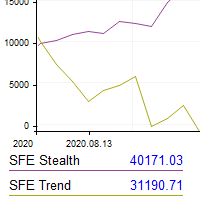
This utility shows the performance of the account (closed operations) in a graphical panel attached to a graph as an indicator. The purpose of the utility is to have a quick and clear view of the performance of transactions organized by different EAs or any desired combination.
The utility has the following features in the current version 1.0:
- Custom groups can be defined, to analyze and compare different performances within the account. The groups can contain filters of two types, filters

A utility to close all orders automatically when conditions meet.
Various options are available to filter or select orders : Conditions : Closing conditions. 3 different conditions can be defined. EA will close orders anytime one or more defined conditions meet. Conditions can be defined based on account properties or selected orders properties. Also a fixed time to close orders is available.
Type of orders : Buy / Sell / Buy Limit / Sell Limit / Buy Stop / Sell Stop Symbol Selection : All / Ch

This Expert Advisor helps checking the connection of your trade accounts and it generates a report as a CSV file. Disconnections can be caused by trade server or by client terminal. Many users run their trading EAs on VPS, and this product help them to find out the cause of disconnection - trade server or VPS. To do that, open 2 client terminals with different brokers on one VPS and run this EA on both 2 terminals for some time. Then you can compare 2 report files from 2 terminals. An example i

This EA Utility allows you to manage (with advanced filtering) unlimited open orders (manual or EA) with 16 trailing stop methods: fixed, percent, ATR Exit, Chandelier Exit, Moving Average, Candle High Low Exit, Bollinger Bands, Parabolic, Envelope, Fractal, Ichimoku Kijun-Sen, Alligator, Exit After X Minutes or Bars, RSI and Stochastic. The trailing stop can be either real or virtual, and you can exit fully or with a partial close percent on touch or bar close.
Moreover, you can add (override

Trading panel for manual trading. Has a fairly wide functionality. Allows you to automatically calculate the order size, open both market and pending orders. It has a wide range of options for closing orders, it is possible to partially close orders, close orders after reaching a certain profit or loss, separately close profitable and unprofitable, buy and sell, as well as pending orders. The panel also contains a simple implementation of a grid of pending orders, reverse and lock functions, tr

Robot Manual Order Manager is a tool that allows you to automatically include Stop Loss, Breakeven, Take Profit and partials in open trades. Be it a market order or a limit order. Besides, it automatically conducts your trade, moving your stop or ending trades, according to the parameters you choose. To make your operations more effective, the Manual Orders Manager Robot has several indicators that can be configured to work on your trade. Among the options you can count on the features: Conducti

Hello, Every one
A script to close all market positions and/or pending orders.
-----------------------------------------------------------------------------------
This is Close All market positions and/or pending orders button
You can close all orders in 1 second by one click
For advanced version: Advanced: https://www.mql5.com/en/market/product/77763
https://www.mql5.com/en/market/product/89311 Key:
1 Close all button: The script will close All orders market + pending
FREE

Pending Orders Grid Complete System opens any combination of Buy Stop, Sell Stop, Buy Limit and Sell Limit pending orders and closes all existing pending orders. Only one time of the pending order at the same time!!! You will have a possibility to put a legitimate Open Price for the first position in the grid. Usually it should in the area of Support/Resistance lines. You just need to drop this script on the chart of a desired currency pair.
Input Parameters Before placing all pending ord
Have you ever been in a situation when you could not control the chart conveniently or had to make additional clicks to be able to scroll the history or set the scale fix numbers manually to be able to stretch the chart? Features: Chart centering. Automatic scale fix. Automatic scroll control. This tool is one of many features included in "Trading Essentials" utility application, which can be found on mql5.com
FREE
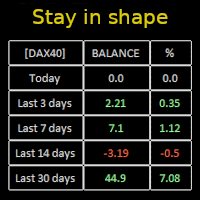
Constantly monitor the progress of your trading at daily intervals of your choice. For positive readings - maintain discipline and stick to your strategy. In case of gradually worsening results - react as soon as possible.
Be aware of the quality of your work!
The panel calculates the account balance You can track your progress for both the current instrument and the entire account The number of days back (5 items) - you set freely Learning to count days: if today is October 3 (day number

What Exactly Is A Smart Trading Tool? Smart Trading Tool was developed for fast and comfortable trading of the financial markets especially for ORDER BLOCKS TRADERS . It provides traders functionalities, such as: A Drawing Tool One-Click Trading Panel Automated Lot Sizes Calculation based on your risk appetite & Money Management ( Watch this video , how this tool can help manage your risk per trade better!) Built in PRICE LEVELS (Fibonacci, Round Numbers, Daily hi-low, etc) Shows Trading

MANAGING YOUR FOREX TRADING LIKE A PROFESSIONAL WITH POSITION SIZE CALCULATOR Position Size Calculator – an MT5 indicator, is a user-friendly tool that allows you to determine your required forex trading size for each trade based on how much you want to risk and available capital in your forex trading account. Load the calculator onto your chart and simply draglines to show your stop loss and take profit level. The calculator will automatically calculate the trade size instantly. This indica

It is utility for working Real Time Binance Futures Ticks Data and Real Time Binance Spot Ticks Data . It is designed to pull data faster and stay within the boundaries of Binance Future. Working logic: Global Variables records the time information it receives from Binance Check Server Time. In other programs, they do their work faster and more efficiently by using this time information.
You should allow WebRequest from Tools menu >> Options >> Expert Advisors and add URL: https://api.binance
FREE

The Grid Builder MT5 utility is designed for placing a grid of pending orders of any complexity and will be an excellent tool in the hands of a trader who trades grid trading strategies. The tool has numerous settings that allow you to quickly and easily build a grid of orders with the specified parameters. All types of pending orders are supported:
Buy Stop; Buy Limit; Sell Stop; Sell Limit. The script also allows you to delete a previously placed grid of orders in one click. If the "Delete

NFP Master its an scalper EA that trade the NFP monhtly news,here we locate an extraordinary oportunity to make flash money, even if the price rise down or pump up we will get profit anyway, the best part of this Expert Advisor is that we dont need any VPS, just run the EA 10 minutes before the Non Farming Payrolls new gonna be released and let the money comes, just test it on any NFP new that has been released in the past and you will see it works, the performance say it all. Preferly use ECN b
Seconds time frame
In MT5 there are no second charts by default. Many of the presented options for creating such do not work fully - errors with extrema, inability to use indicators, etc. I present you a fully working variant. The script works as an Expert Advisor by creating a custom symbol. To work, the script is placed on the M1 chart of the instrument of interest, after which the window of the custom symbol will open automatically. The settings are minimal and intuitive - the timeframe inter

It may be true that “Time waits for no one [human],” but at least now you can control the marching time of all your robots. EA Schedule Launcher (ESL) can launch and close any number of your EAs and/or indicators at custom beginning and ending times. You save your EA and/or indicator to a template and input when to open and close them. The power to control your EAs trading time window can improve both strategy performance and terminal/computer performance.
Note: EA cannot be run with the visual
I find the lot calculation tedious so I just use this script and tell it the dollar amount to use. It then does the rest. This works for any currency.
How-To: Creates a buy limit order at chosen MA price using the desired dollar amount instead of lots. To use, just drop it onto a chart and set inputs as needed. The script will then do the necessary lot calculation and create a buy limit order.
Inputs: FIXED_DEAL_AMOUNT: Fixed amount to use for the trade e.g 100 to open a R100 deal MA_PRICE: MA
FREE
I find the lot calculation tedious so I just use this script and tell it the dollar amount to use. It then does the rest. This works for any currency.
How-To: Creates a sell limit order at chosen MA price using the desired dollar amount instead of lots. To use, just drop it onto a chart and set inputs as needed. The script will then do the necessary lot calculation and create a sell limit order.
Inputs: FIXED_DEAL_AMOUNT: Fixed amount to use for the trade e.g 100 to open a R100 deal MA_PRICE:
FREE
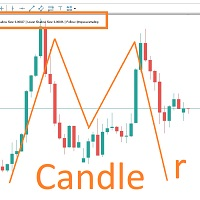
MARUBOZU IS THE KEY.
Imagine finding a fantastic marubozu candle pattern in the 1H timeframe automatically and bips an alarm for your awareness?
The 1H Marubozu means trend and momentum in the 5M timeframe.
Find a momentum candlestick pattern with this great algorithm, it always considers the last closed candle.
it is simple to use, but if you want some support just get in touch via mql5.

一 運作方式(如下圖)
在一個單邊向上的行情中, 自動交易工具做以下動作: 當價格來到高點,等待突破訊號在進場。
當價格回調,等待回調結束要往上時在進場。 當進場下單後,
如果一直漲就持續持單,等待價格漲不上去準備下來時,在獲利離場。
但如果一直跌,就等待要上漲時在進場,進場時加倍下單,
一個做底單,動作同上等待獲利離場,
另一個單用做倉位修正,此單和第一張單在盈虧為0時會各自平倉,不造成損失。 Ps:
在一個單邊向下的行情中,動作則相反
二 設定方法(如下圖)
Step1 一開始要自己指定工具的方向.
如果認為會往上走,設定i_tradeup=true, i_tradedown=false,
如果認為會往下走,設定i_tradeup=false, i_tradedown=true,
Step2 指定目標位置和止損位置
如果認為會往上走,i_top輸入目標位置,i_bottom輸入止損位置
如果認為會往下走,i_top輸入止損位置,i_bottom輸入止盈位置
當價格到達目標位置會強制平倉獲利並暫停工具運作
當價格到達止損位置會反向開單鎖倉
FREE

The utility places a grid of pending orders . You can select the number of orders in the grid, the step between orders, multiplier for the order size, SL and TP levels, magic number etc. If you use a profit bucket , please note that it applies to all orders on the current currency pair with the current magic. If you want to use several grids with independent profit buckets at the same time, run several copies of the utility and specify different magics in the settings. MT4 version of the utility
FREE

This is the Best Renko chart generator ever in the market you can set the box sizes based on ATR or Fixed Size: 1. Fixed Box Size 2. Current ATR Size 3. ATR size of the Chart Start Time. also you can set the Renko chart cut of date and time to start as reference of creating renko charts. you need to attach to a symbol chart that want the renko chart of it, then immediately a new chart will be opened which is based on renko, you can use this generated chart and attach your EA to trade on or you e

A utility to close all positions and orders with one simple click at once.
Various options are available to filter or select orders and positions : Type of orders/positions : Buy / Sell / Buy Limit / Sell Limit / Buy Stop / Sell Stop Symbol Selection : All / Chart Symbol / Custom Symbols. You can enter custom symbols separated by comma. (for example you can enter EURUSD,GBPUSD,AUDJPY) Order Open Type : Manual Opened / Opened by EA Magic Number : You can enter more than one magic number separate

Manual Trade Panel EA MT5 is the most straightforward and easy to use trade panel you can find for MT5. It has all its options and functions in one surface, without the need of opening additional windows or panels. It is an order management, risk calculator, partial closure and account protector utility all in one extremely convenient to use interface! By using Manual Trade Panel EA MT5 you can trade many times faster and more accurate than traditional manual trading methods and that gives

This service is designed to stream online cryptocurrency quotes from the Binance exchange to your MetaTrader 5 terminal. You will find it perfectly suitable if you want to see the quotes of cryptocurrencies in real time — in the Market watch window and on the MetaTrader 5 charts. After running the service, you will have fully featured and automatically updated cryptocurrency charts in your MetaTrader 5. You can apply templates, color schemes, technical indicators and any non-trading tools to

1. This EA is an auto take profit, stoploss, trailing stop & profit lock with exit strategy (reverse/ hedge) martingale.
2. Suitable for manual trading either on pc chart or mobile trading (when on VPS)
3. Variable input are in pips 4. 1st position will be opened manually by yourself (buy/sell). TP, SL, TS and profit lock will be set thereafter. 5. There are 2 exit strategy if your 1st manual trades (Failed) and goes against your trend. (a) Reverse Martingale (Sell) is activated when y
RENKO Reversal by StockGamblers Actually working RENKO in MT5. Uses "custom symbols" for drawing. You can apply any indicators with complete peace of mind. The movement of the last price is displayed in real during the formation of the "brick". Put the script in the MQL5/Experts folder. More precisely: C:\Users\user\AppData\Roaming\MetaQuotes\Terminal\terminal_number\MQL5\Experts Settings: ValuePerBar - height of the "brick" in points revCandle - multiplier for the height of the turning "brick".
FREE

This script is designed to download a long history of cryptocurrency quotes from the Binance exchange. You will find it perfectly suitable if you want once to download the history of cryptocurrencies for charts analyzing, collecting statistics or testing trading robots in the MetaTrader 5 strategy tester, or if you need to update the history not very frequently (for example, once a day or once a week). After running the script, you will have fully featured (but not automatically updated) cryptoc

We use Price Action and Japanese Candlesticks at important price zones and standard times to open positions and use Risk/Reward: 1/2 - 0.2%/trade. Recommended symbol: EURUSD, GBPUSD, AUDUSD, USDCAD, USDJPY, GBPJPY, EURJPY. Contact me: Gmail: fifund.cuscare@gmail.com, Facebook , Twitter , Instagram . Product: Metatrader4 , Metatrader5 . Broker references: Exness , ICMarket , FBS .
FREE

Mt5 bot for Binance Future (Expert)
The system is running on Binance Future market.
You can easily integrate it into your own code to automate operations.
Manual operation panel is available.
Hedge mod compatible.
All operations can be done manually from the screen.
It is the most effective way to control many cryptocurrencies at the same time.
The screen is template type with binance screen. You can download the template file from the link. https://drive.google.com/file/d/1WHqGhym0QIK31

1. What is this. This is a very rigorous indicator to show different market trading sessions. It shows the main markets: NewYork, London, Frankfurt, Sydney, Wellington, Tokyo. Very important: Different markets have different start and end dates for daylight saving time, and the trading session of a market can vary depending on daylight saving time and winter time. Also, the daylight saving time system is different for countries in the northern hemisphere and southern

1. What is this. This is a very rigorous indicator to show different market trading sessions. It shows the main markets: NewYork, London, Frankfurt, Sydney, Wellington, Tokyo. Very important: Different markets have different start and end dates for daylight saving time, and the trading session of a market can vary depending on daylight saving time and winter time. Also, the daylight saving time system is different for countries in the northern hemisphere and southern hemisphe
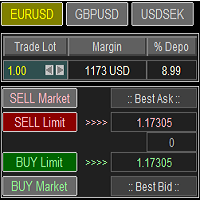
Trade Panel with Loss Breaking for MT5
Multi-instrumental trading panel with the function of transferring the stop loss of positions to loss breaking.
Has the following distinctive properties:
All trading parameters and panel operation are set in the settings. The traded position volume (lot size) is quickly changed. The required margin and the percentage of the required margin of the current deposit for the specified lot size are displayed. Shows profit when take profit is triggered and losses

Less is more. Find the strongest trends! This expert scans ALL currency pairs for a strong trend combined with a breakout.
Requirements for a trend report: 1. Up-trend or down-trend must be found in all of the following timeframes (D, H4, H1, M30) 2. Breakout in the daily timeframe (the upper or lower band of the Bollinger band must be broken)
The correctness of the trend is confirmed to 90%
FREE

Basket EA MT5 is a powerful profit-harvesting tool and a comprehensive account protection system, all combined into a simple and easy-to-use solution. Its core purpose is to give you complete control over your trading account’s overall profit and loss by managing all open positions at the basket level, rather than individually. The EA offers a full range of basket-level features, including take profit, stop loss, break even, and trailing stop loss. These can be configured as a percentage of yo

Mercurial Position Sizing Trade Manager is a free MT5 Expert Advisor built for traders who want precise risk management, automatic lot size calculation, and faster trade execution. Designed for manual Forex traders, this EA helps eliminate emotional decision-making and manual calculation errors by automatically calculating the correct lot size based on your selected risk percentage. Ideal for: Forex traders Prop firm traders Scalpers Swing traders Day traders Smart money and price action traders
FREE

Work logic
Stop Out utility is a simple but very convenient indicator showing how many points are left to the Stop Out level /
Its benefit lies in the fact that many traders deliberately overestimate the risk in trading in pursuit of profit, use the available margin at the maximum, and for this case it is very important to know where the broker can forcibly close your positions.
Just place the indicator on the chart and depending on the open position in Buy or Sell, you will see the border m
FREE
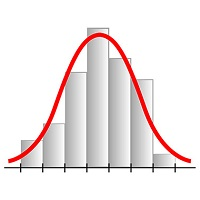
This expert advisor works on price volatility, it scans the market every single tick trying to find great opportunities for day trading. it has alarms, analisys and much more to provide great trades for you, give it a try.
It is a cross-over alarm which bips when standard deviation goes from low to very high so that you can surf the movement. It is all about volatility and high flow.

The 7 energies of the price.
it is an expert advisor analyst. it analizes the 7 energies of the price which are:
direction
momentum
fractals
cicles
support/resistance
volatility
Amplitudeness
When you have all these energies aligned you have a better understanding of the price movement.
This EA helps students who are learning technical analisys and it keeps new learners away from the bad trades.
give it a try now for free.
FREE

Open Risk Profit shows your current risk or possible profit of all open positions. Total open risk is your loss if all positions run into the stop loss.
Total open profit is your profit if all positions reach your take profit.
Total float is your current profit or loss of all positions. The program also breaks down the information into the individual symbols. For example, you can monitor how much is your current profit and your potential risk in EURUSD, no matter how many individual positions

EasyTradePad – Trading Panel for MetaTrader 5 EasyTradePad is a tool for manual and semi-automated trading. The panel allows quick management of orders and positions, as well as risk management calculations in one click. [ DEMO and Instruction ]
Panel Features: Open and close trades with predefined risk (% or deposit currency) Set SL and TP in points, percentages, or monetary values Calculate risk-to-reward ratio automatically Move stop loss to breakeven Partial position closing Trailing stop

The panel has the most intuitive interface that every beginner can handle. In the SLp column – you need to specify the SL size in pips. If the value turns gray and at the same time the Bay / Sell buttons are also inactive, then you have specified a SL value that is less than that allowed before it was set by your broker. In the TP% column – you indicate TP in% of the account balance. In the settings, you can choose on the basis of what this indicator will be calculated, by equity, balance or
FREE

This utility is a graphical shell for other Expert Advisors that do not have their own graphical shell or whose graphical shell you do not like. Just run the utility on a free chart of any currency pair, specify in the input parameters the "Magic Number" of the advisor to which you want to connect the utility, and a graphical shell will appear on the graph, containing information about the traded currency pairs, current positions and trading results of your advisor. If you like this utility, tak
FREE

Ferramenta derivada do DR Assistant, a versão Lite conta com recursos semelhantes, mas sendo mais específica em sua aplicação, destina-se exclusivamente ao uso para gestão de ordens abertas a partir de suas funções. Deste modo, quaisquer outras negociações ou posições abertas por outras ferramentas ou manuais serão ignoradas pelo Assitant Lite. Os parâmetros e configurações disponíveis, bem como suas principais funções são: - Take Profit e Stop Loss: duas opções de Steps, em pontos, para ambas a

SemiAuto Martin System
introduce
This tool is used for semi-automatic Martin trading, click on the panel to place an order and the EA will manage the position Just decide the direction of the transaction, and leave the rest to the EA management Automatic Martin, add warehouse according to the set grid, you can also disable this function One-click liquidation One key lock function time control Warning sound prompt
characteristic Trading chart: any Tradeable currency: any Automatic take profi
This is a screener that allows to identify assets that are more than usually overbought (% growth) or oversold (% fall) within a selected period of time (time frame). The market is ruled by the law, buy cheaper, sell more expensive, but without an automatic scanner it is very difficult to identify assets overbought or oversold, say, within the current week, or the current hour, or month. There can be dozens or hundreds of instruments, sometimes it is simply not possible to physically analyze e
Expert Advisor Risk Manager for MT5 is a very important and in my opinion necessary program for every trader.
With this Expert Advisor, you will be able to control the risk in your trading account. Risk and profit control can be carried out both in monetary terms and in percentage terms.
For the Expert Advisor to work, simply attach it to the currency pair chart and set the acceptable risk values in the deposit currency or in % of the current balance. [Instruction for Risk Manager parameter

This script is designed to evaluate weights in various window functions. An indicator built on these window functions can be downloaded at https://www.mql5.com/ru/market/product/72159 Input parameters: iPeriod – indicator period. iPeriod >= 2 iCenter is the index of the reference where the center of the window function will be located. By default, this parameter is 0 - the center of the window coincides with the center of the indicator. With 1 <= iCenter <= iPeriod, the center of the window f
FREE

MetaTrader utility MTI (Main Trading Info) – shows the basic trading information for a trader, namely: average and current spread size Swap size for short and long positions Cost of 1 pip for 1 trading lot Stop Level size (minimum distance for placing pending orders) Time until the end of the current (red) and time until the start of the next (gray) trading session Recommended Robot Scalper - https://www.mql5.com/en/market/product/77108
The time until the end of the current trading session is
FREE
The EA opens and closes new orders on time. It can be used to implement trading scenarios of any complexity by creating a list of tasks. There are two options for completing the task The task is executed on the specified date and time - it is executed once and is removed from the list. The task is executed with repetition on the specified day of the week and time - the task with repetitions is not removed from the list. Panel settings Symbol - select the symbol for the trade function. Time -

The Martinware Eye Rest Reminder serves to periodically remind traders to rest their eyes without the need for a tool outside MT5.
Input parameters: Periodicity: play the alert every n minutes Alert with sound: define if the alert should include playing a sound Custom sound file: name of the custom sound file to be used instead of the default. It must be inside a folder named "Sounds", this one inside the "Files" folder in the Terminal's MQL5 directory tree. Alert with Alert message: informs
FREE

Иногда бывает, что наши построения на графике выходят за пределы последнего бара. После выходных, эти построения могут измениться в виду особенностей учета времени в мт5. Данный индикатор поможет решить эту проблему - он проходит по всем графикам и сдвигает дату объекта, которая дальше, чем нулевой бар. После завершения работы индикатор удаляется. Параметры:
Direction - направление сдвига; DaysShift - количество дней, на которые сдвигается дата объекта, правее нулевого бара.
FREE

Imagine what results you could achieve in your manual trading if you had a tool that notifies you of a possible price reversal for all the symbols you are interested in at the same time (futures, stocks, forex or cryptocurrency)?
VSA screener is just the right tool. It was created for traders who value their time and make their own trading decisions on opening or closing a position. The software monitors the presence of trading patterns on the preselected tickers under several timeframes (up to
FREE
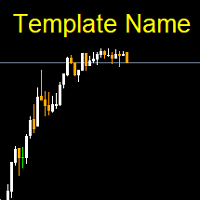
Template name allows you to write custom text that will show up on your charts. It allows you to position the text anywhere including selecting any color that you prefer. You can position the text at any of the 4 corners of your chart screen. This custom text can aid as a watermark for your screen shots. This text can act as a unique and true signature for your charts.
FREE

This DYJ OonClickClose help you to close all orders having profit immediately with only ONE CLICK, its work is very fast. You can choose which symbol you want or close all symbols so it will helpful for you in your trading to manage trading faster. This EA can quick close all Buy and Sell Orders by a selected symbol or total, And delete all pending orders. It includes dynamic target profit tracking function. The software has manual transaction buttons buy and sell. It is a management softw

Auto SL and TP is a program that adds StopLoss and TakeProfit automatically, so you don't need to worry about it anymore. The program checks at any time if StopLoss and TakeProfit are set correctly!!! You can enter your values via the input parameter.
Input-Settings StopLoss: Boolean value, if set to true, will be executed. StopLoss in Points TakeProfit: Boolean value, if set to true, will be executed. TakeProfit in Points
Auto set stop loss and take profit and trailing on any open position on chart , Wen you open positions manually it will manage the trade and set the stop loss/take profit and trailing stop based on Average true range calculation with risk reward factor default 1:3 . also you can use normal stop loss take profit and trailing . Inputs Stop Loss (in pips) Take Profit (in pips) Trailing Stop (in pips) Trailing Step (in pips) Use ATR = true ATR period Risk Reward
chart output f
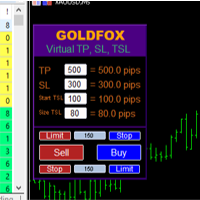
Forex Expert Advisor (utility) "Virtual Stop Loss, Trailing Stop" allows you to set a virtual (hidden) stop loss and trailing stop. At the same time, without using standard stop loss and trailing stop orders. Thus, when the advisor opens a deal, your broker and the Meta Trader terminal will not see or set stop loss or trailing stop, but the advisor will control the parameters of the TP SL TSL you specified and draw the corresponding lines on the chart. ... When the price of the instrument reach

Account Info Manager (AIM) is a utility designed to view information on the results of the work of advisors on a trading account. The utility can group orders by their magics or comments, thereby making it possible to analyze separately the results of the work of each Expert Advisor that traded on the account. Using this utility, you can view information on the number of orders opened by the advisor, percentage of winning orders, profit value, profit factor, average order size, maximum drawdown
The MetaTrader Market is the only store where you can download a free demo trading robot for testing and optimization using historical data.
Read the application overview and reviews from other customers, download it right to your terminal and test a trading robot before you buy. Only on the MetaTrader Market you can test an application absolutely free of charge.

You are missing trading opportunities:
- Free trading apps
- Over 8,000 signals for copying
- Economic news for exploring financial markets
Registration
Log in
You agree to website policy and terms of use
If you do not have an account, please register