Open Risk Profit MT5

2

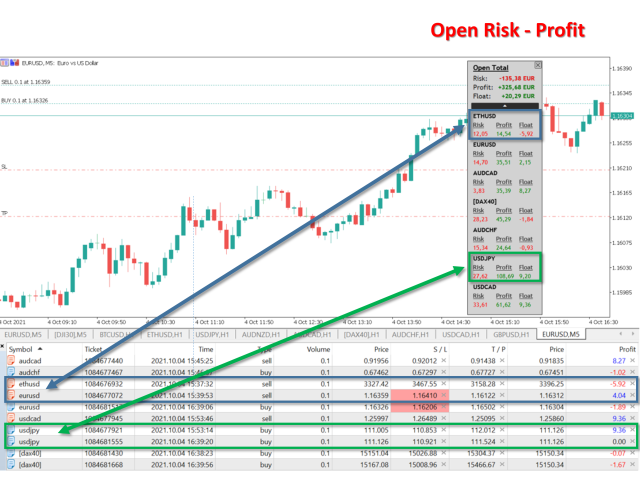
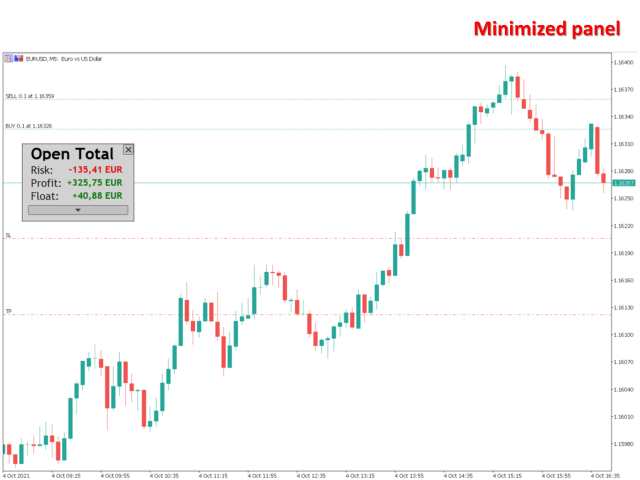
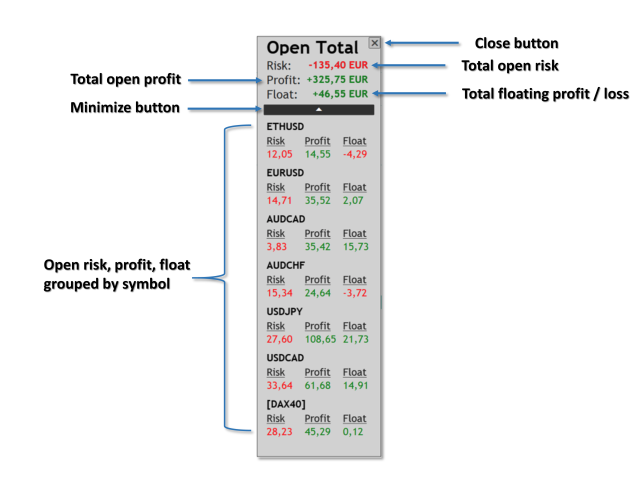
Open Risk Profit shows your current risk or possible profit of all open positions.

Total open risk is your loss if all positions run into the stop loss.
Total open profit is your profit if all positions reach your take profit.
Total float is your current profit or loss of all positions.

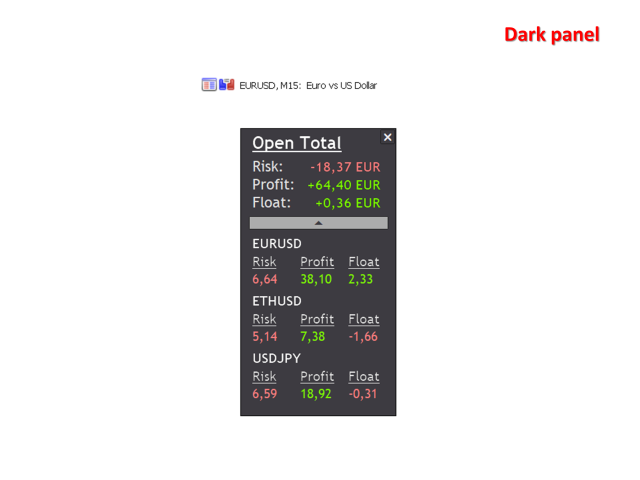
The program also breaks down the information into the individual symbols. For example, you can monitor how much is your current profit and your potential risk in EURUSD, no matter how many individual positions you have. This is especially helpful if you use EAs or automated trading.

Usage

Just drop the program on any chart you like. That's it.

Recommended products
Smart Flow Light -  Trading Assistant Core Selling Points Smart Interval Trading   - Automated buy/sell execution with configurable millisecond intervals Visual Dashboard   - Clean, professional control panel with real-time P&L display One-Click Operations   - Instant BUY/SELL/STOP/CLOSE ALL functionality Risk Management   - Built-in lot size validation and position monitoring Key Features   Intuitive Interface   - Professional dashboard with title banner and organized controls   Preci
FREE
Traders Choice
Israr Hussain Shah
All-In-One Multi-Functional Dashboard is a comprehensive trading utility designed to streamline your workflow, enhance your technical analysis, and simplify trade management on MetaTrader 5. Instead of cluttering your charts with multiple indicators and scripts, this single Expert Advisor provides a unified control panel that handles everything from market structure analysis and supply/demand zones to risk management and trade execution. Built entirely in pure MQL5 without DLL dependencies , thi
Position Limit Monitor: Efficient Control of Your Trading Operations Have you ever worried about having too many open trades simultaneously? Would you like precise control over the maximum number of positions in your account? Position Limit Monitor is the solution you need. Main Features: • Real-time monitoring: Constantly supervises the number of open positions in your account. • Customizable limit: Easily set the maximum number of positions you want to keep open. • Automatic closure: When the
product video: https://vimeo.com/824742776?share=copy Trade Assistant, Trade Manager, Trade Panel for MetaTrader 5 with the following functions: - Display the remaining candle time and the current time of day - Open long and short positions without SL and TP at the current market price - Display of the current ask, bid and spread - Open long and short positions with predefined lot size, SL and TP at the current market price - Quick selection of the lot size (freely selectable lot sizes) -
Support Or Resistance Alert Broken
Jhojan Alberto Tobon Monsalve
"Support or Resistance Alert Broken" is a simple and very intuitive tool that allows you to create or eliminate horizontal and trend supports and / or resistances with a simple click. When the support or resistance line is broken by the closing price at the end of the current candle, the "Support or Resistance Alert Broken" tool will send an alert with sound, as well as a notification to the MT4 or MT5 mobile application. This tool can send alerts from multiple pairs at the same time. Utility
.................................. This script is intended to help users to get information about ticks and spreads (e.g. ticks count, minimum/maximum/average spread). It can export reports in the CSV format with this information. Traders can see spread statistics in real time in the chart window It is useful for comparing spreads of different brokers. --------------------------------------------------------------------------
Session panel
Timo Mario Hoffmann
Session Panel for MT5 Session Panel is a free MT5 indicator that gives you a fast and convenient live overview of the major trading sessions directly from the chart. Monitor Tokyo, London, and New York session times, see which session is currently active, track countdowns to the next session, and view session overlap information in one compact dashboard. Built for traders who want better market timing, clearer session awareness, and a cleaner chart workflow in live market conditions. Session Pan
FREE
Trade Dashboard MT5
Fatemeh Ameri
4.94 (120)
Tired of complex order placement and manual calculations? Trade Dashboard is your solution. With its user-friendly interface, placing orders becomes effortless, by a single click, you can open trades, set stop loss and take profit levels, manage trade lot size, and calculate risk to reward ratios, allowing you to only focus on your strategy. Say goodbye to manual calculations and streamline your trading experience with Trade Dashboard. Download  Demo Version  right now. You can find  Details of
AKCAP Hotkey Tool
AK Capital Markets Limited
5 (3)
Special offer for the next 10 copies Are you tired of manually navigating through menus and inputting data every time you want to execute a trade or open an order on Meta Trader? Our hotkey tool is here to make your life easier and boost your trading efficiency. Our tool is natively coded for lightning-fast performance and comes loaded with all the features you could possibly want. From pending orders and OCO orders to trailing and multiple buckets, it has everything a scalper could need. And
GMT Time MT5
Oeyvind Borgsoe
This indicator shows both GMT time and your broker's time on the chart. Simply attach the indicator to a chart, and you will see the GMT time and your broker's time displayed in the top left corner, as shown in the screenshot. By using this indicator, you can always stay informed about your broker's time, which is especially useful during daylight saving changes. You won't have to worry about whether your broker follows the US or EU schedule, as the indicator automatically adjusts to reflect any
FREE
MT5 AI Chatbot
Thomas Bradley Butler
BE PATIENT WITH THE BOT AS THE RESPONSE TIME COULD BE IN SECONDS. IT WILL RESPOND. MAKE SURE TO PRESS THE SEND AND THEN WAIT. IT IS A SIMPLE CHAT GPT BOT FOR MT5 AND MQL5. In comments Add your API Key in the inputs and  add these to web request in Expert Advisor tab: CHAT WITH AI ON MQL5 AND MT5.  THE PROMPT MUST CONTAIN MQL5 OR MT5, OTHERWISE IT WILL NOT RESPOND.  IT IS TRAINED ONLY ON MT5 AND MQL5. NOTE THAT IT WILL ONLY WORK IN REAL TIME CHARTS, NOT IN BACKTEST.  Add your API Key in the inpu
Chart Spot Binance
Ghavamipour Mohammadreza
show live chart spot All symbol binance If you want to get this product with a 99% discount, send a message to my Telegram admin and rent this product for 1 $ per month or 10 $ per year. Even if you do not like the way the chart is displayed, you can tell the admin in Telegram how to display it so that your own expert is ready. https://t.me/Bella_ciao1997 https://t.me/Binance_to_mql5
Sync In Many Ways MT5
Sa No Tsuyoshi Kokorozashi
Description This is a Utility tool for MT5 which will make our chart analysis task quite more efficient and save large amount of time. As for chart analysis, some are watching out several symbol simultaneously with single timeframe and others are trading only one single pair with   multi timeframe analysis. For both, a common troublesome issue is “scroll chart to look back” or “draw chart objects” in multi charts at the same time.  Especially for those who are trading with multi timeframe soluti
This script is designed to evaluate weights in various window functions. An indicator built on these window functions can be downloaded at   https://www.mql5.com/ru/market/product/72159 Input parameters: iPeriod – indicator period. iPeriod >= 2 iCenter is the index of the reference where the center of the window function will be located. By default, this parameter is 0 - the center of the window coincides with the center of the indicator. With 1 <= iCenter <= iPeriod, the center of the window f
FREE
SyncDB LT
Maxim Kuznetsov
A   service   to   keep   the   SQLite   database up   to   date .   Fast   real -t ime   operation .   Saves   open   positions   and   orders ,   current   quotes ,   and   trading   history .   Take   advantage   of   SQLite 's   capabilities   for   intermediate   data   storage ,   analytics ,   and   integration   of the   MetaTrader   platform .   Save   all   your   data   in   one   place .   Use   the   saved   data   in   SQL   analytical   queries ,   from   Python   and   other   la
FREE
EQUITY DRAWDOWN MONITOR   This is a simple mt5 advisor that monitors the drawdon levels Features: Easy to use Useful for money managers How to Use  Load the EA once a single chart Type the maximum drawdown desired in inputs Leave the EA alone and never close that chart The EA monitors all trades and magic numbers in your account. Input Parameter Drawdown Percent:   Maximum drawdown in percentage terms allowable in the account. When the drawdown level is surpassed, the EA will close all trades
Binance is a world-renowned cryptocurrency exchange! In order to facilitate the real-time data analysis of the encrypted digital currency market, the program can automatically import the real-time transaction data of Binance Futures to MT5 for analysis. The main functions are: 1. Support the automatic creation of USD-M futures trading pairs of the Ministry of Currency Security, and the base currency can also be set separately. The base currency BaseCurrency is empty to indicate all currencies,
ICT PD Arrays Trader
Aesen Noah Remolacio Perez
Attention All ICT Students! This indispensable tool is a must-have addition to your trading arsenal... Introducing the ICT PD Arrays Trader: Empower your trading with this innovative utility designed to enhance and simplify your ICT trading strategy and maximize your potential profits.  How does it work? It's simple yet highly effective. Begin by placing a rectangle on your trading chart and assigning it a name like 'ict' or any preferred identifier. This allows the system to accurately ident
LIMITED TIME SALE - 30% OFF! WAS $50 - NOW JUST $35! Take control of your forex portfolio. See instantly where you stand, whats working and whats causing you pain! MT4 VERSION AVAILABLE HERE:  https://www.mql5.com/en/market/product/58375 The Trade Manager Dashboard is designed to show you at a glance where each position you have in the forex market currently is, and make risk management and exposure to currencies easier to understand.   For traders that scale into the market gradually
Executor Trader Panel (Sta) PC Version   is a multi-functional trading tool designed for traders. The trading panel integrates over 30 individual functions and more than 10 combined functions, providing traders with a highly flexible operational approach. Main Features of the Executor: Instant Connection Status:   Immediately know if the connection with the broker is lost. Time Synchronization:   Instantly know the current local time and the time of the trading server. Universal Compatibility:  
The account manager has a set of functions necessary for trading, which take into account the results of the entire account in total, and not for each individual open position: Trailing stop loss. Take profit. Break-even on the amount of profit. Breakeven by time. Stop Loss Typically, each of these options can be applied to each individual trade. As a result, the total profit on the account may continue to increase, and individual positions will be closed. This does not allow you to get the maxi

The analyzer makes it possible to quickly assess spread changes on historical data,   the magnitude and frequency of bursts, the dynamics and nature of the extensions by the days of the week, etc. The analyzer needs to be started in the tester (visualization mode) on the symbol and time interval required for analysis,   recommended TimeFrame H1, select "Every tick based on real ticks" mode.
OrderHelper MT5
Md Atikur Rahman
OrderHelper script is super easy and trader friendly to use. It would boost your trading experience. Because it is designed to open one to multiple orders quickly with just one click. Besides using the OrderHelper script, traders can define various parameters for open orders such as the symbol, order type, lot size, stoploss, takeprofit and more. Basically, with this script traders can manage their open orders more efficiently and save their trading time. OrderHelper manages: Open the number of
TradingX Hotkeys
Johannes Stephanus Lombard
Inputs Available Lotsizes Partial Close % You can change lotsizes as you require On an open chart click once to select chart to be able to use hotkeys on specific chart. All Pairs can be used with this expert We created this expert to be able to still trade C300 with a 0.06 Lotsize If you enter a 0.6 lot and close 0.90% you can trade with 0.06 Lot Keys to be used: B -Buy S -Sell C -Close Profitable D -Breakeven (Note if stoploss is set it won't break even) P -Partial close X -Close all
TC-Supportは手動取引とEA運用のために開発されたパネルになります。 このパネルでは、リスクリワード、リスク計算、リスク管理など資金管理、 トレーリングストップ機能、ブレークイーブンなどポジション管理が可能になります。 その他、便利な機能があります。 詳細な情報はこちらにサイトがあります。 デモ口座で動作するEAはこちらに置いてあります。   https://toushika.top/ mt5-tc-support / Disable Auto Trading  の 機能はMQL5では外部のDLLの利用は許可されませんので使用できません。 おもな機能一覧 資金管理 リスクリワード計算 ロット計算 損失金額計算 最大ロット数の設定 設定したリスクパーセンテージでヘッジポジション EA運用 最大損失金額またはパーセンテージによる強制クローズ EA運用 資金破綻回避  ポジション管理 成行、指値、Stop Limit注文に対応 ポジションを部分的にクローズ トレーリングストップ機能 一定の距離を超えてたらSLを移動 利確条件設定
Compare Symbols Specifications is a utility indicator that is a summary interactive table of the analyzed parameters. Trading conditions in the market are constantly changing and tracking these changes is a time-consuming task. This tool allows you to compare the trading conditions of all symbols in a matter of seconds, and choose for trading those symbols that meet the requirements of the trading system. This tool will be useful to all traders and will help them to have up-to-date information
Title : Trade Assistant Manager MT5 Trade Assistant Manager — See your risk before you click Visual Risk Manager is a MetaTrader 5 chart utility for discretionary traders who want a clear, visual way to size positions . Place your Entry, Stop Loss, and Take Profit directly on the chart. The panel shows the lot size, the money at risk, the profit target in money, and the reward-to-risk ratio — updated as you move the lines. What you gain   Faster decisions   : - Automatically calculate the volum
FREE
This application exports all completed operations to a text file delimited by <TAB>, comma, semicolon or any character defined by the user, also including the comments and magic number of the operations which can be easily exported to EXCEL or Google Spreadsheets. The files are generated in the "files" folder, individually separated by month with the name in the format: 999999-AAAA BBBB- [9-9999] where: 999999 = MT5 Trading Account Number AAAA BBBB = Trading Account User Name [9-9999] - Mo
Checklist Indicator
Okeene Rajae Chambers
This indicator displays a customizable checklist directly on your chart, helping you stay disciplined and organized during trading. You can define your own list of tasks, position it anywhere on the screen, and adjust the appearance to match your setup. It’s ideal for pre-trade routines, strategy rules, or reminders to follow your trading plan. The indicator automatically manages and cleans up its text labels, ensuring no leftover objects remain when it is removed or updated.
FREE
Professional tool for automated trade management in MetaTrader 5. Simplifies trading, protects capital, and maximizes profits without the need for constant chart monitoring. Key Features ️ Automatic Stop Loss and Take Profit setup ️ Intelligent Trailing Stop (profit locking) ️ Works with both market and pending orders ️ Automatic SL/TP visualization directly on the chart ️ Clear candle countdown timer ️ Fully automated operation – no manual intervention required What It Brings You
Buyers of this product also purchase
Trade Assistant MT5
Evgeniy Kravchenko
4.42 (207)
It helps to calculate the risk per trade, the easy installation of a new order, order management with partial closing functions, trailing stop of 7 types and other useful functions. Additional materials and instructions Installation instructions - Application instructions - Trial version of the application for a demo account Line function -   shows on the chart the Opening line, Stop Loss, Take Profit. With this function it is easy to set a new order and see its additional characteristics bef
Forex Trade Manager MT5
InvestSoft
4.98 (642)
Welcome to Trade Manager MT5 - the ultimate risk management tool designed to make trading more intuitive, precise, and efficient. This is not just an order placement tool; it's a comprehensive solution for seamless trade planning, position management, and enhanced control over risk. Whether you're a beginner taking your first steps, an advanced trader, or a scalper needing rapid executions, Trade Manager MT5 adapts to your needs, offering flexibility across all markets, from forex and indices t
Local Trade Copier EA MT5
Juvenille Emperor Limited
4.96 (134)
Experience exceptionally fast trade copying with the   Local Trade Copier EA MT5 . With its easy 1-minute setup, this trade copier allows you to copy trades between multiple MetaTrader terminals on the same Windows computer or Windows VPS with lightning-fast copying speeds of under 0.5 seconds. Whether you're a beginner or a professional trader, the   Local Trade Copier EA MT5   offers a wide range of options to customize it to your specific needs. It's the ultimate solution for anyone looking t
TradePanel MT5
Alfiya Fazylova
4.87 (149)
Trade Panel is a multi-functional trading assistant. The app contains over 50 trading functions for manual trading and allows you to automate most trading tasks. Attention! Discounts are limited in time, every Tuesday the price will increase by $5 (up to $100). Before making a purchase, you can test the demo version on a demo account. Download the trial version of the application for a demonstration account: https://www.mql5.com/en/blogs/post/750865 . Full instructions here . Trade. Allows you t
FarmedHedge Pair Trading Dashboard
Tanapisit Tepawarapruek
5 (4)
VERIFIED TRADING RESULTS - Farmed Hedge Yield Axi Copy:  https://www.mql5.com/en/signals/2356376 - Farmed Hedge Yield Exn Copy:   https://www.mql5.com/en/signals/2356404 - Farmed Hedge Yield V Copy:  https://www.mql5.com/en/signals/2357156 Contact me via private message to receive the User Manual and Setup. * Thai Lauguage Support Available Farmed Hedge Yield Farming - Professional Pair Trading Dashboard (Manual - Hybrid - Semi/Automated EA) VERSION 3 - WILD HARVEST UPDATE Trading Approac
Beta Release The Telegram to MT5 Signal Trader is nearly at the official alpha release. Some features are still under development and you may encounter minor bugs. If you experience issues, please report them, your feedback helps improve the software for everyone. Telegram to MT5 Signal Trader is a powerful tool that automatically copies trading signals from Telegram channels or groups directly to your MetaTrader 5 account. It supports both public and private Telegram channels, and you can conn
Exp COPYLOT CLIENT for MT5
Vladislav Andruschenko
3.82 (34)
Trade copier for MT5 is a trade copier for the МetaТrader 5 platform. It copies forex trades  between any accounts   MT5 - MT5, MT4 - MT5 for the COPYLOT MT5 version (or MT4 - MT4 MT5 - MT4 for the COPYLOT MT4 version)    Reliable copier!         MT4 version Full Description +DEMO +PDF   How To Buy    How To Install     How to get Log Files    How To Test and Optimize    All products from Expforex You can also copy trades in the МТ4 terminal (МТ4 - МТ4, МТ5 - МТ4):     COPYLOT CLIENT for MT4
Copy Cat More Trade Copier MT5 is a local trade copier and a complete risk management and execution framework designed for today’s trading challenges. From prop firm challenges to personal portfolio management, it adapts to every situation with a blend of robust execution, capital protection, flexible configuration, and advanced trade handling. The copier works in both Master (sender) and Slave (receiver) modes, with real-time synchronization of market and pending orders, trade modifications, pa
MT5 to Telegram Signal Provider turns your trading account into a signal provider. Every trade action, whether manual, by EA or from your phone, is instantly sent as a message to Telegram. You can fully customize the format or use a ready-made template for quick setup. [ Demo ] [ Manual ] [ MT4 Version ] [ Discord Version ]     New: [ Telegram To MT5 ] Setup A step by step user guide is available. Key Features Ability to customize order details sent to subscribers You can create a tiered subs
Timeless Charts
Samuel Manoel De Souza
5 (3)
Timeless Charts is an advanced charting solution designed for professional traders seeking for custom charts / custom timeframes , including seconds charts / seconds timeframe, renko charts / renko bars, cluster charts / footprint charts and advanced tools present in most of the popular platforms. Unlike traditional offline charts or simplistic custom indicators, this solution constructs fully custom bars with true timestamp accuracy , down to miliseconds, allowing for a powerful and precise tr
AntiOverfit PRO MT5
Enrique Enguix
5 (3)
Most traders make the same mistake without even realizing it: they trust an Expert Advisor simply because it performed well on a single historical backtest. But one historical backtest does not prove robustness. It only proves that the strategy worked on one specific market path. And the real market only showed that path once. That is where AntiOverfit PRO comes in. AntiOverfit PRO is a tool built to help you evaluate the real strength of any Expert Advisor in MetaTrader 5. It is not designed
HINN MagicEntry Extra
ALGOFLOW OÜ
4.71 (14)
HINN MAGIC ENTRY – the ultimate tool for entry and position management! Place orders by selecting a level directly on the chart! full description   ::  demo-version  :: 60-sec-video-description Key features: - Market, limit, and pending orders - Automatic lot size calculation - Automatic spread and commission accounting - Unlimited partitial take-profits  - Breakeven and trailing stop-loss and take-profit  functions - Invalidation leves - Intuitive, adaptive, and customizable interface - Works
The News Filter MT5
Leolouiski Gan
4.75 (20)
This product filters   all expert advisors and manual charts   during news time.  It is able to remove any of your EA during news and automatically reattach them after news ends. This product also comes with a complete  order management system   that can handle your open positions and pending orders before the release of any news. Once you purchase   The News Filter , you will no longer need to rely on built-in news filters for future expert advisors, as this product can filter them all from her
HINN Lazy Trader
ALGOFLOW OÜ
5 (2)
The core idea: using the user interface, you configure the parameters the chart must meet before entering a position (or positions), choose which entry models to use, and set the rules for when trading and planning should end. Lazy Trader  handles the rest: it  takes over all the routine chart watching and execution! full description  :: 3 key videos [1] ->  [2]   ->  [3] What can it do? - Understands Larry Williams market structure - Understands swing market structure by Michael Huddleston
Seconds Chart MT5
Boris Sedov
4.59 (17)
Seconds Chart is a unique tool for creating second-based charts in MetaTrader 5 . With Seconds Chart , you can construct charts with timeframes set in seconds, providing unparalleled flexibility and precision in analysis that is unavailable with standard minute or hourly charts. For example, the S15 timeframe indicates a chart with candles lasting 15 seconds. You can use any indicators and Expert Advisors that support custom symbols. Working with them is just as convenient as on standard charts.
EasyTrade MT5
Alain Verleyen
5 (3)
Easy Trade – Smart, Simple, Powerful Trade Management Easy Trade is the all-in-one trade management solution for MetaTrader users who want to keep risk under control and execution ultra-smooth. Designed from scratch with trader feedback in mind, Easy Trade makes it easy to execute, monitor, and manage trades across multiple symbols – without overcomplicating your workflow. Whether you're scalping manually or managing a small portfolio of setups, Easy Trade keeps your focus where it belongs: on
EA Auditor
Stephen J Martret
EA AUDITOR - VERIFY EA'S BEFORE YOU BUY The Only Independent EA & Signal Verification Tool for MetaTrader 5 MAKE SMARTER EA PURCHASES. EVERY TIME. The MQL5 market is home to some genuinely outstanding Expert Advisors built by talented developers — strategies that can transform your trading. But it can also include EAs with history readers coded in to produce fake backtest results, curve-fitted strategies, manipulated signals, and EAs falsely marketed as "AI-powered" or "machine learning" when th
Trade Manager DaneTrades
Levi Dane Benjamin
4.36 (28)
DaneTrades Trade Manager is a professional trade panel for MetaTrader 5, designed for fast, accurate execution with built‑in risk control. Place market or pending orders directly from the chart while the panel automatically calculates position size from your chosen risk, helping you stay consistent and avoid emotional decision‑making. The Trade Manager is built for manual traders who want structure: clear risk/reward planning, automation for repeatable management, and safeguards that help reduc
The product will copy all telegram signal to MT5 ( which you are member) , also it can work as remote copier.  Easy to set up, copy order instant, can work with almost signal formats, image signal,  s upport to translate other language to English Work with all type of channel or group, even channel have "Restrict Saving Content", work with  multi channel, multi MT5 Work as remote copier: with signal have ticket number, it will copy exactly via ticket number. Support to backtest signal. How to s
Footprint Chart Pro — Professional OrderFlow EA for MetaTrader 5 Version 6.34 | Professional tool for real traders | Institutional-Grade Visualization DEMO USERS - PLEASE SELECT EVERY TICK / REAL TICK WHEN TESTING AND YOU HAVE DOWNLOADED HISTORICAL DATA. IF YOU SEE A WAITING SCREEN AND IT IS NOT DOWNLOADING, IT MEANS YOU HAVE LOW HISTORICAL DATA. TRY 1 MIN AND 5 MIN FIRST ON 1 DAY DATA. ONE DAY DATA SHOULD BE THE NEWEST AND MOST CURRENT DATE. PLEASE WAIT UNTIL THE MARKET HAS ROLLED OVER PERIOD.
Crypto Charting
Rajesh Kumar Nait
5 (5)
Overview Crypto Charting for MT5 provides real-time OHLC data for various cryptocurrencies via WebSocket integration. It is designed for traders who require consistent and automated chart updates from multiple exchanges directly within the MetaTrader 5 platform. The product supports all standard MT5 timeframes and offers historical data synchronization features. Features Real-Time Charts via WebSocket Provides continuous, low-latency market data without relying on traditional API connections. A
Scan your entire watchlist for extreme bars - in real time. Power Bar Scanner monitors all your symbols at once and alerts you the moment an extreme price bar appears. No more flipping through charts. See every opportunity in one panel. Works on any timeframe. Forex, Indices, Gold, Crypto - all in one view. How it works The scanner checks each symbol in your Market Watch for bars where the candle body exceeds N x ATR . When it finds one, the symbol lights up with direction (BUY/SELL), the ATR r
Telegram to MT5 Coppy
Sergey Batudayev
5 (8)
Telegram to MT5: The Ultimate Signal Copying Solution Simplify your trading with Telegram to MT5, the modern tool that copies trading signals directly from Telegram channels and chats to your MetaTrader 5 platform, without the need for DLLs. This powerful solution ensures precise signal execution, extensive customization options, saves time, and boosts your efficiency. [ Instructions and DEMO ] [ FAQ ] [ How atach logs properly ] [ Settings descrition ] Key Features Direct Telegram API Integrati
Trade Assistant 38 in 1
Makarii Gubaydullin
4.91 (23)
Multifunctional tool: Lot Calculator, Grid Orders, R/R ratio, Trade Manager, Supply and Demand zones, Price Action and much more Demo version   |   User manual Trade Assistant   doesn't work in the strategy tester : you can download the   Demo Version HERE  to test the utility . Contact me   for any questions  / ideas for improvement / in case of a bug found If you need a MT4 version, it is available here Simplify, speed up and automate your trading   process . Expand the standard terminal capa
Smart Stop Manager MT5
Daniel Stein
4.33 (3)
Smart Stop Manager – Automated Stop-Loss Execution with Professional Precision Overview The Smart Stop Manager is the execution layer of the Smart Stop lineup, built for traders who require structured, reliable, and fully automated stop-loss management across multiple open positions. It continuously monitors active trades, calculates the optimal stop level using Smart Stop market-structure logic, and updates stops automatically with clean, transparent rules. Whether managing a single asset or
Custom Alerts MT5
Daniel Stein
5 (8)
Custom Alerts: Monitor Multiple Markets and Never Miss a Key Setup Overview Custom Alerts is a dynamic solution for traders who want a consolidated way to track potential setups across multiple instruments. By integrating data from our flagship tools—such as FX Power, FX Volume, FX Dynamic, FX Levels, and IX Power— Custom Alerts automatically notifies you of crucial market developments without juggling multiple charts or missing prime opportunities. With support for all asset classes your brok
Entry In The Zone with SMC Multi Timeframe is a real-time market analysis tool developed based on Smart Money Concepts (SMC). It is designed to analyze market structure, price direction, reversal points, and key zones across multiple timeframes in a systematic way. The system displays Points of Interest (POI) and real-time No Repaint signals, with instant alerts when price reaches key zones or when signals occur within those zones. It functions as both an Indicator and a Signal System (2-in-1),
Anchor Trade Manager
Kalinskie Gilliam
5 (2)
Anchor: The EA Manager A coordination system for traders running multiple EAs. Anchor ensures only one EA can trade at a time, preventing conflicting positions and keeping your portfolio safer. Attach Anchor to any chart. Configure your EAs and their magic numbers. Anchor handles the rest. Built for portfolios. Built for discipline. Built for prop firms. The Problem Running multiple EAs on the same account creates risk. Two gold EAs can open opposite positions on the same candle. Three EA
EasyInsight AIO MT5
Alain Verleyen
4.92 (12)
EASY Insight AIO – All-In-One Power for AI-Driven Trading Want to skip the setup and start scanning the entire market – Forex, Gold, Crypto, Indices, and even Stocks – in seconds? EASY Insight AIO is the complete plug-and-play solution for AI-powered trade analysis. It includes all core Stein Investments indicators built-in and automatically exports clean, structured CSV files – perfect for backtesting, AI prompts, and live market decision-making. No need to install or configure indicators manu
Layer Master Grid Trader MT5
Peter Andrew Thomas
5 (3)
Layer Master: Professional Grid Trading Tool for MT5 Transform your grid trading with Layer Master - the most intuitive and powerful order management toolkit designed specifically for professional traders. MT4   Version:  https://www.mql5.com/en/market/product/79133 FREE - 7 Day Trial Version available. Please   contact  me to get your Free trial! Master Grid Trading with Precision Layer Master revolutionizes how you place and manage grid trades. With our visual interface, you can: Deploy hun
More from author
Real Trend Zigzag PRO   shows the real trend of a market, u nlike the default Zigzag indicator. It calculates the trend in real time and shows green lines for upwards trends, red lines for downward trends and blue lines for no trends.  Regarding the old slogan "the trend is your friend" it helps you to decide if should open a buy or sell position. The PRO version is a multi timeframe zigzag (MTF). Means, it shows the trend of the current timeframe as well as the trend of a higher or lower time.
This is the MetaTrader version of the very popular Squeeze Momentum indicator. It is based of of John Carter's TTM Squeeze volatility indicator, as discussed in his book Mastering the Trade. With this version you can enable notifications when a squeeze is released (push notification, email, or pop-up message). Strategie Grey dots indicates a squeeze in the current timeframe. Blue dots indicates that the squeeze is released. Mr. Carter suggests waiting till the first blue dot after a grey dot an
MT Moving Average MT Moving Average is an easy to use multi time frame moving average indicator. It shows moving averages (SMA or EMA) of current symbol from all time frames (higher and lower). No need to switch between time frames anymore. With help of the indicator panel you can select which timeframe should be shown on the chart. I.e. your current timeframe is M5 and you can turn on M15 to see the the moving average of period M15. Indicator settings Dark interface --> Set to true to use dark
ToolBox 360 is the swiss knife of all indicators. It is full packed with useful tools to help you with your trading. It can be used to find best entry and exit points and help you to decide if you should open a trade or not. It shows market trends, candlestick formations outside / inside bars and you can sett time based allerts. Main features: Time based Fibonacci lines Choose a start and end time and the indicator shows you Fibonacci lines within the selected time range including range high a
Trailing Stops Pro is a highly advanced trailing stop program. It comes with 12 different trailing stops and helps you to manage your trade and stops easily. You can specify a trail start, that means the trailing stop will be started after your positions has reached the selected profit points. Additionally you can set a trail distance as well as activate and deactivate the trailing stop for each position separately. For your convenience the program has a very easy to use app panel. For a detaile
Real Trend Zigzag   shows the real trend of a market, u nlike the default Zigzag indicator. It calculates the trend in real time and shows green lines for upwards trends, red lines for downward trends and blue lines for no trends.  Regarding the old slogan "the trend is your friend" it helps you to decide if should open a buy or sell position. MT5 Version can be found here:  https://www.mql5.com/en/market/product/72065 If you are looking for a multi timeframe zigzag, take a look at the PRO vers
Real Trend Zigzag PRO   shows the real trend of a market, u nlike the default Zigzag indicator. It calculates the trend in real time and shows green lines for upwards trends, red lines for downward trends and blue lines for no trends.  Regarding the old slogan "the trend is your friend" it helps you to decide if should open a buy or sell position. The PRO version is a multi timeframe zigzag (MTF). Means, it shows the trend of the current timeframe as well as the trend of a higher or lower time.
This is the MetaTrader version of the very popular   Squeeze Momentum   indicator. It is based of of John Carter's   TTM Squeeze   volatility indicator, as discussed in his book   Mastering the Trade. With this version you can enable notifications when a squeeze is released (push notification, email, or pop-up message). Strategie Grey dots indicates a squeeze in the current timeframe.   Blue dots indicates that the squeeze is released. Mr. Carter suggests waiting till the first blue dot after a
Open Risk Profit  shows your current risk or possible profit of all open positions. Total open risk   is your loss if all positions run into the stop loss. Total open profit   is your profit if all positions reach your take profit. Total float   is your current profit or loss of all positions. The program also breaks down the information into the individual symbols. For example, you can monitor how much is your current profit and your potential risk in EURUSD, no matter how many individual posi
Description This is a modified version of the popular  Voss Predictive Filter - A peek into the future   by Dr. John Ehlers. It contains 2 lines - V-Line (blue) and F-Line (red), a trend indication and BUY/SELL signals. Usage Buy Green dots indicate an up trend.  Open a BUY position if the V-Line crosses the F-Line from below and an up trend is signaled (green dots) Close BUY position if V-Lines falls beneath F-Line again  Sell Red dots indicate a down trend Open a sell position if V-Line falls
The VIX Fix is a volatility indicator developed by renowned trader Larry Williams. It's designed to measure volatility in assets that don't have options or futures, such as individual stocks and forex markets. Essentially,   it acts as a synthetic VIX (Volatility Index) for any asset , providing a gauge of market uncertainty. This modified version of William's indicator helps you to find market bottoms and market tops. It comes with 2 styles: Stochastic and histogram style. Please see screenshot
MT Moving Average MT Moving Average is an easy to use multi time frame moving average indicator. It shows moving averages (SMA or EMA) of current symbol from all time frames (higher and lower). No need to switch between time frames anymore. With help of the indicator panel you can select which timeframe should be shown on the chart. I.e. your current timeframe is M5 and you can turn on M15 to see the the moving average of period M15. Indicator settings Dark interface --> Set to true to use dar
ToolBox 360 is the swiss knife of all indicators. It is full packed with useful tools to help you with your trading. It can be used to find best entry and exit points and help you to decide if you should open a trade or not. It shows market trends, candlestick formations outside / inside bars and you can sett time based allerts. Main features: Time based Fibonacci lines Choose a start and end time and the indicator shows you Fibonacci lines within the selected time range including range high a
Trailing Stops Pro is a highly advanced trailing stop program. It comes with 12 different trailing stops and helps you to manage your trade and stops easily. You can specify a trail start, that means the trailing stop will be started after your positions has reached the selected profit points. Additionally you can set a trail distance as well as activate and deactivate the trailing stop for each position separately. For your convenience the program has a very easy to use app panel. For a detaile
Real Trend Zigzag shows the real trend of a market, u nlike the default Zigzag indicator. It calculates the trend in real time and shows green lines for upwards trends, red lines for downward trends and blue lines for no trends.  Regarding the old slogan "the trend is your friend" it helps you to decide if should open a buy or sell position. If you are looking for a multi timeframe zigzag, take a look at the PRO version:  https://www.mql5.com/en/market/product/72071 MT4 version can be found her
Description This is a modified version of the popular  Voss Predictive Filter - A peek into the future by Dr. John Ehlers. It contains 2 lines - V-Line (blue) and F-Line (red), a trend indication and BUY/SELL signals. Usage Buy Green dots indicate an up trend.  Open a BUY position if the V-Line crosses the F-Line from below and an up trend is signaled (green dots) Close BUY position if V-Lines falls beneath F-Line again  Sell Red dots indicate a down trend Open a sell position if V-Line falls b
The VIX Fix is a volatility indicator developed by renowned trader Larry Williams. It's designed to measure volatility in assets that don't have options or futures, such as individual stocks and forex markets. Essentially, it acts as a synthetic VIX (Volatility Index) for any asset , providing a gauge of market uncertainty. This modified version of William's indicator helps you to find market bottoms and market tops. It comes with 2 styles: Stochastic and histogram style. Please see screenshots
Filter:
Andreas Beyer
426
Andreas Beyer 2022.10.21 15:32 
 

The existing version is by no means mature.

Timo Kosiol
1602
Reply from developer Timo Kosiol 2023.01.06 16:34
New version online. Issues should be fixed now
Reply to review