How to Start with Metatrader 5 - page 121

You are missing trading opportunities:
- Free trading apps
- Over 8,000 signals for copying
- Economic news for exploring financial markets
Registration
Log in
You agree to website policy and terms of use
If you do not have an account, please register
Hi
Iam a beginner want to follow cut and paste strategy. How do l start . I need step by step approach
please
Where Do I start from?
https://www.mql5.com/en/forum/212020
----------------
Forum on trading, automated trading systems and testing trading strategies
How to Start with Metatrader 5
Sergey Golubev, 2013.09.20 08:21
Summaries :
====
Forum on trading, automated trading systems and testing trading strategies
Some question about Signals
Sergey Golubev, 2016.12.30 20:14
Just some information about the Signal Service:
This is the information about where to start to.
------------
From the rules -
The subject of Kohonen neural networks was approached to in some articles on the mql5.com website, such as Using Self-Organizing Feature Maps (Kohonen Maps) in MetaTrader 5 and Self-Organizing Feature Maps (Kohonen Maps) - Revisiting the Subject. They introduced readers to the general principles of building neural networks of this type and visually analyzing the economic numbers of markets using such maps.
However, in practical terms, using Kohonen networks just for algorithmic trading has been confined with only one approach, namely the same visual analysis of topology maps built for the EA optimization results. In this case, one's value judgment, or rather one's vision and ability to draw reasonable conclusions from a picture turns out to be, perhaps, the crucial factor, sidelining the network properties regarding representing data in terms of nuts-and-bolts matters.
In other words, the features of neural network algorithms were not used to the full, i.e., they were used without automatically extracting knowledge or supporting decision making with specific recommendations. In this paper, we consider the problem of defining the optimal sets of robots' parameters in a more formalized manner. Moreover, we are going to apply Kohonen network to forecasting economic ranges. However, before proceeding to these applied problems, we should revise the existing source codes, get something fixed, and make some improvements.
It is highly recommended to read the above articles first, if you are not familiar with the terms such as 'network', 'layer', 'neuron' ('node'), 'link', 'weight', 'learning rate', 'learning range', and other notions related to Kohonen networks. Then we will have to saturate ourselves in this matter, so re-teaching the basic notions would lengthen this publication significantly.
Forum on trading, automated trading systems and testing trading strategies
New MetaTrader 5 Platform build 2005: Economic Calendar, MQL5 applications as services and R language API
MetaQuotes Software Corp., 2019.02.20 17:20
The MetaTrader 5 platform update will be released on February 21, 2019. The new version features the following changes:
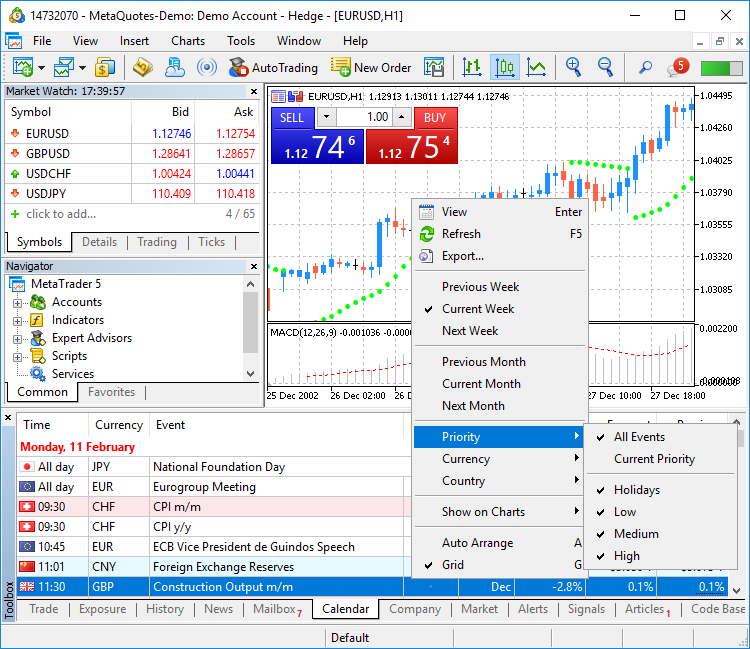
- Terminal: Completely revised built-in Economic Calendar.
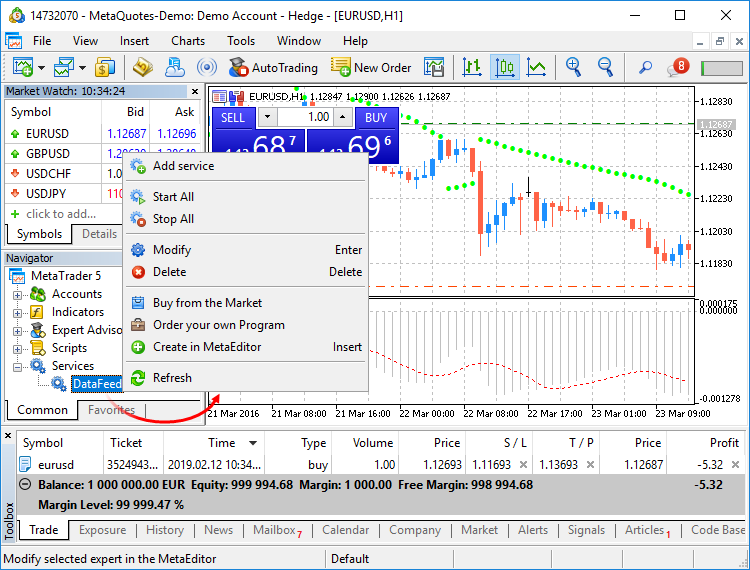
- Terminal: Added new type of MQL5 applications — Services. This new type enables the creation of custom price feeds for the terminal, i.e. to implement price delivery from external systems in real time, just like it is implemented on brokers' trade servers.
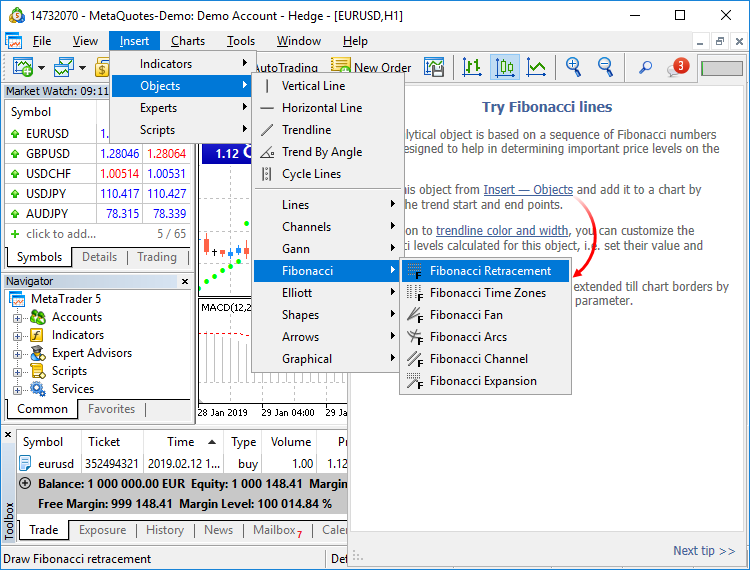
- Terminal: A learning program has been added.
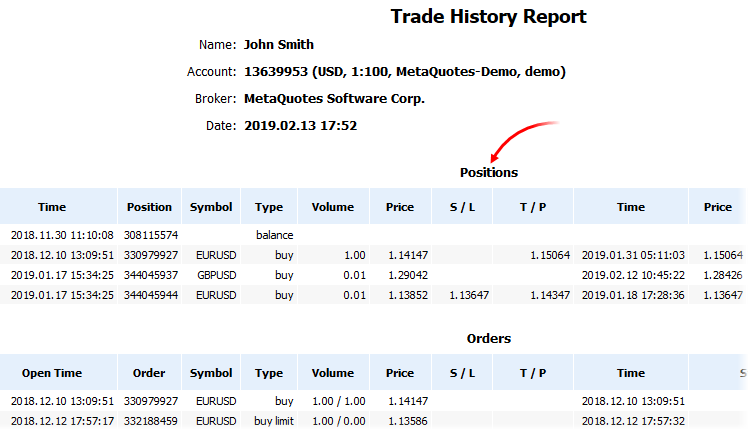
- Terminal: The trading account history can be presented as positions. The platform collects data on deals related to the position (opening, volume increase, partial or full closing) and groups the information into a single record. Thus you can access position details: open and close time, volume, price and result. This efficient presentation form is now available in history reports exported to files.
- Terminal: Added new API enabling request of MetaTrader 5 terminal data through applications using the R language.

R CMD INSTALL --build MetaTrader
- MT5Initialize initializes and establishes connection with the MetaTrader 5 terminal. If necessary, the terminal is launched during command execution.
- MT5Shutdown de-initializes and disconnects from MetaTrader 5.
- MT5Version gets the MetaTrader 5 terminal version.
- MT5TerminalInfo gets the state and parameters of terminal connection to a broker's server (account number and server address).
- MT5WaitTerminal waits for the MetaTrader 5 terminal to connect to a broker's server.
- MT5CopyTicksFrom(symbol, from, count, flags) copies the specified number of ticks starting from the specified date. The date is specified in milliseconds since 01.01.1970.
- MT5CopyTicksRange(symbol, from, to, flags) copies ticks from within the specified period. The dates are specified in milliseconds since 01.01.1970.
- MT5CopyRatesFrom(symbol, timeframe, from, count) copies the specified number of one-minute bars starting from the specified date. The date is specified in seconds since 01.01.1970.
- MT5CopyRatesFromPos(symbol, timeframe, start_pos, count) copies one-minute bars from the specified position relative to the last bar.
- MT5CopyRatesFromRange(symbol, timeframe, date_from, date_to) copies bars from within the specified period. The dates are specified in seconds since 01.01.1970.
- Terminal: Optimized Close By dialog used for closing a position by an opposite one. Now, the dialog is not slowed down even if you have a large number of open positions.
- Terminal: Fixed synthetic symbol calculation errors, due to which data could be occasionally skipped.
- Terminal: When a custom symbol is deleted, files storing its tick and bar history are also deleted. This avoids the accumulation of unused data on the hard disk.
- Terminal: Fixed display of search results on High DPI screens.
- MQL5: Implemented access to economic calendar data from MQL5 programs.
- MQL5: Fixes and operation speed improvements related to tick and bar history.
- MQL5: Fixes and significant operation speed improvements related to tick and bars history modification functions of custom trading symbols, CustomTicks* and CustomRates*.
- MQL5: New data conversion functions.
- Added MathSwap function for changing byte order in ushort, uint and ulong values.
- MQL5: Added network functions for creating TCP connections to remote hosts via system sockets:
- SocketCreate creates a socket with specified flags and returns its handle
- SocketClose closes the socket
- SocketConnect connects to the server, with timeout control
- SocketIsConnected checks if the socket is currently connected
- SocketIsReadable gets the number of bytes which can be read from the socket
- SocketIsWritable checks if data writing to this socket is possible at the current time
- SocketTimeouts sets data receiving and sending timeouts for the system socket object
- SocketRead reads data from a socket
- SocketSend writes data to a socket
- SocketTlsHandshake initiates a secure TLS (SSL) connection with the specified host using the TLS Handshake protocol
- SocketTlsCertificate receives information concerning the certificate used for secure network connection
- SocketTlsRead reads data from a secure TLS connection
- SocketTlsReadAvailable reads all available data from a secure TLS connection
- SocketTlsSend sends data using a secure TLS connection
The address of the host, to which connection using network functions is established, must be explicitly added to the list of allowed addresses in terminal settings.
- ERR_NETSOCKET_INVALIDHANDLE (5270): invalid socket handle passed to the function
- ERR_NETSOCKET_TOO_MANY_OPENED (5271): too many sockets open (maximum 128)
- ERR_NETSOCKET_CANNOT_CONNECT (5272): error while connecting to remote host
- ERR_NETSOCKET_IO_ERROR (5273): error while sending/receiving data from the socket
- ERR_NETSOCKET_HANDSHAKE_FAILED (5274): secure connection establishment error (TLS Handshake)
- ERR_NETSOCKET_NO_CERTIFICATE (5275) — no data about certificate used for secure connection
- MQL5: Added new functions for string operations:
- MQL5: Added new function for array operations:
- MQL5: New "uint count" parameter has been added in functions CustomRatesUpdate, CustomRatesReplace, CustomTicksAdd and CustomTicksReplace. It allows specification of the number of elements of the passed array, which will be used for these functions. The WHOLE_ARRAY value is used for the parameter by default. It means that the whole array will be utilized.
- MQL5: Added CustomBookAdd function to pass the status of the Depth of Market for a custom symbol. The function allows broadcasting the Depth of Market as if the prices arrive from a broker's server.
- MQL5: Added CustomSymbolCreate function overloading. This allows the creation of a custom trading symbol based on an existing one. After creation, any symbol property can be edited using corresponding functions.
- The StringToTime function converting the string with date/time to a datetime value has been updated. Now it supports the following date formats:
- yyyy.mm.dd [hh:mi]
- yyyy.mm.dd [hh:mi:ss]
- yyyymmdd [hh:mi:ss]
- yyyymmdd [hhmiss]
- yyyy/mm/dd [hh:mi:ss]
- yyyy-mm-dd [hh:mi:ss]
- MQL5: New TERMINAL_VPS property in the ENUM_TERMINAL_INFO_INTEGER enumeration; it shows that the terminal is running on the MetaTrader Virtual Hosting server (MetaTrader VPS). If an application is running on a hosting server, you can disable all its visual functions, since the virtual server does not have a graphical user interface.
- MQL5: New SYMBOL_EXIST property in the ENUM_SYMBOL_INFO_INTEGER enumeration, means that the symbol under this name exists.
- MQL5: Fixed typing when using template function pre-declarations.
- MQL5: Added re-initialization of indicators when changing a trading account.
- MQL5: Optimized StringSplit function.
- MQL5: Fixed errors in the standard library operation.
- Tester: Added TesterStop function — routine early shutdown of an Expert Advisor on a test agent. Now you can forcibly stop testing after reaching the specified number of losing trades, a preset drawdown level or any other criterion.
- Tester: Disabled ability to test and optimize Expert Advisors through MQL5 Cloud Network in the real tick mode. This mode can only be used on local agents and local network farms.
- Tester: Improved work with indicators during visual testing. Now the price chart and indicator lines are drawn synchronously, even for the maximum visualization speed.
- Tester: Optimized and significantly accelerated testing and optimization.
- Tester: Fixed debugging of indicators on historical data. Now the OnInit and OnDeinit indicator functions can be properly debugged.
- Tester: Implemented faster access to historical data when testing multicurrency Expert Advisors.
- Tester: Fixed occasional freezing of the visual tester during debugging on historical data.
- Tester: Implemented faster start of optimization passes when processing a task package by an agent.
- Tester: Changed policy of distributing task packages to testing agents. The package size has been increased and thus resource consumption on network operations has been significantly reduced.
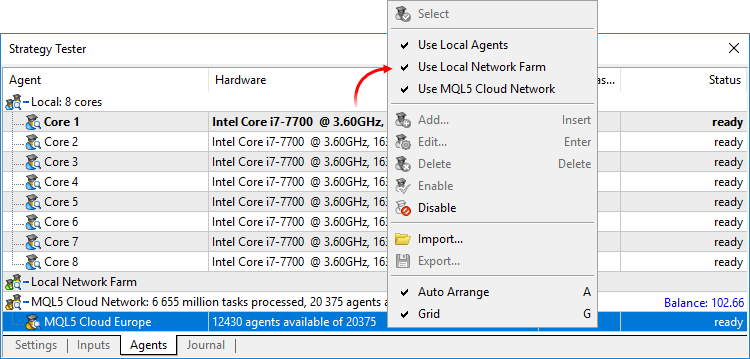
- Tester: Changed behavior of options enabling the use of local, network and cloud agents. Now, when you switch off the options, the agents complete processing of received tasks, while no more new tasks are given to them. In earlier versions, the behavior was similar to the "Disable" command, which immediately stopped agent operation.
- MetaEditor: Added support for non-ANSI characters in the debugger. Now, the expressions are properly displayed even if the variable name is specified in Cyrillic.
- MetaEditor: Fixed display of search results on High DPI screens.
- Added user interface translation into Croatian.
- Documentation has been updated.
The update will be available through the LiveUpdate system.The Economic Calendar is our proprietary solution. Therein you will find over 600 financial news and indicators related to the 13 largest global economies: USA, European Union, Japan, UK, Canada, Australia, China among others. Relevant data is collected from open sources in real time.
The new version features updated contents and advanced event filters: by time, priority, currencies and countries.
The calendar data can now be accessed from MQL5 programs. Please see below for details.
Unlike Expert Advisors, indicators and scripts, services are not linked to a specific chart. Such applications run in the background and are launched automatically when the terminal is started (unless such an app was forcibly stopped).
Services can be managed from a new section within the Navigator window:
How to create services
To create a service template, use the corresponding MQL5 Wizard option. Services have one OnStart entry point, similar to scripts. At this point, you can implement an endless data receiving and handling cycle using network functions.
How to launch services
To run multiple Expert Advisor or indicator copies with different parameters, you should launch them on different charts. In this case different program instances are created, which then operate independently. Services are not linked to charts, therefore a special mechanism has been implemented for the creation of service instances.
Select a service from the Navigator and click "Add service" in its context menu. This will open a standard MQL5 program dialog, in which you can enable/disable trading and access to signal settings, as well as set various parameters.
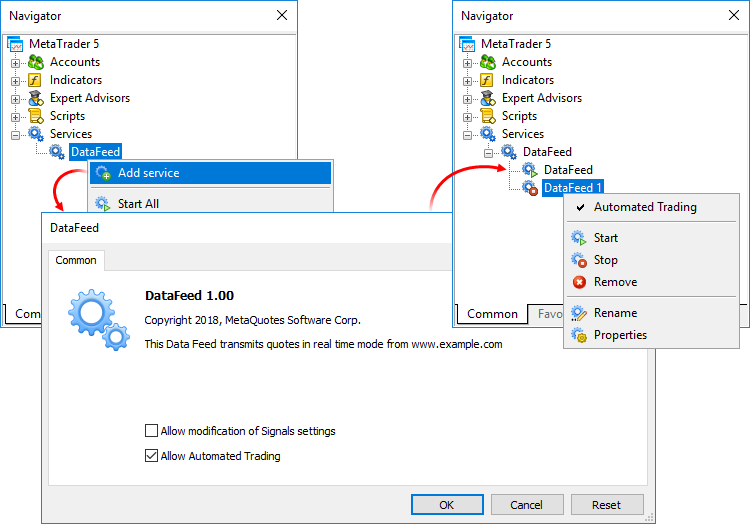
A service instance can be launched and stopped using the appropriate instance menu. To manage all instances, use the service menu.The new feature will help beginners in learning how to interact with the platform. We have added over 100 interactive tips concerning the main platform features.
- Tips are seamlessly displayed as a progress bar on the toolbar and thus they do not distract the user.
- Tips only appear for the actions which you have never performed in the platform.
- All tips include interactive links, by which you can navigate to the relevant interface elements. For example, a trading dialog or a menu with the desired program can be launched straight from the tip.
The filled area of the progress bar will increase whenever you perform appropriate actions and continue training.We have prepared a special MetaTrader package. It contains DLL for interactions between R and the MetaTrader 5 terminal, documentation and auxiliary r files. We are completing the package registration in the CRAN repository, after which it will be available for download and installation.
The package can be installed using a special command:
The following commands related to data request are available:
The list of supported commands will be further expanded.
New functions
CalendarCountryById — gets country description by identifier.
CalendarEventById — gets event description by identifier.
CalendarValueById — gets event value description by identifier.
CalendarEventByCountry — gets the array of available events for the country.
CalendarEventByCurrency — gets the array of available events for the affected currency.
CalendarValueHistoryByEvent — gets the array of values for the specified time period, by event identifier.
CalendarValueHistory — gets the array of values for the specified time period for all events, filtered by country and/or currency.
CalendarValueLastByEvent — gets an array of last event values by identifier. This function enables the request of the values which have appeared since the previous request. The in/out parameter "change_id" is additionally used for this operation.
Every time the calendar database changes, the "change_id" property (the last change identifier) is updated. During data request, you specify "change_id" and the terminal returns events which appeared after that time, as well as the current "change_id" value, which can be used for the next request. During the first function call, specify the zero "change_id": the function will not return any events, but will return the current "change_id" for further requests.
CalendarValueLast — gets the array of last values for all events, filtered by country and/or currency. This function enables the request of the values which have appeared since the previous request. Similarly to CalendarValueLastByEvent, the "change_id" property is used for the request.
New structures
MqlCalendarCountry — country description.
MqlCalendarEvent — event description.
MqlCalendarValue — event value description.
New enumerations
New error codes
CharArrayToStruct copies a uchar array to a POD structure.
StructToCharArray copies a POD structure to a uchar array.
New error codes have been added for operations with network functions:
StringReserve reserves for a string the memory buffer of the specified size.
StringSetLength sets the specified string length in characters.
ArrayRemove removes from an array the specified number of elements starting with the specified index.
ArrayInsert inserts to a receiver array the specified number of elements from the source array, starting with the specified index.
ArrayReverse reverses in an array the specified number of elements starting with the specified index.
The name of the symbol, from which the properties of for the custom symbol should be copied, is specified in the "symbol_origin" parameter.
Testing completed using this function is considered successful. After the function call, the trading history obtained during testing and all trade statistics are passed to the terminal.
Forum on trading, automated trading systems and testing trading strategies
MetaTrader R package - the summary
Sergey Golubev, 2019.02.22 06:47
The Main Study
The Articles
The Forum
----------------
more to follow ..
Forum on trading, automated trading systems and testing trading strategies
Usefull links/threads/tools
Sergey Golubev, 2017.10.05 12:33
Multi-Currency Expert Advisors in MT5 - backtesting and optimization
The threads/posts
The articles
Interesting results can also be obtained by running a multi-currency EA in the strategy tester. As an example, the free Multicurrency Expert from the CodeBase was used. In addition, the "#include <DistributionOfProfits.mqh>" file was specified and the "CDistributionOfProfits ExtDistribution" variable was declared in the header of the EA, and the "OnTester()" function was added at the end of the code. After a single run, the following statistics had been received: "TestAnalysis.htm".
optimization it over all symbols selected in Market Watch
Documentation
..and this is the example of the code from CodeBase -
----------------
Multicurrency iMA Trend - expert for MetaTrader 5
The multi-symbol adviser uses the MA Trend 2 adviser as the base advisor, while the advisor itself is rewritten as a class.
This adviser is in the form of a class the first version, so, for now, the symbols ("EURUSD", "USDCAD", "USDJPY") are specified in the code hard. Also, all input parameters are the same for each of the three symbols (Stop Loss, Take Profit, and so on ...).
Good article was published -
----------------
Practical application of correlations in trading
Correlation is a statistical relationship between two or more random variables (or quantities which can be considered random with some acceptable degree of accuracy). Changes in one ore more variables lead to systematic changes of other related variables. The mathematical measure of the correlation of two random variables is the correlation coefficient. If a change in one random variable does not lead to a regular change in the other random variable but leads to a change in another statistical characteristic of this random variable, such a relation is not considered correlation, although it is statistical.
Table of contents
Forum on trading, automated trading systems and testing trading strategies
Where Do I start from?
Sergey Golubev, 2018.09.20 15:43
Use tips - the instruction about HowTo
=========
----------------
----------------
----------------
There is one thread on the forum -
Possibilities of Canvas.
It is very useful thread.
And this is one very interesting tool which is fully related to this thread -
----------------
System of linear algebraic equations on each bar - indicator for MetaTrader 5
This work has 3 goals:
Using MATLAB 2018 computational capabilities in MetaTrader 5
This article is a development of the article "Interaction between MetaTrader 4 and MATLAB" by A. Emelyanov, and it provides information on solving a similar task for modern 64-bit versions of all platforms utilized by users. Over the past period, the method for creating shared DLL libraries has been substantially upgraded in the MATLAB package. Therefore, the method discussed in the original article requires modification. This happened because MATLAB Compiler SDK or MATLAB Coder must now be used instead of MATLAB Compiler. In addition, the practice of working with dynamic memory in MATLAB has changed, which implies certain adjustments of the source code that addresses a library written in the MATLAB language.