

MQL5自动化交易策略(第二十九部分):构建基于价格行为的加特利谐波形态交易系统
 32
32
 1
1

引言
在我们前一篇文章(第二十八部分)中,我们基于MetaQuotes Language 5(MQL5)开发了蝙蝠形态交易系统,依靠精确的斐波那契比率识别看涨与看跌蝙蝠谐波形态。在第二十九部分中,我们将编写加特利形态程序,借助枢轴点与特定斐波那契回撤位识别看涨和看跌加特利谐波形态。该系统按实时入场价与多级止盈位执行交易,并通过三角形、趋势线和文本标签可视化绘制形态,清晰展示结构。本文将介绍以下内容:
阅读完本文,您将获得一套功能完善的MQL5加特利谐波形态交易策略,可按需自定义,下面我们正式开始!
理解加特利谐波形态框架
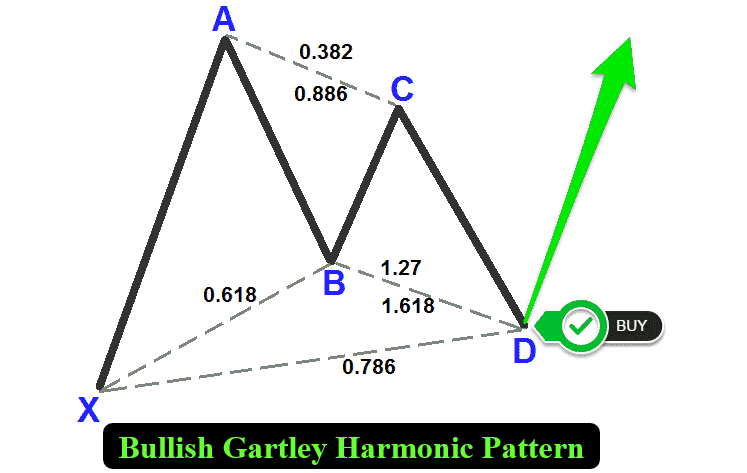
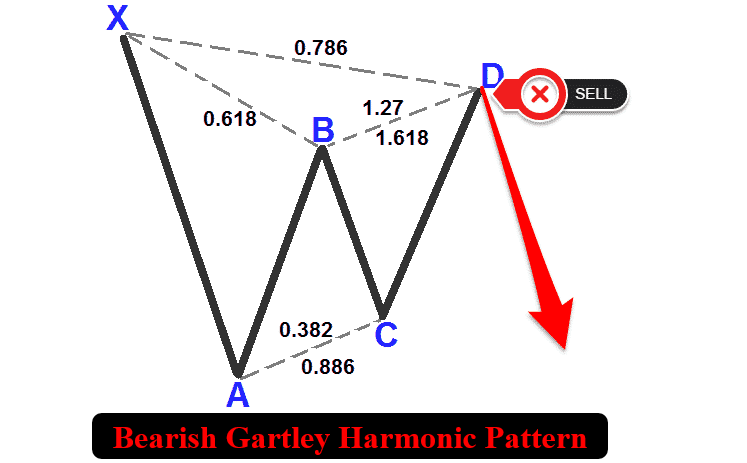
加特利形态是一种谐波交易结构,由五个关键波动点X、A、B、C、D构成,分为看涨形态与看跌形态两类。该形态借助特定斐波那契比率,用于识别高概率反转区域。看涨加特利形态的走势序列为:低点 — 高点 — 低点 — 高点 — 低点。其中X为波段低点,A为波段高点,B为波段低点(回撤XA段约0.618),C为波段高点(AB段延伸0.382至0.886),D为波段低点(XA段回撤0.786,且D点位置高于X点)。与之相反,看跌加特利形态走势序列为:高点 — 低点 — 高点 — 低点 — 高点。X为波段高点,A为波段低点,B为波段高点,C为波段低点,D为波段高点(XA段回撤0.786,且D点位置低于X点)。两种形态的可视化示意图如下。
看涨加特利谐波形态:
看跌加特利谐波形态:
为识别这些形态,我们将采用以下结构化方法:
- 定义XA波段:从X点到A点的初始行情运动决定形态方向(看涨形态向上,看跌形态向下),同时作为后续斐波那契计算的基准。
- 确立AB波段:B点应对XA波段产生约0.618的回撤,表示市场对初始推动浪做出了一次幅度较大但仍属可控的回调。
- 解析BC波段:该波段是AB波段的0.382至0.886倍扩展,也是最终反转区形成前的最后一次反向运动。
- 确定CD波段:最后这一波段应对XA波段完成0.786的回撤,在D点标记潜在反转区,形态在此处形成,并生成交易信号。
通过运用这套几何与斐波那契判定规则,本交易系统将在价格数据中系统性识别有效的加特利形态。一旦形态确认,系统会在图表上绘制三角形、趋势线以及X、A、B、C和D各点标签,同时标注入场位与止盈价位,实现形态可视化。该方案可在D点自动执行交易,使用经过计算的止损位与多级止盈区间,利用该形态预判市场反转的优势来捕捉交易机会。接下来,我们进入代码实现环节!
在MQL5中的实现
要在MQL5中创建该程序,请打开MetaEditor,在导航器中找到“Indicators”文件夹,点击“新建”选项卡,并按照向导提示创建文件。文件创建完成后,我们首先声明一些将在整个程序中用到的全局变量。
//+------------------------------------------------------------------+
//|                                       Gartley Pattern EA.mq5     |
//|                        Copyright 2025, Forex Algo-Trader, Allan. |
//|                                 "https://t.me/Forex_Algo_Trader" |
//+------------------------------------------------------------------+
#property copyright "Forex Algo-Trader, Allan"
#property link      "https://t.me/Forex_Algo_Trader"
#property version   "1.00"
#property description "This EA trades based on Gartley Strategy"
#property strict

//--- Include the trading library for order functions
#include <Trade\Trade.mqh>  //--- Include Trade library
CTrade obj_Trade;  //--- Instantiate a obj_Trade object

//--- Input parameters for user configuration
input int    PivotLeft    = 5;      // Number of bars to the left for pivot check
input int    PivotRight   = 5;      // Number of bars to the right for pivot check
input double Tolerance    = 0.10;   // Allowed deviation (10% of XA move)
input double LotSize      = 0.01;   // Lot size for new orders
input bool   AllowTrading = true;   // Enable or disable trading

//---------------------------------------------------------------------------
//--- Gartley pattern definition:
//
//--- Bullish Gartley:
//---   Pivots (X-A-B-C-D): X swing low, A swing high, B swing low, C swing high, D swing low.
//---   Normally XA > 0; Ideal B = A - 0.618*(A-X); Legs within specified ranges; D at 0.786 retracement.
//
//--- Bearish Gartley:
//---   Pivots (X-A-B-C-D): X swing high, A swing low, B swing high, C swing low, D swing high.
//---   Normally XA > 0; Ideal B = A + 0.618*(X-A); Legs within specified ranges; D at 0.786 retracement.
//---------------------------------------------------------------------------

//--- Structure for a pivot point
struct Pivot {
   datetime time;   //--- Bar time of the pivot
   double   price;  //--- Pivot price (High for swing high, low for swing low)
   bool     isHigh; //--- True if swing high; false if swing low
};

//--- Global dynamic array for storing pivots in chronological order
Pivot pivots[];     //--- Declare a dynamic array to hold identified pivot points

//--- Global variables to lock in a pattern (avoid trading on repaint)
int      g_patternFormationBar = -1;  //--- Bar index where the pattern was formed (-1 means none)
datetime g_lockedPatternX      = 0;   //--- The key X pivot time for the locked pattern
为搭建加特利形态的底层框架,我们首先引入"<Trade\Trade.mqh>"库,并实例化"obj_Trade"作为CTrade对象,用于处理买入或卖出订单这类交易操作。接着定义可供用户自定义的输入参数:"PivotLeft"和"PivotRight" 均设为5根K线,用于指定枢轴点识别的回溯范围;"Tolerance"取值0.10,允许斐波那契比率存在10%的偏差;将"LotSize"手数设置为0.01;将"AllowTrading"设置为true,开启自动交易功能。
接下来,定义"Pivot"结构体,包含"time"(日期时间类型)、"price"(双精度浮点型)与"isHigh"(布尔型)成员,用来存储波段拐点。声明动态数组"pivots"存放这些拐点数据;将全局变量"g_patternFormationBar"初始化为-1,用于记录形态形成所在K线;将全局变量"g_lockedPatternX"初始化为0,锁定X枢轴点的时间戳,用于形态校验。以上构成识别与交易加特利形态的核心框架。可视化方面,我们可以编写函数来绘制线段、文本标签与三角形图形。
//+------------------------------------------------------------------+
//| Helper: Draw a filled triangle                                   |
//+------------------------------------------------------------------+
void DrawTriangle(string name, datetime t1, double p1, datetime t2, double p2, datetime t3, double p3, color cl, int width, bool fill, bool back) {
   //--- Attempt to create a triangle object with three coordinate points
   if(ObjectCreate(0, name, OBJ_TRIANGLE, 0, t1, p1, t2, p2, t3, p3)) {
      //--- Set the triangle's color
      ObjectSetInteger(0, name, OBJPROP_COLOR, cl);
      //--- Set the triangle's line style to solid
      ObjectSetInteger(0, name, OBJPROP_STYLE, STYLE_SOLID);
      //--- Set the line width of the triangle
      ObjectSetInteger(0, name, OBJPROP_WIDTH, width);
      //--- Determine if the triangle should be filled
      ObjectSetInteger(0, name, OBJPROP_FILL, fill);
      //--- Set whether the object is drawn in the background
      ObjectSetInteger(0, name, OBJPROP_BACK, back);
   }
}

//+------------------------------------------------------------------+
//| Helper: Draw a trend line                                        |
//+------------------------------------------------------------------+
void DrawTrendLine(string name, datetime t1, double p1, datetime t2, double p2, color cl, int width, int style) {
   //--- Create a trend line object connecting two points
   if(ObjectCreate(0, name, OBJ_TREND, 0, t1, p1, t2, p2)) {
      //--- Set the trend line's color
      ObjectSetInteger(0, name, OBJPROP_COLOR, cl);
      //--- Set the trend line's style (solid, dotted, etc.)
      ObjectSetInteger(0, name, OBJPROP_STYLE, style);
      //--- Set the width of the trend line
      ObjectSetInteger(0, name, OBJPROP_WIDTH, width);
   }
}

//+------------------------------------------------------------------+
//| Helper: Draw a dotted trend line                                 |
//+------------------------------------------------------------------+
void DrawDottedLine(string name, datetime t1, double p, datetime t2, color lineColor) {
   //--- Create a horizontal trend line at a fixed price level with dotted style
   if(ObjectCreate(0, name, OBJ_TREND, 0, t1, p, t2, p)) {
      //--- Set the dotted line's color
      ObjectSetInteger(0, name, OBJPROP_COLOR, lineColor);
      //--- Set the line style to dotted
      ObjectSetInteger(0, name, OBJPROP_STYLE, STYLE_DOT);
      //--- Set the line width to 1
      ObjectSetInteger(0, name, OBJPROP_WIDTH, 1);
   }
}

//+------------------------------------------------------------------+
//| Helper: Draw anchored text label (for pivots)                    |
//| If isHigh is true, anchor at the bottom (label appears above);   |
//| if false, anchor at the top (label appears below).               |
//+------------------------------------------------------------------+
void DrawTextEx(string name, string text, datetime t, double p, color cl, int fontsize, bool isHigh) {
   //--- Create a text label object at the specified time and price
   if(ObjectCreate(0, name, OBJ_TEXT, 0, t, p)) {
      //--- Set the text of the label
      ObjectSetString(0, name, OBJPROP_TEXT, text);
      //--- Set the color of the text
      ObjectSetInteger(0, name, OBJPROP_COLOR, cl);
      //--- Set the font size for the text
      ObjectSetInteger(0, name, OBJPROP_FONTSIZE, fontsize);
      //--- Set the font type and style
      ObjectSetString(0, name, OBJPROP_FONT, "Arial Bold");
      //--- Anchor the text depending on whether it's a swing high or low
      if(isHigh)
         ObjectSetInteger(0, name, OBJPROP_ANCHOR, ANCHOR_BOTTOM);
      else
         ObjectSetInteger(0, name, OBJPROP_ANCHOR, ANCHOR_TOP);
      //--- Center-align the text
      ObjectSetInteger(0, name, OBJPROP_ALIGN, ALIGN_CENTER);
   }
}
我们继续实现系统的可视化函数,在图表上清晰绘制形态及其交易价位。首先,编写"DrawTriangle"函数:该函数调用ObjectCreate创建填充三角形对象(OBJ_TRIANGLE),三角形由三组时间("t1"、"t2"、"t3")与价格("p1"、"p2"、"p3")坐标定义,通过ObjectSetInteger函数设置属性:设置OBJPROP_COLOR为指定颜色,将"OBJPROP_STYLE"设置为STYLE_SOLID(实线),设置"OBJPROP_WIDTH"为指定线条宽度,"OBJPROP_FILL"控制是否开启填充,并使用"OBJPROP_BACK"设置图形置于图表背景还是前景。
接下来,构建"DrawTrendLine"函数,用于在两点之间绘制趋势线对象(OBJ_TREND)。随后实现"DrawDottedLine"函数,在指定价格位置,从时间"t1"到"t2"绘制水平虚线(对象类型同样为"OBJ_TREND")。最后,我们开发"DrawTextEx"函数,用于在坐标("t","p")处创建文本标签对象(OBJ_TEXT)。通过ObjectSetString与"ObjectSetInteger"配置属性:"OBJPROP_TEXT"为指定文本内容,设置"OBJPROP_COLOR"颜色、"OBJPROP_FONTSIZE"字号,字体"OBJPROP_FONT"选用"Arial Bold"(Arial粗体);借助OBJPROP_ANCHOR锚点属性,根据"isHigh"参数控制标签位置 —— 波段高点时使用底部锚点(文字显示在上方),波段低点时使用顶部锚点(文字显示在下方);并通过"OBJPROP_ALIGN"设置居中对齐。以此保证图表上的加特利形态与交易价位清晰可视。完成绘图函数后,我们开启OnTick事件处理器,寻找可供后续形态识别使用的枢轴点。以下是实现这一逻辑的方法:
//+------------------------------------------------------------------+
//| Expert tick function                                             |
//+------------------------------------------------------------------+
void OnTick() {
   //--- Declare a static variable to store the time of the last processed bar
   static datetime lastBarTime = 0;
   //--- Get the time of the current confirmed bar
   datetime currentBarTime = iTime(_Symbol, _Period, 1);
   //--- If the current bar time is the same as the last processed, exit
   if(currentBarTime == lastBarTime)
      return;
   //--- Update the last processed bar time
   lastBarTime = currentBarTime;

   //--- Clear the pivot array for fresh analysis
   ArrayResize(pivots, 0);
   //--- Get the total number of bars available on the chart
   int barsCount = Bars(_Symbol, _Period);
   //--- Define the starting index for pivot detection (ensuring enough left bars)
   int start = PivotLeft;
   //--- Define the ending index for pivot detection (ensuring enough right bars)
   int end = barsCount - PivotRight;

   //--- Loop through bars from 'end-1' down to 'start' to find pivot points
   for(int i = end - 1; i >= start; i--) {
      //--- Assume current bar is both a potential swing high and swing low
      bool isPivotHigh = true;
      bool isPivotLow = true;
      //--- Get the high and low of the current bar
      double currentHigh = iHigh(_Symbol, _Period, i);
      double currentLow = iLow(_Symbol, _Period, i);
      //--- Loop through the window of bars around the current bar
      for(int j = i - PivotLeft; j <= i + PivotRight; j++) {
         //--- Skip if the index is out of bounds
         if(j < 0 || j >= barsCount)
            continue;
         //--- Skip comparing the bar with itself
         if(j == i)
            continue;
         //--- If any bar in the window has a higher high, it's not a swing high
         if(iHigh(_Symbol, _Period, j) > currentHigh)
            isPivotHigh = false;
         //--- If any bar in the window has a lower low, it's not a swing low
         if(iLow(_Symbol, _Period, j) < currentLow)
            isPivotLow = false;
      }
      //--- If the current bar qualifies as either a swing high or swing low
      if(isPivotHigh || isPivotLow) {
         //--- Create a new pivot structure
         Pivot p;
         //--- Set the pivot's time
         p.time = iTime(_Symbol, _Period, i);
         //--- Set the pivot's price depending on whether it is a high or low
         p.price = isPivotHigh ? currentHigh : currentLow;
         //--- Set the pivot type (true for swing high, false for swing low)
         p.isHigh = isPivotHigh;
         //--- Get the current size of the pivots array
         int size = ArraySize(pivots);
         //--- Increase the size of the pivots array by one
         ArrayResize(pivots, size + 1);
         //--- Add the new pivot to the array
         pivots[size] = p;
      }
   }
}
这里,我们实现OnTick函数的初始逻辑,用于检测波段枢轴点,这是识别加特利谐波形态的基础。首先,我们声明静态变量"lastBarTime"并初始化为 0,用来记录上一根已确认收盘的K线时间。通过iTime函数获取当前品种、当前周期下偏移量为1的K线时间"currentBarTime",将两者进行比对;如果时间未发生变化,则直接退出函数,防止重复运算。一旦检测到新K线生成,则更新"lastBarTime"。随后,我们调用ArrayResize清空"pivots"数组,保证每一轮都是全新的分析。
接下来,我们调用Bars获取K线总数量;设置枢轴点检测区间:起始位置"start"为"PivotLeft",结束位置"end"等于K线总数减去"PivotRight"。然后从"end - 1"到"start"遍历每一根K线。对每一根K线,先预设它可能是波段高点(将"isPivotHigh"设置为true),也可能是波段低点(将"isPivotLow"设置为true)。通过iHigh与iLow获取该K线的最高价、最低价,再利用"iHigh"、"iLow"校验该K线左右"PivotLeft"、"PivotRight"范围内的相邻K线。如果任意一根相邻K线创出更高高点或更低低点,则判定该点不是有效枢轴点。最后,如果该K线满足枢轴点判定条件,就创建一个"Pivot"结构体:用"iTime"赋值"time"成员,根据是否为波段高点,将"price"设为最高价或最低价,并设置"isHigh"标记。之后调用ArrayResize扩容数组,把该枢轴点追加存入"pivots"数组。打印该枢轴结构体,即可得到如下数组数据。
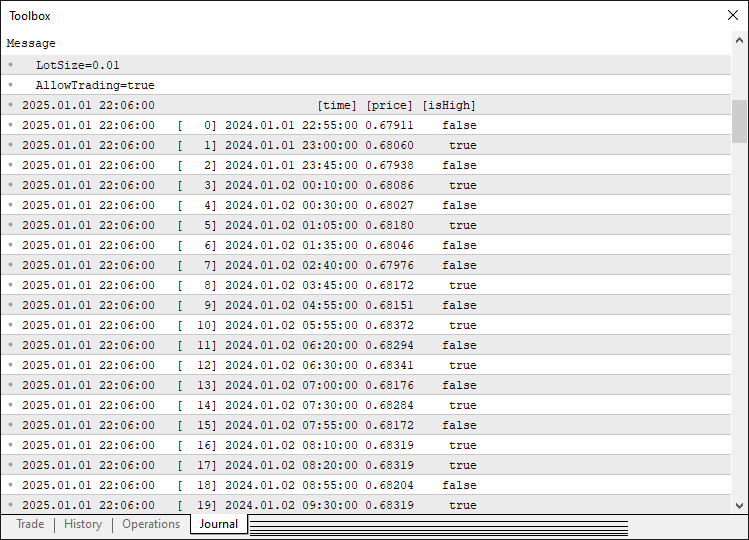
基于这些数据,我们即可提取枢轴点信息,当有效拐点数量足够时,即可开始形态的分析与识别。以下是实现该功能的完整逻辑:
//--- Determine the total number of pivots found
int pivotCount = ArraySize(pivots);
//--- If fewer than five pivots are found, the pattern cannot be formed
if(pivotCount < 5) {
   //--- Reset pattern lock variables
   g_patternFormationBar = -1;
   g_lockedPatternX = 0;
   //--- Exit the OnTick function
   return;
}

//--- Extract the last five pivots as X, A, B, C, and D
Pivot X = pivots[pivotCount - 5];
Pivot A = pivots[pivotCount - 4];
Pivot B = pivots[pivotCount - 3];
Pivot C = pivots[pivotCount - 2];
Pivot D = pivots[pivotCount - 1];

//--- Initialize a flag to indicate if a valid Gartley pattern is found
bool patternFound = false;
//--- Initialize pattern type
string patternType = "";
//--- Check for the high-low-high-low-high (Bearish reversal) structure
if(X.isHigh && (!A.isHigh) && B.isHigh && (!C.isHigh) && D.isHigh) {
   //--- Calculate the difference between pivot X and A
   double diff = X.price - A.price;
   //--- Ensure the difference is positive
   if(diff > 0) {
      //--- Calculate the ideal position for pivot B based on Fibonacci ratio
      double idealB = A.price + 0.618 * diff;
      //--- Check if actual B is within tolerance of the ideal position
      if(MathAbs(B.price - idealB) <= Tolerance * diff) {
         //--- Calculate the AB leg length
         double AB = B.price - A.price;
         //--- Calculate the BC leg length
         double BC = B.price - C.price;
         //--- Verify that BC is within the acceptable Fibonacci range
         if((BC >= 0.382 * AB) && (BC <= 0.886 * AB)) {
            //--- Calculate the retracement
            double retrace = D.price - A.price;
            //--- Verify that the retracement is within tolerance of 0.786 and that D is below X
            if(MathAbs(retrace - 0.786 * diff) <= Tolerance * diff && (D.price < X.price)) {
               patternFound = true;
               patternType = "Bearish";
            }
         }
      }
   }
}
//--- Check for the low-high-low-high-low (Bullish reversal) structure
if((!X.isHigh) && A.isHigh && (!B.isHigh) && C.isHigh && (!D.isHigh)) {
   //--- Calculate the difference between pivot A and X
   double diff = A.price - X.price;
   //--- Ensure the difference is positive
   if(diff > 0) {
      //--- Calculate the ideal position for pivot B based on Fibonacci ratio
      double idealB = A.price - 0.618 * diff;
      //--- Check if actual B is within tolerance of the ideal position
      if(MathAbs(B.price - idealB) <= Tolerance * diff) {
         //--- Calculate the AB leg length
         double AB = A.price - B.price;
         //--- Calculate the BC leg length
         double BC = C.price - B.price;
         //--- Verify that BC is within the acceptable Fibonacci range
         if((BC >= 0.382 * AB) && (BC <= 0.886 * AB)) {
            //--- Calculate the retracement
            double retrace = A.price - D.price;
            //--- Verify that the retracement is within tolerance of 0.786 and that D is above X
            if(MathAbs(retrace - 0.786 * diff) <= Tolerance * diff && (D.price > X.price)) {
               patternFound = true;
               patternType = "Bullish";
            }
         }
      }
   }
}
首先,我们通过"ArraySize(pivots)"获取枢轴点数组总长度并存入"pivotCount"中。如果枢轴点数量不足5个,则直接退出,并将"g_patternFormationBar"重置为-1、"g_lockedPatternX"重置为0;因为加特利形态必须具备X、A、B、C和D五个拐点。然后从"pivots"数组提取最新的5个枢轴点,依次赋值给"X"(最早的拐点)、"A"、"B"、"C"和"D"(最新拐点),以此构成形态结构。
接下来,我们校验看跌加特利形态(X为波段高点、A为波段低点、B为波段高点、C为波段低点、D为波段高点):计算XA波段价差("X.price - A.price"),确保该值为正;B点理论价位等于"A.price + 0.618 * diff";使用MathAbs函数校验B点实际价位落在"Tolerance * diff"容差范围内;校验BC波段幅度为AB波段的0.382至0.886倍;同时确认AD回撤满足XA波段的0.786,且D点价位低于X点。如果全部条件满足,则将"patternFound"设置为true,并将"patternType"赋值为"Bearish"。最后,校验看涨加特利形态(X为波段低点、A为波段高点、B为波段低点、C为波段高点、D为波段低点):计算XA波段价差为"A.price - X.price",保证数值为正;校验B点处于XA的0.618回撤位,BC波段在AB的0.382至0.886区间,AD 回撤等于XA的0.786且D点高于X点。当条件全部成立时,将"patternFound"设置为true,将"patternType"赋值为"Bullish"。一旦识别到有效形态,就可以在图表上绘制可视化图形。
//--- If a valid Gartley pattern is detected
if(patternFound) {
   //--- Print a message indicating the pattern type and detection time
   Print(patternType, " Gartley pattern detected at ", TimeToString(D.time, TIME_DATE|TIME_MINUTES|TIME_SECONDS));

   //--- Create a unique prefix for all graphical objects related to this pattern
   string signalPrefix = "GA_" + IntegerToString(X.time);

   //--- Choose triangle color based on the pattern type
   color triangleColor = (patternType=="Bullish") ? clrBlue : clrRed;

   //--- Draw the first triangle connecting pivots X, A, and B
   DrawTriangle(signalPrefix+"_Triangle1", X.time, X.price, A.time, A.price, B.time, B.price,
                triangleColor, 2, true, true);
   //--- Draw the second triangle connecting pivots B, C, and D
   DrawTriangle(signalPrefix+"_Triangle2", B.time, B.price, C.time, C.price, D.time, D.price,
                triangleColor, 2, true, true);
}
如果检测到有效形态("patternFound"为true),就通过Print打印日志,输出形态类型(看涨或看跌)以及D枢轴点的时间。时间使用TimeToString格式化输出,包含日期、分钟和秒。随后创建唯一标识"signalPrefix":调用IntegerToString函数将"X.time"转为字符串,再与前缀"GA_"拼接。再设置"triangleColor",看涨形态使用蓝色,看跌形态使用红色。最后两次调用"DrawTriangle"函数绘制形态:第一次绘制连接枢轴点X、A、B的XAB三角形;第二次绘制连接枢轴点B、C、D的BCD三角形。图形名称由"signalPrefix"分别拼接后缀"_Triangle1"和"_Triangle2"组成,传入对应的枢轴时间与价格、"triangleColor"、线条宽度2,并传入true标识开启填充以及背景绘制模式。运行效果如下:
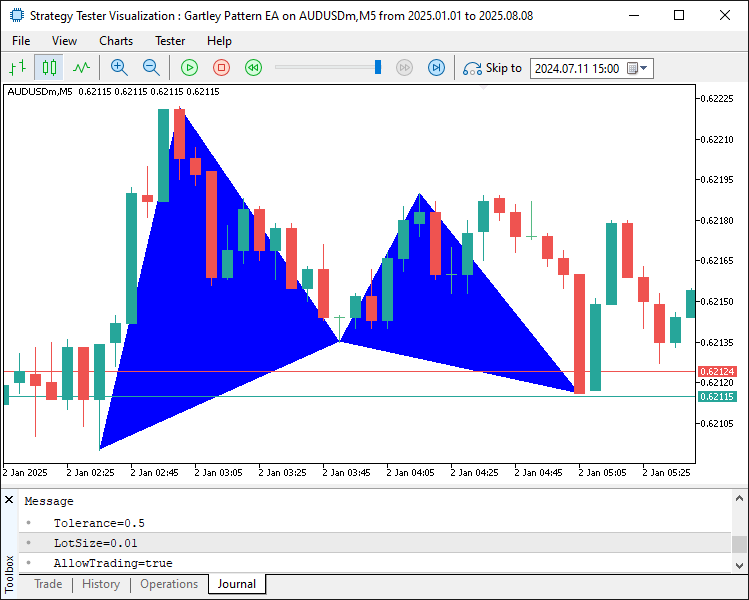
由图可见,程序能够正确定位并绘制识别到的形态。现在,我们继续绘制趋势线,让形态在区间内完整呈现,并添加文字标签,方便快速识别各个价位。
//--- Draw boundary trend lines connecting the pivots for clarity
DrawTrendLine(signalPrefix+"_TL_XA", X.time, X.price, A.time, A.price, clrBlack, 2, STYLE_SOLID);
DrawTrendLine(signalPrefix+"_TL_AB", A.time, A.price, B.time, B.price, clrBlack, 2, STYLE_SOLID);
DrawTrendLine(signalPrefix+"_TL_BC", B.time, B.price, C.time, C.price, clrBlack, 2, STYLE_SOLID);
DrawTrendLine(signalPrefix+"_TL_CD", C.time, C.price, D.time, D.price, clrBlack, 2, STYLE_SOLID);
DrawTrendLine(signalPrefix+"_TL_XB", X.time, X.price, B.time, B.price, clrBlack, 2, STYLE_SOLID);
DrawTrendLine(signalPrefix+"_TL_BD", B.time, B.price, D.time, D.price, clrBlack, 2, STYLE_SOLID);

//--- Retrieve the symbol's point size to calculate offsets for text positioning
double point = SymbolInfoDouble(_Symbol, SYMBOL_POINT);
//--- Calculate an offset (15 points) for positioning text above or below pivots
double offset = 15 * point;

//--- Determine the Y coordinate for each pivot label based on its type
double textY_X = (X.isHigh ? X.price + offset : X.price - offset);
double textY_A = (A.isHigh ? A.price + offset : A.price - offset);
double textY_B = (B.isHigh ? B.price + offset : B.price - offset);
double textY_C = (C.isHigh ? C.price + offset : C.price - offset);
double textY_D = (D.isHigh ? D.price + offset : D.price - offset);

//--- Draw text labels for each pivot with appropriate anchoring
DrawTextEx(signalPrefix+"_Text_X", "X", X.time, textY_X, clrBlack, 11, X.isHigh);
DrawTextEx(signalPrefix+"_Text_A", "A", A.time, textY_A, clrBlack, 11, A.isHigh);
DrawTextEx(signalPrefix+"_Text_B", "B", B.time, textY_B, clrBlack, 11, B.isHigh);
DrawTextEx(signalPrefix+"_Text_C", "C", C.time, textY_C, clrBlack, 11, C.isHigh);
DrawTextEx(signalPrefix+"_Text_D", "D", D.time, textY_D, clrBlack, 11, D.isHigh);

//--- Calculate the central label's time as the midpoint between pivots X and B
datetime centralTime = (X.time + B.time) / 2;
//--- Set the central label's price at pivot D's price
double centralPrice = D.price;
//--- Create the central text label indicating the pattern type
if(ObjectCreate(0, signalPrefix+"_Text_Center", OBJ_TEXT, 0, centralTime, centralPrice)) {
   ObjectSetString(0, signalPrefix+"_Text_Center", OBJPROP_TEXT,
      (patternType=="Bullish") ? "Bullish Gartley" : "Bearish Gartley");
   ObjectSetInteger(0, signalPrefix+"_Text_Center", OBJPROP_COLOR, clrBlack);
   ObjectSetInteger(0, signalPrefix+"_Text_Center", OBJPROP_FONTSIZE, 11);
   ObjectSetString(0, signalPrefix+"_Text_Center", OBJPROP_FONT, "Arial Bold");
   ObjectSetInteger(0, signalPrefix+"_Text_Center", OBJPROP_ALIGN, ALIGN_CENTER);
}
我们继续丰富已识别形态的可视化效果,添加更多图表对象来完整描绘形态结构。首先,我们调用"DrawTrendLine"绘制六条实线趋势线,使用唯一标识"signalPrefix"作为对象名称前缀,连接关键枢轴点:XA、AB、BC、CD、XB、BD。传入各枢轴点的时间与价格(例如"X.time"、"X.price"),并通过ObjectSetInteger设置属性:将OBJPROP_COLOR设置为黑色,将"OBJPROP_WIDTH"设置为2,并将"OBJPROP_STYLE"设置为"STYLE_SOLID",勾勒出形态的各个波段。然后调用"SymbolInfoDouble(_Symbol, SYMBOL_POINT)"获取当前品种的点值,计算15点的偏移量用于标签定位。根据每个枢轴点是否为波段高点("isHigh"为true),对价格加上或减去该偏移量,得到各个点位的Y坐标("textY_X"、"textY_A"、"textY_B"、"textY_C"、"textY_D"),实现高点标签放在价格上方、低点标签放在价格下方。
接下来,我们使用"DrawTextEx"函数为 X、A、B、C和D各个枢轴点添加文本标签。通过"signalPrefix"搭配后缀如"_Text_X"作为对象名,显示对应的点位字母;标签放置在枢轴点时间与调整后的 Y 坐标位置,文字颜色为黑色"clrBlack"、字号11,并依据枢轴点的"isHigh"属性设置锚点。最后,我们计算中心标签的位置:"centralTime"为"X.time"与"B.time"的时间中点,"centralPrice"取值为"D.price"。调用ObjectCreate创建文本对象,对象名称为"signalPrefix + '_Text_Center'"。根据"patternType",将OBJPROP_TEXT设置为“看涨加特利”或“看跌加特利”;再通过ObjectSetString与"ObjectSetInteger"函数配置属性:配置"OBJPROP_COLOR"为"clrBlack","OBJPROP_FONTSIZE"为11,OBJPROP_FONT为"Arial Bold","OBJPROP_ALIGN"为"ALIGN_CENTER"(居中对齐)。这套逻辑可以在图表上完整直观地展示形态结构与形态类型。运行程序后,呈现效果如下:
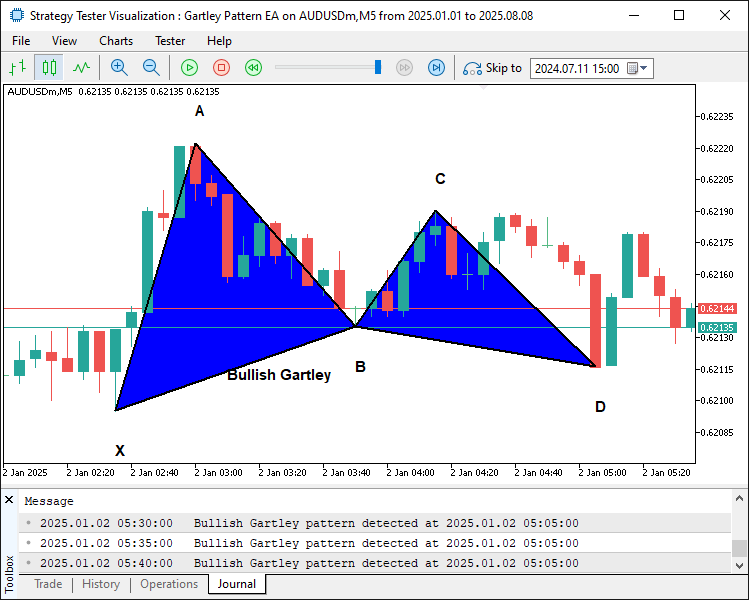
由图可见,我们已经为形态绘制好轮廓线与点位标签,使形态展示得更加清晰、直观。接下来,我们需要计算该形态对应的交易价位。
//--- Define start and end times for drawing horizontal dotted lines for trade levels
datetime lineStart = D.time;
datetime lineEnd = D.time + PeriodSeconds(_Period)*2;

//--- Declare variables for entry price and take profit levels
double entryPriceLevel, TP1Level, TP2Level, TP3Level, tradeDiff;
//--- Calculate trade levels based on whether the pattern is Bullish or Bearish
if(patternType=="Bullish") { //--- Bullish → BUY signal
   //--- Use the current ASK price as the entry
   entryPriceLevel = SymbolInfoDouble(_Symbol, SYMBOL_ASK);
   //--- Set TP3 at pivot C's price
   TP3Level = C.price;
   //--- Calculate the total distance to be covered by the trade
   tradeDiff = TP3Level - entryPriceLevel;
   //--- Set TP1 at one-third of the total move
   TP1Level = entryPriceLevel + tradeDiff/3;
   //--- Set TP2 at two-thirds of the total move
   TP2Level = entryPriceLevel + 2*tradeDiff/3;
} else { //--- Bearish → SELL signal
   //--- Use the current BID price as the entry
   entryPriceLevel = SymbolInfoDouble(_Symbol, SYMBOL_BID);
   //--- Set TP3 at pivot C's price
   TP3Level = C.price;
   //--- Calculate the total distance to be covered by the trade
   tradeDiff = entryPriceLevel - TP3Level;
   //--- Set TP1 at one-third of the total move
   TP1Level = entryPriceLevel - tradeDiff/3;
   //--- Set TP2 at two-thirds of the total move
   TP2Level = entryPriceLevel - 2*tradeDiff/3;
}

//--- Draw dotted horizontal lines to represent the entry and TP levels
DrawDottedLine(signalPrefix+"_EntryLine", lineStart, entryPriceLevel, lineEnd, clrMagenta);
DrawDottedLine(signalPrefix+"_TP1Line", lineStart, TP1Level, lineEnd, clrForestGreen);
DrawDottedLine(signalPrefix+"_TP2Line", lineStart, TP2Level, lineEnd, clrGreen);
DrawDottedLine(signalPrefix+"_TP3Line", lineStart, TP3Level, lineEnd, clrDarkGreen);

//--- Define a label time coordinate positioned just to the right of the dotted lines
datetime labelTime = lineEnd + PeriodSeconds(_Period)/2;

//--- Construct the entry label text with the price
string entryLabel = (patternType=="Bullish") ? "BUY (" : "SELL (";
entryLabel += DoubleToString(entryPriceLevel, _Digits) + ")";
//--- Draw the entry label on the chart
DrawTextEx(signalPrefix+"_EntryLabel", entryLabel, labelTime, entryPriceLevel, clrMagenta, 11, true);

//--- Construct and draw the TP1 label
string tp1Label = "TP1 (" + DoubleToString(TP1Level, _Digits) + ")";
DrawTextEx(signalPrefix+"_TP1Label", tp1Label, labelTime, TP1Level, clrForestGreen, 11, true);

//--- Construct and draw the TP2 label
string tp2Label = "TP2 (" + DoubleToString(TP2Level, _Digits) + ")";
DrawTextEx(signalPrefix+"_TP2Label", tp2Label, labelTime, TP2Level, clrGreen, 11, true);

//--- Construct and draw the TP3 label
string tp3Label = "TP3 (" + DoubleToString(TP3Level, _Digits) + ")";
DrawTextEx(signalPrefix+"_TP3Label", tp3Label, labelTime, TP3Level, clrDarkGreen, 11, true);
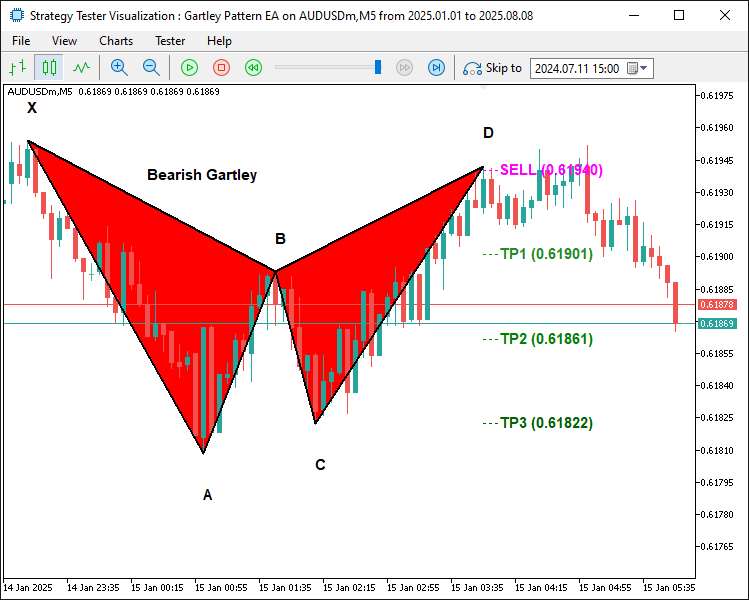
为了给识别出来的形态定义并可视化交易价位,我们将"lineStart"设置为D枢轴点的时间("D.time"),"lineEnd"设置为往后两个周期,计算公式为"PeriodSeconds(_Period) * 2";同时声明变量"entryPriceLevel"、"TP1Level"、"TP2Level"、"TP3Level"以及"tradeDiff",用于交易相关的价格计算。随后,如果是看涨形态("patternType为'Bullish'"):使用SymbolInfoDouble获取当前ask价作为"entryPriceLevel" ,将"TP3Level"设置为C枢轴点价格,"tradeDiff"等于"TP3Level - entryPriceLevel"。TP1Level与TP2Level则分别在入场价基础上加上价差的1/3和2/3;如果是看跌形态:使用当前bid价作为入场价,"TP3Level"同样取C点价格,"tradeDiff"等于"entryPriceLevel - TP3Level","TP1Level"和"TP2Level"分别通过从入场价减去价差的1/3和2/3得到。
接下来调用"DrawDottedLine"绘制四条水平虚线:品红色的"entryPriceLevel"入场价位线,以及分别位于"TP1Level"(森林绿)、"TP2Level"(绿色)、"TP3Level"(深绿色)的止盈线;所有线条的时间范围均从"lineStart"延伸至"lineEnd"。最后,将"labelTime"设置为"lineEnd"加上半个周期。通过DoubleToString将价格格式化后生成标签文本(如“BUY(价格)”、“SELL(价格)”、“TP1(价格)”等);调用"DrawTextEx"函数,在"labelTime"位置绘制这些标签,配置对应颜色、字号为11,并将标签锚定在价位线上方,清晰展示加特利形态的交易入场位与各止盈位。编译后,呈现如下效果:
看跌形态:
看涨形态:
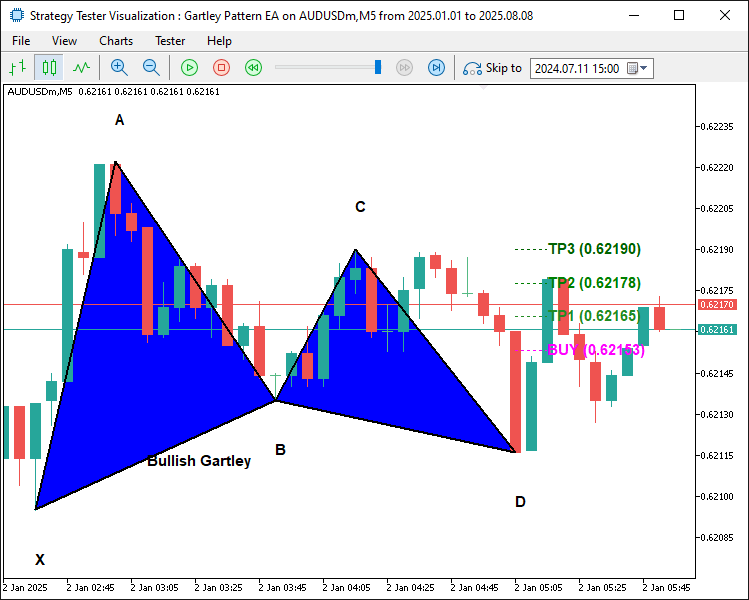
由图可见,我们已经正确绘制好了各项交易价位。现在只剩最后一步 —— 实际开仓,至此整个流程就完成了。
//--- Retrieve the index of the current bar
int currentBarIndex = Bars(_Symbol, _Period) - 1;
//--- If no pattern has been previously locked, lock the current pattern formation
if(g_patternFormationBar == -1) {
   g_patternFormationBar = currentBarIndex;
   g_lockedPatternX = X.time;
   //--- Print a message that the pattern is detected and waiting for confirmation
   Print("Pattern detected on bar ", currentBarIndex, ". Waiting for confirmation on next bar.");
   return;
}
//--- If still on the same formation bar, the pattern is considered to be repainting
if(currentBarIndex == g_patternFormationBar) {
   Print("Pattern is repainting; still on locked formation bar ", currentBarIndex, ". No trade yet.");
   return;
}
//--- If we are on a new bar compared to the locked formation
if(currentBarIndex > g_patternFormationBar) {
   //--- Check if the locked pattern still corresponds to the same X pivot
   if(g_lockedPatternX == X.time) {
      Print("Confirmed pattern (locked on bar ", g_patternFormationBar, "). Opening trade on bar ", currentBarIndex, ".");
      //--- Update the pattern formation bar to the current bar
      g_patternFormationBar = currentBarIndex;
      //--- Only proceed with trading if allowed and if there is no existing position
      if(AllowTrading && !PositionSelect(_Symbol)) {
         double entryPriceTrade = 0, stopLoss = 0, takeProfit = 0;
         point = SymbolInfoDouble(_Symbol, SYMBOL_POINT);
         bool tradeResult = false;
         //--- For a Bullish pattern, execute a BUY trade
         if(patternType=="Bullish") {  //--- BUY signal
            entryPriceTrade = SymbolInfoDouble(_Symbol, SYMBOL_ASK);
            double diffTrade = TP2Level - entryPriceTrade;
            stopLoss = entryPriceTrade - diffTrade * 3;
            takeProfit = TP2Level;
            tradeResult = obj_Trade.Buy(LotSize, _Symbol, entryPriceTrade, stopLoss, takeProfit, "Gartley Signal");
            if(tradeResult)
               Print("Buy order opened successfully.");
            else
               Print("Buy order failed: ", obj_Trade.ResultRetcodeDescription());
         }
         //--- For a Bearish pattern, execute a SELL trade
         else if(patternType=="Bearish") {  //--- SELL signal
            entryPriceTrade = SymbolInfoDouble(_Symbol, SYMBOL_BID);
            double diffTrade = entryPriceTrade - TP2Level;
            stopLoss = entryPriceTrade + diffTrade * 3;
            takeProfit = TP2Level;
            tradeResult = obj_Trade.Sell(LotSize, _Symbol, entryPriceTrade, stopLoss, takeProfit, "Gartley Signal");
            if(tradeResult)
               Print("Sell order opened successfully.");
            else
               Print("Sell order failed: ", obj_Trade.ResultRetcodeDescription());
         }
      }
      else {
         //--- If a position is already open, do not execute a new trade
         Print("A position is already open for ", _Symbol, ". No new trade executed.");
      }
   }
   else {
      //--- If the pattern has changed, update the lock with the new formation bar and X pivot
      g_patternFormationBar = currentBarIndex;
      g_lockedPatternX = X.time;
      Print("Pattern has changed; updating lock on bar ", currentBarIndex, ". Waiting for confirmation.");
      return;
   }
}
}
else {
   //--- If no valid Gartley pattern is detected, reset the pattern lock variables
   g_patternFormationBar = -1;
   g_lockedPatternX = 0;
}
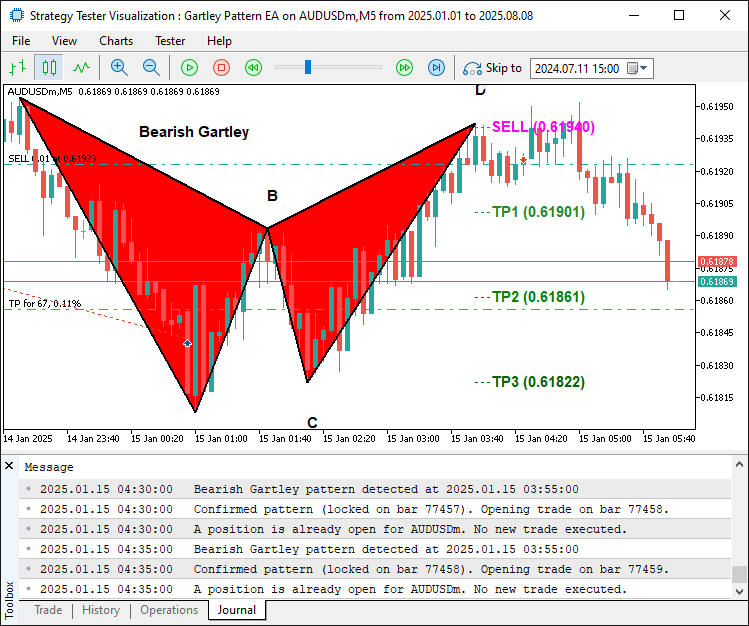
至此,我们在OnTick中完成了最后一段逻辑:管理已识别形态的确认与交易执行。首先通过"Bars(_Symbol, _Period) - 1"获取当前K线索引,并存储在"currentBarIndex"中。如果当前没有锁定任何形态("g_patternFormationBar等于-1"),则将"g_patternFormationBar"赋值为"currentBarIndex",将"X.time"存入"g_lockedPatternX"完成锁定,打印日志提示等待形态确认,随后退出本段逻辑。如果仍然处于形态形成的同一根K线("currentBarIndex等于g_patternFormationBar"),则打印日志并退出,避免过早交易。
最后,如果一根新K线已经生成("currentBarIndex > g_patternFormationBar"),并且X枢轴点与"g_lockedPatternX"保持一致,则确认该形态有效,打印日志,更新"g_patternFormationBar",并通过PositionSelect函数检查是否允许交易和当前是否无持仓。如果是看涨形态:将"entryPriceTrade"设置为Ask价,计算价差"diffTrade" = "TP2Level - entryPriceTrade",将止损位设置为入场价向下偏移3倍该价差,将止盈位设置为"TP2Level",调用"obj_Trade.Buy"以"LotSize"手数执行买入,交易注释为"Gartley Signal",并记录下单成功或失败日志;如果是看跌形态:采用Bid价,设置"stopLoss"在入场价向上偏移3倍价差的位置,调用"obj_Trade.Sell"执行卖出。如果不允许交易或者已有持仓,则输出日志为不执行交易;如果形态发生变化,则更新锁定标记并继续等待;如果未检测到形态,则重置全局变量。编译后,呈现如下效果:
看跌信号:
看涨信号:
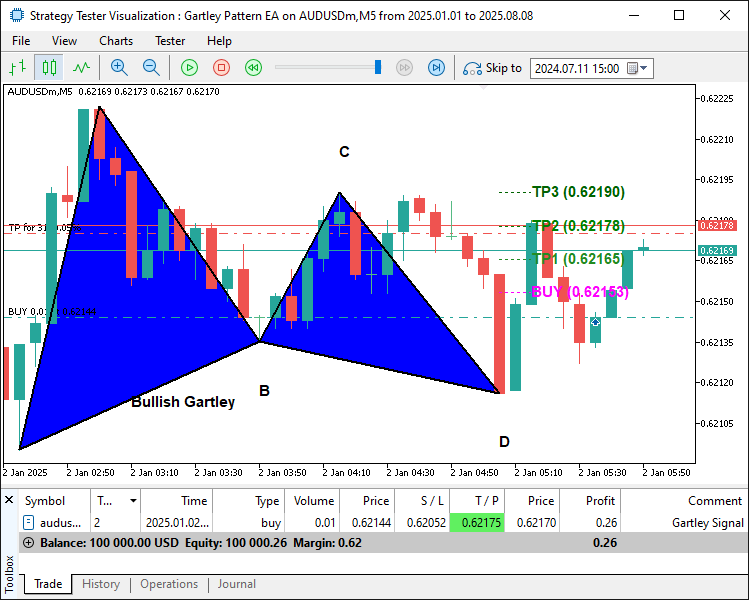
由图可见,程序能够绘制谐波形态,并且在形态确认后按规则执行交易,至此我们达成目标:识别、绘制并交易该形态。接下来需要对程序进行回测,具体内容见下一节。
回测
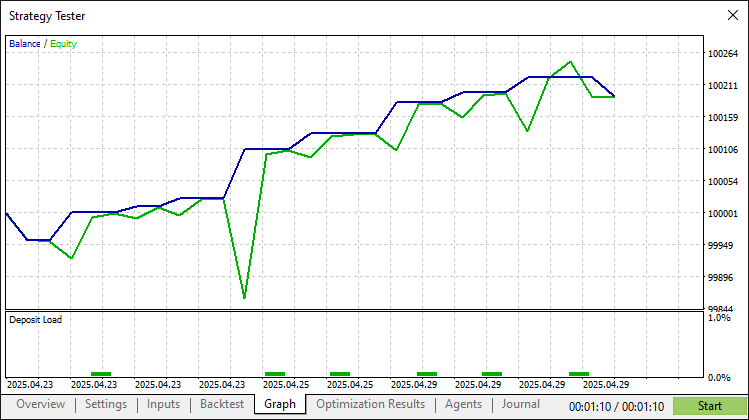
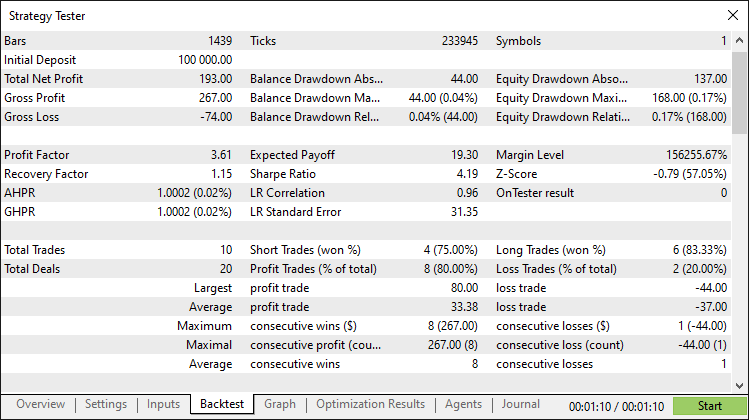
经过全面回测后,我们得到以下结果:
回测图:
回测报告:
结论
总而言之,我们已在MQL5中完成了一套加特利形态交易系统的开发。该系统基于价格行为分析,依靠精确的斐波那契比率识别看涨与看跌加特利谐波形态,并按计算好的入场位、止损位和多级止盈位自动执行交易,并借助三角形和趋势线等图表对象完成形态可视化绘制。
免责声明:本文仅用于教学目的。交易存在重大财务风险,市场剧烈波动可能导致资金损失。在实盘操作前,务必进行充分的回测,并做好严格的风险管理。
借助本文介绍的原理与实现,您可以按自己的交易风格改造这套加特利形态系统,让您的算法交易策略更上一层楼。祝您交易顺利!
本文由MetaQuotes Ltd译自英文
原文地址: https://www.mql5.com/en/articles/19111
注意: MetaQuotes Ltd.将保留所有关于这些材料的权利。全部或部分复制或者转载这些材料将被禁止。
本文由网站的一位用户撰写,反映了他们的个人观点。MetaQuotes Ltd 不对所提供信息的准确性负责,也不对因使用所述解决方案、策略或建议而产生的任何后果负责。


- 加特利形态定义不完整:代码仅检查点 D 是否位于 XA 区间的 0.786 附近。 在谐波交易中,核心概念是“潜在反转区”(PRZ),这需要多个比率(例如0.786 XA与1.27–1.618 BC)的汇聚。若缺少这一条件,将出现许多虚假形态。
- 止损/止盈规则:此处将其定义为向C点移动距离的简单分数。在谐波交易中,止损通常设置在X点之后,而止盈目标则基于AD段的斐波那契回撤位。若不遵循此原则,风险回报比将变得随意。

 神经网络在交易中的应用:一种端到端多变量时间序列预测模型(GinAR)
 新手在交易中的10个基本错误
 交易中的神经网络:解耦结构化分量——编码器实现
