
MQL5交易工具(第八部分):具备可拖拽与可最小化功能的增强型信息仪表盘
 282
282
 0
0

引言
在前一篇文章(第七部分)中,我们使用MetaQuotes Language 5(MQL5)开发了一款信息仪表盘,用于监控多品种持仓以及账户指标,例如“账户余额”、“净值”、“可用保证金”,同时具备可排序列与逗号分隔值(CSV)导出功能。在第八部分,我们对该仪表盘进行功能增强:新增可拖拽、可最小化特性,增加用于关闭、切换按钮和导出的交互按钮,同时加入鼠标悬停效果,带来更具动态的交互体验。本次升级依旧保留了实时持仓追踪以及表头发光特效。我们将涵盖以下主题:
到本文结束时,您将得到一个功能全面、易于使用的MQL5仪表盘,专门用于高效监控交易情况 —— 让我们正式开始!
理解增强版仪表盘的架构
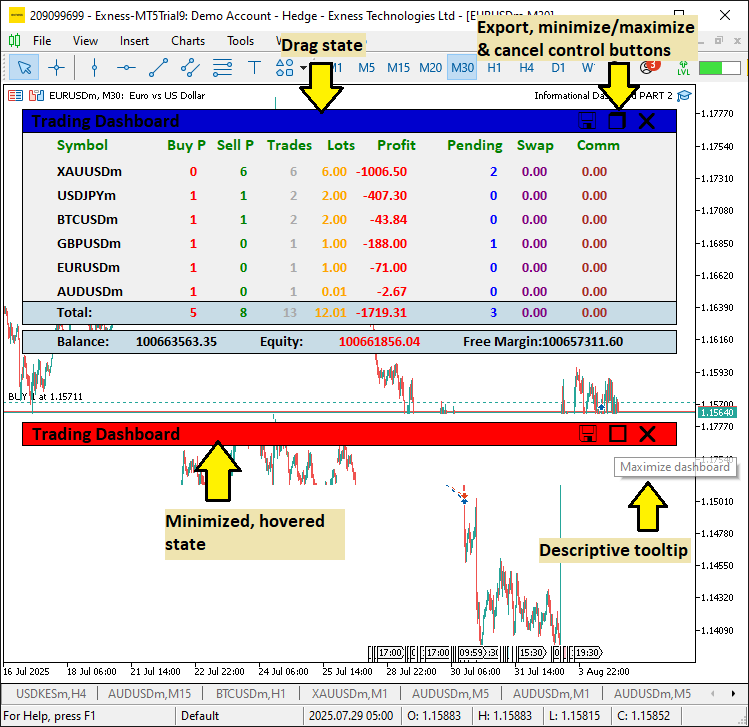
我们将对第七部分的信息仪表盘进行升级,新增可拖拽与可最小化功能,同时加入交互按钮以及鼠标悬停效果,让该工具在管理多笔持仓时更加灵活、更便于使用。本次升级具备实际意义:拖拽功能支持将仪表盘移动至图表任意位置,避免分析界面杂乱;最小化选项可以减少屏幕占用;各类交互组件能够提供即时视觉反馈,在节奏快速的交易环境下,整体使用体验得以提升。
为实现以上效果,我们将加入用于拖拽、按钮点击的鼠标事件处理逻辑,保证仪表盘响应灵敏、适配性强,同时不丢失核心的持仓跟踪能力。我们还会在表头位置增设导出功能图标,方便用户快速找到该功能,同时保留键盘快捷键的操作方式。在新增这些增强特性的同时,我们将继续保留可排序表格与实时刷新能力,打造一款日常使用时直观又高效的工具。请先看我们预期实现的效果,之后再进入具体代码实现环节!
在MQL5中的实现
要在MQL5中对程序做功能增强,我们需要定义新的仪表盘组件,一般共包含4个组件。
//--- existing components

#define HEADER_PANEL_TEXT   "HEADER_PANEL_TEXT"//--- Header title label
#define CLOSE_BUTTON        "BUTTON_CLOSE"     //--- Close button identifier
#define EXPORT_BUTTON       "BUTTON_EXPORT"    //--- Export button identifier
#define TOGGLE_BUTTON       "BUTTON_TOGGLE"    //--- Toggle (minimize/maximize) button

//--- the rest of the components
我们首先新增宏定义(defines),用于支撑信息仪表盘的各项增强功能,为交互式用户界面(UI)元素设置标识名称。将"HEADER_PANEL_TEXT"定义为"HEADER_PANEL_TEXT",用作仪表盘的标题文本标签,实现清晰的可视化表头。将"CLOSE_BUTTON"定义为"BUTTON_CLOSE",为关闭仪表盘的按钮创建对象标识,可将仪表盘从图表上移除。将"EXPORT_BUTTON"定义为"BUTTON_EXPORT",设置用于触发CSV数据导出的按钮,提升数据获取便利性。"TOGGLE_BUTTON"定义为"BUTTON_TOGGLE",实现仪表盘最小化或最大化切换按钮,优化屏幕空间管理。
以上定义为新增交互组件提供规整统一的命名,为可拖拽和最小化的升级功能提供支持。接下来要做的是修改表头颜色层次,将其替换为MQL5中明确定义的颜色常量。
// Dashboard settings
struct DashboardSettings {                     //--- Structure for dashboard settings
   int      panel_x;                           //--- X-coordinate of panel
   int      panel_y;                           //--- Y-coordinate of panel
   int      row_height;                        //--- Height of each row
   int      font_size;                         //--- Font size for labels
   string   font;                              //--- Font type for labels
   color    bg_color;                          //--- Background color of main panel
   color    border_color;                      //--- Border color of panels
   color    header_color;                      //--- Default color for header text
   color    text_color;                        //--- Default color for text
   color    section_bg_color;                  //--- Background color for header/footer panels
   int      zorder_panel;                      //--- Z-order for main panel
   int      zorder_subpanel;                   //--- Z-order for sub-panels
   int      zorder_labels;                     //--- Z-order for labels
   int      label_y_offset;                    //--- Y-offset for label positioning
   int      label_x_offset;                    //--- X-offset for label positioning
   int      header_x_distances[9];             //--- X-distances for header labels (9 columns)
   color    header_shades[12];                 //--- Array of header color shades for glow effect
} settings = {                                 //--- Initialize settings with default values
   20,                                         //--- panel_x
   20,                                         //--- panel_y
   24,                                         //--- row_height
   11,                                         //--- font_size
   "Calibri Bold",                             //--- font
   C'240,240,240',                             //--- bg_color (light gray)
   clrBlack,                                   //--- border_color
   C'0,50,70',                                 //--- header_color (dark teal)
   clrBlack,                                   //--- text_color
   C'200,220,230',                             //--- section_bg_color (light blue-gray)
   100,                                        //--- zorder_panel
   101,                                        //--- zorder_subpanel
   102,                                        //--- zorder_labels
   3,                                          //--- label_y_offset
   25,                                         //--- label_x_offset
   {10, 120, 170, 220, 280, 330, 400, 470, 530}, //--- header_x_distances
   {clrBlack, clrRed, clrBlue, clrGreen, clrMagenta, clrDarkOrchid,
    clrDeepPink, clrSkyBlue, clrDodgerBlue, clrDarkViolet, clrOrange, clrCrimson} //--- header_shades
};

//--- the previous one was as below
/*
   //---
   {C'0,0,0', C'255,0,0', C'0,255,0', C'0,0,255', C'255,255,0', C'0,255,255',
    C'255,0,255', C'255,255,255', C'255,0,255', C'0,255,255', C'255,255,0', C'0,0,255'}
*/
此处我们对"DashboardSettings"结构体进行增强,更新"header_shades"数组,优化表头发光特效,带来更好的视觉效果。此前,"header_shades"混合使用基础RGB 颜色(例如纯黑、红、绿、蓝、黄、青色、品红、白色)完成发光颜色循环。现在我们为"header_shades"精心选定12种颜色:"clrBlack"、"clrRed"、"clrBlue"、"clrGreen"、"clrMagenta"、"clrDarkOrchid"、"clrDeepPink"、"clrSkyBlue"、"clrDodgerBlue"、"clrDarkViolet"、"clrOrange"和"clrCrimson"。
本次升级将提供一套更加丰富多变的配色方案,循环切换鲜亮且层次细腻的色调。在保留表头高亮发光特效功能的同时,提升仪表盘的视觉美观度。最后,我们新增更多全局变量,用于实现动态仪表盘,处理鼠标悬停状态与拖拽状态。
//--- added global variables


int          prev_num_symbols = 0;             //--- Previous number of active symbols
bool         panel_is_visible = true;          //--- Flag to control panel visibility
bool         panel_minimized = false;          //--- Flag to control minimized state
bool         panel_dragging = false;           //--- Flag to track if panel is being dragged
int          panel_drag_x = 0;                 //--- Mouse x-coordinate when drag starts
int          panel_drag_y = 0;                 //--- Mouse y-coordinate when drag starts
int          panel_start_x = 0;                //--- Panel x-coordinate when drag starts
int          panel_start_y = 0;                //--- Panel y-coordinate when drag starts
int          prev_mouse_state = 0;             //--- Previous mouse state
bool         header_hovered = false;           //--- Header hover state
bool         toggle_hovered = false;           //--- Toggle button hover state
bool         close_hovered = false;            //--- Close button hover state
bool         export_hovered = false;           //--- Export button hover state
int          last_mouse_x = 0;                 //--- Last mouse x position
int          last_mouse_y = 0;                 //--- Last mouse y position
bool         prev_header_hovered = false;      //--- Previous header hover state
bool         prev_toggle_hovered = false;      //--- Previous toggle hover state
bool         prev_close_hovered = false;       //--- Previous close button hover state
bool         prev_export_hovered = false;      //--- Previous export button hover state
最后,我们引入更多全局变量,用以支持增强交互能力与拖拽功能。我们定义:"prev_num_symbols"初始值为0,用于记录上一轮有效品种数量,实现面板动态尺寸调整;"panel_is_visible"初始值为true,用于控制仪表盘显示或隐藏;"panel_minimized"初始值为 false,管理面板的最小化状态。为实现拖拽功能,我们新增:"panel_dragging"初始值false,标记拖拽进行状态;"panel_drag_x"和"panel_drag_y"初始值0,保存拖拽开始时刻的鼠标坐标;"panel_start_x"和"panel_start_y"初始值0,保存拖拽开始时刻面板自身的坐标。
将"prev_mouse_state"初始值设置为0,用来监测鼠标点击状态。针对鼠标悬停效果,我们定义:"header_hovered"、"toggle_hovered"、"close_hovered"、"export_hovered"初始值均为false,分别记录表头与各个按钮的鼠标悬停状态;"last_mouse_x"和"last_mouse_y"初始值0,存储鼠标上一次的位置; "prev_header_hovered"、"prev_toggle_hovered"、"prev_close_hovered"、"prev_export_hovered"初始值均为false,用于检测悬停状态是否发生变化。
借助这些变量,我们就可以实现拖拽、最小化、鼠标悬停反馈这类动态UI交互效果。现在变量已经更新完毕,接下来我们同样对函数进行更新,对于对象创建逻辑做标准化处理,这样有助于进一步提高模块化程度。我们从创建标签的函数开始,为其新增工具提示 (tooltip)功能。
//+------------------------------------------------------------------+
//| Creating label object                                            |
//+------------------------------------------------------------------+
bool createLABEL(string objName, string txt, int xD, int yD, color clrTxt, int fontSize, string font, int anchor, string tooltip = "", bool selectable = false) {
   if(!ObjectCreate(0, objName, OBJ_LABEL, 0, 0, 0)) { //--- Creating label object
      Print(__FUNCTION__, ": Failed to create label '", objName, "'. Error code = ", GetLastError()); //--- Logging creation failure
      return(false);                                   //--- Returning failure
   }
   ObjectSetInteger(0, objName, OBJPROP_XDISTANCE, xD);                  //--- Setting x-coordinate
   ObjectSetInteger(0, objName, OBJPROP_YDISTANCE, yD);                  //--- Setting y-coordinate
   ObjectSetInteger(0, objName, OBJPROP_CORNER, CORNER_LEFT_UPPER);      //--- Setting corner alignment
   ObjectSetString(0, objName, OBJPROP_TEXT, txt);                       //--- Setting text content
   ObjectSetInteger(0, objName, OBJPROP_FONTSIZE, fontSize);             //--- Setting font size
   ObjectSetString(0, objName, OBJPROP_FONT, font);                      //--- Setting font type
   ObjectSetInteger(0, objName, OBJPROP_COLOR, clrTxt);                  //--- Setting text color
   ObjectSetInteger(0, objName, OBJPROP_BACK, false);                    //--- Setting to foreground
   ObjectSetInteger(0, objName, OBJPROP_STATE, selectable);              //--- Setting selectable state
   ObjectSetInteger(0, objName, OBJPROP_SELECTABLE, selectable);         //--- Setting selectability
   ObjectSetInteger(0, objName, OBJPROP_SELECTED, false);                //--- Setting not selected
   ObjectSetInteger(0, objName, OBJPROP_ANCHOR, anchor);                 //--- Setting anchor point
   ObjectSetInteger(0, objName, OBJPROP_ZORDER, settings.zorder_labels); //--- Setting z-order


   //--- added this tooltip feature
   ObjectSetString(0, objName, OBJPROP_TOOLTIP, tooltip == "" ? (selectable ? "Click to sort" : "Position data") : tooltip); //--- Setting tooltip text
   //---
   //--- the existing was a hardcoded to this
   // ObjectSetString(0, objName, OBJPROP_TOOLTIP, selectable ? "Click to sort" : "Position data"); //--- Set tooltip
   //---


   ChartRedraw(0);                                    //--- Redrawing chart
   return(true);                                      //--- Returning success
}
针对"createLABEL"函数,我们对tooltip逻辑做优化,使其更加灵活,能够复用于各类UI控件。此前工具提示属于硬编码实现:通过ObjectSetString将属性OBJPROP_TOOLTIP设置固定文本,可点击标签写死为“点击进行排序”,不可点击标签写死为“持仓数据”,自定义能力受限。本次修改新增一个"tooltip"参数,默认值为空字符串;并在"ObjectSetString"设置"OBJPROP_TOOLTIP"属性处使用三元条件判断:如果传入的 `tooltip` 参数为空,可点击标签默认显示 “点击进行排序”,其余标签默认显示 “持仓数据”;如果参数不为空,则直接使用传入的"tooltip"值。该改动可以为按钮类控件设置专属提示文字(例如“最小化仪表盘”或“关闭仪表盘”),同时保留表头、数据标签的默认提示。以此优化用户指引,提升交互的清晰度。
接下来,为了标准化面板创建逻辑,我们将把OnInit事件处理函数中内联式的对象创建调用,替换为独立函数,以此降低后续维护难度。我们采用的实现逻辑如下。
//+------------------------------------------------------------------+
//| Creating rectangle object                                        |
//+------------------------------------------------------------------+
bool createRectangle(string object_name, int x_distance, int y_distance, int x_size, int y_size,
                     color background_color, color border_color = clrBlack) {
   if(!ObjectCreate(0, object_name, OBJ_RECTANGLE_LABEL, 0, 0, 0)) { //--- Creating rectangle object
      Print(__FUNCTION__, ": Failed to create Rectangle: '", object_name, "'. Error code = ", GetLastError()); //--- Logging creation failure
      return(false);                                  //--- Returning failure
   }
   ObjectSetInteger(0, object_name, OBJPROP_XDISTANCE, x_distance);            //--- Setting x-coordinate
   ObjectSetInteger(0, object_name, OBJPROP_YDISTANCE, y_distance);            //--- Setting y-coordinate
   ObjectSetInteger(0, object_name, OBJPROP_XSIZE, x_size);                    //--- Setting width
   ObjectSetInteger(0, object_name, OBJPROP_YSIZE, y_size);                    //--- Setting height
   ObjectSetInteger(0, object_name, OBJPROP_CORNER, CORNER_LEFT_UPPER);        //--- Setting corner alignment
   ObjectSetInteger(0, object_name, OBJPROP_BGCOLOR, background_color);        //--- Setting background color
   ObjectSetInteger(0, object_name, OBJPROP_BORDER_COLOR, border_color);       //--- Setting border color
   ObjectSetInteger(0, object_name, OBJPROP_BORDER_TYPE, BORDER_FLAT);         //--- Setting border type
   ObjectSetInteger(0, object_name, OBJPROP_BACK, false);                      //--- Setting to foreground
   ObjectSetInteger(0, object_name, OBJPROP_ZORDER, settings.zorder_subpanel); //--- Setting z-order
   return(true);                                                               //--- Returning success
}
这里,我们仅需创建布尔返回值类型的"createRectangle"函数,函数的定义结构与前面标签的实现保持一致。相关内容对您而言应该并不陌生,为节省篇幅,我们直接进入下一处更新:对计数函数做小幅修正,改变循环的遍历方向。
//+------------------------------------------------------------------+
//| Counting total positions for a symbol                            |
//+------------------------------------------------------------------+
string countPositionsTotal(string symbol) {
   int totalPositions = 0;                               //--- Initializing position counter
   int count_Total_Pos = PositionsTotal();               //--- Getting total positions
   for(int i = count_Total_Pos - 1; i >= 0; i--) {       //--- Iterating through positions
      ulong ticket = PositionGetTicket(i);               //--- Getting position ticket
      if(ticket > 0 && PositionSelectByTicket(ticket)) { //--- Checking if position selected
         if(PositionGetString(POSITION_SYMBOL) == symbol && (MagicNumber < 0 || PositionGetInteger(POSITION_MAGIC) == MagicNumber)) totalPositions++; //--- Checking symbol and magic
      }
   }
   return IntegerToString(totalPositions);               //--- Returning total as string
}

//+------------------------------------------------------------------+
//| Counting buy or sell positions for a symbol                      |
//+------------------------------------------------------------------+
string countPositions(string symbol, ENUM_POSITION_TYPE pos_type) {
   int totalPositions = 0;                               //--- Initializing position counter
   int count_Total_Pos = PositionsTotal();               //--- Getting total positions
   for(int i = count_Total_Pos - 1; i >= 0; i--) {       //--- Iterating through positions
      ulong ticket = PositionGetTicket(i);               //--- Getting position ticket
      if(ticket > 0 && PositionSelectByTicket(ticket)) { //--- Checking if position selected
         if(PositionGetString(POSITION_SYMBOL) == symbol && PositionGetInteger(POSITION_TYPE) == pos_type && (MagicNumber < 0 || PositionGetInteger(POSITION_MAGIC) == MagicNumber)) { //--- Checking symbol, type, magic
            totalPositions++;                            //--- Incrementing counter
         }
      }
   }
   return IntegerToString(totalPositions);               //--- Returning total as string
}

//+------------------------------------------------------------------+
//| Counting pending orders for a symbol                             |
//+------------------------------------------------------------------+
string countOrders(string symbol) {
   int total = 0;                                        //--- Initializing counter
   int tot = OrdersTotal();                              //--- Getting total orders
   for(int i = tot - 1; i >= 0; i--) {                   //--- Iterating through orders
      ulong ticket = OrderGetTicket(i);                  //--- Getting order ticket
      if(ticket > 0 && OrderSelect(ticket)) {            //--- Checking if order selected
         if(OrderGetString(ORDER_SYMBOL) == symbol && (MagicNumber < 0 || OrderGetInteger(ORDER_MAGIC) == MagicNumber)) total++; //--- Checking symbol and magic
      }
   }
   return IntegerToString(total);                        //--- Returning total as string
}

//+------------------------------------------------------------------+
//| Summing double property for positions of a symbol                |
//+------------------------------------------------------------------+
string sumPositionDouble(string symbol, ENUM_POSITION_PROPERTY_DOUBLE prop) {
   double total = 0.0;                                   //--- Initializing total
   int count_Total_Pos = PositionsTotal();               //--- Getting total positions
   for(int i = count_Total_Pos - 1; i >= 0; i--) {       //--- Iterating through positions
      ulong ticket = PositionGetTicket(i);               //--- Getting position ticket
      if(ticket > 0 && PositionSelectByTicket(ticket)) { //--- Checking if position selected
         if(PositionGetString(POSITION_SYMBOL) == symbol && (MagicNumber < 0 || PositionGetInteger(POSITION_MAGIC) == MagicNumber)) { //--- Checking symbol and magic
            total += PositionGetDouble(prop);            //--- Adding property value
         }
      }
   }
   return DoubleToString(total, 2);                      //--- Returning total as string
}

//+------------------------------------------------------------------+
//| Summing commission for positions of a symbol from history        |
//+------------------------------------------------------------------+
double sumPositionCommission(string symbol) {
   double total_comm = 0.0;                             //--- Initializing total commission
   int pos_total = PositionsTotal();                    //--- Getting total positions
   for(int p = 0; p < pos_total; p++) {                 //--- Iterating through positions
      ulong ticket = PositionGetTicket(p);              //--- Getting position ticket
      if(ticket > 0 && PositionSelectByTicket(ticket)) { //--- Checking if selected
         if(PositionGetString(POSITION_SYMBOL) == symbol && (MagicNumber < 0 || PositionGetInteger(POSITION_MAGIC) == MagicNumber)) { //--- Checking symbol and magic
            long pos_id = PositionGetInteger(POSITION_IDENTIFIER); //--- Getting position ID
            if(HistorySelectByPosition(pos_id)) {       //--- Selecting history by position
               int deals_total = HistoryDealsTotal();   //--- Getting total deals
               for(int d = 0; d < deals_total; d++) {   //--- Iterating through deals
                  ulong deal_ticket = HistoryDealGetTicket(d); //--- Getting deal ticket
                  if(deal_ticket > 0) {                 //--- Checking valid
                     total_comm += HistoryDealGetDouble(deal_ticket, DEAL_COMMISSION); //--- Adding commission
                  }
               }
            }
         }
      }
   }
   return total_comm;                                  //--- Returning total commission
}

//+------------------------------------------------------------------+
//| Collecting active symbols with positions or orders               |
//+------------------------------------------------------------------+
void CollectActiveSymbols() {
   string symbols_temp[];                             //--- Temporary array for symbols
   int added = 0;                                     //--- Counter for added symbols
   // Collecting from positions
   int pos_total = PositionsTotal();                  //--- Getting total positions
   for(int i = pos_total - 1; i >= 0; i--) {          //--- Iterating through positions
      ulong ticket = PositionGetTicket(i);            //--- Getting position ticket
      if(ticket > 0 && PositionSelectByTicket(ticket)) { //--- Checking if position selected
         if(MagicNumber < 0 || PositionGetInteger(POSITION_MAGIC) == MagicNumber) { //--- Checking magic number
            string sym = PositionGetString(POSITION_SYMBOL); //--- Getting symbol
            bool found = false;                       //--- Flag for symbol found
            for(int k = 0; k < added; k++) {          //--- Checking existing symbols
               if(symbols_temp[k] == sym) {           //--- Symbol already added
                  found = true;                       //--- Setting found flag
                  break;                              //--- Exiting loop
               }
            }
            if(!found) {                              //--- If not found
               ArrayResize(symbols_temp, added + 1);  //--- Resizing array
               symbols_temp[added] = sym;             //--- Adding symbol
               added++;                               //--- Incrementing counter
            }
         }
      }
   }
   // Collecting from orders
   int ord_total = OrdersTotal();                     //--- Getting total orders
   for(int i = ord_total - 1; i >= 0; i--) {          //--- Iterating through orders
      ulong ticket = OrderGetTicket(i);               //--- Getting order ticket
      if(ticket > 0 && OrderSelect(ticket)) {         //--- Checking if order selected
         if(MagicNumber < 0 || OrderGetInteger(ORDER_MAGIC) == MagicNumber) { //--- Checking magic number
            string sym = OrderGetString(ORDER_SYMBOL); //--- Getting symbol
            bool found = false;                       //--- Flag for symbol found
            for(int k = 0; k < added; k++) {          //--- Checking existing symbols
               if(symbols_temp[k] == sym) {           //--- Symbol already added
                  found = true;                       //--- Setting found flag
                  break;                              //--- Exiting loop
               }
            }
            if(!found) {                             //--- If not found
               ArrayResize(symbols_temp, added + 1); //--- Resizing array
               symbols_temp[added] = sym;            //--- Adding symbol
               added++;                              //--- Incrementing counter
            }
         }
      }
   }
   // Setting symbol_data
   ArrayResize(symbol_data, added);                   //--- Resizing symbol data array
   for(int i = 0; i < added; i++) {                   //--- Iterating through added symbols
      symbol_data[i].name = symbols_temp[i];          //--- Setting symbol name
      symbol_data[i].buys = 0;                        //--- Initializing buys
      symbol_data[i].sells = 0;                       //--- Initializing sells
      symbol_data[i].trades = 0;                      //--- Initializing trades
      symbol_data[i].lots = 0.0;                      //--- Initializing lots
      symbol_data[i].profit = 0.0;                    //--- Initializing profit
      symbol_data[i].pending = 0;                     //--- Initializing pending
      symbol_data[i].swaps = 0.0;                     //--- Initializing swaps
      symbol_data[i].comm = 0.0;                      //--- Initializing commission
      symbol_data[i].buys_str = "0";                  //--- Initializing buys string
      symbol_data[i].sells_str = "0";                 //--- Initializing sells string
      symbol_data[i].trades_str = "0";                //--- Initializing trades string
      symbol_data[i].lots_str = "0.00";               //--- Initializing lots string
      symbol_data[i].profit_str = "0.00";             //--- Initializing profit string
      symbol_data[i].pending_str = "0";               //--- Initializing pending string
      symbol_data[i].swaps_str = "0.00";              //--- Initializing swaps string
      symbol_data[i].comm_str = "0.00";               //--- Initializing commission string
   }
}
为加固计数函数的逻辑,我们将循环遍历方向由正向递增循环改为反向递减循环,这种方式在MQL5中通常更为安全,当然您也可以选择保留原来的方式。除此之外,在选取订单与持仓之前增加了订单单号校验,避免迭代过程中因无效单号或列表发生改动而产生潜在错误。由于我们需要完整的动态效果,我们把仪表盘的初始化创建逻辑封装到独立函数中,并且拆分为两个函数:一个用于面板最大化状态下的创建,另一个用于面板最小化状态下的创建。
//+------------------------------------------------------------------+
//| Creating full dashboard UI                                       |
//+------------------------------------------------------------------+
void createFullDashboard() {
   CollectActiveSymbols();                            //--- Collecting active symbols
   int num_rows = ArraySize(symbol_data);             //--- Getting number of rows
   int num_columns = ArraySize(headers);              //--- Getting number of columns
   int column_width_sum = 0;                          //--- Initializing column width sum
   for(int i = 0; i < num_columns; i++)               //--- Iterating through columns
      column_width_sum += column_widths[i];           //--- Adding column width
   int panel_width = MathMax(settings.header_x_distances[num_columns - 1] + column_widths[num_columns - 1], column_width_sum) + 20 + settings.label_x_offset; //--- Calculating panel width
   // Creating main panel
   string panel_name = PREFIX + PANEL;                //--- Defining main panel name
   createRectangle(panel_name, settings.panel_x, settings.panel_y, panel_width, (num_rows + 3) * settings.row_height, settings.bg_color, settings.border_color); //--- Creating main panel
   // Creating header panel
   string header_panel = PREFIX + HEADER_PANEL;       //--- Defining header panel name
   createRectangle(header_panel, settings.panel_x, settings.panel_y, panel_width, settings.row_height, settings.section_bg_color, settings.border_color); //--- Creating header panel
   // Creating header title
   createLABEL(PREFIX + HEADER_PANEL_TEXT, "Trading Dashboard", settings.panel_x + 10, settings.panel_y + 8 + settings.label_y_offset, clrBlack, 14, settings.font, ANCHOR_LEFT, "Dashboard Title"); //--- Creating header title
   // Creating export button
   createLABEL(PREFIX + EXPORT_BUTTON, CharToString(60), settings.panel_x + panel_width - 90, settings.panel_y + 12, clrBlack, 18, "Wingdings", ANCHOR_CENTER, "Click to export or press 'E' key to export", true); //--- Creating export button
   // Creating toggle button
   createLABEL(PREFIX + TOGGLE_BUTTON, CharToString('r'), settings.panel_x + panel_width - 60, settings.panel_y + 12, clrBlack, 18, "Wingdings", ANCHOR_CENTER, "Minimize dashboard", true); //--- Creating toggle button
   // Creating close button
   createLABEL(PREFIX + CLOSE_BUTTON, CharToString('r'), settings.panel_x + panel_width - 30, settings.panel_y + 12, clrBlack, 18, "Webdings", ANCHOR_CENTER, "Close dashboard", true); //--- Creating close button
   // Creating headers
   int header_y = settings.panel_y + settings.row_height + 8 + settings.label_y_offset; //--- Calculating header y-coordinate
   for(int i = 0; i < num_columns; i++) {             //--- Iterating through headers
      string header_name = PREFIX + HEADER + IntegerToString(i); //--- Defining header label name
      int header_x = settings.panel_x + settings.header_x_distances[i] + settings.label_x_offset; //--- Calculating header x-coordinate
      createLABEL(header_name, headers[i], header_x, header_y, settings.header_color, 12, settings.font, ANCHOR_LEFT, "Click to sort", true); //--- Creating header label
   }
   // Creating symbol and data labels
   int first_row_y = header_y + settings.row_height;  //--- Calculating first row y-coordinate
   int symbol_x = settings.panel_x + 10 + settings.label_x_offset; //--- Setting symbol x-coordinate
   for(int i = 0; i < num_rows; i++) {                //--- Iterating through rows
      string symbol_name = PREFIX + SYMB + IntegerToString(i); //--- Defining symbol label name
      createLABEL(symbol_name, symbol_data[i].name, symbol_x, first_row_y + i * settings.row_height + settings.label_y_offset, settings.text_color, settings.font_size, settings.font, ANCHOR_LEFT, "Symbol name"); //--- Creating symbol label
      int x_offset = settings.panel_x + 10 + column_widths[0] + settings.label_x_offset; //--- Setting data x-offset
      for(int j = 0; j < num_columns - 1; j++) {      //--- Iterating through data columns
         string data_name = PREFIX + DATA + IntegerToString(i) + "_" + IntegerToString(j); //--- Defining data label name
         color initial_color = data_default_colors[j]; //--- Setting initial color
         string initial_txt = (j <= 2 || j == 5) ? "0" : "0.00"; //--- Setting initial text
         createLABEL(data_name, initial_txt, x_offset, first_row_y + i * settings.row_height + settings.label_y_offset, initial_color, settings.font_size, settings.font, ANCHOR_RIGHT, "Data value"); //--- Creating data label
         x_offset += column_widths[j + 1];            //--- Updating x-offset
      }
   }
   // Creating footer panel
   int footer_y = settings.panel_y + (num_rows + 3) * settings.row_height - settings.row_height; //--- Calculating footer y-coordinate
   string footer_panel = PREFIX + FOOTER_PANEL;       //--- Defining footer panel name
   createRectangle(footer_panel, settings.panel_x, footer_y, panel_width, settings.row_height, settings.section_bg_color, settings.border_color); //--- Creating footer panel
   // Creating footer text and data
   int footer_text_x = settings.panel_x + 10 + settings.label_x_offset; //--- Setting footer text x-coordinate
   createLABEL(PREFIX + FOOTER_TEXT, "Total:", footer_text_x, footer_y + 8 + settings.label_y_offset, settings.text_color, settings.font_size, settings.font, ANCHOR_LEFT, "Totals"); //--- Creating footer text label
   int x_offset = settings.panel_x + 10 + column_widths[0] + settings.label_x_offset; //--- Setting footer data x-offset
   for(int j = 0; j < num_columns - 1; j++) {         //--- Iterating through footer data
      string footer_data_name = PREFIX + FOOTER_DATA + IntegerToString(j); //--- Defining footer data label name
      color footer_color = data_default_colors[j];    //--- Setting footer data color
      string initial_txt = (j <= 2 || j == 5) ? "0" : "0.00"; //--- Setting initial text
      createLABEL(footer_data_name, initial_txt, x_offset, footer_y + 8 + settings.label_y_offset, footer_color, settings.font_size, settings.font, ANCHOR_RIGHT, "Total value"); //--- Creating footer data label
      x_offset += column_widths[j + 1];               //--- Updating x-offset
   }
   // Creating account panel
   int account_panel_y = footer_y + settings.row_height + 5; //--- Calculating account panel y-coordinate
   string account_panel_name = PREFIX + ACCOUNT_PANEL; //--- Defining account panel name
   createRectangle(account_panel_name, settings.panel_x, account_panel_y, panel_width, settings.row_height, settings.section_bg_color, settings.border_color); //--- Creating account panel
   // Creating account text and data labels
   int acc_x = settings.panel_x + 10 + settings.label_x_offset; //--- Setting account label x-coordinate
   int acc_data_offset = 160;                         //--- Setting data offset
   int acc_spacing = (panel_width - 45) / ArraySize(account_items); //--- Calculating spacing
   for(int k = 0; k < ArraySize(account_items); k++) { //--- Iterating through account items
      string acc_text_name = PREFIX + ACC_TEXT + IntegerToString(k); //--- Defining account text label name
      int text_x = acc_x + k * acc_spacing;          //--- Calculating text x-coordinate
      createLABEL(acc_text_name, account_items[k] + ":", text_x, account_panel_y + 8 + settings.label_y_offset, settings.text_color, settings.font_size, settings.font, ANCHOR_LEFT, "Account info"); //--- Creating account text label
      string acc_data_name = PREFIX + ACC_DATA + IntegerToString(k); //--- Defining account data label name
      int data_x = text_x + acc_data_offset;         //--- Calculating data x-coordinate
      createLABEL(acc_data_name, "0.00", data_x, account_panel_y + 8 + settings.label_y_offset, settings.text_color, settings.font_size, settings.font, ANCHOR_RIGHT, "Account value"); //--- Creating account data label
   }
   ChartRedraw(0);                                    //--- Redrawing chart
}

//+------------------------------------------------------------------+
//| Creating minimized dashboard UI                                  |
//+------------------------------------------------------------------+
void createMinimizedDashboard() {
   int num_columns = ArraySize(headers);              //--- Getting number of columns
   int column_width_sum = 0;                          //--- Initializing column width sum
   for(int i = 0; i < num_columns; i++)               //--- Iterating through columns
      column_width_sum += column_widths[i];           //--- Adding column width
   int panel_width = MathMax(settings.header_x_distances[num_columns - 1] + column_widths[num_columns - 1], column_width_sum) + 20 + settings.label_x_offset; //--- Calculating panel width
   // Creating header panel
   createRectangle(PREFIX + HEADER_PANEL, settings.panel_x, settings.panel_y, panel_width, settings.row_height, settings.section_bg_color, settings.border_color); //--- Creating header panel
   // Creating header title
   createLABEL(PREFIX + HEADER_PANEL_TEXT, "Trading Dashboard", settings.panel_x + 10, settings.panel_y + 8 + settings.label_y_offset, clrBlack, 14, settings.font, ANCHOR_LEFT, "Dashboard Title"); //--- Creating header title
   // Creating export button
   createLABEL(PREFIX + EXPORT_BUTTON, CharToString(60), settings.panel_x + panel_width - 90, settings.panel_y + 12, clrBlack, 18, "Wingdings", ANCHOR_CENTER, "Click to export or press 'E' key to export", true); //--- Creating export button
   // Creating toggle button (maximize)
   createLABEL(PREFIX + TOGGLE_BUTTON, CharToString('o'), settings.panel_x + panel_width - 60, settings.panel_y + 12, clrBlack, 18, "Wingdings", ANCHOR_CENTER, "Maximize dashboard", true); //--- Creating toggle button
   // Creating close button
   createLABEL(PREFIX + CLOSE_BUTTON, CharToString('r'), settings.panel_x + panel_width - 30, settings.panel_y + 12, clrBlack, 18, "Webdings", ANCHOR_CENTER, "Close dashboard", true); //--- Creating close button
   ChartRedraw(0);                                    //--- Redrawing chart
}

//+------------------------------------------------------------------+
//| Deleting all dashboard objects                                   |
//+------------------------------------------------------------------+
void deleteAllObjects() {
   ObjectsDeleteAll(0, PREFIX, -1, -1);               //--- Deleting all objects with prefix
}
我们实现"createFullDashboard"、"createMinimizedDashboard"和"deleteAllObjects"这三个函数,用于管理用户界面,分别支持完整视图、最小化视图以及各类交互控件。在"createFullDashboard"函数内部,调用"CollectActiveSymbols"填充"symbol_data"数组;借助ArraySize计算出行数"num_rows"与列数"num_columns";再结合"column_widths"和"settings.header_x_distances"计算得到面板宽度"panel_width"。通过"createRectangle"创建主面板,对象名称为"PREFIX + PANEL";创建表头面板,对象名称为"PREFIX + HEADER_PANEL";调用"createLABEL"创建表头标题,对象名称为"PREFIX + HEADER_PANEL_TEXT",标题文本为 “Trading Dashboard(交易仪表盘)”。
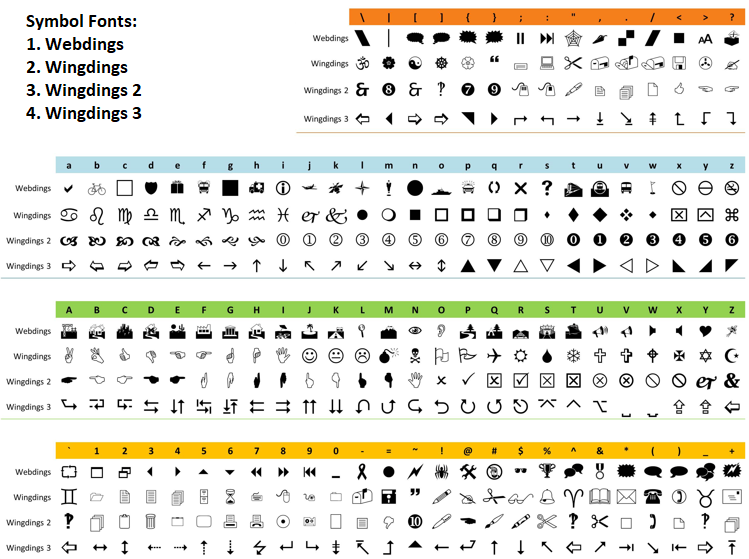
我们调用"createLABEL"函数创建按钮:"PREFIX + EXPORT_BUTTON"(Wingdings字体,字符代码60)、"PREFIX + TOGGLE_BUTTON"(Wingdings 字体,字符r,用于最小化)和"PREFIX + CLOSE_BUTTON"(Webdings字体,字符r)。全部按钮均设置专属工具提示,同时开启可点击属性(selectable = true)。图标样式可由您自行选择。下面给出一套可直接使用的字体精简示例,只需使用正确的符号与字符即可。
接下来,我们在计算得出的坐标位置创建表头标签集合"headers";创建品种标签,内容取自"symbol_data[i].name";创建带初始值的数据标签;随后创建页脚面板"PREFIX + FOOTER_PANEL"、页脚文本“Total:”以及页脚数据标签;再创建账户面板(对象名"PREFIX + ACCOUNT_PANEL"),并为"account_items"创建各项账户信息标签。以上全部通过"createRectangle"与"createLABEL"完成,配置合适的坐标与颜色,最后调用ChartRedraw函数刷新图表。
在"createMinimizedDashboard"函数中,构建精简界面:仅保留表头面板,通过"createRectangle"创建"PREFIX + HEADER_PANEL";调用"createLABEL"生成"PREFIX + HEADER_PANEL_TEXT";同时创建导出按钮(Wingdings 字体,字符代码60)、切换按钮(Wingdings字体,字符o,用于最大化)、关闭按钮(Webdings字体,字符r),最大限度节省屏幕占用,完成后执行重绘。
"deleteAllObjects"函数借助ObjectsDeleteAll,配合对象名前缀"PREFIX",删除全部图表上所有类型的仪表盘相关对象,保证界面更新或者关闭时环境干净无残留。以上函数使得仪表盘可以灵活在完整模式、最小化模式之间切换,同时支持拖拽、面板状态切换等用户交互。现在,我们就使用这套动态函数,对仪表盘主逻辑函数进行更新。
//+------------------------------------------------------------------+
//| Updating dashboard data and visuals                              |
//+------------------------------------------------------------------+
void UpdateDashboard() {
   bool needs_redraw = false;                //--- Initializing redraw flag
   CollectActiveSymbols();                   //--- Collecting active symbols
   int current_num = ArraySize(symbol_data); //--- Getting current number of symbols
   if(current_num != prev_num_symbols) {     //--- Checking if symbol count changed
      deleteAllObjects();                    //--- Deleting all objects
      if(panel_minimized) {                  //--- Checking if minimized
         createMinimizedDashboard();         //--- Creating minimized dashboard
      } else {
         createFullDashboard();              //--- Creating full dashboard
      }
      prev_num_symbols = current_num;        //--- Updating previous symbol count
      needs_redraw = true;                   //--- Setting redraw flag
   }
   if(!panel_is_visible || panel_minimized) return; //--- Exiting if not visible or minimized
   // Resetting totals
   totalBuys = 0;     //--- Resetting total buys
   totalSells = 0;    //--- Resetting total sells
   totalTrades = 0;   //--- Resetting total trades
   totalLots = 0.0;   //--- Resetting total lots
   totalProfit = 0.0; //--- Resetting total profit
   totalPending = 0;  //--- Resetting total pending
   totalSwap = 0.0;   //--- Resetting total swap
   totalComm = 0.0;   //--- Resetting total commission
   // Calculating symbol data and totals
   for(int i = 0; i < current_num; i++) {           //--- Iterating through symbols
      string symbol = symbol_data[i].name;          //--- Getting symbol name
      for(int j = 0; j < 8; j++) {                  //--- Iterating through data columns
         string value = "";                         //--- Initializing value
         color data_color = data_default_colors[j]; //--- Setting default color
         double dval = 0.0;                         //--- Initializing double value
         int ival = 0;                              //--- Initializing integer value
         switch(j) {                                //--- Handling data type
            case 0:                                 // Buy positions
               value = countPositions(symbol, POSITION_TYPE_BUY); //--- Getting buy positions
               ival = (int)StringToInteger(value);  //--- Converting to integer
               if(value != symbol_data[i].buys_str) { //--- Checking if changed
                  symbol_data[i].buys_str = value;  //--- Updating buys string
                  symbol_data[i].buys = ival;       //--- Updating buys count
               }
               totalBuys += ival;                   //--- Adding to total buys
               break;
            case 1:                                 // Sell positions
               value = countPositions(symbol, POSITION_TYPE_SELL); //--- Getting sell positions
               ival = (int)StringToInteger(value);  //--- Converting to integer
               if(value != symbol_data[i].sells_str) { //--- Checking if changed
                  symbol_data[i].sells_str = value; //--- Updating sells string
                  symbol_data[i].sells = ival;      //--- Updating sells count
               }
               totalSells += ival; //--- Adding to total sells
               break;
            case 2: // Total trades
               value = countPositionsTotal(symbol); //--- Getting total trades
               ival = (int)StringToInteger(value);  //--- Converting to integer
               if(value != symbol_data[i].trades_str) { //--- Checking if changed
                  symbol_data[i].trades_str = value; //--- Updating trades string
                  symbol_data[i].trades = ival;     //--- Updating trades count
               }
               totalTrades += ival;                 //--- Adding to total trades
               break;
            case 3: // Lots
               value = sumPositionDouble(symbol, POSITION_VOLUME); //--- Getting total lots
               dval = StringToDouble(value);        //--- Converting to double
               if(value != symbol_data[i].lots_str) { //--- Checking if changed
                  symbol_data[i].lots_str = value; //--- Updating lots string
                  symbol_data[i].lots = dval;      //--- Updating lots value
               }
               totalLots += dval;                  //--- Adding to total lots
               break;
            case 4: // Profit
               value = sumPositionDouble(symbol, POSITION_PROFIT); //--- Getting total profit
               dval = StringToDouble(value);      //--- Converting to double
               data_color = (dval > 0) ? clrGreen : (dval < 0) ? clrRed : clrGray; //--- Setting color based on value
               if(value != symbol_data[i].profit_str) { //--- Checking if changed
                  symbol_data[i].profit_str = value; //--- Updating profit string
                  symbol_data[i].profit = dval;  //--- Updating profit value
               }
               totalProfit += dval;              //--- Adding to total profit
               break;
            case 5: // Pending
               value = countOrders(symbol);      //--- Getting pending orders
               ival = (int)StringToInteger(value); //--- Converting to integer
               if(value != symbol_data[i].pending_str) { //--- Checking if changed
                  symbol_data[i].pending_str = value; //--- Updating pending string
                  symbol_data[i].pending = ival; //--- Updating pending count
               }
               totalPending += ival;             //--- Adding to total pending
               break;
            case 6: // Swap
               value = sumPositionDouble(symbol, POSITION_SWAP); //--- Getting total swap
               dval = StringToDouble(value);     //--- Converting to double
               data_color = (dval > 0) ? clrGreen : (dval < 0) ? clrRed : clrPurple; //--- Setting color based on value
               if(value != symbol_data[i].swaps_str) { //--- Checking if changed
                  symbol_data[i].swaps_str = value;    //--- Updating swap string
                  symbol_data[i].swaps = dval;  //--- Updating swap value
               }
               totalSwap += dval; //--- Adding to total swap
               break;
            case 7: // Comm
               dval = sumPositionCommission(symbol); //--- Getting total commission
               value = DoubleToString(dval, 2);      //--- Formatting commission
               data_color = (dval > 0) ? clrGreen : (dval < 0) ? clrRed : clrBrown; //--- Setting color based on value
               if(value != symbol_data[i].comm_str) { //--- Checking if changed
                  symbol_data[i].comm_str = value;   //--- Updating commission string
                  symbol_data[i].comm = dval;        //--- Updating commission value
               }
               totalComm += dval;                    //--- Adding to total commission
               break;
         }
      }
   }
   // Sort after calculating values
   SortDashboard(); //--- Sorting dashboard data
   // Update header breathing effect
   glow_counter += MathMax(UpdateIntervalMs, 10); //--- Incrementing glow counter
   if(glow_counter >= GLOW_INTERVAL_MS) { //--- Checking if glow interval reached
      if(glow_direction) { //--- Checking if glowing forward
         glow_index++; //--- Incrementing glow index
         if(glow_index >= ArraySize(settings.header_shades) - 1) //--- Checking if at end
            glow_direction = false; //--- Reversing glow direction
      } else { //--- Glow backward
         glow_index--; //--- Decrementing glow index
         if(glow_index <= 0) //--- Checking if at start
            glow_direction = true; //--- Reversing glow direction
      }
      glow_counter = 0; //--- Resetting glow counter
   }
   color header_shade = settings.header_shades[glow_index]; //--- Getting current header shade
   for(int i = 0; i < ArraySize(headers); i++) { //--- Iterating through headers
      string header_name = PREFIX + HEADER + IntegerToString(i); //--- Defining header name
      ObjectSetInteger(0, header_name, OBJPROP_COLOR, header_shade); //--- Updating header color
      needs_redraw = true; //--- Setting redraw flag
   }
   // Update symbol and data labels
   bool labels_updated = false; //--- Initializing label update flag
   for(int i = 0; i < current_num; i++) { //--- Iterating through symbols
      string symbol = symbol_data[i].name; //--- Getting symbol name
      string symb_name = PREFIX + SYMB + IntegerToString(i); //--- Defining symbol label name
      string current_symb_txt = ObjectGetString(0, symb_name, OBJPROP_TEXT); //--- Getting current symbol text
      if(current_symb_txt != symbol) { //--- Checking if symbol changed
         ObjectSetString(0, symb_name, OBJPROP_TEXT, symbol); //--- Updating symbol text
         labels_updated = true; //--- Setting label updated flag
      }
      for(int j = 0; j < 8; j++) { //--- Iterating through data columns
         string data_name = PREFIX + DATA + IntegerToString(i) + "_" + IntegerToString(j); //--- Defining data label name
         string value; //--- Initializing value
         color data_color = data_default_colors[j]; //--- Setting default color
         switch(j) { //--- Handling data type
            case 0: //--- Buy positions
               value = symbol_data[i].buys_str; //--- Getting buys string
               data_color = clrRed; //--- Setting color to red
               break;
            case 1: //--- Sell positions
               value = symbol_data[i].sells_str; //--- Getting sells string
               data_color = clrGreen; //--- Setting color to green
               break;
            case 2: // Total trades
               value = symbol_data[i].trades_str;
               data_color = clrDarkGray;
               break;
            case 3: //--- Lots
               value = symbol_data[i].lots_str; //--- Getting lots string
               data_color = clrOrange; //--- Setting color to orange
               break;
            case 4: //--- Profit
               value = symbol_data[i].profit_str; //--- Getting profit string
               data_color = (symbol_data[i].profit > 0) ? clrGreen : (symbol_data[i].profit < 0) ? clrRed : clrGray; //--- Setting color based on profit
               break;
            case 5: //--- Pending
               value = symbol_data[i].pending_str; //--- Getting pending string
               data_color = clrBlue; //--- Setting color to blue
               break;
            case 6: //--- Swap
               value = symbol_data[i].swaps_str; //--- Getting swap string
               data_color = (symbol_data[i].swaps > 0) ? clrGreen : (symbol_data[i].swaps < 0) ? clrRed : clrPurple; //--- Setting color based on swap
               break;
            case 7: //--- Comm
               value = symbol_data[i].comm_str; //--- Getting commission string
               data_color = (symbol_data[i].comm > 0) ? clrGreen : (symbol_data[i].comm < 0) ? clrRed : clrBrown; //--- Setting color based on commission
               break;
         }
         if(updateLABEL(data_name, value, data_color)) labels_updated = true; //--- Updating label if changed
      }
   }
   if(labels_updated) needs_redraw = true; //--- Setting redraw flag if labels updated
   // Updating totals
   string new_total_buys = IntegerToString(totalBuys); //--- Formatting total buys
   if(new_total_buys != total_buys_str) { //--- Checking if changed
      total_buys_str = new_total_buys; //--- Updating buys string
      if(updateLABEL(PREFIX + FOOTER_DATA + "0", new_total_buys, clrRed)) needs_redraw = true; //--- Updating label
   }
   string new_total_sells = IntegerToString(totalSells); //--- Formatting total sells
   if(new_total_sells != total_sells_str) { //--- Checking if changed
      total_sells_str = new_total_sells; //--- Updating sells string
      if(updateLABEL(PREFIX + FOOTER_DATA + "1", new_total_sells, clrGreen)) needs_redraw = true; //--- Updating label
   }
   string new_total_trades = IntegerToString(totalTrades); //--- Formatting total trades
   if(new_total_trades != total_trades_str) { //--- Checking if changed
      total_trades_str = new_total_trades; //--- Updating trades string
      if(updateLABEL(PREFIX + FOOTER_DATA + "2", new_total_trades, clrDarkGray)) needs_redraw = true; //--- Updating label
   }
   string new_total_lots = DoubleToString(totalLots, 2); //--- Formatting total lots
   if(new_total_lots != total_lots_str) { //--- Checking if changed
      total_lots_str = new_total_lots; //--- Updating lots string
      if(updateLABEL(PREFIX + FOOTER_DATA + "3", new_total_lots, clrOrange)) needs_redraw = true; //--- Updating label
   }
   string new_total_profit = DoubleToString(totalProfit, 2); //--- Formatting total profit
   color total_profit_color = (totalProfit > 0) ? clrGreen : (totalProfit < 0) ? clrRed : clrGray; //--- Setting color based on profit
   if(new_total_profit != total_profit_str) { //--- Checking if changed
      total_profit_str = new_total_profit; //--- Updating profit string
      if(updateLABEL(PREFIX + FOOTER_DATA + "4", new_total_profit, total_profit_color)) needs_redraw = true; //--- Updating label
   }
   string new_total_pending = IntegerToString(totalPending); //--- Formatting total pending
   if(new_total_pending != total_pending_str) { //--- Checking if changed
      total_pending_str = new_total_pending; //--- Updating pending string
      if(updateLABEL(PREFIX + FOOTER_DATA + "5", new_total_pending, clrBlue)) needs_redraw = true; //--- Updating label
   }
   string new_total_swap = DoubleToString(totalSwap, 2); //--- Formatting total swap
   color total_swap_color = (totalSwap > 0) ? clrGreen : (totalSwap < 0) ? clrRed : clrPurple; //--- Setting color based on swap
   if(new_total_swap != total_swap_str) { //--- Checking if changed
      total_swap_str = new_total_swap; //--- Updating swap string
      if(updateLABEL(PREFIX + FOOTER_DATA + "6", new_total_swap, total_swap_color)) needs_redraw = true; //--- Updating label
   }
   string new_total_comm = DoubleToString(totalComm, 2); //--- Formatting total commission
   color total_comm_color = (totalComm > 0) ? clrGreen : (totalComm < 0) ? clrRed : clrBrown; //--- Setting color based on commission
   if(new_total_comm != total_comm_str) { //--- Checking if changed
      total_comm_str = new_total_comm; //--- Updating commission string
      if(updateLABEL(PREFIX + FOOTER_DATA + "7", new_total_comm, total_comm_color)) needs_redraw = true; //--- Updating label
   }
   // Updating account info
   double balance = AccountInfoDouble(ACCOUNT_BALANCE); //--- Getting account balance
   double equity = AccountInfoDouble(ACCOUNT_EQUITY); //--- Getting account equity
   double free_margin = AccountInfoDouble(ACCOUNT_MARGIN_FREE); //--- Getting free margin
   string new_bal = DoubleToString(balance, 2); //--- Formatting balance
   if(new_bal != acc_bal_str) { //--- Checking if changed
      acc_bal_str = new_bal; //--- Updating balance string
      if(updateLABEL(PREFIX + ACC_DATA + "0", new_bal, clrBlack)) needs_redraw = true; //--- Updating label
   }
   string new_eq = DoubleToString(equity, 2); //--- Formatting equity
   color eq_color = (equity > balance) ? clrGreen : (equity < balance) ? clrRed : clrBlack; //--- Setting color based on equity
   if(new_eq != acc_eq_str) { //--- Checking if changed
      acc_eq_str = new_eq; //--- Updating equity string
      if(updateLABEL(PREFIX + ACC_DATA + "1", new_eq, eq_color)) needs_redraw = true; //--- Updating label
   }
   string new_free = DoubleToString(free_margin, 2); //--- Formatting free margin
   if(new_free != acc_free_str) { //--- Checking if changed
      acc_free_str = new_free; //--- Updating free margin string
      if(updateLABEL(PREFIX + ACC_DATA + "2", new_free, clrBlack)) needs_redraw = true; //--- Updating label
   }
   if(needs_redraw) { //--- Checking if redraw needed
      ChartRedraw(0); //--- Redrawing chart
   }
}
在"UpdateDashboard"函数开头加入对"CollectActiveSymbols"的调用,以此保证总计、余额类字段能够始终得到更新。当交易品种数量发生变化时,调用"deleteAllObjects"销毁现有仪表盘,再通过"createFullDashboard"或"createMinimizedDashboard"函数重新构建界面。在数据计算循环内部,补充完善盈利、隔夜利息、手续费的颜色渲染逻辑,该部分此前代码并不完整。文中已经标出所有改动区域,便于识别和阅读。最后,我们可以在初始化环节调用这套业务逻辑,查看本阶段的开发成果。
//+------------------------------------------------------------------+
//| Initializing expert                                              |
//+------------------------------------------------------------------+
int OnInit() {
   createFullDashboard();                             //--- Creating full dashboard
   prev_num_symbols = ArraySize(symbol_data);         //--- Setting initial symbol count
   ChartSetInteger(0, CHART_EVENT_MOUSE_MOVE, true);  //--- Enabling mouse move events
   EventSetMillisecondTimer(MathMax(UpdateIntervalMs, 10)); //--- Setting timer with minimum 10ms
   UpdateDashboard();                                 //--- Updating dashboard
   return(INIT_SUCCEEDED);                            //--- Returning success
}

//+------------------------------------------------------------------+
//| Deinitializing expert                                            |
//+------------------------------------------------------------------+
void OnDeinit(const int reason) {
   deleteAllObjects();                                //--- Deleting all objects
   ChartSetInteger(0, CHART_EVENT_MOUSE_MOVE, false); //--- Disabling mouse move events
   EventKillTimer();                                  //--- Stopping timer
}

//+------------------------------------------------------------------+
//| Handling timer for millisecond-based updates                     |
//+------------------------------------------------------------------+
void OnTimer() {
   if(panel_is_visible && !panel_minimized) {         //--- Checking if visible and not minimized
      UpdateDashboard();                              //--- Updating dashboard
   }
}
这里我们实现OnInit、"OnDeinit"和"OnTimer"事件处理器,用于管理仪表盘的生命周期与数据刷新,以此实现交互与动态功能。在"OnInit"函数中:调用"createFullDashboard"创建完整用户界面;使用ArraySize获取"symbol_data"数组的大小并赋值给"prev_num_symbols",记录初始的持仓品种数量;通过ChartSetInteger将CHART_EVENT_MOUSE_MOVE设置为 true,开启鼠标移动事件,用于实现拖拽与鼠标悬停效果;调用 EventSetMillisecondTimer设置毫秒级定时器,定时器周期取"UpdateIntervalMs"与10ms两者中的较大值,用于周期性刷新;调用"UpdateDashboard"填充初始显示数据;最后返回"INIT_SUCCEEDED",代表初始化执行成功。
OnDeinit函数负责资源清理工作:调用"deleteAllObjects" ,依据前缀"PREFIX"删除全部仪表盘相关图面对象;通过"ChartSetInteger"将"CHART_EVENT_MOUSE_MOVE"设置为false,关闭鼠标移动事件;调用 EventKillTimer停止定时器,释放程序资源。
在OnTimer函数中,判断条件:"panel_is_visible"为 true,并且"panel_minimized"为 false;只有仪表盘处于完整显示状态时,才调用"UpdateDashboard"刷新数据。以此保证刷新逻辑高效,面板最小化或隐藏状态下不再执行数据处理。编译后,呈现如下效果:
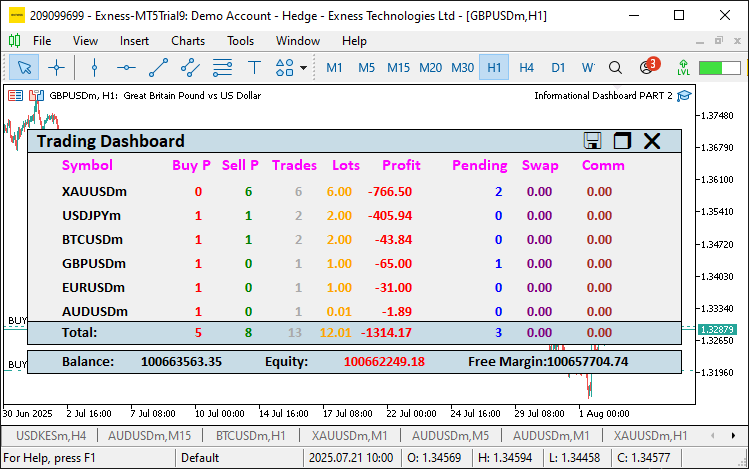
由图可见,各项新功能已经可以正常展示。现在,我们要实现一个函数,在拖拽过程中更新面板坐标位置,以此避免反复重建绘图对象。
//+------------------------------------------------------------------+
//| Updating panel object positions                                  |
//+------------------------------------------------------------------+
void updatePanelPositions() {
   int num_rows = ArraySize(symbol_data);             //--- Getting number of rows
   int num_columns = ArraySize(headers);              //--- Getting number of columns
   int column_width_sum = 0;                          //--- Initializing column width sum
   for(int i = 0; i < num_columns; i++)               //--- Iterating through columns
      column_width_sum += column_widths[i];           //--- Adding column width
   int panel_width = MathMax(settings.header_x_distances[num_columns - 1] + column_widths[num_columns - 1], column_width_sum) + 20 + settings.label_x_offset; //--- Calculating panel width
   // Updating header panel and buttons
   ObjectSetInteger(0, PREFIX + HEADER_PANEL, OBJPROP_XDISTANCE, settings.panel_x); //--- Updating header panel x-coordinate
   ObjectSetInteger(0, PREFIX + HEADER_PANEL, OBJPROP_YDISTANCE, settings.panel_y); //--- Updating header panel y-coordinate
   ObjectSetInteger(0, PREFIX + HEADER_PANEL_TEXT, OBJPROP_XDISTANCE, settings.panel_x + 10); //--- Updating header text x-coordinate
   ObjectSetInteger(0, PREFIX + HEADER_PANEL_TEXT, OBJPROP_YDISTANCE, settings.panel_y + 8 + settings.label_y_offset); //--- Updating header text y-coordinate
   ObjectSetInteger(0, PREFIX + EXPORT_BUTTON, OBJPROP_XDISTANCE, settings.panel_x + panel_width - 90); //--- Updating export button x-coordinate
   ObjectSetInteger(0, PREFIX + EXPORT_BUTTON, OBJPROP_YDISTANCE, settings.panel_y + 12); //--- Updating export button y-coordinate
   ObjectSetInteger(0, PREFIX + TOGGLE_BUTTON, OBJPROP_XDISTANCE, settings.panel_x + panel_width - 60); //--- Updating toggle button x-coordinate
   ObjectSetInteger(0, PREFIX + TOGGLE_BUTTON, OBJPROP_YDISTANCE, settings.panel_y + 12); //--- Updating toggle button y-coordinate
   ObjectSetInteger(0, PREFIX + CLOSE_BUTTON, OBJPROP_XDISTANCE, settings.panel_x + panel_width - 30); //--- Updating close button x-coordinate
   ObjectSetInteger(0, PREFIX + CLOSE_BUTTON, OBJPROP_YDISTANCE, settings.panel_y + 12); //--- Updating close button y-coordinate
   if(!panel_minimized) {                                               //--- Checking if not minimized
      // Updating main panel
      ObjectSetInteger(0, PREFIX + PANEL, OBJPROP_XDISTANCE, settings.panel_x); //--- Updating main panel x-coordinate
      ObjectSetInteger(0, PREFIX + PANEL, OBJPROP_YDISTANCE, settings.panel_y); //--- Updating main panel y-coordinate
      // Updating headers
      int header_y = settings.panel_y + settings.row_height + 8 + settings.label_y_offset; //--- Calculating header y-coordinate
      for(int i = 0; i < num_columns; i++) {                            //--- Iterating through headers
         string header_name = PREFIX + HEADER + IntegerToString(i);     //--- Defining header name
         int header_x = settings.panel_x + settings.header_x_distances[i] + settings.label_x_offset; //--- Calculating header x-coordinate
         ObjectSetInteger(0, header_name, OBJPROP_XDISTANCE, header_x); //--- Updating header x-coordinate
         ObjectSetInteger(0, header_name, OBJPROP_YDISTANCE, header_y); //--- Updating header y-coordinate
      }
      // Updating symbol and data labels
      int first_row_y = header_y + settings.row_height;                 //--- Calculating first row y-coordinate
      int symbol_x = settings.panel_x + 10 + settings.label_x_offset;   //--- Setting symbol x-coordinate
      for(int i = 0; i < num_rows; i++) {                               //--- Iterating through rows
         string symbol_name = PREFIX + SYMB + IntegerToString(i);       //--- Defining symbol label name
         ObjectSetInteger(0, symbol_name, OBJPROP_XDISTANCE, symbol_x); //--- Updating symbol x-coordinate
         ObjectSetInteger(0, symbol_name, OBJPROP_YDISTANCE, first_row_y + i * settings.row_height + settings.label_y_offset); //--- Updating symbol y-coordinate
         int x_offset = settings.panel_x + 10 + column_widths[0] + settings.label_x_offset; //--- Setting data x-offset
         for(int j = 0; j < num_columns - 1; j++) {                      //--- Iterating through data columns
            string data_name = PREFIX + DATA + IntegerToString(i) + "_" + IntegerToString(j); //--- Defining data label name
            ObjectSetInteger(0, data_name, OBJPROP_XDISTANCE, x_offset); //--- Updating data x-coordinate
            ObjectSetInteger(0, data_name, OBJPROP_YDISTANCE, first_row_y + i * settings.row_height + settings.label_y_offset); //--- Updating data y-coordinate
            x_offset += column_widths[j + 1];                            //--- Updating x-offset
         }
      }
      // Updating footer panel and labels
      int footer_y = settings.panel_y + (num_rows + 3) * settings.row_height - settings.row_height; //--- Calculating footer y-coordinate
      ObjectSetInteger(0, PREFIX + FOOTER_PANEL, OBJPROP_XDISTANCE, settings.panel_x); //--- Updating footer panel x-coordinate
      ObjectSetInteger(0, PREFIX + FOOTER_PANEL, OBJPROP_YDISTANCE, footer_y); //--- Updating footer panel y-coordinate
      ObjectSetInteger(0, PREFIX + FOOTER_TEXT, OBJPROP_XDISTANCE, settings.panel_x + 10 + settings.label_x_offset); //--- Updating footer text x-coordinate
      ObjectSetInteger(0, PREFIX + FOOTER_TEXT, OBJPROP_YDISTANCE, footer_y + 8 + settings.label_y_offset); //--- Updating footer text y-coordinate
      int x_offset = settings.panel_x + 10 + column_widths[0] + settings.label_x_offset; //--- Setting footer data x-offset
      for(int j = 0; j < num_columns - 1; j++) {                        //--- Iterating through footer data
         string footer_data_name = PREFIX + FOOTER_DATA + IntegerToString(j); //--- Defining footer data name
         ObjectSetInteger(0, footer_data_name, OBJPROP_XDISTANCE, x_offset);  //--- Updating footer data x-coordinate
         ObjectSetInteger(0, footer_data_name, OBJPROP_YDISTANCE, footer_y + 8 + settings.label_y_offset); //--- Updating footer data y-coordinate
         x_offset += column_widths[j + 1];                              //--- Updating x-offset
      }
      // Updating account panel and labels
      int account_panel_y = footer_y + settings.row_height + 5;         //--- Calculating account panel y-coordinate
      ObjectSetInteger(0, PREFIX + ACCOUNT_PANEL, OBJPROP_XDISTANCE, settings.panel_x); //--- Updating account panel x-coordinate
      ObjectSetInteger(0, PREFIX + ACCOUNT_PANEL, OBJPROP_YDISTANCE, account_panel_y);  //--- Updating account panel y-coordinate
      int acc_x = settings.panel_x + 10 + settings.label_x_offset;      //--- Setting account label x-coordinate
      int acc_data_offset = 160;                                        //--- Setting data offset
      int acc_spacing = (panel_width - 45) / ArraySize(account_items);  //--- Calculating spacing
      for(int k = 0; k < ArraySize(account_items); k++) { //--- Iterating through account items
         string acc_text_name = PREFIX + ACC_TEXT + IntegerToString(k); //--- Defining account text name
         int text_x = acc_x + k * acc_spacing;                          //--- Calculating text x-coordinate
         ObjectSetInteger(0, acc_text_name, OBJPROP_XDISTANCE, text_x); //--- Updating account text x-coordinate
         ObjectSetInteger(0, acc_text_name, OBJPROP_YDISTANCE, account_panel_y + 8 + settings.label_y_offset); //--- Updating account text y-coordinate
         string acc_data_name = PREFIX + ACC_DATA + IntegerToString(k); //--- Defining account data name
         int data_x = text_x + acc_data_offset;                         //--- Calculating data x-coordinate
         ObjectSetInteger(0, acc_data_name, OBJPROP_XDISTANCE, data_x); //--- Updating account data x-coordinate
         ObjectSetInteger(0, acc_data_name, OBJPROP_YDISTANCE, account_panel_y + 8 + settings.label_y_offset); //--- Updating account data y-coordinate
      }
   }
   ChartRedraw(0);                                    //--- Redrawing chart
}
这里,我们实现"updatePanelPositions"函数,用于实现增强版仪表盘的拖拽功能,保证拖拽操作时全部 UI 组件整体同步移动。通过对"symbol_data"和"headers"使用"ArraySize",计算出行数 "num_rows"和列数"num_columns";对"column_widths"求和,再结合MathMax函数、"settings.header_x_distances"以及边距,计算得到面板宽度 "panel_width"。通过ObjectSetInteger,配合"settings.panel_x"、"settings.panel_y"坐标,为以下对象设置OBJPROP_XDISTANCE和"OBJPROP_YDISTANCE"属性,完成表头面板与按钮的位置更新:"PREFIX + HEADER_PANEL"、"PREFIX + HEADER_PANEL_TEXT"、"PREFIX + EXPORT_BUTTON"、"PREFIX + TOGGLE_BUTTON"和"PREFIX + CLOSE_BUTTON"。
如果"panel_minimized"为false(面板处于完整展开状态):更新主面板"PREFIX + PANEL"的位置;根据"settings.panel_y + settings.row_height + 8 + settings.label_y_offset"计算得到"header_y",更新表头;基于"first_row_y"、"symbol_x",配合经过"column_widths"调整后的"x_offset"更新品种标签与数据标签;根据"num_rows + 3"计算出"footer_y",更新页脚面板以及页脚标签;使用"acc_x"和"acc_spacing"做对齐处理,更新账户面板与账户标签;以上全部位置修改均通过ObjectSetInteger函数完成。我们再调用ChartRedraw刷新显示画面。这套逻辑可以保证拖拽过程中整个仪表盘平滑移动,布局结构不会错乱。接下来我们还需要实现一套逻辑,用来判断鼠标光标是否悬浮在表头或者按钮之上,以此处理鼠标悬停效果。对应的实现逻辑如下。
//+------------------------------------------------------------------+
//| Checking if cursor is inside header or buttons                   |
//+------------------------------------------------------------------+
bool isCursorInHeaderOrButtons(int mouse_x, int mouse_y) {
   int header_x = (int)ObjectGetInteger(0, PREFIX + HEADER_PANEL, OBJPROP_XDISTANCE);  //--- Getting header x-coordinate
   int header_y = (int)ObjectGetInteger(0, PREFIX + HEADER_PANEL, OBJPROP_YDISTANCE);  //--- Getting header y-coordinate
   int header_width = (int)ObjectGetInteger(0, PREFIX + HEADER_PANEL, OBJPROP_XSIZE);  //--- Getting header width
   int header_height = (int)ObjectGetInteger(0, PREFIX + HEADER_PANEL, OBJPROP_YSIZE); //--- Getting header height
   bool in_header = (mouse_x >= header_x && mouse_x <= header_x + header_width &&
                     mouse_y >= header_y && mouse_y <= header_y + header_height);      //--- Checking if in header
   int close_x = (int)ObjectGetInteger(0, PREFIX + CLOSE_BUTTON, OBJPROP_XDISTANCE);   //--- Getting close button x-coordinate
   int close_y = (int)ObjectGetInteger(0, PREFIX + CLOSE_BUTTON, OBJPROP_YDISTANCE);   //--- Getting close button y-coordinate
   int close_width = 20;                              //--- Setting close button width
   int close_height = 20;                             //--- Setting close button height
   bool in_close = (mouse_x >= close_x && mouse_x <= close_x + close_width &&
                    mouse_y >= close_y && mouse_y <= close_y + close_height);          //--- Checking if in close button
   int export_x = (int)ObjectGetInteger(0, PREFIX + EXPORT_BUTTON, OBJPROP_XDISTANCE); //--- Getting export button x-coordinate
   int export_y = (int)ObjectGetInteger(0, PREFIX + EXPORT_BUTTON, OBJPROP_YDISTANCE); //--- Getting export button y-coordinate
   int export_width = 20;                             //--- Setting export button width
   int export_height = 20;                            //--- Setting export button height
   bool in_export = (mouse_x >= export_x && mouse_x <= export_x + export_width &&
                     mouse_y >= export_y && mouse_y <= export_y + export_height);      //--- Checking if in export button
   int toggle_x = (int)ObjectGetInteger(0, PREFIX + TOGGLE_BUTTON, OBJPROP_XDISTANCE); //--- Getting toggle button x-coordinate
   int toggle_y = (int)ObjectGetInteger(0, PREFIX + TOGGLE_BUTTON, OBJPROP_YDISTANCE); //--- Getting toggle button y-coordinate
   int toggle_width = 20;                             //--- Setting toggle button width
   int toggle_height = 20;                            //--- Setting toggle button height
   bool in_toggle = (mouse_x >= toggle_x && mouse_x <= toggle_x + toggle_width &&
                     mouse_y >= toggle_y && mouse_y <= toggle_y + toggle_height);      //--- Checking if in toggle button
   return in_header || in_close || in_export || in_toggle;                             //--- Returning combined check
}
我们实现"isCursorInHeaderOrButtons"函数,用来检测鼠标光标是否落在交互组件之上,以此支撑拖拽与按钮交互逻辑。调用ObjectGetInteger获取表头面板"PREFIX + HEADER_PANEL"的坐标与尺寸:读取属性"OBJPROP_XDISTANCE"、"OBJPROP_YDISTANCE"、"OBJPROP_XSIZE"和"OBJPROP_YSIZE",将结果存入变量"header_x"、"header_y"、"header_width"和"header_height";再通过变量"in_header"判断鼠标坐标("mouse_x"、"mouse_y")是否处于表头的矩形范围内。
用同样方式读取"PREFIX + CLOSE_BUTTON"、"PREFIX + EXPORT_BUTTON"、"PREFIX + TOGGLE_BUTTON"的"OBJPROP_XDISTANCE"和OBJPROP_YDISTANCE坐标;将按钮尺寸"close_width"、 "close_height"、"export_width"、"export_height"、"toggle_width"和"toggle_height"统一设置为20;分别用"in_close"、"in_export"和"in_toggle"判断光标是否落在各个按钮的矩形区域内。使用或运算符(OR)合并条件:光标位于表头,或是落在任意一个按钮内,返回true。完成悬浮区域检测之后,我们就需要根据检测结果更新表头或按钮,实现对应的视觉反馈效果。以下是实现该功能的完整逻辑:
//+------------------------------------------------------------------+
//| Updating button hover states                                     |
//+------------------------------------------------------------------+
void updateButtonHoverStates(int mouse_x, int mouse_y) {
   int close_x = (int)ObjectGetInteger(0, PREFIX + CLOSE_BUTTON, OBJPROP_XDISTANCE);     //--- Getting close button x-coordinate
   int close_y = (int)ObjectGetInteger(0, PREFIX + CLOSE_BUTTON, OBJPROP_YDISTANCE);     //--- Getting close button y-coordinate
   int close_width = 20;                              //--- Setting close button width
   int close_height = 20;                             //--- Setting close button height
   bool is_close_hovered = (mouse_x >= close_x && mouse_x <= close_x + close_width &&
                            mouse_y >= close_y && mouse_y <= close_y + close_height);     //--- Checking if close button hovered
   if(is_close_hovered != prev_close_hovered) {       //--- Checking hover change
      ObjectSetInteger(0, PREFIX + CLOSE_BUTTON, OBJPROP_COLOR, is_close_hovered ? clrRed : clrBlack); //--- Updating close button color
      ObjectSetInteger(0, PREFIX + CLOSE_BUTTON, OBJPROP_BGCOLOR, is_close_hovered ? clrDodgerBlue : clrNONE); //--- Updating close button background
      prev_close_hovered = is_close_hovered;          //--- Updating previous hover state
      ChartRedraw(0);                                 //--- Redrawing chart
   }
   int export_x = (int)ObjectGetInteger(0, PREFIX + EXPORT_BUTTON, OBJPROP_XDISTANCE);    //--- Getting export button x-coordinate
   int export_y = (int)ObjectGetInteger(0, PREFIX + EXPORT_BUTTON, OBJPROP_YDISTANCE);    //--- Getting export button y-coordinate
   int export_width = 20;                             //--- Setting export button width
   int export_height = 20;                            //--- Setting export button height
   bool is_export_hovered = (mouse_x >= export_x && mouse_x <= export_x + export_width &&
                             mouse_y >= export_y && mouse_y <= export_y + export_height); //--- Checking if export button hovered
   if(is_export_hovered != prev_export_hovered) {     //--- Checking hover change
      ObjectSetInteger(0, PREFIX + EXPORT_BUTTON, OBJPROP_COLOR, is_export_hovered ? clrOrange : clrBlack); //--- Updating export button color
      ObjectSetInteger(0, PREFIX + EXPORT_BUTTON, OBJPROP_BGCOLOR, is_export_hovered ? clrDodgerBlue : clrNONE); //--- Updating export button background
      prev_export_hovered = is_export_hovered;        //--- Updating previous hover state
      ChartRedraw(0);                                 //--- Redrawing chart
   }
   int toggle_x = (int)ObjectGetInteger(0, PREFIX + TOGGLE_BUTTON, OBJPROP_XDISTANCE);    //--- Getting toggle button x-coordinate
   int toggle_y = (int)ObjectGetInteger(0, PREFIX + TOGGLE_BUTTON, OBJPROP_YDISTANCE);    //--- Getting toggle button y-coordinate
   int toggle_width = 20;                             //--- Setting toggle button width
   int toggle_height = 20;                            //--- Setting toggle button height
   bool is_toggle_hovered = (mouse_x >= toggle_x && mouse_x <= toggle_x + toggle_width &&
                             mouse_y >= toggle_y && mouse_y <= toggle_y + toggle_height); //--- Checking if toggle button hovered
   if(is_toggle_hovered != prev_toggle_hovered) {     //--- Checking hover change
      ObjectSetInteger(0, PREFIX + TOGGLE_BUTTON, OBJPROP_COLOR, is_toggle_hovered ? clrBlue : clrBlack); //--- Updating toggle button color
      ObjectSetInteger(0, PREFIX + TOGGLE_BUTTON, OBJPROP_BGCOLOR, is_toggle_hovered ? clrDodgerBlue : clrNONE); //--- Updating toggle button background
      prev_toggle_hovered = is_toggle_hovered;        //--- Updating previous hover state
      ChartRedraw(0);                                 //--- Redrawing chart
   }
}

//+------------------------------------------------------------------+
//| Updating header hover state                                      |
//+------------------------------------------------------------------+
void updateHeaderHoverState(int mouse_x, int mouse_y) {
   int header_x = (int)ObjectGetInteger(0, PREFIX + HEADER_PANEL, OBJPROP_XDISTANCE);  //--- Getting header x-coordinate
   int header_y = (int)ObjectGetInteger(0, PREFIX + HEADER_PANEL, OBJPROP_YDISTANCE);  //--- Getting header y-coordinate
   int header_width = (int)ObjectGetInteger(0, PREFIX + HEADER_PANEL, OBJPROP_XSIZE);  //--- Getting header width
   int header_height = (int)ObjectGetInteger(0, PREFIX + HEADER_PANEL, OBJPROP_YSIZE); //--- Getting header height
   int close_x = (int)ObjectGetInteger(0, PREFIX + CLOSE_BUTTON, OBJPROP_XDISTANCE);   //--- Getting close button x-coordinate
   int close_y = (int)ObjectGetInteger(0, PREFIX + CLOSE_BUTTON, OBJPROP_YDISTANCE);   //--- Getting close button y-coordinate
   int close_width = 20;                              //--- Setting close button width
   int close_height = 20;                             //--- Setting close button height
   int export_x = (int)ObjectGetInteger(0, PREFIX + EXPORT_BUTTON, OBJPROP_XDISTANCE); //--- Getting export button x-coordinate
   int export_y = (int)ObjectGetInteger(0, PREFIX + EXPORT_BUTTON, OBJPROP_YDISTANCE); //--- Getting export button y-coordinate
   int export_width = 20;                             //--- Setting export button width
   int export_height = 20;                            //--- Setting export button height
   int toggle_x = (int)ObjectGetInteger(0, PREFIX + TOGGLE_BUTTON, OBJPROP_XDISTANCE); //--- Getting toggle button x-coordinate
   int toggle_y = (int)ObjectGetInteger(0, PREFIX + TOGGLE_BUTTON, OBJPROP_YDISTANCE); //--- Getting toggle button y-coordinate
   int toggle_width = 20;                             //--- Setting toggle button width
   int toggle_height = 20;                            //--- Setting toggle button height
   bool is_header_hovered = (mouse_x >= header_x && mouse_x <= header_x + header_width &&
                             mouse_y >= header_y && mouse_y <= header_y + header_height &&
                             !(mouse_x >= close_x && mouse_x <= close_x + close_width &&
                               mouse_y >= close_y && mouse_y <= close_y + close_height) &&
                             !(mouse_x >= export_x && mouse_x <= export_x + export_width &&
                               mouse_y >= export_y && mouse_y <= export_y + export_height) &&
                             !(mouse_x >= toggle_x && mouse_x <= toggle_x + toggle_width &&
                               mouse_y >= toggle_y && mouse_y <= toggle_y + toggle_height)); //--- Checking if header hovered
   if(is_header_hovered != prev_header_hovered && !panel_dragging) {                         //--- Checking hover change
      ObjectSetInteger(0, PREFIX + HEADER_PANEL, OBJPROP_BGCOLOR, is_header_hovered ? clrRed : settings.section_bg_color); //--- Updating header background
      prev_header_hovered = is_header_hovered;        //--- Updating previous hover state
      ChartRedraw(0);                                 //--- Redrawing chart
   }
   updateButtonHoverStates(mouse_x, mouse_y);         //--- Updating button hover states
}
最后,我们实现"updateButtonHoverStates"和"updateHeaderHoverState"两个函数,为用户交互增加视觉反馈,提升按钮和表头的响应表现。在"updateButtonHoverStates"函数内,我们调用ObjectGetInteger获取"PREFIX + CLOSE_BUTTON"、"PREFIX + EXPORT_BUTTON"、"PREFIX + TOGGLE_BUTTON"的"OBJPROP_XDISTANCE"和"OBJPROP_YDISTANCE"坐标;将按钮尺寸变量"close_width"、"close_height"、"export_width"、"export_height"、"toggle_width"和"toggle_height"全部赋值为 20。
针对关闭按钮,判断鼠标坐标"mouse_x"和"mouse_y"是否落在按钮范围内,得到"is_close_hovered";如果该状态与"prev_close_hovered"(上一帧悬浮状态)不一致,则通过"ObjectSetInteger"更新属性:将"OBJPROP_COLOR"设置为"clrRed"或"clrBlack",并将"OBJPROP_BGCOLOR"设置为"clrDodgerBlue"或"clrNONE";更新"prev_close_hovered"状态标记,调用ChartRedraw函数完成重绘。对导出按钮执行相同的逻辑:悬浮时文字颜色为"clrOrange"或"clrBlack",背景色为"clrDodgerBlue"或"clrNONE",更新"prev_export_hovered"并重绘;对于切换按钮:悬浮时文字颜色为"clrBlue"或"clrBlack",更新"prev_toggle_hovered"并重绘。
在"updateHeaderHoverState"中,我们读取表头面板"PREFIX + HEADER_PANEL"的"header_x"、"header_y"、"header_width"和"header_height",同时读取各个按钮坐标;判断光标落在表头区域、但不在任意按钮区域内,得到"is_header_hovered"。如果"is_header_hovered"与"prev_header_hovered"状态不一致,并且"panel_dragging"(拖拽标记)为false:使用ObjectSetInteger修改"PREFIX + HEADER_PANEL"的"OBJPROP_BGCOLOR",悬浮时设置为"clrRed",常态使用配置项"settings.section_bg_color" ;更新"prev_header_hovered",调用"ChartRedraw",再调用"updateButtonHoverStates"。以上函数实现动态悬浮效果,让交互操作更加直观。为调用所有函数,我们需要扩充OnChartEvent事件处理器,把视觉反馈相关逻辑放置其中。
//+------------------------------------------------------------------+
//| Handling chart events for sorting, export, and UI interactions   |
//+------------------------------------------------------------------+
void OnChartEvent(const int id, const long &lparam, const double &dparam, const string &sparam) {
   if(id == CHARTEVENT_OBJECT_CLICK) {                //--- Handling object click
      if(sparam == PREFIX + CLOSE_BUTTON) {           //--- Checking close button click
         Print("Closing the dashboard");              //--- Logging closing
         PlaySound("alert.wav");                      //--- Playing alert sound
         panel_is_visible = false;                    //--- Setting panel invisible
         deleteAllObjects();                          //--- Deleting all objects
         ChartRedraw(0);                              //--- Redrawing chart
      }
      else if(sparam == PREFIX + EXPORT_BUTTON) {     //--- Checking export button click
         Print("Exporting dashboard to CSV");         //--- Logging exporting
         ExportToCSV();                               //--- Exporting to CSV
         ChartRedraw(0);                              //--- Redrawing chart
      }
      else if(sparam == PREFIX + TOGGLE_BUTTON) {     //--- Checking toggle button click
         deleteAllObjects();                          //--- Deleting all objects
         panel_minimized = !panel_minimized;          //--- Toggling minimized state
         if(panel_minimized) {                        //--- Checking if minimized
            Print("Minimizing the dashboard");        //--- Logging minimizing
            createMinimizedDashboard();               //--- Creating minimized dashboard
         } else {
            Print("Maximizing the dashboard");        //--- Logging maximizing
            createFullDashboard();                    //--- Creating full dashboard
            // Resetting string variables to force update
            total_buys_str = "";                      //--- Resetting buys string
            total_sells_str = "";                     //--- Resetting sells string
            total_trades_str = "";                    //--- Resetting trades string
            total_lots_str = "";                      //--- Resetting lots string
            total_profit_str = "";                    //--- Resetting profit string
            total_pending_str = "";                   //--- Resetting pending string
            total_swap_str = "";                      //--- Resetting swap string
            total_comm_str = "";                      //--- Resetting commission string
            acc_bal_str = "";                         //--- Resetting balance string
            acc_eq_str = "";                          //--- Resetting equity string
            acc_free_str = "";                        //--- Resetting free margin string
            UpdateDashboard();                        //--- Updating dashboard
         }
         prev_header_hovered = false;                 //--- Resetting header hover
         prev_close_hovered = false;                  //--- Resetting close hover
         prev_export_hovered = false;                 //--- Resetting export hover
         prev_toggle_hovered = false;                 //--- Resetting toggle hover
         ObjectSetInteger(0, PREFIX + HEADER_PANEL, OBJPROP_BGCOLOR, settings.section_bg_color); //--- Resetting header background
         ObjectSetInteger(0, PREFIX + CLOSE_BUTTON, OBJPROP_COLOR, clrBlack); //--- Resetting close button color
         ObjectSetInteger(0, PREFIX + CLOSE_BUTTON, OBJPROP_BGCOLOR, clrNONE); //--- Resetting close button background
         ObjectSetInteger(0, PREFIX + EXPORT_BUTTON, OBJPROP_COLOR, clrBlack); //--- Resetting export button color
         ObjectSetInteger(0, PREFIX + EXPORT_BUTTON, OBJPROP_BGCOLOR, clrNONE); //--- Resetting export button background
         ObjectSetInteger(0, PREFIX + TOGGLE_BUTTON, OBJPROP_COLOR, clrBlack); //--- Resetting toggle button color
         ObjectSetInteger(0, PREFIX + TOGGLE_BUTTON, OBJPROP_BGCOLOR, clrNONE); //--- Resetting toggle button background
         ChartRedraw(0);                              //--- Redrawing chart
      }
      else {
         for(int i = 0; i < ArraySize(headers); i++) { //--- Iterating through headers
            if(sparam == PREFIX + HEADER + IntegerToString(i)) { //--- Checking header click
               if(sort_column == i)                   //--- Checking if same column
                  sort_ascending = !sort_ascending;   //--- Toggling sort direction
               else {
                  sort_column = i;                    //--- Setting new sort column
                  sort_ascending = true;              //--- Setting to ascending
               }
               UpdateDashboard();                     //--- Updating dashboard
               break;                                 //--- Exiting loop
            }
         }
      }
   }
   else if(id == CHARTEVENT_KEYDOWN && lparam == 'E') { //--- Handling 'E' key press
      ExportToCSV();                                  //--- Exporting to CSV
   }
   else if(id == CHARTEVENT_MOUSE_MOVE && panel_is_visible) { //--- Handling mouse move
      int mouse_x = (int)lparam;                      //--- Getting mouse x-coordinate
      int mouse_y = (int)dparam;                      //--- Getting mouse y-coordinate
      int mouse_state = (int)sparam;                  //--- Getting mouse state
      if(mouse_x == last_mouse_x && mouse_y == last_mouse_y && !panel_dragging) { //--- Checking if mouse moved
         return;                                      //--- Exiting if no movement
      }
      last_mouse_x = mouse_x;                         //--- Updating last mouse x
      last_mouse_y = mouse_y;                         //--- Updating last mouse y
      updateHeaderHoverState(mouse_x, mouse_y);       //--- Updating header hover state
      int header_x = (int)ObjectGetInteger(0, PREFIX + HEADER_PANEL, OBJPROP_XDISTANCE); //--- Getting header x-coordinate
      int header_y = (int)ObjectGetInteger(0, PREFIX + HEADER_PANEL, OBJPROP_YDISTANCE); //--- Getting header y-coordinate
      int header_width = (int)ObjectGetInteger(0, PREFIX + HEADER_PANEL, OBJPROP_XSIZE); //--- Getting header width
      int header_height = (int)ObjectGetInteger(0, PREFIX + HEADER_PANEL, OBJPROP_YSIZE);//--- Getting header height
      int close_x = (int)ObjectGetInteger(0, PREFIX + CLOSE_BUTTON, OBJPROP_XDISTANCE);  //--- Getting close button x-coordinate
      int close_width = 20;                           //--- Setting close button width
      int export_x = (int)ObjectGetInteger(0, PREFIX + EXPORT_BUTTON, OBJPROP_XDISTANCE);//--- Getting export button x-coordinate
      int export_width = 20;                          //--- Setting export button width
      int toggle_x = (int)ObjectGetInteger(0, PREFIX + TOGGLE_BUTTON, OBJPROP_XDISTANCE);//--- Getting toggle button x-coordinate
      int toggle_width = 20;                          //--- Setting toggle button width
      if(prev_mouse_state == 0 && mouse_state == 1) { //--- Checking mouse click start
         if(mouse_x >= header_x && mouse_x <= header_x + header_width &&
            mouse_y >= header_y && mouse_y <= header_y + header_height &&
            !(mouse_x >= close_x && mouse_x <= close_x + close_width) &&
            !(mouse_x >= export_x && mouse_x <= export_x + export_width) &&
            !(mouse_x >= toggle_x && mouse_x <= toggle_x + toggle_width)) { //--- Checking if in draggable area
            panel_dragging = true;                     //--- Starting dragging
            panel_drag_x = mouse_x;                    //--- Setting drag start x
            panel_drag_y = mouse_y;                    //--- Setting drag start y
            panel_start_x = header_x;                  //--- Setting panel start x
            panel_start_y = header_y;                  //--- Setting panel start y
            ObjectSetInteger(0, PREFIX + HEADER_PANEL, OBJPROP_BGCOLOR, clrMediumBlue); //--- Setting dragging color
            ChartSetInteger(0, CHART_MOUSE_SCROLL, false); //--- Disabling chart scroll
         }
      }
      if(panel_dragging && mouse_state == 1) {        //--- Handling dragging
         int dx = mouse_x - panel_drag_x;             //--- Calculating x change
         int dy = mouse_y - panel_drag_y;             //--- Calculating y change
         settings.panel_x = panel_start_x + dx;       //--- Updating panel x
         settings.panel_y = panel_start_y + dy;       //--- Updating panel y
         int chart_width = (int)ChartGetInteger(0, CHART_WIDTH_IN_PIXELS);   //--- Getting chart width
         int chart_height = (int)ChartGetInteger(0, CHART_HEIGHT_IN_PIXELS); //--- Getting chart height
         int num_columns = ArraySize(headers);        //--- Getting number of columns
         int column_width_sum = 0;                    //--- Initializing column width sum
         for(int i = 0; i < num_columns; i++) column_width_sum += column_widths[i]; //--- Adding column width
         int panel_width = MathMax(settings.header_x_distances[num_columns - 1] + column_widths[num_columns - 1], column_width_sum) + 20 + settings.label_x_offset; //--- Calculating panel width
         int panel_height = panel_minimized ? settings.row_height : (ArraySize(symbol_data) + 3) * settings.row_height; //--- Calculating panel height
         settings.panel_x = MathMax(0, MathMin(chart_width - panel_width, settings.panel_x)); //--- Constraining x
         settings.panel_y = MathMax(0, MathMin(chart_height - panel_height, settings.panel_y)); //--- Constraining y
         updatePanelPositions();                      //--- Updating object positions
         ChartRedraw(0);                              //--- Redrawing chart
      }
      if(mouse_state == 0 && prev_mouse_state == 1) { //--- Handling mouse release
         if(panel_dragging) {                         //--- Checking if was dragging
            panel_dragging = false;                   //--- Stopping dragging
            updateHeaderHoverState(mouse_x, mouse_y); //--- Updating hover state
            ChartSetInteger(0, CHART_MOUSE_SCROLL, true); //--- Enabling chart scroll
            ChartRedraw(0);                           //--- Redrawing chart
         }
      }
      prev_mouse_state = mouse_state;                //--- Updating previous mouse state
   }
}
这里,我们对OnChartEvent函数进行扩展,用于处理各类交互事件,实现关闭、导出、切换按钮、列排序的点击响应,以及用于拖拽操作的鼠标移动事件处理。针对 CHARTEVENT_OBJECT_CLICK,判断"sparam"是否为"PREFIX + CLOSE_BUTTON";使用"Print"输出日志,通过PlaySound播放"alert.wav"提示音,将"panel_is_visible"置为false,调用"deleteAllObjects"删除全部界面对象,并执行"ChartRedraw"重绘图表。如果"sparam"为"PREFIX + EXPORT_BUTTON",输出日志并调用"ExportToCSV"函数。
针对"PREFIX + TOGGLE_BUTTON",删除全部界面对象,翻转"panel_minimized"状态;通过"Print"打印 “正在最小化”或“正在还原最大化”日志;调用"createMinimizedDashboard"或"createFullDashboard";重置"total_buys_str"和"acc_bal_str"等字符串变量;调用"UpdateDashboard"刷新仪表盘;重置各类悬停状态变量("prev_header_hovered"、"prev_close_hovered"等);再使用ObjectSetInteger函数重置"PREFIX + HEADER_PANEL"、"PREFIX + CLOSE_BUTTON"、"PREFIX + EXPORT_BUTTON"和"PREFIX + TOGGLE_BUTTON"的颜色属性。执行后将得到如下效果。
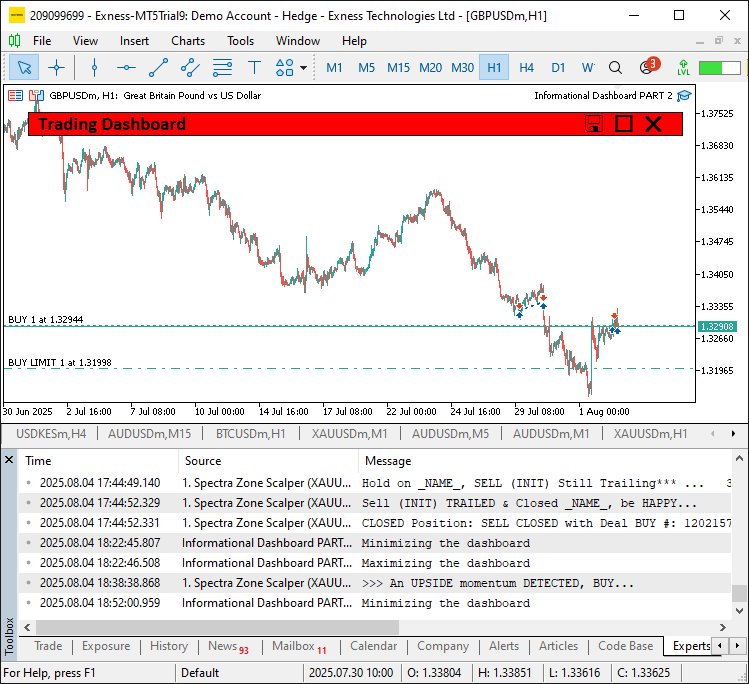
针对表头点击事件,遍历表头数组"headers";若点击列与当前"sort_column"一致,则翻转"sort_ascending"排序标识;否则设置新的"sort_column",并将"sort_ascending"设置为true,随后调用"UpdateDashboard"刷新面板。检测到CHARTEVENT_KEYDOWN键盘按下事件,按键为E时,调用"ExportToCSV"执行导出。当仪表盘处于可见状态,触发CHARTEVENT_MOUSE_MOVE鼠标移动事件时:获取鼠标坐标"mouse_x"、"mouse_y"以及鼠标状态;若鼠标位置无变化且未开启拖拽则直接退出;更新"last_mouse_x"、"last_mouse_y",并调用"updateHeaderHoverState"更新表头悬停状态。
如果"prev_mouse_state"为0(鼠标未按下)且当前"mouse_state"为 1(鼠标左键按下),判断点击发生在可拖拽区域(排除按钮区域);将"panel_dragging"设置为true,保存鼠标起始坐标;把表头颜色设置为"clrMediumBlue",并调用ChartSetInteger函数禁用图表滚动。拖拽过程中且鼠标左键保持按下状态:计算鼠标偏移量"dx"和"dy",在图表边界范围内更新面板坐标"settings.panel_x"与"settings.panel_y";调用"updatePanelPositions"更新面板位置,执行图表重绘。鼠标松开时,结束拖拽状态,更新悬停状态,重新开启图表滚动,并重绘界面。以上逻辑为仪表盘实现了流畅的动态交互,提升使用体验。编译完成后,即可看到下述按钮悬停效果。
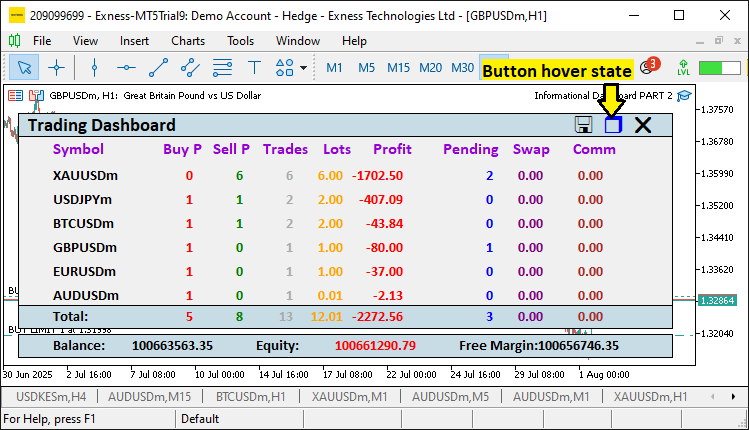
面板最大化且处于拖拽状态下的运行效果如下。
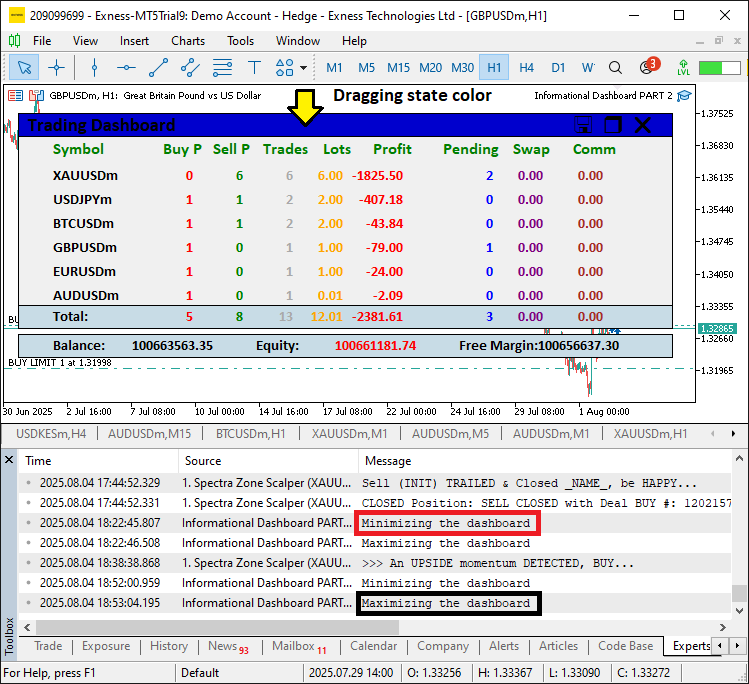
由图可见,我们已经完成仪表盘各项组件的开发,实现了鼠标悬浮、拖拽以及面板最小化相关逻辑,达成了开发目标。当前仅需完成项目可操作性的测试工作,该部分内容已在前文章节中详细阐述。
回测
我们已完成测试,以下是编译后得到的可视化结果,以单一的GIF动图形式呈现。
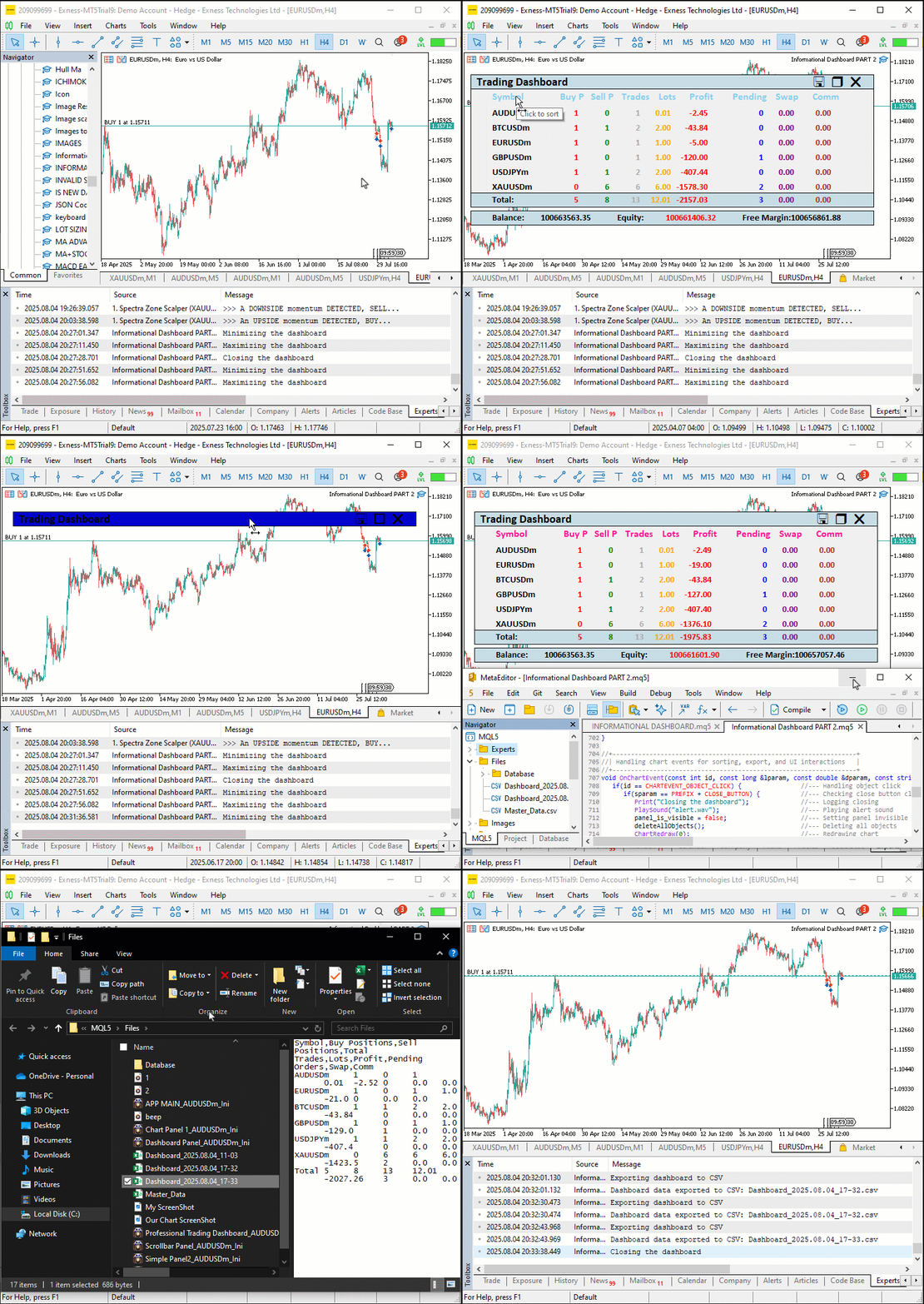
结论
综上所述,我们完成了MQL5第八部分信息仪表盘的功能增强:新增可拖拽、可最小化特性,实现了如"CLOSE_BUTTON"和"TOGGLE_BUTTON"等交互按钮以及悬浮高亮效果,在保障多品种持仓与账户状态稳定监控的同时,提升了用户使用体验。本文详细讲解了整体架构与代码实现,借助"createFullDashboard"、"updatePanelPositions"以及OnChartEvent等函数,打造出一款灵活、视觉反馈灵敏的工具,支持实时数据刷新与Excel兼容的CSV文件导出。您可以对该仪表盘进行自定义修改,优化自身交易工作流,让持仓分析更加直观高效。
本文由MetaQuotes Ltd译自英文
原文地址: https://www.mql5.com/en/articles/19059
注意: MetaQuotes Ltd.将保留所有关于这些材料的权利。全部或部分复制或者转载这些材料将被禁止。
本文由网站的一位用户撰写,反映了他们的个人观点。MetaQuotes Ltd 不对所提供信息的准确性负责,也不对因使用所述解决方案、策略或建议而产生的任何后果负责。

 从基础到中级:对象(四)
 基于协整股票的统计套利(第二部分):EA、回测与优化
 交易机器人风险管理器(第一部分):EA风控头文件
 Python-MetaTrader 5 策略测试器(第一部分):交易模拟器
