

从新手到专家:使用 Reporting EA 打造详尽的交易报告
 40
40
 0
0

内容:
引言
本文聚焦于处理 MetaTrader 5 中交易报告交付相关的挑战。在上一篇文章中,我们梳理了整套系统有效运行的完整工作流程与需求。我们介绍了报表 EA(Reporting EA)这款工具,它可以按用户自定义周期生成并发送 PDF 格式交易报告。
本篇续作将在原有基础上,进一步提升报告的信息深度与推送效率。本次优化通过 MQL5 与功能强大的 Python 库协同实现,以此实现更丰富的输出效果与更流畅的自动化流程。过程当中,我们也会收获宝贵经验:如何借助跨语言集成,开发稳定、体验流畅的交易解决方案。
一旦意识到详尽的报告对交易者的心态以及决策会产生多大影响,你就会明白研究这个课题的价值。先前版本生成的 PDF 报告仅包含四项数据指标,这是明显的短板,也充分说明我们需要更全面的报表。新版本报告将扩充指标体系,增加可视化图表、图形以及多项分析模块,具体内容可参考前一篇文章介绍报表功能的第二段。
最终目标是打造一套灵活、信息丰富的报表工具,分析师与交易者都可以根据自身的交易策略和工作流程对其进行适配。
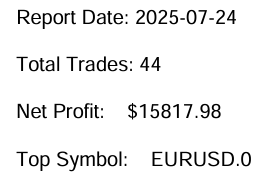
图 1:早期版本报表 EA 输出的交易报告截图
上图是由第一版 reports_processor.py 脚本生成的 PDF 报告截图。对应的代码片段下文会给出。本文的核心工作就是优化这份代码,输出细节更丰富、更有参考价值的报告。
通过本文,我们会挖掘 Python 在报表生成流程中的更多能力,同时演示如何简化 MQL5 与 Python 之间的数据交互,以此提升整体效率与灵活性。
def generate_pdf(report, output_path):
    pdf = FPDF()
    pdf.add_page()
    pdf.set_font("Arial", size=12)
    pdf.cell(0, 10, f"Report Date: {report['date']}", ln=True)
    pdf.cell(0, 10, f"Total Trades: {report['trade_count']}", ln=True)
    pdf.cell(0, 10, f"Net Profit:    ${report['net_profit']:.2f}", ln=True)
    pdf.cell(0, 10, f"Top Symbol:    {report['top_symbol']}", ln=True)
    pdf.output(output_path)
对比上面图 1 与下面图 2 所展示的报表功能,可以发现仍存在很大的优化空间。我们的目标并非重新创造已有成熟方案,而是提供一套可自定义、灵活性强的替代方案,用于生成交易报告。
MetaTrader 5 终端报表模块的截图展示了其现有功能,我们将以此作为基准,开展后续的功能增强开发。
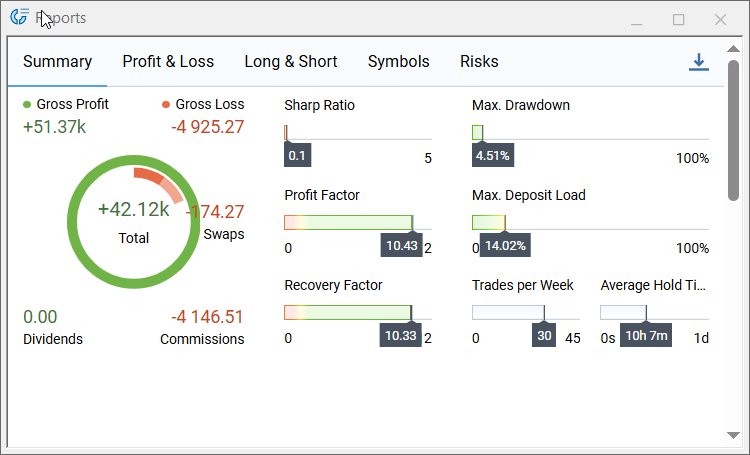
图 2:MQL5 交易报告功能特性
报表 EA 更新概览
下方图 3 为流程图,展示本次报表 EA 更新所要实现的整套处理工作流。EA 导出一份带日期标记的交易历史 CSV 文件,并且启动 Python 报表生成程序;Python 程序处理这份 CSV 文件,完成各项分析指标计算、绘制图表,输出最终 PDF 报告,同时生成一份精简的 JSON 结果文件,里面记录 pdf_path(PDF 文件路径)与 email_sent(邮件发送)状态。EA 会轮询读取该 JSON 文件,解析文件内容,校验报告输出路径与文件大小;校验通过后,EA 发送通知,还可选择归档或直接打开报告文件,至此完成整套自动化报表流程。
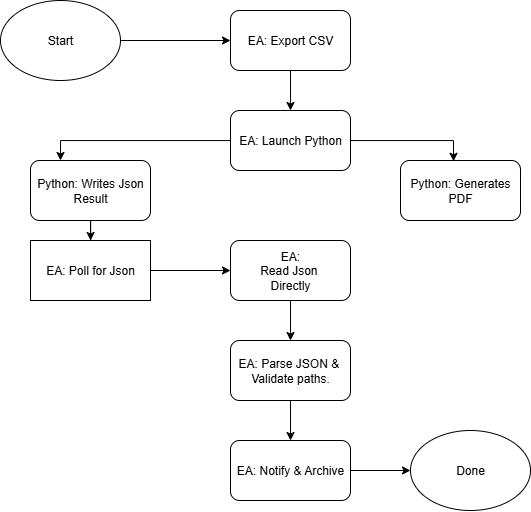
图 3:报表 EA 处理流程图
更新报表 EA 代码
这一部分我们来实现 MQL5 端的更新,用以输出高质量报告。我们会把 EA 拆分为多个逻辑模块,并说明其中直接支撑报表目标的代码部分。要记住,MQL5 EA 并不局限于执行开仓交易,它可以自动化大量常规交易任务,报表生成就是一个典型例子。虽然我们现在开发的是轻量、专门用于报表的 EA,但这套报表模块后续也可以集成到功能更完备的 EA 当中。开发专用、功能聚焦的 EA,可以把复杂大问题拆解为若干易于处理的小模块;我们可以独立开发、迭代报表功能,通过冒烟测试与定向调试完成验证,之后再把调试完善的组件接入更复杂的系统,尽可能减少副作用。
1. 文件头、Windows 接口导入、用户输入参数
该部分声明 EA 元信息,导入所需的最小化 Windows API 调用(用于检查绝对路径文件的属性、启动 cmd.exe),同时对外开放可供用户配置的输入参数。请根据你的实际运行环境正确填写各项参数(Python 路径、脚本路径、输出文件夹),方便 EA 在程序启动时完成参数校验。ReportFormats(报告格式)、EnableEmail(启用邮件)以及TestOnInit(初始化时测试)输入参数,允许用户无需修改代码即可控制程序行为。
#property copyright "Clemence Benjamin"
#property version   "1.01"
#property description "Exports trading history in CSV and generates reports via Python"
#property strict

#define SW_HIDE                 0
#define INVALID_FILE_ATTRIBUTES 0xFFFFFFFF

#import "kernel32.dll"
uint   GetFileAttributesW(string lpFileName);
#import

#import "shell32.dll"
int    ShellExecuteW(int hwnd, string lpOperation, string lpFile, string lpParameters, string lpDirectory, int nShowCmd);
#import

//--- User inputs
input string PythonPath   = "C:\\Users\\YOUR_COMPUTER_NAME\\AppData\\Local\\Programs\\Python\\Python312\\python.exe";
input string ScriptPath   = "C:\\Users\\YOUR_COMPUTER_NAME\\PATH_TO\\reports_processor.py";
input string ReportFormats= "html,pdf";
input string OutputDir    = "C:\\Users\\YOUR_COMPUTER_NAME\\PATH_TO_WHERE_YOUR_Reports_are_ saved";
input bool   EnableEmail  = true;
input bool   TestOnInit   = true;
2. 初始化与环境校验(OnInit)
OnInit() 完成 EA 的初始化准备工作,初始化随机数生成器,规范化配置路径,记录终端文件目录;校验 Python 可执行程序与输出目录是否存在,并确认对 MQL5\Files 文件夹拥有写入权限。当开启 TestOnInit 参数时,会执行一次测试运行,这是十分实用的冒烟测试,用来确认整套端到端链路连接正常。
int OnInit()
{
   Print(">> Reporting EA initializing…");
   MathSrand((uint)TimeLocal());

   string cleanPythonPath = CleanPath(PythonPath);
   string cleanScriptPath = CleanPath(ScriptPath);
   string cleanOutputDir = CleanPath(OutputDir);
   Print("PythonPath set to: ", cleanPythonPath);
   Print("ScriptPath set to: ", cleanScriptPath);
   Print("OutputDir set to: ", cleanOutputDir);

   string filesDir = TerminalInfoString(TERMINAL_DATA_PATH) + "\\MQL5\\Files\\";
   Print("Terminal Files directory: ", filesDir);

   if(GetFileAttributesW(cleanPythonPath) == INVALID_FILE_ATTRIBUTES)
      Print("!! Python executable not found at: ", cleanPythonPath);
   else
      Print("✔ Found Python at: ", cleanPythonPath);

   // Write-permission test (MQL5\\Files)
   int h = FileOpen("test_perm.txt", FILE_WRITE|FILE_TXT);
   if(h == INVALID_HANDLE)
      Print("!! Cannot write to MQL5\\Files directory! Error: ", GetLastError());
   else
   {
      FileWrite(h, "OK");
      FileFlush(h);
      FileClose(h);
      FileDelete("test_perm.txt");
      Print("✔ Write permission confirmed.");
   }

   if(TestOnInit)
   {
      Print(">> Test mode: running initial export.");
      RunDailyExport();
      lastRunTime = TimeCurrent();
   }

   return(INIT_SUCCEEDED);
}
3. 路径工具与基础辅助函数
经过清理、标准化的路径以及可靠的文件检测逻辑,可以规避一大类运行时错误。CleanPath() 用于统一路径分隔符,并对路径中包含空格的情况给出提示;FileExists() 对绝对路径封装调用 GetFileAttributesW 接口,针对终端本地文件则使用 FileOpen 做判断。将这些辅助函数统一封装,在 EA 代码各处复用。
string CleanPath(string path)
{
   string cleaned = path;
   StringReplace(cleaned, "/", "\\");
   while(StringFind(cleaned,"\\\\")>=0) StringReplace(cleaned, "\\\\", "\\");
   StringTrimLeft(cleaned);
   StringTrimRight(cleaned);
   return cleaned;
}

bool FileExists(string path)
{
   if(StringFind(path, "\\", 0) >= 0)
   {
      uint attrs = GetFileAttributesW(path);
      return(attrs != INVALID_FILE_ATTRIBUTES);
   }
   else
   {
      int fh = FileOpen(path, FILE_READ|FILE_TXT);
      if(fh == INVALID_HANDLE) return false;
      FileClose(fh);
      return true;
   }
}
4. CSV 文件生成与导出逻辑
ExportHistoryToCSV() 负责筛选交易历史数据,输出带有表头、每笔交易单独一行的 CSV 文件。该函数调用 MakeUniqueFilename() 避免文件名冲突(适合多次重复运行的场景),并把生成的文件名存入全局变量 LastExportedCSV。CSV 写入逻辑需要具备确定性,并且必须包含 Python 脚本所需要的全部字段列。
string MakeUniqueFilename(string baseName)
{
   int dot = StringFind(baseName, ".", 0);
   string name = dot >= 0 ? StringSubstr(baseName, 0, dot) : baseName;
   string ext  = dot >= 0 ? StringSubstr(baseName, dot) : "";
   string ts = TimeToString(TimeCurrent(), TIME_DATE | TIME_SECONDS);
   StringReplace(ts, ".", ""); StringReplace(ts, " ", "_"); StringReplace(ts, ":", "");
   int suffix = MathAbs(MathRand()) % 9000 + 1000;
   return name + "_" + ts + "_" + IntegerToString(suffix) + ext;
}

bool ExportHistoryToCSV(string filename)
{
   datetime end = TimeCurrent();
   datetime start = end - 7776000; // 90 days
   if(!HistorySelect(start, end)) { Print("!! HistorySelect failed."); return false; }
   int total = HistoryDealsTotal();
   if(total == 0) { Print("!! No trading history found."); return false; }

   int attempts = 3;
   string tryName = filename;
   int fh = INVALID_HANDLE;
   for(int a=0; a<attempts; a++)
   {
      fh = FileOpen(tryName, FILE_WRITE|FILE_CSV|FILE_ANSI, ",");
      if(fh != INVALID_HANDLE) break;
      tryName = MakeUniqueFilename(filename);
      Sleep(200);
   }
   if(fh == INVALID_HANDLE) { Print("!! FileOpen failed after retries."); return false; }

   FileWrite(fh, "Ticket,Time,Type,Symbol,Volume,Price,Profit,Commission,Swap,Balance,Equity");

   // ... iterate deals and FileWrite rows ...
   FileFlush(fh); FileClose(fh);
   LastExportedCSV = tryName;
   return true;
}
5. Python 调用与流程调度(RunDailyExport)
RunDailyExport() 是整个流程的调度核心:拼接 CSV 文件路径,通过 cmd.exe 启动 Python 程序,将标准输出、标准错误重定向保存到 MQL5\Files 目录下的 python_run.log 日志,方便 EA 读取查看脚本运行输出信息。随后该函数轮询等待 Python 生成的 report_result_YYYY‑MM‑DD.json 结果文件;如果 JSON 文件获取失败,则降级改为轮询 PDF 报告文件。该架构优先采用结构化 JSON 交互,让 EA 可以可靠确认任务执行状态与附件信息。
void RunDailyExport()
{
   string filesDir = TerminalInfoString(TERMINAL_DATA_PATH) + "\\MQL5\\Files\\";
   string dateStr = TimeToString(TimeCurrent(), TIME_DATE); StringReplace(dateStr, ".", "");
   string csvBase = "History_" + dateStr + ".csv";

   LastExportedCSV = "";
   if(!ExportHistoryToCSV(csvBase)) { Print("!! CSV export failed"); return; }
   string csvFull = filesDir + LastExportedCSV;

   string cleanOutputDir  = CleanPath(OutputDir);
   string pyLogName = "python_run.log";
   string pyLogFull = filesDir + pyLogName;

   string pythonCmd = StringFormat("\"%s\" \"%s\" \"%s\" --formats %s --outdir \"%s\" %s > \"%s\" 2>&1",
      CleanPath(PythonPath), CleanPath(ScriptPath), csvFull, "pdf", cleanOutputDir, EnableEmail ? "--email" : "", pyLogFull);

   string fullCmd = "/c " + pythonCmd;
   PrintFormat("→ Launching: cmd.exe %s", fullCmd);
   int result = ShellExecute(fullCmd);
   PrintFormat("← ShellExecute returned: %d", result);

   // Then poll for JSON or fallback to PDF; see next section for JSON handling...
}
6. JSON 处理以及降级读取策略
为了避免过度依赖面向人工阅读的日志,EA 优先使用机器可解析的 JSON 结果文件。ReadFileText() 尝试直接读取绝对路径下的 JSON 文件;当 MetaTrader5 不允许直接打开绝对路径文件时,CopyToFilesAndRead() 调用 cmd 复制命令,把 JSON 文件复制到 MQL5\Files 目录,再通过 FileOpen 读取内容。JsonExtractString / JsonExtractBool 是轻量实用的提取函数,足以处理这套简易 JSON 协议(pdf_path、email_sent 字段)。
string ReadFileText(string fullpath)
{

   if(StringFind(fullpath, "\\", 0) >= 0)
   {
      uint attrs = GetFileAttributesW(fullpath);
      if(attrs == INVALID_FILE_ATTRIBUTES) return("");
      int fh = FileOpen(fullpath, FILE_READ|FILE_TXT);
      if(fh == INVALID_HANDLE) return("");
      string txt = "";
      while(!FileIsEnding(fh)) { txt += FileReadString(fh); if(!FileIsEnding(fh)) txt += "\n"; }
      FileClose(fh);
      return txt;
   }

   else
   {
      int fh = FileOpen(fullpath, FILE_READ|FILE_TXT);
      if(fh == INVALID_HANDLE) return("");

      // ... read and return ...
   }
}

string CopyToFilesAndRead(string absPath, string filesName)
{
   string filesDir = TerminalInfoString(TERMINAL_DATA_PATH) + "\\MQL5\\Files\\";
   string destAbs = filesDir + filesName;
   string cmd = "/c copy /Y \"" + absPath + "\" \"" + destAbs + "\" > nul 2>&1";
   int r = ShellExecute(cmd);

   // wait briefly for copy then read local file
   return ReadTerminalLogFile(filesName);
}

string JsonExtractString(string json, string key) { /* tiny extractor: locate "key": "value" */ }
bool   JsonExtractBool(string json, string key)   { /* tiny extractor: locate "key": true/false */ }
7. 结果校验、消息通知与优雅降级处理
解析 JSON 完成后,EA 调用 FileExists() 校验 pdf_path、html_path 对应的文件,还可以选择通过SendNotification() 向交易者推送通知。如果 JSON 读取或者校验失败,EA 会平滑降级:读 python_run.log 日志,同时轮询目标报告 Report_YYYY‑MM‑DD.pdf(校验文件大于 0 字节)。这种分层设计兼顾 JSON 方式的可靠性,以及 PDF、日志兜底方案的健壮性。
if(StringLen(pdfp) > 0)
{
   if(FileExists(pdfp))
   {
      PrintFormat("✔ PDF exists at (from JSON): %s", pdfp);
      SendNotification("Report PDF created: " + pdfp);
   }
   else
      Print("!! JSON says PDF path but file not found: ", pdfp);
}

// fallback: if JSON unavailable -> poll expectedPdf in OutputDir and check size
8. 通用辅助函数与资源释放
各类工具函数:GetFileSizeByOpen()(安全获取文件大小)、ReadTerminalLogFile()(读取MQL5\Files 内的文件),以及封装后的 ShellExecute(),代码量不大但至关重要。OnDeinit() 在清理资源时输出日志信息。保持这类工具函数代码精简、注释完善,可以简化调试,减少重复代码。
long GetFileSizeByOpen(string filename)

{

   int fh = FileOpen(filename, FILE_READ|FILE_BIN);
   if(fh == INVALID_HANDLE) return -1;
   int pos = FileSeek(fh, 0, SEEK_END);
   FileClose(fh);
   return (pos < 0) ? -1 : (long)pos;
}

string ReadTerminalLogFile(string filename)

{
   int fh = FileOpen(filename, FILE_READ | FILE_TXT);
   if(fh == INVALID_HANDLE) return("");
   string content = "";
   while(!FileIsEnding(fh)) { content += FileReadString(fh); if(!FileIsEnding(fh)) content += "\n"; }
   FileClose(fh);
   return content;
}
int ShellExecute(string command)
{
   return ShellExecuteW(0, "open", "cmd.exe", command, NULL, SW_HIDE);
}
更新 reports_processor Python 脚本
EA 和 Python 脚本 reports_processor.py 协同工作。更新完 EA 代码之后,我们还需要修改 Python 端代码,让它输出、返回 EA 能够高效解析识别的运行结果。本章节将详细讲解脚本代码,完整展示各个模块如何与 EA 对接:从读取 CSV 数据、指标运算,到生成 PDF 文档、输出 JSON 结果,以此搭建一套稳定、可自动化运行的报告处理流水线。
在拆解脚本代码之前,先要配置 Python 运行环境,保障环境可以完整支撑脚本全部功能。接下来步骤将演示完整安装配置流程。完成这一关键步骤,才能确认环境配置无误,后续开发 reports_processor 脚本的过程中可以顺畅开展各项测试。
分步指南:在 Windows 上为 reports_processor 脚本配置 Python 环境
1. 从 python.org上安装 Python 3.9 及以上版本,并确保 Python 已加入系统环境变量 PATH。
2. 打开 PowerShell,创建并激活虚拟环境 venv:
python -m venv venv
.\venv\Scripts\Activate.ps1
3. 升级 pip 包管理器:
python -m pip install --upgrade pip
4. 安装核心依赖包(fpdf 为默认 PDF 后端;可按需额外安装其他包):
pip install pandas numpy jinja2 matplotlib fpdf yagmail
可选 PDF 后端:
pip install pdfkit weasyprint
如果使用 wkhtmltopdf,请下载 Windows 安装程序,将可执行文件路径加入 PATH 环境变量,或者配置 WKHTMLTOPDF_PATH 环境变量。
5. 配置邮件相关环境变量(示例:可在系统属性→环境变量,或 PowerShell 中执行):
setx YAGMAIL_USERNAME "you@example.com"
setx YAGMAIL_PASSWORD "your-email-password"
setx WKHTMLTOPDF_PATH "C:\Program Files\wkhtmltopdf\bin\wkhtmltopdf.exe"  # if using wkhtmltopdf
6. 测试运行(切换至项目文件夹,且虚拟环境已激活):
python reports_generator.py "C:\path\to\MQL5\Files\History_20250821.csv" --formats pdf --outdir "C:\path\to\Reports" --email
7. 到 C:\path\to\Reports 目录校验输出文件:
- Report_YYYY‑MM‑DD.pdf(主报告文件)
- equity_curve_YYYY‑MM‑DD.png(净值曲线图)
- report_result_YYYY‑MM‑DD.json(与 EA 交互的握手文件)
Reports_processor.py
1. 程序启动、模块导入、后端检测
脚本启动时加载 Python 标准库(os、sys、logging、datetime、argparse、glob)以及核心数据处理库(pandas、numpy)。随后尝试导入可选工具库:WeasyPrint、pdfkit(wkhtmltopdf)、FPDF、yagmail,并且为每一个后端记录可用状态标记。依靠这些状态标记,脚本运行时可以根据实际已安装组件,自动选择合适的 PDF 生成方式或者邮件发送逻辑;即便部分可选库未安装,脚本依然可以正常运行。日志模块会提前完成配置,脚本输出带时间戳的普通信息与报错信息,这些内容会被 EA 捕获保存至 python_run.log。
#!/usr/bin/env python
# reports_processor.py
__version__ = "1.0.1"
import sys
import os
import traceback
import argparse
import glob
from datetime import datetime, timedelta
import logging

# core data libs
import pandas as pd
import numpy as np

# templating & plotting
from jinja2 import Environment, FileSystemLoader
import matplotlib.pyplot as plt

# optional libraries: import safely
WEASY_AVAILABLE = False
PDFKIT_AVAILABLE = False
FPDF_AVAILABLE = False
YAGMAIL_AVAILABLE = False

try:
    from weasyprint import HTML          # may fail if native libs aren't installed
    WEASY_AVAILABLE = True
except Exception:
    WEASY_AVAILABLE = False

try:
    import pdfkit                       # wrapper for wkhtmltopdf
    PDFKIT_AVAILABLE = True
except Exception:
    PDFKIT_AVAILABLE = False

try:
    from fpdf import FPDF               # pure-python PDF writer (no native deps)
    FPDF_AVAILABLE = True
except Exception:
    FPDF_AVAILABLE = False

try:
    import yagmail
    YAGMAIL_AVAILABLE = True
except Exception:
    YAGMAIL_AVAILABLE = False

# Configure logging
logging.basicConfig(level=logging.INFO, format='%(asctime)s - %(levelname)s - %(message)s')
2. 命令行参数解析与调用协议
脚本对外提供一套简易命令行接口:位置参数 csv_path,既可以传入 CSV 文件完整路径,也可以传入文件夹路径用于检索文件;--formats 参数控制输出格式(HTML、PDF,或者两者同时输出);--outdir 设置报告文件输出目录;--email 开关控制是否发送邮件报告;--pdf‑backend 指定选用哪一套 PDF 生成后端。这套调用协议和 EA 的调用逻辑完全匹配:EA 传入 CSV 路径、输出目录,附带可选邮件开关;之后 EA 会监控输出目录,等待读取 JSON 结果文件。
def parse_args():
    """Parse command-line arguments."""
    parser = argparse.ArgumentParser(description="Generate trading reports (HTML/PDF) from CSV.")
    parser.add_argument("csv_path", help="Path to the trades CSV file or a folder to search for History_*.csv")
    parser.add_argument("-f", "--formats", nargs="+", choices=["html", "pdf"], default=["pdf"],
                        help="Report formats to generate (html, pdf, or both)")
    parser.add_argument("-o", "--outdir", default=".", help="Directory to write report files")
    parser.add_argument("--email", action="store_true", help="Send report via email")
    parser.add_argument("--pdf-backend", choices=["weasyprint","wkhtmltopdf","fpdf"],
                        default="fpdf",
                        help="PDF backend to use. 'weasyprint', 'wkhtmltopdf', or 'fpdf' (no native deps). Default: fpdf")
    return parser.parse_args()
3. CSV 路径解析(定位输入文件)
当传入文件夹路径或者模糊的 csv_path 路径时,脚本会解析得到真正待处理的 CSV 文件。如果 csv_path 是文件夹,脚本会检索 History_*.csv 格式文件;找不到该格式文件则退而查找全部 csv 文件,选取修改时间最新的那一个。如果传入完整 CSV 文件路径,则直接使用该文件。这样设计让脚本兼容性更强,既可以被 EA 调用(传入确定的 CSV 路径),也支持人工手动执行。
def resolve_csv_path(csv_path):
    """
    Ensure csv_path points to an existing file. If not, try to locate the
    most recent History_*.csv in the same directory or the provided folder.
    Returns resolved path or raises FileNotFoundError.
    """
    # If csv_path is a directory -> look there
    if os.path.isdir(csv_path):
        search_dir = csv_path
    else:
        # If path exists as file -> return
        if os.path.isfile(csv_path):
            return csv_path
        # otherwise, take parent directory to search
        search_dir = os.path.dirname(csv_path) or "."

    pattern = os.path.join(search_dir, "History_*.csv")
    candidates = glob.glob(pattern)
    if not candidates:
        # also allow any .csv if no History_*.csv found
        candidates = glob.glob(os.path.join(search_dir, "*.csv"))
    if not candidates:
        raise FileNotFoundError(f"No CSV files found in {search_dir} (tried {pattern})")

    # pick the newest file by modification time
    candidates.sort(key=os.path.getmtime, reverse=True)
    chosen = candidates[0]
    logging.info(f"Resolved CSV path: {chosen} (searched: {search_dir})")
    return chosen
4. 交易数据加载与标准化处理
数据加载模块使用 pandas 读取 CSV 文件,尝试将时间字段解析为日期时间格式。程序会校验必填字段是否存在(例如利润、交易品种、账户余额、账户净值);缺失字段时填充默认值,条件允许时自动计算所需字段(例如必要时对余额、净值做累加计算)。完成标准化之后,DataFrame 数据集按照时间排序,得到一份时序规整的数据,供后续统计分析与绘图使用。
def load_data(csv_path):
    """Load and validate CSV data, computing missing columns if necessary."""
    try:
        if not os.path.isfile(csv_path):
            logging.error(f"CSV file not found: {csv_path}")
            raise FileNotFoundError(f"CSV file not found: {csv_path}")
        # try parsing Time; if fails, read without parse and try to coerce later
        try:
            df = pd.read_csv(csv_path, parse_dates=["Time"])
        except Exception:
            df = pd.read_csv(csv_path)
            if "Time" in df.columns:
                df["Time"] = pd.to_datetime(df["Time"], errors="coerce")
        # Provide minimal defaults if columns missing
        if "Profit" not in df.columns:
            df["Profit"] = 0.0
        if "Symbol" not in df.columns:
            df["Symbol"] = "N/A"
        required_cols = ["Time", "Symbol", "Profit", "Balance", "Equity"]
        for col in required_cols:
            if col not in df.columns:
                logging.warning(f"Missing column: {col}. Attempting to compute.")
                if col == "Balance":
                    # create cumsum of profit + commission + swap if possible
                    df["Commission"] = df.get("Commission", 0)
                    df["Swap"] = df.get("Swap", 0)
                    df["Balance"] = (df["Profit"] + df["Commission"] + df["Swap"]).cumsum()
                elif col == "Equity":
                    df["Equity"] = df.get("Balance", df["Profit"].cumsum())
        # ensure Time column exists and is sorted
        if "Time" in df.columns:
            df = df.sort_values(by="Time")
        return df
    except Exception as e:
        logging.error(f"Error loading CSV: {e}")
        raise
5. 计算分析指标与统计数据
compute_stats 函数用于计算 EA 与用户所关注的各项核心报表指标:报表日期字符串、净利润、总交易笔数、按累计利润统计表现最佳的交易品种、根据净值曲线计算得到的最大回撤,以及简易版夏普比率估算值。这些统计值被封装到一个字典 stats 中,后续会嵌入 HTML 模板与 PDF 页面,用来展示简洁的执行摘要。
def compute_stats(df):
    """Compute trading statistics from the DataFrame."""
    try:
        top_symbol = None
        try:
            top_symbol = df.groupby("Symbol")["Profit"].sum().idxmax()
        except Exception:
            top_symbol = "N/A"
        eq = df.get("Equity")
        if eq is None:
            eq = df.get("Balance", df["Profit"].cumsum())
        max_dd = float((eq.cummax() - eq).max()) if len(eq) > 0 else 0.0
        sharpe = 0.0
        if len(df) > 1 and "Profit" in df.columns:
            dif = df["Profit"].diff().dropna()
            if dif.std() != 0:
                sharpe = float((dif.mean() / dif.std()) * np.sqrt(252))
        stats = {
            "date": datetime.now().strftime("%Y-%m-%d"),
            "net_profit": float(df["Profit"].sum()) if "Profit" in df.columns else 0.0,
            "trade_count": int(len(df)),
            "top_symbol": top_symbol,
            "max_drawdown": max_dd,
            "sharpe_ratio": sharpe
        }
        return stats
    except Exception as e:
        logging.error(f"Error computing stats: {e}")
        raise
6. 绘图 — 净值 / 余额曲线
脚本使用 matplotlib 生成净值曲线 PNG 图片。如果时间戳字段可用,优先绘制时间‑余额、时间‑净值曲线;若无时间戳,则使用数据行索引作为横轴绘制余额、净值曲线。生成的 PNG 图片保存至 --outdir 指定输出目录,后续供 HTML 模板调用或是嵌入 PDF 文档,让阅读者直观看到报表周期内账户整体表现。
# Generate equity curve plot
curve_image = os.path.join(args.outdir, f"equity_curve_{stats['date']}.png")
plt.figure()
# handle possibility of NaT in Time
if "Time" in df.columns and not df["Time"].isnull().all():
    plt.plot(df["Time"], df["Balance"], label="Balance")
    plt.plot(df["Time"], df["Equity"], label="Equity")
else:
    # fallback: plot index vs balance/equity
    plt.plot(df.index, df["Balance"], label="Balance")
    plt.plot(df.index, df["Equity"], label="Equity")
plt.title("Balance & Equity Curve")
plt.legend()
plt.tight_layout()
plt.savefig(curve_image)
plt.close()
logging.info(f"Equity curve saved: {curve_image}")
7. 使用 Jinja2 渲染 HTML 报告
如果开启 HTML 输出(HTML 也可以作为中间产物),脚本调用 Jinja2 渲染 report_template.html 模板。模板接收 stats 统计字典、各品种利润汇总数据、净值曲线图文件名。渲染完成的 HTML 文件写入输出目录,并输出日志记录。这份 HTML 既可以作为最终交付文件,也能够作为 HTML 转 PDF 工具的源输入文件。
def render_html(df, stats, outpath, curve_image):
    """Render the HTML report using a Jinja2 template."""
    try:
        env = Environment(loader=FileSystemLoader(os.path.dirname(__file__)))
        tmpl_path = os.path.join(os.path.dirname(__file__), "report_template.html")
        if not os.path.isfile(tmpl_path):
            logging.error(f"Template not found: {tmpl_path}")
            raise FileNotFoundError(f"Missing template: {tmpl_path}")
        tmpl = env.get_template("report_template.html")
        html = tmpl.render(stats=stats, symbol_profits=df.groupby("Symbol")["Profit"].sum().to_dict(), curve_image=curve_image)
        os.makedirs(os.path.dirname(outpath), exist_ok=True)
        with open(outpath, "w", encoding="utf-8") as f:
            f.write(html)
        logging.info(f"HTML written: {outpath}")
    except Exception as e:
        logging.error(f"Error rendering HTML: {e}")
        raise
8. PDF 生成 — 多后端支持
脚本支持三套 PDF 生成方案,会根据 --pdf‑backend 参数以及检测到的可用组件自动选择:
- WeasyPrint:如果已安装,直接把渲染完毕的 HTML 转换为 PDF(HTML→PDF)。
- wkhtmltopdf (pdfkit):配置完成后,调用 wkhtmltopdf 二进制程序将 HTML 转为 PDF。
- FPDF:纯 Python 实现方案,通过代码直接构建 PDF,插入图表与数据表格,不依赖 HTML/CSS 渲染。该方案输出多页 A4 格式 PDF,包含封面页、核心统计模块、净值曲线图、各品种利润表格以及近期交易样本。
def convert_pdf_weasy(html_path, pdf_path):
    if not WEASY_AVAILABLE:
        raise RuntimeError("WeasyPrint backend requested but weasyprint is not available.")
    os.makedirs(os.path.dirname(pdf_path), exist_ok=True)
    HTML(html_path).write_pdf(pdf_path)
    logging.info(f"PDF written: {pdf_path}")

def convert_pdf_wkhtml(html_path, pdf_path, wk_path=None):
    if not PDFKIT_AVAILABLE:
        raise RuntimeError("wkhtmltopdf/pdfkit backend requested but pdfkit is not available.")
    config = None
    if wk_path and os.path.isfile(wk_path):
        config = pdfkit.configuration(wkhtmltopdf=wk_path)
    pdfkit.from_file(html_path, pdf_path, configuration=config)
    logging.info(f"PDF written: {pdf_path}")

def convert_pdf_with_fpdf(df, stats, curve_image_path, pdf_path):
    if not FPDF_AVAILABLE:
        raise RuntimeError("FPDF backend requested but fpdf is not installed.")
    pdf = FPDF(orientation='P', unit='mm', format='A4')
    pdf.set_auto_page_break(auto=True, margin=15)
    pdf.add_page()
    pdf.set_font("Arial", "B", 16)
    pdf.cell(0, 8, f"Trading Report - {stats.get('date','')}", ln=True, align='C')
    # ... add stats, insert curve image and tables ...
    if curve_image_path and os.path.isfile(curve_image_path):
        try:
            pdf.image(curve_image_path, x=10, y=None, w=190)
        except Exception as e:
            logging.warning(f"Could not insert curve image into PDF: {e}")
    pdf.output(pdf_path)
    logging.info(f"PDF written: {pdf_path}")
每一种后端都会将最终文件 Report_YYYY‑MM‑DD.pdf 写入配置好的输出目录,并且输出日志标记任务完成。
9. 邮件发送功能
当设置 --email 参数时,脚本调用邮件辅助函数,使用已加载的邮件库,把生成好的报表文件发送至已配置的收件地址。函数会记录邮件是否发送成功,该结果会写入后续交互 JSON 文件,供 EA 判断本次运行是否完成邮件投递。
def send_email(files, stats):
    """Send the generated reports via email."""
    try:
        if not YAGMAIL_AVAILABLE:
            logging.error("yagmail not available; cannot send email. Install yagmail or remove --email flag.")
            return
        user = os.getenv("Your YAGMAIL ACCOUNT")
        pw = os.getenv("Your Email password")
        if not user or not pw:
            logging.error("Email credentials not set in environment variables (YAGMAIL_USERNAME, YAGMAIL_PASSWORD).")
            return
        yag = yagmail.SMTP(user, pw)
        subject = f"Trading Report {stats['date']}"
        contents = [f"See attached report for {stats['date']}"] + files
        yag.send(to=user, subject=subject, contents=contents)
        logging.info("Email sent.")
    except Exception as e:
        logging.error(f"Error sending email: {e}")
10. 输出结果 JSON 文件 — 与 EA 交互握手
全部输出文件生成完毕后,脚本生成一份精简、机器可读的 JSON 文件,包含 PDF 路径、HTML 路径、邮件发送状态、时间戳、程序退出码。JSON 采用原子写入方式(先写临时文件再重命名),保存到 --outdir 目录,文件名为report_result_YYYY‑MM‑DD.json。原子写入机制保证 EA 可以安全轮询该文件;一旦文件出现,就代表 Python 端处理结束,EA 读取文件即可获知准确输出路径以及邮件发送状态。
def write_result_json(outdir, pdf_path=None, html_path=None, email_sent=False, exit_code=0):
    """Write a small JSON file with the report result so MQL5 can poll/verify."""
    import json, tempfile
    try:
        result = {
            "pdf_path": pdf_path or "",
            "html_path": html_path or "",
            "email_sent": bool(email_sent),
            "timestamp": datetime.now().isoformat(),
            "exit_code": int(exit_code)
        }
        os.makedirs(outdir, exist_ok=True)
        fname = os.path.join(outdir, f"report_result_{datetime.now().strftime('%Y-%m-%d')}.json")
        # atomic write
        fd, tmp = tempfile.mkstemp(prefix="._report_result_", dir=outdir, text=True)
        with os.fdopen(fd, "w", encoding="utf-8") as f:
            json.dump(result, f, indent=2)
        os.replace(tmp, fname)
        logging.info(f"Result JSON written: {fname}")
        return fname
    except Exception as e:
        logging.error(f"Failed to write result JSON: {e}")
        return None
11. 主业务流程
main() 函数串联全部逻辑:解析命令行参数、定位 CSV 文件、加载并标准化交易数据、计算统计指标、生成净值曲线图、按需渲染 HTML、选用指定后端生成 PDF、可选执行邮件发送、清理输出目录内过期旧报表、写入交互 JSON,最后返回成功或失败退出码。整套流程与日志输出,让调用脚本的 EA 可以通过 python_run.log 跟踪运行进度,并且读取最终 report_result_...json 获取执行结果。
def main():
    """Main function to generate reports."""
    args = parse_args()
    try:
        # Ensure output directory exists
        os.makedirs(args.outdir, exist_ok=True)

        # Resolve csv_path in case a folder or variable-name was provided
        try:
            csv_path_resolved = resolve_csv_path(args.csv_path)
        except FileNotFoundError as e:
            logging.error(str(e))
            return 1

        # Load data and compute stats
        df = load_data(csv_path_resolved)
        stats = compute_stats(df)

        # Generate equity curve plot
        curve_image = os.path.join(args.outdir, f"equity_curve_{stats['date']}.png")
        # ... plotting code ...

        base = os.path.join(args.outdir, f"Report_{stats['date']}")
        files_out = []

        # Generate HTML report (if requested or needed by PDF backend)
        html_path = base + ".html"
        if "html" in args.formats:
            render_html(df, stats, html_path, os.path.basename(curve_image))
            files_out.append(html_path)

        # Decide PDF backend and generate PDF
        backend = args.pdf_backend.lower() if hasattr(args, "pdf_backend") else "fpdf"
        if "pdf" in args.formats:
            pdf_path = base + ".pdf"
            if backend == "weasyprint":
                convert_pdf_weasy(html_path, pdf_path)
            elif backend == "wkhtmltopdf":
                convert_pdf_wkhtml(html_path, pdf_path, wk_path=os.getenv("WKHTMLTOPDF_PATH"))
            elif backend == "fpdf":
                convert_pdf_with_fpdf(df, stats, curve_image, pdf_path)
            files_out.append(pdf_path)

        # Send email if enabled
        if args.email:
            send_email(files_out, stats)

        # write result JSON for MQL5
        pdf_file = next((f for f in files_out if f.endswith(".pdf")), "")
        html_file = next((f for f in files_out if f.endswith(".html")), "")
        write_result_json(args.outdir, pdf_path=pdf_file, html_path=html_file,
                          email_sent=args.email, exit_code=0)

        return 0

    except Exception as e:
        logging.error(f"Main execution error: {e}")
        traceback.print_exc()
        try:
            write_result_json(args.outdir, exit_code=1)
        except:
            pass
        return 1

if __name__ == "__main__":
    sys.exit(main())
12. 异常处理:程序失败时仍保证输出 JSON
main() 函数顶层捕获全部异常;一旦发生未捕获错误,脚本打印异常堆栈信息,仍然输出 report_result_YYYY‑MM‑DD.json,通过退出码标记任务失败。这保证 EA 总能读到一份确定的 JSON 结果(无论成功还是失败),简化 EA 内部的校验与降级处理逻辑。
except Exception as e:
    logging.error(f"Main execution error: {e}")
    traceback.print_exc()
    # ensure a JSON is still written so MQL5 knows it failed
    try:
        write_result_json(args.outdir, exit_code=1)
    except:
        pass
    return 1
13. 文件清理与保留策略
程序正常执行结束后,脚本扫描输出目录做过期清理,删除超过保留期限的 Report_ 开头文件(脚本默认保留 30 天)。保持输出目录整洁,避免频繁生成报表时磁盘占用无限增长。
# Clean up old reports (older than 30 days)
cutoff = datetime.now() - timedelta(days=30)
for f in os.listdir(args.outdir):
    if f.startswith("Report_") and f.endswith(tuple(args.formats)):
        full = os.path.join(args.outdir, f)
        if datetime.fromtimestamp(os.path.getmtime(full)) < cutoff:
            os.remove(full)
            logging.info(f"Deleted old file: {full}")
EA 与 Python 脚本的运行时交互逻辑
运行时交互流程十分清晰:EA 导出 CSV 交易历史文件,启动 Python 脚本,并传入 CSV 路径、--outdir 输出目录以及各类开关参数。Python 脚本处理 CSV,把 PNG、PDF 等产物写入输出文件夹,最后生成 report_result_YYYY‑MM‑DD.json。EA 轮询等待该 JSON 文件;文件存在后读取 JSON,校验文件路径与文件大小,执行后续动作:推送通知、归档文件、确认邮件发送结果。日志文件 python_run.log 加上 JSON 结果文件,共同构成两套程序之间稳定、可供程序解析的交互协议。
测试
我们将 EA 部署到 MetaTrader5 平台完成测试,Python 脚本会在后台被启动执行。可以通过终端的 EA 日志窗口监控运行情况,同时查看指定输出目录,检查生成的各类文件。在本次测试中,生成报表文件为 Report_2025‑08‑21。该文件内容相比旧版本丰富很多。新版报表包含结构规整的数据表格、净值曲线图以及多项计算指标,格式清晰,可为交易者提供有效参考信息。下方截图展示生成的报表文件以及 PDF 部分内容。
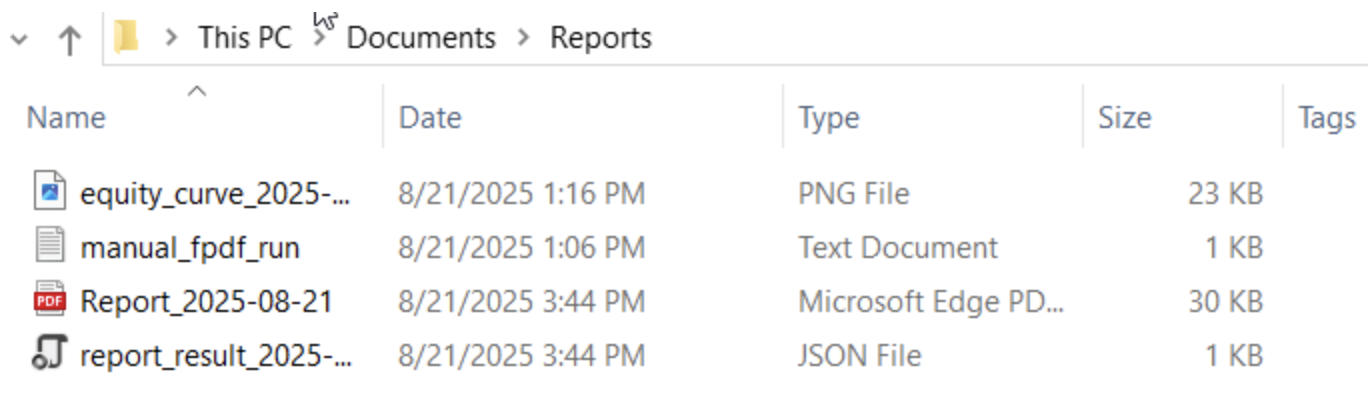
图 4:Windows 资源管理器中查看输出文件
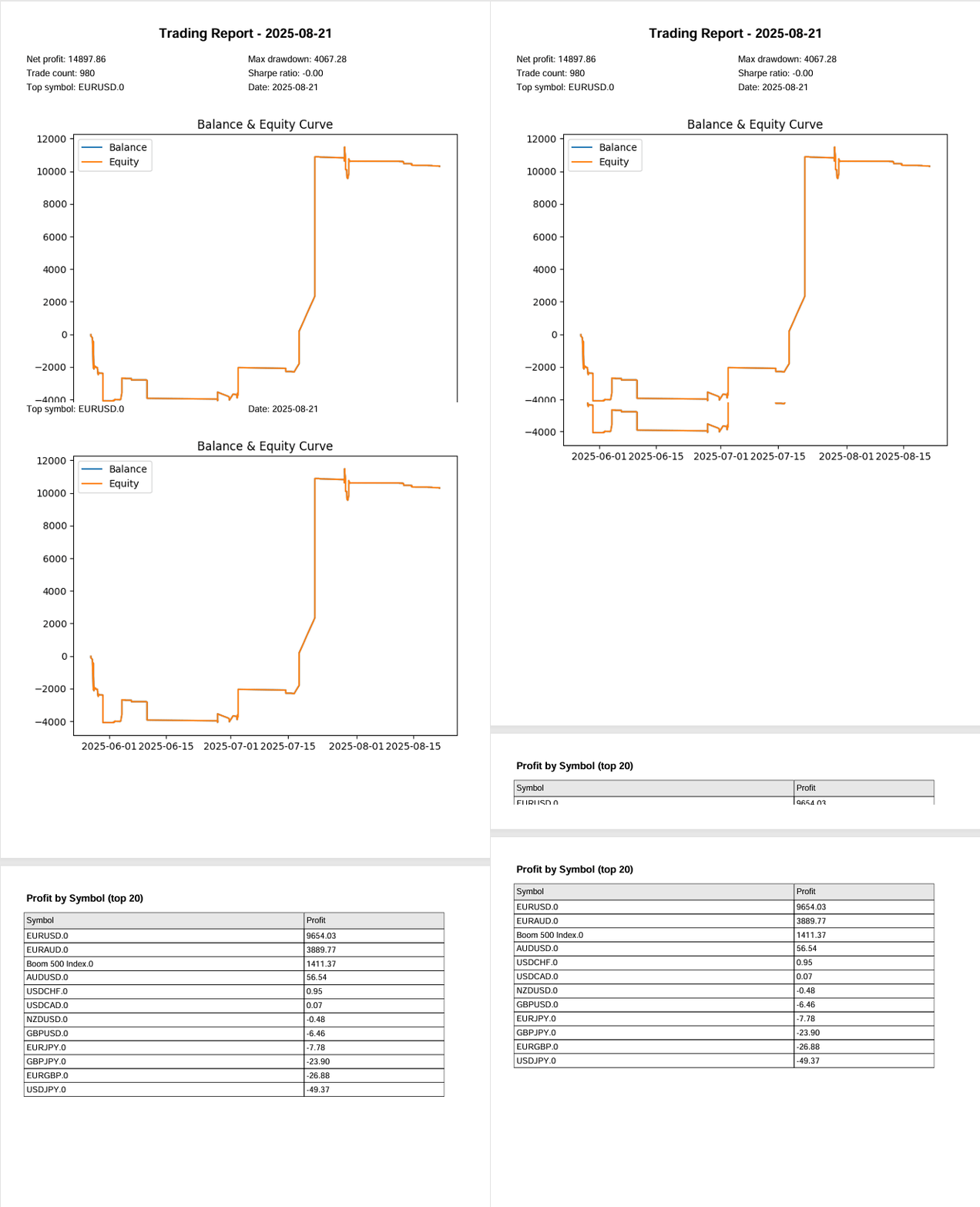
图 5:生成报表 PDF 的动图截图
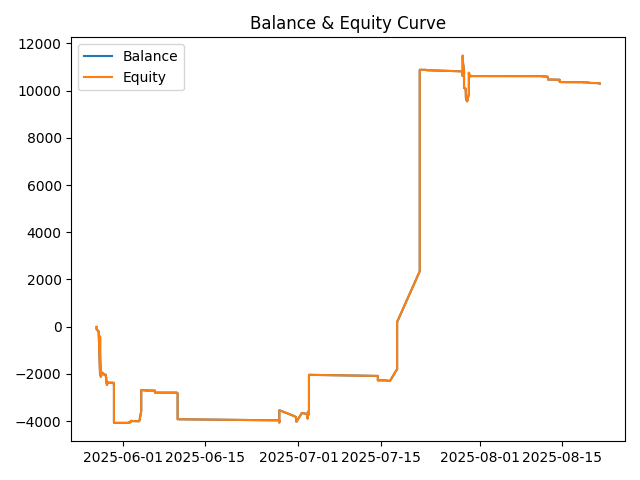
图 6:报表输出的净值曲线图
结论
本文完整演示 MQL5 与 Python 协同开发,实现功能完备的交易报告,能力远超过旧版报表 EA 的基础输出。一大亮点是自动化生成净值曲线,直观展示账户余额与净值随时间的变化趋势,交易者可以快速理解账户绩效变化。本系统验证了智能 EA 对接外部 Python 报表处理流水线的可行性,同时证明这套联动方案还可以继续优化、拓展更多功能。
通过持续迭代 EA 代码,结合 Pandas、Matplotlib、FPDF 等强大 Python 库,我们可以计算高阶统计指标、生成分析表格、在报表中嵌入可视化图表。EA 与 Python 脚本之间增加轻量 JSON 握手机制,实现可靠的输出状态确认,整套工作流变得流畅透明。除此之外,自动邮件发送、多套可选 PDF 后端等附加功能,也体现该框架可以适配多种不同运行环境。
本次开发为长期报表解决方案打下坚实基础。生成的文档可以作为交易绩效综合分析工具,帮助交易者与投资者发现趋势、评估回撤等风险指标,更加清晰地评估交易策略。总而言之,这套报表 EA 配合 reports_processor.py 脚本,充分体现跨语言集成如何增强自动化能力、辅助交易决策,也为未来实现更复杂的量化分析打开空间。
核心要点
| 核心要点 | 描述: |
|---|---|
| 启动时校验外部依赖。 | 在 OnInit 函数中,务必通过文件属性检查,校验外部工具与文件夹的路径是否有效(Python 可执行程序路径、脚本路径、输出目录)。借助 GetFileAttributesW 提前做校验,可以规避难以排查的运行时故障。 |
| 优先使用机器可解析的握手协议(JSON) | 使用小型结构化结果文件(JSON)作为 Python 向 MQL5 传递状态的标准信号,不要去解析自由格式的日志文本。该方式让校验逻辑结果确定、可被程序自动化处理。 |
| 对结果文件执行原子写入 | 先使用临时文件名写入 JSON 文件,再通过原子操作重命名 / 替换正式文件。避免 EA 轮询任务完成状态时,出现读取到不完整文件的竞态问题。 |
| 考虑 MQL5 的绝对路径访问限制 | MQL5 的 FileOpen 函数通常无法随意读取任意绝对路径。提供备选方案:将文件复制到 MQL5\Files目录,或者调用 WinAPI 的 ReadFile 接口读取,保证 EA 能够稳定读取输出文件。 |
| 完善的文件存在性与文件大小校验 | 不能认为 “文件存在” 就等同于 “文件写入完毕”。检查文件属性与文件大小(打开文件并将文件指针移至文件末尾),确认报表或者二进制文件完整写入后,再执行后续业务逻辑。 |
| 使用唯一文件名,防止文件覆盖冲突 | 生成 CSV 文件与报表文件名时加入时间戳以及随机后缀,这样多次运行不会覆盖旧结果,历史输出文件可以保留,用于审计核查。 |
| 统一规范导出供 Python 读取的 CSV 文件 | CSV 的列定义(表头、数据格式、日期时间格式)要和 Python 脚本预期格式保持一致。统一的导出规范可以消除解析歧义,减少数据处理过程中的异常。 |
| 集中存放通用辅助工具函数 | 把路径标准化、文件存在判断、JSON 解析器、简易读写封装函数统一放到一处,让 EA 各个模块复用同一套可靠逻辑(例如 CleanPath、FileExists、ReadTerminalLogFile)。 |
| 实现带合理超时机制的轮询逻辑 | 等待外部程序执行时,使用循环轮询,设置较短轮询间隔,同时配置总超时时间。在响应速度与 CPU 占用之间取得平衡,同时避免程序无限等待。 |
| 提供备选方案,多层级校验 | 设计多层校验逻辑:优先采用 JSON 确认执行结果;如果 JSON 缺失,则读取 python_run.log 日志;日志读取失败,则轮询预期生成的 PDF 文件。多重校验路径提升整体程序健壮性。 |
| 充分输出日志,展示诊断信息 | 输出内容详实的日志,并且把 Python 日志的末尾片段打印到 EA 日志窗口。清晰的诊断信息,有助于线上环境发生故障时快速排查问题。 |
| 切勿硬编码密钥凭证 | 不要在源码内保存敏感信息:邮件账号密码存放在环境变量,同时文档写明需要配置的环境变量名称。提升程序安全性与可移植性。 |
| 支持多种 PDF 后端,自动检测组件可用性 | Python 脚本做到后端无关:自动检测 WeasyPrint、wkhtmltopdf/pdfkit、纯 Python 的 FPDF,运行时选用可用的最优方案。 |
| 使用虚拟环境,编写部署文档 | 提供一套可复现的 Windows 部署文档:Python 版本、虚拟环境创建命令、pip 安装依赖清单,以及可选 PDF 后端所需的本地依赖,保证部署结果可预期。 |
| 执行端到端冒烟测试 | 执行简易端到端冒烟测试:部署 EA,导出 CSV 文件,启动 Python 处理脚本,查看 EA 日志与输出目录的 PDF、JSON 文件。冒烟测试可以在完整 QA 测试之前,快速确认基础流程可用。 |
| 确保失败场景下同样输出确定的故障报告 | 捕获异常时,务必输出结果 JSON,写入退出码与诊断字段。保证 EA 能够识别故障,执行备选逻辑,而不是程序无限挂起等待。 |
附件
| 文件名 | 版本 | 说明 |
|---|---|---|
| Reporting_EA.mq5 | 1.01 | EA,将交易历史导出为唯一命名的 CSV 文件,调用 Python 报表处理程序,并校验输出产物。功能包含路径标准化、依赖校验、原子化文件名生成、基于 JSON 和 Python 交互握手、绝对路径读取的文件复制备选策略、PDF 轮询降级、详细 EA 日志输出,以及可选的推送通知。 |
| Reports_processor.py | 1.0.1 | Python 报表处理引擎,读取 EA 导出的 CSV 数据;计算分析指标(净利润、回撤、夏普比率、各品种统计汇总);生成图表;渲染 HTML 与 PDF(支持多种后端:FPDF、wkhtmltopdf、WeasyPrint);可选自动发送邮件;原子写入 report_result_YYYY‑MM‑DD.json 文件供 EA 交互。包括内置过期文件清理,完善异常处理,程序出错时也一定会输出 JSON 结果。 |
本文由MetaQuotes Ltd译自英文
原文地址: https://www.mql5.com/en/articles/19006
注意: MetaQuotes Ltd.将保留所有关于这些材料的权利。全部或部分复制或者转载这些材料将被禁止。
本文由网站的一位用户撰写,反映了他们的个人观点。MetaQuotes Ltd 不对所提供信息的准确性负责,也不对因使用所述解决方案、策略或建议而产生的任何后果负责。


 简化MQL5中的数据库操作(第一部分):数据库与SQL简介
 新手在交易中的10个基本错误
 MQL5交易策略自动化(第二十八部分):构建带可视化反馈的价格行为蝙蝠谐波形态
