

MQL5でカスタムインジケータを作成する(第7回):セッション分析のためのハイブリッドTime Price Opportunity (TPO)マーケットプロファイル
 148
148
 0
0

はじめに
第6回では、MetaQuotes Language 5 (MQL5)において、平滑化技術、視覚的な強化のための色相変化、マルチタイムフレーム対応を組み込んだ、改良版のRelative Strength Index計算システムを開発しました。これにより、より幅広い市場分析を実現しました。第7回では、ハイブリッドTime Price Opportunity (TPO)マーケットプロファイルインジケータを開発します。このインジケータは、タイムゾーン調整を含む、イントラデイ、日足、週足、月足、固定期間など、さまざまなセッション時間足をサポートします。このインジケータでは、価格をグリッド化し、高値、安値、始値、終値などのセッションデータを管理します。また、TPOカウントからポイントオブコントロール(PoC)とバリューエリア(VA)を計算し、詳細なセッション分析を行うために、カスタマイズ可能な色を使用してチャート上に視覚的に描画します。本記事では以下のトピックを扱います。
最終的には、カスタマイズ可能なハイブリッドTime Price Opportunityマーケットプロファイル用の実用的なMQL5インジケータが完成し、カスタマイズ可能な状態になります。それでは実装に進みましょう。
ハイブリッドTime Price Opportunityマーケットプロファイルの概念を理解する
ハイブリッドTime Price Opportunity (TPO)マーケットプロファイルは、定義されたトレードセッション内での時間経過に伴う価格分布を可視化するツールです。特定の価格レベルにおける時間間隔を表現するために、文字、矩形マーカー、またはドットのみを使用し、最も取引が発生したVAやPoCなど、高い活動領域を明らかにします。この手法は、価格変動をプロファイルヒストグラムに集約することで、サポート、レジスタンス、公正価値ゾーンを特定するのに役立ちます。TPOの積み重なりが密集している領域はバランスの取れた取引を示し、薄い領域は潜在的なブレイクアウトや市場の不均衡を示唆します。通常、この手法はセッション単位で適用し、市場センチメントを判断します。VAの端付近でエントリーしたり、トレンド継続を判断するためにPoCの変化を監視したりします。
今回の計画では、選択した時間足とタイムゾーン調整に基づいてセッションを定義します。TPO割り当てのために価格をグリッド化し、高値や安値などのセッションデータを追跡します。また、最も高いTPOカウントを持つレベルをPoCとして計算します。次に、全TPO数の一定割合をカバーするVAを算出します。最後に、色分けされたラベル、ドット、四角形を使用してプロファイルを可視化し、チャート分析を強化します。以下に、目標を視覚的に示した図を掲載します。

MQL5での実装
MQL5でインジケータを作成するには、まずMetaEditorを開き、ナビゲータに移動して、インジケータフォルダを見つけ、[新規]タブをクリックして、表示される手順に従ってファイルを作成します。作成が完了したら、コーディング環境内で、バッファ数やプロット数などのインジケータのプロパティと設定を定義します。
//+------------------------------------------------------------------+
//|                             Hybrid TPO Market Profile PART 1.mq5 |
//|                           Copyright 2026, Allan Munene Mutiiria. |
//|                                   https://t.me/Forex_Algo_Trader |
//+------------------------------------------------------------------+
#property copyright "Copyright 2026, Allan Munene Mutiiria."
#property link "https://t.me/Forex_Algo_Trader"
#property version "1.00"
#property strict

#property indicator_chart_window
#property indicator_buffers 0
#property indicator_plots 0

//+------------------------------------------------------------------+
//| Enums                                                            |
//+------------------------------------------------------------------+
enum MarketProfileTimeframe { // Define market profile timeframe enum
   INTRADAY,                  // Intraday
   DAILY,                     // Daily
   WEEKLY,                    // Weekly
   MONTHLY,                   // Monthly
   FIXED                      // Fixed
};

//+------------------------------------------------------------------+
//| Inputs                                                           |
//+------------------------------------------------------------------+
sinput group "Settings"
input double ticksPerTpoLetter = 10;             // Ticks per letter
input int valueAreaPercent = 70;                 // Value Area Percent

sinput group "Time"
input MarketProfileTimeframe profileTimeframe = DAILY;    // Timeframe
input string timezone = "Exchange";              // Timezone
input string dailySessionRange = "0830-1500";    // Daily session
input int intradayProfileLengthMinutes = 60;     // Profile length in minutes (Intraday)
input datetime fixedTimeRangeStart = D'2026.02.01 08:30'; // From (Fixed)
input datetime fixedTimeRangeEnd = D'2026.02.02 15:00';   // Till (Fixed)

sinput group "Rendering"
input int labelFontSize = 10;                   // Font size

sinput group "Colors"
input color defaultTpoColor = clrGray;          // Default
input color singlePrintColor = 0xd56a6a;        // Single Print
input color valueAreaColor = clrBlack;          // Value Area
input color pointOfControlColor = 0x3f7cff;     // POC
input color closeColor = clrRed;                // Close

//+------------------------------------------------------------------+
//| Constants                                                        |
//+------------------------------------------------------------------+
#define MAX_BARS_BACK 5000
#define TPO_CHARACTERS_STRING "ABCDEFGHIJKLMNOPQRSTUVWXYZabcdefghijklmnopqrstuvwxyz"

//+------------------------------------------------------------------+
//| Structures                                                       |
//+------------------------------------------------------------------+
struct TpoPriceLevel {       // Define TPO price level structure
   double price;             // Store price level
   string tpoString;         // Store TPO string
   int tpoCount;             // Store TPO count
};

struct ProfileSessionData {  // Define profile session data structure
   datetime startTime;       // Store start time
   datetime endTime;         // Store end time
   double sessionOpen;       // Store session open price
   double sessionClose;      // Store session close price
   double sessionHigh;       // Store session high price
   double sessionLow;        // Store session low price
   TpoPriceLevel levels[];   // Store array of price levels
   int periodCount;          // Store period count
   double periodOpens[];     // Store array of period opens
   int pointOfControlIndex;  // Store point of control index
};

//+------------------------------------------------------------------+
//| Global Variables                                                 |
//+------------------------------------------------------------------+
string objectPrefix = "HTMP_";     //--- Set object prefix
ProfileSessionData sessions[];     //--- Declare sessions array
int activeSessionIndex = -1;       //--- Initialize active session index
double tpoPriceGridStep = 0;       //--- Initialize TPO price grid step
string tpoCharacterSet[];          //--- Declare TPO character set array
datetime previousBarTime = 0;      //--- Initialize previous bar time
datetime lastCompletedBarTime = 0; //--- Initialize last completed bar time
int maxSessionHistory = 20;        //--- Set maximum session history
int timezoneOffsetSeconds = 0;     //--- Initialize timezone offset in seconds
実装は、#propertyディレクティブを使用してインジケータのプロパティを設定することから開始します。indicator_chart_windowを使用してメインチャートウィンドウ上に表示されるよう設定し、ラインやヒストグラムを描画するのではなく、カスタムオブジェクトによる描画に重点を置くため、バッファ数とプロット数を0に指定します。次に、プロファイル期間を選択できるようにMarketProfileTimeframe列挙型を定義します。この列挙型には、短期セッション用のINTRADAY、標準的な取引日用のDAILY、WEEKLY、MONTHLY、およびカスタム範囲用のFIXEDなどのオプションを含め、セッション分析に柔軟性を持たせます。
続いて、文字列入力グループを使用して、セクションごとに分類されたユーザー入力パラメータを宣言します。まず、ticksPerTpoLetterでは1つのTime Price Opportunity文字あたりの価格粒度を制御し、valueAreaPercentではVAを定義する全Time Price Opportunity数に対する割合を設定します。時間関連のグループでは、プロファイル時間足の選択、オフセット調整用のタイムゾーン文字列、「0830-1500」のような形式で指定する日次セッション範囲、分単位で指定するイントラデイプロファイルの長さ、固定範囲用の開始日時と終了日時を入力項目として定義します。描画グループでは、テキスト表示用のlabelFontSizeを追加します。また、カラーグループでは、プロファイル要素を視覚的に区別するため、標準文字用のdefaultTpoColor、単独プリント用のsinglePrintColor、VA用のvalueAreaColor、PoC用のpointOfControlColor、終値用のcloseColorなど、カスタマイズ可能な色を定義します。
一貫した処理をサポートするため、#defineを使用して定数を導入します。これには、過去バーの処理数を制限するMAX_BARS_BACKと、TPO区間に文字を割り当てるためのアルファベット順文字列であるTPO_CHARACTERS_STRINGが含まれます。データ管理のために、2つの構造体を作成します。TpoPriceLevel構造体は、個々の価格レベルの詳細を保持するために使用し、価格、Time Price Opportunity文字列、カウントを格納するフィールドを持ちます。もう1つのProfileSessionData構造体は、セッション全体の情報を管理するために使用します。この構造体には、開始時刻と終了時刻、始値、終値、高値、安値、価格レベル配列、期間数、各期間の始値配列、およびPoCのインデックスが含まれます。
最後に、実行時管理に必要なグローバル変数を初期化します。これには、チャートオブジェクトの名前付けに使用するobjectPrefix、プロファイルデータを保存する sessions配列、現在のセッションを追跡するために初期値を-1としたactiveSessionIndex、価格量子化に使用するtpoPriceGridStep、文字割り当て用のtpoCharacterSet配列、previousBarTimeやlastCompletedBarTimeなどのタイムスタンプ、保存するセッション数を20件に制限するmaxSessionHistory、時間調整用のtimezoneOffsetSecondsなどを定義します。これでインジケータを初期化する準備が整いました。
//+------------------------------------------------------------------+
//| Initialize custom indicator                                      |
//+------------------------------------------------------------------+
int OnInit() {
   IndicatorSetString(INDICATOR_SHORTNAME, "Hybrid TPO Market Profile - Part 1"); //--- Set indicator short name

   tpoPriceGridStep = ticksPerTpoLetter * _Point;  //--- Calculate TPO price grid step

   ArrayResize(tpoCharacterSet, 52);               //--- Resize TPO character set array
   for(int i = 0; i < 52; i++) {                   //--- Loop through characters
      tpoCharacterSet[i] = StringSubstr(TPO_CHARACTERS_STRING, i, 1); //--- Assign character to array
   }

   if(timezone != "Exchange") {                    //--- Check if timezone is not exchange
      string tzString = StringSubstr(timezone, 3); //--- Extract timezone string
      int offset = (int)StringToInteger(tzString); //--- Convert offset to integer
      timezoneOffsetSeconds = offset * 3600;       //--- Calculate timezone offset in seconds
   }

   ArrayResize(sessions, 0);                       //--- Resize sessions array to zero

   return(INIT_SUCCEEDED);                         //--- Return initialization success
}
実装を続けるために、次にOnInitイベントハンドラを実装します。このイベントハンドラは、インジケータがチャートに適用されたときに実行され、ハイブリッドTime Price Opportunityマーケットプロファイルに必要な基本設定をおこないます。まず、プラットフォームのインターフェース上に「Hybrid TPO Market Profile - Part 1」と表示するため、IndicatorSetString関数とINDICATOR_SHORTNAMEを使用してインジケータに短縮名を設定します。
次に、ユーザー入力のticksPerTpoLetterに銘柄のポイント値である_Pointを乗算して価格グリッドのステップを計算し、結果をtpoPriceGridStepに格納します。これにより、価格増分に基づいたTime Price Opportunity文字の垂直方向の間隔を決定します。続いて、Time Price Opportunityを識別するためのラベル文字セットを準備します。tpoCharacterSet配列のサイズを52要素に変更し、ループ処理で値を設定します。各文字はTPO_CHARACTERS_STRING定数からStringSubstrを使用して取得し、大文字と小文字の両方のアルファベットを使用して期間を識別できるようにします。
時間調整に対応するため、timezone入力値が"Exchange"と異なるかを確認します。異なる場合は、StringSubstrを使用して4文字目から始まるオフセット部分を取得し、StringToIntegerで整数へ変換します。その後、オフセット値に3600を乗算して、時間単位を秒単位に変換し、timezoneOffsetSecondsを計算します。次に、sessions配列をArrayResizeでサイズ0に変更し、以前のデータをすべてクリアして、新しいプロファイルセッション用に初期化します。最後に、INIT_SUCCEEDEDを返して、プラットフォームへ初期化が正常に完了したことを通知します。ここからは、ティックごとにインジケータの計算処理を実行する必要があります。コードをモジュール化し、保守しやすくするために、ロジックをヘルパー関数に分割して整理します。まず、セッションの作成とセッション範囲の解析から始めます。
//+------------------------------------------------------------------+
//| Create new session                                               |
//+------------------------------------------------------------------+
int CreateNewSession() {
   int size = ArraySize(sessions);                //--- Get size of sessions array

   if(size >= maxSessionHistory) {                //--- Check if size exceeds history limit
      for(int i = 0; i < size - 1; i++) {         //--- Loop to shift sessions
         sessions[i] = sessions[i + 1];           //--- Copy next session to current
      }
      ArrayResize(sessions, size - 1);            //--- Resize sessions array
      size = size - 1;                            //--- Update size
   }

   ArrayResize(sessions, size + 1);               //--- Resize sessions array for new session
   int newIndex = size;                           //--- Set new index

   sessions[newIndex].startTime = 0;              //--- Initialize start time
   sessions[newIndex].endTime = 0;                //--- Initialize end time
   sessions[newIndex].sessionOpen = 0;            //--- Initialize session open
   sessions[newIndex].sessionClose = 0;           //--- Initialize session close
   sessions[newIndex].sessionHigh = 0;            //--- Initialize session high
   sessions[newIndex].sessionLow = 0;             //--- Initialize session low
   sessions[newIndex].periodCount = 0;            //--- Initialize period count
   sessions[newIndex].pointOfControlIndex = -1;   //--- Initialize point of control index
   ArrayResize(sessions[newIndex].levels, 0);     //--- Resize levels array
   ArrayResize(sessions[newIndex].periodOpens, 0);//--- Resize period opens array

   return newIndex;                               //--- Return new index
}

//+------------------------------------------------------------------+
//| Quantize price to grid                                           |
//+------------------------------------------------------------------+
double QuantizePriceToGrid(double price) {
   return MathRound(price / tpoPriceGridStep) * tpoPriceGridStep;   //--- Calculate and return quantized price
}

//+------------------------------------------------------------------+
//| Parse daily session time range                                   |
//+------------------------------------------------------------------+
bool ParseDailySessionTimeRange(int &startHour, int &startMinute, int &endHour, int &endMinute) {
   string parts[];                                                   //--- Declare parts array
   int count = StringSplit(dailySessionRange, '-', parts);           //--- Split daily session range
   if(count != 2) return false;                                      //--- Return false if invalid count

   startHour = (int)StringToInteger(StringSubstr(parts[0], 0, 2));   //--- Parse start hour
   startMinute = (int)StringToInteger(StringSubstr(parts[0], 2, 2)); //--- Parse start minute
   endHour = (int)StringToInteger(StringSubstr(parts[1], 0, 2));     //--- Parse end hour
   endMinute = (int)StringToInteger(StringSubstr(parts[1], 2, 2));   //--- Parse end minute

   return true;                                                      //--- Return true
}
まず、配列に新しいプロファイルセッションを追加するために、CreateNewSession関数を定義します。処理は、ArraySize関数を使用して現在の配列サイズを取得します。配列サイズが最大履歴数の上限以上である場合は、ループ処理で既存のセッションを前方へ移動させ、最も古いセッションを削除します。その後、ArrayResizeを使用して配列サイズを縮小し、サイズ情報を更新します。次に、新しいセッションを格納できるように配列を1つ分拡張し、そのインデックスを設定します。そして、すべてのフィールドを0や-1などのデフォルト値で初期化します。この際、levels配列とperiod opens配列も空になるようにリサイズします。Time Price Opportunityグリッドに価格を正確に合わせるために、QuantizePriceToGrid関数を実装します。この関数では、入力価格をグリッドステップで割り、MathRound関数を使用して丸めた後、再度グリッドステップを掛けることで、最も近いグリッドポイントへスナップします。
日次セッションを処理するために、ParseDailySessionTimeRange関数では、ハイフンを区切り文字としてStringSplit関数を使用し、入力された範囲文字列を分割します。2つの要素が正しく取得された場合、それぞれの値からStringSubstrとStringToIntegerを使用して時間と分を抽出・変換し、参照パラメータへ割り当てます。それ以外の場合はfalseを返し、解析に失敗したことを示します。次に必要となるのは、セッションバーをフィルタリングし、セッション内の価格レベルを管理するための関数です。
//+------------------------------------------------------------------+
//| Check if bar is within daily session                             |
//+------------------------------------------------------------------+
bool IsBarWithinDailySession(datetime barTime) {
   if(profileTimeframe != DAILY) return true;                       //--- Return true if not daily timeframe

   int startHour, startMinute, endHour, endMinute;                  //--- Declare time variables
   if(!ParseDailySessionTimeRange(startHour, startMinute, endHour, endMinute)) return true; //--- Parse and return true if fail

   MqlDateTime dateTimeStruct;                                      //--- Declare date time struct
   TimeToStruct(barTime + timezoneOffsetSeconds, dateTimeStruct);   //--- Convert time to struct

   int barMinutes = dateTimeStruct.hour * 60 + dateTimeStruct.min;  //--- Calculate bar minutes
   int startMinutes = startHour * 60 + startMinute;                 //--- Calculate start minutes
   int endMinutes = endHour * 60 + endMinute;                       //--- Calculate end minutes

   if(endMinutes > startMinutes) {                                   //--- Check if end after start
      return barMinutes >= startMinutes && barMinutes <= endMinutes; //--- Return if within range
   } else {                                       //--- Handle overnight case
      return barMinutes >= startMinutes || barMinutes <= endMinutes; //--- Return if within range
   }
}

//+------------------------------------------------------------------+
//| Check if new session started                                     |
//+------------------------------------------------------------------+
bool IsNewSessionStarted(datetime currentTime, datetime previousTime) {
   if(previousTime == 0) return true;                                 //--- Return true if no previous time

   datetime adjustedCurrent = currentTime + timezoneOffsetSeconds;    //--- Adjust current time
   datetime adjustedPrevious = previousTime + timezoneOffsetSeconds;  //--- Adjust previous time

   MqlDateTime currentDateTime, previousDateTime;                     //--- Declare date time structs
   TimeToStruct(adjustedCurrent, currentDateTime);                    //--- Convert current to struct
   TimeToStruct(adjustedPrevious, previousDateTime);                  //--- Convert previous to struct

   switch(profileTimeframe) {                                         //--- Switch on profile timeframe
      case DAILY: {                                                   //--- Handle daily case
         int startHour, startMinute, endHour, endMinute;              //--- Declare time variables
         if(!ParseDailySessionTimeRange(startHour, startMinute, endHour, endMinute)) return false; //--- Parse and return false if fail

         datetime sessionStart = StringToTime(TimeToString(adjustedCurrent, TIME_DATE) + " " +
                                              IntegerToString(startHour, 2, '0') + ":" +
                                              IntegerToString(startMinute, 2, '0')); //--- Calculate session start
         datetime prevSessionStart = StringToTime(TimeToString(adjustedPrevious, TIME_DATE) + " " +
                                                   IntegerToString(startHour, 2, '0') + ":" +
                                                   IntegerToString(startMinute, 2, '0')); //--- Calculate previous session start

         return adjustedCurrent >= sessionStart && adjustedPrevious < prevSessionStart; //--- Return if new session
      }

      case WEEKLY:                                                     //--- Handle weekly case
         return currentDateTime.day_of_week < previousDateTime.day_of_week ||
                currentDateTime.day_of_year < previousDateTime.day_of_year; //--- Return if new week

      case MONTHLY:                                                    //--- Handle monthly case
         return currentDateTime.mon != previousDateTime.mon;           //--- Return if new month

      case FIXED:                                                      //--- Handle fixed case
         return currentTime >= fixedTimeRangeStart && previousTime < fixedTimeRangeStart; //--- Return if new fixed range

      case INTRADAY: {                                                 //--- Handle intraday case
         long currentMinute = (adjustedCurrent / 60) * 60;             //--- Calculate current minute
         long prevMinute = (adjustedPrevious / 60) * 60;               //--- Calculate previous minute
         return (currentMinute % (intradayProfileLengthMinutes * 60)) == 0 &&
                currentMinute != prevMinute;                           //--- Return if new intraday profile
      }
   }

   return false;                                                       //--- Return false
}

//+------------------------------------------------------------------+
//| Check if bar is eligible for processing                          |
//+------------------------------------------------------------------+
bool IsBarEligibleForProcessing(datetime barTime) {
   if(profileTimeframe == FIXED) {                                    //--- Check fixed timeframe
      return barTime >= fixedTimeRangeStart && barTime <= fixedTimeRangeEnd; //--- Return if within fixed range
   }

   if(profileTimeframe == DAILY) {                                   //--- Check daily timeframe
      return IsBarWithinDailySession(barTime);                       //--- Return if within daily session
   }

   return true;                                                      //--- Return true
}

//+------------------------------------------------------------------+
//| Get or create price level                                        |
//+------------------------------------------------------------------+
int GetOrCreatePriceLevel(int sessionIndex, double price) {
   if(sessionIndex < 0 || sessionIndex >= ArraySize(sessions)) return -1; //--- Return invalid if index out of range

   int size = ArraySize(sessions[sessionIndex].levels);              //--- Get levels size

   for(int i = 0; i < size; i++) {                                   //--- Loop through levels
      if(MathAbs(sessions[sessionIndex].levels[i].price - price) < _Point / 2) //--- Check if price matches
         return i;                                                   //--- Return index
   }

   ArrayResize(sessions[sessionIndex].levels, size + 1);             //--- Resize levels array
   sessions[sessionIndex].levels[size].price = price;                //--- Set new price
   sessions[sessionIndex].levels[size].tpoString = "";               //--- Initialize TPO string
   sessions[sessionIndex].levels[size].tpoCount = 0;                 //--- Initialize TPO count

   return size;                                                      //--- Return new index
}
次に、指定された日次取引時間内に特定のバーが含まれるかを判定するために、IsBarWithinDailySession関数を実装します。日次時間足以外の場合は、すぐにtrueを返します。ParseDailySessionTimeRange関数によるセッション範囲の解析に失敗した場合は、デフォルトでtrueを返します。解析に成功した場合は、タイムゾーン調整後のバー時刻をTimeToStructを使用してMqlDateTime構造体へ変換します。その後、バー時刻、開始時刻、終了時刻をそれぞれ総分数へ変換し、バーの分数が指定範囲内にあるかを確認します。この際、条件分岐によって通常のセッションと日をまたぐオーバーナイトセッションの両方に対応します。
次に、IsNewSessionStarted関数を実装します。この関数では、現在時刻と以前の時刻を調整後のタイムスタンプで比較し、新しいプロファイルセッションの開始を判定します。以前の時刻が存在しない場合はtrueを返します。タイムゾーンオフセットを適用してタイムスタンプを調整した後、それらをMqlDateTime構造体へ変換します。そして、プロファイル時間足に対してswitch文を使用して処理を分岐します。日次の場合は、セッション範囲を解析し、StringToTime、TimeToString、IntegerToStringを使用して開始時刻を構築し、新しい日へ移行したかを確認します。週次の場合は曜日と年を比較します。月次の場合は月の差分を確認します。固定期間の場合は開始入力値と比較します。イントラデイの場合は、現在の分がプロファイル長の剰余に一致するかを確認し、かつ以前の時刻とは一致しないことを確認します。
バーを処理対象として含めるかを判定するために、IsBarEligibleForProcessing関数を定義します。この関数では、固定期間の場合、バー時刻が開始入力値と終了入力値の間にあるかを確認します。日次の場合はIsBarWithinDailySessionを呼び出し、それ以外の場合はすべてのバーを処理対象としてtrueを返します。最後に、セッション内の価格レベルを管理するために、GetOrCreatePriceLevel関数を実装します。まず、ArraySizeを使用してセッションインデックスがsessions配列のサイズ範囲内で有効かを確認し、無効な場合は-1を返します。その後、既存の価格レベルをループ処理し、MathAbsを使用して半ポイント分の許容誤差内で一致するレベルを検索します。一致するものが見つかった場合は、そのインデックスを返します。一致するレベルが存在しない場合は、levels配列のサイズを拡張し、新しいレベルの価格を設定します。また、Time Price Opportunity文字列を空に初期化し、カウントを0に設定した後、新しいインデックスを返します。プロファイルの文字を特定の順序で描画するためには、まず描画前に文字を適切な順序へ並べ替える必要があります。そのため、次にバブルソートアルゴリズムを定義します。
//+------------------------------------------------------------------+
//| Add TPO character to level                                       |
//+------------------------------------------------------------------+
void AddTpoCharacterToLevel(int sessionIndex, int levelIndex, int periodIndex) {
   if(sessionIndex < 0 || sessionIndex >= ArraySize(sessions)) return;                  //--- Return if session index invalid
   if(levelIndex < 0 || levelIndex >= ArraySize(sessions[sessionIndex].levels)) return; //--- Return if level index invalid

   string tpoCharacter = tpoCharacterSet[periodIndex % 52];                             //--- Get TPO character

   sessions[sessionIndex].levels[levelIndex].tpoString += tpoCharacter;                 //--- Append character to TPO string
   sessions[sessionIndex].levels[levelIndex].tpoCount++;                                //--- Increment TPO count
}

//+------------------------------------------------------------------+
//| Sort price levels descending                                     |
//+------------------------------------------------------------------+
void SortPriceLevelsDescending(int sessionIndex) {
   if(sessionIndex < 0 || sessionIndex >= ArraySize(sessions)) return;                 //--- Return if index invalid

   int size = ArraySize(sessions[sessionIndex].levels);                                //--- Get levels size

   for(int i = 0; i < size - 1; i++) {                                                 //--- Outer loop for sorting
      for(int j = 0; j < size - i - 1; j++) {                                          //--- Inner loop for comparison
         if(sessions[sessionIndex].levels[j].price < sessions[sessionIndex].levels[j + 1].price) { //--- Check if swap needed
            TpoPriceLevel temp = sessions[sessionIndex].levels[j];                     //--- Store temporary level
            sessions[sessionIndex].levels[j] = sessions[sessionIndex].levels[j + 1];   //--- Swap levels
            sessions[sessionIndex].levels[j + 1] = temp;                               //--- Assign temporary back
         }
      }
   }
}

//+------------------------------------------------------------------+
//| Calculate point of control                                       |
//+------------------------------------------------------------------+
void CalculatePointOfControl(int sessionIndex) {
   if(sessionIndex < 0 || sessionIndex >= ArraySize(sessions)) return;                 //--- Return if index invalid

   int size = ArraySize(sessions[sessionIndex].levels);                                //--- Get levels size
   if(size == 0) return;                                                               //--- Return if no levels

   int maxTpoCount = 0;                                                                //--- Initialize max TPO count
   int pointOfControlIndex = 0;                                                        //--- Initialize POC index

   for(int i = 0; i < size; i++) {                                                     //--- Loop through levels
      if(sessions[sessionIndex].levels[i].tpoCount > maxTpoCount) {                    //--- Check if higher TPO count
         maxTpoCount = sessions[sessionIndex].levels[i].tpoCount;                      //--- Update max TPO count
         pointOfControlIndex = i;                                                      //--- Update POC index
      }
   }

   sessions[sessionIndex].pointOfControlIndex = pointOfControlIndex;                   //--- Set POC index
}

//+------------------------------------------------------------------+
//| Get total TPO count                                              |
//+------------------------------------------------------------------+
int GetTotalTpoCount(int sessionIndex) {
   if(sessionIndex < 0 || sessionIndex >= ArraySize(sessions)) return 0;               //--- Return zero if index invalid

   int total = 0;                                                                      //--- Initialize total
   int size = ArraySize(sessions[sessionIndex].levels);                                //--- Get levels size

   for(int i = 0; i < size; i++) {                                                     //--- Loop through levels
      total += sessions[sessionIndex].levels[i].tpoCount;                              //--- Accumulate TPO count
   }

   return total;                                                                       //--- Return total
}
まず、特定の価格レベルにTime Price Opportunity文字を割り当てるために、AddTpoCharacterToLevel関数を実装します。最初に、エラーを防ぐため、ArraySizeを使用してセッションおよびレベルのインデックスが配列サイズの範囲内で有効かを確認し、無効な場合は早期に処理を終了します。次に、期間インデックスを52で剰余計算し、文字セットから適切な文字を取得します。その文字をレベルの文字列へ追加し、カウントを増加させることで、その価格における活動量を追跡します。価格レベルを高値から安値の順に整理するために、SortPriceLevelsDescending関数を実装します。この関数では、まずセッションインデックスの有効性を確認し、レベル数を取得します。その後、二重ループによるバブルソートアルゴリズムを適用し、現在の価格が次の価格より低い場合に要素を入れ替えます。入れ替えには、一時的なTpoPriceLevel構造体を使用します。
CalculatePointOfControl関数では、最も多くのTime Price Opportunityを持つ価格レベルを特定します。まずセッションが有効かを確認し、最大カウントとインデックスを0で初期化します。その後、レベルを順番に処理し、より高いカウントが見つかった場合に値を更新します。最後に、そのインデックスをセッションデータ内へ保存します。次に、セッション内のすべての価格レベルにおけるTime Price Opportunityカウントを合計するため、GetTotalTpoCount関数を追加します。この関数では、無効なインデックスの場合は0を返します。それ以外の場合は合計値を初期化し、ループ処理で各カウントを加算して、VA計算用の合計値を返します。これで、マーケットプロファイルの各要素に対する視覚的な描画処理を開始できます。まず、終値からTPOへのハイライト表示と、始値・終値マーカーを描画するためのロジックを定義します。
//+------------------------------------------------------------------+
//| Render close TPO highlight                                       |
//+------------------------------------------------------------------+
void RenderCloseTpoHighlight(int sessionIndex, int closeLevelIndex, string &displayStrings[]) {
   if(sessionIndex < 0 || sessionIndex >= ArraySize(sessions)) return;                              //--- Return if session invalid
   if(closeLevelIndex < 0 || closeLevelIndex >= ArraySize(sessions[sessionIndex].levels)) return;   //--- Return if level invalid

   string fullString = displayStrings[closeLevelIndex];                                             //--- Get full display string
   int stringLength = StringLen(fullString);                                                        //--- Get string length
   if(stringLength == 0) return;                                                                    //--- Return if empty string

   string closeCharacter = StringSubstr(fullString, stringLength - 1, 1);                           //--- Extract close character
   string remainingCharacters = StringSubstr(fullString, 0, stringLength - 1);                      //--- Extract remaining characters

   string objectName = objectPrefix + "CloseTPO_" + IntegerToString(sessions[sessionIndex].startTime); //--- Create object name
   int barIndex = iBarShift(_Symbol, _Period, sessions[sessionIndex].startTime);                    //--- Get bar index
   if(barIndex < 0) return;                                                                         //--- Return if invalid bar index

   datetime labelTime = iTime(_Symbol, _Period, barIndex);                                          //--- Get label time
   int x, y;                                                                                        //--- Declare coordinates
   ChartTimePriceToXY(0, 0, labelTime, sessions[sessionIndex].levels[closeLevelIndex].price, x, y); //--- Convert to XY

   int characterWidth = 8;                                                                          //--- Set character width
   int offsetX = (stringLength - 1) * characterWidth;                                               //--- Calculate offset X

   if(ObjectFind(0, objectName) < 0) {                                                              //--- Check if object not found
      ObjectCreate(0, objectName, OBJ_LABEL, 0, 0, 0);                                              //--- Create label object
   }

   ObjectSetInteger(0, objectName, OBJPROP_XDISTANCE, x + offsetX);                                 //--- Set X distance
   ObjectSetInteger(0, objectName, OBJPROP_YDISTANCE, y);                                           //--- Set Y distance
   ObjectSetInteger(0, objectName, OBJPROP_CORNER, CORNER_LEFT_UPPER);                              //--- Set corner
   ObjectSetInteger(0, objectName, OBJPROP_ANCHOR, ANCHOR_LEFT);                                    //--- Set anchor
   ObjectSetInteger(0, objectName, OBJPROP_COLOR, closeColor);                                      //--- Set color
   ObjectSetInteger(0, objectName, OBJPROP_FONTSIZE, labelFontSize);                                //--- Set font size
   ObjectSetString(0, objectName, OBJPROP_FONT, "Arial");                                           //--- Set font
   ObjectSetString(0, objectName, OBJPROP_TEXT, closeCharacter + "◄");                              //--- Set text
   ObjectSetInteger(0, objectName, OBJPROP_SELECTABLE, false);                                      //--- Set selectable false
   ObjectSetInteger(0, objectName, OBJPROP_HIDDEN, true);                                           //--- Set hidden true

   displayStrings[closeLevelIndex] = remainingCharacters;                                           //--- Update display string
}

//+------------------------------------------------------------------+
//| Render open close markers                                        |
//+------------------------------------------------------------------+
void RenderOpenCloseMarkers(int sessionIndex, int barIndex) {
   if(sessionIndex < 0 || sessionIndex >= ArraySize(sessions)) return;                              //--- Return if index invalid
   if(sessions[sessionIndex].sessionOpen == 0) return;                                              //--- Return if no open

   datetime startTime = iTime(_Symbol, _Period, barIndex);                                          //--- Get start time

   string openObjectName = objectPrefix + "Open_" + IntegerToString(sessions[sessionIndex].startTime); //--- Create open object name
   if(ObjectFind(0, openObjectName) < 0) {                                                          //--- Check if not found
      ObjectCreate(0, openObjectName, OBJ_TREND, 0, startTime, sessions[sessionIndex].sessionOpen,
                   startTime, sessions[sessionIndex].sessionOpen);                                  //--- Create trend object
      ObjectSetInteger(0, openObjectName, OBJPROP_RAY_RIGHT, false);                                //--- Set ray right false
      ObjectSetInteger(0, openObjectName, OBJPROP_SELECTABLE, false);                               //--- Set selectable false
      ObjectSetInteger(0, openObjectName, OBJPROP_HIDDEN, true);                                    //--- Set hidden true
   }
   ObjectSetInteger(0, openObjectName, OBJPROP_COLOR, clrDodgerBlue);                               //--- Set color
   ObjectSetInteger(0, openObjectName, OBJPROP_WIDTH, 2);                                           //--- Set width

   string closeObjectName = objectPrefix + "Close_" + IntegerToString(sessions[sessionIndex].startTime); //--- Create close object name
   if(ObjectFind(0, closeObjectName) < 0) {                                                         //--- Check if not found
      ObjectCreate(0, closeObjectName, OBJ_TREND, 0, startTime, sessions[sessionIndex].sessionClose,
                   startTime, sessions[sessionIndex].sessionClose);                                 //--- Create trend object
      ObjectSetInteger(0, closeObjectName, OBJPROP_RAY_RIGHT, false);                               //--- Set ray right false
      ObjectSetInteger(0, closeObjectName, OBJPROP_SELECTABLE, false);                              //--- Set selectable false
      ObjectSetInteger(0, closeObjectName, OBJPROP_HIDDEN, true);                                   //--- Set hidden true
   }
   ObjectSetInteger(0, closeObjectName, OBJPROP_COLOR, closeColor);                                 //--- Set color
   ObjectSetInteger(0, closeObjectName, OBJPROP_WIDTH, 2);                                          //--- Set width
}
RenderCloseTpoHighlight関数を定義し、プロファイル表示内の終値に対応するTime Price Opportunity文字を強調表示します。まず、ArraySizeを使用してセッションおよびレベルのインデックスを検証し、無効なケースは処理をスキップします。次に、終値レベルの表示文字列を取得し、StringLenでその長さを計算します。文字列が空でない場合は、StringSubstrを使用して最後の文字を取得し、強調表示用に保存すると同時に、残りの文字列も保持します。。
オブジェクト名は、プレフィックスとセッション開始時刻をIntegerToStringで変換した値を結合して構築します。また、iBarShiftを使用してバーインデックスを取得し、無効な場合は早期に処理を終了します。次に、iTimeを使用してラベル時刻を取得し、ChartTimePriceToXYで価格と時刻をチャート座標へ変換します。その後、文字幅と文字列長に基づいてX方向のオフセットを計算します。ObjectFindでオブジェクトの存在を確認し、存在しない場合はObjectCreateを使用してOBJ_LABELラベルオブジェクトを作成します。その後、ObjectSetIntegerおよびObjectSetIntegerを使用して、位置、コーナー、アンカー、色、フォントサイズ、フォント、テキスト(マーカーを追加したもの)、選択不可・非表示のプロパティを設定します。最後に、表示文字列から強調表示した文字を除外するよう更新します。
セッション境界を可視化するために、RenderOpenCloseMarkers関数を実装します。この関数では、まずセッションインデックスを検証し、始値が設定されていない場合は処理をスキップします。次に、バーインデックスに基づいてiTimeから開始時刻を取得し、始値および終値用のオブジェクト名を同様の方法で構築します。始値マーカーについては、ObjectFindでオブジェクトが存在しない場合、OBJ_TRENDを使用したトレンドラインオブジェクトをObjectCreateで作成します。このラインでは右方向への延長を無効化し、選択不可および非表示に設定します。また、青色と幅2を適用します。同様に、終値マーカーについても、終値価格上にトレンドラインを作成または更新します。色には入力されたcloseColorを設定し、幅は同じく2にします。これにより、両方のマーカーはセッション開始バー上で短い水平線としてチャートに表示されます。これで、すべてのロジックを組み合わせ、完全なマーケットプロファイルを描画する準備が整いました。
//+------------------------------------------------------------------+
//| Render session profile                                           |
//+------------------------------------------------------------------+
void RenderSessionProfile(int sessionIndex) {
   if(sessionIndex < 0 || sessionIndex >= ArraySize(sessions)) return;           //--- Return if index invalid

   int size = ArraySize(sessions[sessionIndex].levels);                          //--- Get levels size
   if(size == 0 || sessions[sessionIndex].startTime == 0) return;                //--- Return if no levels or no start time

   int barIndex = iBarShift(_Symbol, _Period, sessions[sessionIndex].startTime); //--- Get bar index
   if(barIndex < 0) return;                                                      //--- Return if invalid

   SortPriceLevelsDescending(sessionIndex);                                      //--- Sort levels descending
   CalculatePointOfControl(sessionIndex);                                        //--- Calculate POC

   int totalTpoCount = GetTotalTpoCount(sessionIndex);                           //--- Get total TPO count
   int pointOfControlIndex = sessions[sessionIndex].pointOfControlIndex;         //--- Get POC index

   int valueAreaUpperIndex = pointOfControlIndex; //--- Initialize value area upper index
   int valueAreaLowerIndex = pointOfControlIndex; //--- Initialize value area lower index

   if(pointOfControlIndex >= 0) {                 //--- Check valid POC index
      int targetTpoCount = (int)(totalTpoCount * valueAreaPercent / 100.0);      //--- Calculate target TPO count
      int currentTpoCount = sessions[sessionIndex].levels[pointOfControlIndex].tpoCount; //--- Set current TPO count

      while(currentTpoCount < targetTpoCount && (valueAreaUpperIndex > 0 || valueAreaLowerIndex < size - 1)) { //--- Loop to expand value area
         int upperTpoCount = (valueAreaUpperIndex > 0) ? sessions[sessionIndex].levels[valueAreaUpperIndex - 1].tpoCount : 0; //--- Get upper TPO count
         int lowerTpoCount = (valueAreaLowerIndex < size - 1) ? sessions[sessionIndex].levels[valueAreaLowerIndex + 1].tpoCount : 0; //--- Get lower TPO count

         if(upperTpoCount >= lowerTpoCount && valueAreaUpperIndex > 0) {         //--- Check upper expansion
            valueAreaUpperIndex--;                //--- Decrement upper index
            currentTpoCount += upperTpoCount;     //--- Add upper TPO
         } else if(valueAreaLowerIndex < size - 1) { //--- Check lower expansion
            valueAreaLowerIndex++;                //--- Increment lower index
            currentTpoCount += lowerTpoCount;     //--- Add lower TPO
         } else if(valueAreaUpperIndex > 0) {     //--- Fallback upper expansion
            valueAreaUpperIndex--;                //--- Decrement upper index
            currentTpoCount += upperTpoCount;     //--- Add upper TPO
         } else {                                 //--- Break if no more
            break;                                //--- Exit loop
         }
      }
   }

   string displayStrings[];                       //--- Declare display strings array
   ArrayResize(displayStrings, size);             //--- Resize display strings
   for(int i = 0; i < size; i++) {                //--- Loop through levels
      displayStrings[i] = sessions[sessionIndex].levels[i].tpoString; //--- Copy TPO string
   }

   int closeLevelIndex = -1;                      //--- Initialize close level index
   double closePrice = sessions[sessionIndex].sessionClose; //--- Get close price

   for(int i = 0; i < size; i++) {                //--- Loop to find close level
      if(MathAbs(sessions[sessionIndex].levels[i].price - closePrice) < tpoPriceGridStep / 2) { //--- Check price match
         closeLevelIndex = i;                     //--- Set close level index
         break;                                   //--- Exit loop
      }
   }

   RenderCloseTpoHighlight(sessionIndex, closeLevelIndex, displayStrings); //--- Render close highlight

   for(int i = 0; i < size; i++) {                                        //--- Loop to render levels
      string objectName = objectPrefix + "TPO_" + IntegerToString(sessions[sessionIndex].startTime) + "_" + IntegerToString(i); //--- Create object name

      color textColor = defaultTpoColor;                                  //--- Set default color

      if(sessions[sessionIndex].levels[i].tpoCount == 1) {                //--- Check single print
         textColor = singlePrintColor;                                    //--- Set single print color
      }

      if(i >= valueAreaUpperIndex && i <= valueAreaLowerIndex) {          //--- Check value area
         textColor = valueAreaColor;                                      //--- Set value area color
      }

      if(i == sessions[sessionIndex].pointOfControlIndex) {               //--- Check POC
         textColor = pointOfControlColor;                                 //--- Set POC color
      }

      if(ObjectFind(0, objectName) < 0) {                                 //--- Check if object not found
         ObjectCreate(0, objectName, OBJ_LABEL, 0, 0, 0);                 //--- Create label
         ObjectSetInteger(0, objectName, OBJPROP_XDISTANCE, 0);           //--- Set X distance
         ObjectSetInteger(0, objectName, OBJPROP_YDISTANCE, 0);           //--- Set Y distance
      }

      datetime labelTime = iTime(_Symbol, _Period, barIndex);             //--- Get label time
      int x, y;                                                           //--- Declare coordinates
      ChartTimePriceToXY(0, 0, labelTime, sessions[sessionIndex].levels[i].price, x, y); //--- Convert to XY

      ObjectSetInteger(0, objectName, OBJPROP_XDISTANCE, x);              //--- Set X distance
      ObjectSetInteger(0, objectName, OBJPROP_YDISTANCE, y);              //--- Set Y distance
      ObjectSetInteger(0, objectName, OBJPROP_CORNER, CORNER_LEFT_UPPER); //--- Set corner
      ObjectSetInteger(0, objectName, OBJPROP_ANCHOR, ANCHOR_LEFT);       //--- Set anchor
      ObjectSetInteger(0, objectName, OBJPROP_COLOR, textColor);          //--- Set color
      ObjectSetInteger(0, objectName, OBJPROP_FONTSIZE, labelFontSize);   //--- Set font size
      ObjectSetString(0, objectName, OBJPROP_FONT, "Arial");              //--- Set font
      ObjectSetString(0, objectName, OBJPROP_TEXT, displayStrings[i]);    //--- Set text
      ObjectSetInteger(0, objectName, OBJPROP_SELECTABLE, false);         //--- Set selectable false
      ObjectSetInteger(0, objectName, OBJPROP_HIDDEN, true);              //--- Set hidden true
   }

   RenderOpenCloseMarkers(sessionIndex, barIndex);                        //--- Render open close markers
}
ここでは、指定されたセッションの完全なマーケットプロファイルをチャート上に描画するために、RenderSessionProfile関数を実装します。まず、ArraySizeを使用してsessions配列のサイズに対してインデックスを検証し、無効な場合は早期に処理を終了します。さらに、レベルが空でないことと、有効な開始時刻が設定されていることを確認します。次に、銘柄、期間、セッション開始時刻に基づいてiBarShiftで開始バーインデックスを取得し、無効な場合は処理を終了します。その後、SortPriceLevelsDescendingを呼び出して価格レベルを高値から安値の順に並べ替え、CalculatePointOfControlを呼び出して最も高いTime Price Opportunityカウントを持つレベルを特定します。
続いて、GetTotalTpoCountを使用してTime Price Opportunityの合計数を取得し、PoCのインデックスを取得します。VAの上限および下限インデックスは、最初にPoCの位置に初期化します。PoCが有効な場合、入力されたVA割合を使用して、合計TPO数に対する目標カウントを計算します。そのレベルの現在のカウントを開始点として、whileループ内でVAを拡張します。隣接する上側または下側のレベルから追加する際には、Time Price Opportunity数が多い側を優先して比較し、カウントを加算します。目標値に到達するか、範囲の境界に達するまで、インデックスを減少または増加させます。
描画準備のため、レベル数に合わせて表示用文字列配列をArrayResizeで確保します。その後、ループ処理で各レベルのTime Price Opportunity文字列を表示配列へコピーします。次に、セッション終値に対応するレベルのインデックスを検索します。各レベルを順番に確認し、MathAbsを使用してセッション終値との距離を計算し、グリッドステップの半分以内に収まる最も近いレベルを探します。一致した場合はループを終了します。
その後、セッションインデックス、終値レベルインデックス、表示文字列配列を引数としてRenderCloseTpoHighlightを呼び出し、終値に対応する文字を強調表示します。続いて、各レベルをループ処理し、ラベルオブジェクトを作成または更新します。まず、プレフィックス、開始時刻、レベルインデックスをIntegerToStringで変換して結合し、一意のオブジェクト名を構築します。次に、デフォルトのテキストカラーを設定し、単独プリント、VA範囲、PoCの場合は、入力されたカラー設定に応じて上書きします。ObjectFindでオブジェクトの存在を確認し、必要であればObjectCreateを使用してOBJ_LABELオブジェクトを作成します。作成時には、距離を0に初期設定します。その後、iTimeでラベル時刻を取得し、ChartTimePriceToXYを使用して時間・価格をチャート座標へ変換します。そして、ObjectSetIntegerおよびObjectSetString関数を使用して、位置、コーナー、アンカー、色、フォントサイズ、フォント、表示文字列、選択不可・非表示プロパティを設定します。
最後に、RenderOpenCloseMarkersをセッションインデックスとバーインデックスを引数として呼び出し、チャート上に始値および終値の視覚的なマーカーを追加します。これで、ティック計算イベントハンドラ内から条件付きでこの関数を呼び出し、主要な描画処理を実行できるようになります。
//+------------------------------------------------------------------+
//| Calculate custom indicator                                       |
//+------------------------------------------------------------------+
int OnCalculate(const int rates_total,
                const int prev_calculated,
                const datetime &time[],
                const double &open[],
                const double &high[],
                const double &low[],
                const double &close[],
                const long &tick_volume[],
                const long &volume[],
                const int &spread[]) {

   if(rates_total < 2) return 0;                                 //--- Return if insufficient rates

   datetime currentBarTime = time[rates_total - 1];              //--- Get current bar time
   bool isNewBar = (currentBarTime != lastCompletedBarTime);     //--- Check if new bar

   if(IsNewSessionStarted(currentBarTime, previousBarTime) || previousBarTime == 0) { //--- Check new session
      if(activeSessionIndex >= 0 && activeSessionIndex < ArraySize(sessions)) { //--- Check active session
         sessions[activeSessionIndex].endTime = previousBarTime; //--- Set end time
         RenderSessionProfile(activeSessionIndex);               //--- Render session profile
      }

      activeSessionIndex = CreateNewSession();                  //--- Create new session
      sessions[activeSessionIndex].startTime = currentBarTime;  //--- Set start time
      sessions[activeSessionIndex].sessionOpen = open[rates_total - 1]; //--- Set session open
      sessions[activeSessionIndex].sessionHigh = high[rates_total - 1]; //--- Set session high
      sessions[activeSessionIndex].sessionLow = low[rates_total - 1];   //--- Set session low
      lastCompletedBarTime = currentBarTime;                    //--- Update last completed bar time
   }

   previousBarTime = currentBarTime;                            //--- Update previous bar time

   if(isNewBar && IsBarEligibleForProcessing(currentBarTime) && activeSessionIndex >= 0) { //--- Check if process bar
      sessions[activeSessionIndex].sessionHigh = MathMax(sessions[activeSessionIndex].sessionHigh, high[rates_total - 1]); //--- Update session high
      sessions[activeSessionIndex].sessionLow = MathMin(sessions[activeSessionIndex].sessionLow, low[rates_total - 1]); //--- Update session low
      sessions[activeSessionIndex].sessionClose = close[rates_total - 1]; //--- Update session close

      int periodIndex = sessions[activeSessionIndex].periodCount; //--- Get period index
      ArrayResize(sessions[activeSessionIndex].periodOpens, periodIndex + 1); //--- Resize period opens

      sessions[activeSessionIndex].periodOpens[periodIndex] = open[rates_total - 1]; //--- Set period open
      sessions[activeSessionIndex].periodCount++;                 //--- Increment period count

      double quantizedHigh = QuantizePriceToGrid(high[rates_total - 1]); //--- Quantize high
      double quantizedLow = QuantizePriceToGrid(low[rates_total - 1]);   //--- Quantize low

      for(double price = quantizedLow; price <= quantizedHigh; price += tpoPriceGridStep) { //--- Loop through prices
         int levelIndex = GetOrCreatePriceLevel(activeSessionIndex, price); //--- Get or create level
         if(levelIndex >= 0) {                                    //--- Check valid level
            AddTpoCharacterToLevel(activeSessionIndex, levelIndex, periodIndex); //--- Add TPO character
         }
      }

      lastCompletedBarTime = currentBarTime;                      //--- Update last completed bar time
   }

   if(IsBarEligibleForProcessing(currentBarTime) && activeSessionIndex >= 0) { //--- Check if update session
      sessions[activeSessionIndex].sessionClose = close[rates_total - 1]; //--- Update close
      sessions[activeSessionIndex].sessionHigh = MathMax(sessions[activeSessionIndex].sessionHigh, high[rates_total - 1]); //--- Update high
      sessions[activeSessionIndex].sessionLow = MathMin(sessions[activeSessionIndex].sessionLow, low[rates_total - 1]); //--- Update low
   }

   for(int i = 0; i < ArraySize(sessions); i++) {                 //--- Loop through sessions
      RenderSessionProfile(i);                                    //--- Render profile
   }

   return rates_total;                                            //--- Return rates total
}
メイン計算処理はOnCalculateイベントハンドラで実行します。このイベントハンドラでは、カスタムインジケータの更新ごとに価格データ配列を処理します。まず、十分なデータが存在することを確認するため、利用可能なレート数が2未満の場合は0を返します。次に、time配列の最後のインデックスから現在のバー時刻を取得し、それを最後に完了した時刻と比較して新しいバーかどうかを判定します。IsNewSessionStartedによって新しいセッションが検出された場合、または以前の時刻が存在しない場合は、アクティブなセッションを確定します。セッションが有効な場合は、その終了時刻を設定し、ArraySizeによる範囲確認後にRenderSessionProfileで描画します。その後、CreateNewSessionを使用して新しいセッションを作成し、現在のバーのデータから開始時刻、始値、高値、安値を初期化します。そして、最後に完了した時刻を更新します。
次に、以前のバー時刻を更新します。IsBarEligibleForProcessingによって新しいバーが処理対象であることが確認され、かつアクティブなセッションが存在する場合は、現在のバー値を使用してMathMaxとMathMinでセッションの高値と安値を更新します。続いて終値を設定し、配列サイズを変更して期間の始値を保存した後、期間カウントを増加させます。その後、バーの高値と安値をQuantizePriceToGridでグリッド化し、安値から高値までグリッドステップごとにループ処理を行います。各価格レベルについて、GetOrCreatePriceLevelを使用してレベルを取得または作成し、その後AddTpoCharacterToLevelでTime Price Opportunity文字を追加します。最後に、最後に完了した時刻を更新します。さらに、現在のバーが処理対象であり、セッションがアクティブな場合は、ライブ変化を反映するために終値、高値、安値を継続的に更新します。
最後に、すべてのセッションをループ処理して各プロファイルを描画し、処理済みレート数の合計を返します。残っている作業は、チャートの手動リサイズ時に表示位置がずれて見えないように再描画すること、そしてインジケータの終了時にオブジェクトを削除する処理です。これを実現するために、以下のアプローチを使用します。
//+------------------------------------------------------------------+
//| Handle chart event                                               |
//+------------------------------------------------------------------+
void OnChartEvent(const int id,
                  const long &lparam,
                  const double &dparam,
                  const string &sparam) {
   if(id == CHARTEVENT_CHART_CHANGE) {               //--- Check chart change event
      for(int i = 0; i < ArraySize(sessions); i++) { //--- Loop through sessions
         RenderSessionProfile(i);                    //--- Render profile
      }
   }
}

//+------------------------------------------------------------------+
//| Deinitialize custom indicator                                    |
//+------------------------------------------------------------------+
void OnDeinit(const int reason) {
   DeleteAllIndicatorObjects();                      //--- Delete all indicator objects
}

//+------------------------------------------------------------------+
//| Delete all indicator objects                                     |
//+------------------------------------------------------------------+
void DeleteAllIndicatorObjects() {
   int total = ObjectsTotal(0, 0, -1);            //--- Get total number of objects
   for(int i = total - 1; i >= 0; i--) {          //--- Loop through objects in reverse
      string name = ObjectName(0, i, 0, -1);      //--- Get object name
      if(StringFind(name, objectPrefix) == 0)     //--- Check if name starts with prefix
         ObjectDelete(0, name);                   //--- Delete object
   }
}
チャート操作についてはOnChartEventイベントハンドラで処理します。このイベントハンドラは、さまざまなチャートイベント発生時に実行されます。まず、イベントIDがCHARTEVENT_CHART_CHANGEと一致するかを確認し、時間足の切り替えやチャートサイズ変更などの変更を検出します。一致した場合は、ArraySizeを使用してセッション数を取得し、すべてのセッションをループ処理します。そして、各プロファイルに対してRenderSessionProfileを呼び出し、表示内容を適切に更新します。
インジケータが削除された場合は、OnDeinitイベントハンドラが実行され、DeleteAllIndicatorObjectsを呼び出して、作成したすべてのチャートオブジェクトを削除し、不要なオブジェクトが残らないようにします。
DeleteAllIndicatorObjectsでは、まずObjectsTotal関数を使用して、すべてのウィンドウおよびオブジェクトタイプを対象としたチャートオブジェクトの総数を取得します。その後、最後のインデックスから0まで逆方向にループ処理を行い、ObjectNameで各オブジェクト名を取得します。そして、StringFindの戻り値が0となり、名前が指定したプレフィックスで始まる場合は、ObjectDeleteを使用して削除します。これにより、完全なクリーンアップを実行できます。インジケータを実行すると、次の結果が得られます。

画像から、インジケータを計算して、テキストラベルを使用してマーケットプロファイルを描画できていることが確認できます。これにより、設定した目的を達成しました。残っている作業は、このプログラムのバックテストをおこなうことです。バックテストについては次のセクションで扱います。
バックテスト
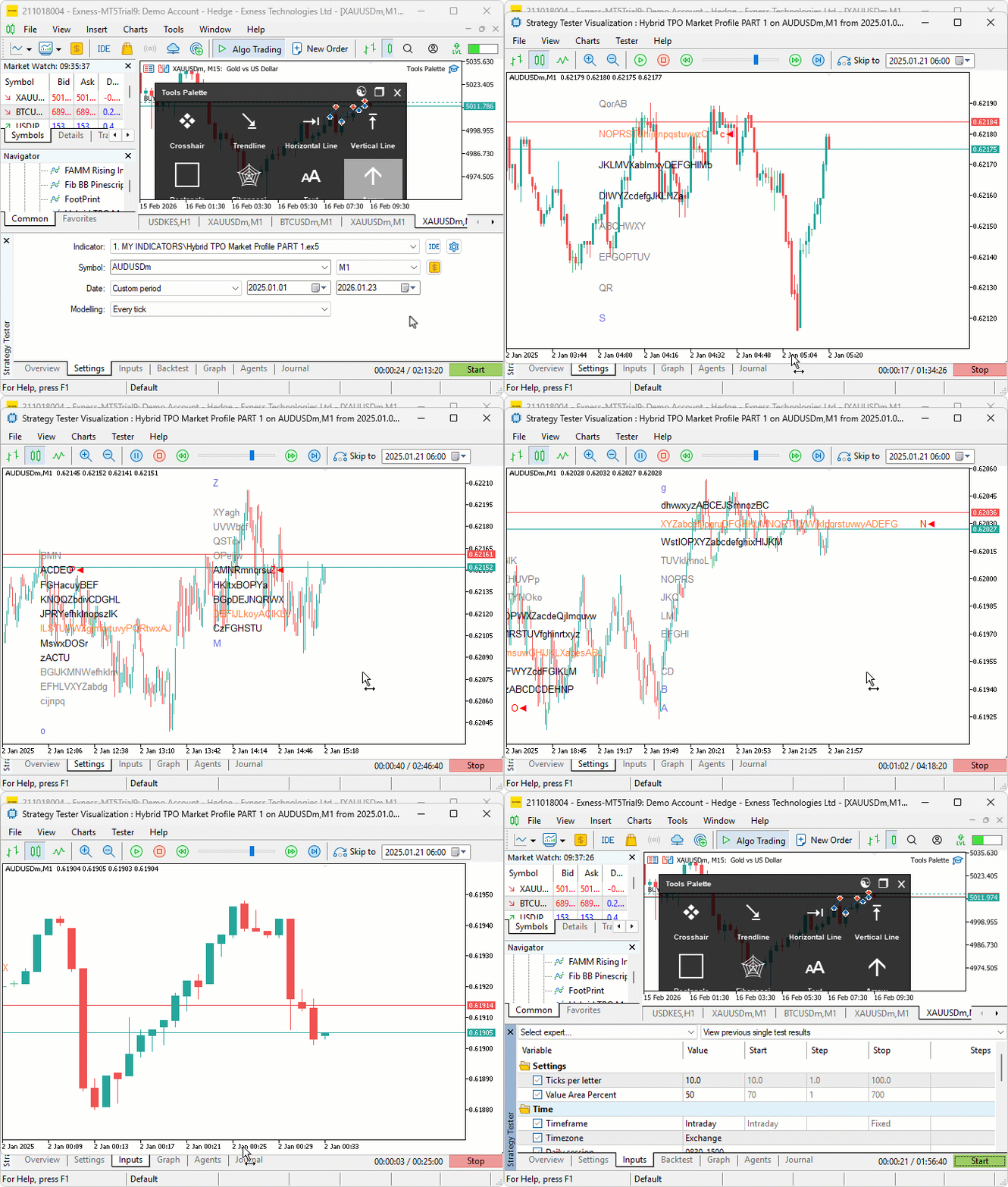
テストを実施しました。以下は、単一のGraphics Interchange Format (GIF)画像形式にまとめた可視化結果です。
結論
複数のセッション時間足に対応したハイブリッドTime Price Opportunity (TPO)マーケットプロファイル用のカスタムインジケータをMQL5で開発しました。このインジケータは、タイムゾーン調整に対応し、イントラデイ、日足、週足、月足、固定期間など、さまざまなセッション時間足をサポートします。このインジケータでは、価格をグリッド化し、高値、安値、始値、終値などのセッションデータを追跡します。また、TPOカウントからPoCとVAを計算し、TPO文字、単独プリント、VA、PoC、終値マーカー用のカスタマイズ可能な色を使用して、チャート上にプロファイルを描画します。次のパートでは、すべてのラベルを含むマーケットプロファイルをマークするために、四角形バブルとドットバブルの描画を追加します。どうぞお楽しみに。
MetaQuotes Ltdにより英語から翻訳されました。
元の記事: https://www.mql5.com/en/articles/21388
警告: これらの資料についてのすべての権利はMetaQuotes Ltd.が保有しています。これらの資料の全部または一部の複製や再プリントは禁じられています。
この記事はサイトのユーザーによって執筆されたものであり、著者の個人的な見解を反映しています。MetaQuotes Ltdは、提示された情報の正確性や、記載されているソリューション、戦略、または推奨事項の使用によって生じたいかなる結果についても責任を負いません。

 MQL5取引ツール(第20回):統計的相関分析と回帰分析を用いたCanvasグラフ作成
 MQL5入門(第41回)MQL5におけるファイル処理入門(III)
 MQL5でカスタムインジケータを作成する(第8回):出来高統合によるより深いマーケットプロファイル分析
 MQL5取引ツール(第19回):チャート描画用のインタラクティブなツールパレットの構築

- 無料取引アプリ
- 8千を超えるシグナルをコピー
- 金融ニュースで金融マーケットを探索