UTralVirtualMT5

Utility for managing open positions and pending orders. The built-in trailing stop has five modes and seven tools. There is a virtual stop loss and a virtual take profit, which can be freely moved around the chart. With the help of the built-in trading simulator, you can check how the EA works in the strategy tester.

A detailed guide to UTralVirtualMT5 can be found in the "Comments" section.

In the MT5 tester, manual movement of virtual SL and TP lines according to the chart does not work!

Benefits

  • 5 trailing stop modes: virtual, normal, total, percentage and mobile stop loss;
  • 7 options: by points, by bar extremes, by fractals, by volumes, by MA, by Parabolic SAR and by ATR;
  • virtual TP and SL - freely move manually according to the graph;
  • adding stop loss and take profit to all open positions;
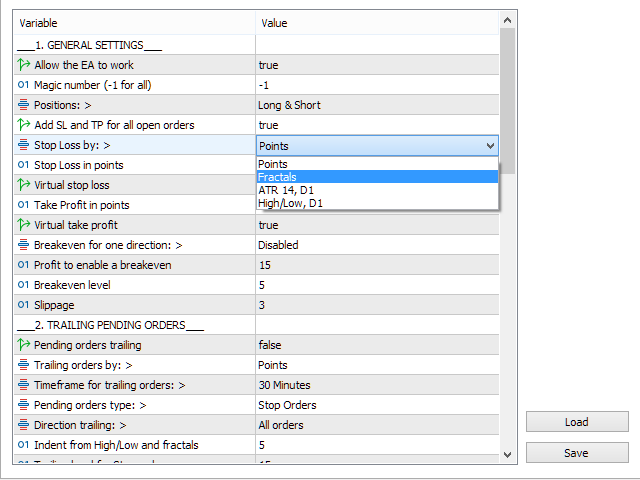
  • setting stop loss by: points, fractals, ATR indicator, daily High/Low;
  • trailing stop for all orders opened on the chart;
  • mini profit to start the trailing stop.
  • setting up a trailing stop for of open positions by magic number and by direction;
  • trailing of pending orders: by type, by direction, by points, fractals, by bar extremes;
  • "hot buttons " on the chart for quick execution of commands;
  • works on accounts with 4 and 5-digit quotes;
  • for 5-digit accounts, the parameters are automatically increased by 10;
  • a special parameter multiplier for working with cryptocurrencies, indices, futures, CFDs.

Parameters

Block 1. GENERAL SETTINGS

  • Allow the EA to work
  • Magic number (-1 for all)
  • Positions: - choice of direction.
  • Add SL and TP for all open orders
  • Stop Loss by: - choice of stop loss setting method.
  • Stop Loss in points
  • Virtual stop loss
  • Take Profit in points
  • Virtual take profit
  • Breakeven for one direction - selection of the breakeven mode
  • Profit to enable a breakeven - level of profit in points, at which a breakeven is enabled.
  • Breakeven level
  • Slippage

Block 2. TRAILING PENDING ORDERS

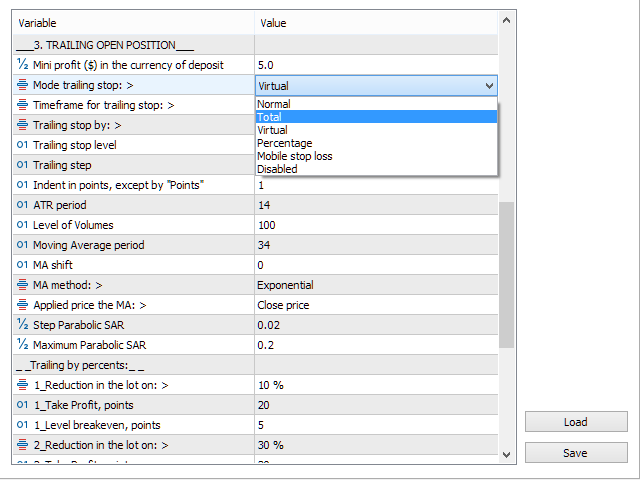
Block 3. TRAILING OPEN POSITIONS

  • Mini profit ($) in the currency of deposit- to start trailing stop.
  • Mode trailing stop: 5 options.
  • Timeframe for trailing stop - select a timeframe a trailing stop is to work on.
  • Trailing stop by: - choice of trailing stop for 7 instruments.
  • Trailing stop level
  • Trailing step 
  • Indent in points, except "by Points"
  • ATR period
  • Level of Volumes

Block 4. OTHER SETTINGS

Recommended products
Close All in 1s
Seng Yang
4.68 (22)
Hello, Every one  A script to close all market positions and/or pending orders. ----------------------------------------------------------------------------------- This is Close All      market positions and/or pending orders button  You can close all orders in 1 second by one click  For advanced version:  Advanced:  https://www.mql5.com/en/market/product/77763           https://www.mql5.com/en/market/product/89311 Key:  1 Close all button: The script will close All orders market + pending
FREE
Hello traders! I'm your trading assistant. No need for lengthy introductions—let me tell you about my specialties: I excel in managing your positions, whether you place orders on either side, I can promptly add appropriate stop-loss lines and implement trailing stops for you. 2. I can help you avoid chasing gains and selling in losses, fundamentally eliminating the human weakness of failing to stick to principles. 3. I will send you a notification message to the MT5 client on your mobile device
Bneu Trade Manager
Marvinson Salavia Caballero
**Bneu Trade Manager** is a trading utility Expert Advisor for MetaTrader 5 designed to assist traders in managing their trading operations through a visual panel interface. This free version provides essential trade management tools suitable for manual traders who want to manage trades efficiently using a graphical interface. **Main Functionality** **Visual Trade Management:** The utility provides drag-and-drop horizontal lines on the chart for stop loss and take profit placement. Users can
FREE
Synchronizer
PATRICK PAARSCH
This Expert Advisor monitors all open positions across all symbols in MetaTrader 5. Whenever a Stop Loss (SL) or Take Profit (TP) is manually set or adjusted on any position, the EA automatically applies that value to all other open positions , regardless of symbol or order type (Buy/Sell). This ensures consistent and synchronized SL and TP levels across your account. Perfect for mobile trading via tablet or smartphone!
Ultimate MT5 to Telegram (UMT) sends controlled trades (via symbol, magic, comment) to your telegram channel. It sends open and closed trades, including pending orders and TP/SL modifications, along with chart screenshots, to any telegram channel. Additionally, you can send trade reports of open trades and summary profit/pip reports for day, week, or month. You can customize the design of the trade actions or reports with variables and emoticons.  A beautiful panel allows you to visualize all t
Smart Remote Trade Assistant MT5: Remote Trading Panel via Telegram for MetaTrader 5 Smart Remote Trade Assistant MT5 is an advanced panel for MetaTrader 5, designed for traders who need to control their operations quickly, securely, and remotely directly from Telegram. Get the   Windows Bridge APP File and Tutorial Bridge file are needed to connect the Telegram Trading Panel to the MT5 EA. Compatible with Windows 10 & Windows 11 - 64 bits - And Windows Server from 2016 This is the introductory
This Expert Advisor (EA) for MetaTrader 5 (MT5) has been designed to automatically manage Stop Loss (SL) and Take Profit (TP). Main Features Automatic Detection of Manual Positions : Monitors new manual positions without SL/TP and applies the configured rules Multiple Orders : Opening of multiple orders under the same conditions as the original position Hidden SL/TP : The hidden mode allows creating SL/TP invisible to your broker  Equity Protection": Allows defining a threshold for the accou
Talents ATR Scalper Utility (MT5) The Talents ATR Scalper Utility is a professional-grade trade execution and management tool built for MetaTrader 5. Inspired by the Biblical Parable of the Talents , this utility is designed to help traders multiply their potential with precision risk control, one-click simplicity, and advanced automation. Whether you’re scalping forex, gold, or indices, this tool delivers speed, consistency, and confidence. Key Features One-Click Trade Preview Click below price
Trade Control Panel
Jerry Jilun Anak Liban
Trade Control Panel Function Normal One Click Function Close All Close All Profit Close All Loss Close All Pending Order Close All Sell Close All Buy Advance One Click Function 1.  Close Partial Lot Sell by Percent It will help you partial close for all open position by desire percent you wanted. No longer partial close one by one for every open position Manual input for desire percent 2. Close Partial Lot Buy by Percent It will help you partial close for all open position by desire percent
Risk Control Utility MT5 designed for manual trading. It helps to calculate and control your risks, transfer transactions to breakeven and accompany positions with trailing stop. Easy to set up and use. It can be used for calculating a trading lot, calculating stop loss and take profit levels. Works with currency pairs, CFDs, stocks, indices, futures, cryptocurrencies Displays   volume,   potential loss and profit before   placing an order Ability to set the expiration time of a pending order Tr
BossFXTradePanelEA (MT5)  [First 10 copies sold at 50 USD price will increase to 99USD] BossFXTradePanelEA is a fully interactive trade management panel designed for MetaTrader 5, providing traders with an easy-to-use, one-click interface to execute and manage trades. This EA simplifies trade execution , risk management, and position control by combining market orders, stop loss, take profit, trailing stops, and breakeven functionalities into a single, intuitive panel.  Key features include: On
Stop And Close
Tetyana Shcherba
2.75 (4)
The utility (Expert Advisor) is designed for monitoring and controlling the total drawdown, as well as closing all positions after reaching the specified levels or upon the occurrence of a specified time with the ability to disable the operation of the automatic EAs running in the same terminal. It is capable of tracking the status of the entire account, as well as individual pairs. It works with the positions opened manually or by other automatic EAs. It tracks the open trades in real time mode
News Hedging Pro  is a unique robot that allows you to trade during the most critical news announcement periods by your predefined strategy. You can preset the strategy to trade, and then it will trade that news automatically when the news comes. News release gives opportunity to have pips since the price usually has big move at that time. Now with this tool, trading news become easier, more flexible and more exciting than ever. No waiting, no confusing anymore. Product Links Fully  Description
Quick Exit
Jefferson Judge Metha
This MT5 Utility is designed to simplify the process of managing multiple trades. If you have several open positions, it can be time-consuming to close each one manually. With this tool, you can easily close all profit trades, losing trades, or just the trades that are linked to the chart you're currently viewing. It saves you time and effort by allowing you to manage your trades with just a few clicks, making your trading experience smoother and more efficient. Whether you're focusing on profit
FREE
如果产品有任何问题或者您需要在此产品上添加功能,请联系我 Contact/message me if you encounter any issue using the product or need extra feature to add on the base version. There is Demo version of this panel Dashboard Super Three MA MT5 Demo in my product list, please try it out to get familiar with all functionalities for free Free version: LINK MT4 version: LINK This system basically utilizes PA and three adjustable Moving Average as the main indicator set to generate trading signal. With the feature that all MA_timefram
Discord Notify
Aleh Piatrenka
5 (2)
Automatically sends real-time  notifications about trade opening,  closing, partial closing and modification of MT5 to Discord . The utility supports 16 languages : English, French, German, Indian (Hindi), Indonesian, Italian, Kazakh, Korean, Dutch, Polish, Portuguese, Russian, Spanish, Turkish, Ukrainian, and Vietnamese. You can also use any other language by customizing the notification text.  The product is designed for traders who need to receive Discord notifications without constantly moni
FREE
Slack Notify
Aleh Piatrenka
Automatically sends real-time  notifications about trade opening, closing, partial closing and modification of MT5 to Slack. The utility supports 16 languages : English, French, German, Indian (Hindi), Indonesian, Italian, Kazakh, Korean, Dutch, Polish, Portuguese, Russian, Spanish, Turkish, Ukrainian, and Vietnamese. You can also use any other language by customizing the notification text.  The product is designed for traders who need to receive Slack notifications without constantly monitoring
FREE
DRANREB TRADING MANAGER PRO - FULL VERSION   Dranreb Trading Manager  – Professional Trade Execution Tool Dranreb Trading Manager  is a powerful all-in-one trade management panel designed for serious traders who demand speed, precision, and full control over their positions. Built specifically for   SMC (Smart Money Concepts)   and   ICT-style trading , this tool enhances your execution workflow and enforces strict risk discipline—perfect for prop firm environments.   Key Features   One-
Trading with multiple positions but neglecting to set Stop Loss and Take Profit levels often leads to catastrophic losses. This tool is designed to manage risk with a single click, supporting you in avoiding large losses and maximizing profits. Once you open a position, just click once for now. It eliminates the regret of no turning back. Target Users Traders who want to batch set SL/TP for numerous positions. Traders who need to hedge risk quickly for all positions during market volatility.
ZoneStrike
Amir Nejatbakhsh
ZoneStrike V 1.00 - Manual Trading Control Panel ZoneStrike is an advanced manual trading assistant for MetaTrader 5, designed to give traders full control over position sizing, risk management, and execution from a clean, intuitive graphical interface. Whether you're a scalper, swing trader, or institutional analyst, ZoneStrike empowers you to trade confidently with precision and speed. Key Features Risk-Based Position Sizing Define your trade risk as a percentage of your account balance. Z
Prop Max Daily Loss Manager — Daily Risk Management Assistant for Prop Trading Firms Prop Max Daily Loss Manager is a MetaTrader 5 utility designed for traders taking Challenges or trading on Funded accounts with prop companies (such as FTMO). The tool automatically monitors daily risk and helps avoid violating the established maximum daily loss limit. Key Features Automatic closure of all trades when the specified daily loss level is reached; Alert notifications when the limit is triggered; Fle
Clear All Stops and Takes — A simple solution for instant SL/TP removal Remove all Stop Loss and Take Profit levels with a single click! Clear All Stops and Takes is a convenient script designed for traders who want to quickly and efficiently remove SL and TP levels on all open positions. Its simple operation and instant execution make this tool indispensable for working in dynamic market conditions. Key Benefits: • Time-saving: No need to manually edit each position — everything is done automat
FREE
CloseByLossOrProfit
Konstantin Chernov
CloseByLossOrProfit Expert Advisor closes all positions as their total profit or loss reaches a specified value (in deposit currency). In addition, it can delete pending orders. Allow AutoTrading before running the Expert Advisor. Usage: Run the Expert Advisor on a chart. Input Parameters:  Language of messages displayed (EN, RU, DE, FR, ES) - language of the output messages (English, Russian, German, French, Spanish); Profit in the currency  - profit in points; Loss in the currency  - loss in p
FREE
` Account Limit Guard MT5 ` is a free account-level daily limit protection utility for MetaTrader 5. It is not a trading strategy, does not open trades, does not generate signals, and does not rely on any specific indicator. Its purpose is simple: monitor your account-level daily loss and automatically apply protection once your configured limit is reached. The Lite version is intentionally focused. It does not try to cover every account-risk rule. It is built to solve one clear problem: **H
FREE
Crash5 EA ,I s a automatic robot that has the level of professional decision when to take a trade without any emotion. The bot will help in your scalping decision making with its own TP (take profit) and SL (stop loss) with the trail stop when in profit. This is a trend based spike catching ,looking on whats happening in real time charts no repainting of any signals. The robot helps in making decisions on the candle stick pattern opened and closed lat price with the help of RSI ,MACD and the EMA
Chart Link
David Gitau Gakunga
4.83 (12)
Chart Link  allows you to control multiple charts from one chart or multiple charts from multiple charts. Features 1. Synchronised Scrolling :     Scrolling the master chart also scrolls all linked sub charts to the same position.     Sub charts inherit offset and auto-scroll settings from the master chart. 2. Synchronised Timeframe :     Switching the master chart timeframe also switches all linked sub charts. 3. Synchronised   Symbol   :     Switching the master chart symbol also switches all
FREE
MultiChart Pro
Pablo Filipe Soares De Almeida
MultiChart Pro – Chart Management Tool for MetaTrader 5 This Expert Advisor (EA) enables users to automate the opening and configuration of charts in MetaTrader 5. It supports the setup of up to four charts with specified timeframes and templates, including offline charts. Functionality Chart Opening: Opens up to three additional charts (e.g., D1, M1, M15) and one offline chart (e.g., 10 seconds), while configuring the current chart (e.g., M5). Template Application: Applies user-defined templat
Auto Trailing Stop MT5
Volodymyr Hrybachov
2 (1)
Utility for automatic closing of deals by trailing stop levels. Allows you to get the most out of your profit. Created by a professional trader for traders.       Utility       works with any market orders opened manually by a trader or using advisors. Can filter trades by magic number. The utility can work with any number of orders simultaneously. MT4 version https://www.mql5.com/en/market/product/56487 WHAT THE UTILITY CAN DO: set virtual   trailing stop   levels       from 1 pip set          
VirtualStopsMT5
Viktor Shpakovskiy
A utility for managing open positions using virtual (invisible to the broker) stops. Virtual stop loss and virtual take profit can be freely moved around the chart. If the price touches the virtual stop line (TP, SL, TS), the EA will close all orders of the same direction on the current chart. Closing orders by virtual take profit is possible only if there is a profit. With the help of the built-in trading simulator, you can, in the strategy tester, see how the adviser works. Parameters Block
Panel Trader MT5
Maksim Vershinin
Trading panel for fast and convenient trading. The panel allows you to quickly open and close orders. Separate closing of orders for Sell and Buy positions. It is also possible to close all orders completely. The trading panel displays information about profit, total volume and number of orders for Sell and Buy positions. Sometimes some positions may not be closed due to market volatility. In this case, click close the position again.
Buyers of this product also purchase
Trade Assistant MT5
Evgeniy Kravchenko
4.42 (209)
It helps to calculate the risk per trade, the easy installation of a new order, order management with partial closing functions, trailing stop of 7 types and other useful functions. Additional materials and instructions Installation instructions - Application instructions - Trial version of the application for a demo account Line function -   shows on the chart the Opening line, Stop Loss, Take Profit. With this function it is easy to set a new order and see its additional characteristics bef
Forex Trade Manager MT5
InvestSoft
4.98 (650)
Welcome to Trade Manager MT5 - the ultimate risk management tool designed to make trading more intuitive, precise, and efficient. This is not just an order placement tool; it's a comprehensive solution for seamless trade planning, position management, and enhanced control over risk. Whether you're a beginner taking your first steps, an advanced trader, or a scalper needing rapid executions, Trade Manager MT5 adapts to your needs, offering flexibility across all markets, from forex and indices t
FarmedHedge Pair Trading Dashboard
Tanapisit Tepawarapruek
5 (3)
Farmed Hedge Yield Farming | All Markets (Manual - Hybrid - Semi/Automated EA) MULTI-ASSET SUPPORT Trade any asset available on your broker - Forex: Major, Minor, Exotic pairs - Crypto: BTC, ETH, XRP, SOL, BNB - Stocks: Apple, Tesla, Amazon, Google, etc. - Commodities: Gold, Silver, Oil, Gas - Indices: US30, NAS100, SPX500, DAX40 - Any CFD your broker offers VERIFIED TRADING RESULTS - Farmed Hedge Yield Axi Copy:  https://www.mql5.com/en/signals/2356376 - Farmed Hedge Yield Exn Copy:   https:/
TradePanel MT5
Alfiya Fazylova
4.87 (153)
Trade Panel is a multi-functional trading assistant. The app contains over 50 trading functions for manual trading and allows you to automate most trading tasks. Before making a purchase, you can test the demo version on a demo account. Download the trial version of the application for a demonstration account: https://www.mql5.com/en/blogs/post/750865 . Full instructions here . Trade. Allows you to perform trading operations in one click: Open pending orders and positions with automatic risk cal
Beta Release The Telegram to MT5 Signal Trader is nearly at the official alpha release. Some features are still under development and you may encounter minor bugs. If you experience issues, please report them, your feedback helps improve the software for everyone. Telegram to MT5 Signal Trader is a powerful tool that automatically copies trading signals from Telegram channels or groups directly to your MetaTrader 5 account. It supports both public and private Telegram channels, and you can conn
Power Candles Strategy Scanner - Self-Optimizing Multi-Symbol Setup Finder Power Candles Strategy Scanner runs the same self-optimizing engine that powers the Power Candles indicator - on every symbol in your Market Watch, side by side. One panel tells you which symbols are statistically tradable right now, which strategy wins on each, the optimal Stop Loss / Take Profit pair, and pings you the moment a fresh signal fires. This tool is part of the Stein Investments ecosystem - 18+ tools plus Max
Footprint Chart Pro — Professional OrderFlow EA for MetaTrader 5 Version 6.34 | Professional tool for real traders | Institutional-Grade Visualization DEMO USERS - PLEASE SELECT EVERY TICK / REAL TICK WHEN TESTING AND YOU HAVE DOWNLOADED HISTORICAL DATA. IF YOU SEE A WAITING SCREEN AND IT IS NOT DOWNLOADING, IT MEANS YOU HAVE LOW HISTORICAL DATA. TRY 1 MIN AND 5 MIN FIRST ON 1 DAY DATA. ONE DAY DATA SHOULD BE THE NEWEST AND MOST CURRENT DATE. PLEASE WAIT UNTIL THE MARKET HAS ROLLED OVER PERIOD.
AntiOverfit PRO MT5
Enrique Enguix
5 (4)
Before you buy an EA, check whether it really holds up or just got lucky in a backtest. Most robots are sold with a beautiful backtest. Rising equity curve. Good profit factor. Very few doubts. And yet, many of those EAs fall apart as soon as the market stops moving the way it did in that historical run. Why? Because a backtest only proves one thing: that the strategy worked on one specific price path. It does not prove it will hold up under different paths. It does not prove it is robust. And i
Timeless Charts
Samuel Manoel De Souza
5 (4)
Timeless Charts is an advanced charting solution designed for professional traders seeking for custom charts / custom timeframes , including seconds charts / seconds timeframe, renko charts / renko bars, cluster charts / footprint charts and advanced tools present in most of the popular platforms. Unlike traditional offline charts or simplistic custom indicators, this solution constructs fully custom bars with true timestamp accuracy , down to miliseconds, allowing for a powerful and precise tr
ABQ Visual Risk Sizer
Cristian David Castillo Arrieta
ABQ Visual Risk Sizer - Institutional Risk & Trade Execution Category: Utilities / Risk Management Manual lot calculation costs time and money. In modern trading, especially when operating with funded accounts (Prop Firms), a lot sizing error or a 5-second delay in entering an order can mean violating the Daily Drawdown rule or missing the perfect entry price. ABQ Visual Risk Sizer is an institutional-grade tool designed to solve this problem permanently. It transforms complex mathematical risk
Ultimate Extractor
Clifton Creath
5 (9)
Ultimate Extractor - Professional Trading Analytics for MT5 *****this is the local HTML version of Ultimate Extractor. !!!!!it is not compatible with Cloud!!!! For the online version please reach out to me directly****** Ultimate Extractor transforms your MetaTrader 5 trading history into actionable insights with comprehensive analytics, interactive charts, and real-time performance tracking. What It Does Automatically analyzes your MT5 trading history across all Expert Advisors and generates
HINN Lazy Trader
ALGOFLOW OÜ
5 (2)
The core idea: using the user interface, you configure the parameters the chart must meet before entering a position (or positions), choose which entry models to use, and set the rules for when trading and planning should end. Lazy Trader  handles the rest: it  takes over all the routine chart watching and execution! full description  :: 3 key videos [1] ->  [2]   ->  [3] What can it do? - Understands Larry Williams market structure - Understands swing market structure by Michael Huddleston
FUTURES ORDERFLOW FOOTPRINT CHART Professional OrderFlow EA for MetaTrader 5 Version 1.01| Professional tool for real traders | Institutional-Grade Visualization STRATEGY TESTER USERS - PLEASE SELECT EVERY REAL TICK WHEN TESTING AND YOU HAVE DOWNLOADED HISTORICAL DATA. IF YOU SEE A WAITING SCREEN AND IT IS NOT DOWNLOADING, IT MEANS YOU HAVE LOW HISTORICAL DATA. TRY 1 MIN AND 5 MIN FIRST ON 1 DAY DATA. ONE DAY DATA SHOULD BE THE NEWEST AND MOST CURRENT DATE. PLEASE WAIT UNTIL THE MARKET HAS ROL
Bots Builder Pro MT5
Andrey Barinov
4.17 (6)
This is exactly what the name says. Visual strategy builder . One of a kind. Turn your trading strategies and ideas into Expert Advisors without writing single line of code. Generate mql source code files with a few clicks and get your fully functional Expert Advisors, which are ready for live execution, strategy tester and cloud optimization. There are very few options for those who have no programming skills and can not create their trading solutions in the MQL language. Now, with Bots Builde
The product will copy all telegram signal to MT5 ( which you are member) , also it can work as remote copier.  Easy to set up, copy order instant, can work with almost signal formats, image signal,  s upport to translate other language to English Work with all type of channel or group, even channel have "Restrict Saving Content", work with  multi channel, multi MT5 Work as remote copier: with signal have ticket number, it will copy exactly via ticket number. Support to backtest signal. How to s
Telegram To MT5 Receiver
Levi Dane Benjamin
4.31 (16)
Copy trade signals from Telegram channels you already belong to (including private and restricted channels) directly into MetaTrader 5. Set your risk rules once, monitor execution, and manage positions with built-in protections designed to reduce mistakes and overtrading. Fast setup : configure your channels, select what to copy, and start within minutes using a clean on-chart interface. User Guide + Demo | MT4 Version | Discord Version Who this is for Traders who follow one or more signal provi
Effortlessly manage multiple trading accounts The Local Trade Copier EA is a solution for individual traders or account managers who need to execute trade signals from external sources or who need to manage several accounts at the same time, without the need for a MAM or a PAMM account. It copies from up to 8 master accounts to unlimited slave accounts . [ Installation Guide | Update Guide | Troubleshooting | FAQ | All Products  ] 100% self hosted Easy to install and use It can copy from MT4 t
Trade Manager DashPlus
Henry Lyubomir Wallace
5 (13)
DashPlus is an advanced trade management tool designed to enhance your trading efficiency and effectiveness on the MetaTrader 5 platform. It offers a comprehensive suite of features, including risk calculation, order management, advanced grid systems, chart-based tools, and performance analytics. Key Features 1. Recovery Grid Implements an averaging and flexible grid system to manage trades during adverse market conditions. Allows for strategic entry and exit points to optimize trade recovery
TradeMirror is a local order replication tool designed for MT4/MT5 platforms, supporting real-time trading synchronization. Product Advantages Aligned with the high standards of security, stability, and privacy protection for financial software, we have optimized three core dimensions: Intuitive graphical interface for user-friendly operation Enhanced privacy protection to meet sensitive data isolation requirements in financial scenarios Millisecond-level order synchronization ensures zero-delay
Custom Alerts AIO: All-in-One Market Scanner – No Setup Required Overview Custom Alerts AIO is the fastest and easiest way to monitor multiple markets for real-time trading signals—without any setup or extra licenses. It comes with all required Stein Investments indicators already embedded, making it the perfect plug-and-play solution for traders who value simplicity and performance. Just load it to any chart and start receiving alerts across Forex, Metals, Crypto, and Indices. Shares can be a
Ultimate Trailing Stop EA MT5
BLAKE STEVEN RODGER
4.13 (8)
This EA Utility allows you to manage (with advanced filtering) unlimited open orders (manual or EA) with 16 trailing stop methods: fixed, percent, ATR Exit, Chandelier Exit, Moving Average, Candle High Low Exit, Bollinger Bands, Parabolic, Envelope, Fractal, Ichimoku Kijun-Sen, Alligator, Exit After X Minutes or Bars, RSI and Stochastic. The trailing stop can be either real or virtual, and you can exit fully or with a partial close percent on touch or bar close.  Moreover, you can add (override
EA Auditor
Stephen J Martret
5 (2)
EA AUDITOR — EA and Signal Verification Tool for MetaTrader 5 EA Auditor is an independent analysis tool for traders evaluating Expert Advisors and trading signals on MetaTrader 5. It audits backtest reports, reviews posted developer signals, and cross-verifies the two against each other to help traders assess strategies before committing capital. The MQL5 market offers a wide range of Expert Advisors from many developers, with varying approaches, quality, and transparency. EA Auditor provides a
Custom Timeframe Manager Pro: Unlimited Timeframes in MetaTrader 5 Standard terminal settings often hide important price movement details. By limiting analysis to classic periods only, a trader risks missing trend inception points and true volatility levels. Custom Timeframe Manager Pro is a professional utility that expands the boundaries of MetaTrader 5. Create any custom periods, including fractional and exotic ones, and work with them exactly like standard terminal charts. Available period
What Exactly Is A Smart Trading Tool? Smart Trading Tool   was developed for fast and comfortable trading of the financial markets especially for   ORDER BLOCKS TRADERS .   It provides traders functionalities, such as: A Drawing Tool One-Click Trading Panel Automated Lot Sizes Calculation   based on your risk appetite & Money Management ( Watch this video , how this tool can help manage your risk per trade better!) Built in PRICE LEVELS (Fibonacci, Round Numbers, Daily hi-low, etc) Shows Trading
YuClusters
Yury Kulikov
4.93 (43)
Attention: You can view the program operation in the free version  YuClusters DEMO .  YuClusters is a professional market analysis system. The trader has unique opportunities to analyze the flow of orders, trade volumes, price movements using various charts, profiles, indicators, and graphical objects. YuClusters operates on data based on Time&Sales or ticks information, depending on what is available in the quotes of a financial instrument. YuClusters allows you to build graphs by combining da
Assistant: Trade Assistant-MT4 (click to download) Trade Assistant-MT5 (click to download) Please read the operating instructions carefully. Basics: Quick opening and closing of positions, one-click opening and closing of positions, one-click placing of orders Draw-Line Trade Auto sl/tp Close By Symbols Profit Protected Move SL Protect Trailing SL Account RiskControl Order's Shadow Auto-Add Orders Auto-Close Orders Close ReOpen Symbols Infomation Chats Open Data Statistics Support language
Hotkeys for Streamdeck
Manuel Michiels
5 (1)
MT5-StreamDeck offers the possibility to use a certain number of pre-programmed Hot-keys with a clearly defined role. So by the push of a button you can open a trade with a pre-defined lot size, stoploss and take profit. Close all your trades, close the ones in profit, or in loss, set Break-even or set a trailing stop. All this with a Hot key button. See the feature list for all the actions that can take place at the push of a button. Ideal for Quick Scalping or day trading with set risk managem
Mt5 To InterativeBrokers Copier allows you to copy deals from MT5 account to Interactive Brokers. With this, you can run your EA strategy on a MT5 Demo/Real Account, then copy all the deals to Interactive Brokers account real time. Features: 1. Copy or Invert-Copy deals Realtime from MT5 to IB Account. 2. Synchronizing positions of both accounts periodicaly, in case any missing copying. 3. You can choose only Buy position or Sell position. Symbols Setup: General Format:  {MT Symbol} -> {IB S
EA Performance Logger Telegram
Abdulqudus Tomiwa Akande-owoo
Are you running multiple Expert Advisors and struggling to keep track of exactly which one is performing and which one is dragging your account down? Do you find yourself constantly logging into MetaTrader just to check your daily or weekly P&L? Or are you looking for an easy way to provide evidence of your EA or manual trading performances to clients and potential investors? Introducing the   Performance Logger by AlgoQuant Labs   for MetaTrader 5. This isn't just a simple notification bot; it
EasyInsight AIO MT5
Alain Verleyen
4.92 (12)
EASY Insight AIO – All-In-One Power for AI-Driven Trading Want to skip the setup and start scanning the entire market – Forex, Gold, Crypto, Indices, and even Stocks – in seconds? EASY Insight AIO is the complete plug-and-play solution for AI-powered trade analysis. It includes all core Stein Investments indicators built-in and automatically exports clean, structured CSV files – perfect for backtesting, AI prompts, and live market decision-making. No need to install or configure indicators manu
More from author
Taranus
Viktor Shpakovskiy
5 (1)
Taranus is a multifunctional EA, a universal assistant to a trader, designed to work under the control of a trader. The EA has a large set of tools and can work: by indicators, by trading levels, by trend lines, by martingale strategy, trade on news. It has: several filters to determine the trend, a multi-level risk management system, money management, virtual stop loss, universal trailing stop, can work with any type of orders. Set files and a guide to the Taranus EA can be found in the "Commen
Taranus Light
Viktor Shpakovskiy
Taranus Light is a reduced version of the universal, semi-automatic EA Taranus, designed to work under the control of a trader. It can work with or without indicators, has several filters for determining the trend direction and can only work with market or pending order. Trailing stop capabilities of the EAd has been expanded by adding functions from UTrailing EA. Taranus Light EA is suitable for both experienced and beginner traders. Set files and a guide to the Taranus Light EA can be found in
Martex
Viktor Shpakovskiy
Martex is a moderately aggressive EA working on a martingale strategy with hedge. The EA independently monitors the risk and, if the risk is high, takes measures to exit the market with a minimum profit. In the hedging mode, the EA independently leaves the "lock" with a profit. A complete guide to the Martex EA can be found in the "Comments" section. Benefits automatic magic number, individual for each currency pair; automatic breakeven and automatic trailing stop; at high risk, reducing the mar
UTrailing
Viktor Shpakovskiy
5 (2)
The EA for manual trading to manage open positions and pending orders.The built-in trailing stop has four modes and seven instruments. There is a virtual stop loss and a virtual take profit, which can be freely moved around the chart.Three take profits, which, when triggered, reduce the volume of the lot by a set percentage. With the help of the built-in trading simulator, you can check how the EA works in the strategy tester. Autumn price reduction by 10%! Until October 1st only! Manual to UTra
ForexNewsTrader
Viktor Shpakovskiy
EA is intended for trading on news only. News appear on the chart in the form of text messages and vertical lines. When the price approaches this line, the adviser places pending orders for purchase and for sale. If the "Modify pending orders" function is enabled, orders will move behind the price (up and down) and stay at the set distance from the price, which will not allow the order to worked ahead of time, before the news releases. If, after the news release, not one of the orders has not wo
McDuckEA
Viktor Shpakovskiy
McDuckEA – works on the martingale strategy. It shows good results when trading on Gold, XAUUSD. Martingale orders are opened with a step from each other and only after the opening of a new bar of the set timeframe. During the release of important news, the EA suspends the opening of new orders. The EA has an internal risk control system and, if the risk is exceeded, it starts to exit the market, closing extreme positions in pairs. The level of loading of the deposit determines the risk and prof
UTrailingMini
Viktor Shpakovskiy
The utility for manual trading to manage open positions.The built-in trailing stop has three modes and seven instruments: by pips, by bar extremes, by fractals, by volumes, by MA, by Parabolic SAR and by ATR. With the help of the built-in trading simulator, you can check how the EA works in the strategy tester. Guide to UTrailingMini can be found in the "Comments" section. Benefits 3 trailing stop modes: normal, total and mobile stop loss; 7 options: by points, by bar extremes, by fractals, by v
Fractalan
Viktor Shpakovskiy
Fractalan – a moderately aggressive EA who works on a martingale strategy with a partial hedging system. With reasonable money management, the EA can withstand significant price corrections against open positions! The first order in the series can be opened manually by both the EA and the trader. Subsequent orders are opened when the fractal level of the specified timeframe is broken. The complete guide to the Fractalan EA, the set files can be found in the "Comments" section. Benefits types of
MartexPO
Viktor Shpakovskiy
MartexPO is a moderately aggressive advisor working on a martingale strategy and with the ability to hedge unprofitable positions. Uses pending orders for opening the first order and for hedging. With an asymmetric "lock" - the MartexPO EA is able to independently exit the "lock" with a profit. The MartexPO EA can average orders manually opened by a trader and orders opened by another EA. The EA will be of interest to both beginners and experienced traders. A set files and a complete guide to th
TralDynamic
Viktor Shpakovskiy
The utility for managing open positions can work with stops (take profit and stop loss) in money, percentages or points. The built-in trailing stop starts working from profit, the size of which can be set in currency or as a percentage. With the help of the built-in trading simulator, you can check how the utility works in the strategy tester. Benefits setting stop loss and take profit in the deposit currency, as a percentage of the account balance or by points; adding stop loss and take profit
UTrailingMin
Viktor Shpakovskiy
The EA for manual trading to manage open positions.The built-in trailing stop has five modes and seven instruments. There is a virtual stop loss and a virtual take profit, which can be freely moved around the chart. With the help of the built-in trading simulator, you can check how the EA works in the strategy tester. Guide to UTrailingMin can be found in the "Comments" section. Benefits 5 trailing stop modes: virtual, normal, total, percentage and mobile stop loss; 7 options: by points, by bar
PriceActionInd
Viktor Shpakovskiy
The indicator shows 7 patterns of the Price Action trading system, as well as the maximum and minimum price lines for the day. Timeframe: H1, H4, D1. Pin bar Outside Vertical Bar (OVB) Pivot Point Reversal (PPR) Closing Price Reversal (CPR) Double Extremums ( DMax/DMin ) Wide Range Bar (WRB) Inside Bar (IB) Settings PRICE ACTION PATTERNS Show Pin Bar   Color Pin Bar - pointer arrow color.                                        Show Outside Vertical Bar (OVB)  Color Outside Vertical Bar   - poin
TralDynamicU
Viktor Shpakovskiy
The utility for managing open positions can work with stops (take profit and stop loss) in money, percentages or points. The built-in trailing stop starts working from profit, the size of which can be set in currency or as a percentage. Trailing stop can work in three modes and for five instruments. With the help of the built-in trading simulator, you can check how the utility works in the strategy tester. Benefits setting stop loss and take profit in the deposit currency, as a percentage of the
UTralVirtual
Viktor Shpakovskiy
Utility for managing open positions and pending orders. The built-in trailing stop has five modes and seven tools. There is a virtual stop loss and a virtual take profit, which can be freely moved around the chart. With the help of the built-in trading simulator, you can check how the EA works in the strategy tester. Detailed guide to UTralVirtual can be found in the "Comments" section. Benefits 5 trailing stop modes: virtual, normal, total, percentage and mobile stop loss; 7 options: by points,
VirtualStops
Viktor Shpakovskiy
A utility for managing open positions using virtual (invisible to the broker) stops. Virtual stop loss and virtual take profit can be freely moved around the chart. If the price touches the virtual stop line (TP, SL, TS), the EA will close all orders of the same direction on the current chart. Closing orders by virtual take profit is possible only if there is a profit. With the help of the built-in trading simulator, you can, in the strategy tester, see how the adviser works. Parameters Block
NebularMan
Viktor Shpakovskiy
EA for manual trading with the ability to add new orders with increasing in one lot. You can manage the risk by changing the lot volume, the step between orders, and limiting the number of open positions and the total volume of lots. There is a trailing stop, virtual stop loss and virtual take profit, which can be freely moved around the chart. With the help of the built-in trading simulator, you can check how the EA works in the strategy tester. Benefits the initial lot is opened by a trader or
Aweron
Viktor Shpakovskiy
The Aweron EA works according to the martingale strategy and opens orders based on the signals of the Awesome Oscillator indicator. If desired, the martingale can be disabled, and the EA will work with one order. You can choose the size of lots depending on your risk: normal lots - high risk, economy lots - moderate risk, initial lots - low risk. The EA has an internal risk control system and, if the risk is exceeded, it starts to exit the market, closing extreme orders in pairs. Profitable sing
McDuckEA MT5
Viktor Shpakovskiy
McDuckEA MT5 – works on the martingale strategy. It shows good results when trading on Gold, XAUUSD. Martingale orders are opened with a step from each other and only after the opening of a new bar of the set timeframe. During the release of important news, the adviser suspends the opening of new orders. The EA has an internal risk control system and, if the risk is exceeded, it starts to exit the market, closing extreme positions in pairs. The level of loading of the deposit determines the risk
UTrailingMT5
Viktor Shpakovskiy
The EA for manual trading to manage open positions and pending orders.The built-in trailing stop has four modes and seven instruments. There is a virtual stop loss and a virtual take profit, which can be freely moved around the chart.Three take profits, which, when triggered, reduce the volume of the lot by a set percentage. With the help of the built-in trading simulator, you can check how the EA works in the strategy tester. Manual to UTrailingMT5 can be found in the "Comments" section. In the
MartexMT5
Viktor Shpakovskiy
MartexMT5 is a moderately aggressive EA working on a martingale strategy with hedge. The EA independently monitors the risk and, if the risk is high, takes measures to exit the market with a minimum profit. In the hedging mode, the EA independently leaves the "lock" with a profit. A complete guide to the MartexMT5 EA can be found in the "Comments" section. Benefits automatic magic number, individual for each currency pair; automatic breakeven and automatic trailing stop; at high risk, reducing t
MartexPO MT5
Viktor Shpakovskiy
MartexPO MT5 is a moderately aggressive advisor working on a martingale strategy and with the ability to hedge unprofitable positions. Uses pending orders for opening the first order and for hedging. With an asymmetric "lock" - the MartexPO MT5 EA is able to independently exit the "lock" with a profit. The MartexPO MT5 EA can average orders manually opened by a trader and orders opened by another EA. The EA will be of interest to both beginners and experienced traders. A set files and a guide to
FractalanMT5
Viktor Shpakovskiy
FractalanMT5 – a moderately aggressive EA who works on a martingale strategy with a partial hedging system. With reasonable money management, the EA can withstand significant price corrections against open positions! The first order in the series can be opened manually by both the EA and the trader. Subsequent orders are opened when the fractal level of the specified timeframe is broken. The guide to the FractalanMT5 EA, the set files can be found in the "Comments" section. Benefits types of ord
TralDynamicMT5
Viktor Shpakovskiy
The utility for managing open positions can work with stops (take profit and stop loss) in money, percentages or points. The built-in trailing stop starts working from profit, the size of which can be set in currency or as a percentage. With the help of the built-in trading simulator, you can check how the utility works in the strategy tester. Benefits setting stop loss and take profit in the deposit currency, as a percentage of the account balance or by points; adding stop loss and take profit
UTrailingMinMT5
Viktor Shpakovskiy
The EA for manual trading to manage open positions.The built-in trailing stop has five modes and seven instruments. There is a virtual stop loss and a virtual take profit, which can be freely moved around the chart. With the help of the built-in trading simulator, you can check how the EA works in the strategy tester. Guide to UTrailingMinMT5 can be found in the "Comments" section. In the MT5 strategy tester, manual movement of virtual SL and TP lines according to the schedule does not work! Ben
UTrailingMiniMT5
Viktor Shpakovskiy
The utility for manual trading to manage open positions.The built-in trailing stop has three modes and seven instruments: by pips, by bar extremes, by fractals, by volumes, by MA, by Parabolic SAR and by ATR. With the help of the built-in trading simulator, you can check how the EA works in the strategy tester. Guide to UTrailingMiniMT5 can be found in the "Comments" section. Benefits 3 trailing stop modes: normal, total and mobile stop loss; 7 options: by points, by bar extremes, by fractals, b
TralDynamicU MT5
Viktor Shpakovskiy
The utility for managing open positions can work with stops (take profit and stop loss) in money, percentages or points. The built-in trailing stop starts working from profit, the size of which can be set in currency or as a percentage. Trailing stop can work in three modes and for five instruments. With the help of the built-in trading simulator, you can check how the utility works in the strategy tester. Benefits setting stop loss and take profit in the deposit currency, as a percentage of the
VirtualStopsMT5
Viktor Shpakovskiy
A utility for managing open positions using virtual (invisible to the broker) stops. Virtual stop loss and virtual take profit can be freely moved around the chart. If the price touches the virtual stop line (TP, SL, TS), the EA will close all orders of the same direction on the current chart. Closing orders by virtual take profit is possible only if there is a profit. With the help of the built-in trading simulator, you can, in the strategy tester, see how the adviser works. Parameters Block
NebularManMT5
Viktor Shpakovskiy
EA for manual trading with the ability to add new orders with increasing in one lot. You can manage the risk by changing the lot volume, the step between orders, and limiting the number of open positions and the total volume of lots. There is a trailing stop, virtual stop loss and virtual take profit, which can be freely moved around the chart. With the help of the built-in trading simulator, you can check how the EA works in the strategy tester. In the MT5 strategy tester, manual movement of vi
AweronMT5
Viktor Shpakovskiy
The AweronMT5 EA works according to the martingale strategy and opens orders based on the signals of the Awesome Oscillator indicator. If desired, the martingale can be disabled, and the EA will work with one order. You can choose the size of lots depending on your risk: normal lots - high risk, economy lots - moderate risk, initial lots - low risk. The EA has an internal risk control system and, if the risk is exceeded, it starts to exit the market, closing extreme orders in pairs. Profitable s
Filter:
No reviews
Reply to review