UTralVirtualMT5

用於管理未平倉頭寸和掛單的實用程序。 內置追踪止損有五種模式和七種工具。 有虛擬止損和虛擬止盈,可以在圖表上自由移動。 借助內置的交易模擬器,您可以檢查 EA 在策略測試器中的工作方式。

UTralVirtualMT5 的詳細指南可以在“評論”部分找到。

在 MT5 策略測試器中,手動移動虛擬線(SL 和 TP)不起作用!

好處

  • 5種追踪止損模式:虛擬、正常、總計、百分比和移動止損;
  • 7 個選項:按點、按柱極值、按分形、按交易量、按 MA、按拋物線 SAR 和按 ATR;
  • 虛擬 TP 和 SL - 根據圖表手動自由移動;
  • 為所有未平倉頭寸添加止損和止盈;
  • 通過以下方式設置止損:點、分形、ATR 指標、每日高/低;
  • 圖表上打開的所有訂單的追踪止損;
  • 迷你利潤開始追踪止損。;
  • 通過幻數和方向為未平倉頭寸設置追踪止損;
  • 掛單的尾隨:按類型、方向、點、分形、柱極值;
  • 圖表上的“熱鍵”用於快速執行命令;
  • 適用於具有 4 位和 5 位報價的帳戶;
  • 5位數賬戶,參數自動加10;
  • 用於處理加密貨幣、指數、期貨、差價合約的特殊參數乘數。.

參數

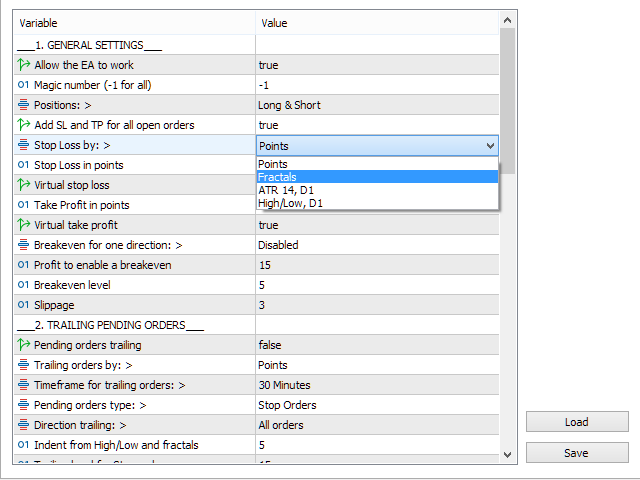
Block 1. GENERAL SETTINGS

  • Allow the EA to work
  • Magic number (-1 for all)
  • Positions:
  • Add SL and TP for all open orders
  • Stop Loss by:
  • Stop Loss in points
  • Virtual stop loss
  • Take Profit in points
  • Virtual take profit
  • Breakeven for one direction<
  • Profit to enable a breakeven
  • Breakeven level
  • Slippage

Block 2. TRAILING PENDING ORDERS

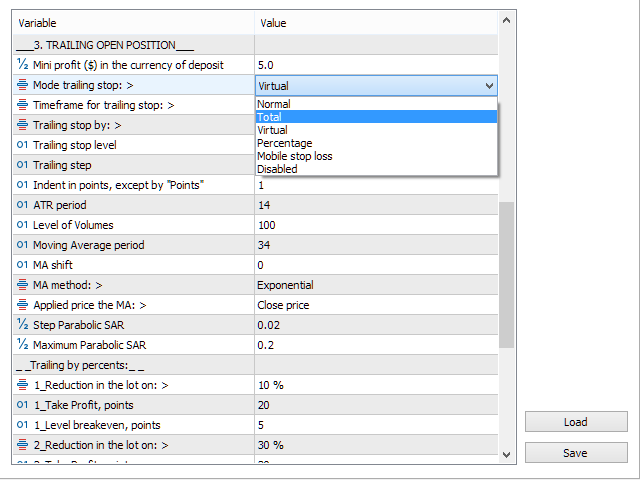
Block 3. TRAILING OPEN POSITIONS

  • Mini profit ($) in the currency of deposit
  • Mode trailing stop:
  • Timeframe for trailing stop:
  • Trailing stop by:
  • Trailing stop level
  • Trailing step 
  • Indent in points, except "by Points"
  • ATR period 
  • Level of Volumes

Block 4. OTHER SETTINGS

推荐产品
Close All in 1s
Seng Yang
4.68 (22)
Hello, Every one  A script to close all market positions and/or pending orders. ----------------------------------------------------------------------------------- This is Close All      market positions and/or pending orders button  You can close all orders in 1 second by one click  For advanced version:  Advanced:  https://www.mql5.com/en/market/product/77763           https://www.mql5.com/en/market/product/89311 Key:  1 Close all button: The script will close All orders market + pending
FREE
各位交易员好!我是您的交易助手。话不多说,让我来告诉你我的专长: 1. 我擅长管理您的持仓,不论你在哪一端下单,我都能第一时间帮你加上合理的止损线以及移动止损。 2. 我能帮你规避追涨杀跌,从根源根除守不住原则的人性弱点。 3. 我会在最佳点位给你发出通知消息到您移动端的MT5客户端,供您参考,当然,您需要将您移动设备内 MetaTrader 5 APP里 的  MetaQuotes ID 注册到  MetaTrader 5 客户端-->选项-->通知--> MetaQuotes ID的编辑框内并勾选开启通知点确定 。 4. 我很好地支持在策略测试中进行手动模拟操盘练习。 5. 联系我您还能获得一个配套的附加AI辅助客户端超级助理程序。 备注:本 项目不承诺您一定能盈利,它只是交易助理工具。 消息通知的效果展示请参阅截图效果。 期待您选择我成为您的助理,让我们共同奔赴财务自由!!!
Bneu Trade Manager
Marvinson Salavia Caballero
Bneu Trade Manager is a professional trading utility Expert Advisor for MetaTrader 5 designed to help manual traders plan, execute, protect and manage trades directly from a visual chart dashboard. It combines drag-and-drop trade planning, risk-based position sizing, one-click execution, pending orders, automated trade management, protection tools, templates, reporting and performance analytics in one organized panel. The latest version includes a reorganized dashboard built around the natural
FREE
该智能交易顾问(EA)会在 MetaTrader 5 中监控所有交易品种上的所有持仓。一旦在任意持仓上 手动设置或调整 了止损(SL)或止盈(TP),EA 会将该值 自动应用于其他所有未平仓头寸 ,无论是买单还是卖单、哪个交易品种。这确保整个账户的 SL 和 TP 水平始终保持同步。 非常适合通过平板或智能手机进行移动交易!    ......................................................................................................................................................
Ultimate MT5 to Telegram (UMT) sends controlled trades (via symbol, magic, comment) to your telegram channel. It sends open and closed trades, including pending orders and TP/SL modifications, along with chart screenshots, to any telegram channel. Additionally, you can send trade reports of open trades and summary profit/pip reports for day, week, or month. You can customize the design of the trade actions or reports with variables and emoticons.  A beautiful panel allows you to visualize all t
智慧遠端交易助理 MT5:基於 Telegram 的 MetaTrader 5 遠端交易面板 智慧遠端交易助理 MT5 是一款適用於 MetaTrader 5 的高級面板,專為需要透過 Telegram 快速、安全地遠端控制交易操作的交易者而設計。 取得 Windows Bridge 應用程式檔案和教學課程 Bridge 檔案用於將 Telegram 交易面板連接到 MT5 EA。相容於 Windows 10 和 Windows 11(64 位元)以及 2016 年及以後的 Windows Server 版本。目前仍處於測試階段,因此這是優惠價。每售出 10 台,價格將上漲。趕快購買吧! 與只能在交易終端內運行的傳統 MQL5 面板不同,這款助手可讓您透過手機上的交易助理介面點擊按鈕,或直接輸入命令(就像聊天一樣),即可下單、調整風險、配置入場參數、管理持倉、查看圖表快照以及控制關鍵交易功能。 (整合式文字辨識功能目前處於 Beta 測試階段,但正在持續開發和改進。) 該系統透過加密的本地橋接運行,確保連接在使用者自身環境中的安全。它並非代表您做出交易決策的交易機器人;而是一
This Expert Advisor (EA) for MetaTrader 5 (MT5) has been designed to automatically manage Stop Loss (SL) and Take Profit (TP). Main Features Automatic Detection of Manual Positions : Monitors new manual positions without SL/TP and applies the configured rules Multiple Orders : Opening of multiple orders under the same conditions as the original position Hidden SL/TP : The hidden mode allows creating SL/TP invisible to your broker  Equity Protection": Allows defining a threshold for the accou
Talents ATR Scalper Utility (MT5) The Talents ATR Scalper Utility is a professional-grade trade execution and management tool built for MetaTrader 5. Inspired by the Biblical Parable of the Talents , this utility is designed to help traders multiply their potential with precision risk control, one-click simplicity, and advanced automation. Whether you’re scalping forex, gold, or indices, this tool delivers speed, consistency, and confidence. Key Features One-Click Trade Preview Click below price
Trade Control Panel
Jerry Jilun Anak Liban
Trade Control Panel Function Normal One Click Function Close All Close All Profit Close All Loss Close All Pending Order Close All Sell Close All Buy Advance One Click Function 1.  Close Partial Lot Sell by Percent It will help you partial close for all open position by desire percent you wanted. No longer partial close one by one for every open position Manual input for desire percent 2. Close Partial Lot Buy by Percent It will help you partial close for all open position by desire percent
Risk Control Utility MT5 designed for manual trading. It helps to calculate and control your risks, transfer transactions to breakeven and accompany positions with trailing stop. Easy to set up and use. It can be used for calculating a trading lot, calculating stop loss and take profit levels. Works with currency pairs, CFDs, stocks, indices, futures, cryptocurrencies Displays   volume,   potential loss and profit before   placing an order Ability to set the expiration time of a pending order Tr
BossFXTradePanelEA (MT5)  [First 10 copies sold at 50 USD price will increase to 99USD] BossFXTradePanelEA is a fully interactive trade management panel designed for MetaTrader 5, providing traders with an easy-to-use, one-click interface to execute and manage trades. This EA simplifies trade execution , risk management, and position control by combining market orders, stop loss, take profit, trailing stops, and breakeven functionalities into a single, intuitive panel.  Key features include: On
Stop And Close
Tetyana Shcherba
2.75 (4)
The utility (Expert Advisor) is designed for monitoring and controlling the total drawdown, as well as closing all positions after reaching the specified levels or upon the occurrence of a specified time with the ability to disable the operation of the automatic EAs running in the same terminal. It is capable of tracking the status of the entire account, as well as individual pairs. It works with the positions opened manually or by other automatic EAs. It tracks the open trades in real time mode
News Hedging Pro  is a unique robot that allows you to trade during the most critical news announcement periods by your predefined strategy. You can preset the strategy to trade, and then it will trade that news automatically when the news comes. News release gives opportunity to have pips since the price usually has big move at that time. Now with this tool, trading news become easier, more flexible and more exciting than ever. No waiting, no confusing anymore. Product Links Fully  Description
Quick Exit
Jefferson Judge Metha
This MT5 Utility is designed to simplify the process of managing multiple trades. If you have several open positions, it can be time-consuming to close each one manually. With this tool, you can easily close all profit trades, losing trades, or just the trades that are linked to the chart you're currently viewing. It saves you time and effort by allowing you to manage your trades with just a few clicks, making your trading experience smoother and more efficient. Whether you're focusing on profit
FREE
Bneu Prop Firm Pass System
Marvinson Salavia Caballero
Compacted conversationBneu Prop Firm Pass System v2.25 — Prop Firm Risk Management Utility for MetaTrader 5 Bneu Prop Firm Pass System is a professional on-chart risk management utility for MetaTrader 5. It is designed to help traders monitor prop firm challenge rules, funded-account restrictions, account risk, news exposure, pending orders, session restrictions, and trade management from one clean dashboard. The system includes a 5-tab premium dashboard, prop firm rule presets, custom rule c
如果产品有任何问题或者您需要在此产品上添加功能,请联系我 Contact/message me if you encounter any issue using the product or need extra feature to add on the base version. There is Demo version of this panel Dashboard Super Three MA MT5 Demo in my product list, please try it out to get familiar with all functionalities for free Free version: LINK MT4 version: LINK This system basically utilizes PA and three adjustable Moving Average as the main indicator set to generate trading signal. With the feature that all MA_timefram
Discord Notify
Aleh Piatrenka
5 (2)
自动将 MT5 中的交易开仓、平仓以及部分平仓的实时通知发送到 Discord。 该工具支持 16 种语言:English、French、German、Indian (Hindi)、Indonesian、Italian、Kazakh、Korean、Dutch、Polish、Portuguese、Russian、Spanish、Turkish、Ukrainian 和 Vietnamese。该产品适用于需要在不持续监控终端的情况下接收 Discord 通知的交易者。它适合使用 Expert Advisor 的用户、同时交易多个品种的交易者以及 VPS 用户。 系统能够正确识别全部或部分平仓(例如:0.10 / 0.30 手),并且具备防止重复消息的功能。 通知可以针对交易账户中的所有品种发送,也可以仅针对挂载该工具的图表品种发送(可选)。 图表上提供 Test Discord 按钮用于测试聊天功能,设置完成后可以将其隐藏。 同时新增 Send open positions 按钮,可将当前所有未平仓交易以表格格式发送到 Discord。 通知内容: 开仓通知包括:交易品种、交易手数、交易方向
FREE
自动将 MT5 交易的开仓、平仓、部分平仓及修改的实时通知发送到 Slack。 该工具支持16种语言:英语、法语、德语、印地语、印尼语、意大利语、哈萨克语、韩语、荷兰语、波兰语、葡萄牙语、俄语、西班牙语、土耳其语、乌克兰语和越南语。你也可以通过自定义通知文本使用其他语言。该产品专为无需持续监控终端即可接收 Slack 通知的交易者设计。适用于使用 Expert Advisor 的用户、交易多个品种的交易者以及 VPS 用户。 能够正确识别全部和平仓(例如:0.10 / 0.30 手),并实现了防止重复消息的机制。 通知可以发送到交易账户的所有品种,或仅发送到附加该工具的图表品种(可选)。 提供 Test Slack 按钮用于验证聊天功能,并可在设置后从图表中隐藏。还新增了 Send open positions 按钮,可将当前所有未平仓头寸以表格形式发送到 Slack。 通知内容: 开仓通知包括:交易品种、交易量、交易方向(BUY / SELL)、开仓价格,以及 Take Profit 和 Stop Loss(可选)。 平仓通知包括:交易品种、平仓量(部分或全部)、平仓价格(可选),以
FREE
DRANREB TRADING MANAGER PRO - FULL VERSION   Dranreb Trading Manager  – Professional Trade Execution Tool Dranreb Trading Manager  is a powerful all-in-one trade management panel designed for serious traders who demand speed, precision, and full control over their positions. Built specifically for   SMC (Smart Money Concepts)   and   ICT-style trading , this tool enhances your execution workflow and enforces strict risk discipline—perfect for prop firm environments.   Key Features   One-
是否因为加仓(马丁)导致持仓增加,却因疏于设置止盈止损而导致反复出现重大亏损? 本工具旨在通过一键操作执行风险管理,支持避开重大损失并实现利润最大化。 开仓后,请先点击一下。这样可以避免无法挽回的遗憾。 目标用户 ・即使持仓数量很多,也希望一键批量设置 SL/TP 的用户 ・希望在行情突变时一键快速对所有持仓进行风险对冲的用户 ・希望在指标公布前或收盘前等指定时间自动平仓的用户 ・希望在蜡烛图确定为指定的阴线或阳线时自动平仓的用户 ・希望使用自动对冲风险并最大化利润的移动止损(Trail)功能的用户 主要功能 批量平仓     THIS PAIR / ALL PAIRS : 一键平仓当前货币对或所有货币对的持仓。 批量设置/删除TP/SL     SET : 对所有持仓一键统一设置或修改指定的 TP 和 SL。     DEL TPs / DEL SLs : 一键批量删除已设置的 TP 或 SL。 根据策略可选的“4 种 SL 批量设置模式”     SET BE : 根据所有持仓的平均入场价,在一键统一设置 SL 到偏离指定点数(pips)的同一价格水平。    
ZoneStrike
Amir Nejatbakhsh
ZoneStrike V 1.00 - Manual Trading Control Panel ZoneStrike is an advanced manual trading assistant for MetaTrader 5, designed to give traders full control over position sizing, risk management, and execution from a clean, intuitive graphical interface. Whether you're a scalper, swing trader, or institutional analyst, ZoneStrike empowers you to trade confidently with precision and speed. Key Features Risk-Based Position Sizing Define your trade risk as a percentage of your account balance. Z
Prop Max Daily Loss Manager — 自营交易公司交易员日内风险管理助手 Prop Max Daily Loss Manager 是一个专为MetaTrader 5设计的实用工具,适用于正在进行挑战赛或在自营交易公司(如FTMO)资金账户上交易的交易员。 该工具自动监控日内风险,帮助避免违反设定的最大日内亏损限制。 主要功能 达到设定的日内亏损水平时自动关闭所有交易; 触发限制时显示提醒通知; 灵活配置:选择亏损计算类型(百分比或账户货币); 支持不同的风险计算方法:从初始余额、当日开始余额/净值或最大值计算; 建议将限制设定为比规定值低10-20%,以考虑可能的滑点。 设置 Input your Challenge\Funded Account Balance — 输入您的挑战赛\资金账户的初始余额; Input Maximum Daily Loss % in Challenge\Funded Account: — 输入最大日内亏损百分比; Calculation loss type — 选择您的自营公司的亏损计算方法: Started Balance — 从初
清除所有止损和止盈 — 快速删除 SL/TP 水平的简单解决方案 只需一键即可删除所有止损和止盈水平! 清除所有止损和止盈 是一款便捷的脚本,专为希望快速高效地删除所有未平仓订单的 SL 和 TP 水平的交易者设计。 简单的操作和即时执行使其成为动态市场条件下不可或缺的工具。 主要优势: • 节省时间: 无需手动逐一编辑每个订单 — 一切自动完成。 • 多符号支持: 脚本可删除所有交易工具的水平。 • 易于使用: 只需将脚本拖到图表上 — 就完成了! • 可靠性: 在执行前检查每个订单,确保操作准确无误。 使用方法: 将脚本拖到 MetaTrader 5 的图表上。 脚本会自动删除所有未平仓订单的 SL 和 TP 水平。 享受完全自由的交易控制! 适用人群: • 切换到没有固定风险水平新策略的交易者。 • 想快速重置所有订单 SL/TP 水平的人。 • 任何寻找简单可靠的风险管理工具的人。 简化您的交易!免费下载 Clear All Stops and Takes,完全掌控您的交易。 顺便提一下,删除 仅限选定符号 的所有止损和止盈的脚本目前可通过 此 链 接 免费下载。 别忘
FREE
CloseByLossOrProfit Expert Advisor closes all positions as their total profit or loss reaches a specified value (in deposit currency). In addition, it can delete pending orders. Allow AutoTrading before running the Expert Advisor. Usage: Run the Expert Advisor on a chart. Input Parameters:  Language of messages displayed (EN, RU, DE, FR, ES) - language of the output messages (English, Russian, German, French, Spanish); Profit in the currency  - profit in points; Loss in the currency  - loss in p
FREE
` Account Limit Guard MT5 ` 是一款面向 MetaTrader 5 的免费账户级日内限制保护工具。 它不是交易策略,不会开仓,不提供买卖信号,也不依赖任何特定指标。它的作用是在账户层面监控当日损失限制,并在达到你设定的 Daily Loss 限制后自动执行保护动作。 Lite 版本的目标很明确:不用复杂规则,不用繁琐参数,只解决一个最核心的问题: **今天最多亏多少。** 无论订单来自手动交易还是其他 EA,本工具都会从账户角度统一监控风险状态。当达到设定限制后,系统会执行: - 关闭当前持仓 - 进入 ` BLOCKED ` - 阻止新的交易继续保留 如果你需要开始新的保护会话,只需点击 ` Reset ` 。 ### 核心功能 - Daily Loss Limit - 可选择是否把浮动盈亏计入日亏损 - 触发后自动 ` Close All + Block ` - 主开关 ` ON / OFF ` - 手动 ` Reset ` - 清晰的图表状态面板 - 同日重挂或重启后恢复封锁状态与基准时间 - 面板支持拖动并记住位置 ### 适合谁
FREE
Crash 5 EA
Wayne Ysel
Crash5 EA ,I s a automatic robot that has the level of professional decision when to take a trade without any emotion. The bot will help in your scalping decision making with its own TP (take profit) and SL (stop loss) with the trail stop when in profit. This is a trend based spike catching ,looking on whats happening in real time charts no repainting of any signals. The robot helps in making decisions on the candle stick pattern opened and closed lat price with the help of RSI ,MACD and the EMA
Chart Link
David Gitau Gakunga
4.83 (12)
Chart Link  allows you to control multiple charts from one chart or multiple charts from multiple charts. Features 1. Synchronised Scrolling :     Scrolling the master chart also scrolls all linked sub charts to the same position.     Sub charts inherit offset and auto-scroll settings from the master chart. 2. Synchronised Timeframe :     Switching the master chart timeframe also switches all linked sub charts. 3. Synchronised   Symbol   :     Switching the master chart symbol also switches all
FREE
MultiChart Pro
Pablo Filipe Soares De Almeida
MultiChart Pro – MetaTrader 5 图表管理专业工具 MultiChart Pro 是一款为 MetaTrader 5 设计的专业级图表管理工具(智能交易顾问,EA),旨在帮助交易者自动化打开、设置和组织多个图表界面。通过此 EA,用户无需手动配置每个时间周期或模板,即可在几秒钟内建立完整的交易布局,从而显著提高分析效率与执行速度。 该系统最多支持四个图表的自动化配置,包括三个标准在线图表(例如 D1、M1、M15)以及一个离线图表(例如 10 秒图)。EA 还会自动设置当前活动图表(例如 M5),使所有时间周期的分析保持一致性。 主要功能: 图表自动打开: 可在启动时快速加载多个不同周期的图表,无需人工干预。 模板自动应用: 每个图表都会加载用户预设的模板,系统会自动检测模板是否存在,以防止错误。 时间周期选择: 用户可通过输入参数自由选择需要打开的时间周期。 离线图表支持: 可为短周期策略(如剥头皮或高频交易)创建自定义的 10 秒图。 MultiChart Pro 特别适合希望同时观察多时间框架信号的交易者,例如日线趋势配合分钟级入场点的策略。借助此 EA
Auto Trailing Stop MT5
Volodymyr Hrybachov
2 (1)
通過追踪止損水平自動關閉交易的實用程序。讓您從您的利潤中獲得最大收益。由專業交易者為交易者創建。該實用程序適用於交易者手動或使用顧問打開的任何市場訂單。可以通過幻數過濾交易。該實用程序可以同時處理任意數量的訂單。 MT4 版本 https://www.mql5.com/en/market/product/56487 公用事業可以做什麼: 從 1 點設置虛擬追踪止損水平 設置真正的追踪止損水平 分別處理每個訂單(追踪止損水平分別放置在每個訂單上) 處理一籃子單向訂單(追踪止損水平對所有訂單設置通用,分別買入和賣出) 處理一籃子雙向訂單(追踪止損水平對所有訂單設置通用,一起買入和賣出) 對於測試和工作,您可以使用圖表上的按鈕。 選項: TRAILING_STOP - 價格變動的點數; TRAILING_STEP - 每一步利潤增加的點數; BASKET - 一籃子訂單或每個訂單單獨; MULTIDIRECTIONAL - 雙向或單向訂單; 虛擬 - 真實或虛擬的止損和止盈; MAGIC_NUMBER - 訂單的幻數,如果 = -1,則它適用於所有訂單; ORDERS_COMME
VirtualStopsMT5
Viktor Shpakovskiy
A utility for managing open positions using virtual (invisible to the broker) stops. Virtual stop loss and virtual take profit can be freely moved around the chart. If the price touches the virtual stop line (TP, SL, TS), the EA will close all orders of the same direction on the current chart. Closing orders by virtual take profit is possible only if there is a profit. With the help of the built-in trading simulator, you can, in the strategy tester, see how the adviser works. Parameters Block
该产品的买家也购买
Trade Assistant MT5
Evgeniy Kravchenko
4.42 (210)
它有助于计算每笔交易的风险,容易安装新的订单,具有部分关闭功能的订单管理, 7 种类型的追踪止损和其他有用的功能。   附加材料和说明 安装说明   -   应用程序说明   -   模拟账户应用程序的试用版 线条功能  - 在图表上显示开仓线、止损线、止盈线。 有了这个功能,就可以很容易地设置一个新的订单,并在开仓前看到它的附加特性。   风险管理  - 风险计算功能在考虑到设定的风险和止损单的大小的情况下,计算新订单的成交量。它允许你设置任何大小的止损,同时观察设定的风险。 批量计算按钮 - 启用 / 禁用风险计算。 在 " 风险 " 一栏中设置必要的风险值,从 0 到 100 的百分比或存款的货币。 在 " 设置 " 选项卡上选择风险计算的变量: $ 货币, % 余额, % 资产, % 自由保证金, % 自定义, %AB 前一天, %AB 前一周, %AB 前一个月。   R/TP 和 R/SL - 设置止盈和止损的关系。 这允许你设置相对于损失的利润大小。 例如, 1 : 1 - 这决定了 TP = SL 的大小。 2 : 1 - 这意味着 TP 是 SL 的两倍。 RR -
欢迎来到 Trade Manager EA——这是一个终极风险管理工具,旨在使交易变得更直观、精准和高效。它不仅仅是一个下单工具,而是一个用于无缝交易计划、仓位管理和风险控制的全面解决方案。不论您是新手交易员、资深交易员,还是需要快速执行的剥头皮交易员,Trade Manager EA 都可以满足您的需求,适用于外汇、指数、大宗商品、加密货币等各种市场。 借助 Trade Manager EA,复杂的计算已成过去。只需分析市场,在图表上用水平线标记入场、止损和止盈,设置您的风险水平,Trade Manager 就会立即计算出理想的头寸规模,并实时显示以点、账户货币计价的止损和止盈。每笔交易都得以轻松管理。 主要功能: 头寸规模计算器 :根据定义的风险瞬间确定交易规模。 简单的交易计划 :在图表上用可拖动的水平线直接计划交易,设置入场、止损和止盈。 实时显示 SL 和 TP :以账户货币、点或分显示止损和止盈,便于分析。 高级保护工具 盈亏平衡选项 : 基本盈亏平衡 :当您的交易达到设定水平时自动保护利润。 多级盈亏平衡 :设置多达 4 个级别以逐步保护利润。 尾随止损选项 : 基本尾随
TradePanel MT5
Alfiya Fazylova
4.87 (154)
交易面板是一款多功能交易助手。该应用包含超过50种手动交易功能,并允许您自动执行大多数交易任务。 在购买之前,您可以在演示账户上测试演示版本。下载用于演示账户的试用版应用程序: https://www.mql5.com/zh/blogs/post/762579 。 完整说明 这里 。 贸易. 只需单击一下即可执行交易操作: 打開掛單和頭寸,並自動計算風險。 一鍵打開多個訂單和頭寸。 打開訂單網格。 按組別關閉掛單和頭寸。 反轉頭寸方向(關閉買入>打開賣出,關閉賣出>打開買入)。 鎖定頭寸(通過開啟缺少的頭寸,使買入和賣出頭寸的數量相等)。 一鍵部分關閉所有頭寸。 將所有頭寸的止盈和止損設置在同一價格水平。 將所有頭寸的止損設置在盈虧平衡水平。 開倉時,可使用以下功能: 在多個訂單或倉位之間分配計算出的數量(在單擊一次時開啟多個訂單和倉位)。 在開啟訂單前在圖表上可視化交易水平。 僅在當前點差不超過設定值時才開啟倉位。 止盈和止損之間的自動比例。 虛擬止損和止盈。 自動將止損和止盈的大小增加為當前點差的大小。 基於ATR指標讀數計算止盈和止損。 設置掛單的到期日期。 為掛單設置追蹤(掛單
Farmed Hedge Yield Farming | All Markets (Manual - Hybrid - Semi/Automated EA) MULTI-ASSET SUPPORT Trade any asset available on your broker - Forex: Major, Minor, Exotic pairs - Crypto: BTC, ETH, XRP, SOL, BNB - Stocks: Apple, Tesla, Amazon, Google, etc. - Commodities: Gold, Silver, Oil, Gas - Indices: US30, NAS100, SPX500, DAX40 - Any CFD your broker offers VERIFIED TRADING RESULTS - Farmed Hedge Yield Axi Copy:  https://www.mql5.com/en/signals/2356376 - Farmed Hedge Yield Exn Copy:   https:/
Quant AI Agents is NOT AN Expert Advisor. Quant AI Agents   is a   multi-agent AI trading framework   that turns natural-language strategy prompts into live.  WANT THE SAME RESULTS AS MY LIVE SIGNAL?   Use the exact same brokers I do:   IC MARKETS , IC TRADING   .  Unlike the centralized stock market, Forex has no single, unified price feed.  Every broker sources liquidity from different providers, creating unique data streams. Other brokers can only achieve trading performance equivalent to 60
测试版发布 Telegram to MT5 Signal Trader 即将进入正式的 Alpha 版本。一些功能仍在开发中,您可能会遇到一些小错误。如果您遇到问题,请反馈,您的意见将帮助我们改进软件。 Telegram to MT5 Signal Trader 是一款强大的工具,能够将 Telegram 频道或群组的交易信号自动复制到您的 MetaTrader 5 账户。 支持公开和私人频道,可将多个信号提供者连接至一个或多个 MT5 账户。软件优化、高效、稳定,精准控制每笔复制交易。 界面简洁,仪表盘美观,图表交互性佳,导航直观。您可以管理多个信号账户,自定义每个提供者的设置,并实时监控所有操作。 系统需求 由于 MQL 限制,EA 需要配合 PC 端应用与 Telegram 通信。 安装程序可通过官方 安装指南 获取。 核心功能 多提供者支持: 从多渠道复制信号至多个 MT5 帐户 高级信号识别: 关键词、模式和标签全面自定义 逐提供者控制: 可启用/禁用特定信号类型、平仓策略等 灵活风险管理: 固定手数、固定金额、余额/权益百分比、部分平仓设置 可定制 SL/TP: 覆盖信号
Power Candles 策略扫描器——自优化多符号设置查找器 Power Candles策略扫描器 采用与Power Candles指标相同的自优化引擎,可同时扫描您“市场观察”中的所有交易品种。一个面板即可显示当前哪些品种在统计上具备交易价值、每种策略的最佳应用方向、最优止损/止盈组合,并在新信号触发时立即向您发送提醒。 本工具是 Stein Investments 生态系统的一部分 - 18+ 款工具,加上 Max,您的一对一 AI 交易导师。  随时在线,深入了解每一款指标,在您需要梳理思路的那一刻就在那里。  立即认识他: https://stein.investments 您的全面市场监控。每个交易品种超过3,000次自动优化。2种警报类型。一键切换图表并采取行动。 为何您需要此工具 大多数多标的扫描器仅展示价格 波动 。每只股票的波动率、百分比变化、RSI。您仍需自行摸索正确的策略、合适的止损位以及理想的入场阈值。Power Candles策略扫描器针对每只股票自动解答这些问题,仅在数学验证过的交易设置中触发实际入场信号时才会向您发出提示。这就是全部卖点。 自动
YuClusters
Yury Kulikov
4.93 (43)
Attention: You can view the program operation in the free version  YuClusters DEMO .  YuClusters is a professional market analysis system. The trader has unique opportunities to analyze the flow of orders, trade volumes, price movements using various charts, profiles, indicators, and graphical objects. YuClusters operates on data based on Time&Sales or ticks information, depending on what is available in the quotes of a financial instrument. YuClusters allows you to build graphs by combining da
AntiOverfit PRO MT5
Enrique Enguix
5 (4)
在购买 EA 之前,先确认它到底是真的扛得住,还是只是刚好在回测里走运。 大多数机器人都是靠一份漂亮的回测卖出去的。 曲线一路向上。 Profit Factor 很好看。 看起来几乎没有疑点。 但即便如此,很多 EA 只要市场不再按照那段历史那样运行,很快就会出问题。 为什么? 因为回测只能证明一件事: 这个策略曾经在某一条特定的价格路径上有效。 它不能证明它在其他路径下也能扛住。 不能证明它足够稳健。 更不能证明它值得你花钱。 因为你买 EA,不是为了欣赏过去那条漂亮的曲线。 你买它,是为了在会变化的市场里使用它。 AntiOverfit PRO 是做什么的 AntiOverfit PRO 帮你判断一个 MetaTrader 5 Expert Advisor 到底是真的够扎实,还是只是恰好适配某一段特定历史。 它的原理其实很容易理解: 它拿真实历史数据,生成许多与原始历史相似、但路径不同的版本,然后让你看到当市场不再完全照着原来的路线走时,这个 EA 会有什么表现。 如果你只是稍微改变一下市场路径,这个机器人就开始失效,那就是个坏信号。 而如果它在许多与原始历史相似的场景里都能稳住
Timeless Charts
Samuel Manoel De Souza
5 (5)
Timeless Charts is an all-in-one trading utility for professional traders. It combines custom chart types such as Seconds Charts and Renko with advanced order flow analysis using Footprints , Clusters , Volume Profiles , VWAP studies, and anchored analysis tools for deeper market insight. Trading and position management are handled directly from the chart through an integrated trade management panel , while Market Replay and Virtual Accounts provide environments for practicing trading skills and
Footprint Chart Pro — Professional OrderFlow EA for MetaTrader 5 Version 6.34 | Professional tool for real traders | Institutional-Grade Visualization DEMO USERS - PLEASE SELECT EVERY TICK / REAL TICK WHEN TESTING AND YOU HAVE DOWNLOADED HISTORICAL DATA. IF YOU SEE A WAITING SCREEN AND IT IS NOT DOWNLOADING, IT MEANS YOU HAVE LOW HISTORICAL DATA. TRY 1 MIN AND 5 MIN FIRST ON 1 DAY DATA. ONE DAY DATA SHOULD BE THE NEWEST AND MOST CURRENT DATE. PLEASE WAIT UNTIL THE MARKET HAS ROLLED OVER PERIOD.
Bots Builder Pro MT5
Andrey Barinov
4.17 (6)
This is exactly what the name says. Visual strategy builder . One of a kind. Turn your trading strategies and ideas into Expert Advisors without writing single line of code. Generate mql source code files with a few clicks and get your fully functional Expert Advisors, which are ready for live execution, strategy tester and cloud optimization. There are very few options for those who have no programming skills and can not create their trading solutions in the MQL language. Now, with Bots Builde
The product will copy all telegram signal to MT5 ( which you are member) , also it can work as remote copier.  Easy to set up, copy order instant, can work with almost signal formats, image signal,  s upport to translate other language to English Work with all type of channel or group, even channel have "Restrict Saving Content", work with  multi channel, multi MT5 Work as remote copier: with signal have ticket number, it will copy exactly via ticket number. Support to backtest signal. How to s
Ultimate Extractor
Clifton Creath
5 (9)
Ultimate Extractor - Professional Trading Analytics for MT5 *****this is the local HTML version of Ultimate Extractor. !!!!!it is not compatible with Cloud!!!! For the online version please reach out to me directly****** Ultimate Extractor transforms your MetaTrader 5 trading history into actionable insights with comprehensive analytics, interactive charts, and real-time performance tracking. What It Does Automatically analyzes your MT5 trading history across all Expert Advisors and generates
AlgoRadar
Stephen J Martret
5 (4)
AlgoRadar is an on-chart analytics dashboard for MT5 that aggregates Expert Advisor performance across multiple accounts, brokers, and platforms, including both MT4 and MT5 data, into a single live view on your MT5 chart. All analysis runs from the chart interface, with no external applications or manual report processing required. EA Analysis and Ranking For traders running multiple Expert Advisors, AlgoRadar provides a consolidated view of each EA's performance across accounts. Active EAs a
Trade Copier Pro MT5 is a tool to copy trade remotely to multiple MT4, MT5 and cTradfer accounts at different computers/locations over internet. This is an ideal solution for you if you are a signal provider and want to copy your trades to other receivers globally on your own rules. One provider can copy trades to multiple receivers and one receiver can get trade from multiple providers as well. The provider can even set the subscription expiry for each receiver, so that receiver will not be abl
Trade Manager DashPlus
Henry Lyubomir Wallace
5 (13)
DashPlus 是一款先进的交易管理工具,旨在提升您在 MetaTrader 5 平台上的交易效率和效果。它提供一整套功能,包括风险计算、订单管理、先进的网格系统、基于图表的工具和绩效分析。 主要功能 1. 恢复网格 实施一个平均和灵活的网格系统,以在不利的市场条件下管理交易。 允许设置战略性进出点,以优化交易恢复。 2. 叠加网格 通过在强劲的市场波动中增加仓位,最大化有利交易的潜在回报。 帮助您通过扩展获利交易来利用趋势市场。 3. 盈亏线 在图表上直接提供潜在利润和损失场景的可视化表示。 调整设置并拖动盈亏线,以在执行之前评估各种交易结果。 4. 篮子模式 简化同一交易品种的多仓位管理,将它们合并为一个聚合仓位。 基于平均价格,便于监控和应用止损、止盈以及其他订单修改。 5. 图表上的新闻 将预定的经济新闻事件整合到您的交易图表中。 帮助您随时掌握可能影响市场波动的即将发生的事件,从而更好地规划交易。 6. 警报 设置基于时间或价格的警报,通知会显示在 MT5 中,或通过 MT5 应用发送到您的移动设备。 对监控关键价格水平或重要的交易时段非常有用。 7. 绩效统计 提供详细的
EchoTrade Telegram to MT5 Copier
Perpetual Chinemerem Vincent
5 (1)
EchoTrade Telegram to MT5 Copier Seamless, Instant, and Reliable Signal Copying - Direct from Telegram to MetaTrader 5! The product does not run in the strategy tester but you can get free trial version here  for testing before purchase. Tired of manually executing trades from Telegram signals? EchoTrade automates the process, instantly copying trades from any Telegram channel or group directly into your MT5 account—accurately, efficiently, and without delay. Key Features: Universal Compatibi
Comprehensive on chart trade panel with the unique ability to be controllable from mobile as well. Plus has a library of downloadable configuration, e.g. exit rules, extra panel buttons, pending order setup and more. Please see our product video. Works with all symbols not just currency pairs. Features On chart panel plus controllable from free app for Windows, iPhone and Android Built-in script engine with library of downloadable configuration, e.g. add 'Close All Trades in Profit' button, exit
Telegram To MT5 Receiver
Levi Dane Benjamin
4.31 (16)
将信号从您所属的任何渠道(包括私人和受限渠道)直接复制到您的 MT5。 该工具在设计时充分考虑了用户的需求,同时提供了管理和监控交易所需的许多功能。 该产品采用易于使用且具有视觉吸引力的图形界面。 自定义您的设置并在几分钟内开始使用该产品! 用户指南 + 演示  |   MT4版本  |   不和谐版本 如果您想尝试演示,请参阅用户指南。 Telegram To MT5 接收器在策略测试器中不起作用! Telegram 至 MT5 功能 一次复制多个通道的信号 从私人和受限频道复制信号 不需要机器人令牌或聊天 ID(如果出于某种原因需要,您仍然可以使用这些) 使用风险百分比或固定手数进行交易 排除特定符号 选择复制所有信号或自定义要复制的信号 配置单词和短语以识别所有信号(默认值应适用于 99% 的信号提供商) 配置时间和日期设置以仅在需要时复制信号 设置一次打开的最大交易量 交易和头寸管理 使用信号或自动设置的管理 通过设置每月、每周、每天、每小时或每分钟的最大交易次数,停止过度交易和报复性交易。 支持市价订单和挂单 每日最大利润目标(以美元为单位)以确保头寸并停止过度交易 确
Custom Alerts AIO:多市场智能监控,一键启动,无需设置 概述 Custom Alerts AIO 是一款“开箱即用”的高级市场扫描工具,无需额外安装任何其他指标或进行复杂设置。它内置了 Stein Investments 的所有核心指标(FX Power、FX Volume、FX Dynamic、FX Levels 和 IX Power),可帮助您轻松监控所有主要资产类别,如外汇、黄金、指数和加密货币。如果您的经纪商支持股票,您也可以手动添加个股进行监控。 1. 为什么选择 Custom Alerts AIO? 无需额外购买任何指标 • 所有关键指标均已内置,开箱即用。 • 专注于实时预警,不包含任何图形元素,性能高效,界面简洁。 全面覆盖所有主要市场 • 支持监控外汇、金属、加密货币和指数市场。 • 无需手动输入任何交易品种,只需在设置中勾选资产类别即可启用。 • 股票并不属于默认类别,如有需要可手动通过参数输入添加。 高效、专业、便捷 • 无需图表模板和手动加载,适合自动化或远程交易环境。 • 非常适合 VPS 上长期运行,或作为后台市场预警工具使用。 2
Local Trade Copier EA 是针对需要从外部来源执行交易信号或需要同时管理多个账户的个人交易者或账户经理的解决方案,无需 MAM 或 PAMM 账户。它可以从多达 8 个主帐户复制到无限的从帐户 [ 安装指南 | 更新指南 | 故障排除 | 常见问题 | 所有产品 ] 100% 自托管 容易安装和使用 不使用安装程序、配置文件、服务器、内存管道或 DLL 1000 次激活可永久使用 EA 本地执行,无网络延迟 它实现了您需要的所有功能: 最多8个主账户和无限从属账户 适用于所有经纪人和 DD/NDD/ECN/STP 执行 适用于具有不同帐户货币的帐户 在真实账户和模拟账户之间工作不明显 支持主从账户中的符号名称后缀 按幻数和订单评论过滤 不会干扰其他交易 可选择复制 SL 和 TP 水平 可选择复制挂单 支持符号翻译 支持部分关闭 反向模式 灵活的交易规模: - 固定地段 - 乘数 - 成比例的 - 与乘数成比例 EA 可以使用投资者或任何账户的主密码复制交易。 如何将交易从一个主账户复制到一个或多个从账户 在源终端中安装 EA 将 EA 加载到任何图表并选择“MA
The product will copy all  Discord  signal   to MT5   ( which you are member  ) , also it can work as remote copier.  Easy to set up. Work with almost signal formats, support to translate other language to English Work with multi channel, multi MT5. Work with Image signal. Copy order instant, auto detect symbol. Work as remote copier: with signal have ticket number, it will copy exactly via ticket number. How to setup and guide: Let read all details about setup and download Discord To MetaTrader
RiskGuard Management
MONTORIO MICHELE
5 (22)
注意 :要获取免费试用版,请访问我的网站。 使用手册 用户手册 RiskGuard Management — 您进行无妥协交易的终极盟友。 Lot Calculator — 自动计算手数。 Quantum — 自动风险控制,最大化利润并减少回撤。 Automatic Journal — 包含并可从我的网站免费下载。 Automatic Screenshot — 两张截图:开仓时一张,平仓时一张。 Partial Profit — 智能管理的部分平仓功能。 Smartphone Trading — 可通过手机下单,自动管理。 Stop Loss & DD Block — 每日资金的全面保护。 Automatic Break-Even — 轻松降低风险。 Closing Time — 精准控制交易时间。 Automatic Spread — 实时正确设置止损和止盈。 详细的多语言文档以及意大利语和英语的视频教程,可在我的网站上获取。
Ultimate Trailing Stop EA MT5
BLAKE STEVEN RODGER
4.13 (8)
This EA Utility allows you to manage (with advanced filtering) unlimited open orders (manual or EA) with 16 trailing stop methods: fixed, percent, ATR Exit, Chandelier Exit, Moving Average, Candle High Low Exit, Bollinger Bands, Parabolic, Envelope, Fractal, Ichimoku Kijun-Sen, Alligator, Exit After X Minutes or Bars, RSI and Stochastic. The trailing stop can be either real or virtual, and you can exit fully or with a partial close percent on touch or bar close.  Moreover, you can add (override
EA Auditor
Stephen J Martret
5 (2)
EA Auditor is an independent analysis tool for traders evaluating Expert Advisors and trading signals on MetaTrader 5. It audits backtest reports, reviews posted developer signals, and cross-verifies the two against each other to help traders assess strategies before committing capital. The MQL5 market offers a wide range of Expert Advisors from many developers, with varying approaches, quality, and transparency. EA Auditor provides a consistent, data-driven framework for reviewing them, answer
HINN Lazy Trader
ALGOFLOW OÜ
5 (2)
The core idea: using the user interface, you configure the parameters the chart must meet before entering a position (or positions), choose which entry models to use, and set the rules for when trading and planning should end. Lazy Trader  handles the rest: it  takes over all the routine chart watching and execution! full description  :: 3 key videos [1] ->  [2]   ->  [3] What can it do? - Understands Larry Williams market structure - Understands swing market structure by Michael Huddleston
Gamma Edge Pro MT5 — GexBot Classic API Integration Gamma Edge Pro   brings institutional-grade   Gamma Exposure (GEX) data   directly onto your MetaTrader 5 chart — the same data used by professional options traders to anticipate price magnets, hedging flows, and dealer positioning. Powered by the   GexBot Classic API , this indicator automatically maps options market data from US-listed instruments onto any   MT5 CFD instrument   — Forex pairs, Gold, indices, and more — with intelligent price
Prop Guardian Risk Manager MT5 – Daily and Overall Drawdown Protection for Prop Firm Traders Prop Guardian Risk Manager is a professional risk-control utility for MetaTrader 5, created for traders who operate under prop firm rules. It does not open trades and does not implement any trading strategy. Instead, it runs in the background, monitors your account risk and can automatically block trading or close exposure when your own limits are reached. Use it as a safety layer on top of your manual t
FUTURES ORDERFLOW FOOTPRINT CHART Professional OrderFlow EA for MetaTrader 5 Version 1.01| Professional tool for real traders | Institutional-Grade Visualization STRATEGY TESTER USERS - PLEASE SELECT EVERY REAL TICK WHEN TESTING AND YOU HAVE DOWNLOADED HISTORICAL DATA. IF YOU SEE A WAITING SCREEN AND IT IS NOT DOWNLOADING, IT MEANS YOU HAVE LOW HISTORICAL DATA. TRY 1 MIN AND 5 MIN FIRST ON 1 DAY DATA. ONE DAY DATA SHOULD BE THE NEWEST AND MOST CURRENT DATE. PLEASE WAIT UNTIL THE MARKET HAS ROL
作者的更多信息
Taranus
Viktor Shpakovskiy
5 (1)
Taranus is a multifunctional EA, a universal assistant to a trader, designed to work under the control of a trader. The EA has a large set of tools and can work: by indicators, by trading levels, by trend lines, by martingale strategy, trade on news. It has: several filters to determine the trend, a multi-level risk management system, money management, virtual stop loss, universal trailing stop, can work with any type of orders. Set files and a guide to the Taranus EA can be found in the "Commen
Taranus Light
Viktor Shpakovskiy
Taranus Light is a reduced version of the universal, semi-automatic EA Taranus, designed to work under the control of a trader. It can work with or without indicators, has several filters for determining the trend direction and can only work with market or pending order. Trailing stop capabilities of the EAd has been expanded by adding functions from UTrailing EA. Taranus Light EA is suitable for both experienced and beginner traders. Set files and a guide to the Taranus Light EA can be found in
Martex
Viktor Shpakovskiy
Martex is a moderately aggressive EA working on a martingale strategy with hedge. The EA independently monitors the risk and, if the risk is high, takes measures to exit the market with a minimum profit. In the hedging mode, the EA independently leaves the "lock" with a profit. A complete guide to the Martex EA can be found in the "Comments" section. Benefits automatic magic number, individual for each currency pair; automatic breakeven and automatic trailing stop; at high risk, reducing the mar
UTrailing
Viktor Shpakovskiy
5 (2)
用於手動交易以管理未平倉頭寸和掛單的 EA。 內置追踪止損有五種模式和七種工具。 有虛擬止損和虛擬止盈,可以在圖表上自由移動。 借助內置的交易模擬器,您可以檢查 EA 在策略測試器中的工作方式 UTrailing 指南可以在“評論”部分找到。 好處 <5種追踪止損模式:虛擬、正常、總計、百分比和移動止損; 7 個選項:按點、按柱極值、按分形、按交易量、按 MA、按拋物線 SAR 和按 ATR; 虛擬 TP 和 SL - 根據圖表手動自由移動; 為所有未平倉頭寸添加止損和止盈; 通過以下方式設置止損:點、分形、ATR 指標、每日高/低; 圖表上打開的所有訂單的追踪止損; 迷你利潤開始追踪止損。; 通過幻數和方向為未平倉頭寸設置追踪止損; 掛單的尾隨:按類型、方向、點、分形、柱極值; 圖表上的“熱鍵”用於快速執行命令; 適用於具有 4 位和 5 位報價的帳戶; 5位數賬戶,參數自動加10; 用於處理加密貨幣、指數、期貨、差價合約的特殊參數乘數。. 參數 Block 1. GENERAL SETTINGS Allow the EA to work Magic number (-1 for a
ForexNewsTrader
Viktor Shpakovskiy
EA is intended for trading on news only. News appear on the chart in the form of text messages and vertical lines. When the price approaches this line, the adviser places pending orders for purchase and for sale. If the "Modify pending orders" function is enabled, orders will move behind the price (up and down) and stay at the set distance from the price, which will not allow the order to worked ahead of time, before the news releases. If, after the news release, not one of the orders has not wo
McDuckEA
Viktor Shpakovskiy
McDuckEA – works on the martingale strategy. It shows good results when trading on Gold, XAUUSD. Martingale orders are opened with a step from each other and only after the opening of a new bar of the set timeframe. During the release of important news, the EA suspends the opening of new orders. The EA has an internal risk control system and, if the risk is exceeded, it starts to exit the market, closing extreme positions in pairs. The level of loading of the deposit determines the risk and prof
UTrailingMini
Viktor Shpakovskiy
The utility for manual trading to manage open positions.The built-in trailing stop has three modes and seven instruments: by pips, by bar extremes, by fractals, by volumes, by MA, by Parabolic SAR and by ATR. With the help of the built-in trading simulator, you can check how the EA works in the strategy tester. Guide to UTrailingMini can be found in the "Comments" section. Benefits 3 trailing stop modes: normal, total and mobile stop loss; 7 options: by points, by bar extremes, by fractals, by v
Fractalan
Viktor Shpakovskiy
Fractalan – a moderately aggressive EA who works on a martingale strategy with a partial hedging system. With reasonable money management, the EA can withstand significant price corrections against open positions! The first order in the series can be opened manually by both the EA and the trader. Subsequent orders are opened when the fractal level of the specified timeframe is broken. The complete guide to the Fractalan EA, the set files can be found in the "Comments" section. Benefits types of
MartexPO
Viktor Shpakovskiy
MartexPO is a moderately aggressive advisor working on a martingale strategy and with the ability to hedge unprofitable positions. Uses pending orders for opening the first order and for hedging. With an asymmetric "lock" - the MartexPO EA is able to independently exit the "lock" with a profit. The MartexPO EA can average orders manually opened by a trader and orders opened by another EA. The EA will be of interest to both beginners and experienced traders. A set files and a complete guide to th
TralDynamic
Viktor Shpakovskiy
The utility for managing open positions can work with stops (take profit and stop loss) in money, percentages or points. The built-in trailing stop starts working from profit, the size of which can be set in currency or as a percentage. With the help of the built-in trading simulator, you can check how the utility works in the strategy tester. Benefits setting stop loss and take profit in the deposit currency, as a percentage of the account balance or by points; adding stop loss and take profit
UTrailingMin
Viktor Shpakovskiy
The EA for manual trading to manage open positions.The built-in trailing stop has five modes and seven instruments. There is a virtual stop loss and a virtual take profit, which can be freely moved around the chart. With the help of the built-in trading simulator, you can check how the EA works in the strategy tester. Guide to UTrailingMin can be found in the "Comments" section. Benefits 5 trailing stop modes: virtual, normal, total, percentage and mobile stop loss; 7 options: by points, by bar
PriceActionInd
Viktor Shpakovskiy
The indicator shows 7 patterns of the Price Action trading system, as well as the maximum and minimum price lines for the day. Timeframe: H1, H4, D1. Pin bar Outside Vertical Bar (OVB) Pivot Point Reversal (PPR) Closing Price Reversal (CPR) Double Extremums ( DMax/DMin ) Wide Range Bar (WRB) Inside Bar (IB) Settings PRICE ACTION PATTERNS Show Pin Bar   Color Pin Bar - pointer arrow color.                                        Show Outside Vertical Bar (OVB)  Color Outside Vertical Bar   - poin
TralDynamicU
Viktor Shpakovskiy
The utility for managing open positions can work with stops (take profit and stop loss) in money, percentages or points. The built-in trailing stop starts working from profit, the size of which can be set in currency or as a percentage. Trailing stop can work in three modes and for five instruments. With the help of the built-in trading simulator, you can check how the utility works in the strategy tester. Benefits setting stop loss and take profit in the deposit currency, as a percentage of the
UTralVirtual
Viktor Shpakovskiy
用於管理未平倉頭寸和掛單的實用程序。 內置追踪止損有五種模式和七種工具。 有虛擬止損和虛擬止盈,可以在圖表上自由移動。 借助內置的交易模擬器,您可以檢查 EA 在策略測試器中的工作方式。 UTralVirtual 的詳細指南可以在“評論”部分找到。 好處 5種追踪止損模式:虛擬、正常、總計、百分比和移動止損; 7 個選項:按點、按柱極值、按分形、按交易量、按 MA、按拋物線 SAR 和按 ATR; 虛擬 TP 和 SL - 根據圖表手動自由移動; 為所有未平倉頭寸添加止損和止盈; 通過以下方式設置止損:點、分形、ATR 指標、每日高/低; 圖表上打開的所有訂單的追踪止損; 迷你利潤開始追踪止損。; 通過幻數和方向為未平倉頭寸設置追踪止損; 掛單的尾隨:按類型、方向、點、分形、柱極值; 圖表上的“熱鍵”用於快速執行命令; 適用於具有 4 位和 5 位報價的帳戶; 5位數賬戶,參數自動加10; 用於處理加密貨幣、指數、期貨、差價合約的特殊參數乘數。. 參數 Block 1. GENERAL SETTINGS Allow the EA to work Magic number (-1 fo
VirtualStops
Viktor Shpakovskiy
A utility for managing open positions using virtual (invisible to the broker) stops. Virtual stop loss and virtual take profit can be freely moved around the chart. If the price touches the virtual stop line (TP, SL, TS), the EA will close all orders of the same direction on the current chart. Closing orders by virtual take profit is possible only if there is a profit. With the help of the built-in trading simulator, you can, in the strategy tester, see how the adviser works. Parameters Block
NebularMan
Viktor Shpakovskiy
用於手動交易的 EA,能夠在一批中添加新訂單並取平均值。 您可以通過更改手數、訂單之間的步長以及限制未平倉頭寸數量和總手數來管理風險。 有移動止損、虛擬止損和虛擬止盈,可以在圖表上自由移動。 借助內置的交易模擬器,您可以檢查 EA 在策略測試器中的工作方式。 好處 初始手數由交易員或其他顧問開立; EA 將新訂單添加到平均 1 手的未平倉頭寸; 增加的手數是固定的,不取決於未平倉頭寸的大小; 風險管理(按手數、訂單數量和訂單之間的步驟); 以存款貨幣獲利; 虛擬止損和虛擬止盈; 按點追踪止損; 開始追踪止損的小利潤; 圖表上的“熱鍵”用於快速打開和關閉訂單; 適用於報價為小數點後 4 位和 5 位的賬戶; 5位數賬戶,參數自動加10; 用於處理加密貨幣、指數、期貨、差價合約的特殊參數乘數。 參數 Block 1. GENERAL SETTINGS Magic number (-1 for all) Lot for manual opening Fixed profit Profit in the deposit currency Virtual Take Profit Virtual
Aweron
Viktor Shpakovskiy
The Aweron EA works according to the martingale strategy and opens orders based on the signals of the Awesome Oscillator indicator. If desired, the martingale can be disabled, and the EA will work with one order. You can choose the size of lots depending on your risk: normal lots - high risk, economy lots - moderate risk, initial lots - low risk. The EA has an internal risk control system and, if the risk is exceeded, it starts to exit the market, closing extreme orders in pairs. Profitable sing
McDuckEA MT5
Viktor Shpakovskiy
McDuckEA MT5 – works on the martingale strategy. It shows good results when trading on Gold, XAUUSD. Martingale orders are opened with a step from each other and only after the opening of a new bar of the set timeframe. During the release of important news, the adviser suspends the opening of new orders. The EA has an internal risk control system and, if the risk is exceeded, it starts to exit the market, closing extreme positions in pairs. The level of loading of the deposit determines the risk
UTrailingMT5
Viktor Shpakovskiy
用於手動交易以管理未平倉頭寸和掛單的 EA。 內置追踪止損有五種模式和七種工具。 有虛擬止損和虛擬止盈,可以在圖表上自由移動。 借助內置的交易模擬器,您可以檢查 EA 在策略測試器中的工作方式 UTrailingMT5 指南可以在“評論”部分找到。 在 MT5 策略測試器中,手動移動虛擬線(SL 和 TP)不起作用! 好處 5種追踪止損模式:虛擬、正常、總計、百分比和移動止損; 7 個選項:按點、按柱極值、按分形、按交易量、按 MA、按拋物線 SAR 和按 ATR; 虛擬 TP 和 SL - 根據圖表手動自由移動; 為所有未平倉頭寸添加止損和止盈; 通過以下方式設置止損:點、分形、ATR 指標、每日高/低; 圖表上打開的所有訂單的追踪止損; 迷你利潤開始追踪止損。; 通過幻數和方向為未平倉頭寸設置追踪止損; 掛單的尾隨:按類型、方向、點、分形、柱極值; 圖表上的“熱鍵”用於快速執行命令; 適用於具有 4 位和 5 位報價的帳戶; 5位數賬戶,參數自動加10; 用於處理加密貨幣、指數、期貨、差價合約的特殊參數乘數。. 參數 Block 1. GENERAL SETTINGS Allow
MartexMT5
Viktor Shpakovskiy
MartexMT5 is a moderately aggressive EA working on a martingale strategy with hedge. The EA independently monitors the risk and, if the risk is high, takes measures to exit the market with a minimum profit. In the hedging mode, the EA independently leaves the "lock" with a profit. A complete guide to the MartexMT5 EA can be found in the "Comments" section. Benefits automatic magic number, individual for each currency pair; automatic breakeven and automatic trailing stop; at high risk, reducing t
MartexPO MT5
Viktor Shpakovskiy
MartexPO MT5 is a moderately aggressive advisor working on a martingale strategy and with the ability to hedge unprofitable positions. Uses pending orders for opening the first order and for hedging. With an asymmetric "lock" - the MartexPO MT5 EA is able to independently exit the "lock" with a profit. The MartexPO MT5 EA can average orders manually opened by a trader and orders opened by another EA. The EA will be of interest to both beginners and experienced traders. A set files and a guide to
FractalanMT5
Viktor Shpakovskiy
FractalanMT5 – a moderately aggressive EA who works on a martingale strategy with a partial hedging system. With reasonable money management, the EA can withstand significant price corrections against open positions! The first order in the series can be opened manually by both the EA and the trader. Subsequent orders are opened when the fractal level of the specified timeframe is broken. The guide to the FractalanMT5 EA, the set files can be found in the "Comments" section. Benefits types of ord
TralDynamicMT5
Viktor Shpakovskiy
The utility for managing open positions can work with stops (take profit and stop loss) in money, percentages or points. The built-in trailing stop starts working from profit, the size of which can be set in currency or as a percentage. With the help of the built-in trading simulator, you can check how the utility works in the strategy tester. Benefits setting stop loss and take profit in the deposit currency, as a percentage of the account balance or by points; adding stop loss and take profit
UTrailingMinMT5
Viktor Shpakovskiy
The EA for manual trading to manage open positions.The built-in trailing stop has five modes and seven instruments. There is a virtual stop loss and a virtual take profit, which can be freely moved around the chart. With the help of the built-in trading simulator, you can check how the EA works in the strategy tester. Guide to UTrailingMinMT5 can be found in the "Comments" section. In the MT5 strategy tester, manual movement of virtual SL and TP lines according to the schedule does not work! Ben
UTrailingMiniMT5
Viktor Shpakovskiy
The utility for manual trading to manage open positions.The built-in trailing stop has three modes and seven instruments: by pips, by bar extremes, by fractals, by volumes, by MA, by Parabolic SAR and by ATR. With the help of the built-in trading simulator, you can check how the EA works in the strategy tester. Guide to UTrailingMiniMT5 can be found in the "Comments" section. Benefits 3 trailing stop modes: normal, total and mobile stop loss; 7 options: by points, by bar extremes, by fractals, b
TralDynamicU MT5
Viktor Shpakovskiy
The utility for managing open positions can work with stops (take profit and stop loss) in money, percentages or points. The built-in trailing stop starts working from profit, the size of which can be set in currency or as a percentage. Trailing stop can work in three modes and for five instruments. With the help of the built-in trading simulator, you can check how the utility works in the strategy tester. Benefits setting stop loss and take profit in the deposit currency, as a percentage of the
VirtualStopsMT5
Viktor Shpakovskiy
A utility for managing open positions using virtual (invisible to the broker) stops. Virtual stop loss and virtual take profit can be freely moved around the chart. If the price touches the virtual stop line (TP, SL, TS), the EA will close all orders of the same direction on the current chart. Closing orders by virtual take profit is possible only if there is a profit. With the help of the built-in trading simulator, you can, in the strategy tester, see how the adviser works. Parameters Block
NebularManMT5
Viktor Shpakovskiy
用於手動交易的 EA,能夠在一批中添加新訂單並取平均值。 您可以通過更改手數、訂單之間的步長以及限制未平倉頭寸數量和總手數來管理風險。 有移動止損、虛擬止損和虛擬止盈,可以在圖表上自由移動。 借助內置的交易模擬器,您可以檢查 EA 在策略測試器中的工作方式。 在 MT5 策略測試器中,根據時間表手動移動虛擬 SL 和 TP 線不起作用! 好處 初始手數由交易員或其他顧問開立; EA 將新訂單添加到平均 1 手的未平倉頭寸; 增加的手數是固定的,不取決於未平倉頭寸的大小; 風險管理(按手數、訂單數量和訂單之間的步驟); 以存款貨幣獲利; 虛擬止損和虛擬止盈; 按點追踪止損; 開始追踪止損的小利潤; 圖表上的“熱鍵”用於快速打開和關閉訂單; 適用於報價為小數點後 4 位和 5 位的賬戶; 5位數賬戶,參數自動加10; 用於處理加密貨幣、指數、期貨、差價合約的特殊參數乘數。 參數 Block 1. GENERAL SETTINGS Magic number (-1 for all) Fixed profit Profit in the deposit currency Virtual Tak
AweronMT5
Viktor Shpakovskiy
The AweronMT5 EA works according to the martingale strategy and opens orders based on the signals of the Awesome Oscillator indicator. If desired, the martingale can be disabled, and the EA will work with one order. You can choose the size of lots depending on your risk: normal lots - high risk, economy lots - moderate risk, initial lots - low risk. The EA has an internal risk control system and, if the risk is exceeded, it starts to exit the market, closing extreme orders in pairs. Profitable s
筛选:
无评论
回复评论