Open Risk Profit MT5

2

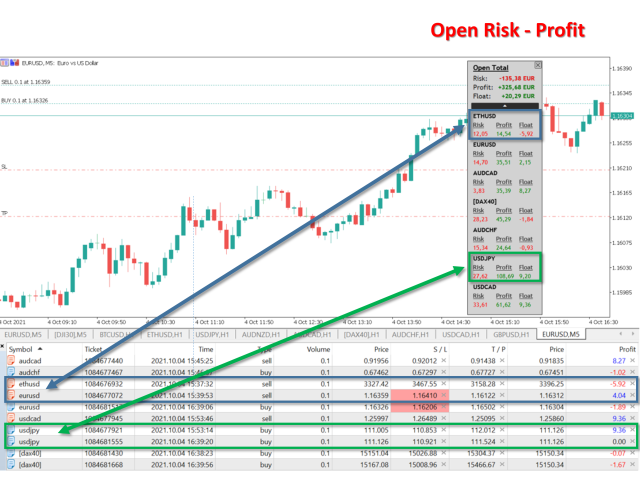
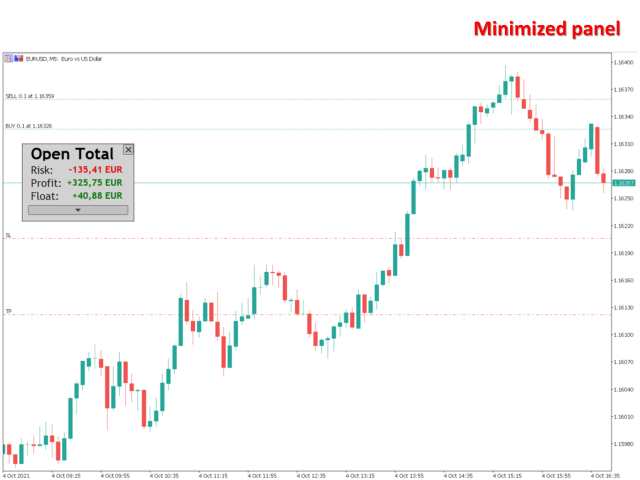
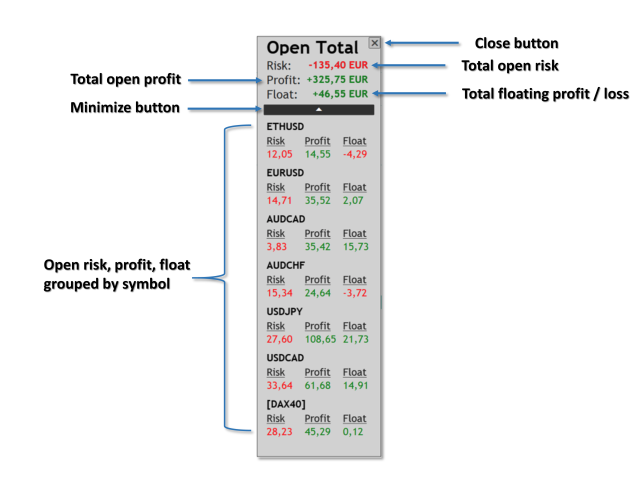
Open Risk Profit shows your current risk or possible profit of all open positions.

Total open risk is your loss if all positions run into the stop loss.
Total open profit is your profit if all positions reach your take profit.
Total float is your current profit or loss of all positions.

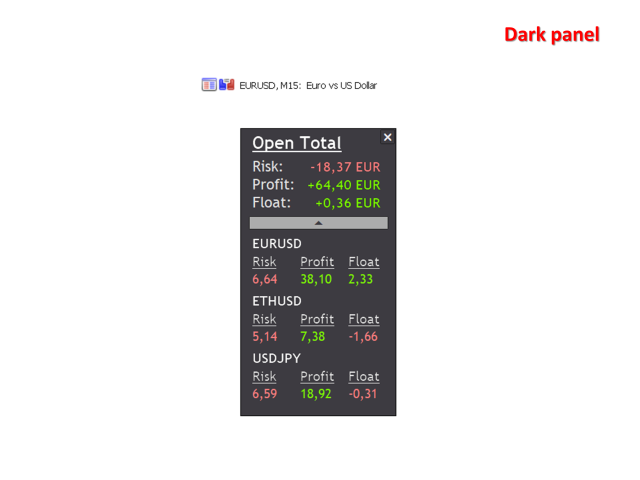
The program also breaks down the information into the individual symbols. For example, you can monitor how much is your current profit and your potential risk in EURUSD, no matter how many individual positions you have. This is especially helpful if you use EAs or automated trading.

Usage

Just drop the program on any chart you like. That's it.

Prodotti consigliati
Position Limit Monitor: Efficient Control of Your Trading Operations Have you ever worried about having too many open trades simultaneously? Would you like precise control over the maximum number of positions in your account? Position Limit Monitor is the solution you need. Main Features: • Real-time monitoring: Constantly supervises the number of open positions in your account. • Customizable limit: Easily set the maximum number of positions you want to keep open. • Automatic closure: When the
EasyScalper MT5
PATRICK WENNING
product video: https://vimeo.com/824742776?share=copy Trade Assistant, Trade Manager, Trade Panel for MetaTrader 5 with the following functions: - Display the remaining candle time and the current time of day - Open long and short positions without SL and TP at the current market price - Display of the current ask, bid and spread - Open long and short positions with predefined lot size, SL and TP at the current market price - Quick selection of the lot size (freely selectable lot sizes) -
Support Or Resistance Alert Broken
Jhojan Alberto Tobon Monsalve
"Support or Resistance Alert Broken" is a simple and very intuitive tool that allows you to create or eliminate horizontal and trend supports and / or resistances with a simple click. When the support or resistance line is broken by the closing price at the end of the current candle, the "Support or Resistance Alert Broken" tool will send an alert with sound, as well as a notification to the MT4 or MT5 mobile application. This tool can send alerts from multiple pairs at the same time. Utility
.................................. This script is intended to help users to get information about ticks and spreads (e.g. ticks count, minimum/maximum/average spread). It can export reports in the CSV format with this information. Traders can see spread statistics in real time in the chart window It is useful for comparing spreads of different brokers. --------------------------------------------------------------------------
RenkoChart EA
Paulo Henrique Da Silva
4.6 (5)
The RenkoChart tool presents an innovative and highly flexible approach to visualizing market data in MetaTrader 5. This expert creates a custom symbol with Renko bricks directly on the chart, displaying accurate prices at the respective opening date/time for each brick. This feature makes it possible to apply any indicator to the Renko chart. Furthermore, this tool also allows access to historical brick data through native methods in the MQL5 programming language, such as iOpen, iHigh, iLow and
FREE
GMT Time MT5
Oeyvind Borgsoe
This indicator shows both GMT time and your broker's time on the chart. Simply attach the indicator to a chart, and you will see the GMT time and your broker's time displayed in the top left corner, as shown in the screenshot. By using this indicator, you can always stay informed about your broker's time, which is especially useful during daylight saving changes. You won't have to worry about whether your broker follows the US or EU schedule, as the indicator automatically adjusts to reflect any
FREE
MT5 AI Chatbot
Thomas Bradley Butler
SIATE PAZIENTI CON IL BOT IN QUANTO IL TEMPO DI RISPOSTA POTREBBE ESSERE DI POCHI SECONDI. RISPONDERÀ. ASSICURATI DI PREMERE INVIA E POI ASPETTA. È UN SEMPLICE BOT CHAT GPT PER MT5 E MQL5. Nei commenti, aggiungi la tua chiave API negli input e aggiungili alla richiesta web nella scheda Expert Advisor: CHAT CON AI SU MQL5 E MT5. IL PROMPT DEVE CONTENERE MQL5 O MT5, ALTRIMENTI NON RISPONDERÀ. È ADDESTRATO SOLO SU MT5 E MQL4. NOTA CHE FUNZIONERÀ SOLO NEI GRAFICI IN TEMPO REALE, NON NEL BACKTEST.
Chart Spot Binance
Ghavamipour Mohammadreza
show live chart spot All symbol binance If you want to get this product with a 99% discount, send a message to my Telegram admin and rent this product for 1 $ per month or 10 $ per year. Even if you do not like the way the chart is displayed, you can tell the admin in Telegram how to display it so that your own expert is ready. https://t.me/Bella_ciao1997 https://t.me/Binance_to_mql5
Sync In Many Ways MT5
Sa No Tsuyoshi Kokorozashi
Description This is a Utility tool for MT5 which will make our chart analysis task quite more efficient and save large amount of time. As for chart analysis, some are watching out several symbol simultaneously with single timeframe and others are trading only one single pair with   multi timeframe analysis. For both, a common troublesome issue is “scroll chart to look back” or “draw chart objects” in multi charts at the same time.  Especially for those who are trading with multi timeframe soluti
Questo script è progettato per valutare i pesi in varie funzioni della finestra. Un indicatore basato su queste funzioni della finestra può essere scaricato all'indirizzo   https://www.mql5.com/ru/market/product/72159 Parametri di input: iPeriod – periodo indicatore. iPeriodo >= 2 iCenter è l'indice del riferimento in cui si troverà il centro della funzione finestra. Per impostazione predefinita, questo parametro è 0: il centro della finestra coincide con il centro dell'indicatore. Con 1 <= iCe
FREE
SyncDB LT
Maxim Kuznetsov
A   service   to   keep   the   SQLite   database up   to   date .   Fast   real -t ime   operation .   Saves   open   positions   and   orders ,   current   quotes ,   and   trading   history .   Take   advantage   of   SQLite 's   capabilities   for   intermediate   data   storage ,   analytics ,   and   integration   of the   MetaTrader   platform .   Save   all   your   data   in   one   place .   Use   the   saved   data   in   SQL   analytical   queries ,   from   Python   and   other   la
FREE
EQUITY DRAWDOWN MONITOR   This is a simple mt5 advisor that monitors the drawdon levels Features: Easy to use Useful for money managers How to Use  Load the EA once a single chart Type the maximum drawdown desired in inputs Leave the EA alone and never close that chart The EA monitors all trades and magic numbers in your account. Input Parameter Drawdown Percent:   Maximum drawdown in percentage terms allowable in the account. When the drawdown level is surpassed, the EA will close all trades
AKCAP Hotkey Tool
AK Capital Markets Limited
5 (3)
Special offer for the next 10 copies Are you tired of manually navigating through menus and inputting data every time you want to execute a trade or open an order on Meta Trader? Our hotkey tool is here to make your life easier and boost your trading efficiency. Our tool is natively coded for lightning-fast performance and comes loaded with all the features you could possibly want. From pending orders and OCO orders to trailing and multiple buckets, it has everything a scalper could need. And
Binance is a world-renowned cryptocurrency exchange! In order to facilitate the real-time data analysis of the encrypted digital currency market, the program can automatically import the real-time transaction data of Binance Futures to MT5 for analysis. The main functions are: 1. Support the automatic creation of USD-M futures trading pairs of the Ministry of Currency Security, and the base currency can also be set separately. The base currency BaseCurrency is empty to indicate all currencies,
ICT PD Arrays Trader
Aesen Noah Remolacio Perez
Attention All ICT Students! This indispensable tool is a must-have addition to your trading arsenal... Introducing the ICT PD Arrays Trader: Empower your trading with this innovative utility designed to enhance and simplify your ICT trading strategy and maximize your potential profits.  How does it work? It's simple yet highly effective. Begin by placing a rectangle on your trading chart and assigning it a name like 'ict' or any preferred identifier. This allows the system to accurately ident
Prendi il controllo del tuo portafoglio forex. Vedi istantaneamente dove ti trovi, cosa sta funzionando e cosa ti sta causando dolore! VERSIONE MT4 DISPONIBILE QUI: https://www.mql5.com/en/market/product/58375 Il dashboard di Trade Manager è progettato per mostrarti a colpo d'occhio dove si trova attualmente ogni posizione che hai nel mercato forex e rendere più facile la comprensione della gestione del rischio e dell'esposizione alle valute. Per i trader che scalano gradualmente il mercato co
The account manager has a set of functions necessary for trading, which take into account the results of the entire account in total, and not for each individual open position: Trailing stop loss. Take profit. Break-even on the amount of profit. Breakeven by time. Stop Loss Typically, each of these options can be applied to each individual trade. As a result, the total profit on the account may continue to increase, and individual positions will be closed. This does not allow you to get the maxi

The analyzer makes it possible to quickly assess spread changes on historical data,   the magnitude and frequency of bursts, the dynamics and nature of the extensions by the days of the week, etc. The analyzer needs to be started in the tester (visualization mode) on the symbol and time interval required for analysis,   recommended TimeFrame H1, select "Every tick based on real ticks" mode.
OrderHelper MT5
Md Atikur Rahman
OrderHelper script is super easy and trader friendly to use. It would boost your trading experience. Because it is designed to open one to multiple orders quickly with just one click. Besides using the OrderHelper script, traders can define various parameters for open orders such as the symbol, order type, lot size, stoploss, takeprofit and more. Basically, with this script traders can manage their open orders more efficiently and save their trading time. OrderHelper manages: Open the number of
TradingX Hotkeys
Johannes Stephanus Lombard
Inputs Available Lotsizes Partial Close % You can change lotsizes as you require On an open chart click once to select chart to be able to use hotkeys on specific chart. All Pairs can be used with this expert We created this expert to be able to still trade C300 with a 0.06 Lotsize If you enter a 0.6 lot and close 0.90% you can trade with 0.06 Lot Keys to be used: B -Buy S -Sell C -Close Profitable D -Breakeven (Note if stoploss is set it won't break even) P -Partial close X -Close all
TC-Supportは手動取引とEA運用のために開発されたパネルになります。 このパネルでは、リスクリワード、リスク計算、リスク管理など資金管理、 トレーリングストップ機能、ブレークイーブンなどポジション管理が可能になります。 その他、便利な機能があります。 詳細な情報はこちらにサイトがあります。 デモ口座で動作するEAはこちらに置いてあります。   https://toushika.top/ mt5-tc-support / Disable Auto Trading  の 機能はMQL5では外部のDLLの利用は許可されませんので使用できません。 おもな機能一覧 資金管理 リスクリワード計算 ロット計算 損失金額計算 最大ロット数の設定 設定したリスクパーセンテージでヘッジポジション EA運用 最大損失金額またはパーセンテージによる強制クローズ EA運用 資金破綻回避  ポジション管理 成行、指値、Stop Limit注文に対応 ポジションを部分的にクローズ トレーリングストップ機能 一定の距離を超えてたらSLを移動 利確条件設定
Compare Symbols Specifications is a utility indicator that is a summary interactive table of the analyzed parameters. Trading conditions in the market are constantly changing and tracking these changes is a time-consuming task. This tool allows you to compare the trading conditions of all symbols in a matter of seconds, and choose for trading those symbols that meet the requirements of the trading system. This tool will be useful to all traders and will help them to have up-to-date information
This application exports all completed operations to a text file delimited by <TAB>, comma, semicolon or any character defined by the user, also including the comments and magic number of the operations which can be easily exported to EXCEL or Google Spreadsheets. The files are generated in the "files" folder, individually separated by month with the name in the format: 999999-AAAA BBBB- [9-9999] where: 999999 = MT5 Trading Account Number AAAA BBBB = Trading Account User Name [9-9999] - Mo
Quick Position Closer
Cristhian Alexander Gaibor Cuasquer
5 (1)
QUICK POSITION CLOSER - The Ultimate Trading Panel Tired of closing positions one by one? Transform your trading experience with Quick Position Closer - the most efficient and elegant solution for instant position management! WHAT DOES IT DO? Quick Position Closer is a professional control panel that allows you to close multiple positions instantly with just ONE CLICK . No more wasting precious time - protect your profits and cut losses in seconds! KEY FEATURES: INSTANT CLOSURE - All p
FREE
Trading Companion is an EA bridge to the Telegram chat. It does not place trades, it provides to your Telegram's terminal information about your accounts - it can be used with any other EA, indicator or trading solution. It notifies you about the server lag (ping between your terminal and your broker) and includes a feature to withdraw wisely from your account.‌ Settings Ping limit: default 300ms - will warn you if ping is superior Basis Fund: 0, deactivated - each time you will withdraw, it is
FREE
PZ Risk Management MT5
PZ TRADING SLU
5 (3)
This indicator monitors the vital constants of your trading account to keep it healthy and away from excessive risks. It monitors all trades, absolute exposure, account floating point and leverage currently in use, using different color codes for your interpretation.  [ Installation Guide | Update Guide | Troubleshooting | FAQ | All Products ] Amazingly easy to understand The indicator is clean and simple It calculates exposure by pairs and currencies Keep your used leverage controlled at all t
FREE
The utility places trailing stop, breakeven, stop loss and take profit.‌ It is necessary to allow automated trading in the terminal settings. In testing mode, the utility opens Buy or Sell positions on the first ticks, which allows you to visually observe the given logic, changing the utility parameters. In real mode, the utility does not open positions. Discuss the complexities of Forex trading here:  chat "Age of Expert Advisors" . Parameters magic   - magic number. If less than 0, positions w
Easy Order NG for MT5
Jorge Delgado Segura
This EA utility helps Price Action traders calculate the risk as Big Money profesional traders do: as percentages of available funds. Allows to visually set a desired Profit:Risk ratio, where you want your stop-loss and take-profit levels. Optionally, enable a second and third orders to be placed simultaneously with different ratios and risk percentages. Great for BTMM, ICT, and other methodologies. Very simple to use, just "point and shoot"!!! FREE limited version here .
Danko DTC Panel
Ricardo Almeida Branco
Do not buy before seeing the Danko Trend Color product, as this panel is a way to view a summary of this indicator on various timeframes. The Danko DTC Panel utility allows you to look at the trend in up to 5 timeframes. When clicking on the timeframe texts, a new window will open with the indicator plotted on the screen so you can see the complete chart. The width of the panel, with the amount of candles you want to see, is customizable, see the images below. Ao clicar nos textos dos timeframe
Pending Orders Grid Complete System opens any combination of Buy Stop, Sell Stop, Buy Limit and Sell Limit pending orders and closes all existing pending orders. You will be able to Drag-and-Drop the Script on the chart and it will pick up the start price for the first position in the grid from the "Drop" point. Usually it should be in the area of Support/Resistance lines. Input Parameters Before placing all pending orders, the input window is opened allowing you to modify all input parameters:
Gli utenti di questo prodotto hanno anche acquistato
Trade Assistant MT5
Evgeniy Kravchenko
4.41 (205)
It helps to calculate the risk per trade, the easy installation of a new order, order management with partial closing functions, trailing stop of 7 types and other useful functions. Additional materials and instructions Installation instructions - Application instructions - Trial version of the application for a demo account Line function -   shows on the chart the Opening line, Stop Loss, Take Profit. With this function it is easy to set a new order and see its additional characteristics bef
Forex Trade Manager MT5
InvestSoft
4.97 (581)
Benvenuto a Trade Manager EA, lo strumento definitivo per la gestione del rischio , progettato per rendere il trading più intuitivo, preciso ed efficiente. Non è solo uno strumento per l'esecuzione degli ordini, ma una soluzione completa per la pianificazione delle operazioni, la gestione delle posizioni e il controllo del rischio. Che tu sia un principiante, un trader avanzato o uno scalper che necessita di esecuzioni rapide, Trade Manager EA si adatta alle tue esigenze, offrendo flessibilità s
TradePanel MT5
Alfiya Fazylova
4.86 (147)
Trade Panel è un assistente commerciale multifunzionale. L'applicazione contiene più di 50 funzioni di trading per il trading manuale e consente di automatizzare la maggior parte delle operazioni di trading. Attenzione, l'applicazione non funziona nel tester di strategia. Prima dell'acquisto, puoi testare la versione demo su un conto demo. Versione demo qui . Istruzioni complete qui . Commercio. Ti consente di eseguire operazioni di trading con un clic: Apri ordini e posizioni pendenti con calco
Local Trade Copier EA MT5
Juvenille Emperor Limited
4.96 (116)
Sperimenta una copia di trading eccezionalmente veloce con il   Local Trade Copier EA MT5 . Con la sua facile configurazione in 1 minuto, questo copiatore di trading ti consente di copiare i trades tra diversi terminali di MetaTrader sullo stesso computer Windows o su Windows VPS con velocità di copia ultra veloci inferiori a 0.5 secondi. Che tu sia un trader principiante o professionista,   Local Trade Copier EA MT5   offre una vasta gamma di opzioni per personalizzarlo alle tue esigenze speci
Versione Beta Telegram to MT5 Signal Trader è quasi pronto per il rilascio ufficiale in versione alpha. Alcune funzionalità sono ancora in fase di sviluppo e potresti riscontrare piccoli bug. Se riscontri problemi, ti preghiamo di segnalarli, il tuo feedback aiuta a migliorare il software per tutti. Il prezzo aumenterà dopo 20 vendite. Copie rimanenti a $90:   2/20 . Telegram to MT5 Signal Trader è uno strumento potente che copia automaticamente segnali di trading da canali o gruppi Telegram a
Ultimate Extractor
Clifton Creath
5 (7)
Ultimate Extractor - Professional Trading Analytics for MT5 Ultimate Extractor transforms your MetaTrader 5 trading history into actionable insights with comprehensive analytics, interactive charts, and real-time performance tracking. What It Does  Phase 1: Automatically analyzes your MT5 trading history across all Expert Advisors and generates detailed HTML reports with interactive visualizations. Tracks live performance metrics including open positions, floating P/L, and drawdown in real-time.
Trade Dashboard MT5
Fatemeh Ameri
4.96 (104)
Tired of complex order placement and manual calculations? Trade Dashboard is your solution. With its user-friendly interface, placing orders becomes effortless, by a single click, you can open trades, set stop loss and take profit levels, manage trade lot size, and calculate risk to reward ratios, allowing you to only focus on your strategy. Say goodbye to manual calculations and streamline your trading experience with Trade Dashboard. Download  Demo Version  right now. You can find  Details of
Smart Stop Scanner – Analisi multi-asset degli stop-loss basata sulla reale struttura di mercato Panoramica Smart Stop Scanner offre un monitoraggio professionale dei livelli di stop-loss su più mercati. Il sistema identifica automaticamente le zone di stop più rilevanti basandosi sulla reale struttura di mercato, sulle rotture significative e sulla logica del price action, presentando tutte le informazioni in un pannello chiaro, coerente e ottimizzato per schermi ad alta risoluzione (DPI-awar
Copy Cat More Trade Copier MT5 (Gatto Copiatore MT5) è un copiatore di trade locale e un framework completo di gestione del rischio ed esecuzione progettato per le sfide di trading odierne. Dalle sfide delle prop firm alla gestione di portafogli personali, si adatta a ogni situazione con una combinazione di esecuzione robusta, protezione del capitale, configurazione flessibile e gestione avanzata dei trade. Il copiatore funziona sia in modalità Master (mittente) che Slave (ricevente), con sincro
Smart Stop Manager – Esecuzione automatica dello stop-loss con precisione professionale Panoramica Smart Stop Manager è il livello di esecuzione della linea Smart Stop, progettato per i trader che richiedono una gestione dello stop-loss strutturata, affidabile e completamente automatizzata su più posizioni aperte. Monitora continuamente tutte le operazioni attive, calcola il livello di stop ottimale utilizzando la logica di struttura di mercato Smart Stop e aggiorna gli stop automaticamente se
Exp COPYLOT CLIENT for MT5
Vladislav Andruschenko
3.82 (34)
Trade copyr per MT5 è un trade copyr per la piattaforma МetaТrader 5   . Copia le negoziazioni forex   tra       eventuali conti   MT5   -   MT5, MT4   -   MT5 per la versione COPYLOT MT5 (o MT4   -   MT4 MT5   -   MT4 per la versione COPYLOT MT4) Fotocopiatrice affidabile! Versione MT4 Descrizione completa   +DEMO +PDF Come comprare Come installare     Come ottenere i file di registro     Come testare e ottimizzare     Tutti i prodotti di Expforex Puoi anche copiare le operazioni nel termina
VirtualTradePad One Click Trading Panel
Vladislav Andruschenko
4.58 (72)
Pannello di trading per il trading in 1 clic.   Lavorare con posizioni e ordini!   Trading dal grafico o dalla tastiera. Con il nostro pannello di trading, puoi eseguire operazioni con un solo clic direttamente dal grafico ed eseguire operazioni di trading 30 volte più velocemente rispetto al controllo MetaTrader standard. I calcoli automatici di parametri e funzioni rendono il trading più veloce e conveniente per i trader. Suggerimenti grafici, etichette informative e informazioni complete sugl
MT5 to Telegram Signal Provider è un'utilità facile da usare e completamente personalizzabile che consente l'invio di segnali specificati a una chat, canale o gruppo Telegram, rendendo il tuo account un fornitore di segnali. A differenza della maggior parte dei prodotti concorrenti, non utilizza importazioni DLL. [ Dimostrativo ] [ Manuale ] [ Versione MT4 ] [ Versione Discord ] [ Canale Telegram ]  New: [ Telegram To MT5 ] Configurazione Una guida utente passo-passo è disponibile. Nessuna cono
Seconds Chart MT5
Boris Sedov
4.59 (17)
Seconds Chart — uno strumento unico per creare grafici in secondi su MetaTrader 5 . Con Seconds Chart , puoi generare grafici con timeframe definiti in secondi, ottenendo una flessibilità e una precisione d'analisi ideali, non disponibili nei grafici standard in minuti o ore. Ad esempio, il timeframe S15 indica un grafico con candele di 15 secondi. Puoi utilizzare qualsiasi indicatore e Expert Advisor con supporto per simboli personalizzati. Lavorare con loro è comodo quanto operare sui grafici
The News Filter MT5
Leolouiski Gan
4.74 (19)
Questo prodotto filtra tutti gli esperti consulenti e i grafici manuali durante il periodo delle notizie, così non dovrai preoccuparti di improvvisi picchi di prezzo che potrebbero distruggere le tue impostazioni di trading manuali o le negoziazioni effettuate da altri esperti consulenti. Questo prodotto viene fornito anche con un sistema completo di gestione degli ordini che può gestire le tue posizioni aperte e gli ordini in sospeso prima della pubblicazione di qualsiasi notizia. Una volta che
HINN MagicEntry Extra
ALGOFLOW OÜ
4.64 (11)
HINN MAGIC ENTRY – the ultimate tool for entry and position management! Place orders by selecting a level directly on the chart! Key features: - Market, limit, and pending orders - Automatic lot size calculation - Automatic spread and commission accounting - Unlimited partitial take-profits  - Breakeven and trailing stop-loss  functions - Intuitive, adaptive, and customizable interface - Session and strong algorithmic level visualization - Works with any assets and account types Join the   ALG
Custom Alerts MT5
Daniel Stein
5 (8)
Custom Alerts: Monitora più mercati e non perdere mai un setup importante Panoramica Custom Alerts è una soluzione dinamica per i trader che desiderano monitorare più strumenti da un unico punto centrale. Integrando i dati dei nostri strumenti principali — come FX Power, FX Volume, FX Dynamic, FX Levels e IX Power — Custom Alerts ti avvisa automaticamente degli sviluppi cruciali del mercato, senza dover passare continuamente da un grafico all'altro o rischiare di perdere opportunità importanti
Grid Manual MT5
Alfiya Fazylova
4.9 (20)
Grid Manual è un pannello di trading per lavorare con una griglia di ordini. L'utilità è universale, ha impostazioni flessibili e un'interfaccia intuitiva. Funziona con una griglia di ordini non solo nella direzione delle perdite, ma anche nella direzione dell'aumento dei profitti. Il trader non ha bisogno di creare e mantenere una griglia di ordini, lo farà l'utilità. È sufficiente aprire un ordine e il manuale di Grid creerà automaticamente una griglia di ordini per esso e lo accompagnerà fino
Trade Manager DaneTrades
Levi Dane Benjamin
4.33 (27)
Trade Manager per aiutarti a entrare e uscire rapidamente dalle operazioni calcolando automaticamente il tuo rischio. Incluse funzionalità che ti aiutano a prevenire l'eccessivo trading, il vendetta trading e il trading emotivo. Le operazioni possono essere gestite automaticamente e i parametri di performance del conto possono essere visualizzati in un grafico. Queste caratteristiche rendono questo pannello ideale per tutti i trader manuali e aiuta a migliorare la piattaforma MetaTrader 5. Suppo
Crypto Charting
Rajesh Kumar Nait
5 (5)
Crypto Charting for MT5 – Integrazione grafici criptovalute in MetaTrader 5 Panoramica Crypto Charting for MT5 offre dati OHLC in tempo reale tramite WebSocket. Supporta più exchange e aggiorna automaticamente i dati in MT5. Funzionalità Dati in tempo reale via WebSocket Aggiornamento automatico dei dati storici Sincronizzazione pianificata dopo interruzioni Compatibile con tutti i timeframe MT5 Dati OHLCV completi Supporto per il tester di strategia Riconnessione automatica Exchange supportati
EasyInsight AIO MT5
Alain Verleyen
4.91 (11)
EASY Insight AIO – La soluzione all-in-one per un trading intelligente e senza sforzo Panoramica Immagina di poter analizzare l’intero mercato — Forex, Oro, Cripto, Indici e persino Azioni — in pochi secondi, senza dover controllare manualmente i grafici, installare indicatori o affrontare configurazioni complicate. EASY Insight AIO è il tuo strumento definitivo di esportazione per il trading alimentato dall’IA, pronto all’uso. Offre una panoramica completa del mercato in un unico file CSV pul
The product will copy all telegram signal to MT5 ( which you are member) , also it can work as remote copier.  Easy to set up, copy order instant, can work with almost signal formats, image signal,  s upport to translate other language to English Work with all type of channel or group, even channel have "Restrict Saving Content", work with  multi channel, multi MT5 Work as remote copier: with signal have ticket number, it will copy exactly via ticket number. Support to backtest signal. How to s
Crypto Ticks and Depth
Rajesh Kumar Nait
5 (1)
Crypto Ticks per MetaTrader 5 – Dati in tempo reale e integrazione libro ordini per criptovalute Panoramica Crypto Ticks trasmette dati tick-by-tick e profondità del book ordini dalle principali borse di criptovalute direttamente su MetaTrader 5. Ideale per scalping, trading algoritmico e test di strategie. Exchange supportati Binance: Spot (con profondità libro su grafico attivo) e Futures (multi-simbolo) KuCoin: Spot e Futures Bybit: Futures e Inverse Futures XT.com: Spot e Futures Caratteris
Auto Trade Copier for MT5
Vu Trung Kien
4.38 (26)
Auto Trade Copier is designed to copy trades to multiple MT4, MT5 and cTrader accounts/terminals with 100% accuracy. The provider and receiver accounts must be on the same PC/VPS. With this tool, you can copy trades to receiver accounts on the same PC/VPS. All trading actions will be copied from provider to receiver perfectly. This version can be used on MT5 accounts only. For MT4 accounts, you must use Auto Trade Copier (for MT4). Reference: - For MT4 receiver, please download Trade Receiver Fr
Strategy Builder offers an incredible amount of functionality. It combines a trade panel with configurable automation (covert indicators into an EA), real-time statistics (profit & draw down) plus automatic optimization of SL, TP/exit, trading hours, indicator inputs. Multiple indicators can be combined into an single alert/trade signal and can include custom indicators, even if just have ex4 file or purchased from Market. The system is easily configured via a CONFIG button and associated pop-u
HINN Lazy Trader
ALGOFLOW OÜ
5 (2)
Lazy Trader is your personal risk management assistant that independently finds the best market entries, manages positions, and helps you extract maximum profit from every trading idea! It monitors charts from M1 to W1 , finds optimal entry points based on your parameters, and manages trades without your involvement: - Got an idea on the daily chart? No need to wait for lower timeframes to form a signal — Lazy Trader will check everything and open all necessary positions while you live your lif
Trade Assistant 38 in 1
Makarii Gubaydullin
4.91 (22)
Ultimate Trade Assistant MT5 — Assistente di Trading Multifunzionale Oltre 66 strumenti integrati per analisi, gestione del rischio e automazione del trading. L’assistente combina gestione del rischio, ordini intelligenti, analisi di mercato e controllo delle posizioni in un’unica interfaccia semplice e potente. Ideale per Forex, azioni, indici e criptovalute. Perché i trader lo scelgono Esecuzione rapida e gestione completa con un clic Calcolo automatico di lotto e rischio in base al saldo Ordi
X2 Copy MT5
Liubov' Shkandrii
Scopri la Copia Istantanea dei Trade con il rivoluzionario X2 Copy MT5. Con soli 10 secondi di configurazione, otterrai uno strumento potente per sincronizzare i trade tra terminali MetaTrader su un singolo computer Windows o VPS con una velocità senza precedenti - inferiore a 0,1 secondi. Sia che tu stia gestendo più account, seguendo segnali o scalando la tua strategia, X2 Copy MT5 si adatta al tuo flusso di lavoro con una precisione e un controllo senza pari. Smetti di aspettare — inizia a co
Trade Manager DashPlus
Henry Lyubomir Wallace
5 (12)
DashPlus è uno strumento avanzato di gestione delle operazioni progettato per migliorare l'efficienza e l'efficacia del trading sulla piattaforma MetaTrader 5. Offre una suite completa di funzionalità, tra cui calcolo del rischio, gestione degli ordini, sistemi di griglia avanzati, strumenti basati su grafici e analisi delle prestazioni. Caratteristiche Principali 1. Griglia di Recupero Implementa un sistema di griglia flessibile e di media per gestire le operazioni in condizioni di mercato avve
Zentral Trading Manager
Ray Zeanrik Parreno Fredeluces
5 (4)
Zentral Trading Manager Your Command Center for Precision Trading — Now Stronger than Ever Take control of your trades like never before. Zentral Trading Manager is your all-in-one manual trading panel for MetaTrader 5 — built for scalpers, day traders, and serious strategy execution. Fully compatible with both Mac and Windows laptops. High-DPI safe. No more layout issues. Key Features (Latest 2025 Update): • One-Click Close – Instantly close Buy/Sell, winning/losing trades, or even half positi
Altri dall’autore
Real Trend Zigzag PRO   shows the real trend of a market, u nlike the default Zigzag indicator. It calculates the trend in real time and shows green lines for upwards trends, red lines for downward trends and blue lines for no trends.  Regarding the old slogan "the trend is your friend" it helps you to decide if should open a buy or sell position. The PRO version is a multi timeframe zigzag (MTF). Means, it shows the trend of the current timeframe as well as the trend of a higher or lower time.
The VIX Fix is a volatility indicator developed by renowned trader Larry Williams. It's designed to measure volatility in assets that don't have options or futures, such as individual stocks and forex markets. Essentially,   it acts as a synthetic VIX (Volatility Index) for any asset , providing a gauge of market uncertainty. This modified version of William's indicator helps you to find market bottoms and market tops. It comes with 2 styles: Stochastic and histogram style. Please see screenshot
MT Moving Average MT Moving Average is an easy to use multi time frame moving average indicator. It shows moving averages (SMA or EMA) of current symbol from all time frames (higher and lower). No need to switch between time frames anymore. With help of the indicator panel you can select which timeframe should be shown on the chart. I.e. your current timeframe is M5 and you can turn on M15 to see the the moving average of period M15. Indicator settings Dark interface --> Set to true to use dar
MT Moving Average MT Moving Average is an easy to use multi time frame moving average indicator. It shows moving averages (SMA or EMA) of current symbol from all time frames (higher and lower). No need to switch between time frames anymore. With help of the indicator panel you can select which timeframe should be shown on the chart. I.e. your current timeframe is M5 and you can turn on M15 to see the the moving average of period M15. Indicator settings Dark interface --> Set to true to use dark
ToolBox 360 is the swiss knife of all indicators. It is full packed with useful tools to help you with your trading. It can be used to find best entry and exit points and help you to decide if you should open a trade or not. It shows market trends, candlestick formations outside / inside bars and you can sett time based allerts. Main features: Time based Fibonacci lines Choose a start and end time and the indicator shows you Fibonacci lines within the selected time range including range high a
Trailing Stops Pro is a highly advanced trailing stop program. It comes with 12 different trailing stops and helps you to manage your trade and stops easily. You can specify a trail start, that means the trailing stop will be started after your positions has reached the selected profit points. Additionally you can set a trail distance as well as activate and deactivate the trailing stop for each position separately. For your convenience the program has a very easy to use app panel. For a detaile
Real Trend Zigzag   shows the real trend of a market, u nlike the default Zigzag indicator. It calculates the trend in real time and shows green lines for upwards trends, red lines for downward trends and blue lines for no trends.  Regarding the old slogan "the trend is your friend" it helps you to decide if should open a buy or sell position. MT5 Version can be found here:  https://www.mql5.com/en/market/product/72065 If you are looking for a multi timeframe zigzag, take a look at the PRO vers
Real Trend Zigzag PRO   shows the real trend of a market, u nlike the default Zigzag indicator. It calculates the trend in real time and shows green lines for upwards trends, red lines for downward trends and blue lines for no trends.  Regarding the old slogan "the trend is your friend" it helps you to decide if should open a buy or sell position. The PRO version is a multi timeframe zigzag (MTF). Means, it shows the trend of the current timeframe as well as the trend of a higher or lower time.
This is the MetaTrader version of the very popular   Squeeze Momentum   indicator. It is based of of John Carter's   TTM Squeeze   volatility indicator, as discussed in his book   Mastering the Trade. With this version you can enable notifications when a squeeze is released (push notification, email, or pop-up message). Strategie Grey dots indicates a squeeze in the current timeframe.   Blue dots indicates that the squeeze is released. Mr. Carter suggests waiting till the first blue dot after a
Open Risk Profit  shows your current risk or possible profit of all open positions. Total open risk   is your loss if all positions run into the stop loss. Total open profit   is your profit if all positions reach your take profit. Total float   is your current profit or loss of all positions. The program also breaks down the information into the individual symbols. For example, you can monitor how much is your current profit and your potential risk in EURUSD, no matter how many individual posi
Description This is a modified version of the popular  Voss Predictive Filter - A peek into the future   by Dr. John Ehlers. It contains 2 lines - V-Line (blue) and F-Line (red), a trend indication and BUY/SELL signals. Usage Buy Green dots indicate an up trend.  Open a BUY position if the V-Line crosses the F-Line from below and an up trend is signaled (green dots) Close BUY position if V-Lines falls beneath F-Line again  Sell Red dots indicate a down trend Open a sell position if V-Line falls
ToolBox 360 is the swiss knife of all indicators. It is full packed with useful tools to help you with your trading. It can be used to find best entry and exit points and help you to decide if you should open a trade or not. It shows market trends, candlestick formations outside / inside bars and you can sett time based allerts. Main features: Time based Fibonacci lines Choose a start and end time and the indicator shows you Fibonacci lines within the selected time range including range high a
Trailing Stops Pro is a highly advanced trailing stop program. It comes with 12 different trailing stops and helps you to manage your trade and stops easily. You can specify a trail start, that means the trailing stop will be started after your positions has reached the selected profit points. Additionally you can set a trail distance as well as activate and deactivate the trailing stop for each position separately. For your convenience the program has a very easy to use app panel. For a detaile
Real Trend Zigzag shows the real trend of a market, u nlike the default Zigzag indicator. It calculates the trend in real time and shows green lines for upwards trends, red lines for downward trends and blue lines for no trends.  Regarding the old slogan "the trend is your friend" it helps you to decide if should open a buy or sell position. If you are looking for a multi timeframe zigzag, take a look at the PRO version:  https://www.mql5.com/en/market/product/72071 MT4 version can be found her
This is the MetaTrader version of the very popular Squeeze Momentum indicator. It is based of of John Carter's TTM Squeeze volatility indicator, as discussed in his book Mastering the Trade. With this version you can enable notifications when a squeeze is released (push notification, email, or pop-up message). Strategie Grey dots indicates a squeeze in the current timeframe. Blue dots indicates that the squeeze is released. Mr. Carter suggests waiting till the first blue dot after a grey dot an
Description This is a modified version of the popular  Voss Predictive Filter - A peek into the future by Dr. John Ehlers. It contains 2 lines - V-Line (blue) and F-Line (red), a trend indication and BUY/SELL signals. Usage Buy Green dots indicate an up trend.  Open a BUY position if the V-Line crosses the F-Line from below and an up trend is signaled (green dots) Close BUY position if V-Lines falls beneath F-Line again  Sell Red dots indicate a down trend Open a sell position if V-Line falls b
The VIX Fix is a volatility indicator developed by renowned trader Larry Williams. It's designed to measure volatility in assets that don't have options or futures, such as individual stocks and forex markets. Essentially, it acts as a synthetic VIX (Volatility Index) for any asset , providing a gauge of market uncertainty. This modified version of William's indicator helps you to find market bottoms and market tops. It comes with 2 styles: Stochastic and histogram style. Please see screenshots
Filtro:
Andreas Beyer
416
Andreas Beyer 2022.10.21 15:32 
 

The existing version is by no means mature.

Timo Kosiol
1595
Risposta dello sviluppatore Timo Kosiol 2023.01.06 16:34
New version online. Issues should be fixed now
Rispondi alla recensione