Complete Pending Orders N Grid System MT5

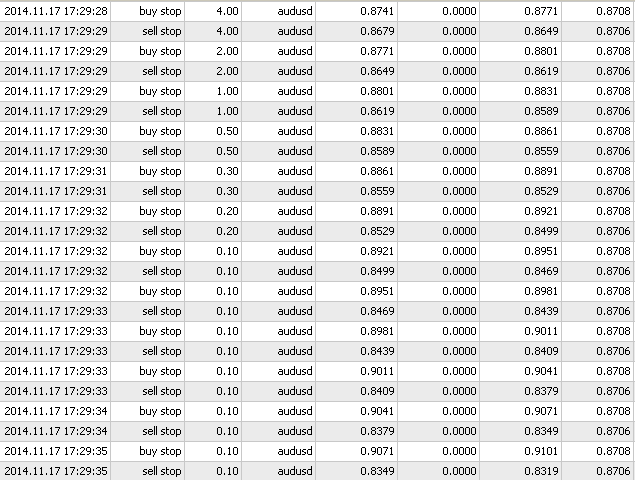
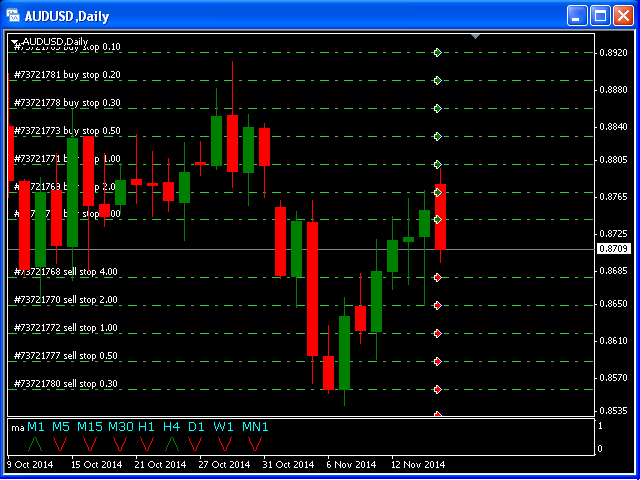
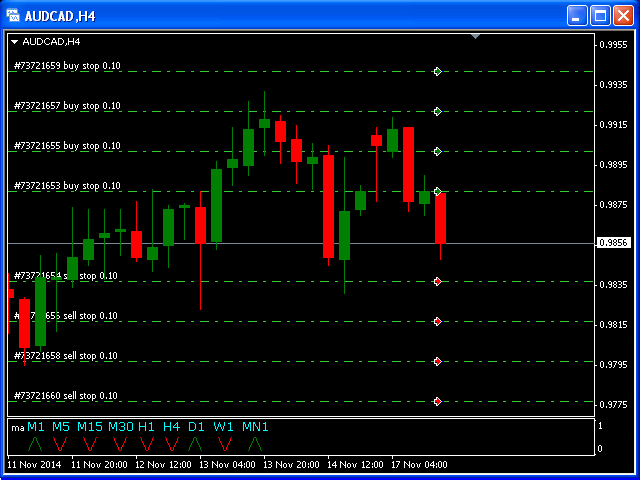
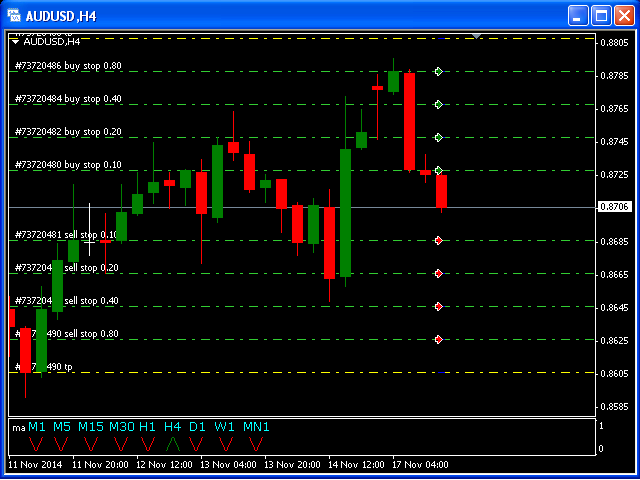
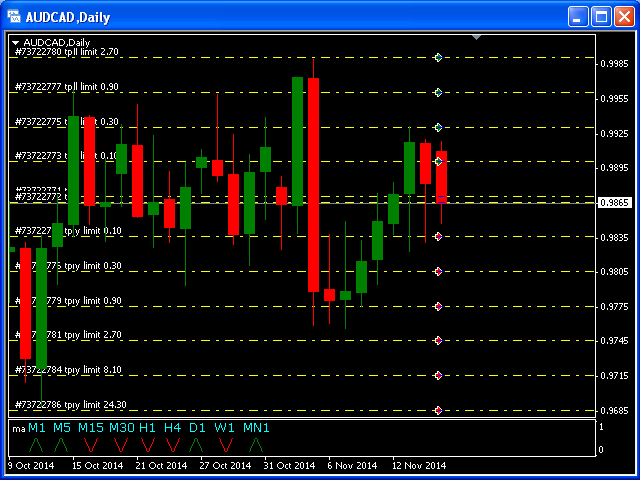
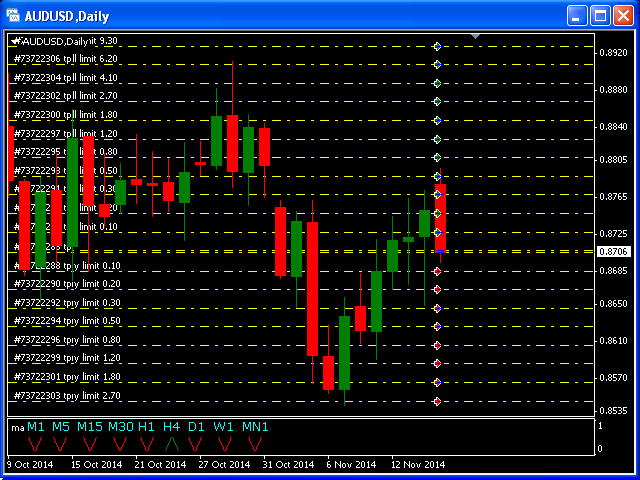
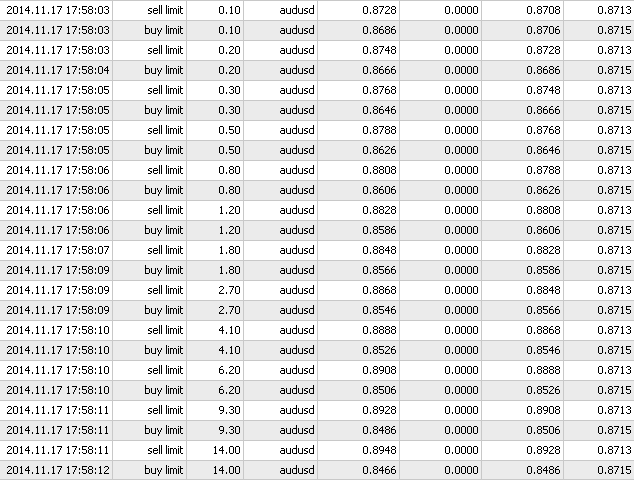
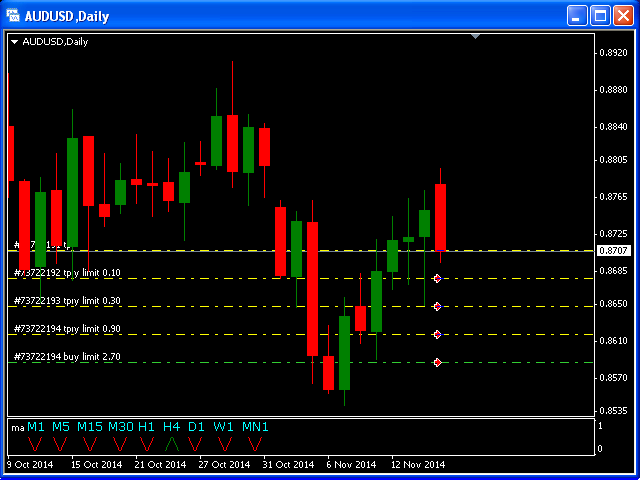
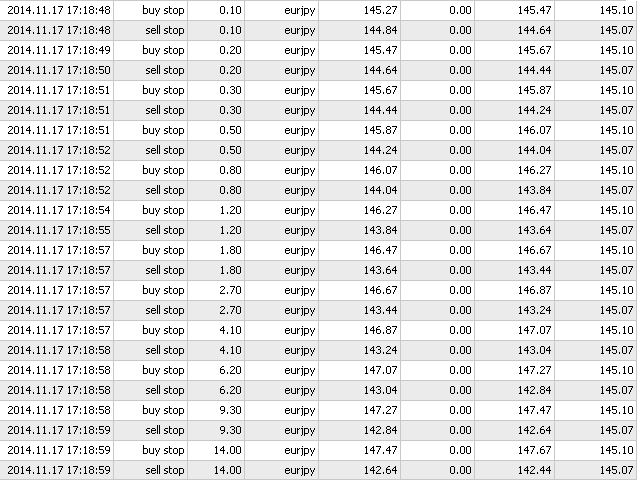
Complete Pending Orders Grid System opens any combinations of Buy Stop, Sell Stop, Buy Limit and Sell Limit pending orders and closes all existing pending orders. You just need to drop this script on the chart of a desired currency pair.

Before placing all pending orders, the input window is opened allowing you to modify all input parameters:

  • DeleteAllPendings – if 'true', then all pending orders (for current currency) are deleted.
  • BuyStop – if 'true', Buy Stop order is opened.
  • SellStop – if 'true', Sell Stop order is opened.
  • BuyLimit – if 'true', Buy Limit order is opened.
  • SellLimit – if 'true', Sell Limit order is opened.
  • InitLot – initial lot.
  • LotCoeff – if 1, all pending orders will have the same lot size.
  • InitStep – difference between two consecutive orders in points.
  • StepCoeff – step coefficient.
  • NumOfOrders – number of orders.
  • Slippage – allowed slippage.
  • MagicNum – magic number.

Attention:

  • If DeleteAllPendings=true, the script is able to delete existing pending orders for the current currency pair only.
  • You have to allow automated trading on the Expert Advisors tab (Tools->Options).
Recommended products
Telegram Broadcast MT5
Volodymyr Hrybachov
3.67 (3)
The TELEGRAM BROADCAST utility helps you instantly publish your trade to the Telegram channel. If you have long wanted to create your own Telegram channel with FOREX signals, then this is what you need. TELEGRAM BROADCAST can send messages: Opening and closing deals; Placing and deleting pending orders; Modification of stop loss and take provision (last order); Stop loss and take prov triggered; Activation and deletion of a pending order: Sending trading reports; Sending a message for deposits
Trading Panel, One-Click Trading, Risk Management, Manual Trading, Trailing Stop,  Order Management, Quick Order,  Stop Loss, Take Profit JoOrderTrade Pro   – Advanced Trading Panel for MetaTrader 5 Extremely important notices For the tool to work correctly, it is   MANDATORY   to enable the " Algo Trading " option in the MetaTrader 5 settings. Without this activation, the panel will not function. The   JoOrderTrade Plo   panel may present some small bugs on certain buttons for some types
Is your trade at a loss? Does not matter ! You can use this Extra martingale tool.  In the set loss of your trade or your EA's trade , this tool will open another trade at a better price. It can also open multiple trades at different distances and with different lot sizes. Each trade will be assigned a TakeProfit. This tool has a lot of settings. You can set variable lot sizes, variable trade distances, variable TakeProfit sizes, maximum total profit or loss in money. You can also close trades
Strategy Manager is a  Multi-Time-Frame & Multi-Currency  Dashboard for  Metatrader 4 and 5. Thanks to a free, external graphical user interface, build your own strategy by combining any indicators and loading them into the dashboard to see the result ! In addition, you can precisely  set-up your Auto-trading & Notifications and use indicators for Stop-Loss, partial profit or limit. Filter your automatic trading & notifications with forex calendar and more. Open and Manage your orders directly w
Click Sent Order
Supanat Wiboonpanit
This program is a GUI for issuing orders that can be done more quickly. Faster TP SL setting This program is not an automated trading platform. Trading is risky, please manage your risk. We do not accept any responsibility. It should be tried with Demo before using it with Real. Normally, the setting sets the risk to 1:1 to shift manually or to enter the risk to x:1, where x can be entered and everything can move freely. Thank you to all customers who have purchased our products. We would like t
TrendLine Pending Order Tool
Marcelo Guimaraes de Lima
This utility opens orders when the candle touches the manually placed trend line, as if it were a more articulated pending order.  It can be used on any asset, when it opens the order it eliminates the line it touched and create Arrow. In this case, it is used for price reversal operations, it opens a sell order when the bullish candle touches the bottom-up line and opens a buy order when the bearish candle touches the top-down line.  You can adjust the stop loss and takeprofit, this utility is
FREE
Overview The Expert Advisor sends notifications to a mobile phone, via e-mail or plays a sound in case any changes are detected on the trading account: opening/closing positions, changing order or position parameters, balance or leverage. Also, the Expert Advisor can inform that Equity on the trading account has dropped below a specified value or Free Margin is small compared to Margin. The Expert Advisor does not trade, it only monitors your account. Launching the Expert Advisor You should all
One Click Breakeven Function: For multiple orders of the same currency but different order types (sell or buy), under the condition that the overall position is profitable, set the same stop-loss level or take-profit level. For example: there are currently 10 EURUSD orders, including 7 sell orders and 3 buy orders. When the overall position is profitable, if the overall take-profit for sell orders is set to 50 points: (1) When the total profit of the 7 sell orders is greater than the total loss
Hello traders! I'm your trading assistant. No need for lengthy introductions—let me tell you about my specialties: I excel in managing your positions, whether you place orders on either side, I can promptly add appropriate stop-loss lines and implement trailing stops for you. 2. I can help you avoid chasing gains and selling in losses, fundamentally eliminating the human weakness of failing to stick to principles. 3. I will send you a notification message to the MT5 client on your mobile device
Signals for Telegram
Elidio Xavier Guimaraes
It is a utility that posts customized messages on Telegram based on account trading activity. Once the utility is on the chart, with each new position opened from the same chart symbol the utility is added, a customized message will be sent to the Telegram group defined in the input parameters. The utility will post to the Telegram group if a new position is opened and if it is the same symbol as the chart the utility is running on. If you are using an Expert Advisor for Buy and Sell and want to
Pending Orders Grid Complete System   opens any combination of Buy Stop, Sell Stop, Buy Limit and Sell Limit pending orders and closes all existing pending orders. Only one time of the pending order at the same time!!! You will have a possibility to put a legitimate   Open Price   for the first position in the grid. Usually it should in the area of Support/Resistance lines. You just need to drop this script on the chart of a desired currency pair. Input Parameters Before placing all pending ord
BossFXTradePanelEA (MT5)  [First 10 copies sold at 50 USD price will increase to 99USD] BossFXTradePanelEA is a fully interactive trade management panel designed for MetaTrader 5, providing traders with an easy-to-use, one-click interface to execute and manage trades. This EA simplifies trade execution , risk management, and position control by combining market orders, stop loss, take profit, trailing stops, and breakeven functionalities into a single, intuitive panel.  Key features include: On
Overview Breakout Meter is a price action tool that identifies key breakout zones based on recent daily price activity. It highlights areas where momentum is likely to trigger, helping traders anticipate breakouts or reversals with minimal configuration. How It Works The EA analyzes a user-defined number of recent daily candles and marks high and low zones where price has shown strong reactions. It automatically updates levels with new data and removes outdated zones to keep charts clear. Users
Trade Signal Pro (MT5) — Telegram Signal Provider (Utility) A lightweight utility that sends trade notifications from your MT5 account to Telegram. It does NOT open/close trades. It only reads positions/deals and sends messages. What it sends Entry signal (BUY/SELL) with Entry, SL, TP, pips + Risk:Reward   Updates when SL/TP is modified (reply/tag to the original signal)   Close notifications: TP hit / SL hit / Breakeven / Manual close   Optional Daily & Weekly performance summary (win
**Bneu Prop Firm Challenge Manager Pro** is a trading utility for MetaTrader 5 designed to assist traders participating in proprietary trading firm evaluation challenges. The utility monitors account metrics, tracks challenge progress, and provides protection features to help maintain compliance with challenge rules. **Main Features** **Prop Firm Presets** - Pre-configured rule sets for common proprietary trading firms - FTMO preset with corresponding rule parameters - MyForexFunds (MFF) pres
EA is parsing trade signals from Telegram bot and executes it in MT5 terminal. To configure you need to complete the following steps: Specify the bot tokein in input settings. Specify a list of key words used for detecting a type of signal (Buy/Sell), for entry price and for stops. Specify default settings for stops and lot size in case incoming signal don't include these details.
This utilities can constantly monitors and handle the equity/ balance account to prevent drawdowns and protect your account. This Utilities can handle manually order and automatically order by other Expert Advisors.  If the conditions are reached, the open position will be close/ all close (depending your setting). How to use : attach this utilities on new chart (same pair) you need to handle make sure magic number is same with other EA you need to handle entry magic number '0' if you need han

FlowAxis
Aysar Alafif
5 (1)
Product Overview   FlowAxis is a semi-automated Expert Advisor for Meta Trader 5 designed for traders who rely on manual trendline analysis and want precise, rule-based trade execution.   Instead of guessing market direction, the trader defines the trend visually, and FlowAxis executes trades automatically when price interacts with predefined trendlines. This approach       combines human market analysis with disciplined, rule-based execution. Important – Please Read Before Use   FlowAxis EA
One chart. Total control. Stop wasting time managing objects, colors, and settings on every chart separately. With   Chart Sync Manager , you can   sync, copy, and control all your MetaTrader charts   instantly—using just one panel and a few shortcuts. Draw once, update everywhere. Open and close charts with a single click. Keep your workspace clean with   symbol-based object management . And never miss important details with   spread display, countdown timers, and candle-close alerts. Save t
Trade Control Panel
Jerry Jilun Anak Liban
Trade Control Panel Function Normal One Click Function Close All Close All Profit Close All Loss Close All Pending Order Close All Sell Close All Buy Advance One Click Function 1.  Close Partial Lot Sell by Percent It will help you partial close for all open position by desire percent you wanted. No longer partial close one by one for every open position Manual input for desire percent 2. Close Partial Lot Buy by Percent It will help you partial close for all open position by desire percent
MA crossing bot MT5
Matthieu Jean Baptiste Wambergue
4.63 (8)
Special offer! $50 instead of $90 Get the MT4 version here ! Automate your moving averages strategy! This is the MT5 version of my best seller 'MA crossing bot' which is available here . The "MA crossing bot" is the ultimate trading assistant for those who rely on the powerful and time-tested strategy of moving average crossovers. This versatile trading robot is designed to alert you or open positions automatically whenever two moving averages cross, helping you capture key market trends with p
Close Assistant 5
Gheis Mohammadi
5 (2)
Close Assistant (CA)  is a full featured utility for monitoring and closing a set of positions placed by trader or EA. It closes filtered orders in specified time or level or candle patterns or when a certain profit or loss of the total positions is reached. CA uses Zero Profit Lock function to save deposit when total profit falls to zero. Profit and loss levels can be set in fixed amount of account currency or percentage of balance or equity or margin. CA only monitors and works on filtered pos
All Pending Orders with StopLoss opens any combination of Buy Stop, Sell Stop, Buy Limit and Sell Limit pending orders and closes all existing pending orders. If boolSL = true then this Script will calculate one common StopLoss value as the StopLoss for a first/last orders and put this value in all pending orders. Input Parameters Before placing all pending orders, the input window is opened allowing you to modify all input parameters: DeleteAllPendings : if true , then all pending orders (for
Panel Trader MT5
Maksim Vershinin
Trading panel for fast and convenient trading. The panel allows you to quickly open and close orders. Separate closing of orders for Sell and Buy positions. It is also possible to close all orders completely. The trading panel displays information about profit, total volume and number of orders for Sell and Buy positions. Sometimes some positions may not be closed due to market volatility. In this case, click close the position again.
MultiChart Pro
Pablo Filipe Soares De Almeida
MultiChart Pro – Chart Management Tool for MetaTrader 5 This Expert Advisor (EA) enables users to automate the opening and configuration of charts in MetaTrader 5. It supports the setup of up to four charts with specified timeframes and templates, including offline charts. Functionality Chart Opening: Opens up to three additional charts (e.g., D1, M1, M15) and one offline chart (e.g., 10 seconds), while configuring the current chart (e.g., M5). Template Application: Applies user-defined templat

Close All in 1s
Seng Yang
4.68 (22)
Hello, Every one  A script to close all market positions and/or pending orders. ----------------------------------------------------------------------------------- This is Close All      market positions and/or pending orders button  You can close all orders in 1 second by one click  For advanced version:  Advanced:  https://www.mql5.com/en/market/product/77763           https://www.mql5.com/en/market/product/89311 Key:  1 Close all button: The script will close All orders market + pending

FREE
Short Description: The ultimate trading assistant. Open trades on ANY symbol with automatic lot size calculation based on your risk percentage. Fast, precise, and safe. Full Description: Stop guessing your lot size. Start trading like a professional. Risk Calculator Pro Panel is designed for traders who need speed and precision. Forget manual calculations or external spreadsheets. This utility allows you to execute trades directly from the chart while automatically managing your risk. Why y
Elevate your forex signal-sharing game with the Telegram Signal Sender MT5, a powerful utility designed to automate and streamline the process of sending trade signals to your Telegram channel, perfect for both aspiring and established signal providers. Widely praised in trading communities like Forex Factory and Reddit’s r/Forex, and highlighted in discussions on Investopedia and MQL5 forums for its efficiency in signal dissemination, this tool is a favorite among traders looking to grow their
Trade Volume Copy MT5
Yuriy Bykov
4.57 (7)
A simple utility to copy trade volumes from one MT5 or MT4 account to another MT5 account. You can copy positions between Netting and Hedging accounts in any combination. By default, positions opened by all matching symbols with the same volumes will be copied. If the symbol names are different or the volume of copied positions should be different or not all positions should be copied, then the desired behavior can be specified in the settings described in this   post . This product will expand
FREE
Synchronizer
PATRICK PAARSCH
This Expert Advisor monitors all open positions across all symbols in MetaTrader 5. Whenever a Stop Loss (SL) or Take Profit (TP) is manually set or adjusted on any position, the EA automatically applies that value to all other open positions , regardless of symbol or order type (Buy/Sell). This ensures consistent and synchronized SL and TP levels across your account. Perfect for mobile trading via tablet or smartphone!
Buyers of this product also purchase
Trade Assistant MT5
Evgeniy Kravchenko
4.42 (208)
It helps to calculate the risk per trade, the easy installation of a new order, order management with partial closing functions, trailing stop of 7 types and other useful functions. Additional materials and instructions Installation instructions - Application instructions - Trial version of the application for a demo account Line function -   shows on the chart the Opening line, Stop Loss, Take Profit. With this function it is easy to set a new order and see its additional characteristics bef
Forex Trade Manager MT5
InvestSoft
4.96 (620)
Welcome to Trade Manager MT5 - the ultimate risk management tool designed to make trading more intuitive, precise, and efficient. This is not just an order placement tool; it's a comprehensive solution for seamless trade planning, position management, and enhanced control over risk. Whether you're a beginner taking your first steps, an advanced trader, or a scalper needing rapid executions, Trade Manager MT5 adapts to your needs, offering flexibility across all markets, from forex and indices t
Local Trade Copier EA MT5
Juvenille Emperor Limited
4.96 (128)
Experience exceptionally fast trade copying with the   Local Trade Copier EA MT5 . With its easy 1-minute setup, this trade copier allows you to copy trades between multiple MetaTrader terminals on the same Windows computer or Windows VPS with lightning-fast copying speeds of under 0.5 seconds. Whether you're a beginner or a professional trader, the   Local Trade Copier EA MT5   offers a wide range of options to customize it to your specific needs. It's the ultimate solution for anyone looking t
TradePanel MT5
Alfiya Fazylova
4.86 (148)
Trade Panel is a multifunctional trading assistant. The application contains more than 50 trading functions for manual trading and allows you to automate most trading operations. Attention, the application does not work in the strategy tester. Before purchasing, you can test the demo version on a demo account. The demo version is here . Full instructions here . Trade. Allows you to perform trading operations in one click: Open pending orders and positions with automatic risk calculation. Open mu
Beta Release The Telegram to MT5 Signal Trader is nearly at the official alpha release. Some features are still under development and you may encounter minor bugs. If you experience issues, please report them, your feedback helps improve the software for everyone. Telegram to MT5 Signal Trader is a powerful tool that automatically copies trading signals from Telegram channels or groups directly to your MetaTrader 5 account. It supports both public and private Telegram channels, and you can conn
Trade Dashboard MT5
Fatemeh Ameri
4.97 (117)
Tired of complex order placement and manual calculations? Trade Dashboard is your solution. With its user-friendly interface, placing orders becomes effortless, by a single click, you can open trades, set stop loss and take profit levels, manage trade lot size, and calculate risk to reward ratios, allowing you to only focus on your strategy. Say goodbye to manual calculations and streamline your trading experience with Trade Dashboard. Download  Demo Version  right now. You can find  Details of
Copy Cat More Trade Copier MT5 is a local trade copier and a complete risk management and execution framework designed for today’s trading challenges. From prop firm challenges to personal portfolio management, it adapts to every situation with a blend of robust execution, capital protection, flexible configuration, and advanced trade handling. The copier works in both Master (sender) and Slave (receiver) modes, with real-time synchronization of market and pending orders, trade modifications, pa
Smart Stop Manager MT5
Daniel Stein
4.33 (3)
Smart Stop Manager – Automated Stop-Loss Execution with Professional Precision Overview The Smart Stop Manager is the execution layer of the Smart Stop lineup, built for traders who require structured, reliable, and fully automated stop-loss management across multiple open positions. It continuously monitors active trades, calculates the optimal stop level using Smart Stop market-structure logic, and updates stops automatically with clean, transparent rules. Whether managing a single asset or
Telegram to MT5 Coppy
Sergey Batudayev
5 (8)
Telegram to MT5: The Ultimate Signal Copying Solution Simplify your trading with Telegram to MT5, the modern tool that copies trading signals directly from Telegram channels and chats to your MetaTrader 5 platform, without the need for DLLs. This powerful solution ensures precise signal execution, extensive customization options, saves time, and boosts your efficiency. [ Instructions and DEMO ] [ FAQ ] Key Features Direct Telegram API Integration Authenticate via phone number and secure code. E
ApexGuard Suite — профессиональная панель контроля риска и дисциплины для MetaTrader 5 ApexGuard Suite — это комплексный инструмент для трейдеров, который помогает структурировать торговлю, контролировать риски и принимать более взвешенные решения прямо внутри терминала MetaTrader 5. Приложение не совершает сделки за вас — его задача дать полный контроль над состоянием счёта, рисками и торговым процессом в удобном визуальном формате. Интерфейс построен как единая панель с вкладками, где каждая о
Только сейчас вы можете приобрести  TradeOps Command Center с 10% скидкой всего за 630$. Акция действует до 01.04.2026 Для получение инструкции об использование утилиты обратитесь в личные сообщения! TradeOps Command Center — Профессиональный инструмент контроля риска и дисциплины в трейдинге TradeOps Command Center — это многофункциональная утилита для MetaTrader 5, разработанная для трейдеров, которые стремятся к системному и дисциплинированному подходу к торговле. Продукт объединяет в себе у
Trade Manager DashPlus
Henry Lyubomir Wallace
5 (13)
DashPlus is an advanced trade management tool designed to enhance your trading efficiency and effectiveness on the MetaTrader 5 platform. It offers a comprehensive suite of features, including risk calculation, order management, advanced grid systems, chart-based tools, and performance analytics. Key Features 1. Recovery Grid Implements an averaging and flexible grid system to manage trades during adverse market conditions. Allows for strategic entry and exit points to optimize trade recovery
Smart Stop Scanner – Multi-Asset Stop-Loss Intelligence for Modern Traders Overview The Smart Stop Scanner brings professional stop-loss monitoring to every chart. It analyzes market structure, detects meaningful breakouts, and identifies the most relevant protective levels across Forex, Gold, Indices, Metals, Crypto, and more. All results appear inside one clean, DPI-aware dashboard designed for clarity, speed, and instant decision-making. How Stop-Loss Levels Are Identified Instead of rely
YuClusters
Yury Kulikov
4.93 (43)
Attention: You can view the program operation in the free version  YuClusters DEMO .  YuClusters is a professional market analysis system. The trader has unique opportunities to analyze the flow of orders, trade volumes, price movements using various charts, profiles, indicators, and graphical objects. YuClusters operates on data based on Time&Sales or ticks information, depending on what is available in the quotes of a financial instrument. YuClusters allows you to build graphs by combining da
HINN MagicEntry Extra
ALGOFLOW OÜ
4.67 (12)
HINN MAGIC ENTRY – the ultimate tool for entry and position management! Place orders by selecting a level directly on the chart! full description   ::  demo-version  :: 60-sec-video-description Key features: - Market, limit, and pending orders - Automatic lot size calculation - Automatic spread and commission accounting - Unlimited partitial take-profits  - Breakeven and trailing stop-loss and take-profit  functions - Invalidation leves - Intuitive, adaptive, and customizable interface - Works
The product will copy all telegram signal to MT5 ( which you are member) , also it can work as remote copier.  Easy to set up, copy order instant, can work with almost signal formats, image signal,  s upport to translate other language to English Work with all type of channel or group, even channel have "Restrict Saving Content", work with  multi channel, multi MT5 Work as remote copier: with signal have ticket number, it will copy exactly via ticket number. Support to backtest signal. How to s
MT5 to Telegram Signal Provider turns your trading account into a signal provider. Every trade action, whether manual, by EA or from your phone, is instantly sent as a message to Telegram. You can fully customize the format or use a ready-made template for quick setup. [ Demo ] [ Manual ] [ MT4 Version ] [ Discord Version ]     New: [ Telegram To MT5 ] Setup A step by step user guide is available. Key Features Ability to customize order details sent to subscribers You can create a tiered subs
Ultimate Extractor
Clifton Creath
5 (9)
Ultimate Extractor - Professional Trading Analytics for MT5 *****this is the local HTML version of Ultimate Extractor. Check out Ultimate Extractor Cloud on mql5 for the Cloud version****** Ultimate Extractor transforms your MetaTrader 5 trading history into actionable insights with comprehensive analytics, interactive charts, and real-time performance tracking. What It Does Automatically analyzes your MT5 trading history across all Expert Advisors and generates detailed HTML reports with inte
Grid Manual MT5
Alfiya Fazylova
4.9 (20)
Grid Manual is a trading panel for working with grid strategies. The utility is universal, has flexible settings and an intuitive interface. It works with a grid of orders not only in the direction of averaging losses, but also in the direction of increasing profits. The trader does not need to create and maintain a grid of orders, the utility will do it. It is enough to open an order and the "Grid manual" will automatically create a grid of orders for it and will accompany it until the close. F
Exp COPYLOT CLIENT for MT5
Vladislav Andruschenko
3.82 (34)
Trade copier for MT5 is a trade copier for the МetaТrader 5 platform. It copies forex trades  between any accounts   MT5 - MT5, MT4 - MT5 for the COPYLOT MT5 version (or MT4 - MT4 MT5 - MT4 for the COPYLOT MT4 version)    Reliable copier!         MT4 version Full Description +DEMO +PDF   How To Buy    How To Install     How to get Log Files    How To Test and Optimize    All products from Expforex You can also copy trades in the МТ4 terminal (МТ4 - МТ4, МТ5 - МТ4):     COPYLOT CLIENT for MT4
FarmedHedge Pair Trading Dashboard
Tanapisit Tepawarapruek
5 (1)
Farmed Hedge Yield Farming - Professional Pair Trading Dashboard (Manual - Hybrid - Semi/Automated EA) VERSION 3 - WILD HARVEST UPDATE Trading Approach: - Manual Trading: Primary focus - Auto Pilot: Optional supplementary feature - Full Automation: Not the main purpose Recommended Timeframe: H1-H4 DEMO VERSION Download the free demo to test functionality. Use Strategy Tester with Visual Mode to see how it works. VERSION 3 - NEW FEATURES Summary Dashboard (SRA Panel) - Quick pair selection w
Custom Alerts AIO: All-in-One Market Scanner – No Setup Required Overview Custom Alerts AIO is the fastest and easiest way to monitor multiple markets for real-time trading signals—without any setup or extra licenses. It comes with all required Stein Investments indicators already embedded, making it the perfect plug-and-play solution for traders who value simplicity and performance. Just load it to any chart and start receiving alerts across Forex, Metals, Crypto, and Indices. Shares can be a
Effortlessly calculate lot sizes and manage trades to save time and avoid costly errors The Trade Pad Pro EA is a tool for the Metatrader Platform that aims to help traders manage their trades more efficiently and effectively. It has a user-friendly visual interface that allows users to easily place and manage an unlimited number of trades, helping to avoid human errors and enhance their trading activity. One of the key features of the Trade Pad Pro EA is its focus on risk and position manageme
Seconds Chart MT5
Boris Sedov
4.59 (17)
Seconds Chart is a unique tool for creating second-based charts in MetaTrader 5 . With Seconds Chart , you can construct charts with timeframes set in seconds, providing unparalleled flexibility and precision in analysis that is unavailable with standard minute or hourly charts. For example, the S15 timeframe indicates a chart with candles lasting 15 seconds. You can use any indicators and Expert Advisors that support custom symbols. Working with them is just as convenient as on standard charts.
Anchor: The EA Manager A coordination system for traders running multiple EAs. Anchor ensures only one EA can trade at a time, preventing conflicting positions and keeping your portfolio safer. Attach Anchor to any chart. Configure your EAs and their magic numbers. Anchor handles the rest. Built for portfolios. Built for discipline. Built for prop firms. The Problem Running multiple EAs on the same account creates risk. Two gold EAs can open opposite positions on the same candle. Three EA
Risk Manager for MT5
Sergey Batudayev
4.35 (17)
Expert Advisor Risk Manager for MT5 is a very important and in my opinion necessary program for every trader. With this Expert Advisor, you will be able to control the risk in your trading account. Risk and profit control can be carried out both in monetary terms and in percentage terms. For the Expert Advisor to work, simply attach it to the currency pair chart and set the acceptable risk values ​​in the deposit currency or in % of the current balance. [Instruction for Risk Manager parameter
Auto Trade Copier for MT5
Vu Trung Kien
4.41 (27)
Auto Trade Copier is designed to copy trades to multiple MT4, MT5 and cTrader accounts/terminals with 100% accuracy. The provider and receiver accounts must be on the same PC/VPS. With this tool, you can copy trades to receiver accounts on the same PC/VPS. All trading actions will be copied from provider to receiver perfectly. This version can be used on MT5 accounts only. For MT4 accounts, you must use Auto Trade Copier (for MT4). Reference: - For MT4 receiver, please download Trade Receiver Fr
EA Portfolio Analyzer
Jimmy Peter Eriksson
Installation Guide:  Click Here! Analyze Multiple Expert Advisors Together Compare EA Results By Magic Number Track Profitability And Drawdowns Filter Results By Date Range Visual Equity Curve And Detailed Metrics Ready To Use In Under One Minute EA Portfolio Analyzer EA Portfolio Analyzer is a professional analytics tool designed to monitor the live performance of multiple Expert Advisors in a clear and structured way. When running several EAs on the same account, it can be difficult to unders
Trade Manager DaneTrades
Levi Dane Benjamin
4.36 (28)
DaneTrades Trade Manager is a professional trade panel for MetaTrader 5, designed for fast, accurate execution with built‑in risk control. Place market or pending orders directly from the chart while the panel automatically calculates position size from your chosen risk, helping you stay consistent and avoid emotional decision‑making. The Trade Manager is built for manual traders who want structure: clear risk/reward planning, automation for repeatable management, and safeguards that help reduc
VirtualTradePad One Click Trading Panel
Vladislav Andruschenko
4.59 (73)
Trading Panel for trading in One click.  Working with positions and orders!  Trading from the  chart  or the  keyboard . With our trading panel, you can execute trades with a single click directly from the chart and perform trading operations 30 times faster than with the standard MetaTrader control. Automatic calculations of parameters and functions make trading faster and more convenient for traders. Graphic tips, info labels, and full information on trade deals are on the chart MetaTrader.  
More from author
This indicator is based on a classic  DeMarker indicator. Multi TimeFrame indicator MTF-DeMarker shows data from the 4 timeframes by your choice. By default this indicator has external parameters: TF1 = 1; TimeFrame2b = true; TF2 = 5; TimeFrame3b = true; TF3 = 15; TimeFrame4b = true; TF4 = 60; InpPeriod = 14; You can change TF1-TF4 in the next limits: TF1 from M1 (1) to H4 (240) TF2 from M5 (5) to D1 (1440) TF3 from M15 (15) to W1 (10080) TF4 from M30 (30) to MN1 (43200) All chosen TFs should be
This is a self-explanatory indicator - do nothing when the current price in the "fence" (flat) mode. Definition of a flat market: A market price that is neither Up nor Down. The input parameter  counted_bars  determines on how many bars the indicator's lines will be visible starting from the current Bar backward. The input parameter  barsNum  is used as a Period for aqua "fence" calculation.
This Multi TimeFrame indicator is based on the "Fractals" classical indicator. 2 Inputs: TimeFrame1; TimeFrame2; You can put any available TimeFrame values (from M1 (Period_M1) to MN1 (Period_MN1)) equal or greater ( >= ) than the Period of the current Time Frame. The last Fractals will shown as color lines (Dots Line) of Support and Resistance for the Price moving.
This is a Multi-Time indicator which allows to display RSI and Stochastic indicators from upper timeframes on a single chart. As an example: a single chart EURUSD M5 and RSI (blue line) and Stochastic (yellow line) from H1. Red Histogram is representing Lower trend and Green Histogram is representing Upper trend.
When you put this Multi TimeFrame Parabolic SAR indicator on the chart it will automatically use Parabolic SAR from next available 3 timeframes. Green arrow will show the beginning of Up trend and Red arrow will show the beginning of Down trend. If AlertsEnabled = true, the indicator will show the Alert (message window) with a text like this: "Price going Down on ", Symbol(), " - ", Period(), " min", " price = ", Bid; If eMailEnabled = true the Indicator will send you an eMail with the same text
The zero line is characterized the Flat trend. V-shaped impulse indicates the entrance to the opposite direction. U-shaped impulse = entry orders in the same direction. If AlertsEnabled = true, the indicator will show the Alert (message window) with a text like this: "Price going Down on ", Symbol(), " - ", Period(), " min", " price = ", Bid; If eMailEnabled = true the indicator will send you an eMail with the same text an Alert message with subject: "Trinity-Impolse" (of course you have to chec
The indicator displays the usual Moving Average with input parameters: maPeriod_1; maMethod_1; maAppPrice_1. Then it calculates and displays MA on MA1 with input parameters: maPeriod_2; maMethod_2. Then it calculates and displays MA on MA2 with input parameters: maPeriod_3; maMethod_3. If AlertsEnabled = true the Indicator will show the Alert (message window) with a text like this: "Price going Down on ", Symbol(), " - ", Period(), " min", " price = ", Bid; If eMailEnabled = true the Indicator w
Multi TimeFrame Indicator "MTF CCI Trigger" based on the Commodity Channel Index from the upper TF (input parameter "TimeFrame") yellow line. Aqua line is representing ATR envelopes from the current TF. Green and Red arrows is triggered by CCI and represented UP and DOWN trends accordingly.
The BBImpulse indicator is based on the standard Moving Average indicator. You have MA input parameters: maPeriod - Moving Average period; maMODE - Moving Average mode (0 = MODE_SMA; 1 = MODE_EMA; 2 = MODE_SMMA; 3 = MODE_LWMA); maPRICE - Applied price (0=PRICE_CLOSE; 1=PRICE_OPEN; 2=PRICE_HIGH; 3=PRICE_LOW; 4=PRICE_MEDIAN; 5=PRICE_TYPICAL; 6=PRICE_WEIGHTED). Green Histogram is representing an UP-trend, Red Histogram is representing a Down-trend.
Multi TimeFrame indicator MTF ADX with Histogram shows ADX indicator data from the TF by your choice. You may choose a TimeFrame equal or greater than current TF. Yellow line is representing a price trend from the upper TF. Green line is representing +DI from the upper TF. Red line is representing -DI from the upper TF. Green histogram is displaying an Up-trend. Red histogram is displaying a Down-trend.
This Indicator creates 2 white lines based on Exponential Moving Averag e of High and Low prices. You can regulate how many bars will be involved in the calculation with input parameter HL_Period. Red and Blue arrows are displaying the moment to go Short and Long trades accordingly.
The most common way to interpreting the price Moving Average is to compare its dynamics to the price action. When the instrument price rises above its Moving Average, a buy signal appears, if the price falls below its moving average, what we have is a sell signal. To avoid a spontaneous entries one may use this update from Moving Average Indicator = Stepper-MA.
Envelopes technical Indicator is formed with two Moving Averages one of which is shifted upward and another one is shifted downward. Envelopes define the upper and the lower margins of the price range. Signal to sell appears when the price reaches the upper margin of the band; signal to buy appears when the price reaches the lower margin. To avoid a spontaneous entries one may use this update from Envelopes Indicator = Envelopes-Stepper.
The interpretation of the Bollinger Bands is based on the fact that the prices tend to remain in between the top and the bottom line of the bands. Abrupt changes in prices tend to happen after the band has contracted due to decrease of volatility; If prices break through the upper band, a continuation of the current trend is to be expected; If the pikes and hollows outside the band are followed by pikes and hollows inside the band, a reverse of trend may occur; The price movement that has starte
Fibonacci sequence is defined by integer sequence: 0, 1, 1, 2, 3, 5, 8, 13, 34, 55, 89, 144, ... By definition, it starts from 0 and 1, the next number is calculated as a sum of two previous numbers. Instead of the standard moving average, the indicator uses the caluclation of average price in form: Bar0 + Bar1 + Bar2 + Bar3 + Bar5 + Bar8 + Bar13 +... Input parameters:  FiboNumPeriod (15) - Fibonacci period; nAppliedPrice (0) - applied price (PRICE_CLOSE=0; PRICE_OPEN=1; PRICE_HIGH=2; PRICE_LOW=
This indicator present a main Moving Average line with input parameters maPeriod_1, maMethod_1 and maAppPrice_1. The second line will be a calculation of the Moving Average data of a first line with input parameters maPeriod_2, maMethod_2. The third line will be a calculation of the Moving Average data of a second line with input parameters maPeriod_3, maMethod_3. To avoid a spontaneous entries one may use this indicator-stepper.
This indicator (as almost all others) is based on classical Moving Averages. It shows the Average Bar under the current bar colored in aqua or over the current bar colored in orange. Input Parameters: ma_Period and ma_Method. The Average Bar maybe helpful to predict where the price will move in the nearest future. Of course, this "near future" depends of the current time frame.
Buy when the market is falling and sell when the market is rising. When the market is moving down you start observing and looking for buy signals. When the market is moving up you start looking for sell signals. This indicator points to the moments to Buy (Blue arrow) and to Sell (Orange arrow). Two input parameters: barsNumber and step for optimization (depending on symbol and Time Frame).
This indicator shows: A green light in case the price goes up; A red light in case the price goes down; A yellow light in case there are a sideways trend. A sideways trend is the horizontal price movement that occurs when the forces of supply and demand are nearly equal. This typically occurs during a period of consolidation before the price continues a prior trend or reverses into a new trend
This indicator is created for M1 timeframe. It shows how many ticks has occurred during current minute and ( after the slash) the sum of points Up (aqua color) and Down (orange color). In times of a high trading activity a grow up number of ticks Up and Down will signal of a big move of the price in the near future. In times of a high trading activity a grow up number of sum of points Up and Down will signal of a big move of the price in the near future too.
Two yellow lines. This is similar to classical Envelopes but with automatic deviation. The Envelopes indicator is   a tool that attempts to identify the upper and lower bands of a trading range. Aqua line. This is a classical Commodity Channel Index added to the Envelopes on the chart, not in a separate window. The Commodity Channel Index ( CCI ) is a technical   indicator   that measures the difference between the current price and the historical average price.
Probability deals with the likelihood of an event happening.   Forex   probability indicates a possibility at a specific time. This is because the forex market is highly volatile, and predicting future events affecting it is impossible. This indicator will show a positive number above the current High or negative number under the current Low as a probability of the trend. Higher time frames usually show a higher probability, even more then 100%.
Envelopes is an excellent indicator when the market is trending. Open Long position when the ClosePrice crossed the upper Aqua band. Close Long position when the Price crossed the upper Yellow band moving down. Open Short position when the ClosePrice crossed the lower Aqua band. Close Short position when the Price crossed the lower Yellow band moving up.
Moving Average Bars is a self-explanatory indicator with one input parameter: nPeriod. When the previous Price Close is above the previous indicator Bar, the probability to go Long is very high.   When the previous Price Close is under the previous indicator Bar, the probability to go Short is very high.
This indicator is based on the same idea as https://www.mql5.com/en/market/product/2406 , but instead of Average Bars it uses series or Fibonacci sequence. When the previous Price Close is above the previous indicator Bar, the probability to go Long is very high. When the previous Price Close is under the previous indicator Bar, the probability to go Short is very high.
This indicator is based on two ideas: Correlations between 5 main currency pairs: EURUSD, GBPUSD, USDCHF, USDJPY, USDCAD; US Dollar Index = the value of the United States dollar relative to a basket of foreign currencies. The use of the indicator is the same as classical  Commodity Channel Index  (CCI) indicator. CCI is calculated with the following formula:  (Typical Price - Simple Moving Average) / (0.015 x Mean Deviation) (Typical Price - Simple Moving Average) / (0.015 x Mean Deviation)
A  tick  is a measure of the minimum upward or downward movement in the  price  of a security. A  tick  can also refer to the change in the  price  of a security from one trade to the next trade.  This indicator will show amounts of ticks when the price goes up and down. This indicator is designed for M1 time frame and shows: Sum of points when the price goes up (Green Histogram). Sum of points when the price goes down (Red Histogram). 
This indicator is a combination of 2 classical indicators MA and RVI. The Relative Vigor Index (RVI) is a momentum indicator used in technical analysis that measures the strength of a trend by comparing a security's closing price to its trading range while smoothing the results using a simple moving average   The input parameter  counted_bars  determines how many bars the indicator's lines will be visible. The input parameter MaRviPeriod  is used for MA and RVI calculation.
This indicator is a combination of 2 classical indicators: MA and Force Index. The input parameter  counted_bars  determines on how many bars the indicator lines will be visible. The input parameter  MaForcePeriod  is used for MA and Force calculation. You may go Long if the current price crossed Up the Ribbon (HISTOGRAM)  and you may go Short if the current price crossed Down the Ribbon (HISTOGRAM)
This indicator is a combination of 2 classical indicators: MA and CCI. Two moving averages form Upper and Lower bands. The input parameter  counted_bars  determines on how many bars the indicator's lines will be visible. The input parameter  barsNum  is used for MA and CCI calculation.
Filter:
No reviews
Reply to review