Daily Equity Sentinel

Account protection tool for MT5: daily and weekly loss limits and a daily profit lock on equity. When a limit is hit it closes the positions and keeps the account flat until the next day.

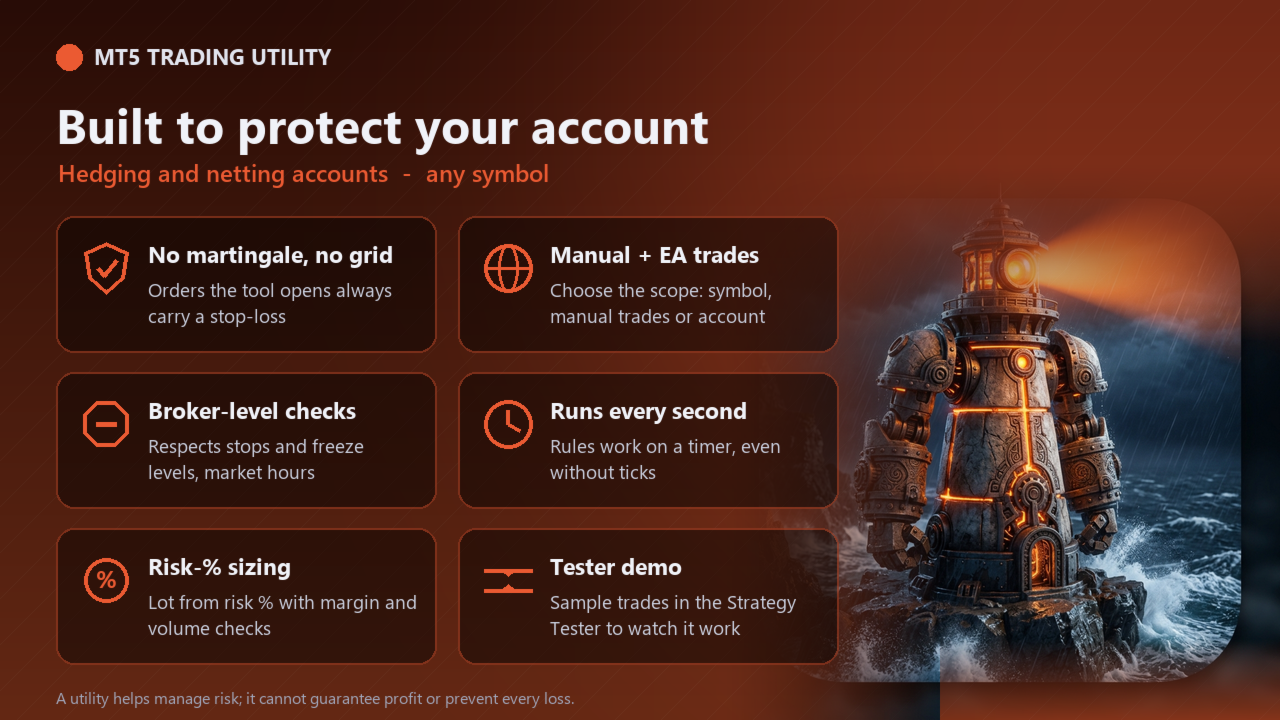
Daily Equity Sentinel is a trading utility for MetaTrader 5 - daily and weekly loss limits for the whole account. Sets a hard floor under your day - and keeps you out once it is hit. It works on any symbol (designed with XAUUSD / gold in mind) and on hedging and netting accounts.

What it does

  • Daily loss limit - in % of the day-start equity and/or in money. When equity falls to the limit, every position in scope is closed.
  • Lock until tomorrow - while locked, any new position (manual or from another EA) in scope is closed straight away, so revenge trading is not possible.
  • Weekly loss limit and an optional daily profit lock (close everything and stop once the day's gain reaches your target).
  • Panel - day-start equity, today's and this week's P/L, how much of the limit is used, status; CLOSE ALL and PAUSE TODAY buttons; alert and push notification when a limit is hit.

Safety (built in)

  • The tool never uses martingale, grid or averaging down. Orders it opens always carry a stop-loss.
  • Lot size from risk % of equity (or a fixed lot), normalised to the broker's min / max / step and reduced if free margin is not enough.
  • Stop-loss and take-profit changes respect the broker's stops and freeze levels; no orders or closes are sent while the market is closed.
  • Every action is printed to the Experts log so you can see what the tool did and why.

Strategy Tester demo

MetaTrader 5 does not send button clicks in the Strategy Tester, so the free demo runs an automatic demonstration: it opens sample trades every few bars and the tool manages them exactly as it would live. Run it in visual mode to watch the panel. Switch the demo off with the "Strategy Tester: run the automatic demo" input. The demo never runs on a live or demo account.

Inputs

Input Default
Positions the sentinel closes All positions on the account
Daily loss limit (% of day-start equity, 0 = off) 3.0
Daily loss limit in money (0 = off) 0
Daily profit lock: close all at this gain % (0 = off) 0
Weekly loss limit (% of week-start equity, 0 = off) 6.0
While locked, close any new position in scope true
Alert + push notification when a limit is hit true
Default risk per order (% of equity), used when Fixed lot = 0 1.0
Fixed lot (0 = size from risk %) 0.0
Maximum lot per order (0 = broker maximum) 10.0
Max slippage (points, 2-digit gold scale: 100 = 1.00 USD) 30
Magic number of orders opened by this tool 26102302
Panel X position (pixels) 20
Panel Y position (pixels) 30
Strategy Tester: run the automatic demo (opens sample trades) true
Strategy Tester demo: bars between sample trades 24

How to use

  • Attach the tool to a chart (allow Algo Trading).
  • Set your limits in the inputs; the panel appears in the top-left corner (position adjustable).
  • Use the panel buttons; the guard rules run automatically every second, even without ticks.

Important notes

  • A utility helps you manage risk - it cannot guarantee profit or prevent every loss (gaps and slippage can move price past any level).
  • Test on a demo account first. Times are your broker's server time.
  • Keep the terminal running (a VPS is recommended) for the automatic rules to work.

Recommended products
Smart Risk Manager
Abderrahmane Benali
5 (1)
Smart Risk Manager – Master Your Trades with Precision and Confidence Take complete control of your manual trading with Smart Risk Manager , a professional all-in-one trade and risk management Expert Advisor for MetaTrader 5 . Designed for traders who value speed, precision, and capital protection, it simplifies every step of trade execution while ensuring your risk remains under control. Whether you trade Forex, Gold, Indices, or Cryptocurrencies , Smart Risk Manager helps you execute trades w
TrendLine Pending Order Tool
Marcelo Guimaraes de Lima
This utility opens orders when the candle touches the manually placed trend line, as if it were a more articulated pending order.  It can be used on any asset, when it opens the order it eliminates the line it touched and create Arrow. In this case, it is used for price reversal operations, it opens a sell order when the bullish candle touches the bottom-up line and opens a buy order when the bearish candle touches the top-down line.  You can adjust the stop loss and takeprofit, this utility is
FREE
MT5 To Telegram Signal EA
Olaoluwa Oluwaseun Bamitale
MT5 Trade To Telegram MT5 Trade To Telegram is a professional trade signal bridge for MetaTrader 5. It monitors trades, positions, and pending orders placed on your MT5 account and sends clean, structured signal updates to your Telegram bot, group, channel, or private chat. It is designed for traders, signal providers, educators, account managers, and trading communities who need fast trade communication with flexible TP/SL handling, inverse signal mode, live target monitoring, and a modern on-
Telegram Control Center (TCC) is a utility Expert Advisor for MetaTrader 5 that connects your trading account to Telegram. It does not open or manage trades. It monitors your account, sends real-time alerts, and lets you control positions remotely via Telegram commands. Key Features - Real-time monitoring of balance, equity, margin, and all open positions - Instant Telegram alerts when positions open, close, or are modified - Equity drawdown alerts with a configurable threshold - Built-in Econ
FREE
Advisor for hedging trading or pair trading. A convenient panel allows you to open positions on the necessary trading instruments and lots. Automatically determines the type of trading account - netting or hedging. Advisor can close all its positions upon reaching profit or loss (determined in the settings). A negative value is required to control losses (for example, -100, -500, etc.). If the corresponding fields are 0, the EA will not use this function.   Settings: Close profit (if 0 here
Click Sent Order
Supanat Wiboonpanit
This program is a GUI for issuing orders that can be done more quickly. Faster TP SL setting This program is not an automated trading platform. Trading is risky, please manage your risk. We do not accept any responsibility. It should be tried with Demo before using it with Real. Normally, the setting sets the risk to 1:1 to shift manually or to enter the risk to x:1, where x can be entered and everything can move freely. Thank you to all customers who have purchased our products. We would like t
SmartZone Sentinel
Allan Njuguna Kimani
SmartZone Sentinel — Multi-Symbol Smart Money Concepts EA Trade Smart Money Concepts across multiple symbols at once — with confluence-gated entries, automatic risk management, and real-time Telegram alerts. SmartZone Sentinel scans as many symbols as you choose, in parallel, looking for institutional-style setups: break of structure, liquidity sweeps, fair value gaps, and order block mitigation. It only acts when multiple signals line up — not on a single indicator firing — and once a trade is
Guardian Account Protector — the seatbelt for your trading account Your robots have no brakes. Guardian is the brakes. Guardian does not open trades. It has no grid, no martingale, and no entry logic of any kind. It does one job with complete discipline: it watches your ENTIRE account and enforces the risk limits you set, so that no robot, no strategy, and no bad day can destroy your balance. Think of it like a seatbelt for the driver. A seatbelt does not steer the car and does not make the d
Ronin Shield - Daily Loss Limiter & Account Guard (MT5) When your loss limit is hit, your trading day is over. A utility built to stop the "just one more trade" moment during prop firm challenges. Attach it to just one chart and it protects the whole account: every symbol and every position, including manual trades and other EAs. No need to open a chart for each symbol. No external DLLs. No web requests. ============================== THREE PROTECTION LINES ============================== 1.
Breakeven Trailing SL Manager
Hafiz Muhammad Usama Sadique
Breakeven Trailing SL Manager; This utility Manager is a simple utility that protects your manual trades automatically. Attach it to any chart and it watches all manual positions on your account, on every symbol. It does not open trades and it ignores trades opened by other Expert Advisors. How it works When a trade moves in profit by the Breakeven Price, the Stop Loss is moved to the exact entry price. When the price moves the same distance again, the Stop Loss is moved to entry plus that dist
FREE
EAs Manager
Abdeljalil El Kedmiri
5 (2)
Are you running multiple EAs on the same MT5 account and losing sleep over stacked risk? EAs Manager Pro is the central risk-control layer for your entire MT5 account. Attach it to one chart, and it automatically detects every EA you're running by  Magic Number — no source code changes, no per-EA setup. It then monitors every  position, automated or manual, and enforces the risk rules you set across your whole account, not just one strategy at a time. Built for traders running scalpers, breakout
Algo Trading Indicaor MT5 The ATC ALGO indicator has been developed to work on the MetaTrader 5 platform. It has the same specifications and zones as the MetaTrader 4 version. There may be slight lag, which we believe is due to differences in MetaTrader 5 programming. We will work on improving it, God willing. MT5 Version                    https://www.mql5.com/en/market/product/170028 MT4 Version                    https://www.mql5.com/en/market/product/88034 With this indicator , you’ll have
Trend Pyramid v5.00 | Gold XAUUSD Floating‑Profit Pyramid EA   This floating‑profit pyramid gold EA only adds positions after existing orders generate floating profit, avoiding blind position‑adding under loss conditions. It adopts EMA20 plus ADX24 dual‑indicator filter to filter false oscillation signals and reduce invalid order openings. Multiple hard risk controls are built‑in to protect your account.   Core advantages   1. Add positions only on floating profit, no position‑adding at loss: a
Deriv Trade Manager MT5
Emilio Jose Quintero Ramos
It has never been so easy to manage the risk of your account until now, this tool will allow you to have full control of your capital and manage your entries in the synthetic index derivative markets, in an easy, practical and safe way. The available input and configuration parameters are as follows :  RISK MANAGEMENT 1. Value of your account:   Here as its name says you will place the value corresponding to the size of your account, for example if your account is 150 dollars the corresponding
# Higher-Lower Pending Bot - Advanced Multi-Pending Orders System ## Revolutionize Your Trading with Smart Pending Order Automation Welcome to the **Higher-Lower Pending Bot** - the most sophisticated pending order management system available on MQL5. Designed for traders who want to maximize opportunities while minimizing manual effort, this EA combines intelligent order placement with comprehensive profit tracking in one powerful package. ## What Makes Our Bot Unique? ### Smart D
Multiple Positions
Emanuel Reynard Phillips
Need to open multiple positions/trades all at once?  We've created your easy solution. You can now enter multiple positions at one time. You can set you Lot size, Number of positions, Take profit, and stop loss. For example: You want to buy 3, 5, 10 or any number of positions with a certain lot size. You can now do so by simply tapping the "Buy" button.  Or  For Example: You want to sell 3, 5, 10 or any number of positions with a certain lot size. You can do so by simply clicking the "Sell" bu
Smart Sync SL and TP
Syamsurizal Dimjati
Smart Sync SL/TP Panel: The Ultimate Trade Management Dashboard For high-frequency manual traders and systematic grid operators, managing risk across multiple positions on a single asset can be a logistical nightmare. The Smart Sync SL/TP Panel is an advanced MQL5 utility engineered to eliminate the friction of mass order modification, giving you total control over your risk parameters in a fraction of a second. If you execute entries like a machine gun, this tool helps you place precise and uni
Magic Alert
Siyabonga Sandile Khanyile
Missing entry opportunities,profitable exits or the chance to make profitable set ups on the chart can be very frustrating for a trader.This tool will help you by giving you alerts if your criteria or conditions have been fully met.It will send you alerts based on conditions you have set and send them through email and mql5 notifications (laptop and mobile devices). 1.Creating Alerts In order to create an alert you must first give the alert its name and how frequent it send you those alerts if c
Just $10 for six months!!!. This will draw Order Blocks just by clicking on a candle with different colors for different time frames. It will use the body or the wicks. It can also draw the mean threshold of the candle open/close or high/low. As a drawing tool, it is not active all the time after adding it to the chart. Activate by pressing 'b' twice on the keyboard within a second. If activated but then decided not to draw, deactivate by pressing 'b' once.  Box color depends if candle is abo
Signals for Telegram
Elidio Xavier Guimaraes
It is a utility that posts customized messages on Telegram based on account trading activity. Once the utility is on the chart, with each new position opened from the same chart symbol the utility is added, a customized message will be sent to the Telegram group defined in the input parameters. The utility will post to the Telegram group if a new position is opened and if it is the same symbol as the chart the utility is running on. If you are using an Expert Advisor for Buy and Sell and want to
News Dashboard Pro
Beatrice Bernard Mgaya
2 (1)
Certainly! Let me provide descriptions for the News Filter tools available on both MetaTrader 4 (MT4) and MetaTrader 5 (MT5) platforms: News Filter for MT4 : Description : The News Filter for MT4 is an expert advisor (EA) template that allows traders to manage their positions during news events. It downloads news data from investing.com without using any external DLLs (Dynamic Link Libraries). Traders can customize their actions based on news releases. Features : Automatic News Detection : The
EquityFence MT5
Natthawut Phumsri
EquityFence MT5 — Plan and manage trades with clear risk information EquityFence MT5 is a manual trade-planning and position-management utility for MetaTrader 5. It helps you review position size, estimated stop-loss and take-profit outcomes, and account-wide exposure before you confirm an order. It does not provide trading signals or open trades automatically. PLAN BEFORE YOU SEND Choose BUY or SELL, select a Market or broker-supported Pending order, set risk as a percentage or account-curren
Hello, I would like to give an example of this EA. From the picture you can see that the EA can spin around 3,500 lots, when taking into account the rebate, you will get about 35,000$ and a little bit of profit during execution. The EA has actually been run as shown in the picture. **You can optimize to get the best value before actually running it.  Thankyou   Excuseme .I'm sorry that I'm not good at English. Therefore, communication may be somewhat wrong. Facebook page :  facebook.com/ Gold
ZenTrade Manager MT5
Ian Paolo Lumba Castro
ZenTrade Manager MT5 Stop Computing. Start Trading. Are you tired of missing perfect entries because you were busy calculating pip distances, lot sizes, or monetary risk? Do you overthink your Stop Loss and Take Profit levels, only to watch the market reverse while you're adjusting lines? ZenTrade Manager MT5 removes the mental load of order management, allowing you to focus 100% on what matters: Reading the Market. You handle the high-level analysis and decide when to enter; ZenTrade handles t
PrecisionEntry EA is a semi-automatic Expert Advisor for MetaTrader 5 that enables precise order placement at the click of a button — without taking control away from the trader. With a single click on the LONG or SHORT button, the EA automatically places a BuyStop or SellStop order at the high or low of the previous candle. Stop-loss, take-profit, and lot size are calculated fully automatically — based on the configured risk percentage and the desired risk-reward ratio. Features: Interactive on
Trade Dashboard MT5
Fatemeh Ameri
4.94 (135)
Trade Dashboard simplifies how you open, manage, and control your trades, with built-in lot size calculation. It allows you to execute trades, manage risk, and control positions directly on the chart, with tools such as partial close, breakeven, and trailing stop. Designed to reduce manual work and help you stay focused on your trading decisions. A demo version is available for testing. Detailed explanations of features are provided within the MQL5 platform. Installation instructions are include
Grid Trading EA is a semi-automated one-click trading EA for both Normal Trading and Grid/Martingale Trading . Normal Trading Simply click Buy or Sell directly from the chart. The EA will automatically manage trades by: Setting Stop Loss and Take Profit Managing Trailing Stop Grid / Martingale Trading (For Hedging Account Type Only) When Grid Trading mode is enabled, the EA will automatically open additional grid orders at specified distances while increasing the lot size based on your settings.
Rubberband
Pablo Maruk Jaguanharo Carvalho Pinheiro
This expert advisor works on price volatility, it scans the market every single tick trying to find great opportunities for day trading. it has alarms, analisys and much more to provide great trades for you, give it a try. It is a cross-over alarm which bips when standard deviation goes from low to very high so that you can surf the movement. It is all about volatility and high flow.
This EA has been developed, tested and traded live on NASDAQ M15 TF. Everything is ready for immediate use on real account. Very SIMPLE STRATEGY with only FEW PARAMETERS.  Strategy is based on  EXPANSION ON THE DAILY CHART .   It enters if volatility raise after some time of consolidation .  It uses  STOP   pending orders with  ATR STOP LOSS.   To catch the profits is a  TRAILING PROFIT  function in the strategy.  EA has been backtested on more than 10-year long tick data with 99% quality of mo
You place the stop; the panel works out the size. Risk Lock Trade Panel is a manual trading panel for MetaTrader 5 that sizes every order from the risk you set, sends it with the stop already attached, and manages the position from the same window. It does not open trades on its own, does not give advice, and does not send signals. Enter your risk as a percent of balance or equity, or as a fixed amount, and set the stop distance in points - or press Show line and drag the stop line on the chart
Buyers of this product also purchase
Trade Assistant MT5
Evgeniy Kravchenko
4.43 (216)
It helps to calculate the risk per trade, the easy installation of a new order, order management with partial closing functions, trailing stop of 7 types and other useful functions. Additional materials and instructions Installation instructions - Application instructions Line function -   shows on the chart the Opening line, Stop Loss, Take Profit. With this function it is easy to set a new order and see its additional characteristics before opening.   Risk management  - The risk calculation
Forex Trade Manager MT5
InvestSoft
4.98 (688)
Trade Manager MT5 is an advanced position size calculator and trade management tool for MetaTrader 5, designed to help traders plan trades faster, control risk more precisely, and manage open positions directly from the chart. It combines order placement, risk based lot calculation, Stop Loss and Take Profit management, Break Even, Trailing Stop, Partial Close, Equity Protection, and external trade management in one panel. Whether you trade forex, indices, metals, commodities, crypto, or future
Local Trade Copier EA MT5
Juvenille Emperor Limited
4.94 (149)
Local Trade Copier EA MT5 is a fast and flexible trade copier for copying and managing trades between multiple MetaTrader 5 accounts on the same Windows computer or Windows VPS. It combines local trade synchronization with Receiver-side controls for lot sizing, risk management, trade filtering, symbol mapping, trade management and account protection. Set up your Transmitter and Receiver terminals in about 1 minute and copy manual or EA trades between accounts at the same or different brokers. U
Telegram to MT5 MultiChannel Copier
Sergio Marquez Uroz
4.67 (21)
Telegram to MT5 Multi-Channel Copier   automatically copies trading signals from your Telegram and Discord channels straight to MetaTrader 5. No bots, no browser extensions, no manual copying. A signal arrives in Telegram or Discord and the EA opens the trade in your terminal within seconds. And before you copy a channel, the built-in backtester shows you what that channel would have done in your account. The product has two components: a Windows application that listens to your Telegram channel
FarmedHedge Pair Trading Dashboard
Tanapisit Tepawarapruek
5 (6)
Farmed Hedge Yield Farming | All Markets (Manual - Hybrid - Semi/Automated EA) VERIFIED TRADING RESULTS - Farmed Hedge Yield Axi Copy:  https://www.mql5.com/en/signals/2356376 - Farmed Hedge Yield Exn Copy:   https://www.mql5.com/en/signals/2356404 - Farmed Hedge Yield V Copy:  https://www.mql5.com/en/signals/2357156 IMPORTANT NOTICE: FarmedHedge is a MANUAL-FOCUSED TRADING UTILITY ,not a fully automated EA. Results shown on this Signal include manual trades and overall strategic management.
Copy Telegram signals with your own trading rules Telegram to MT5 Signal Trader automatically copies text-based trading signals from public and private Telegram channels and groups into MetaTrader 5. Manage multiple providers and MT5 accounts from one desktop app, with individual risk and trade settings for each provider . No Telegram bot or API setup needed for copying. Simply sign in with your own Telegram account by phone or QR code and select the channels or groups you have already joined. Y
TradePanel MT5
Alfiya Fazylova
4.88 (170)
Trade Panel is a multi-functional trading assistant. The app contains over 50 trading functions for manual trading and allows you to automate most trading tasks. Application instructions: https://www.mql5.com/en/blogs/post/756482 Trial version of the application for a demo account: https://www.mql5.com/en/blogs/post/750865 How to install the application: https://www.mql5.com/en/blogs/post/756239 How to test the application in visual mode: https://www.mql5.com/en/blogs/post/770277 How to install
================================================================================ POC BREAKOUT - V20.72. Full Professional Grade Toolkit ================================================================================ POC Breakout is a full MetaTrader 5 trading dashboard for discretionary traders who want breakout signals, Point of Control (POC) context, volume profiles, order flow, market structure, news, alerts, and advanced trade planning in one professional workspace. Attached directly to you
News Trade EA MT5
Konstantin Kulikov
4.55 (11)
Present to you the useful robot that I have been using for several years. It can be used in both semi-automatic mode and fully automatic mode. >>> Chat <<< The program contains flexible settings for trading on the news of the economic calendar. It cannot be checked in the strategy tester. Only real work. In the terminal settings, you need to add the news site to the list of allowed URLs. Click Tools > Options > Expert Advisors. Check the option "Allow WebRequests for listed URL:". Add this (de

Master Your Trading Discipline   Stop losing your hard-earned gains to overtrading and emotional decisions. The Discipline Tool is your ultimate trading assistant, ensuring strict risk management in real-time. Key Protection Features: Advanced Drawdown Defense : Automatically halts trading if your daily drawdown exceeds a preset threshold (percentage or dollar amount). Real-Time Equity Lock : Safeguard profits by referencing peak equity, ensuring drawdown stays within control. Hard Profit Target
Entry In The Zone with SMC Multi Timeframe is a real-time market analysis tool based on Smart Money Concepts (SMC), designed to analyze market structure, price direction, and key trading zones. It supports both Single-Timeframe and Multi-Timeframe Analysis, providing a clearer view of overall market structure across multiple timeframes, with real-time BUY / SELL signals designed with a strict focus on No-Repaint principles.   The signals are designed to help filter unclear setups and evaluate tr
The product will copy all telegram signal to MT5 ( which you are member) , also it can work as remote copier.  Easy to set up, copy order instant, can work with almost signal formats, image signal,  s upport to translate other language to English Work with all type of channel or group, even channel have "Restrict Saving Content", work with  multi channel, multi MT5 Work as remote copier: with signal have ticket number, it will copy exactly via ticket number. Support to backtest signal. How to s
Exp COPYLOT CLIENT for MT5
Vladislav Andruschenko
3.97 (35)
Professional Trade Copier for MetaTrader 5 Fast, professional, and reliable trade copier for MetaTrader . COPYLOT allows you to copy Forex trades between MT4 and MT5 terminals with support for Hedge and Netting accounts. COPYLOT MT5 version supports: - MT5 Hedge to MT5 Hedge - MT5 Hedge to MT5 Netting - MT5 Netting to MT5 Hedge - MT5 Netting to MT5 Netting - MT4 to MT5 Hedge - MT4 to MT5 Netting MT4 version Full Description +DEMO +PDF How To Buy How To Install How to get Log Files H
EasyInsight AIO MT5
Alain Verleyen
4.92 (12)
EASY Insight AIO – All-In-One Power for AI-Driven Trading Want to skip the setup and start scanning the entire market – Forex, Gold, Crypto, Indices, and even Stocks – in seconds? EASY Insight AIO is the complete plug-and-play solution for AI-powered trade analysis. It includes all core Stein Investments indicators built-in and automatically exports clean, structured CSV files – perfect for backtesting, AI prompts, and live market decision-making. No need to install or configure indicators manu
Copy Cat More Trade Copier MT5 is a local trade copier and a complete risk management and execution framework designed for today’s trading challenges. From prop firm challenges to personal portfolio management, it adapts to every situation with a blend of robust execution, capital protection, flexible configuration, and advanced trade handling. The copier works in both Master (sender) and Slave (receiver) modes, with real-time synchronization of market and pending orders, trade modifications, pa
MT5 to Telegram Signal Provider turns your trading account into a signal provider. Every trade action, whether manual, by EA or from your phone, is instantly sent as a message to Telegram. You can fully customize the format or use a ready-made template for quick setup. [ Demo ] [ Manual ] [ MT4 Version ] [ Discord Version ]     New: [ Telegram To MT5 ] Setup A step by step user guide is available. Key Features Ability to customize order details sent to subscribers You can create a tiered subs
Signal Trading View to MT5 Pro
Mirel Daniel Gheonu
4.5 (2)
Signal TradingView to MT5 Pro  Instant professional execution between TradingView and MetaTrader 5 Automate your trading strategy with the most robust communication bridge between TradingView alerts and real execution in MT5. Designed for traders who demand speed, flexibility, and impeccable risk management, this Expert Advisor transforms any alert message into a precise market or limit order.   Install and TEST the TRIAL version HERE STRENGTHS AND ADVANTAGES Universal Parsing Engine (Propriet
Power Candles Strategy Scanner - Self-Optimizing Multi-Symbol Setup Finder Self-optimizing settings work one chart at a time, and finding where they pay off right now means opening chart after chart. Power Candles Strategy Scanner runs the same self-optimizing engine as the Power Candles indicator on every symbol in your Market Watch, side by side. One panel ranks where it pays off: the winning strategy per symbol, its optimized Stop Loss and Take Profit. An alert fires the moment a fresh signal
The Patch
Mian Rameez Ali
The Patch It never opens a trade. It walks behind the ones that did. Every open position, every pending order — checked twice a second for the one thing that's easy to forget: a stop, a target. Found bare, it doesn't ask. It writes the missing number in, measured in points from wherever the position began, and moves on to the next. No strategy, no opinion on direction. Just the quiet assumption that nothing should ever sit on the market unprotected — not because someone decided it shouldn't,
VirtualTradePad One Click Trading Panel
Vladislav Andruschenko
4.59 (74)
Trading Panel for MetaTrader 5 — professional one-click trading from chart and keyboard A powerful trading panel for active manual trading, designed to open, manage, and close trades far faster and more efficiently than the standard MetaTrader interface. This panel is built for traders who want full control over positions, pending orders, profit management, and trading execution inside one professional workspace. This is not just another utility. It is a complete trading cockpit for MetaTrader
Grid Manual MT5
Alfiya Fazylova
4.73 (22)
Grid Manual is a trading panel for working with grid strategies. The utility is universal, has flexible settings and an intuitive interface. It works with a grid of orders not only in the direction of averaging losses, but also in the direction of increasing profits. The trader does not need to create and maintain a grid of orders, the utility will do it. It is enough to open an order and the "Grid manual" will automatically create a grid of orders for it and will accompany it until the close. F
Anchor Trade Manager
Kalinskie Gilliam
5 (9)
Your EAs cannot see each other, but Anchor can. Anchor gives you one place to coordinate your EAs, manage risk, and decide when trading is allowed. It works alongside the trading bots you already use without any changes to them. The Problem One EA opens a trade. Then another starts trading. The next thing you know, you wake up to multiple grids built across your account. Each EA may be doing exactly what it was designed to do, but together they can place far more risk on your account than you in
RETAILBERG FOOTPRINT CHART PRO — Order-Flow Workspace for MetaTrader 5 Version 7.00  |  Professional System  |  31 tools  |  One chart A full 150-page illustrated User Manual is included. Please read the full manual to understand this feature packed footprint chart elements and ui. https://www.mql5.com/en/blogs/post/777982 DEMO / STRATEGY TESTER — PLEASE READ FIRST
The News Filter MT5
Leolouiski Gan
4.79 (24)
This product filters   all expert advisors and manual charts   during news time.  It is able to remove any of your EA during news and automatically reattach them after news ends. This product also comes with a complete  order management system   that can handle your open positions and pending orders before the release of any news. Once you purchase   The News Filter , you will no longer need to rely on built-in news filters for future expert advisors, as this product can filter them all from her
Trade Indicator Assistant   is a powerful MT5 utility designed to turn indicators into automated trading systems. Its main feature is the ability to automatically detect an indicator’s   BUY and SELL signal buffers , without requiring you to know the buffer numbers, search through indicator settings, or modify the indicator source code. Bonus Indicator:   After purchasing Trade Indicator Assistant, contact me to receive   Trade Signal Pro   completely free as a bonus indicator. [Download Demo V
Floor Watch
Syed Tauqeer Hussain Shah
Floor Watch One number, watched every thirty seconds: how far equity has fallen since the day began — or since its highest point, if it's told to trail the peak instead of the open. Cross the line and it doesn't argue. Every open position closes, every pending order vanishes, and anything that slips through afterward gets shut the moment it appears. Not asked. Removed. The floor holds until the clock turns 5 AM Pakistan time — then, and only then, does the day start over. One rule. No except
Seconds Chart MT5
Boris Sedov
4.61 (18)
Seconds Chart is a unique tool for creating second-based charts in MetaTrader 5 . With Seconds Chart , you can construct charts with timeframes set in seconds, providing unparalleled flexibility and precision in analysis that is unavailable with standard minute or hourly charts. For example, the S15 timeframe indicates a chart with candles lasting 15 seconds. You can use any indicators and Expert Advisors that support custom symbols. Working with them is just as convenient as on standard charts.
Buy once. Get all my MT4 and MT5 indicators - available now and released in the future - at no extra cost. Contact me after purchase for instructions to receive them. The price is planned to rise by 50$ after every 10 purchases, up to 999$. The Market price at checkout applies. Keep the indicator you trust. Automate the work around it. Your signal. Your rules. Your execution. Already have an MT5 indicator you rely on, but still need to watch the chart, wait for a signal, calculate the lot, plac
Signals from your Telegram channels, copied to MetaTrader 4 and MetaTrader 5 within seconds. TradingMind Signal Bridge reads the channels and groups you choose, recognises each signal with fast built in rules, hands the messy ones to an AI model, including signals posted as screenshots, and passes the order to an expert advisor on your terminal. A news filter, prop firm account protection and a Telegram bot for remote control keep the decision about what gets traded with you. What this product i
Astro Trade MT5
Indra Maulana
5 (8)
25% discount on the release of the tool: only for the next 3 buyers Send a message to receive a demo version. AstroTrade Trading Assistant AstroTrade is a comprehensive multi-functional trading utility developed for the MetaTrader 5 platform. It integrates essential tools for trade execution, risk management, and technical monitoring into a single unified interface. The application is designed to assist traders in managing their daily operations through a visual and structured environment. Vi
More from author
GoldLab Multi Strategy is an Expert Advisor for XAUUSD (Gold) that runs five independent strategies on five timeframes from a single chart. Each module can be switched on or off, has its own stop-loss and take-profit, and uses its own magic number, so the modules never manage each other's trades. THE FIVE MODULES - M1 Scalper: EMA 8/21 cross confirmed by RSI, only in the direction of the M15 EMA 50 trend. Off by default because it is sensitive to spread. - M5 Pullback: price dips to EMA 20 and
GoldLab Trend Pullback is an Expert Advisor for XAUUSD (Gold) that trades with the trend and waits for a pullback before entering. Every trade has a stop-loss, and the position size is calculated from your account balance. HOW IT TRADES - Trend filter: only trades in the direction of the H4 EMA 50 trend. - Market regime: uses ADX and DI on H1 to separate trending from ranging conditions. In a trend it looks for pullback entries; in between it waits. - Entry: on the M15 chart, price must pull ba
GoldWick Candle Rejection is an Expert Advisor for XAUUSD (Gold) that makes every decision on closed candles only. It looks for rejection wicks in the direction of the trend and for two closed candles of the same colour. Every trade has a stop-loss and a take-profit. HOW IT TRADES - Signal 1, rejection wick: when the last closed M15 candle has a long lower wick (default at least 3.00 USD on gold), it opens a buy; a long upper wick opens a sell. By default the wick must point in the direction o
Asian-range breakout EA for the London open. One trade per side per day, stop at the other side of the range, R-multiple target, session-end exit. GoldLab London Breakout is a fully automated Expert Advisor for MetaTrader 5. It is designed for XAUUSD (gold) and also runs on other symbols such as EURUSD. How it trades Builds the Asian range - the highest high and lowest low between the Range start hour and Range end hour (server time, default 00:00-07:00), measured on M15 bars. Filters the range
New York opening-range breakout EA: closed-bar breakout or retest entry, tick-volume and ATR filters, stop at the range, time exit. Built for gold. GoldLab NY Opening Range is a fully automated Expert Advisor for MetaTrader 5. It is designed for XAUUSD (gold) and also runs on other symbols such as EURUSD. How it trades Opening range - the high and low of the first N minutes (default 30) of the New York session, starting at the NY session start time you set in server time (default 13:30 - set 16:
RSI divergence EA: regular bullish/bearish divergence on closed bars, confirmation candle, stop beyond the swing, R or opposite-swing target. GoldLab RSI Divergence is a fully automated Expert Advisor for MetaTrader 5. It is designed for XAUUSD (gold) and also runs on other symbols such as EURUSD. How it trades Swing detection - swing lows and highs are found on closed bars with a configurable strength (default 3 bars on each side). Nothing repaints: a swing only counts once the bars after it ha
Volatility-squeeze breakout EA: Bollinger width / Keltner squeeze, expansion breakout with the EMA trend, stop trailed on the middle band. GoldLab Bollinger Squeeze is a fully automated Expert Advisor for MetaTrader 5. It is designed for XAUUSD (gold) and also runs on other symbols such as EURUSD. How it trades Squeeze detection - volatility is considered compressed when the Bollinger Band width is near its lowest of the last N bars, and/or when the Bollinger Bands sit inside a Keltner Channel (
Supertrend trend-following EA: closed-bar flip with higher-timeframe agreement, partial close at 1R, stop trailed on the Supertrend line. GoldLab Supertrend Rider is a fully automated Expert Advisor for MetaTrader 5. It is designed for XAUUSD (gold) and also runs on other symbols such as EURUSD. How it trades Supertrend calculated in code - the classic ATR-based Supertrend (default ATR 10, multiplier 3) is computed inside the EA on closed bars; no external indicator files are needed. Entry on a
Ichimoku trend EA for XAUUSD: Tenkan/Kijun cross confirmed by the cloud and Chikou, stop beyond Kijun, Kijun trailing stop, risk-% sizing. GoldLab Ichimoku Cloud is an Expert Advisor that trades the classic Ichimoku Kinko Hyo trend method. It was designed for XAUUSD (Gold) and also runs on forex pairs and other CFDs. Every trade has a stop-loss. How it trades Trigger: a Tenkan-sen / Kijun-sen cross within the last few closed bars (default 3). Cloud filter: buys only when price closes above the K
Turtle-style Donchian breakout EA for XAUUSD: System 1 (20/10) or System 2 (55/20), ATR (N) stops and sizing, optional pyramiding, channel exits. GoldLab Turtle Channel is an Expert Advisor based on the well-known Turtle trading rules: buy new highs, sell new lows, size positions by volatility and let winners run. It was designed for XAUUSD (Gold) and also runs on forex pairs, indices and other CFDs. Every trade has a stop-loss. How it trades Entry: a closed bar beyond the Donchian channel - Sys
GoldLab MACD Ribbon
Worapong Longwong
Trend pullback EA for XAUUSD: 8/13/21/34/55 EMA ribbon alignment + MACD histogram turn after a pullback. Exits when the ribbon disorders. GoldLab MACD Ribbon is an Expert Advisor that combines an EMA ribbon with the MACD histogram to join established trends after a pullback. It was designed for XAUUSD (Gold) and also runs on forex pairs and other CFDs. Every trade has a stop-loss. How it trades Trend: the EMA ribbon (8, 13, 21, 34, 55) must be fully aligned - every faster EMA above the slower on
Range mean-reversion EA for XAUUSD: fades outer Keltner touches when ADX is low, RSI is stretched and the bar rejects. Targets the middle EMA. GoldLab Keltner Reversion is a mean-reversion Expert Advisor for ranging markets. It was designed for XAUUSD (Gold) and also runs on forex pairs and other CFDs. It deliberately stays out of strong trends. Every trade has a stop-loss. How it trades Regime filter: new trades only while ADX is below the threshold (default 25) - the market is ranging. Setup:
Fibonacci pullback EA for XAUUSD: finds the last impulse swing, enters the 50-61.8% zone on a confirmation candle, stop past 78.6%, target 127.2%. GoldLab Fibo Pullback is an Expert Advisor that trades Fibonacci retracements of the most recent impulse move. It was designed for XAUUSD (Gold) and also runs on forex pairs and other CFDs. All swing detection is done inside the EA - no external indicators are needed. Every trade has a stop-loss. How it trades Swing detection: swing highs and lows are
Stoch Hook Pilot
Worapong Longwong
Trend pullback EA: trades Stochastic hooks out of oversold / overbought only in the direction of a rising / falling trend EMA. Stoch Hook Pilot is a fully automated Expert Advisor for MetaTrader 5 - trend-following Stochastic hook entries. Buys oversold dips in an uptrend, sells overbought rallies in a downtrend. It is designed for XAUUSD (gold) and also runs on forex majors such as EURUSD and GBPUSD. How it trades Trend filter - longs only when the last close is above a rising trend EMA (defaul
SAR Falcon
Worapong Longwong
Trend EA: enters on Parabolic SAR flips only when ADX shows a real trend and the DI lines and trend EMA agree. SAR Falcon is a fully automated Expert Advisor for MetaTrader 5 - Parabolic SAR flips confirmed by ADX. Catches fresh trends when the Parabolic SAR flips with ADX strength. It is designed for XAUUSD (gold) and also runs on forex majors such as EURUSD and GBPUSD. How it trades SAR flip - the Parabolic SAR dot moves from above the candles to below them (buy) or from below to above (sell)
Heikin Titan
Worapong Longwong
Trend EA built on Heikin Ashi candles: enters on a strong colour flip (no opposite wick) in the direction of the EMA trend. Heikin Titan is a fully automated Expert Advisor for MetaTrader 5 - Heikin Ashi colour-flip trend entries. Smooths the noise with Heikin Ashi and rides clean trend legs. It is designed for XAUUSD (gold) and also runs on forex majors such as EURUSD and GBPUSD. How it trades Heikin Ashi candles are calculated inside the EA from normal price data (no extra indicator needed). C
Inside Bar Hunter
Worapong Longwong
Price-action EA: trades the breakout of an inside-bar (mother bar) pattern in the direction of the trend EMA. Inside Bar Hunter is a fully automated Expert Advisor for MetaTrader 5 - inside-bar breakout with trend filter. Compression, then release - trades the break of the mother bar. It is designed for XAUUSD (gold) and also runs on forex majors such as EURUSD and GBPUSD. How it trades Pattern - a mother bar followed by an inside bar (lower high and higher low). The mother bar range must be bet
Intraday mean-reversion EA: fades stretches beyond the daily VWAP standard-deviation bands back to the VWAP line. VWAP Magnet is a fully automated Expert Advisor for MetaTrader 5 - intraday VWAP band mean reversion. Price stretched far from VWAP tends to snap back - this EA trades the snap. It is designed for XAUUSD (gold) and also runs on forex majors such as EURUSD and GBPUSD. How it trades Daily VWAP - volume-weighted average price is rebuilt from the first bar of each server day, with standa
Pivot Sentinel
Worapong Longwong
Level-trading EA: buys rejections of the daily S1 pivot support and sells rejections of the R1 resistance, targeting the central pivot. Pivot Sentinel is a fully automated Expert Advisor for MetaTrader 5 - daily pivot S1 / R1 bounce trading. Classic floor-trader pivots, traded automatically. It is designed for XAUUSD (gold) and also runs on forex majors such as EURUSD and GBPUSD. How it trades Pivots - the central pivot P, support S1 and resistance R1 are calculated each day from the previous da
CCI Comet
Worapong Longwong
Trend pullback EA: enters when the CCI climbs back out of its oversold zone in an uptrend (or drops out of overbought in a downtrend). CCI Comet is a fully automated Expert Advisor for MetaTrader 5 - CCI pullback re-entry in the trend. Uses the CCI to time pullbacks inside a trend. It is designed for XAUUSD (gold) and also runs on forex majors such as EURUSD and GBPUSD. How it trades Trend - buys only when price is above a rising trend EMA (default 100), sells only below a falling one. Pullback
Engulf Striker
Worapong Longwong
Price-action EA: trades bullish / bearish engulfing candles that form at the trend EMA during a pullback in an established trend. Engulf Striker is a fully automated Expert Advisor for MetaTrader 5 - engulfing candles at the trend EMA. Engulfing candles where they matter - at the trend line. It is designed for XAUUSD (gold) and also runs on forex majors such as EURUSD and GBPUSD. How it trades Trend - fast EMA (default 50) above the slow EMA (default 200) for buys, below for sells. Location - th
Triple EMA Arrow
Worapong Longwong
Trend EA: fast / medium EMA crossover taken only when both sit on the right side of a rising or falling slow EMA. Triple EMA Arrow is a fully automated Expert Advisor for MetaTrader 5 - three-EMA crossover trend system. Three EMAs lined up like an arrow - the trend is your entry. It is designed for XAUUSD (gold) and also runs on forex majors such as EURUSD and GBPUSD. How it trades Three EMAs - fast (default 8), medium (default 21) and slow (default 55). Entry - the fast EMA crosses the medium E
Bill Williams trend EA: trades breakouts of the latest fractal when the Alligator is awake (lips, teeth and jaw fanned out in order). Alligator Fractal Rover is a fully automated Expert Advisor for MetaTrader 5 - Bill Williams Alligator + fractal breakouts. Wakes up with the Alligator and hunts fractal breakouts. It is designed for XAUUSD (gold) and also runs on forex majors such as EURUSD and GBPUSD. How it trades Alligator awake - lips above teeth above jaw for buys (the opposite order for sel
Aroon Voyager
Worapong Longwong
Trend EA: enters when Aroon Up crosses Aroon Down (or the reverse) with the leading line above a strength level, optionally filtered by a trend EMA. Aroon Voyager is a fully automated Expert Advisor for MetaTrader 5 - Aroon crossover trend entries. Measures how recently price made new highs or lows - and follows the side that is winning. It is designed for XAUUSD (gold) and also runs on forex majors such as EURUSD and GBPUSD. How it trades Aroon (default 25 bars) is calculated inside the EA: Aro
DI Crossfire
Worapong Longwong
Trend EA: trades +DI / -DI crossovers of the Directional Movement System only while ADX is above a minimum and rising. DI Crossfire is a fully automated Expert Advisor for MetaTrader 5 - +DI / -DI crossovers with rising ADX. Wilder's Directional Movement System, traded with discipline. It is designed for XAUUSD (gold) and also runs on forex majors such as EURUSD and GBPUSD. How it trades DI cross - +DI crosses above -DI on the last closed bar for buys, -DI crosses above +DI for sells. Trend stre
Hull Glider
Worapong Longwong
Trend EA: enters when the Hull Moving Average turns up or down, in the direction of a slower trend EMA. Hull Glider is a fully automated Expert Advisor for MetaTrader 5 - Hull Moving Average turns with a trend filter. A fast, smooth Hull Moving Average that turns with the market. It is designed for XAUUSD (gold) and also runs on forex majors such as EURUSD and GBPUSD. How it trades Hull Moving Average (default 30) is calculated inside the EA from WMA(2 x WMA(n/2) - WMA(n), sqrt n) - fast but smo
Force Pulse
Worapong Longwong
Trend pullback EA based on Dr. Elder's method: buys when the short Force Index turns back above zero in an uptrend, sells when it turns below zero in a downtrend. Force Pulse is a fully automated Expert Advisor for MetaTrader 5 - Elder Force Index pullbacks in a trend. Uses the Force Index to catch the end of a pullback. It is designed for XAUUSD (gold) and also runs on forex majors such as EURUSD and GBPUSD. How it trades Trend - the trend EMA (default 50) must be rising for buys (falling for s
RSI2 Snapback
Worapong Longwong
Short-term mean-reversion EA: buys deep RSI(2) pullbacks while price is above the 200 SMA and sells RSI(2) spikes below it, exiting on the snap back. RSI2 Snapback is a fully automated Expert Advisor for MetaTrader 5 - short-term RSI(2) pullbacks above the 200 SMA. Buys short, sharp dips in a long-term uptrend - and gets out on the bounce. It is designed for XAUUSD (gold) and also runs on forex majors such as EURUSD and GBPUSD. How it trades Long-term filter - buys only when the last close is ab
Zscore Return
Worapong Longwong
Statistical mean-reversion EA: fades closes that sit more than a set number of standard deviations from the moving average, targeting the average. Zscore Return is a fully automated Expert Advisor for MetaTrader 5 - statistical z-score mean reversion. Measures how far price has stretched in standard deviations - and trades the return. It is designed for XAUUSD (gold) and also runs on forex majors such as EURUSD and GBPUSD. How it trades Z-score = (close - SMA) / standard deviation over the same
Pinbar Ranger
Worapong Longwong
Price-action EA: trades pin bars (long-nosed rejection candles) that form at a fresh N-bar high or low. Pinbar Ranger is a fully automated Expert Advisor for MetaTrader 5 - pin bar rejections at fresh highs and lows. A long wick at a fresh extreme shows rejection - this EA trades it. It is designed for XAUUSD (gold) and also runs on forex majors such as EURUSD and GBPUSD. How it trades Location - the candle must make the lowest low (for buys) or highest high (for sells) of the last N bars (defau
Filter:
No reviews
Reply to review