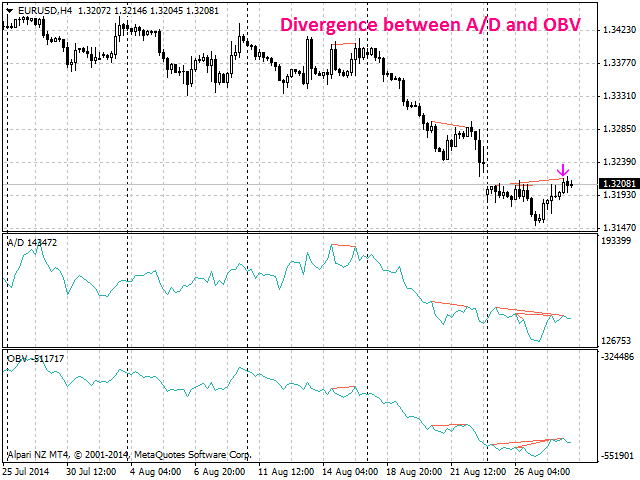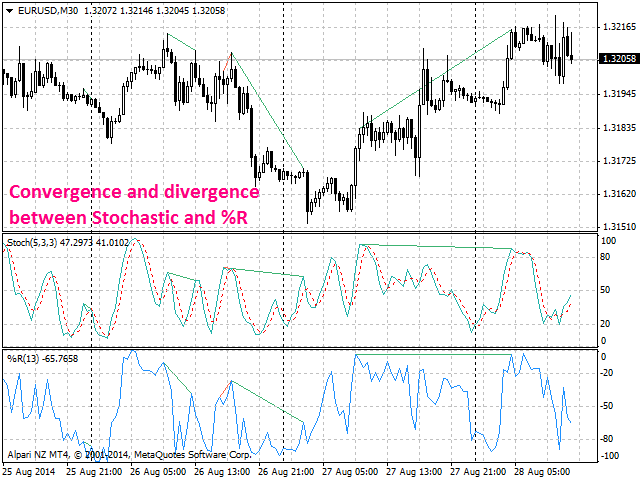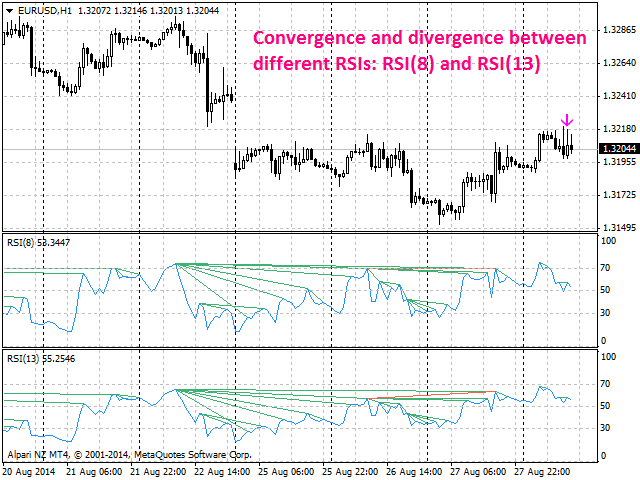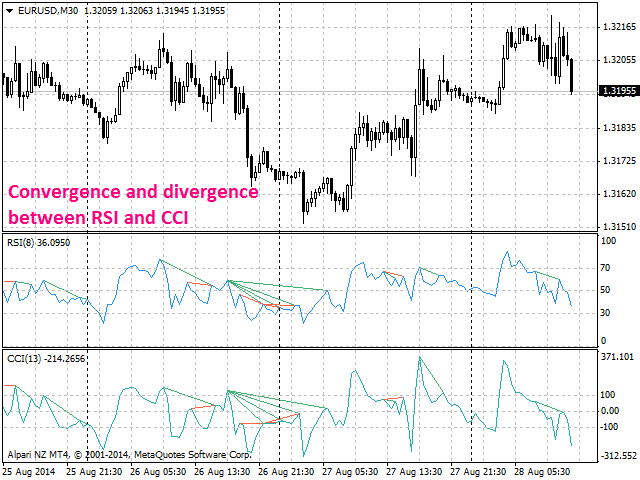
Bearish CD HTB Osc

Information is a subject of the market mood. Information is objective when it comes from different sources. If information is identical then we may speak about its convergence. Otherwise, we may speak about its conflict (divergence). Indicators and oscillators are the sources of information of the technical analysis.

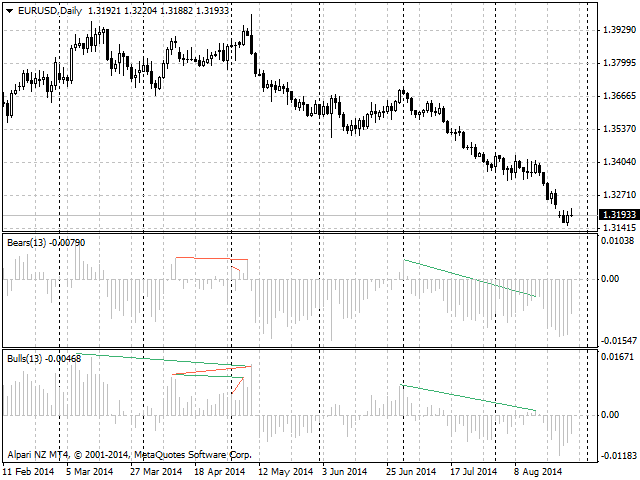
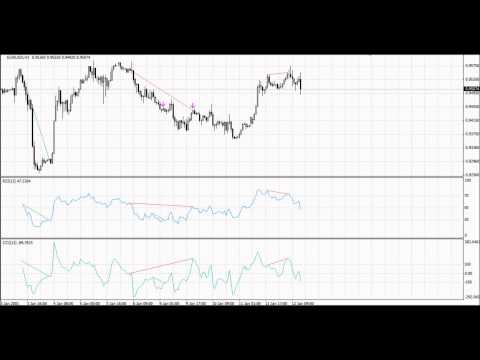
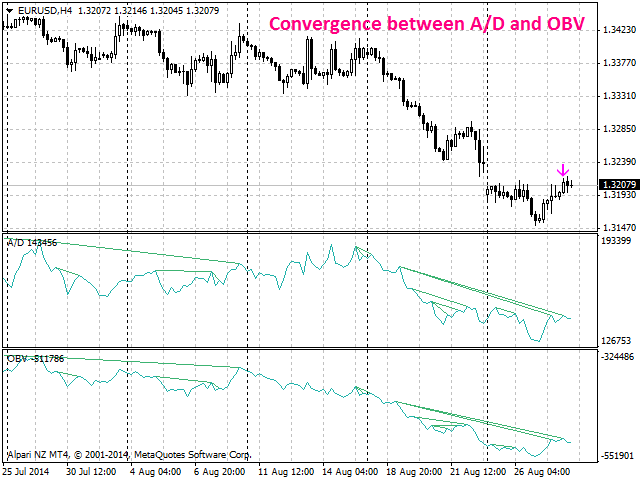
Bearish CD HTB Osc (Bears Convergence/Divergence High Top Bottom Oscillator) is a universal analytical bears convergence/divergence indicator between any of the twenty three standard indicators included in МT4 package. The indicator is the first out of the two possible versions (HBT and HTB) of the bearish convergence/divergence origins.

Due to its multiple use feature, the indicator allows you to find convergences/divergences between various standard indicators simultaneously.

Users can select the sell graphical symbol and its width, as well as the color of convergence/divergence lines.

The indicator is not a lagging one. It works by ticks and is able to show convergence/divergence in the symbol's window even if there is no a separate window with a conventional indicator used for search. This allows you to open additional windows with any other indicators for a joint analysis.

As an option, the indicator can notify of a new signal using the graphical sell symbol instead of convergence/divergence lines.

In most cases, convergence/divergence is considered to be confirmed if it takes the form of a line with a graphical symbol remaining on the chart.

Attention: Since the indicator is downloaded, graphical symbols are displayed in the main window only after a new convergence/divergence signal appears (unlike convergence/divergence lines). Graphical symbols are not displayed for the past periods (before the indicator was downloaded).

If convergence/divergence lines are absent in the main window after launching the indicator, keep switching timeframes, till they are detected. Absence of lines indicates the absence of convergence/divergence on the current timeframe. If the lines are present only in the main window, but not in the additional one, you should recheck the type and the specified parameters of the basic indicator, for which you want to find convergence/divergence.

The indicator's operation is displayed in the attached video.

The indicator can notify of the appearance of a formed signal by playing an audio signal, as well as display the time remaining until the end of the formation of the current bar in the format of <d:h:m:s, where:

  • < - the current bar.
  • d - days.
  • h - hours.
  • m - minutes.
  • s - seconds.

Sample e-mail notification:

  • Subject: Bears CD HTB Signal
  • Message: Signal,M30 - Bearish Convergence between EURUSD and A/D - 2014.08.06 10:18:00


    Purpose

    The indicator can be used for manual or automated trading within an Expert Advisor. For automated trading, use the indicator buffer of the double type:

    1. Sell signal - buffer 0, must not be zero.

    Input Parameters

    1. Bars_Number - number of bars for calculation.
    2. CodeIndicator_1 - code of the first basic indicator:
      • 0 - AD (an indicator of accumulation and distribution of volume) - (default).
      • 1 - OBV (On Balance Volume).
      • 2 - Volume (tick volume indicator).
      • 3 - Force (Force Index indicator).
      • 4 - %R (Bill Williams oscillator).
      • 5 - ATR (Average True Range).
      • 6 - CCI (Commodity Channel Index).
      • 7 - DeMarker (DeMarker indicator).
      • 8 - BW MFI (Market Facilitation Index).
      • 9 - MFI (Money Flow Index).
      • 10 - Momentum (Momentum indicator).
      • 11 - RSI (Relative Strength Index).
      • 12 - RVI (Relative Vigor Index).
      • 13 - Standard Deviation.
      • 14 - Stochastic.
      • 15 - ADX (Average Directional Movement indicator).
      • 16 - AC (indicator of acceleration).
      • 17 - AO (Williams' oscillator).
      • 18 - Gator (Bill Williams' Alligator).
      • 19 - MACD (moving average convergence/divergence).
      • 20 - OsMA (moving average of oscillator).
      • 21 - BearsPower.
      • 22 - BullsPower.
    3. CodeIndicator_2 - code of the second basic indicator:
      • 0 - AD (an indicator of accumulation and distribution of volume) - (default).
      • 1 - OBV (On Balance Volume).
      • 2 - Volume (tick volume indicator).
      • 3 - Force (Force Index indicator).
      • 4 - %R (Bill Williams oscillator).
      • 5 - ATR (Average True Range).
      • 6 - CCI (Commodity Channel Index).
      • 7 - DeMarker (DeMarker indicator).
      • 8 - BW MFI (Market Facilitation Index).
      • 9 - MFI (Money Flow Index).
      • 10 - Momentum (Momentum indicator).
      • 11 - RSI (Relative Strength Index).
      • 12 - RVI (Relative Vigor Index).
      • 13 - Standard Deviation.
      • 14 - Stochastic.
      • 15 - ADX (Average Directional Movement indicator).
      • 16 - AC (indicator of acceleration).
      • 17 - AO (Williams' oscillator).
      • 18 - Gator (Bill Williams' Alligator).
      • 19 - MACD (moving average convergence/divergence).
      • 20 - OsMA (moving average of oscillator).
      • 21 - BearsPower.
      • 22 - BullsPower.
    4. Periods_1 - calculation period of the first basic indicator.
    5. Periods_2 - calculation period of the second basic indicator.
    6. FastMA_1 - fast Moving Average calculation period for the first basic MACD or OsMA.
    7. SlowMA_1 - slow Moving Average calculation period for the first basic MACD or OsMA.
    8. SignalMA_1 - calculation period of the first basic MACD or OsMA indicator's signal line.
    9. FastMA_2 - fast Moving Average calculation period for the second basic MACD or OsMA.
    10. SlowMA_2 - slow Moving Average calculation period for the second basic MACD or OsMA.
    11. SignalMA_2 - calculation period of the second basic MACD or OsMA indicator's signal line.
    12. KPeriod_1 - К period of the first basic Stochastic.
    13. DPeriod_1 - D period of the first basic Stochastic.
    14. Slowing_1 - Slowing period of the fist basic Stochastic.
    15. Stoch_Price_1 - basic Stochastic's price type of the first indicator:
      • Low/High (by default).
      • Close/Close.
    16. Price_Field_1 - Stochastic averaging type of the first indicator:
      • Simple.
      • Exponential (by default).
      • Smoothed.
      • Linear weighted.
    17. KPeriod_2 - К period of the second basic Stochastic.
    18. DPeriod_2 - D period of the second basic Stochastic.
    19. Slowing_2 - Slowing period of the second basic Stochastic.
    20. Stoch_Price_2 - basic Stochastic's price type of the second indicator:
      • Low/High (by default).
      • Close/Close.
    21. Price_Field_2 - Stochastic averaging type of the second indicator:
      • Simple.
      • Exponential (by default).
      • Smoothed.
      • Linear weighted.
    22. Jaw_Period_1 - blue line (Alligator's Jaws) averaging period of the the first basic indicator.
    23. Jaw_Shift_1 - the first basic indicator's blue line shift relative to the price chart.
    24. Teeth_Period_1 - red line (Alligator's Teeth) averaging period of the first basic indicator.
    25. Teeth_Shift_1 - the first basic indicator's red line shift relative to the price chart.
    26. Lips_Period_1 - green line (Alligator's Lips) averaging period of the first basic indicator.
    27. Lips_Shift_1 - the first basic indicator's green line shift relative to the price chart.
    28. Jaw_Period_2 - blue line (Alligator's Jaws) averaging period of the the second basic indicator.
    29. Jaw_Shift_2 - the second basic indicator's blue line shift relative to the price chart.
    30. Teeth_Period_2 - red line (Alligator's Teeth) averaging period of the second basic indicator.
    31. Teeth_Shift_2 - the second basic indicator's red line shift relative to the price chart.
    32. Lips_Period_2 - green line (Alligator's Lips) averaging period of the second basic indicator.
    33. Lips_Shift_2 - the second basic indicator's green line shift relative to the price chart.
    34. Applied_Price_1 - the price of the first indicator used:
      • Close price (by default).
      • Open price.
      • High price.
      • Low price.
      • Median price.
      • Typical price.
      • Weighted price.
    35. MA_Method_1 - method of averaging for the first indicator:
      • Simple.
      • Exponential (by default).
      • Smoothed.
      • Linear weighted.
    36. Mode_1 - the index of the line (MAIN - 0 (by default) or SIGNAL - 1) of the first basic indicator, based on which ADX, RVI, Stochastic, Gator or MACD are calculated.
    37. Applied_Price_2 - the price of the second indicator used:
      • Close price (by default).
      • Open price.
      • High price.
      • Low price.
      • Median price.
      • Typical price.
      • Weighted price.
    38. MA_Method_2 - method of averaging for the second indicator:
      • Simple.
      • Exponential (by default).
      • Smoothed.
      • Linear weighted.
    39. Mode_2 - the index of the line (MAIN - 0 (by default) or SIGNAL - 1) of the second basic indicator, based on which ADX, RVI, Stochastic, Gator or MACD are calculated.
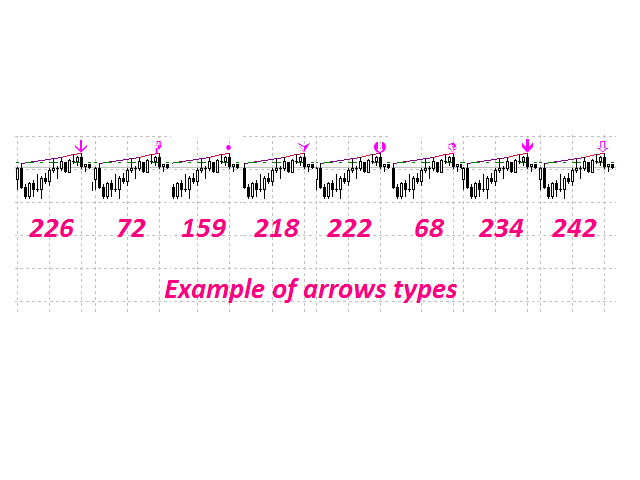
    40. Arrow_Symbol - graphical sell symbol type (recognizes one of the eight user-defined symbols, see the screenshot):
      • 68
      • 72
      • 159
      • 218
      • 222
      • 226 (by default)
      • 234
      • 242 
    41. Arrow_Width - graphical symbol width (allowable values - 1, 2, 3, 4 and 5).
    42. Sound_Mail_Numbers - number of audio and e-mail notifications on the last two bars.
    43. DrawLineChart - display of convergence/divergence line in the main window.
      • true - draw the lines (by default).
      • false - do not draw the lines.
    44. DrawLineInd - display of convergence/divergence line in separate windows.
      • true - draw the lines (by default).
      • false - do not draw the lines.
    45. Convergence - calculating convergence or divergence:
      • true - convergence (by default).
      • false - divergence.
    46. Ideal_Searching - searching onvergence/divergence in non-ideal conditions:
      • true - ideal search conditions (by default).
      • false - non-ideal search conditions.
    47. Play_Sound - enable/disable sound notification.
    48. Show_Time - displaying time remaining until the formation of the current bar.
    49. Send_Mail - send an e-mail notification.
    50. ConvMainLevelColor - color of the convergence line in the main window.
    51. DivMainLevelColor - color of the divergence line in the main window. 
    52. ConvLevelColor_1 - color of the convergence line in the first indicator window.
    53. ConvLevelColor_2 - color of the convergence line in the second indicator window.
    54. DivLevelColor_1 - color of the divergence line in the first indicator window.
    55. DivLevelColor_2 - color of the divergence line in the second indicator window.
    Recommended products
    Information is a subject of the market mood. Information is objective when it comes from different sources. If information is identical then we may speak about its convergence. Otherwise, we may speak about its conflict (divergence). Indicators and oscillators are the sources of information for technical analysis. Bullish CD LTB   Osc  (Bullish Convergence/Divergence Low Top Bottom  Oscillator) is a universal analytical bulls convergence/divergence indicator between any of the twenty three stand
    Information is a subject of the market mood. Information is objective when it comes from different sources. If information is identical then we may speak about its convergence. Otherwise, we may speak about its conflict (divergence). Indicators and oscillators are the sources of information of the technical analysis. Bullish CD LBT   Osc  (Bullish Convergence/Divergence Low Bottom Top Oscillator) is a universal analytical bulls convergence/divergence indicator between any of the twenty three sta
    Information is a subject of the market mood. Information is objective when it comes from different sources. If information is identical then we may speak about its convergence. Otherwise, we may speak about its conflict (divergence). Indicators and oscillators are the s ources of information of the technical analysis. Bearish CD HBT   Osc (Bearish Convergence/Divergence High Bottom Top Oscillator) is a universal analytical bears convergence/divergence indicator between any of the twenty three st
    First 5 copies sold for 39$. 2/5 sold. Next price 49$. Not all function work on tester. If you want to test it, write to me a personal message, i send to you a demo version valid for 7 days with full functionality. The Trade Manager Advace is composed by 4 part: Navigation panel. Execution panel (Here is present the Risk Reward Tool). Management panel. Equity panel. Input parameters Magic Number : Number (number must be unique, do not use the same number in more one chart). Trailing stop for
    This indicator will display current logined mt4 account's orders information of current symbol chart. It also allow import some formated data: 1) MQL5 Signals History CSV file (*.csv) 2) MT4 Account History Statement file (*.htm -> *.txt) *[Next Version] Allow Import data form 'HF HistoryExporter (*.csv)' Sample Data of MQL5 Signals History File Time;Type;Volume;Symbol;Price;S/L;T/P;Time;Price;Commission;Swap;Profit;Comment 2023.12.20 23:00:02;Buy Limit;0.06;EURUSD;1.08994;1.06024;1.09464;202
    TimeFilter simple 4
    Andrej Nikitin
    1 (1)
    The indicator is an inter-week hourly filter. When executing trading operations, the indicator allows considering time features of each trading session. Permissive and restrictive filter intervals are set in string form. The used format is [first day]-[last day]:[first hour]-[last hour]. See the screenshots for examples. Parameters: Good Time for trade - intervals when trading is allowed. Bad Time for trade - intervals when trading is forbidden. time filter shift (hours) - hourly shift. percenta
    Margin Call Shield – Defend Your Margin on Your Terms Margin Call Shield   is a tool for MetaTrader 4 traders who want to decide for themselves which open positions are closed during margin call situations before the platform does so automatically based on its internal rules. By default, the broker or platform decides which positions to close, often using undisclosed algorithms. Margin Call Shield lets you set this order according to your own strategy. Why Was Margin Call Shield Created? In a  
    Expert Advisor for MT4 Useful utility MUST have for all traders.  With 1 click button, you're able to close all your open positions. Its come with a warning pop up notification when you click to close all your trades, to avoid an accident press the button. Just press 'Yes' to confirm or 'No' to cancel it. The expert will close all your open positions no matter what pairs you currently open or directions. Just attach the expert on 1 of your chart, and you're good to go.
    红盘手交易助手,该EA不会自动交易,属于辅助工具,参考4小时图表波动率参数,自动给订单设置止损和止盈,以及追踪止损。策略带有风控标准,如下<1K为50 >1K<1W为100, >1W<5W为500, >5W<10W为1000, >10<20为2000。最大的特色是资金管理和风控功能。显示信号为5日平滑均线方向,布林线中轨平仓功能,开仓警报提醒功能,手数资金恢复功能,该EA可以在历史数据测试时下单,所以它相当于复盘工具。注意EA会修改所不带止损和止盈品种的定单,并执行风控标准。EA参数经过实盘反复验证和优化,可以直接使用默认参数。        参数与功能: FixBuy_target 指定后统一修改当前品种所有多单的止盈价; FixSell_target 指定后统一修改当前品种所有空单的止盈价; 一比一恢复资金 默认不启用,启用盈利按固定亏损金额数字平仓; Boll_close_order 默认不启用,启用后价格遇到布林线(周期30)中轨平仓; Lots 设置固定手数,开启UseMM后无效; UseMM 默认启用资金管理; 风险系数 启用; ATR止损基数 默认按4小时
    AutoTrade IR v20
    Mas Khairul Araaf
    Auto trade V20 is a trading tool like Robot or Expert Advisor that is used for automatic trading, this type is Martingale EA, the recommended broker is FBS, EU Pair, default setting. If you want to find the best setting, please look for it by backtesting it, so that you find the best setting and help your trading become more profitable, please try this tool to help you trade. minimum deposit 200 $ cen lot 0.01, pipstep in points.
    GoldenTrend
    Aliaksandr Sych
    GoldenTrend — a next-generation high-frequency scalping Expert Advisor designed to extract profit from the smallest market movements. Utilizing advanced algorithms for price action and volume analysis, it opens dozens of highly accurate trades daily with minimal risk. Why GoldenTrend? Монитор Ultra-Fast Trades : Captures profit from 5–15 pip movements. Ideal for ECN accounts with low spreads. Adaptive Strategy : Automatically adjusts to current market volatility and dynamically shifts tradi
    TradePulse Commander Pannel MT4
    AL MOOSAWI ABDULLAH JAFFER BAQER
    • Please test the product in the Strategy Tester before purchasing to understand how it works. • If you face any issues, contact me via private message—I’m always available to help. • After purchase, send me a screenshot of your order to receive a   FREE EA   as a gift. Introducing the ultimate   Trade Management Panel   designed to streamline your trading operations and boost your efficiency! Our advanced panel is packed with powerful features to simplify your trading tasks and provide real-t
    Close by percentage MT4
    Konstantin Kulikov
    5 (1)
    Hello friends. I wrote this utility specifically for use in my profile with a large number of Expert Advisors and sets ("Joint_profiles_from_grid_sets" https://www.mql5.com/en/blogs/post/747929 ). Now, in order to limit losses on the account, there is no need to change the "Close_positions_at_percentage_of_loss" parameter on each chart. Just open one additional chart, attach this utility and set the desired percentage for closing all trades on the account. The utility has the following function
    Easy Trade Executor is a tool for fast position sizing, trade execution, and trade management in MT4. Place Open Price, Stop Loss, and Take Profit levels directly on the chart, get automatic position size calculations, and open trades with controlled risk in just a few clicks. Why Easy Trade Executor? Easy Trade Executor is designed for traders who want more than just risk calculations — they want to manage trades quickly and efficiently directly from the chart. The tool combines position sizi
    MQL5 Blogs : https://www.mql5.com/en/blogs/post/761446 MT4 Version : https://www.mql5.com/en/market/product/136790 MT5 Version : https://www.mql5.com/en/market/product/136791 Time Wizard is a professional trading assistant built for traders who need speed, timing, and execution control in one clean dashboard. This Expert Advisor is designed for event-based trading, scheduled execution, and fast semi-automatic order management. It allows you to prepare your orders in advance, define the exact e
    Hedge and Position Commander MT4
    AL MOOSAWI ABDULLAH JAFFER BAQER
    • Please test the product in the Strategy Tester before purchasing to understand how it works. • If you face any issues, contact me via private message—I’m always available to help. • After purchase, send me a screenshot of your order to receive a   FREE EA   as a gift. Hedge & Position Commander The Hedge & Position Commander is an advanced trading utility designed to give traders complete control over their positions with powerful hedging capabilities and comprehensive position management to
    Ultimate Trade Closer
    Ebenezer Sochima Charles
    Ultimate Trade Closer for MT4 – Efficient Multi-Symbol Trade Management Overview: The Ultimate Trade Closer for MT4 is a powerful and user-friendlytrade management system designed to help traders quickly close multiple trades with just one click. Whether you need to close all trades on a specific symbol or across all traded symbols, this script ensures seamless execution, saving you time and effort. Key Features: Close Trades Instantly – Shut down all open positions on a single symbo
    Multi Replicator Copier - MT4 Utility Unleash the power of seamless trade replication with Multi Replicator Copier , The Expert Advisor (EA) designed for traders seeking speed and efficiency! This innovative tool automates routine tasks and simplifies multi-account management, allowing you to replicate trades across multiple terminals with unmatched speed and accuracy. Whether you're managing a single strategy or a complex portfolio, Multi Replicator Copier ensures every move is mirrored effortl
    This system is very simple.. It uses a martingale grid hedging style strategy by increasing lot sizes and grid levels. The open order step and volume can be both fixed and dynamic. The EA is easily customizable. The EA does not use a stop loss and all positions close when the chart move back from trend and arrive last grid level. Recommended :   pairs : Side way pairs is very good for this system.                                 Time frame : not important.                                Deposit
    My Trade History PRO
    Bernhard Schweigert
    5 (4)
    CURRENTLY 20% OFF !! Best Solution for any Newbie or Expert Trader! Review your trades is the first step to a successful trader. Successful traders have a habit of regularly reviewing their trading performance. This tool will help you to do just that. The review process will be most effective with this tool to track your trading. Analyse your manual trades or the trades of your EA. Use the 3 general view. To switch between just click on the button. Closed Trades Open Trades Close+Open Trades Al
    ChainVector
    Evgeniy Zhdan
    5 (1)
    The trading panel is designed to help the trader in managing transactions in the MT4 terminal. There is a possibility: Open deals using BUY and SELL buttons; In Auto Traiding On mode, already opened positions are averaged by their type until profit is received (the amount of profit at which orders will be closed is set in the settings - in points or percent of the deposit); In Cycle Auto Trading On mode - the EA initially opens two opposite orders and makes two multidirectional grids until pro
    If you found this EA, it's probably because you want to get a funded account with a prop firm, but you see a rule that most of traders fear :   Maximum Daily Drawdown.  I've been through this problem myself as   I'm a prop firm trader   and I've made a bot to solve this rule, and you can get it to solve this problem too. How does it work ? When you first setup this EA, you need to input the   initial deposit   which corresponds to the size of your funded account. For exemple if you get a 10k$ f
    Paid release: Cumulative Delta Flow MT4 is a paid MetaCoderStore indicator. Use the product comments for setup questions, feature requests, and feedback for future updates. Cumulative Delta Flow MT4 is a separate-window tick-volume flow oscillator for MetaTrader 4. It estimates signed buying and selling pressure from candle position, candle direction, and tick volume, then plots a cumulative delta line with a signal line and divergence markers. Use it to spot: Positive and negative tick-volume p
    TPSpro Risk Manager
    Roman Podpora
    3.67 (3)
    TPSpro Risk Manager       – is a unique system of professional risk control for traders of any level and any capital. Allows you to avoid losses in trading and serious mistakes in transactions. TPSpro Risk Manager is a must have for risk management and is primarily used by scalpers and day traders, but is successfully used by traders of any trading style. The panel has 3 columns, each of which contains useful information. The first column displays information about the account as of the beginn
    Auto Breakeven level
    Makarii Gubaydullin
    Automatic Breakeven levels Using   this   utility ,   y ou can activate the automatic SL movement, when the trade reaches a desired profit.  Especially   important   for a   short -term   traders.   Offset option is also available: some profit may be protected. Multifunctional utility : 66+ features, including this tool  |   Contact me  if you have any questions  |   MT5 version The process of activating the automatic breakeven function: 1.   Select the Symbol or Trade   for which the Auto BE f
    Expert Advisor: Breakout_Recovery_V2    Version: 2.3    Symbol: XAUUSD    Timeframe: M15 (recommended)    Strategy Type: Breakout + Smart Recovery (Bi-directional Martingale)    Platform: MetaTrader 4 (MT4) Description: Breakout_Recovery_V2 is a smart trading system that detects real breakout opportunities and uses a controlled recovery mechanism (martingale) when the market moves against the initial entry. Features: *Real breakout entry logic using a custom supply/demand
    Savage Trades M.T.A.  is a Manual Trade Assistant expert advisor. This EA contains self-adaptive market algorithm, which uses price action patterns and standard trading indicators. 1.) Quickly Execute trade entries with the click of a button with your own predetermined Stop Loss and Take Profit. 2.) Non-Repainting retracement and reversal warnings indicated by arrows and system alert. 3.) Auto adjusting Support and Resistance levels with strength indicated by color shade. 4.) Auto adjusting Fibo
    EA123 Snipper MACD
    Jose Francisco Flores Rojas
    MACD Divergence Pro is an intelligent and adaptive Forex trading robot designed to capitalize on MACD signals and detect divergence patterns that often precede major price reversals. The EA automatically places Buy and Sell trades when: Bearish divergence is detected at market highs Bullish divergence is detected at market lows MACD crossover signals confirm potential entry points Key Features: Fully automated trading using MACD and divergence logic ️ Customizable MACD settings for f
    Fx Technical Analysis Sharing System, Experts make technical analysis and you can see the analysis. Analyses are updated during the day. One-click analysis with MetaTrader is displayed on the screen. If there are pending orders for these analyses, you will open the transaction with a single click. It is quite easy and easy to use. Related analysis , period and information is saved as template to your computer. You can then download and view it from the files folder. It is quite educational and a
    Auto Fibo Pro m
    DMITRII GRIDASOV
    "Auto FIBO Pro"   Crypto_Forex  indicator  - is great auxiliary tool in trading! Indicator automatically calculate and place on chart Fibo levels and local trend lines (red color). Fibonacci levels indicate key areas where price can reverse. Most important levels are 23.6%, 38.2%, 50% and 61.8%. You can use it   for reversal scalping  or for zone grid trading. There are plenty of opportunities to  improve your current system using Auto FIBO Pro indicator as well. It has Info Spread Swap Displa
    Buyers of this product also purchase
    Forex Trade Manager MT4
    InvestSoft
    4.98 (442)
    Trade Manager MT4 is an advanced position size calculator and trade management tool for MetaTrader 4, designed to help traders plan trades faster, control risk more precisely, and manage open positions directly from the chart. It combines order placement, risk based lot calculation, Stop Loss and Take Profit management, Break Even, Trailing Stop, Partial Close, Equity Protection, and external trade management in one panel. Whether you trade forex, indices, metals, commodities, or crypto, Trade M
    Local Trade Copier EA MT4
    Juvenille Emperor Limited
    4.96 (110)
    Experience exceptionally  fast trade copying with the Local Trade Copier EA MT4 . With its easy 1-minute setup, this trade copier allows you to copy trades between multiple MetaTrader terminals on the same Windows computer or Windows VPS with lightning-fast copying speeds of under 0.5 seconds. Whether you're a beginner or a professional trader, the Local Trade Copier EA MT4 offers a wide range of options to customize it to your specific needs. It's the ultimate solution for anyone looking to inc
    Exp COPYLOT CLIENT for MT4
    Vladislav Andruschenko
    4.69 (65)
    Professional Trade Copier for MetaTrader 4 Fast, professional, and reliable trade copier for MetaTrader 4 . COPYLOT helps you copy Forex trades between MetaTrader 4 and MetaTrader 5 terminals with flexible synchronization for different account setups. COPYLOT MT4 version supports: MetaTrader 4 to MetaTrader 4 MetaTrader 5 Hedge to MetaTrader 4 MetaTrader 5 Netting to MetaTrader 4   MT5 version Full Description + DEMO + PDF How To Buy How To Install How to get Log Files How To Test and Optimize A
    Strategy Builder offers an incredible amount of functionality. It combines a trade panel with configurable automation (covert indicators into an EA), real-time statistics (profit & draw down) plus automatic optimization of SL, TP/exit, trading hours, indicator inputs. Multiple indicators can be combined into an single alert/trade signal and can include custom indicators, even if just have ex4 file or purchased from Market. The system is easily configured via a CONFIG button and associated pop-up
    Trade Assistant MT4
    Evgeniy Kravchenko
    4.43 (197)
    It helps to calculate the risk per trade, the easy installation of a new order, order management with partial closing functions, trailing stop of 7 types and other useful functions. Additional materials and instructions Installation instructions   -   Application instructions   -   Trial version of the application for a demo account Line function -   shows on the chart the Opening line, Stop Loss, Take Profit. With this function it is easy to set a new order and see its additional characteris
    PZ Trade Pad Pro MT4
    PZ TRADING SLU
    3.67 (3)
    Effortlessly calculate lot sizes and manage trades to save time and avoid costly errors The Trade Pad Pro EA is a tool for the Metatrader Platform that aims to help traders manage their trades more efficiently and effectively. It has a user-friendly visual interface that allows users to easily place and manage an unlimited number of trades, helping to avoid human errors and enhance their trading activity. [ Installation Guide | Update Guide | Troubleshooting | FAQ | All Products ] One of the k
    MT4 to Telegram Signal Provider   turns your trading account into a signal provider. Every trade action, whether manual, by EA or from your phone, is instantly sent as a message to Telegram. You can fully customize the format or use a ready-made template for quick setup. [ Demo ] [ Manual ] [ MT5 Version ] [ Discord Version ]  New: [ Telegram To MT5 ] Setup A step by step user guide is available. Key Features Ability to customize order details sent to subscribers You can create a tiered subs
    The product will copy all telegram signal to MT4   ( which you are member  ) , also it can work as remote copier.  Easy to set up, copy order instant, can work with almost signal formats, image signal, s upport to translate other language to English Work with all type of channel or group, even channel have "Restrict Saving Content", work with  multi channel, multi MT5 Work as remote copier: with signal have ticket number, it will copy exactly via ticket number. Support to backtest signal. How to
    Trade Copier Global
    Laszlo Tormasi
    5 (15)
    Trade Copier Global: The name speaks for itself. This copier allows you to copy orders between MT4 terminals even if they are not installed on the same computer. Features Copying trades between MT4 terminals around the world with a short delay. Automatically recognizes symbol prefixes. Can connect many Slaves to the same Master. Supports pending and market orders. Supports partial order close (with limitations, see below) Can send messages and notifications to the Slaves from the Master Several
    Trade copier MT4
    Alfiya Fazylova
    4.56 (32)
    Trade Copier is a professional utility designed to copy and synchronize trades between trading accounts. Copying occurs from the account / terminal of the supplier to the account / terminal of the recipient, which are installed on the same computer or VPS . PROMOTION - If you have already purchased the "Trade Copier MT5," you can receive the "Trade Copier MT4" for free (for copying MT4 > MT5 and MT4 < MT5). For more detailed information about the conditions, please contact us via private message
    TradePanel MT4
    Alfiya Fazylova
    4.84 (95)
    Trade Panel is a multi-functional trading assistant. The app contains over 50 trading functions for manual trading and allows you to automate most trading tasks. Before making a purchase, you can test the demo version on a demo account. Download the trial version of the application for a demonstration account: https://www.mql5.com/en/blogs/post/750865 . Full instructions here . Trade. Allows you to perform trading operations in one click: Open pending orders and positions with automatic risk cal
    Working Trial Download Copy Cat More Trade Copier MT4 is not just a simple local trade copier; it is a complete risk management and execution framework designed for today’s trading challenges. From prop firm challenges to personal portfolio management, it adapts to every situation with its blend of robust execution, capital protection, flexible configuration, and advanced trade handling. The copier works in both   Master (sender) and Slave (receiver)   modes, with real-time synchronization of
    Telegram to MT4 Multi-Channel Copier automatically copies trading signals from your Telegram channels directly into MetaTrader 4. No bots, no browser extensions, no manual copying. You receive a signal on Telegram and the EA opens the trade on your terminal in a few seconds. The product includes two components: a Windows application that listens to your Telegram channels, and this Expert Advisor that executes the signals on your MT4 terminal. An MT5 version is also available. Setup guide and app
    News Filter EA MT4
    Rashed Samir
    5 (9)
    News Filter EA: Advanced Algo Trading Assistant News Filter EA is an advanced algo trading assistant designed to enhance your trading experience. By using the   News Filter EA , you can integrate a Forex economic news filter into your existing expert advisor, even if you do not have access to its source code. In addition to the news filter, you can also specify   trading days   and   hours   for your expert. The News Filter EA also includes   risk management   and   equity protection   features
    VirtualTradePad mt4 Extra
    Vladislav Andruschenko
    4.85 (61)
    Trading Panel for trading in 1 click.  Working with positions and orders!  Trading from the chart or the keyboard. Using our trading panel, you can trade in one click from the chart and perform trading operations 30 times faster than the standard MetaTrader control. Automatic calculations of parameters and functions that make life easier for a trader and help a trader conduct their trading activities much faster and more conveniently. Graphic tips and full information on trade deals on the chart
    TradeMirror is a trade copier EA for MT4/MT5 platform. Tutorial Please click the Trademirror Tutorial link to view more tutorials. Why TradeMirror We understand the importance of security, stability and privacy for financial software, so we've gone the extra mile to harden these three elements in detail: Provides a user-friendly graphical interface that is easy to operate Focus on privacy and security, suitable for various financial scenarios with privacy requirements for order distribution Prec
    RSI Divergence Scanner is a multi-timeframe and multi-symbol dashboard and alert that checks all timeframes and symbols to find divergences between price chart and RSI indicator. This divergence scanner is integrated with support and resistance zones so you can check the RSI divergences in the most important areas of the chart to find trend reversals in the price chart. Download demo version   (works on M 1,M5,M30,W1 timeframes) Full description of scanner parameters ->   click here . How to get
    CloseIfProfitorLoss with Trailing
    Vladislav Andruschenko
    4.87 (31)
    Close If Profit or Loss with Trailing for MetaTrader 4 — automatic closing by total profit or loss A reliable trade-management utility for MetaTrader 4 that automatically closes positions when the total profit or total loss reaches the level you set. The Expert Advisor monitors open trades, calculates floating profit and loss, can trail profit, and helps close positions faster than manual reaction. MetaTrader 4 is still used by many manual traders, grid traders, scalpers, and Expert Advisor use
    RS Trade Copier
    Boris Sedov
    5 (1)
    RS Trade Copier - the ultra-fast local trade copier with a real graphical interface. Stop typing account numbers manually. No more 200+ cryptic inputs. A reliable and flexible tool for copying trading operations between multiple MT4 and MT5 terminals. It suits experienced traders, signal providers, and individual investors. It enables trade synchronization from one or multiple Providers to one or multiple Clients with high precision and minimal latency. It supports simple automatic configuration
    Telegram to MT4 Coppy
    Sergey Batudayev
    4.09 (11)
    Telegram to MT4: The Ultimate Signal Copying Solution Streamline your trading with Telegram to MT4 , the cutting-edge utility designed to copy trading signals directly from Telegram channels and chats to your MetaTrader 4 platform—without the need for DLLs. This robust solution ensures seamless execution of signals with unparalleled precision and customization options, saving you time and boosting your efficiency. [ Instructions and DEMO ] [ FAQ ] [ How atach logs properly ] [Settings descrition
    Grid Manual MT4
    Alfiya Fazylova
    4.71 (17)
    Grid Manual is a trading panel for working with grid strategies. The utility is universal, has flexible settings and an intuitive interface. It works with a grid of orders not only in the direction of averaging losses, but also in the direction of increasing profits. The trader does not need to create and maintain a grid of orders, the utility will do it. It is enough to open an order and the Grid manual will automatically create a grid of orders for it and will accompany it until the close. Ful
    The AlgoKing Lightning Bolt Strategy is a trade manager and has multiple indicators built for a complete trading strategy.  Here is a list of indicators built in. Indicators Auto drawn Support and Resistance signals Auto drawn RSI Divergence signals Auto drawn Fibonacci Retracement signals with buy and sell entry lines. Lightning Bolt reversal signals. Auto drawn trend lines. Trade Management Auto take partials at simple moving average targets. Auto take partial and stop losses at Fibonacci ret
    Copier->Convenient and fast interface interaction, users can use it right away   ->>>> Recommended to use on Windows computers or VPS Windows Features: Diversified and personalized copy trading settings: 1. Different lot modes can be set for different signal sources 2. Different signal sources can be set for forward and reverse copy trading 3. Signals can be set with comments 4. Whether to calibrate the lot according to the contract lot Diversified and personalized copy order settings 2: 1. Dif
    Instantly see your closed trade history by day and week, your current open trades, and forex exposure on one chart! Use the heatmap to identify profitable trades and where your current drawdown is within your trading portfolio. MT5 Version -  https://www.mql5.com/en/market/product/132613 Quick Close Buttons Use the quick close buttons to close every trade on a single symbol, close out individual trades in full, or take partial profits or losses at the click of a button. No more hunting for trade
    Trade panel Sniper
    Andrey Kaunov
    5 (4)
    Простая в управлении Торговая панель обеспечит безопасную торговлю. Вычислит объём сделки от заданного уровня Stop Loss и величины убытка. Поможет рассчитать сейф, и в ноль закрыть неверную сделку. Интуитивно понятный интерфейс делает панель удобной в управлении, освобождая внимание трейдера для принятия решения о входе в сделку. Программа сделает все расчёты за вас. Поэтому работа с помощью панели Снайпер - оптимальное решение для торговли с соблюдением Мани-менеджмента. А это главный ключ к по
    Trader Evolution MT4
    Siarhei Vashchylka
    5 (2)
    " Trader Evolution " - A utility designed for traders who use wave and technical analysis in their work. One tab of the utility is capable of money management and opening orders, and the other can help in making Elliott wave and technical analysis. Manual (Be sure to read before purchasing) | Version for MT5 Advantages 1. Trading in a few clicks. Immediate and pending orders are available in the panel 2. Money management. The program automatically selects the appropriate lot size 3. Simplifies
    Auto Trade Copier
    Vu Trung Kien
    4.76 (85)
    Auto Trade Copier is designed to copy trades to multiple MT4, MT5 and cTrader accounts/terminals with 100% accuracy. The provider and receiver accounts must be on the same PC/VPS. With this tool, you can copy trades to receiver accounts on the same PC/VPS. All trading actions will be copied from provider to receiver perfectly. This version can be used on MT4 accounts only. For MT5 accounts, you must use Auto Trade Copier for MT5 . Reference: - For MT4 receiver, please download Trade Receiver Fre
    Drawdown Protector MT4
    Konstantinos Kalaitzidis
    5 (2)
    Drawdown protector is used to manage your desired Max Daily Drawdown. It's a highly valuable tool for traders, especially for prop firm traders, you need to be careful of the drawdown limits.  It's an effective EA that is simple to use for Equity Drawdown Management purposes.  It works by blocking new trades - and closing existing trades, when the floating Equity (not Balance) exceeds the Daily Loss limit you've set. Also, you can set a Maximum Loss Limit for a SINGLE trade, which if exceeded, i
    X2 Copy MT4
    Liubov' Shkandrii
    Fast. Accurate. Innovative. Tech-Driven. Discover instant trade copying with the revolutionary X2 Copy MT4. With just a 10-second simple setup, you'll get a powerful tool for syncing trades between MetaTrader terminals on a single computer or Windows VPS with unprecedented speed. Whether you're managing multiple accounts, following signals, or scaling your strategy, X2 Copy MT4 adapts to your workflow with unparalleled precision and control. Work faster and more reliably with the most tech-drive
    Trendline PRO MT4 Trendline PRO MT4 is a semi-automated Expert Advisor for MetaTrader 4 that executes trades, manages orders, or sends alerts from trendlines and chart levels created by the user. The Expert Advisor does not generate trading signals and does not include a built-in trading strategy. All entries, exits, risk settings, and management rules are defined by the user on the chart. The product is designed for traders who already use trendlines, breakout levels, support and resistance, ch
    More from author
    Description The indicator determines the appearance of the bars that signal of a reversal of current local moods and plays a beep. It also paints these bars in accordance with the bullish and/or bearish priority. You can select the color for bullish and bearish moods. Inputs Sound_Play - a flag that allows the sound notification. Use Detection of the reversal bar can be a signal to perform appropriate trading activities.  The indicator can be used for manual or automated trading in an Expert A
    The indicator detects the following types of Japanese candlesticks: Doji, Hammer and/or Hanging Man, Shooting Star and/or Inverted Hammer, Spinning Top, Maribozu. The indicator is intended for manual and/or automated trading within an Expert Advisor. There is a possibility to choose colors for bullish and bearish candlesticks. For automated trading, use any indicator buffer of the double type: 0, 1, 2 or 3, whose value is not zero!
    The indicator is intended for detecting big (long) and/or small (short) candlesticks. There is possibility of coloring the bullish and bearish candlesticks. The indicator can be used for manual and/or automated trading within an Expert Advisor. The indicator data that can be used for automated trading can be taken from one of four buffers of the double type: 0, 1, 2 or 3. Values must not be equal to zero. 
    The indicator of DeMark fractals. The indicator can be drawn on the basis of price data and on the basis of a moving average. There is a possibility to color the up and down fractals. The indicator can be used for manual and for automated trading within an Expert Advisor. For automated trading, use any indicator buffer of the double type: 0 - up fractals, 1 - down fractals! Values of the buffers must not be equal to zero.  A moving average is drawn on the basis of input parameters: Calc_Method 
    Stochastic Global
    Igor Semyonov
    4 (1)
    Description A universal colored indicator Stochastic. The rising and falling lines and the levels of the indicator can be colored.   The indicator can be calculated as the standard one on the basis of a price or as a derivative on the basis of the following nineteen other indicators included in the standard package of the MetaTrader 4 terminal: AD - an indicator of accumulation and distribution of volume. OBV - On Balance Volume. Volume - tick volume indicator. AC - indicator of acceleration. AO
    Description A universal colored indicator MACD Histo. The rising and falling of the indicator histogram can be colored.   The indicator can be calculated as the standard one on the basis of a price or as a derivative on the basis of the following twelve other indicators included in the standard package of the MetaTrader 4 terminal: AD - an indicator of accumulation and distribution of volume. OBV - On Balance Volume. Volume - tick volume indicator. Force - Force Index indicator. MFI - Money Flow
    Description A colored universal indicator MACD Line (MA convergence-divergence indicator, shown as a histogram). The rising and falling of the indicator histogram can be colored. The indicator can be calculated as the standard one on the basis of a price or as a derivative on the basis of the following twelve other indicators included in the standard package of the MetaTrader 4 terminal: AD - an indicator of accumulation and distribution of volume. OBV - On Balance Volume. Volume - tick volume i
    RSI Global
    Igor Semyonov
    Description A universal indicator RSI together with moving averages based on it. Depending on the need, moving averages can be disabled. You can color the indicator lines and levels: lines of RSI, moving average lines and thresholds of overbought and oversold levels.   The indicator can be calculated as the standard one on the basis of a price or as a derivative on the basis of the following eighteen other indicators included in the standard package of the MT4 terminal: AD - an indicator of accu
    CCI Global
    Igor Semyonov
    5 (1)
    Description A universal indicator CCI together with moving averages based on it. Depending on the need, moving averages can be disabled. You can color the indicator lines and levels: lines of CCI, moving average lines and thresholds of overbought and oversold levels.   The indicator can be calculated as the standard one on the basis of a price or as a derivative on the basis of the following eighteen other indicators included in the standard package of the MetaTrader 4 terminal: AD - an indicato
    Description A multi-purpose multi-colored/multi-symbol indicator, which is a set of standard tools from the MetaTrader 4 terminal. The difference is that below the basic price chart it allows to calculate and build in a separate window any of the twenty indicators in a colored form, painting bulls and bears in different colors, for any financial instrument in accordance with the list below:  AD - an indicator of accumulation and distribution of volume. OBV - On Balance Volume. Force - Force Inde
    AO Global
    Igor Semyonov
    Description A colored universal indicator AO (Awesome Oscillator). The rising and falling of the indicator histogram can be colored.   The indicator can be calculated as the standard one or as a derivative on the basis of the following eleven other indicators included in the standard package of the MetaTrader 4 terminal: AD - an indicator of accumulation and distribution of volume. OBV - On Balance Volume. Volume - tick volume indicator. Force - Force Index indicator. MFI - Money Flow Index. ATR
    Description A colored universal indicator MACD Classic (MA convergence-divergence indicator) that combines two indicators: MACD Line and MACD Histo. The rising and falling lines, the signal line and the indicator histogram can be colored. The indicator can be calculated as the standard one on the basis of a price or as a derivative on the basis of the following twelve other indicators included in the standard package of the MetaTrader 4 terminal: AD - an indicator of accumulation and distributio
    Description The universal colored multicurrency/multisymbol indicator MACD Classic, consisting of two MACD indicators: MACD Line and MACD Histo. The indicator may be used with any broker, irrespective of the name of the financial instrument since it is necessary to manually enter the name as an input parameter. If you enter a non-existent or incorrect name of a financial instrument, you will receive an error message that this financial instrument is unknown (does not exist). Inputs Currency_Nam
    Description A colored universal indicator/oscillator based on crossing moving averages. The rising and falling lines of the indicator histogram can be colored. The combined use of the line and the histogram increases the level of the analysis when making a decision to open or close deals. The indicator can be calculated as the standard Price Oscillator or as a derivative on the basis of the following eleven other indicators included in the standard package of the MetaTrader 4 terminal: AD - an i
    Description A universal colored multicurrency/multi-symbol indicator RAVI. Was proposed by T. Chand as a trend indicator. RAVI means Range Action Verification Index. The indicator may be used with any broker, irrespective of the name of the financial instrument since it is necessary to manually enter the name as an input parameter. If you enter a non-existent or incorrect name of a financial instrument, you will receive an error message that this financial instrument is unknown (does not exist).
    Description A colored multicurrency/multisymbol oscillator of the market mood. The oscillator is designed for detecting the continuation or change of the market mood prior to its occurrence. An excellent example is the screenshots that show all the features of the oscillator. The oscillator may be used with any broker, irrespective of the name of the financial instrument since it is necessary to manually enter the name as an input parameter. If you enter a non-existent or incorrect name of a fin
    Inside Bar
    Igor Semyonov
    Description The indicator determines the appearance of internal bars on the chart, and paints them in accordance with the bullish and/or bearish mood. The indicator can notify of the appearance of a formed internal bar by playing a beep, as well as display the time remaining until the end of the formation of the current bar in the format of <d:h:m:s, where: < means the current bar. d - days. h - hours. m - minutes. s - seconds. The bullish and bearish mood can be colored. Inputs Sound_Play - a
    Description The indicator determines the appearance of bars that notify of the reversal of the current trend, and paints them in accordance with the bullish and/or bearish mood. The indicator can notify of the appearance of a formed reversal bar by playing a beep, as well as display the time remaining until the end of the formation of the current bar in the format of <d:h:m:s, where: < means the current bar. d - days. h - hours. m - minutes. s - seconds. You can select the color for bullish and
    Description A universal colored multicurrency/multi-symbol indicator of moving averages: Moving Average, Double Moving Average, Triple Moving Average . The indicator is drawn in a separate window, so below the main trading chart a user can see the development of another financial instrument. It is very useful when considering the combined values of various moving averages for different financial instruments below the main trading chart.  The indicator may be used with any broker, irrespective of
    Description A universal colored indicator of moving averages: Moving Average, Double Moving Average, Triple Moving Average . The indicator provides various opportunities for the analysis of prices based on different ways of constructing moving averages in the window of the main financial instrument. You can color bullish and bearish moods. Inputs MA_Type - type of multiplicity: Moving Average. Double Moving Average. Triple Moving Average. MA_Period - the MA period. MA_Method - the averaging met
    Description A colored universal multicurrency/multi-symbol indicator Bollinger Bands to be drawn in a separate window below the main financial instrument. The rising and falling line of the main indicator and Bollinger Bands can be colored. The indicator can be calculated based on one of the eleven basic indicators included in the standard package of the MetaTrader 4 terminal: AD - an indicator of accumulation and distribution of volume. OBV - On Balance Volume. Force - Force Index indicator. MF
    Description A colored universal multicurrency/multi-symbol indicator Channel to be drawn in a separate window below the main financial instrument. The indicator uses the calculation method of the Price Channel indicator. The rising and falling line of the main indicator and the Channel lines can be colored. The indicator can be calculated based on one of the eleven basic indicators included in the standard package of the MetaTrader 4 terminal: AD - an indicator of accumulation and distribution o
    Keltner Channel
    Igor Semyonov
    5 (1)
    Description Keltner's colored channel indicator,also called STARC band, drawn in the main chart window. The indicator uses the calculation technique of the three drawing options: basic, improved and modified . The first two were proposed by Keltner, the third one - by a successful trader L. Rakshe. You can also search for your own best parameters of the indicator. The upper, middle and lower bands can be colored. The indicator includes the basic analytical tool of the market moods by Keltner. Th


    Description A colored universal multicurrency/multi-symbol indicator ZigZag to be drawn in a separate window below the main financial instrument. The indicator may be used with any broker, irrespective of the name of the financial instrument since it is necessary to manually enter the name as an input parameter. If you enter a non-existent or incorrect name of a financial instrument, you will receive an error message that this financial instrument is unknown (does not exist).  The indicator can
    Description A colored channel indicator Price Channel to be drawn on the main chart of a financial symbol. It can color bullish and bearish moods based on the middle line of the indicator, as well as change the color of the upper and lower lines of the channel. Purpose The indicator can be used for manual or automated trading in an Expert Advisor. Values of indicator buffer of the double type can be used for automated trading:  The middle line of the indicator - buffer 4. The upper line of the
    Description Candlesticks is a colored multicurrency/multy-symbol indicator. It shows a financial instrument as a candlestick chart in a separate window below the chart of the main financial symbo. The indicator may be used with any broker, irrespective of the name of the financial instrument since it is necessary to manually enter the name as an input parameter. If you enter a non-existent or incorrect name of a financial instrument, you will receive an error message that this financial instrume
    Description Candlestick Tools  is a colored multicurrency/multy-symbol indicator. It shows one of four standard indicators as a candlestick chart in a separate window below the chart of the main financial symbol. The indicator is calculated based on one of two indicators included in the standard package of the МetaТrader 4 terminal: CCI - Commodity Channel Index. RSI - Relative Strength Index. The default indicator is Commodity Channel Index. The indicator may be used with any broker, irrespecti
    Pivot Pro
    Igor Semyonov
    Description Pivot Pro  is a universal color indicator of the  Pivot Points  levels systems. You can select one of its three versions:  Standard   Old , Standard New  and  Fibo . The system will automatically calculate the  Pivot Point  on the basis of market data for the previous day ( PERIOD_D1 ) and the system of support and resistance levels, three in each. It can also display price tags for each level. You can color the indicator lines. Only a method of calculation of the third level of supp
    Description The indicator is intended for labeling the chart using horizontal levels and/or half-round prices. The indicator works on any financial instrument regardless of the name and the number of digits. A user can choose colors for the indicator lines. Input Parameters Calc_Method - method of calculation of the lines: levels of round prices. levels of half-round prices. Digits_Accepted - flag for calculating the levels according to number of decimal places in the quotes of a financial inst
    Description A colored universal multicurrency/multi-symbol indicator MACD Line Smart (the indicator moving average convergence divergence is displayed as a histogram) based on double or triple moving average .  Comparing to the standard MACD this indicator is more sensitive to what allows generating advance signals. he indicator may be used with any broker, irrespective of the name of the financial instrument since it is necessary to manually enter the name as an input parameter. If you enter a
    Filter:
    No reviews
    Reply to review