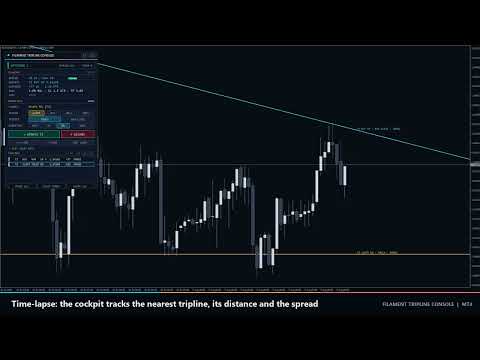
Filament Tripline Console
- Utilities
-
Syarief Azman Bin Rosli
 Hello and welcome to my official MQL5 profile!
I am Syarief Azman Bin Rosli, an algorithmic trading systems developer and quantitative software engineer with over a decade of specialized experience creating robust automated trading solutions for MetaTrader 5 and MetaTrader 4. - Version: 1.0
- Activations: 5
Filament Tripline Console turns your own horizontal lines and trendlines into armed triplines. When price touches a line, or a bar closes beyond it, the tripline fires its action: an alert, a market BUY or SELL with automatic lot size, stop loss and take profit, or an EXIT that closes positions. It never trades on its own analysis; it only acts on lines you arm.
Quick Start
- Attach the utility to any chart. For BUY, SELL and EXIT actions enable Algo Trading in the toolbar and Allow live trading on the Common tab. ALERT works without them.
- Draw a Horizontal Line or Trendline with the normal MetaTrader tools, or press + H-LINE / + T-LINE on the panel.
- Click the line. TARGET shows its name.
- Choose ACTION, TRIGGER, DIRECTION and ONCE or REPEAT, then press ARM. The line takes the action colour and a label appears at its right end.
- Press TEST ALERT to check your notification channels. For a live check, arm an ALERT tripline a few points from price on a demo chart.
Buttons do not respond in the MT4 Strategy Tester (MetaTrader sends no chart events there), so test on a demo chart.
How a Tripline Fires
- Reference price: TOUCH uses the Bid; BAR CLOSE uses the close of the last completed bar of the chart timeframe.
- Line price: a horizontal line is its price; a trendline is its value at the current bar (TOUCH) or at the last closed bar (BAR CLOSE), extended to the right while armed.
- UP fires when price goes from below the line to the line plus Trigger Buffer or higher; DOWN is the mirror. AUTO means toward the line from the side price is on when you arm or drag it.
- A tripline only fires after price has been on its starting side, so arming or dragging a line across price never fires it at once.
- States: ARMED (ready), PRIMING (price on the wrong side, waits for it to return), HOLD (crossed but blocked by AutoTrading off, market closed or spread above the limit; retried on every tick while price stays beyond the line), FIRED (done), COOLDOWN (REPEAT: re-arms when price is back on the starting side and Repeat Cooldown bars have passed; a REPEAT BUY or SELL also waits until the order of its previous fire has closed, so orders never stack), CANCELLED (by OCO), FAILED (order rejected), PAUSED (PAUSE ALL).
- After a restart or RESUME ALL, a tripline that price crossed in the meantime becomes PRIMING instead of firing late.
Actions
- ALERT: notification only.
- BUY / SELL: market order with comment Filament T<n> and the Magic Number. The order opens without stops and SL/TP are attached right after (works on market-execution accounts); a rejected modification is retried for 30 ticks. Stops closer than the broker stop level are moved outward. Margin is checked with AccountFreeMarginCheck first. Requotes and busy errors are retried; after 5 failed attempts the state is FAILED.
- Lots: Fixed lots, or risk = balance or equity x Risk per Trade / 100 and lots = risk / (SL distance / tick size x tick value), rounded down to the lot step and capped by Maximum Lots per Order. A risk lot below the broker minimum gives FAILED (risk below minimum lot). Risk modes without a stop loss use Fixed Lots.
- Stop loss: Fixed distance in points; ATR multiple = Stop Loss ATR Multiple x ATR(ATR Period) of the last closed bar (Stop Loss Points if ATR is unavailable); Behind the tripline = line price minus (BUY) or plus (SELL) Stop Loss Points, or Stop Loss Points from entry if price is already past that level. Minimum = stop level + spread.
- Take profit = Take Profit x stop distance (none without a stop loss).
- EXIT: closes market orders of the Exit Scope, and pending orders too when Exit Also Deletes Pending Orders is on. Orders that fail to close are retried for 30 ticks, then reported.
- OCO: with One-Cancels-Other for Entry Triplines, a fired BUY or SELL cancels every other unfinished BUY or SELL tripline. ALERT and EXIT triplines are not affected.
Panel Controls
- Header: <> moves the panel to the next corner; [-] collapses it into a 180 x 26 px pill with the LED, FILAMENT and a short state; [+] expands it. Corner and pill survive timeframe and symbol changes and reset to the inputs on re-attach, input change or terminal restart.
- Click a line or its chart label to select it as TARGET (click a line on the chart when empty; [H-LINE] or [TREND] for an unarmed line, [T2] for an armed one; lines made with + H-LINE or + T-LINE show as Draft H1, Draft T2).
- ACTION: ALERT, BUY, SELL, EXIT. TRIGGER: TOUCH, BAR CLOSE. DIRECTION: AUTO, UP, DN. ONCE / REPEAT toggles repeat mode.
- ARM arms the target. On an armed target it reads UPDATE T<n>: applies the selected settings and re-checks the state.
- DISARM removes the tripline. Your own line stays in its original style; a line made with + H-LINE or + T-LINE is deleted, also when not armed yet.
- + H-LINE: dashed draft line 0.5 ATR above price, selected for dragging. + T-LINE: draft trendline through the lowest low of bars 21-60 and of bars 2-20.
- TEST ALERT: test message through every enabled channel (ALL ALERT CHANNELS ARE OFF if none).
- TRIPLINES: 5 rows per page, paged with the « and » buttons; click a row to select it.
- PAUSE ALL / RESUME ALL: stops and restarts all firing. CLEAR FIRED removes FIRED, CANCELLED and FAILED triplines. CLEAR ALL asks CONFIRM? and removes everything when pressed again within 3 s.
- The message line under the deck confirms each action, e.g. CLICK A LINE ON THE CHART FIRST or LIMIT REACHED: 40 TRIPLINES.
Readouts
- LED and badge: WATCHING n (green, n unfinished triplines), IDLE (none), PAUSED (amber), MARKET CLOSED (amber, session closed with trading triplines), TRADING OFF (red, Algo Trading or Allow live trading off with trading triplines). Right side: symbol, timeframe and FIRED count.
- TELEMETRY (corner LIVE, TESTER or PAUSED): SPREAD in points against the limit, meter green below 60%, amber below 100%, coral above. NEAREST: closest unfinished tripline with action, UP or DN and current line price, or none armed. DISTANCE: line minus Bid in points and in ATR; the meter fills as price approaches (cyan, amber within 0.5 ATR, coral within 0.2 ATR). RISK: lot mode (% BAL, % EQ or LOT), SL (pt, ATR, LINE+ or SL OFF), TP (R or TP OFF) and OCO. LAST: last fire or failure with time and ticket.
- Rows: id, action, TOUCH or BAR, UP or DN, A = AUTO, R = REPEAT, line price, distance in points, state. White ARMED, grey PRIMING or COOLDOWN, amber HOLD or PAUSED, dim FIRED or CANCELLED, coral FAILED.
- Chart: armed lines in Alert, Buy, Sell or Exit colour; solid when ARMED, dashed when PRIMING or paused, dash-dot in COOLDOWN, dotted and dimmed when FIRED or CANCELLED, dotted coral when FAILED. Labels read like T2 BUY UP · TOUCH · ARMED, plus REPEAT x<fires> and the ticket number. Fire markers at the line price: up arrow BUY, down arrow SELL, diamond ALERT, cross EXIT.
Alerts
Each fire, failure and proximity event is sent through every enabled channel: Popup Alert on Fire, Sound Alert on Fire (alert.wav), Push Notification on Fire, Email on Fire. Example: Filament Tripline EURUSD M15: T2 BUY filled at 1.15412 (BAR CLOSE UP), 0.24 lots, ticket #81234567. Proximity Alert sends one message when price comes within Proximity Distance of an ARMED tripline and re-arms after price moves twice that distance away. In the tester messages go to the journal only.
Side Effects
- File MQL4\Files\FilamentTripline\<symbol>_<magic>.csv stores triplines, coordinates, states and the panel state. Missing lines are redrawn from it at start.
- Chart objects prefixed FTC_ (panel, labels, markers, + H-LINE / + T-LINE lines) are removed with the utility; your own lines get their original style back.
- 250 ms timer. No DLLs, global variables or web requests. On two charts of the same symbol use different Magic Numbers.
Input Parameters
- Default Action (Alert only; also Buy at market, Sell at market, Exit positions) and Default Trigger (Touch (price crosses the line) or Bar close beyond the line): preset selectors.
- Trigger Buffer (0): points beyond the line required to fire.
- Repeat Cooldown (1): bars after a fire before a REPEAT tripline can re-arm.
- One-Cancels-Other for Entry Triplines (false).
- Lot Mode (Risk % of balance; also Fixed lots, Risk % of equity), Fixed Lots (0.10), Risk per Trade (1.0 %), Maximum Lots per Order (5.0).
- Stop Loss Mode (ATR multiple; also No stop loss, Fixed distance in points, Behind the tripline), Stop Loss Points (300), Stop Loss ATR Multiple (1.5), ATR Period (14).
- Take Profit (2.0 R, 0 = none).
- Maximum Spread for Entries (30 points, 0 = no limit), Maximum Slippage (10 points), Magic Number (26101700).
- Exit Scope (All trades on this symbol or This magic number only), Exit Also Deletes Pending Orders (false).
- Popup Alert on Fire (true), Sound Alert on Fire (true), Push Notification on Fire (false), Email on Fire (false), Proximity Alert (false), Proximity Distance (50 points).
- Alert Tripline Color, Buy Tripline Color, Sell Tripline Color, Exit Tripline Color.
- Show Tripline Labels (true), Show Fire Markers (true).
- Panel Corner (Top left, Top right, Bottom right, Bottom left), Panel X Offset (16) and Panel Y Offset (24) in pixels, Start Minimized (false).
Typical Setups
- Trendline breakout: BUY, BAR CLOSE, AUTO, ONCE; Stop Loss Mode = Behind the tripline, Stop Loss Points 100, Take Profit 2.
- Range straddle: BUY line above the range, SELL line below, TOUCH; One-Cancels-Other for Entry Triplines = true, Trigger Buffer 20.
- Exit guard: EXIT, BAR CLOSE on a support line; Exit Scope = All trades on this symbol.
- Level watcher: ALERT, TOUCH, REPEAT; Repeat Cooldown 3, Push Notification on Fire = true.
Notes and Risk
Triplines only work while the terminal runs (use a VPS for unattended use). Up to 40 triplines per symbol and Magic Number; only Horizontal Line and Trendline objects can be armed. Market orders can fill away from the line in fast markets or gaps. Trading involves risk of loss; the utility executes your plan and does not predict price.