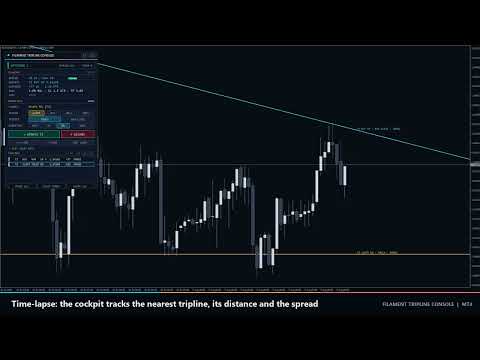
Filament Tripline Console

Filament Tripline Console은 직접 그린 수평선과 추세선을 작동 상태의 "트립라인"(tripline)으로 바꿉니다. 가격이 선에 닿거나 봉이 선 너머에서 마감하면 트립라인이 지정된 동작을 실행합니다. 동작은 알림, 랏·손절·익절을 자동 계산하는 시장가 BUY 또는 SELL, 또는 포지션을 청산하는 EXIT입니다. 자체 분석으로 거래하지 않으며, 사용자가 작동시킨 선에만 반응합니다.

빠른 시작

  1. 아무 차트에나 유틸리티를 적용합니다. BUY, SELL, EXIT 동작을 쓰려면 도구 모음의 Algo Trading과 Common 탭의 Allow live trading을 켜세요. ALERT는 없어도 작동합니다.
  2. MetaTrader 기본 도구로 Horizontal Line 또는 Trendline을 그리거나, 패널의 + H-LINE / + T-LINE을 누릅니다.
  3. 선을 클릭합니다. TARGET에 이름이 표시됩니다.
  4. ACTION, TRIGGER, DIRECTION과 ONCE 또는 REPEAT을 고른 뒤 ARM을 누릅니다. 선이 동작 색으로 바뀌고 오른쪽 끝에 라벨이 나타납니다.
  5. TEST ALERT를 눌러 알림 채널을 확인합니다. 실제 동작을 확인하려면 데모 차트에서 가격과 몇 포인트 떨어진 곳에 ALERT 트립라인을 작동시키세요.

MT4 전략 테스터에서는 버튼이 반응하지 않습니다(MetaTrader가 차트 이벤트를 보내지 않음). 데모 차트에서 테스트하세요.

트립라인 작동 방식

  • 기준 가격: TOUCH는 Bid를, BAR CLOSE는 차트 주기에서 마지막으로 완성된 봉의 종가를 사용합니다.
  • 선 가격: 수평선은 그 가격이고, 추세선은 현재 봉(TOUCH) 또는 마지막 마감 봉(BAR CLOSE)에서의 값이며 작동 중에는 오른쪽으로 연장됩니다.
  • UP은 가격이 선 아래에서 선 가격 + Trigger Buffer 이상으로 오를 때 작동하고, DOWN은 그 반대입니다. AUTO는 작동하거나 끌어 옮길 때 가격이 있던 쪽에서 선을 향하는 방향입니다.
  • 트립라인은 가격이 먼저 시작 쪽에 있었던 뒤에만 작동합니다. 그래서 가격을 가로지르는 위치로 선을 작동하거나 옮겨도 즉시 작동하지 않습니다.
  • 상태:
  • ARMED: 준비 완료.
  • PRIMING: 가격이 반대쪽에 있어 돌아오기를 기다립니다.
  • HOLD: 선을 넘었지만 실행이 막혔습니다. 원인은 AutoTrading 꺼짐, 시장 휴장, 또는 한도를 넘은 스프레드이며, 가격이 선 너머에 있는 동안 매 틱 재시도합니다.
  • FIRED: 완료.
  • COOLDOWN: REPEAT에서 가격이 시작 쪽으로 돌아오고 Repeat Cooldown 개의 봉이 지나면 다시 작동합니다. REPEAT BUY 또는 SELL은 이전 작동의 주문이 청산될 때까지도 기다리므로 주문이 쌓이지 않습니다.
  • CANCELLED: OCO로 취소.
  • FAILED: 주문 거부.
  • PAUSED: PAUSE ALL.
  • 재시작 또는 RESUME ALL 후, 그 사이 가격이 넘은 트립라인은 늦게 작동하지 않고 PRIMING이 됩니다.

동작

  • ALERT: 알림만.
  • BUY / SELL: 주석 Filament T<n>과 Magic Number가 붙은 시장가 주문입니다.
  • 주문은 손절 없이 체결된 뒤 곧바로 SL/TP를 설정합니다. 시장 체결 계좌에서도 작동하며, 거부된 수정은 30틱 동안 재시도합니다.
  • 브로커 스톱 레벨보다 가까운 스톱은 바깥쪽으로 옮깁니다.
  • 먼저 AccountFreeMarginCheck로 증거금을 확인합니다.
  • 리쿼트와 비지 오류는 재시도하며, 5번 실패하면 FAILED가 됩니다.
  • 랏: Fixed lots, 또는 위험 금액 = 잔고 또는 순자산 x Risk per Trade / 100, 랏 = 위험 금액 / (SL 거리 / 틱 크기 x 틱 가치)입니다. 랏 단위로 내림하고 Maximum Lots per Order로 상한을 둡니다. 위험 랏이 브로커 최소값보다 작으면 FAILED(최소 랏 미만의 위험)입니다. 손절 없는 위험 모드는 Fixed Lots를 사용합니다.
  • 손절:
  • Fixed distance in points: 고정 거리.
  • ATR multiple: Stop Loss ATR Multiple x 마지막 마감 봉의 ATR(ATR Period). ATR이 없으면 Stop Loss Points를 씁니다.
  • Behind the tripline: 선 가격에서 Stop Loss Points를 뺀 값(BUY) 또는 더한 값(SELL). 가격이 이미 그 수준을 넘었다면 진입가에서 Stop Loss Points입니다.
  • 최소값 = 스톱 레벨 + 스프레드.
  • 익절 = Take Profit x 손절 거리(손절이 없으면 설정하지 않음).
  • EXIT: Exit Scope의 시장가 주문을 청산하고, Exit Also Deletes Pending Orders가 켜져 있으면 대기 주문도 삭제합니다. 청산하지 못한 주문은 30틱 동안 재시도한 뒤 보고합니다.
  • OCO: One-Cancels-Other for Entry Triplines가 켜져 있으면, BUY 또는 SELL이 작동할 때 완료되지 않은 다른 BUY·SELL 트립라인을 모두 취소합니다. ALERT와 EXIT 트립라인은 영향을 받지 않습니다.

패널 조작

  • 헤더: <>는 패널을 다음 모서리로 옮기고, [-]는 LED, FILAMENT, 짧은 상태가 있는 180 x 26 px 알약 모양으로 접으며, [+]는 펼칩니다. 모서리와 알약 상태는 주기·종목 변경 후에도 유지되고, 다시 적용하거나 입력값을 바꾸거나 터미널을 재시작하면 입력값으로 돌아갑니다.
  • 선이나 차트 라벨을 클릭하면 TARGET으로 선택됩니다. 표시는 다음과 같습니다.
  • 선택 전: click a line on the chart.
  • 작동하지 않은 선: [H-LINE] 또는 [TREND].
  • 작동한 선: [T2]와 같은 번호.
  • + H-LINE / + T-LINE으로 만든 선: Draft H1, Draft T2.
  • ACTION: ALERT, BUY, SELL, EXIT. TRIGGER: TOUCH, BAR CLOSE. DIRECTION: AUTO, UP, DN. ONCE / REPEAT은 반복 모드를 전환합니다.
  • ARM은 대상을 작동시킵니다. 이미 작동한 대상에서는 UPDATE T<n>로 표시되며, 선택한 설정을 적용하고 상태를 다시 확인합니다.
  • DISARM은 트립라인을 해제합니다. 직접 그린 선은 원래 스타일로 돌아가고, + H-LINE 또는 + T-LINE으로 만든 선은 작동 전이라도 삭제됩니다.
  • + H-LINE: 가격 0.5 ATR 위에 점선 초안 선을 만들고 끌어 옮기도록 선택합니다. + T-LINE: 봉 21-60과 봉 2-20 각각의 최저가를 잇는 초안 추세선을 만듭니다.
  • TEST ALERT: 켜진 모든 채널로 테스트 메시지를 보냅니다(모두 꺼져 있으면 ALL ALERT CHANNELS ARE OFF).
  • TRIPLINES: 페이지당 5행이며 « 와 » 버튼으로 넘깁니다. 행을 클릭하면 선택됩니다.
  • PAUSE ALL / RESUME ALL: 모든 작동을 멈추고 다시 시작합니다. CLEAR FIRED는 FIRED, CANCELLED, FAILED 트립라인을 지웁니다. CLEAR ALL은 CONFIRM?을 표시하고, 3초 안에 다시 누르면 모두 지웁니다.
  • 덱 아래 메시지 줄이 각 동작을 확인합니다. 예: CLICK A LINE ON THE CHART FIRST, LIMIT REACHED: 40 TRIPLINES.

표시

  • LED와 배지:
  • WATCHING n(초록): 완료되지 않은 트립라인 n개.
  • IDLE: 없음.
  • PAUSED(호박색).
  • MARKET CLOSED(호박색): 거래 트립라인이 있고 세션이 닫혔습니다.
  • TRADING OFF(빨강): 거래 트립라인이 있고 Algo Trading 또는 Allow live trading이 꺼져 있습니다.
  • 오른쪽에는 종목, 주기, FIRED 개수를 표시합니다.
  • TELEMETRY(모서리에 LIVE, TESTER 또는 PAUSED):
  • SPREAD: 한도 대비 포인트. 막대는 60% 미만 초록, 100% 미만 호박색, 그 이상 산호색입니다.
  • NEAREST: 가장 가까운 미완료 트립라인의 동작, UP 또는 DN, 현재 선 가격. 없으면 none armed.
  • DISTANCE: 선 − Bid를 포인트와 ATR로 표시합니다. 가격이 다가올수록 막대가 찹니다(청록, 0.5 ATR 이내 호박색, 0.2 ATR 이내 산호색).
  • RISK: 랏 모드(% BAL, % EQ, LOT), SL(pt, ATR, LINE+, SL OFF), TP(R, TP OFF), OCO.
  • LAST: 최근 작동 또는 실패와 시각·티켓.
  • 목록 행: 번호, 동작, TOUCH 또는 BAR, UP 또는 DN, A = AUTO, R = REPEAT, 선 가격, 포인트 거리, 상태. 색은 ARMED 흰색, PRIMING·COOLDOWN 회색, HOLD·PAUSED 호박색, FIRED·CANCELLED 어두운 색, FAILED 산호색입니다.
  • 차트:
  • 작동한 선은 Alert, Buy, Sell, Exit 색으로 표시됩니다.
  • 선 모양은 ARMED 실선, PRIMING 또는 일시정지 중 점선, COOLDOWN 일점쇄선, FIRED·CANCELLED 어두운 점선, FAILED 산호색 점선입니다.
  • 라벨은 T2 BUY UP · TOUCH · ARMED처럼 표시되며, REPEAT x<횟수>와 티켓 번호가 붙습니다.
  • 선 가격 위 작동 표시: 위쪽 화살표 BUY, 아래쪽 화살표 SELL, 마름모 ALERT, X 표시 EXIT.

알림

작동, 실패, 접근이 있을 때마다 켜진 모든 채널로 보냅니다: Popup Alert on Fire, Sound Alert on Fire(alert.wav), Push Notification on Fire, Email on Fire.

예: Filament Tripline EURUSD M15: T2 BUY filled at 1.15412 (BAR CLOSE UP), 0.24 lots, ticket #81234567

Proximity Alert는 가격이 ARMED 트립라인에 Proximity Distance 이내로 다가오면 한 번 알리고, 가격이 그 두 배 이상 멀어지면 다시 작동합니다. 테스터에서는 메시지가 일지에만 기록됩니다.

부수 효과

  • 파일 MQL4\Files\FilamentTripline\<symbol>_<magic>.csv에 트립라인, 좌표, 상태, 패널 상태를 저장합니다. 시작할 때 사라진 선을 이 파일에서 다시 그립니다.
  • 접두사 FTC_가 붙은 차트 객체(패널, 라벨, 표시, + H-LINE / + T-LINE 선)는 유틸리티와 함께 삭제되고, 직접 그린 선은 원래 스타일로 돌아갑니다.
  • 250ms 타이머를 사용합니다. DLL, 전역 변수, 웹 요청은 사용하지 않습니다. 같은 종목의 차트 두 개에서는 서로 다른 Magic Number를 쓰세요.

입력 매개변수

  • Default Action(Alert only. 그 외 Buy at market, Sell at market, Exit positions)과 Default Trigger(Touch (price crosses the line) 또는 Bar close beyond the line): 패널 선택의 기본값입니다.
  • Trigger Buffer(0): 작동에 필요한, 선을 넘는 포인트 수.
  • Repeat Cooldown(1): 작동 후 REPEAT 트립라인이 다시 작동할 수 있을 때까지의 봉 수.
  • One-Cancels-Other for Entry Triplines(false).
  • Lot Mode(Risk % of balance. 그 외 Fixed lots, Risk % of equity), Fixed Lots(0.10), Risk per Trade(1.0 %), Maximum Lots per Order(5.0).
  • Stop Loss Mode(ATR multiple. 그 외 No stop loss, Fixed distance in points, Behind the tripline), Stop Loss Points(300), Stop Loss ATR Multiple(1.5), ATR Period(14).
  • Take Profit(2.0 R, 0 = 없음).
  • Maximum Spread for Entries(30 포인트, 0 = 제한 없음), Maximum Slippage(10 포인트), Magic Number(26101700).
  • Exit Scope(All trades on this symbol 또는 This magic number only), Exit Also Deletes Pending Orders(false).
  • Popup Alert on Fire(true), Sound Alert on Fire(true), Push Notification on Fire(false), Email on Fire(false), Proximity Alert(false), Proximity Distance(50 포인트).
  • Alert Tripline Color, Buy Tripline Color, Sell Tripline Color, Exit Tripline Color.
  • Show Tripline Labels(true), Show Fire Markers(true).
  • Panel Corner(Top left, Top right, Bottom right, Bottom left), Panel X Offset(16)과 Panel Y Offset(24)는 픽셀 단위, Start Minimized(false).

대표 설정

  1. 추세선 돌파: BUY, BAR CLOSE, AUTO, ONCE. Stop Loss Mode = Behind the tripline, Stop Loss Points 100, Take Profit 2.
  2. 박스권 스트래들: 박스 위에 BUY 선, 아래에 SELL 선, TOUCH. One-Cancels-Other for Entry Triplines = true, Trigger Buffer 20.
  3. 보호 청산: 지지선에 EXIT, BAR CLOSE. Exit Scope = All trades on this symbol.
  4. 수준 감시: ALERT, TOUCH, REPEAT. Repeat Cooldown 3, Push Notification on Fire = true.

참고 및 위험

  • 트립라인은 터미널이 실행 중일 때만 작동합니다. 무인 운용에는 VPS를 사용하세요.
  • 트립라인은 종목과 Magic Number마다 최대 40개입니다. 작동시킬 수 있는 객체는 Horizontal Line과 Trendline뿐입니다.
  • 급변 장세나 갭에서는 시장가 주문이 선에서 떨어진 가격에 체결될 수 있습니다.
  • 거래에는 손실 위험이 따릅니다. 이 유틸리티는 사용자의 계획을 실행할 뿐 가격을 예측하지 않습니다.
추천 제품
Vizzion
Joel Protusada
Vizzion is a fully automated scalping Expert Advisor that can be run successfully using GBPJPY currency pair at H1 timeframe. Very Important This Expert Advisor can not run with any EAs in the same account. As part of the money management plan, it calculates and monitors the Margin Level % and assumes that all open trades are created by it. If you want an Expert Advisor that trades in a daily basis, this EA is not for you because using this requires a patience to wait for a few days or weeks on
Jet Punch
Didit Haryadi Saputra
Jet Punch is another best expert advisor for MT4,  can help you make money while you sleep by automatically entering and exiting trades. It trades by opening trades every day and closing them at the right time to ensure you always earn a profit. The software is very simple and can be used by both beginner and experienced traders.  Jet Punch was tested and has successfully passed the stress test with slippage and commission approximate to the real market condition. Recommendations: Currency pair:
Magic Grid
Aliaksandr Charkes
4.52 (27)
Magic Grid is an indicator-free advisor that uses a grid strategy. The strategy is based on automatic reopening of grid pending orders, after closing their market positions (by Take-Profit, Stop-Loss or manually). Pending orders are placed with a specified step from the initial prices, which can be entered manually or generated automatically ( one time at the beginning of the trade ). The robot can trade on any time frame, on any currency pair, on several currency pairs, and on any number of di
FREE
The Infinity Expert Advisor is a scalper. When the resistance and support levels are broken, trades are opened in the direction of the price movement. Open positions are managed by several algorithms based on the current market situation (fixed stop loss and take profit, trailing stop, holding positions in case of trend indication, etc.). Requirements for the broker The EA is sensitive to spread, slippages and execution quality. It is strongly recommended not to use the EA for currencies with s
Exotic Adv
Ivan Simonika
Exotic Bot   is a multi -cream multifunctional adviser working on any time frame and in any market conditions. The robot’s work is taken as a system of averaging with the non -geometric progression of the construction of a trading grid. Built -in protection systems: special filters, spreading, internal restriction of trading time. Building a trading grid, taking into account important internal levels. The ability to configure trading aggressiveness. Work postponed orders with trailing orders. T
Traders Toolbox Premium 은 올인원 도구입니다. 이러한 전략 및 계산을 자동화하기 위해 일반적인 거래 전략에 대한 광범위한 교육을 기반으로 생성되었습니다.   (Jason Kisogloo가 설계하고 프로그래밍함)   특징: 19 개별 신호   - 이러한 신호 각각은 최종/전체 결과를 구성하기 위해 신경망 스타일 구성에서 바이어스될 수 있습니다. 각 신호에는 필요한 경우 사용자 정의하거나 최적화할 고유한 설정이 있습니다.  포괄적인 화면 디스플레이   - 포괄적인 정보와 도구 설명이 포함된 6개의 스냅 패널. (패널 테두리를 클릭하여 접거나 펼침... 설정은 기기별로 자동으로 저장됨):     신호 패널   - 바이어싱 정보 및 신호 세부 정보와 함께 신호 분석을 표시합니다. 뉴스 패널   - 이벤트까지 카운트다운이 포함된 현재 악기에 대한 예측 효과가 있는 최신 뉴스 이벤트. (내부 Mt5 경제 캘린더 대 Forex Factory Scraper 옵션 - 이
High Freq Grid Scalper
Letsekang Bruno Sekhosana
This E.A is designed to wait for the perfect opportunity to get in the market, take a few trades (low risk) and get out. There is an option to Cut Loss at specific percentage of balance, this should be set to a max of 1% since we scalping. Very cautious EA, can go up to a few days without taking a trade. This should not alarm you, it simply means there currently is no opportunity available. Mainly designed for low spread brokers. Tested Pairs and their settings: EURUSD M1 : Jan 2022 - Dec 2022
| Fully-automated Smart Money Concept (ICT) inspired trading solution with multi-strategy capabilities | Built by a grid trader >> for grid traders.  This is MT4 version, click  here  for  Blue CARA MT5  (settings and logics are same in both versions)     Real monitoring signal  -->  Cara Gold Intro Blue CARA EA   ('CARA') - short for  C omprehensive  A lgorithmic R esponsive A dvisor is a next-gen  multi-currency    multi-timeframe  EA base on the widely known (and perhapse most popular) Inn
Correlation Beast EA
Rodrigo Rethka Goncalves
Correlation Beast V2.05 - Skyrocket Your Forex Trading! Unlock the power of currency correlations with Correlation Beast V2.5 , the ultimate Expert Advisor for MetaTrader 4! Designed for traders who crave precision and profitability, this EA leverages advanced correlation strategies to identify high-probability trades. Whether you're a beginner or a pro, this tool is your key to mastering the Forex market! Why Choose Correlation Beast V2.5? Powerful Correlation Trading Trade sma
GoldenTrend
Aliaksandr Sych
GoldenTrend — a next-generation high-frequency scalping Expert Advisor designed to extract profit from the smallest market movements. Utilizing advanced algorithms for price action and volume analysis, it opens dozens of highly accurate trades daily with minimal risk. Why GoldenTrend? Монитор Ultra-Fast Trades : Captures profit from 5–15 pip movements. Ideal for ECN accounts with low spreads. Adaptive Strategy : Automatically adjusts to current market volatility and dynamically shifts tradi
The Arrow Scalper
Fawwaz Abdulmantaser Salim Albaker
1 (2)
Dear Friend..  I share with you this simple Expert Adviser .. it is full automatic  this Expert Adviser following the trend of the pair you install on or any stocks or indices , it is works like that: - when the trend on H4 chart show a start of up trend the expert will wait till the 15M & 1H charts show an up trend the EA will open a buy order directly , and do the same for down trend and open a sell order the buy or sell  order lot size and take profit and stop loss will measured manually  by
FREE
The algorithm of the adviser's work: When the Expert Advisor is launched at a specified distance from the price (first_step), BuyStop and SellStop orders are placed. Further, depending on which way the price went, one of them becomes market, and the other begins to crawl after the price. When the price rolls back, it also becomes market. If we have reached a set profit in some direction, the order is closed and a creeping pending order of the same direction is placed again. If the profit is no
This Expert Advisor trades based on trend lines, as well as on the basis of volume analysis. Volumes are calculated using minute bars, in order to determine if they were ascending or descending. The trend lines are drawn based on High and Lows in the trade history. There are also additional indicators. Buy or sell signals depend on all those factors. This allows the EA to enter the market with more accuracy and to perform more deals. Input parameters Lots - lot size (if 0, a lot is calculated b
EA Black Lion
Mohamed Hassan
5 (4)
Huge 70% Halloween Sale for 24 hours only!  EA BLACK LION  is an expert advisor that is the true definition of a scalper where it's able to spot real divergence movements in the forex market. It is highly sophisticated because it can spot potential reversal or continuation patterns. The real-time divergence patterns are visually shown to you on your MT4 chart. (This is game changing because you actually see the strategy in front of you)  It uses a sophisticated system that has been successfull
H4 GBPUSD Trend Scalper is a trend signal scalper The EA trades according to the trend strategy using original built-in indicator for opening and closing orders. The external inputs for limiting trading on Fridays and Mondays are available. The purpose of the strategy is to use the current trend with the most benefit. According to the results of testing and working on demo and real accounts, the best results achieved by using the Н4 timeframe on the GBP/USD pair Works on MetaTrader 4 Build 971+
PipFinite EA Breakout EDGE
Karlo Wilson Vendiola
5 (5)
The Official Automated Version of the Reliable Indicator PipFinite Breakout EDGE EA Breakout EDGE takes the signal of PipFinite Breakout EDGE indicator and manages the trade for you. Because of numerous financial instruments to consider, many traders want the signals to be fully automated. The EA will make sure all your trades are executed from entry to exit. Saving you time and effort while maximizing your profits. The Edge of Automation Effortless price action trading is now possible acros
Matrix Arrow EA MT4
Juvenille Emperor Limited
5 (8)
Matrix Arrow EA MT4 는 Matrix Arrow Indicator의 MT4 신호를 차트의 거래 패널과 수동 또는 100% 자동으로 거래할 수 있는 고유한 전문가 조언자입니다. Matrix Arrow Indicator MT4 는 다음과 같은 최대 10개의 표준 지표에서 정보와 데이터를 수집하여 초기 단계에서 현재 추세를 결정합니다. 평균 방향 이동 지수(ADX) ,   상품 채널 지수(CCI) ,   클래식 하이켄 아시 캔들 ,   이동 평균 ,   이동 평균 수렴 발산(MACD) ,   상대 활력 지수(RVI) ,   상대 강도 지수(RSI) ,   포물선 SAR ,   스토캐스틱 오실레이터 ,   윌리엄스의 백분율 범위. 모든 지표가 유효한 매수 또는 매도 신호를 제공하면 강력한 상승/하락 추세를 나타내는 다음 캔들/막대가 시작될 때 해당 화살표가 차트에 인쇄됩니다. 사용자는 사용할 표시기를 선택하고 각 표시기의 매개변수를 개별적으로 조정할 수 있습니다. Matri
About The Secret of Dow The Secret of Dow  is an unique system running on a complex set of algorithms and advanced machine learning computation mechanism to analyze massive sets of data from the neural network, and combines with a special set of price action movement analysis to optimize the trading decision, and it will then predicts the next best possible and potential moves of the Dow Jones (US30) prices. The advantages of The Secret of Dow:- Easy plug and play, worry free with easy param
How the EA works (simple explanation) Trades on   M5   timeframe Uses   H1 timeframe   to analyze global market context Analyzes   2 or 3 timeframes simultaneously On each timeframe: Checks price position relative to one or two Moving Averages Evaluates MA angle and distance between price and MA Entry logic is based on   trend + volatility conditions , not on random signals The full algorithm is illustrated in the screenshots. Recommended usage Symbol:   EURUSD Timeframe:   M5 Trading
Adaptive VP Gold 는 주로 XAUUSD를 대상으로 골드 거래를 위해 설계된 자동매매 Expert Advisor이며, 적응형 시장 분석 방식을 사용합니다. 이 전략은 Volume Profile 분석, 시장 상태 감지, 가격 움직임, 변동성, 모멘텀 및 통합 머신러닝 필터링 시스템을 결합합니다. EA는 다양한 시장 환경을 식별하고 현재 상태에 따라 진입 로직을 조정합니다. 거래 엔진에는 풀백, 브레이크아웃 및 빠른 시장 움직임에 대응하는 별도의 로직이 포함되어 있습니다. 주요 기능: 골드 자동매매 시스템 Volume Profile 기반 시장 분석 시장 상태 자동 감지 풀백 및 브레이크아웃 진입 로직 빠른 시장 움직임 대응 진입 모듈 통합 머신러닝 기반 거래 필터링 Stop Loss 및 Take Profit 자동 관리 시장 상태에 따른 선택적 추가 포지션 각 메인 거래당 최대 1개의 추가 포지션 DLL 불필요 외부 인디케이터 불필요 추가 파일 불필요 권장 설정: 심볼: XAU
Bar Boss
Iurii Tokman
5 (1)
Bar Boss   Expert   Advisor는 FletBoxPush 지표를 사용하여 시장을 분석하고 거래 신호를 결정합니다. 표시기는 Expert Advisor에 내장되어 있으며 차트에 추가로 설치할 필요가 없습니다. 거래는 플랫의 경계로 정의된 레벨의 브레이크아웃에서 발생합니다. 손실 제한이 사용됩니다. 어드바이저 설정에 대한 설명 TimeFrames - 차트 기간, 표시기 설정 color - 플랫으로 정의된 가격 영역의 색상, 표시기에 대한 설정 직사각형 - 평면으로 정의된 가격 영역 표시, 지표 설정 랏 - 거래 시작 볼륨 MagicNumber - 마법의 주문 수 Count_LOSS - 수익이 0이 될 때까지의 연속 손실 거래 수(0으로 종료) FlatPips - 플랫을 결정하기 위한 포인트 제한, 지표 설정 FlatBars - 평면을 결정하기 위한 막대 수의 제한, 표시기 설정 MinBarsClosedOutside - 종가가 특정 고정 수준 위/아래로 고정된 막대의 수
The Super scalper universal is a fully automated scalping Expert Advisor, which uses five indicators. Each open position is protected by a hidden stop order managed by an advanced modification algorithm. When searching for the suitable signals, the EA uses the integrated indicator in conjunction with the trend and time filters, as well as the volatility filter. It use dynamic position closure, which considers the location where the order had been opened and the subsequent price action. Profit is
Expert Grid rsi Pro
Mykhailo Zakervashevych
General Description Grid RSI Pro v3.1 is an advanced trading Expert Advisor for MetaTrader 4 that uses a grid strategy with RSI indicator filtering. The EA automatically opens orders at specified levels, creating a grid of orders to capture market fluctuations. Version 3.1 includes enhanced risk management features and improved signal filtering systems. Key Features 1. Trading Strategies RSI Strategy : Position opening when RSI reaches overbought (80) or oversold (20) levels Fixed Points : Posit
Karman
Vladislav Filippov
Karman is a fully automated trading advisor working on a М30 timeframe. The settings of the advisor are based on the safe trading, the essence of which is to close the transaction, while achieving a positive profitability dynamism of several points, which allows the user to reduce the costs of opening losing trades. The Expert Advisor is multi-functional and does not require a specific type of account for the normal operation of all functions embedded in it. The advisor’s manual involves encapsu
Hello traders! I present to you Argo Gold Edition - an expert built for gold trading, which is tailored to the specifics of gold movements on international markets. The basis of its logic is that it follows profitable patterns drawn from past periods. Mathematical algorithms are based on the correlation between the values of the indicators used and the corresponding movement of the price of gold. The expert is built on the basis of the ARGO series. It specializes in GOLD / XAUUSD trading. 2 or 3
HMA Trend Expert
Alexander Fedosov
5 (1)
HMA Trend robot for professional traders works with a set of Hull moving averages( HMA ). Advisor Parameters Use Trade Panel  — Use the visual panel to configure and trade robot. Lot  — Lot size for a market entry. Take Profit(points)  — Take Profit for an open order. Stop Loss(points)  — Stol Loss for an open order. Max Spread(0 - disabled)  — Maximum allowable spread at which you can enter the market. 0 - disabled. Magic number  — The magic number of the robot. EA Comment  — Comments of robot.
Gyroscopes
Nadiya Mirosh
Gyroscope        professional forex expert   (for EURUSD, GBPUSD, USDJPY, AUDUSD, USDCHF, EURGBP, EURJPY, NZDUSD, USDCAD, EURCHF, AUDJPY, CADJPY pairs)   alyzing the market using the Elliot Wave Index. Elliott wave theory is the interpretation of processes in financial markets through a system of visual models (waves) on price charts. The author of the theory, Ralph Elliott, identified eight variants of alternating waves (of which five are in the trend and three are against the trend). The mov
This PORTFOLIO of 3 strategies has been developed, tested and traded live on DAX H1 timeframe. Multiple EAs traded together will lead to a BIGGER PROFITS and SMOOTHER EQUITY CURVE. 3 not correlated EAs logics for DAX H1 timeframe merged to a single strategy. Very SIMPLE STRATEGIES with only FEW PARAMETERS. Every trade has his own logic for STOP LOSS. To catch the profits every strategy uses different approach - some has TAKE PROFIT, some uses TIME BASED EXITS or PROFIT TRAILING. EA has been back
This PORTFOLIO of 3 strategies has been developed, tested and traded live on DAX M30 timeframe. Multiple EAs traded together will lead to a BIGGER PROFITS and SMOOTHER EQUITY CURVE. 3 not correlated EAs logics for DAX M30 timeframe merged to a single strategy. Very SIMPLE STRATEGIES with only FEW PARAMETERS.  Every trade has his own logic for STOP LOSS. To catch the profits every strategy uses different approach - some has TAKE PROFIT, some uses TIME BASED EXITS or PROFIT TRAILING. EA has been
Macd Pro I
Steve Zoeger
MACD Pro I EA https://youtu.be/2wCzTFIGNp4 =============== This Robot is fully automated and has been created for everyone. The Robot works also on cent accounts. The Ea is based on the MACD Indicator and 3 more and has been kept simple. ========================================= Maybe better to go for small profit, set it on higher time frames then you can use it for more pairs at the same time. =========================================== => works on all Time Frames but i would recommend the
이 제품의 구매자들이 또한 구매함
The product will copy all telegram signal to MT4   ( which you are member  ) , also it can work as remote copier.  Easy to set up, copy order instant, can work with almost signal formats, image signal, s upport to translate other language to English Work with all type of channel or group, even channel have "Restrict Saving Content", work with  multi channel, multi MT5 Work as remote copier: with signal have ticket number, it will copy exactly via ticket number. Support to backtest signal. How to
Unlimited Trade Copier Pro is a tool to copy trade remotely to multiple MT4, MT5 and cTrader accounts at different computers/locations over internet. This is an ideal solution for you if you are a signal provider and want to copy your trades to other receivers globally on your own rules. One provider can copy trades to multiple receivers and one receiver can get trade from multiple providers as well. The provider can even set the subscription expiry for each receiver, so that receiver will not b
Strategy Builder offers an incredible amount of functionality. It combines a trade panel with configurable automation (covert indicators into an EA), real-time statistics (profit & draw down) plus automatic optimization of SL, TP/exit, trading hours, indicator inputs. Multiple indicators can be combined into an single alert/trade signal and can include custom indicators, even if just have ex4 file or purchased from Market. The system is easily configured via a CONFIG button and associated pop-up
EasyInsight AIO MT4
Alain Verleyen
4 (2)
EASY Insight AIO – 스마트하고 손쉬운 트레이딩을 위한 올인원 솔루션 개요 외환, 금, 암호화폐, 지수, 심지어 주식까지 — 전 시장을 몇 초 만에, 수동 차트 확인이나 복잡한 설치, 인디케이터 설정 없이 스캔할 수 있다고 상상해 보세요. EASY Insight AIO 는 AI 기반 트레이딩을 위한 궁극의 플러그 앤 플레이(Plug & Play) 데이터 내보내기 도구입니다. 단 하나의 깔끔한 CSV 파일로 전체 시장 스냅샷을 제공하며, ChatGPT, Claude, Gemini, Perplexity 등 다양한 AI 플랫폼에서 즉시 분석할 수 있습니다. 창 전환, 복잡함, 차트 오버레이는 더 이상 필요 없습니다. 자동으로 내보내지는 순수하고 구조화된 데이터 인사이트만으로, 반복적인 차트 감시 대신 데이터 기반의 스마트한 의사결정에 집중할 수 있습니다. 왜 EASY Insight AIO인가요? 진정한 올인원 • 별도의 설정, 인디케이터 설치, 차트 오버레이가 필요 없습
The FFx Hidden Manager panel will help you to manage easily your orders directly on the chart. Below all features described: TP, SL and TrailingStop are hidden Each order has its own lines on chart Drag & Drop any line to change the TP/SL as per your need Option to move automatically the SL line at breakeven when TP #1 is reached Option to choose the TP/SL type (by pips or price) Option to choose the TrailingStop type (by pips, MA, Fractals, PSAR or ATR) Define which order(s) you want to manage
FFx Risk Calculator panel will help you to calculate very easily your trades size, SL or the risk directly on the chart. All features are described below: Option to select which parameter to calculate: Risk, Stop Loss or Lot Size The panel will show if the lot size is allowed according to the current account free margin Button to maximize/minimize the panel Drag and Drop the panel anywhere on the chart How to use it? Select the parameter you want to be calculated. It will be based on the 2 other
Trade Copier Pro
Vu Trung Kien
4.29 (14)
Trade Copier Pro is a tool to copy trade remotely to MT4, MT5 and cTrader accounts at different computers/locations over internet. This is an ideal solution for you if you are a signal provider and want to copy your trades to other receivers globally on your own rules. One provider can copy trades to multiple receivers and one receiver can get trade from multiple providers as well. The provider can even set the subscription expiry for each receiver, so that receiver will not be able to receive t
News Trader Pro
Vu Trung Kien
4.38 (16)
News Trader Pro is a unique robot that allows you to trade the news by your predefined strategy. It loads every piece of news from several popular Forex websites. You can choose any news and preset the strategy to trade it, and then News Trader Pro will trade that news by selected strategy automatically when the news comes. News release gives opportunity to have pips since the price usually has big move at that time. Now, with this tool, trading news becomes easier, more flexible and more exciti
FFx Watcher PRO
Eric Venturi-Bloxs
The FFx Watcher PRO is a dashboard displaying on a single chart the current direction of up to 15 standard indicators and up to 9 timeframes. It has 2 different modes: 1. Watcher mode: Multi Indicators User is able to select up to 15 indicators to be displayed User is able to select up to 9 timeframes to be displayed 2. Watcher mode: Multi Pairs User is able to select any number of pairs/symbols User is able to select up to 9 timeframes to be displayed This mode uses one of the standard indicat
The product combines a manual trade panel with the ability to perform actions automatically in a highly configurable way. Actions include capturing indicator values and then based on those values raising alerts, open/close or partially close trades, scale-in, setting up pending orders, adjusting stop loss, take profit and more. On-chart controls can be configured, such as tick boxes and buttons, so can be fully interactive. The EA also handles money management, news events, hidden stop loss, tak
Binary Options Copier Remote is an EA that allows to copy binary options trades between MT4 accounts at different computers. This is an ideal solution for signal provider, who want to share his trade with the others globally on his own rules. Provider can give free bonus license to 10 receivers. That means those 10 receivers can copy from provider by using Binary Options Receiver Free (no cost). From 11th one, receiver have to buy Binary Options Receiver Pro (paid version) in order to copy from
The Price Action Dashboard is an innovative tool to help the trader to control a large number of financial instruments. This tool is designed to automatically suggest signals and price conditions. The Dashboard analyzes all major Time Frame suggesting price action conditions with graphic elements. The Dashboard can suggest you the strength of the trend identifying directional movement, it is an indispensable tool for those who want to open position themselves using market trends identifiers. The
Elliott Wave Counter는 Elliott 파동의 빠르고 사용자 친화적인 수동 마크업을 위한 패널입니다. 색상과 마크 수준을 선택할 수 있습니다. 도구에서 만든 마지막 마크업과 전체 마크업을 제거하는 기능도 있습니다. 한 번의 클릭으로 마크업이 이루어집니다. 5번 클릭 - 5개의 웨이브가 있습니다! Elliott Wave Counter는 Elliott 파동의 초보자와 전문 분석가 모두에게 훌륭한 도구가 될 것입니다. Elliott Wave Counter 설치 및 입력 가이드 당신이 얻고 싶다면       EA 추가 URL(   http://autofxhub.com   ) MT5 터미널에 대한   알림   (스크린샷 참조). MT4 버전   https://www.mql5.com/en/market/product/14016 MT5 버전   https://www.mql5.com/en/market/product/15081 일반 입력: 웨이브 유형 버튼:   이 버튼을 사용하면 차트
If you wish to draw Support and Resistance lines, view: daily market opening, classical pivot levels, Fibonacci pivot levels, trend lines, Fibonacci levels, the remaining time to candle closing, and current spread. If you seek to place your orders with the exact lot that meets your desired stop loss risk. If you wish to do all this and more with just one click, then this is the perfect tool to use. This tool will allow you to feel more relaxed when deciding to open orders, as well as predicting
Partial Close Expert는   여러 기능을 하나의 자동화 시스템으로 결합한 도구입니다. 이 EA는 위험 관리 및 잠재 수익 극대화를 위한 다양한 옵션을 제공하여 트레이더가 포지션을 더욱 효과적으로 관리할 수 있도록 지원합니다. Partial Close Expert를 사용하면 거래자는 다음을 설정할 수 있습니다.       부분 폐쇄       이익을 확보하기 위한 수준       트레일링 스톱       이익을 보호하고 손실을 제한하는 수준       손익분기점       가격이 불리하게 변동하더라도 거래가 손익분기점을 넘지 않도록 보장하는 수준과 여러 가지 다른 기능이 있습니다. 이 올인원 EA를 사용하면 트레이더는 거래를 지속적으로 모니터링할 필요가 없으므로 시간과 노력을 절약할 수 있습니다. EA는 시장 상황에 따라 미리 설정된 지시를 실행하여 트레이더에게 거래에 대한 유연성과 통제력을 제공합니다. 부분 닫기 전문가 첨부,       키보드의 "p"를 누르고  
Master Trend Dashboard is a new generation indicator, compact, light and efficient. Each element of this Dashboard is designed to return specific signals as: Price Action, Breakout, Net Change (performance of the instrument), algorithmic studies, correlations and statistical calculations. This tool will change your way of trading allowing you to receive important information. See the Graphic Signals to understand every single signal below: Graphic Signals Symbol name and arrow color Green = Cur
Trade Copier Agent는 여러 MetaTrader(4/5) 계정/터미널 간에 거래를 복사하도록 설계되었습니다. 이 도구를 사용하면 제공자(소스) 또는 수신자(대상) 역할을 할 수 있습니다. 모든 거래 행위는 지연 없이 제공자에서 수신자로 복사됩니다. 이 도구를 사용하면 0.5초 미만의 매우 빠른 복사 속도로 동일한 컴퓨터의 여러 MetaTrader 터미널 간에 거래를 복사할 수 있습니다. 무역 복사기 에이전트 설치 및 입력 가이드 복사를 시작하기 전이나 주문이 없을 때 공급자 계정의 설정을 적용하십시오! 주문이 있는 동안 모든 변경 사항은 수신자 계정에 영향을 미칩니다. 예: 공급자 계정이 구매 주문을 적용한 다음 구매를 비활성화하면 수신자 계정의 모든 구매 주문이 닫힙니다. EA에 대한 알림을 받으려면 URL(   http://autofxhub.com   ) MT4 터미널을 추가하십시오(스크린샷 참조). MT5 버전   https://www.mql5.com/en/m
Unlimited Binary Options Copier Remote is a powerful tool to copy binary options trades remotely between multiple accounts at different locations over internet. This is an ideal solution for signal provider, who want to share his binary options trades with the others globally on his own rules. One provider can copy trades to unlimited receivers and one receiver can get trade from unlimited providers as well. The provider can set the subscription expiry for each receiver, so that receiver will no
This is an Expert Adviser use for manual trading as a background EA or combine with external EA to open orders. Loss Recovery Trading is one of your options to handle the lose positions instead of using stop loss by setting a zone recovery area and target to exit the turn rounds sequence. How It Work? If the market goes against your first positions direction at the specific of losing points, the EA will open an opposite direction position with calculated larger lot size and also keep the first
Great for scalper/intraday weapon for your ease daily trading. Scalper weapon will suit's you for any trading condition, whether it's intraday / scalper this tool is important for you which providing the missing function on the native MT4 platform. You have to check Allow Auto Trading by pressing Ctrl+O, going to Expert Advisors tab, and checking " Allow automated trading" . also to ensure the " auto trading " is green. Input Parameters _MINIMIZED_AT_START: to chose whether the panel is minimiz
Market Pressure Dashboard is a new generation utility. Its main function is to assist you and give you operational ideas optimizing your analytical work. Using this utility you could monitor a lots of financial instruments (max 28 symbols FOREX) in a very simple way. The Market Pressure indicator allows you to customize the internal list of the symbols to be monitored. The opening function and position management with this panel will be much more comfortable and navigation charts very powerful.
Contact/message me if you encounter any issue using the product or need extra feature to add on the base version. There is a demo version of this panel Dashboard Trading Made Simple Demo in my product list, please try it out to get familiar with all functionalities free, LINK . This system basically utilizes TDI as the main indicator to generate trading signal mainly on H1 and H4 timeframes. The signal will be further filtered and trimmed. Stochastic; Heiken Ashi candle direction and candle siz
Telegram Publisher Agent는   거래자가 Telegram 채널 및 그룹에 실시간으로 신호를 보낼 수 있는 추가 기능입니다. 사용자 정의 가능한 메시지, 차트 스크린샷 및 기타 기능을 통해 이 도구는 트레이더가 트레이딩 통찰력과 전략을 팔로워와 공유할 수 있도록 도와줍니다. 이 도구는 또한 밝고 어두운 테마 스위치가 있는 아름다운 디자인을 특징으로 하여 사용자에게 미적 및 기능적인 거래 경험을 제공합니다. Telegram 게시자 에이전트는 모든 거래를 채널 및 그룹의 신호로 게시하도록 설계되었습니다. 거래를 제공하기만 하면 Telegram 게시자 에이전트가 버튼 클릭 한 번으로 거래 채널이나 그룹에 거래 신호를 보내는 모든 어려운 작업을 수행합니다. 텔레그램 게시자 에이전트       설치 및 입력 가이드 EA 추가 URL ( http://autofxhub.com ) MT4/MT5 터미널(스크린샷 참조) 에 대한 알림을 받으려면 . MT4 버전   https://ww
如果产品有任何问题或者您需要在此产品上添加功能,请联系我 Contact/message me if you encounter any issue using the product or need extra feature to add on the base version. There is a Demo version of this panel Dashboard Currency Strength Meter AdvancedDemo in my product list, please try it out to get familiar with all functionalities free, LINK . The Dashboard Currency Strength Meter Advanced gives you a quick visual guide to which currencies are strong, and which ones are weak over the customized 4 time-frames and period.
如果产品有任何问题或者您需要在此产品上添加功能,请联系我 Contact/message me if you encounter any issue using the product or need extra feature to add on the base version. There is Demo version of this panel Dashboard Genesis Matrix Trading Demo in my product list, please try it out to get familiar with all functionalities free, LINK . This system basically utilizes Genesis Indi Set (TVI, CCI, GannHilo, and T3) as the core indicators to generate trading signal mainly on time-frame M15. The signal will be further filtered a
如果产品有任何问题或者您需要在此产品上添加功能,请联系我 Contact/message me if you encounter any issue using the product or need extra feature to add on the base version. There is Demo version of this panel Dashboard Symphonie Trader System Demo in my product list, please try it out to get familiar with all functionalities free, LINK . This system basically utilizes Symphonie Indicator Set (Extreme, Emotion, Trend, and Sentiment) as the core indicators to generate trading signal mainly on time-frame M15. The signal will b
如果产品有任何问题或者您需要在此产品上添加功能,请联系我 Contact/message me if you encounter any issue using the product or need extra feature to add on the base version. There is Demo version of this panel Dashboard Babon Scalping System Demo in my product list, please try it out to get familiar with all functionalities for free, LINK . This system basically utilizes TDI, Heiken Ashi Trend, Price Trend on H1 time-frame and TMA on H1&H4 time-frame to generate the trend (big picture). Then the system will zoom in to genera
‌Demo version here: https://www.mql5.com/en/market/product/21344 P‌urpose: F‌or those who trade with trend line manually, this expert is suitable for you to manage your trade in easy way. U‌sage: Draw a trend line or horizontal line, and rename it according to input parameter in example "sell" >> for more details please watch the video below. A‌ction: ea will identify the trend line, and trade based on the selected mode (Touch/Break), ea will also set the TP/SL/Lot automatically according to in
Pairs Trade
Oleg Pechenezhskiy
The Pairs Trade indicator is a utility for semi-automatic pair trading. It allows combining the charts of two arbitrary instruments, even if the schedules of their trading sessions are different. It displays a spread chart in the form of a histogram with an overlaying moving average. It calculates the swap that will be charged for the synthetic position (in the deposit currency). It is possible to set a level for automatic opening of a synthetic position on the spread chart (analogous to the 'se
Corporate Report
Pavel Verveyko
5 (1)
The script displays info about the share's corporate reports and dividends. The data is downloaded from   investing.com : Report date Profit per share (EPS) Revenue Market capitalization Amount of dividends Date of payment of dividends Dividend income The product cannot be tested in the tester (since it is not possible to receive data from the Internet). Before launching:  Add 2   URL   https://ru.investing.com/earnings-calendar/Service/getCalendarFilteredData  and   https://ru.investing.com/di
제작자의 제품 더 보기
EA Budak Ubat MT5
Syarief Azman Bin Rosli
EA Budak Ubat MT5는 MetaTrader 5 전용 자동 그리드 마틴게일(Grid Martingale) 전문 트레이딩 시스템입니다. 정교한 기술적 추세 분석, 시장 변동성에 맞춘 동적 파라미터 최적화 및 다층 리스크 관리 기능을 통합하여 횡보장과 추세장 모두에서 유연하게 대응합니다. M5(5분봉) 차트 기준 주요 통화쌍 및 골드(XAUUSD)에 최적화되어 있습니다. ### 주요 기능 • 4가지 진입 분석 전략 지원:   1. Classic Candle: 캔들 패턴 및 모멘텀 기반 진입.   2. SMA20: 20일 단순 이동평균선 교차 신호.   3. Alligator: 빌 윌리엄스 앨리게이터 추세 확장 전략.   4. Ichimoku: 일목균형표 전환선 및 기준선 균형 신호 (기본값). • AutoConfig AI 변동성 적응 엔진:   현재 종목의 20일 ADR과 EURUSD 365일 ADR을 실시간 비교하여 최적의 익절폭(TP), 그리드 진입 간격, 단계별 증
EA Budak Ubat
Syarief Azman Bin Rosli
4 (3)
체험판 다운로드 EA Budak Ubat 채널 한정된 시간 가격! 10개의 구매마다 가격이 10 USD 상승합니다! 작동 방식 EA가 활성화되면 실행 모드 매개변수에 따라 차트를 분석합니다. 차트에 기존 포지션이 없으면 EA는 매개변수에 따라 거래를 시작합니다. 추세가 상승세이면 매수 거래를 시작하고 하락세이면 매도 거래를 시작합니다. 또한 손절매 변수가 0보다 클 경우 개설된 거래 가격에서 일정 거리만큼 손절매 주문을 설정합니다. 0은 손절매가 없음을 의미합니다. 차트에 기존 포지션이 있고 마지막 포지션이 손실인 경우, EA는 현재 시장 가격과 주문 간의 거리가 사용자가 설정한 최소 거리 이상인지 확인한 후, 캔들에 따라 거래를 시작합니다. 로트 크기는 마틴게일 방법을 사용하여 계산되며, 손절매 변수가 0보다 클 경우 개설된 거래 가격에서 일정 거리만큼 손절매 주문을 설정합니다. 헤징이 false로 설정된 경우, EA는 한 번에 한 방향으로만 거래를 시작합니다. 첫 번째 포지션
Indi RBO
Syarief Azman Bin Rosli
Input: Range Start Time : The starting time of the range creation Range End Time : The ending time of range creation Trade End Time : The time where the line of range zone high/low will be extended to Minimum Size : The minimum size of the range in point Maximum Size : The maximum size of the range in point If the range size is between the minimum and maximum, indicator will print the 1st color (blue).
Apex Flow Reversion
Syarief Azman Bin Rosli
# Apex Flow Reversion MT4 Apex Flow Reversion은 MetaTrader 4 전용으로 개발된 일중 통계적 평균 회귀(Mean-Reversion) 자동매매 시스템입니다. 이 시스템은 동적 거래량 가중 평균 가격(VWAP) 기준선으로부터의 가격 괴리를 실시간으로 추적하며, 표준편차 밴드, 상대강도지수(RSI) 모멘텀 소진 필터 및 ATR 변동성 기준을 결합하여 고확률 반전 지점을 포착합니다. ## 전략 개요 이 알고리즘은 사용자가 정의한 기간 동안 틱 볼륨으로 가중치를 부여한 롤링 일중 VWAP 곡선을 계산합니다. 이 중심선을 기준으로 표준편차 계산을 통해 통계적 상단 및 하단 밴드를 산출합니다. 시장 가격이 하단 밴드 아래로 하락하고 RSI가 과매도 소진 상태를 나타낼 때 시스템은 매수 진입 조건을 평가합니다. 반대로 가격이 상단 밴드를 돌파하고 RSI가 과매수 소진 상태를 보일 때 매도 진입 조건을 평가합니다. 진입된 거래는 동적 VWAP 중심
Vortex Confluence Radar
Syarief Azman Bin Rosli
Vortex Confluence Radar MT4 Vortex Confluence Radar는 MetaTrader 4를 위해 네이티브로 개발된 멀티 오실레이터 컨플루언스 스코어링 엔진입니다. Relative Vigor Index(RVI), Commodity Channel Index(CCI), Williams % Percent Range(WPR) 등 3가지 핵심 기술적 지표를 결합하여 평활 시그널 라인과 자동 크로스오버 알림을 지원하는 통합 모멘텀 히스토그램을 제공합니다. 지표 구조 및 시각 신호 안내 본 지표는 별도의 보조창에서 작동하며 다음과 같은 시각적 요소를 정밀하게 표시합니다: 통합 컨플루언스 히스토그램 정규화 스코어링: RVI, CCI, Williams %R 값을 개별적으로 [-100, +100] 범위로 정규화한 후 사용자 설정 가중치에 따라 가중 평균을 산출합니다. 상승 모멘텀(라임그린 막대): 종합 스코어가 0보다 큰 경우 표시되며 매수세 우위를 나타냅니다. 하락 모멘텀
Kinetix Speed Commander
Syarief Azman Bin Rosli
Kinetix Speed Commander MT4 Kinetix Speed Commander 는 MetaTrader 4(MT4) 전용으로 설계된 기관급 원클릭 주문 실행 콕핏, 동적 포지션 크기 계산기 및 위험 대비 수익(Risk-to-Reward) 주문 관리 유틸리티입니다. 프랍 트레이딩 펌(Prop Firm) 도전자, 빠른 템포의 스캘퍼, 체계적인 데이 트레이더를 위해 개발되었으며, 수동 계산 지연, 랏 입력 실수, 과도한 레버리지 노출 위험을 원천 차단합니다. 외부 동적 링크 라이브러리(DLL)를 전혀 사용하지 않는 고성능 다크 테마의 온차트 헤드업 디스플레이(HUD)를 통해 구동되며, 계좌 잔고, 유효마진(Equity), 심볼의 틱 가치를 실시간으로 정밀 모니터링합니다. 즉각적인 원클릭 시장가 진입, 차트 상에서 드래그 가능한 리스크 라인, 그리고 250밀리초 하드웨어 타이머로 작동하는 트레일링 스탑 및 본전 보호(Breakeven) 엔진을 제공합니다. 핵심 기능 및 아키텍처
Prism Candle Forge
Syarief Azman Bin Rosli
Prism Candle Forge — MT4 캔들스틱 패턴 인식 엔진 Prism Candle Forge는 ATR 가중 기하학적 분석을 통해 20개 이상의 일본식 캔들스틱 패턴을 감지하고 검증하는 네이티브 MQL4 라이브러리입니다. 8개의 내보내기 함수를 통해 패턴 식별, 방향성 신뢰도 점수 산출, 캔들 형태 분류 및 트렌드 컨텍스트 검증 기능을 제공하며, 모든 Expert Advisor, 보조지표 또는 스크립트에서 호출할 수 있습니다. DLL 불필요, 외부 종속성 제로, 순수 MQL4 연산 엔진입니다. 컴파일된 바이너리 (Prism_Candle_Forge.ex4) 형태로 배포됩니다. 본 문서는 전체 API 레퍼런스입니다. 설치 방법 MQL5 Market에서 Prism_Candle_Forge.ex4를 다운로드합니다. 다음 폴더에 파일을 복사합니다: MQL4/Libraries/ 아래의 #import 블록을 .mq4 소스 파일에 추가합니다. EA 또는 지표를 컴파일합니다. 이제 8개 함수
Sigma Squeeze Reactor
Syarief Azman Bin Rosli
Sigma Squeeze Reactor 볼린저 밴드 & 켈트너 채널 스퀴즈 돌파 MT4 자동매매 EA Sigma Squeeze Reactor는 MetaTrader 4 플랫폼을 위한 프리미엄 변동성 돌파 전문 Expert Advisor입니다. 볼린저 밴드가 켈트너 채널 내부로 압축되는 스퀴즈(Squeeze) 패턴을 정밀하게 탐지하고, 압축된 에너지가 분출되는 순간 모멘텀 오실레이터의 방향 확인을 통해 강력한 추세 돌파 진입을 수행합니다. 본 EA는 에너지 응축 후의 분출과 강한 추세 확장을 모두 포착하는 **듀얼 엔진 돌파 아키텍처(Dual-Engine Breakout)**를 탑재하였으며, 차트 중앙에 배치된 인터랙티브 핀테크 콕핏 HUD를 제공합니다. 시스템 작동 원리 스퀴즈(Squeeze) 메커니즘 볼린저 밴드가 켈트너 채널 내부로 수축할 때, 시장은 저변동성 에너지 응축 구간에 진입합니다. 이는 기관 투자자들의 포지션 매집을 나타내며, 이후 큰 폭의 방향성 확장이 일어나는 전조
Fulcrum Value Profile
Syarief Azman Bin Rosli
Fulcrum Value Profile는 MetaTrader 4용 지표로, 세션마다 틱 거래량 프로파일을 만들고 POC(Point of Control)와 밸류 에어리어를 표시하며, 형성 중인 POC/VAH/VAL을 선으로 그리고, 아직 닿지 않은 POC(naked POC)를 추적하며, 확정 봉에서 두 가지 셋업을 표시합니다: 이전 밸류 에어리어로의 재진입(80% 규칙)과 그 밖에서의 수용(돌파). 주문을 열거나 수정하거나 청산하지 않습니다. 빠른 시작 M5, M15 또는 M30 차트에 지표를 적용합니다. Profile Period = Daily session을 유지하거나 Custom session window를 선택하고 Custom Session Start / Custom Session End를 브로커 서버 시간(시장 감시 창의 시계)으로 설정합니다. 몇 초 안에 최근 완료된 5개 세션이 수평 히스토그램으로 그려지고 카드에 ABOVE VALUE, INSIDE VALUE 또는 BELO

Spectra Trend Ribbon
Syarief Azman Bin Rosli
# Spectra Trend Ribbon MT5 Spectra Trend Ribbon은 MetaTrader 5 플랫폼 전용으로 개발된 고성능 트렌드 방향성 및 변동성 확장 감지 보조지표입니다. 삼중 평활화된 적응형 중심 기준선, 동적 Average True Range(ATR) 엔벨로프 밴드, 그리고 압축 구간 이후의 모멘텀 돌파 신호 화살표를 유기적으로 결합하여 시장의 구조적 추세를 시각화합니다. ## 차트 상의 시각적 신호 해석 이 지표는 차트 위에 다섯 가지 핵심 시각 요소를 표시합니다: 1. 중앙 적응형 기준선 (컬러 라인) - 녹색: 가격이 기준선 위에서 형성되고 기준선 기울기가 상향일 때 표시되며, 활성 상승 추세 국면을 나타냅니다. - 적색: 가격이 기준선 아래에서 형성되고 기준선 기울기가 하향일 때 표시되며, 활성 하락 추세 국면을 나타냅니다. - 회색: 수평 기울기 또는 횡보 수렴 구간을 나타내며 방향성 모멘텀이 중립 상태임을 의미합니다. 2. 상단 및 하단
Aegis Risk Sentinel
Syarief Azman Bin Rosli
Aegis Risk Sentinel MT5 Aegis Risk Sentinel 은 MetaTrader 5 전용으로 개발된 기관급 실시간 자산 보호 및 리스크 관리 유틸리티입니다. 프랍 트레이딩 펌(Prop Firm) 도전자, 자산 운용 관리자 및 데이 트레이더를 위해 설계되었으며, 거래 계좌에 수학적 규율을 적용하여 치명적인 드로우다운, 감정적 뇌동매매 및 마진콜을 철저히 방지합니다. 외부 DLL을 전혀 사용하지 않는 순수 MQL5 아키텍처로 제작되었으며, 차트 상에서 부드럽게 작동하는 대화형 HUD 대시보드를 제공합니다. 백그라운드에서 1초 미만 단위로 계좌 지표를 지속적으로 감사하며 원클릭 긴급 주문 실행 컨트롤을 지원합니다. 주요 기능 일일 최대 손실 한도 보호   브로커 시간 자정에 자동 리셋되는 일일 시작 자산을 기준으로 실시간 변동을 추적합니다. 하루 드로우다운이 설정 한도(예: 4.0%)에 도달하면 Aegis는 모든 열린 포지션을 즉시 시장가 청산하고, 미체결 대기 주문
Stratos Momentum Engine
Syarief Azman Bin Rosli
Stratos Momentum Engine MT5 Stratos Momentum Engine은 MetaTrader 5 플랫폼 전용으로 개발된 멀티 타임프레임(MTF) 모멘텀 돌파 자동매매 시스템(Expert Advisor)입니다. H1 시간대의 선형 회귀 기울기(Linear Regression Slope)를 통해 상위 추세의 방향성을 정밀하게 규정하고, M15 시간대의 스토캐스틱 오실레이터 골든/데드크로스를 통해 진입 타이밍을 포착하며, 20기간 돈치안 채널(Donchian Channel) 돌파를 통해 모멘텀의 유효성을 최종 확증합니다. 본 시스템은 체계적인 기관급 자금 관리 프로토콜을 탑재하고 있습니다. 계좌 잔고 대비 리스크 비율(%) 기반의 동적 포지션 사이징, MQL5 네이티브 OrderCalcMargin() 함수를 통한 주문 체결 전 가용 증거금 안전 검증, ATR(Average True Range) 변동성 기반의 동적 손절(SL) 및 익절(TP), 샹들리에 엑시트(Chan
Nexus Quant Matrix
Syarief Azman Bin Rosli
Nexus Quant Matrix MT5 Nexus Quant Matrix 는 MetaTrader 5 플랫폼을 위해 네이티브로 설계된 기관 투자자급 퀀트 연산 및 실시간 스트리밍 통계 분석 라이브러리입니다. 퀀트 시스템 개발자, 헤지펀드 아키텍트, 알고리즘 트레이더를 위해 제작되었으며, 외부 DLL, 파이썬 또는 C++ 의존성 없이 순수 MQL5 런타임 환경에서 초고속 수치 연산을 직접 수행합니다. 본 라이브러리는 엄격한 O(1) 시간 복잡도를 준수하며, 사전 할당된 링 버퍼를 활용하여 메모리 재할당에 따른 오버헤드를 원천 차단합니다. 적응형 1차원 칼만 필터(Kalman Filter), 롤링 피어슨 상관계수(Pearson Correlation), OLS 선형 회귀, 팻 테일(Fat-tail) 보정 코니시-피셔 VaR(Value-at-Risk), 조건부 VaR(CVaR / Expected Shortfall), 증거금 사전 검증 기능이 통합된 켈리 기준(Kelly Criterion)
Quasar Regime Cloud
Syarief Azman Bin Rosli
Quasar Regime Cloud는 MetaTrader 5용 시장 국면(레짐) 지표입니다. 가격이 현재 추세 상태인지 횡보 상태인지 판별하고, 그 결과를 프랙탈 적응형 클라우드로 차트에 직접 표시합니다. 시장이 추세로 분류된 경우에만 신호가 발생하므로 횡보 구간에서 흔한 거짓 교차를 상당 부분 걸러냅니다. 작동 원리 1. 프랙탈 차원 추정 각 봉마다 설정 가능한 구간에서 박스 카운팅 방식으로 가격의 프랙탈 차원(D)을 추정합니다. D가 1.0에 가까우면 매끄럽고 방향성 있는 움직임, 2.0에 가까우면 레인지 특유의 잡음이 많은 움직임을 의미합니다. 2. 프랙탈 적응 코어 (FRAMA) 프랙탈 차원이 프랙탈 적응 이동평균의 평활 계수를 결정합니다. 방향성 있는 구간에서는 코어 라인이 가격을 가깝게 따라가고, 잡음 구간에서는 느려지며 평평해집니다. 3. Spine 라인 코어 라인을 2극 슈퍼 스무더 필터로 다시 평활하여 Spine 라인을 만듭니다. 코어와 Spine 사이의 영역이 클
Isobar Event Shield
Syarief Azman Bin Rosli
Isobar Event Shield는 MetaTrader 5에서 경제 뉴스로부터 거래를 보호합니다. 터미널에 내장된 경제 캘린더를 읽어 심볼에 영향을 주는 각 발표까지 카운트다운하고, 발표 직전에 사용자나 다른 EA가 이미 보유한 포지션과 대기 주문에 선택한 보호 조치를 적용합니다. 스스로 거래를 열지는 않습니다. 빠른 시작 유틸리티를 차트 하나에 적용하고(터미널당 하나) 도구 모음에서 Algo Trading을 켭니다. 차트 심볼의 기준 통화와 호가 통화는 자동으로 감시됩니다. 다른 통화는 Extra Currencies to Watch에 추가하고(예: USD,EUR,JPY), Protection Scope를 Linked로 두면 해당 통화를 쓰는 모든 심볼이 보호됩니다. Open Position Action과 윈도우 길이(Window Opens, Window Closes, 기본 15분과 10분)를 선택합니다. 패널을 차트에 둡니다. 윈도우가 열리면 보호가 자동으로 실행되고, 닫히면
Riptide Sweep Reclaimer
Syarief Azman Bin Rosli
Riptide Sweep Reclaimer는 조용한 세션 레인지의 유동성 스윕을 거래하는 MetaTrader 5 전문가 어드바이저입니다. 선택한 시간 구간(기본 서버 시간 00:00-08:00)의 고가와 저가를 측정하고, 다음 세션이 한쪽을 뚫기를 기다린 뒤, 캔들이 다시 레인지 안에서 마감하는 순간 반대 방향으로 진입합니다. 목표는 레인지 중간과 반대편입니다. 차트 심볼만, 한 번에 하나의 포지션만 거래하며 그리드, 마틴게일, 물타기를 사용하지 않습니다. 빠른 시작 심볼 차트 하나에 EA를 적용하고(시간 프레임 무관, 로직은 Working Timeframe 기본 M15에서 동작) Algo Trading을 켭니다. Range Start와 Range End를 브로커 서버 시간(시장 보기 시계) 기준의 조용한 세션으로, 그 직후 헌트 구간을 Hunt Window Start와 Hunt Window End로 설정합니다. Position Sizing을 선택합니다(기본: 거래당 잔고의 1%)



필터:
리뷰 없음
리뷰 답변