Fulcrum Value Profile
- Indicators
-
Syarief Azman Bin Rosli
 Hello and welcome to my official MQL5 profile!
I am Syarief Azman Bin Rosli, an algorithmic trading systems developer and quantitative software engineer with over a decade of specialized experience creating robust automated trading solutions for MetaTrader 5 and MetaTrader 4. - Version: 1.0
- Activations: 5
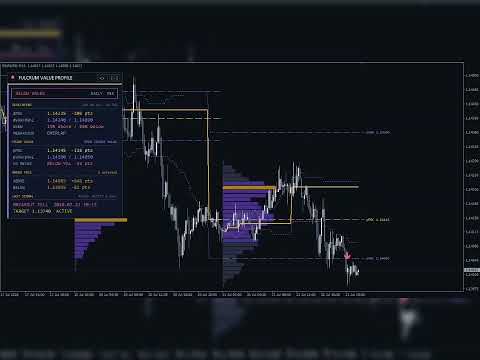
Fulcrum Value Profile is a MetaTrader 4 indicator that builds a tick-volume profile for every session, marks its Point of Control (POC) and value area, draws the developing POC/VAH/VAL as lines, tracks naked POCs and flags two value-area setups on closed bars: re-entry into the prior value area (80% rule) and acceptance outside it (breakout). It never opens, modifies or closes trades.
Quick Start
- Attach the indicator to an M5, M15 or M30 chart.
- Keep Profile Period = Daily session, or choose Custom session window and set Custom Session Start / Custom Session End in broker server time (the Market Watch clock).
- Within seconds the last 5 completed sessions are drawn as horizontal histograms and the card shows ABOVE VALUE, INSIDE VALUE or BELOW VALUE.
- Optional: enable Popup Alert on Signal or Push Notification on Signal (needs a MetaQuotes ID in Tools > Options > Notifications).
- Quick check: run the visual Strategy Tester on EURUSD M15 for two weeks; arrows appear as each signal bar closes.
How the Profile Is Built
- Session: Daily session = server day 00:00-24:00. Weekly session = Sunday to Saturday (Sunday bars join the following week). Custom session window = Custom Session Start to Custom Session End, may cross midnight; equal times mean 24 hours from that time; bars outside the window are ignored.
- Volume: each bar's tick volume is spread over the price rows between its high and low. Volume Distribution: Uniform across bar range (equal share per row) or Weighted toward close (triangular weights peaking at the close row).
- Row height: Row Height in Points when above 0; otherwise the median range of the last 20 completed sessions divided by Target Rows per Profile, rounded to the tick size. The card shows the size (ROW).
- POC: the row with the most volume (ties: the row nearest the profile centre); the price is the row middle.
- Value area: starting at the POC, the larger neighbouring row (above or below) is added until Value Area Share of the session volume is included. VAH = top of the highest row, VAL = bottom of the lowest row.
- Developing levels: for every bar, POC/VAH/VAL of the session from its first bar up to that bar.
- Prior levels: final POC/VAH/VAL of the previous completed session.
- Naked POC: the POC of a completed session older than the prior one that no bar has traded through since that session ended (the forming bar counts). It disappears once touched. The prior session POC is shown as pPOC, not as nPOC.
- History: the last History Bars to Calculate bars, starting at the first complete session.
- Timeframe: a session must hold at least 4 bars (Daily session up to H4, Weekly session up to D1); otherwise the card shows TIMEFRAME TOO HIGH and nothing is drawn.
Signals
Acceptance bars = Acceptance Time divided by the chart timeframe in minutes, rounded up, at least 1 (30 minutes = 2 bars on M15, 6 on M5, 1 on H1). Only closed bars are used; at most one signal per session. The session open is the open of its first bar compared with the prior value area.
- RE-ENTRY (80% rule): the session opened above pVAH (or below pVAL), then Acceptance bars consecutive closes are inside the prior value area. Signal: SELL after an open above, BUY after an open below. Target = prior POC. If that close is already beyond the prior POC, no signal is given that session. FAILED after the same number of consecutive closes back beyond the re-entered edge.
- BREAKOUT (acceptance outside value): the session opened inside the prior value area, then Acceptance bars consecutive closes above pVAH + Breakout Buffer x ATR (BUY) or below pVAL - Breakout Buffer x ATR (SELL). Target = broken edge plus/minus Breakout Target x prior value-area height. FAILED on any close back across the prior POC.
- States (checked on later closed bars): ACTIVE, TARGET HIT (a bar's high or low reached the target), FAILED, EXPIRED (session ended first).
- Signal Types: Re-entry and breakout, Re-entry only (80% rule), Breakout only.
- Repaint: closed-bar values never change; bar 0 updates with each tick. Arrows appear when the signal bar closes and never move. Reloading recalculates history; with automatic rows older levels can shift slightly.
Chart Legend
- Profiles (behind the candles, from the session start to the right, longest row = Profile Width): POC Row Color for the POC row, Value Area Row Color inside the value area, Outside Row Color outside it.
- Solid gold line: developing POC. Dotted violet lines: developing VAH and VAL. The lines break at each session start.
- Dashed lines across each drawn session: prior VAH and VAL (violet) and prior POC (yellow). On the current session they are labelled pVAH, pPOC and pVAL with their prices.
- Dotted amber line with the label nPOC, session date and price: a naked POC, extended to the right edge.
- Cyan up arrow (0.5 ATR below the low): BUY. Coral down arrow (0.5 ATR above the high): SELL.
- Dashed target line from the signal bar to its outcome, labelled TARGET (still ACTIVE), HIT, FAILED or EXPIRED.
Telemetry Card
Controls:
- [-] collapses the card into a 180 x 26 px pill with the LED, FULCRUM and a short state (ABOVE, INSIDE, BELOW, NO PRIOR, CLOSED, TF HIGH); [+] expands it.
- <> moves the card to the next corner (top left, top right, bottom right, bottom left).
- Not saved: a timeframe change, re-attach or input change restores Card Corner and the expanded card.
Readouts (distances in points, positive = price above the level):
- LED and badge: ABOVE VALUE (emerald, price above pVAH), INSIDE VALUE (violet), BELOW VALUE (coral, price below pVAL), NO PRIOR SESSION (first session in history), OUTSIDE SESSION (custom window closed), TIMEFRAME TOO HIGH, LOADING (waiting for history). Right side: DAILY, WEEKLY or the custom window, plus the timeframe.
- DEVELOPING (corner: ROW size and value-area share): dPOC with distance; dVAH/dVAL; SKEW = share of session volume above and below the dPOC row (green from 55% above, coral at 45% or less); MIGRATION = HIGHER (developing VAL above pVAH), LOWER (developing VAH below pVAL) or OVERLAP.
- PRIOR VALUE (corner: OPEN ABOVE VALUE, OPEN INSIDE VALUE or OPEN BELOW VALUE): pPOC with distance; pVAH/pVAL; VA METER = bar from pVAL (left) to pVAH (right) with the price position in percent and a gold tick at the prior POC; outside the value area it reads ABOVE VAH or BELOW VAL with the distance.
- NAKED POCS (corner: number untested): ABOVE and BELOW = nearest naked POC on each side with distance, or none.
- LAST SIGNAL (corner: RE+BO, RE or BO and ACCEPT with the bar count): type, direction and bar time, e.g. RE-ENTRY BUY or BREAKOUT SELL; TARGET with price and state. NO SIGNAL YET when none exists.
Alerts
When a signal bar closes (at the open of the next bar), using every channel enabled: Popup Alert on Signal, Sound Alert on Signal (alert.wav), Push Notification on Signal, Email on Signal (needs Tools > Options > Email). Text example: Fulcrum Value Profile EURUSD M15: RE-ENTRY SELL at 1.08452, target 1.08401. Alert on Naked POC Touch sends a message through the same channels when price touches a naked POC. No alerts for history or in the Strategy Tester.
Buffers for iCustom
0 Developing POC, 1 Developing VAH, 2 Developing VAL (empty on the first bar of each session), 3 Buy Signal, 4 Sell Signal (arrow price, EMPTY_VALUE otherwise), 5 dPOC (every bar), 6 dVAH (every bar), 7 dVAL (every bar), 8 Prior POC, 9 Prior VAH, 10 Prior VAL, 11 Signal Target (signal bars only). Bars outside a session are EMPTY_VALUE.
double dpoc = iCustom(NULL, 0, "Fulcrum_Value_Profile", 5, 1); // last closed bar
double buy  = iCustom(NULL, 0, "Fulcrum_Value_Profile", 3, 1); // EMPTY_VALUE = no buy
double tgt  = iCustom(NULL, 0, "Fulcrum_Value_Profile", 11, 1);
Side Effects
Chart objects prefixed FVP_, removed with the indicator. No files, global variables, timers, DLLs or web requests. Use one copy per chart.
Input Parameters
- Profile Period (Daily session).
- Custom Session Start (08:00) and Custom Session End (17:00): hh:mm server time, used only by Custom session window.
- Target Rows per Profile (50): 10-500, used when Row Height in Points = 0.
- Row Height in Points (0): fixed row height; 0 = auto.
- Value Area Share (70): 50-95 percent of session volume.
- Volume Distribution (Weighted toward close).
- History Bars to Calculate (5000): 300 or more.
- Draw Session Profiles (true) and Sessions to Draw (5): completed sessions drawn besides the current one, 0-30; also limits prior-level and target lines.
- Profile Width (35): longest row in percent of the session length, 5-100.
- Value Area Row Color, Outside Row Color, POC Row Color: profile colours.
- Show Developing Value Area Lines (true): buffers keep their values when off.
- Show Prior Session Levels (true), Show Naked POCs (true).
- Naked POC Lookback (20): completed sessions checked for naked POCs, 0-200.
- Show Signal Arrows (true): hides arrows only; signals, card and alerts keep working.
- Signal Types (Re-entry and breakout).
- Acceptance Time (30): minutes, 1-1440.
- Breakout Buffer (0.10): ATR multiple beyond the edge, 0-5.
- Breakout Target (1.0): multiple of the prior value-area height, 0.1-10.
- ATR Period (14): for the breakout buffer and arrow spacing.
- Show Signal Targets (true): target lines and labels.
- Popup Alert on Signal, Sound Alert on Signal, Push Notification on Signal, Email on Signal, Alert on Naked POC Touch (all false).
- Show Telemetry Card (true), Card Corner (Top left; also Top right, Bottom right, Bottom left), Card X Offset (16) and Card Y Offset (24) in pixels.
Typical Setups
- Intraday forex: Daily session, M15, defaults.
- London and New York only: Custom session window, Custom Session Start 08:00, Custom Session End 17:00 (shift to your server time), Signal Types = Re-entry only (80% rule).
- Swing: Weekly session on H1, Acceptance Time 240, Breakout Buffer 0.20, Sessions to Draw 3.
- Gold and indices: Daily session on M15, Target Rows per Profile 60, Breakout Buffer 0.15.
Notes and Risk
MetaTrader 4 provides tick volume, not exchange volume; the profile is an estimate built from bar ranges, so lower timeframes give finer profiles. Signals are analytical references, not trade instructions. Trading involves risk of loss; past behaviour does not guarantee future results.