Isobar Event Shield


Isobar Event Shield protects your trades from economic news in MetaTrader 5. It reads the terminal's built-in economic calendar, counts down to every release that affects your symbols and, shortly before each release, applies the protection you choose to the positions and pending orders that you or your other Expert Advisors already have. It never opens trades of its own.

Quick Start

  1. Attach the utility to one chart (one copy per terminal) and enable Algo Trading in the terminal toolbar.
  2. The base and quote currencies of the chart symbol are watched automatically. Add more in Extra Currencies to Watch (for example USD,EUR,JPY) and keep Protection Scope on Linked to protect every symbol that uses them.
  3. Choose Open Position Action and the window length (Window Opens and Window Closes, default 15 and 10 minutes).
  4. Leave the panel on the chart. When a window opens the shield acts by itself; when it closes, parked pending orders are placed again.
  5. To see it work, enter a manual event a few minutes ahead in server time, for example 14:35 USD Test, and watch the status change to SHIELD ACTIVE.

Panel Buttons

  • [-] / [+]: collapse the panel into a small pill that shows the countdown, or expand it again.
  • <>: move the panel to the next chart corner (top left, top right, bottom right, bottom left).
  • SHIELD NOW: run the position action and park pending orders immediately for the current scope (with Linked: every symbol that uses a watched currency). Orders parked this way return after the current or next release window if it starts within the Threat Meter Horizon, otherwise after Window Closes minutes.
  • FLATTEN SCOPE: close every position in scope. The first click arms it (the button shows CONFIRM FLATTEN ?), a second click within 4 seconds executes. Pending orders are not touched.
  • AUTO ON / OFF: with OFF the utility only monitors. Countdowns and alerts continue, but no position or order is changed when a window opens.
  • IMPACT HIGH / MED+ / ALL: minimum importance used by the radar, the windows, the alerts, the chart lines and the lock flags.
  • SYMBOL / LINKED / ACCOUNT: protection scope, explained below.
  • HARD ON / OFF: hard blackout, explained below. It works independently of AUTO.

Button changes stay in effect while the utility runs, including after a timeframe or symbol change. Changing inputs or attaching it again restores the input values.

Panel Readouts

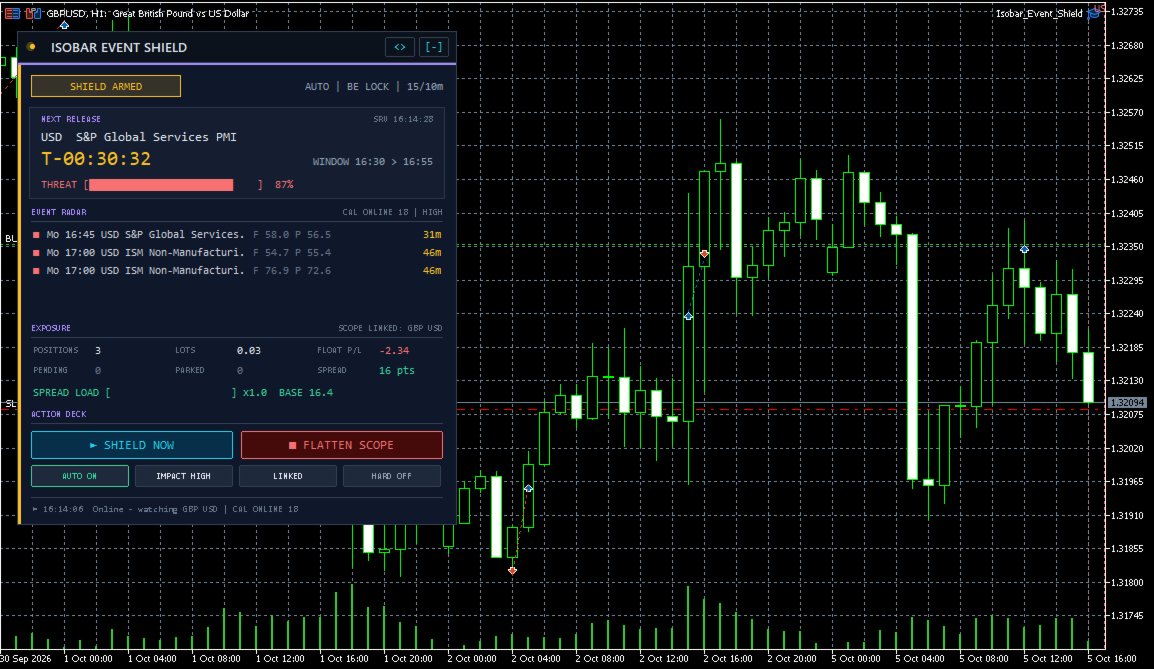
  • Status badge: ALL CLEAR (no window soon), SHIELD ARMED (the next window starts within the alert lead time), SHIELD ACTIVE (a window is open), WINDOW OPEN (a window is open while AUTO is OFF), MONITOR ONLY (AUTO is OFF), ALGO TRADING OFF (the shield cannot act until Algo Trading is enabled), NO EVENT FEED (calendar unavailable and no manual events), TESTER MODE. The LED and the left accent bar use the status color, and the LED blinks while a window is open.
  • Line next to the badge: AUTO or MANUAL, the position action and the window minutes, for example 15/10m.
  • NEXT RELEASE card: currency and event name, a large countdown (T- before the release, T+ after it), the server clock, the window times and a THREAT meter that rises from 0% (window still Threat Meter Horizon minutes away) to 100% (window open).
  • EVENT RADAR: the next five releases. Each row shows an importance square (red high, amber moderate, grey low), day, time, currency, name, values (F forecast, P previous, A actual once published) and the time left. LIVE means its window is open. The corner shows the feed status (CAL ONLINE and the number of events, CAL ERROR and an error code, or TESTER: MANUAL FEED) and the impact filter.
  • EXPOSURE: positions, lots, floating profit including swap, pending orders and parked orders, counted for the current scope and magic filter, plus the chart symbol's spread in points. SPREAD LOAD compares the spread with its normal level, which is learned outside windows (x3.0 means three times normal; BASE is the normal spread).
  • Bottom line: the last action or alert.
  • On the chart: a dotted vertical line with the event name at each upcoming release, and a shaded zone covering its window (red high, amber moderate, slate low). Labels that would overlap are stacked, and hovering a line shows the event and its time.

What Happens in a Window

When a window opens, the Open Position Action runs once per release on every position in scope that matches the magic filter:

  • Alert only (no position changes).
  • Lock winners at breakeven + buffer: positions that are at least Minimum Profit Before Breakeven Lock points in profit get their stop loss moved to entry plus Breakeven Lock Buffer. A better existing stop is kept, stop and freeze levels are respected, and losing positions keep their own stops.
  • Reduce exposure by %, then lock breakeven: closes Exposure Reduction percent of each position (rounded down to the volume step and skipped if the remainder would fall below the minimum lot), only once per window, then applies the breakeven lock.
  • Bank positions that are in profit: closes positions whose profit plus swap is positive.
  • Close every position in scope.

With Park Pending Orders on, pending orders in scope are removed and stored with all their settings. After the window they are placed again unchanged. An order is dropped, with a log entry, if its price was crossed or it expired during the window. If the market is closed, the connection is lost or Algo Trading is off, the order is retried every 60 seconds. With Re-Arm Parked Orders off, removed orders are cancelled for good. Parked orders are saved in MQL5\Files and are placed again when the utility is attached to the same symbol after a restart.

Hard blackout: while a window is open, every new position on an affected symbol is closed immediately (on netting accounts only the added volume) and every new pending order is parked until the window ends. This covers manual trades and other Expert Advisors that match the magic filter. Without it, positions opened during a window are not touched.

Alerts are sent before each release (Pre-Release Alert Lead), when the shield acts, when a window opens while AUTO is OFF, when a new entry is rejected, and when parked orders are placed again.

Protection Scope

  • Symbol: only the chart symbol.
  • Linked: every symbol whose base or quote currency is the currency of the release.
  • Account: every position and order on the account.

Magic Filter: -1 for all trades, 0 for manual trades only, any other value for the Expert Advisor with that magic number.

Manual Events

Enter events separated by semicolons, in server time. Use yyyy.mm.dd hh:mi CCY Label for one date, or hh:mi CCY Label to repeat every day. CCY is a three-letter currency or ALL for the whole account. Manual events always count as high importance and are the only feed in the Strategy Tester.

Example: 2026.10.09 15:30 USD FOMC Minutes; 21:55 ALL Rollover

Pausing Your Own Expert Advisors

Isobar publishes terminal global variables that any Expert Advisor can read: ISOBAR_LOCK (1 during any window), ISOBAR_LOCK_ plus each watched currency (for example ISOBAR_LOCK_USD), ISOBAR_LOCK_ plus the chart symbol (for example ISOBAR_LOCK_EURUSD) and ISOBAR_NEXT_SEC (seconds to the next release, -1 if none). They are deleted when the utility is removed. Add this line before the entry logic of your EA:

if(GlobalVariableCheck("ISOBAR_LOCK") && GlobalVariableGet("ISOBAR_LOCK") > 0.5) return;

Typical Setups

  • Protect manual trades (defaults): Lock winners at breakeven + buffer, Park Pending Orders on, scope Linked.
  • No open trades around high-impact news (for example a prop firm rule): Window Opens 2, Window Closes 2, Close every position in scope, Hard Blackout on, scope Entire account.
  • Pause another EA without touching its trades: Alert only (no position changes), Park Pending Orders off, and read ISOBAR_LOCK in that EA.
  • Halve the risk on a basket: Reduce exposure by %, then lock breakeven, Exposure Reduction 50, Extra Currencies to Watch USD,EUR,GBP,JPY.

Input Parameters

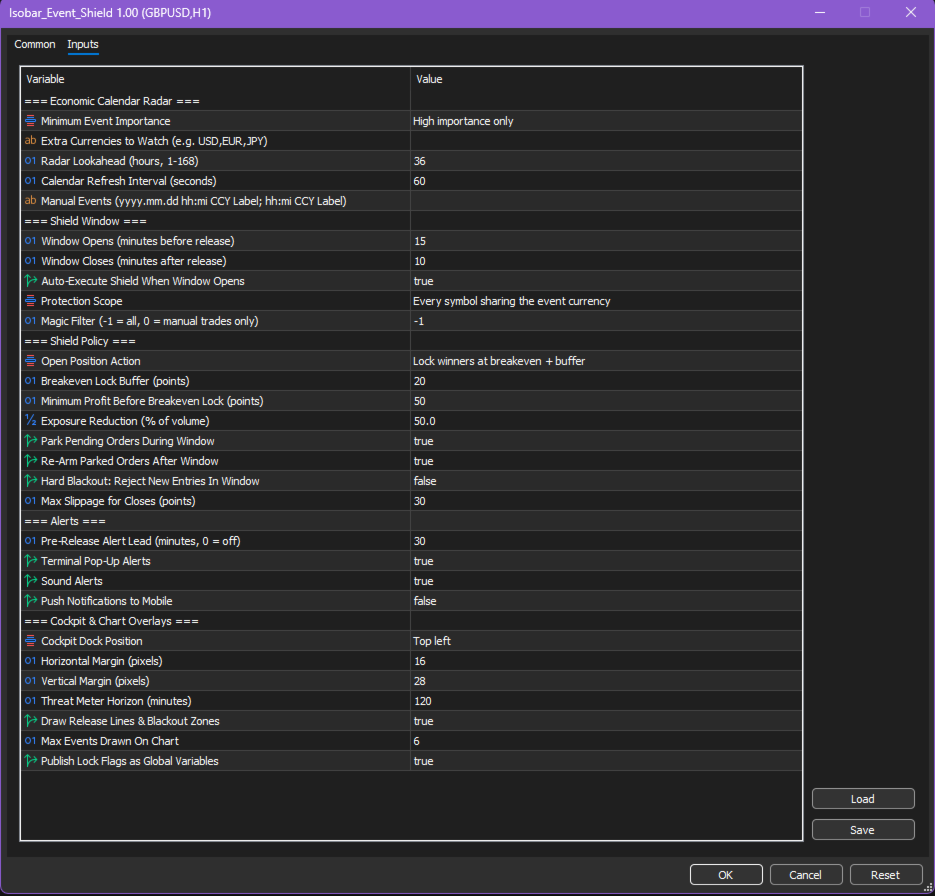
Economic Calendar Radar

  • Minimum Event Importance (High importance only): the other options are Moderate and high importance, and All events.
  • Extra Currencies to Watch (empty): comma-separated currency codes.
  • Radar Lookahead (36): hours ahead to load, 1 to 168.
  • Calendar Refresh Interval (60): seconds between calendar reloads, minimum 15.
  • Manual Events (empty): see Manual Events.

Shield Window

  • Window Opens (15) and Window Closes (10): minutes before and after the release, 0 to 240.
  • Auto-Execute Shield When Window Opens (true): starting value of the AUTO button.
  • Protection Scope (Every symbol sharing the event currency): starting value of the scope button. The other options are Chart symbol only and Entire account.
  • Magic Filter (-1).

Shield Policy

  • Open Position Action (Lock winners at breakeven + buffer).
  • Breakeven Lock Buffer (20) and Minimum Profit Before Breakeven Lock (50): in points.
  • Exposure Reduction (50): percent of volume closed by the reduce action.
  • Park Pending Orders During Window (true) and Re-Arm Parked Orders After Window (true).
  • Hard Blackout: Reject New Entries In Window (false): starting value of the HARD button.
  • Max Slippage for Closes (30): points.

Alerts

  • Pre-Release Alert Lead (30): minutes before a release, 0 turns it off.
  • Terminal Pop-Up Alerts (true), Sound Alerts (true), Push Notifications to Mobile (false; requires a MetaQuotes ID in the terminal notification settings).

Cockpit & Chart Overlays

  • Cockpit Dock Position (Top left), Horizontal Margin (16) and Vertical Margin (28): panel position in pixels.
  • Threat Meter Horizon (120): minutes covered by the THREAT meter and by SHIELD NOW parking.
  • Draw Release Lines & Blackout Zones (true) and Max Events Drawn On Chart (6).
  • Publish Lock Flags as Global Variables (true).

Notes

  • Works on hedging and netting accounts and on any symbol whose currencies appear in the calendar (forex, metals, indices, energies).
  • Every request is checked against stop and freeze levels, volume limits and OrderCheck before it is sent. No DLLs and no web requests are used, and all chart objects are removed with the utility.

Risk Disclaimer

Isobar Event Shield is a risk management tool. It cannot prevent slippage, gaps or spread widening around news and does not guarantee profits or the avoidance of losses. Test your settings on a demo account before using them on a live account.
Recommended products
Entry Points Pro 10 — the legend of the MQL5 Market. Three years in the Market's Top-3. 595 reviews across two versions. Over 31,000 demo downloads. Thousands of traders open their charts with it every morning. Built and traded by an author who has been in the market since 1999. Version 10 is the biggest rebuild in the indicator's history: I read every review from five years — and built the answers into the code. WHAT IT DOES It shows the entry point in advance — strictly without repainting. The
MT5 Trade Copier Transmitter & Receiver EA A flexible MetaTrader 5 trade copier system designed to transmit and mirror positions across multiple broker accounts with accurate symbol mapping, including gold/XAU instruments. It supports reliable snapshot-based synchronization, position lifecycle tracking, and broker-specific symbol translation so trades can be copied even when brokers use different contract names or suffixes. Features Copies live positions from transmitter to receiver in near rea
The Stop Loss Manger - SL Mange With the Stop Loss Manager you can finally sleep peacefully while it effectively manages your risk in stock market trading. Simply set your individual stop loss limits and let the manager trade for you. Never worry about losses again - the Stop Loss Manager takes care of it for you! Get the ultimate support for your trading now and maximize your profits with ease. Join the community of successful traders who swear by Stop Loss Manager today. Function overview: 1.
Alpha xauusd Engine JcoWorld is a professional, institutional-grade Expert Advisor built exclusively to exploit high-probability momentum and trend-continuation setups on Gold (XAUUSD) . Unlike generic EAs, this system combines Multi-Timeframe Trend Analysis (H1) with Precision Entry Execution (M15) , filtered by dynamic RSI momentum and Candle Price Action. Key Features No Dangerous Strategies: NO Martingale, NO Grid, NO Hedging, and NO Averaging. Every trade has a fixed Stop Loss and Take P
BigPlayerBars
Paulo Henrique Faquineli Garcia
Se você já ouviu falar do Método de  Wyckoff, Análise de dispersão de volume, etc., com certeza chegou até aqui para buscar o indicador que lhe faltava!! Nosso indicador é capaz de lhe mostrar a dispersão de volume negociado pelos grandes players durante todo o período de negociação! E o grande diferencial deste tipo de abordagem é a capacidade que este indicador possui de lhe mostrar onde está armado o "ACAMPAMENTO" dos BigPlayers e, assim, tirar o melhor proveito em seus trades, entrando junt
Smart FVG Stats
- Md Rashidul Hasan
5 (1)
The  Smart FVG Statistics Indicator  is a powerful MetaTrader 5 tool designed to automatically identify, track, and analyze Fair Value Gaps (FVGs) on your charts. Love it? Hate it? Let me know in a review! Feature requests and ideas for new tools are highly appreciated. :) Try "The AUDCAD Trader": https://www.mql5.com/en/market/product/151841 Key Features Advanced  Fair Value Gap  Detection Automatic Identification : Automatically scans for both bullish and bearish FVGs across specified histo
FREE
Delta Profile Volume
Teresinha Moraes Correia
Technical Description of the Indicator – Delta Profile for MetaTrader 5 The Delta Profile is an indicator developed for MetaTrader 5 focused on detailed analysis of volume flow within a defined range of candles. It organizes and displays information about the imbalance of positive volumes (associated with upward movements) and negative volumes (associated with downward movements) at different price levels. The result is a clear view of the chart points where the highest concentration of trades o
Arrow Micro Scalper - an indicator designed for scalping and short-term trading, integrated into any chart and financial instrument (currency, crypto, stocks, metals). In its work, it uses wave analysis and a trend direction filter. It is recommended to use on time frames from M1 to H4. How to work with the indicator. The indicator contains 2 external parameters for changing the settings, the rest are already configured by default. Large arrows indicate a change in trend direction, blue - the
CV Guardian Service – Professional MT5 Monitoring & Maintenance System CV Guardian Service is a professional background service for MetaTrader 5 designed for continuous monitoring, diagnostics, and technical maintenance of your MT5 environment. The service runs without a chart in the background and monitors key operational conditions including terminal health, broker connectivity, system resources, execution quality, charts, Strategy Tester resources, and potential technical risks. Features Con
Pipfinite creates unique, high quality and affordable trading tools. Our tools may or may not work for you, so we strongly suggest to try the Demo Version for MT4 first. Please test the indicator prior to purchasing to determine if it works for you. We want your good reviews, so hurry up and test it for free...we hope you will find it useful. Combo Energy Beam with Swing Control Strategy: Confirm swing pullback signals Watch Video: (Click Here) Energy Beam with Trend Laser Strategy: Confirm Tre
Pattern Recognition EA
Claudiu-georgian Zavera
Pattern Recognition EA - From Learn to Earn. The market repeats itself. This EA finds every past repeat of the current candle sequence - and lets history vote the direction. ONE SHAPE. EVERY REPEAT IN HISTORY VOTES. The last N candles on your signal timeframe form a shape. The EA scans the history you choose - a fixed number of bars or everything your broker provides - for the SAME shape, and checks what happened next, every single time. Only when enough repeats exist AND a clear majority of t
Contact me after payment to send you the user manual PDF file. Download the MT4 version here. Volume Profile Indicator A functional and useful tool that can improve your trading plan. This indicator calculates volume in price levels(typical volume indicator shows only candle volumes). With the volume of price levels, you can identify important areas that have the potential to reverse. You can also see the volume of support and resistance levels and decide on them. Using volume profiles along
Money Flow Profile MT4  HERE   Use Guide Here our more valuable tools SMC Trend Trading   ,  Easy SMC Trading  ,  Institutional SMC Architect Volume Analysis Tools  ,  Volume flow Profile  ,  Market volume profile  , FVG with Volume  , Liquidity Heatmap Profile  ,  Volume Spread Analysis  Master Edition is a professional-grade analytical tool designed to visualize market structure through the lens of volume and money flow. Unlike standard volume indicators, this tool displays a Daily Vo
True TrendLines MT5 - Smart Trend Detection & Alerts Overview True TrendLines MT5 is a professional-grade technical analysis tool that automatically identifies and plots high-probability trend lines on your MetaTrader 5 charts. Using a sophisticated swing point detection algorithm, it helps traders visualize key market structure and potential reversal points with precision. Key Features Automatic Trend Line Detection Identifies valid swing highs and lows based on your chosen strength paramet
FREE
Volume Profile Utility
AL MOOSAWI ABDULLAH JAFFER BAQER
Volume Profile Discover where the market really trades. Make decisions based on volume, not guesswork. Volume Profile is a professional MetaTrader utility that analyzes trading activity across different price levels, allowing traders to identify where the highest concentration of market participation has occurred. Instead of focusing only on price movement over time, Volume Profile reveals the price levels where buyers and sellers have been most active, providing valuable insight into market str
The VWAP indicator is our version of the popular Volume-Weighted Average Price indicator. The VWAP is the ratio between the value traded (price multiplied by the number of volume traded) and the total volume traded over a specific time period. As a result, it measures the average price of the instrument much better than the simple moving average. Although there are many ways to use the VWAP, most investors use it to calculate the daily average.  The indicator works in five modes: Moving  - In
The Multi Pairs Forex Indicator is an   advanced trading too l that allows traders to track and analyze the performance of   multiple currency pairs in real-time   on a single chart. It consolidates data from various Forex pairs, providing an at-a-glance overview of market conditions across different currencies and helps you save time. Useful for various trading styles, including scalping, day trading, and swing trading. Whether you're monitoring major pairs like EUR/USD, GBP/USD, or more exoti
Matrix Currency
Augusto Martins Lopes
Matrix Currency – Multi-Timeframe Analysis Tool The Matrix Currency is an advanced indicator designed to analyze currency strength in the Forex market. It provides efficient monitoring and strategic support for traders seeking clear and actionable insights. Key Features Multi-Timeframe Analysis : Simultaneously monitors multiple timeframes (from M1 to MN1) with real-time updates, displayed in an intuitive matrix format. Alert System : Customizable notifications via pop-up, email, and mobile devi
FREE
Fair Value Gap Volume Profile Pro This indicator detects price imbalances (Fair Value Gaps) on the chart and displays the volume distribution inside each gap using data from a lower timeframe. It is designed for traders who use institutional price action concepts and want to understand where volume was concentrated during the formation of each gap. What is a Fair Value Gap A Fair Value Gap (FVG) is a three-candle price imbalance where a candle moves so strongly that it leaves a range untouched
CVD SmoothFlow Pro
Thalles Nascimento De Carvalho
CVD SmoothFlow Pro - Unlimited Volume Analysis for Any Asset! CVD SmoothFlow Pro is the ultimate solution for traders seeking precise and unlimited volume analysis. Utilizing Cumulative Volume Delta (CVD) with advanced noise filtering, the Pro Version provides the flexibility and precision needed to trade any financial asset. What does CVD SmoothFlow Pro offer? Clear Analysis : Filters out noise and highlights significant volume movements across any financial asset. ️ Precise Calculation
The News Filter MT5
Leolouiski Gan
4.78 (23)
This product filters   all expert advisors and manual charts   during news time.  It is able to remove any of your EA during news and automatically reattach them after news ends. This product also comes with a complete  order management system   that can handle your open positions and pending orders before the release of any news. Once you purchase   The News Filter , you will no longer need to rely on built-in news filters for future expert advisors, as this product can filter them all from her
GENESIS SYNDICATE PRIME — The 3-in-1 Institutional Algo "Trade like the Banks. Don't become their Liquidity." > Engineered to simulate institutional trading footprints using Advanced Smart Money Concepts (SMC). Are you tired of retail strategies that get hunted by institutional players? Genesis Syndicate Prime- is a revolutionary 3-in-1 algorithm designed to track, identify, and trade alongside the "Smart Money." It features three independent, powerful trading engines built into a single, hi
Fibaction
Abdelkhalek Orabi
Indicator Name: Fibaction – price action candle Detector Description: Fibo Signal Boxes is a powerful Smart Money Concept (SMC)-inspired indicator that auto-detects price action candles. bullish hammers and shooting stars, then draws precise Fibonacci entry zones and multiple take-profit levels directly on the chart. as for the SL personally i use 40 pips rules  Key Features: Detects bullish hammer and shooting star reversal candles. Automatically draws Fibonacci entry and TP boxes. as
Demavend EA MT5
Miroslav Rubes
Introducing Revolutionary Self-Learning EA with Monte Carlo Simulation This Expert Advisor (EA) combines advanced trading strategies with state-of-the-art risk management. With integrated Monte Carlo simulation, it elevates your trading to a whole new level of safety and profitability. Main Features and Benefits Adaptive Trading Strategy Dynamic threshold values: EA automatically adjusts its trading parameters based on market conditions. Multi-indicator filtering: Uses ADX, ATR, RS
FREE
Market Profile TPO  See where the market spent its time — not just where it went. Market Profile TPO — multi-period Time-Price-Opportunity profiles with POC, Value Area, Initial Balance, Single Prints, dual volume overlay, and merge control — all on-chart, MT5. Stock chart shows you price. Volume histogram shows you money. Neither shows you where time actually accumulated — and time is what institutions use to read market balance and imbalance. Market Profile TPO brings that auction-theory view
X Forts
Denis Chebatarev
5 (1)
Trading robot X Forts The scalper Forts EA is designed for futures trading on the Russian futures futures market (RTS, Sberbank, Gazprom, Ruble, etc.). The main instruments are futures on the RTS, SBRF index. Recommended timeframes M1-M6. The EA does not use averaging. Each trade has its own stop loss.  The size of the required GO for tests and trading on the selected instrument is taken from the instrument code.  Trading robot settings SL - stop loss Lots - lot for trading Pos_Market - numbe
ARE Quantum Liquidity
Jakir Hussain Shaikh
ARE Quantum Liquidity Institutional Smart Money Engine ARE Quantum Liquidity is an advanced Smart Money Concepts (SMC) indicator designed to help traders identify institutional liquidity movements and high-probability trading opportunities. The indicator analyzes market structure in real time and automatically detects important price action elements used by professional traders, including Break of Structure (BOS), Change of Character (CHoCH), Order Blocks, Fair Value Gaps (FVG), Liquidity Swe
TickBurstSpikeEA
Motohiro Umehara
TickBurstSpikeEA Tick Acceleration & Burst Detection Scalping EA TickBurstSpikeEA is a high-speed Expert Advisor designed to detect rapid price acceleration directly from real-time tick activity without waiting for candle confirmation. The EA analyzes: tick direction burst speed acceleration price flow expansion to react quickly to short-term spikes and burst movements often seen on highly volatile symbols such as XAUUSD and BTCUSD. Main Features Feature Description Tick Acceleration Detection A
Your Trend Friend
Luigi Nunes Labigalini
5 (1)
The trend is your friend! Look at the color of the indicator and trade on that direction. It does not  repaint. After each candle is closed, that's the color of the trend. You can focus on shorter faster trends or major trends, just test what's most suitable for the symbol and timeframe you trade. Simply change the "Length" parameter and the indicator will automatically adapt. You can also change the color, thickness and style of the lines. Download and give it a try! There are big movements w
HA Metals Flow Chart is a visual MetaTrader 5 indicator designed to make the flow of gold and silver easier to read. It replaces the standard chart display with synthetic Heikin Ashi candles and combines flow classification, normalized momentum, confirmed market structure events and a compact dashboard in a single interface. The indicator is intended for discretionary chart analysis. It does not open, modify or close trades. MAIN FEATURES - Synthetic Heikin Ashi chart for a cleaner view of direc
FREE
Buyers of this product also purchase
Trade Assistant MT5
Evgeniy Kravchenko
4.43 (216)
It helps to calculate the risk per trade, the easy installation of a new order, order management with partial closing functions, trailing stop of 7 types and other useful functions. Additional materials and instructions Installation instructions - Application instructions - Trial version of the application for a demo account Line function -   shows on the chart the Opening line, Stop Loss, Take Profit. With this function it is easy to set a new order and see its additional characteristics bef
Forex Trade Manager MT5
InvestSoft
4.98 (685)
Trade Manager MT5 is an advanced position size calculator and trade management tool for MetaTrader 5, designed to help traders plan trades faster, control risk more precisely, and manage open positions directly from the chart. It combines order placement, risk based lot calculation, Stop Loss and Take Profit management, Break Even, Trailing Stop, Partial Close, Equity Protection, and external trade management in one panel. Whether you trade forex, indices, metals, commodities, crypto, or future
================================================================================ POC BREAKOUT - V20.72. Full Professional Grade Toolkit ================================================================================ POC Breakout is a full MetaTrader 5 trading dashboard for discretionary traders who want breakout signals, Point of Control (POC) context, volume profiles, order flow, market structure, news, alerts, and advanced trade planning in one professional workspace. Attached directly to you
Telegram to MT5 MultiChannel Copier
Sergio Marquez Uroz
4.61 (18)
Telegram to MT5 Multi-Channel Copier   automatically copies trading signals from your Telegram channels straight to MetaTrader 5. No bots, no browser extensions, no manual copying. A signal arrives in Telegram and the EA opens the trade in your terminal within seconds. And before you copy a channel, the built-in backtester shows you what that channel would have done in your account. The product has two components: a Windows application that listens to your Telegram channels, and this Expert Advi
TradePanel MT5
Alfiya Fazylova
4.88 (170)
Trade Panel is a multi-functional trading assistant. The app contains over 50 trading functions for manual trading and allows you to automate most trading tasks. Application instructions: https://www.mql5.com/en/blogs/post/756482 Trial version of the application for a demo account: https://www.mql5.com/en/blogs/post/750865 How to install the application: https://www.mql5.com/en/blogs/post/756239 How to test the application in visual mode: https://www.mql5.com/en/blogs/post/770277 How to install
Copy Telegram signals with your own trading rules Telegram to MT5 Signal Trader automatically copies text-based trading signals from public and private Telegram channels and groups into MetaTrader 5. Manage multiple providers and MT5 accounts from one desktop app, with individual risk and trade settings for each provider . No Telegram bot or API setup needed for copying. Simply sign in with your own Telegram account by phone or QR code and select the channels or groups you have already joined. Y
Grid Manual MT5
Alfiya Fazylova
4.73 (22)
Grid Manual is a trading panel for working with grid strategies. The utility is universal, has flexible settings and an intuitive interface. It works with a grid of orders not only in the direction of averaging losses, but also in the direction of increasing profits. The trader does not need to create and maintain a grid of orders, the utility will do it. It is enough to open an order and the "Grid manual" will automatically create a grid of orders for it and will accompany it until the close. F
Power Candles Strategy Scanner - Self-Optimizing Multi-Symbol Setup Finder Self-optimizing settings work one chart at a time, and finding where they pay off right now means opening chart after chart. Power Candles Strategy Scanner runs the same self-optimizing engine as the Power Candles indicator on every symbol in your Market Watch, side by side. One panel ranks where it pays off: the winning strategy per symbol, its optimized Stop Loss and Take Profit. An alert fires the moment a fresh signal
Footprint Chart Pro — Professional OrderFlow EA for MetaTrader 5 Version 6.34 | Professional tool for real traders | Institutional-Grade Visualization DEMO USERS - PLEASE SELECT EVERY TICK / REAL TICK WHEN TESTING AND YOU HAVE DOWNLOADED HISTORICAL DATA. IF YOU SEE A WAITING SCREEN AND IT IS NOT DOWNLOADING, IT MEANS YOU HAVE LOW HISTORICAL DATA. TRY 1 MIN AND 5 MIN FIRST ON 1 DAY DATA. ONE DAY DATA SHOULD BE THE NEWEST AND MOST CURRENT DATE. PLEASE WAIT UNTIL THE MARKET HAS ROLLED OVER PERIOD.
FarmedHedge Pair Trading Dashboard
Tanapisit Tepawarapruek
5 (5)
Farmed Hedge Yield Farming | All Markets (Manual - Hybrid - Semi/Automated EA) VERIFIED TRADING RESULTS - Farmed Hedge Yield Axi Copy:  https://www.mql5.com/en/signals/2356376 - Farmed Hedge Yield Exn Copy:   https://www.mql5.com/en/signals/2356404 - Farmed Hedge Yield V Copy:  https://www.mql5.com/en/signals/2357156 IMPORTANT NOTICE: FarmedHedge is a MANUAL-FOCUSED TRADING UTILITY ,not a fully automated EA. Results shown on this Signal include manual trades and overall strategic management.
Copy your MT5 trades to Interactive Brokers You keep using MT5. Every order you open or close is sent to your IB account. In real time. No coding. No changes to your strategy or EA. Try it first Rent 1 month: $30. Test on a live or paper account. What it does Real-time copying: same direction, reverse, or one side only. Map any MT5 symbol to any IB symbol. Set a lot ratio for each. Forex, Futures, Stocks, CFDs, Metals and Crypto. Position sync: both accounts checked, any difference fixed. Optio

Trading Chaos Expert
Hennadii Stanilevych
5 (11)
This software has no equals in the world and represents a universal trade "console" covering trading signals, automated market entry, setting of Stop Loss and Take Profit, as well as Trailing Profit for multiple trades at the same time in a single open window. Intuitive control of the Expert Advisor in "three clicks" ensures a comprehensive use of all its functions on different computers, including tablets PCs. Interacting with additional signal indicators that mark the chart to give a real mark
Keep the indicator you trust. Automate the work around it. Already have an MT5 indicator you rely on, but still need to watch the chart, wait for a signal, calculate the lot, place the order and manage every position by hand? Stratiora Signal Engine MT5 was built to close that gap. It can turn compatible Buy and Sell buffer signals into a complete automated workflow: entry, volume calculation, Stop Loss, Take Profit, filters, position management and account protection. Instead of ordering a dif
EA Overfitter
Stephen J Martret
5 (1)
That backtest looks great. But will it still be making money tomorrow, next week, next month? EA Overfitter re-runs your EA on 100 price histories it has never seen. One score tells you if the edge is real. A backtest tells you what an EA did on one price history — the one that happened to occur. What you cannot tell from it is how much of that result was the strategy and how much was the particular path. EA Overfitter answers that. It builds up to 100 synthetic price histories your EA has n
Trade Indicator Assistant   is a powerful MT5 utility designed to turn indicators into automated trading systems. Its main feature is the ability to automatically detect an indicator’s   BUY and SELL signal buffers , without requiring you to know the buffer numbers, search through indicator settings, or modify the indicator source code. Bonus Indicator:   After purchasing Trade Indicator Assistant, contact me to receive   Trade Signal Pro   completely free as a bonus indicator. [Download Demo V
Welcome to ENTRY IN THE ZONE AND SMC MULTI TIMEFRAME  SPECIAL BENEFIT / FOR OUR MQL5 CUSTOMERS FREE ACCESS TO THE NEW TOOL  — COMING SOON — Learn more on our official website  : https://www.fableedge.net Entry In The Zone and SMC Multi Timeframe is a real-time market analysis tool based on Smart Money Concepts (SMC), designed to analyze market structure, price direction, and key trading zones. It supports both Single-Timeframe Analysis and Multi-Timeframe Analysis, providing a clearer view of th
Quant Panel
Kevin Craig E Gittins
QUANT PANEL Independent per-algo analytics, protected MT5 history and professional PDF reporting Quant Panel is built for traders who run several Expert Advisors or strategies on one MT5 account and need to know how each algo is actually performing. Instead of treating the terminal as one combined portfolio, Quant Panel groups closed positions by EA comment or magic number and calculates every strategy independently. It gives you one clear dashboard for comparing algos, finding weak systems and
YuClusters
Yury Kulikov
4.93 (43)
Attention: You can view the program operation in the free version  YuClusters DEMO .  YuClusters is a professional market analysis system. The trader has unique opportunities to analyze the flow of orders, trade volumes, price movements using various charts, profiles, indicators, and graphical objects. YuClusters operates on data based on Time&Sales or ticks information, depending on what is available in the quotes of a financial instrument. YuClusters allows you to build graphs by combining da
Premium Trade Manager - The Trade Panel With a Coach Built In Premium Trade Manager puts a trading coach inside your chart, with a full execution engine underneath it. Set the trade up the way you always do, then let Max, your AI trading coach, read that exact setup against your live account and give you a straight verdict before you commit: is the stop disciplined, is the risk sane, is a high-impact release minutes away, are you near a prop-firm limit. Below sits the engine that runs everything
Binance Quotes Updater
Andrey Khatimlianskii
5 (1)
This service is designed to stream online cryptocurrency quotes   from the Binance exchange to your MetaTrader 5 terminal. You will find it perfectly suitable if you want to see the quotes of cryptocurrencies in real time — in the Market watch window and on the MetaTrader 5 charts. After running the service, you will have fully featured and automatically updated  cryptocurrency charts in your MetaTrader 5. You can apply templates, color schemes, technical indicators and any non-trading tools to
Mentfx Mmanage mt5
Anton Jere Calmes
4.25 (8)
The added video will showcase all functionality, effectiveness, and uses of the trade manager. Drag and Drop Trade Manager. Draw your entry and have the tool calculate the rest. Advanced targeting and close portions of a trade directly available in tool (manage trades while you sleep). Market order or limit order on either side with factored spread. Just draw the entry, the tool does the rest. Hotkey setup to make it simple. Draw where you want to enter, and the stop loss, the tool calculates al
Timeless Charts
Samuel Manoel De Souza
5 (8)
Timeless Charts is an all-in-one trading utility for professional traders. It combines custom chart types such as Seconds Charts and Renko with advanced order flow analysis using Footprints , Clusters , Volume Profiles , VWAP studies, and anchored analysis tools for deeper market insight. Trading and position management are handled directly from the chart through an integrated trade management panel , while Market Replay and Virtual Accounts provide environments for practicing trading skills and
The product will copy all telegram signal to MT5 ( which you are member) , also it can work as remote copier.  Easy to set up, copy order instant, can work with almost signal formats, image signal,  s upport to translate other language to English Work with all type of channel or group, even channel have "Restrict Saving Content", work with  multi channel, multi MT5 Work as remote copier: with signal have ticket number, it will copy exactly via ticket number. Support to backtest signal. How to s
EasyInsight AIO MT5
Alain Verleyen
4.92 (12)
EASY Insight AIO – All-In-One Power for AI-Driven Trading Want to skip the setup and start scanning the entire market – Forex, Gold, Crypto, Indices, and even Stocks – in seconds? EASY Insight AIO is the complete plug-and-play solution for AI-powered trade analysis. It includes all core Stein Investments indicators built-in and automatically exports clean, structured CSV files – perfect for backtesting, AI prompts, and live market decision-making. No need to install or configure indicators manu
MT5 Trading Deck
Manuel Michiels
5 (2)
One button. One trade. MT5 Trading Deck is a hotkey trading panel for MetaTrader 5 that turns the platform into a keyboard-driven execution cockpit. Stop loss, take profit and lot size are pre-calculated for every key; the moment you press, a market order is live on the broker. A complete technical user manual is attached in the product Comments section. It documents every input parameter, the full hotkey map, the recommended Stream Deck XL layout, and the advanced workflows for Pre-Limit orders
VERON LINK MASTER MT5 — Real-time Multi-Account Dashboard & Sync Controller Veron Link Master is a high-performance, centralized monitoring and synchronization control center designed for MetaTrader 5. Built specifically for traders managing multiple accounts, prop firm portfolios, grid/martingale EAs, or client networks, Veron Link Master provides a seamless, ultra-modern dark-themed GUI dashboard directly on your MT5 terminal. Pricing Structure: Take advantage of our early-bird pricing before
FUTURES ORDERFLOW FOOTPRINT CHART Professional OrderFlow EA for MetaTrader 5 Version 1.01| Professional tool for real traders | Institutional-Grade Visualization STRATEGY TESTER USERS - PLEASE SELECT EVERY REAL TICK WHEN TESTING AND YOU HAVE DOWNLOADED HISTORICAL DATA. IF YOU SEE A WAITING SCREEN AND IT IS NOT DOWNLOADING, IT MEANS YOU HAVE LOW HISTORICAL DATA. TRY 1 MIN AND 5 MIN FIRST ON 1 DAY DATA. ONE DAY DATA SHOULD BE THE NEWEST AND MOST CURRENT DATE. PLEASE WAIT UNTIL THE MARKET HAS ROL
Custom Timeframe Manager Pro: Unlimited Timeframes in MetaTrader 5 Standard terminal settings often hide important price movement details. By limiting analysis to classic periods only, a trader risks missing trend inception points and true volatility levels. Custom Timeframe Manager Pro is a professional utility that expands the boundaries of MetaTrader 5. Create any custom periods, including fractional and exotic ones, and work with them exactly like standard terminal charts. Available period
EA Slipstream
Stephen J Martret
5 (1)
Your backtest filled every order at the price it asked for. Your account does not. EA Slipstream measures what execution costs your EA, using your own fills, slippages and spreads to show you the true performance of your EA. A backtest prices every trade at the level the EA named. In live trading a pending order fills at whatever price is available when it triggers, a stop closes wherever the market is when it is hit, and the spread at that moment is whatever the account was quoting. The differ
Veron Link Slave – Synchronized Grid, Martingale & Breakout Management Short Description Advanced synchronization tool designed to manage Grid, Martingale, and Breakout EAs. Automatically sends close-basket signals to the Master account upon profit target completion, minimizing slippage across different brokers. Full Description Veron Link Slave is a specialized utility developed to enhance the execution efficiency and risk management of multi-account or multi-broker trading setups. It is desig
More from author
EA Budak Ubat MT5
Syarief Azman Bin Rosli
EA Budak Ubat MT5 is an automated grid-trading Expert Advisor designed for MetaTrader 5. It combines technical trend analysis, dynamic volatility scaling, and multi-layered risk management to trade ranging and trending market conditions. Optimized for the M5 timeframe on major forex pairs and metals (XAUUSD / Gold). ### Key Features • 4 Selectable Analysis Methods:   1. Classic Candle: Directional momentum from candle patterns.   2. SMA20: 20-period Simple Moving Average crossover.   3. Allig
EA Budak Ubat
Syarief Azman Bin Rosli
4 (3)
Download Trial EA Budak Ubat Channel Limited Time Price! The price will increase by 10 USD after every 10 purchases! How it works When the EA is active, it will analyze the chart based on the Execution Mode parameter. If there are no existing positions on the chart, the EA will enter a trade based on the parameter. If the trend is bullish, it will enter a buy trade and if it is bearish it will enter a sell trade. And it will also set a Stop loss order at a certain distance from the opened trad
Indi RBO
Syarief Azman Bin Rosli
Input: Range Start Time : The starting time of the range creation Range End Time : The ending time of range creation Trade End Time : The time where the line of range zone high/low will be extended to Minimum Size : The minimum size of the range in point Maximum Size : The maximum size of the range in point If the range size is between the minimum and maximum, indicator will print the 1st color (blue).
Apex Flow Reversion
Syarief Azman Bin Rosli
# Apex Flow Reversion MT4 Apex Flow Reversion is an automated trading system developed for MetaTrader 4 that executes an intraday statistical mean-reversion strategy. The system monitors price deviation from a dynamic Volume-Weighted Average Price benchmark and identifies exhaustion points using standard deviation bands, Relative Strength Index momentum filtration, and Average True Range volatility constraints. ## Strategy Overview The algorithm computes a rolling intraday VWAP curve weighte
Vortex Confluence Radar
Syarief Azman Bin Rosli
Vortex Confluence Radar MT4 Vortex Confluence Radar is a multi-oscillator confluence scoring engine developed natively for MetaTrader 4. It fuses three distinct technical oscillators—Relative Vigor Index (RVI), Commodity Channel Index (CCI), and Williams % Percent Range (WPR)—into a unified momentum histogram with a smoothed signal line and automated crossover alert signals. Understanding the Indicator Architecture The indicator operates in a separate sub-window and renders several distinct visu
Kinetix Speed Commander
Syarief Azman Bin Rosli
Kinetix Speed Commander MT4 Kinetix Speed Commander   is an institutional-grade, on-chart one-click trade execution cockpit, dynamic position sizing calculator, and risk-to-reward order management terminal engineered natively for MetaTrader 4. Built specifically for proprietary trading firm challengers, fast-paced scalpers, and systematic day traders, Kinetix Speed Commander eliminates manual calculation delays, human execution errors, and over-leveraged risk exposure. Operating via a high-perfo
Prism Candle Forge
Syarief Azman Bin Rosli
Prism Candle Forge — Candlestick Pattern Recognition Engine for MT4 Prism Candle Forge is a native MQL4 library that detects and validates 20+ Japanese candlestick patterns using ATR-weighted geometric analysis. It provides pattern identification, directional confidence scoring, candle morphology classification, and trend context validation — all through 8 exported functions callable from any Expert Advisor, Indicator, or Script. Zero DLLs, zero external dependencies, pure MQL4 computation. Dist
Sigma Squeeze Reactor
Syarief Azman Bin Rosli
Sigma Squeeze Reactor Bollinger-Keltner Volatility Squeeze Breakout Expert Advisor Sigma Squeeze Reactor is an intelligent breakout Expert Advisor for MetaTrader 4 that identifies and trades explosive volatility expansion moves. It detects when Bollinger Bands contract inside Keltner Channels (the classic volatility squeeze) and executes precise entries when the compression releases, confirmed by momentum oscillator direction. The EA is engineered with a   Dual-Engine Breakout Architecture   tha
Spectra Trend Ribbon
Syarief Azman Bin Rosli
Spectra Trend Ribbon is a multi-tier trend direction and volatility expansion indicator developed natively for MetaTrader 5. It combines an adaptive smoothed central trend baseline with dynamic volatility envelope bands and automated momentum breakout signals. Understanding the Visual Signals: 1. Central Adaptive Baseline (Color Line) - Green Color: Indicates that the market price is trading above the baseline and the baseline slope is positive, representing an active bullish trend regime. -
Aegis Risk Sentinel
Syarief Azman Bin Rosli
Aegis Risk Sentinel MT5 Aegis Risk Sentinel   is an institutional-grade, real-time equity protection and risk management utility developed natively for MetaTrader 5. Engineered for proprietary trading firm challengers, professional fund managers, and retail day traders, Aegis enforces mathematical discipline on your trading account, preventing catastrophic drawdowns, emotional revenge trading, and over-leveraged margin calls. The utility features an ultra-responsive on-chart Head-Up Display (HUD
Stratos Momentum Engine
Syarief Azman Bin Rosli
Stratos Momentum Engine MT5 Stratos Momentum Engine is a fully automated multi-timeframe momentum breakout trading system designed for MetaTrader 5. The Expert Advisor combines structural trend identification on the higher timeframe (H1) with precision momentum timing and breakout confirmation on the lower timeframe (M15). The system utilizes mathematical least-squares linear regression slope to define primary directional bias, Stochastic oscillator dynamics to identify optimal entry points with
Nexus Quant Matrix
Syarief Azman Bin Rosli
Nexus Quant Matrix — Quantitative Computing Engine for MT5 Nexus Quant Matrix is a high-performance quantitative library built natively in MQL5. It delivers institutional-grade Kalman filtering, Cornish-Fisher VaR, Expected Shortfall (CVaR), Kelly Criterion sizing, margin-protected lot calculation, and Pearson correlation directly into your Expert Advisors — zero DLLs, zero external dependencies. Distributed as a compiled binary (Nexus_Quant_Matrix.ex5). This description is your complete API ref
Quasar Regime Cloud
Syarief Azman Bin Rosli
Quasar Regime Cloud is a market regime indicator for MetaTrader 5. It measures whether price is currently trending or chopping, then shows the result directly on the chart through a fractal-adaptive cloud. Signals are only produced while the market is classified as trending, which filters out many of the false crossovers that occur in sideways conditions. How It Works 1. Fractal Dimension Estimate For every bar the indicator estimates the fractal dimension (D) of price over a configurable window
Filter:
No reviews
Reply to review