Filament Tripline Console

  • 实用工具
  • Syarief Azman Bin Rosli
    Syarief Azman Bin Rosli
    您好,欢迎访问我的官方 MQL5 个人主页!
    我是 Syarief Azman Bin Rosli,一名专注于 MetaTrader 5 和 MetaTrader 4 的量化交易软件工程师与算法系统开发者,拥有十余年的自动化交易系统架构设计经验。
    我的开发理念基于严谨的数学风险模型、动态波动率自适应与长期资金安全保护。我的交易系统不依赖僵化过拟合的历史参数,而是通过实时市场波动率基准(例如平均真实日波幅 ADR 自适应算法)与多周期技术指标共振,在趋势与震荡行情中稳健运行。
    核心专业领域:
    • MQL5 与 MQL4 自动化智能交易系统(EA)架构设计
  • 版本: 1.0
  • 激活: 5

Filament Tripline Console 把您自己画的水平线和趋势线变成已布防的"绊线"(tripline)。当价格触及线条,或K线收盘越过线条时,绊线执行其动作:提醒、带自动手数、止损和止盈的市价 BUY 或 SELL,或者平仓的 EXIT。它从不根据自身分析交易,只对您布防的线条采取行动。

快速开始

  1. 将工具加载到任意图表。要使用 BUY、SELL 和 EXIT 动作,请在工具栏启用 Algo Trading,并在 Common 选项卡勾选 Allow live trading。ALERT 无需这些设置。
  2. 用 MetaTrader 常规工具画一条 Horizontal Line 或 Trendline,或在面板上按 + H-LINE / + T-LINE。
  3. 单击该线。TARGET 显示其名称。
  4. 选择 ACTION、TRIGGER、DIRECTION 以及 ONCE 或 REPEAT,然后按 ARM。线条变为动作颜色,右端出现标签。
  5. 按 TEST ALERT 检查提醒通道。若要实时检查,可在模拟图表上于距价格几个点处布防一条 ALERT 绊线。

在 MT4 策略测试器中按钮不响应(MetaTrader 不向测试器发送图表事件),请在模拟图表上测试。

绊线如何触发

  • 参考价格:TOUCH 使用 Bid;BAR CLOSE 使用图表周期最后一根已完成K线的收盘价。
  • 线条价格:水平线即其价格;趋势线取当前K线(TOUCH)或最后一根已收盘K线(BAR CLOSE)处的数值,布防期间向右延伸。
  • UP:价格从线下方移动到线价加 Trigger Buffer 或更高时触发;DOWN 与之相反。AUTO 表示从布防或拖动时价格所在的一侧朝向线条。
  • 只有价格先位于起始一侧后绊线才会触发,因此布防或把线拖过价格绝不会立即触发。
  • 状态:ARMED(就绪)、PRIMING(价格在错误一侧,等待返回)、HOLD(已穿越但被阻止:AutoTrading 关闭、市场休市或点差超过上限;只要价格仍在线外,每个报价都会重试)、FIRED(完成)、COOLDOWN(REPEAT:价格回到起始一侧且经过 Repeat Cooldown 根K线后重新布防;REPEAT 的 BUY 或 SELL 还会等待上一次触发的订单平仓,因此订单绝不叠加)、CANCELLED(被 OCO 取消)、FAILED(订单被拒)、PAUSED(PAUSE ALL)。
  • 重启或 RESUME ALL 之后,期间已被价格穿越的绊线进入 PRIMING,而不会延迟触发。

动作

  • ALERT:仅提醒。
  • BUY / SELL:市价单,注释为 Filament T<n>,使用 Magic Number。订单先不带止损开仓,随后立即附加 SL/TP(适用于市场执行账户);被拒的修改在 30 个报价内重试。比经纪商止损水平更近的止损会向外移动。开仓前先用 AccountFreeMarginCheck 检查保证金。重新报价和繁忙错误会重试;5 次失败后状态变为 FAILED。
  • 手数:Fixed lots,或 风险 = 余额或净值 x Risk per Trade / 100,手数 = 风险 / (SL 距离 / 最小变动价位 x 每变动价值),向下取整到手数步长,并受 Maximum Lots per Order 限制。按风险计算的手数低于经纪商最小手数时为 FAILED(风险低于最小手数)。无止损的风险模式使用 Fixed Lots。
  • 止损:Fixed distance in points;ATR multiple = Stop Loss ATR Multiple x 最后一根已收盘K线的 ATR(ATR Period)(ATR 不可用时用 Stop Loss Points);Behind the tripline = 线价减(BUY)或加(SELL)Stop Loss Points,若价格已越过该水平则为距入场价 Stop Loss Points。最小值 = 止损水平 + 点差。
  • 止盈 = Take Profit x 止损距离(无止损时不设)。
  • EXIT:平掉 Exit Scope 范围内的市价单;开启 Exit Also Deletes Pending Orders 时也删除挂单。平仓失败的订单在 30 个报价内重试,然后报告。
  • OCO:开启 One-Cancels-Other for Entry Triplines 后,已触发的 BUY 或 SELL 会取消所有其他未完成的 BUY 或 SELL 绊线。ALERT 和 EXIT 绊线不受影响。

面板控件

  • 标题栏:<> 把面板移到下一个角落;[-] 折叠为 180 x 26 px 的胶囊,显示指示灯、FILAMENT 和简短状态;[+] 展开。角落和胶囊状态在切换周期和品种时保留,重新加载、修改参数或重启终端时恢复为输入参数。
  • 单击线条或其图表标签即可选为 TARGET(为空时显示 click a line on the chart;未布防的线显示 [H-LINE] 或 [TREND],已布防的显示 [T2];用 + H-LINE 或 + T-LINE 创建的线显示为 Draft H1、Draft T2)。
  • ACTION:ALERT、BUY、SELL、EXIT。TRIGGER:TOUCH、BAR CLOSE。DIRECTION:AUTO、UP、DN。ONCE / REPEAT 切换重复模式。
  • ARM 布防目标。目标已布防时按钮显示 UPDATE T<n>:应用所选设置并重新检查状态。
  • DISARM 撤除绊线。您自己的线恢复原样式;用 + H-LINE 或 + T-LINE 创建的线会被删除,即使尚未布防。
  • + H-LINE:在价格上方 0.5 ATR 处创建虚线草稿线并选中以便拖动。+ T-LINE:草稿趋势线,经过第 21-60 根K线和第 2-20 根K线中的最低低点。
  • TEST ALERT:通过所有已启用通道发送测试消息(全部关闭时显示 ALL ALERT CHANNELS ARE OFF)。
  • TRIPLINES:每页 5 行,用 « 和 » 按钮翻页;单击某行即选中。
  • PAUSE ALL / RESUME ALL:停止和恢复所有触发。CLEAR FIRED 删除 FIRED、CANCELLED 和 FAILED 绊线。CLEAR ALL 先显示 CONFIRM?,3 秒内再按一次即全部删除。
  • 面板下方的消息行确认每个操作,例如 CLICK A LINE ON THE CHART FIRST 或 LIMIT REACHED: 40 TRIPLINES。

读数

  • 指示灯与徽章:WATCHING n(绿色,n 条未完成绊线)、IDLE(没有)、PAUSED(琥珀色)、MARKET CLOSED(琥珀色,有交易绊线时交易时段关闭)、TRADING OFF(红色,有交易绊线时 Algo Trading 或 Allow live trading 关闭)。右侧:品种、周期和 FIRED 计数。
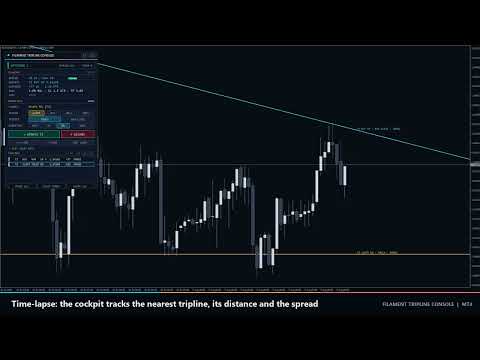
  • TELEMETRY(角落显示 LIVE、TESTER 或 PAUSED):SPREAD 以点数对比上限,进度条低于 60% 绿色,低于 100% 琥珀色,超过为珊瑚色。NEAREST:最近的未完成绊线及其动作、UP 或 DN 和当前线价,或 none armed。DISTANCE:线价减 Bid,单位为点数和 ATR;价格接近时进度条填满(青色,0.5 ATR 内琥珀色,0.2 ATR 内珊瑚色)。RISK:手数模式(% BAL、% EQ 或 LOT)、SL(pt、ATR、LINE+ 或 SL OFF)、TP(R 或 TP OFF)及 OCO。LAST:最近一次触发或失败,含时间和订单号。
  • 列表行:编号、动作、TOUCH 或 BAR、UP 或 DN、A = AUTO、R = REPEAT、线价、点数距离、状态。白色 ARMED,灰色 PRIMING 或 COOLDOWN,琥珀色 HOLD 或 PAUSED,暗色 FIRED 或 CANCELLED,珊瑚色 FAILED。
  • 图表:已布防的线使用 Alert、Buy、Sell 或 Exit 颜色;ARMED 为实线,PRIMING 或暂停时为虚线,COOLDOWN 为点划线,FIRED 或 CANCELLED 为变暗的点线,FAILED 为珊瑚色点线。标签形如 T2 BUY UP · TOUCH · ARMED,并附 REPEAT x<次数> 和订单号。触发标记位于线价处:向上箭头 BUY,向下箭头 SELL,菱形 ALERT,叉号 EXIT。

提醒

每次触发、失败和接近事件都会通过所有已启用通道发送:Popup Alert on Fire、Sound Alert on Fire(alert.wav)、Push Notification on Fire、Email on Fire。示例:Filament Tripline EURUSD M15: T2 BUY filled at 1.15412 (BAR CLOSE UP), 0.24 lots, ticket #81234567。Proximity Alert 在价格进入已布防(ARMED)绊线 Proximity Distance 范围时发送一条消息,价格远离两倍距离后重新布防。在测试器中消息只写入日志。

副作用

  • 文件 MQL4\Files\FilamentTripline\<symbol>_<magic>.csv 保存绊线、坐标、状态和面板状态。启动时会据此重绘缺失的线条。
  • 前缀为 FTC_ 的图表对象(面板、标签、标记、+ H-LINE / + T-LINE 线)随工具一同删除;您自己的线恢复原样式。
  • 250 毫秒定时器。无 DLL、无全局变量、无网络请求。同一品种的两个图表请使用不同的 Magic Number。

输入参数

  • Default Action(Alert only;另有 Buy at market、Sell at market、Exit positions)和 Default Trigger(Touch (price crosses the line) 或 Bar close beyond the line):面板选择器预设。
  • Trigger Buffer(0):触发所需越过线条的点数。
  • Repeat Cooldown(1):触发后 REPEAT 绊线可重新布防前需经过的K线数。
  • One-Cancels-Other for Entry Triplines(false)。
  • Lot Mode(Risk % of balance;另有 Fixed lots、Risk % of equity),Fixed Lots(0.10),Risk per Trade(1.0 %),Maximum Lots per Order(5.0)。
  • Stop Loss Mode(ATR multiple;另有 No stop loss、Fixed distance in points、Behind the tripline),Stop Loss Points(300),Stop Loss ATR Multiple(1.5),ATR Period(14)。
  • Take Profit(2.0 R,0 = 不设)。
  • Maximum Spread for Entries(30 点,0 = 不限),Maximum Slippage(10 点),Magic Number(26101700)。
  • Exit Scope(All trades on this symbol 或 This magic number only),Exit Also Deletes Pending Orders(false)。
  • Popup Alert on Fire(true),Sound Alert on Fire(true),Push Notification on Fire(false),Email on Fire(false),Proximity Alert(false),Proximity Distance(50 点)。
  • Alert Tripline Color、Buy Tripline Color、Sell Tripline Color、Exit Tripline Color。
  • Show Tripline Labels(true),Show Fire Markers(true)。
  • Panel Corner(Top left、Top right、Bottom right、Bottom left),Panel X Offset(16)和 Panel Y Offset(24),单位像素,Start Minimized(false)。

典型设置

  1. 趋势线突破:BUY、BAR CLOSE、AUTO、ONCE;Stop Loss Mode = Behind the tripline,Stop Loss Points 100,Take Profit 2。
  2. 区间跨式:区间上方 BUY 线,下方 SELL 线,TOUCH;One-Cancels-Other for Entry Triplines = true,Trigger Buffer 20。
  3. 保护性离场:在支撑线上设 EXIT、BAR CLOSE;Exit Scope = All trades on this symbol。
  4. 价位监视:ALERT、TOUCH、REPEAT;Repeat Cooldown 3,Push Notification on Fire = true。

注意事项与风险

绊线仅在终端运行时有效(无人值守请使用 VPS)。每个品种和 Magic Number 最多 40 条绊线;只能布防 Horizontal Line 和 Trendline 对象。在快速行情或跳空中,市价单可能偏离线价成交。交易存在亏损风险;本工具执行您的计划,并不预测价格。
推荐产品
Vizzion
Joel Protusada
Vizzion is a fully automated scalping Expert Advisor that can be run successfully using GBPJPY currency pair at H1 timeframe. Very Important This Expert Advisor can not run with any EAs in the same account. As part of the money management plan, it calculates and monitors the Margin Level % and assumes that all open trades are created by it. If you want an Expert Advisor that trades in a daily basis, this EA is not for you because using this requires a patience to wait for a few days or weeks on
Jet Punch
Didit Haryadi Saputra
Jet Punch is another best expert advisor for MT4,  can help you make money while you sleep by automatically entering and exiting trades. It trades by opening trades every day and closing them at the right time to ensure you always earn a profit. The software is very simple and can be used by both beginner and experienced traders.  Jet Punch was tested and has successfully passed the stress test with slippage and commission approximate to the real market condition. Recommendations: Currency pair:
Magic Grid
Aliaksandr Charkes
4.52 (27)
Magic Grid is an indicator-free advisor that uses a grid strategy. The strategy is based on automatic reopening of grid pending orders, after closing their market positions (by Take-Profit, Stop-Loss or manually). Pending orders are placed with a specified step from the initial prices, which can be entered manually or generated automatically ( one time at the beginning of the trade ). The robot can trade on any time frame, on any currency pair, on several currency pairs, and on any number of di
FREE
Project Infinity
Sergey Yarmish
The Infinity Expert Advisor is a scalper. When the resistance and support levels are broken, trades are opened in the direction of the price movement. Open positions are managed by several algorithms based on the current market situation (fixed stop loss and take profit, trailing stop, holding positions in case of trend indication, etc.). Requirements for the broker The EA is sensitive to spread, slippages and execution quality. It is strongly recommended not to use the EA for currencies with s
Exotic Adv
Ivan Simonika
Exotic Bot   is a multi -cream multifunctional adviser working on any time frame and in any market conditions. The robot’s work is taken as a system of averaging with the non -geometric progression of the construction of a trading grid. Built -in protection systems: special filters, spreading, internal restriction of trading time. Building a trading grid, taking into account important internal levels. The ability to configure trading aggressiveness. Work postponed orders with trailing orders. T
交易者工具箱是一種多功能工具   基於對常見交易策略的廣泛培訓而創建,以使這些策略和計算自動化。     (由Jason Kisogloo設計和編程)   特徵:   19個獨立信號   -這些信號   中的   每個信號   都   以神經網絡樣式配置進行偏置,以構成最終/整體結果。   每個信號都有其自己的設置   ,可以根據   需要   對其進行   自定義或優化。     綜合上   -   屏   -   顯示   -六搭扣,全面的信息和工具提示走板。   (單擊面板邊框可折疊或折疊...自動為每台儀器保存的設置):     信號面板   -顯示帶有偏差信息和信號詳細信息的信號分析。     新聞小組   -和未來甚至有消息   牛逼   小號   基於   預測   的   影響與倒計時事件當前的儀器。   (   針對此功能,必須將   內部M     T     5經濟日曆與   外匯工廠刮板的   選項   -https:   // www.forexfactory.com   添加到Metatrader中允許的網站上)         EA設置面板   -根據止

High Freq Grid Scalper
Letsekang Bruno Sekhosana
This E.A is designed to wait for the perfect opportunity to get in the market, take a few trades (low risk) and get out. There is an option to Cut Loss at specific percentage of balance, this should be set to a max of 1% since we scalping. Very cautious EA, can go up to a few days without taking a trade. This should not alarm you, it simply means there currently is no opportunity available. Mainly designed for low spread brokers. Tested Pairs and their settings: EURUSD M1 : Jan 2022 - Dec 2022
| Fully-automated Smart Money Concept (ICT) inspired trading solution with multi-strategy capabilities | Built by a grid trader >> for grid traders.  This is MT4 version, click  here  for  Blue CARA MT5  (settings and logics are same in both versions)     Real monitoring signal  -->  Cara Gold Intro Blue CARA EA   ('CARA') - short for  C omprehensive  A lgorithmic R esponsive A dvisor is a next-gen  multi-currency    multi-timeframe  EA base on the widely known (and perhapse most popular) Inn
Correlation Beast EA
Rodrigo Rethka Goncalves
Correlation Beast V2.05 - Skyrocket Your Forex Trading! Unlock the power of currency correlations with Correlation Beast V2.5 , the ultimate Expert Advisor for MetaTrader 4! Designed for traders who crave precision and profitability, this EA leverages advanced correlation strategies to identify high-probability trades. Whether you're a beginner or a pro, this tool is your key to mastering the Forex market! Why Choose Correlation Beast V2.5? Powerful Correlation Trading Trade sma
GoldenTrend
Aliaksandr Sych
GoldenTrend — a next-generation high-frequency scalping Expert Advisor designed to extract profit from the smallest market movements. Utilizing advanced algorithms for price action and volume analysis, it opens dozens of highly accurate trades daily with minimal risk. Why GoldenTrend? Монитор Ultra-Fast Trades : Captures profit from 5–15 pip movements. Ideal for ECN accounts with low spreads. Adaptive Strategy : Automatically adjusts to current market volatility and dynamically shifts tradi
The Arrow Scalper
Fawwaz Abdulmantaser Salim Albaker
1 (2)
Dear Friend..  I share with you this simple Expert Adviser .. it is full automatic  this Expert Adviser following the trend of the pair you install on or any stocks or indices , it is works like that: - when the trend on H4 chart show a start of up trend the expert will wait till the 15M & 1H charts show an up trend the EA will open a buy order directly , and do the same for down trend and open a sell order the buy or sell  order lot size and take profit and stop loss will measured manually  by
FREE
The algorithm of the adviser's work: When the Expert Advisor is launched at a specified distance from the price (first_step), BuyStop and SellStop orders are placed. Further, depending on which way the price went, one of them becomes market, and the other begins to crawl after the price. When the price rolls back, it also becomes market. If we have reached a set profit in some direction, the order is closed and a creeping pending order of the same direction is placed again. If the profit is no
TrendLines And Volumes
Alexander Nikolaev
This Expert Advisor trades based on trend lines, as well as on the basis of volume analysis. Volumes are calculated using minute bars, in order to determine if they were ascending or descending. The trend lines are drawn based on High and Lows in the trade history. There are also additional indicators. Buy or sell signals depend on all those factors. This allows the EA to enter the market with more accuracy and to perform more deals. Input parameters Lots - lot size (if 0, a lot is calculated b
EA Black Lion
Mohamed Hassan
5 (4)
Huge 70% Halloween Sale for 24 hours only!  EA BLACK LION  is an expert advisor that is the true definition of a scalper where it's able to spot real divergence movements in the forex market. It is highly sophisticated because it can spot potential reversal or continuation patterns. The real-time divergence patterns are visually shown to you on your MT4 chart. (This is game changing because you actually see the strategy in front of you)  It uses a sophisticated system that has been successfull
H4 GBPUSD Trend Scalper is a trend signal scalper The EA trades according to the trend strategy using original built-in indicator for opening and closing orders. The external inputs for limiting trading on Fridays and Mondays are available. The purpose of the strategy is to use the current trend with the most benefit. According to the results of testing and working on demo and real accounts, the best results achieved by using the Н4 timeframe on the GBP/USD pair Works on MetaTrader 4 Build 971+
PipFinite EA Breakout EDGE
Karlo Wilson Vendiola
5 (5)
The Official Automated Version of the Reliable Indicator PipFinite Breakout EDGE EA Breakout EDGE takes the signal of PipFinite Breakout EDGE indicator and manages the trade for you. Because of numerous financial instruments to consider, many traders want the signals to be fully automated. The EA will make sure all your trades are executed from entry to exit. Saving you time and effort while maximizing your profits. The Edge of Automation Effortless price action trading is now possible acros
Matrix Arrow EA MT4
Juvenille Emperor Limited
5 (8)
Matrix Arrow EA MT4 是一款独特的智能交易系统,可以通过图表上的交易面板手动或 100% 自动交易 Matrix Arrow Indicator 的 MT4 信号。 Matrix Arrow Indicator MT4 将在其早期阶段确定当前趋势,从多达 10 个标准指标中收集信息和数据,它们是:平均定向运动指数 (ADX) , 商品渠道指数 (CCI) , 经典 Heiken Ashi 蜡烛 , 移动平均线 , 移动平均收敛散度 (MACD) , 相对活力指数 (RVI) , 相对强弱指数 (RSI) , 抛物线SAR , 随机振荡器 , 威廉姆斯的百分比范围 。 当所有指标给出有效的买入或卖出信号时,相应的箭头将打印在图表上,在下一个蜡烛/柱线的开盘时表示强劲的上升趋势/下降趋势。用户可以选择使用哪些指标,并可以单独调整每个指标的参数。使用 Matrix Arrow EA MT4 ,您可以直接从图表上的交易面板手动交易 Matrix Arrow Indicator MT4 信号,或使用 100% 算法交易选项 100% 自动交易! 注意力:   如果您想用您的
About The Secret of Dow The Secret of Dow  is an unique system running on a complex set of algorithms and advanced machine learning computation mechanism to analyze massive sets of data from the neural network, and combines with a special set of price action movement analysis to optimize the trading decision, and it will then predicts the next best possible and potential moves of the Dow Jones (US30) prices. The advantages of The Secret of Dow:- Easy plug and play, worry free with easy param
How the EA works (simple explanation) Trades on   M5   timeframe Uses   H1 timeframe   to analyze global market context Analyzes   2 or 3 timeframes simultaneously On each timeframe: Checks price position relative to one or two Moving Averages Evaluates MA angle and distance between price and MA Entry logic is based on   trend + volatility conditions , not on random signals The full algorithm is illustrated in the screenshots. Recommended usage Symbol:   EURUSD Timeframe:   M5 Trading
Adaptive VP Gold 是一款用于黄金交易的自动化 Expert Advisor,主要针对 XAUUSD,并采用自适应市场分析方法。 该策略结合 Volume Profile 分析、市场状态识别、价格行为、波动率、动量以及集成的机器学习过滤系统。 EA 会识别不同的市场环境,并根据当前状态调整入场逻辑。其交易引擎针对回调、突破以及快速行情分别采用不同的交易逻辑。 主要功能: 黄金自动化交易系统 基于 Volume Profile 的市场分析 自动识别市场状态 回调和突破入场逻辑 快速行情入场模块 集成机器学习交易过滤 自动 Stop Loss 和 Take Profit 管理 基于市场状态的可选附加仓位 每个主交易最多增加一个附加仓位 无需 DLL 无需外部指标 无需额外文件 推荐设置: 交易品种:XAUUSD / Gold 时间周期:M1 为了兼容性,EA 可以加载到其他时间周期,但其交易逻辑和参数是专门针对推荐配置开发的。 不同经纪商之间的交易条件可能因点差、执行方式以及交易品种规格而存在显著差异。因此,建议用户在真实账户使用之前,先通过 Strategy Tester
Bar Boss
Iurii Tokman
5 (1)
Bar Boss   Expert   Advisor 使用 FletBoxPush 指标来分析市场并确定交易信号。该指标内置于“EA 交易”中,不需要在图表上额外安装。交易发生在定义为平台边界的水平上。使用损失限制。 顾问设置说明 TimeFrames - 图表周期,指标设置 颜色 - 定义为平面的价格区域的颜色,为指标设置 矩形 - 显示定义为平坦的价格区域,为指标设置 手数 - 起始交易量 MagicNumber - 订单的幻数 Count_LOSS - 连续亏损交易的数量,之后将设置为零利润(退出为零) FlatPips - 以点为单位确定平台,设置指标 FlatBars - 用于确定平面的柱数限制,为指标设置 MinBarsClosedOutside - 收盘价固定在特定平面水平之上/之下的柱数 CoefficientLot - 亏损后后续交易手数的乘数 CoefficientTakeProfit - 根据确定的平台的通道宽度计算的利润乘数 PercentLoss - 损失百分比,如果顾问带来的总损失低于此值,交易停止,该值必须设置为负数,例如:-33.3 顾问如何工作
The Super scalper universal is a fully automated scalping Expert Advisor, which uses five indicators. Each open position is protected by a hidden stop order managed by an advanced modification algorithm. When searching for the suitable signals, the EA uses the integrated indicator in conjunction with the trend and time filters, as well as the volatility filter. It use dynamic position closure, which considers the location where the order had been opened and the subsequent price action. Profit is
Expert Grid rsi Pro
Mykhailo Zakervashevych
General Description Grid RSI Pro v3.1 is an advanced trading Expert Advisor for MetaTrader 4 that uses a grid strategy with RSI indicator filtering. The EA automatically opens orders at specified levels, creating a grid of orders to capture market fluctuations. Version 3.1 includes enhanced risk management features and improved signal filtering systems. Key Features 1. Trading Strategies RSI Strategy : Position opening when RSI reaches overbought (80) or oversold (20) levels Fixed Points : Posit
Karman
Vladislav Filippov
Karman is a fully automated trading advisor working on a М30 timeframe. The settings of the advisor are based on the safe trading, the essence of which is to close the transaction, while achieving a positive profitability dynamism of several points, which allows the user to reduce the costs of opening losing trades. The Expert Advisor is multi-functional and does not require a specific type of account for the normal operation of all functions embedded in it. The advisor’s manual involves encapsu
Hello traders! I present to you Argo Gold Edition - an expert built for gold trading, which is tailored to the specifics of gold movements on international markets. The basis of its logic is that it follows profitable patterns drawn from past periods. Mathematical algorithms are based on the correlation between the values of the indicators used and the corresponding movement of the price of gold. The expert is built on the basis of the ARGO series. It specializes in GOLD / XAUUSD trading. 2 or 3
HMA Trend Expert
Alexander Fedosov
5 (1)
HMA Trend robot for professional traders works with a set of Hull moving averages( HMA ). Advisor Parameters Use Trade Panel  — Use the visual panel to configure and trade robot. Lot  — Lot size for a market entry. Take Profit(points)  — Take Profit for an open order. Stop Loss(points)  — Stol Loss for an open order. Max Spread(0 - disabled)  — Maximum allowable spread at which you can enter the market. 0 - disabled. Magic number  — The magic number of the robot. EA Comment  — Comments of robot.
Gyroscopes
Nadiya Mirosh
Gyroscope        professional forex expert   (for EURUSD, GBPUSD, USDJPY, AUDUSD, USDCHF, EURGBP, EURJPY, NZDUSD, USDCAD, EURCHF, AUDJPY, CADJPY pairs)   alyzing the market using the Elliot Wave Index. Elliott wave theory is the interpretation of processes in financial markets through a system of visual models (waves) on price charts. The author of the theory, Ralph Elliott, identified eight variants of alternating waves (of which five are in the trend and three are against the trend). The mov
This PORTFOLIO of 3 strategies has been developed, tested and traded live on DAX H1 timeframe. Multiple EAs traded together will lead to a BIGGER PROFITS and SMOOTHER EQUITY CURVE. 3 not correlated EAs logics for DAX H1 timeframe merged to a single strategy. Very SIMPLE STRATEGIES with only FEW PARAMETERS. Every trade has his own logic for STOP LOSS. To catch the profits every strategy uses different approach - some has TAKE PROFIT, some uses TIME BASED EXITS or PROFIT TRAILING. EA has been back
This PORTFOLIO of 3 strategies has been developed, tested and traded live on DAX M30 timeframe. Multiple EAs traded together will lead to a BIGGER PROFITS and SMOOTHER EQUITY CURVE. 3 not correlated EAs logics for DAX M30 timeframe merged to a single strategy. Very SIMPLE STRATEGIES with only FEW PARAMETERS.  Every trade has his own logic for STOP LOSS. To catch the profits every strategy uses different approach - some has TAKE PROFIT, some uses TIME BASED EXITS or PROFIT TRAILING. EA has been
Macd Pro I
Steve Zoeger
MACD Pro I EA https://youtu.be/2wCzTFIGNp4 =============== This Robot is fully automated and has been created for everyone. The Robot works also on cent accounts. The Ea is based on the MACD Indicator and 3 more and has been kept simple. ========================================= Maybe better to go for small profit, set it on higher time frames then you can use it for more pairs at the same time. =========================================== => works on all Time Frames but i would recommend the
该产品的买家也购买
The product will copy all telegram signal to MT4   ( which you are member  ) , also it can work as remote copier.  Easy to set up, copy order instant, can work with almost signal formats, image signal, s upport to translate other language to English Work with all type of channel or group, even channel have "Restrict Saving Content", work with  multi channel, multi MT5 Work as remote copier: with signal have ticket number, it will copy exactly via ticket number. Support to backtest signal. How to
Unlimited Trade Copier Pro is a tool to copy trade remotely to multiple MT4, MT5 and cTrader accounts at different computers/locations over internet. This is an ideal solution for you if you are a signal provider and want to copy your trades to other receivers globally on your own rules. One provider can copy trades to multiple receivers and one receiver can get trade from multiple providers as well. The provider can even set the subscription expiry for each receiver, so that receiver will not b
Strategy Builder offers an incredible amount of functionality. It combines a trade panel with configurable automation (covert indicators into an EA), real-time statistics (profit & draw down) plus automatic optimization of SL, TP/exit, trading hours, indicator inputs. Multiple indicators can be combined into an single alert/trade signal and can include custom indicators, even if just have ex4 file or purchased from Market. The system is easily configured via a CONFIG button and associated pop-up
EasyInsight AIO MT4
Alain Verleyen
4 (2)
EASY Insight AIO – 全能智能交易一站式解决方案 概述 想象一下,您可以在几秒钟内扫描整个市场——外汇、黄金、加密货币、指数,甚至股票——无需手动筛选图表、繁琐安装或配置指标。 EASY Insight AIO 是您专为 AI 交易打造的即装即用数据导出工具。它将整个市场快照一次性输出为简洁的 CSV 文件,直接支持 ChatGPT、Claude、Gemini、Perplexity 等各类 AI 平台的即时分析。 无需窗口切换,无需图表叠加,也没有任何杂乱。只需纯净、结构化的数据自动导出,让您专注于基于数据的高效决策,无需再盯盘耗时。 为什么选择 EASY Insight AIO? 真正的一体化 • 无需设置,无需安装指标,无图表叠加。只需安装、运行并导出——就是这么简单。 多资产全覆盖 • 扫描分析外汇、金属、加密货币、指数、股票——您的券商所能提供的一切市场。 AI 专属数据导出 • 高度结构化、针对 AI 优化的 CSV 文件,直接适配主流智能工具和平台。 完整导出内容: • 三个可选周期的货币强度分析 • 净多头头寸变化体现市场情绪 • 成交量变化、
面板 FFx 隐藏管理 轻松帮助您在图表上直接管理您的订单。下面描述所有特征: 止盈, 止损和尾随停止均隐藏 每笔交易在图表上都有自己的指示线 可按您的需要拖拽任何线来改变止盈/止损 当止盈 #1 到达,自动将止损位移到盈亏平衡位置的选项 选择止盈/止损类型的选项 (通过点数或价格) 选择尾随停止类型的选项 (通过点数, MA, 分形, PSAR 或 ATR) 定义哪些订单您希望在当前图表上进行管理 (所有订单或特定单号) 最大化 / 最小化面板按钮 在图表上将面板拖拽到任意位置 显示交易信息的选项 如何使用它? (参看以下截图) 选择您希望管理的订单 (所有或特定的) 设置您的目标, 止损和尾随停止 … 之后点击 “放置”。它们都独立工作,这样您就只需设置一次。 如果您希望删除一个止盈, 止损或尾随停止, 选择正确的订单 … 然后点击 “删除” 当您选择设置 “所有当前符号”, 则 “当前设置”显示在面板里。这些设置将自动用于所有新开订单。若要重置/删除这些设置, 点击 “重置所有”。 如果 “显示交易信息”被选中, 一个新的小表格显示在面板之下, 包括每笔订单及其当前的目标和尾随停
FFx Risk Calculator panel will help you to calculate very easily your trades size, SL or the risk directly on the chart. All features are described below: Option to select which parameter to calculate: Risk, Stop Loss or Lot Size The panel will show if the lot size is allowed according to the current account free margin Button to maximize/minimize the panel Drag and Drop the panel anywhere on the chart How to use it? Select the parameter you want to be calculated. It will be based on the 2 other
Trade Copier Pro
Vu Trung Kien
4.29 (14)
Trade Copier Pro 是一个强大的工具,多账户之间进行远程复制的贸易超过互联网不同的位置。这是一个信号提供商的理想解决方案,谁想要与全球范围内对自己规则的人分享他的贸易。一个供应商的交易可以复制到多接收器和一个接收器可以得到贸易额从多供应商也是如此。 供应商和接收器可与供电内置的数据库管理系统来管理他的合作伙伴名单。 这个工具允许全局配置模式(copy过来互联网)和本地模式(在同一台PC/服务器内复制)之间进行选择。 要求: MetaTrader4的4.00版构建670或以上。 参考: 如果你只需要在本地复制与更低的价格,你可以检查Auto Trade Copier在: https://www.mql5.com/en/market/product/4676 以下是亮点功能:     在一个工具提供商或接收器之间转换角色。     一个供应商的交易可以复制到多接收器和一个接收器可以从多个供应商收到交易。     供应/接收器可通过供电数据库管理系统,而无需额外的工具管理自己的接收器/供应商名单(添加,删除,编辑,启用/禁用)。     全球模式(copy过来互联网)和本
News Trader Pro
Vu Trung Kien
4.38 (16)
新闻操盘手专业版 是一个独特的机器人,让您使用您预先定义的策略进行消息交易。它从几个流行的外汇网站加载的每条消息的片断。您可以选择任何消息和预设的策略进行交易,之后新闻操盘手专业版根据选定的策略,在新闻来临时自动进行交易。 新闻发布给出了赚点数的机会,因为在那个时刻,价格通常有大动作。现在,利用这款工具,新闻交易变得比以往任何时候更容易,更灵活,更令人兴奋。不要等待,不要错失,不要再迷惑了。每周只需针对重要新闻设置一次,这个工具将完全按照您的计划进行精准交易。 演示版: 由于这不是一个自动交易机器人 (它是半自动), 您需要下载单独的演示版本: https://www.mql5.com/zh/market/product/5931 参考: 如果您只需要加载新闻 (无需交易), 您可以购买新闻加载机专业版: https://www.mql5.com/zh/market/product/5463 功能 包括所有 新闻加载机专业版 的功能 (查看详情)。 针对每条新闻构建您自己的策略,具有非常灵活的参数。 支持五种高级策略,带有大量控制参数 (止损, 止盈, 尾随, 网格间隔, 手数缩放,
FFx Watcher PRO
Eric Venturi-Bloxs
The FFx Watcher PRO is a dashboard displaying on a single chart the current direction of up to 15 standard indicators and up to 9 timeframes. It has 2 different modes: 1. Watcher mode: Multi Indicators User is able to select up to 15 indicators to be displayed User is able to select up to 9 timeframes to be displayed 2. Watcher mode: Multi Pairs User is able to select any number of pairs/symbols User is able to select up to 9 timeframes to be displayed This mode uses one of the standard indicat
The product combines a manual trade panel with the ability to perform actions automatically in a highly configurable way. Actions include capturing indicator values and then based on those values raising alerts, open/close or partially close trades, scale-in, setting up pending orders, adjusting stop loss, take profit and more. On-chart controls can be configured, such as tick boxes and buttons, so can be fully interactive. The EA also handles money management, news events, hidden stop loss, tak
Binary Options Copier Remote is an EA that allows to copy binary options trades between MT4 accounts at different computers. This is an ideal solution for signal provider, who want to share his trade with the others globally on his own rules. Provider can give free bonus license to 10 receivers. That means those 10 receivers can copy from provider by using Binary Options Receiver Free (no cost). From 11th one, receiver have to buy Binary Options Receiver Pro (paid version) in order to copy from
The Price Action Dashboard is an innovative tool to help the trader to control a large number of financial instruments. This tool is designed to automatically suggest signals and price conditions. The Dashboard analyzes all major Time Frame suggesting price action conditions with graphic elements. The Dashboard can suggest you the strength of the trend identifying directional movement, it is an indispensable tool for those who want to open position themselves using market trends identifiers. The
Elliott Wave Counter 是一个面板,用于快速和用户友好地手动标记 Elliott 波浪。可以选择一种颜色和一个级别的标记。还有用于删除最后一个标记和工具制作的整个标记的功能。一键制作标记。点击五次 - 有五波!艾略特波浪计数器对于艾略特波浪的初学者和专业分析师来说都是一个很好的工具。 艾略特波浪计数器安装和输入指南 如果你想得到   关于 EA 添加 URL (   http://autofxhub.com   ) MT5 终端的 通知 (见截图)。 MT4版本 https://www.mql5.com/en/market/product/14016 MT5版本 https://www.mql5.com/en/market/product/15081 一般输入: 波形类型按钮: 此按钮允许用户选择他们想要在图表上突出显示的波形类型。可用的选项包括推动波、调整波和其他自定义波模式。 波级按钮: 这个按钮   允许用户选择他们想要在图表上突出显示的波形级别。可用的选项包括初级、中级和次级波级别。 波浪颜色: 这个   按钮   允许用户选择他们想要在图表上突出显示的波浪图
If you wish to draw Support and Resistance lines, view: daily market opening, classical pivot levels, Fibonacci pivot levels, trend lines, Fibonacci levels, the remaining time to candle closing, and current spread. If you seek to place your orders with the exact lot that meets your desired stop loss risk. If you wish to do all this and more with just one click, then this is the perfect tool to use. This tool will allow you to feel more relaxed when deciding to open orders, as well as predicting
部分平仓专家 是一款将多种功能整合到一个自动化系统中的工具。该 EA 提供多种风险管理选项,并最大化潜在收益,从而帮助交易者更有效地管理仓位。 使用部分平仓专家,交易者可以设置   部分关闭   锁定利润的水平,     追踪止损   保护利润和限制损失的水平,     收支平衡   水平,以确保即使价格朝着不利于交易的方向变动,交易也能实现盈亏平衡,以及其他一些功能。 使用这款一体化智能交易系统,交易者可以节省时间和精力,因为他们无需时刻监控交易。相反,EA 会根据市场情况执行预设指令,从而为交易者提供更大的灵活性和对交易的控制力。 附加部分关闭专家,     按下键盘上的“p”   ,更改设置,然后就可以开始了。 部分关闭专家   安装和输入指南 如果您想收到有关 EA 的通知,请添加 URL(   http://www.betasoft.dev   )MT4/MT5 终端(见截图)。 MT4版本 https://www.mql5.com/en/market/product/14965 MT5版本 https://www.mql5.com/en/market/product/15
Master Trend Dashboard is a new generation indicator, compact, light and efficient. Each element of this Dashboard is designed to return specific signals as: Price Action, Breakout, Net Change (performance of the instrument), algorithmic studies, correlations and statistical calculations. This tool will change your way of trading allowing you to receive important information. See the Graphic Signals to understand every single signal below: Graphic Signals Symbol name and arrow color Green = Cur
Trade Copier Agent 旨在复制多个 MetaTrader(4/5) 账户/终端之间的交易。 使用此工具,您可以充当提供者(源)或接收者(目的地)。所有交易行为都将立即从提供者复制到接收者。 该工具允许您在同一台计算机上的多个 MetaTrader 终端之间复制交易,复制速度快如闪电,不到 0.5 秒。 贸易复印机代理安装和输入指南 请在开始复制之前或没有订单时在提供商帐户上应用设置! 有订单时的任何更改都会影响收款人帐户。 例如:如果提供者账户应用买单然后禁用接收者账户上的所有买单将被关闭。 如果您想获得有关 EA 添加 URL (   http://autofxhub.com   ) MT4 终端的通知(请参阅屏幕截图)。 MT5版本 https://www.mql5.com/en/market/product/77134 以下是亮点功能: 在 MT4 和 MT5 账户之间复制。 在一个工具内切换提供者或接收者。 每个账户既可以作为Provider又可以作为Receiver,因此账户之间可以通过2种传输方式相互复制。这就像一个贸易共享网络。 一个提供者可以将交易
Unlimited Binary Options Copier Remote is a powerful tool to copy binary options trades remotely between multiple accounts at different locations over internet. This is an ideal solution for signal provider, who want to share his binary options trades with the others globally on his own rules. One provider can copy trades to unlimited receivers and one receiver can get trade from unlimited providers as well. The provider can set the subscription expiry for each receiver, so that receiver will no
This is an Expert Adviser use for manual trading as a background EA or combine with external EA to open orders. Loss Recovery Trading is one of your options to handle the lose positions instead of using stop loss by setting a zone recovery area and target to exit the turn rounds sequence. How It Work? If the market goes against your first positions direction at the specific of losing points, the EA will open an opposite direction position with calculated larger lot size and also keep the first
Great for scalper/intraday weapon for your ease daily trading. Scalper weapon will suit's you for any trading condition, whether it's intraday / scalper this tool is important for you which providing the missing function on the native MT4 platform. You have to check Allow Auto Trading by pressing Ctrl+O, going to Expert Advisors tab, and checking " Allow automated trading" . also to ensure the " auto trading " is green. Input Parameters _MINIMIZED_AT_START: to chose whether the panel is minimiz
Market Pressure Dashboard is a new generation utility. Its main function is to assist you and give you operational ideas optimizing your analytical work. Using this utility you could monitor a lots of financial instruments (max 28 symbols FOREX) in a very simple way. The Market Pressure indicator allows you to customize the internal list of the symbols to be monitored. The opening function and position management with this panel will be much more comfortable and navigation charts very powerful.
Contact/message me if you encounter any issue using the product or need extra feature to add on the base version. There is a demo version of this panel Dashboard Trading Made Simple Demo in my product list, please try it out to get familiar with all functionalities free, LINK . This system basically utilizes TDI as the main indicator to generate trading signal mainly on H1 and H4 timeframes. The signal will be further filtered and trimmed. Stochastic; Heiken Ashi candle direction and candle siz
Telegram Publisher Agent 是一个附加组件,允许交易者实时向他们的 Telegram 频道和群组发送信号。通过可定制的消息、图表截图和其他功能,该工具可以帮助交易者与他们的追随者分享他们的交易见解和策略。该工具还具有亮暗主题切换的精美设计,为用户提供美观和功能性的交易体验。 Telegram Publisher Agent 旨在将您的所有交易作为信号发布在您的频道和群组中。您所要做的就是提供交易,然后 Telegram 发布商代理将为您完成所有繁重的工作,只需单击一个按钮即可将交易信号发送到您的交易渠道或群组。 电报发布代理   安装和输入指南 如果您想获得有关 EA 添加 URL ( http://autofxhub.com ) MT4/MT5 终端的通知(见屏幕截图)。 MT4版本 https://www.mql5.com/en/market/product/18985 MT5版本 https://www.mql5.com/en/market/product/23946 主要特点: 信号发送 - 将信号发送到用户的 Telegram 频道和组,带有可自定义的
如果产品有任何问题或者您需要在此产品上添加功能,请联系我 Contact/message me if you encounter any issue using the product or need extra feature to add on the base version. There is a Demo version of this panel Dashboard Currency Strength Meter AdvancedDemo in my product list, please try it out to get familiar with all functionalities free, LINK . The Dashboard Currency Strength Meter Advanced gives you a quick visual guide to which currencies are strong, and which ones are weak over the customized 4 time-frames and period.
如果产品有任何问题或者您需要在此产品上添加功能,请联系我 Contact/message me if you encounter any issue using the product or need extra feature to add on the base version. There is Demo version of this panel Dashboard Genesis Matrix Trading Demo in my product list, please try it out to get familiar with all functionalities free, LINK . This system basically utilizes Genesis Indi Set (TVI, CCI, GannHilo, and T3) as the core indicators to generate trading signal mainly on time-frame M15. The signal will be further filtered a
如果产品有任何问题或者您需要在此产品上添加功能,请联系我 Contact/message me if you encounter any issue using the product or need extra feature to add on the base version. There is Demo version of this panel Dashboard Symphonie Trader System Demo in my product list, please try it out to get familiar with all functionalities free, LINK . This system basically utilizes Symphonie Indicator Set (Extreme, Emotion, Trend, and Sentiment) as the core indicators to generate trading signal mainly on time-frame M15. The signal will b
如果产品有任何问题或者您需要在此产品上添加功能,请联系我 Contact/message me if you encounter any issue using the product or need extra feature to add on the base version. There is Demo version of this panel Dashboard Babon Scalping System Demo in my product list, please try it out to get familiar with all functionalities for free, LINK . This system basically utilizes TDI, Heiken Ashi Trend, Price Trend on H1 time-frame and TMA on H1&H4 time-frame to generate the trend (big picture). Then the system will zoom in to genera
‌Demo version here: https://www.mql5.com/en/market/product/21344 P‌urpose: F‌or those who trade with trend line manually, this expert is suitable for you to manage your trade in easy way. U‌sage: Draw a trend line or horizontal line, and rename it according to input parameter in example "sell" >> for more details please watch the video below. A‌ction: ea will identify the trend line, and trade based on the selected mode (Touch/Break), ea will also set the TP/SL/Lot automatically according to in
Pairs Trade
Oleg Pechenezhskiy
The Pairs Trade indicator is a utility for semi-automatic pair trading. It allows combining the charts of two arbitrary instruments, even if the schedules of their trading sessions are different. It displays a spread chart in the form of a histogram with an overlaying moving average. It calculates the swap that will be charged for the synthetic position (in the deposit currency). It is possible to set a level for automatic opening of a synthetic position on the spread chart (analogous to the 'se
Corporate Report
Pavel Verveyko
5 (1)
The script displays info about the share's corporate reports and dividends. The data is downloaded from   investing.com : Report date Profit per share (EPS) Revenue Market capitalization Amount of dividends Date of payment of dividends Dividend income The product cannot be tested in the tester (since it is not possible to receive data from the Internet). Before launching:  Add 2   URL   https://ru.investing.com/earnings-calendar/Service/getCalendarFilteredData  and   https://ru.investing.com/di
作者的更多信息
EA Budak Ubat MT5
Syarief Azman Bin Rosli
EA Budak Ubat MT5 是一款专为 MetaTrader 5 设计的自动化网格马丁格尔(Grid Martingale)交易机器人。该系统结合了技术趋势分析、动态波动率自适应计算以及多层风险控制,可在震荡和单边趋势市场中高效管理仓位。 针对主要外汇货币对和现货黄金(XAUUSD)的 M5 周期进行了全面优化。 ### 核心功能 • 4 种可选入场分析策略:   1. Classic Candle:根据K线反转与动量形态判定方向。   2. SMA20:基于20周期均线交叉判定。   3. Alligator:基于比尔·威廉姆斯鳄鱼线指标开裂趋势。   4. Ichimoku:基于一目均衡表(转换线与基准线)平衡信号(默认推荐)。 • AutoConfig AI 动态波动率引擎:   将当前品种的20日平均日波动幅度(ADR)与EURUSD的365日ADR进行自动对比,智能计算最佳止盈点数(TP)、网格初始间距、递增步长以及最大网格间距。 • H1 周期 RSI 过滤器:   监控一小时级别 RSI,避免在超买区盲目追多或在超卖区盲目做空。在交易黄金(XAUUSD)
EA Budak Ubat
Syarief Azman Bin Rosli
4 (3)
免费试用 EA Budak Ubat 频道 限时特价! 每购买10次后价格将增加10美元! 工作原理 当 EA 激活时,它会根据执行模式参数分析图表。 如果图表上没有现有仓位,EA 将根据参数输入交易。如果趋势是看涨的,它将进入买入交易,如果是看跌的,它将进入卖出交易。如果止损变量大于0,则还会设置距离已打开交易价格一定距离的止损订单。0表示没有止损。 如果图表上存在现有仓位,且最后一个仓位处于亏损状态,EA 将检查当前市场价格与订单之间的距离是否至少为用户设置的最小距离,然后将根据蜡烛图输入交易,仓位大小将使用马丁格尔方法计算,并且将设置离已打开交易价格一定距离的止损订单,如果止损变量大于0。 如果未启用套期保值,EA 一次只会进入一个方向的交易。如果第一个仓位是买入交易,则所有后续的马丁格尔仓位也必须是买入交易。如果第一个仓位是卖出交易,则所有后续的马丁格尔仓位也必须是卖出交易。如果启用套期保值,EA 将进入双向交易。 EA 将修改相同方向的所有仓位的获利点为单一的保本点,再加上用户设置的获利水平。 EA 参数 执行模式: 在每个新 K 线上:当 EA 激活时,它会在每个新的
Indi RBO
Syarief Azman Bin Rosli
Input: Range Start Time : The starting time of the range creation Range End Time : The ending time of range creation Trade End Time : The time where the line of range zone high/low will be extended to Minimum Size : The minimum size of the range in point Maximum Size : The maximum size of the range in point If the range size is between the minimum and maximum, indicator will print the 1st color (blue).
Apex Flow Reversion
Syarief Azman Bin Rosli
# Apex Flow Reversion MT4 Apex Flow Reversion 是一款专为 MetaTrader 4 开发的自动化日内统计均值回归交易系统。该系统监测价格与动态成交量加权平均价(VWAP)基准的偏离程度,并结合标准差通道、相对强弱指数(RSI)动量超买超卖过滤以及真实波幅(ATR)波动率约束来识别价格反转点。 ## 策略概述 该算法在用户设定的时间窗口内,根据分笔跳动量(Tick Volume)计算滚动日内 VWAP 曲线。系统以该中轨为中心,通过标准差计算生成统计上下轨。 当市场价格跌破下轨且 RSI 显示超卖衰竭时,系统评估多头入场条件;当价格突破上轨且 RSI 显示超买衰竭时,系统评估空头入场条件。交易目标为价格回归至动态 VWAP 中轨或设定的固定点数止盈。 ## 核心功能特点 - 严格符合 MQL5 市场规范:原生 MQL4 代码编写,完全不依赖任何外部 DLL。 - 动态经纪商环境适配:在下单或修改订单前,系统自动校验并满足最低停损距离(StopLevel)、冻结距离(FreezeLevel)以及点差上限。 - 稳健的订单执行机制:
Vortex Confluence Radar
Syarief Azman Bin Rosli
Vortex Confluence Radar MT4 Vortex Confluence Radar 是专为 MetaTrader 4 平台开发的多震荡指标共振评分引擎。该指标融合了相对活力指数(RVI)、顺势指标(CCI)与威廉指标(Williams %R)三大经典技术震荡工具,生成统一步伐的动量柱状图、平滑信号线以及交叉预警信号。 指标架构与可视化信号 该指标在独立的副图窗口中运行,包含以下核心图表组件: 统一共振动量柱状图 归一化评分机制:RVI、CCI 和 Williams %R 的数值均被独立归一化映射至 [-100, +100] 区间,并通过用户自定义权重进行加权平均计算。 多头动量(草绿色柱线):当综合共振分值大于零时显示,代表多方动能占优。 空头动量(红色柱线):当综合共振分值小于零时显示,代表空方动能占优。 平滑信号线(金色曲线) 基于综合共振评分计算的指数移动平均线(EMA)。 有效过滤单个震荡指标的高频杂波,提供明确的均线交叉转折时机。 阈值边界水平线(天蓝色与橙红色线条) 超买阈值线(默认 +60.0):标识多头动能进入过度饱和的区域。 超卖阈值线(默认 -6
Kinetix Speed Commander
Syarief Azman Bin Rosli
Kinetix Speed Commander MT4 Kinetix Speed Commander   是一款专为 MetaTrader 4 平台打造的机构级图表一键交易控制台、动态仓位手数计算器及风险回报率订单管理工具。专为自营交易考核交易员(Prop Firm Traders)、敏捷超短线交易者(Scalpers)以及日内系统化交易者设计,Kinetix Speed Commander 全面消除人工计算延迟、下单输入失误以及过度杠杆风险。 该工具运行于高响应、深色主题的图表面板(HUD)之上,不依赖任何外部动态链接库(DLL)。程序在后台以毫秒级精度持续分析账户余额、净值与交易品种的点值,提供毫秒级一键下单、图表交互式可视化风险线调整,以及由 250 毫秒硬件定时器驱动的自动移动止损与保本引擎。 核心架构与功能特性 一键极速交易控制台   直接在图表界面上一键完成买入(Buy)与卖出(Sell)市价开仓。开仓时自动附加精确计算的手数、预设止损及止盈防护。内置滑点控制与实时点差过滤器,在点差异常扩大或市场剧烈波动时自动阻止开仓,保护资金安全。 自动动态仓位手数计算器   在订单提
Prism Candle Forge
Syarief Azman Bin Rosli
Prism Candle Forge — MT4 蜡烛形态识别引擎 Prism Candle Forge 是一个原生的 MQL4 库,利用基于 ATR 加权的几何分析来检测并验证 20 多种日本蜡烛图形态。它提供形态识别、方向置信度评分、蜡烛形态分类以及趋势上下文验证 — 全部通过 8 个导出函数实现,可供任何 Expert Advisor、指标或脚本调用。无需 DLL,无外部依赖,纯 MQL4 高性能计算。 以编译二进制文件 (Prism_Candle_Forge.ex4) 形式分发。本说明文档是您的完整 API 参考手册。 安装说明 从 MQL5 Market 下载 Prism_Candle_Forge.ex4。 将其放置在:MQL4/Libraries/ 将下面的 #import 代码块添加到您的 .mq4 源文件中。 编译您的 EA 或指标。全部 8 个函数现已可用。 导入声明(即拷即用) #import "Prism_Candle_Forge.ex4"    int     PCF_DetectPattern( const double &open[], const doub
Sigma Squeeze Reactor
Syarief Azman Bin Rosli
Sigma Squeeze Reactor 布林带与肯特纳通道挤压突破 MetaTrader 4 智能交易系统 (EA) Sigma Squeeze Reactor 是一款专为 MetaTrader 4 平台打造的高性能波动率突破量化 EA。它利用布林带(Bollinger Bands)收缩进入肯特纳通道(Keltner Channels)所形成的经典挤压(Squeeze)结构,并在挤压释放瞬间结合动量振荡器确认,精准捕捉强劲的单边突破行情。 本策略搭载了 双引擎突破系统(Dual-Engine Breakout Architecture) ,兼顾低波动静止筹码的蓄势爆发与强趋势下的通道扩张突破,并配备直接渲染在图表中央的机构级交互式量化驾驶舱(Cockpit HUD)。 核心工作原理 波动率挤压机制 (Squeeze Mechanism) 当基于标准差的布林带完全收缩在基于真实波幅(ATR)的肯特纳通道内部时,市场进入低波动蓄势期。这一挤压状态反映了机构订单的沉淀与筹码集中,往往是爆发性单边行情的先兆。 双引擎突破逻辑 引擎 A(挤压释放突破):   监测布林带自肯特纳通道内部向外扩
Fulcrum Value Profile
Syarief Azman Bin Rosli
Fulcrum Value Profile 是一款 MetaTrader 4 指标:为每个交易时段构建 tick 成交量分布(Volume Profile),标出控制点 POC(Point of Control)和价值区(value area),以线条绘制发展中的 POC/VAH/VAL,跟踪未被触及的 POC(naked POC),并在已收盘K线上标记两种价值区形态:回到前一价值区内(80% 法则)以及在价值区外被接受(突破)。本指标从不开仓、修改或平仓。 快速开始 将指标加载到 M5、M15 或 M30 图表。 保持 Profile Period = Daily session,或选择 Custom session window 并按经纪商服务器时间(市场报价窗口的时钟)设置 Custom Session Start / Custom Session End。 数秒内,最近 5 个已完成时段以水平直方图绘出,信息卡显示 ABOVE VALUE、INSIDE VALUE 或 BELOW VALUE。 可选:启用 Popup Alert on Signal 或 Push Notific
Spectra Trend Ribbon
Syarief Azman Bin Rosli
# Spectra Trend Ribbon MT5 Spectra Trend Ribbon 是一款专为 MetaTrader 5 开发的原生多层级趋势方向与波动率扩张指标。该指标结合了自适应平滑趋势基准线、动态波动率包络通道以及自动化动量突破信号。 ## 图表视觉信号解析 指标在图表上呈现五种核心视觉元素: 1. 中央自适应基准线(变色线) - 绿色线条:表示市价运行于基准线上方且基准线斜率向上,代表当前处于强势多头趋势。 - 红色线条:表示市价运行于基准线下方且基准线斜率向下,代表当前处于强势空头趋势。 - 灰色线条:表示斜率走平或处于横盘整理阶段,方向动量呈中性。 2. 上下动态波动率通道(皇家蓝线) - 以外部真实波幅(ATR)乘以设定倍数并叠加于中央基准线计算所得的包络带。 - 价格在通道内运行时处于正常波动区间。 - 通道显著收窄时预示市场正在经历波动率压缩(Squeeze 挤压)。 3. 多头扩张箭头(绿色箭头) - 当 K 线突破并收盘于上轨之外,且中央基准线保持多头斜率时,在 K 线下方显示绿色箭头。 - 标志着价格从收敛整理状态中恢复动量,顺应主升趋
Aegis Risk Sentinel
Syarief Azman Bin Rosli
Aegis Risk Sentinel MT5 Aegis Risk Sentinel   是一款专为 MetaTrader 5 开发的机构级实时净值保护与风控管理实用工具。专为自营交易公司(Prop Firm 挑战者)、职业资产管理经理和日内交易者打造,旨在通过量化规则规范交易行为,避免重大回撤、情绪化报复性交易以及高杠杆爆仓风险。 本工具配备超流畅的图表 HUD 仪表盘,100% 采用原生 MQL5 架构编写,不含任何外部 DLL。后台以亚秒级频率持续监控账户净值,并提供一键紧急平仓与订单管理操作。 核心功能 每日最大亏损上限保护   实时监控相对于每日开盘初始净值的变动(平台经纪商时间每日午夜自动重置)。一旦日内回撤达到设定的最大阈值(如 4.0%),Aegis 可自动清空所有持仓、撤销所有挂单,并锁定账户直至下一个交易日。 每日目标利润锁定   在达到设定的日内目标利润时及时锁住收益,避免在市场后期震荡中回吐利润。 账户最大总回撤防护   针对账户余额监控总浮动回撤,防止触及严格的净值底线,非常适合通过 FTMO 等自营机构风控考核。 预付款比例安全哨兵   实时审计账户 Ma
Stratos Momentum Engine
Syarief Azman Bin Rosli
Stratos Momentum Engine MT5 Stratos Momentum Engine 是专为 MetaTrader 5 平台开发的全自动多时间框架动量突破智能交易系统(EA)。该系统将较高时间框架(H1)的宏观结构趋势判定与较低时间框架(M15)的高精度动量择时及通道突破确认深度结合。 本系统采用最小二乘法线性回归斜率算法精确捕捉市场主导趋势方向,结合平滑随机震荡指标(Stochastic)识别回调结束后的动量恢复节点,并通过唐奇安通道(Donchian Channel)极值突破进行入场确认。风险管理方面集成了基于 ATR 的自适应动态止损与止盈、Chandelier Exit 吊灯移动止损、开仓前保证金计算校验以及账户级每日最大回撤熔断保护。 产品概述 Stratos Momentum Engine 严格基于三层分析架构执行交易决策: 宏观趋势方向:在 H1 时间框架上通过 50 周期线性回归斜率进行评估。仅当斜率绝对值超过设定阈值时才允许顺势交易,有效过滤震荡行情。 动量择时确认:在 M15 时间框架上利用 Stochastic(14, 3, 3)指标监控超买超卖
Nexus Quant Matrix
Syarief Azman Bin Rosli
Nexus Quant Matrix MT5 Nexus Quant Matrix   是专为 MetaTrader 5 原生打造的机构级量化计算与流式统计分析库。专为量化交易开发者、系统化对冲基金与程序化策略架构师设计,无需依赖任何外部 Python、C++ 或 DLL 动态链接库,直接在 MQL5 原生运行环境中提供极速数值计算支持。 该库具备严格的 O(1) 计算复杂度,依托预分配环形缓冲区与 Welford 增量算法原理,彻底消除了动态内存重新分配带来的性能开销。系统整合了自适应一维卡尔曼滤波(Kalman Filter)、滚动双变量皮尔逊相关系数(Pearson Correlation)、最小二乘法线性回归(OLS)、经厚尾修正的 Cornish-Fisher 在险价值(VaR)、预期亏损(CVaR / Expected Shortfall)以及受保证金严格约束的凯利公式(Kelly Criterion)头寸管理。 核心功能架构 流式统计矩引擎 (CStreamingStats)   实时计算滑动窗口内的均值、样本方差、标准差、偏度(Skewness)与峰度(Kurtosis
Quasar Regime Cloud
Syarief Azman Bin Rosli
Quasar Regime Cloud 是一款适用于 MetaTrader 5 的市场状态指标。它判断价格当前处于趋势还是震荡,并通过分形自适应云带直接在图表上显示结果。只有当市场被判定为趋势状态时才会产生信号,从而过滤掉横盘行情中大量的虚假交叉。 工作原理 1. 分形维数估计 指标在可配置的窗口内,使用盒计数方法为每根K线估算价格的分形维数 (D)。D 接近 1.0 表示平滑、有方向的运动;D 接近 2.0 表示区间行情中常见的嘈杂运动。 2. 分形自适应核心线 (FRAMA) 分形维数决定分形自适应移动平均线的平滑系数。在方向性行情中,核心线紧跟价格;在噪音行情中,核心线变慢并趋于平缓。 3. Spine 脊线 核心线再经过双极点 super smoother 滤波形成脊线。核心线与脊线之间的区域构成云带。 4. 状态评分 (0 到 100) Kaufman 效率比(净位移除以总路径长度)与分形维数合并为 0 到 100 的状态评分。评分经过轻度平滑,并与带滞后区间的阈值比较,避免状态在边界附近反复切换。 视觉组件 趋势云带:核心线在脊线上方时为绿色,下方时为红色,仅在趋势状态显
Isobar Event Shield
Syarief Azman Bin Rosli
Isobar Event Shield 在 MetaTrader 5 中保护您的交易免受经济新闻冲击。它读取终端内置的经济日历,对影响您交易品种的每次数据发布进行倒计时,并在发布前不久对您或其他智能交易系统已持有的仓位和挂单执行您选择的保护措施。它从不自行开仓。 快速入门 将工具加载到一个图表上(每个终端一个副本),并在终端工具栏中启用 Algo Trading。 图表品种的基础货币和报价货币会被自动监控。可在 Extra Currencies to Watch 中添加更多货币(例如 USD,EUR,JPY),并将 Protection Scope 保持为 Linked,以保护使用这些货币的所有品种。 选择 Open Position Action 和窗口长度(Window Opens 和 Window Closes,默认 15 和 10 分钟)。 保持面板在图表上。窗口打开时保护会自动执行;窗口关闭后,暂存的挂单会重新挂出。 想查看效果时,按服务器时间输入一个几分钟后的手动事件,例如 14:35 USD Test,观察状态变为 SHIELD ACTIVE。 面板按钮 [-] / [
Riptide Sweep Reclaimer
Syarief Azman Bin Rosli
Riptide Sweep Reclaimer 是一款 MetaTrader 5 智能交易系统,专门交易平静时段区间的流动性扫荡:它测量您所选时间窗口的最高价和最低价(默认服务器时间 00:00-08:00),等待下一时段刺穿其中一侧,一旦有K线重新收回区间内部即反向入场,目标为区间中点和另一侧。仅交易图表品种,同一时间只持有一个仓位;不使用网格、马丁或加仓摊平。 快速开始 将 EA 加载到该品种的一个图表上(任意周期;逻辑运行于 Working Timeframe,默认 M15),并开启 Algo Trading。 按经纪商服务器时间(市场报价窗口的时钟)把 Range Start 和 Range End 设为平静时段,并用 Hunt Window Start 和 Hunt Window End 把猎取窗口紧接其后。 选择 Position Sizing(默认:每笔交易风险为余额的 1%)。 区间形成期间面板显示 RANGE BUILDING,之后显示 AWAITING HUNT 或 HUNTING。 快速验证:在 EURUSD 上用可视化策略测试运行几周,每个时段都会被框出,每次
筛选:
无评论
回复评论