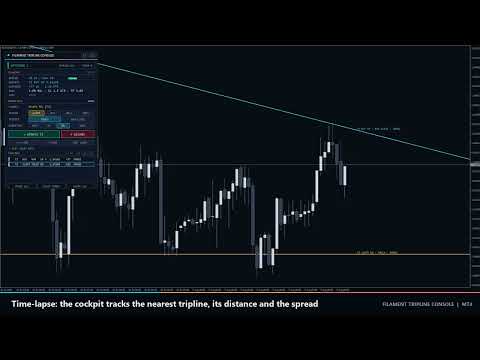
Filament Tripline Console

Filament Tripline Console は、あなた自身が引いた水平線とトレンドラインを、作動中の「トリップライン」(tripline) に変えます。価格がラインに触れる、またはバーがラインの向こう側で確定すると、トリップラインが設定したアクションを実行します。アクションは、アラート、ロット・ストップロス・テイクプロフィットを自動計算する成行の BUY または SELL、あるいはポジションを決済する EXIT です。独自の分析で取引することはなく、あなたが作動させたラインにだけ反応します。

クイックスタート

  1. 任意のチャートにユーティリティを適用します。BUY、SELL、EXIT を使う場合は、ツールバーの Algo Trading と、Common タブの Allow live trading を有効にしてください。ALERT はそれらなしでも動作します。
  2. MetaTrader の通常ツールで Horizontal Line または Trendline を描くか、パネルの + H-LINE / + T-LINE を押します。
  3. ラインをクリックします。TARGET にその名前が表示されます。
  4. ACTION、TRIGGER、DIRECTION、ONCE または REPEAT を選び、ARM を押します。ラインがアクションの色に変わり、右端にラベルが表示されます。
  5. TEST ALERT を押して通知チャネルを確認します。実際の動作を確かめるには、デモチャートで価格から数ポイントの位置に ALERT トリップラインを作動させてください。

MT4 のストラテジーテスターではボタンが反応しません(MetaTrader がチャートイベントを送らないため)。デモチャートでテストしてください。

トリップラインの発動条件

  • 基準価格:TOUCH は Bid を使用し、BAR CLOSE はチャート時間足で最後に確定したバーの終値を使用します。
  • ラインの価格:水平線はその価格です。トレンドラインは現在のバー(TOUCH)または最後の確定バー(BAR CLOSE)での値で、作動中は右方向へ延長されます。
  • UP は、価格がラインの下からライン価格+Trigger Buffer 以上に達すると発動します。DOWN はその逆です。AUTO は、作動または移動した時点で価格がある側からラインへ向かう方向を意味します。
  • トリップラインは、価格が一度スタート側にあった後でのみ発動します。そのため、価格をまたぐ位置でラインを作動・移動しても即座には発動しません。
  • 状態:
  • ARMED:準備完了。
  • PRIMING:価格が逆側にあり、戻るのを待っています。
  • HOLD:ラインを越えたが実行がブロックされています。原因は AutoTrading オフ、市場休場、または上限超過のスプレッドで、価格がラインの向こうにある間はティックごとに再試行します。
  • FIRED:完了。
  • COOLDOWN:REPEAT 時、価格がスタート側に戻り Repeat Cooldown 本のバーが経過すると再作動します。REPEAT の BUY・SELL は前回発動の注文が決済されるまでも待つため、注文が積み重なることはありません。
  • CANCELLED:OCO で取消。
  • FAILED:注文拒否。
  • PAUSED:PAUSE ALL。
  • 再起動または RESUME ALL の後、その間に価格が越えたトリップラインは、遅れて発動せずに PRIMING になります。

アクション

  • ALERT:通知のみ。
  • BUY / SELL:コメント Filament T<n> と Magic Number を付けた成行注文です。
  • 注文はストップなしで約定し、直後に SL/TP を設定します。マーケット執行口座でも動作し、修正が拒否された場合は 30 ティックの間再試行します。
  • ブローカーのストップレベルより近いストップは外側へ移動します。
  • 事前に AccountFreeMarginCheck で証拠金を確認します。
  • リクオートやビジーエラーは再試行し、5 回失敗すると FAILED になります。
  • ロット:Fixed lots、または リスク = 残高または有効証拠金 x Risk per Trade / 100、ロット = リスク / (SL 距離 / ティックサイズ x ティック価値) です。ロットステップに切り捨て、Maximum Lots per Order で上限を設けます。リスクロットがブローカー最小値を下回ると FAILED(最小ロット未満のリスク)になります。ストップロスなしのリスクモードは Fixed Lots を使います。
  • ストップロス:
  • Fixed distance in points:固定距離。
  • ATR multiple:Stop Loss ATR Multiple x 最後の確定バーの ATR(ATR Period)。ATR が無い場合は Stop Loss Points を使います。
  • Behind the tripline:ライン価格から Stop Loss Points を引いた値(BUY)または足した値(SELL)。価格がすでにその水準を越えている場合は、エントリーから Stop Loss Points とします。
  • 最小値 = ストップレベル + スプレッド。
  • テイクプロフィット = Take Profit x ストップ距離(ストップロスなしの場合は設定しません)。
  • EXIT:Exit Scope の成行注文を決済し、Exit Also Deletes Pending Orders がオンなら待機注文も削除します。決済できない注文は 30 ティック再試行し、その後報告します。
  • OCO:One-Cancels-Other for Entry Triplines がオンの場合、BUY または SELL が発動すると、未完了の他の BUY・SELL トリップラインをすべて取り消します。ALERT と EXIT は影響を受けません。

パネル操作

  • ヘッダー:<> はパネルを次の角へ移動します。[-] は LED、FILAMENT、短い状態を表示する 180 x 26 px のピルに折りたたみ、[+] で展開します。角とピルの状態は時間足・銘柄の変更後も保持され、再適用・パラメータ変更・ターミナル再起動で入力値に戻ります。
  • ラインまたはチャート上のラベルをクリックすると TARGET として選択されます。表示は次のとおりです。
  • 未選択時:click a line on the chart。
  • 未作動のライン:[H-LINE] または [TREND]。
  • 作動中のライン:[T2] のような番号。
  • + H-LINE / + T-LINE で作成したライン:Draft H1、Draft T2。
  • ACTION:ALERT、BUY、SELL、EXIT。TRIGGER:TOUCH、BAR CLOSE。DIRECTION:AUTO、UP、DN。ONCE / REPEAT で繰り返しモードを切り替えます。
  • ARM はターゲットを作動させます。作動済みのターゲットでは UPDATE T<n> と表示され、選択した設定を適用して状態を再確認します。
  • DISARM はトリップラインを解除します。あなた自身のラインは元のスタイルに戻ります。+ H-LINE または + T-LINE で作成したラインは、未作動でも削除されます。
  • + H-LINE:価格の 0.5 ATR 上に破線の下書きラインを作り、ドラッグ用に選択します。+ T-LINE:バー 21-60 とバー 2-20 それぞれの最安値を結ぶ下書きトレンドラインを作ります。
  • TEST ALERT:有効なすべてのチャネルにテストメッセージを送ります(すべて無効なら ALL ALERT CHANNELS ARE OFF)。
  • TRIPLINES:1 ページ 5 行で、« と » ボタンでページを切り替えます。行をクリックすると選択されます。
  • PAUSE ALL / RESUME ALL:すべての発動を停止・再開します。CLEAR FIRED は FIRED、CANCELLED、FAILED のトリップラインを削除します。CLEAR ALL は CONFIRM? と表示し、3 秒以内にもう一度押すとすべて削除します。
  • デッキ下のメッセージ行が各操作を確認します。例:CLICK A LINE ON THE CHART FIRST、LIMIT REACHED: 40 TRIPLINES。

表示

  • LED とバッジ:
  • WATCHING n(緑):n 本の未完了トリップライン。
  • IDLE:なし。
  • PAUSED(琥珀)。
  • MARKET CLOSED(琥珀):取引系トリップラインがあり、セッションが閉じています。
  • TRADING OFF(赤):取引系トリップラインがあり、Algo Trading または Allow live trading がオフです。
  • 右側には銘柄、時間足、FIRED の件数を表示します。
  • TELEMETRY(角に LIVE、TESTER または PAUSED):
  • SPREAD:上限に対するポイント数。バーは 60% 未満で緑、100% 未満で琥珀、それ以上で珊瑚色です。
  • NEAREST:最も近い未完了トリップラインのアクション、UP または DN、現在のライン価格。無い場合は none armed。
  • DISTANCE:ライン−Bid をポイントと ATR で表示します。価格が近づくほどバーが満ちます(シアン、0.5 ATR 以内で琥珀、0.2 ATR 以内で珊瑚色)。
  • RISK:ロットモード(% BAL、% EQ、LOT)、SL(pt、ATR、LINE+、SL OFF)、TP(R、TP OFF)、OCO。
  • LAST:直近の発動または失敗と、その時刻・チケット。
  • リストの行:番号、アクション、TOUCH または BAR、UP または DN、A = AUTO、R = REPEAT、ライン価格、ポイント距離、状態。色は ARMED が白、PRIMING・COOLDOWN が灰、HOLD・PAUSED が琥珀、FIRED・CANCELLED が暗色、FAILED が珊瑚色です。
  • チャート:
  • 作動中のラインは Alert、Buy、Sell、Exit の色で表示されます。
  • 線種は ARMED が実線、PRIMING または一時停止中が破線、COOLDOWN が一点鎖線、FIRED・CANCELLED が暗い点線、FAILED が珊瑚色の点線です。
  • ラベルは T2 BUY UP · TOUCH · ARMED のように表示され、REPEAT x<回数> とチケット番号が付きます。
  • ライン価格上の発動マーク:上矢印 BUY、下矢印 SELL、ひし形 ALERT、バツ印 EXIT。

アラート

発動・失敗・接近のたびに、有効なすべてのチャネルへ通知します:Popup Alert on Fire、Sound Alert on Fire(alert.wav)、Push Notification on Fire、Email on Fire。

例:Filament Tripline EURUSD M15: T2 BUY filled at 1.15412 (BAR CLOSE UP), 0.24 lots, ticket #81234567

Proximity Alert は、価格が ARMED のトリップラインに Proximity Distance 以内まで近づくと 1 回通知し、その 2 倍以上離れると再作動します。テスターではメッセージは操作ログにのみ出力されます。

副作用

  • ファイル MQL4\Files\FilamentTripline\<symbol>_<magic>.csv に、トリップライン、座標、状態、パネル状態を保存します。起動時に、見つからないラインをこのファイルから再描画します。
  • 接頭辞 FTC_ のチャートオブジェクト(パネル、ラベル、マーク、+ H-LINE / + T-LINE のライン)はユーティリティと一緒に削除され、あなた自身のラインは元のスタイルに戻ります。
  • 250 ms タイマーを使います。DLL、グローバル変数、Web リクエストは使いません。同じ銘柄の 2 つのチャートでは異なる Magic Number を使ってください。

入力パラメータ

  • Default Action(Alert only。ほかに Buy at market、Sell at market、Exit positions)と Default Trigger(Touch (price crosses the line) または Bar close beyond the line):パネルの選択の初期値です。
  • Trigger Buffer(0):発動に必要な、ラインを越えるポイント数。
  • Repeat Cooldown(1):発動後、REPEAT トリップラインが再作動できるまでのバー数。
  • One-Cancels-Other for Entry Triplines(false)。
  • Lot Mode(Risk % of balance。ほかに Fixed lots、Risk % of equity)、Fixed Lots(0.10)、Risk per Trade(1.0 %)、Maximum Lots per Order(5.0)。
  • Stop Loss Mode(ATR multiple。ほかに No stop loss、Fixed distance in points、Behind the tripline)、Stop Loss Points(300)、Stop Loss ATR Multiple(1.5)、ATR Period(14)。
  • Take Profit(2.0 R、0 = なし)。
  • Maximum Spread for Entries(30 ポイント、0 = 制限なし)、Maximum Slippage(10 ポイント)、Magic Number(26101700)。
  • Exit Scope(All trades on this symbol または This magic number only)、Exit Also Deletes Pending Orders(false)。
  • Popup Alert on Fire(true)、Sound Alert on Fire(true)、Push Notification on Fire(false)、Email on Fire(false)、Proximity Alert(false)、Proximity Distance(50 ポイント)。
  • Alert Tripline Color、Buy Tripline Color、Sell Tripline Color、Exit Tripline Color。
  • Show Tripline Labels(true)、Show Fire Markers(true)。
  • Panel Corner(Top left、Top right、Bottom right、Bottom left)、Panel X Offset(16)と Panel Y Offset(24)はピクセル単位、Start Minimized(false)。

代表的な設定

  1. トレンドラインブレイク:BUY、BAR CLOSE、AUTO、ONCE。Stop Loss Mode = Behind the tripline、Stop Loss Points 100、Take Profit 2。
  2. レンジのストラドル:レンジ上に BUY ライン、下に SELL ライン、TOUCH。One-Cancels-Other for Entry Triplines = true、Trigger Buffer 20。
  3. 保護的な決済:サポートラインに EXIT、BAR CLOSE。Exit Scope = All trades on this symbol。
  4. 水準の監視:ALERT、TOUCH、REPEAT。Repeat Cooldown 3、Push Notification on Fire = true。

注意事項とリスク

  • トリップラインはターミナルが起動している間だけ動作します。無人で運用する場合は VPS を使用してください。
  • トリップラインは銘柄と Magic Number ごとに最大 40 本です。作動できるのは Horizontal Line と Trendline のオブジェクトだけです。
  • 急変時や窓開けでは、成行注文がラインから離れた価格で約定することがあります。
  • 取引には損失のリスクがあります。本ユーティリティはあなたの計画を実行するもので、価格を予測するものではありません。
おすすめのプロダクト
Vizzion is a fully automated scalping Expert Advisor that can be run successfully using GBPJPY currency pair at H1 timeframe. Very Important This Expert Advisor can not run with any EAs in the same account. As part of the money management plan, it calculates and monitors the Margin Level % and assumes that all open trades are created by it. If you want an Expert Advisor that trades in a daily basis, this EA is not for you because using this requires a patience to wait for a few days or weeks on
Jet Punch
Didit Haryadi Saputra
Jet Punch is another best expert advisor for MT4,  can help you make money while you sleep by automatically entering and exiting trades. It trades by opening trades every day and closing them at the right time to ensure you always earn a profit. The software is very simple and can be used by both beginner and experienced traders.  Jet Punch was tested and has successfully passed the stress test with slippage and commission approximate to the real market condition. Recommendations: Currency pair:
Magic Grid
Aliaksandr Charkes
4.52 (27)
Magic Grid is an indicator-free advisor that uses a grid strategy. The strategy is based on automatic reopening of grid pending orders, after closing their market positions (by Take-Profit, Stop-Loss or manually). Pending orders are placed with a specified step from the initial prices, which can be entered manually or generated automatically ( one time at the beginning of the trade ). The robot can trade on any time frame, on any currency pair, on several currency pairs, and on any number of di
FREE
The Infinity Expert Advisor is a scalper. When the resistance and support levels are broken, trades are opened in the direction of the price movement. Open positions are managed by several algorithms based on the current market situation (fixed stop loss and take profit, trailing stop, holding positions in case of trend indication, etc.). Requirements for the broker The EA is sensitive to spread, slippages and execution quality. It is strongly recommended not to use the EA for currencies with s
Exotic Bot   is a multi -cream multifunctional adviser working on any time frame and in any market conditions. The robot’s work is taken as a system of averaging with the non -geometric progression of the construction of a trading grid. Built -in protection systems: special filters, spreading, internal restriction of trading time. Building a trading grid, taking into account important internal levels. The ability to configure trading aggressiveness. Work postponed orders with trailing orders. T
Traders Toolbox Premium  はオールインワンツールです   それらの戦略と計算を自動化するために、一般的な取引戦略に関する広範なトレーニングに基づいて作成されました。     (Jason Kisoglooによって設計およびプログラムされました)   特徴:   19個々の信号   -これらの信号の それぞれ は、ニューラルネットワークスタイルの構成でバイアスされ、最終的な/全体的な結果を構成します。 各信号には独自の設定が あり 、必要に応じてカスタマイズまたは最適化できます。     包括的なオン   - 画面 - ディスプレイ -包括的な情報とツールチップを備えた6つのスナップアウェイパネル。 (パネルの境界線をクリックして、折りたたんだり、離したりします...設定は機器ごとに自動的に保存されます):     信号パネル   -バイアス情報と信号の詳細を含む信号分析を表示します。     ニュースパネル   -アップ、さらにはニュース来 トン の に基づいて 予測 の イベントへのカウントダウンと現在の機器に影響を。 (内部M     T5 エコノミッ
This E.A is designed to wait for the perfect opportunity to get in the market, take a few trades (low risk) and get out. There is an option to Cut Loss at specific percentage of balance, this should be set to a max of 1% since we scalping. Very cautious EA, can go up to a few days without taking a trade. This should not alarm you, it simply means there currently is no opportunity available. Mainly designed for low spread brokers. Tested Pairs and their settings: EURUSD M1 : Jan 2022 - Dec 2022
| Fully-automated Smart Money Concept (ICT) inspired trading solution with multi-strategy capabilities | Built by a grid trader >> for grid traders.  This is MT4 version, click  here  for  Blue CARA MT5  (settings and logics are same in both versions)     Real monitoring signal  -->  Cara Gold Intro Blue CARA EA   ('CARA') - short for  C omprehensive  A lgorithmic R esponsive A dvisor is a next-gen  multi-currency    multi-timeframe  EA base on the widely known (and perhapse most popular) Inn
Correlation Beast V2.05 - Skyrocket Your Forex Trading! Unlock the power of currency correlations with Correlation Beast V2.5 , the ultimate Expert Advisor for MetaTrader 4! Designed for traders who crave precision and profitability, this EA leverages advanced correlation strategies to identify high-probability trades. Whether you're a beginner or a pro, this tool is your key to mastering the Forex market! Why Choose Correlation Beast V2.5? Powerful Correlation Trading Trade sma
GoldenTrend — a next-generation high-frequency scalping Expert Advisor designed to extract profit from the smallest market movements. Utilizing advanced algorithms for price action and volume analysis, it opens dozens of highly accurate trades daily with minimal risk. Why GoldenTrend? Монитор Ultra-Fast Trades : Captures profit from 5–15 pip movements. Ideal for ECN accounts with low spreads. Adaptive Strategy : Automatically adjusts to current market volatility and dynamically shifts tradi
The Arrow Scalper
Fawwaz Abdulmantaser Salim Albaker
1 (2)
Dear Friend..  I share with you this simple Expert Adviser .. it is full automatic  this Expert Adviser following the trend of the pair you install on or any stocks or indices , it is works like that: - when the trend on H4 chart show a start of up trend the expert will wait till the 15M & 1H charts show an up trend the EA will open a buy order directly , and do the same for down trend and open a sell order the buy or sell  order lot size and take profit and stop loss will measured manually  by
FREE
The algorithm of the adviser's work: When the Expert Advisor is launched at a specified distance from the price (first_step), BuyStop and SellStop orders are placed. Further, depending on which way the price went, one of them becomes market, and the other begins to crawl after the price. When the price rolls back, it also becomes market. If we have reached a set profit in some direction, the order is closed and a creeping pending order of the same direction is placed again. If the profit is no
This Expert Advisor trades based on trend lines, as well as on the basis of volume analysis. Volumes are calculated using minute bars, in order to determine if they were ascending or descending. The trend lines are drawn based on High and Lows in the trade history. There are also additional indicators. Buy or sell signals depend on all those factors. This allows the EA to enter the market with more accuracy and to perform more deals. Input parameters Lots - lot size (if 0, a lot is calculated b
EA Black Lion
Mohamed Hassan
5 (4)
Huge 70% Halloween Sale for 24 hours only!  EA BLACK LION  is an expert advisor that is the true definition of a scalper where it's able to spot real divergence movements in the forex market. It is highly sophisticated because it can spot potential reversal or continuation patterns. The real-time divergence patterns are visually shown to you on your MT4 chart. (This is game changing because you actually see the strategy in front of you)  It uses a sophisticated system that has been successfull
H4 GBPUSD Trend Scalper is a trend signal scalper The EA trades according to the trend strategy using original built-in indicator for opening and closing orders. The external inputs for limiting trading on Fridays and Mondays are available. The purpose of the strategy is to use the current trend with the most benefit. According to the results of testing and working on demo and real accounts, the best results achieved by using the Н4 timeframe on the GBP/USD pair Works on MetaTrader 4 Build 971+
The Official Automated Version of the Reliable Indicator PipFinite Breakout EDGE EA Breakout EDGE takes the signal of PipFinite Breakout EDGE indicator and manages the trade for you. Because of numerous financial instruments to consider, many traders want the signals to be fully automated. The EA will make sure all your trades are executed from entry to exit. Saving you time and effort while maximizing your profits. The Edge of Automation Effortless price action trading is now possible acros
Matrix Arrow EA MT4
Juvenille Emperor Limited
5 (8)
マトリックスアローEAMT4 は、 マトリックスアローインジケーターのMT4 シグナルをチャート上のトレードパネルと手動または100%自動でトレードできるユニークなエキスパートアドバイザーです。 マトリックスアローインジケーターMT4 は、初期段階で現在のトレンドを判断し、最大10の標準インジケーターから情報とデータを収集します。平均方向移動指数(ADX) 、 商品チャネルインデックス(CCI) 、 クラシック平研アシキャンドル 、 移動平均 、 移動平均収束発散(MACD) 、 相対活力指数(RVI) 、 相対力指数(RSI) 、 放物線SAR 、 ストキャスティクス 、 ウィリアムズのパーセント範囲 。 すべてのインジケーターが有効な買いまたは売りシグナルを与えると、対応する矢印がチャートに印刷され、次のろうそく/バーの開始時に強い上昇トレンド/下降トレンドを示します。ユーザーは、使用するインジケーターを選択し、各インジケーターのパラメーターを個別に調整できます。 Matrix Arrow EA MT4 を使用すると、チャートのトレードパネルから直接、または100%アルゴリズム取
About The Secret of Dow The Secret of Dow  is an unique system running on a complex set of algorithms and advanced machine learning computation mechanism to analyze massive sets of data from the neural network, and combines with a special set of price action movement analysis to optimize the trading decision, and it will then predicts the next best possible and potential moves of the Dow Jones (US30) prices. The advantages of The Secret of Dow:- Easy plug and play, worry free with easy param
How the EA works (simple explanation) Trades on   M5   timeframe Uses   H1 timeframe   to analyze global market context Analyzes   2 or 3 timeframes simultaneously On each timeframe: Checks price position relative to one or two Moving Averages Evaluates MA angle and distance between price and MA Entry logic is based on   trend + volatility conditions , not on random signals The full algorithm is illustrated in the screenshots. Recommended usage Symbol:   EURUSD Timeframe:   M5 Trading
Adaptive VP Gold は、主に XAUUSD を対象としたゴールド取引用の自動売買 Expert Advisor で、適応型の市場分析アプローチを採用しています。 この戦略は、Volume Profile 分析、市場レジーム判定、プライスアクション、ボラティリティ、モメンタム、および統合された機械学習フィルターを組み合わせています。 EA は異なる市場環境を識別し、その状況に応じてエントリーロジックを適応させます。取引エンジンには、プルバック、ブレイクアウト、高速な市場変動に対応する個別のロジックが含まれています。 主な機能: ゴールド向け自動売買システム Volume Profile に基づく市場分析 市場レジームの自動判定 プルバックおよびブレイクアウトのエントリーロジック 急速な市場変動に対応するエントリーモジュール 統合された機械学習による取引フィルタリング Stop Loss と Take Profit の自動管理 市場状態に基づくオプションの追加ポジション 1つのメイントレードにつき追加ポジションは最大1つ DLL 不要 外部インジケーター不要 追加ファイル不要
Bar Boss
Iurii Tokman
5 (1)
Bar Boss   Expert   Advisorは、FletBoxPushインジケーターを使用して市場を分析し、取引シグナルを決定します。インディケータはエキスパートアドバイザーに組み込まれており、チャートに追加でインストールする必要はありません。取引は、フラットの境界として定義されたレベルのブレイクアウトで行われます。損失の制限が使用されます。 アドバイザ設定の説明 TimeFrames-チャート期間、インジケーターの設定 色-インジケーターの設定であるフラットとして定義された価格領域の色 長方形-インジケーターの設定で、フラットとして定義された価格エリアを表示します ロット-トランザクションの開始ボリューム MagicNumber-注文のマジックナンバー Count_LOSS-ゼロ利益が設定される(ゼロに終了する)後の連続した負けトレードの数 FlatPips-フラットを決定するためのポイントの制限、インジケーターの設定 FlatBars-フラットを決定するためのバーの数の制限、インジケーターの設定 MinBarsClosedOutside-終値が特定のフラットレベルより上
The Super scalper universal is a fully automated scalping Expert Advisor, which uses five indicators. Each open position is protected by a hidden stop order managed by an advanced modification algorithm. When searching for the suitable signals, the EA uses the integrated indicator in conjunction with the trend and time filters, as well as the volatility filter. It use dynamic position closure, which considers the location where the order had been opened and the subsequent price action. Profit is
General Description Grid RSI Pro v3.1 is an advanced trading Expert Advisor for MetaTrader 4 that uses a grid strategy with RSI indicator filtering. The EA automatically opens orders at specified levels, creating a grid of orders to capture market fluctuations. Version 3.1 includes enhanced risk management features and improved signal filtering systems. Key Features 1. Trading Strategies RSI Strategy : Position opening when RSI reaches overbought (80) or oversold (20) levels Fixed Points : Posit
Karman
Vladislav Filippov
Karman is a fully automated trading advisor working on a М30 timeframe. The settings of the advisor are based on the safe trading, the essence of which is to close the transaction, while achieving a positive profitability dynamism of several points, which allows the user to reduce the costs of opening losing trades. The Expert Advisor is multi-functional and does not require a specific type of account for the normal operation of all functions embedded in it. The advisor’s manual involves encapsu
Hello traders! I present to you Argo Gold Edition - an expert built for gold trading, which is tailored to the specifics of gold movements on international markets. The basis of its logic is that it follows profitable patterns drawn from past periods. Mathematical algorithms are based on the correlation between the values of the indicators used and the corresponding movement of the price of gold. The expert is built on the basis of the ARGO series. It specializes in GOLD / XAUUSD trading. 2 or 3
HMA Trend Expert
Alexander Fedosov
5 (1)
HMA Trend robot for professional traders works with a set of Hull moving averages( HMA ). Advisor Parameters Use Trade Panel  — Use the visual panel to configure and trade robot. Lot  — Lot size for a market entry. Take Profit(points)  — Take Profit for an open order. Stop Loss(points)  — Stol Loss for an open order. Max Spread(0 - disabled)  — Maximum allowable spread at which you can enter the market. 0 - disabled. Magic number  — The magic number of the robot. EA Comment  — Comments of robot.
Gyroscope        professional forex expert   (for EURUSD, GBPUSD, USDJPY, AUDUSD, USDCHF, EURGBP, EURJPY, NZDUSD, USDCAD, EURCHF, AUDJPY, CADJPY pairs)   alyzing the market using the Elliot Wave Index. Elliott wave theory is the interpretation of processes in financial markets through a system of visual models (waves) on price charts. The author of the theory, Ralph Elliott, identified eight variants of alternating waves (of which five are in the trend and three are against the trend). The mov
This PORTFOLIO of 3 strategies has been developed, tested and traded live on DAX H1 timeframe. Multiple EAs traded together will lead to a BIGGER PROFITS and SMOOTHER EQUITY CURVE. 3 not correlated EAs logics for DAX H1 timeframe merged to a single strategy. Very SIMPLE STRATEGIES with only FEW PARAMETERS. Every trade has his own logic for STOP LOSS. To catch the profits every strategy uses different approach - some has TAKE PROFIT, some uses TIME BASED EXITS or PROFIT TRAILING. EA has been back
This PORTFOLIO of 3 strategies has been developed, tested and traded live on DAX M30 timeframe. Multiple EAs traded together will lead to a BIGGER PROFITS and SMOOTHER EQUITY CURVE. 3 not correlated EAs logics for DAX M30 timeframe merged to a single strategy. Very SIMPLE STRATEGIES with only FEW PARAMETERS.  Every trade has his own logic for STOP LOSS. To catch the profits every strategy uses different approach - some has TAKE PROFIT, some uses TIME BASED EXITS or PROFIT TRAILING. EA has been
MACD Pro I EA https://youtu.be/2wCzTFIGNp4 =============== This Robot is fully automated and has been created for everyone. The Robot works also on cent accounts. The Ea is based on the MACD Indicator and 3 more and has been kept simple. ========================================= Maybe better to go for small profit, set it on higher time frames then you can use it for more pairs at the same time. =========================================== => works on all Time Frames but i would recommend the
このプロダクトを購入した人は以下も購入しています
The product will copy all telegram signal to MT4   ( which you are member  ) , also it can work as remote copier.  Easy to set up, copy order instant, can work with almost signal formats, image signal, s upport to translate other language to English Work with all type of channel or group, even channel have "Restrict Saving Content", work with  multi channel, multi MT5 Work as remote copier: with signal have ticket number, it will copy exactly via ticket number. Support to backtest signal. How to
Unlimited Trade Copier Pro is a tool to copy trade remotely to multiple MT4, MT5 and cTrader accounts at different computers/locations over internet. This is an ideal solution for you if you are a signal provider and want to copy your trades to other receivers globally on your own rules. One provider can copy trades to multiple receivers and one receiver can get trade from multiple providers as well. The provider can even set the subscription expiry for each receiver, so that receiver will not b
Strategy Builder offers an incredible amount of functionality. It combines a trade panel with configurable automation (covert indicators into an EA), real-time statistics (profit & draw down) plus automatic optimization of SL, TP/exit, trading hours, indicator inputs. Multiple indicators can be combined into an single alert/trade signal and can include custom indicators, even if just have ex4 file or purchased from Market. The system is easily configured via a CONFIG button and associated pop-up
EASY Insight AIO – スマートで手間いらずな取引のオールインワンソリューション 概要 数秒で市場全体——FX、ゴールド、暗号資産、指数、さらには株式まで——を、手作業のチャート確認や複雑なセットアップ・インジケーター導入なしにスキャンできたらどうでしょうか? EASY Insight AIO はAIトレードのための究極のプラグ&プレイ型エクスポートツールです。市場全体のスナップショットを、クリーンなCSVファイルで一括出力。ChatGPT、Claude、Gemini、Perplexityなど、さまざまなAIプラットフォームで即座に解析できます。 ウィンドウの切り替えやグラフのごちゃごちゃしたオーバーレイはもう不要。自動エクスポートされる純粋で構造化されたインサイトだけで、無駄なチャート監視に悩まされず、スマートなデータ主導の判断に集中できます。 なぜEASY Insight AIOなのか? 本当のオールインワン • セットアップ不要、インジケーターのインストール不要、チャートへのオーバーレイ不要。インストールして起動し、エクスポートするだけです。 マルチアセット対
The FFx Hidden Manager panel will help you to manage easily your orders directly on the chart. Below all features described: TP, SL and TrailingStop are hidden Each order has its own lines on chart Drag & Drop any line to change the TP/SL as per your need Option to move automatically the SL line at breakeven when TP #1 is reached Option to choose the TP/SL type (by pips or price) Option to choose the TrailingStop type (by pips, MA, Fractals, PSAR or ATR) Define which order(s) you want to manage
FFx Risk Calculator panel will help you to calculate very easily your trades size, SL or the risk directly on the chart. All features are described below: Option to select which parameter to calculate: Risk, Stop Loss or Lot Size The panel will show if the lot size is allowed according to the current account free margin Button to maximize/minimize the panel Drag and Drop the panel anywhere on the chart How to use it? Select the parameter you want to be calculated. It will be based on the 2 other
Trade Copier Pro is a tool to copy trade remotely to MT4, MT5 and cTrader accounts at different computers/locations over internet. This is an ideal solution for you if you are a signal provider and want to copy your trades to other receivers globally on your own rules. One provider can copy trades to multiple receivers and one receiver can get trade from multiple providers as well. The provider can even set the subscription expiry for each receiver, so that receiver will not be able to receive t
News Trader Pro is a unique robot that allows you to trade the news by your predefined strategy. It loads every piece of news from several popular Forex websites. You can choose any news and preset the strategy to trade it, and then News Trader Pro will trade that news by selected strategy automatically when the news comes. News release gives opportunity to have pips since the price usually has big move at that time. Now, with this tool, trading news becomes easier, more flexible and more exciti
The FFx Watcher PRO is a dashboard displaying on a single chart the current direction of up to 15 standard indicators and up to 9 timeframes. It has 2 different modes: 1. Watcher mode: Multi Indicators User is able to select up to 15 indicators to be displayed User is able to select up to 9 timeframes to be displayed 2. Watcher mode: Multi Pairs User is able to select any number of pairs/symbols User is able to select up to 9 timeframes to be displayed This mode uses one of the standard indicat
The product combines a manual trade panel with the ability to perform actions automatically in a highly configurable way. Actions include capturing indicator values and then based on those values raising alerts, open/close or partially close trades, scale-in, setting up pending orders, adjusting stop loss, take profit and more. On-chart controls can be configured, such as tick boxes and buttons, so can be fully interactive. The EA also handles money management, news events, hidden stop loss, tak
Binary Options Copier Remote is an EA that allows to copy binary options trades between MT4 accounts at different computers. This is an ideal solution for signal provider, who want to share his trade with the others globally on his own rules. Provider can give free bonus license to 10 receivers. That means those 10 receivers can copy from provider by using Binary Options Receiver Free (no cost). From 11th one, receiver have to buy Binary Options Receiver Pro (paid version) in order to copy from
The Price Action Dashboard is an innovative tool to help the trader to control a large number of financial instruments. This tool is designed to automatically suggest signals and price conditions. The Dashboard analyzes all major Time Frame suggesting price action conditions with graphic elements. The Dashboard can suggest you the strength of the trend identifying directional movement, it is an indispensable tool for those who want to open position themselves using market trends identifiers. The
エリオット波動カウンターは、エリオット波動を迅速かつユーザーフレンドリーに手動でマークアップするためのパネルです。マークの色とレベルを選択できます。最後のマークアップとツールによって作成されたマークアップ全体を削除する機能もあります。マークアップはワンクリックで作成されます。 5 回クリック - 5 つの波があります。エリオット波動カウンターは、エリオット波動の初心者にもプロのアナリストにも最適なツールです。 エリオット波動カウンターのインストールと入力ガイド 取得したい場合     EA 追加 URL (  http://autofxhub.com   ) MT5 端末に関する 通知 (スクリーンショットを参照)。 MT4 バージョン https://www.mql5.com/en/market/product/14016 MT5 バージョン https://www.mql5.com/en/market/product/15081 一般的な入力: 波の種類ボタン: このボタンを使用すると、ユーザーはチャートで強調表示する波のパターンの種類を選択できます。使用可能なオプションには、イン
If you wish to draw Support and Resistance lines, view: daily market opening, classical pivot levels, Fibonacci pivot levels, trend lines, Fibonacci levels, the remaining time to candle closing, and current spread. If you seek to place your orders with the exact lot that meets your desired stop loss risk. If you wish to do all this and more with just one click, then this is the perfect tool to use. This tool will allow you to feel more relaxed when deciding to open orders, as well as predicting
Partial Close Expertは 、多くの機能を1つの自動化システムに統合したツールです。このEAは、リスク管理と潜在的な利益の最大化のための複数のオプションを提供することで、トレーダーがポジションをより効果的に管理するのに役立ちます。 パーシャルクローズエキスパートを使用すると、トレーダーは   部分的な閉鎖   利益を確定するためのレベル、     トレーリングストップ   利益を守り損失を制限するレベル、     とんとん   価格が反対方向に動いた場合でも取引が損益ゼロになることを保証するレベル、およびその他のいくつかの機能。 このオールインワンのエキスパートアドバイザーを使用することで、トレーダーは取引を常に監視する必要がなく、時間と労力を節約できます。EAは市場の状況に基づいて事前に設定された指示を実行するため、トレーダーはより柔軟に取引をコントロールできます。 部分クローズエキスパートを添付し、     キーボードの「p」を押して 設定を変更すれば準備完了です。 部分クローズエキスパート   インストールと入力ガイド EA に関する通知を受け取りたい場合は、U
Master Trend Dashboard is a new generation indicator, compact, light and efficient. Each element of this Dashboard is designed to return specific signals as: Price Action, Breakout, Net Change (performance of the instrument), algorithmic studies, correlations and statistical calculations. This tool will change your way of trading allowing you to receive important information. See the Graphic Signals to understand every single signal below: Graphic Signals Symbol name and arrow color Green = Cur
Trade Copier Agent は、複数の MetaTrader(4/5) アカウント/端末間で取引をコピーするように設計されています。 このツールを使用すると、プロバイダー (ソース) または受信者 (宛先) として機能できます。すべての取引アクションは、遅延なくプロバイダーからレシーバーにコピーされます。 このツールを使用すると、0.5 秒未満の超高速のコピー速度で、同じコンピューター上の複数の MetaTrader ターミナル間で取引をコピーできます。 Trade Copier Agent インストール & 入力ガイド コピーを開始する前、または注文がないうちに、プロバイダー アカウントで設定を適用してください。 注文中の変更は、受取人のアカウントに影響します。 例: プロバイダー アカウントが買い注文を適用し、その後、受信者アカウントのすべての買い注文を無効にすると、決済されます。 EA追加URL(   http://autofxhub.com   )MT4端末(スクリーンショット参照) に関する通知を受け取りたい場合 。 MT5 バージョン https://www
Unlimited Binary Options Copier Remote is a powerful tool to copy binary options trades remotely between multiple accounts at different locations over internet. This is an ideal solution for signal provider, who want to share his binary options trades with the others globally on his own rules. One provider can copy trades to unlimited receivers and one receiver can get trade from unlimited providers as well. The provider can set the subscription expiry for each receiver, so that receiver will no
This is an Expert Adviser use for manual trading as a background EA or combine with external EA to open orders. Loss Recovery Trading is one of your options to handle the lose positions instead of using stop loss by setting a zone recovery area and target to exit the turn rounds sequence. How It Work? If the market goes against your first positions direction at the specific of losing points, the EA will open an opposite direction position with calculated larger lot size and also keep the first
Great for scalper/intraday weapon for your ease daily trading. Scalper weapon will suit's you for any trading condition, whether it's intraday / scalper this tool is important for you which providing the missing function on the native MT4 platform. You have to check Allow Auto Trading by pressing Ctrl+O, going to Expert Advisors tab, and checking " Allow automated trading" . also to ensure the " auto trading " is green. Input Parameters _MINIMIZED_AT_START: to chose whether the panel is minimiz
Market Pressure Dashboard is a new generation utility. Its main function is to assist you and give you operational ideas optimizing your analytical work. Using this utility you could monitor a lots of financial instruments (max 28 symbols FOREX) in a very simple way. The Market Pressure indicator allows you to customize the internal list of the symbols to be monitored. The opening function and position management with this panel will be much more comfortable and navigation charts very powerful.
Contact/message me if you encounter any issue using the product or need extra feature to add on the base version. There is a demo version of this panel Dashboard Trading Made Simple Demo in my product list, please try it out to get familiar with all functionalities free, LINK . This system basically utilizes TDI as the main indicator to generate trading signal mainly on H1 and H4 timeframes. The signal will be further filtered and trimmed. Stochastic; Heiken Ashi candle direction and candle siz
Telegram Publisher Agent は、 トレーダーが Telegram チャネルおよびグループにリアルタイムでシグナルを送信できるようにするアドオンです。このツールは、カスタマイズ可能なメッセージ、チャートのスクリーンショット、その他の機能を備えており、トレーダーが取引の洞察や戦略をフォロワーと共有するのに役立ちます。このツールは、明暗のテーマ切り替えを備えた美しいデザインも備えており、ユーザーに美的で機能的な取引体験を提供します。 Telegram Publisher Agent は、すべての取引をチャネルおよびグループ内のシグナルとして公開するように設計されています。あなたがしなければならないことは、取引を提供することだけです。その後、ボタンをクリックするだけで、Telegram Publisher Agent が取引シグナルを取引チャネルまたはグループに送信するためのすべての面倒な作業を実行します。 Telegram パブリッシャーエージェント   インストールと入力ガイド EA に関する通知を受け取りたい場合は、URL  ( http://autofxhub.c
如果产品有任何问题或者您需要在此产品上添加功能,请联系我 Contact/message me if you encounter any issue using the product or need extra feature to add on the base version. There is a Demo version of this panel Dashboard Currency Strength Meter AdvancedDemo in my product list, please try it out to get familiar with all functionalities free, LINK . The Dashboard Currency Strength Meter Advanced gives you a quick visual guide to which currencies are strong, and which ones are weak over the customized 4 time-frames and period.
如果产品有任何问题或者您需要在此产品上添加功能,请联系我 Contact/message me if you encounter any issue using the product or need extra feature to add on the base version. There is Demo version of this panel Dashboard Genesis Matrix Trading Demo in my product list, please try it out to get familiar with all functionalities free, LINK . This system basically utilizes Genesis Indi Set (TVI, CCI, GannHilo, and T3) as the core indicators to generate trading signal mainly on time-frame M15. The signal will be further filtered a
如果产品有任何问题或者您需要在此产品上添加功能,请联系我 Contact/message me if you encounter any issue using the product or need extra feature to add on the base version. There is Demo version of this panel Dashboard Symphonie Trader System Demo in my product list, please try it out to get familiar with all functionalities free, LINK . This system basically utilizes Symphonie Indicator Set (Extreme, Emotion, Trend, and Sentiment) as the core indicators to generate trading signal mainly on time-frame M15. The signal will b
如果产品有任何问题或者您需要在此产品上添加功能,请联系我 Contact/message me if you encounter any issue using the product or need extra feature to add on the base version. There is Demo version of this panel Dashboard Babon Scalping System Demo in my product list, please try it out to get familiar with all functionalities for free, LINK . This system basically utilizes TDI, Heiken Ashi Trend, Price Trend on H1 time-frame and TMA on H1&H4 time-frame to generate the trend (big picture). Then the system will zoom in to genera
‌Demo version here: https://www.mql5.com/en/market/product/21344 P‌urpose: F‌or those who trade with trend line manually, this expert is suitable for you to manage your trade in easy way. U‌sage: Draw a trend line or horizontal line, and rename it according to input parameter in example "sell" >> for more details please watch the video below. A‌ction: ea will identify the trend line, and trade based on the selected mode (Touch/Break), ea will also set the TP/SL/Lot automatically according to in
The Pairs Trade indicator is a utility for semi-automatic pair trading. It allows combining the charts of two arbitrary instruments, even if the schedules of their trading sessions are different. It displays a spread chart in the form of a histogram with an overlaying moving average. It calculates the swap that will be charged for the synthetic position (in the deposit currency). It is possible to set a level for automatic opening of a synthetic position on the spread chart (analogous to the 'se
The script displays info about the share's corporate reports and dividends. The data is downloaded from   investing.com : Report date Profit per share (EPS) Revenue Market capitalization Amount of dividends Date of payment of dividends Dividend income The product cannot be tested in the tester (since it is not possible to receive data from the Internet). Before launching:  Add 2   URL   https://ru.investing.com/earnings-calendar/Service/getCalendarFilteredData  and   https://ru.investing.com/di
作者のその他のプロダクト
EA Budak Ubat MT5
Syarief Azman Bin Rosli
EA Budak Ubat MT5 は、MetaTrader 5 向けに設計された自動グリッド・マーチンゲール(Grid Martingale)エキスパートアドバイザーです。テクニカル分析、市場ボラティリティへの自動適応計算、および多層型リスク管理を融合させ、レンジ相場とトレンド相場の両方に対応します。 主要通貨ペアおよびゴールド(XAUUSD)の M5(5分足)チャートに最適化されています。 ### 主な機能 • 4つの選べるエントリー分析手法:   1. Classic Candle:ローソク足の勢いとパターン検出。   2. SMA20:20期間単純移動平均線のクロス。   3. Alligator:ビル・ウィリアムズのアリゲーター指標。   4. Ichimoku:一目均衡表の転換線と基準線の均衡シグナル(推奨デフォルト)。 • AutoConfig AI ボラティリティ適応エンジン:   現在の通貨ペアの20日ADRをEURUSDの365日ADRと比較計算し、最適な利確幅(TP)、グリッド間隔、増加ステップ幅、最大グリッド幅を全自動算出。 • H1 時間足 RSI
EA Budak Ubat
Syarief Azman Bin Rosli
4 (3)
トライアルをダウンロード 動作原理 EAがアクティブな場合、実行モードパラメータに基づいてチャートを分析します。 チャート上に既存のポジションがない場合、EAはパラメータに基づいて取引を行います。トレンドが上昇トレンドの場合、買い取引を行い、下降トレンドの場合は売り取引を行います。そして、ストップロス変数が0より大きい場合、オープンした取引価格から一定の距離にストップロス注文も設定します。0はストップロスなしを意味します。 チャート上に既存のポジションがあり、最後のポジションが損失の場合、EAは現在の市場価格と注文との間の距離がユーザーが設定した最小距離以上であるかどうかを確認し、それに基づいて取引を行います。ロットサイズはマーチンゲール法を使用して計算され、ストップロス変数が0より大きい場合、オープンした取引価格から一定の距離にストップロス注文も設定します。 Hedging(ヘッジ)がfalseに設定されている場合、EAは一度に1つの方向にしか取引しません。最初のポジションが買い取引の場合、すべての後続のマーチンゲールポジションも買い取引でなければなりません。最初のポジションが売り
Indi RBO
Syarief Azman Bin Rosli
Input: Range Start Time : The starting time of the range creation Range End Time : The ending time of range creation Trade End Time : The time where the line of range zone high/low will be extended to Minimum Size : The minimum size of the range in point Maximum Size : The maximum size of the range in point If the range size is between the minimum and maximum, indicator will print the 1st color (blue).
# Apex Flow Reversion MT4 Apex Flow Reversion は、MetaTrader 4 向けに設計された日内統計的回帰(ミーン・リバージョン)自動売買システムです。動的な出来高加重平均価格(VWAP)からの価格乖離をリアルタイムで監視し、標準偏差バンド、相対力指数(RSI)のモメンタム枯渇フィルター、および平均真のレンジ(ATR)ボラティリティ制限を組み合わせて反転ポイントを的確に捉えます。 ## 戦略の概要 このアルゴリズムは、指定された期間にわたってティック出来高で加重されたローリングVWAP曲線を算出します。この中心線をもとに、標準偏差計算による統計的な上限バンドおよび下限バンドを生成します。 市場価格が下限バンドを下回り、同時にRSIが売られすぎのシグナルを示した場合に買いエントリー条件を判定します。逆に、価格が上限バンドを上回り、RSIが買われすぎのシグナルを示した場合に売りエントリー条件を判定します。ポジションはVWAP中心線への回帰または設定された固定目標ポイントでの利確を目指します。 ## 主な機能と特徴 - MQL5 マ
Vortex Confluence Radar MT4 Vortex Confluence Radar は、MetaTrader 4 向けにネイティブ開発されたマルチオシレーター・コンフルエンス評価エンジンです。Relative Vigor Index(RVI)、Commodity Channel Index(CCI)、Williams % Percent Range(WPR)の3大テクニカル指標を融合し、平滑化シグナルラインと自動クロスオーバーアラートを備えた統合モメンタム・ヒストグラムを生成します。 指標構造と視覚的シグナル 本インジケーターは独立したサブウィンドウで動作し、以下の視覚的要素を精密に描画します。 統合コンフルエンス・ヒストグラム 正規化スコアリング:RVI、CCI、Williams %R の数値をそれぞれ [-100, +100] の範囲に正規化し、設定された重み付けに基づいて加重平均を算出します。 強気モメンタム(ライムグリーン柱):総合スコアがプラスの場合に表示され、上昇圧力が優勢であることを示します。 弱気モメンタム(レッド柱):総合スコアがマイナスの場合に表
Kinetix Speed Commander MT4 Kinetix Speed Commander   は、MetaTrader 4(MT4)向けに開発された機関投資家水準のワンクリック注文執行コックピット、動的ポジションサイズ計算機、およびリスクリワード注文管理ユーティリティです。プロップファーム(自己資本取引会社)の審査に挑むトレーダー、機敏なスキャルパー、および体系的なデイトレーダーのために設計され、手動計算の手間、ロット入力ミス、過剰レバレッジのリスクを排除します。 本ユーティリティは、外部DLLを一切使用せず、ダークテーマを採用した高応答なオングラフHUD(ヘッドアップディスプレイ)で動作します。口座残高、有効証拠金、銘柄のティックバリューをバックグラウンドで常時監視し、ミリ秒単位の即時成行注文、ドラッグ可能なリスクラインによる視覚的操作、および250ミリ秒タイマーによる自動トレーリングストップと建値保護(ブレイクイーブン)を提供します。 主な機能とアーキテクチャ ワンクリック発注コックピット   チャート画面から直接、成行買い(Buy)および成行売り(Sell)を瞬時に
Prism Candle Forge
Syarief Azman Bin Rosli
Prism Candle Forge — MT4用ローソク足パターン認識エンジン Prism Candle Forge は、ATR加重幾何解析を用いて20種類以上の酒田五法・ローソク足パターンを検出・検証するネイティブMQL4ライブラリです。パターンの識別、方向性の信頼度スコアリング、ローソク足形態分類、トレンドコンテキスト検証を、Expert Advisor、インジケーター、スクリプトから呼び出し可能な8つのエクスポート関数を通じて提供します。DLL不使用、外部依存性ゼロ、純粋なMQL4計算エンジンです。 コンパイル済みバイナリ (Prism_Candle_Forge.ex4) として配布されます。本ドキュメントは完全なAPIリファレンスです。 インストール手順 MQL5 Market から Prism_Candle_Forge.ex4 をダウンロードします。 ファイルを次のフォルダに配置します: MQL4/Libraries/ 以下の #import ブロックを .mq4 ソースファイルに追加します。 EAまたはインジケーターをコンパイルします。これで8つの関数すべてが利用可能に
Sigma Squeeze Reactor ボリンジャーバンド & ケルトナーチャネル スクイーズブレイクアウト MT4 EA Sigma Squeeze Reactor は、MetaTrader 4 向けに開発された高精度ボラティリティブレイクアウト型エキスパートアドバイザー(EA)です。ボリンジャーバンドがケルトナーチャネルの内側に収縮する「ボラティリティ・スクイーズ」状態を検知し、スクイーズが解放された瞬間にモメンタムの方向性を確認して爆発的なトレンド相場へ正確にエントリーします。 本システムは、エネルギー蓄積からの解放と急激なトレンド拡張の両方を捕捉する**デュアルエンジン・ブレイクアウト機構(Dual-Engine Breakout)**を搭載し、チャート中央に直感的なインタラクティブ・コックピットHUDを備えています。 ロジック概要 スクイーズメカニズム ボリンジャーバンドがケルトナーチャネルの内側に入り込むと、相場は低ボラティリティのエネルギー圧縮状態に入ります。この状態は機関投資家によるポジション蓄積を示唆し、その後の急激なトレンド発生の前兆となります。 デュアルエンジ
Fulcrum Value Profile は MetaTrader 4 用インジケーターです。セッションごとにティック出来高のボリュームプロファイルを作成し、POC(Point of Control)とバリューエリアを表示し、形成中の POC/VAH/VAL をラインで描画し、未接触の POC(naked POC)を追跡し、確定足で 2 つのセットアップを示します:前回バリューエリアへの回帰(80% ルール)と、その外側での受け入れ(ブレイクアウト)。注文の発注・変更・決済は一切行いません。 クイックスタート M5、M15 または M30 チャートにインジケーターを適用します。 Profile Period = Daily session のままにするか、Custom session window を選び、Custom Session Start / Custom Session End をブローカーのサーバー時間(気配値表示の時計)で設定します。 数秒で直近 5 つの完了セッションが水平ヒストグラムとして描画され、カードに ABOVE VALUE、INSIDE VALUE または
# Spectra Trend Ribbon MT5 Spectra Trend Ribbon は、MetaTrader 5 専用に設計された高精度トレンド方向判定およびボラティリティ拡張検出インジケーターです。トリプル平滑化された適応型トレンド基準線、動的ボラティリティエンベロープバンド、および自動モメンタムブレイクアウトシグナルを統合しています。 ## チャート上の視覚シグナルの解説 本インジケーターは、チャート上に5つの明確な視覚要素を描画します: 1. 中央適応型ベースライン(カラーライン) - 緑色:現在価格がベースラインより上で推移し、かつベースラインの傾きが上向きであることを示します(上昇トレンド継続)。 - 赤色:現在価格がベースラインより下で推移し、かつベースラインの傾きが下向きであることを示します(下降トレンド継続)。 - 灰色:傾きが水平、または方向性のないレンジ・保ち合い状態を示します。 2. 上限・下限ボラティリティバンド(ロイヤルブルーライン) - Average True Range(ATR)の数値を中央ベースラインに加減算して導き出される動的
Aegis Risk Sentinel MT5 Aegis Risk Sentinel   は、MetaTrader 5 専用にネイティブ設計されたプロフェッショナル向けリアルタイム資金管理・リスクコントロールユーティリティです。プロップファーム挑戦者、資金運用マネージャー、デイトレーダーのために開発され、トレード口座に厳格な規律を適用し、壊滅的なドローダウン、感情的なリベンジトレード、予期せぬマージンコールを確実に防止します。 本ユーティリティは、外部 DLL を一切使用しない純粋な MQL5 アーキテクチャで開発された、チャート上の高応答 HUD ダッシュボードを搭載しています。バックグラウンドでサブ秒単位のアカウント監査を実施し、1 クリックでの緊急決済およびリスク保護アクションを提供します。 主な機能 日次最大損失リミット保護   ブローカー時間の深夜 0 時に自動リセットされる日次開始資金を基準に、エクイティの変動を常時監視します。1 日のドローダウンが設定値(例: 4.0%)に達した場合、Aegis は自動的に全保有ポジションを成行決済し、未約定の待機注文をすべてキャンセル
Stratos Momentum Engine MT5 Stratos Momentum Engine は、MetaTrader 5 専用に開発されたマルチタイムフレーム(MTF)モメンタム・ブレイクアウト自動売買システム(Expert Advisor)です。H1時間足の線形回帰スロープ分析により市場のマクロトレンド方向を判定し、M15時間足のストキャスティクス・オシレーターによる精密なタイミング制御、さらに20期間ドンチアン・チャネルのブレイクアウト確認を組み合わせて高精度な順張りエントリーを実行します。 また、本システムは厳格な資金管理プロトコルを標準搭載しています。口座残高に対するリスク比率(%)に基づく動的ロット計算、MQL5ネイティブの OrderCalcMargin() による発注前必要証拠金チェック、ATR(Average True Range)をベースにした動的ストップロスおよびテイクプロフィット、ボラティリティ追従型のシャンデリア・エグジット(Chandelier Exit)トレーリングストップ、建値移動(ブレークイーブン)機能、スプレッド制限、日次最大ドローダウン制
Nexus Quant Matrix
Syarief Azman Bin Rosli
Nexus Quant Matrix MT5 Nexus Quant Matrix   は、MetaTrader 5 向けにネイティブ設計された機関投資家水準の定量的計算・ストリーミング統計解析ライブラリです。クオンツ開発者、クオンツヘッジファンド、システマティックトレーダー向けに開発され、外部の DLL、Python、C++ 連携を一切使用せず、MQL5 の高速ランタイム環境内で直接高度な数値計算を実行します。 本ライブラリは O(1) の計算量を実現し、事前確保されたリングバッファ構造を採用することで動的メモリ再確保による遅延を完全に排除しています。適応型 1D カルマンフィルタ、ローリング・ピアソン相関係数、最小二乗法線形回帰 (OLS)、ファットテール分布に対応したコーニッシュ・フィッシャー VaR(バリュー・アット・リスク)、期待ショートフォール (CVaR)、および証拠金安全チェック付きケリー基準ロット計算エンジンを網羅しています。 主要アーキテクチャ ストリーミング統計モーメントエンジン (CStreamingStats)   ローリングウィンドウでの移動平均、分散、標準
Quasar Regime Cloud は MetaTrader 5 用の相場レジーム判定インジケーターです。価格が現在トレンド状態かレンジ状態かを判定し、その結果をフラクタル適応型クラウドとしてチャート上に直接表示します。シグナルは相場がトレンドと判定されている間のみ発生するため、横ばい相場で起こりがちなダマシのクロスを多く除外できます。 仕組み 1. フラクタル次元の推定 各バーについて、設定可能なウィンドウ内で価格のフラクタル次元 (D) をボックスカウント法で推定します。D が 1.0 に近いほど滑らかで方向性のある動き、2.0 に近いほどレンジ特有のノイズの多い動きを表します。 2. フラクタル適応コア (FRAMA) フラクタル次元がフラクタル適応移動平均の平滑化係数を決定します。方向性のある局面ではコアラインが価格に密着し、ノイズ局面では動きが遅くなり平坦になります。 3. Spine ライン コアラインを 2 極スーパースムーザーフィルターでさらに平滑化し、Spine ラインを形成します。コアと Spine の間の領域がクラウドになります。 4. レジームスコア (0
Isobar Event Shield は MetaTrader 5 で経済指標ニュースからトレードを守るユーティリティです。ターミナル内蔵の経済指標カレンダーを読み込み、取引銘柄に影響する各発表までカウントダウンし、発表の直前に、お客様または他の EA がすでに保有しているポジションと待機注文へ選択した保護を適用します。自ら新規ポジションを建てることはありません。 クイックスタート ユーティリティを 1 つのチャートに適用し(ターミナルごとに 1 つ)、ツールバーで Algo Trading を有効にします。 チャート銘柄の基軸通貨と決済通貨は自動で監視されます。他の通貨は Extra Currencies to Watch に追加し(例:USD,EUR,JPY)、Protection Scope を Linked のままにすると、それらの通貨を使うすべての銘柄が保護されます。 Open Position Action とウィンドウの長さ(Window Opens と Window Closes、初期値 15 分と 10 分)を選びます。 パネルをチャートに表示したままにします。ウ

Riptide Sweep Reclaimer は、静かなセッションのレンジで起こる流動性スイープを取引する MetaTrader 5 用エキスパートアドバイザーです。指定した時間帯(既定はサーバー時間 00:00-08:00)の高値と安値を測定し、次のセッションが片側を突き抜けるのを待ち、ローソク足がレンジ内に戻って確定した時点で逆方向にエントリーします。目標はレンジ中央と反対側です。チャートの銘柄のみ、同時に1ポジションまで。グリッド、マーチンゲール、ナンピンは使いません。 クイックスタート 銘柄のチャート1枚に EA を適用し(時間足は任意。ロジックは Working Timeframe、既定 M15 で動作)、Algo Trading を有効にします。 Range Start と Range End をブローカーのサーバー時間(気配値表示の時計)で静かなセッションに合わせ、その直後にハント時間帯を Hunt Window Start と Hunt Window End で設定します。 Position Sizing を選びます(既定は1取引あたり残高の1%)。 レンジ形成中の


フィルタ:
レビューなし
レビューに返信