Sweep reversal map
- Indicators
-
Shipra Gupta
 I’m Shipra Gupta, a trader and quantitative strategy developer with a strong background in mathematics, economics, and algorithmic trading systems. Over the years, I’ve worked extensively across forex, gold, indices, commodities, and crypto markets, focusing on building data-driven trading
 - Version: 1.0
Sweep Reversal Map for MetaTrader 5
Overview
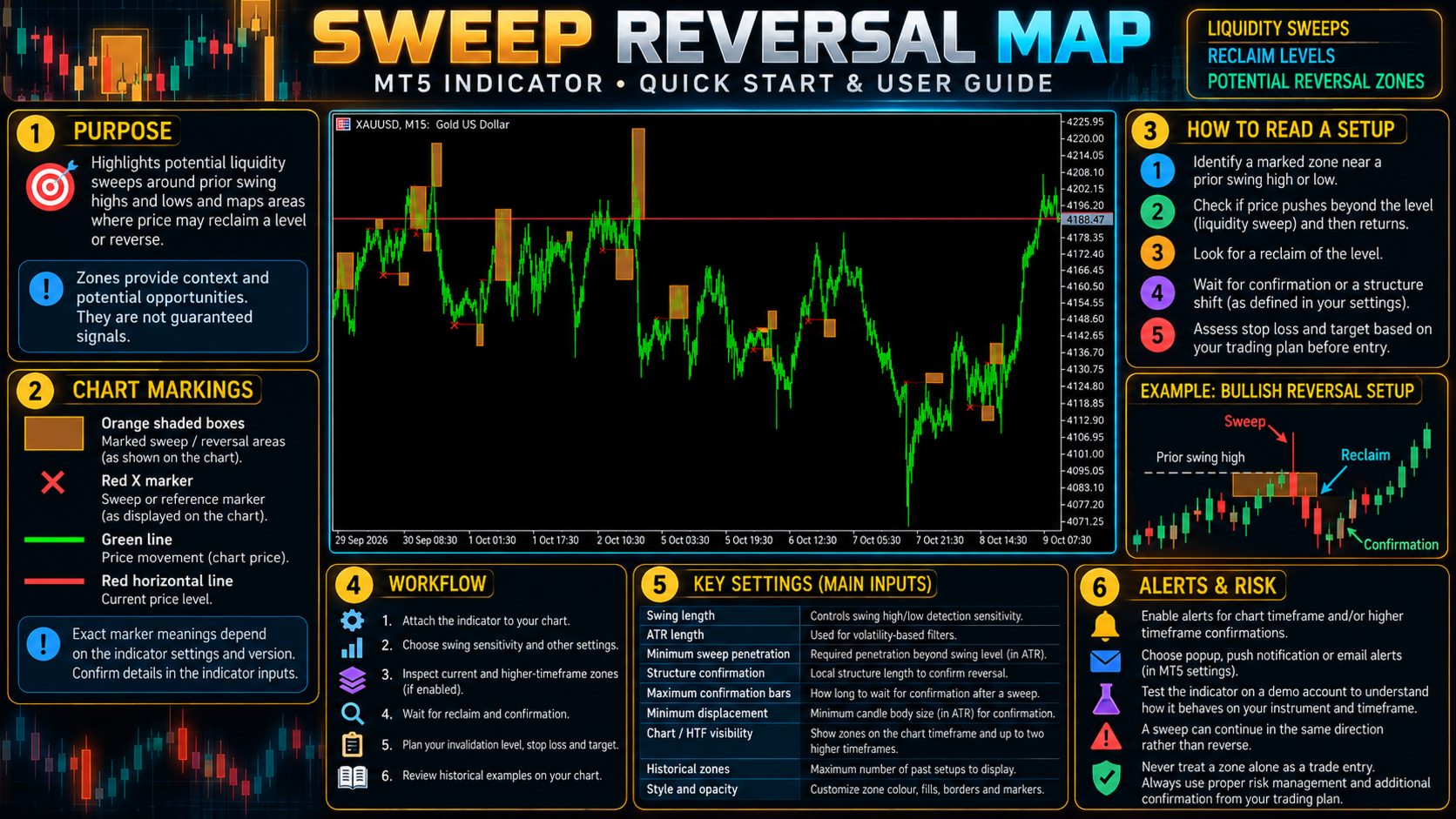
Sweep Reversal Map identifies potential reversal setups after price moves beyond a previously detected swing high or low and then reclaims the level. It follows a sequence of swing-level detection, sweep, reclaim, and market-structure confirmation.
The indicator distinguishes developing setups from confirmed ones and can display reversal zones across the chart timeframe and up to two additional timeframes. It is intended to help traders monitor failed breakouts and potential changes in local price behaviour.
How It Works
Swing-Level and Sweep Detection
The indicator identifies swing highs and lows using a configurable swing length. A sweep is detected when price moves beyond one of these levels. The minimum penetration setting uses ATR-relative distance to adjust detection sensitivity for different volatility conditions.
Reclaim and Confirmation
After a sweep, the indicator monitors whether price returns through the relevant level. A developing setup may appear before all confirmation conditions are met.
The confirmation stage evaluates local market structure and displacement. Settings include the structure length, the maximum number of bars allowed for confirmation, and the minimum displacement candle-body size relative to ATR.
Reversal Zone Mapping
When the configured confirmation conditions are satisfied, the indicator marks the relevant reversal zone. Developing and confirmed zones can be styled separately. Historical setups can be retained for chart review.
Multi-Timeframe Display
The indicator can display zones from the current chart timeframe and up to two additional configured timeframes. Optional timeframe labels help identify the source of each higher-timeframe zone.
Key Features
-
Detection of price sweeps beyond historical swing levels.
-
Reclaim monitoring after a sweep.
-
Local structure and displacement confirmation.
-
ATR-based controls for sweep penetration and displacement.
-
Separate display options for developing and confirmed setups.
-
Zones from the chart timeframe and up to two additional timeframes.
-
Configurable historical setup retention.
-
Customisable zone, level, border, fill, marker, and opacity settings.
-
Optional higher-timeframe labels.
-
Separate confirmation alerts for each enabled timeframe layer.
-
Popup, push, and email notifications.
Input Settings
Detection
-
Swing Length: Sets the swing-point detection window.
-
ATR Length: Sets the ATR calculation period.
-
Minimum Sweep Penetration: Sets the minimum penetration in ATR units.
Confirmation
-
Local Structure Length: Sets the local structure window used for confirmation.
-
Maximum Confirmation Bars: Limits the time allowed for a developing setup to confirm.
-
Minimum Displacement Body: Sets the minimum qualifying candle-body size relative to ATR.
Timeframes
-
Show Chart TF: Displays zones from the active chart timeframe.
-
Show HTF 1 / HTF 2: Enables the additional timeframe layers.
-
HTF 1 / HTF 2: Selects the additional timeframes.
Display and History
-
Show Developing Reversals: Displays setups that have not completed confirmation.
-
Confirmed Box Extension: Sets how far confirmed zones extend in source-timeframe bars.
-
Maximum Historical Setups: Limits the number of retained setups per layer.
-
Zone and Level Colours / Opacity Controls: Customise the appearance of zones and markers.
-
Show HTF Text: Displays the source timeframe label.
-
Maximum Bars: Limits the historical data used for calculation and plotting.
-
Refresh Interval: Controls refresh throttling.
Alerts
Configure confirmation alerts for the chart timeframe and each enabled higher-timeframe layer. Popup, push, and email notifications can be enabled as required. Push and email alerts require the relevant MetaTrader terminal settings.
Suggested Workflow
-
Identify the broader market direction and nearby support or resistance.
-
Watch for price to move beyond a previously established swing high or low.
-
Monitor whether price reclaims the swept level.
-
Distinguish developing zones from zones that have met the configured confirmation conditions.
-
Compare a confirmed zone with higher-timeframe context and available room to the next price level.
-
Define an invalidation point and acceptable risk before considering an entry.
Suitable For
-
Traders using liquidity-sweep and price-action concepts.
-
Traders studying failed breakouts and possible reversals.
-
Intraday traders who combine lower-timeframe setups with higher-timeframe context.
Important Notes
A sweep does not necessarily lead to a reversal. Price can continue beyond the swept level, and a confirmed setup can fail. Developing zones are monitoring references, not confirmed entry signals. Higher-timeframe displays depend on the selected timeframes and available price data. Use independent confirmation and appropriate risk management.