Expect Fix Accept
- Utilities
-
Mohamed Amr Mohamed Osama Abdelwahab
 Software Developer, Instructor, and Technical Team Leader with over 22 years of experience across desktop, web, and financial software development. Top Rated freelancer on Upwork with 200+ completed projects, $200K+ delivered, and a 100% job success record. Specialized in algorithmic trading systems
 - Version: 1.0
- Activations: 5
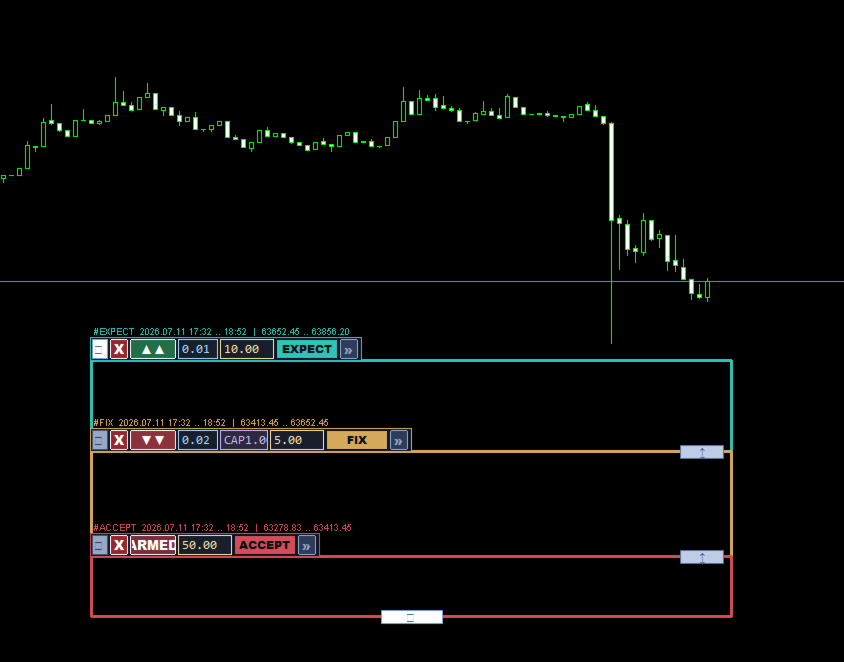
ExpectFixAccept is a manual visual trading assistant with automated execution for MetaTrader 5. It draws three contiguous, locked zones (the "ladder") directly on your chart. The zones stay glued together with zero gaps or overlaps.
The Three Zones
-
EXPECT (Teal): The entry zone closest to the price. When price enters, trades open in your chosen direction. Its $ field is the Basket Target: when total net profit of all trades reaches this dollar value, everything closes.
-
FIX (Amber): The recovery zone. If price moves against EXPECT and enters here, it opens recovery trades. Its $ field is the Recovery Target: once the combined profit of EXPECT + FIX trades reaches this net profit, all positions close.
-
ACCEPT (Red): The invalidation zone. When ARMED, if price touches this zone, all positions close. Its
∗ ∗ f i e l d i s t h e ∗ ∗ M a x L o s s ( ∗∗fieldisthe∗∗MaxLoss(
): if total floating loss reaches this amount, everything closes immediately (even before price reaches the zone).
Interface & Controls
-
Grip Handle (::): The EXPECT grip moves the entire ladder. Other grips adjust boundaries.
-
Close (X): Closes trades for that specific zone (ACCEPT's X closes everything).
-
Mode Button: Cycles through OFF
→ →▲ (1 Buy)→ →
▲▲ (2 Buys)→ →▲▲▲ (Multi Buy)→ →
▼ (1 Sell)→ →▼▼ (2 Sells)→ →
▼▼▼ (Multi Sell)→ →OFF. ACCEPT toggles OFF/ARMED. -
Cadence Toggle (Multi-Mode): CLOSE (opens on every bar close) or TIME (opens every HH:MM interval).
-
Lot Size / Recovery Cap (CAP): Set trade volume per zone. CAP restricts the max cumulative volume allowed in the FIX zone.
Features & Safety
-
Two Movement Modes: Press-and-hold drag, or click-to-pick-up (clicks once to grab, moves mouse, clicks to drop).
-
Auto-Orientation: Automatically re-sorts zones so EXPECT always faces the current market price.
-
Auto-Extend: Automatically extends the right edge of the zones with each new candle.
-
Drag Suspension: Trading is paused while dragging any handle.
-
Margin Buffer: Skips entries if free margin after open drops below X% of equity.
-
Max Trades: Hard safety cap on the total number of open positions.