Fibonacci Pilot Mini

What Is Fibonacci Pilot Mini?
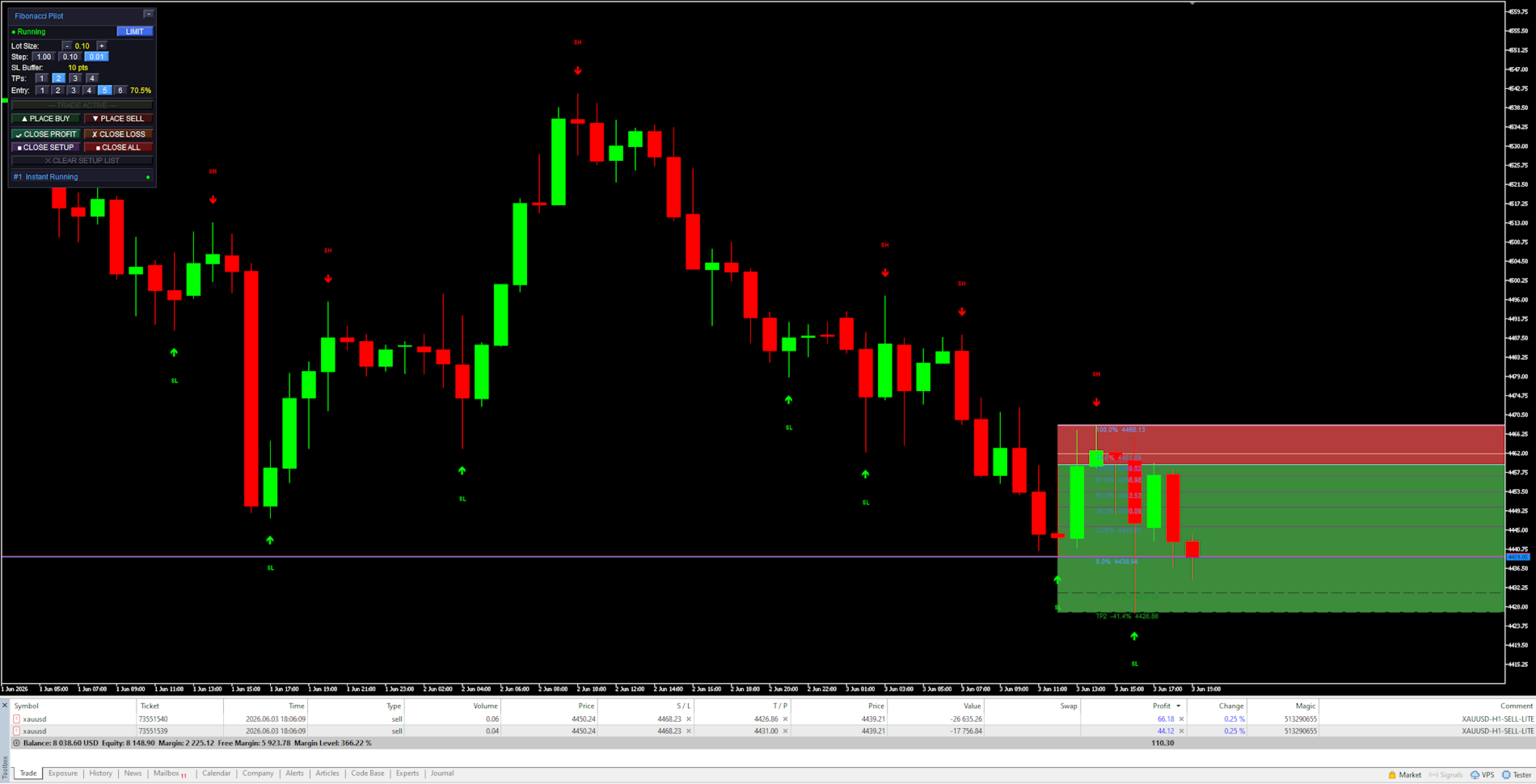
Fibonacci Pilot Mini is a semi-automatic Expert Advisor for MetaTrader 5. It assists the trader in placing Fibonacci-based trades by automating the mechanical steps after the trader has identified the swing. The trader performs the analysis; the EA handles lot sizing, entry price calculation, stop loss, take profit levels, and order placement.
Mini is the streamlined single-setup edition of Fibonacci Pilot Pro. It runs one trade setup at a time with a clean, minimal panel and no overlapping complexity. It is designed for traders who want fast, focused execution without managing multiple concurrent setups.

Important: The Fibonacci Pilot Mini, does not perform any trades automatically, it requires human interaction to perform the trades.


What the EA does
Detects and draws swing highs and swing lows on the chart automatically
Draws a full Fibonacci retracement grid between two user-selected price points (A and B)
Draws extension levels beyond point B as take profit targets
Calculates entry price, stop loss and up to 4 take profit levels from the Fibonacci grid
Places one or more market or limit orders with correct lot splits across TPs
Draws a color-coded risk zone (entry to SL) and reward zone (entry to last TP) on the chart
Shows a limit line with a stoplight color system as price approaches the entry level
Detects when a limit order is manually cancelled in the MT5 terminal and removes the setup
Restores an active setup automatically if the EA is reloaded or settings are changed

    What the trader does
    Identifies a swing high and swing low on the chart
    Clicks Point A then Point B on the chart to define the Fibonacci range
    Selects the desired entry retracement level on the panel
    Adjusts lot size and number of TPs
    Presses PLACE BUY or PLACE SELL to execute

      Mini supports one active setup at a time. For multiple concurrent setups on the same chart, use Fibonacci Pilot Pro.
      In LIMIT mode the EA places a pending limit order at the entry level. A horizontal line with stoplight coloring shows the entry price and changes from red → yellow → green as price approaches. In INSTANT mode the order is placed at market price immediately.


      Panel Reference:

      Title bar:
      Shows the EA name and version. The [−] button minimizes the panel to the title bar only. Click [−] again to restore.

        State row:
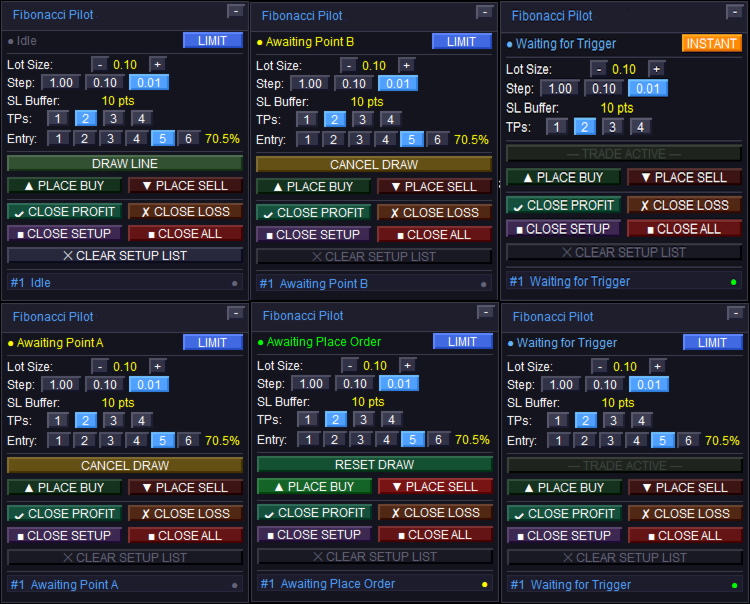
        Shows the current EA state. The colored dot on the left indicates the setup status:
        Idle — no active setup. DRAW LINE is available.
        Awaiting Point A / Awaiting Point B — click on the chart to place the point.
        Setup Ready — A and B are placed. Adjust entry level and press PLACE BUY/SELL.
        Limit Active / Waiting for Trigger — limit order is live on the broker.
        Instant Running — market order is live.
        Closed — trade has been closed (TP, SL, or manual).
        The LIMIT / INSTANT mode toggle button on the right switches order mode at runtime.

          Lot Size row:
          Shows the current lot size. Use [−] and [+] to adjust. The step selector [1.00] [0.10] [0.01] sets how much each press changes the lot size.

            SL Buffer row:
            Displays the current Stop Loss buffer in points as set in the inputs. This is informational — the value is set in the inputs dialog, not on the panel.

              TPs row:
              Selects how many Take Profit levels to use: [1] [2] [3] [4]. The active selection is highlighted. Each TP is calculated from a Fibonacci extension level beyond Point B.

                Entry row:
                Selects which Fibonacci retracement level is used as the entry price: [1] through [6] corresponding to FibLevel1–FibLevel6. The active level is highlighted and its percentage shown on the right. Only visible in LIMIT mode.

                  DRAW LINE button:
                  Starts the A→B drawing sequence. Changes to CANCEL DRAW while drawing. Shows RESET DRAW when a setup is ready but not yet placed. Dims to “— TRADE ACTIVE —” when a live trade is running to indicate it cannot be used.

                    PLACE BUY / PLACE SELL buttons:
                    Active only when a setup is ready (Setup Ready state). Places the order using the current lot size, TP count, SL buffer, and selected entry level. The EA automatically reorients A and B to match the chosen direction regardless of draw order.

                      CLOSE PROFIT / CLOSE LOSS:
                      Closes all open tickets for the current setup. CLOSE PROFIT closes only tickets currently in profit. CLOSE LOSS closes only tickets currently at a loss.

                        CLOSE SETUP / CLOSE ALL:
                        CLOSE SETUP closes the active setup’s tickets and removes chart objects. CLOSE ALL closes all open positions on the account (not limited to this setup).

                          CLEAR SETUP LIST:
                          Removes a closed or idle setup from the panel and clears all associated chart objects. Disabled (dimmed) when a live trade is active — close the trade first.


                            Chart Objects:

                            Swing arrows:
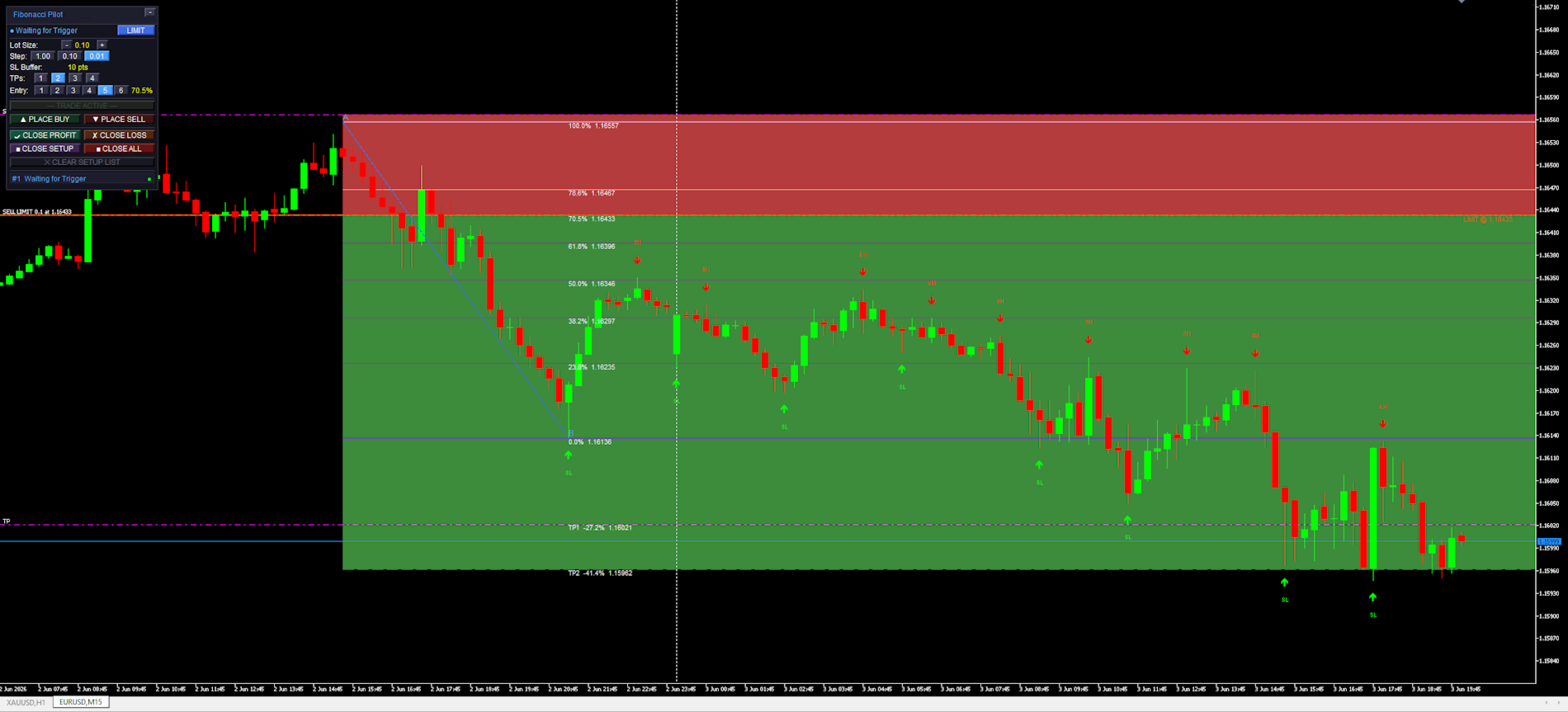
                            Red arrows pointing down mark Swing Highs (SH). Green arrows pointing up mark Swing Lows (SL). The SH and SL labels are centered above/below the arrow. Arrows are rendered in front of candles but behind the panel.

                              Fibonacci retracement lines:
                              Drawn between Point A (100%, SL side) and Point B (0%) as horizontal rays extending to the right. The 0% and 100% anchor lines use the panel accent color. The selected entry level uses the mode color (blue for limit, amber for instant). All other levels use “Retracement line color”.

                                Fibonacci extension lines:
                                Dashed lines drawn beyond Point B in the trade direction, one per active TP. Labeled with the TP number, extension percentage, and price. Use “Extension line color”.

                                  Risk zone (red):
                                  A filled rectangle from the entry price to the SL price. Drawn only after the order is placed. Shows the price range at risk for this trade.

                                    Reward zone (green):
                                    A filled rectangle from the entry price to the last active TP. Drawn only after the order is placed. Shows the potential reward range.

                                      Limit entry line:
                                      A solid horizontal line at the entry price. Color cycles based on how close price is to the entry: red (far) → yellow (approaching) → green (imminent). Thresholds are set by “Limit Trigger Line Near %” and “Limit Trigger Line Medium %”. Removed when the limit is triggered or cancelled.


                                        Settings Reference:

                                        Swing Detection:

                                        Controls how the EA identifies and draws swing highs and lows on the chart. These are visual aids only — the user selects the actual A and B points manually by clicking the chart.
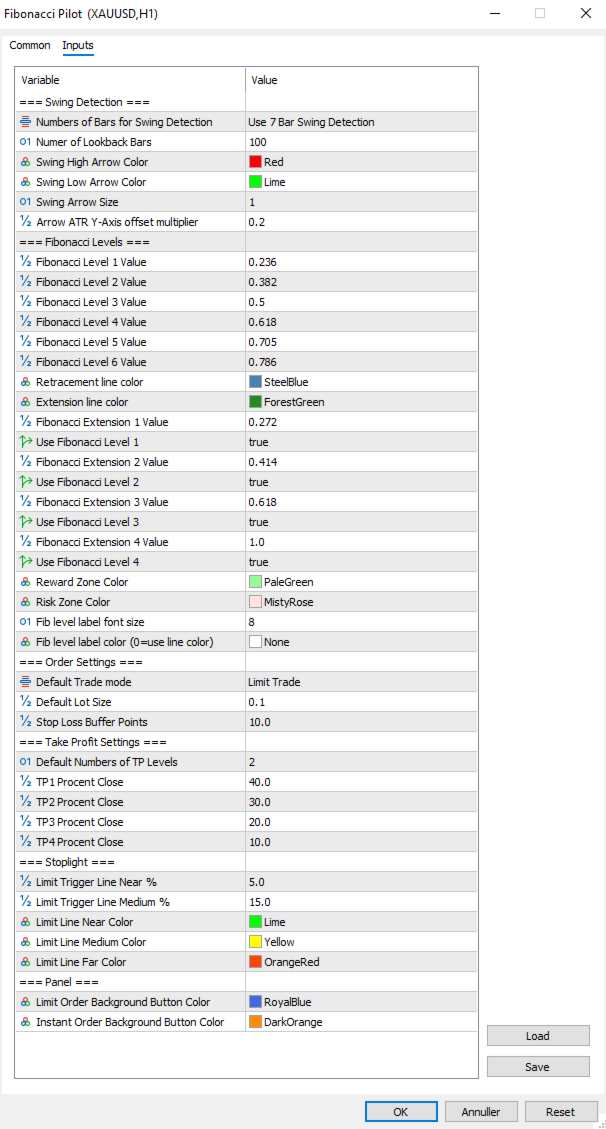
                                        Numbers of Bars for Swing Detection Number of bars used for swing detection. 3BAR: requires 1 bar each side. 5BAR: 2 bars each side. 7BAR: 3 bars each side. More bars = fewer but more significant swings.
                                        Number of Lookback Bars Lower values show fewer recent swings; higher values show more historical swings. Range: any positive integer.
                                        Swing High Arrow Color Color of the downward arrows marking Swing High points.
                                        Swing Low Arrow Color Color of the upward arrows marking Swing Low points.
                                        Swing Arrow Size   (weight) of the swing arrow objects. Range: 1–5.
                                        Arrow ATR Y-Axis offset multiplier Vertical distance between price and arrow, as a multiplier of the current ATR(14). Higher values push arrows further from the bars.

                                          Fibonacci Levels:

                                          Defines the retracement ratios drawn between A and B, the extension ratios drawn beyond B as TP targets, zone colors, and label appearance.

                                          Fibonacci Level X Value The six retracement ratios displayed on the grid. These are also the selectable entry levels [1]–[6] on the panel.
                                          Retracement line color Color of all retracement lines except anchors and the active entry level.
                                          Extension line color Color of all extension lines and their labels.
                                          Fibonacci Extension X Value Extension ratios beyond Point B, used as TP1–TP4 targets. Calculated as range × ratio added beyond B.
                                          Use Fibonacci Level X Enables or disables each extension line individually. Only enabled extensions are drawn and only up to the active TP count.
                                          Reward Zone Color Color of the reward zone rectangle (entry to last TP). Light red by default — rename/recolor to suit your premium zone convention.
                                          Risk Zone Color Color of the risk zone rectangle (entry to SL). Light green by default — rename/recolor to suit your discount zone convention.
                                          Fib level label font size Font size for all Fibonacci level text labels on the chart.
                                          Fib level label color Color for all Fibonacci level text labels. Set to NONE to use the line’s own color instead.


                                            Order Settings:
                                            Core parameters for how orders are sized and placed.

                                            Default Trade mode Starting order mode when the EA loads. LIMIT: places a pending limit order at the entry level. INSTANT: places a market order immediately at current price. Can be toggled on the panel at runtime.
                                            Default Lot Size Starting lot size shown on the panel when the EA loads. Adjusted per session using the panel controls.
                                            Stop Loss Buffer Additional points added to the SL distance beyond Point A. For a BUY, SL = point A − buffer. For a SELL, SL = point A + buffer. This prevents stop-outs from normal spread/wick at the swing level.


                                              Take Profit Settings:
                                              Controls the default number of TPs and how lots are distributed across them.

                                              Default Numbers of TP Levels Number of TP levels active when the EA loads (1–4). Changed per session on the panel.
                                              TP1 Percentage Close Percentage of total lots closed at TP1.
                                              TP2 Percentage Close Percentage of total lots closed at TP2.
                                              TP3 Percentage Close Percentage of total lots closed at TP3.
                                              TP4Percentage Close Percentage closed at TP4 when 4 TPs selected.
                                                The last active TP always absorbs any remaining lots to ensure the full position is always placed. Example with 2 TPs: TP1 = 40%, TP2 = 60% (not 30%). With 3 TPs: TP1 = 40%, TP2 = 30%, TP3 = 30%.


                                                Stoplight:
                                                Controls the color-changing limit entry line that shows how close price is to the pending entry level.

                                                Limit Trigger Line Near % When price is within this percentage of the A–B range from the entry level, the limit line turns green (imminent trigger).
                                                Limit Trigger Line Medium % When price is within this percentage of the A–B range, the line turns yellow (approaching). Beyond this threshold it shows red.
                                                Limit Line Near Color Color of the limit line when price is close (imminent).
                                                Limit Line Medium Color Color of the limit line when price is approaching.
                                                Limit Line Far Color Color of the limit line when price is far from entry.


                                                  Panel:
                                                  Visual colors used on the trade panel.

                                                  Limit Order Background Button Color Color used for the LIMIT mode toggle button and the entry level line when in limit mode. Blue by default.
                                                  Instant Order Background Button Color Color used for the INSTANT mode toggle button and the entry level line when in instant mode. Amber by default.


                                                  Fibonacci Orientation:
                                                  Understanding how the EA orients the Fibonacci grid is important for correct use.
                                                  Point A — 100% anchor Always the Stop Loss side of the trade. For a BUY setup: Point A is the swing low (price the SL is placed below). For a SELL setup: Point A is the swing high (price the SL is placed above).
                                                  Point B — 0% anchor Always the entry side of the trade. For a BUY: Point B is the swing high (the swing from which price is retracing). For a SELL: Point B is the swing low.
                                                  The EA automatically reorients A and B when you press PLACE BUY or PLACE SELL, regardless of which point you drew first or in which direction. You may draw from bottom to top, top to bottom, left to right, or right to left — the direction buttons determine the final orientation.


                                                  Notes and Tips:
                                                  Setup persistence:
                                                  If you open the settings dialog and change any input, the EA reinitializes. Any active setup (limit pending or trade running) is automatically saved to MT5 Global Variables before the restart and restored afterward. Chart objects, fib lines and the limit line are all redrawn with the new settings applied.
                                                  Manual limit cancellation:
                                                  If you cancel a pending limit order directly in the MT5 terminal (Toolbox → Trade tab), the EA detects this automatically within one tick and removes the setup from the panel and chart.
                                                  One setup at a time:
                                                  Mini supports a single active setup. The DRAW LINE button dims with the label “— TRADE ACTIVE —” while a trade is live. To start a new setup, close or clear the current one first.
                                                  Lot sizing with fewer TPs:
                                                  When using fewer than 4 TPs, the remaining lot percentage is always allocated to the last active TP. No lots are silently discarded. Check the TP percentage inputs if you want specific splits.
                                                  Strategy Tester compatibility:
                                                  Fibonacci Pilot Mini is compatible with the MT5 Strategy Tester. Timer events, sounds and push notifications are automatically disabled in tester mode.
                                                  Difference from Fibonacci Pilot Pro:
                                                  The Mini edition intentionally omits: multiple concurrent setups, Mini HUD, trailing stop, breakeven move, per-level Fibonacci colors, swing filter passes (significance, amplitude, wick), ATR-based SL, internal limit engine, push notifications, CSV trade journal, panel position customization, and the Finetune HUD. For those features, use Fibonacci Pilot Pro.
                                                  Recommended products
                                                  Development of the previous version of the indicator ZigZag WaveSize MT4 ZigZag WaveSize - modified standard ZigZag indicator with added information about wave length in points, levels, and different alert logic General Improvements: Code adaptation for MetaTrader 5 Optimized work with graphical objects New Features: Horizontal levels at extremes Selection of level types: horizontal/rays/segments Filter for liquidity levels (not broken by price) Buffer for breakouts: adjusting sensitivity to f
                                                  FREE
                                                  Auto Fib Retracements
                                                  Ross Adam Langlands Nelson
                                                  4.2 (5)
                                                  Automatic Fibonacci Retracement Line Indicator. This indicator takes the current trend and if possible draws Fibonacci retracement lines from the swing until the current price. The Fibonacci levels used are: 0%, 23.6%, 38.2%, 50%, 61.8%, 76.4%, 100%. This indicator works for all charts over all timeframes. The Fibonacci levels are also recorded in buffers for use by other trading bots. Any comments, concerns or additional feature requirements are welcome and will be addressed promptly. 
                                                  FREE
                                                  Fibo Trader FREE MT5
                                                  Grzegorz Korycki
                                                  3 (3)
                                                  Fibo Trader is an expert advisor that allows you to create automated presets for oscillation patterns in reference to Fibonacci retracements values using fully automated and dynamically created grid. The process is achieved by first optimizing the EA, then running it on automated mode. EA allows you to switch between automatic and manual mode. When in manual mode the user will use a graphical panel that allows to manage the current trading conditions, or to take control in any moment to trade ma
                                                  FREE
                                                  Auto Fibonacci Retracement Indicator — Flexible and Reliable This isn’t just another Auto Fibonacci Retracement indicator. It’s one of the most flexible and dependable tools available . If you find it useful, please consider leaving a review or comment — your feedback means a lot! Check out my other helpful tools below: Telegram to MT5 using AI   - AI-Powered Signal Copier Bot Smart Alert Manager   - Set up advanced alerts and send them to Mobile, Telegram, Discord, Webhook... Timeframes Trend
                                                  FREE
                                                  Golden Mind EA
                                                  Leszek Aleksander Mroczek
                                                  NEW VERSION -  FREE FOR LIMITED TIME Golden Mind EA is a fully automated Expert Advisor designed for MetaTrader 5, built around a dynamic grid-based trading approach combined with intelligent position management. Unlike traditional grid systems that rely on fixed take-profit levels, Golden Mind EA uses a pair-based closing logic . The system continuously calculates the combined result of positions and closes them when a defined profit level above the break-even line is reached. This allows the E
                                                  FREE
                                                  The Swing High Low and Fibonacci Retracement Indicator is a powerful technical analysis tool designed to identify key price levels and potential reversal zones in the market. It automatically detects recent swing highs and swing lows on the chart and overlays Fibonacci retracement levels based on these points. This indicator helps traders: Visualize market structure by highlighting recent swing points. Identify support and resistance zones using Fibonacci ratios (e.g., 38.2%, 50%, 61.8%). Adapt
                                                  FREE
                                                  Fibonacci Moving Averages
                                                  Brendan Jonathan Stoyanowski-campbell
                                                  2 (1)
                                                  OVERVIEW The Fibonacci Moving Averages are a toolkit which allows the user to configure different types of Moving Averages based on key Fibonacci numbers. Moving Averages are used to visualise short-term and long-term support and resistance which can be used as a signal where price might continue or retrace. Moving Averages serve as a simple yet powerful tool that can help traders in their decision-making and help foster a sense of where the price might be moving next. The aim of this scrip
                                                  FREE
                                                  Free automatic Fibonacci is an indicator that automatically plots a Fibonacci retracement based on the number of bars you select on the BarsToScan setting in the indicator. The Fibonacci is automatically updated in real time as new highest and lowest values appears amongst the selected bars. You can select which level values to be displayed in the indicator settings. You can also select the color of the levels thus enabling the trader to be able to attach the indicator several times with differe
                                                  FREE
                                                  Automatic fibonacci with alerts is an indicator that automatically plots a fibonacci retracement based on the number of bars you select on the BarsToScan setting in the indicator. The fibonacci is automatically updated in real time as new highest and lowest values appear amongst the selected bars. You can select which level values to be displayed in the indicator settings. You can also select the color of the levels thus enabling the trader to be able to attach the indicator several times with d
                                                  FREE
                                                  -- Simple but effective. Inversion Indicator -  What is it? A trend-following overlay indicator that combines SuperTrend logic with exponential curve technology. It detects trend direction, draws a dynamic channel on the chart, and sends real-time alerts when the trend reverses. How does it work? The indicator calculates an exponential baseline using ATR and a SuperTrend factor. When price closes above or below this baseline, a trend reversal is confirmed. A green arrow marks the start of a
                                                  FREE
                                                  Pillartrade
                                                  QuanticX
                                                  3 (1)
                                                  Announcement: All EAs (Expert Advisors) from QuanticX are currently available for free, but only for a limited time! To enjoy a Lifetime QuanticX support and continue receiving free EAs, we kindly request you to leave a review and track the performance of our EAs on Myfxbook. Additionally, don't hesitate to reach out to us for exclusive bonuses on EAs and personalized support. Pillartrade by QuanticX Welcome to Pillartrade - Your Long-Only Trading Ally for US500 Join the forefront of financial
                                                  FREE
                                                  Fibo Pivot Optimus
                                                  Syamsurizal Dimjati
                                                  5 (1)
                                                  Ritz Smart FIBOPIVOT Optimus Pro Advanced Multi-Timeframe Fibonacci Trading System SMART PREDICTION & ACCURATE FORECAST Revolutionary Fibonacci Pivot Technology combines traditional pivot points with advanced Fibonacci extensions, creating a powerful predictive tool for professional traders. Our algorithm intelligently detects significant price levels across multiple timeframes, delivering laser-accurate support and resistance zones before the market moves . INTELLIGENT VOLUME-VALIDATED SIGNALS
                                                  FREE
                                                  Use this expert advisor whose strategy is essentially based on the Relative Strength Index (RSI) indicator as well as a personal touch. Other free expert advisors are available in my personal space as well as signals, do not hesitate to visit and leave a comment, it will make me happy and will make me want to offer content. Expert advisors currently available: LVL Creator LVL Creator Pro LVL Bollinger Bands   Trading is not a magic solution, so before using this expert on a live account, carry
                                                  FREE
                                                  EurowaveFX
                                                  Fabio Sorrentino
                                                  FX_EUXXX is a free expert advisor designed primarily for EURUSD on the H4 chart. It operates without hedging, grid, martingale, or anti-martingale basically, no gambling. I encourage you to request the updated set file for free. Subscribe   to our new channel for   promo/FREE  and   updates! :  MQL5 Group   OR  Telegram Channel Subscribe  to get new   announcements   and look behind the scenes!  MQL5_Channel   Please support me to building   FREE EAs!   Leave a   review ! Thank you Recommendati
                                                  FREE
                                                  FiboZoneLines Short Description Automatically draws multi-layered Fibonacci zone lines from your manually placed Fibonacci retracement. No repainting. Fully customizable. Overview FiboZoneLines is a powerful Fibonacci-based indicator for MetaTrader 5 that automatically generates a complete set of multi-layered support and resistance lines from a single manually drawn Fibonacci retracement object on your chart. Unlike standard Fibonacci tools, FiboZoneLines divides the entire retracement range in
                                                  FREE
                                                  IAMFX offers the ultimate solution to make trading easier and more flexible on IAMFX Web  using IAMFX Agent . With our exclusive IAMFX-Agent and IAMFX-Center, you can effortlessly manage your trading anytime, anywhere through web and mobile interfaces. Fully compatible with both web and mobile environments,   IAMFX allows real-time multi-account management and monitoring with a simple installation. IAMFX Benefits Manage multiple MT5 accounts Easy orders with market, stop and limited Manage orde
                                                  FREE
                                                  GhostTrail Pro v5 is an intelligent Expert Advisor for MetaTrader 5 that manages the complete lifecycle of manual crypto trades. From detecting your setup and alerting your phone, to automatically protecting profits and closing positions — GhostTrail does the heavy lifting so you don't have to.   Designed specifically for manual traders and scalpers who have a proven entry strategy but struggle with trade management, partial closes, and protecting profits while away from their screen.
                                                  FREE
                                                  This indicator automatically identifies liquidity levels using swing fractals and tracks when price sweeps through them. Works on any symbol and timeframe with full multi-timeframe support. Features: — Detects swing highs and lows via a fractal method (configurable bars left & right) on a selected timeframe. Active levels are displayed as rays extending to the right; swept levels turn into dashed lines ending at the sweep candle. — Plots Previous Day (PDhigh / PDlow), Previous Week (PWhigh / PWl
                                                  FREE
                                                  AP Fibonacci Retracement PRO (MT5) Overview AP Fibonacci Retracement PRO is a trend-continuation pullback EA. It waits for a confirmed swing, calculates the Fibonacci retracement zone, and looks for entries in the direction of the original move. No grid, no martingale. Strategy logic Detects the last valid swing high/low using Fractals on the selected signal timeframe. Calculates the retracement zone between 38.2% and 61.8% (configurable). On a closed bar, if price is inside the zone (with opti
                                                  FREE
                                                  The Fibonacci Scalper
                                                  STANTON ROUX
                                                  4.22 (45)
                                                  The Fibonacci Trader MQL5 expert advisor uses the Fibonacci levels to determine a buy or sell trade with the MACD as confirmation. The Fibonacci levels work as follows: Above 61.8 SELL if MACD trend is SELL Trading Range (Ability to select trading input parameters) BUY if MACD trend is BUY SELL if MACD trend is SELL Below 23.6 BUY if MACD trend is BUY Default settings are configured for EURUSD on M5 Chart. To work with the news server, you must add the URL ‘ http://ec.forexprostools.com/ ’ in t
                                                  FREE
                                                  Babel Assistant
                                                  Iurii Bazhanov
                                                  4.33 (9)
                                                  Babel assistant 1 The MT5 netting robot "Babel_assistant_1" uses the ZigZag indicator to generate Fibonacci levels across M1, M5, M15, H1, H4, D1, and W1 timeframes, and calculates the strength of buy and sell trends. It opens a position using the "Lot for open a position" setting if the specified trend level of 4.925 is exceeded. Then, Babel places pending orders at certain Fibonacci levels and sets the specified Stop Loss and Take Profit lines. The screen displays the current results of the po
                                                  FREE
                                                  Triangle Pattern Gann EA
                                                  Nguyen Van Kien
                                                  5 (3)
                                                  Triangle Pattern Gann EA v3.4 - Trade Like the Legendary W.D. Gann Harness the Power of Geometric Price Patterns & Sacred Ratios Are you ready to trade with one of the most powerful pattern recognition systems ever developed? The Triangle Pattern Gann EA v3.4 brings the legendary wisdom of W.D. Gann into the modern algorithmic trading era. What Makes This EA Exceptional? Based on Proven Gann Methodology W.D. Gann was one of history's most successful traders, achieving over 90% accuracy u
                                                  FREE
                                                  CloseAll MT5
                                                  Mr Sorachai Pitakjarukul
                                                  4.5 (2)
                                                  ขอบคุณ แรงบันดาลใจ จากโค้ชแพม ที่ทำให้เริ่มทำ    Close all ตัวนี้  และขอขอบคุณทุกคนที่ให้ความรู็มาโดยตลอด ไม่ว่าจะทางตรงทางอ้อม ขอบคุณทุกคนที่ให้ความรู้เพื่อนร่วมเทรด ทั้งนี้เพื่อให้นักเทรดทุกคนได้มีเครื่องมือในการควบคุมการปิดการซื้อขาย จึงขอพัฒนาโปรแกรม close all version 5 ได้ใช้ทุกคน  Close all and update profit Version 1.00 (MT5) Full version Give you free  For MT4 Click  https://www.mql5.com/en/market/product/79252 Fix TPSL calculate  Program function Tab 1 Close order function and show br
                                                  FREE
                                                  This indicator copies graphical objects (vertical lines, horizontal lines, text labels, fibo and etc.) from master chart to other charts.  For example, you can copy lines from the chart GBPUSD with period H1 to chart GBPUSD with period M15. It's makes technical analyses more simple. Show label - show label on the Master chart, where you draw graphical objects to copy; Font size - font size of label; Type of synchronisation - type of synchronisation Copy text - on/off copy of text objects Copy la
                                                  FREE
                                                  Fast Fibonacci Grid MT5
                                                  Grzegorz Korycki
                                                  2.5 (2)
                                                  Did you ever feel irritated by manually adjusting Fibonacci retracement levels? Do you ever want to have a tool that was automatically adjust to certain Fibonacci levels with your trading? Well here is a tool for you: Fast Fibonacci indicator and Grid trader allows you to quickly adjust Fibonacci retracement levels or construct Fibonacci extension grid! You can also quickly setup your grid trading based on these levels - only with few clicks. Adjustable graphics, font sizes and graphics panels m
                                                  FREE
                                                  Smart Market Flow Detector
                                                  Victor Paul Hamilton
                                                  4.5 (2)
                                                  Smart Market Flow Detector (SMFD) v4.0 — Professional Edition Four Algorithms. One Signal. Zero Repainting. Smart Market Flow Detector combines four analytical engines into a single indicator that identifies institutional order flow patterns across all timeframes. Every signal is generated on closed bars only — what you see in back-testing is what you get live. What It Does SMFD scores every bar on two axes: Smart Money Flow (institutional accumulation/distribution) and Dumb Money Flow (retail
                                                  FREE
                                                  A ready-made multitimeframe trading system based on automatic plotting and tracking of Fibonacci levels for buying and selling any symbol. Demo version - calculation of the last 390 bars is not performed. Advantages Determines the trend direction based on a complex of 14 indicators ( Cx ), extremums of ZigZag ( Z ), RSI ( R ), Impulse ( I ) Displaying the values of 14 indicators comprising the trend direction ( Cx ) Plotting horizontal levels, support and resistance lines, channels View the plo
                                                  FREE
                                                  Fractal Structure Auto Fibonacci This tool is designed for price action traders and structural analysts who want to optimize their charting. It automatically identifies valid market swings using fractal logic, draws clear ZigZag lines, and automatically draws Fibonacci retracement levels for the most recent trading range. Key Features Dynamic Fractal Detection: Identifies valid swing peaks and troughs based on a user-defined review period (n). It filters out market noise and visually marks
                                                  FREE
                                                  VadineroLab MT5 Export Master to CSV EXEL JSON - Expert Advisor for exporting and analyzing symbols, account, terminal parameters, active trades, current account state, trading history, global variables.   Generates the following report types: * Symbols Parameters — spread, tick size, min/max lot, swap, … * Account Parameters — balance, equity, leverage, currency, margin info, … * Terminal Parameters — server, version, language, date, environment, … * Trade History — orders, deals, positions, se
                                                  FREE
                                                  Go Long Advanced
                                                  Phantom Trading Inc.
                                                  4.78 (9)
                                                  The Go Long EA implements an advanced intraday trading strategy based on the principle of systematic daily trading with multiple technical confirmations. While many traders seek complex algorithms, this EA combines simple yet effective concepts with sophisticated risk management and multiple technical filters. The EA opens positions at a specific time each day, but only when market conditions align with multiple technical indicators. This systematic approach helps capture intraday moves while a
                                                  FREE
                                                  Buyers of this product also purchase
                                                  Trade Assistant MT5
                                                  Evgeniy Kravchenko
                                                  4.41 (216)
                                                  It helps to calculate the risk per trade, the easy installation of a new order, order management with partial closing functions, trailing stop of 7 types and other useful functions. Additional materials and instructions Installation instructions - Application instructions - Trial version of the application for a demo account Line function -   shows on the chart the Opening line, Stop Loss, Take Profit. With this function it is easy to set a new order and see its additional characteristics bef
                                                  Forex Trade Manager MT5
                                                  InvestSoft
                                                  4.98 (674)
                                                  Trade Manager MT5 is an advanced position size calculator and trade management tool for MetaTrader 5, designed to help traders plan trades faster, control risk more precisely, and manage open positions directly from the chart. It combines order placement, risk based lot calculation, Stop Loss and Take Profit management, Break Even, Trailing Stop, Partial Close, Equity Protection, and external trade management in one panel. Whether you trade forex, indices, metals, commodities, crypto, or future
                                                  ================================================================================ POC BREAKOUT - V20.72. Full Professional Grade Toolkit ================================================================================ POC Breakout is a full MetaTrader 5 trading dashboard for discretionary traders who want breakout signals, Point of Control (POC) context, volume profiles, order flow, market structure, news, alerts, and advanced trade planning in one professional workspace. Attached directly to you
                                                  Local Trade Copier EA MT5
                                                  Juvenille Emperor Limited
                                                  4.94 (148)
                                                  Experience exceptionally fast trade copying with the   Local Trade Copier EA MT5 . With its easy 1-minute setup, this trade copier allows you to copy trades between multiple MetaTrader terminals on the same Windows computer or Windows VPS with lightning-fast copying speeds of under 0.5 seconds. Whether you're a beginner or a professional trader, the   Local Trade Copier EA MT5   offers a wide range of options to customize it to your specific needs. It's the ultimate solution for anyone looking t
                                                  TradePanel MT5
                                                  Alfiya Fazylova
                                                  4.88 (167)
                                                  Trade Panel is a multi-functional trading assistant. The app contains over 50 trading functions for manual trading and allows you to automate most trading tasks. Application instructions + video instructions: https://www.mql5.com/en/blogs/post/756482 Trial version of the application for a demo account: https://www.mql5.com/en/blogs/post/750865 How to install the application: https://www.mql5.com/en/blogs/post/756239 How to test the application in visual mode: https://www.mql5.com/en/blogs/post/7
                                                  Beta Release The Telegram to MT5 Signal Trader is nearly at the official alpha release. Some features are still under development and you may encounter minor bugs. If you experience issues, please report them, your feedback helps improve the software for everyone. Telegram to MT5 Signal Trader is a powerful tool that automatically copies trading signals from Telegram channels or groups directly to your MetaTrader 5 account. It supports both public and private Telegram channels, and you can conn
                                                  Telegram to MT5 MultiChannel Copier
                                                  Sergio Marquez Uroz
                                                  4.42 (12)
                                                  Telegram to MT5 Multi-Channel Copier   automatically copies trading signals from your Telegram channels straight to MetaTrader 5. No bots, no browser extensions, no manual copying. A signal arrives in Telegram and the EA opens the trade in your terminal within seconds. The product has two components: a Windows application that listens to your Telegram channels, and this Expert Advisor that executes the signals in your MT5 terminal. An MT4 version is also available   here . Setup guide and appli
                                                  Astro Trade MT5
                                                  Indra Maulana
                                                  5 (4)
                                                  25% discount on the release of the tool: only for the next 3 buyers Send a message to receive a demo version. AstroTrade Trading Assistant AstroTrade is a comprehensive multi-functional trading utility developed for the MetaTrader 5 platform. It integrates essential tools for trade execution, risk management, and technical monitoring into a single unified interface. The application is designed to assist traders in managing their daily operations through a visual and structured environment. Vi
                                                  Telegram To MT5 Ultra
                                                  Mirel Daniel Gheonu
                                                  5 (4)
                                                  Telegram To MT5 — Signal Copier Turn the trading calls from your Telegram channels into real MT5 orders — automatically, on as many accounts as you like, with risk and rules fully under your control. Telegram To MT5 connects the VIP / signal channels you already follow on Telegram to your MetaTrader 5 terminal. A free companion desktop app reads the messages (even from channels that block bots), and this Expert Advisor executes them on your account — applying your own risk settings, symbol mappi
                                                  Exp COPYLOT CLIENT for MT5
                                                  Vladislav Andruschenko
                                                  3.97 (35)
                                                  Professional Trade Copier for MetaTrader 5 Fast, professional, and reliable trade copier for MetaTrader . COPYLOT allows you to copy Forex trades between MT4 and MT5 terminals with support for Hedge and Netting accounts. COPYLOT MT5 version supports: - MT5 Hedge to MT5 Hedge - MT5 Hedge to MT5 Netting - MT5 Netting to MT5 Hedge - MT5 Netting to MT5 Netting - MT4 to MT5 Hedge - MT4 to MT5 Netting MT4 version Full Description +DEMO +PDF How To Buy How To Install How to get Log Files H
                                                  Premium Trade Manager - The Trade Panel With a Coach Built In Premium Trade Manager puts a trading coach inside your chart, with a full execution engine underneath it. Set the trade up the way you always do, then let Max, your AI trading coach, read that exact setup against your live account and give you a straight verdict before you commit: is the stop disciplined, is the risk sane, is a high-impact release minutes away, are you near a prop-firm limit. Below sits the engine that runs everything
                                                  Anchor Trade Manager
                                                  Kalinskie Gilliam
                                                  5 (8)
                                                  Anchor: The EA Manager Your EAs cannot see each other, but Anchor can. Anchor gives you one place to coordinate your EAs, manage risk, and decide when trading is allowed. It works alongside the trading bots you already use without any changes to them. The Problem One EA opens a trade. Then another starts trading. The next thing you know, you wake up to multiple grids built across your account. Each EA may be doing exactly what it was designed to do, but together they can place far more risk on y
                                                  HINN MagicEntry Extra
                                                  ALGOFLOW OÜ
                                                  4.74 (19)
                                                  HINN MAGIC ENTRY – the ultimate tool for entry and position management! SIMPLE. FASTEST. INTUITIVE. MAX AUTOMATED. Place orders by selecting a level directly on the chart! full description   ::  demo-version  :: 60-sec-video-description Key features: - Market, limit, and pending orders - Automatic lot size calculation - Automatic spread and commission accounting - Unlimited partitial take-profits  - Breakeven and trailing stop-loss and take-profit  functions - Invalidation leves - Intuitive, a
                                                  Trade Dashboard MT5
                                                  Fatemeh Ameri
                                                  4.95 (132)
                                                  Trade Dashboard simplifies how you open, manage, and control your trades, with built-in lot size calculation. It allows you to execute trades, manage risk, and control positions directly on the chart, with tools such as partial close, breakeven, and trailing stop. Designed to reduce manual work and help you stay focused on your trading decisions. A demo version is available for testing. Detailed explanations of features are provided within the MQL5 platform. Installation instructions are include
                                                  Trade copier MT5
                                                  Alfiya Fazylova
                                                  4.59 (54)
                                                  Trade Copier is a professional utility designed to copy and synchronize trades between trading accounts. Copying occurs from the account / terminal of the supplier to the account / terminal of the recipient, which are installed on the same computer or VPS . PROMOTION - If you have already purchased the "Trade Copier MT5," you can receive the "Trade Copier MT4" for free (for copying MT4 > MT5 and MT4 < MT5). For more detailed information about the conditions, please contact us via private message
                                                  Ultimate Extractor
                                                  Clifton Creath
                                                  5 (8)
                                                  Ultimate Extractor - Professional Trading Analytics for MT5 *****this is the local HTML version of Ultimate Extractor. !!!!!it is not compatible with Cloud!!!! For the online version please reach out to me directly****** Ultimate EA manager also now available when you use cloud pro and above for free!! Ultimate Extractor transforms your MetaTrader 5 trading history into actionable insights with comprehensive analytics, interactive charts, and real-time performance tracking. What It Does Automa
                                                  Signal Trading View to MT5 Pro
                                                  Mirel Daniel Gheonu
                                                  4.5 (2)
                                                  Signal TradingView to MT5 Pro  Instant professional execution between TradingView and MetaTrader 5 Automate your trading strategy with the most robust communication bridge between TradingView alerts and real execution in MT5. Designed for traders who demand speed, flexibility, and impeccable risk management, this Expert Advisor transforms any alert message into a precise market or limit order.   Install and TEST the TRIAL version HERE STRENGTHS AND ADVANTAGES Universal Parsing Engine (Propriet
                                                  The product will copy all telegram signal to MT5 ( which you are member) , also it can work as remote copier.  Easy to set up, copy order instant, can work with almost signal formats, image signal,  s upport to translate other language to English Work with all type of channel or group, even channel have "Restrict Saving Content", work with  multi channel, multi MT5 Work as remote copier: with signal have ticket number, it will copy exactly via ticket number. Support to backtest signal. How to s
                                                  Power Candles Strategy Scanner - Self-Optimizing Multi-Symbol Setup Finder Power Candles Strategy Scanner runs the same self-optimizing engine that powers the Power Candles indicator - on every symbol in your Market Watch, side by side. One panel tells you which symbols are statistically tradable right now, which strategy wins on each, the optimal Stop Loss / Take Profit pair, and pings you the moment a fresh signal fires. This tool is part of the Stein Investments ecosystem - 18+ tools plus Max
                                                  Seconds Chart MT5
                                                  Boris Sedov
                                                  4.61 (18)
                                                  Seconds Chart is a unique tool for creating second-based charts in MetaTrader 5 . With Seconds Chart , you can construct charts with timeframes set in seconds, providing unparalleled flexibility and precision in analysis that is unavailable with standard minute or hourly charts. For example, the S15 timeframe indicates a chart with candles lasting 15 seconds. You can use any indicators and Expert Advisors that support custom symbols. Working with them is just as convenient as on standard charts.
                                                  Trade Copier Ultimate
                                                  Janitha Sandaruwan Amaradasa Wickramasingha Arachchilage
                                                  5 (5)
                                                  Trade Copier Ultimate - Telegram to MT5 Signal Copier Trade Copier Ultimate automatically copies Telegram trading signals into MetaTrader 5. The EA can read signal messages, detect the symbol, order type, entry price, Stop Loss, Take Profit levels and selected update commands, then execute or manage the trade in MT5 using your lot and risk settings. It is more than a basic Telegram to MT5 copier. TCU also supports Bot API and user-account Bridge workflows, Discord signal routing, local MT5 to MT
                                                  Message me after purchase to receive the complete manual kit + 3-day OpenAI API trial to test the AI features + Another bonus gift The current price is a limited discount for August Relaunch Update — secure your edition now before price go up. Next Price: $340 This is completely different from any trading panel you’ve tried or seen on the market. It’s one of the most innovative AI-powered trading panels available in the retail market right now. Imagine connecting   AI directly to your chart   —
                                                  FarmedHedge Pair Trading Dashboard
                                                  Tanapisit Tepawarapruek
                                                  5 (3)
                                                  Farmed Hedge Yield Farming | All Markets (Manual - Hybrid - Semi/Automated EA) VERIFIED TRADING RESULTS - Farmed Hedge Yield Axi Copy:  https://www.mql5.com/en/signals/2356376 - Farmed Hedge Yield Exn Copy:   https://www.mql5.com/en/signals/2356404 - Farmed Hedge Yield V Copy:  https://www.mql5.com/en/signals/2357156 * Before purchasing, please feel free to send me a message if you have any questions about the product or setup. ** After purchase,  Contact me via private message to receive t
                                                  Footprint Chart Pro — Professional OrderFlow EA for MetaTrader 5 Version 6.34 | Professional tool for real traders | Institutional-Grade Visualization DEMO USERS - PLEASE SELECT EVERY TICK / REAL TICK WHEN TESTING AND YOU HAVE DOWNLOADED HISTORICAL DATA. IF YOU SEE A WAITING SCREEN AND IT IS NOT DOWNLOADING, IT MEANS YOU HAVE LOW HISTORICAL DATA. TRY 1 MIN AND 5 MIN FIRST ON 1 DAY DATA. ONE DAY DATA SHOULD BE THE NEWEST AND MOST CURRENT DATE. PLEASE WAIT UNTIL THE MARKET HAS ROLLED OVER PERIOD.
                                                  Trading View ToMT5
                                                  Mirel Daniel Gheonu
                                                  The Ultimate TradingView to MT5 Bridge Automation Stop manual trading and latency issues. TradingView to MT5 Copier PRO is the fastest and most reliable bridge to execute your TradingView alerts directly on MetaTrader 5. This EA executes your trades instantly using High-Speed WebSocket technology . Installation instructions and Trial version  Key Features  Trade Copier  Ultra-Fast Execution: Uses WebSocket connectivity (faster than standard WebRequest) to minimize slippage.  Universal Broker
                                                  News Filter EA
                                                  Rashed Samir
                                                  5 (1)
                                                  News Filter EA: Advanced Algo Trading Assistant News Filter EA is an advanced algo trading assistant designed to enhance your trading experience. By using the News Filter EA , you can integrate a Forex economic news filter into your existing expert advisor, even if you do not have access to its source code. In addition to the news filter, you can also specify trading days and hours for your expert. The News Filter EA also includes risk management  and equity protection features. MT4 Version Ma
                                                  Quant AI Agents
                                                  Ho Tuan Thang
                                                  5 (1)
                                                  Quant AI Agents are independent trading Expert Advisors. Instead of trading using a fixed strategy like other conventional EAs, Quant AI Agents   is a   multi-agent AI trading framework   that turns natural-language strategy prompts into live.  WANT THE SAME RESULTS AS MY LIVE SIGNAL?   Use the exact same brokers I do:   IC MARKETS , IC TRADING   .  Unlike the centralized stock market, Forex has no single, unified price feed.  Every broker sources liquidity from different providers, creating un
                                                  Working Demo Download Copy Cat More Trade Copier MT5 is a local trade copier and a complete risk management and execution framework designed for today’s trading challenges. From prop firm challenges to personal portfolio management, it adapts to every situation with a blend of robust execution, capital protection, flexible configuration, and advanced trade handling. The copier works in both Master (sender) and Slave (receiver) modes, with real-time synchronization of market and pending orders,
                                                  Telegram to MT5 Coppy
                                                  Sergey Batudayev
                                                  5 (10)
                                                  Telegram to MT5: The Ultimate Signal Copying Solution Simplify your trading with Telegram to MT5, the modern tool that copies trading signals directly from Telegram channels and chats to your MetaTrader 5 platform, without the need for DLLs. This powerful solution ensures precise signal execution, extensive customization options, saves time, and boosts your efficiency. [ Instructions and DEMO ] [ FAQ ] [ How atach logs properly ] [ Settings descrition ] Key Features Direct Telegram API Integrati
                                                  VirtualTradePad One Click Trading Panel
                                                  Vladislav Andruschenko
                                                  4.59 (74)
                                                  Trading Panel for MetaTrader 5 — professional one-click trading from chart and keyboard A powerful trading panel for active manual trading, designed to open, manage, and close trades far faster and more efficiently than the standard MetaTrader interface. This panel is built for traders who want full control over positions, pending orders, profit management, and trading execution inside one professional workspace. This is not just another utility. It is a complete trading cockpit for MetaTrader
                                                  More from author
                                                  News Marker
                                                  Kenneth Weleh
                                                  News Markers Description Version: 1.13Type: MetaTrader 5 indicator (chart window) Purpose: Plots economic-calendar news events as color-coded vertical lines on the chart, with optional currency tags and an upcoming-news HUD panel. Before you start — three things that always apply Live connection required. The data comes from MT5's built-in economic calendar via your broker's feed. It returns nothing in the Strategy Tester, and nothing if your broker doesn't serve calendar data. If no lines appe
                                                  FREE
                                                  The Simple Manual Trading Panel (v2.11) Is a professional trade management tool designed with a clean, movable UI to streamline manual execution and automated exit strategies. Core Features Dynamic Visual Interface: A movable GUI panel that provides real-time information including a bar countdown timer, live spread, and advanced volume analysis. Flexible Lot Size setting, with 2 decimals (If broker supports it). Multi-Stage Take Profit: Supports three distinct Take Profit (TP) levels in either
                                                  Trend Matrix Panel is a multi-timeframe technical indicator for MetaTrader 5 that compresses an entire trading session's structural picture into a single panel. Rather than flipping between charts to read M1, M15, H1, and D1 separately, the panel shows the trend state of three configurable moving averages across twelve timeframes simultaneously, with a heatmap that draws your eye to the genuinely strong signals and away from noise. The core idea is simple: every cell in the matrix tells you how
                                                  This script is an Intelligence Gathering Utility designed to give you full control over your data exports from MetaTrader 5. It allows you to synchronize up to three different symbols into a single file with precise timestamping. 1. Setting the Data Range (Range) You can define exactly which historical period you want to capture: Date Mode : If Last N bars (0 = use date range above) is set to 0 , the script will export all data between your chosen start and end dates. Bar Mode : By entering a nu
                                                  The primary function of this script, Tick Data Exporter , is to efficiently extract historical tick data. Tick data represents the most granular level of market data, capturing every single price change. The script downloads this data from a broker and formats it into CSV files for external quantitative analysis. Five things tick data shows that bars permanently hide: Spread microstructure: Bars give you one spread number per period (typically the spread at bar close). Ticks show you the sprea
                                                  FVG Multi TimeFrame Levels — Indicator Overview What it is A multi-timeframe   Fair Value Gap   detector and analysis tool for MetaTrader 5. It scans price action across up to four configurable timeframe "slots" simultaneously, identifies gaps that meet a configurable significance threshold, draws them as boxes on the current chart, and tracks how each gap behaves over its lifetime — whether it gets tested, how deeply, how often, and ultimately whether it gets filled or swept beyond. It runs alo
                                                  Fibonacci Pilot Pro Overview The EA functions as a comprehensive, panel-driven Fibonacci trading ecosystem designed to bridge the gap between manual chart analysis and fully automated algorithmic execution. Dual Execution Modes: It operates as both a visual trade assistant for manual trading and a fully autonomous robot. In manual mode, you plot Point A and Point B on the chart to instantly visualize risk/reward zones and limit entries before executing. In auto mode, it scans for market struc
                                                  Filter:
                                                  No reviews
                                                  Reply to review