Fibonacci Pilot Mini

What Is Fibonacci Pilot Mini?
Fibonacci Pilot Mini is a semi-automatic Expert Advisor for MetaTrader 5. It assists the trader in placing Fibonacci-based trades by automating the mechanical steps after the trader has identified the swing. The trader performs the analysis; the EA handles lot sizing, entry price calculation, stop loss, take profit levels, and order placement.
Mini is the streamlined single-setup edition of Fibonacci Pilot Pro. It runs one trade setup at a time with a clean, minimal panel and no overlapping complexity. It is designed for traders who want fast, focused execution without managing multiple concurrent setups.

Important: The Fibonacci Pilot Mini, does not perform any trades automatically, it requires human interaction to perform the trades.


What the EA does
Detects and draws swing highs and swing lows on the chart automatically
Draws a full Fibonacci retracement grid between two user-selected price points (A and B)
Draws extension levels beyond point B as take profit targets
Calculates entry price, stop loss and up to 4 take profit levels from the Fibonacci grid
Places one or more market or limit orders with correct lot splits across TPs
Draws a color-coded risk zone (entry to SL) and reward zone (entry to last TP) on the chart
Shows a limit line with a stoplight color system as price approaches the entry level
Detects when a limit order is manually cancelled in the MT5 terminal and removes the setup
Restores an active setup automatically if the EA is reloaded or settings are changed

    What the trader does
    Identifies a swing high and swing low on the chart
    Clicks Point A then Point B on the chart to define the Fibonacci range
    Selects the desired entry retracement level on the panel
    Adjusts lot size and number of TPs
    Presses PLACE BUY or PLACE SELL to execute

      Mini supports one active setup at a time. For multiple concurrent setups on the same chart, use Fibonacci Pilot Pro.
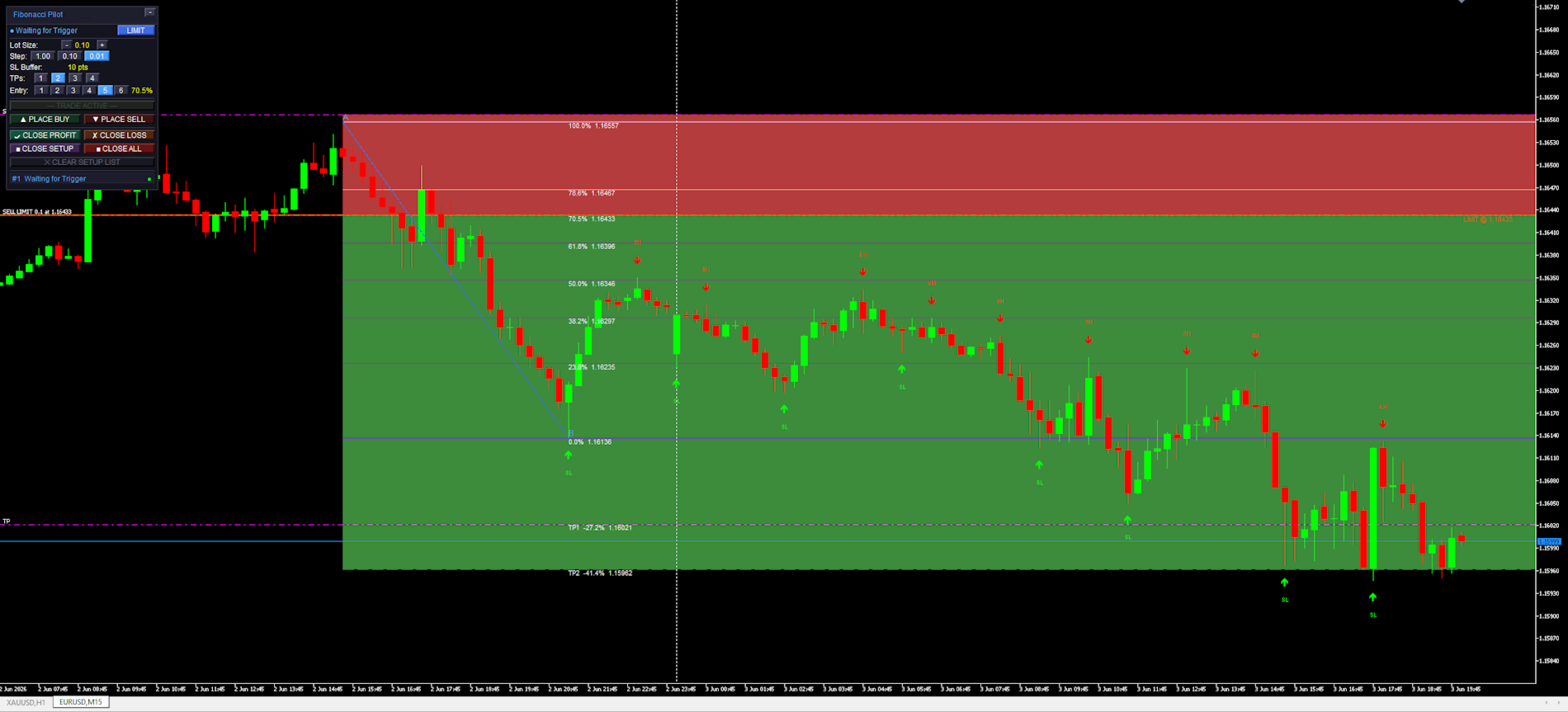
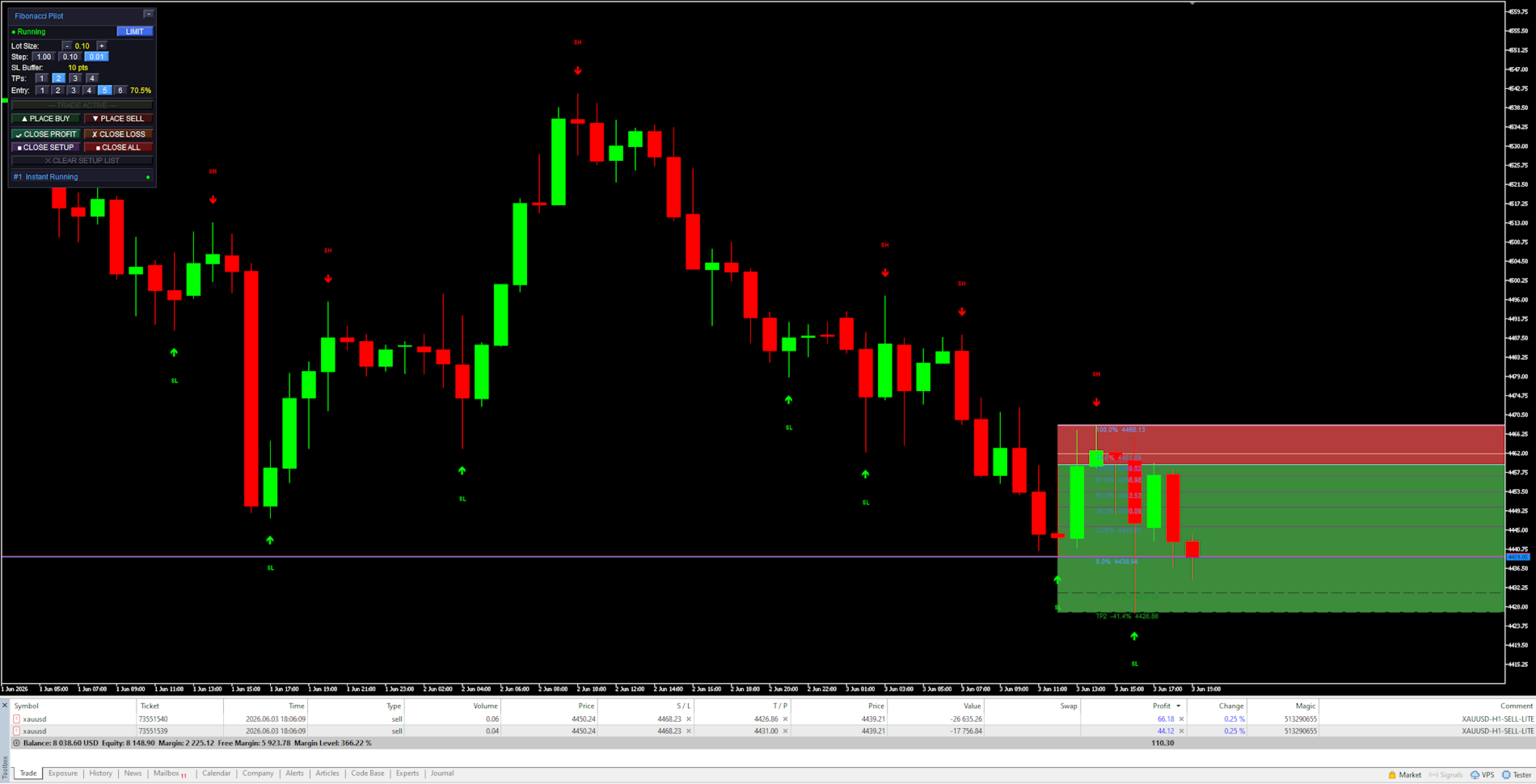
      In LIMIT mode the EA places a pending limit order at the entry level. A horizontal line with stoplight coloring shows the entry price and changes from red → yellow → green as price approaches. In INSTANT mode the order is placed at market price immediately.


      Panel Reference:

      Title bar:
      Shows the EA name and version. The [−] button minimizes the panel to the title bar only. Click [−] again to restore.

        State row:
        Shows the current EA state. The colored dot on the left indicates the setup status:
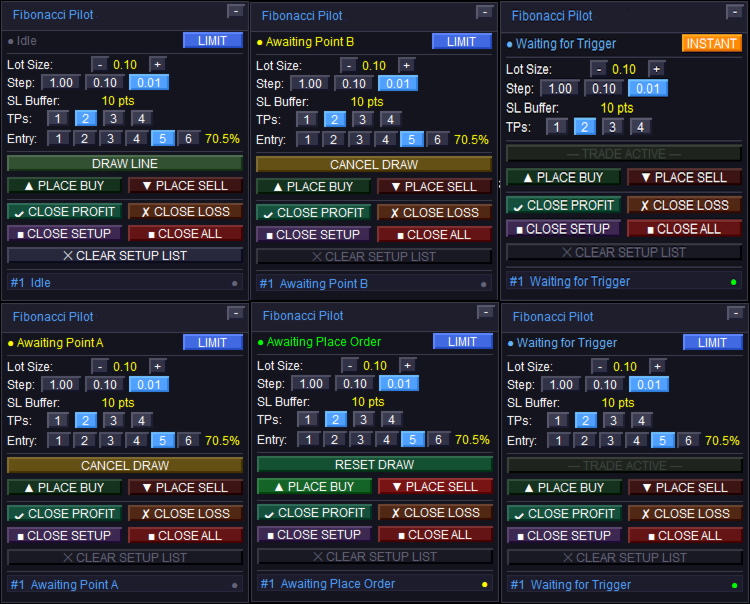
        Idle — no active setup. DRAW LINE is available.
        Awaiting Point A / Awaiting Point B — click on the chart to place the point.
        Setup Ready — A and B are placed. Adjust entry level and press PLACE BUY/SELL.
        Limit Active / Waiting for Trigger — limit order is live on the broker.
        Instant Running — market order is live.
        Closed — trade has been closed (TP, SL, or manual).
        The LIMIT / INSTANT mode toggle button on the right switches order mode at runtime.

          Lot Size row:
          Shows the current lot size. Use [−] and [+] to adjust. The step selector [1.00] [0.10] [0.01] sets how much each press changes the lot size.

            SL Buffer row:
            Displays the current Stop Loss buffer in points as set in the inputs. This is informational — the value is set in the inputs dialog, not on the panel.

              TPs row:
              Selects how many Take Profit levels to use: [1] [2] [3] [4]. The active selection is highlighted. Each TP is calculated from a Fibonacci extension level beyond Point B.

                Entry row:
                Selects which Fibonacci retracement level is used as the entry price: [1] through [6] corresponding to FibLevel1–FibLevel6. The active level is highlighted and its percentage shown on the right. Only visible in LIMIT mode.

                  DRAW LINE button:
                  Starts the A→B drawing sequence. Changes to CANCEL DRAW while drawing. Shows RESET DRAW when a setup is ready but not yet placed. Dims to “— TRADE ACTIVE —” when a live trade is running to indicate it cannot be used.

                    PLACE BUY / PLACE SELL buttons:
                    Active only when a setup is ready (Setup Ready state). Places the order using the current lot size, TP count, SL buffer, and selected entry level. The EA automatically reorients A and B to match the chosen direction regardless of draw order.

                      CLOSE PROFIT / CLOSE LOSS:
                      Closes all open tickets for the current setup. CLOSE PROFIT closes only tickets currently in profit. CLOSE LOSS closes only tickets currently at a loss.

                        CLOSE SETUP / CLOSE ALL:
                        CLOSE SETUP closes the active setup’s tickets and removes chart objects. CLOSE ALL closes all open positions on the account (not limited to this setup).

                          CLEAR SETUP LIST:
                          Removes a closed or idle setup from the panel and clears all associated chart objects. Disabled (dimmed) when a live trade is active — close the trade first.


                            Chart Objects:

                            Swing arrows:
                            Red arrows pointing down mark Swing Highs (SH). Green arrows pointing up mark Swing Lows (SL). The SH and SL labels are centered above/below the arrow. Arrows are rendered in front of candles but behind the panel.

                              Fibonacci retracement lines:
                              Drawn between Point A (100%, SL side) and Point B (0%) as horizontal rays extending to the right. The 0% and 100% anchor lines use the panel accent color. The selected entry level uses the mode color (blue for limit, amber for instant). All other levels use “Retracement line color”.

                                Fibonacci extension lines:
                                Dashed lines drawn beyond Point B in the trade direction, one per active TP. Labeled with the TP number, extension percentage, and price. Use “Extension line color”.

                                  Risk zone (red):
                                  A filled rectangle from the entry price to the SL price. Drawn only after the order is placed. Shows the price range at risk for this trade.

                                    Reward zone (green):
                                    A filled rectangle from the entry price to the last active TP. Drawn only after the order is placed. Shows the potential reward range.

                                      Limit entry line:
                                      A solid horizontal line at the entry price. Color cycles based on how close price is to the entry: red (far) → yellow (approaching) → green (imminent). Thresholds are set by “Limit Trigger Line Near %” and “Limit Trigger Line Medium %”. Removed when the limit is triggered or cancelled.


                                        Settings Reference:

                                        Swing Detection:

                                        Controls how the EA identifies and draws swing highs and lows on the chart. These are visual aids only — the user selects the actual A and B points manually by clicking the chart.
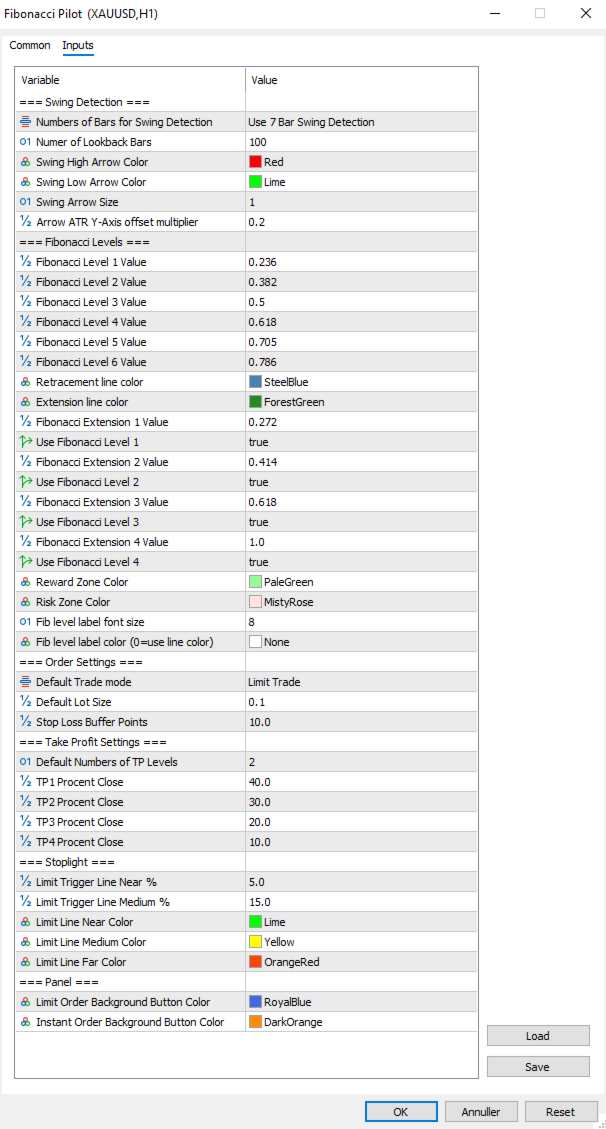
                                        Numbers of Bars for Swing Detection Number of bars used for swing detection. 3BAR: requires 1 bar each side. 5BAR: 2 bars each side. 7BAR: 3 bars each side. More bars = fewer but more significant swings.
                                        Number of Lookback Bars Lower values show fewer recent swings; higher values show more historical swings. Range: any positive integer.
                                        Swing High Arrow Color Color of the downward arrows marking Swing High points.
                                        Swing Low Arrow Color Color of the upward arrows marking Swing Low points.
                                        Swing Arrow Size   (weight) of the swing arrow objects. Range: 1–5.
                                        Arrow ATR Y-Axis offset multiplier Vertical distance between price and arrow, as a multiplier of the current ATR(14). Higher values push arrows further from the bars.

                                          Fibonacci Levels:

                                          Defines the retracement ratios drawn between A and B, the extension ratios drawn beyond B as TP targets, zone colors, and label appearance.

                                          Fibonacci Level X Value The six retracement ratios displayed on the grid. These are also the selectable entry levels [1]–[6] on the panel.
                                          Retracement line color Color of all retracement lines except anchors and the active entry level.
                                          Extension line color Color of all extension lines and their labels.
                                          Fibonacci Extension X Value Extension ratios beyond Point B, used as TP1–TP4 targets. Calculated as range × ratio added beyond B.
                                          Use Fibonacci Level X Enables or disables each extension line individually. Only enabled extensions are drawn and only up to the active TP count.
                                          Reward Zone Color Color of the reward zone rectangle (entry to last TP). Light red by default — rename/recolor to suit your premium zone convention.
                                          Risk Zone Color Color of the risk zone rectangle (entry to SL). Light green by default — rename/recolor to suit your discount zone convention.
                                          Fib level label font size Font size for all Fibonacci level text labels on the chart.
                                          Fib level label color Color for all Fibonacci level text labels. Set to NONE to use the line’s own color instead.


                                            Order Settings:
                                            Core parameters for how orders are sized and placed.

                                            Default Trade mode Starting order mode when the EA loads. LIMIT: places a pending limit order at the entry level. INSTANT: places a market order immediately at current price. Can be toggled on the panel at runtime.
                                            Default Lot Size Starting lot size shown on the panel when the EA loads. Adjusted per session using the panel controls.
                                            Stop Loss Buffer Additional points added to the SL distance beyond Point A. For a BUY, SL = point A − buffer. For a SELL, SL = point A + buffer. This prevents stop-outs from normal spread/wick at the swing level.


                                              Take Profit Settings:
                                              Controls the default number of TPs and how lots are distributed across them.

                                              Default Numbers of TP Levels Number of TP levels active when the EA loads (1–4). Changed per session on the panel.
                                              TP1 Percentage Close Percentage of total lots closed at TP1.
                                              TP2 Percentage Close Percentage of total lots closed at TP2.
                                              TP3 Percentage Close Percentage of total lots closed at TP3.
                                              TP4Percentage Close Percentage closed at TP4 when 4 TPs selected.
                                                The last active TP always absorbs any remaining lots to ensure the full position is always placed. Example with 2 TPs: TP1 = 40%, TP2 = 60% (not 30%). With 3 TPs: TP1 = 40%, TP2 = 30%, TP3 = 30%.


                                                Stoplight:
                                                Controls the color-changing limit entry line that shows how close price is to the pending entry level.

                                                Limit Trigger Line Near % When price is within this percentage of the A–B range from the entry level, the limit line turns green (imminent trigger).
                                                Limit Trigger Line Medium % When price is within this percentage of the A–B range, the line turns yellow (approaching). Beyond this threshold it shows red.
                                                Limit Line Near Color Color of the limit line when price is close (imminent).
                                                Limit Line Medium Color Color of the limit line when price is approaching.
                                                Limit Line Far Color Color of the limit line when price is far from entry.


                                                  Panel:
                                                  Visual colors used on the trade panel.

                                                  Limit Order Background Button Color Color used for the LIMIT mode toggle button and the entry level line when in limit mode. Blue by default.
                                                  Instant Order Background Button Color Color used for the INSTANT mode toggle button and the entry level line when in instant mode. Amber by default.


                                                  Fibonacci Orientation:
                                                  Understanding how the EA orients the Fibonacci grid is important for correct use.
                                                  Point A — 100% anchor Always the Stop Loss side of the trade. For a BUY setup: Point A is the swing low (price the SL is placed below). For a SELL setup: Point A is the swing high (price the SL is placed above).
                                                  Point B — 0% anchor Always the entry side of the trade. For a BUY: Point B is the swing high (the swing from which price is retracing). For a SELL: Point B is the swing low.
                                                  The EA automatically reorients A and B when you press PLACE BUY or PLACE SELL, regardless of which point you drew first or in which direction. You may draw from bottom to top, top to bottom, left to right, or right to left — the direction buttons determine the final orientation.


                                                  Notes and Tips:
                                                  Setup persistence:
                                                  If you open the settings dialog and change any input, the EA reinitializes. Any active setup (limit pending or trade running) is automatically saved to MT5 Global Variables before the restart and restored afterward. Chart objects, fib lines and the limit line are all redrawn with the new settings applied.
                                                  Manual limit cancellation:
                                                  If you cancel a pending limit order directly in the MT5 terminal (Toolbox → Trade tab), the EA detects this automatically within one tick and removes the setup from the panel and chart.
                                                  One setup at a time:
                                                  Mini supports a single active setup. The DRAW LINE button dims with the label “— TRADE ACTIVE —” while a trade is live. To start a new setup, close or clear the current one first.
                                                  Lot sizing with fewer TPs:
                                                  When using fewer than 4 TPs, the remaining lot percentage is always allocated to the last active TP. No lots are silently discarded. Check the TP percentage inputs if you want specific splits.
                                                  Strategy Tester compatibility:
                                                  Fibonacci Pilot Mini is compatible with the MT5 Strategy Tester. Timer events, sounds and push notifications are automatically disabled in tester mode.
                                                  Difference from Fibonacci Pilot Pro:
                                                  The Mini edition intentionally omits: multiple concurrent setups, Mini HUD, trailing stop, breakeven move, per-level Fibonacci colors, swing filter passes (significance, amplitude, wick), ATR-based SL, internal limit engine, push notifications, CSV trade journal, panel position customization, and the Finetune HUD. For those features, use Fibonacci Pilot Pro.
                                                  Рекомендуем также
                                                  Развитие предыдущей версии индикатора  ZigZag WaveSize MT4 ZigZag WaveSize -  модифицированный стандартный индикатор ZigZag с добавлением информации о длине волны в пунктах, уровней и разной логики алертов Общие улучшения: Адаптация кода под MetaTrader 5 Оптимизирована работа с графическими объектами Новое: Горизонтальные уровни на экстремумах Выбор типа уровней: горизонт/лучи/отрезки Фильтр ликвидных уровней (не пробитых ценой) Буфер для пробоев: настройка чувствительности к ложным пробоям На
                                                  FREE
                                                  Auto Fib Retracements
                                                  Ross Adam Langlands Nelson
                                                  4.2 (5)
                                                  Automatic Fibonacci Retracement Line Indicator. This indicator takes the current trend and if possible draws Fibonacci retracement lines from the swing until the current price. The Fibonacci levels used are: 0%, 23.6%, 38.2%, 50%, 61.8%, 76.4%, 100%. This indicator works for all charts over all timeframes. The Fibonacci levels are also recorded in buffers for use by other trading bots. Any comments, concerns or additional feature requirements are welcome and will be addressed promptly. 
                                                  FREE
                                                  Fibo Trader - это советник, позволяющий создавать автоматизированные шаблоны для паттернов колебаний по значениям коррекций Фибоначчи, используя полностью автоматизированную и динамически созданную сетку. Данный процесс достигается путем оптимизации советника, с последующим его запуском в автоматическом режиме. Советник позволяет переключаться между автоматическим и ручным режимом. В ручном режиме пользователю предоставляется графическая панель, позволяющая управлять текущими торговыми условиями
                                                  FREE
                                                  Auto Fibonacci Retracement Indicator — Flexible and Reliable This isn’t just another Auto Fibonacci Retracement indicator. It’s one of the most flexible and dependable tools available . If you find it useful, please consider leaving a review or comment — your feedback means a lot! Check out my other helpful tools below: Telegram to MT5 using AI   - AI-Powered Signal Copier Bot Smart Alert Manager   - Set up advanced alerts and send them to Mobile, Telegram, Discord, Webhook... Timeframes Trend
                                                  FREE
                                                  Golden Mind EA
                                                  Leszek Aleksander Mroczek
                                                  NEW VERSION -  FREE FOR LIMITED TIME Golden Mind EA is a fully automated Expert Advisor designed for MetaTrader 5, built around a dynamic grid-based trading approach combined with intelligent position management. Unlike traditional grid systems that rely on fixed take-profit levels, Golden Mind EA uses a pair-based closing logic . The system continuously calculates the combined result of positions and closes them when a defined profit level above the break-even line is reached. This allows the E
                                                  FREE
                                                  The Swing High Low and Fibonacci Retracement Indicator is a powerful technical analysis tool designed to identify key price levels and potential reversal zones in the market. It automatically detects recent swing highs and swing lows on the chart and overlays Fibonacci retracement levels based on these points. This indicator helps traders: Visualize market structure by highlighting recent swing points. Identify support and resistance zones using Fibonacci ratios (e.g., 38.2%, 50%, 61.8%). Adapt
                                                  FREE
                                                  Babel Assistant
                                                  Iurii Bazhanov
                                                  4.33 (9)
                                                  Babel assistant 1          MT5 netting советник ”Babel_assistant_1” по индикатору ZigZag формирует уровни Фибонвччи на периодах графиков M1, M5, M15, H1, H4, D1, W1, вычисляет вероятность трендов на покупку и продажу. Робот открывает позицию при превышении заданного уровня тренда  4.925 . Затем он  выставляет отложенные ордера на некоторых  уровнях Фибоначчи, формирует линии Stop Loss и Take Profit.  На экране отображаются текущие результаты работы по позиции, сделкам, трендам.           Ручное
                                                  FREE
                                                  Fibonacci Moving Averages
                                                  Brendan Jonathan Stoyanowski-campbell
                                                  2 (1)
                                                  OVERVIEW The Fibonacci Moving Averages are a toolkit which allows the user to configure different types of Moving Averages based on key Fibonacci numbers. Moving Averages are used to visualise short-term and long-term support and resistance which can be used as a signal where price might continue or retrace. Moving Averages serve as a simple yet powerful tool that can help traders in their decision-making and help foster a sense of where the price might be moving next. The aim of this scrip
                                                  FREE
                                                  Free automatic Fibonacci is an indicator that automatically plots a Fibonacci retracement based on the number of bars you select on the BarsToScan setting in the indicator. The Fibonacci is automatically updated in real time as new highest and lowest values appears amongst the selected bars. You can select which level values to be displayed in the indicator settings. You can also select the color of the levels thus enabling the trader to be able to attach the indicator several times with differe
                                                  FREE
                                                  Automatic fibonacci with alerts is an indicator that automatically plots a fibonacci retracement based on the number of bars you select on the BarsToScan setting in the indicator. The fibonacci is automatically updated in real time as new highest and lowest values appear amongst the selected bars. You can select which level values to be displayed in the indicator settings. You can also select the color of the levels thus enabling the trader to be able to attach the indicator several times with d
                                                  FREE
                                                  -- Просто, но эффективно. Индикатор инверсии - Что это такое? Индикатор, следующий за трендом, который сочетает в себе логику SuperTrend и технологию экспоненциальной кривой. Он определяет направление тренда, рисует динамический канал на графике и отправляет оповещения в режиме реального времени, когда тренд меняется. Как он работает? Индикатор рассчитывает экспоненциальную базовую линию с использованием ATR и коэффициента SuperTrend. Когда цена закрывается выше или ниже этой базовой линии, п
                                                  FREE
                                                  Announcement: All EAs (Expert Advisors) from QuanticX are currently available for free, but only for a limited time! To enjoy a Lifetime QuanticX support and continue receiving free EAs, we kindly request you to leave a review and track the performance of our EAs on Myfxbook. Additionally, don't hesitate to reach out to us for exclusive bonuses on EAs and personalized support. Pillartrade by QuanticX Welcome to Pillartrade - Your Long-Only Trading Ally for US500 Join the forefront of financial
                                                  FREE
                                                  Fibo Pivot Optimus
                                                  Syamsurizal Dimjati
                                                  5 (1)
                                                  Ritz Smart FIBOPIVOT Optimus Pro Advanced Multi-Timeframe Fibonacci Trading System SMART PREDICTION & ACCURATE FORECAST Revolutionary Fibonacci Pivot Technology combines traditional pivot points with advanced Fibonacci extensions, creating a powerful predictive tool for professional traders. Our algorithm intelligently detects significant price levels across multiple timeframes, delivering laser-accurate support and resistance zones before the market moves . INTELLIGENT VOLUME-VALIDATED SIGNALS
                                                  FREE
                                                  Use this expert advisor whose strategy is essentially based on the Relative Strength Index (RSI) indicator as well as a personal touch. Other free expert advisors are available in my personal space as well as signals, do not hesitate to visit and leave a comment, it will make me happy and will make me want to offer content. Expert advisors currently available: LVL Creator LVL Creator Pro LVL Bollinger Bands   Trading is not a magic solution, so before using this expert on a live account, carry
                                                  FREE
                                                  FX_EUXXX is a free expert advisor designed primarily for EURUSD on the H4 chart. It operates without hedging, grid, martingale, or anti-martingale basically, no gambling. I encourage you to request the updated set file for free. Subscribe   to our new channel for   promo/FREE  and   updates! :  MQL5 Group   OR  Telegram Channel Subscribe  to get new   announcements   and look behind the scenes!  MQL5_Channel   Please support me to building   FREE EAs!   Leave a   review ! Thank you Recommendati
                                                  FREE
                                                  IAMFX offers the ultimate solution to make trading easier and more flexible on IAMFX Web  using IAMFX Agent . With our exclusive IAMFX-Agent and IAMFX-Center, you can effortlessly manage your trading anytime, anywhere through web and mobile interfaces. Fully compatible with both web and mobile environments,   IAMFX allows real-time multi-account management and monitoring with a simple installation. IAMFX Benefits Manage multiple MT5 accounts Easy orders with market, stop and limited Manage orde
                                                  FREE
                                                  GhostTrail Pro v5 is an intelligent Expert Advisor for MetaTrader 5 that manages the complete lifecycle of manual crypto trades. From detecting your setup and alerting your phone, to automatically protecting profits and closing positions — GhostTrail does the heavy lifting so you don't have to.   Designed specifically for manual traders and scalpers who have a proven entry strategy but struggle with trade management, partial closes, and protecting profits while away from their screen.
                                                  FREE
                                                  Индикатор автоматически определяет уровни ликвидности на основе свинг-фракталов и отслеживает их «сметание» ценой (Liquidity Sweep). Работает на любом инструменте и таймфрейме, поддерживает мультитаймфреймовый режим. Что делает индикатор: — Находит свинг-хаи и свинг-лои по методу фракталов (настраиваемое количество свечей слева и справа) на выбранном таймфрейме. Активные уровни отображаются лучом вправо, сметённые — пунктиром до точки касания. — Рисует уровни предыдущего дня (PDhigh / PDlow), пр
                                                  FREE
                                                  AP Fibonacci Retracement PRO (MT5) Overview AP Fibonacci Retracement PRO is a trend-continuation pullback EA. It waits for a confirmed swing, calculates the Fibonacci retracement zone, and looks for entries in the direction of the original move. No grid, no martingale. Strategy logic Detects the last valid swing high/low using Fractals on the selected signal timeframe. Calculates the retracement zone between 38.2% and 61.8% (configurable). On a closed bar, if price is inside the zone (with opti
                                                  FREE
                                                  The Fibonacci Trader MQL5 expert advisor uses the Fibonacci levels to determine a buy or sell trade with the MACD as confirmation. The Fibonacci levels work as follows: Above 61.8 SELL if MACD trend is SELL Trading Range (Ability to select trading input parameters) BUY if MACD trend is BUY SELL if MACD trend is SELL Below 23.6 BUY if MACD trend is BUY Default settings are configured for EURUSD on M5 Chart. To work with the news server, you must add the URL ‘ http://ec.forexprostools.com/ ’ in t
                                                  FREE
                                                  Our offer also includes a free panel — Indicator Panel — which allows you to show or hide indicators created by BOToBRACIA. High and Low Points is a practical technical analysis indicator that plots levels corresponding to the highs and lows from previous periods (day / week / month) — levels that, in the Smart Money Concepts (SMC) and ICT approach, are treated as liquidity zones, while in classical technical analysis they serve as potential support and resistance levels. Indicator settings: •
                                                  FREE
                                                  Советник Gann EA «Треугольные паттерны» v3.4 — Торгуйте как легендарный У. Д. Ганн Используйте силу геометрических ценовых паттернов и священных соотношений Готовы ли вы торговать с помощью одной из самых мощных систем распознавания паттернов, когда-либо разработанных? Советник Gann EA «Треугольные паттерны» v3.4 переносит легендарную мудрость У. Д. Ганна в современную эпоху алгоритмической торговли. Что делает этот советник исключительным? Основан на проверенной методологии Ганна У. Д.
                                                  FREE
                                                  CloseAll MT5
                                                  Mr Sorachai Pitakjarukul
                                                  4.5 (2)
                                                  ขอบคุณ แรงบันดาลใจ จากโค้ชแพม ที่ทำให้เริ่มทำ    Close all ตัวนี้  และขอขอบคุณทุกคนที่ให้ความรู็มาโดยตลอด ไม่ว่าจะทางตรงทางอ้อม ขอบคุณทุกคนที่ให้ความรู้เพื่อนร่วมเทรด ทั้งนี้เพื่อให้นักเทรดทุกคนได้มีเครื่องมือในการควบคุมการปิดการซื้อขาย จึงขอพัฒนาโปรแกรม close all version 5 ได้ใช้ทุกคน  Close all and update profit Version 1.00 (MT5) Full version Give you free  For MT4 Click  https://www.mql5.com/en/market/product/79252 Fix TPSL calculate  Program function Tab 1 Close order function and show br
                                                  FREE
                                                  Данный индикатор позволяет переносить графические объекты (вертикальные, горизонтальные линии, текстовые метки и т.д.) с одного графика на другие. Например вы сможете перенести линии с графика GBPUSD  с периодом H1 на график GBPUSD M15. Это позволит упростить выполнение графического анализа. Show label - показывать метку на графике, где установлен индикатор, чтобы не путаться; Font size - размер текста метки; Type of synchronisation - тип синхронизации Доступно три типа синхронизации:   all time
                                                  FREE
                                                  Fast Fibonacci Grid MT5
                                                  Grzegorz Korycki
                                                  2.5 (2)
                                                  Вам никогда не докучала ручная настройка уровней коррекции Фибоначчи? Вы задумывались об инструменте, который бы автоматически настраивал определенные уровни Фибоначчи под вашу торговлю? Тогда этот инструмент для вас: торгующий по сетке индикатор Fast Fibonacci Grid позволит вам быстро настроить уровни коррекции Фибоначчи и построить сетку Фибоначчи! Всего лишь несколькими кликами вы сможете настроить свою сеточную торговлю на основе этих уровней. Изменяемая графика, размеры шрифтов и графически
                                                  FREE
                                                  Bit Buddy AI
                                                  Michael Prescott Burney
                                                  Bit Buddy Portfolio for BTCUSD H1 Bit Buddy Portfolio is a professional MetaTrader 5 Expert Advisor for BTCUSD on the H1 timeframe, running on the Expert Advisor HQ universal portfolio framework. It is designed for structured automated trading on BTCUSD H1, with clear on-chart feedback for entries, exits, protections, and live performance so you can see how the EA is operating in real time. Overview Bit Buddy Portfolio combines its strategy logic for Bitcoin with the Expert Advisor HQ execution
                                                  FREE
                                                  Готовая мультитаймфреймовая торговая система на основе автоматического построения и сопровождения уровней Фибоначчи на продажу и покупку по любому символу. Демо-версия - расчет последних 390 баров не производится. Преимущества Определение направления тренда по 14 индикаторам в комплексе ( Cx ), на экстремумах ZigZag ( Z ), RSI ( R ), Impulse ( I ) Отображение значений 14 индикаторов, составляющих направление тренда ( Cx ) Построение горизонтальных уровней, линий поддержки и сопротивления, канал
                                                  FREE
                                                  VadineroLab MT5 Export Master to CSV EXEL JSON - советник для экспорта и анализа параметров символов, аккаунта, терминала, текущего состояния торговли, истории торговли, глобальных переменных. Формирует отчёты следующих типов: * Параметры символов (Symbols Info) - спред, шаг цены, минимальные/максимальные лоты, своп, … * Параметры счёта (Асcount Info) - баланс, эквити, плечо, валюта, состояние маржи, … * Параметры терминала (Terminal Info) - сервер, версия, язык, дата, окружение, … * Открытые по
                                                  FREE
                                                  Go Long Advanced
                                                  Phantom Trading Inc.
                                                  4.78 (9)
                                                  EA Go Long реализует продвинутую внутридневную торговую стратегию, основанную на принципе систематической ежедневной торговли с множественными техническими подтверждениями. В то время как многие трейдеры ищут сложные алгоритмы, этот EA сочетает простые, но эффективные концепты с продвинутым управлением рисками и множественными техническими фильтрами. EA открывает позиции в определенное время каждый день, но только когда рыночные условия соответствуют множественным техническим индикаторам. Этот
                                                  FREE
                                                  С этим продуктом покупают
                                                  Trade Assistant MT5
                                                  Evgeniy Kravchenko
                                                  4.43 (214)
                                                  Помогает рассчитать риск на сделку, простая установка нового ордера с помощью линий, управление ордерами с функциями частичного закрытия, 7 типов трейлинг-стопа и другие полезные функции. Дополнительные материалы и инструкции Инструкция по установке - Инструкция к приложению - Пробная версия приложения для демо счета Функция Линии   - отображает на графике линию открытия, стоп-лосс, тейк-профит. С помощью этой функции легко установить новый ордер и увидеть его дополнительные характеристики пе
                                                  Добро пожаловать в Trade Manager EA — лучший инструмент для управления рисками, предназначенный для упрощения, точности и эффективности торговли. Это не просто инструмент для размещения ордеров; это комплексное решение для удобного планирования торгов, управления позициями и усиленного контроля над рисками. Независимо от того, начинающий вы трейдер, опытный специалист или скальпер, нуждающийся в быстром исполнении, Trade Manager EA адаптируется к вашим потребностям и работает с любыми активами:
                                                  Local Trade Copier EA MT5
                                                  Juvenille Emperor Limited
                                                  4.96 (142)
                                                  Опыт экстремально быстрого копирования сделок с помощью Local Trade Copier EA MT5 . Благодаря простой установке в течение 1 минуты этот копировщик сделок позволяет вам копировать сделки между несколькими терминалами MetaTrader на одном компьютере с Windows или на Windows VPS с крайне быстрыми скоростями копирования менее 0.5 секунды. Независимо от того, новичок вы или профессиональный трейдер, Local Trade Copier EA MT5 предлагает широкий спектр опций, чтобы настроить его под ваши конкретные по
                                                  TradePanel MT5
                                                  Alfiya Fazylova
                                                  4.88 (162)
                                                  Trade Panel — это многофункциональный торговый помощник. Приложение содержит более 50 торговых функций для ручной торговли и позволяет автоматизировать большинство торговых операций. Перед покупкой вы можете протестировать демоверсию на демо-счете. Скачать пробную версию приложения для демонстрационного аккаунта: https://www.mql5.com/ru/blogs/post/750864 . Полная инструкция здесь . Торговля. Позволяет совершать торговые операции в один клик: Открыть отложенные ордера и позиции с автоматическим р
                                                  Бета-версия Telegram to MT5 Signal Trader почти готов к официальному альфа-релизу. Некоторые функции все еще находятся в разработке, и вы можете столкнуться с небольшими ошибками. Если вы заметите проблемы, пожалуйста, сообщите о них, ваша обратная связь помогает улучшать программное обеспечение для всех. Telegram to MT5 Signal Trader — мощный инструмент, который автоматически копирует торговые сигналы из каналов и групп Telegram прямо в ваш счёт MetaTrader 5 . Поддерживаются как публичные, так
                                                  Telegram to MT5 Multi-Channel Copier автоматически копирует торговые сигналы из ваших Telegram-каналов напрямую в MetaTrader 5. Никаких ботов, никаких браузерных расширений, никакого ручного копирования. Вы получаете сигнал в Telegram, и советник открывает сделку на вашем терминале за несколько секунд. Продукт включает два компонента: приложение для Windows, которое слушает ваши Telegram-каналы, и этот советник, который исполняет сигналы на терминале MT5. Также доступна версия для MT4. Руководст
                                                  Power Candles Strategy Scanner — самооптимизирующийся инструмент для поиска настроек по нескольким инструментам Power Candles Strategy Scanner использует тот же самооптимизирующийся движок, что и индикатор Power Candles — для всех символов в вашем Market Watch, одновременно. На одной панели отображается информация о том, какие символы в данный момент являются статистически торгуемыми, какая стратегия выигрывает на каждом из них, оптимальная пара Stop Loss / Take Profit, а также отправляется увед
                                                  Exp COPYLOT CLIENT for MT5
                                                  Vladislav Andruschenko
                                                  3.94 (34)
                                                  Профессиональный копировщик сделок для MetaTrader 5 Быстрый, профессиональный и надежный копировщик сделок для MetaTrader . COPYLOT позволяет копировать сделки Forex между терминалами MT4 и MT5 с поддержкой счетов Hedge и Netting . Версия COPYLOT для MT5 поддерживает: - MT5 Hedge → MT5 Hedge - MT5 Hedge → MT5 Netting - MT5 Netting → MT5 Hedge - MT5 Netting → MT5 Netting - MT4 → MT5 Hedge - MT4 → MT5 Netting Версия MT4 Полное описание + DEMO + PDF Как купить Как установить Как получить файлы жур
                                                  Anchor Trade Manager
                                                  Kalinskie Gilliam
                                                  5 (5)
                                                  Anchor: The EA Manager Run your full EA portfolio without conflicts, without stacked risk, and without watching every chart yourself. Anchor coordinates up to 64 Expert Advisors on a single account, including daily loss protection built for prop firm rules. Attach Anchor to any chart. Type your EA names and magic numbers in one line. Click OK. Anchor begins coordinating immediately. Built for portfolios. Built for prop firms. Built for discipline. The Problem Running multiple EAs on the same acc
                                                  Trade copier MT5
                                                  Alfiya Fazylova
                                                  4.59 (49)
                                                  Trade Copier — это профессиональная утилита, предназначенная для копирования и синхронизации сделок между торговыми счетами. Копирование происходит от счета/терминала поставщика к счету/терминалу получателя, которые установлены на одном компьютере или vps. АКЦИЯ - Если вы уже приобрели "Trade copier MT5", вы можете получить "Trade copier MT4" бесплатно (для копирования MT4 > MT5 и MT4 < MT5). Для получения более подробной информации об условиях, пожалуйста, свяжитесь с нами через личные сообщени
                                                  Farmed Hedge Yield Farming | All Markets (Manual - Hybrid - Semi/Automated EA) MULTI-ASSET SUPPORT Trade any asset available on your broker - Forex: Major, Minor, Exotic pairs - Crypto: BTC, ETH, XRP, SOL, BNB - Stocks: Apple, Tesla, Amazon, Google, etc. - Commodities: Gold, Silver, Oil, Gas - Indices: US30, NAS100, SPX500, DAX40 - Any CFD your broker offers VERIFIED TRADING RESULTS - Farmed Hedge Yield Axi Copy:  https://www.mql5.com/en/signals/2356376 - Farmed Hedge Yield Exn Copy:   https:/
                                                  EasyInsight AIO MT5
                                                  Alain Verleyen
                                                  4.92 (12)
                                                  EASY Insight AIO – Всё-в-одном для умного и простого трейдинга Обзор Представьте, что вы можете просканировать весь рынок — Форекс, золото, криптовалюты, индексы и даже акции — всего за несколько секунд, без ручного просмотра графиков, сложной установки или настройки индикаторов. EASY Insight AIO — это ваш идеальный инструмент экспорта для трейдинга с поддержкой искусственного интеллекта. Он предоставляет полный снимок рынка в одном аккуратном CSV-файле — готовом к мгновенному анализу в ChatGP
                                                  Quant AI Agents
                                                  Ho Tuan Thang
                                                  5 (1)
                                                  Quant AI Agents are independent trading Expert Advisors. Instead of trading using a fixed strategy like other conventional EAs, Quant AI Agents   is a   multi-agent AI trading framework   that turns natural-language strategy prompts into live.  WANT THE SAME RESULTS AS MY LIVE SIGNAL?   Use the exact same brokers I do:   IC MARKETS , IC TRADING   .  Unlike the centralized stock market, Forex has no single, unified price feed.  Every broker sources liquidity from different providers, creating un
                                                  Premium Trade Manager - Торговая панель со встроенным коучем Premium Trade Manager помещает торгового коуча прямо в ваш график, а под ним работает полноценный движок исполнения. Настройте сделку так, как вы всегда это делаете, затем позвольте Max, вашему ИИ-наставнику по трейдингу, прочитать именно эту настройку с учётом вашего живого счёта и дать чёткое заключение до того, как вы входите: соответствует ли стоп дисциплинированному подходу, разумен ли риск, не выходит ли высоковолатильный релиз ч
                                                  Seconds Chart MT5
                                                  Boris Sedov
                                                  4.61 (18)
                                                  Seconds Chart - уникальный инструмент для создания секундных графиков в MetaTrader 5 . С помощью Seconds Chart вы можете построить график с таймфреймом, заданным в секундах, получая идеальную гибкость и точность анализа, недоступную на стандартных минутных или часовых графиках. Например, таймфрейм S15 обозначает график со свечами продолжительностью 15 секунд. Вы можете использовать любые индикаторы и советники с поддержкой пользовательских символов. Работать с ними так же удобно, как и на станда
                                                  The product will copy all telegram signal to MT5 ( which you are member) , also it can work as remote copier.  Easy to set up, copy order instant, can work with almost signal formats, image signal,  s upport to translate other language to English Work with all type of channel or group, even channel have "Restrict Saving Content", work with  multi channel, multi MT5 Work as remote copier: with signal have ticket number, it will copy exactly via ticket number. Support to backtest signal. How to s
                                                  ВРЕМЕННАЯ СКИДКА  -40% !    Всего $30 вместо $50 за бессрочную версию!   Максимальный реальный дисконт! HINN MAGIC ENTRY - лучший инструмент для входа и менеджмента позиций! Выставляет ордера через выбор уровня на графике! полное описание    ::    demo-версия    ::   60-sec-video-description Основные функции: - Рыночные, лимитные и отложенные ордера -  Автоматический подсчет лоттажа  -  Автоматический учет спреда и комиссий -  Неограниченное количество промежуточных тейков для позиций - Перев
                                                  Trade Dashboard MT5
                                                  Fatemeh Ameri
                                                  4.95 (131)
                                                  Trade Dashboard simplifies how you open, manage, and control your trades, with built-in lot size calculation. It allows you to execute trades, manage risk, and control positions directly on the chart, with tools such as partial close, breakeven, and trailing stop. Designed to reduce manual work and help you stay focused on your trading decisions. A demo version is available for testing. Detailed explanations of features are provided within the MQL5 platform. Installation instructions are include
                                                  Скачать рабочую демо-версию Copy Cat More (Копи Кэт Мор) — копировщик сделок (Trade Copier) MT5 — это локальный копировщик сделок и полноценная система управления рисками и исполнения, созданная для современных торговых задач. От челленджей проп-фирм (prop firm) до управления личным портфелем — он адаптируется к любой ситуации благодаря сочетанию надёжного исполнения, защиты капитала, гибкой настройки и продвинутой обработки сделок. Копировщик работает в обоих режимах — Мастер (Master, отправи
                                                  Trade Manager DaneTrades
                                                  Levi Dane Benjamin
                                                  4.28 (29)
                                                  Trade Manager, который поможет вам быстро входить и выходить из сделок, автоматически рассчитывая риск. Включает функции, которые помогут предотвратить чрезмерную торговлю, торговлю из мести и эмоциональную торговлю. Сделками можно управлять автоматически, а показатели эффективности счета можно визуализировать в виде графика. Эти функции делают эту панель идеальной для всех трейдеров, занимающихся ручной торговлей, и помогают улучшить платформу MetaTrader 5. Многоязычная поддержка. Версия для МТ
                                                  EA Performance Tracker (AESTracker) A clean, modern dashboard that shows exactly how your trades and EAs are performing — right on your chart. It reads your full account history automatically and breaks down the numbers by magic number / strategy. Display only — it does not place any trades. What it shows - Account header: live Balance, Equity, and Open (floating) P/L - Profit summary: gross profit, net profit, and the exact commission & swap deducted - Key stats: win rate, profit factor, exp
                                                  ВРЕМЕННАЯ СКИДКА  -40% ! Всего  $470 вместо $790!  Максимальный реальный дисконт! Суть: используя юзер-интерфейс вы настраиваете параметры, которым должен соответствовать график до входа в позицию(позиции), настраиваете какие входные модели использовать, настраиваете правила по которым надо завершать торговлю и планирование. А всю рутину по наблюдению за графиком и исполнению Lazy Trader берет на себя. полное описание  :: 3 ключевых видео [1] -> [2] -> [3]  :: [ ДЕМО-ВЕРСИЯ ] Что он умеет? - П
                                                  ================================================================================ POC BREAKOUT - V20.72. Full Professional Grade Toolkit ================================================================================ POC Breakout is a full MetaTrader 5 trading dashboard for discretionary traders who want breakout signals, Point of Control (POC) context, volume profiles, order flow, market structure, news, alerts, and advanced trade planning in one professional workspace. Attached directly to you
                                                  Торговая панель для MetaTrader 5 — профессиональная торговля в один клик с графика и клавиатуры Мощная торговая панель для активного ручного трейдинга, которая позволяет открывать, сопровождать и закрывать сделки значительно быстрее и удобнее, чем стандартными средствами MetaTrader. Панель создана для тех, кто хочет получить полный контроль над позициями, ордерами, прибылью и торговыми сценариями в одном рабочем пространстве. Это не просто вспомогательная утилита. Это полноценный торговый интер
                                                  DrawDown Limiter
                                                  Haidar Lionel Haj Ali
                                                  5 (20)
                                                  Drawdown Limiter EA You are in the right place if you were searching for Drawdown control, Drawdown limiter, Balance protection, Equity Protection or Daily Drawdown Limit related to Prop Firm, FTMO, or Funded account trading, or if you want to protect your trading account. Have you suffered from controlling your drawdown when trading funded accounts? This EA is meant for you. Prop firms usually set a rule called “Trader Daily Drawdown”, and if it is not respected, you are disqualified.  I am an
                                                  Welcome to ENTRY IN THE ZONE WITH SMC MULTI TIMEFRAME Entry In The Zone with  SMC Multi Timeframe  is a professional trading indicator built on Smart Money Concepts (SMC), combining market structure analysis with a No Repaint BUY / SELL signal system in a single indicator. It helps traders understand market structure more clearly, identify key price zones, and focus on higher-quality trading opportunities. By combining Multi-Timeframe Analysis, Points of Interest (POIs), and real-time signals, t
                                                  Timeless Charts
                                                  Samuel Manoel De Souza
                                                  5 (7)
                                                  Timeless Charts is an all-in-one trading utility for professional traders. It combines custom chart types such as Seconds Charts and Renko with advanced order flow analysis using Footprints , Clusters , Volume Profiles , VWAP studies, and anchored analysis tools for deeper market insight. Trading and position management are handled directly from the chart through an integrated trade management panel , while Market Replay and Virtual Accounts provide environments for practicing trading skills and
                                                  The News Filter MT5
                                                  Leolouiski Gan
                                                  4.78 (23)
                                                  Этот продукт фильтрует всех экспертных советников и ручные графики во время новостей, так что вам не нужно беспокоиться о внезапных скачках цены, которые могут разрушить ваши ручные торговые настройки или сделки, введенные другими экспертными советниками. Этот продукт также поставляется с полной системой управления ордерами, которая может обрабатывать ваши открытые позиции и ордера на ожидание перед выпуском новостей. После покупки   The News Filter   вам больше не придется полагаться на встроен
                                                  YuClusters
                                                  Yury Kulikov
                                                  4.93 (43)
                                                  Внимание: Ознакомиться с работой программы можно с помощью бесплатной версии  YuClusters DEMO . YuClusters это профессиональная система анализа рынка. Для трейдера открываются уникальные возможности анализа потока ордеров, объемов торговли, движения цены используя различные графики, профили, индикаторы, графические объекты. YuClusters оперирует данными на основе ленты сделок или тиковой информации, в зависимости от того, что доступно в котировках финансового инструмента.  YuClusters позволяет с
                                                  Chart Copilot
                                                  George Angelo Boutselis
                                                  Chart Copilot — это торговый ассистент, разработанный для того, чтобы помочь трейдерам быстрее размещать сделки, управлять открытыми позициями и устанавливать оповещения любого типа непосредственно с графика. Все эти функции доступны как через графическую панель, так и через чат-бота. Дополнительные материалы и инструкции: Пробная версия  - Инструкции по настройке Чат-бот Chart Copilot поставляется с выделенным сервером, работающим с большой языковой моделью — это означает, что нет необходимости
                                                  Другие продукты этого автора
                                                  News Markers Description Version: 1.13Type: MetaTrader 5 indicator (chart window) Purpose: Plots economic-calendar news events as color-coded vertical lines on the chart, with optional currency tags and an upcoming-news HUD panel. Before you start — three things that always apply Live connection required. The data comes from MT5's built-in economic calendar via your broker's feed. It returns nothing in the Strategy Tester, and nothing if your broker doesn't serve calendar data. If no lines appe
                                                  FREE
                                                  The Simple Manual Trading Panel (v2.11) Is a professional trade management tool designed with a clean, movable UI to streamline manual execution and automated exit strategies. Core Features Dynamic Visual Interface: A movable GUI panel that provides real-time information including a bar countdown timer, live spread, and advanced volume analysis. Flexible Lot Size setting, with 2 decimals (If broker supports it). Multi-Stage Take Profit: Supports three distinct Take Profit (TP) levels in either
                                                  Trend Matrix Panel is a multi-timeframe technical indicator for MetaTrader 5 that compresses an entire trading session's structural picture into a single panel. Rather than flipping between charts to read M1, M15, H1, and D1 separately, the panel shows the trend state of three configurable moving averages across twelve timeframes simultaneously, with a heatmap that draws your eye to the genuinely strong signals and away from noise. The core idea is simple: every cell in the matrix tells you how
                                                  This script is an Intelligence Gathering Utility designed to give you full control over your data exports from MetaTrader 5. It allows you to synchronize up to three different symbols into a single file with precise timestamping. 1. Setting the Data Range (Range) You can define exactly which historical period you want to capture: Date Mode : If Last N bars (0 = use date range above) is set to 0 , the script will export all data between your chosen start and end dates. Bar Mode : By entering a nu
                                                  The primary function of this script, Tick Data Exporter , is to efficiently extract historical tick data. Tick data represents the most granular level of market data, capturing every single price change. The script downloads this data from a broker and formats it into CSV files for external quantitative analysis. Five things tick data shows that bars permanently hide: Spread microstructure: Bars give you one spread number per period (typically the spread at bar close). Ticks show you the sprea
                                                  FVG Multi TimeFrame Levels — Indicator Overview What it is A multi-timeframe   Fair Value Gap   detector and analysis tool for MetaTrader 5. It scans price action across up to four configurable timeframe "slots" simultaneously, identifies gaps that meet a configurable significance threshold, draws them as boxes on the current chart, and tracks how each gap behaves over its lifetime — whether it gets tested, how deeply, how often, and ultimately whether it gets filled or swept beyond. It runs alo
                                                  Фильтр:
                                                  Нет отзывов
                                                  Ответ на отзыв