Fibonacci Pilot Mini

What Is Fibonacci Pilot Mini?
Fibonacci Pilot Mini is a semi-automatic Expert Advisor for MetaTrader 5. It assists the trader in placing Fibonacci-based trades by automating the mechanical steps after the trader has identified the swing. The trader performs the analysis; the EA handles lot sizing, entry price calculation, stop loss, take profit levels, and order placement.
Mini is the streamlined single-setup edition of Fibonacci Pilot Pro. It runs one trade setup at a time with a clean, minimal panel and no overlapping complexity. It is designed for traders who want fast, focused execution without managing multiple concurrent setups.

Important: The Fibonacci Pilot Mini, does not perform any trades automatically, it requires human interaction to perform the trades.


What the EA does
Detects and draws swing highs and swing lows on the chart automatically
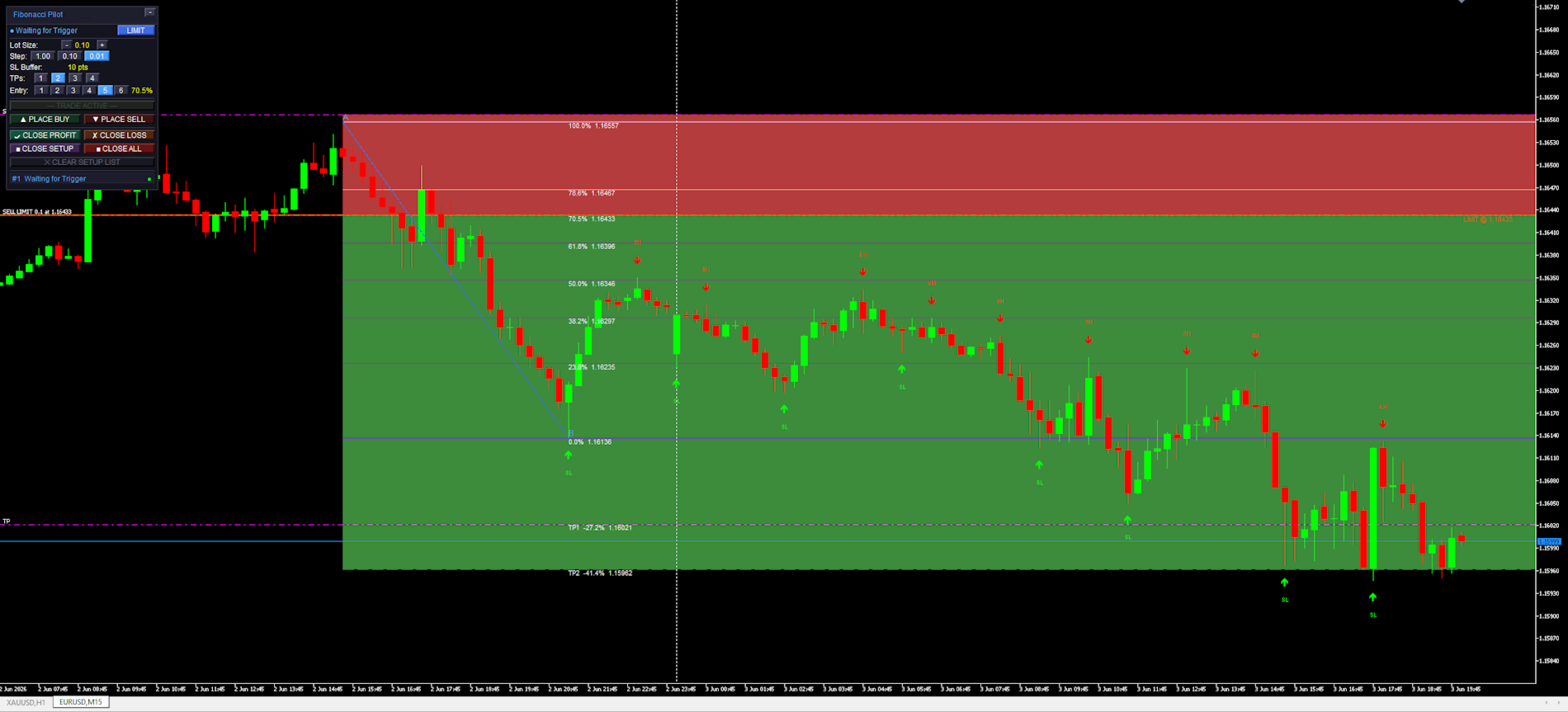
Draws a full Fibonacci retracement grid between two user-selected price points (A and B)
Draws extension levels beyond point B as take profit targets
Calculates entry price, stop loss and up to 4 take profit levels from the Fibonacci grid
Places one or more market or limit orders with correct lot splits across TPs
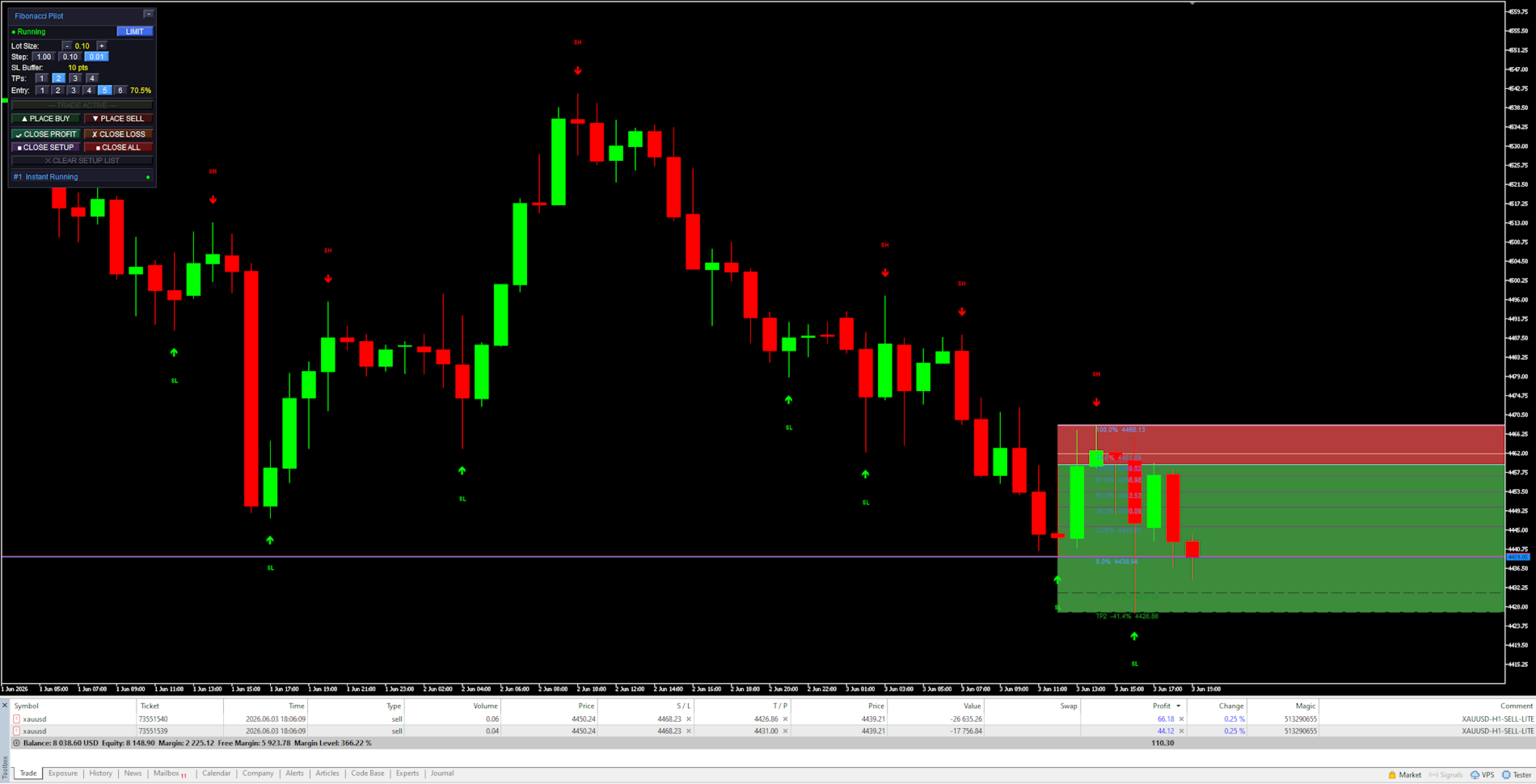
Draws a color-coded risk zone (entry to SL) and reward zone (entry to last TP) on the chart
Shows a limit line with a stoplight color system as price approaches the entry level
Detects when a limit order is manually cancelled in the MT5 terminal and removes the setup
Restores an active setup automatically if the EA is reloaded or settings are changed

    What the trader does
    Identifies a swing high and swing low on the chart
    Clicks Point A then Point B on the chart to define the Fibonacci range
    Selects the desired entry retracement level on the panel
    Adjusts lot size and number of TPs
    Presses PLACE BUY or PLACE SELL to execute

      Mini supports one active setup at a time. For multiple concurrent setups on the same chart, use Fibonacci Pilot Pro.
      In LIMIT mode the EA places a pending limit order at the entry level. A horizontal line with stoplight coloring shows the entry price and changes from red → yellow → green as price approaches. In INSTANT mode the order is placed at market price immediately.


      Panel Reference:

      Title bar:
      Shows the EA name and version. The [−] button minimizes the panel to the title bar only. Click [−] again to restore.

        State row:
        Shows the current EA state. The colored dot on the left indicates the setup status:
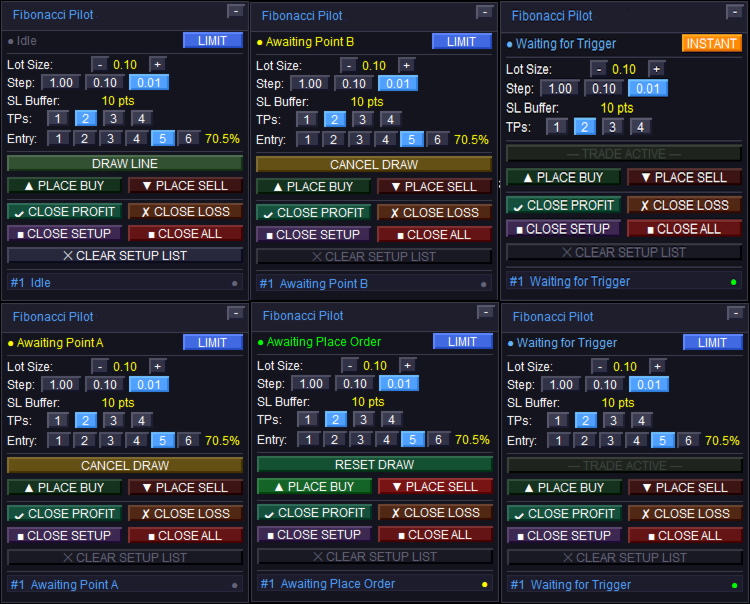
        Idle — no active setup. DRAW LINE is available.
        Awaiting Point A / Awaiting Point B — click on the chart to place the point.
        Setup Ready — A and B are placed. Adjust entry level and press PLACE BUY/SELL.
        Limit Active / Waiting for Trigger — limit order is live on the broker.
        Instant Running — market order is live.
        Closed — trade has been closed (TP, SL, or manual).
        The LIMIT / INSTANT mode toggle button on the right switches order mode at runtime.

          Lot Size row:
          Shows the current lot size. Use [−] and [+] to adjust. The step selector [1.00] [0.10] [0.01] sets how much each press changes the lot size.

            SL Buffer row:
            Displays the current Stop Loss buffer in points as set in the inputs. This is informational — the value is set in the inputs dialog, not on the panel.

              TPs row:
              Selects how many Take Profit levels to use: [1] [2] [3] [4]. The active selection is highlighted. Each TP is calculated from a Fibonacci extension level beyond Point B.

                Entry row:
                Selects which Fibonacci retracement level is used as the entry price: [1] through [6] corresponding to FibLevel1–FibLevel6. The active level is highlighted and its percentage shown on the right. Only visible in LIMIT mode.

                  DRAW LINE button:
                  Starts the A→B drawing sequence. Changes to CANCEL DRAW while drawing. Shows RESET DRAW when a setup is ready but not yet placed. Dims to “— TRADE ACTIVE —” when a live trade is running to indicate it cannot be used.

                    PLACE BUY / PLACE SELL buttons:
                    Active only when a setup is ready (Setup Ready state). Places the order using the current lot size, TP count, SL buffer, and selected entry level. The EA automatically reorients A and B to match the chosen direction regardless of draw order.

                      CLOSE PROFIT / CLOSE LOSS:
                      Closes all open tickets for the current setup. CLOSE PROFIT closes only tickets currently in profit. CLOSE LOSS closes only tickets currently at a loss.

                        CLOSE SETUP / CLOSE ALL:
                        CLOSE SETUP closes the active setup’s tickets and removes chart objects. CLOSE ALL closes all open positions on the account (not limited to this setup).

                          CLEAR SETUP LIST:
                          Removes a closed or idle setup from the panel and clears all associated chart objects. Disabled (dimmed) when a live trade is active — close the trade first.


                            Chart Objects:

                            Swing arrows:
                            Red arrows pointing down mark Swing Highs (SH). Green arrows pointing up mark Swing Lows (SL). The SH and SL labels are centered above/below the arrow. Arrows are rendered in front of candles but behind the panel.

                              Fibonacci retracement lines:
                              Drawn between Point A (100%, SL side) and Point B (0%) as horizontal rays extending to the right. The 0% and 100% anchor lines use the panel accent color. The selected entry level uses the mode color (blue for limit, amber for instant). All other levels use “Retracement line color”.

                                Fibonacci extension lines:
                                Dashed lines drawn beyond Point B in the trade direction, one per active TP. Labeled with the TP number, extension percentage, and price. Use “Extension line color”.

                                  Risk zone (red):
                                  A filled rectangle from the entry price to the SL price. Drawn only after the order is placed. Shows the price range at risk for this trade.

                                    Reward zone (green):
                                    A filled rectangle from the entry price to the last active TP. Drawn only after the order is placed. Shows the potential reward range.

                                      Limit entry line:
                                      A solid horizontal line at the entry price. Color cycles based on how close price is to the entry: red (far) → yellow (approaching) → green (imminent). Thresholds are set by “Limit Trigger Line Near %” and “Limit Trigger Line Medium %”. Removed when the limit is triggered or cancelled.


                                        Settings Reference:

                                        Swing Detection:

                                        Controls how the EA identifies and draws swing highs and lows on the chart. These are visual aids only — the user selects the actual A and B points manually by clicking the chart.
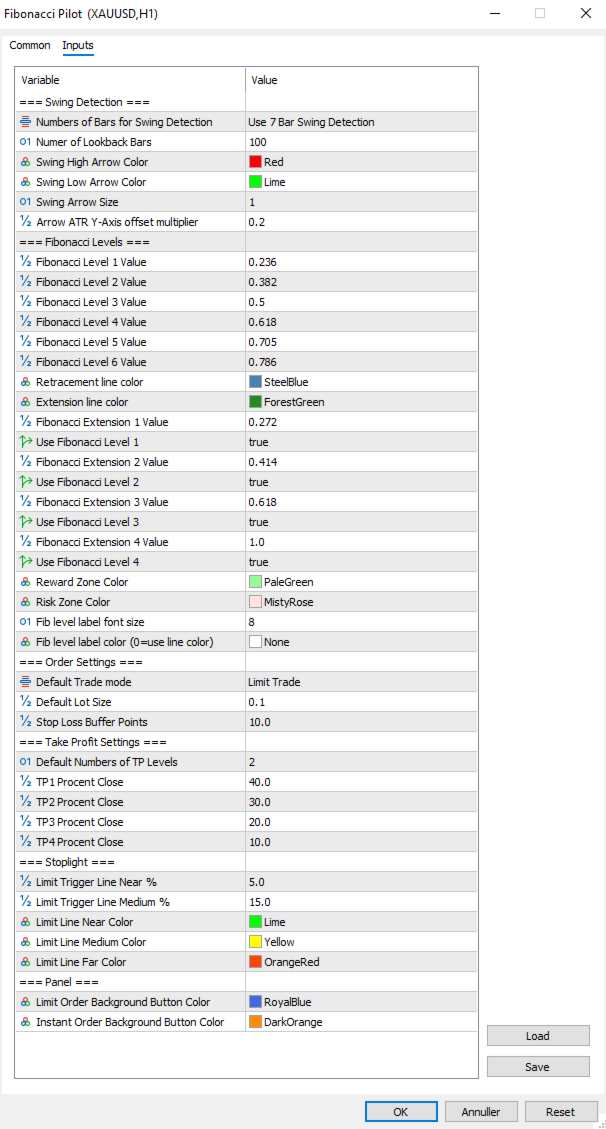
                                        Numbers of Bars for Swing Detection Number of bars used for swing detection. 3BAR: requires 1 bar each side. 5BAR: 2 bars each side. 7BAR: 3 bars each side. More bars = fewer but more significant swings.
                                        Number of Lookback Bars Lower values show fewer recent swings; higher values show more historical swings. Range: any positive integer.
                                        Swing High Arrow Color Color of the downward arrows marking Swing High points.
                                        Swing Low Arrow Color Color of the upward arrows marking Swing Low points.
                                        Swing Arrow Size   (weight) of the swing arrow objects. Range: 1–5.
                                        Arrow ATR Y-Axis offset multiplier Vertical distance between price and arrow, as a multiplier of the current ATR(14). Higher values push arrows further from the bars.

                                          Fibonacci Levels:

                                          Defines the retracement ratios drawn between A and B, the extension ratios drawn beyond B as TP targets, zone colors, and label appearance.

                                          Fibonacci Level X Value The six retracement ratios displayed on the grid. These are also the selectable entry levels [1]–[6] on the panel.
                                          Retracement line color Color of all retracement lines except anchors and the active entry level.
                                          Extension line color Color of all extension lines and their labels.
                                          Fibonacci Extension X Value Extension ratios beyond Point B, used as TP1–TP4 targets. Calculated as range × ratio added beyond B.
                                          Use Fibonacci Level X Enables or disables each extension line individually. Only enabled extensions are drawn and only up to the active TP count.
                                          Reward Zone Color Color of the reward zone rectangle (entry to last TP). Light red by default — rename/recolor to suit your premium zone convention.
                                          Risk Zone Color Color of the risk zone rectangle (entry to SL). Light green by default — rename/recolor to suit your discount zone convention.
                                          Fib level label font size Font size for all Fibonacci level text labels on the chart.
                                          Fib level label color Color for all Fibonacci level text labels. Set to NONE to use the line’s own color instead.


                                            Order Settings:
                                            Core parameters for how orders are sized and placed.

                                            Default Trade mode Starting order mode when the EA loads. LIMIT: places a pending limit order at the entry level. INSTANT: places a market order immediately at current price. Can be toggled on the panel at runtime.
                                            Default Lot Size Starting lot size shown on the panel when the EA loads. Adjusted per session using the panel controls.
                                            Stop Loss Buffer Additional points added to the SL distance beyond Point A. For a BUY, SL = point A − buffer. For a SELL, SL = point A + buffer. This prevents stop-outs from normal spread/wick at the swing level.


                                              Take Profit Settings:
                                              Controls the default number of TPs and how lots are distributed across them.

                                              Default Numbers of TP Levels Number of TP levels active when the EA loads (1–4). Changed per session on the panel.
                                              TP1 Percentage Close Percentage of total lots closed at TP1.
                                              TP2 Percentage Close Percentage of total lots closed at TP2.
                                              TP3 Percentage Close Percentage of total lots closed at TP3.
                                              TP4Percentage Close Percentage closed at TP4 when 4 TPs selected.
                                                The last active TP always absorbs any remaining lots to ensure the full position is always placed. Example with 2 TPs: TP1 = 40%, TP2 = 60% (not 30%). With 3 TPs: TP1 = 40%, TP2 = 30%, TP3 = 30%.


                                                Stoplight:
                                                Controls the color-changing limit entry line that shows how close price is to the pending entry level.

                                                Limit Trigger Line Near % When price is within this percentage of the A–B range from the entry level, the limit line turns green (imminent trigger).
                                                Limit Trigger Line Medium % When price is within this percentage of the A–B range, the line turns yellow (approaching). Beyond this threshold it shows red.
                                                Limit Line Near Color Color of the limit line when price is close (imminent).
                                                Limit Line Medium Color Color of the limit line when price is approaching.
                                                Limit Line Far Color Color of the limit line when price is far from entry.


                                                  Panel:
                                                  Visual colors used on the trade panel.

                                                  Limit Order Background Button Color Color used for the LIMIT mode toggle button and the entry level line when in limit mode. Blue by default.
                                                  Instant Order Background Button Color Color used for the INSTANT mode toggle button and the entry level line when in instant mode. Amber by default.


                                                  Fibonacci Orientation:
                                                  Understanding how the EA orients the Fibonacci grid is important for correct use.
                                                  Point A — 100% anchor Always the Stop Loss side of the trade. For a BUY setup: Point A is the swing low (price the SL is placed below). For a SELL setup: Point A is the swing high (price the SL is placed above).
                                                  Point B — 0% anchor Always the entry side of the trade. For a BUY: Point B is the swing high (the swing from which price is retracing). For a SELL: Point B is the swing low.
                                                  The EA automatically reorients A and B when you press PLACE BUY or PLACE SELL, regardless of which point you drew first or in which direction. You may draw from bottom to top, top to bottom, left to right, or right to left — the direction buttons determine the final orientation.


                                                  Notes and Tips:
                                                  Setup persistence:
                                                  If you open the settings dialog and change any input, the EA reinitializes. Any active setup (limit pending or trade running) is automatically saved to MT5 Global Variables before the restart and restored afterward. Chart objects, fib lines and the limit line are all redrawn with the new settings applied.
                                                  Manual limit cancellation:
                                                  If you cancel a pending limit order directly in the MT5 terminal (Toolbox → Trade tab), the EA detects this automatically within one tick and removes the setup from the panel and chart.
                                                  One setup at a time:
                                                  Mini supports a single active setup. The DRAW LINE button dims with the label “— TRADE ACTIVE —” while a trade is live. To start a new setup, close or clear the current one first.
                                                  Lot sizing with fewer TPs:
                                                  When using fewer than 4 TPs, the remaining lot percentage is always allocated to the last active TP. No lots are silently discarded. Check the TP percentage inputs if you want specific splits.
                                                  Strategy Tester compatibility:
                                                  Fibonacci Pilot Mini is compatible with the MT5 Strategy Tester. Timer events, sounds and push notifications are automatically disabled in tester mode.
                                                  Difference from Fibonacci Pilot Pro:
                                                  The Mini edition intentionally omits: multiple concurrent setups, Mini HUD, trailing stop, breakeven move, per-level Fibonacci colors, swing filter passes (significance, amplitude, wick), ATR-based SL, internal limit engine, push notifications, CSV trade journal, panel position customization, and the Finetune HUD. For those features, use Fibonacci Pilot Pro.
                                                  Produits recommandés
                                                  Développement de la version précédente de l'indicateur ZigZag WaveSize MT4 ZigZag WaveSize - indicateur standard ZigZag modifié avec ajout d'informations sur la longueur d'onde en points, niveaux et différentes logiques d'alertes Améliorations générales : Adaptation du code pour MetaTrader 5 Travail optimisé avec les objets graphiques Nouveautés : Niveaux horizontaux aux extrêmes Choix du type de niveaux : horizontal/rayons/segments Filtre de niveaux liquides (non percés par le prix) Tampon po
                                                  FREE
                                                  Auto Fib Retracements
                                                  Ross Adam Langlands Nelson
                                                  4.2 (5)
                                                  Automatic Fibonacci Retracement Line Indicator. This indicator takes the current trend and if possible draws Fibonacci retracement lines from the swing until the current price. The Fibonacci levels used are: 0%, 23.6%, 38.2%, 50%, 61.8%, 76.4%, 100%. This indicator works for all charts over all timeframes. The Fibonacci levels are also recorded in buffers for use by other trading bots. Any comments, concerns or additional feature requirements are welcome and will be addressed promptly. 
                                                  FREE
                                                  Fibo Trader FREE MT5
                                                  Grzegorz Korycki
                                                  3 (3)
                                                  Fibo Trader is an expert advisor that allows you to create automated presets for oscillation patterns in reference to Fibonacci retracements values using fully automated and dynamically created grid. The process is achieved by first optimizing the EA, then running it on automated mode. EA allows you to switch between automatic and manual mode. When in manual mode the user will use a graphical panel that allows to manage the current trading conditions, or to take control in any moment to trade ma
                                                  FREE
                                                  Auto Fibonacci Retracement Indicator — Flexible and Reliable This isn’t just another Auto Fibonacci Retracement indicator. It’s one of the most flexible and dependable tools available . If you find it useful, please consider leaving a review or comment — your feedback means a lot! Check out my other helpful tools below: Telegram to MT5 using AI   - AI-Powered Signal Copier Bot Smart Alert Manager   - Set up advanced alerts and send them to Mobile, Telegram, Discord, Webhook... Timeframes Trend
                                                  FREE
                                                  Golden Mind EA
                                                  Leszek Aleksander Mroczek
                                                  NEW VERSION -  FREE FOR LIMITED TIME Golden Mind EA is a fully automated Expert Advisor designed for MetaTrader 5, built around a dynamic grid-based trading approach combined with intelligent position management. Unlike traditional grid systems that rely on fixed take-profit levels, Golden Mind EA uses a pair-based closing logic . The system continuously calculates the combined result of positions and closes them when a defined profit level above the break-even line is reached. This allows the E
                                                  FREE
                                                  The Swing High Low and Fibonacci Retracement Indicator is a powerful technical analysis tool designed to identify key price levels and potential reversal zones in the market. It automatically detects recent swing highs and swing lows on the chart and overlays Fibonacci retracement levels based on these points. This indicator helps traders: Visualize market structure by highlighting recent swing points. Identify support and resistance zones using Fibonacci ratios (e.g., 38.2%, 50%, 61.8%). Adapt
                                                  FREE
                                                  Fibonacci Moving Averages
                                                  Brendan Jonathan Stoyanowski-campbell
                                                  2 (1)
                                                  OVERVIEW The Fibonacci Moving Averages are a toolkit which allows the user to configure different types of Moving Averages based on key Fibonacci numbers. Moving Averages are used to visualise short-term and long-term support and resistance which can be used as a signal where price might continue or retrace. Moving Averages serve as a simple yet powerful tool that can help traders in their decision-making and help foster a sense of where the price might be moving next. The aim of this scrip
                                                  FREE
                                                  Free automatic Fibonacci is an indicator that automatically plots a Fibonacci retracement based on the number of bars you select on the BarsToScan setting in the indicator. The Fibonacci is automatically updated in real time as new highest and lowest values appears amongst the selected bars. You can select which level values to be displayed in the indicator settings. You can also select the color of the levels thus enabling the trader to be able to attach the indicator several times with differe
                                                  FREE
                                                  FibRetrace Zones Zones de retracement de Fibonacci du dernier mouvement FibRetrace Zones est le compagnon visuel gratuit de l'Expert Advisor FibRetrace. Il trace les niveaux de retracement de Fibonacci et met en évidence la zone de repli du dernier mouvement, pour que vous voyiez où se situent les entrées avant de trader. La zone est colorée selon la direction : vert pour les configurations haussières, rouge pour les baissières. Fonctionne sur tout symbole et toute unité de temps. FONCTIONNALITÉ
                                                  FREE
                                                  Automatic fibonacci with alerts is an indicator that automatically plots a fibonacci retracement based on the number of bars you select on the BarsToScan setting in the indicator. The fibonacci is automatically updated in real time as new highest and lowest values appear amongst the selected bars. You can select which level values to be displayed in the indicator settings. You can also select the color of the levels thus enabling the trader to be able to attach the indicator several times with d
                                                  FREE
                                                  -- Simple mais efficace. Indicateur d'inversion - Qu'est-ce que c'est ? Un indicateur superposé qui suit les tendances et combine la logique SuperTrend avec la technologie des courbes exponentielles. Il détecte la direction de la tendance, trace un canal dynamique sur le graphique et envoie des alertes en temps réel lorsque la tendance s'inverse. Comment fonctionne-t-il ? L'indicateur calcule une ligne de base exponentielle à l'aide de l'ATR et d'un facteur SuperTrend. Lorsque le prix clôture
                                                  FREE
                                                  Fib by EV
                                                  Enrique Valeros Muriana
                                                  Fibonacci Retracement EA Fibonacci Retracement EA is a rules-based Expert Advisor for MetaTrader 5. It identifies confirmed swing points, measures the impulse, and looks for a continuation entry after price retraces into the 50%–61.8% Fibonacci zone. How it works Finds the latest confirmed fractal high and low. Checks that the impulse is at least the configured size relative to ATR. Optionally filters trades by the EMA trend. Waits for a candle to overlap the 50%–61.8% retracement zone and close
                                                  FREE
                                                  Pillartrade
                                                  QuanticX
                                                  3 (1)
                                                  Announcement: All EAs (Expert Advisors) from QuanticX are currently available for free, but only for a limited time! To enjoy a Lifetime QuanticX support and continue receiving free EAs, we kindly request you to leave a review and track the performance of our EAs on Myfxbook. Additionally, don't hesitate to reach out to us for exclusive bonuses on EAs and personalized support. Pillartrade by QuanticX Welcome to Pillartrade - Your Long-Only Trading Ally for US500 Join the forefront of financial
                                                  FREE
                                                  Fibo Pivot Optimus
                                                  Syamsurizal Dimjati
                                                  5 (1)
                                                  Ritz Smart FIBOPIVOT Optimus Pro Advanced Multi-Timeframe Fibonacci Trading System SMART PREDICTION & ACCURATE FORECAST Revolutionary Fibonacci Pivot Technology combines traditional pivot points with advanced Fibonacci extensions, creating a powerful predictive tool for professional traders. Our algorithm intelligently detects significant price levels across multiple timeframes, delivering laser-accurate support and resistance zones before the market moves . INTELLIGENT VOLUME-VALIDATED SIGNALS
                                                  FREE
                                                  The jcoworld OTE EA is an automated trading bot for MetaTrader 5 built on Smart Money Concepts (SMC) . It accurately identifies market impulse moves and automatically enters trades within the Optimal Trade Entry (OTE) zone (61.8% – 79.0% Fibonacci) as soon as a confirmation candle closes. Optimized for: XAUEUR, XAUUSD, and Major Forex Pairs Features: Automatic risk management, dynamic lot sizing & automated Stop Loss/Take Profit. Try for free: This demo version is 100% free! Pricing Plans for Fu
                                                  FREE
                                                  Utilisez cet expert opérationnel dont la stratégie repose essentiellement sur l’indicateur RSI (Relative Strength Index)  ainsi qu’une touche personnelle. D’autres experts gratuits sont disponibles dans mon espace personnel ainsi que des signaux, n’hésitez pas à visiter et à mettre un commentaire, cela me fera plaisir et me donnera envie de proposer du contenu. Les experts actuellement disponibles: LVL Creator LVL Creator Pro LVL Bollinger Bands Lorsque vous utiliserez ce robot en réel, n’hési
                                                  FREE
                                                  EurowaveFX
                                                  Fabio Sorrentino
                                                  FX_EUXXX is a free expert advisor designed primarily for EURUSD on the H4 chart. It operates without hedging, grid, martingale, or anti-martingale basically, no gambling. I encourage you to request the updated set file for free. Subscribe   to our new channel for   promo/FREE  and   updates! :  MQL5 Group   OR  Telegram Channel Subscribe  to get new   announcements   and look behind the scenes!  MQL5_Channel   Please support me to building   FREE EAs!   Leave a   review ! Thank you Recommendati
                                                  FREE
                                                  IAMFX offers the ultimate solution to make trading easier and more flexible on IAMFX Web  using IAMFX Agent . With our exclusive IAMFX-Agent and IAMFX-Center, you can effortlessly manage your trading anytime, anywhere through web and mobile interfaces. Fully compatible with both web and mobile environments,   IAMFX allows real-time multi-account management and monitoring with a simple installation. IAMFX Benefits Manage multiple MT5 accounts Easy orders with market, stop and limited Manage orde
                                                  FREE
                                                  This indicator automatically identifies liquidity levels using swing fractals and tracks when price sweeps through them. Works on any symbol and timeframe with full multi-timeframe support. Features: — Detects swing highs and lows via a fractal method (configurable bars left & right) on a selected timeframe. Active levels are displayed as rays extending to the right; swept levels turn into dashed lines ending at the sweep candle. — Plots Previous Day (PDhigh / PDlow), Previous Week (PWhigh / PWl
                                                  FREE
                                                  AP Fibonacci Retracement PRO (MT5) Overview AP Fibonacci Retracement PRO is a trend-continuation pullback EA. It waits for a confirmed swing, calculates the Fibonacci retracement zone, and looks for entries in the direction of the original move. No grid, no martingale. Strategy logic Detects the last valid swing high/low using Fractals on the selected signal timeframe. Calculates the retracement zone between 38.2% and 61.8% (configurable). On a closed bar, if price is inside the zone (with opti
                                                  FREE
                                                  The Fibonacci Scalper
                                                  STANTON ROUX
                                                  4.22 (45)
                                                  The Fibonacci Trader MQL5 expert advisor uses the Fibonacci levels to determine a buy or sell trade with the MACD as confirmation. The Fibonacci levels work as follows: Above 61.8 SELL if MACD trend is SELL Trading Range (Ability to select trading input parameters) BUY if MACD trend is BUY SELL if MACD trend is SELL Below 23.6 BUY if MACD trend is BUY Default settings are configured for EURUSD on M5 Chart. To work with the news server, you must add the URL ‘ http://ec.forexprostools.com/ ’ in t
                                                  FREE
                                                  Babel Assistant
                                                  Iurii Bazhanov
                                                  4.33 (9)
                                                  Babel assistant 1 Le robot de compensation (netting) MT5 "Babel_assistant_1" utilise l'indicateur ZigZag pour générer des niveaux de Fibonacci sur les unités de temps M1, M5, M15, H1, H4, D1 et W1, et calcule la force des tendances d'achat et de vente. Il ouvre une position en utilisant le paramètre "Lot for open a position" si le niveau de tendance spécifié de 4,925 est dépassé. Ensuite, Babel place des ordres en attente à certains niveaux de Fibonacci et définit les lignes de Stop Loss et de T
                                                  FREE
                                                  Triangle Pattern Gann EA
                                                  Nguyen Van Kien
                                                  5 (3)
                                                  Triangle Pattern Gann EA v3.4 - Trade Like the Legendary W.D. Gann Harness the Power of Geometric Price Patterns & Sacred Ratios Are you ready to trade with one of the most powerful pattern recognition systems ever developed? The Triangle Pattern Gann EA v3.4 brings the legendary wisdom of W.D. Gann into the modern algorithmic trading era. What Makes This EA Exceptional? Based on Proven Gann Methodology W.D. Gann was one of history's most successful traders, achieving over 90% accuracy u
                                                  FREE
                                                  CloseAll MT5
                                                  Mr Sorachai Pitakjarukul
                                                  4.5 (2)
                                                  ขอบคุณ แรงบันดาลใจ จากโค้ชแพม ที่ทำให้เริ่มทำ    Close all ตัวนี้  และขอขอบคุณทุกคนที่ให้ความรู็มาโดยตลอด ไม่ว่าจะทางตรงทางอ้อม ขอบคุณทุกคนที่ให้ความรู้เพื่อนร่วมเทรด ทั้งนี้เพื่อให้นักเทรดทุกคนได้มีเครื่องมือในการควบคุมการปิดการซื้อขาย จึงขอพัฒนาโปรแกรม close all version 5 ได้ใช้ทุกคน  Close all and update profit Version 1.00 (MT5) Full version Give you free  For MT4 Click  https://www.mql5.com/en/market/product/79252 Fix TPSL calculate  Program function Tab 1 Close order function and show br
                                                  FREE
                                                  This indicator copies graphical objects (vertical lines, horizontal lines, text labels, fibo and etc.) from master chart to other charts.  For example, you can copy lines from the chart GBPUSD with period H1 to chart GBPUSD with period M15. It's makes technical analyses more simple. Show label - show label on the Master chart, where you draw graphical objects to copy; Font size - font size of label; Type of synchronisation - type of synchronisation Copy text - on/off copy of text objects Copy la
                                                  FREE
                                                  Fast Fibonacci Grid MT5
                                                  Grzegorz Korycki
                                                  2.5 (2)
                                                  Did you ever feel irritated by manually adjusting Fibonacci retracement levels? Do you ever want to have a tool that was automatically adjust to certain Fibonacci levels with your trading? Well here is a tool for you: Fast Fibonacci indicator and Grid trader allows you to quickly adjust Fibonacci retracement levels or construct Fibonacci extension grid! You can also quickly setup your grid trading based on these levels - only with few clicks. Adjustable graphics, font sizes and graphics panels m
                                                  FREE
                                                  Smart Market Flow Detector
                                                  Victor Paul Hamilton
                                                  4.5 (2)
                                                  Smart Market Flow Detector (SMFD) v4.0 — Professional Edition Four Algorithms. One Signal. Zero Repainting. Smart Market Flow Detector combines four analytical engines into a single indicator that identifies institutional order flow patterns across all timeframes. Every signal is generated on closed bars only — what you see in back-testing is what you get live. What It Does SMFD scores every bar on two axes: Smart Money Flow (institutional accumulation/distribution) and Dumb Money Flow (retail
                                                  FREE
                                                  A ready-made multitimeframe trading system based on automatic plotting and tracking of Fibonacci levels for buying and selling any symbol. Demo version - calculation of the last 390 bars is not performed. Advantages Determines the trend direction based on a complex of 14 indicators ( Cx ), extremums of ZigZag ( Z ), RSI ( R ), Impulse ( I ) Displaying the values of 14 indicators comprising the trend direction ( Cx ) Plotting horizontal levels, support and resistance lines, channels View the plo
                                                  FREE
                                                  Trading Stats Panel Your Trading Performance. At a Glance. Trading Stats Panel is a professional MetaTrader 5 indicator designed to give traders a clear and convenient overview of their recent trading activity directly on the chart. Instead of constantly opening the MT5 History tab and manually calculating your results, the panel presents key trading statistics in one easy-to-read dashboard. What Does Trading Stats Panel Show? The dashboard provides important performance information including
                                                  FREE
                                                  Fractal Structure Auto Fibonacci This tool is designed for price action traders and structural analysts who want to optimize their charting. It automatically identifies valid market swings using fractal logic, draws clear ZigZag lines, and automatically draws Fibonacci retracement levels for the most recent trading range. Key Features Dynamic Fractal Detection: Identifies valid swing peaks and troughs based on a user-defined review period (n). It filters out market noise and visually marks
                                                  FREE
                                                  Les acheteurs de ce produit ont également acheté
                                                  Trade Assistant MT5
                                                  Evgeniy Kravchenko
                                                  4.43 (216)
                                                  It helps to calculate the risk per trade, the easy installation of a new order, order management with partial closing functions, trailing stop of 7 types and other useful functions. Additional materials and instructions Installation instructions - Application instructions Line function -   shows on the chart the Opening line, Stop Loss, Take Profit. With this function it is easy to set a new order and see its additional characteristics before opening.   Risk management  - The risk calculation
                                                  Bienvenue sur Trade Manager EA, l’outil ultime de gestion des risques conçu pour rendre le trading plus intuitif, précis et efficace. Ce n’est pas seulement un outil d’exécution d’ordres ; c’est une solution complète pour la planification des trades, la gestion des positions et le contrôle des risques. Que vous soyez débutant, trader expérimenté ou scalpeur ayant besoin d’une exécution rapide, Trade Manager EA s’adapte à vos besoins, offrant une flexibilité sur tous les marchés, des devises et i
                                                  Local Trade Copier EA MT5
                                                  Juvenille Emperor Limited
                                                  4.94 (149)
                                                  Local Trade Copier EA MT5 est un copieur de trades rapide et flexible permettant de copier et de gérer des trades entre plusieurs comptes MetaTrader 5 sur le même ordinateur Windows ou Windows VPS. Il combine la synchronisation locale des trades avec des contrôles côté Receiver pour la taille des lots, la gestion du risque, le filtrage des trades, le mappage des symboles, la gestion des trades et la protection du compte. Configurez vos terminaux Transmitter et Receiver en environ 1 minute et co
                                                  Telegram to MT5 Multi-Channel Copier   copie automatiquement les signaux de trading de vos canaux Telegram et Discord directement vers MetaTrader 5. Pas de bots, pas d'extensions de navigateur, pas de copie manuelle. Un signal arrive sur Telegram ou Discord et l'EA ouvre le trade dans votre terminal en quelques secondes. Et avant de copier un canal, le backtester intégré vous montre ce que ce canal aurait fait sur votre compte. Le produit comprend deux composants : une application Windows qui éc
                                                  Farmed Hedge Yield Farming | All Markets (Manual - Hybrid - Semi/Automated EA) VERIFIED TRADING RESULTS - Farmed Hedge Yield Axi Copy:  https://www.mql5.com/en/signals/2356376 - Farmed Hedge Yield Exn Copy:   https://www.mql5.com/en/signals/2356404 - Farmed Hedge Yield V Copy:  https://www.mql5.com/en/signals/2357156 IMPORTANT NOTICE: FarmedHedge is a MANUAL-FOCUSED TRADING UTILITY ,not a fully automated EA. Results shown on this Signal include manual trades and overall strategic management.
                                                  Copiez les signaux Telegram avec vos propres règles de trading Telegram to MT5 Signal Trader copie automatiquement les signaux de trading au format texte provenant de canaux et de groupes Telegram publics et privés vers MetaTrader 5. Gérez plusieurs fournisseurs et comptes MT5 depuis une seule application de bureau, avec des paramètres de risque et de trading propres à chaque fournisseur . Aucun bot Telegram ni configuration d'API n'est nécessaire pour copier les signaux. Connectez-vous simpleme
                                                  News Trade EA MT5
                                                  Konstantin Kulikov
                                                  4.55 (11)
                                                  Je voudrais vous présenter un robot efficace que j'utilise depuis plusieurs années. Il peut être utilisé en mode semi-automatique, comme en mode totalement automatique. >>> Chat <<< Le programme comporte des paramètres souples pour le commerce sur les nouvelles du calendrier économique. Il est impossible de le vérifier dans le testeur des stratégies. Ce qu’il faut, c’est le travail réel. Il faut ajouter à la liste des URL autorisées, dans les paramètres du terminal, un site d'actualités. Cliqu
                                                  ================================================================================ POC BREAKOUT - V20.72. Full Professional Grade Toolkit ================================================================================ POC Breakout is a full MetaTrader 5 trading dashboard for discretionary traders who want breakout signals, Point of Control (POC) context, volume profiles, order flow, market structure, news, alerts, and advanced trade planning in one professional workspace. Attached directly to you
                                                  TradePanel MT5
                                                  Alfiya Fazylova
                                                  4.88 (170)
                                                  Trade Panel est un assistant commercial multifonction. L'application contient plus de 50 fonctions de trading pour le trading manuel et permet d'automatiser la plupart des tâches commerciales. Instructions d'utilisation : https://www.mql5.com/fr/blogs/post/762589 Version d'essai de l'application pour un compte démo : https://www.mql5.com/fr/blogs/post/762644 Comment installer l'application : https://www.mql5.com/fr/blogs/post/762645 Comment tester l'application en mode visuel : https://www.mql5.
                                                  Strategy Ledger Pro
                                                  Abdullah Uygar Tuna
                                                  5 (13)
                                                  Désormais disponible en français. Strategy Ledger Pro est un panneau d'analyse de compte en lecture seule pour MetaTrader 5. Il sépare les résultats du compte par Expert Advisor, stratégie, symbole et numéro magic, pour que vous voyiez ce que chacun apporte réellement. Le panneau est disponible en 11 langues : English, Français, Deutsch, Español, Italiano, Português, Русский, Türkçe, 中文, 日本語 et 한국어. Avant de télécharger la démo. Le Market exécute la démo de tout produit payant uniquement dans l
                                                  Dealer Panel
                                                  Mian Rameez Ali
                                                  Dealer's Panel No signal decides anything here — a hand does. One click, and the panel calculates what's underneath: lot size from risk, target from a 30-step balance ladder that remembers exactly how far an account has climbed. Toggle between market and pending without touching an input field. Set a stop, and the take-profit can write itself — a fixed share of the balance, translated into price with no arithmetic left for the trader to get wrong. One trade live at a time; it won't let a seco
                                                  Exp COPYLOT CLIENT for MT5
                                                  Vladislav Andruschenko
                                                  3.97 (35)
                                                  Copieur professionnel de trades pour MetaTrader 5 Un copieur de trades rapide, professionnel et fiable pour MetaTrader . COPYLOT permet de copier des trades Forex entre les terminaux MT4 et MT5 avec prise en charge des comptes Hedge et Netting . La version MT5 de COPYLOT prend en charge : - MT5 Hedge → MT5 Hedge - MT5 Hedge → MT5 Netting - MT5 Netting → MT5 Hedge - MT5 Netting → MT5 Netting - MT4 → MT5 Hedge - MT4 → MT5 Netting Version MT4 Description complète + DEMO + PDF Comment acheter Comme
                                                  Prochaine mise à jour — Version 2.52 bientôt disponible ! [NOUVEAU] Préparez-vous à découvrir 4 nouvelles fonctionnalités majeures conçues pour améliorer votre analyse du marché et votre flux de travail de trading Nous faisons passer l’analyse du marché au niveau supérieur avec 4 nouvelles fonctionnalités conçues pour répondre à vos besoins en trading. Découvrez : 1. TRADE OVERVIEW DASHBOARD 2. CONFLUENCE AT ZONE 3. STRONG & WEAK HIGH/LOW 4. OTE 1. TRADE OVERVIEW DASHBOARD Un tableau de bord qu
                                                  RETAILBERG FOOTPRINT CHART PRO — Order-Flow Workspace for MetaTrader 5 Version 7.00  |  Professional System  |  31 tools  |  One chart A full 150-page illustrated User Manual is included. Please read the full manual to understand this feature packed footprint chart elements and ui. https://www.mql5.com/en/blogs/post/777982 DEMO / STRATEGY TESTER — PLEASE READ FIRST
                                                  The product will copy all telegram signal to MT5 ( which you are member) , also it can work as remote copier.  Easy to set up, copy order instant, can work with almost signal formats, image signal,  s upport to translate other language to English Work with all type of channel or group, even channel have "Restrict Saving Content", work with  multi channel, multi MT5 Work as remote copier: with signal have ticket number, it will copy exactly via ticket number. Support to backtest signal. How to s
                                                  Trade copier MT5
                                                  Alfiya Fazylova
                                                  4.61 (57)
                                                  Trade Copier est un utilitaire professionnel conçu pour copier et synchroniser les commandesentre les comptes de trading. Les commandes sont copiées du compte/terminal du fournisseur vers le compte/terminal du destinataire, qui sont installés sur le même ordinateur ou vps. Avant d'acheter, vous pouvez tester la version démo sur un compte démo. Version démo ici . Instructions complètes ici . Principales fonctionnalités et avantages: Prend en charge la copie des commandes MT5> MT5, MT4> MT5, MT5>
                                                  HINN MagicEntry Extra
                                                  ALGOFLOW OÜ
                                                  4.74 (19)
                                                  HINN MAGIC ENTRY – the ultimate tool for entry and position management! SIMPLE. FASTEST. INTUITIVE. MAX AUTOMATED. Place orders by selecting a level directly on the chart! full description   ::  demo-version  :: 60-sec-video-description Key features: - Market, limit, and pending orders - Automatic lot size calculation - Automatic spread and commission accounting - Unlimited partitial take-profits  - Breakeven and trailing stop-loss and take-profit  functions - Invalidation leves - Intuitive, a
                                                  EasyInsight AIO MT5
                                                  Alain Verleyen
                                                  4.92 (12)
                                                  EASY Insight AIO – La solution tout-en-un pour un trading intelligent et sans effort Présentation Imaginez pouvoir analyser l’ensemble du marché — Forex, Or, Crypto, Indices et même Actions — en quelques secondes, sans aucune analyse manuelle de graphiques, sans installation complexe ni configuration d’indicateurs. EASY Insight AIO est votre outil d’exportation ultime, prêt à l’emploi, pour un trading alimenté par l’IA. Il fournit une vue d’ensemble du marché dans un fichier CSV propre — prêt
                                                  Telegram To MT5 Ultra
                                                  Mirel Daniel Gheonu
                                                  5 (5)
                                                  Telegram To MT5 — Copieur de signaux Transformez les appels de trading de vos canaux Telegram en véritables ordres MT5 — automatiquement, sur autant de comptes que vous le souhaitez, avec le risque et les règles entièrement sous votre contrôle. Telegram To MT5 relie les canaux VIP / de signaux que vous suivez déjà sur Telegram à votre terminal MetaTrader 5. Une application de bureau compagnon gratuite lit les messages (même des canaux qui bloquent les bots), et cet Expert Advisor les exécute sur
                                                  MT5 to Telegram Signal Provider est un utilitaire facile à utiliser et entièrement personnalisable qui permet l'envoi de signaux spécifiés vers un chat, un canal ou un groupe Telegram, transformant ainsi votre compte en fournisseur de signaux. Contrairement à la plupart des produits concurrents, il n'utilise pas d'importations DLL. [ Démonstration ] [ Manuel ] [ Version MT4 ] [ Version Discord ] [ Canal Telegram ]  New: [ Telegram To MT5 ] Configuration Un guide utilisateur étape par étape est
                                                  The Patch
                                                  Mian Rameez Ali
                                                  The Patch It never opens a trade. It walks behind the ones that did. Every open position, every pending order — checked twice a second for the one thing that's easy to forget: a stop, a target. Found bare, it doesn't ask. It writes the missing number in, measured in points from wherever the position began, and moves on to the next. No strategy, no opinion on direction. Just the quiet assumption that nothing should ever sit on the market unprotected — not because someone decided it shouldn't,
                                                  Grid Manual MT5
                                                  Alfiya Fazylova
                                                  4.73 (22)
                                                  Grid Manual est un panneau de trading permettant de travailler avec une grille d'ordres. L'utilitaire est universel, possède des paramètres flexibles et une interface intuitive. Il fonctionne avec une grille d'ordres non seulement dans le sens des pertes, mais aussi dans le sens de l'augmentation des profits. Le commerçant n'a pas besoin de créer et de maintenir une grille d'ordres, l'utilitaire le fera. Il suffit d'ouvrir une ordre et "Grid Manual" créera automatiquement une grille de ordres po
                                                  Signal Trading View to MT5 Pro
                                                  Mirel Daniel Gheonu
                                                  4.5 (2)
                                                  Signal TradingView to MT5 Pro Automator Exécution professionnelle instantanée entre TradingView et MetaTrader 5 Automatisez votre stratégie de trading avec le pont de communication le plus robuste entre les alertes TradingView et l'exécution réelle sur MT5. Conçu pour les traders qui exigent vitesse, flexibilité et une gestion des risques impeccable, cet Expert Advisor transforme tout message d'alerte en un ordre au marché ou à cours limité précis. POINTS FORTS ET AVANTAGES Moteur d'analyse univ
                                                  Power Candles Strategy Scanner - Outil de recherche de configurations multi-symboles à optimisation automatique Le Power Candles Strategy Scanner utilise le même moteur d'auto-optimisation que celui qui alimente l'indicateur Power Candles, pour chaque symbole de votre Market Watch, en parallèle. Un panneau vous indique quels symboles sont statistiquement négociables à l'instant, quelle stratégie est la plus performante pour chacun, la paire Stop Loss / Take Profit optimale, et vous alerte dès qu
                                                  Prop Guardian Risk Manager MT5 – Drawdown, Risk & Hedge Protection for Prop Firm and Managed Accounts Prop Guardian Risk Manager is a professional risk-control utility for MetaTrader 5, designed for prop firm traders, money managers and anyone who wants strict account-level risk protection. It does not generate trading signals, strategy entries or trading decisions. Instead, it runs in the background, monitors your account risk and can automatically block new exposure, close managed positions or
                                                  Anchor Trade Manager
                                                  Kalinskie Gilliam
                                                  5 (9)
                                                  Your EAs cannot see each other, but Anchor can. Anchor gives you one place to coordinate your EAs, manage risk, and decide when trading is allowed. It works alongside the trading bots you already use without any changes to them. The Problem One EA opens a trade. Then another starts trading. The next thing you know, you wake up to multiple grids built across your account. Each EA may be doing exactly what it was designed to do, but together they can place far more risk on your account than you in
                                                  VirtualTradePad PRO SE MT5 — centre de contrôle de trading professionnel pour MetaTrader 5 VirtualTradePad PRO SE est un panneau de trading premium basé sur le graphique et un espace de gestion des trades pour MetaTrader 5 . Il est conçu pour les traders qui souhaitent une exécution plus rapide, un contrôle plus clair des positions, une gestion structurée des trades, une planification visuelle des niveaux et un flux de travail professionnel directement depuis le graphique. Ce n’est pas seulement
                                                  The News Filter MT5
                                                  Leolouiski Gan
                                                  4.79 (24)
                                                  Ce produit filtre tous les conseillers experts et les graphiques manuels pendant les heures de publication des actualités, de sorte que vous n'avez pas à vous soucier des pics de prix soudains qui pourraient détruire vos configurations de trading manuelles ou les transactions entrées par d'autres conseillers experts. Ce produit est également livré avec un système de gestion des ordres complet qui peut gérer vos positions ouvertes et vos ordres en attente avant la publication de toute actualité.
                                                  Trader Evolution
                                                  Siarhei Vashchylka
                                                  5 (7)
                                                  " Trader Evolution " - A utility designed for traders who use wave and technical analysis in their work. One tab of the utility is capable of money management and opening orders, and the other can help in making Elliott wave and technical analysis. Manual (Be sure to read before purchasing) | Version for MT4 Advantages 1. Trading in a few clicks. Immediate and pending orders are available in the panel 2. Money management. The program automatically selects the appropriate lot size 3. Simplifies
                                                  Floor Watch
                                                  Syed Tauqeer Hussain Shah
                                                  Floor Watch One number, watched every thirty seconds: how far equity has fallen since the day began — or since its highest point, if it's told to trail the peak instead of the open. Cross the line and it doesn't argue. Every open position closes, every pending order vanishes, and anything that slips through afterward gets shut the moment it appears. Not asked. Removed. The floor holds until the clock turns 5 AM Pakistan time — then, and only then, does the day start over. One rule. No except
                                                  Plus de l'auteur
                                                  The primary function of this script, Tick Data Exporter , is to efficiently extract historical tick data. Tick data represents the most granular level of market data, capturing every single price change. The script downloads this data from a broker and formats it into CSV files for external quantitative analysis. Five things tick data shows that bars permanently hide: Spread microstructure: Bars give you one spread number per period (typically the spread at bar close). Ticks show you the sprea
                                                  News Markers Description Version: 1.13Type: MetaTrader 5 indicator (chart window) Purpose: Plots economic-calendar news events as color-coded vertical lines on the chart, with optional currency tags and an upcoming-news HUD panel. Before you start — three things that always apply Live connection required. The data comes from MT5's built-in economic calendar via your broker's feed. It returns nothing in the Strategy Tester, and nothing if your broker doesn't serve calendar data. If no lines appe
                                                  FREE
                                                  The Simple Manual Trading Panel (v2.11) Is a professional trade management tool designed with a clean, movable UI to streamline manual execution and automated exit strategies. Core Features Dynamic Visual Interface: A movable GUI panel that provides real-time information including a bar countdown timer, live spread, and advanced volume analysis. Flexible Lot Size setting, with 2 decimals (If broker supports it). Multi-Stage Take Profit: Supports three distinct Take Profit (TP) levels in either
                                                  Trend Matrix Panel is a multi-timeframe technical indicator for MetaTrader 5 that compresses an entire trading session's structural picture into a single panel. Rather than flipping between charts to read M1, M15, H1, and D1 separately, the panel shows the trend state of three configurable moving averages across twelve timeframes simultaneously, with a heatmap that draws your eye to the genuinely strong signals and away from noise. The core idea is simple: every cell in the matrix tells you how
                                                  This script is an Intelligence Gathering Utility designed to give you full control over your data exports from MetaTrader 5. It allows you to synchronize up to three different symbols into a single file with precise timestamping. 1. Setting the Data Range (Range) You can define exactly which historical period you want to capture: Date Mode : If Last N bars (0 = use date range above) is set to 0 , the script will export all data between your chosen start and end dates. Bar Mode : By entering a nu
                                                  FVG Multi TimeFrame Levels — Indicator Overview What it is A multi-timeframe   Fair Value Gap   detector and analysis tool for MetaTrader 5. It scans price action across up to four configurable timeframe "slots" simultaneously, identifies gaps that meet a configurable significance threshold, draws them as boxes on the current chart, and tracks how each gap behaves over its lifetime — whether it gets tested, how deeply, how often, and ultimately whether it gets filled or swept beyond. It runs alo
                                                  Fibonacci Pilot Pro Overview The EA functions as a comprehensive, panel-driven Fibonacci trading ecosystem designed to bridge the gap between manual chart analysis and fully automated algorithmic execution. Dual Execution Modes: It operates as both a visual trade assistant for manual trading and a fully autonomous robot. In manual mode, you plot Point A and Point B on the chart to instantly visualize risk/reward zones and limit entries before executing. In auto mode, it scans for market struc
                                                  Filtrer:
                                                  Aucun avis
                                                  Répondre à l'avis