Fibonacci Pilot Mini

What Is Fibonacci Pilot Mini?
Fibonacci Pilot Mini is a semi-automatic Expert Advisor for MetaTrader 5. It assists the trader in placing Fibonacci-based trades by automating the mechanical steps after the trader has identified the swing. The trader performs the analysis; the EA handles lot sizing, entry price calculation, stop loss, take profit levels, and order placement.
Mini is the streamlined single-setup edition of Fibonacci Pilot Pro. It runs one trade setup at a time with a clean, minimal panel and no overlapping complexity. It is designed for traders who want fast, focused execution without managing multiple concurrent setups.

Important: The Fibonacci Pilot Mini, does not perform any trades automatically, it requires human interaction to perform the trades.


What the EA does
Detects and draws swing highs and swing lows on the chart automatically
Draws a full Fibonacci retracement grid between two user-selected price points (A and B)
Draws extension levels beyond point B as take profit targets
Calculates entry price, stop loss and up to 4 take profit levels from the Fibonacci grid
Places one or more market or limit orders with correct lot splits across TPs
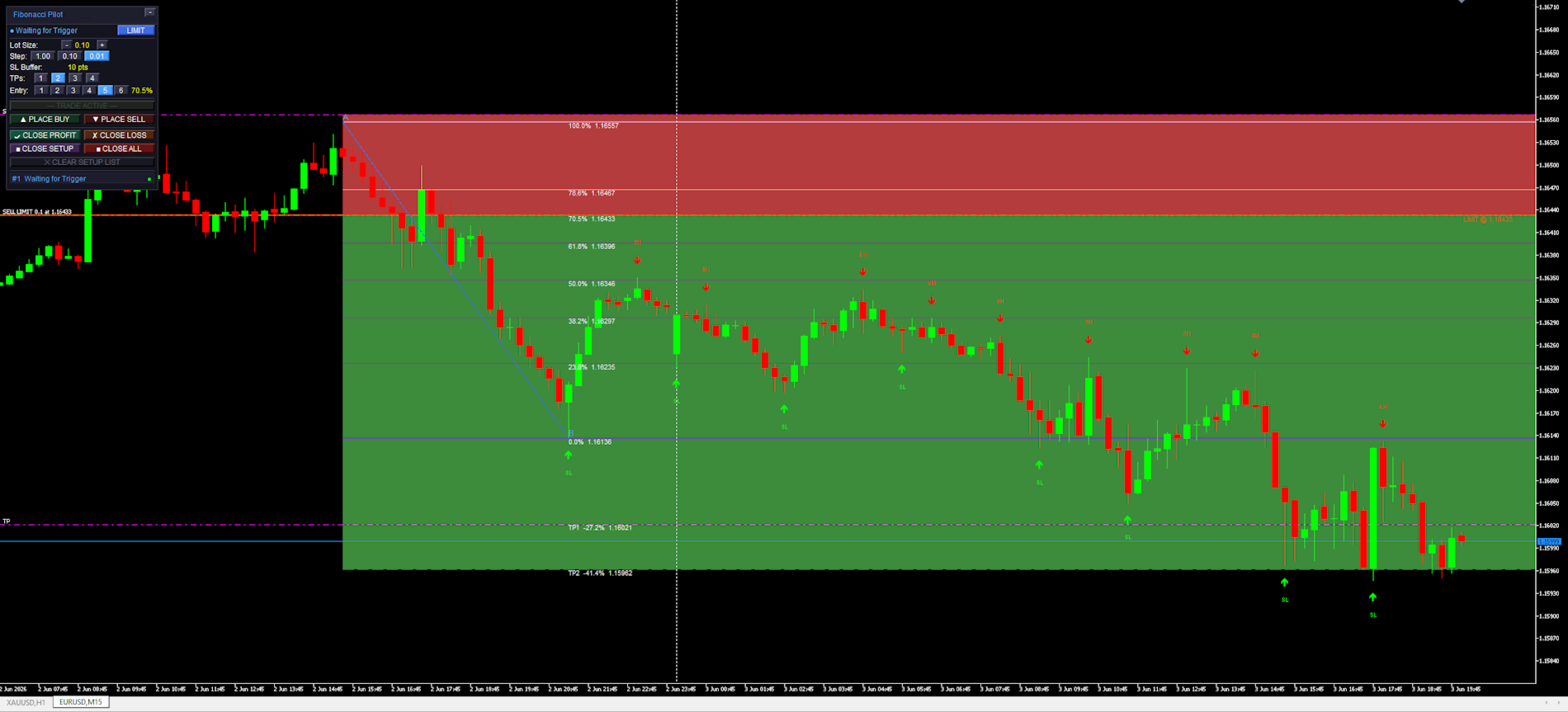
Draws a color-coded risk zone (entry to SL) and reward zone (entry to last TP) on the chart
Shows a limit line with a stoplight color system as price approaches the entry level
Detects when a limit order is manually cancelled in the MT5 terminal and removes the setup
Restores an active setup automatically if the EA is reloaded or settings are changed

    What the trader does
    Identifies a swing high and swing low on the chart
    Clicks Point A then Point B on the chart to define the Fibonacci range
    Selects the desired entry retracement level on the panel
    Adjusts lot size and number of TPs
    Presses PLACE BUY or PLACE SELL to execute

      Mini supports one active setup at a time. For multiple concurrent setups on the same chart, use Fibonacci Pilot Pro.
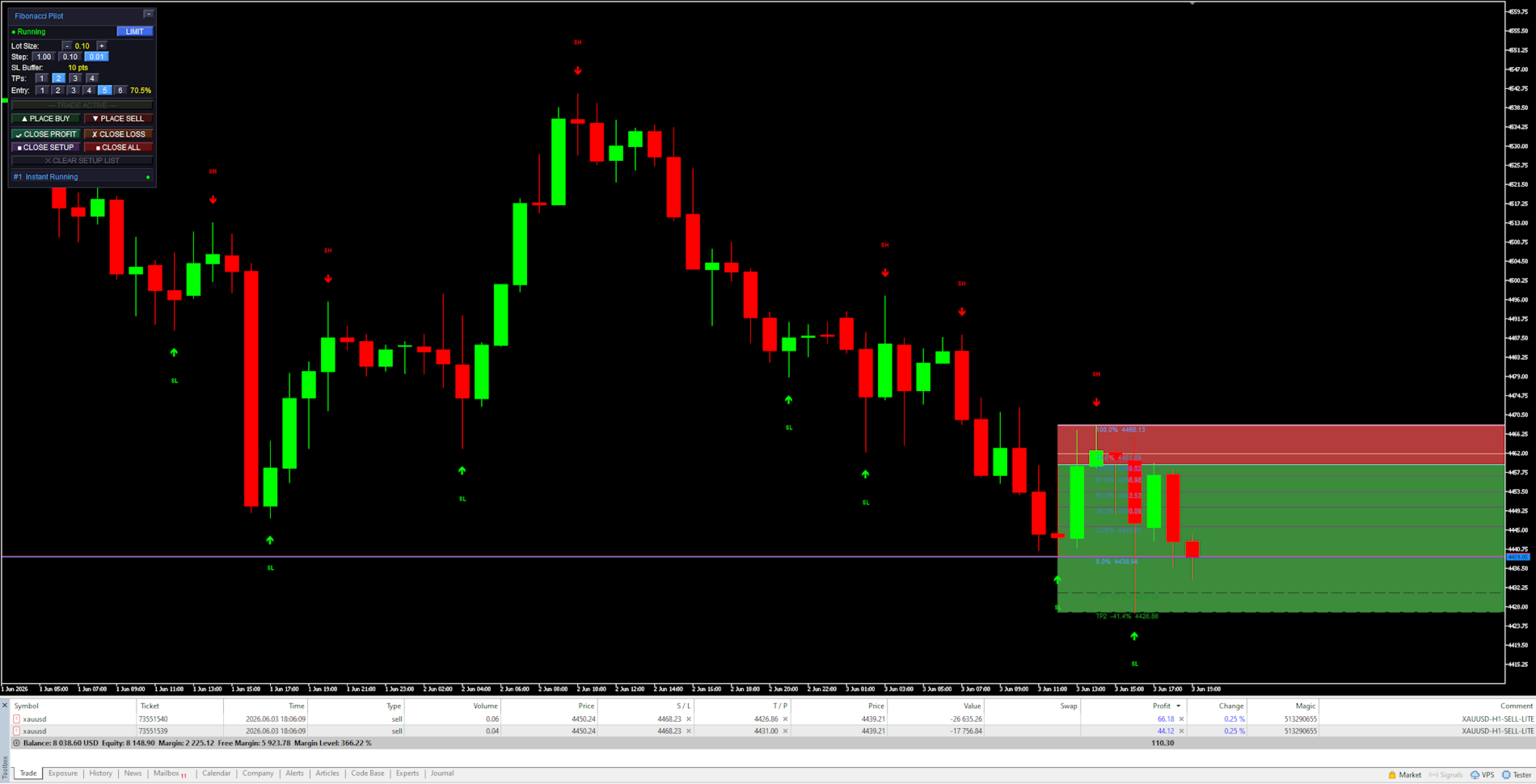
      In LIMIT mode the EA places a pending limit order at the entry level. A horizontal line with stoplight coloring shows the entry price and changes from red → yellow → green as price approaches. In INSTANT mode the order is placed at market price immediately.


      Panel Reference:

      Title bar:
      Shows the EA name and version. The [−] button minimizes the panel to the title bar only. Click [−] again to restore.

        State row:
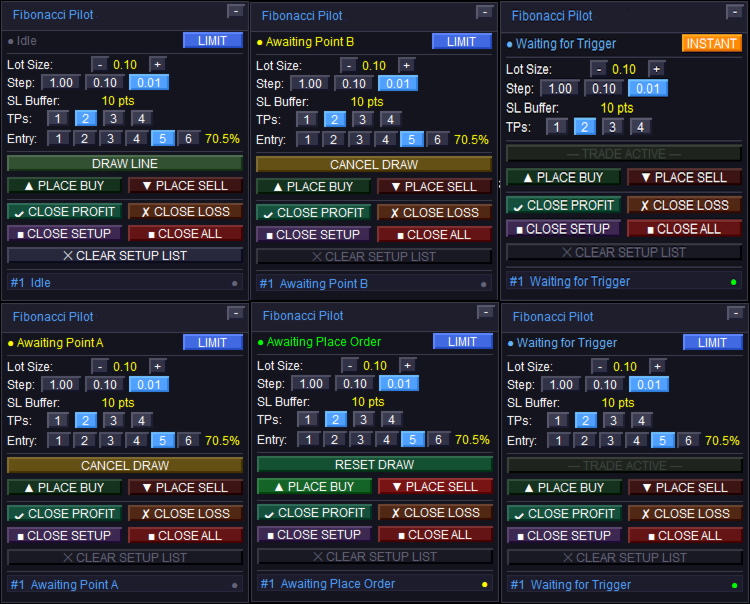
        Shows the current EA state. The colored dot on the left indicates the setup status:
        Idle — no active setup. DRAW LINE is available.
        Awaiting Point A / Awaiting Point B — click on the chart to place the point.
        Setup Ready — A and B are placed. Adjust entry level and press PLACE BUY/SELL.
        Limit Active / Waiting for Trigger — limit order is live on the broker.
        Instant Running — market order is live.
        Closed — trade has been closed (TP, SL, or manual).
        The LIMIT / INSTANT mode toggle button on the right switches order mode at runtime.

          Lot Size row:
          Shows the current lot size. Use [−] and [+] to adjust. The step selector [1.00] [0.10] [0.01] sets how much each press changes the lot size.

            SL Buffer row:
            Displays the current Stop Loss buffer in points as set in the inputs. This is informational — the value is set in the inputs dialog, not on the panel.

              TPs row:
              Selects how many Take Profit levels to use: [1] [2] [3] [4]. The active selection is highlighted. Each TP is calculated from a Fibonacci extension level beyond Point B.

                Entry row:
                Selects which Fibonacci retracement level is used as the entry price: [1] through [6] corresponding to FibLevel1–FibLevel6. The active level is highlighted and its percentage shown on the right. Only visible in LIMIT mode.

                  DRAW LINE button:
                  Starts the A→B drawing sequence. Changes to CANCEL DRAW while drawing. Shows RESET DRAW when a setup is ready but not yet placed. Dims to “— TRADE ACTIVE —” when a live trade is running to indicate it cannot be used.

                    PLACE BUY / PLACE SELL buttons:
                    Active only when a setup is ready (Setup Ready state). Places the order using the current lot size, TP count, SL buffer, and selected entry level. The EA automatically reorients A and B to match the chosen direction regardless of draw order.

                      CLOSE PROFIT / CLOSE LOSS:
                      Closes all open tickets for the current setup. CLOSE PROFIT closes only tickets currently in profit. CLOSE LOSS closes only tickets currently at a loss.

                        CLOSE SETUP / CLOSE ALL:
                        CLOSE SETUP closes the active setup’s tickets and removes chart objects. CLOSE ALL closes all open positions on the account (not limited to this setup).

                          CLEAR SETUP LIST:
                          Removes a closed or idle setup from the panel and clears all associated chart objects. Disabled (dimmed) when a live trade is active — close the trade first.


                            Chart Objects:

                            Swing arrows:
                            Red arrows pointing down mark Swing Highs (SH). Green arrows pointing up mark Swing Lows (SL). The SH and SL labels are centered above/below the arrow. Arrows are rendered in front of candles but behind the panel.

                              Fibonacci retracement lines:
                              Drawn between Point A (100%, SL side) and Point B (0%) as horizontal rays extending to the right. The 0% and 100% anchor lines use the panel accent color. The selected entry level uses the mode color (blue for limit, amber for instant). All other levels use “Retracement line color”.

                                Fibonacci extension lines:
                                Dashed lines drawn beyond Point B in the trade direction, one per active TP. Labeled with the TP number, extension percentage, and price. Use “Extension line color”.

                                  Risk zone (red):
                                  A filled rectangle from the entry price to the SL price. Drawn only after the order is placed. Shows the price range at risk for this trade.

                                    Reward zone (green):
                                    A filled rectangle from the entry price to the last active TP. Drawn only after the order is placed. Shows the potential reward range.

                                      Limit entry line:
                                      A solid horizontal line at the entry price. Color cycles based on how close price is to the entry: red (far) → yellow (approaching) → green (imminent). Thresholds are set by “Limit Trigger Line Near %” and “Limit Trigger Line Medium %”. Removed when the limit is triggered or cancelled.


                                        Settings Reference:

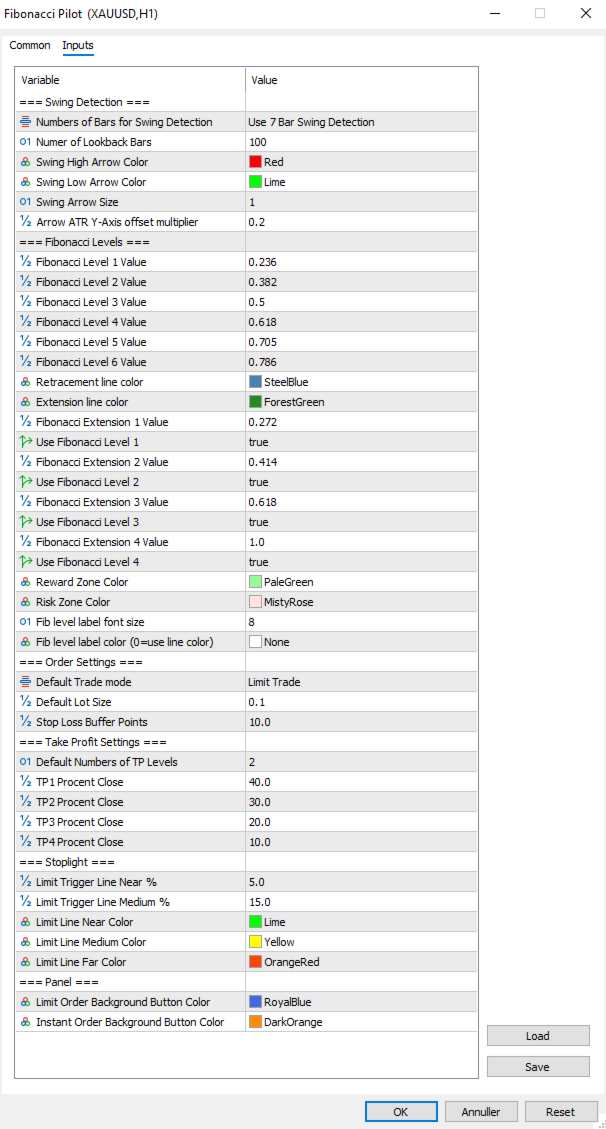
                                        Swing Detection:

                                        Controls how the EA identifies and draws swing highs and lows on the chart. These are visual aids only — the user selects the actual A and B points manually by clicking the chart.
                                        Numbers of Bars for Swing Detection Number of bars used for swing detection. 3BAR: requires 1 bar each side. 5BAR: 2 bars each side. 7BAR: 3 bars each side. More bars = fewer but more significant swings.
                                        Number of Lookback Bars Lower values show fewer recent swings; higher values show more historical swings. Range: any positive integer.
                                        Swing High Arrow Color Color of the downward arrows marking Swing High points.
                                        Swing Low Arrow Color Color of the upward arrows marking Swing Low points.
                                        Swing Arrow Size   (weight) of the swing arrow objects. Range: 1–5.
                                        Arrow ATR Y-Axis offset multiplier Vertical distance between price and arrow, as a multiplier of the current ATR(14). Higher values push arrows further from the bars.

                                          Fibonacci Levels:

                                          Defines the retracement ratios drawn between A and B, the extension ratios drawn beyond B as TP targets, zone colors, and label appearance.

                                          Fibonacci Level X Value The six retracement ratios displayed on the grid. These are also the selectable entry levels [1]–[6] on the panel.
                                          Retracement line color Color of all retracement lines except anchors and the active entry level.
                                          Extension line color Color of all extension lines and their labels.
                                          Fibonacci Extension X Value Extension ratios beyond Point B, used as TP1–TP4 targets. Calculated as range × ratio added beyond B.
                                          Use Fibonacci Level X Enables or disables each extension line individually. Only enabled extensions are drawn and only up to the active TP count.
                                          Reward Zone Color Color of the reward zone rectangle (entry to last TP). Light red by default — rename/recolor to suit your premium zone convention.
                                          Risk Zone Color Color of the risk zone rectangle (entry to SL). Light green by default — rename/recolor to suit your discount zone convention.
                                          Fib level label font size Font size for all Fibonacci level text labels on the chart.
                                          Fib level label color Color for all Fibonacci level text labels. Set to NONE to use the line’s own color instead.


                                            Order Settings:
                                            Core parameters for how orders are sized and placed.

                                            Default Trade mode Starting order mode when the EA loads. LIMIT: places a pending limit order at the entry level. INSTANT: places a market order immediately at current price. Can be toggled on the panel at runtime.
                                            Default Lot Size Starting lot size shown on the panel when the EA loads. Adjusted per session using the panel controls.
                                            Stop Loss Buffer Additional points added to the SL distance beyond Point A. For a BUY, SL = point A − buffer. For a SELL, SL = point A + buffer. This prevents stop-outs from normal spread/wick at the swing level.


                                              Take Profit Settings:
                                              Controls the default number of TPs and how lots are distributed across them.

                                              Default Numbers of TP Levels Number of TP levels active when the EA loads (1–4). Changed per session on the panel.
                                              TP1 Percentage Close Percentage of total lots closed at TP1.
                                              TP2 Percentage Close Percentage of total lots closed at TP2.
                                              TP3 Percentage Close Percentage of total lots closed at TP3.
                                              TP4Percentage Close Percentage closed at TP4 when 4 TPs selected.
                                                The last active TP always absorbs any remaining lots to ensure the full position is always placed. Example with 2 TPs: TP1 = 40%, TP2 = 60% (not 30%). With 3 TPs: TP1 = 40%, TP2 = 30%, TP3 = 30%.


                                                Stoplight:
                                                Controls the color-changing limit entry line that shows how close price is to the pending entry level.

                                                Limit Trigger Line Near % When price is within this percentage of the A–B range from the entry level, the limit line turns green (imminent trigger).
                                                Limit Trigger Line Medium % When price is within this percentage of the A–B range, the line turns yellow (approaching). Beyond this threshold it shows red.
                                                Limit Line Near Color Color of the limit line when price is close (imminent).
                                                Limit Line Medium Color Color of the limit line when price is approaching.
                                                Limit Line Far Color Color of the limit line when price is far from entry.


                                                  Panel:
                                                  Visual colors used on the trade panel.

                                                  Limit Order Background Button Color Color used for the LIMIT mode toggle button and the entry level line when in limit mode. Blue by default.
                                                  Instant Order Background Button Color Color used for the INSTANT mode toggle button and the entry level line when in instant mode. Amber by default.


                                                  Fibonacci Orientation:
                                                  Understanding how the EA orients the Fibonacci grid is important for correct use.
                                                  Point A — 100% anchor Always the Stop Loss side of the trade. For a BUY setup: Point A is the swing low (price the SL is placed below). For a SELL setup: Point A is the swing high (price the SL is placed above).
                                                  Point B — 0% anchor Always the entry side of the trade. For a BUY: Point B is the swing high (the swing from which price is retracing). For a SELL: Point B is the swing low.
                                                  The EA automatically reorients A and B when you press PLACE BUY or PLACE SELL, regardless of which point you drew first or in which direction. You may draw from bottom to top, top to bottom, left to right, or right to left — the direction buttons determine the final orientation.


                                                  Notes and Tips:
                                                  Setup persistence:
                                                  If you open the settings dialog and change any input, the EA reinitializes. Any active setup (limit pending or trade running) is automatically saved to MT5 Global Variables before the restart and restored afterward. Chart objects, fib lines and the limit line are all redrawn with the new settings applied.
                                                  Manual limit cancellation:
                                                  If you cancel a pending limit order directly in the MT5 terminal (Toolbox → Trade tab), the EA detects this automatically within one tick and removes the setup from the panel and chart.
                                                  One setup at a time:
                                                  Mini supports a single active setup. The DRAW LINE button dims with the label “— TRADE ACTIVE —” while a trade is live. To start a new setup, close or clear the current one first.
                                                  Lot sizing with fewer TPs:
                                                  When using fewer than 4 TPs, the remaining lot percentage is always allocated to the last active TP. No lots are silently discarded. Check the TP percentage inputs if you want specific splits.
                                                  Strategy Tester compatibility:
                                                  Fibonacci Pilot Mini is compatible with the MT5 Strategy Tester. Timer events, sounds and push notifications are automatically disabled in tester mode.
                                                  Difference from Fibonacci Pilot Pro:
                                                  The Mini edition intentionally omits: multiple concurrent setups, Mini HUD, trailing stop, breakeven move, per-level Fibonacci colors, swing filter passes (significance, amplitude, wick), ATR-based SL, internal limit engine, push notifications, CSV trade journal, panel position customization, and the Finetune HUD. For those features, use Fibonacci Pilot Pro.
                                                  추천 제품
                                                  이전 버전의 인디케이터 개발 ZigZag WaveSize MT4 ZigZag WaveSize - 표준 ZigZag 인디케이터를 수정하여 포인트, 레벨 및 다양한 경고 로직에 대한 정보 추가 일반적인 개선 사항: MetaTrader 5 코드 적응 그래픽 객체 작업 최적화 새로운 기능: 극점에서의 수평 수준 수준 유형 선택: 수평/광선/세그먼트 유동성 수준 필터 (가격에 의해 돌파되지 않음) 돌파 버퍼: 거짓 돌파에 대한 민감도 설정 레이블 및 기능 설정: 수량, 외관, 오래된 레이블 삭제 구조 돌파 알림 (BoS) 움직임 성격 변경 알림 (ChoCH) 최적화: 극값 업데이트 로직 수정 새로운 객체의 동적 업데이트 바 출현 시 하중 감소 레이블의 중앙 집중 시스템 수정 사항: 배열 범위 초과 수정 레이블의 정확한 위치 지정 중복 파라미터 제거 ZigZag WaveSize 인디케이터를 귀하의 트레이딩 시스템의 보완재로 사용하세요   또한 시장에서의 나의 다른 제품도 시도해 보세요 
                                                  FREE
                                                  Auto Fib Retracements
                                                  Ross Adam Langlands Nelson
                                                  4.2 (5)
                                                  Automatic Fibonacci Retracement Line Indicator. This indicator takes the current trend and if possible draws Fibonacci retracement lines from the swing until the current price. The Fibonacci levels used are: 0%, 23.6%, 38.2%, 50%, 61.8%, 76.4%, 100%. This indicator works for all charts over all timeframes. The Fibonacci levels are also recorded in buffers for use by other trading bots. Any comments, concerns or additional feature requirements are welcome and will be addressed promptly. 
                                                  FREE
                                                  Fibo Trader FREE MT5
                                                  Grzegorz Korycki
                                                  3 (3)
                                                  Fibo Trader is an expert advisor that allows you to create automated presets for oscillation patterns in reference to Fibonacci retracements values using fully automated and dynamically created grid. The process is achieved by first optimizing the EA, then running it on automated mode. EA allows you to switch between automatic and manual mode. When in manual mode the user will use a graphical panel that allows to manage the current trading conditions, or to take control in any moment to trade ma
                                                  FREE
                                                  Auto Fibo Retracement MT5
                                                  Nguyen Tuan Son
                                                  5 (10)
                                                  Auto Fibonacci Retracement Indicator — Flexible and Reliable This isn’t just another Auto Fibonacci Retracement indicator. It’s one of the most flexible and dependable tools available . If you find it useful, please consider leaving a review or comment — your feedback means a lot! Check out my other helpful tools below: Telegram to MT5 using AI   - AI-Powered Signal Copier Bot Smart Alert Manager   - Set up advanced alerts and send them to Mobile, Telegram, Discord, Webhook... Timeframes Trend
                                                  FREE
                                                  Golden Mind EA
                                                  Leszek Aleksander Mroczek
                                                  NEW VERSION -  FREE FOR LIMITED TIME Golden Mind EA is a fully automated Expert Advisor designed for MetaTrader 5, built around a dynamic grid-based trading approach combined with intelligent position management. Unlike traditional grid systems that rely on fixed take-profit levels, Golden Mind EA uses a pair-based closing logic . The system continuously calculates the combined result of positions and closes them when a defined profit level above the break-even line is reached. This allows the E
                                                  FREE
                                                  The Swing High Low and Fibonacci Retracement Indicator is a powerful technical analysis tool designed to identify key price levels and potential reversal zones in the market. It automatically detects recent swing highs and swing lows on the chart and overlays Fibonacci retracement levels based on these points. This indicator helps traders: Visualize market structure by highlighting recent swing points. Identify support and resistance zones using Fibonacci ratios (e.g., 38.2%, 50%, 61.8%). Adapt
                                                  FREE
                                                  Babel Assistant
                                                  Iurii Bazhanov
                                                  4.33 (9)
                                                  Babel assistant 1     The MT5 netting “Babel_assistant_1” robot uses the ZigZag indicator to generate Fibonacci levels on M1, M5, M15, H1, H4, D1, W1  periods of the charts , calculates the strength of trends for buying and selling. It opens a position with "Lot for open a position" if the specified trend level 4.925 is exceeded. Then Babel places pending orders at the some Fibonacci levels and places specified Stop Loss , Take Profit. The screen displays current results of work on the position
                                                  FREE
                                                  Fibonacci Moving Averages
                                                  Brendan Jonathan Stoyanowski-campbell
                                                  2 (1)
                                                  OVERVIEW The Fibonacci Moving Averages are a toolkit which allows the user to configure different types of Moving Averages based on key Fibonacci numbers. Moving Averages are used to visualise short-term and long-term support and resistance which can be used as a signal where price might continue or retrace. Moving Averages serve as a simple yet powerful tool that can help traders in their decision-making and help foster a sense of where the price might be moving next. The aim of this scrip
                                                  FREE
                                                  Free automatic Fibonacci is an indicator that automatically plots a Fibonacci retracement based on the number of bars you select on the BarsToScan setting in the indicator. The Fibonacci is automatically updated in real time as new highest and lowest values appears amongst the selected bars. You can select which level values to be displayed in the indicator settings. You can also select the color of the levels thus enabling the trader to be able to attach the indicator several times with differe
                                                  FREE
                                                  Automatic fibonacci with alerts is an indicator that automatically plots a fibonacci retracement based on the number of bars you select on the BarsToScan setting in the indicator. The fibonacci is automatically updated in real time as new highest and lowest values appear amongst the selected bars. You can select which level values to be displayed in the indicator settings. You can also select the color of the levels thus enabling the trader to be able to attach the indicator several times with d
                                                  FREE
                                                  -- 간단하지만 효과적입니다. 역전 지표 - 무엇인가요? 슈퍼트렌드(SuperTrend) 논리와 지수 곡선 기술을 결합한 추세 추종 오버레이 지표입니다. 추세 방향을 감지하고 차트에 동적 채널을 그리며, 추세가 반전될 때 실시간 알림을 보냅니다. 어떻게 작동하나요? 지표는 ATR과 슈퍼트렌드 계수를 사용해 지수형 기준선을 계산합니다. 가격이 이 기준선 위나 아래로 마감되면 추세 반전이 확인됩니다. 녹색 화살표는 매수 추세 시작을, 빨간색 화살표는 매도 추세 시작을 표시합니다. 주요 기능: ATR 기반 동적 채널을 적용한 지수 추세 기준선 녹색/적색으로 구분된 추세선 및 채워진 채널 추세 반전 시 매수/매도 화살표 신호 내장 알림: 팝업, 푸시 알림, 이메일, 소리 중복 알림 방지 (바당 하나의 알림) 완전 커스터마이징 가능: 색상, 선 두께, 화살표 크기, 채널 폭 지연 없는 깔끔한 차트 오버레이 입력값: 지수 추세율, 슈퍼트렌드 계수, ATR 기간, 채널 폭 토글 기능
                                                  FREE
                                                  Pillartrade
                                                  QuanticX
                                                  3 (1)
                                                  Announcement: All EAs (Expert Advisors) from QuanticX are currently available for free, but only for a limited time! To enjoy a Lifetime QuanticX support and continue receiving free EAs, we kindly request you to leave a review and track the performance of our EAs on Myfxbook. Additionally, don't hesitate to reach out to us for exclusive bonuses on EAs and personalized support. Pillartrade by QuanticX Welcome to Pillartrade - Your Long-Only Trading Ally for US500 Join the forefront of financial
                                                  FREE
                                                  Fibo Pivot Optimus
                                                  Syamsurizal Dimjati
                                                  5 (1)
                                                  Ritz Smart FIBOPIVOT Optimus Pro Advanced Multi-Timeframe Fibonacci Trading System SMART PREDICTION & ACCURATE FORECAST Revolutionary Fibonacci Pivot Technology combines traditional pivot points with advanced Fibonacci extensions, creating a powerful predictive tool for professional traders. Our algorithm intelligently detects significant price levels across multiple timeframes, delivering laser-accurate support and resistance zones before the market moves . INTELLIGENT VOLUME-VALIDATED SIGNALS
                                                  FREE
                                                  Use this expert advisor whose strategy is essentially based on the Relative Strength Index (RSI) indicator as well as a personal touch. Other free expert advisors are available in my personal space as well as signals, do not hesitate to visit and leave a comment, it will make me happy and will make me want to offer content. Expert advisors currently available: LVL Creator LVL Creator Pro LVL Bollinger Bands   Trading is not a magic solution, so before using this expert on a live account, carry
                                                  FREE
                                                  EurowaveFX
                                                  Fabio Sorrentino
                                                  FX_EUXXX is a free expert advisor designed primarily for EURUSD on the H4 chart. It operates without hedging, grid, martingale, or anti-martingale basically, no gambling. I encourage you to request the updated set file for free. Subscribe   to our new channel for   promo/FREE  and   updates! :  MQL5 Group   OR  Telegram Channel Subscribe  to get new   announcements   and look behind the scenes!  MQL5_Channel   Please support me to building   FREE EAs!   Leave a   review ! Thank you Recommendati
                                                  FREE
                                                  IAMFX offers the ultimate solution to make trading easier and more flexible on IAMFX Web  using IAMFX Agent . With our exclusive IAMFX-Agent and IAMFX-Center, you can effortlessly manage your trading anytime, anywhere through web and mobile interfaces. Fully compatible with both web and mobile environments,   IAMFX allows real-time multi-account management and monitoring with a simple installation. IAMFX Benefits Manage multiple MT5 accounts Easy orders with market, stop and limited Manage orde
                                                  FREE
                                                  GhostTrail Pro v5 is an intelligent Expert Advisor for MetaTrader 5 that manages the complete lifecycle of manual crypto trades. From detecting your setup and alerting your phone, to automatically protecting profits and closing positions — GhostTrail does the heavy lifting so you don't have to.   Designed specifically for manual traders and scalpers who have a proven entry strategy but struggle with trade management, partial closes, and protecting profits while away from their screen.
                                                  FREE
                                                  This indicator automatically identifies liquidity levels using swing fractals and tracks when price sweeps through them. Works on any symbol and timeframe with full multi-timeframe support. Features: — Detects swing highs and lows via a fractal method (configurable bars left & right) on a selected timeframe. Active levels are displayed as rays extending to the right; swept levels turn into dashed lines ending at the sweep candle. — Plots Previous Day (PDhigh / PDlow), Previous Week (PWhigh / PWl
                                                  FREE
                                                  AP Fibonacci Retracement PRO (MT5) Overview AP Fibonacci Retracement PRO is a trend-continuation pullback EA. It waits for a confirmed swing, calculates the Fibonacci retracement zone, and looks for entries in the direction of the original move. No grid, no martingale. Strategy logic Detects the last valid swing high/low using Fractals on the selected signal timeframe. Calculates the retracement zone between 38.2% and 61.8% (configurable). On a closed bar, if price is inside the zone (with opti
                                                  FREE
                                                  The Fibonacci Scalper
                                                  STANTON ROUX
                                                  4.22 (45)
                                                  The Fibonacci Trader MQL5 expert advisor uses the Fibonacci levels to determine a buy or sell trade with the MACD as confirmation. The Fibonacci levels work as follows: Above 61.8 SELL if MACD trend is SELL Trading Range (Ability to select trading input parameters) BUY if MACD trend is BUY SELL if MACD trend is SELL Below 23.6 BUY if MACD trend is BUY Default settings are configured for EURUSD on M5 Chart. To work with the news server, you must add the URL ‘ http://ec.forexprostools.com/ ’ in t
                                                  FREE
                                                  Our offer also includes a free panel — Indicator Panel — which allows you to show or hide indicators created by BOToBRACIA. High and Low Points is a practical technical analysis indicator that plots levels corresponding to the highs and lows from previous periods (day / week / month) — levels that, in the Smart Money Concepts (SMC) and ICT approach, are treated as liquidity zones, while in classical technical analysis they serve as potential support and resistance levels. Indicator settings: •
                                                  FREE
                                                  Triangle Pattern Gann EA
                                                  Nguyen Van Kien
                                                  5 (2)
                                                  Triangle Pattern Gann EA v3.4 - Trade Like the Legendary W.D. Gann Harness the Power of Geometric Price Patterns & Sacred Ratios Are you ready to trade with one of the most powerful pattern recognition systems ever developed? The Triangle Pattern Gann EA v3.4 brings the legendary wisdom of W.D. Gann into the modern algorithmic trading era. What Makes This EA Exceptional? Based on Proven Gann Methodology W.D. Gann was one of history's most successful traders, achieving over 90% accuracy u
                                                  FREE
                                                  CloseAll MT5
                                                  Mr Sorachai Pitakjarukul
                                                  4.5 (2)
                                                  ขอบคุณ แรงบันดาลใจ จากโค้ชแพม ที่ทำให้เริ่มทำ    Close all ตัวนี้  และขอขอบคุณทุกคนที่ให้ความรู็มาโดยตลอด ไม่ว่าจะทางตรงทางอ้อม ขอบคุณทุกคนที่ให้ความรู้เพื่อนร่วมเทรด ทั้งนี้เพื่อให้นักเทรดทุกคนได้มีเครื่องมือในการควบคุมการปิดการซื้อขาย จึงขอพัฒนาโปรแกรม close all version 5 ได้ใช้ทุกคน  Close all and update profit Version 1.00 (MT5) Full version Give you free  For MT4 Click  https://www.mql5.com/en/market/product/79252 Fix TPSL calculate  Program function Tab 1 Close order function and show br
                                                  FREE
                                                  This indicator copies graphical objects (vertical lines, horizontal lines, text labels, fibo and etc.) from master chart to other charts.  For example, you can copy lines from the chart GBPUSD with period H1 to chart GBPUSD with period M15. It's makes technical analyses more simple. Show label - show label on the Master chart, where you draw graphical objects to copy; Font size - font size of label; Type of synchronisation - type of synchronisation Copy text - on/off copy of text objects Copy la
                                                  FREE
                                                  Fast Fibonacci Grid MT5
                                                  Grzegorz Korycki
                                                  2.5 (2)
                                                  Did you ever feel irritated by manually adjusting Fibonacci retracement levels? Do you ever want to have a tool that was automatically adjust to certain Fibonacci levels with your trading? Well here is a tool for you: Fast Fibonacci indicator and Grid trader allows you to quickly adjust Fibonacci retracement levels or construct Fibonacci extension grid! You can also quickly setup your grid trading based on these levels - only with few clicks. Adjustable graphics, font sizes and graphics panels m
                                                  FREE
                                                  Bit Buddy AI
                                                  Michael Prescott Burney
                                                  Bit Buddy Portfolio for BTCUSD H1 Bit Buddy Portfolio is a professional MetaTrader 5 Expert Advisor for BTCUSD on the H1 timeframe, running on the Expert Advisor HQ universal portfolio framework. It is designed for structured automated trading on BTCUSD H1, with clear on-chart feedback for entries, exits, protections, and live performance so you can see how the EA is operating in real time. Overview Bit Buddy Portfolio combines its strategy logic for Bitcoin with the Expert Advisor HQ execution
                                                  FREE
                                                  A ready-made multitimeframe trading system based on automatic plotting and tracking of Fibonacci levels for buying and selling any symbol. Demo version - calculation of the last 390 bars is not performed. Advantages Determines the trend direction based on a complex of 14 indicators ( Cx ), extremums of ZigZag ( Z ), RSI ( R ), Impulse ( I ) Displaying the values of 14 indicators comprising the trend direction ( Cx ) Plotting horizontal levels, support and resistance lines, channels View the plo
                                                  FREE
                                                  Smart Gold 15M Fibonacci Retracement EA This EA is shared free of charge as a contribution to the trading community. I hope it serves as a useful tool for traders who value disciplined trading and risk management. Overview Smart Gold 15M Fibonacci Retracement EA is a fully automated Expert Advisor designed for trading XAUUSD (Gold), with recommended use on the M15 timeframe. The EA combines EMA 9 / EMA 21 trend detection with a Fibonacci Retracement entry system. Instead of entering immediately
                                                  FREE
                                                  VadineroLab MT5 Export Master to CSV EXEL JSON - Expert Advisor for exporting and analyzing symbols, account, terminal parameters, active trades, current account state, trading history, global variables.   Generates the following report types: * Symbols Parameters — spread, tick size, min/max lot, swap, … * Account Parameters — balance, equity, leverage, currency, margin info, … * Terminal Parameters — server, version, language, date, environment, … * Trade History — orders, deals, positions, se
                                                  FREE
                                                  Go Long Advanced
                                                  Phantom Trading Inc.
                                                  4.78 (9)
                                                  Go Long EA는 다중 기술적 확인을 통한 체계적인 일일 거래 원칙을 기반으로 한 고급 장중 거래 전략을 구현합니다. 많은 트레이더들이 복잡한 알고리즘을 찾는 반면, 이 EA는 단순하지만 효과적인 개념과 정교한 위험 관리 및 다중 기술적 필터를 결합합니다. EA는 매일 특정 시간에 포지션을 열지만, 시장 조건이 여러 기술적 지표와 일치할 때만 실행됩니다. 이러한 체계적인 접근 방식은 수익을 잠식할 수 있는 야간 보유 비용을 피하면서 장중 움직임을 포착하는 데 도움이 됩니다. EA는 사전 설정된 시간에 자동으로 포지션을 종료하므로, 야간 노출을 피하고자 하는 트레이더에게 완벽합니다. 이 EA를 특별하게 만드는 것은 적응형 위험 관리 시스템입니다. 포지션 크기는 여러 요인을 기반으로 자동 조정됩니다: - 기본 자금 및 위험 비율 설정 - 기술적 지표 조건 (이동평균선, RSI, MACD 등) - 조건이 특히 유리할 때 포지션 크기를 증가시키는 특별 승수 EA는 활성화/비활성화
                                                  FREE
                                                  이 제품의 구매자들이 또한 구매함
                                                  Trade Assistant MT5
                                                  Evgeniy Kravchenko
                                                  4.43 (214)
                                                  거래당 위험 계산, 라인을 사용한 손쉬운 신규 주문, 부분 청산 기능을 통한 주문 관리, 7가지 유형의 트레일링 스탑 및 기타 유용한 기능을 제공합니다. 추가 자료 및 지침 설치 지침   -   애플리케이션 지침   -   데모 계정용 애플리케이션 평가판 라인 기능       - 차트에 개시선, 손절매, 차익실현을 표시합니다. 이 기능을 사용하면 새로운 주문을 쉽게 하고 개봉 전에 추가 특성을 볼 수 있습니다. 위기 관리       -       위험 계산 기능은 설정된 위험과 손절매 주문의 크기를 고려하여 새 주문의 볼륨을 계산합니다. 이를 통해 손절매 크기를 설정하고 동시에 설정된 위험을 존중할 수 있습니다. 로트 계산 버튼 - 위험 계산을 활성화/비활성화합니다. 필요한 위험 값은 위험 필드에 0에서 100 사이의 백분율 또는 예금 통화로 설정됩니다. 설정 탭에서 위험 계산 옵션을 선택합니다. $ 통화, % 잔액, % 지분, % 자유 마진, % 사용자 정의, % AB 이전
                                                  Trade Manager EA에 오신 것을 환영합니다. 이 도구는 거래를 보다 직관적이고 정확하며 효율적으로 만들기 위해 설계된 궁극적인 리스크 관리 도구 입니다. 단순한 주문 실행 도구가 아닌, 원활한 거래 계획, 포지션 관리 및 리스크 제어를 위한 종합 솔루션입니다. 초보자부터 고급 트레이더, 빠른 실행이 필요한 스캘퍼에 이르기까지 Trade Manager EA는 외환, 지수, 상품, 암호화폐 등 다양한 시장에서 유연성을 제공합니다. Trade Manager EA를 사용하면 복잡한 계산은 이제 과거의 일이 됩니다. 시장을 분석하고 진입, 손절 및 익절 수준을 차트의 수평선으로 표시한 후 리스크를 설정하면, Trade Manager가 이상적인 포지션 크기를 즉시 계산하고 SL 및 TP 값을 실시간으로 표시합니다. 모든 거래가 간편하게 관리됩니다. 주요 기능: 포지션 크기 계산기 : 정의된 리스크에 따라 거래 크기를 즉시 결정합니다. 간단한 거래 계획 : 진입, 손절, 익절을 위한
                                                  Local Trade Copier EA MT5
                                                  Juvenille Emperor Limited
                                                  4.96 (142)
                                                  Local Trade Copier EA MT5 를 사용하여 매우 빠른 거래 복사 경험을 해보세요. 1분 안에 간편하게 설정할 수 있으며, 이 거래 복사기를 사용하면 Windows 컴퓨터 또는 Windows VPS에서 여러 개의 MetaTrader 터미널 간에 거래를 0.5초 미만의 초고속 복사 속도로 복사할 수 있습니다. 초보자든 전문가든   Local Trade Copier EA MT5 는 다양한 옵션을 제공하여 사용자의 특정 요구에 맞게 맞춤 설정할 수 있습니다. 이는 수익 잠재력을 높이려는 모든 사람을 위한 최고의 솔루션입니다. 지금 사용해보시고 이것이 왜 시장에서 가장 빠르고 쉬운 무역용 복사기인지 알아보세요! 팁: 여기 에서 데모 계정에서 Local Trade Copier EA MT5 데모 버전을 다운로드하여 사용해 볼 수 있습니다. 다운로드한 무료 데모 파일을 MT5 >> File >> Open Data Folder >> MQL5 >> Experts 폴더에 붙여넣고 터
                                                  TradePanel MT5
                                                  Alfiya Fazylova
                                                  4.88 (162)
                                                  Trade Panel은 다기능 거래 도우미입니다. 이 애플리케이션에는 50개 이상의 수동 거래 기능이 포함되어 있으며 대부분의 거래 작업을 자동화할 수 있습니다. 구매하기 전에 데모 계정에서 데모 버전을 테스트할 수 있습니다. 데모 계정용 애플리케이션 체험판 다운로드: https://www.mql5.com/en/blogs/post/750865 . 전체 지침 여기 . 거래. 한 번의 클릭으로 거래를 수행할 수 있습니다: 리스크 자동 계산과 함께 예약 주문 및 포지션 열기. 한 번의 클릭으로 여러 주문 및 포지션 열기. 주문 그리드 열기. 예약 주문 및 포지션을 그룹별로 닫기. 포지션 방향 전환 (Buy 닫기 > Sell 열기, Sell 닫기 > Buy 열기). 포지션 잠금 (부족한 포지션을 열어 Buy와 Sell 포지션의 수량을 동일하게 만들기). 모든 포지션 한 번의 클릭으로 부분적으로 닫기. 모든 포지션의 테이크 프로핏과 스톱로스를 같은 가격 수준에 설정. 모든 포지션의 스톱로스를
                                                  베타 출시 Telegram to MT5 Signal Trader 는 곧 공식 알파 버전을 출시할 예정입니다. 일부 기능은 아직 개발 중이며, 작은 버그가 발생할 수 있습니다. 문제가 있으면 꼭 보고해 주세요. 여러분의 피드백은 소프트웨어 개선에 도움이 됩니다. Telegram to MT5 Signal Trader 는 Telegram 채널 또는 그룹의 거래 신호를 자동으로 MetaTrader 5 계정으로 복사하는 강력한 도구입니다. 공개 및 비공개 채널을 모두 지원하며, 여러 신호 제공자를 여러 MT5 계정에 연결할 수 있습니다. 소프트웨어는 빠르고 안정적으로 동작하며, 복사된 거래를 완벽히 제어할 수 있습니다. 인터페이스는 깔끔하며 대시보드와 차트가 시각적으로 구성되어 있고, 직관적인 네비게이션이 가능합니다. 여러 Signal Account를 관리하고, 공급자별 설정을 세밀하게 조정하며, 모든 동작을 실시간으로 모니터링할 수 있습니다. 필수 조건 MQL의 제한으로 인해 EA는 Te
                                                  Telegram to MT5 Multi-Channel Copier 는 Telegram 채널의 트레이딩 신호를 자동으로 MetaTrader 5로 직접 복사합니다. 봇도, 브라우저 확장 프로그램도, 수동 복사도 필요 없습니다. Telegram에서 신호를 받으면 EA가 몇 초 안에 터미널에서 거래를 엽니다. 본 제품은 두 가지 구성 요소로 구성되어 있습니다: Telegram 채널을 감시하는 Windows 애플리케이션과 MT5 터미널에서 신호를 실행하는 이 Expert Advisor입니다. MT4 버전도 제공됩니다. 설정 가이드 및 애플리케이션 다운로드: https://www.mql5.com/en/blogs/post/768988 작동 방식 Windows 애플리케이션은 봇이 아닌 사용자 자신의 API 자격 증명을 사용하여 Telegram에 연결됩니다. 이는 프라이빗 및 VIP 채널을 포함하여 구독 중인 모든 채널, 그룹 또는 주제를 읽을 수 있음을 의미합니다. 신호를 감지하면 이를 파싱하여
                                                  파워 캔들 전략 스캐너 - 자체 최적화 다중 종목 설정 찾기 도구 파워 캔들 전략 스캐너는 마켓 워치에 등록된 모든 종목에 대해 파워 캔들 지표와 동일한 자체 최적화 엔진을 동시에 실행합니다. 하나의 패널에서 현재 통계적으로 거래 가능한 종목, 각 종목별 최적의 전략, 최적의 손절매/익절 조합을 알려주며, 새로운 신호가 발생하면 즉시 알림을 전송합니다. 이 도구는 Stein Investments 에코시스템의 일부입니다. 18개 이상의 도구와 함께 당신의 1대1 AI 트레이딩 멘토 Max.  항상 대기 중, 모든 인디케이터를 깊이 있게 이해, 무언가를 차근차근 생각해보고 싶은 순간에 도움을 줍니다.  https://stein.investments 에서 만나보세요 완벽한 시장 모니터링. 종목당 3,000건 이상의 자동 최적화. 2가지 알림 유형. 한 번의 클릭으로 차트를 전환하고 바로 거래하세요. 이 도구가 필요한 이유 대부분의 다중 종목 스캐너는 가격 변동만 보여줍니다. 티커별
                                                  Exp COPYLOT CLIENT for MT5
                                                  Vladislav Andruschenko
                                                  3.94 (34)
                                                  MetaTrader 5용 전문 트레이드 복사기 MetaTrader 용 빠르고 전문적이며 신뢰할 수 있는 트레이드 복사기 입니다. COPYLOT 은 MT4와 MT5 터미널 간의 Forex 거래 복사를 지원하며, Hedge 및 Netting 계좌를 모두 지원합니다. COPYLOT MT5 버전 지원 구성: - MT5 Hedge → MT5 Hedge - MT5 Hedge → MT5 Netting - MT5 Netting → MT5 Hedge - MT5 Netting → MT5 Netting - MT4 → MT5 Hedge - MT4 → MT5 Netting MT4 버전 전체 설명 + DEMO + PDF 구매 방법 설치 방법 로그 파일 확인 방법 테스트 및 최적화 방법 Expforex의 모든 제품 MT4 터미널로도 거래를 복사할 수 있습니다(MT4 → MT4, MT5 → MT4): COPYLOT CLIENT for MT4 COPYLOT은 2개, 3개, 심지어 10개의 터미널과 동시에 작동할
                                                  EasyInsight AIO MT5
                                                  Alain Verleyen
                                                  4.92 (12)
                                                  EASY Insight AIO – 스마트하고 손쉬운 트레이딩을 위한 올인원 솔루션 개요 외환, 금, 암호화폐, 지수, 심지어 주식까지 — 전 시장을 몇 초 만에, 수동 차트 확인이나 복잡한 설치, 인디케이터 설정 없이 스캔할 수 있다고 상상해 보세요. EASY Insight AIO 는 AI 기반 트레이딩을 위한 궁극의 플러그 앤 플레이(Plug & Play) 데이터 내보내기 도구입니다. 단 하나의 깔끔한 CSV 파일로 전체 시장 스냅샷을 제공하며, ChatGPT, Claude, Gemini, Perplexity 등 다양한 AI 플랫폼에서 즉시 분석할 수 있습니다. 창 전환, 복잡함, 차트 오버레이는 더 이상 필요 없습니다. 자동으로 내보내지는 순수하고 구조화된 데이터 인사이트만으로, 반복적인 차트 감시 대신 데이터 기반의 스마트한 의사결정에 집중할 수 있습니다. 왜 EASY Insight AIO인가요? 진정한 올인원 • 별도의 설정, 인디케이터 설치, 차트 오버레이가 필요 없습
                                                  Anchor Trade Manager
                                                  Kalinskie Gilliam
                                                  5 (5)
                                                  Anchor: The EA Manager Run your full EA portfolio without conflicts, without stacked risk, and without watching every chart yourself. Anchor coordinates up to 64 Expert Advisors on a single account, including daily loss protection built for prop firm rules. Attach Anchor to any chart. Type your EA names and magic numbers in one line. Click OK. Anchor begins coordinating immediately. Built for portfolios. Built for prop firms. Built for discipline. The Problem Running multiple EAs on the same acc
                                                  Trade copier MT5
                                                  Alfiya Fazylova
                                                  4.59 (49)
                                                  Trade Copier는 거래 계정 간의 거래를 복사하고 동기화하도록 설계된 전문 유틸리티입니다. 복사는 공급자의 계정/단말기에서 동일한 컴퓨터 또는 vps에 설치된 수신자의 계정/단말기로 발생합니다. 프로모션 - 이미 "Trade copier MT5"를 구매하셨다면, "Trade copier MT4"를 무료로 받으실 수 있습니다 (MT4 → MT5 및 MT4 ← MT5 복사용). 조건에 대한 자세한 정보를 원하시면, 개인 메시지를 통해 저희에게 문의해 주시기 바랍니다! 구매하기 전에 데모 계정에서 데모 버전을 테스트할 수 있습니다. 데모 버전 여기 . 전체 지침 여기 . 주요 기능 및 이점: 복사기는 "МТ5> МТ5", "МТ4> МТ5", "МТ5> МТ4" 복사를 지원합니다. 복사기는 데모 계정 > 실 계정, 실 계정 > 데모 계정, 데모 계정 > 데모 계정 및 실제 계정 > 실 계정 복사를 지원합니다. 복사기는 읽기 전용 암호가 적용된 투자자 계정에서 복사를 지원합니다. 하
                                                  Farmed Hedge Yield Farming | All Markets (Manual - Hybrid - Semi/Automated EA) MULTI-ASSET SUPPORT Trade any asset available on your broker - Forex: Major, Minor, Exotic pairs - Crypto: BTC, ETH, XRP, SOL, BNB - Stocks: Apple, Tesla, Amazon, Google, etc. - Commodities: Gold, Silver, Oil, Gas - Indices: US30, NAS100, SPX500, DAX40 - Any CFD your broker offers VERIFIED TRADING RESULTS - Farmed Hedge Yield Axi Copy:  https://www.mql5.com/en/signals/2356376 - Farmed Hedge Yield Exn Copy:   https:/
                                                  Quant AI Agents
                                                  Ho Tuan Thang
                                                  5 (1)
                                                  Quant AI Agents are independent trading Expert Advisors. Instead of trading using a fixed strategy like other conventional EAs, Quant AI Agents   is a   multi-agent AI trading framework   that turns natural-language strategy prompts into live.  WANT THE SAME RESULTS AS MY LIVE SIGNAL?   Use the exact same brokers I do:   IC MARKETS , IC TRADING   .  Unlike the centralized stock market, Forex has no single, unified price feed.  Every broker sources liquidity from different providers, creating un
                                                  Premium Trade Manager - 코치가 내장된 트레이딩 패널 Premium Trade Manager 는 차트 안에 트레이딩 코치를 심어놓은 도구입니다. 주문을 확정하기 전에, AI 트레이딩 코치 Max가 설정된 거래를 직접 읽고 명확한 판단을 내려줍니다. 스톱이 규율 있는 접근 방식에 맞는지, 리스크 크기가 합리적인지, 고영향 뉴스 이벤트가 몇 분 후에 있는지, 프롭 펌 한도에 근접했는지. 그 아래에는 완전한 실행 엔진이 있습니다. 원클릭 리스크 기반 진입, 차트에서 드래그로 세우고 거래가 진행되는 동안에도 계속 움직일 수 있는 플랜, 최대 4단계 분할 익절, 7가지 트레일링 방식, 실시간 프롭 펌 컴플라이언스, 뉴스 가드, 그리고 자체 비용을 평가하는 스프레드까지. 결정은 당신이 내립니다. Max가 두 번째 시선으로 확인합니다. 패널이 그 이후의 모든 것을 처리합니다. 구매 전에 직접 체험해 보세요. 브라우저에서 라이브 패널을 직접 클릭해볼 수 있습니다. 구매 전에 실제
                                                  Seconds Chart MT5
                                                  Boris Sedov
                                                  4.61 (18)
                                                  Seconds Chart - MetaTrader 5에서 초 단위 차트를 생성하는 독특한 도구입니다. Seconds Chart 를 사용하면 초 단위로 설정된 타임프레임으로 차트를 작성할 수 있어, 표준 분 또는 시간 단위 차트에서는 불가능한 유연성과 정밀한 분석이 가능합니다. 예를 들어, S15 타임프레임은 15초 동안의 캔들로 구성된 차트를 의미합니다. 사용자 정의 심볼을 지원하는 모든 인디케이터와 전문가 어드바이저를 사용할 수 있습니다. 이를 사용하는 것은 표준 차트에서 거래하는 것만큼 편리합니다. 표준 도구와 달리, Seconds Chart 는 초고속 타임프레임에서도 높은 정확도와 지연 없이 작업할 수 있도록 지원합니다. 무료 데모: Seconds Chart v2.29 Demo.ex5 무료 데모를 다운로드하고 직접 확인하십시오: 완전한 기능 - 모든 기능 사용 가능 24시간 테스트 - 정확성과 편리성을 평가하기에 충분한 시간 데모 계정만 - 대부분의 브로커에서 쉽게 개설 가능
                                                  The product will copy all telegram signal to MT5 ( which you are member) , also it can work as remote copier.  Easy to set up, copy order instant, can work with almost signal formats, image signal,  s upport to translate other language to English Work with all type of channel or group, even channel have "Restrict Saving Content", work with  multi channel, multi MT5 Work as remote copier: with signal have ticket number, it will copy exactly via ticket number. Support to backtest signal. How to s
                                                  HINN MagicEntry Extra
                                                  ALGOFLOW OÜ
                                                  4.75 (16)
                                                  LIMITED SUMMER SALE -40% !   ONLY $30 insead of $50!  Maximum real discount! HINN MAGIC ENTRY – the ultimate tool for entry and position management! Place orders by selecting a level directly on the chart! full description   ::  demo-version  :: 60-sec-video-description Key features: - Market, limit, and pending orders - Automatic lot size calculation - Automatic spread and commission accounting - Unlimited partitial take-profits  - Breakeven and trailing stop-loss and take-profit  functions -
                                                  Trade Dashboard MT5
                                                  Fatemeh Ameri
                                                  4.95 (131)
                                                  Trade Dashboard simplifies how you open, manage, and control your trades, with built-in lot size calculation. It allows you to execute trades, manage risk, and control positions directly on the chart, with tools such as partial close, breakeven, and trailing stop. Designed to reduce manual work and help you stay focused on your trading decisions. A demo version is available for testing. Detailed explanations of features are provided within the MQL5 platform. Installation instructions are include
                                                  작동 데모 다운로드 Copy Cat More (카피캣) MT5 트레이드 카피어 (Trade Copier) 는 로컬 트레이드 카피어이자, 오늘날의 트레이딩 과제를 위해 설계된 완전한 리스크 관리 및 실행 프레임워크입니다. 프롭 펌 (prop firm) 챌린지부터 개인 포트폴리오 관리까지, 견고한 실행, 자본 보호, 유연한 설정, 고급 트레이드 처리의 조합으로 모든 상황에 적응합니다. 이 카피어는 마스터 (Master, 송신측) 와 슬레이브 (Slave, 수신측) 두 모드 모두에서 작동하며, 시장가 주문과 대기 주문, 트레이드 수정, 부분 청산, 상호 청산 (Close By) 작업을 실시간으로 동기화합니다. 데모 및 실거래 계좌, 트레이딩 또는 인베스터 로그인 모두와 호환되며, EA·터미널·VPS가 재시작되더라도 영구 트레이드 메모리 (Persistent Trade Memory) 시스템을 통해 복구를 보장합니다. 고유 ID로 여러 마스터와 슬레이브를 동시에 관리할 수 있으며, 브로커
                                                  Trade Manager DaneTrades
                                                  Levi Dane Benjamin
                                                  4.28 (29)
                                                  거래 관리자는 위험을 자동으로 계산하는 동시에 거래를 빠르게 시작하고 종료하는 데 도움을 줍니다. 과잉 거래, 복수 거래 및 감정 거래를 방지하는 데 도움이 되는 기능이 포함되어 있습니다. 거래를 자동으로 관리할 수 있으며 계정 성과 지표를 그래프로 시각화할 수 있습니다. 이러한 기능은 이 패널을 모든 수동 거래자에게 이상적으로 만들고 MetaTrader 5 플랫폼을 향상시키는 데 도움이 됩니다. 다중 언어 지원. MT4 버전  |  사용자 가이드 + 데모 트레이드 매니저는 전략 테스터에서 작동하지 않습니다. 데모를 보려면 사용자 가이드로 이동하세요. 위기 관리 % 또는 $를 기준으로 위험 자동 조정 고정 로트 크기 또는 거래량과 핍을 기반으로 한 자동 로트 크기 계산을 사용하는 옵션 RR, Pips 또는 Price를 사용한 손익분기점 손실 설정 추적 중지 손실 설정 목표 달성 시 모든 거래를 자동으로 마감하는 최대 일일 손실률(%)입니다. 과도한 손실로부터 계정을 보호하고 과도한
                                                  EA Auditor
                                                  Stephen J Martret
                                                  5 (4)
                                                  EA Auditor is an independent analysis tool for traders evaluating Expert Advisors and trading signals on MetaTrader 5. It audits backtest reports, reviews posted developer signals, and cross-verifies the two against each other to help traders assess strategies before committing capital. The MQL5 market offers a wide range of Expert Advisors from many developers, with varying approaches, quality, and transparency. EA Auditor provides a consistent, data-driven framework for reviewing them, answer
                                                  EA Performance Tracker
                                                  Russell Leeon Tan
                                                  5 (2)
                                                  EA Performance Tracker (AESTracker) A clean, modern dashboard that shows exactly how your trades and EAs are performing — right on your chart. It reads your full account history automatically and breaks down the numbers by magic number / strategy. Display only — it does not place any trades. What it shows - Account header: live Balance, Equity, and Open (floating) P/L - Profit summary: gross profit, net profit, and the exact commission & swap deducted - Key stats: win rate, profit factor, exp
                                                  HINN Lazy Trader
                                                  ALGOFLOW OÜ
                                                  5 (1)
                                                  LIMITED SUMMER SALE -40% ! ONLY $470 insead of $790!  Maximum real discount! The core idea: using the user interface, you configure the parameters the chart must meet before entering a position (or positions), choose which entry models to use, and set the rules for when trading and planning should end. Lazy Trader  handles the rest: it  takes over all the routine chart watching and execution! full description  :: 3 key videos [1] ->  [2]   ->  [3] What can it do? - Understands Larry Williams
                                                  ================================================================================ POC BREAKOUT - V20.72. Full Professional Grade Toolkit ================================================================================ POC Breakout is a full MetaTrader 5 trading dashboard for discretionary traders who want breakout signals, Point of Control (POC) context, volume profiles, order flow, market structure, news, alerts, and advanced trade planning in one professional workspace. Attached directly to you
                                                  MetaTrader 5용 트레이딩 패널 — 차트와 키보드에서 실행하는 프로페셔널 원클릭 트레이딩 활동적인 트레이더를 위해 설계된 고급 Trading Panel로, MetaTrader 기본 인터페이스보다 훨씬 빠르고 직관적으로 포지션과 주문을 열고, 관리하고, 종료할 수 있습니다. 이 패널은 포지션 관리, 대기 주문 제어, 총수익 관리, 체결 속도를 하나의 전문적인 작업 공간에 통합하고 싶은 트레이더를 위한 솔루션입니다. 이것은 단순한 보조 유틸리티가 아닙니다. MetaTrader 5를 위한 진정한 trading cockpit입니다. 차트에서 직접 거래하고, 키보드로 빠르게 명령을 실행하며, 자동 계산과 시각적 가이드를 통해 수동 트레이딩을 더 빠르고, 더 명확하고, 더 편리하게 만들어 줍니다.  이 패널을 사용하면 차트에서 단 한 번의 클릭으로 거래를 실행할 수 있으며, 표준 MetaTrader 컨트롤보다 최대 30배 빠르게 거래 작업을 수행할 수 있습니다. 새로운 프리미엄 버전
                                                  DrawDown Limiter
                                                  Haidar Lionel Haj Ali
                                                  5 (20)
                                                  Drawdown Limiter EA You are in the right place if you were searching for Drawdown control, Drawdown limiter, Balance protection, Equity Protection or Daily Drawdown Limit related to Prop Firm, FTMO, or Funded account trading, or if you want to protect your trading account. Have you suffered from controlling your drawdown when trading funded accounts? This EA is meant for you. Prop firms usually set a rule called “Trader Daily Drawdown”, and if it is not respected, you are disqualified.  I am an
                                                  Welcome to ENTRY IN THE ZONE WITH SMC MULTI TIMEFRAME Entry In The Zone with  SMC Multi Timeframe  is a professional trading indicator built on Smart Money Concepts (SMC), combining market structure analysis with a No Repaint BUY / SELL signal system in a single indicator. It helps traders understand market structure more clearly, identify key price zones, and focus on higher-quality trading opportunities. By combining Multi-Timeframe Analysis, Points of Interest (POIs), and real-time signals, t
                                                  Timeless Charts
                                                  Samuel Manoel De Souza
                                                  5 (7)
                                                  Timeless Charts is an all-in-one trading utility for professional traders. It combines custom chart types such as Seconds Charts and Renko with advanced order flow analysis using Footprints , Clusters , Volume Profiles , VWAP studies, and anchored analysis tools for deeper market insight. Trading and position management are handled directly from the chart through an integrated trade management panel , while Market Replay and Virtual Accounts provide environments for practicing trading skills and
                                                  The Ultimate TradingView to MT5 Bridge Automation 수동 매매와 지연 시간(Latency) 문제에서 벗어나세요. TradingView to MT5 Copier PRO 는 트레이딩뷰(TradingView) 알람을 메타트레이더 5(MT5)에서 직접 실행할 수 있는 가장 빠르고 안정적인 브릿지입니다. 사용자 지정 지표, 전략 테스터 스크립트, 수동 작도 등 무엇을 사용하든, 이 EA는 초고속 웹소켓(WebSocket) 기술 을 사용하여 매매를 즉시 실행합니다. 단순한 복사기와 달리, 이 PRO 버전에는 Arena Statistics 가 포함되어 있습니다. 이는 차트에서 직접 매매 성과, 드로다운(Drawdown), 샤프 지수(Sharpe ratio)를 분석할 수 있는 전문적인 내장 대시보드입니다. 주요 기능 트레이드 복사기 (Trade Copier) 초고속 실행: 표준 WebRequest보다 빠른 WebSocket 연결을 사용하여 슬리피지(Slippa
                                                  The News Filter MT5
                                                  Leolouiski Gan
                                                  4.78 (23)
                                                  이 제품은 뉴스 시간 동안 모든 전문가 어드바이저 및 수동 차트를 필터링하여 수동 거래 설정이나 다른 전문가 어드바이저가 입력한 거래가 파괴될 수 있는 급격한 가격 상승으로부터 걱정하지 않아도 됩니다. 이 제품은 또한 뉴스 발표 전에 열린 포지션과 대기 주문을 처리할 수 있는 완전한 주문 관리 시스템이 함께 제공됩니다.   The News Filter  를 구매하면 더 이상 내장 뉴스 필터에 의존할 필요가 없으며 이제부터 모든 전문가 어드바이저를 여기서 필터링할 수 있습니다. 뉴스 선택 뉴스 소스는 Forex Factory의 경제 캘린더에서 얻어집니다. USD, EUR, GBP, JPY, AUD, CAD, CHF, NZD 및 CNY와 같은 어떤 통화 기준으로 선택할 수 있습니다. Non-Farm (NFP), FOMC, CPI 등과 같은 키워드 식별을 기준으로 선택할 수도 있습니다. 저, 중, 고 영향을 가지는 뉴스를 필터링할 수 있도록 선택할 수 있습니다. 차트와 관련된 뉴스만 선
                                                  제작자의 제품 더 보기
                                                  News Markers Description Version: 1.13Type: MetaTrader 5 indicator (chart window) Purpose: Plots economic-calendar news events as color-coded vertical lines on the chart, with optional currency tags and an upcoming-news HUD panel. Before you start — three things that always apply Live connection required. The data comes from MT5's built-in economic calendar via your broker's feed. It returns nothing in the Strategy Tester, and nothing if your broker doesn't serve calendar data. If no lines appe
                                                  FREE
                                                  The Simple Manual Trading Panel (v2.11) Is a professional trade management tool designed with a clean, movable UI to streamline manual execution and automated exit strategies. Core Features Dynamic Visual Interface: A movable GUI panel that provides real-time information including a bar countdown timer, live spread, and advanced volume analysis. Flexible Lot Size setting, with 2 decimals (If broker supports it). Multi-Stage Take Profit: Supports three distinct Take Profit (TP) levels in either
                                                  Trend Matrix Panel is a multi-timeframe technical indicator for MetaTrader 5 that compresses an entire trading session's structural picture into a single panel. Rather than flipping between charts to read M1, M15, H1, and D1 separately, the panel shows the trend state of three configurable moving averages across twelve timeframes simultaneously, with a heatmap that draws your eye to the genuinely strong signals and away from noise. The core idea is simple: every cell in the matrix tells you how
                                                  This script is an Intelligence Gathering Utility designed to give you full control over your data exports from MetaTrader 5. It allows you to synchronize up to three different symbols into a single file with precise timestamping. 1. Setting the Data Range (Range) You can define exactly which historical period you want to capture: Date Mode : If Last N bars (0 = use date range above) is set to 0 , the script will export all data between your chosen start and end dates. Bar Mode : By entering a nu
                                                  The primary function of this script, Tick Data Exporter , is to efficiently extract historical tick data. Tick data represents the most granular level of market data, capturing every single price change. The script downloads this data from a broker and formats it into CSV files for external quantitative analysis. Five things tick data shows that bars permanently hide: Spread microstructure: Bars give you one spread number per period (typically the spread at bar close). Ticks show you the sprea
                                                  FVG Multi TimeFrame Levels — Indicator Overview What it is A multi-timeframe   Fair Value Gap   detector and analysis tool for MetaTrader 5. It scans price action across up to four configurable timeframe "slots" simultaneously, identifies gaps that meet a configurable significance threshold, draws them as boxes on the current chart, and tracks how each gap behaves over its lifetime — whether it gets tested, how deeply, how often, and ultimately whether it gets filled or swept beyond. It runs alo
                                                  필터:
                                                  리뷰 없음
                                                  리뷰 답변