Fibonacci Pilot Mini

What Is Fibonacci Pilot Mini?
Fibonacci Pilot Mini is a semi-automatic Expert Advisor for MetaTrader 5. It assists the trader in placing Fibonacci-based trades by automating the mechanical steps after the trader has identified the swing. The trader performs the analysis; the EA handles lot sizing, entry price calculation, stop loss, take profit levels, and order placement.
Mini is the streamlined single-setup edition of Fibonacci Pilot Pro. It runs one trade setup at a time with a clean, minimal panel and no overlapping complexity. It is designed for traders who want fast, focused execution without managing multiple concurrent setups.

Important: The Fibonacci Pilot Mini, does not perform any trades automatically, it requires human interaction to perform the trades.


What the EA does
Detects and draws swing highs and swing lows on the chart automatically
Draws a full Fibonacci retracement grid between two user-selected price points (A and B)
Draws extension levels beyond point B as take profit targets
Calculates entry price, stop loss and up to 4 take profit levels from the Fibonacci grid
Places one or more market or limit orders with correct lot splits across TPs
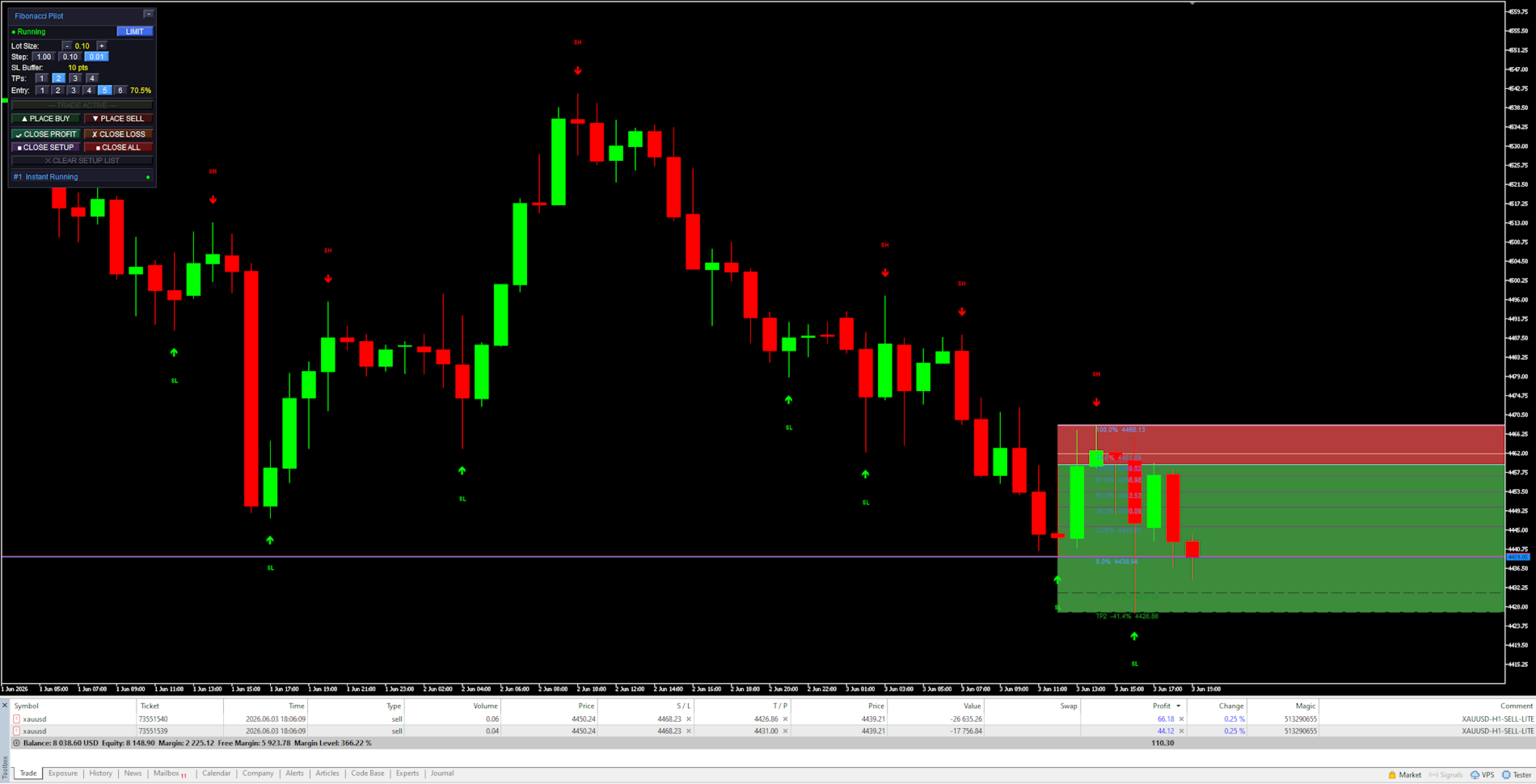
Draws a color-coded risk zone (entry to SL) and reward zone (entry to last TP) on the chart
Shows a limit line with a stoplight color system as price approaches the entry level
Detects when a limit order is manually cancelled in the MT5 terminal and removes the setup
Restores an active setup automatically if the EA is reloaded or settings are changed

    What the trader does
    Identifies a swing high and swing low on the chart
    Clicks Point A then Point B on the chart to define the Fibonacci range
    Selects the desired entry retracement level on the panel
    Adjusts lot size and number of TPs
    Presses PLACE BUY or PLACE SELL to execute

      Mini supports one active setup at a time. For multiple concurrent setups on the same chart, use Fibonacci Pilot Pro.
      In LIMIT mode the EA places a pending limit order at the entry level. A horizontal line with stoplight coloring shows the entry price and changes from red → yellow → green as price approaches. In INSTANT mode the order is placed at market price immediately.


      Panel Reference:

      Title bar:
      Shows the EA name and version. The [−] button minimizes the panel to the title bar only. Click [−] again to restore.

        State row:
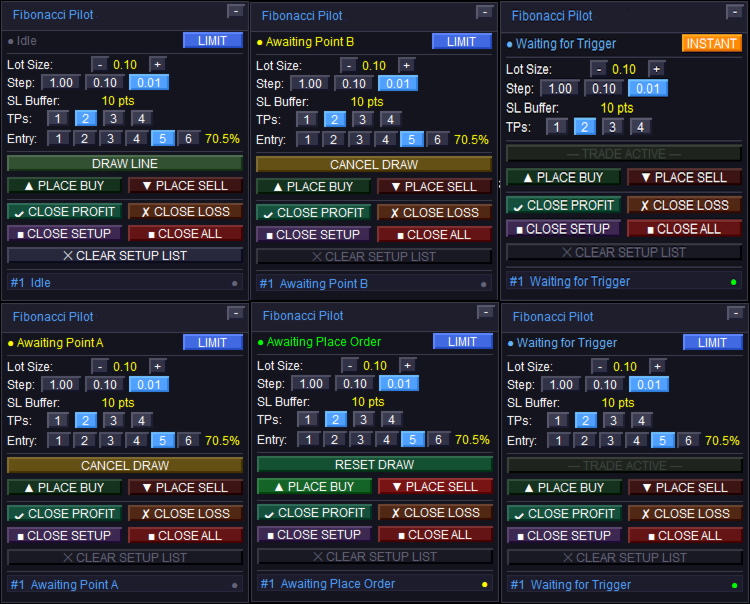
        Shows the current EA state. The colored dot on the left indicates the setup status:
        Idle — no active setup. DRAW LINE is available.
        Awaiting Point A / Awaiting Point B — click on the chart to place the point.
        Setup Ready — A and B are placed. Adjust entry level and press PLACE BUY/SELL.
        Limit Active / Waiting for Trigger — limit order is live on the broker.
        Instant Running — market order is live.
        Closed — trade has been closed (TP, SL, or manual).
        The LIMIT / INSTANT mode toggle button on the right switches order mode at runtime.

          Lot Size row:
          Shows the current lot size. Use [−] and [+] to adjust. The step selector [1.00] [0.10] [0.01] sets how much each press changes the lot size.

            SL Buffer row:
            Displays the current Stop Loss buffer in points as set in the inputs. This is informational — the value is set in the inputs dialog, not on the panel.

              TPs row:
              Selects how many Take Profit levels to use: [1] [2] [3] [4]. The active selection is highlighted. Each TP is calculated from a Fibonacci extension level beyond Point B.

                Entry row:
                Selects which Fibonacci retracement level is used as the entry price: [1] through [6] corresponding to FibLevel1–FibLevel6. The active level is highlighted and its percentage shown on the right. Only visible in LIMIT mode.

                  DRAW LINE button:
                  Starts the A→B drawing sequence. Changes to CANCEL DRAW while drawing. Shows RESET DRAW when a setup is ready but not yet placed. Dims to “— TRADE ACTIVE —” when a live trade is running to indicate it cannot be used.

                    PLACE BUY / PLACE SELL buttons:
                    Active only when a setup is ready (Setup Ready state). Places the order using the current lot size, TP count, SL buffer, and selected entry level. The EA automatically reorients A and B to match the chosen direction regardless of draw order.

                      CLOSE PROFIT / CLOSE LOSS:
                      Closes all open tickets for the current setup. CLOSE PROFIT closes only tickets currently in profit. CLOSE LOSS closes only tickets currently at a loss.

                        CLOSE SETUP / CLOSE ALL:
                        CLOSE SETUP closes the active setup’s tickets and removes chart objects. CLOSE ALL closes all open positions on the account (not limited to this setup).

                          CLEAR SETUP LIST:
                          Removes a closed or idle setup from the panel and clears all associated chart objects. Disabled (dimmed) when a live trade is active — close the trade first.


                            Chart Objects:

                            Swing arrows:
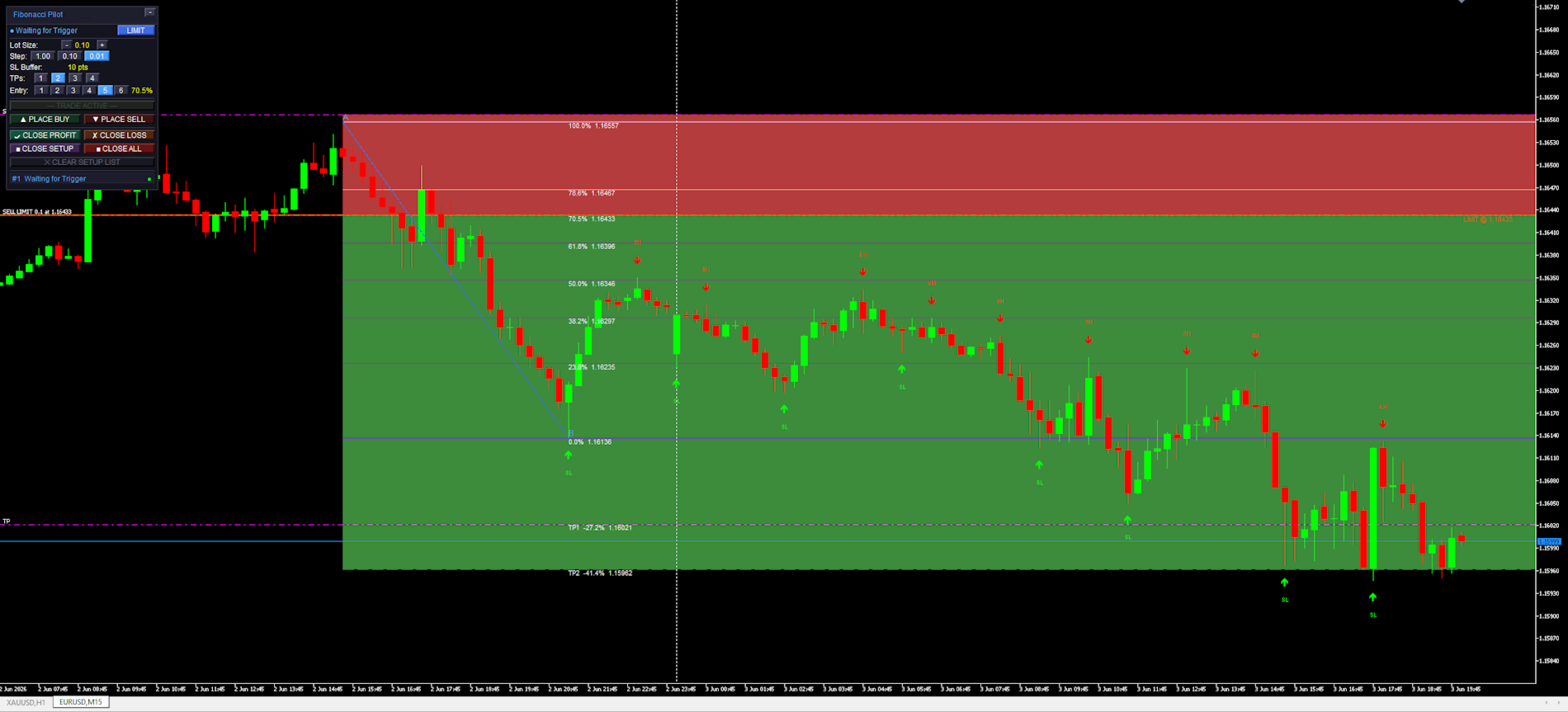
                            Red arrows pointing down mark Swing Highs (SH). Green arrows pointing up mark Swing Lows (SL). The SH and SL labels are centered above/below the arrow. Arrows are rendered in front of candles but behind the panel.

                              Fibonacci retracement lines:
                              Drawn between Point A (100%, SL side) and Point B (0%) as horizontal rays extending to the right. The 0% and 100% anchor lines use the panel accent color. The selected entry level uses the mode color (blue for limit, amber for instant). All other levels use “Retracement line color”.

                                Fibonacci extension lines:
                                Dashed lines drawn beyond Point B in the trade direction, one per active TP. Labeled with the TP number, extension percentage, and price. Use “Extension line color”.

                                  Risk zone (red):
                                  A filled rectangle from the entry price to the SL price. Drawn only after the order is placed. Shows the price range at risk for this trade.

                                    Reward zone (green):
                                    A filled rectangle from the entry price to the last active TP. Drawn only after the order is placed. Shows the potential reward range.

                                      Limit entry line:
                                      A solid horizontal line at the entry price. Color cycles based on how close price is to the entry: red (far) → yellow (approaching) → green (imminent). Thresholds are set by “Limit Trigger Line Near %” and “Limit Trigger Line Medium %”. Removed when the limit is triggered or cancelled.


                                        Settings Reference:

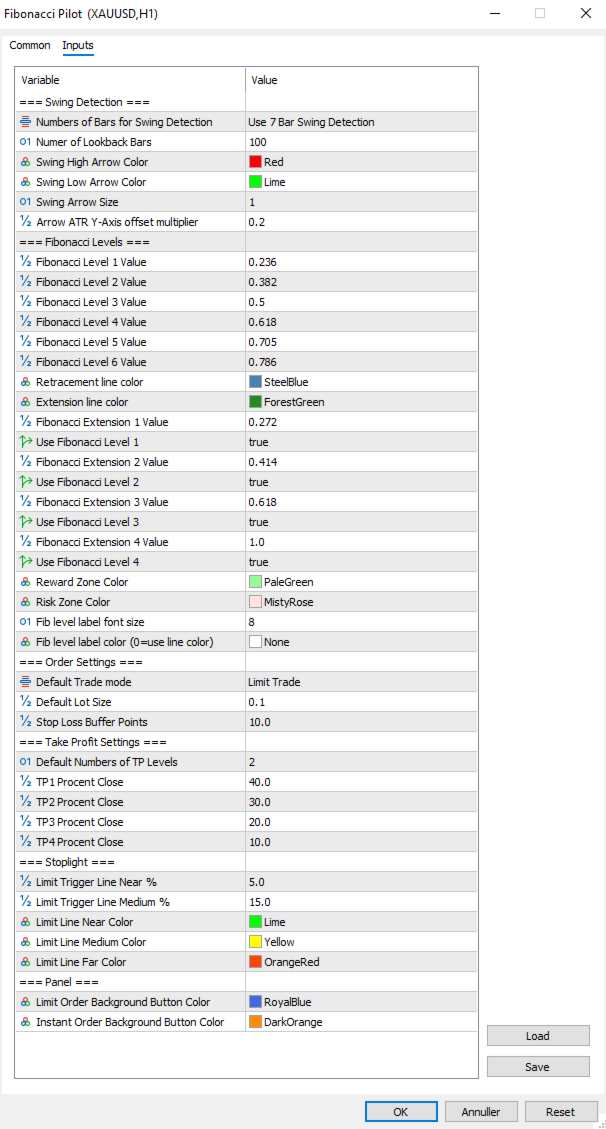
                                        Swing Detection:

                                        Controls how the EA identifies and draws swing highs and lows on the chart. These are visual aids only — the user selects the actual A and B points manually by clicking the chart.
                                        Numbers of Bars for Swing Detection Number of bars used for swing detection. 3BAR: requires 1 bar each side. 5BAR: 2 bars each side. 7BAR: 3 bars each side. More bars = fewer but more significant swings.
                                        Number of Lookback Bars Lower values show fewer recent swings; higher values show more historical swings. Range: any positive integer.
                                        Swing High Arrow Color Color of the downward arrows marking Swing High points.
                                        Swing Low Arrow Color Color of the upward arrows marking Swing Low points.
                                        Swing Arrow Size   (weight) of the swing arrow objects. Range: 1–5.
                                        Arrow ATR Y-Axis offset multiplier Vertical distance between price and arrow, as a multiplier of the current ATR(14). Higher values push arrows further from the bars.

                                          Fibonacci Levels:

                                          Defines the retracement ratios drawn between A and B, the extension ratios drawn beyond B as TP targets, zone colors, and label appearance.

                                          Fibonacci Level X Value The six retracement ratios displayed on the grid. These are also the selectable entry levels [1]–[6] on the panel.
                                          Retracement line color Color of all retracement lines except anchors and the active entry level.
                                          Extension line color Color of all extension lines and their labels.
                                          Fibonacci Extension X Value Extension ratios beyond Point B, used as TP1–TP4 targets. Calculated as range × ratio added beyond B.
                                          Use Fibonacci Level X Enables or disables each extension line individually. Only enabled extensions are drawn and only up to the active TP count.
                                          Reward Zone Color Color of the reward zone rectangle (entry to last TP). Light red by default — rename/recolor to suit your premium zone convention.
                                          Risk Zone Color Color of the risk zone rectangle (entry to SL). Light green by default — rename/recolor to suit your discount zone convention.
                                          Fib level label font size Font size for all Fibonacci level text labels on the chart.
                                          Fib level label color Color for all Fibonacci level text labels. Set to NONE to use the line’s own color instead.


                                            Order Settings:
                                            Core parameters for how orders are sized and placed.

                                            Default Trade mode Starting order mode when the EA loads. LIMIT: places a pending limit order at the entry level. INSTANT: places a market order immediately at current price. Can be toggled on the panel at runtime.
                                            Default Lot Size Starting lot size shown on the panel when the EA loads. Adjusted per session using the panel controls.
                                            Stop Loss Buffer Additional points added to the SL distance beyond Point A. For a BUY, SL = point A − buffer. For a SELL, SL = point A + buffer. This prevents stop-outs from normal spread/wick at the swing level.


                                              Take Profit Settings:
                                              Controls the default number of TPs and how lots are distributed across them.

                                              Default Numbers of TP Levels Number of TP levels active when the EA loads (1–4). Changed per session on the panel.
                                              TP1 Percentage Close Percentage of total lots closed at TP1.
                                              TP2 Percentage Close Percentage of total lots closed at TP2.
                                              TP3 Percentage Close Percentage of total lots closed at TP3.
                                              TP4Percentage Close Percentage closed at TP4 when 4 TPs selected.
                                                The last active TP always absorbs any remaining lots to ensure the full position is always placed. Example with 2 TPs: TP1 = 40%, TP2 = 60% (not 30%). With 3 TPs: TP1 = 40%, TP2 = 30%, TP3 = 30%.


                                                Stoplight:
                                                Controls the color-changing limit entry line that shows how close price is to the pending entry level.

                                                Limit Trigger Line Near % When price is within this percentage of the A–B range from the entry level, the limit line turns green (imminent trigger).
                                                Limit Trigger Line Medium % When price is within this percentage of the A–B range, the line turns yellow (approaching). Beyond this threshold it shows red.
                                                Limit Line Near Color Color of the limit line when price is close (imminent).
                                                Limit Line Medium Color Color of the limit line when price is approaching.
                                                Limit Line Far Color Color of the limit line when price is far from entry.


                                                  Panel:
                                                  Visual colors used on the trade panel.

                                                  Limit Order Background Button Color Color used for the LIMIT mode toggle button and the entry level line when in limit mode. Blue by default.
                                                  Instant Order Background Button Color Color used for the INSTANT mode toggle button and the entry level line when in instant mode. Amber by default.


                                                  Fibonacci Orientation:
                                                  Understanding how the EA orients the Fibonacci grid is important for correct use.
                                                  Point A — 100% anchor Always the Stop Loss side of the trade. For a BUY setup: Point A is the swing low (price the SL is placed below). For a SELL setup: Point A is the swing high (price the SL is placed above).
                                                  Point B — 0% anchor Always the entry side of the trade. For a BUY: Point B is the swing high (the swing from which price is retracing). For a SELL: Point B is the swing low.
                                                  The EA automatically reorients A and B when you press PLACE BUY or PLACE SELL, regardless of which point you drew first or in which direction. You may draw from bottom to top, top to bottom, left to right, or right to left — the direction buttons determine the final orientation.


                                                  Notes and Tips:
                                                  Setup persistence:
                                                  If you open the settings dialog and change any input, the EA reinitializes. Any active setup (limit pending or trade running) is automatically saved to MT5 Global Variables before the restart and restored afterward. Chart objects, fib lines and the limit line are all redrawn with the new settings applied.
                                                  Manual limit cancellation:
                                                  If you cancel a pending limit order directly in the MT5 terminal (Toolbox → Trade tab), the EA detects this automatically within one tick and removes the setup from the panel and chart.
                                                  One setup at a time:
                                                  Mini supports a single active setup. The DRAW LINE button dims with the label “— TRADE ACTIVE —” while a trade is live. To start a new setup, close or clear the current one first.
                                                  Lot sizing with fewer TPs:
                                                  When using fewer than 4 TPs, the remaining lot percentage is always allocated to the last active TP. No lots are silently discarded. Check the TP percentage inputs if you want specific splits.
                                                  Strategy Tester compatibility:
                                                  Fibonacci Pilot Mini is compatible with the MT5 Strategy Tester. Timer events, sounds and push notifications are automatically disabled in tester mode.
                                                  Difference from Fibonacci Pilot Pro:
                                                  The Mini edition intentionally omits: multiple concurrent setups, Mini HUD, trailing stop, breakeven move, per-level Fibonacci colors, swing filter passes (significance, amplitude, wick), ATR-based SL, internal limit engine, push notifications, CSV trade journal, panel position customization, and the Finetune HUD. For those features, use Fibonacci Pilot Pro.
                                                  Produtos recomendados
                                                  Desenvolvimento da versão anterior do indicador ZigZag WaveSize MT4 ZigZag WaveSize - indicador padrão ZigZag modificado com informações adicionais sobre o comprimento da onda em pontos, níveis e diferentes lógicas de alerta Melhorias gerais: Adaptação do código para MetaTrader 5 Otimizada a operação com objetos gráficos Novidades: Níveis horizontais nos extremos Seleção do tipo de níveis: horizontal/raios/segmentos Filtro de níveis líquidos (não quebrados pelo preço) Buffer para rupturas: aju
                                                  FREE
                                                  Auto Fib Retracements
                                                  Ross Adam Langlands Nelson
                                                  4.2 (5)
                                                  Automatic Fibonacci Retracement Line Indicator. This indicator takes the current trend and if possible draws Fibonacci retracement lines from the swing until the current price. The Fibonacci levels used are: 0%, 23.6%, 38.2%, 50%, 61.8%, 76.4%, 100%. This indicator works for all charts over all timeframes. The Fibonacci levels are also recorded in buffers for use by other trading bots. Any comments, concerns or additional feature requirements are welcome and will be addressed promptly. 
                                                  FREE
                                                  Fibo Trader FREE MT5
                                                  Grzegorz Korycki
                                                  3 (3)
                                                  Fibo Trader is an expert advisor that allows you to create automated presets for oscillation patterns in reference to Fibonacci retracements values using fully automated and dynamically created grid. The process is achieved by first optimizing the EA, then running it on automated mode. EA allows you to switch between automatic and manual mode. When in manual mode the user will use a graphical panel that allows to manage the current trading conditions, or to take control in any moment to trade ma
                                                  FREE
                                                  Auto Fibonacci Retracement Indicator — Flexible and Reliable This isn’t just another Auto Fibonacci Retracement indicator. It’s one of the most flexible and dependable tools available . If you find it useful, please consider leaving a review or comment — your feedback means a lot! Check out my other helpful tools below: Telegram to MT5 using AI   - AI-Powered Signal Copier Bot Smart Alert Manager   - Set up advanced alerts and send them to Mobile, Telegram, Discord, Webhook... Timeframes Trend
                                                  FREE
                                                  Golden Mind EA
                                                  Leszek Aleksander Mroczek
                                                  NEW VERSION -  FREE FOR LIMITED TIME Golden Mind EA is a fully automated Expert Advisor designed for MetaTrader 5, built around a dynamic grid-based trading approach combined with intelligent position management. Unlike traditional grid systems that rely on fixed take-profit levels, Golden Mind EA uses a pair-based closing logic . The system continuously calculates the combined result of positions and closes them when a defined profit level above the break-even line is reached. This allows the E
                                                  FREE
                                                  The Swing High Low and Fibonacci Retracement Indicator is a powerful technical analysis tool designed to identify key price levels and potential reversal zones in the market. It automatically detects recent swing highs and swing lows on the chart and overlays Fibonacci retracement levels based on these points. This indicator helps traders: Visualize market structure by highlighting recent swing points. Identify support and resistance zones using Fibonacci ratios (e.g., 38.2%, 50%, 61.8%). Adapt
                                                  FREE
                                                  Babel Assistant
                                                  Iurii Bazhanov
                                                  4.33 (9)
                                                  Babel assistant 1     The MT5 netting “Babel_assistant_1” robot uses the ZigZag indicator to generate Fibonacci levels on M1, M5, M15, H1, H4, D1, W1  periods of the charts , calculates the strength of trends for buying and selling. It opens a position with "Lot for open a position" if the specified trend level 4.925 is exceeded. Then Babel places pending orders at the some Fibonacci levels and places specified Stop Loss , Take Profit. The screen displays current results of work on the position
                                                  FREE
                                                  Fibonacci Moving Averages
                                                  Brendan Jonathan Stoyanowski-campbell
                                                  2 (1)
                                                  OVERVIEW The Fibonacci Moving Averages are a toolkit which allows the user to configure different types of Moving Averages based on key Fibonacci numbers. Moving Averages are used to visualise short-term and long-term support and resistance which can be used as a signal where price might continue or retrace. Moving Averages serve as a simple yet powerful tool that can help traders in their decision-making and help foster a sense of where the price might be moving next. The aim of this scrip
                                                  FREE
                                                  Free automatic Fibonacci is an indicator that automatically plots a Fibonacci retracement based on the number of bars you select on the BarsToScan setting in the indicator. The Fibonacci is automatically updated in real time as new highest and lowest values appears amongst the selected bars. You can select which level values to be displayed in the indicator settings. You can also select the color of the levels thus enabling the trader to be able to attach the indicator several times with differe
                                                  FREE
                                                  Automatic fibonacci with alerts is an indicator that automatically plots a fibonacci retracement based on the number of bars you select on the BarsToScan setting in the indicator. The fibonacci is automatically updated in real time as new highest and lowest values appear amongst the selected bars. You can select which level values to be displayed in the indicator settings. You can also select the color of the levels thus enabling the trader to be able to attach the indicator several times with d
                                                  FREE
                                                  -- Simples, mas eficaz. Indicador de inversão - O que é? Um indicador de sobreposição que segue tendências e combina a lógica SuperTrend com a tecnologia de curva exponencial. Ele detecta a direção da tendência, desenha um canal dinâmico no gráfico e envia alertas em tempo real quando a tendência se inverte. Como funciona? O indicador calcula uma linha de base exponencial usando ATR e um fator SuperTrend. Quando o preço fecha acima ou abaixo dessa linha de base, uma inversão de tendência é co
                                                  FREE
                                                  Pillartrade
                                                  QuanticX
                                                  3 (1)
                                                  Announcement: All EAs (Expert Advisors) from QuanticX are currently available for free, but only for a limited time! To enjoy a Lifetime QuanticX support and continue receiving free EAs, we kindly request you to leave a review and track the performance of our EAs on Myfxbook. Additionally, don't hesitate to reach out to us for exclusive bonuses on EAs and personalized support. Pillartrade by QuanticX Welcome to Pillartrade - Your Long-Only Trading Ally for US500 Join the forefront of financial
                                                  FREE
                                                  Fibo Pivot Optimus
                                                  Syamsurizal Dimjati
                                                  5 (1)
                                                  Ritz Smart FIBOPIVOT Optimus Pro Advanced Multi-Timeframe Fibonacci Trading System SMART PREDICTION & ACCURATE FORECAST Revolutionary Fibonacci Pivot Technology combines traditional pivot points with advanced Fibonacci extensions, creating a powerful predictive tool for professional traders. Our algorithm intelligently detects significant price levels across multiple timeframes, delivering laser-accurate support and resistance zones before the market moves . INTELLIGENT VOLUME-VALIDATED SIGNALS
                                                  FREE
                                                  Use this expert advisor whose strategy is essentially based on the Relative Strength Index (RSI) indicator as well as a personal touch. Other free expert advisors are available in my personal space as well as signals, do not hesitate to visit and leave a comment, it will make me happy and will make me want to offer content. Expert advisors currently available: LVL Creator LVL Creator Pro LVL Bollinger Bands   Trading is not a magic solution, so before using this expert on a live account, carry
                                                  FREE
                                                  EurowaveFX
                                                  Fabio Sorrentino
                                                  FX_EUXXX is a free expert advisor designed primarily for EURUSD on the H4 chart. It operates without hedging, grid, martingale, or anti-martingale basically, no gambling. I encourage you to request the updated set file for free. Subscribe   to our new channel for   promo/FREE  and   updates! :  MQL5 Group   OR  Telegram Channel Subscribe  to get new   announcements   and look behind the scenes!  MQL5_Channel   Please support me to building   FREE EAs!   Leave a   review ! Thank you Recommendati
                                                  FREE
                                                  IAMFX offers the ultimate solution to make trading easier and more flexible on IAMFX Web  using IAMFX Agent . With our exclusive IAMFX-Agent and IAMFX-Center, you can effortlessly manage your trading anytime, anywhere through web and mobile interfaces. Fully compatible with both web and mobile environments,   IAMFX allows real-time multi-account management and monitoring with a simple installation. IAMFX Benefits Manage multiple MT5 accounts Easy orders with market, stop and limited Manage orde
                                                  FREE
                                                  GhostTrail Pro v5 is an intelligent Expert Advisor for MetaTrader 5 that manages the complete lifecycle of manual crypto trades. From detecting your setup and alerting your phone, to automatically protecting profits and closing positions — GhostTrail does the heavy lifting so you don't have to.   Designed specifically for manual traders and scalpers who have a proven entry strategy but struggle with trade management, partial closes, and protecting profits while away from their screen.
                                                  FREE
                                                  This indicator automatically identifies liquidity levels using swing fractals and tracks when price sweeps through them. Works on any symbol and timeframe with full multi-timeframe support. Features: — Detects swing highs and lows via a fractal method (configurable bars left & right) on a selected timeframe. Active levels are displayed as rays extending to the right; swept levels turn into dashed lines ending at the sweep candle. — Plots Previous Day (PDhigh / PDlow), Previous Week (PWhigh / PWl
                                                  FREE
                                                  AP Fibonacci Retracement PRO (MT5) Overview AP Fibonacci Retracement PRO is a trend-continuation pullback EA. It waits for a confirmed swing, calculates the Fibonacci retracement zone, and looks for entries in the direction of the original move. No grid, no martingale. Strategy logic Detects the last valid swing high/low using Fractals on the selected signal timeframe. Calculates the retracement zone between 38.2% and 61.8% (configurable). On a closed bar, if price is inside the zone (with opti
                                                  FREE
                                                  The Fibonacci Scalper
                                                  STANTON ROUX
                                                  4.22 (45)
                                                  The Fibonacci Trader MQL5 expert advisor uses the Fibonacci levels to determine a buy or sell trade with the MACD as confirmation. The Fibonacci levels work as follows: Above 61.8 SELL if MACD trend is SELL Trading Range (Ability to select trading input parameters) BUY if MACD trend is BUY SELL if MACD trend is SELL Below 23.6 BUY if MACD trend is BUY Default settings are configured for EURUSD on M5 Chart. To work with the news server, you must add the URL ‘ http://ec.forexprostools.com/ ’ in t
                                                  FREE
                                                  Our offer also includes a free panel — Indicator Panel — which allows you to show or hide indicators created by BOToBRACIA. High and Low Points is a practical technical analysis indicator that plots levels corresponding to the highs and lows from previous periods (day / week / month) — levels that, in the Smart Money Concepts (SMC) and ICT approach, are treated as liquidity zones, while in classical technical analysis they serve as potential support and resistance levels. Indicator settings: •
                                                  FREE
                                                  Triangle Pattern Gann EA
                                                  Nguyen Van Kien
                                                  5 (2)
                                                  Triangle Pattern Gann EA v3.4 - Trade Like the Legendary W.D. Gann Harness the Power of Geometric Price Patterns & Sacred Ratios Are you ready to trade with one of the most powerful pattern recognition systems ever developed? The Triangle Pattern Gann EA v3.4 brings the legendary wisdom of W.D. Gann into the modern algorithmic trading era. What Makes This EA Exceptional? Based on Proven Gann Methodology W.D. Gann was one of history's most successful traders, achieving over 90% accuracy u
                                                  FREE
                                                  CloseAll MT5
                                                  Mr Sorachai Pitakjarukul
                                                  4.5 (2)
                                                  ขอบคุณ แรงบันดาลใจ จากโค้ชแพม ที่ทำให้เริ่มทำ    Close all ตัวนี้  และขอขอบคุณทุกคนที่ให้ความรู็มาโดยตลอด ไม่ว่าจะทางตรงทางอ้อม ขอบคุณทุกคนที่ให้ความรู้เพื่อนร่วมเทรด ทั้งนี้เพื่อให้นักเทรดทุกคนได้มีเครื่องมือในการควบคุมการปิดการซื้อขาย จึงขอพัฒนาโปรแกรม close all version 5 ได้ใช้ทุกคน  Close all and update profit Version 1.00 (MT5) Full version Give you free  For MT4 Click  https://www.mql5.com/en/market/product/79252 Fix TPSL calculate  Program function Tab 1 Close order function and show br
                                                  FREE
                                                  This indicator copies graphical objects (vertical lines, horizontal lines, text labels, fibo and etc.) from master chart to other charts.  For example, you can copy lines from the chart GBPUSD with period H1 to chart GBPUSD with period M15. It's makes technical analyses more simple. Show label - show label on the Master chart, where you draw graphical objects to copy; Font size - font size of label; Type of synchronisation - type of synchronisation Copy text - on/off copy of text objects Copy la
                                                  FREE
                                                  Fast Fibonacci Grid MT5
                                                  Grzegorz Korycki
                                                  2.5 (2)
                                                  Did you ever feel irritated by manually adjusting Fibonacci retracement levels? Do you ever want to have a tool that was automatically adjust to certain Fibonacci levels with your trading? Well here is a tool for you: Fast Fibonacci indicator and Grid trader allows you to quickly adjust Fibonacci retracement levels or construct Fibonacci extension grid! You can also quickly setup your grid trading based on these levels - only with few clicks. Adjustable graphics, font sizes and graphics panels m
                                                  FREE
                                                  Bit Buddy AI
                                                  Michael Prescott Burney
                                                  Bit Buddy Portfolio for BTCUSD H1 Bit Buddy Portfolio is a professional MetaTrader 5 Expert Advisor for BTCUSD on the H1 timeframe, running on the Expert Advisor HQ universal portfolio framework. It is designed for structured automated trading on BTCUSD H1, with clear on-chart feedback for entries, exits, protections, and live performance so you can see how the EA is operating in real time. Overview Bit Buddy Portfolio combines its strategy logic for Bitcoin with the Expert Advisor HQ execution
                                                  FREE
                                                  A ready-made multitimeframe trading system based on automatic plotting and tracking of Fibonacci levels for buying and selling any symbol. Demo version - calculation of the last 390 bars is not performed. Advantages Determines the trend direction based on a complex of 14 indicators ( Cx ), extremums of ZigZag ( Z ), RSI ( R ), Impulse ( I ) Displaying the values of 14 indicators comprising the trend direction ( Cx ) Plotting horizontal levels, support and resistance lines, channels View the plo
                                                  FREE
                                                  Smart Gold 15M Fibonacci Retracement EA This EA is shared free of charge as a contribution to the trading community. I hope it serves as a useful tool for traders who value disciplined trading and risk management. Overview Smart Gold 15M Fibonacci Retracement EA is a fully automated Expert Advisor designed for trading XAUUSD (Gold), with recommended use on the M15 timeframe. The EA combines EMA 9 / EMA 21 trend detection with a Fibonacci Retracement entry system. Instead of entering immediately
                                                  FREE
                                                  VadineroLab MT5 Export Master to CSV EXEL JSON - Expert Advisor for exporting and analyzing symbols, account, terminal parameters, active trades, current account state, trading history, global variables.   Generates the following report types: * Symbols Parameters — spread, tick size, min/max lot, swap, … * Account Parameters — balance, equity, leverage, currency, margin info, … * Terminal Parameters — server, version, language, date, environment, … * Trade History — orders, deals, positions, se
                                                  FREE
                                                  Go Long Advanced
                                                  Phantom Trading Inc.
                                                  4.78 (9)
                                                  O EA Go Long implementa uma estratégia avançada de trading intradiário baseada no princípio de trading diário sistemático com múltiplas confirmações técnicas. Enquanto muitos traders procuram algoritmos complexos, este EA combina conceitos simples mas eficazes com gestão sofisticada de risco e múltiplos filtros técnicos. O EA abre posições em um horário específico todos os dias, mas apenas quando as condições de mercado se alinham com múltiplos indicadores técnicos. Esta abordagem sistemática
                                                  FREE
                                                  Os compradores deste produto também adquirem
                                                  Trade Assistant MT5
                                                  Evgeniy Kravchenko
                                                  4.43 (214)
                                                  Ajuda a calcular o risco por comércio, a fácil instalação de uma nova encomenda, gestão de encomendas com funções de fecho parcial, trailing stop de 7 tipos e outras funções úteis. Materiais e instruções adicionais Instruções de instalação   -   Instruções para a aplicação   -   Versão de teste da aplicação para uma conta de demonstração Função de linha Mostra no gráfico a linha de Abertura, Stop Loss, Take Profit. Com esta função é fácil definir uma nova ordem e ver as suas características ad
                                                  Bem-vindo ao Trade Manager EA—uma ferramenta de gestão de risco criada para tornar o trading mais intuitivo, preciso e eficiente. Não é apenas uma ferramenta para executar ordens, mas uma solução abrangente para planejamento de operações, gerenciamento de posições e controle de risco. Seja você um iniciante, trader avançado ou scalper que precisa de execução rápida, o Trade Manager EA adapta-se às suas necessidades, oferecendo flexibilidade em todos os mercados, desde forex e índices até commodi
                                                  Local Trade Copier EA MT5
                                                  Juvenille Emperor Limited
                                                  4.96 (142)
                                                  Experimente uma cópia de negociação excepcionalmente rápida com o Local Trade Copier EA MT5 . Com sua fácil configuração de 1 minuto, este copiador de negociações permite que você copie negociações entre vários terminais MetaTrader no mesmo computador Windows ou em um Windows VPS com velocidades de cópia ultra rápidas de menos de 0.5 segundos. Seja você um trader iniciante ou profissional, o   Local Trade Copier EA MT5   oferece uma ampla gama de opções para personalizá-lo de acordo com suas ne
                                                  TradePanel MT5
                                                  Alfiya Fazylova
                                                  4.88 (161)
                                                  Trade Panel é um assistente de negociação multifuncional. O aplicativo contém mais de 50 funções de negociação para trading manual e permite automatizar a maioria das tarefas de negociação. Antes da compra, você pode testar a versão de demonstração em uma conta demo. Baixe a versão experimental do aplicativo para uma conta de demonstração: https://www.mql5.com/pt/blogs/post/762547 . Instruções completas aqui . Comércio. Permite realizar operações de negociação com um clique: Abrir ordens pendent
                                                  Versão Beta O Telegram to MT5 Signal Trader está quase no lançamento oficial da versão alfa. Alguns recursos ainda estão em desenvolvimento e você pode encontrar pequenos erros. Se tiver problemas, por favor reporte, seu feedback ajuda a melhorar o software para todos. Telegram to MT5 Signal Trader é uma ferramenta poderosa que copia automaticamente sinais de trading de canais ou grupos do Telegram diretamente para sua conta MetaTrader 5 . Suporta canais públicos e privados do Telegram, e você
                                                  Telegram to MT5 Multi-Channel Copier copia automaticamente sinais de trading dos seus canais do Telegram diretamente para o MetaTrader 5. Sem bots, sem extensões de navegador, sem copiar manualmente. Você recebe um sinal no Telegram e o EA abre a operação no seu terminal em poucos segundos. O produto inclui dois componentes: um aplicativo do Windows que escuta seus canais do Telegram, e este Expert Advisor que executa os sinais no seu terminal MT5. Também está disponível uma versão para MT4. Gui
                                                  Power Candles Strategy Scanner - Localizador de configurações multissímbolo com auto-otimização O Power Candles Strategy Scanner utiliza o mesmo motor de auto-otimização que alimenta o indicador Power Candles — em todos os símbolos da sua lista de observação, lado a lado. Um painel indica-lhe quais os símbolos que são estatisticamente negociáveis neste momento, qual a estratégia vencedora para cada um, o par ideal de Stop Loss / Take Profit, e avisa-o assim que um novo sinal é emitido. Esta ferr
                                                  Exp COPYLOT CLIENT for MT5
                                                  Vladislav Andruschenko
                                                  3.94 (34)
                                                  Copiador profissional de operações para MetaTrader 5 Um copiador de operações rápido, profissional e confiável para MetaTrader . COPYLOT permite copiar operações de Forex entre terminais MT4 e MT5 com suporte para contas Hedge e Netting . A versão MT5 do COPYLOT oferece suporte a: - MT5 Hedge → MT5 Hedge - MT5 Hedge → MT5 Netting - MT5 Netting → MT5 Hedge - MT5 Netting → MT5 Netting - MT4 → MT5 Hedge - MT4 → MT5 Netting Versão MT4 Descrição completa + DEMO + PDF Como comprar Como instalar Como
                                                  EasyInsight AIO MT5
                                                  Alain Verleyen
                                                  4.92 (12)
                                                  EASY Insight AIO – A solução tudo-em-um para trading inteligente e sem esforço Visão geral Imagine analisar todo o mercado — Forex, Ouro, Cripto, Índices e até Ações — em segundos, sem precisar examinar gráficos manualmente, instalar indicadores ou lidar com configurações complicadas. EASY Insight AIO é sua ferramenta definitiva de exportação para trading com IA, pronta para usar. Ela oferece um panorama completo do mercado em um único arquivo CSV limpo — pronto para análise imediata no ChatGP
                                                  Anchor Trade Manager
                                                  Kalinskie Gilliam
                                                  5 (5)
                                                  Anchor: The EA Manager Run your full EA portfolio without conflicts, without stacked risk, and without watching every chart yourself. Anchor coordinates up to 64 Expert Advisors on a single account, including daily loss protection built for prop firm rules. Attach Anchor to any chart. Type your EA names and magic numbers in one line. Click OK. Anchor begins coordinating immediately. Built for portfolios. Built for prop firms. Built for discipline. The Problem Running multiple EAs on the same acc
                                                  Trade copier MT5
                                                  Alfiya Fazylova
                                                  4.59 (49)
                                                  Trade Copier é um utilitário profissional projetado para copiar e sincronizar negociações entre contas de negociação. A cópia ocorre da conta / terminal do fornecedor para a conta / terminal do destinatário, instalada no mesmo computador ou vps. PROMOÇÃO - Se você já adquiriu o "Trade copier MT5", pode receber o "Trade copier MT4" gratuitamente (para cópia MT4 > MT5 e MT4 < MT5). Para obter informações mais detalhadas sobre os termos, por favor, entre em contato conosco através de mensagens priv
                                                  Farmed Hedge Yield Farming | All Markets (Manual - Hybrid - Semi/Automated EA) MULTI-ASSET SUPPORT Trade any asset available on your broker - Forex: Major, Minor, Exotic pairs - Crypto: BTC, ETH, XRP, SOL, BNB - Stocks: Apple, Tesla, Amazon, Google, etc. - Commodities: Gold, Silver, Oil, Gas - Indices: US30, NAS100, SPX500, DAX40 - Any CFD your broker offers VERIFIED TRADING RESULTS - Farmed Hedge Yield Axi Copy:  https://www.mql5.com/en/signals/2356376 - Farmed Hedge Yield Exn Copy:   https:/
                                                  Quant AI Agents
                                                  Ho Tuan Thang
                                                  5 (1)
                                                  Quant AI Agents are independent trading Expert Advisors. Instead of trading using a fixed strategy like other conventional EAs, Quant AI Agents   is a   multi-agent AI trading framework   that turns natural-language strategy prompts into live.  WANT THE SAME RESULTS AS MY LIVE SIGNAL?   Use the exact same brokers I do:   IC MARKETS , IC TRADING   .  Unlike the centralized stock market, Forex has no single, unified price feed.  Every broker sources liquidity from different providers, creating un
                                                  Premium Trade Manager - O Painel de Operações com um Coach Integrado Premium Trade Manager coloca um coach de trading dentro do seu gráfico, com um motor de execução completo por baixo. Configure a operação da forma que sempre faz e deixe o Max, seu coach de trading com IA, ler exatamente esse setup em relação à sua conta ao vivo e dar um veredicto direto antes de confirmar: se o stop é disciplinado, se o risco faz sentido, se há um evento de alto impacto a minutos de distância, se você está pró
                                                  Seconds Chart MT5
                                                  Boris Sedov
                                                  4.61 (18)
                                                  Seconds Chart - uma ferramenta exclusiva para criar gráficos de segundos no MetaTrader 5 . Com o Seconds Chart , você pode criar gráficos com períodos definidos em segundos, proporcionando flexibilidade e precisão ideais para análise, indisponíveis em gráficos padrão de minutos ou horas. Por exemplo, o período S15 indica um gráfico com velas de 15 segundos. Você pode usar qualquer indicador ou Expert Advisor com suporte a símbolos personalizados. Trabalhar com eles é tão conveniente quanto negoc
                                                  The product will copy all telegram signal to MT5 ( which you are member) , also it can work as remote copier.  Easy to set up, copy order instant, can work with almost signal formats, image signal,  s upport to translate other language to English Work with all type of channel or group, even channel have "Restrict Saving Content", work with  multi channel, multi MT5 Work as remote copier: with signal have ticket number, it will copy exactly via ticket number. Support to backtest signal. How to s
                                                  HINN MagicEntry Extra
                                                  ALGOFLOW OÜ
                                                  4.75 (16)
                                                  LIMITED SUMMER SALE -40% !   ONLY $30 insead of $50!  Maximum real discount! HINN MAGIC ENTRY – the ultimate tool for entry and position management! Place orders by selecting a level directly on the chart! full description   ::  demo-version  :: 60-sec-video-description Key features: - Market, limit, and pending orders - Automatic lot size calculation - Automatic spread and commission accounting - Unlimited partitial take-profits  - Breakeven and trailing stop-loss and take-profit  functions -
                                                  Trade Dashboard MT5
                                                  Fatemeh Ameri
                                                  4.95 (131)
                                                  Trade Dashboard simplifies how you open, manage, and control your trades, with built-in lot size calculation. It allows you to execute trades, manage risk, and control positions directly on the chart, with tools such as partial close, breakeven, and trailing stop. Designed to reduce manual work and help you stay focused on your trading decisions. A demo version is available for testing. Detailed explanations of features are provided within the MQL5 platform. Installation instructions are include
                                                  Baixar demo funcional Copy Cat More (Gato Copião) — Copiador de Trades (Trade Copier) MT5 é um copiador local de trades e um completo framework de gerenciamento de risco e execução, projetado para os desafios de trading de hoje. De desafios de prop firm ao gerenciamento de portfólio pessoal, ele se adapta a cada situação com uma combinação de execução robusta, proteção de capital, configuração flexível e manuseio avançado de trades. O copiador funciona em ambos os modos — Mestre (Master, emiss
                                                  Trade Manager DaneTrades
                                                  Levi Dane Benjamin
                                                  4.28 (29)
                                                  Trade Manager para ajudá-lo a entrar e sair rapidamente de negociações enquanto calcula automaticamente seu risco. Incluindo recursos para ajudar a evitar negociações excessivas, negociações de vingança e negociações emocionais. As negociações podem ser gerenciadas automaticamente e as métricas de desempenho da conta podem ser visualizadas em um gráfico. Esses recursos tornam este painel ideal para todos os traders manuais e ajudam a aprimorar a plataforma MetaTrader 5. Suporte multilíngue. Vers
                                                  EA Auditor
                                                  Stephen J Martret
                                                  5 (4)
                                                  EA Auditor is an independent analysis tool for traders evaluating Expert Advisors and trading signals on MetaTrader 5. It audits backtest reports, reviews posted developer signals, and cross-verifies the two against each other to help traders assess strategies before committing capital. The MQL5 market offers a wide range of Expert Advisors from many developers, with varying approaches, quality, and transparency. EA Auditor provides a consistent, data-driven framework for reviewing them, answer
                                                  EA Performance Tracker
                                                  Russell Leeon Tan
                                                  5 (2)
                                                  EA Performance Tracker (AESTracker) A clean, modern dashboard that shows exactly how your trades and EAs are performing — right on your chart. It reads your full account history automatically and breaks down the numbers by magic number / strategy. Display only — it does not place any trades. What it shows - Account header: live Balance, Equity, and Open (floating) P/L - Profit summary: gross profit, net profit, and the exact commission & swap deducted - Key stats: win rate, profit factor, exp
                                                  HINN Lazy Trader
                                                  ALGOFLOW OÜ
                                                  5 (1)
                                                  LIMITED SUMMER SALE -40% ! ONLY $470 insead of $790!  Maximum real discount! The core idea: using the user interface, you configure the parameters the chart must meet before entering a position (or positions), choose which entry models to use, and set the rules for when trading and planning should end. Lazy Trader  handles the rest: it  takes over all the routine chart watching and execution! full description  :: 3 key videos [1] ->  [2]   ->  [3] What can it do? - Understands Larry Williams
                                                  ================================================================================ POC BREAKOUT - V20.72. Full Professional Grade Toolkit ================================================================================ POC Breakout is a full MetaTrader 5 trading dashboard for discretionary traders who want breakout signals, Point of Control (POC) context, volume profiles, order flow, market structure, news, alerts, and advanced trade planning in one professional workspace. Attached directly to you
                                                  Painel de Trading para MetaTrader 5 — controle profissional de trading em um clique a partir do gráfico e do teclado Um painel de trading avançado para traders ativos, criado para abrir, gerenciar e fechar operações muito mais rápido do que com a interface padrão do MetaTrader. Esta solução foi desenvolvida para quem deseja controlar posições, ordens pendentes, lucro total e execução em um único espaço de trabalho profissional. Não se trata apenas de mais um utilitário. É um verdadeiro cockpit
                                                  DrawDown Limiter
                                                  Haidar Lionel Haj Ali
                                                  5 (20)
                                                  Drawdown Limiter EA You are in the right place if you were searching for Drawdown control, Drawdown limiter, Balance protection, Equity Protection or Daily Drawdown Limit related to Prop Firm, FTMO, or Funded account trading, or if you want to protect your trading account. Have you suffered from controlling your drawdown when trading funded accounts? This EA is meant for you. Prop firms usually set a rule called “Trader Daily Drawdown”, and if it is not respected, you are disqualified.  I am an
                                                  ENTRY IN THE ZONE with SMC MULTI-TIMEFRAME  Professional Smart Money Concepts Trading System Entry In The Zone with  SMC Multi Timeframe   is a professional trading indicator built on   Smart Money Concepts (SMC) , combining market structure analysis with a   No Repaint BUY / SELL signal system   in a single indicator. It helps traders understand market structure more clearly, identify key price zones, and focus on higher-quality trading opportunities. By combining   Multi-Timeframe Analysis ,  
                                                  Timeless Charts
                                                  Samuel Manoel De Souza
                                                  5 (7)
                                                  Timeless Charts é um utilitário de trading tudo-em-um para traders profissionais. Ele combina tipos de gráficos personalizados, como Gráficos por Segundos e Renko , com análise avançada de fluxo de ordens utilizando Footprints , Clusters , Perfis de Volume , estudos VWAP e ferramentas de análise ancorada para uma visão mais profunda do mercado. O gerenciamento de ordens e posições é realizado diretamente no gráfico por meio de um painel integrado de gerenciamento de operações , enquanto o Market
                                                  The Ultimate TradingView to MT5 Bridge Automation Pare com o trading manual e problemas de latência. TradingView to MT5 Copier PRO é a ponte mais rápida e confiável para executar seus alertas do TradingView diretamente no MetaTrader 5. Quer você use indicadores personalizados, scripts do Strategy Tester ou desenhos manuais, este EA (Expert Advisor) executa suas negociações instantaneamente usando tecnologia WebSocket de Alta Velocidade . Diferente de copiadores simples, esta versão PRO inclui Ar
                                                  The News Filter MT5
                                                  Leolouiski Gan
                                                  4.78 (23)
                                                  Este produto filtra todos os consultores especializados e gráficos manuais durante o horário das notícias, para que você não precise se preocupar com picos de preços repentinos que possam destruir suas configurações de negociação manuais ou negociações realizadas por outros consultores especializados. Este produto também vem com um sistema de gerenciamento de pedidos completo que pode lidar com suas posições abertas e ordens pendentes antes do lançamento de qualquer notícia. Depois de comprar o
                                                  Mais do autor
                                                  News Markers Description Version: 1.13Type: MetaTrader 5 indicator (chart window) Purpose: Plots economic-calendar news events as color-coded vertical lines on the chart, with optional currency tags and an upcoming-news HUD panel. Before you start — three things that always apply Live connection required. The data comes from MT5's built-in economic calendar via your broker's feed. It returns nothing in the Strategy Tester, and nothing if your broker doesn't serve calendar data. If no lines appe
                                                  FREE
                                                  The Simple Manual Trading Panel (v2.11) Is a professional trade management tool designed with a clean, movable UI to streamline manual execution and automated exit strategies. Core Features Dynamic Visual Interface: A movable GUI panel that provides real-time information including a bar countdown timer, live spread, and advanced volume analysis. Flexible Lot Size setting, with 2 decimals (If broker supports it). Multi-Stage Take Profit: Supports three distinct Take Profit (TP) levels in either
                                                  Trend Matrix Panel is a multi-timeframe technical indicator for MetaTrader 5 that compresses an entire trading session's structural picture into a single panel. Rather than flipping between charts to read M1, M15, H1, and D1 separately, the panel shows the trend state of three configurable moving averages across twelve timeframes simultaneously, with a heatmap that draws your eye to the genuinely strong signals and away from noise. The core idea is simple: every cell in the matrix tells you how
                                                  This script is an Intelligence Gathering Utility designed to give you full control over your data exports from MetaTrader 5. It allows you to synchronize up to three different symbols into a single file with precise timestamping. 1. Setting the Data Range (Range) You can define exactly which historical period you want to capture: Date Mode : If Last N bars (0 = use date range above) is set to 0 , the script will export all data between your chosen start and end dates. Bar Mode : By entering a nu
                                                  The primary function of this script, Tick Data Exporter , is to efficiently extract historical tick data. Tick data represents the most granular level of market data, capturing every single price change. The script downloads this data from a broker and formats it into CSV files for external quantitative analysis. Five things tick data shows that bars permanently hide: Spread microstructure: Bars give you one spread number per period (typically the spread at bar close). Ticks show you the sprea
                                                  FVG Multi TimeFrame Levels — Indicator Overview What it is A multi-timeframe   Fair Value Gap   detector and analysis tool for MetaTrader 5. It scans price action across up to four configurable timeframe "slots" simultaneously, identifies gaps that meet a configurable significance threshold, draws them as boxes on the current chart, and tracks how each gap behaves over its lifetime — whether it gets tested, how deeply, how often, and ultimately whether it gets filled or swept beyond. It runs alo
                                                  Filtro:
                                                  Sem comentários
                                                  Responder ao comentário