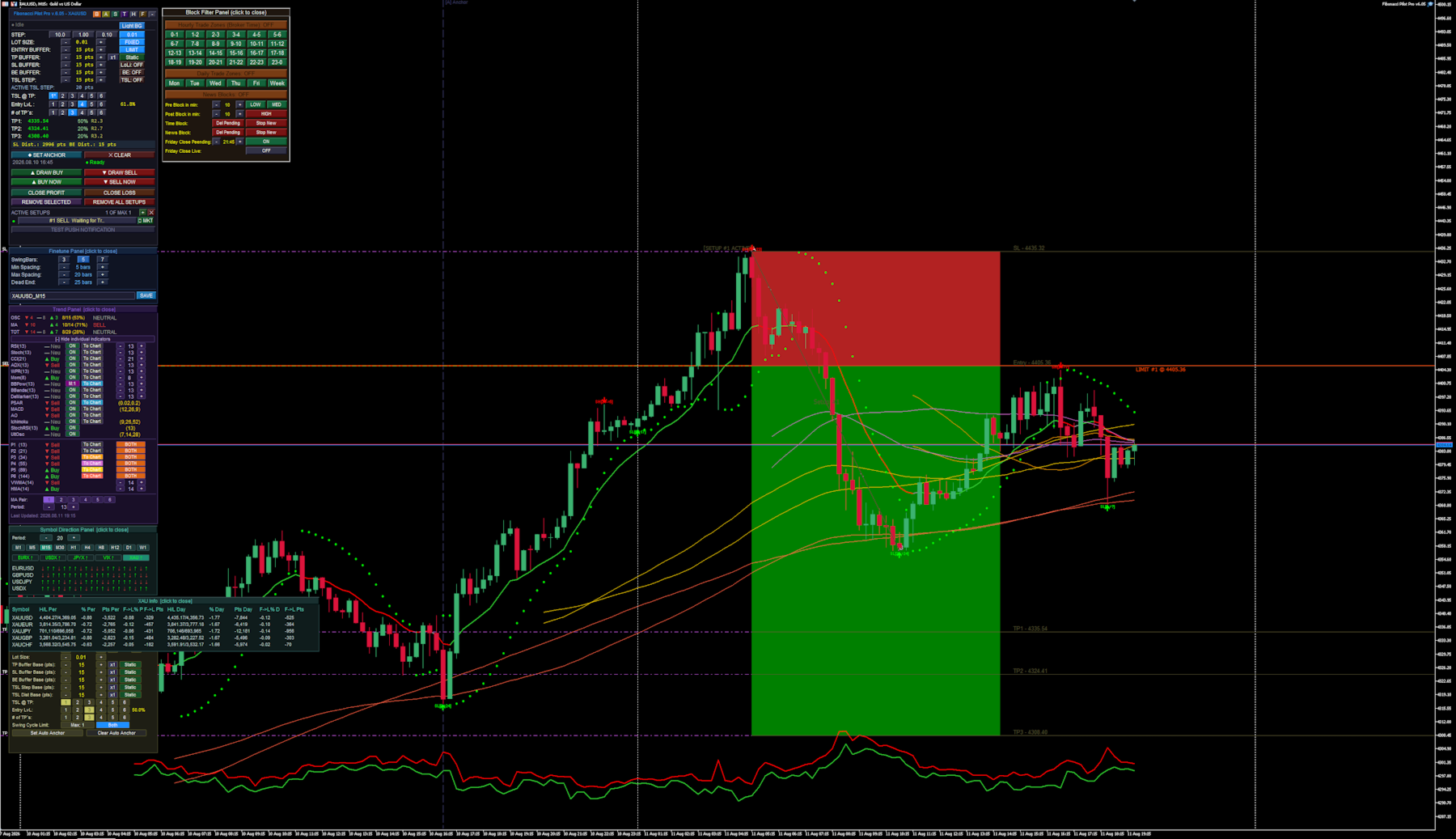
Fibonacci Pilot Pro

Fibonacci Pilot Pro Overview

The EA functions as a comprehensive, panel-driven Fibonacci trading ecosystem designed to bridge the gap between manual chart analysis and fully automated algorithmic execution.

  1. Dual Execution Modes: It operates as both a visual trade assistant for manual trading and a fully autonomous robot. In manual mode, you plot Point A and Point B on the chart to instantly visualize risk/reward zones and limit entries before executing. In auto mode, it scans for market structure shifts to place trades without intervention.
  2. Algorithmic Swing Detection: The engine identifies market swing highs and lows using an adjustable N-bar fractal logic, complete with gap filtering and "dead-end" resets to ensure it only anchors to valid market impulses.
  3. Advanced Trade Management: Once a setup is live, the EA takes over position management. It scales out of positions across up to 6 custom Take Profit (TP) extension levels, automatically moves the Stop Loss to Break Even, and deploys Trailing Stops.
  4. Dynamic Volatility Buffers: Instead of relying solely on static point distances, all entry, stop-loss, and trailing buffers can dynamically expand or contract based on live market Spread or Average True Range (ATR).
  5. Multi-Indicator Trend Filtering: The EA houses an internal scoring engine that polls up to 15 different oscillators (like RSI, MACD, and Bollinger Bands) and 8 moving averages (including VWMA and HMA). It aggregates these into a master "Trend Score" to permit or block automated trades.
  6. Environmental & Time Blocking: It features a built-in economic calendar and time matrix. You can program the EA to sit out during specific hours, days, high-impact news spikes, or force a total square-off before the Friday market close.
  7. Modular Graphical Interface: Everything is controlled directly on the chart via a network of interactive, floating UI panels (Main, Trend, Auto, Block, Symbol, and Finetune). You rarely need to open the native MT5 input dialog to make adjustments.
  8. It is a highly flexible EA, fit to run many different strategies and on various assets. The panel driven mode makes it easy to adjust strategies on the fly, while also including a built in "Backtest" mode, that automatically disables most of the visuals when running test, speeding up the test´s.

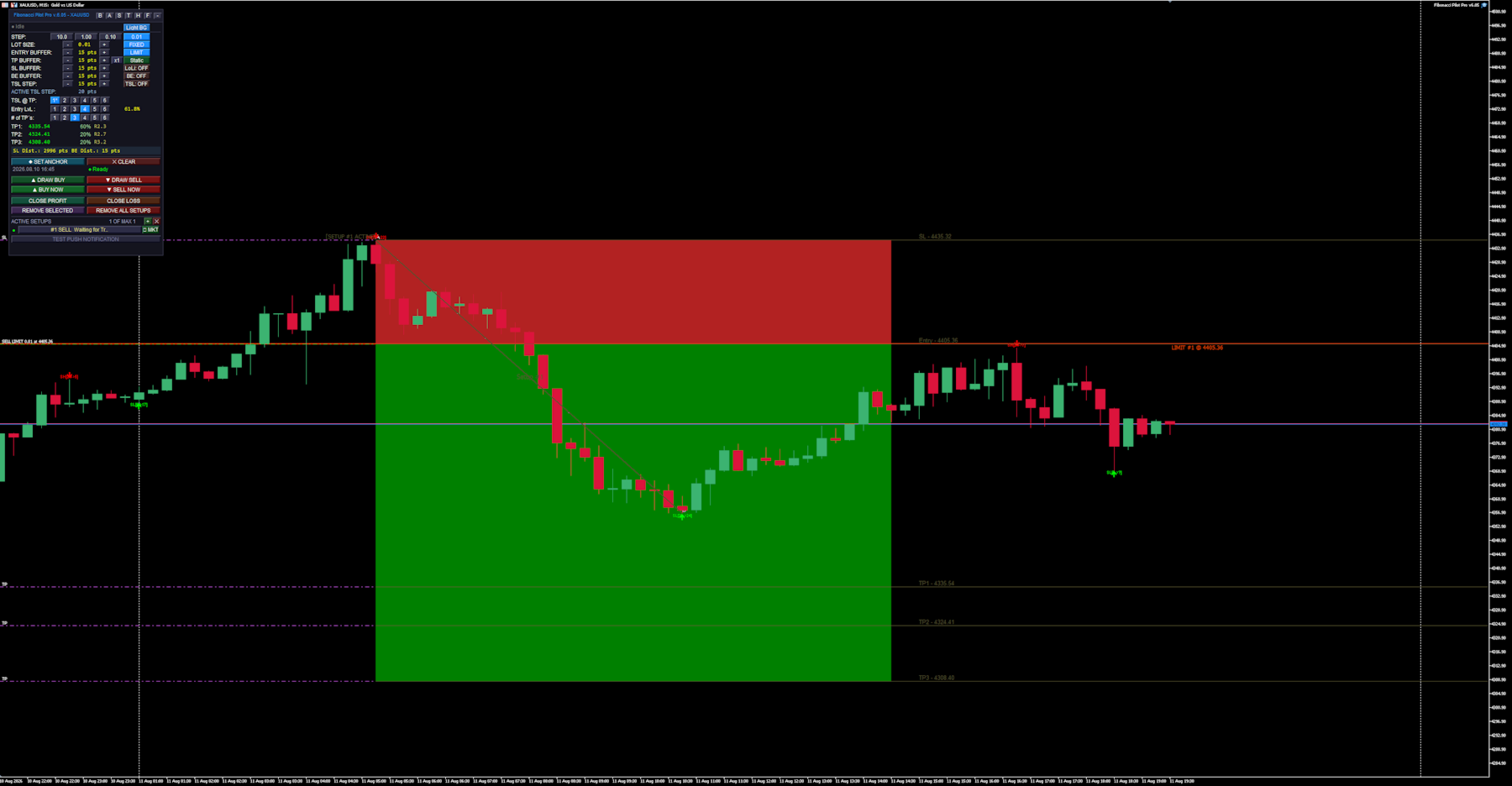
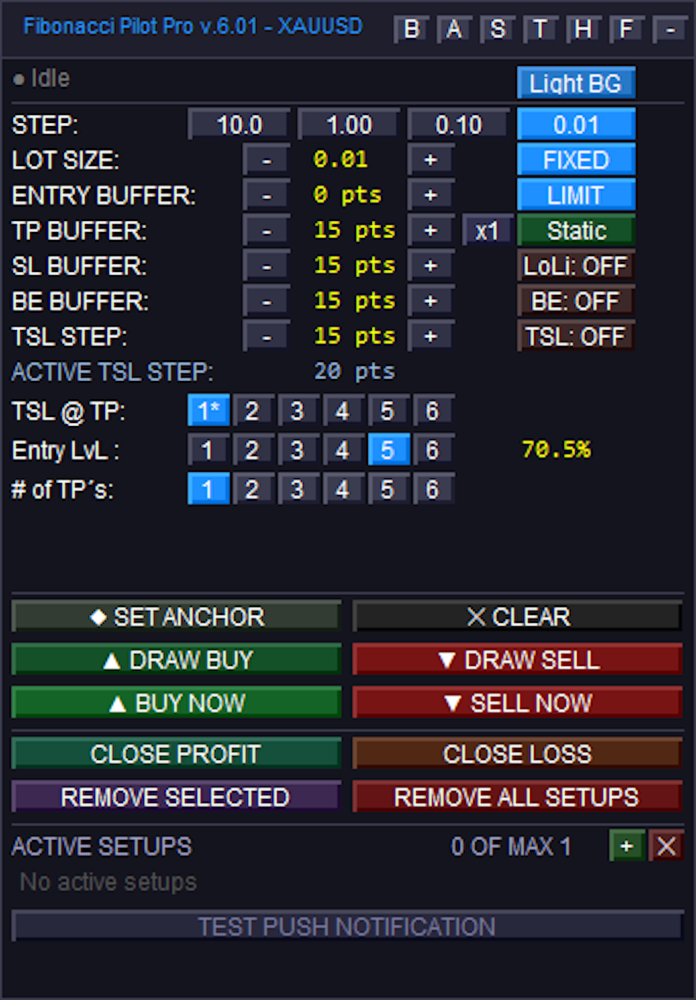
Main panel:
### Top Navigation & General Settings

Sub-Panel Toggles: The top right features small buttons to open or close specific sub-panels and modes. These toggle the Block Panel (`B`), Auto Panel (`A`), Symbol Panel (`S`), Trend Panel (`T`), Hover Info (`H`), Finetune (`F`), and Minimize (`-`).
Color Schema: Toggles the panel's visual theme. Its states alternate between "Light BG" and "Dark BG".
STEP: Four buttons used to set the increment amount for the `+` and `-` adjustments below. The states represent the point values: "10.0", "1.00", "0.10", and "0.01".

### Trade Parameters (Modifiers and Toggles)
LOT SIZE: Uses `+` and `-` to adjust volume. The adjacent toggle button switches the calculation mode, transitioning between "FIXED" lots and "Risk%".
ENTRY BUFFER: Uses `+` and `-` to adjust entry buffer distance. The adjacent toggle switches the execution mode between "LIMIT" and "INSTANT".
TP BUFFER: Uses `+` and `-` to adjust the Take Profit buffer distance. It includes a multiplier button (cycling from `x1` to `x5`) and a mode toggle that switches between "Static", "Spread", and "ATR".
SL BUFFER: Uses `+` and `-` to adjust Stop Loss distance. The adjacent toggle button controls the line extensions drawn to the left on the chart, switching between "LoLi: ON" and "LoLi: OFF".
BE BUFFER: Uses `+` and `-` to adjust Break Even locking distance. The adjacent toggle button enables or disables Break Even logic, switching between "BE: ON" and "BE: OFF".
TSL STEP: Uses `+` and `-` to adjust the Trailing Stop Loss step amount. The adjacent toggle button activates the trailing stop, switching between "TSL: ON" and "TSL: OFF".

### Fibonacci Targeting Rows
TSL @ TP: Six buttons numbered "1" to "6" used to designate which Take Profit target milestone will activate the trailing stop. The active selection will append an asterisk (e.g., `1*`) if the TSL toggle is currently active.
Entry LvL: Six buttons numbered "1" to "6" used to select which Fibonacci retracement level will dictate the entry price.
# of TP's: Six buttons numbered "1" to "6" used to select the total number of Take Profit extension levels to deploy for the setup.

### Drawing, Action, and Execution
Anchor Buttons: The "◆ SET ANCHOR" button activates manual anchor placement, changing its text to "● Click Chart..." while awaiting the user's chart click. The "✕ CLEAR" button deletes the manual anchor.
Drawing Buttons: The "▲ DRAW BUY" and "▼ DRAW SELL" buttons begin a manual drawing sequence. During the drawing process, they combine into a single button that changes states to indicate the current step: "— Awaiting Point A — CANCEL", "— Awaiting Point B — CANCEL", or "↺ RESET" (if the setup is fully drawn but unplaced).
Execution Buttons: When idle, these function as instant execution triggers, reading "▲ BUY NOW" and "▼ SELL NOW". If a limit setup has been successfully drawn on the chart, they transition to "▲ PLACE BUY" and "▼ PLACE SELL" to arm the pending limits.
Close Conditions: The "CLOSE PROFIT" and "CLOSE LOSS" buttons are used to force-close the currently selected active setup, provided the market is in the corresponding profit or loss state.
Removal Actions: "REMOVE SELECTED" deletes the highlighted setup, while "REMOVE ALL SETUPS" wipes all active setups from the chart.

### Setup Management List
List Controls: The green `+` button initializes a new blank setup slot, and the red `✕` button clears away all closed, cancelled, or inactive setups from the list.
Active Setup Rows: Clickable rows that select a specific setup and display its state (e.g., "Idle", "Limit Active", "Running"). If the setup is currently a pending limit order, an inline execution button appears reading "▶ MKT", which allows the user to immediately force the limit to execute at market price.
Test Push: The "TEST PUSH NOTIFICATION" button manually triggers a test alert to confirm mobile terminal notifications are configured correctly.


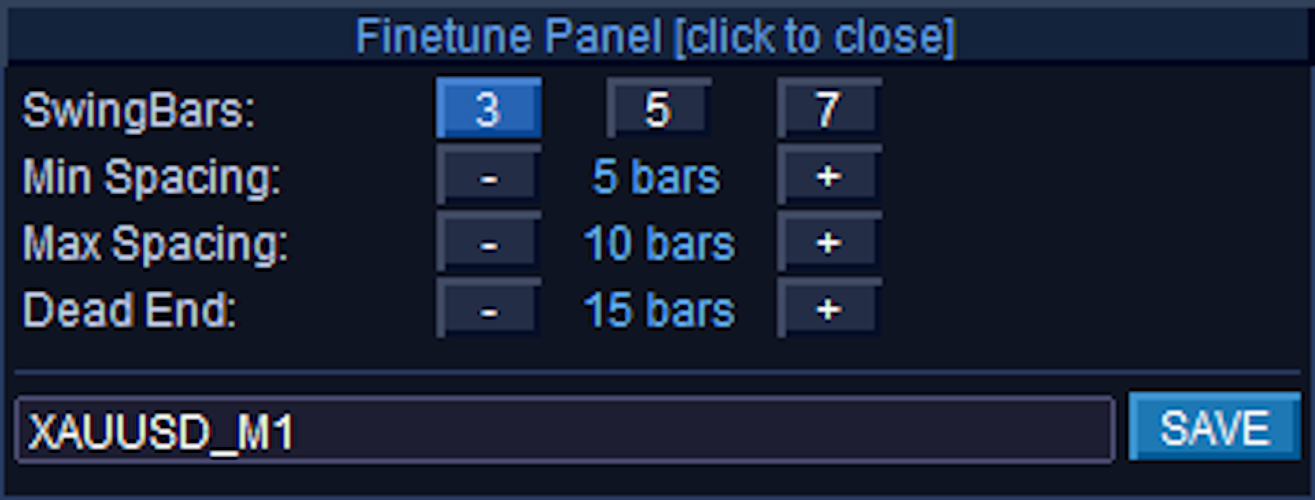
Finetune Panel:
### Finetune Panel Controls
Finetune Panel [click to close]: The entire top header bar functions as a button to minimize/hide the panel from the chart.
SwingBars: Three toggle buttons labeled "3", "5", and "7" that determine the fractal sensitivity (N-bar dominance) for detecting swing highs and lows. The currently selected mode is highlighted in bright blue, while the inactive options remain dark.
Min Spacing: Uses the `-` and `+` buttons to adjust the minimum number of chart bars required between opposite swings (e.g., from a Swing High to a Swing Low). The middle label displays the current value in bars, and changes to read "off" if the value is reduced to 0.
Max Spacing: Uses the `-` and `+` buttons to adjust the preferred maximum gap between opposite swings. Like Min Spacing, the label displays the value in bars and shifts to "off" if set to 0.
Dead End: Uses the `-` and `+` buttons to set the maximum allowed distance before a "dead end" warning is triggered, which reinstates the nearest suppressed swing if a gap gets too large. The label displays the current value in bars and shifts to "off" if set to 0.
Preset Name (Text Box): This is an editable text input field (showing "XAUUSD_M1" in your image) rather than a standard button. It automatically defaults to the current chart symbol and timeframe, but allows you to type in a custom filename.
SAVE: Clicking this button takes the current SwingBars, Min Spacing, Max Spacing, and Dead End values and writes them to a `.set` file in your terminal's `Presets\` folder, using the exact name typed in the text box next to it.


Trend Panel:
### Header & Layout Controls
Trend Panel [click to close]: The top header bar acts as a button to completely hide the Trend Panel from the chart.
Expand / Collapse Toggle: The full-width button just below the score summary toggles the expanded view. It switches states between "[-] Hide individual indicators" and "[+] Show individual indicators".

### Individual Oscillator Controls
ON/OFF State Toggles: The column of buttons currently displaying "OFF" in brown/dark red controls whether that specific indicator contributes to the overall Trend score. When clicked, they switch to an active "ON" state (green).
Note on BBPow: The Bull/Bear Power indicator has a special 3-state toggle instead of a standard ON/OFF. It cycles between "OFF" (red), "M:1" (purple), and "M:2" (magenta) to dictate different visual color modes when plotted.
To Chart: Injects the indicator visually onto your main chart or into a sub-window. When inactive, the button is grey; when active, it highlights in bright blue. *(Note: StochRSI and UltOsc do not have "To Chart" buttons)*.
Period Steppers (`-` and `+`): For the top 9 basic oscillators (RSI through DeMarker), these buttons dynamically adjust the lookback period, which updates the number in the middle. The bottom 6 complex oscillators (PSAR through UltOsc) use fixed parameters configured in the EA settings, represented by the static gold text instead of buttons.

### Moving Average (MA) Grid Controls
MA Mode Toggles: The column of buttons on the far right of the MA list (currently showing "BOTH" in orange) cycles the specific moving average calculation type for slots P1 through P6. Clicking them rotates the state between "OFF" (dark red), "EMA" (green), "SMA" (blue), and "BOTH" (orange).
To Chart: Renders the active MA pair directly onto the price chart. When activated, the button color changes from grey to explicitly match the color of the corresponding lines drawn on the chart (e.g., DeepSkyBlue, LimeGreen, Orange, etc.).
VWMA & HMA Steppers (`-` and `+`): These buttons adjust the lookback periods specifically for the Volume Weighted MA and Hull MA.

### Bottom Configuration Panel
MA Pair (1 through 6): These six buttons select which specific MA Pair slot (P1-P6) you want to configure. The currently selected slot is highlighted in bright purple/blue, while the others remain dark.
Period (`-` and `+`): These steppers directly alter the lookback period for whichever MA Pair is currently highlighted in the row above it.


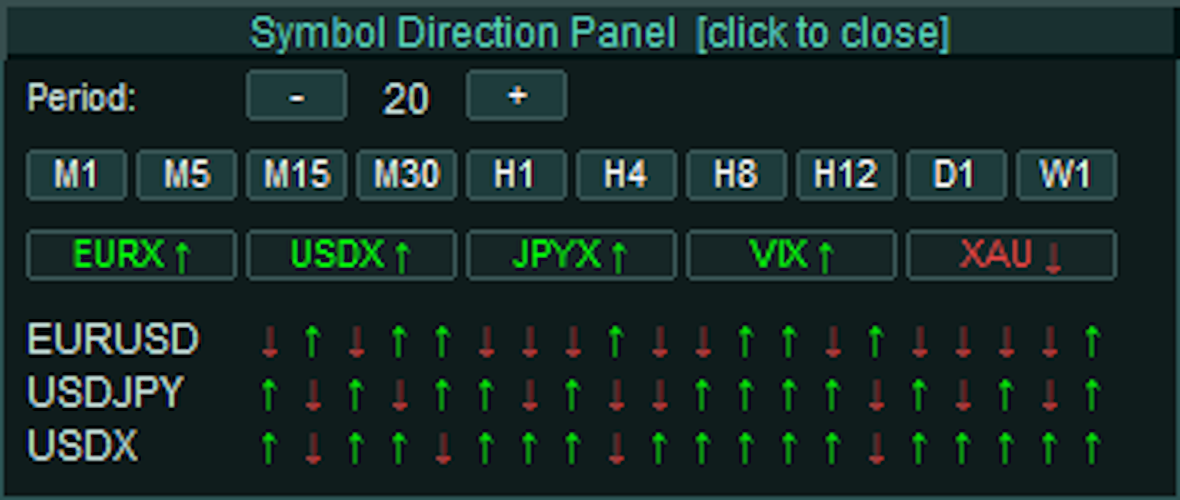
Symbol Direction Panel:
### Header & Layout Controls
Symbol Direction Panel [click to close]: The top header bar acts as a single, full-width button to completely hide the Symbol Panel from the chart.

### Timeframe & Period Controls
Period (`-` and `+`): These stepper buttons adjust the number of historical bars evaluated for the directional arrows. Clicking them increases or decreases the value displayed in the center, ranging from a minimum of 3 up to a maximum of 20 bars.
Timeframe Quick-Select (M1 to W1): A row of ten buttons used to select the active timeframe for the panel's data calculation, operating completely independently of your main chart's timeframe.
State: The currently selected timeframe (e.g., "M30" in your image) highlights with a brighter teal background, while inactive timeframes remain a darker muted teal.

### Highlight Basket Slots
Basket Buttons (e.g., EURX, USDX, XAU): A dynamic row of interactive buttons representing user-defined individual indices or multi-symbol baskets parsed from the EA's settings. Clicking one of these buttons opens a secondary "Highlight Info HUD" to provide a detailed statistical breakdown of its internal components.
Text & Arrow State: The text and directional arrow on the button dynamically change color to reflect the aggregate momentum of the basket's members over the selected period. Green with an up arrow (↑) indicates bullish dominance, Red with a down arrow (↓) indicates bearish dominance, and Grey with a right arrow (→) indicates a neutral or invalid state.
Background State: When actively clicked to display its Info HUD, the button's background highlights in bright teal. When closed/inactive, it remains a dark slate color.
(Note: The bottom section displaying specific symbols like EURUSD, USDJPY, and USDX alongside their respective red and green arrows are non-interactive informational text labels, not clickable buttons. They visually map the close-versus-open direction of the most recent bars based on your specific Period and Timeframe settings).

Symbol Direction Panel - Highlight Info HUD:
The data is split into two halves: **Period** statistics and **Day** statistics.

### Period Statistics (Per)
These calculations are dynamically based on the exact Timeframe and Period limit you set on the main Symbol Panel (e.g., the last 20 bars on the M30 chart).
Symbol: The individual asset within the basket (e.g., XAUUSD, XAUEUR).
H/L Per: The absolute highest price and lowest price reached during your defined period.
% Per & Pts Per: The total range of movement between that period's High and Low, measured in both percentage and raw points.
F->L% P & F->L Pts: Stands for "First to Last". This measures the net momentum by comparing the opening price of the *first* bar in your period to the closing price of the *last* bar, displayed in percentages and points.

### Daily Statistics (Day)
These calculations completely ignore your panel settings and look strictly at the current daily candle (`PERIOD_D1`) to give you a macro perspective of today's price action.
H/L Day: The absolute highest and lowest prices reached today.
% Day & Pts Day: The total range of movement between today's High and Low, measured in percentages and points.
F->L% D & F->L Pts: The "First to Last" net change for the current day. This directly compares today's Daily Open price against the current live price, telling you exactly how far the asset is up or down on the day in both percentages and points.
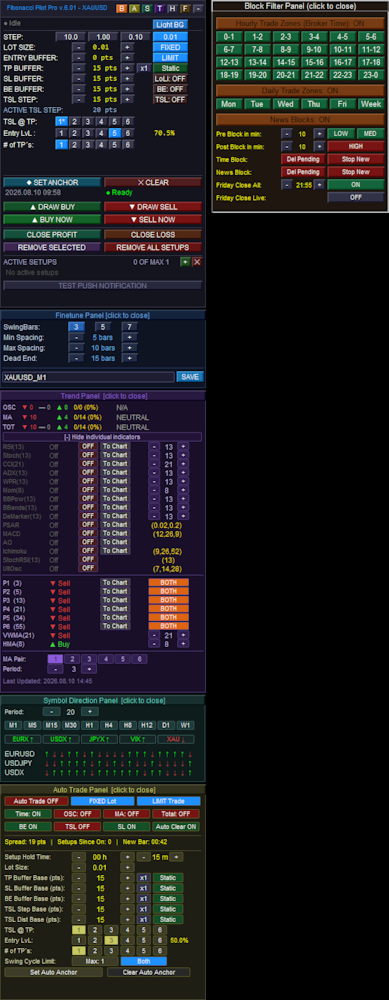
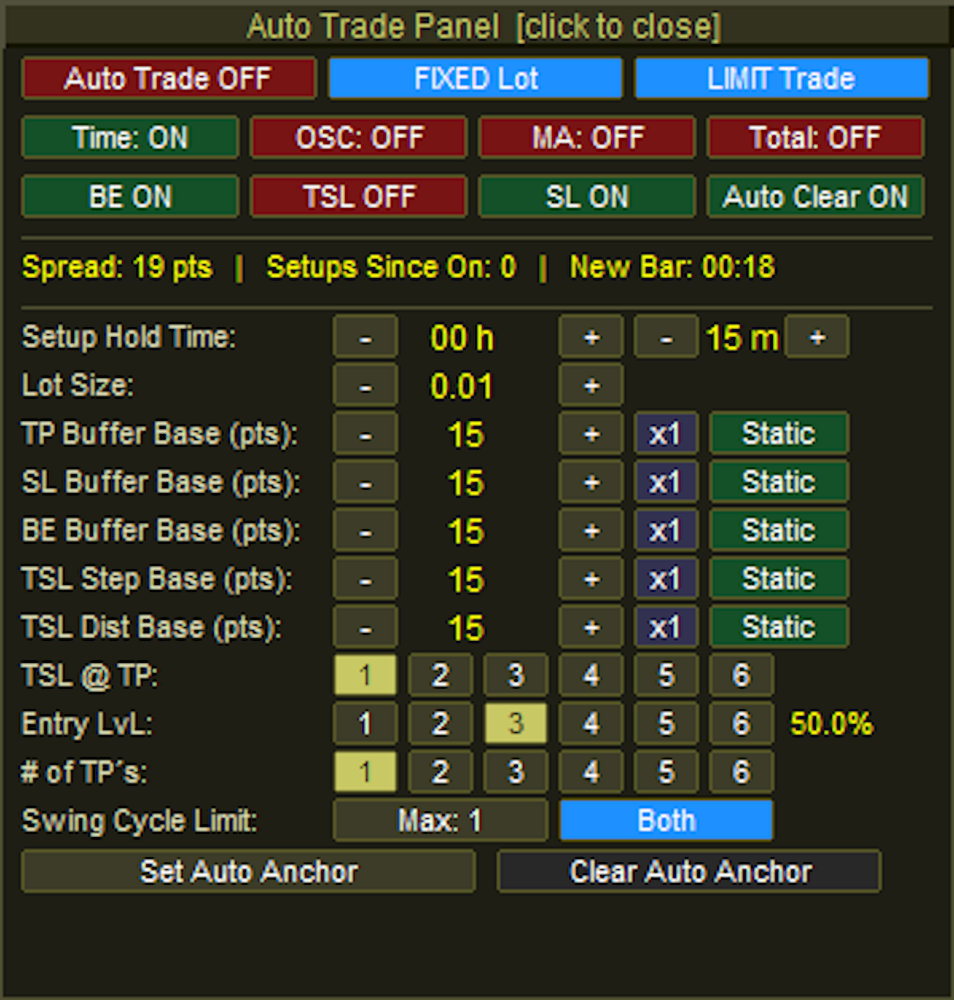
Auto Trade Panel:
### Header & Top Execution Controls
Auto Trade Panel [click to close]: The top header bar acts as a full-width button to minimize and hide the Auto Panel from the chart.
Auto Trade Master Toggle: Enables or disables the entire automated trading engine. The button switches between "Auto Trade OFF" (Red) and "Auto Trade ON" (Green).
Lot Type Toggle: Switches the volume calculation method between "FIXED Lot" (Blue) and "RISK %" (Orange).
Order Mode Toggle: Cycles through the execution methods the EA will use when a setup is detected. It rotates between "LIMIT Trade" (Blue), "INSTANT Trade" (Orange), and "BREAKOUT" (Purple).

### Filter & Management Toggles
Filters Row (Time, OSC, MA, Total): Four independent toggle buttons that enforce specific entry conditions before an auto-trade is allowed. Each button flips between an active "ON" state (Green) and an inactive "OFF" state (Red).
Management Row (BE, TSL, SL, Auto Clear): Four independent toggles managing the lifecycle of the auto-trade. They control whether Break Even, Trailing Stops, and Master Stop Losses are applied, as well as if closed setups are automatically removed from the screen. Like the filters, they alternate between Green ("ON") and Red ("OFF").

### Inputs, Steppers, & Dynamic Buffers
Setup Hold Time: Two pairs of `-` and `+` stepper buttons. The first pair adjusts the expiration hours (e.g., `00 h`), and the second pair adjusts the expiration minutes (e.g., `15 m`). If a pending limit order is not triggered within this window, the EA cancels it.
Lot Size / Risk %: Uses `-` and `+` buttons to adjust the trading volume. The text label dynamically changes based on the Lot Type toggle in the top row.
Buffer Base Rows (TP, SL, BE, TSL Step, TSL Dist):
Base Steppers (`-` and `+`): Adjusts the raw point value for the respective buffer.
Multiplier Button: A clickable button (e.g., `x1`) that cycles from `x1` up to `x5`. This multiplies the dynamic volatility value if a dynamic mode is selected.
Mode Toggle: Cycles the calculation method for the buffer. It rotates between "Static" (Green), "Spread" (Red), and "ATR" (Blue). *(Note: The TP Buffer has a fourth option: "TP+Sprd")*.

### Targeting Matrices
TSL @ TP: Six buttons numbered "1" to "6" used to designate which Take Profit target milestone must be reached to activate the trailing stop. The active selection is highlighted in khaki/yellow, while inactive slots are dark grey.
Entry LvL: Six buttons numbered "1" to "6" that dictate which Fibonacci retracement level the pending order will be placed at. A text label to the right automatically displays the corresponding percentage (e.g., `50.0%`).
# of TP's: Six buttons numbered "1" to "6" that determine the total number of Take Profit extension levels to deploy for the auto-setup.

### Cycle Limit, Direction, & Anchors
Swing Cycle Limit: A button that increments the maximum allowed consecutive setups the EA will trade off the same Point A anchor. It increments up to your global `MaxSetups` limit before resetting to 1.
Direction Toggle: Cycles the permitted market direction for automated entries. It rotates between "Both" (Blue), "Bullish" (Green), and "Bearish" (Red).
Anchor Buttons:
Set Auto Anchor: Initiates the manual selection of the auto-trade starting point. When clicked, the button turns a muted gold and the text changes to "Click Chart..." while awaiting the user's input.
Clear Auto Anchor: Wipes the active automated anchor line from the chart and halts the auto-scanning engine.


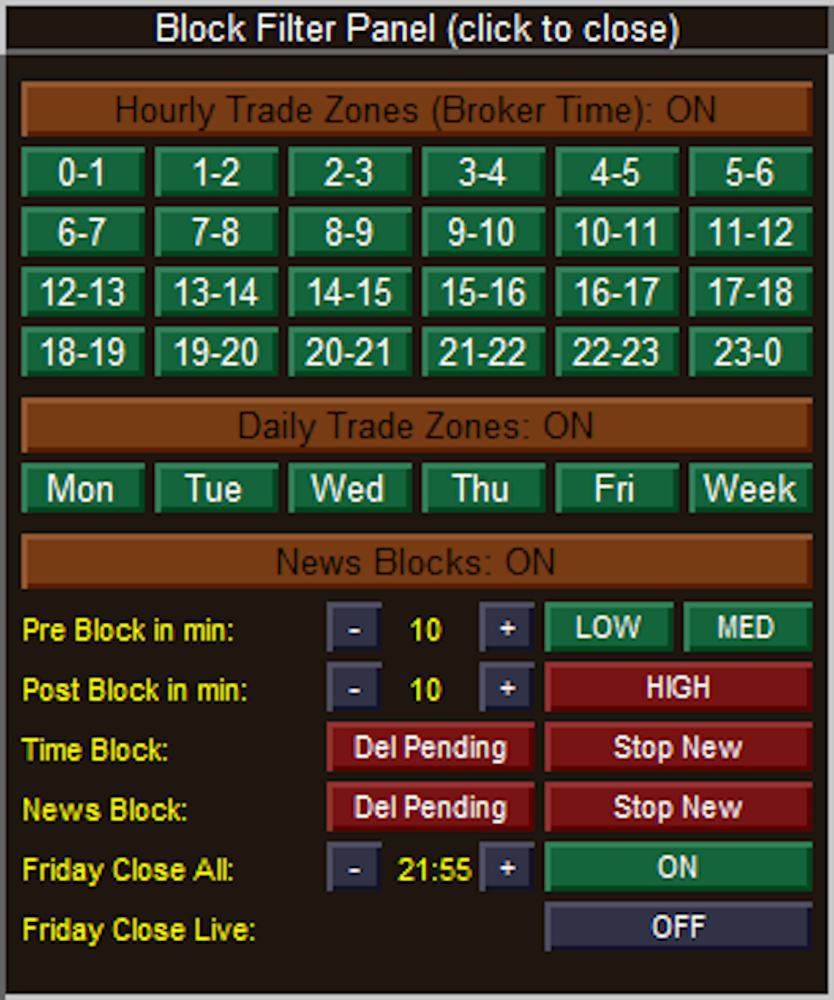
Block Filter Panel:
### Header & Master Toggles
Block Filter Panel (click to close): The topmost header bar acts as a full-width button to minimize and completely hide the Block Filter Panel from the chart.
Hourly Trade Zones (Broker Time): A master toggle header that enables or disables the entire 24-hour time-blocking matrix below it. The text dynamically updates between "ON" and "OFF".
Daily Trade Zones: A master toggle header that enables or disables the specific days-of-the-week blocking matrix below it.
News Blocks: A master toggle header that enables or disables the entire economic calendar filtering engine.

### Matrix Controls (Hourly & Daily)
24-Hour Matrix (0-1 through 23-0): Individual toggle buttons for every hour of the day.
State: Green indicates trading is Allowed during that hour. Red indicates trading is Blocked.
Daily Matrix (Mon through Week): Individual toggle buttons for specific trading days, where "Week" represents the weekend (Saturday/Sunday).
State: Green indicates trading is Allowed on that day. Red indicates trading is Blocked.

### News & Safety Filter Settings
Pre & Post Block in min: Uses `-` and `+` stepper buttons to define the safety window (in minutes) surrounding an economic news event.
Impact Toggles (LOW, MED, HIGH): Three separate buttons to determine which levels of economic news impact will trigger a trading suspension.
State: Green means the block is inactive (the EA will ignore news of this impact level). Red means the block is active (trading will be suspended for these events).
Time Block Actions: Two action toggles dictating what the EA should do when a scheduled Hourly or Daily block begins.
Del Pending: If Red (ON), un-triggered pending limit orders will be deleted. If Green (OFF), pending orders are left alone.
Stop New: If Red (ON), the EA is forbidden from calculating and placing new trades. If Green (OFF), new trades are permitted.
News Block Actions: Two action toggles dictating what the EA should do when an active News event hits its pre- or post-block window. They function exactly the same as the Time Block Actions, turning Red when active and Green when inactive.

### Friday Close Options
Friday Close All: Enables the failsafe to halt Friday trading based on a specific cutoff time.
Time Steppers: The `-` and `+` buttons adjust the cutoff time (displayed in the center) in 15-minute increments.
Toggle State: The rightmost button switches the feature between "ON" (Green) and "OFF" (Dark Grey).
Friday Close Live: Dictates whether the EA should aggressively force-close actively running, live trades when the Friday cutoff time is reached. The button switches between "ON" (Green) and "OFF" (Dark Grey).


Hover Panel:
SH 2026.08.10 10:24:** Identifies the type of swing and its exact timestamp. **SH** stands for **S**wing **H**igh (a market peak), whereas a trough would display **SL** for **S**wing **L**ow. The red color corresponds to your bearish/high settings.
Price: The exact price level of that specific swing point (the absolute high of that candle's wick). If this swing point was currently being used as Point A or Point B for an active setup, an extra tag would appear here to let you know.
Left spacing: Shows there are 10 bars between this swing high and the previous swing point recorded on the chart. The text is green because 10 bars passes your EA's minimum spacing filter.
Right spacing: Shows there are 7 bars between this swing high and the *next* swing point that formed after it.
Status (Confirmed): This means the swing has fully passed your "SwingBars" fractal requirement (e.g., if set to 5 bars, it successfully formed the required lower highs on both the left and right sides). If a swing was still forming on the live edge of the market, this would read "Pending", and if it was brought back by your Dead End filter, it would read "Rescued*".
▲ 2463 pts from current: This is a live distance tracker. It tells you that this specific swing high is exactly 2,463 points *above* (indicated by the up arrow) the current live market price.


Symbol Direction Panel - Highlight Info HUD:
The data is split into two halves: **Period** statistics and **Day** statistics.
### Period Statistics (Per)
These calculations are dynamically based on the exact Timeframe and Period limit you set on the main Symbol Panel (e.g., the last 20 bars on the M30 chart).
Symbol: The individual asset within the basket (e.g., XAUUSD, XAUEUR).
H/L Per: The absolute highest price and lowest price reached during your defined period.
% Per & Pts Per: The total range of movement between that period's High and Low, measured in both percentage and raw points.
F->L% P & F->L Pts: Stands for "First to Last". This measures the net momentum by comparing the opening price of the *first* bar in your period to the closing price of the *last* bar, displayed in percentages and points.

### Daily Statistics (Day)
These calculations completely ignore your panel settings and look strictly at the current daily candle (`PERIOD_D1`) to give you a macro perspective of today's price action.
H/L Day: The absolute highest and lowest prices reached today.
% Day & Pts Day: The total range of movement between today's High and Low, measured in percentages and points.
F->L% D & F->L Pts: The "First to Last" net change for the current day. This directly compares today's Daily Open price against the current live price, telling you exactly how far the asset is up or down on the day in both percentages and points.
Recommended products
Opal MT5
Oeyvind Borgsoe
This is the official version of Opal EA, a powerful tool using cutting-edge algorithms and AI-driven calculations. This fully automated EA encompasses the exceptional qualities we associate with the opulent gemstone: proper decision-making, prudence and strong protection. Be aware of cracked versions/unofficial copies that either work only on demo accounts or are sold at suspiciously low prices. These reportedly lead to rapid account losses.   Opal also takes into account the study of psychol
Momentum Master EA
Goyani Piyushbhai
MOMENTUM MASTER EA: The Pinnacle of Momentum Trading Master the Markets with Precision and Power The Momentum Master EA is a cutting-edge Expert Advisor built to capitalize on the power of momentum indicators for exceptional trading outcomes. By seamlessly integrating top-tier technical tools like MACD , Bollinger Bands , RSI , and the Momentum Indicator , this EA offers a dynamic and comprehensive approach to trading in today's fast-paced markets. Features That Set Momen
Gold Range Grid Mean Reversion — version 4.20 Current strategy: Gold Regime H1 Pro, an H1 trend-following system. Additional entries are disabled by default. October 2026 update kit: setup notes, executable defaults and matched simulation summary . MT5 Setup Hub . Follow gold trends from one H1 chart, with exposure that adapts to volatility and ATR-based trade management. Designed for traders who want clear rules and a return/drawdown comparison before choosing an automated strategy. Product ide
Brent Precision Pro is an intraday Expert Advisor for MetaTrader 5, designed for Brent oil CFDs. It combines long reversals, short reversals and break-and-retest entries, with stop-loss management and shared account risk controls. It does not use grid, martingale or averaging down. Strategy Version 1.40 selects its entry logic according to the current spread. The lower-spread regime retains the previous M3 reversal and M5 break-and-retest logic. The higher-spread regime uses M15 signals, additio
Phoenix Midas
Alvaro Albillos Gutierrez
Phoenix Midas is an order-flow Expert Advisor built specifically for XAUUSD (Gold) on the M15 timeframe. It reads market structure through synthetic order-flow analysis — volume delta, volume profile (POC / value area) and liquidity behaviour — to time entries on two complementary setups, and it manages every trade with a fixed, pre-defined risk. Built-in news filtering and prop-firm risk controls make it suitable for both personal accounts and funded-challenge environments. WHAT IT IS NOT
Aurum Apex Gold
Shashvat Singham
Aurum Apex Gold trades one instrument -- XAUUSD -- with one idea: institutions fill large orders where retail stops sit, and the reversal that follows is tradable when, and only when, price confirms it. How a trade is built 1. Liquidity sweep. A tracked pool of resting orders (previous day/week    high or low, session extreme, equal highs/lows, untapped swing) is    penetrated and then reclaimed. Penetration and reclaim are both measured in    ATR, never in fixed points, so the logic scales w
Rebate Hunter Apex — Trade Smarter. Rebate More. ONE EA. MULTIPLE STRATEGIES. MORE CONTROL. Optimized for XAUUSD (GOLD) | M1 Recommended POWERFUL FEATURES Enhanced Trade-Quality Logic Spike Protection for Gold Adaptive Trend & Range Trading Optional Averaging Grid Optional News Filter Optional Hedge Mode Conservative, Balanced, Aggressive & Manual Presets Multi-Timeframe Confirmation Profit Lock & Risk Management MANUAL CONTROL & TRADE MANAGEMENT Manual Control
PipFinite EA Breakout EDGE MT5
Karlo Wilson Vendiola
5 (3)
The Official Automated Version of the Reliable Indicator PipFinite Breakout EDGE EA Breakout EDGE takes the signal of PipFinite Breakout EDGE indicator and manages the trade for you. Because of numerous financial instruments to consider, many traders want the signals to be fully automated. The EA will make sure all your trades are executed from entry to exit. Saving you time and effort while maximizing your profits. The Edge of Automation Effortless price action trading is now possible acros
Extended Round 1 Special Pricing for Early Adopters | Current Price: $299 - Only 10 copies left at this price | Next Price: $399 Aureus MT5 is a cutting-edge Expert Advisor designed exclusively for trading Gold. Combining the precision of a price reversal trading strategy with advanced machine learning, Aureus MT5 provides traders with a reliable tool to navigate the complexities of the Gold market. Strategy Aureus MT5 employs a multi-faceted approach with three distinct price reversal strat
Smart Pattern AtrShield
Nuno Miguel Costa Tome
Self-learning core – scans the last 500 candles, extracts RSI + MA-slope patterns  Real-time adaptation – each bar updates accuracy scores and votes on the most similar patterns before opening a trade. Volatility-aware risk – every position starts with a stop-loss equal to ATR(14) × 1.5 , automatically wider in fast markets and tighter in calm ones. Ultra-light, 100 % MQL5 – minimal CPU load, works on any broker, any symbol. Full source code included – transparent, modifiable, future-proof.
ProTrade EA
Jim Ariel Camarce Ignao
Key Features   Automated Candle Pattern Recognition 10 Professional Patterns : Detects Bullish/Bearish Engulfing, Hammer/Shooting Star, Morning/Evening Star, Piercing/Dark Cloud, and 6 additional professional candlestick patterns Smart Filtering : Combine multiple patterns with configurable confirmation logic Volume Confirmation : Optional volume filter to validate pattern strength Multi-Timeframe Analysis : Separate execution and bias timeframes for better timing   Trading Dashboard Int
Alpha Bullish Engine MT5 Overview Alpha Bullish Engine(No Martingale, no Grid) is a professional Expert Advisor for MetaTrader 5 designed to identify and trade high-quality market bullish opportunities while maintaining a strong focus on risk management and capital preservation. Built with a combination of trend analysis, momentum assessment, and intelligent trade management, the EA is designed to operate in favorable market conditions while avoiding unnecessary exposure during less suitable env
Short Description Swing Timing Breakout EA is a smart Expert Advisor for MetaTrader 5 that combines trend filtering, momentum timing, and dynamic risk management to capture high-probability swing and breakout opportunities. Full Description Swing Timing Breakout EA is a professional trading robot designed for MetaTrader 5, suitable for traders who want a balance between automation, control, and disciplined risk management. This EA uses a trend-following and momentum confirmation approach ,
Exclusive Imperium MT5 — Automated Trading System Exclusive Imperium MT5 is an Expert Advisor for MetaTrader 5, based on market analysis algorithms and risk management. The EA operates in a fully automated mode and requires minimal trader intervention. Attention! Contact me immediately after purchase to receive setup instructions! IMPORTANT: All examples, screenshots, and tests are provided for demonstration purposes only. If a certain currency pair shows good results with one broker, it does no
Aura Gold Pro Edition
Stanislav Tomilov
4.56 (9)
Built to dominate the gold market. Official Information Seller profile Official channel User Guide LIMITED PRICE — $599 Aura Gold Pro Edition is available for $599 until the end of October . Starting November  1 , the price will increase to $999 — secure your copy before the price goes up. Live Trading Signals  Roboforex https://www.mql5.com/en/signals/2366593 FPMarkets https://www.mql5.com/en/signals/2358523 ICTrading https://www.mql5.com/en/signals/2380859 Description Aura Gold PRO Edition is
Manofgold
Eakkarach Wikeng
Trend & Grid V36 Instant Trend & Grid V36 Instant is a high-performance hybrid Expert Advisor (EA) designed to combine Trend-Following logic with an intelligent Grid Management system. It utilizes EMA 25 and 50 on the M5 timeframe to identify market direction while employing a sophisticated recovery mechanism to handle market retracements. SPECIAL PROMO & PRICE UPDATE: To maintain the exclusivity and quality of support, the price will DOUBLE after every 5 copies sold. Get your copy now at the
Scalping bot for the gold/dollar pair (XAU/USD) — a powerful and versatile solution for traders, designed to deliver maximum efficiency in a dynamic market. This bot is specifically engineered for scalping: it analyzes price changes and places trades even before significant market movements begin. This allows it to secure advantageous positions early and capitalize on even the smallest market fluctuations. Key Features: Flexibility: Adapts to any market conditions and suits your trading strategy
Bober Real MT5
Arnold Bobrinskii
4.88 (16)
Bober Real MT5 is a fully automatic Forex trading Expert Advisor. This robot was made in 2014 year and did a lot of profitbale trades during this period. So far over 7000% growth on my personal account. There was many updates but 2019 update is the best one. The robot can run on any instrument, but the results are better with EURGBP, GBPUSD, on the M5 timeframe. Robot doesn't show good results in tester or live account if you run incorrect sets. Set files for Live accounts availible only for cu
BTC Smart Hunter
Puguh Andrie Setia Aji
BTC Smart Hunter for MetaTrader 5 Overview BTC Smart Hunter is an automated breakout trading Expert Advisor (EA) designed specifically for BTCUSD on MetaTrader 5 . The EA focuses on identifying significant breakout opportunities while avoiding many common false signals through multiple built-in market filters. Instead of opening trades randomly, BTC Smart Hunter continuously analyzes recent price action, detects important breakout levels, and places pending orders only when predefined market con
MercuryX
Ziyodullo Kamolov
MercuryX is an automated grid based Expert Advisor for MetaTrader 5. It manages trading cycles on the selected instrument and offers settings that can be adapted to broker conditions. Its internal entry and position management rules remain part of the product and are not disclosed in this description. Features: • Configurable position size and grid level limits. • Trading condition filters and position management settings. • Configurable cycle exit and an optional loss limit. Main input groups
Eldan
Danail Palhutev
Swing Trading Expert Advisor - a reliable tool for efficient market trading. This Expert Advisor is designed to automate swing trading strategies in financial markets. It uses proven indicators such as Moving Average (MA) and Average True Range (ATR) to identify the most suitable entry and exit points. This allows you to follow current market movements and trade in the direction of the trend. The advisor works with a fixed volume and also has flexible parameter settings for risk management, i
| Fully-automated Smart Money Concept (ICT) inspired trading solution with multi-strategy capabilities | Built by a grid trader >> for grid traders.  This is MT5 version, click  here  for  Blue CARA MT4  (settings and logics are same in both versions)     Real monitoring signal  -->  Cara Gold Intro Blue CARA EA   ('CARA') - short for  C omprehensive  A lgorithmic   R esponsive   A dvisor is a next-gen  multi-currency    multi-timeframe  EA base on the widely known (and perhaps the most popul
NextGen Premium is an automated Expert Advisor for MetaTrader 5 designed primarily for XAUUSD (Gold). The EA uses a two-sided pending order grid. It places Buy Stop orders above the current market price and Sell Stop orders below the current market price. The EA does not use indicators or trend prediction to determine the trading direction. Orders are activated when market price reaches the corresponding pending order level. The EA is designed to maintain a structured grid and includes position
This Expert Advisor can be applied to many markets because It exploits basic supply/demand and price action concepts. It identifies the major rotation zones (PRZ), supply and demand zones and supports and resistances within major price trends. It buys at discount zones and sells at premium prices. It can and should be optimized through the Metatrader tester to find the best parameters to use for current market conditions. This is not a fixed strategy rather a full trading algo that will find whi
Disruptive Edge
Jarmin Jamike Ugorji
Disruptive Edge EA is an innovative Expert Advisor developed from the concept of disruptive technology. It incorporates technical analysis strategy based on the various price movements, patterns, trends, retrenchments and reversals which are carefully coded into the system. It use s a flexible and dynamic execution trading algorithm which depends on price action/ movement to execute very high precision trades. All trades are protected with a hard stop loss. Very good risk management is an integr
Classic Market Surfer EA - A Timeless, Proven Strategy for Gold Trading For years, this powerful trading strategy has been hidden from the public-reserved for a select few. Now, for the first time, the Classic Market Surfer EA is available to traders like you.   Built on pure, time-tested trading principles, this EA doesn't rely on trendy gimmicks like AI or machine learning. Instead, it harnesses a classic, robust strategy that has consistently delivered results over the years. This is not a "g
Akk Striker
Akkhadet Vijitto
KK STRIKER is a professional automated trading system built to dominate Gold (XAUUSD) with intelligent momentum entries and advanced capital protection. Designed for traders who want consistent performance without emotional trading . Why AKK STRIKER Works Trades only high-probability momentum moves Smart recovery system to manage market pullbacks Individual profit trailing on every trade Built-in risk control and drawdown protection Fully automated – no manual trading needed Smart
Gold Liquidity Master Pro H4
Oscar Dario Murillo Delgado
Gold Liquidity Master Pro is a high-precision algorithmic trading system designed exclusively for Gold (XAUUSD). Unlike conventional bots that use lagging indicators, this Expert Advisor (EA) operates based on Price Action and Institutional Liquidity Taking, identifying false breakouts on 4-hour (H4) candles where large banks typically "clean up" weak hands before a major move. Recommendations Symbol: XAUUSD (Gold) Timeframe: H4 Minimum Deposit: $500  Account Type: ECN / Raw Spread with low
PipFinite EA Trend PRO MT5
Karlo Wilson Vendiola
3.67 (9)
The Official Automated Version of the Powerful Indicator PipFinite Trend PRO EA Trend PRO trades the signal of PipFinite Trend PRO and manages the trade depending on the user's preference. The EA includes many customizable features that can further enhance the Trend PRO trading strategy. Features like Entry and Exit Filters, Higher Timeframe Filter, Stoploss, Takeprofit, Breakeven, Trailing Stop, News Filter and MORE! The Innovative Solution EA Trend PRO was created to make your trading more
Iconic BTC AI
Maurice Prang
5 (1)
ICONIC BTC AI+ | SYNAPSE.PHENOTYPE S6 ENGINE (Version 15.00) Launch Pricing Current price: 599 USD. Available licenses: 10. Next price tier: 699 USD. Final price: 1699 USD. Early access pricing reflects the current phase of the product release. Pricing will step up as the license contingent closes and subsequent tiers open. There is no scheduled date after which the current price remains available. Bitcoin is not a Forex pair. It does not behave like gold, does not respect session boundaries th
Buyers of this product also purchase
My AI Gold
Vitalii Kosov
4.92 (26)
AI-DRIVEN GOLD TRADING REVOLUTION -------------------------------------------------------------------------------- My AI Gold is not just another automated trading tool—it is the culmination of advanced neural network engineering, proprietary custom architecture, and rigorous real-world optimization. Built from the ground up utilizing cutting-edge repositories and state-of-the-art machine learning frameworks from GitHub, My AI Gold harnesses deep data analysis to decode the complexities of the
The Gold Reaper MT5
Profalgo Limited
4.36 (116)
PROP FIRM READY! ( download SETFILE ) WARNING: Only a few copies left at current price! Final price: 990$ Get 1 EA for free (for 3 trade accounts) -> contact me after purchase Ultimate Combo Deal   ->   click here JOIN PUBLIC GROUP:   Click here Live Signal YouTube Reviews LATEST MANUAL Welcome to the Gold Reaper! Build on the very succesfull Goldtrade Pro, this EA has been designed to run on multiple timeframes at the same time, and has the option to set the trade frequency from very conserv
Hedgehog MT5
Thomas Christoph Lipka
4.89 (9)
HEDGEHOG MT5 Precision in Gold Trading. Intelligence in Every Decision. Hedgehog MT5 is an advanced automated trading system developed specifically for Gold (XAUUSD) on MetaTrader 5. Focused on precision, selectivity, and execution quality, Hedgehog MT5 combines sophisticated market analysis with intelligent order management and a structured approach to automated trading. Rather than reacting to every price movement, the system is designed to identify relevant market opportunities and respond wh
Quantum Titan MT5
Bogdan Ion Puscasu
4.76 (51)
Bringing institutional-grade trading to the Quantum ecosystem, Quantum Titan sets a new standard for precision, discipline, and proven live-market performance. Developed for traders who expect more from a GOLD Expert Advisor, Titan represents the next evolution of Quantum trading technology. Availability is strictly limited to 1,000 lifetime licenses worldwide. Once all 1,000 copies have been claimed, Quantum Titan will no longer be available. Special launch discount price. Final price $1999
MoonDog EA
James Vito Armin Bianchini
4.35 (51)
CHRISTMAS SPECIAL — $50 OFF FOR A LIMITED TIME To celebrate the holiday season, MoonDog EA is currently available with a $50 discount . This limited Christmas offer will end after the holiday period. VIEW THE MAIN MOONDOG LIVE SIGNAL  OFFICIALE SET AND THE ONE RECOMMENDED VIEW THE SECOND MOONDOG LIVE SIGNAL  SET 4 MORE TRADES ( UNDER TEST FOR NOW ) START HERE — USER GUIDE OPEN THE COMPLETE MOONDOG V4.18 USER GUIDE These signals are provided for transparency. They may include earlier MoonDog ver
The Invincible
Vitalii Kosov
5 (5)
The Invincible — Built to Survive. Designed to Dominate The Invincible is an advanced AI-driven Expert Advisor built specifically for the XAUUSD / Gold market. It is designed for traders who want a clean, structured, and professional trading system — without martingale, without grid, without hedging, and without any dangerous recovery tricks hidden inside the logic. This is not a system that tries to survive by averaging losses or multiplying positions. The Invincible works with a disciplined tr
AiX Gold MT5
William Brandon Autry
5 (2)
AiX GOLD — BUILT FOR GOLD. One market. Up to seven breakout strategies. Optional AI review. AiX identifies breakout opportunities at established daily and hourly price levels. It prepares the entry, sets the stop loss and profit target, then manages the trade with break-even and trailing rules. Read the AiX Gold story: the strategy, long-term backtests and how Jev is used. NO RECOVERY TRADING. NO GRID. NO MARTINGALE. Every trade starts with a predefined stop loss. Each pending entry is submitted
Gold Beaver
Arnold Bobrinskii
4.43 (7)
Gold Beaver - limited offer $449 now. Next price $499. 10 copies left at this price GOLD BEAVER MT5  > Live signal Attach Gold Beaver to any XAUUSD chart, on any timeframe, and it trades. The default preset, Combo Safe , is ready to run.  Not HFT. No low-latency VPS is needed. Signals are evaluated on M15 candle boundaries, so testing on OHLC M1 is enough. No martingale. No grid. No averaging. Every position gets a stop loss the moment it opens. The strategies were built with a custom Python re
TitanForge EA MT5
Maxim Kurochkin
5 (17)
TITANFORGE EA MT5 ALGORITHMIC IMPULSE SWING SYSTEM FOR XAUUSD H1 TitanForge EA is an automated trading system developed specifically for Gold on the H1 timeframe. The strategy focuses on directional momentum, volatility expansion and controlled position management. It is designed to wait for selected market conditions rather than remain permanently exposed to the market. No Grid. No Martingale. No uncontrolled averaging. Every position is opened with predefined protection, including a hard Stop
AI Golden Life MT5
MQL TOOLS SL
4.47 (15)
AI GOLDEN LIFE is a professional AI-powered trading system developed exclusively for XAUUSD (Gold) on the H1 timeframe. It represents a new generation of automated Gold trading, combining advanced technical analysis, intelligent market filtering, adaptive trade management, and innovative geopolitical risk protection. Unlike traditional scalping systems that focus on rapid market fluctuations, AI GOLDEN LIFE operates on the H1 timeframe , analyzing broader market structures, price action, moment
Allylla Pullback Bot
Uttam Kumar Nandeibam
ALLYLLA is NOT another Breakout or Grid-Martingale Bot . It is a unique and an original trading system that combines a complex market structure analysis model with a multi-timeframe pullback algorithm to generate high-probability entry signals. It is a single-entry, SLTP Expert Advisor for MT5 that combines five such trading strategies into a single system. Live Signal Link (Balanced Exposure) Roboforex : Live Signal Link (Balanced Exposure / Deployment) Live Signal Links (High Exposure) Robofo
Scalping Robot Pro MT5
MQL TOOLS SL
4.4 (177)
Scalping Robot Pro is a professional trading system designed specifically for fast and precise scalping on XAUUSD using the M1 timeframe. The system is built to capture short term market movements with accurate execution and controlled risk management. It focuses on real time price behavior, momentum shifts, short term volatility, and selective trade management techniques to identify high probability trading opportunities in the gold market. Scalping Robot Pro is optimized for traders who prefer
Ultimate Breakout System
Profalgo Limited
5 (56)
IMPORTANT : This package will only be sold at current price for a very limited number of copies.    Price will go to 1999$ soon!   + 300 Strategies included and more coming! BONUS : choose 1  of my other EA's for free!   ALL SET FILES + COMPLETE SETUP AND OPTIMIZATION GUIDE VIDEO GUIDE LIVE SIGNALS REVIEW (3rd party) NEW SIGNALS: 44-STRATEGIES LIVE SIGNAL LIVE SIGNAL SCALP SET UBS "CHRISTMAS" PORTFOLIO (Client made) NEW: UBS OPTIMIZER APP ! Welcome to the ULTIMATE BREAKOUT SYSTEM! I'm ple
Janus Zone
Guilherme Jose Mattes
5 (6)
249,00 USD - PRICE WILL INCREASE AFTER 10 SALES Janus Zone — Multi-Engine Zone Trading System Live Signal1  (current version) Live Signal2  (monitoring version) User manual No gimmicks, no fake backtests, no overfitting, no grid, no martingale! Janus Zone was built and refined over months of live testing before reaching this listing — currently running on 3 separate live signals for over 2 months, with dozens of internal versions tested, measured and discarded until this one earned its place.
Smart Gold Hunter
Barbaros Bulent Kortarla
4.02 (81)
No Grid / No Martingale / No Recovery / No Hedging / Single Entry with SL / One Shot Smart Gold Hunter is an Expert Advisor for XAUUSD / Gold trading on MetaTrader 5. It is designed for traders who prefer a Gold EA with no grid, no martingale, real Stop Loss and Take Profit logic, and controlled risk management. Please send a short message via the comment section after your purchase to receive your guides, set files, and access to the live chat group. You can check the live signal before maki
Ghost Scalper MT5
Thomas Christoph Lipka
4.14 (29)
Ghost Scalper MT5 5.1 Ghost Scalper MT5 is a fully automated Expert Advisor for XAUUSD (Gold) on MetaTrader 5. Four independent trading strategies selectively identify breakout and momentum opportunities. The EA executes trades only when its internal trading conditions are met. Extended periods without trading activity are normal. Four Independent Strategies Ghost A, B, C and D operate independently. Each strategy can be enabled or disabled individually. BUY and SELL directions can be controlled
Pink Volume Queen
Jennifer Paola Carmona Hernandez
4.5 (8)
Pink Volume Queen Sophisticated Multi-Strategy Trading Expert Advisor ===================================================== LIVE SIGNAL: https://www.mql5.com/en/signals/2399164 ==================================================== SPECIAL OFFER – GET ANOTHER EA FOR FREE! Purchase Pink Volume Queen and claim my other product absolutely FREE! ** Your Gift EA:  https://www.mql5.com/en/market/product/199467 Want to try before you buy? Contact me to request an exclusive demo version, available for
Range Breakout EA with Range Filters
Jimmy Peter Eriksson
4.68 (31)
2 Year Verified Live Track Record:  Click Here! Highly Diversified: XAUUSD, USDJPY, BTCUSD, US30, DE40. Prop Firm Ready: Daily Drawdown Protection, Trade Randomisation. Low Risk System: No Grid, No Martingale, Stop Loss On Every Trade. Honest Approach: Realistic Backtest, No Curvefitting,  [Backtest Result] . UPDATE:  VERY FEW COPIES LEFT AT CURRENT PRICE! FINAL PRICE:  $1290 [FTMO Results]  |  [Main Portfolio]  |  [Backtest Guide] Why Range Breakout EA is so Stable ? Range Breakout EA is
Volatility Gold Master MT5
Sergio Lozano Romero
4.33 (12)
Volatility Gold Master Live signal is available!  click here  . "Many EAs either aggressively try to recover and quickly deplete prop firm accounts, or they are overly cautious to the point that recovery never happens. Volatility Gold Master takes a different approach. Its recovery mechanism is integrated but can be fully controlled — you can activate it for personal accounts and easily disable it for prop trading challenges." 1 ===== THE VOLATILITY STRATEGY Gold does not move in one mood. I
Quantum Commander
Bogdan Ion Puscasu
4.67 (24)
The Quantum ecosystem is entering a new battlefield—and a new Commander is taking control. Developed exclusively for the US30 index, Quantum Commander is the fully automated Expert Advisor built for one of the world’s most dynamic markets. In a world saturated with GOLD EAs, Quantum Commander stands apart. After several GOLD-focused releases, we are advancing into new territory with US30—a new instrument, a different strategy, and a powerful opportunity to bring true diversification to the Qua
The Last Broker EA
Maxim Kurochkin
5 (4)
The Last Broker EA Systematic gold trading. Two algorithms. Defined trade management. The Last Broker EA is an algorithmic XAUUSD trading system for MetaTrader 5. Its dual-strategy architecture combines rule-based execution, configurable position sizing and two distinct trailing profiles in one trading environment. Choose how your positions are managed while keeping the market context visible on the integrated trading panel. Live signals on real accounts Strategy 1 — Ultima Markets Strategy 2
Pac Man BTC
Thomas Christoph Lipka
5 (7)
Pac Man BTC MT5 – Bitcoin Trading Expert Advisor Pac Man BTC MT5 is an automated trading Expert Advisor for BTCUSD on MetaTrader 5. The trading robot is designed for the specific market characteristics of Bitcoin, including high volatility, changing spreads and rapid price movements. Version 1.7 combines the trading strategies into one unified system with predefined entry conditions and individual trade management rules. The EA monitors market movements and places pending orders when its interna

Quantum King EA
Bogdan Ion Puscasu
4.91 (228)
Quantum King EA — Intelligent Power, Refined for Every Trader IMPORTANT! After the purchase please send me a private message to receive the installation manual and the setup instructions. Special Launch Price Live Signal:   CLICK HERE MT4 version : CLICK HERE Quantum King channel:   Click Here ***Buy Quantum King MT5 and you could get Quantum Queen X or Quantum Athena X or Quantum Commander or Quantum Emperor or Quantum Baron or Quantum OmniGold or Quantum StarMan for free !*** Ask in
Aikon MT5
William Brandon Autry
4.91 (11)
AIKON — AUTOMATED TRADING. CONVERSATIONAL CONTROL. AIKON is an AI-powered Expert Advisor (EA) for MetaTrader 5. Once configured and enabled, it can analyze markets, open trades and manage positions automatically within your chosen settings and risk controls. Ask Aikon gives you a direct way to understand and control your trading system—in plain language. Build your setup. Ask why a market did or did not trade. Review your exposure. Prepare changes from your desktop or through Telegram on your ph
Institutional SMC Robot
VUJCIC INVESTMENTS COMPANY
4.82 (22)
Institutional SMC Robot 3.5 Smart Money Concepts Expert Advisor for MetaTrader 5 Overview Institutional SMC Robot is an Expert Advisor for MetaTrader 5 based on Smart Money Concepts (SMC). The algorithm analyzes market structure, order flow and liquidity zones and opens trades when its entry conditions are met. The EA works with the following structures: Break of Structure (BOS), Change of Character (CHoCH), Order Blocks (OB), Fair Value Gaps (FVG) and Quasimodo Levels (QML). It includes risk ma
SomaOil
Andrii Soma
5 (4)
SomaOil is a multi-strategy breakout Expert Advisor for MetaTrader 5, built exclusively for WTI crude oil (XTIUSD). One chart, one EA, 20 independent strategies running together as a single diversified portfolio. Live Signal v1.0 Live Signal v2.0 - Conservative To make it accessible at launch, I am using a transparent ramping-price model: Launch price: 100 USD (48 hours) Starting from Monday the price increases by 100 USD for every 10 copies sold Price increases happen at most once per day, even
EA Super Trend XAUUSD
Vitali Vasilenka
2.63 (46)
EA Super Trend XAUUSD is an algorithmic trading advisor for gold featuring two-stage signal filtering based on the indicator.  Synthetic Trend AI   Attention Traders! Live Signal 1 :  https://www.mql5.com/ru/signals/2392762 Live Signal 2 : https://telegra.ph/Path-to-a-Million-10-11 This package is available at the current price for a strictly limited run of only 5 copies. The price will soon increase to $999. After purchasing, please send me a private message to receive a bonus gift. KEY FEATU
Nova Range EA
Vladimir Lekhovitser
Live Trading Signal Public real-time monitoring of trading activity: https://www.mql5.com/en/signals/2391321 Ultima Markets: https://www.mql5.com/en/signals/2398964 Official Information Seller profile Official channel User Manual Setup instructions and usage guidelines: View user manual Nova Range EA is a neural-network-driven Expert Advisor built around the iTransformer architecture, a modern deep-learning model designed for analyzing complex sequential data. The strategy uses a tra
SomaForex
Andrii Soma
SomaForex is a multi-strategy breakout Expert Advisor for MetaTrader 5, built for EURUSD, GBPUSD, and USDJPY. One chart, one EA, 34 independent strategies running together as a single diversified portfolio. Live Signal. To make it accessible at launch, I am using a transparent ramping-price model: Launch price: 100 USD The price increases by 100 USD for every 10 copies sold, at most once per day Early buyers lock in the lowest price for the lifetime of the product. Concept Instead of running a s
Bitcoin Scalping MT5
Lo Thi Mai Loan
5 (6)
[ IMPORTANT ] REAL CLIENT FEEDBACK :  https://www.mql5.com/en/market/product/127498/comments#comment_58814415 [ IMPORTANT ]  UPDATED (1 YEAR PERFORMANCE):  https://www.mql5.com/en/market/product/127498/comments#comment_59233853 [ IMPORTANT ]  UPDATED (1 YEAR 6 MONTHS PERFORMANCE):  https://www.mql5.com/en/market/product/127498/comments#comment_60000067 [ IMPORTANT ]  UPDATED  (2026/09):  https://www.mql5.com/en/market/product/127498/comments/page2#comment_60389797 [ IMPORTANT ] UPDATED (2026/
More from author
The primary function of this script, Tick Data Exporter , is to efficiently extract historical tick data. Tick data represents the most granular level of market data, capturing every single price change. The script downloads this data from a broker and formats it into CSV files for external quantitative analysis. Five things tick data shows that bars permanently hide: Spread microstructure: Bars give you one spread number per period (typically the spread at bar close). Ticks show you the sprea
News Marker
Kenneth Weleh
News Markers Description Version: 1.13Type: MetaTrader 5 indicator (chart window) Purpose: Plots economic-calendar news events as color-coded vertical lines on the chart, with optional currency tags and an upcoming-news HUD panel. Before you start — three things that always apply Live connection required. The data comes from MT5's built-in economic calendar via your broker's feed. It returns nothing in the Strategy Tester, and nothing if your broker doesn't serve calendar data. If no lines appe
FREE
What Is Fibonacci Pilot Mini? Fibonacci Pilot Mini is a semi-automatic Expert Advisor for MetaTrader 5. It assists the trader in placing Fibonacci-based trades by automating the mechanical steps after the trader has identified the swing. The trader performs the analysis; the EA handles lot sizing, entry price calculation, stop loss, take profit levels, and order placement. Mini is the streamlined single-setup edition of Fibonacci Pilot Pro. It runs one trade setup at a time with a clean, minima
FREE
The Simple Manual Trading Panel (v2.11) Is a professional trade management tool designed with a clean, movable UI to streamline manual execution and automated exit strategies. Core Features Dynamic Visual Interface: A movable GUI panel that provides real-time information including a bar countdown timer, live spread, and advanced volume analysis. Flexible Lot Size setting, with 2 decimals (If broker supports it). Multi-Stage Take Profit: Supports three distinct Take Profit (TP) levels in either
Trend Matrix Panel is a multi-timeframe technical indicator for MetaTrader 5 that compresses an entire trading session's structural picture into a single panel. Rather than flipping between charts to read M1, M15, H1, and D1 separately, the panel shows the trend state of three configurable moving averages across twelve timeframes simultaneously, with a heatmap that draws your eye to the genuinely strong signals and away from noise. The core idea is simple: every cell in the matrix tells you how
This script is an Intelligence Gathering Utility designed to give you full control over your data exports from MetaTrader 5. It allows you to synchronize up to three different symbols into a single file with precise timestamping. 1. Setting the Data Range (Range) You can define exactly which historical period you want to capture: Date Mode : If Last N bars (0 = use date range above) is set to 0 , the script will export all data between your chosen start and end dates. Bar Mode : By entering a nu
FVG Multi TimeFrame Levels — Indicator Overview What it is A multi-timeframe   Fair Value Gap   detector and analysis tool for MetaTrader 5. It scans price action across up to four configurable timeframe "slots" simultaneously, identifies gaps that meet a configurable significance threshold, draws them as boxes on the current chart, and tracks how each gap behaves over its lifetime — whether it gets tested, how deeply, how often, and ultimately whether it gets filled or swept beyond. It runs alo
Filter:
No reviews
Reply to review