Trade Assistant Risk Calculator MT4

Trade Assistant Risk Calculator is an all-in-one floating trading panel (Expert Advisor) designed for professional manual traders on MetaTrader 5. It combines Visual Chart Trading, Automatic Risk Calculation, and Advanced Position Management into a single, compact interface.

Stop calculating lot sizes manually. Stop guessing your Risk:Reward ratio. Simply drag lines on the chart, and the EA calculates the exact lot size to match your risk percentage, equity, or money target.

Important Notes

  • This is an Expert Advisor (EA), not an indicator. Attach it to any chart to activate the floating panel.
  • Algo Trading must be enabled in MetaTrader 5 (Options → Expert Advisors → Allow Algo Trading) for the EA to place and manage orders.
  • The panel is draggable (click and hold the title bar) and minimizable (click the "–" button on the title bar).
  • Works on live accounts and demo accounts. The Strategy Tester does not support chart-event-based EAs — please use a demo account for testing.
  • Supports Hedging and Netting account types.

Key Features

1. Visual Order Placement & Interactive Chart Overlay

  • Drag & Drop Trading: Three interactive trend lines (Entry, Stop Loss, Take Profit) appear on your chart spanning 40% of chart width. Simply drag them to your desired levels.
  • Instant Calculation: As you move the Stop Loss line, the panel automatically recalculates the Lot Size to keep your risk constant (e.g., 1% of Balance).
  • Live R:R Display: See your Risk-to-Reward ratio in real-time as you adjust your Take Profit line.
  • Market & Pending Orders: Supports both instant execution and pending orders (Buy/Sell Limit & Stop) with a single click. Toggle between Market (M) and Pending (S) mode directly from the chart overlay. Pending orders support a configurable expiry timer.
  • Interactive Chart Drag Bars: Each line (Entry, TP, SL, and all partial levels) has a floating overlay bar that displays the current price, pips distance, and dollar profit/loss in real-time. Drag any bar to move its corresponding line — no need to click the tiny line itself.
  • Entry Bar Quick Actions: The Entry drag bar includes B/S (flip direction), Cmd (execute order), M/S (market/pending toggle), R (cycle risk mode), and X (remove all lines) buttons — all accessible directly on the chart.
  • Color-Shaded Profit/Loss Zones: Semi-transparent green (profit) and red (loss) fill zones between Entry, TP, and SL lines provide instant visual feedback of your trade setup.
  • Color-Coded Order Overlays: Each on-chart order card uses a distinct background tint and bullet marker so you can tell its state at a glance — green-tinted “●” for filled positions, purple-tinted “○” for broker pending orders, and blue-grey for virtual pending orders. Filled positions that originated from a virtual pending also carry a [VP] tag in the entry row.
  • Live Unrealised P/L Badge: Every filled position shows its current floating P/L on its entry overlay in both money and pips, color-coded green when in profit and red when in loss. The badge sits on its own row inside the entry card so it never overlaps the order info, and it updates every tick with swap and commission included.
  • Lock Buttons: Lock the TP or SL to a specific price level using the "L" button on each drag bar, preventing accidental movement.
  • Order Options Quick Access: The OCO (One-Cancels-Other), Hide SL/TP, and Virtual Pending toggles are available directly in the Trade tab as a compact three-button row — no need to navigate to another tab for these frequently used options.
  • Per-Order Action Menu: Every on-chart entry card includes a context menu for ticket-level actions. Filled positions can close, close-and-reverse, partial-close 25% / 50% / 75%, edit broker or virtual SL/TP, open Edit Parts, and configure per-ticket Breakeven or per-ticket fixed-pip trailing. Broker pending and virtual pending orders can also edit SL/TP and run Parts: Sync from Panel or Parts: Clear All.
  • Timeframe Persistence: Entry, Stop Loss, and Take Profit lines retain their exact positions when you switch chart timeframes — no recalculation, no reset. Your trade setup survives timeframe changes intact.

2. Buy/Sell Direction Flip with Smart Mirror

  • One-Click Flip: The B/S button on the Entry drag bar instantly flips the entire trade setup between Buy and Sell.
  • Automatic Mirror: SL and TP lines mirror symmetrically around the entry price, preserving your risk-to-reward geometry.
  • Partial Lines Follow: All active partial TP/SL levels (TP1–TP10, SL1–SL10) automatically reposition to the correct side when the direction flips — whether triggered by the B/S button or by dragging SL past the entry price.
  • Auto-Flip on Drag: Dragging the TP line below entry (Buy) or above entry (Sell) automatically flips the direction and mirrors the SL to match. Same for dragging SL past entry.

3. Professional Risk Management

  • 4 Risk Modes with Memory:
    • % Balance: Risk a specific percentage of your account balance (e.g., 1.0%).
    • % Equity: Risk a specific percentage of your current equity — ideal for accounts with open positions.
    • $ Money: Risk a fixed dollar amount per trade (e.g., $50).
    • Fixed Lots: Trade with a manual fixed lot size.
    Each mode remembers its last value, so switching between modes instantly restores your previous setting.
  • Pips vs. Price Input Mode: Toggle between entering absolute price levels or pip distances from entry. In Pips mode, SL and TP are automatically calculated relative to entry.
  • Spread Limit: Set a maximum allowed spread (in pips). The EA blocks any new trade when the current spread exceeds your threshold, protecting you from high-spread slippage.
  • Real-Time Spread Display: Current bid-ask spread is shown on the TRADE tab and updates every tick.
  • Order Confirmation Dialog: Before execution, review order type, lot size, account balance, risk amount, margin required, and entry/SL/TP prices. Includes a "Disable confirmation" option for experienced traders who want faster execution.
  • Custom Order Comment: Enter a custom comment for each order directly from the TRADE tab, making it easy to tag and track your trades.
  • Daily Loss Lock: Protect your capital with daily loss limits. If your daily loss exceeds a set amount or percentage, the EA can automatically close trades and lock the panel to prevent "revenge trading." Supports locking by current symbol or all symbols. Lock resets automatically at daily rollover.

4. PARTS Tab — Multi-Level Partial Close System

  • Up to 10 Take Profit Levels (TP1–TP10) and 10 Stop Loss Levels (SL1–SL10), each independently configurable.
  • Per-Level Controls: Each level has an activation toggle, lot percentage (% of position to close), and pips trigger (distance from entry). A level can stay disabled even when a pips value is stored, letting you prepare values first and decide exactly which levels go live on Apply.
  • Chart Visualization: Activated partial levels draw dashed lines on the chart with interactive drag bars showing the level's price, pips, USD value, and close percentage in real-time.
  • Drag to Adjust: Drag any partial level bar directly on the chart. The panel fields update automatically in both directions — drag a line to update the panel, or edit the panel to move the line.
  • Drag Priority: When partial level bars overlap with the main Entry/TP/SL bars, partial levels always take drag priority, preventing accidental movement of main lines.
  • Smart Clamping: Partial TP lines cannot be dragged past entry into loss territory, and partial SL lines cannot be dragged past entry into profit territory. Lines snap to entry at the boundary. Additionally, each partial TP level is enforced to stay at least 1 pip below the full TP price, and each partial SL level stays at least 1 pip above the full SL price — ensuring proper execution order for both planning lines and placed-order overlay bars.
  • Per-Order Independent Levels: Every placed position, pending order, and virtual pending order maintains its own independent TP1–10 and SL1–10 pip distances. Dragging a partial level bar on one order does not affect any other order — each order can have a completely different partial close structure.
  • Overlay Bars on Placed & Pending Orders: TP1–10 and SL1–10 overlay bars are rendered directly on the chart for all filled positions, pending orders, and virtual pending orders. Each bar shows the trigger price, pip distance, USD value, and close percentage. Bars are fully draggable with the same 1-pip boundary clamping.
  • Per-Ticket Edit Parts: Every filled position, broker pending order, and virtual pending order can open its own Edit Parts sub-panel from the order-card menu. That panel has its own Apply / Back workflow, ticket-scoped validation, and independent TP1–TP10 / SL1–SL10 values that do not affect any other order.
  • Ticket-Level Sync or Clear: From the same order menu you can copy the current PARTS panel into one ticket with Parts: Sync from Panel or wipe only that ticket's partial structure with Parts: Clear All.
  • Input Validation with Preserved Typing: When entering pips values in the PARTS panel or a ticket's Edit Parts panel, the EA validates that the value leaves at least a 1 pip gap from the full TP or SL distance. If the value is too large, the field turns red and an inline error is shown, but your typed value is kept for correction. Invalid values are not applied until you fix them.
  • Lines OFF Auto-Reset: Clicking the LINES: OFF button automatically resets the PARTS panel planning values (TP1–10 and SL1–10 fields reset to 0) and deactivates both the "TP in parts" and "SL in parts" master toggles — giving you a clean slate for the next new order. Already-placed positions, pending orders, and virtual pending orders retain their individual TP1–10 / SL1–10 settings unaffected.
  • Proportional USD Display: Each partial level's drag bar shows the USD profit/loss based on that level's lot percentage — not the full position size. For example, a TP2 set to close 20% of 1.0 lots displays the USD value for 0.2 lots, giving you an accurate per-level P&L view.
  • Timeframe Persistence: All partial TP and SL levels are preserved when you switch chart timeframes or change chart parameters — no need to reconfigure your partial levels after changing to a different timeframe.
  • Dynamic Spacing: Auto-calculate evenly spaced levels with configurable starting intervals. Separate toggles for TP and SL dynamic spacing.
  • RESET & APPLY Workflow: The main PARTS tab uses a draft/apply workflow. Editing values prepares the next setup without immediately changing the live planner state; Apply commits the current draft to the planner and future new orders, while Reset clears the PARTS planning fields and master toggles back to a clean starting state. Already-placed positions, pending orders, and virtual pending orders keep their own independent snapshots.

5. BE Tab — Breakeven & Pending Order Management

  • Auto Breakeven: Automatically moves Stop Loss to breakeven after a configurable profit trigger (in pips), with an adjustable offset.
  • Auto-Offset: Calculates the optimal breakeven offset by analyzing the current spread + estimated commission from your 30-day deal history. Ensures breakeven truly breaks even after costs.
  • Per-Ticket Breakeven Overrides: From each filled position's order menu you can enable a dedicated breakeven profile with its own trigger and offset. These ticket-level settings override the global BE engine for that one order only, and the sub-panel supports Apply / Back so temporary edits can be discarded cleanly.
  • Pending Limit Trail: Automatically trail BUY_LIMIT / SELL_LIMIT orders closer to market price as price moves favorably. Configurable in pips with +/- adjustment buttons.
  • Pending Stop Trail: Separately trail BUY_STOP / SELL_STOP orders, keeping them at an optimal distance from market.
  • OCO (One-Cancels-Other): Automatically cancels other pending orders on the same symbol when one is triggered.
  • Hide SL/TP: Send market orders without SL/TP to the broker. The EA manages stops virtually — useful for accounts with SL/TP restrictions.
  • Virtual Pending Orders: EA-managed pending order queue. Orders are not sent to the broker until triggered, then automatically converted to market orders. Supports expiry timers.
  • Per-Order Stealth Isolation: The Hide SL/TP and Virtual Pending toggles only affect new orders you place from now on — they never disturb orders that are already live. Each ticket carries its own independent virtual SL/TP state, so you can freely flip the panel toggles at any time without losing the TP/SL on any existing position or pending order, and orders placed under different toggle settings happily coexist on the same chart.
  • Persistence Model: Hidden SL/TP, PARTS panel settings, per-ticket TP1–TP10 / SL1–SL10 snapshots, and per-ticket BE / Trail overrides are restored across EA recompile, version upgrade, and remove + re-attach. Untriggered virtual pending orders are intentionally restored from hidden chart mementos on the same chart window only, so re-attaching keeps your setup intact while a brand-new chart starts clean.

6. TRAIL Tab — 8-Mode Trailing Stop Engine

  • 8 Trailing Stop Modes:
    • NONE: Trailing disabled.
    • PIPS: Classic fixed-distance trailing stop.
    • HI/LO: Trail to previous bar's high (sell) or low (buy) — follows price structure.
    • MA: Trail to a Moving Average (EMA/SMA/WMA with configurable period).
    • SAR: Trail to Parabolic SAR (adjustable step and max).
    • ATR: Volatility-based trailing using ATR multiplier × ATR value.
    • PARTIAL: Combination trail + auto-close partial position at profit triggers.
    • FRACTALS: Trail to fractal support/resistance levels for swing-based traders.
  • Universal Settings: Start (minimum profit in pips before activation), Distance, and Step (minimum update increment to prevent jitter) apply across all modes.
  • Per-Ticket Fixed-Pip Trail Overrides: Filled positions can also open a Per-Ticket Trail sub-panel from the order menu, with independent on/off state, trail distance, and trail step. When enabled, that ticket uses its own fixed-pip trail instead of the global trailing engine.

7. CLOSE Tab — Bulk Position Management

  • Close All: Close all open positions and delete all pending orders across all symbols.
  • Close Symbol: Close all positions on the current chart symbol.
  • Close Pending: Cancel all pending orders.
  • Close All Buy: Close all buy positions across all managed symbols.
  • Close All Sell: Close all sell positions across all managed symbols.
  • Close Profitable: Close only positions currently in profit.
  • Close Losing: Close only positions currently at a loss.
  • Partial Close: Close a configurable percentage (10–99%) of each open position with one click.
  • Auto-Close Targets: Set profit or loss targets (in $ or %) for the entire account or individual symbols. Positions close automatically when the target is reached.
  • Lock All / Lock Symbol: Instantly block all new trading or block trading on the current symbol only — prevents impulsive entries.

8. INFO Tab — Account Dashboard

  • Live Account Data: Balance, Equity, Floating P/L, Free Margin, and Margin % — all updating in real-time.
  • Open Positions Summary: Total position count, total Buy lots, total Sell lots, and current-symbol P/L — giving you a quick snapshot of exposure.
  • Daily Statistics: Day-start equity, today's P/L (color-coded green/red), and current lock status. Resets automatically at daily rollover.
  • Symbol Switcher: Up to 6 configurable symbol buttons (via the InpSwitcherSymbols input parameter) to quickly switch the chart to frequently traded instruments.
  • Hotkey Reference: All keyboard shortcuts are displayed for quick reference.

9. Tools

  • Screenshot: Capture a full chart screenshot with one click. Saved automatically with symbol name and timestamp.
  • Price Alert Line: Draw an alert line on the chart. When price crosses it, the EA triggers an audio and visual alert. The alert resets automatically so it can fire again on the next crossing.
  • Cancel-at-Level: Draw a cancel level on the chart. When price reaches it, the EA automatically cancels all pending orders on the current symbol — perfect for invalidating setups at key price levels.

10. Entry Line Proportional Drag

  • Dragging the Entry line moves SL, TP, and all active partial levels by the same amount — your entire trade geometry shifts together while preserving all distances and risk/reward ratios.

Hotkeys (Keyboard Shortcuts)

Speed up your execution with built-in hotkeys:

  • B / S: Buy / Sell Market
  • U / D: Buy / Sell Pending (Up/Down)
  • C: Close All Positions
  • X: Close All on Current Symbol
  • P: Close All Pending Orders
  • L: Lock Symbol Trading
  • A: Lock All Trading
  • T: Toggle Trailing Stop
  • E: Toggle Breakeven

Input Parameters

  • Risk Settings: Default Risk %, Fixed Risk $, Default R:R Ratio, Max Spread Limit.
  • Stealth Settings: Enable Virtual Pending or Virtual SL/TP.
  • Management: Breakeven Trigger/Offset, Trailing Stop Mode/Distance/Step, Magic Number, Manage All Symbols.
  • Auto-Close Rules: Profit/Loss targets in money or % to auto-close positions.
  • Time Filters: Configure trading hours and days (including crypto weekends).
  • Visuals: Customize line colors and panel position.
  • Symbol Switcher: Configure up to 6 symbols for the one-click symbol switcher (comma-separated list).

Why Choose Trade Assistant Risk Calculator?

Whether you are a scalper needing speed or a swing trader needing precision, this tool handles the math so you can focus on the price action. With up to 10 partial take-profit and 10 partial stop-loss levels, interactive chart overlays, 8 trailing stop modes, and smart direction-flip mirroring, it enforces discipline with risk limits and simplifies complex order management.

Take control of your trading today with Trade Assistant Risk Calculator.


Рекомендуем также
The Best One Scalping Trade Panel functional manual trade panel with risk reward, auto SL by candle ( original solution), lot size calculation, one-click trading, scale in and out of trades (partial close),  Works with all symbols not just currency pairs, perfect works on DAX, NASDAQ, GOLD, ...... I earn every day during live stream on ZakopiecFX - join Me Risk by lot Risk by percent SL by points SL by Candle, Renko, RangeBar ( original solution) TP by point TP by Risk/Reward Auto Trailing by P
Индикатор Crypto_Forex "Auto FIBO Pro" - отличный вспомогательный инструмент в торговле! - Индикатор автоматически рассчитывает и размещает на графике уровни Фибоначчи и локальные линии тренда (красного цвета). - Уровни Фибоначчи указывают ключевые области, где цена может развернуться. - Наиболее важными уровнями являются 23,6%, 38,2%, 50% и 61,8%. - Вы можете использовать его для скальпинга на разворот или для торговли по зональной сетке. - Существует множество возможностей улучшить вашу текущ
VR Cub
Vladimir Pastushak
VR Cub это индикатор что бы получать качественные точки входа. Индикатор разрабатывался с целью облегчить математические расчеты и упростить поиск точек входа в позицию. Торговая стратегия, для которой писался индикатор, уже много лет доказывает свою эффективность. Простота торговой стратегии является ее большим преимуществом, что позволяет успешно торговать по ней даже начинающим трейдерам. VR Cub рассчитывает точки открытия позиций и целевые уровни Take Profit и Stop Loss, что значительно повы
Noize Absorption Index - is the manual trading system that measures the difference of pressure between bears forces and bulls forces. Green line - is a noize free index that showing curent situation. Zero value of index shows totally choppy/flat market.Values above zero level shows how powerfull bullish wave is and values below zero measures bearish forces.Up arrow appears on bearish market when it's ready to reverse, dn arrow appears on weak bullish market, as a result of reverse expectation. S
VN Trade Panel II
Vyacheslav Nekipelov
4 (1)
Новый вариант торговой панели, в котором теперь имеется возможность раздельного закрытия ордеров Buy и Sell, показ на графике целей для всех ордеров, а также возможность использования панели для торговли с брокерами, работающими по правилу FIFO. Также в новой версии добавлены кнопки опций для раздельного управления открытыми ордерами. Имеет удобный визуализированный   интерфейс и интуитивно понятное управление без массы дополнительных вкладок, на которые трейдерам приходится отвлекаться и перекл
Индикатор отображает на графике данные стохастик-осцилятора более старшего временного интервала. Основная и сигнальная линии отображаются в дополнительном окне. Ступенчатая характеристика не сглажена. Индикатор удобен для отработки "ручных" стратегий форекс-торговли, использующих данные от нескольких экранов с различными временными интервалами одного инструмента. В индикаторе используются настройки, аналогичные стандартному и выпадающий список для выбора тайм-фрейма. Параметры индикатора TimeFr
Daily Candle Predictor - это индикатор, который предсказывает цену закрытия свечи. Прежде всего индикатор предназначен для использования на графиках D1. Данный индикатор подходит как для традиционной форекс торговли, так и для торговли бинарными опционами. Индикатор может использоваться как самостоятельная торговая система, так может выступать в качестве дополнения к вашей уже имеющейся торговой системе. Данный индикатор производит анализ текущей свечи, рассчитывая определенные факторы силы внут
Price Magnet — Индикатор зон плотности цены и уровней притяжения Price Magnet — это профессиональный аналитический инструмент, который определяет ключевые уровни поддержки и сопротивления на основе статистической плотности распределения цены (Price Density). Индикатор анализирует заданный исторический период и находит ценовые значения, на которых рынок находился дольше всего. Эти зоны выступают в роли «магнитов» — они притягивают цену или служат фундаментом для разворота. В отличие от стандартны
CoPilot dashboard MT4
Frederic Jacques Collomb
CoPilot — Торговая панель дня Знайте свои цифры. Торгуйте с ясностью. MT5 версия Что такое CoPilot? CoPilot — это торговый помощник профессионального уровня , который отображает в режиме реального времени всю статистику дневной производительности прямо на графике — с живой кривой эквити , обновляемой сделка за сделкой. Разработан для активных трейдеров, которым нужна мгновенная видимость торговой сессии без переключения вкладок. CoPilot агрегирует каждую закрытую сделку дня по всем инструментам
Одна из числовых последовательностей носит название - "Последовательность лесного пожара". Она была признана одной из самых красивых новых последовательностей. Её главная особенность заключается в том, что эта последовательность избегает линейных трендов, даже самых кратковременных. Именно это свойство легло в основу этого индикатора. При анализе финансового временного ряда этот индикатор старается отбросить все возможные варианты тренда. И только если это ему не удается, то он признает наличие
TradePilot
Hossein Khalil Alishir
Советник TradePilot для MetaTrader 4 TradePilot — это мощный и удобный в использовании советник для MetaTrader 4 , созданный для упрощения торговли и управления рисками. Благодаря профессиональной графической панели, автоматическому расчету лота по риску и интеллектуальным функциям управления сделками, TradePilot позволяет трейдерам сосредоточиться на стратегии, а советник берет на себя точность исполнения. Преимущества Простой интерфейс : Чистая графическая панель с кнопками и горячими кл
Smartility
Syed Oarasul Islam
This utility is designed to help you with your Manual Trading. It allows different ways of closing trades. It can display total number of BUY and SELL orders individually and also their individual profits. It can enter trades without stopl loss and take profits. However upon selecting UseStopLossTakeProfit from the settings it can use best possible stop loss and take profits based on the market conditions. Upon selecting the CloseOppositeTrades  from the settings it can close opposite trades. Fo
Risk Commander
Adisorn Soodkanueng
Product Name: Risk Commander: Trade Assistant & Strategy Simulator Risk Commander is more than just a trade panel—it is a complete Manual Trading Ecosystem . It serves two powerful purposes: Live Assistant: Helps you execute trades with speed, precision, and perfect risk management in real-time markets. Training Simulator: Fully compatible with the Strategy Tester (Visual Mode) , allowing you to practice manual trading on historical data without risking a cent. NEW! Built-in Simulator Mode Stop
"Тренд - друг трейдера" . Это одна из самых известных пословиц в трейдинге, потому что правильное определение тренда может помочь заработать. Однако проще сказать о торговле по тренду, чем сделать, потому что многие индикаторы основаны на развороте цены, а не на анализе тренда. Они не очень эффективны при определении периодов тренда или в определении того, сохранится ли этот тренд. Мы разработали индикатор Trendiness Index , чтобы попытаться решить эту проблему. Индикатор определяет силу и напра
Trade with Gann on your side!! MASTER CIRCLE 360 CIRCLE CHART, originally created by Gann admitted that this is “The Mother of all charts”. It is one of the last studies that this great trader left for us. The numeric tab le is apparently quite simple like all the tables and is based on square numbers, the SQUARE OF 12 and is by evolution, one of the most important square numbers. Here we can find CYCLE, PRICE AND TIME thanks to angles and grades, to show past and future support and resistance.
Панель   “panel_kjutaMultiT erminal ”   для торговли. Открывает, модифицирует,   закрывает и удаляет торговые и отложенные ордера с   графика c помощью виртуальных линий, кнопок и активного информационного терминала. Автоматически открывает ордер по индикаторным   уровням . Подсказки на русском,   английском   языке или отключены. Имеет   ряд   функций по тралу виртуальных линий   Take Profit   и лимитных ордеров. Выводит   информацию на активный информационный терминал.   Скрывает и включает  
Super Reversal Pattern Indicator Unlock the power of advanced pattern recognition with our Super Reversal Pattern Indicator. Designed for traders seeking precision and reliability, this indicator identifies one of the most effective reversal patterns in technical analysis, offering a significant edge in your trading strategy. Key Features: Non-Repainting Accuracy: Enjoy the confidence of non-repainting technology. Once a Super Reversal Pattern is detected, it remains static, providing consiste

Candlestick Pattern Scanner is a multi-timeframe and multi-symbol dashboard and alert system that checks all timeframes and currency pairs for different candlestick patterns that are formed in them. Scanner is integrated with support and resistance zones so you can check the candlestick patterns in the most important areas of the chart to find breakout and reversal patterns in the price chart. Download demo version   (works on M30,D1,W1 timeframes and 20 symbols of Market Watch window) Read the
Индикатор показывает потенциальный направление тренда по циклично-волновой зависимости. Таким образом, все лучи пересечения будут оптимальными лучами, в направлении которых ожидается движение цены с учетом периода индикатора. Лучи можно использовать как направление потенциального движения рынка. Но не надо забывать, что подход должен быть комплексным, сигналы индикатора требуют дополнительной информации для входа в рынок.
Trend Oscillator — это продвинутый пользовательский индикатор Crypto_Forex, эффективный торговый инструмент! - Используется новый продвинутый метод расчета — 20 вариантов параметра «Цена для расчета». - Самый плавный осциллятор из когда-либо созданных. - Зеленый цвет для восходящих трендов, красный цвет для нисходящих трендов. - Значения перепроданности: ниже 5, значения перекупленности: выше 95. - С этим индикатором есть множество возможностей для модернизации даже стандартных стратегий. - С о
TWO PAIRS SQUARE HEDGE METER INDICATOR Try this brilliant 2 pairs square indicator It draws a square wave of the relation between your two inputs symbols when square wave indicates -1 then it is very great opportunity to SELL pair1 and BUY Pair2 when square wave indicates +1 then it is very great opportunity to BUY pair1 and SELL Pair2 the inputs are : 2 pairs of symbols         then index value : i use 20 for M30 charts ( you can try other values : 40/50 for M15 , : 30 for M30 , : 10 for H1 ,
Signalator Lot Size Evaluator MT4 is a free local MetaTrader 4 utility for manual traders. It helps calculate an estimated lot size before opening a trade manually. The calculation is based on account size, trade direction, entry price, stop loss, risk percentage or fixed money risk, and broker symbol settings. The main purpose is simple: Enter your setup → define your risk → get the suggested lot size. The panel also shows useful pre-trade information such as spread, risk amount, SL/TP distance
FREE
DF Fib Trader Pro DF Fib Trader Pro — это автоматизированная торговая система, разработанная для MetaTrader 4. Она использует ценовые уровни Фибоначчи в сочетании с анализом тренда и структуры для определения точек входа и выхода. Советник поддерживает как длинные, так и короткие позиции и включает встроенные параметры управления рисками. Основные характеристики: • Использует логику коррекции и расширения Фибоначчи для построения точек входа, стоп-лосса и тейк-профита. • Настраиваемый размер л
FREE
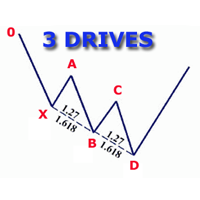
Индикатор определяет и отображает на графике гармоничный паттерн 3 Движения (3 Drives), согласно схеме, приведенной на скриншоте. Выделение паттерна производится по вершинам индикатора ZigZag (включен в ресурсы, не требует дополнительной установки). В момент распознавания паттерна выводится сообщение во всплывающем окне, отправляются оповещения на мобильное устройство и электронный почтовый ящик. Индикатор выделяет не только завершенную фигуру, но и момент ее формирования. На этапе формирования
Панель-анализатор позволяет быстро провести операции добавления сетки отложенных ордеров (Buy Limit, Sell Limit, Buy Stop, Sell Stop) наиболее оптимальным образом.   Параметры stop mode - выбор режима выставления стопов every order - стоп-уровни выставляются отдельно по каждому ордеру position as - общие стоп-уровни для всех ордеров order type - выбор типа отложенного ордера Buy Limit Sell Limit Buy Stop Sell Stop magic - если требуется, указать магическое число для открываемых ордеров. При вклю
P Y R A M I D   E X P E R T    This Forex utility is a complex exit strategy and order management tool that executes four trading methods; scalping, pyramid style, hedging, and scaling method to close trades with a profit.           V E R Y  I M P O R T A N T     This is not a stand alone expert advisor. Use it with your own volatility-based strategy. Once you found the currency pair to trade, you can just attach this tool to the chart of the chosen pair and it will do the

Мультитаймфреймовая версия скользящей средней Хала (Hull Moving Average - HMA). Индикатор Double HMA MTF Light совмещает на одном графике два таймфрейма. HMA старшего таймфрейма определяет тренд, а HMA текущего таймфрейма - краткосрочные ценовые движения. Индикатор распространяется свободно и не имеет звуковых сигналов и сообщений. Основная его функция – это визуализация ценовых движений. Если вам нужны продвинутые функциональные возможности мультитаймфреймного индикатора HMA (информация о пок
FREE
Rainbow Price Visualizer v1.21 See where the market really breathes. Turns your MT4 chart into an ultra-precise heatmap that highlights price zones favored by big players. Why it matters 300 price levels at 0.2‑pip resolution — microscopic detail. 8 visual themes (Rainbow, Fire, Ocean…) for instant readibility. Smart opacity: low noise fades, real zones pop. Lightweight rendering with automatic cleanup. Fully customizable: saturation, opacity, resolution, history depth. Bands project into the f
Money Flow Profile MT5 HERE   Here   our more valuable tools SMC Trend Trading   ,  Easy SMC Trading  ,  Institutional SMC Architect Volume Analysis Tools  ,  Volume flow Profile  ,  Market volume profile  , FVG with Volume  , Liquidity Heatmap Profile  ,  Volume Spread Analysis This Master Edition is engineered for clarity and speed, featuring a unique Auto-Theme Sync system that instantly beautifies your chart layout upon loading. Key Features: True Money Flow Calculation: Goes beyond stand
Daily FIBO Pro
Mark Thimoty Evangelista
Раскройте свой торговый потенциал с BERG Daily FIBO Pro BERG Daily FIBO Pro   — это мощный и настраиваемый индикатор уровней Фибоначчи, разработанный специально для торговой платформы MetaTrader 4 (MT4). Независимо от того, являетесь ли вы опытным трейдером или только начинаете, этот индикатор станет вашим незаменимым инструментом для определения ключевых уровней поддержки и сопротивления, улучшения рыночного анализа и оптимизации торговой стратегии. Почему выбирают BERG Daily FIBO Pro?   То
С этим продуктом покупают
Local Trade Copier EA MT4
Juvenille Emperor Limited
4.96 (111)
Опыт экстремально быстрого копирования сделок с помощью Local Trade Copier EA MT4 . Благодаря простой установке в течение 1 минуты этот копировщик сделок позволяет вам копировать сделки между несколькими терминалами MetaTrader на одном компьютере с Windows или на Windows VPS с крайне быстрыми скоростями копирования менее 0.5 секунды. Независимо от того, новичок вы или профессиональный трейдер, Local Trade Copier EA MT4 предлагает широкий спектр опций, чтобы настроить его под ваши конкретные пот
Добро пожаловать в Trade Manager EA — лучший инструмент для управления рисками, предназначенный для упрощения, точности и эффективности торговли. Это не просто инструмент для размещения ордеров; это комплексное решение для удобного планирования торгов, управления позициями и усиленного контроля над рисками. Независимо от того, начинающий вы трейдер, опытный специалист или скальпер, нуждающийся в быстром исполнении, Trade Manager EA адаптируется к вашим потребностям и работает с любыми активами:
Exp COPYLOT CLIENT for MT4
Vladislav Andruschenko
4.69 (65)
Профессиональный копировщик сделок для MetaTrader 4 Быстрый, профессиональный и надежный копировщик сделок для MetaTrader 4 . COPYLOT позволяет копировать сделки Forex между терминалами MetaTrader 4 и MetaTrader 5 , обеспечивая гибкую синхронизацию для разных типов счетов и сценариев торговли. Версия COPYLOT MT4 поддерживает: MetaTrader 4 → MetaTrader 4 MetaTrader 5 Hedge → MetaTrader 4 MetaTrader 5 Netting → MetaTrader 4   Версия MT5 Полное описание + DEMO + PDF Как купить Как установить Как по
Trade Assistant MT4
Evgeniy Kravchenko
4.43 (197)
Помогает рассчитать риск на сделку, простая установка нового ордера с помощью линий, управление ордерами с функциями частичного закрытия, 7 типов трейлинг-стопа и другие полезные функции. Дополнительные материалы и инструкции Инструкция по установке   -   Инструкция к приложению   -   Пробная версия приложения для демо счета Функция Линии   - отображает на графике линию открытия, стоп-лосс, тейк-профит. С помощью этой функции легко установить новый ордер и увидеть его дополнительные характери
Telegram to MT4 Coppy
Sergey Batudayev
4.09 (11)
Telegram to MT4: Идеальное решение для копирования сигналов Упростите свою торговлю с Telegram to MT4 — современным инструментом, который копирует торговые сигналы прямо из каналов и чатов Telegram на вашу платформу MetaTrader 4, без необходимости использования DLL. Это мощное решение обеспечивает точное исполнение сигналов, широкие возможности настройки, экономит время и повышает вашу эффективность. [ Instructions and DEMO ] [ FAQ ] [ How atach logs properly ] [ Settings descrition ] Ключевые
Скачать рабочую пробную версию Copy Cat More (Копи Кэт Мор) — копировщик сделок (Trade Copier) MT4 — это не просто локальный копировщик сделок; это полноценная система управления рисками и исполнения (risk management and execution framework), созданная для современных торговых задач. От челленджей проп-фирм (prop firm) до управления личным портфелем — он адаптируется к любой ситуации благодаря сочетанию надёжного исполнения, защиты капитала, гибкой настройки и продвинутой обработки сделок. Ко
Multi Copy
Kaijun Wang
5 (1)
Копир->Удобное и быстрое взаимодействие с интерфейсом, пользователи могут использовать его сразу       ->>>> Рекомендуется использовать на компьютерах Windows или VPS Windows Основные функции: Нормальная скорость взаимодействия при копировании сделок составляет менее 0,5 с. Автоматически определять источники сигнала и отображать список учетных записей источников сигнала Автоматически сопоставлять символы, 95% наиболее часто используемых торговых символов на разных платформах (особые случаи, таки
X2 Copy MT4
Liubov' Shkandrii
Быстрый. Точный. Инновационный. Технологичный. Откройте для себя мгновенное копирование сделок с революционным X2 Copy MT4. Всего за 10 секунд простой установки вы получите мощный инструмент для синхронизации сделок между терминалами MetaTrader на одном компьютере или Windows VPS с беспрецедентной скоростью. Управляете несколькими счетами, следуете сигналам или масштабируете свою стратегию — X2 Copy MT4 адаптируется к вашему рабочему процессу с непревзойдённой точностью и контролем. Работайте бы
Trend Line Optimizer
Evgenii Aksenov
4.11 (19)
Это автоматический оптимизатор параметров для индикатора   Trend Line PRO Легко и быстро вы подберете оптимальные параметры для вашего любимого индикатора Trend Line PRO.  Оптимизация занимает всего несколько секунд. Оптимизатор позволяет находит лучшие параметры для каждой пары и периода: Amplitude, TP1-TP3, StopLoss, а так же значения для Time Filter и HTF Filter на выбранном участке истории (Days)  Для оптимизации разных таймфреймов вам нужен разный диапазон истории: M5-M15 установите парам
Риск менеджер Риск менеджер - упростит отслеживание просадки и оповестит при критическом достижении указанного риска, а также закроет ордера при достижении критического (указанного) уровня риска. При превышении указанной просадки, можно выбрать два варианта событий Все ордера закрываются и фиксируется убыток. Терминал также полностью закрывается Вместо фиксирования убытка открывается противоположный ордер - и происходит локирование. Ни один ордер не закрывается. Логику раскрытия локов можно п
The product will copy all telegram signal to MT4   ( which you are member  ) , also it can work as remote copier.  Easy to set up, copy order instant, can work with almost signal formats, image signal, s upport to translate other language to English Work with all type of channel or group, even channel have "Restrict Saving Content", work with  multi channel, multi MT5 Work as remote copier: with signal have ticket number, it will copy exactly via ticket number. Support to backtest signal. How to

Индикатор силы валют для MetaTrader 4 Этот индикатор силы валют анализирует до 28 основных пар и выводит одно значение по каждой из 8 валют: USD, EUR, GBP, JPY, CHF, CAD, AUD и NZD. Вместо того чтобы открывать график за графиком, вы читаете одну панель на графике MetaTrader 4 и видите, какую валюту покупают, а какую продают. Что показывает панель Ранжированную шкалу силы для каждой из 8 валют с процентом Мультитаймфреймовую матрицу: три таймфрейма на валюту рядом, чтобы увидеть, согласны ли M15,
Partial Closure EA MT4
Juvenille Emperor Limited
5 (3)
Partial Closure EA MT4 позволяет частично закрывать любую сделку на вашем счёте вручную, по выбранному проценту от объёма лота и/или по номеру тикета, либо автоматически — на указанных уровнях TP/SL, закрывая определённый процент от первоначального объёма лота на до 10 уровнях take profit и 10 уровнях stop loss. Он может управлять всеми или выбранными сделками на вашем счёте, указывая или исключая определённые magic-номера, комментарии или символы. Совет: Загрузите бесплатную демо-версию совет
TPSpro Risk Manager
Roman Podpora
3.67 (3)
TPSpro Risk Manager – это уникальная система профессионального контроля рисков для трейдеров любой подготовки и любого капитала. Позволяет избежать потерь в торговле и серьёзных ошибок в сделках. TPSpro Risk Manager необходим для управления рисками и в первую очередь для скальперов и дейтрейдеров, но успешно используется трейдерами любого стиля торговли.  Панель имеет 3 столбца, каждый из которых несёт полезную информацию. В первом столбце отображается информация о счёте по состоянию от начала
EA Local Trade Copier Pro MT4: The Ultimate DLL-Free Trade Duplicator Are you tired of complicated trade copiers that require unsafe external DLLs, crash your terminal, or confuse you with separate "Master" and "Client" files? Experience the next generation of trade copying with EA Local Trade Copier Pro MT4. Engineered for maximum stability, lightning-fast execution, and ultimate simplicity, this utility allows you to seamlessly copy trades between multiple MetaTrader terminals on the same Wind
King Trade Copier MT4
Mohammed Maher Al-sayed Mohammed Ahmed Saleh
King Trade Copier MT4 – Lightning-Fast Local Trade Copier (Master + Slave in ONE file) King Trade Copier is a professional local trade copier that mirrors every trading action from one Master account to unlimited Slave accounts on the same PC or VPS — with an internal copy latency of just a few milliseconds. It was built by a real trader for daily real-money use, with one goal: whatever happens on the Master must happen on the Slave, instantly and without exceptions. Watch the demo video to s
Fast Trade MT4
Alexey Valeev
4.8 (5)
Данная торговая панель разрабатывалась для быстрой и комфортной работы на финансовых рынках. Оснащена необходимыми функциями для ручной и полуавтоматической торговли. Благодаря наличию функций трейлинга ордеров, трейлинг-стопу и автоматическому закрытию по средствам, профиту, времени, Вы можете автоматизировать свою торговую систему. Вам останется лишь открыть позицию и задать параметры сопровождения, всё остальное советник сделает за вас. Если Вы хотите ограничить свои убытки, задайте автоматич
Trade copier MT4
Alfiya Fazylova
4.6 (35)
Trade Copier — это профессиональная утилита, предназначенная для копирования и синхронизации сделок между торговыми счетами. Копирование происходит от счета/терминала поставщика к счету/терминалу получателя, которые установлены на одном компьютере или vps. АКЦИЯ - Если вы уже приобрели "Trade copier MT4", вы можете получить "Trade copier MT5" бесплатно (для копирования MT4 > MT5 и MT4 < MT5). Для получения более подробной информации об условиях, пожалуйста, свяжитесь с нами через личные сообщени
TradePanel MT4
Alfiya Fazylova
4.84 (95)
Trade Panel — это многофункциональный торговый помощник. Приложение содержит более 50 торговых функций для ручной торговли и позволяет автоматизировать большинство торговых операций. Инструкция к приложению + видео-инструкции: https://www.mql5.com/ru/blogs/post/771695 Пробная версия приложения для демо-счета: https://www.mql5.com/ru/blogs/post/750864 Как установить приложение: https://www.mql5.com/ru/blogs/post/750096 Как тестировать приложение в визуальном режиме: https://www.mql5.com/ru/blogs/
Smart Copy Local MT4
Kyra Nickaline Watson-gordon
5 (7)
Smart Copy is an Easy-to-Use EA that supports Multi Copying Metatrader4 and Metatrader5 and Local/Remote Copying. (Remote Version is coming soon) Free version is available on Smart Copy Local Free MT4 Specifications :     Real Time, Multi Terminal - Multi Account - MT4/MT5 trade copying     Copy from netting to hedge and hedge to netting is supported.     Fast and instant copy     All settings are input visually.     Easy modifying symbol names, prefix, suffix     Enable/Disable copying s
News Filter EA: Advanced Algo Trading Assistant News Filter EA is an advanced algo trading assistant designed to enhance your trading experience. By using the   News Filter EA , you can integrate a Forex economic news filter into your existing expert advisor, even if you do not have access to its source code. In addition to the news filter, you can also specify   trading days   and   hours   for your expert. The News Filter EA also includes   risk management   and   equity protection   features
Riskless Pyramid
Snapdragon Systems Ltd
5 (1)
Introduction This powerful MT4 trade mangement EA offers a way potentially to aggressively multiply trade profits in a riskfree manner. Once a trade has been entered with a defined stoploss and take profit target then the EA will add three pyramid add-on trades in order to increase the overall level of profit. The user sets the total combined profit target to be gained if everything works out. This can be specified either as a multiple of the original trade profit or as a total dollar amount. Fo
The News Filter
Leolouiski Gan
5 (25)
Этот продукт фильтрует всех экспертных советников и ручные графики во время новостей, так что вам не нужно беспокоиться о внезапных скачках цены, которые могут разрушить ваши ручные торговые настройки или сделки, введенные другими экспертными советниками. Этот продукт также поставляется с полной системой управления ордерами, которая может обрабатывать ваши открытые позиции и ордера на ожидание перед выпуском новостей. После покупки The News Filter вам больше не придется полагаться на встроенные
Prop Guardian Risk Manager MT4 – Drawdown, Risk & Hedge Protection for Prop Firm and Managed Accounts Prop Guardian Risk Manager is a professional risk-control utility for MetaTrader 4, designed for prop firm traders, money managers and anyone who wants strict account-level risk protection. It does not generate trading signals, strategy entries or trading decisions. Instead, it runs in the background, monitors your account risk and can automatically block new exposure, close managed trades or ac
Grid Manual MT4
Alfiya Fazylova
4.71 (17)
Grid Manual — это торговая панель для работы с сеточными стратегиями. Утилита универсальная, имеет гибкие настройки и понятный интерфейс. Работает с сеткой ордеров не только в сторону усреднения убытков, но и в сторону наращивания прибыли. Трейдеру не нужно создавать и сопровождать сетку ордеров, это сделает утилита. Достаточно открыть ордер и Grid manual автоматически создаст ему сетку ордеров и будет сопровождать его до самого закрытия. Полная инструкция и демо-версия здесь . Основные особенно
# Vyl Trade Manager — Full Documentation ## Short Description (for the Market product card) Vyl Trade Manager is a professional trading panel for MetaTrader 4 that automates risk-based position-size calculation and gives you instant access to all the trade-management tools you need. Forget manual calculations and complex formulas — one click to open a trade with the correct lot size, instant move-to-breakeven, partial profit-taking, and Stop Loss/Take Profit management right from the chart
Trading History MT4
Siarhei Vashchylka
5 (9)
Trading History - Программа для торговли и управления капиталом на истории котировок в тестере стратегий. Может работать с отложенными и немедленными ордерами, оснащена функциями трейлинг стопа, безубытка и тейкпрофита. Очень хорошо подходит для тренировок и тестирования различных стратегий. Инструкция/Мануал ( Обязательно читайте перед приобретением ) Преимущества 1. В кратчайшие сроки позволяет протестировать любую торговую стратегию 2. Отличный тренажёр для тренировок трейдинга. Можно получи
MT4 к Telegram Signal Provider - это простой в использовании и полностью настраиваемый инструмент, который позволяет отправлять сигналы в Telegram, превращая ваш аккаунт в поставщика сигналов. Формат сообщений полностью настраиваем! Однако для простого использования вы также можете выбрать предопределенный шаблон и включать или отключать определенные части сообщения. [ Демо ]  [ Руководство ] [ Версия для MT5 ] [ Версия для Discord ] [ Телеграм-канал ]  New: [ Telegram To MT5 ] Настройка Шаг за
Trade Reverse Copie4
Chukwuemeka Kingsley Anyanwu
5 (1)
Feel free to contact me for any extra features :) [SEE MT5 VERSION  https://www.mql5.com/en/market/product/128846 The Local Reverse Copier is an Expert Advisor designed to synchronize positions between a Master account and a Slave account with a twist: it reverses the trades. When a buy position is opened on the Master account, the EA opens a sell position on the Slave account, and vice versa. This allows for a unique form of trade copying where positions are mirrored in opposite directions bet
Lot Architect — Trade Panel and Position Size Calculator for MT4 Lot Architect is a trade panel and risk-based position size calculator for MetaTrader 4. It helps calculate lot size from the selected risk, displays trade parameters before entry, and supports Market, Limit and Stop orders from the chart. The utility is designed for traders who want a structured workflow for position sizing, stop-loss placement, take-profit planning and order execution. Purpose Before opening a trade, a trader nee
Другие продукты этого автора
SMC Price Action Patterns - MT5 Indicator Product Description MetaTrader 5 custom indicator SMC Price Action Patterns A chart overlay indicator for traders who want a structured view of Smart Money Concepts, market structure shifts, order block patterns, fair value gaps, equal highs and lows, and key multi-timeframe price levels directly inside MetaTrader 5. BOS and CHoCH Internal and Swing Structure Order Block Finder Input-Controlled FVG Colors EQH and EQL Premium and Discount Zones Product Ov
FREE
MACD Divergence Radar Pro Multi-Symbol Divergence Scanner & Visual Dashboard for MetaTrader 5 Regular & Hidden Divergence 20+ Pairs Simultaneous Scan One-Click Chart Opening Auto MACD Sub-Window Overview MACD Divergence Radar Pro is a professional-grade divergence detection indicator that continuously scans multiple currency pairs and timeframes in real time. It identifies both regular and hidden MACD divergences — bullish and bearish — and presents all findings in a sleek, draggable on-chart d
Prop Firm Risk Manager PRO EA Professional account protection for prop-firm challenges and funded accounts. It monitors drawdown, open risk, news windows, trading sessions, manual trades, profit targets, and challenge progress in real time, then warns, locks, de-risks, deletes orders, or closes managed exposure according to your rules. Two draggable on-chart panels — Economic Calendar and Performance Stats — keep news planning and account analytics on the chart without leaving MT5. MT5 Expert Ad
VoidFlow IFVG Trade Assistant Pro VoidFlow IFVG Trade Assistant Pro VoidFlow IFVG Trade Assistant Pro is a manual-first MetaTrader 5 trading assistant built for traders who want a cleaner Inverse Fair Value Gap (IFVG) workflow with structured trade planning, chart context, and optional automatic execution only when it is explicitly enabled by the user. It scans the selected signal timeframe for raw Fair Value Gaps, confirms true inversions, filters weak setups, draws the full trade plan on the c
Trade Assistant Risk Calculator is an all-in-one floating trading panel Expert Advisor for MetaTrader 5, built for professional manual traders. It combines visual chart trading , automatic risk calculation , and advanced position management in one compact interface. Stop calculating lot sizes manually. Stop guessing your Risk:Reward ratio. Drag the planning lines on the chart and the EA calculates the exact lot size for your selected risk percentage, equity, fixed-money risk, or fixed-lot workfl
ICT Market Structure Pro ICT Market Structure Pro is a Smart Money Concepts / ICT trading tool designed to automatically draw the most important structural and liquidity elements directly on the chart. The indicator helps traders read price action through an institutional lens by mapping market structure shifts, liquidity pools, order blocks, imbalances, premium/discount zones, and key ICT session windows in one place. It supports both single-timeframe and multi-timeframe analysis modes, with a
Momentum Pulse MT5 – Strength-Based Candle Coloring Indicator with Fibonacci Zone TP/SL Momentum Pulse MT5 MT5 Indicator All Markets Non-Repainting Fibonacci TP/SL Momentum Pulse is a professional-grade multi-dimensional momentum strength indicator that colors each candle based on real market power rather than price alone. It classifies every bar into one of nine clearly defined strength states , provides built-in Fibonacci zone-based TP/SL levels , and includes a comprehensive set of signal qua
TrendGuard Pro – Product Description (English) TrendGuard Pro Supertrend core · 11 confirmation guards · ATR-calculated SL/TP · 5,000-bar performance simulation · P&L pip labels · Symbol watermark · Draggable stats panel TrendGuard Pro is a professional-grade MT5 scalping indicator that fortifies every entry signal with up to 11 independent confirmation filters . False breakouts are systematically eliminated before an arrow ever appears on the chart, letting you trade only the highest-probabilit
Overview SR Confluence Pro is a professional MetaTrader 5 indicator for support & resistance and chart pattern analysis. It combines dual S&R engines (high-volume box engine + multi-timeframe pivot engine), automatic detection of 16+ classic chart patterns , and a confluence scoring system that rates how closely price structure and S&R levels align. Key levels, pattern structures, break/retest events, and high-quality setups are displayed directly on the chart. A draggable dashboard, multi-symbo
Фильтр:
Нет отзывов
Ответ на отзыв