Published products

Trailing Stop Manager MT5 Trailing Stop Manager MT5 is a flexible trade management utility for MetaTrader 5 that automatically moves the Stop Loss as price moves in your favor. It is designed for traders who want to protect profits and manage open positions automatically while keeping control over how and which positions are managed. The manager currently includes two trailing methods: • Standard Trailing Stop
• Fractals Trailing Stop It also includes a compact trading panel for opening, managi

Trade Copier Local MT4 is a fast local trade copier for copying trades between multiple MT4 and MT5 accounts.
One EA works in both Master and Slave modes. Simply select the required Copier Mode and use the same product on your MetaTrader terminals.
Copy trades between:
• MT5 → MT5 • MT5 → MT4 • MT4 → MT5 • MT4 → MT4
Perfect for:
• Trading multiple accounts at once • Linking multiple trading accounts • Personal account mirroring • Signal providers • Account managers • Prop trading setups
#

Trade Copier Local MT5 is a fast local trade copier for copying trades between multiple MT4 and MT5 accounts.
One EA works in both Master and Slave modes. Simply select the required Copier Mode and use the same product on your MetaTrader terminals.
Copy trades between:
• MT5 → MT5 • MT5 → MT4 • MT4 → MT5 • MT4 → MT4
Perfect for:
• Trading multiple accounts at once • Linking multiple trading accounts • Personal account mirroring • Signal providers • Account managers • Prop trading setups
#

The panel is designed to manage trading positions: to open new trades and close already opened ones. To open new trades, you can set the position LotSize, Stop Loss in points, risk in dollars or in percent, Take Profit in points or Profit in dollars, you can set the Profit/Risk parameter. It is possible to place a panel on the active chart to visually set the parameters of a new trade, select a market order or a pending one. If you fix the RR parameter, then when the Risk changes, the Profit wil

The account manager has a set of functions necessary for trading, which take into account the results of the entire account in total, and not for each individual open position: Trailing stop loss. Take profit. Break-even on the amount of profit. Breakeven by time. Stop Loss Typically, each of these options can be applied to each individual trade. As a result, the total profit on the account may continue to increase, and individual positions will be closed. This does not allow you to get the maxi

BreakEven Trade Manager MT5 is a lightweight and easy-to-use trading utility for MetaTrader 5 that helps you open, manage, and automatically protect trades directly from the chart. The utility combines fast manual order execution with automatic BreakEven management, helping reduce routine actions and improve position control. TradeHub Trading Utilities BreakEven Trade Manager MT5 is the first product in the TradeHub Trading Utilities collection — a growing ecosystem of professional MetaTrader to

Smart Risk Manager Pro — Professional Trading Workspace for MT4/MT5 Smart Risk Manager Pro is an advanced trading workspace for professional manual trading, risk control and visual trade execution in MetaTrader 4 and MetaTrader 5. The utility combines dynamic risk calculation, interactive trade placement, pending order management and trade control in one fully synchronized environment. Designed for active traders who need speed, precision and consistent risk management. Main Features Two Profe

Flexible receiver with lot scaling, symbol mapping and filters. Ideal receiver for MT4 → MT5 trade copying. Receive trades automatically from MT4 or MT5 master accounts. Designed for fast, flexible and reliable multi-account copying. Main Features • MT4 Master → MT5 Slave
• MT5 Master → MT5 Slave
• Lot size management: Same Lot Fixed Lot Multiply Lot Balance Based Lot • Symbol Mapping
Example:
XAUUSD = GOLD
EURUSD = EURUSD.a • Include Symbols filter
• Include Magics filter
• Reverse Trades mode

Fast copier for sending trades to multiple MT4 / MT5 accounts. MT5 Trade Copier Master EA sends trades instantly from your master account to one or multiple slave accounts. Supports copying to:
• MT5 accounts
• MT4 accounts Perfect for:
• Multi-account traders
• Signal providers
• Account managers
• Personal account mirroring Main Features • Fast local trade copying
• Low latency execution
• Multiple slave accounts support
• Copy open positions on startup
• Stable file-based communication
• Easy

Simple Customizable Trade Panel — Fast and Easy One-Click Trading This lightweight and powerful panel is built for traders who value speed , simplicity , and full customization . With just one click, you can: Buy or Sell instantly
Close all open positions
Place pending orders with custom distance
Delete all pending orders Adjustable parameters: • Lot size
• Stop Loss (in points)
• Take Profit (in points)
• Distance to price for pending orders The panel is fully responsive and ad
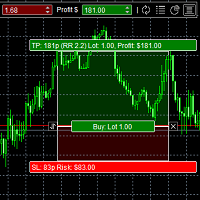
The panel was created to manage trading positions: to open new trades and close existing ones. To open new transactions, you can set the position volume, Stop Loss in points, risk in dollars or as a percentage, Take Profit in points or Profit in dollars, you can set the Profit/Risk parameter. It is possible to place a panel on the active chart to visually set the parameters of a new transaction, select a market order or a pending one. If you fix the RR parameter, then when Risk changes, Profit w

Risk Calculatorr Panel MT4
Professional trading assistant for MetaTrader 4.
Open trades faster, calculate precise risk instantly, and manage positions like a professional trader.
WHY TRADERS NEED THIS PANEL
Many traders lose money because they:
• use wrong lot size • risk too much per trade • enter too slowly • manage positions emotionally • open trades without clear RR ratio
This panel helps solve these problems in seconds.
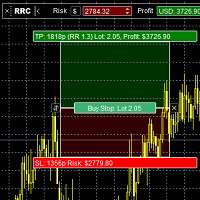
Risk Calculatorr Panel MT5
Professional trading assistant for MetaTrader 5.
Open trades faster, calculate precise risk instantly, and manage positions like a professional trader.
WHY TRADERS NEED THIS PANEL
Many traders lose money because they:
• use wrong lot size • risk too much per trade • enter too slowly • manage positions emotionally • open trades without clear RR ratio
This panel helps solve these problems in seconds.

TradeHub Smart Order Manager is a professional order entry and risk management panel for MetaTrader 5.
It helps you prepare and place trades directly from the chart, calculate position size based on account risk, and manage Stop Loss and Take Profit using several calculation methods.
The panel supports Market, Limit and Stop orders for both Buy and Sell operations.
Video demonstration: https://youtu.be/3c7oVfafm8c
MAIN FEATURES
• Market, Limit and Stop orders • Buy and Sell operations • M

TradeHub Smart Order Manager is a professional order entry and risk management panel for MetaTrader 4.
It helps you prepare and place trades directly from the chart, calculate position size based on account risk, and manage Stop Loss and Take Profit using several calculation methods.
The panel supports Market, Limit and Stop orders for both Buy and Sell operations.
Video demonstration: https://youtu.be/3c7oVfafm8c
MAIN FEATURES
• Market, Limit and Stop orders • Buy and Sell operations • M

Trailing Stop Manager MT4 Trailing Stop Manager MT4 is a flexible trade management utility for MetaTrader 5 that automatically moves the Stop Loss as price moves in your favor. It is designed for traders who want to protect profits and manage open positions automatically while keeping control over how and which positions are managed. The manager currently includes two trailing methods: • Standard Trailing Stop
• Fractals Trailing Stop It also includes a compact trading panel for opening, managi

BreakEven Trade Manager MT4 is a lightweight and easy-to-use trading utility for MetaTrader 4 that helps you open, manage, and automatically protect trades directly from the chart. The utility combines fast manual order execution with automatic BreakEven management, helping reduce routine actions and improve position control. TradeHub Trading Utilities BreakEven Trade Manager MT4 is the first product in the TradeHub Trading Utilities collection — a growing ecosystem of professional MetaTrade

Smart Risk Manager Pro — Professional Trading Workspace for MT4/MT5 Smart Risk Manager Pro is an advanced trading workspace for professional manual trading, risk control and visual trade execution in MetaTrader 4 and MetaTrader 5. The utility combines dynamic risk calculation, interactive trade placement, pending order management and trade control in one fully synchronized environment. Designed for active traders who need speed, precision and consistent risk management. Main Features Two Profe

Fast copier for sending trades to multiple MT4 / MT5 accounts. Perfect for copying trades from MT4 to MT5 accounts. MT4 Trade Copier Master EA sends trades instantly from your master account to one or multiple slave accounts. Supports copying to:
• MT5 accounts
• MT4 accounts Perfect for:
• Multi-account traders
• Signal providers
• Account managers
• Personal account mirroring Main Features • Fast local trade copying
• Low latency execution
• Multiple slave accounts support
• Copy open position

Flexible receiver with lot scaling, symbol mapping and filters. Receive trades automatically from MT4 or MT5 master accounts. Designed for fast, flexible and reliable multi-account copying. Main Features • MT4 Master → MT4 Slave
• MT5 Master → MT4 Slave
• Lot size management: Same Lot Fixed Lot Multiply Lot Balance Based Lot • Symbol Mapping
Example:
XAUUSD = GOLD
EURUSD = EURUSD.a • Include Symbols filter
• Include Magics filter
• Reverse Trades mode
• Slippage control
• Custom Magic Number Mul

The account manager has a set of functions necessary for trading, which take into account the results of the entire account in total, and not for each individual open position: Trailing stop loss. Take profit. Break-even on the amount of profit. Breakeven by time. Stop Loss Typically, each of these options can be applied to each individual trade. As a result, the total profit on the account may continue to increase, and individual positions will be closed. This does not allow you to get the maxi

Simple Customizable Trade Panel — Fast and Easy One-Click Trading This lightweight and powerful panel is built for traders who value speed , simplicity , and full customization . With just one click, you can: Buy or Sell instantly
Close all open positions
Place pending orders with custom distance
Delete all pending orders Adjustable parameters: • Lot size
• Stop Loss (in points)
• Take Profit (in points)
• Distance to price for pending orders The panel is fully responsive and adaptab
Published signals
- Growth
- 68%
- Subscribers
- 0
- Weeks
- 99
- Trades
- 2033
- Win
- 46%
- Profit Factor
- 1.17
- Max DD
- 74%