Master Decision Engine

Master Decision Engine MT5 is an on-chart decision support utility for manual traders who want a more structured way to read market conditions before entering a trade.

Current price: $59 - increases by $10 after every 20 purchases until reaching the final price of $119. Next price: $69.

Complete Buyer Kit: 40 Professional Resources included at no additional cost.

MT5 Presets, PDF Guides, Checklists, Mindmaps, Reference Cards, and Excel Workbooks - built from 8 years of developing structured XAUUSD trading workflows.

After purchase, please message me via MQL5 inbox. Your complete Buyer Kit will be delivered within 24 hours.

With XAUUSD, the difficult part is often not the click itself. The harder part is knowing whether the setup is ready, still developing, or blocked by weak market conditions. This tool is built for that decision process.

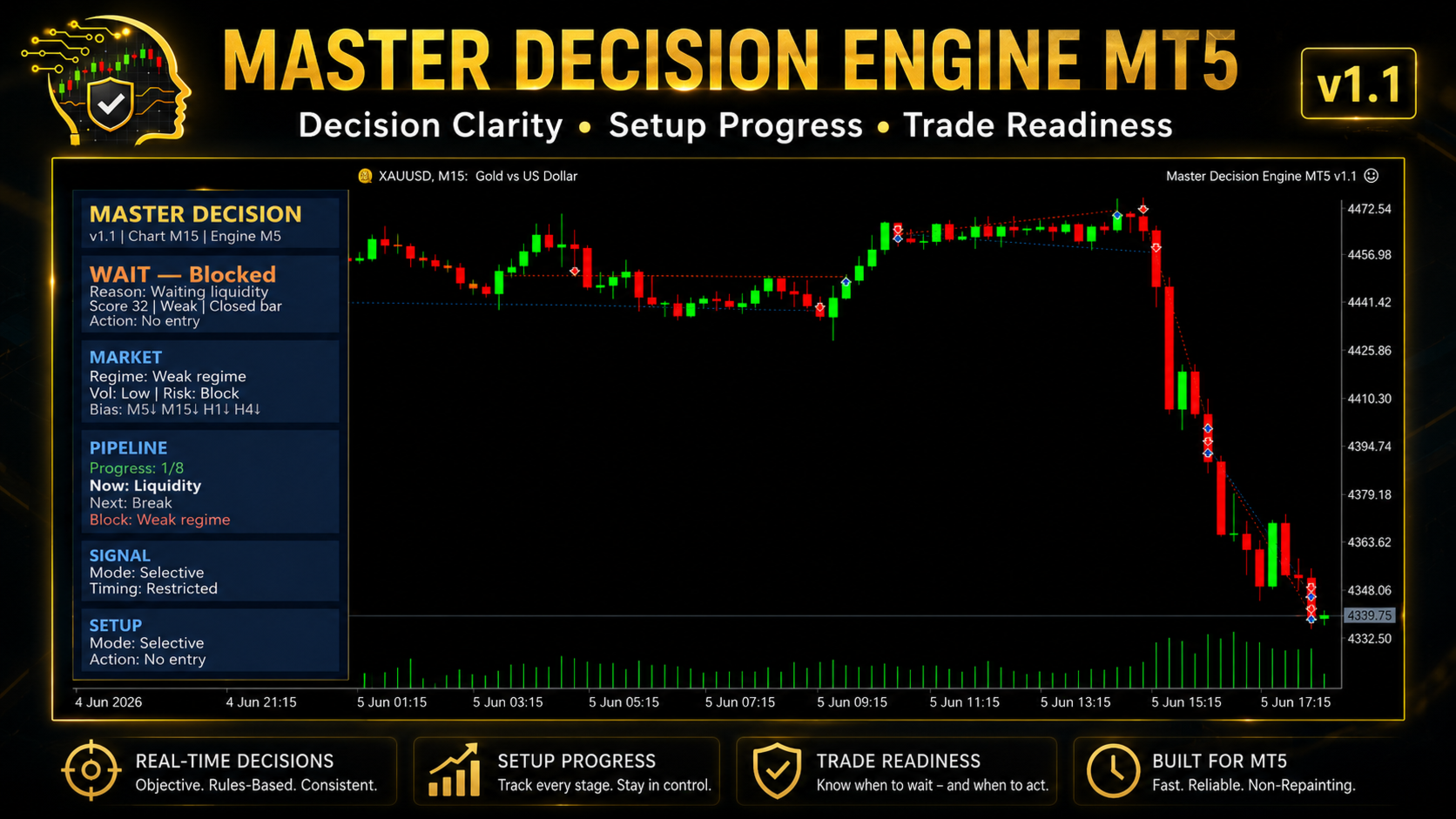
The panel works like a structured checklist for market state, setup progress, multi-timeframe bias, risk condition and trade readiness. It does not predict the market or replace the trader’s judgment. It organizes important conditions into one clear dashboard so the trader can review the situation before making a manual decision.

Current Version Highlights

Version 1.3 is the current complete release of Master Decision Engine MT5. It focuses on clearer decision states, closed-bar confirmation, trade plan display and better panel readability for manual XAUUSD traders.

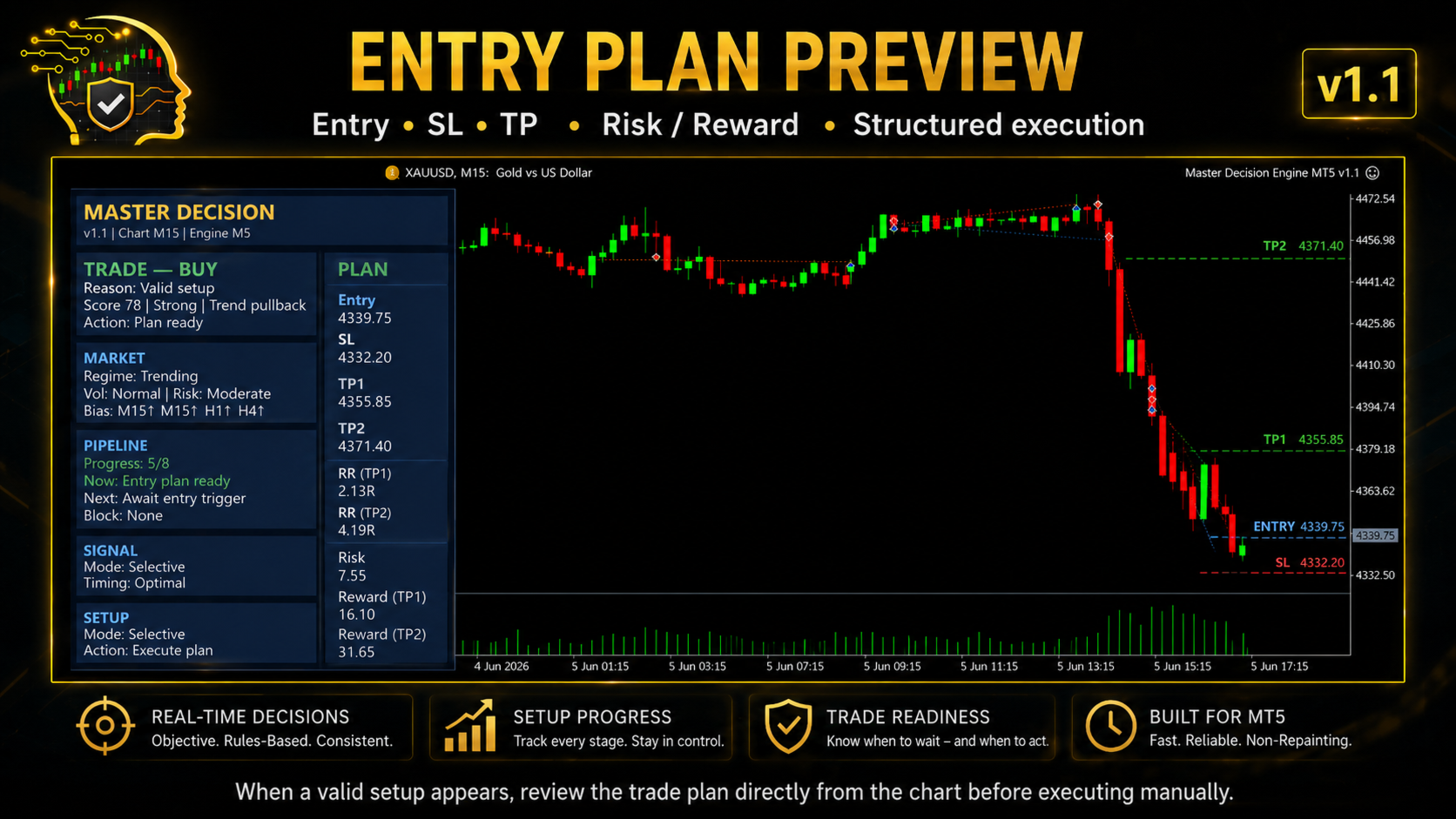
  • Trade plan display: when a valid plan is available, the tool can show Entry, SL, TP1, TP2 and RR directly on the chart.
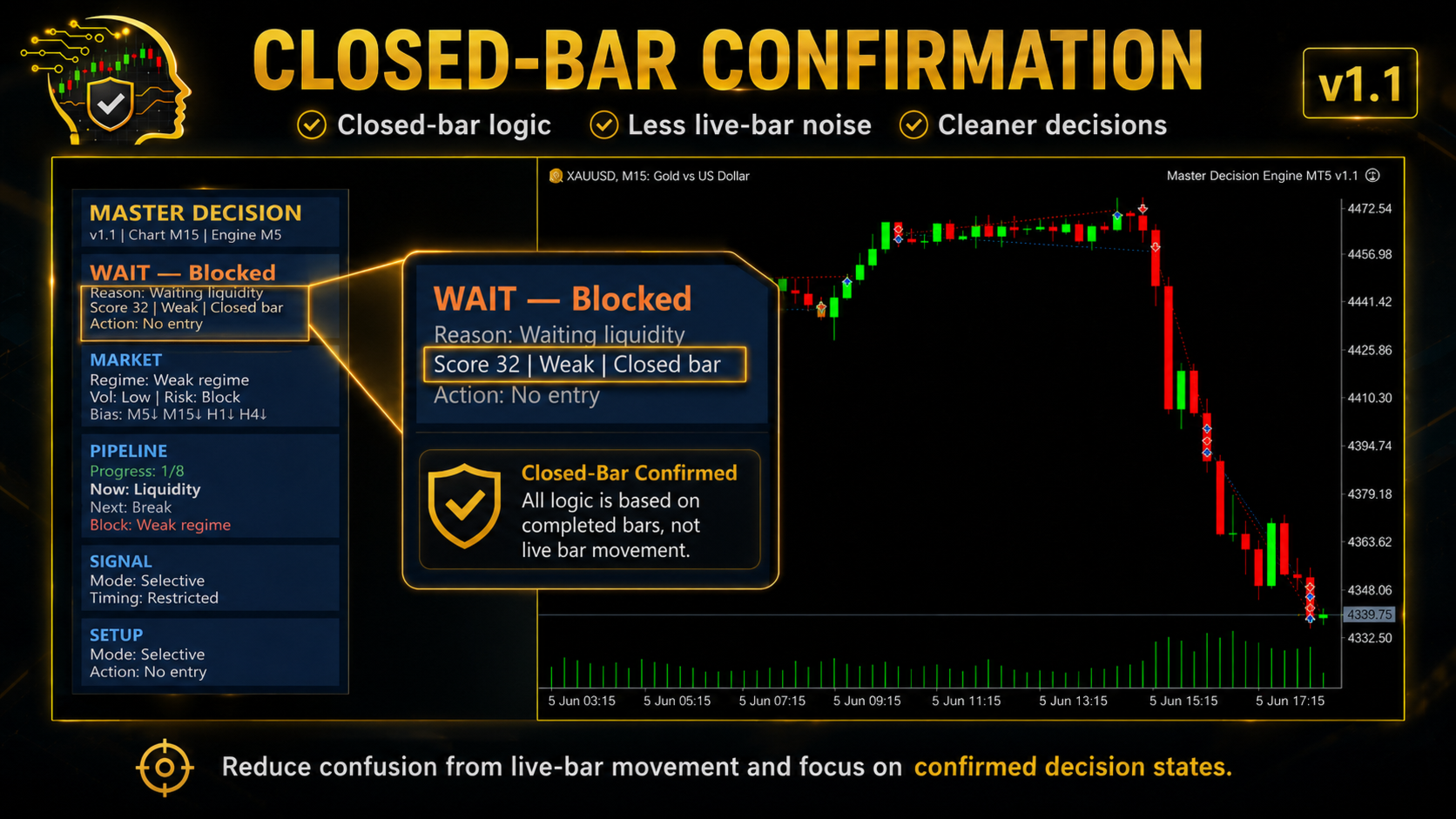
  • Closed-bar confirmation: the panel shows when the decision state is based on completed candle data.
  • Chart TF and Engine TF display: helps clarify whether the current chart timeframe or the selected engine timeframe is being used.
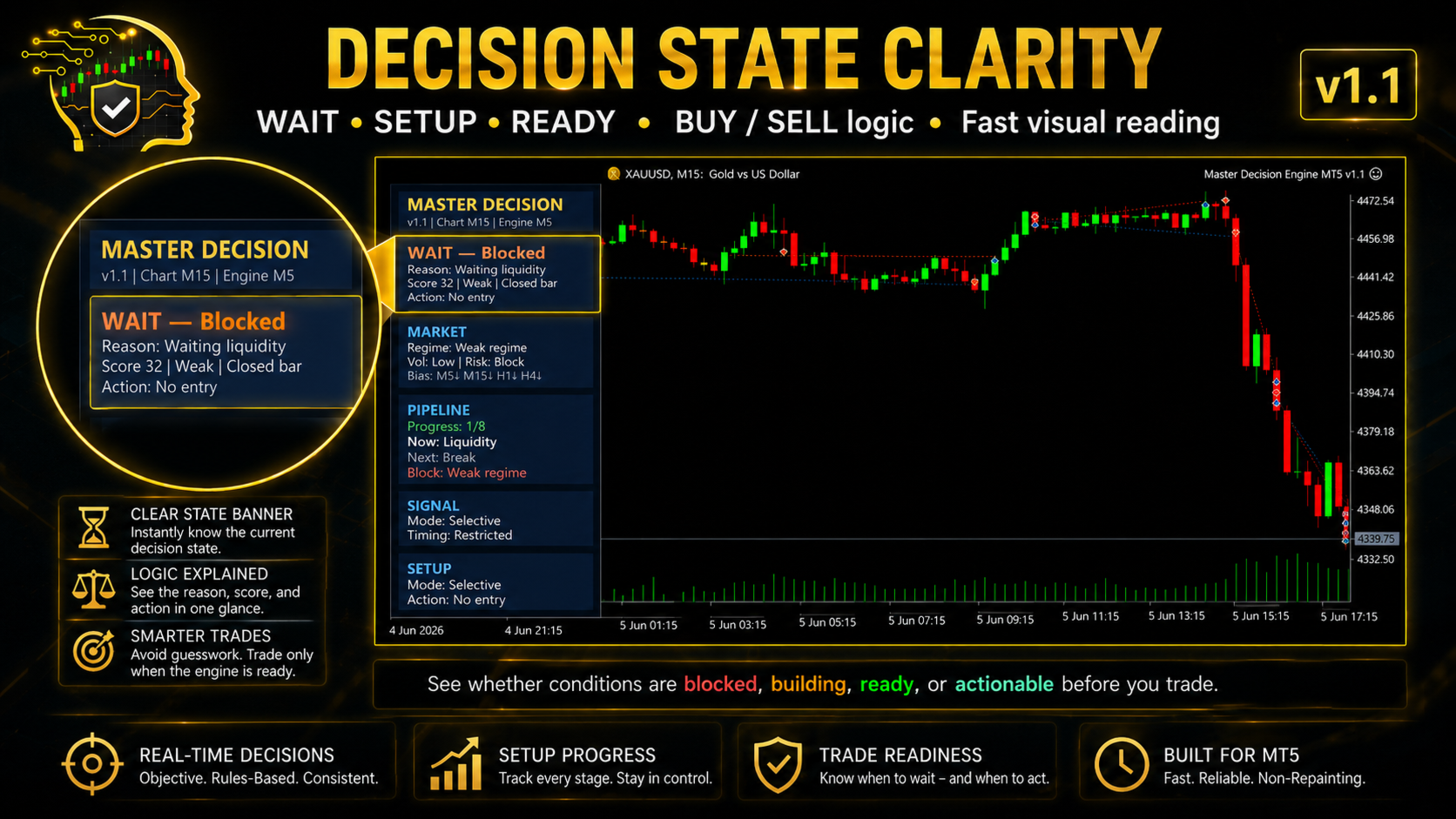
  • Clearer decision wording: WAIT, SETUP, READY, TRADE BUY and TRADE SELL states are easier to understand.
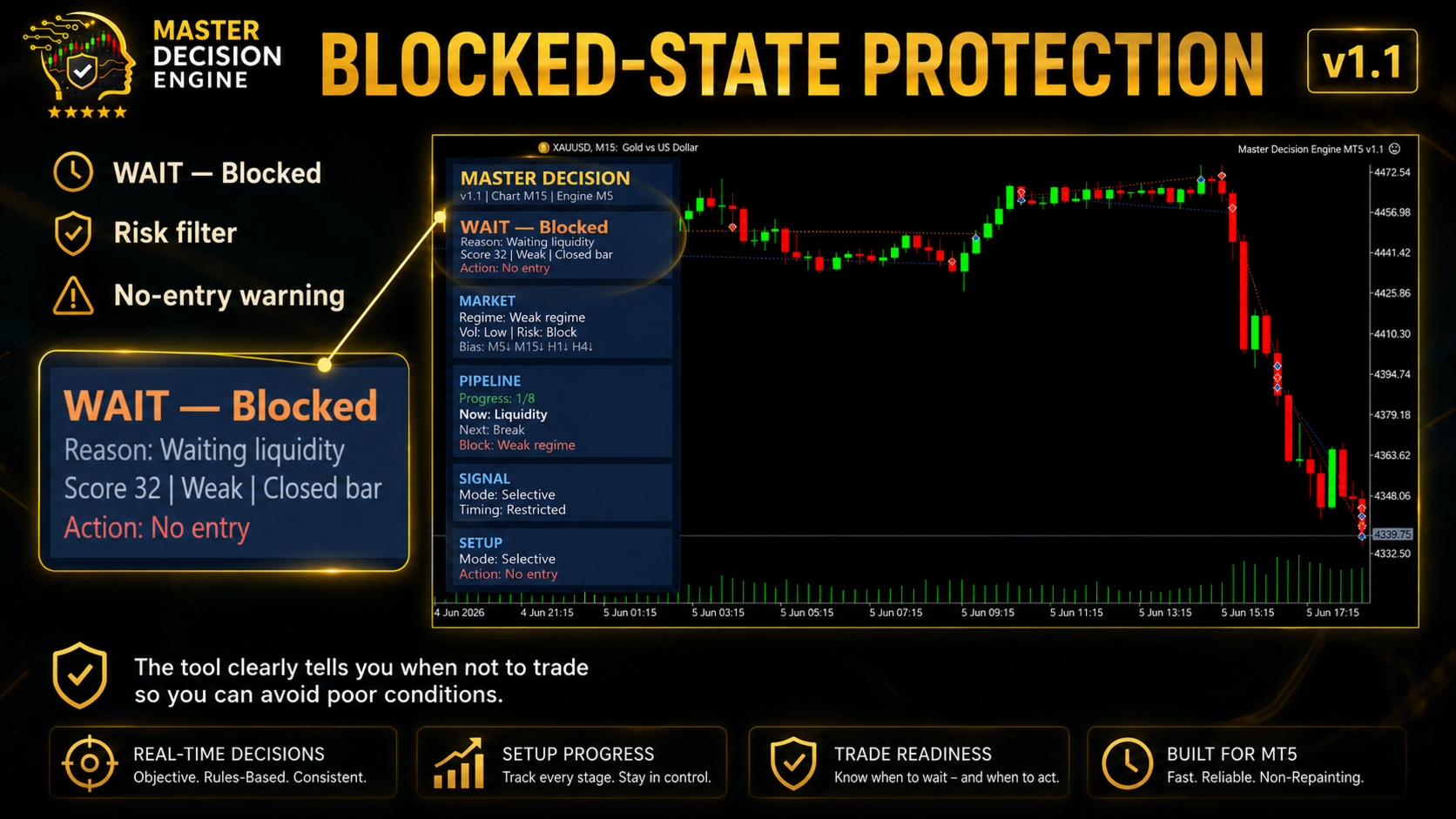
  • Blocked-state display: the panel shows when conditions are restricted, for example during weak regime or unsuitable risk conditions.
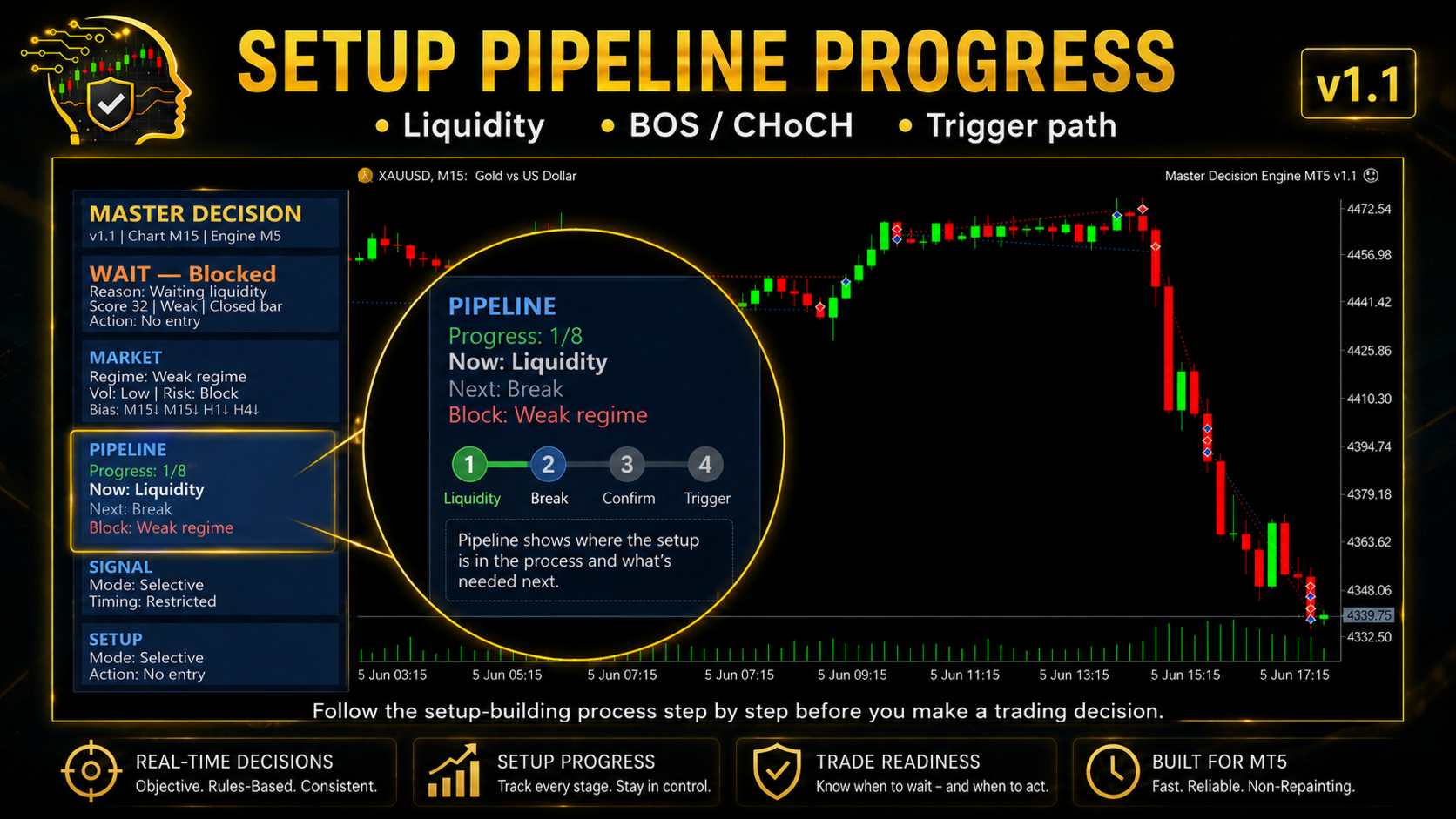
  • Pipeline progress view: Progress, Now, Next and Block fields show what the tool is waiting for.
  • Cleaner panel layout: improved spacing, card structure, Blue Utility style and gold title.

Main Features

  • Structured decision panel showing current state, action text and reason
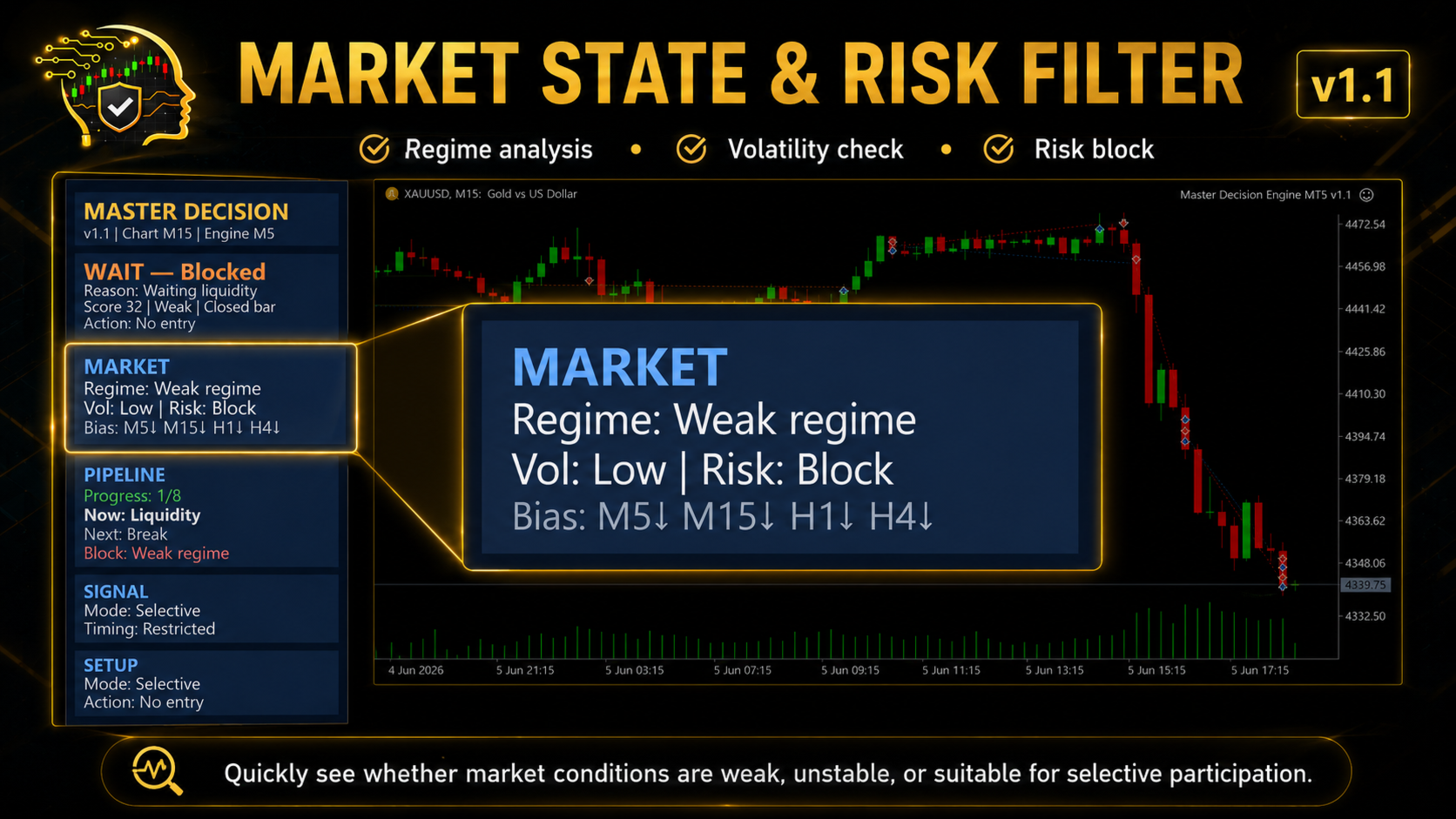
  • Market state view with regime, volatility and risk condition
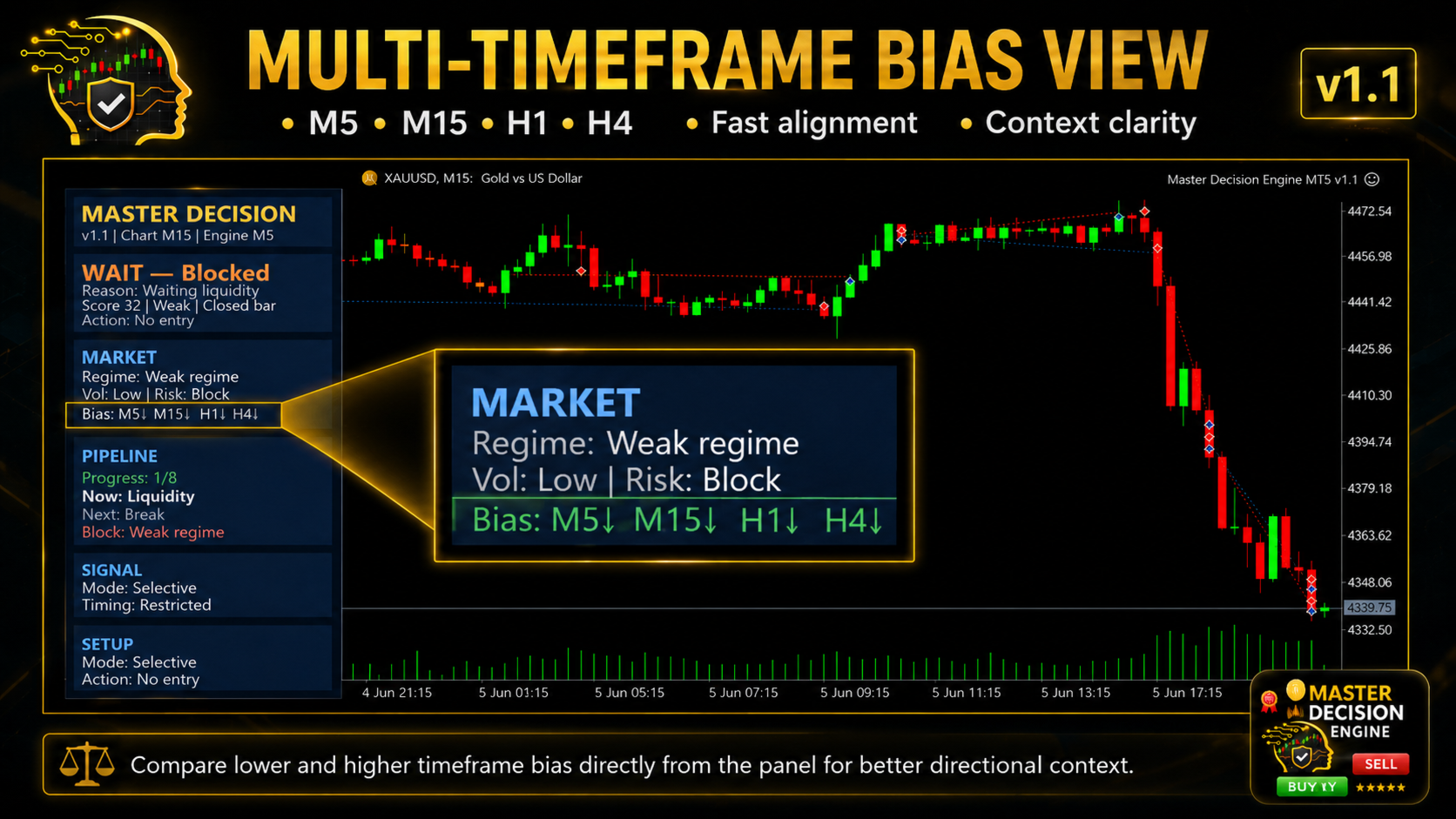
  • Multi-timeframe bias row for M5, M15, H1 and H4 context
  • Pipeline view for setup development, including liquidity, break, displacement, FVG, OB, mitigation and trigger stages
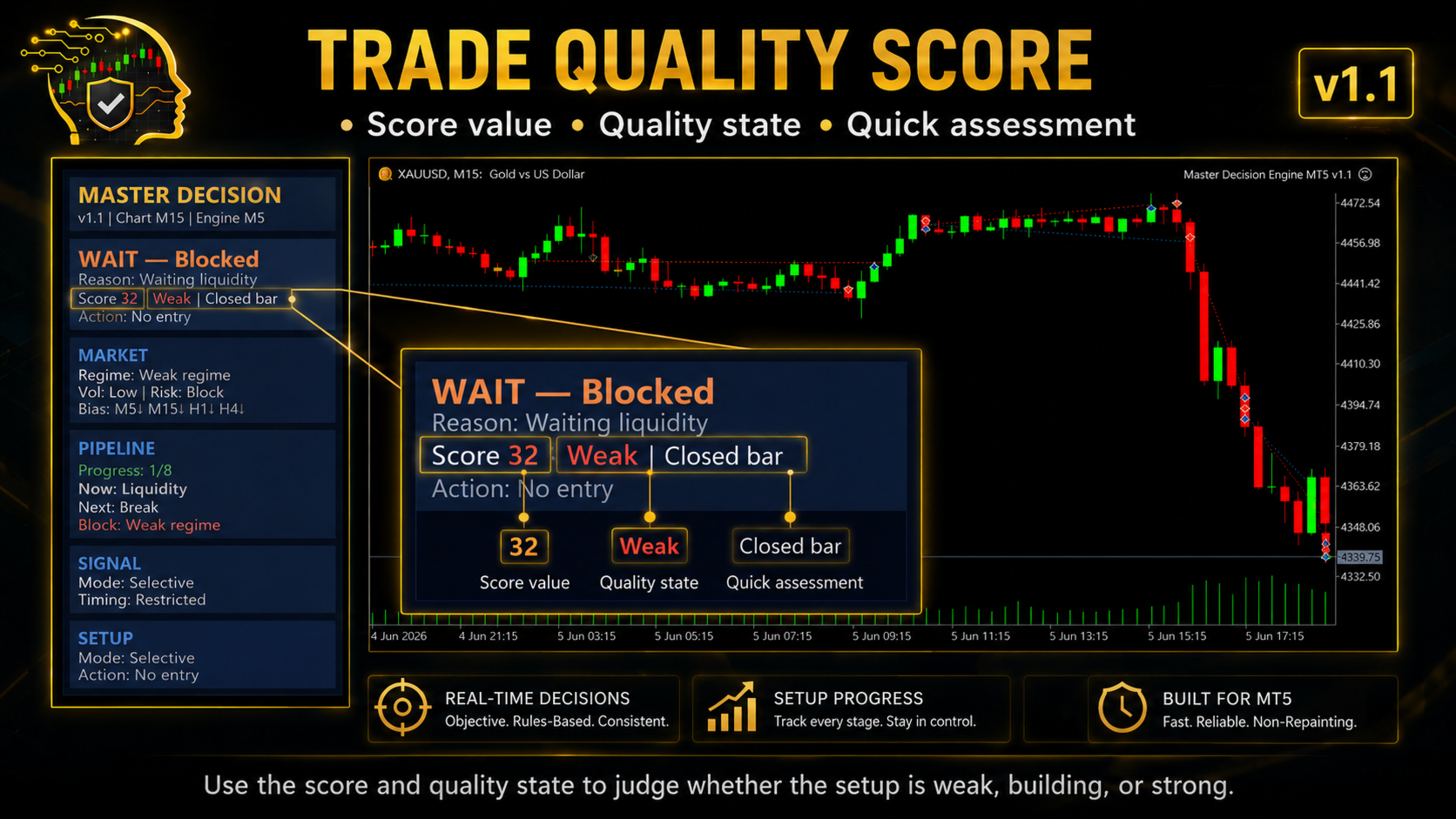
  • Score and quality state for quick setup assessment
  • Blocker text showing why the tool remains in a restricted state
  • Entry plan display with Entry, SL, TP1, TP2 and RR when available
  • Popup, sound and mobile push alert options
  • Compact on-chart panel designed to keep the chart readable

How the Panel Helps

The panel is designed to answer practical questions directly on the chart.

Is the market currently suitable for participation?
Is the setup still developing, or is it close to a valid decision state?
Which condition is missing from the pipeline?
Is the current state blocked by weak regime, low volatility or unclear structure?
Is there a valid Entry, SL, TP and RR plan available?

For example, WAIT - Blocked means the tool is not treating the current condition as actionable. The reason may be waiting liquidity, weak regime, restricted timing or another missing pipeline condition.

This makes the panel useful not only when a setup is ready, but also when the correct action is to wait.

Recommended Use

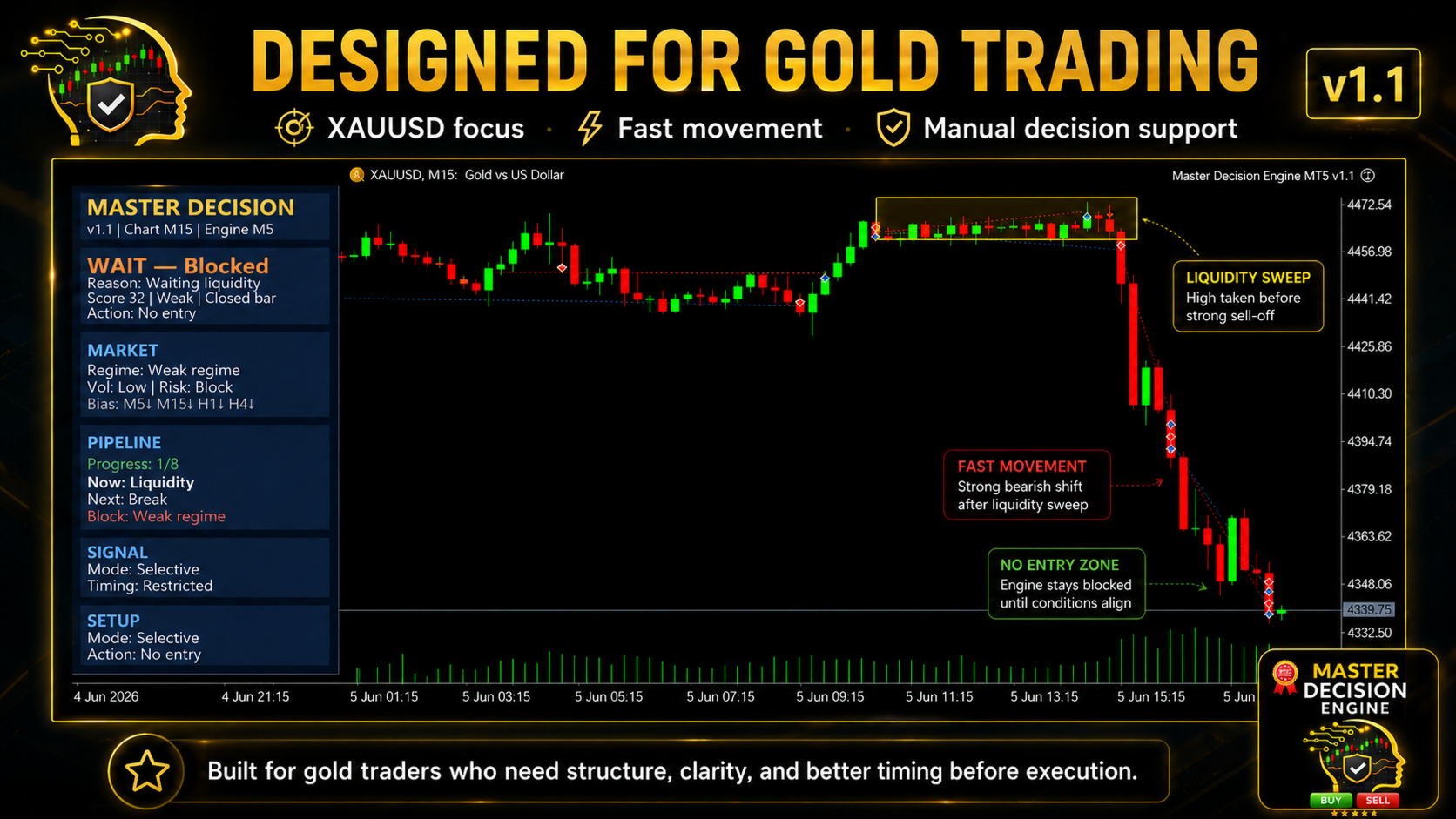
Master Decision Engine MT5 is mainly designed around XAUUSD manual trading. It can be useful during active market sessions when price movement is fast and the trader needs a clearer process before acting.

A practical workflow is to watch the decision state, market condition, multi-timeframe bias, pipeline progress and risk block together. When the tool shows that a setup is still developing or blocked, the trader can wait for clearer conditions. When a valid plan is available, the trader can review the Entry, SL, TP and RR information before making a manual execution decision.

The default logic is designed for XAUUSD. It may be tested on other symbols, but parameters and interpretation should be reviewed manually.

Further reading about broker and XAUUSD feed differences:
https://www.mql5.com/en/blogs/post/769009

Important Notes

Master Decision Engine MT5 is a decision support utility only. It does not open, modify or close trades automatically. It is not a signal system and does not guarantee profitable results.

Different brokers may show small differences because of spread, symbol settings, server time, liquidity and price feed conditions.

Please test the tool on a demo account first and make sure you understand how the panel states behave before using it in live trading.

Not sure where this tool fits in your trading process?

Each Gold Algo Lab tool is built to solve one specific part of the trading workflow. The Gold Algo Lab Tool Map shows how our MT5 tools connect across 6 practical stages for XAUUSD traders: market context, setup selection, risk planning, trade execution, position management and account protection.

→ Gold Algo Lab Tool Map: Where to Actually Start With MT5 Tools for XAUUSD

https://www.mql5.com/en/blogs/post/771930

You do not need every tool. Start with the stage where your process breaks down most often, then build your workflow one layer at a time.

Risk Disclaimer

Trading financial markets involves risk. This tool provides structured market information inside MetaTrader 5, but all trading decisions remain the user’s responsibility. 

Gold Algo Lab builds practical, risk-first MT5 tools for serious XAUUSD traders, shaped by 8 years of developing and trading real systems to help traders identify clearer setups, manage risk with greater confidence and execute with more discipline.
Recommended products
This tool can help you close all open orders with one click, just click "Close all". If you only want to close profitable orders, click the "Close profitable" button. After clicking, all floating orders will be closed; If you only want to close the orders with floating losses, click the "Close losable" button. After clicking, all orders with floating losses will be closed. This tool has been tested for a year. The one-click position closing function is very complete, the position closing is time
T Manager for Price action Traders
Haidar Lionel Haj Ali
4.5 (10)
T Manager, the ultimate trade management solution designed by traders for traders. If you are searching for a simple and efficient trade panel, trade manager, or trade assistant, you are at the right place.   The market contains a diverse number of those tools , but this one is designed by traders for traders . I designed this tool, and I am using it daily. Take my advice and stop buying tools blended with un-useful features that you will never use,   T Manager provides you with the essential y
AI Trade Journal CSV Exporter
Fadi Hassan Khaled Ghanem
Turn your trading history into a clean journal you can open in Excel or Google Sheets. How it works Click the button on the chart or let the utility export every day at a set time. Each closed position becomes one row: symbol, direction, volume, entry and exit time and price, SL, TP, pips, duration, profit, swap, commission and net result. A second summary file lists win rate, profit factor, average win and loss, largest win and loss and maximum consecutive losses. Key features One row per posit
FREE
Enter your firm's daily loss and drawdown limits once. Multi-Account Risk Sync Panel checks your account against them all day and, the moment a limit is reached, closes your open positions, deletes your pending orders and stops itself. Built for prop firm challenges, funded accounts and any account with a hard loss limit. It does not open trades, does not copy trades and does not touch any other account. Every screenshot on this page is from a live demo chart. Key Features Daily loss limit as a
TradeRazor: One-Click Trade Execution Panel It calculates your risk before every trade, places market and pending orders in one click, and manages open positions with partial closing, breakeven, and close-all functions with one click. Order Execution One-Click Execution Place market Buy or Sell orders instantly. Lot size, stop loss, and take profit are all pre-set before you click. Preset Buttons Four customizable lot size, stop loss, and take profit presets each, ready in one click. Universal
Xiao Dan Kuai Pao is a fast and clean one-click order panel for MetaTrader 5. Open and manage your trades instantly, with Stop Loss and Take Profit placed automatically — no more typing TP distances by hand. Key features: - One-click buttons: BUY, SELL, CLOSE, BREAK EVEN - Custom Stop Loss and Take Profit (in points) — set any distance you want - Flexible risk/reward — combine SL and TP freely to build any ratio, such as 1:1, 1:2, 1:3, 1:4 or 1:5 - Real-time price display (Bid) - Bar countdown t
ApexForge Economic Calendar Safety Dashboard MT5 Economic Calendar | Forex Calendar | News Filter | High Impact News Alert | Economic Event Countdown | Emergency Close | Close All | Market Holiday Alert | Early Close Reminder | KTimer | Candle Countdown | Mobile Push Notification | 12 Languages + Auto ApexForge Economic Calendar Safety Dashboard is an integrated MetaTrader 5 trading information dashboard combining an MT5 Economic Calendar, Forex News Filter, High Impact News Alert, Economic Even
Session panel
Timo Mario Hoffmann
Session Panel for MT5 Session Panel is a free MT5 indicator that gives you a fast and convenient live overview of the major trading sessions directly from the chart. Monitor Tokyo, London, and New York session times, see which session is currently active, track countdowns to the next session, and view session overlap information in one compact dashboard. Built for traders who want better market timing, clearer session awareness, and a cleaner chart workflow in live market conditions. Session Pan
FREE
Trade HotKeys is a manual trading utility that allows instant execution of trading actions using keyboard hotkeys. It is designed for discretionary and scalping traders who need fast order control without using MetaTrader 5 interface buttons. Instead of clicking chart buttons or navigating menus, you execute trading actions directly from the keyboard. What you can do Open BUY / SELL instantly via hotkeys Close BUY / SELL positions separately Close all positions with one key Reverse position (fli
FREE
Neuron News Risk Manager MT5 Neuron News Risk Manager MT5 is an economic news protection, risk management and Telegram remote-control center for MetaTrader 5. The system monitors the MT5 Economic Calendar and displays the next event, currency, time, importance, impact and remaining time. Users can filter Low, Medium and High importance events and display news lines directly on the chart. The Global Algo Trading Guard can temporarily disable Algo Trading before an economic event and restore it af
One Click Trader  is a tool designed for MetaTrader 4 platform, which enables you to take your trading to the next level. It enables you to open, manage and close your trades in simple an efficient way by just one click of your mouse button. "-"   ,  "+"  change OCT window size  Up arrow minimizes the OCT panel Down arrow maximizes the OCT panel Right arrow displays the next panel with additional features Left arrow hides the panel with additional features Red  SELL  button enables you to open s
Trade Guardian Manager
Cedric Tallefourtane
Trade Guardian Risk Manager is a MT5 utility Expert Advisor dedicated to risk control and equity protection. Many know how to trade. Few know when to stop. Trade Guardian formalizes discipline and mechanically enforces your limits when emotions or over-exposure take over. Risk management utility No trading logic — Does NOT open trades : does not open positions, does not provide signals, contains no strategy, and does not guarantee results. Operating principle — Equity Monitoring + rule enf
KS Hotkey Trading Panel Pro  is a MetaTrader 5 Expert Advisor that provides fast keyboard-driven trading plus a clickable on-chart dashboard. Main Features Hotkey trading — Single-key actions for: Market Buy / Sell Buy Limit / Sell Limit Buy Stop / Sell Stop Close All positions Close Buys only / Close Sells only Delete all pending orders Lot size up / down (Arrow Up / Arrow Down) Show / Hide the panel On-chart dashboard — Displays every hotkey, current lot size, live account info (Balance, Equit
All In One Trade Manager is a trade manager and one-click trading panel for manual traders on MetaTrader 5. It works as a trading assistant, risk manager and position size calculator in one dashboard. It brings together everything below in one panel: order entry with risk sizing automatic trade management advanced order types account protection statistics Its entry checks run in the background and tell you, before you click BUY or SELL, when something speaks against the trade. Also available
Telegram ChartSnap MT5 is an utility tool to bridge your MetaTrader 5 activities to your Telegram chat/group/channel. It will screen shot your MetaTrader 5 chart and send it to your dedicated Telegram chat/group/channel through a Telegram bot. The whole process will keep repeating based on a time cycle that predetermined by the user. It is a convenient tool for those who like to get access to their favorite system/dashboard that only available at MetaTrader Desktop. Beside that, trader can easi
Virtual TP SL TS
Andrei Sviatlichny
Make your Take Profit, Stop Loss, and Trailing Stop levels invisible to the broker! Main option: STEALTH MODE Virtual Trailing Stop Virtual Take Profit Virtual Breakeven Virtual Stop Loss Virtual Orders Lifetime WARNING: The Expert Advisor does not place orders by itself. You must open orders yourself (including through the Expert panel) or use a third-party Expert on another chart of the same currency pair. Please specify the Magic number "-1" in the Expert settings for the Expert to process th
Position Prime
Mariana Cordeiro Neves Fernandes
Download the free demo version now and test all the risk management features within your Strategy Tester before you buy! Position Prime is an institutional-grade visual execution assistant and risk manager for MetaTrader 5. Designed for traders who demand speed and precision, it eliminates the need for manual lot calculations and transforms your chart into a true trading desk. Plan, execute, and protect your trades in fractions of a second. ️ Risk Management & Automatic Lot Calculation Dyna
Pro Trade Manager Panel puts your whole manual-trading workflow on one on-chart panel for MetaTrader 5: plan the trade visually, let the panel size the position from your risk, send the orders, then manage and protect them. Works on Forex, metals, indices and other symbols. VISUAL TRADE PLANNING Entry, Stop Loss and Take Profit boxes drawn on the chart; drag them to adjust. 1, 2 or 3 take-profit levels (split lot). Optional Step SL: SL moves to entry after TP1 and to TP1 after TP2. One-click BUY
Trade Panel HotKey – MT5 Scalping Utility Fast Trade Panel HotKey is a lightweight MT5 trading utility designed for traders who need to open, manage, and close positions as quickly as possible . The main purpose of this tool is to reduce the time between a trading decision and execution. Instead of moving the mouse, opening order windows, or manually modifying multiple positions, most important actions can be performed instantly through customizable keyboard hotkeys or directly from the compact
Risk Panel - Click to Trade Risk Panel - Click to Trade is a manual trade execution utility for MetaTrader 5. It provides a chart-based interface for preparing and placing buy and sell orders with risk-based position sizing. Features Adjustable risk percentage based on account equity. ATR-based stop-loss calculation. Take-profit calculation using a configurable risk-to-reward ratio. Buy and Sell trade controls. Order placement through a dedicated trade button. Spread limit and trade deviation se
RealCost Auditor MT5 is an execution-cost monitor for MetaTrader 5. It does not open, close, or modify trades. It watches the chart symbol, samples live spread, records executed deals, estimates signed slippage when the terminal exposes the requested price, and saves a local CSV audit file. Many backtests use spread, slippage, commission, and swap assumptions that are cleaner than real trading conditions. This utility gives you broker and account data from your own terminal before you trust a s
See the correlated risk hidden across all your open trades — live on the chart, with an exposure cap and clear alerts. OVERVIEW Many traders size each trade carefully, but still take more risk than intended because several open positions depend on the same currency or move together. EURUSD and GBPUSD bought together are largely one USD trade. A "hedge" on a negatively correlated pair can cancel itself out and only add spread. Correlation and Overexposure Checker scans every open position on t
Synchronizer
PATRICK PAARSCH
This Expert Advisor monitors all open positions across all symbols in MetaTrader 5. Whenever a Stop Loss (SL) or Take Profit (TP) is manually set or adjusted on any position, the EA automatically applies that value to all other open positions , regardless of symbol or order type (Buy/Sell). This ensures consistent and synchronized SL and TP levels across your account. Perfect for mobile trading via tablet or smartphone!
FREE
Prop Risk Guard
Mohamed-amine Baddir
Prop Risk Guard enforces your account's risk rules automatically. Attach it to one chart and it watches every position on the account. When a limit is reached, it closes positions, deletes pending orders and locks trading, so one bad trade or a runaway EA cannot break the rules of your evaluation or funded account. Daily loss limit - Set as a percentage, a fixed amount, or both (the stricter applies) - Measured from the day-start balance, the day-start equity, or the higher of the two - Daily
Overview Equity Watching Telegram Pro is an advanced, intelligent portfolio guardian designed for professional traders and investors who demand real-time control over their MetaTrader accounts. This Expert Advisor continuously monitors your account's Balance, Equity, and Floating P/L, instantly dispatching structured, mobile-optimized status cards directly to your Telegram account or group chats. Whether you are running multiple automated trading strategies simultaneously, managing high-volatil
Risk Basket Planner
Mohamed Qosyairy Bin Shamsuddin
Risk Basket Planner Risk Basket Planner is a manual basket risk planning utility for MetaTrader 5. It helps traders plan multiple entry levels, define a technical stop loss, and calculate per-layer lot size and actual basket risk before placing trades manually. Main Features Plan from 1 to 5 entry layers . Choose BUY or SELL direction. Set risk as a percentage of account equity . Type or drag L1-L5 entry prices directly on the chart. Use a common Technical Stop Loss . Auto SL presets: 80%, 100%,
FREE
# ApexForge One Click Close EA ## Overview **ApexForge One Click Close EA** is a lightweight, non-blocking trading utility that allows you to close all matching positions—and optionally delete pending orders—with a single click. Instead of manually closing trades one by one during volatile markets, this EA provides a fast, reliable, and visually clear way to manage your exposure instantly. > ️ This tool does not generate trading signals or open positions automatically. It is designed purely
FREE
Smart Basket Manager
Tamer Mohamed Montaser Mohamed Tawfik Moussa
Smart Basket Manager Overview Smart Basket Manager is a trade management utility for MetaTrader 5. It is designed for traders who open several positions on a symbol and want to manage them together as one basket. It does not open trades and does not generate entry signals. It manages positions that already exist, according to the rules below. What it does Basket profit protection. When the combined profit of the managed positions reaches a start level, the utility locks a percentage of the highe
PropShield Guard
Esting Alexis Puerta Perez
PropShield Guard protects a prop firm challenge or funded account from rule violations. It has no trading strategy: it watches the whole account (your manual trades and any other EA) and enforces your limits automatically. What it does Daily loss and maximum loss monitoring on equity, with safety thresholds below the firm's limit. Soft limit: blocks new trades. Hard limit: closes everything and locks trading until the next control day or manual unlock. Presets for FTMO 2-Step, FTMO 1-Step, FTMO
GS trade report
Aleksander Gladkov
5 (1)
3 in 1 : Report + monitoring + sending messages (Telegram, ...) to optimize trading and use of advisors. Monitoring: Panel on the chart Sending messages to Telegram Sending messages to Email Sending Notifications Sending pop-up messages Sound notifications when the established Profit/Loss levels are exceeded Monitoring is activated by pressing the Start button. Profit for the period by currency pairs, hours and Magic number for the current account. Forms four tables: by symbols, by magic number
Buyers of this product also purchase
Trade Assistant MT5
Evgeniy Kravchenko
4.43 (216)
It helps to calculate the risk per trade, the easy installation of a new order, order management with partial closing functions, trailing stop of 7 types and other useful functions. Additional materials and instructions Installation instructions - Application instructions Line function -   shows on the chart the Opening line, Stop Loss, Take Profit. With this function it is easy to set a new order and see its additional characteristics before opening.   Risk management  - The risk calculation
Forex Trade Manager MT5
InvestSoft
4.98 (689)
Trade Manager MT5 is an advanced position size calculator and trade management tool for MetaTrader 5, designed to help traders plan trades faster, control risk more precisely, and manage open positions directly from the chart. It combines order placement, risk based lot calculation, Stop Loss and Take Profit management, Break Even, Trailing Stop, Partial Close, Equity Protection, and external trade management in one panel. Whether you trade forex, indices, metals, commodities, crypto, or future
Telegram to MT5 MultiChannel Copier
Sergio Marquez Uroz
4.67 (21)
Telegram to MT5 Multi-Channel Copier   automatically copies trading signals from your Telegram and Discord channels straight to MetaTrader 5. No bots, no browser extensions, no manual copying. A signal arrives in Telegram or Discord and the EA opens the trade in your terminal within seconds. And before you copy a channel, the built-in backtester shows you what that channel would have done in your account. The product has two components: a Windows application that listens to your Telegram channel
Copy Telegram signals with your own trading rules Telegram to MT5 Signal Trader automatically copies text-based trading signals from public and private Telegram channels and groups into MetaTrader 5. Manage multiple providers and MT5 accounts from one desktop app, with individual risk and trade settings for each provider . No Telegram bot or API setup needed for copying. Simply sign in with your own Telegram account by phone or QR code and select the channels or groups you have already joined. Y
TradePanel MT5
Alfiya Fazylova
4.88 (170)
Trade Panel is a multi-functional trading assistant. The app contains over 50 trading functions for manual trading and allows you to automate most trading tasks. Application instructions: https://www.mql5.com/en/blogs/post/756482 Trial version of the application for a demo account: https://www.mql5.com/en/blogs/post/750865 How to install the application: https://www.mql5.com/en/blogs/post/756239 How to test the application in visual mode: https://www.mql5.com/en/blogs/post/770277 How to install
FarmedHedge Pair Trading Dashboard
Tanapisit Tepawarapruek
5 (7)
Farmed Hedge Yield Farming | All Markets (Manual - Hybrid - Semi/Automated EA) VERIFIED TRADING RESULTS - Farmed Hedge Yield Axi Copy:  https://www.mql5.com/en/signals/2356376 - Farmed Hedge Yield Exn Copy:   https://www.mql5.com/en/signals/2356404 - Farmed Hedge Yield V Copy:  https://www.mql5.com/en/signals/2357156 IMPORTANT NOTICE: FarmedHedge is a MANUAL-FOCUSED TRADING UTILITY ,not a fully automated EA. Results shown on this Signal include manual trades and overall strategic management.
================================================================================ POC BREAKOUT - V20.72. Full Professional Grade Toolkit ================================================================================ POC Breakout is a full MetaTrader 5 trading dashboard for discretionary traders who want breakout signals, Point of Control (POC) context, volume profiles, order flow, market structure, news, alerts, and advanced trade planning in one professional workspace. Attached directly to you
News Trade EA MT5
Konstantin Kulikov
4.55 (11)
Present to you the useful robot that I have been using for several years. It can be used in both semi-automatic mode and fully automatic mode. >>> Chat <<< The program contains flexible settings for trading on the news of the economic calendar. It cannot be checked in the strategy tester. Only real work. In the terminal settings, you need to add the news site to the list of allowed URLs. Click Tools > Options > Expert Advisors. Check the option "Allow WebRequests for listed URL:". Add this (de
Dealer Panel
Mian Rameez Ali
Dealer's Panel No signal decides anything here — a hand does. One click, and the panel calculates what's underneath: lot size from risk, target from a 30-step balance ladder that remembers exactly how far an account has climbed. Toggle between market and pending without touching an input field. Set a stop, and the take-profit can write itself — a fixed share of the balance, translated into price with no arithmetic left for the trader to get wrong. One trade live at a time; it won't let a seco
RETAILBERG FOOTPRINT CHART PRO — Order-Flow Workspace for MetaTrader 5 Version 7.00  |  Professional System  |  31 tools  |  One chart A full 150-page illustrated User Manual is included. Please read the full manual to understand this feature packed footprint chart elements and ui. https://www.mql5.com/en/blogs/post/777982 DEMO / STRATEGY TESTER — PLEASE READ FIRST
Next Update — Version 2.52 Coming Soon! [NEW] Get Ready for 4 Major New Features Designed to Enhance Your Market Analysis and Trading Workflow We’re taking market analysis to the next level with 4   new features designed to meet your trading needs. Introducing: TRADE OVERVIEW DASHBOARD CONFLUENCE AT ZONE STRONG & WEAK HIGH/LOW OTE 1. TADE OVERVIEW DASHBOARD  A dashboard that helps you understand the overall market picture more easily, providing guidance to support your trading decisions and h
Grid Manual MT5
Alfiya Fazylova
4.73 (22)
Grid Manual is a trading panel for working with grid strategies. The utility is universal, has flexible settings and an intuitive interface. It works with a grid of orders not only in the direction of averaging losses, but also in the direction of increasing profits. The trader does not need to create and maintain a grid of orders, the utility will do it. It is enough to open an order and the "Grid manual" will automatically create a grid of orders for it and will accompany it until the close. F
MT5 to Telegram Signal Provider turns your trading account into a signal provider. Every trade action, whether manual, by EA or from your phone, is instantly sent as a message to Telegram. You can fully customize the format or use a ready-made template for quick setup. [ Demo ] [ Manual ] [ MT4 Version ] [ Discord Version ]     New: [ Telegram To MT5 ] Setup A step by step user guide is available. Key Features Ability to customize order details sent to subscribers You can create a tiered subs
Anchor Trade Manager
Kalinskie Gilliam
5 (9)
Your EAs cannot see each other, but Anchor can. Anchor gives you one place to coordinate your EAs, manage risk, and decide when trading is allowed. It works alongside the trading bots you already use without any changes to them. The Problem One EA opens a trade. Then another starts trading. The next thing you know, you wake up to multiple grids built across your account. Each EA may be doing exactly what it was designed to do, but together they can place far more risk on your account than you in
The Patch
Mian Rameez Ali
The Patch It never opens a trade. It walks behind the ones that did. Every open position, every pending order — checked twice a second for the one thing that's easy to forget: a stop, a target. Found bare, it doesn't ask. It writes the missing number in, measured in points from wherever the position began, and moves on to the next. No strategy, no opinion on direction. Just the quiet assumption that nothing should ever sit on the market unprotected — not because someone decided it shouldn't,
Power Candles Strategy Scanner - Self-Optimizing Multi-Symbol Setup Finder Self-optimizing settings work one chart at a time, and finding where they pay off right now means opening chart after chart. Power Candles Strategy Scanner runs the same self-optimizing engine as the Power Candles indicator on every symbol in your Market Watch, side by side. One panel ranks where it pays off: the winning strategy per symbol, its optimized Stop Loss and Take Profit. An alert fires the moment a fresh signal
VirtualTradePad PRO SE MT5 — professional trading control center for MetaTrader 5 VirtualTradePad PRO SE is a premium chart-based trading panel and trade-management workspace for MetaTrader 5 . It is designed for traders who want faster execution, clearer position control, structured trade management, visual level planning and a professional workflow directly from the chart. This is not only a BUY / SELL panel. PRO SE combines manual trading, pending orders, position management, partial exits, b
Prop Guardian Risk Manager MT5 – Drawdown, Risk & Hedge Protection for Prop Firm and Managed Accounts Prop Guardian Risk Manager is a professional risk-control utility for MetaTrader 5, designed for prop firm traders, money managers and anyone who wants strict account-level risk protection. It does not generate trading signals, strategy entries or trading decisions. Instead, it runs in the background, monitors your account risk and can automatically block new exposure, close managed positions or
The product will copy all telegram signal to MT5 ( which you are member) , also it can work as remote copier.  Easy to set up, copy order instant, can work with almost signal formats, image signal,  s upport to translate other language to English Work with all type of channel or group, even channel have "Restrict Saving Content", work with  multi channel, multi MT5 Work as remote copier: with signal have ticket number, it will copy exactly via ticket number. Support to backtest signal. How to s
Floor Watch
Syed Tauqeer Hussain Shah
Floor Watch One number, watched every thirty seconds: how far equity has fallen since the day began — or since its highest point, if it's told to trail the peak instead of the open. Cross the line and it doesn't argue. Every open position closes, every pending order vanishes, and anything that slips through afterward gets shut the moment it appears. Not asked. Removed. The floor holds until the clock turns 5 AM Pakistan time — then, and only then, does the day start over. One rule. No except
EA Auditor
Stephen J Martret
5 (6)
EA Auditor is an independent analysis tool for traders evaluating Expert Advisors and trading signals on MetaTrader 5. It audits backtest reports, reviews posted developer signals, and cross-verifies the two against each other to help traders assess strategies before committing capital. The MQL5 market offers a wide range of Expert Advisors from many developers, with varying approaches, quality, and transparency. EA Auditor provides a consistent, data-driven framework for reviewing them, answer
Trade Manager DashPlus
Henry Lyubomir Wallace
4.85 (13)
DashPlus is an advanced trade management tool designed to enhance your trading efficiency and effectiveness on the MetaTrader 5 platform. It offers a comprehensive suite of features, including risk calculation, order management, advanced grid systems, chart-based tools, and performance analytics. Key Features 1. Recovery Grid Implements an averaging and flexible grid system to manage trades during adverse market conditions. Allows for strategic entry and exit points to optimize trade recovery
YuClusters
Yury Kulikov
4.93 (43)
Attention: You can view the program operation in the free version  YuClusters DEMO .  YuClusters is a professional market analysis system. The trader has unique opportunities to analyze the flow of orders, trade volumes, price movements using various charts, profiles, indicators, and graphical objects. YuClusters operates on data based on Time&Sales or ticks information, depending on what is available in the quotes of a financial instrument. YuClusters allows you to build graphs by combining da
Trade Copier Ultimate
Janitha Sandaruwan Amaradasa Wickramasingha Arachchilage
5 (5)
Trade Copier Ultimate - Telegram to MT5 Signal Copier Trade Copier Ultimate automatically copies Telegram trading signals into MetaTrader 5. The EA can read signal messages, detect the symbol, order type, entry price, Stop Loss, Take Profit levels and selected update commands, then execute or manage the trade in MT5 using your lot and risk settings. It is more than a basic Telegram to MT5 copier. TCU also supports Bot API and user-account Bridge workflows, Discord signal routing, local MT5 to MT
Buy once. Get all my MT4 and MT5 indicators and trading robots (EAs) - available now and released in the future - at no extra cost. Contact me after purchase for instructions to receive them. The price is planned to rise by 50$ after every 10 purchases, up to 999$. The Market price at checkout applies. Keep the indicator you trust. Automate the work around it. Your signal. Your rules. Your execution. Already have an MT5 indicator you rely on, but still need to watch the chart, wait for a signal
Signal Trading View to MT5 Pro
Mirel Daniel Gheonu
4.5 (2)
Signal TradingView to MT5 Pro  Instant professional execution between TradingView and MetaTrader 5 Automate your trading strategy with the most robust communication bridge between TradingView alerts and real execution in MT5. Designed for traders who demand speed, flexibility, and impeccable risk management, this Expert Advisor transforms any alert message into a precise market or limit order.   Install and TEST the TRIAL version HERE STRENGTHS AND ADVANTAGES Universal Parsing Engine (Propriet
Trader Evolution
Siarhei Vashchylka
5 (7)
" Trader Evolution " - A utility designed for traders who use wave and technical analysis in their work. One tab of the utility is capable of money management and opening orders, and the other can help in making Elliott wave and technical analysis. Manual (Be sure to read before purchasing) | Version for MT4 Advantages 1. Trading in a few clicks. Immediate and pending orders are available in the panel 2. Money management. The program automatically selects the appropriate lot size 3. Simplifies
Master Your Trading Discipline   Stop losing your hard-earned gains to overtrading and emotional decisions. The Discipline Tool is your ultimate trading assistant, ensuring strict risk management in real-time. Key Protection Features: Advanced Drawdown Defense : Automatically halts trading if your daily drawdown exceeds a preset threshold (percentage or dollar amount). Real-Time Equity Lock : Safeguard profits by referencing peak equity, ensuring drawdown stays within control. Hard Profit Target
Signals from your Telegram channels, copied to MetaTrader 4 and MetaTrader 5 within seconds. TradingMind Signal Bridge reads the channels and groups you choose, recognises each signal with fast built in rules, hands the messy ones to an AI model, including signals posted as screenshots, and passes the order to an expert advisor on your terminal. A news filter, prop firm account protection and a Telegram bot for remote control keep the decision about what gets traded with you. What this product i
The News Filter MT5
Leolouiski Gan
4.79 (24)
This product filters   all expert advisors and manual charts   during news time.  It is able to remove any of your EA during news and automatically reattach them after news ends. This product also comes with a complete  order management system   that can handle your open positions and pending orders before the release of any news. Once you purchase   The News Filter , you will no longer need to rely on built-in news filters for future expert advisors, as this product can filter them all from her
More from author
M1 Prime Scalper
Hoai Nam Trinh
5 (2)
M1 Prime Scalper (No-Repaint) is a MetaTrader 5 indicator designed for traders who want a more selective and structured approach to XAUUSD scalping. Gold can move quickly. A signal may appear during a temporary pullback, a narrow range or an already extended move. Entering too early, trading too often or chasing a strong candle can turn a good-looking setup into an unnecessary loss. M1 Prime Scalper is designed to help traders slow down the decision process and focus on more meaningful market si
MACD Ultimate MTF PRO   is a MetaTrader 5 indicator built for traders who use MACD but want more context than a simple crossover. A common issue with the standard MACD is that a crossover may look clear, while momentum is still weak, the histogram is fading, or higher timeframes are not aligned. This can happen often on XAUUSD, M5/M15 charts, and other fast-moving symbols. Current price: $69 - increases by $10 after every 20 purchases until reaching the final price of $119 . Next price: $79 . Co
After downloading, message me via MQL5 inbox to receive your FREE User Kit - setup guide, practical checklist, and workflow resources built specifically for XAUUSD traders. I've been trading XAUUSD for years, and one thing I kept running into was this: Supertrend is a solid concept, but watching it in live market conditions is a different story. Price spikes through a level, a candle closes just barely on the wrong side, and suddenly your read flips - only to flip right back two bars later. On
FREE
After downloading, message me via MQL5 inbox to receive your FREE User Kit - setup guide, practical checklist, and workflow resources built specifically for XAUUSD traders. Gold can look ready when it is not. That is one of the harder lessons on XAUUSD. Price starts to move fast, the histogram expands, the chart feels like a breakout is forming - and then it reverses, or chops sideways for the next twenty candles. The move looked real. The compression had not actually released. After spending y
FREE
After downloading, message me via MQL5 inbox to receive your FREE User Kit - setup guide, practical checklist, and workflow resources built specifically for XAUUSD traders. Let me be honest with you - most indicators either clutter your chart with noise or give you signals so late that the move is already done by the time you act. I built Trend Flip Detector after spending years staring at gold charts, watching perfectly good setups get ruined by one thing: not knowing whether price was still c
FREE
After downloading, message me via MQL5 inbox to receive your FREE User Kit - setup guide, practical checklist, and workflow resources built specifically for XAUUSD traders. If you've been trading Gold long enough, you already know the drill. Before the session opens, you pull up the chart and start looking for the same levels you've been marking every week: previous week high, previous week low, the midpoint, and yesterday's high and low. You draw them manually, label them, and keep an eye on t
FREE
The question most Gold traders forget to ask You check the chart. Structure looks clean. Candle confirms. You are ready to press Buy or Sell. But what is the spread right now? Current price: $39 - increases by $10 after every 20 purchases until reaching the final price of $89 . Next price: $49 . Complete Buyer Kit: 34 Professional Resources included at no additional cost. MT5 Presets, PDF Guides, Checklists, Mindmaps, Reference Cards, and Excel Workbooks - built from 8 years of developing struct
After downloading, message me via MQL5 inbox to receive your FREE User Kit - setup guide, practical checklist, and workflow resources built specifically for XAUUSD traders. After years of trading Gold, one thing becomes clear fast: the P/L number alone does not tell you whether your position structure is clean or quietly building pressure. You can have a positive float while simultaneously carrying too many layered positions, a one-sided exposure that is not hedged, a margin level that is slowl
FREE
Gold Trade Manager PRO MT5 is a manual trade management utility for MetaTrader 5. It is designed for traders who want to open, protect and manage positions directly from the chart without switching between multiple terminal windows. Current price: $59 - increases by $10 after every 20 purchases until reaching the final price of $119 . Next price: $69 . Complete Buyer Kit: 40 Professional Resources included at no additional cost. MT5 Presets, PDF Guides, Checklists, Mindmaps, Reference Cards, and
Drawing session boxes by hand every day takes time and can easily become inconsistent. Gold Session Box MT5 helps automate that part of intraday analysis by marking the Asia, London and New York sessions directly on the MetaTrader 5 chart. Current price: $39 - increases by $10 after every 20 purchases until reaching the final price of $79 . Next price: $49 . Complete Buyer Kit: 34 Professional Resources included at no additional cost. MT5 Presets, PDF Guides, Checklists, Mindmaps, Reference Card
Most trading mistakes do not happen during the trade. They happen in the thirty seconds before it. Current price: $39 - increases by $10 after every 20 purchases until reaching the final price of $79 . Next price: $49 . Complete Buyer Kit: 35 Professional Resources included at no additional cost. MT5 Presets, PDF Guides, Checklists, Mindmaps, Reference Cards, and Excel Workbooks - built from 8 years of developing structured XAUUSD trading workflows. After purchase, please message me via MQL5 in
After years of watching traders get stopped out not because their direction was wrong, but because they entered too late in the day - I built this tool to answer one question first, every time:   How much range does this day still have left? Current price: $39 - increases by $10 after every 20 purchases until reaching the final price of $79 . Next price: $49 . Complete Buyer Kit: 37 Professional Resources included at no additional cost. MT5 Presets, PDF Guides, Checklists, Mindmaps, Reference Ca
Most traders know exactly what their daily loss limit should be. They just don't stop when they hit it. One more trade. Just recovering a little. This feels different. That's how a manageable drawdown turns into a devastating session. Current price: $39 - increases by $10 after every 20 purchases until reaching the final price of $89 . Next price: $49 . Complete Buyer Kit: 37 Professional Resources included at no additional cost. MT5 Presets, PDF Guides, Checklists, Mindmaps, Reference Cards, an
If you've ever stared at a gold chart, done the math in your head three times, and still second-guessed your lot size right before entry - this tool was built for you. Current price: $39 - increases by $10 after every 20 purchases until reaching the final price of $89 . Next price: $49 . Complete Buyer Kit: 34 Professional Resources included at no additional cost. MT5 Presets, PDF Guides, Checklists, Mindmaps, Reference Cards, and Excel Workbooks - built from 8 years of developing structured XAU
Gold Market Structure PRO MT5 is a market structure indicator for MetaTrader 5. It helps traders read confirmed swing highs, swing lows, HH, HL, LH, LL, BOS and CHoCH directly on the chart. Current price: $39 - increases by $10 after every 20 purchases until reaching the final price of $89 . Next price: $49 . Complete Buyer Kit: 38 Professional Resources included at no additional cost. MT5 Presets, PDF Guides, Checklists, Mindmaps, Reference Cards, and Excel Workbooks - built from 8 years of dev
Gold does not move gently. A 300-point stop that looks reasonable on the chart can carry very different real-world risk depending on your account size, your broker's contract specification, how the volume step rounds your lot, and what the spread looks like at the moment you actually enter. Current price: $39 - increases by $10 after every 20 purchases until reaching the final price of $79 . Next price: $49 . Complete Buyer Kit: 34 Professional Resources included at no additional cost. MT5 Prese
Anyone who trades Gold manually has been through this: price moves fast, you have a clear read on the market, but you are still fumbling through input windows to adjust lot size, recalculate risk, place a pending order, or close a position before it turns. By the time the action is done, the level is gone. Current price: $39 - increases by $10 after every 20 purchases until reaching the final price of $79 . Next price: $49 . Complete Buyer Kit: 38 Professional Resources included at no additional
Most basket-related blow-ups do not happen because of one bad trade. They happen because the trader kept adding while the inventory was already heavy, the losing side kept growing, and the structure quietly became unmanageable. By the time the account equity started moving, the basket was already too far in to exit cleanly. Current price: $39 - increases by $10 after every 20 purchases until reaching the final price of $79 . Next price: $49 . Complete Buyer Kit: 38 Professional Resources includ
Most traders don't blow accounts because they lack a strategy. They blow accounts because they trade a good strategy in the wrong environment. Current price: $39 - increases by $10 after every 20 purchases until reaching the final price of $89 . Next price: $49 . Complete Buyer Kit: 36 Professional Resources included at no additional cost. MT5 Presets, PDF Guides, Checklists, Mindmaps, Reference Cards, and Excel Workbooks - built from 8 years of developing structured XAUUSD trading workflows. Af
Most Gold trades don't blow up at entry. They bleed out because the stop was never set, set too wide, or left sitting in the wrong place while the market moved. Current price: $39 - increases by $10 after every 20 purchases until reaching the final price of $89 . Next price: $49 . Complete Buyer Kit: 38 Professional Resources included at no additional cost. MT5 Presets, PDF Guides, Checklists, Mindmaps, Reference Cards, and Excel Workbooks - built from 8 years of developing structured XAUUSD tra
Smart TP SL Manager MT5 is a position management utility for MetaTrader 5. It is designed to work with positions that are already open and to help manage protection rules directly from the chart. Current price: $39 - increases by $10 after every 20 purchases until reaching the final price of $89 . Next price: $49 . Complete Buyer Kit: 37 Professional Resources included at no additional cost. MT5 Presets, PDF Guides, Checklists, Mindmaps, Reference Cards, and Excel Workbooks - built from 8 years
You already have positions open. The question is whether the episode is still under control. Floating P/L tells you the result. It does not tell you the condition. Current price: $39 - increases by $10 after every 20 purchases until reaching the final price of $79 . Next price: $49 . Complete Buyer Kit: 36 Professional Resources included at no additional cost. MT5 Presets, PDF Guides, Checklists, Mindmaps, Reference Cards, and Excel Workbooks - built from 8 years of developing structured XAUUSD
You have 5 positions open on XAUUSD. Net floating is +$30 - looks fine. But look closer: 3 buys, 2 sells. The buys are carrying 0.60 lots, the sells only 0.20. One of those buys has been sitting underwater for 90 minutes. Margin level is at 390% and drifting down. Stress is building - quietly, invisibly - while the terminal just shows you a list of rows. Current price: $59 - increases by $10 after every 20 purchases until reaching the final price of $119 . Next price: $69 . Complete Buyer Kit: 4
Trading Control System MT5 is an on-chart control panel for traders who want to monitor exposure, manage open positions, and control daily risk conditions directly from MetaTrader 5. Current price: $59 - increases by $10 after every 20 purchases until reaching the final price of $119 . Next price: $69 . Complete Buyer Kit: 40 Professional Resources included at no additional cost. MT5 Presets, PDF Guides, Checklists, Mindmaps, Reference Cards, and Excel Workbooks - built from 8 years of developin
One sharp gold move can change the whole account situation in seconds. When several XAUUSD positions are open, daily loss, floating drawdown and risk room can move faster than most traders can calculate manually. Current price: $59 - increases by $10 after every 20 purchases until reaching the final price of $119 . Next price: $69 . Complete Buyer Kit: 40 Professional Resources included at no additional cost. MT5 Presets, PDF Guides, Checklists, Mindmaps, Reference Cards, and Excel Workbooks - b
Gold breaks levels every single day. Most of those breaks go nowhere. Price punches through a Daily high, pulls in late buyers, then collapses back inside the range within the next two candles. It happens on XAUUSD more than any other instrument, because the liquidity sitting above and below key levels is exactly what the market is hunting. Current price: $39 - increases by $10 after every 20 purchases until reaching the final price of $79 . Next price: $49 . Complete Buyer Kit: 36 Professional
Most bad gold trades don't start with a bad strategy. They start with a bad moment - spread sitting at 35 points, London session not yet open, structure that hasn't confirmed anything, or a setup that was fine on paper but wrong in context. The strategy was fine. The timing wasn't. Current price: $39 - increases by $10 after every 20 purchases until reaching the final price of $79 . Next price: $49 . Complete Buyer Kit: 37 Professional Resources included at no additional cost. MT5 Presets, PDF G
Gold Candle Timer PRO is a MetaTrader 5 indicator designed to display candle closing time directly on the chart. Current price: $39 - increases by $10 after every 20 purchases until reaching the final price of $79 . Next price: $49 . Complete Buyer Kit: 35 Professional Resources included at no additional cost. MT5 Presets, PDF Guides, Checklists, Mindmaps, Reference Cards, and Excel Workbooks - built from 8 years of developing structured XAUUSD trading workflows. After purchase, please message m
WaveTrend Clarity PRO was built for traders who use WaveTrend-style momentum analysis but want more context than a simple WT1/WT2 cross. On fast charts such as XAUUSD M5/M15, WaveTrend crosses can appear frequently. Some crosses happen near useful overbought or oversold areas, while others appear inside noisy price movement. Current price: $99 - increases by $10 after every 20 purchases until reaching the final price of $159 . Next price: $109 . Complete Buyer Kit: 45 Professional Resources inc
Support Resistance Break Zones PRO was built for a common problem I often see when trading XAUUSD and other fast-moving symbols: support and resistance levels are visible, but the chart becomes difficult to read when breakouts, retests and false breaks happen around the same area. Current price: $79 - increases by $10 after every 20 purchases until reaching the final price of $129 . Next price: $89 . Complete Buyer Kit: 42 Professional Resources included at no additional cost. MT5 Presets, PDF
Filter:
No reviews
Reply to review