Awesome Account Manager MT5

The account manager has a set of functions necessary for trading, which take into account the results of the entire account in total, and not for each individual open position:

  1. Trailing stop loss.
  2. Take profit.
  3. Break-even on the amount of profit.
  4. Breakeven by time.
  5. Stop Loss

Typically, each of these options can be applied to each individual trade. As a result, the total profit on the account may continue to increase, and individual positions will be closed. This does not allow you to get the maximum profit and closes positions that are temporarily in the red, but in the future could also bring profit. In addition, the standard Stop Loss, Take Profit and Break Even Point are set in points, and in this Account Manager they are set in the account currency (dollars) or as a percentage of the starting value, which is much more convenient and clearer.

By and large, this utility is necessary for everyone who uses any trading system on the Metatrader. It can be reset, for example, every month - at the beginning of the month, in order to set the desired limits for the trading account in terms of profit and loss. For example, set Trailing Stop Loss - 10%, Take Profit - 10%. Then, if a monthly profit of 10% is reached, the program will close all positions and this month you can no longer trade, fixing this profit. If the Trailing Stop Loss is triggered, then trading will also be stopped, with the preliminary closing of all open positions. In this case, even if the number of profitable and unprofitable months is the same, you will still remain in profit, since the loss received when the Trailing Stop Loss is triggered will always be no more than 10%, and the profit when Take Profit is triggered will always be at least 10 %.

This version of Account Manager only closes open positions, but I also have an another version of the program that uses the DLL, which also disables the Auto-Trade of the terminal, which allows you to use this Account Manager even when using automatic programs that manage the opening and closing of trades.

Account Manager is linked to the current trading account and saves all settings even when changing the Timeframe, rebooting the Terminal or turning off the computer. You can install only one Account Manager per trading account. If you place it on a VPS server, then the control over the trading account will be carried out around the clock. Account information is checked every second.

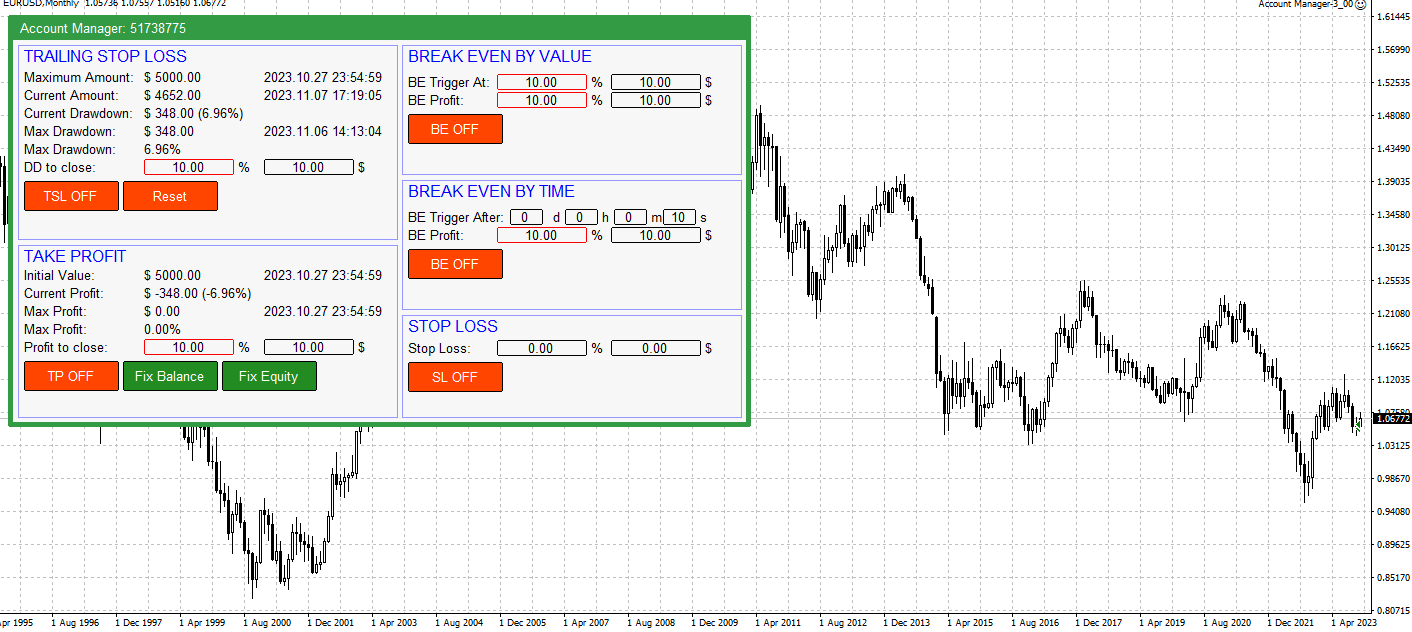
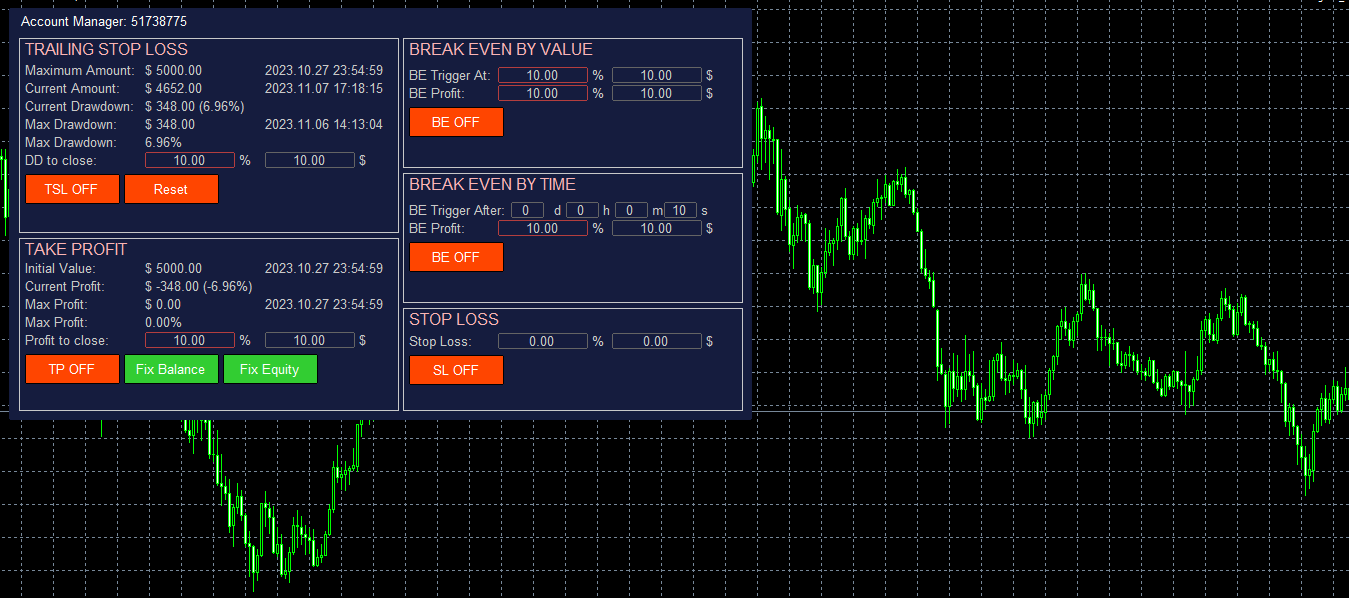
Trailing Stop Loss is set as a percentage or in the account currency (for example, in dollars). The Reset button resets the value of the maximum drawdown. In this section:

  • Maximum Amount - the maximum amount of funds on the account, fixed after pressing the Reset button and the time of getting this value. Used to calculate Trailing Stop Loss.
  • Current Amount - the current value of the funds on the account and the current time.
  • Current Drawdown - the current value of the drawdown on the account - in the account currency and as a percentage.
  • Max Drawdown - the maximum drawdown on the trading account that occurred after pressing the Reset button, in the account currency and as a percentage. And the time when this value was reached.
  • DD to close - drawdown value at which all positions are closed. It can be set both in percentage and in currency. Counted from Maximum Amount. The manager remembers in what units the value was set - percentage or currency. The selected option is highlighted with a frame.
  • TSL ON/OFF - switch on/ switch off closing by TSL
  • Reset - reset value of Maximum Amount to the current Equity

Take Profit is set as a percentage or in the account currency (for example, in dollars). Calculated from the Initial value. In this section:

  • Initial Value - the initial value from which the following are calculated: current profit, maximum profit, profit to close, Break Even values by amount and time.  And the time when this value was fixed.
  • Current Profit - current profit for the entire account.
  • Max Profit - maximum profit from the moment of setting the initializing value in the account currency and as a percentage. The time of reaching the maximum profit value.
  • Profit to close - profit value at which all open positions are closed. It can be set both in percentage and in currency. Calculated from Initial Value. The manager remembers in what units the value was set - percentage or currency. The selected option is highlighted with a frame.
  • TP ON/OFF - switch on/switch off closing by TP
  • Fix Balance - a button, when clicked, the Initial Value is set equal to the current Account Balance value.
  • Fix Equity - a button, when clicked, the Initial Value is set equal to the current account Equity value.

Break Even by Value is set as a percentage or in the account currency (for example, in dollars). Calculated from the Initial value. In this section:

  • BE Trigger At - profit value at which BE is activated. Calculated from the Initial Value of the Take Profit section. It can be set both in percentage and in currency. The manager remembers in what units the value was set - percentage or currency. The selected option is highlighted with a frame.
  • BE Profit - profit value to be received when BE is triggered. Calculated from the Initial Value of the Take Profit section. It can be set both in percentage and in currency. The manager remembers in what units the value was set - percentage or currency. The selected option is highlighted with a frame.
  • BE ON/OFF - BE by value on/off button.

Break Even by Time fixes the minimum value of profit that should be on the account after the specified value of days, hours, minutes, seconds will be passed. This means that after the specified time has passed since the activation of this option, all positions on the account will be closed if the profit is less than the specified value in the account currency or as a percentage. For example, if you set the timer for 1 hour, then in an hour the manager will control that the profit on the account does not fall below the BE Profit value. If the profit is less, then all positions will be closed.

  • BE Trigger After - after what time after the activation of the option, profit control on the account will be activated. Specified in days, hours, minutes and seconds.
  • BE Profit - profit that should be on the account after the expiration of the BE Trigger After time to save open positions. 
  • BE ON/OFF - BE by time on/off button.

Stop Loss closes opened trades when Stop Loss value is reached. Counting from the Initial Value

  • Stop Loss - value of total loss by the account, when SL will be triggered (dollars and percents)
  • SL ON/OFF - switch on/switch off the Stop Loss

Input Parameters:

  1. Panel's colors - There are two panel color schemes: Black on white and White on black.
  2. Scale (%) - Scale. Set to anything other than 100% if a scale other than 100% is selected in Windows - Display Options.

Produtos recomendados
AKCAP Hotkey Tool
AK Capital Markets Limited
5 (3)
Special offer for the next 10 copies Are you tired of manually navigating through menus and inputting data every time you want to execute a trade or open an order on Meta Trader? Our hotkey tool is here to make your life easier and boost your trading efficiency. Our tool is natively coded for lightning-fast performance and comes loaded with all the features you could possibly want. From pending orders and OCO orders to trailing and multiple buckets, it has everything a scalper could need. And
A professional tool for real-time monitoring of the account status and the work of Expert Advisors. Information about the account status can be sent to Telegram chats automatically at a specified interval or upon request. From the screenshots of the open charts of the terminal, you receive upon request from your Telegram bot. Account information includes: 13:02 Trade monitoring by Telegram v.1.0 (headline) Account : 6802ххх RoboForex-Pro (account information) Profit start: 2661 USD (profit earne
This EA help trader to manage his pending orders, when you place many Pending Orders this utility monitor them and when of them get filed (executed) the EA cancel and delete all rest of pending orders, to avoid  opening of all of pending orders at the same time , and lose your risk management. this utility is very useful for trader when he /she is not available on the desk.
Pending Orders Grid Complete System opens any combination of Buy Stop, Sell Stop, Buy Limit and Sell Limit pending orders and closes all existing pending orders. You will be able to Drag-and-Drop the Script on the chart and it will pick up the start price for the first position in the grid from the "Drop" point. Usually it should be in the area of Support/Resistance lines. Input Parameters Before placing all pending orders, the input window is opened allowing you to modify all input parameters:
The utility is designed to send signals from MT4 to Telegram. It has several unique features, allowing not only the sending of trade signals but also the following functionalities: Send messages directly from the terminal to Telegram Send emojis along with custom text Send text and images from Telegram All of these features enable users to manage a signal channel while focusing on trading and finding quality signals. Customizable Signal Messages You can fully customize the signal message: Specif
Title : Trade Assistant Manager MT5 Trade Assistant Manager — See your risk before you click Visual Risk Manager is a MetaTrader 5 chart utility for discretionary traders who want a clear, visual way to size positions . Place your Entry, Stop Loss, and Take Profit directly on the chart. The panel shows the lot size, the money at risk, the profit target in money, and the reward-to-risk ratio — updated as you move the lines. What you gain   Faster decisions   : - Automatically calculate the volum
FREE
MT5toTLGRM
Fernando Morales
4.2 (5)
Do not use Windows 7 with this EA MT5toTLGRM EA only sends text messages to a Telegram group or channel of your choice. The messages are customizable to show information about any trading activity in the account. Also it shows a daily PnL report. Several instances of this EA can be used simultaneously in the same MT5 terminal for sending messages to different Telegram group/channel but ensure that each one has a different number in [B13] setting. Following are the features of MT5toTLGRM EA send
FREE
Trade Dashboard MT5
Fatemeh Ameri
4.94 (120)
Tired of complex order placement and manual calculations? Trade Dashboard is your solution. With its user-friendly interface, placing orders becomes effortless, by a single click, you can open trades, set stop loss and take profit levels, manage trade lot size, and calculate risk to reward ratios, allowing you to only focus on your strategy. Say goodbye to manual calculations and streamline your trading experience with Trade Dashboard. Download  Demo Version  right now. You can find  Details of
Adaptive ATR Trailing Stop
Seref Oliver Joisten
5 (1)
Adaptive ATR Trailing Stop (MT5) Overview Adaptive ATR Trailing Stop is a utility Expert Advisor for MetaTrader 5 that manages stop loss levels for existing open positions. It uses the Average True Range (ATR) to calculate a volatility-based trailing distance. This EA does not open trades. It only modifies the Stop Loss (SL) of existing positions and keeps the current Take Profit (TP) unchanged. How it works - The EA runs on every tick of the chart where it is attached. - For each open posit
FREE
ReverseTune
Konstantin Chernov
A script for quick reversing positions and/or orders. If you need to reverse a position with the same volume, open an opposite position of a different volume or change the type of existing orders (for example, Buy Limit -> Sell Limit, Buy Stop -> Sell Limit, etc.) with the same or different take profit/stop loss, this script will make all the routine for you! Allow AutoTrading before running the script. Usage: Run the script on a chart. Input Parameters: Language of messages displayed (EN, RU, D
Assuma o controle de sua carteira forex. Veja instantaneamente onde você está, o que está funcionando e o que está causando dor! VERSÃO MT4 DISPONÍVEL AQUI: https://www.mql5.com/en/market/product/58375 O Painel do Trade Manager foi projetado para mostrar rapidamente onde está cada posição que você tem no mercado cambial atualmente e tornar o gerenciamento de risco e a exposição a moedas mais fáceis de entender. Para os comerciantes que escalam para o mercado gradualmente com várias posições ou
AUTO RISK MANAGER PRO: o seu parceiro no trading Forex! AUTO RISK MANAGER PRO_MT4 — versão para MT4 Versão demo + descrição detalhada Pare de perder dinheiro por causa das emoções! É hora de confiar a gestão de risco a um algoritmo profissional. Imagine a situação: o mercado se move rapidamente contra a sua posição enquanto você está dormindo, trabalhando ou passando tempo com a família. História comum? Com o Auto Risk Manager Pro — nunca mais! Vantagens: Abordagem revolucionária para gestão de
One Click Trader  is a tool designed for MetaTrader 4 platform, which enables you to take your trading to the next level. It enables you to open, manage and close your trades in simple an efficient way by just one click of your mouse button. "-"   ,  "+"  change OCT window size  Up arrow minimizes the OCT panel Down arrow maximizes the OCT panel Right arrow displays the next panel with additional features Left arrow hides the panel with additional features Red  SELL  button enables you to open s
Session panel
Timo Mario Hoffmann
Session Panel for MT5 Session Panel is a free MT5 indicator that gives you a fast and convenient live overview of the major trading sessions directly from the chart. Monitor Tokyo, London, and New York session times, see which session is currently active, track countdowns to the next session, and view session overlap information in one compact dashboard. Built for traders who want better market timing, clearer session awareness, and a cleaner chart workflow in live market conditions. Session Pan

FREE
TradingX Hotkeys
Johannes Stephanus Lombard
Inputs Available Lotsizes Partial Close % You can change lotsizes as you require On an open chart click once to select chart to be able to use hotkeys on specific chart. All Pairs can be used with this expert We created this expert to be able to still trade C300 with a 0.06 Lotsize If you enter a 0.6 lot and close 0.90% you can trade with 0.06 Lot Keys to be used: B -Buy S -Sell C -Close Profitable D -Breakeven (Note if stoploss is set it won't break even) P -Partial close X -Close all
Position Limit Monitor: Efficient Control of Your Trading Operations Have you ever worried about having too many open trades simultaneously? Would you like precise control over the maximum number of positions in your account? Position Limit Monitor is the solution you need. Main Features: • Real-time monitoring: Constantly supervises the number of open positions in your account. • Customizable limit: Easily set the maximum number of positions you want to keep open. • Automatic closure: When the
Dhokiyas Market Screener
Dhokiyas Money Map Investment Consultants - FZCO
Dhokiya's Market Screener Guia do Usuario Painel de analise multi simbolo para MetaTrader 5 com trading em um clique e visao tecnica completa Canal Oficial para Atualizações Entre no canal : Dhokiyas Suporte Envie mensagem direta : Contact 1. O Que Este Produto Faz Dhokiya's Market Screener e uma ferramenta de analise tecnica multi simbolo para MetaTrader 5. Ele escaneia uma lista de simbolos e mostra possiveis direcoes de operacao com uma pontuacao baseada em multiplas confirmacoes. Foi d
"Support or Resistance Alert Broken" is a simple and very intuitive tool that allows you to create or eliminate horizontal and trend supports and / or resistances with a simple click. When the support or resistance line is broken by the closing price at the end of the current candle, the "Support or Resistance Alert Broken" tool will send an alert with sound, as well as a notification to the MT4 or MT5 mobile application. This tool can send alerts from multiple pairs at the same time. Utility
All Pending Orders with StopLoss opens any combination of Buy Stop, Sell Stop, Buy Limit and Sell Limit pending orders and closes all existing pending orders. If boolSL = true then this Script will calculate one common StopLoss value as the StopLoss for a first/last orders and put this value in all pending orders. Input Parameters Before placing all pending orders, the input window is opened allowing you to modify all input parameters: DeleteAllPendings : if true , then all pending orders (for
GS trade report
Aleksander Gladkov
5 (1)
3 in 1 : Report + monitoring + sending messages (Telegram, ...) to optimize trading and use of advisors. Monitoring: Panel on the chart Sending messages to Telegram Sending messages to Email Sending Notifications Sending pop-up messages Sound notifications when the established Profit/Loss levels are exceeded Monitoring is activated by pressing the Start button. Profit for the period by currency pairs, hours and Magic number for the current account. Forms four tables: by symbols, by magic number
EA Auditor
Stephen J Martret
EA AUDITOR - VERIFY EA'S BEFORE YOU BUY The Only Independent EA & Signal Verification Tool for MetaTrader 5 MAKE SMARTER EA PURCHASES. EVERY TIME. The MQL5 market is home to some genuinely outstanding Expert Advisors built by talented developers — strategies that can transform your trading. But it can also include EAs with history readers coded in to produce fake backtest results, curve-fitted strategies, manipulated signals, and EAs falsely marketed as "AI-powered" or "machine learning" when th
SessionSync é uma ferramenta inteligente e elegante para MetaTrader 5, criada para manter o trader totalmente sincronizado com o mercado. Ela mostra em tempo real o tempo restante do candle atual e exibe os principais horários de referência, incluindo servidor, horário local, Nova York e Londres. Com um painel flutuante limpo e intuitivo, o SessionSync ajuda você a acompanhar o fechamento dos candles e as sessões do mercado de forma rápida e eficiente, sem poluir o gráfico. Seja para operações c
Cálculo automático de un lote comercial teniendo en cuenta el Stop Loss (en pips) y el porcentaje de riesgo del saldo de la cuenta. El panel del Asesor Experto se encuentra en el gráfico de la parte superior izquierda. En el panel del asesor, puede seleccionar el tamaño del stop loss en pips y el porcentaje de riesgo del saldo. Puede establecer la desviación del precio actual en pips para órdenes pendientes. El color rojo indica la cantidad en la moneda de depósito que puede perder cuando se ac
Operative Management Pro – Advanced Trading Utility Operative Management Pro is a smart visual tool for traders who want to analyze and simulate their trades before placing them on the market. This panel displays in real-time the most important parameters of the current symbol: Current price and minimum lot size Required margin Spread cost in USD and pips Take Profit and Stop Loss value in USD Automatic risk and reward calculation With just a click on the chart, you can simulate BUY or SELL t
Chart Spot Binance
Ghavamipour Mohammadreza
show live chart spot All symbol binance If you want to get this product with a 99% discount, send a message to my Telegram admin and rent this product for 1 $ per month or 10 $ per year. Even if you do not like the way the chart is displayed, you can tell the admin in Telegram how to display it so that your own expert is ready. https://t.me/Bella_ciao1997 https://t.me/Binance_to_mql5
EW Close All – Um clique. Tudo fechado. EW Close All é um Expert Advisor leve e multilíngue que permite fechar todas as posições abertas e cancelar todas as ordens pendentes instantaneamente — com apenas um clique. Fecha todas as posições abertas   Cancela todas as ordens pendentes   Funciona em qualquer símbolo e timeframe   Interface multilíngue   Limpo, rápido e confiável Perfeito para saídas rápidas, controle de risco ou limpeza no final do dia. Mantenha total controle — feche
FREE
Utility TimeLs Close Positions é uma ferramenta para gerenciar e automatizar o fechamento de posições no MetaTrader 5. Ela permite controle flexível sobre quando e como as posições abertas são encerradas, com base em horário, símbolo, direção, número mágico e comentário. Você pode desativar as negociações em dias específicos da semana Você pode definir um horário específico para fechar todas as posições abertas Você pode filtrar os fechamentos por símbolo, direção (compra/venda), número mágico o
Nova Forex Traderr
Eduar Ulises Toro Daza
An algorithm that uses artificial intelligence (AI) to analyze the best entries in the market over the 24 hours generally works by following these steps: Real-Time Data Collection: The algorithm collects real-time information from various sources such as market prices, trading volumes, technical indicators, economic news, and fundamental analysis. Data Processing: It uses data processing techniques such as time series analysis, noise filtering, and extraction of relevant features that help pr
TradesManger
Ali Abdalrasool Ai-sayyd Sobai
Ultimate Manager is the ultimate Expert Advisor (EA) for MetaTrader5, empowering traders with seamless control over every aspect of their trades. This powerful tool manages lot sizes, stop losses, trailing stops, trade durations, and trailing activation thresholds with precision. Featuring intuitive buttons, you can execute two trades simultaneously, close all positions, close buys only, close sells only, or close profitable trades in an instant. Designed for efficiency and risk management, Ulti
Equity Guard AI Professional account protection system that closes trades and removes EAs when drawdown limits are breached.Equity Guard is a professional account protection utility designed to safeguard your trading capital. This tool monitors your account equity and drawdown in real-time, automatically executing protective measures when predefined risk thresholds are exceeded. Perfect for prop firm traders, FTMO challenges, and personal accounts. Equity Guard AI installtion Guide       Downl
Os compradores deste produto também adquirem
Trade Assistant MT5
Evgeniy Kravchenko
4.42 (207)
Ajuda a calcular o risco por comércio, a fácil instalação de uma nova encomenda, gestão de encomendas com funções de fecho parcial, trailing stop de 7 tipos e outras funções úteis. Materiais e instruções adicionais Instruções de instalação   -   Instruções para a aplicação   -   Versão de teste da aplicação para uma conta de demonstração Função de linha Mostra no gráfico a linha de Abertura, Stop Loss, Take Profit. Com esta função é fácil definir uma nova ordem e ver as suas características ad
VERIFIED TRADING RESULTS - Farmed Hedge Yield Axi Copy:  https://www.mql5.com/en/signals/2356376 - Farmed Hedge Yield Exn Copy:   https://www.mql5.com/en/signals/2356404 - Farmed Hedge Yield V Copy:  https://www.mql5.com/en/signals/2357156 Contact me via private message to receive the User Manual and Setup. * Thai Lauguage Support Available Farmed Hedge Yield Farming - Professional Pair Trading Dashboard (Manual - Hybrid - Semi/Automated EA) VERSION 3 - WILD HARVEST UPDATE Trading Approac
HINN Lazy Trader
ALGOFLOW OÜ
5 (2)
The core idea: using the user interface, you configure the parameters the chart must meet before entering a position (or positions), choose which entry models to use, and set the rules for when trading and planning should end. Lazy Trader  handles the rest: it  takes over all the routine chart watching and execution! full description  :: 3 key videos [1] ->  [2]   ->  [3] What can it do? - Understands Larry Williams market structure - Understands swing market structure by Michael Huddleston
The product will copy all telegram signal to MT5 ( which you are member) , also it can work as remote copier.  Easy to set up, copy order instant, can work with almost signal formats, image signal,  s upport to translate other language to English Work with all type of channel or group, even channel have "Restrict Saving Content", work with  multi channel, multi MT5 Work as remote copier: with signal have ticket number, it will copy exactly via ticket number. Support to backtest signal. How to s
Crypto Charting
Rajesh Kumar Nait
5 (5)
Crypto Charting for MT5 – Integração de gráficos de criptomoedas no MetaTrader 5 Visão geral Crypto Charting for MT5 oferece gráficos OHLC em tempo real através de WebSocket. Suporta múltiplas corretoras e atualizações automáticas no MT5. Funcionalidades Dados em tempo real via WebSocket Sincronização automática de histórico Atualizações programadas após falhas de conexão Compatível com todos os timeframes do MT5 Dados OHLCV completos Suporte ao testador de estratégias Reconexão automática Corr
Footprint Chart Pro — Professional OrderFlow EA for MetaTrader 5 Version 6.34 | Professional tool for real traders | Institutional-Grade Visualization DEMO USERS - PLEASE SELECT EVERY TICK / REAL TICK WHEN TESTING AND YOU HAVE DOWNLOADED HISTORICAL DATA. IF YOU SEE A WAITING SCREEN AND IT IS NOT DOWNLOADING, IT MEANS YOU HAVE LOW HISTORICAL DATA. TRY 1 MIN AND 5 MIN FIRST ON 1 DAY DATA. ONE DAY DATA SHOULD BE THE NEWEST AND MOST CURRENT DATE. PLEASE WAIT UNTIL THE MARKET HAS ROLLED OVER PERIOD.
Ultimate Extractor
Clifton Creath
5 (9)
Ultimate Extractor - Professional Trading Analytics for MT5 *****this is the local HTML version of Ultimate Extractor. For the online version please reach out to me directly****** Ultimate Extractor transforms your MetaTrader 5 trading history into actionable insights with comprehensive analytics, interactive charts, and real-time performance tracking. What It Does Automatically analyzes your MT5 trading history across all Expert Advisors and generates detailed HTML reports with interactive vi
YuClusters
Yury Kulikov
4.93 (43)
Atenção: A versão demo para revisão e teste está aqui . YuClusters é um sistema profissional de análise de mercado. O trader tem oportunidades únicas para analisar o fluxo de pedidos, volumes de negociação, movimentos de preços usando vários gráficos, perfis, indicadores e objetos gráficos. O YuClusters opera com base em dados de Tempos e Negócios ou informações de ticks, dependendo do que está disponível nas cotações de um instrumento financeiro. O YuClusters permite que você crie gráficos com
Telegram To MT5 Receiver
Levi Dane Benjamin
4.31 (16)
Copie os sinais de qualquer canal do qual você seja membro (incluindo privados e restritos) diretamente para o seu MT5.  Esta ferramenta foi projetada com o usuário em mente, oferecendo muitos recursos que você precisa para gerenciar e monitorar as negociações. Este produto é apresentado em uma interface gráfica fácil de usar e visualmente atraente. Personalize suas configurações e comece a usar o produto em minutos! Guia do usuário + Demo  | Versão MT4 | Versão Discord Se deseja experimentar
Neowave Chart Plotter
Bahador Baradari
5 (1)
This Expert Advisor is applicable to plot wave charts as per the NeoWave  method (Neely Extension of Wave Theory).  NeoWave is a scientific, objective and revolutionary style of Elliott Wave Theory that was invented by Glenn Neely in 1990 in the “Mastering Elliott Wave” book. To start analyzing with this method, we need a particular chart called the Wave Chart or Cash Data chart . This is the first step for a good wave analysis. To draw this chart, Highs and Lows should be plotted in the order t
Custom Timeframe Manager Pro: Timeframes ilimitados no MetaTrader 5 As configurações padrão do terminal muitas vezes ocultam detalhes importantes do movimento do preço. Ao limitar a análise apenas aos períodos clássicos, o trader corre o risco de perder os momentos de origem da tendência e os verdadeiros níveis de volatilidade. Custom Timeframe Manager Pro é uma solução profissional que remove quaisquer restrições na construção de gráficos. Crie quaisquer períodos personalizados, incluindo fraci
EasyInsight AIO MT5
Alain Verleyen
4.92 (12)
EASY Insight AIO – A solução tudo-em-um para trading inteligente e sem esforço Visão geral Imagine analisar todo o mercado — Forex, Ouro, Cripto, Índices e até Ações — em segundos, sem precisar examinar gráficos manualmente, instalar indicadores ou lidar com configurações complicadas. EASY Insight AIO é sua ferramenta definitiva de exportação para trading com IA, pronta para usar. Ela oferece um panorama completo do mercado em um único arquivo CSV limpo — pronto para análise imediata no ChatGP
Signal TradingView to MT5 Pro Automator Execução profissional instantânea entre TradingView e MetaTrader 5 Automatize a sua estratégia de trading com a ponte de comunicação mais robusta entre os alertas do TradingView e a execução real no MT5. Concebido para traders que exigem velocidade, flexibilidade e uma gestão de risco impecável, este Expert Advisor transforma qualquer mensagem de alerta numa ordem de mercado ou de limite precisa. PONTOS FORTES E VANTAGENS Motor de Parsing Universal (Propri
Unlimited Trade Copier Pro MT5 is a tool to copy trade remotely to multiple MT4, MT5 and cTrader accounts at different computers/locations over internet. This is an ideal solution for you if you are a signal provider and want to copy your trades to other receivers globally on your own rules. One provider can copy trades to multiple receivers and one receiver can get trade from multiple providers as well. The provider can even set the subscription expiry for each receiver, so that receiver will n
ManHedger MT5
Peter Mueller
4.83 (6)
THIS EA IS A SEMI-AUTO EA, IT NEEDS USER INPUT. Manual & Test Version Please TEST this product before BUYING  and watch my video about it. The price of the ManHedger will increase to 250$ after 20 copies sold. Contact me for user support or bug reports or if you want the MT4 version! MT4 Version  I do not guarantee any profits or financial success using this EA. With this Expert Advisor, you can: Implement your own Zone Recovery strategy to capitalize on trending markets. Create Grid trading s
The product is used to trade base on any Alert signal in MT5 Easy to setup, simple format with custom keyword All option to management orders as trailing stop, breakeen, partial close, time filter, news filter ... Option to auto open grid orders How to setup and guide: Let read all details about setup and download indicator for auto get   Alert Signal   here Do not buy if you even can not install demo EA to your VPS ( some VPS block download EA from mql5 market) We always bring customers high q
Custom Alerts AIO: Monitoramento inteligente de múltiplos mercados – pronto para uso, sem configuração Visão geral Custom Alerts AIO é uma ferramenta avançada de varredura de mercado que funciona imediatamente após a instalação — sem necessidade de configurar indicadores adicionais. Inclui internamente todos os principais indicadores da Stein Investments (FX Power, FX Volume, FX Dynamic, FX Levels e IX Power), permitindo que você monitore facilmente todas as principais classes de ativos: Forex
GRat Binance
Ivan Titov
1 (1)
Trade on Binance in MT5! GRat_Crypto is a tool for manual and automated trading , including ANY available EA, ANY  cryptocurrency  on most popular crypto exchange Binance in the familiar MT5 environment 24/7. Features 1. ALL instruments of the 5 most popular crypto exchange  Binance . 2. The ability to place ANY type of order available in MT5, both market and pending, to modify orders and positions, to delete orders and close positions (even partially), to set trailing stop and trailing profit.
Features   With MT5 to Interactive Brokers(IB) Trader, you can: 1. Load chart data from IB to MT5, and Analyze with all standard or customer Indicators. 2. Place Orders to IB Account Directly in MT5. 3. Make your Own EAs upon IB Securities by only making minus changes of the trading function. Usage 1) Installation Copy the "Mt5ToIBTraderEn.ex4" and sample files to [MT5 Data Folder]->MQL5->Experts.  2)  MT5 Settings Add the IP Address to the MT5 Allowed URLs in 'Tools->Options->Expert Adviso
******************************* ***************** ********************** ***************** ********************** ************************* GoldMine Train é uma estratégia de trading Trend EA for Gold. O operador determina a direção da tendência principal e instrui o comboio para partir. O comboio comprará/venderá continuamente na direção. O volume do lote dependerá do saldo da conta e da taxa de alavancagem predefinida. Quando o Operador mudar a direção da tendência, o Comboio irá parar
The Expert Advisor will help you forward all alert from  MetaTrader 5 to Telegram channel/ group.  All alert must save to folder <Data folder>MQL5\Files\Alerts\ , text file with format *.txt and screenshot with format *.gif or *.png. Parameters: - Telegram Bot Token: - create bot on Telegram and get token. - Telegram Chat ID:  - input your Telegram user ID,  group / channel ID - Forward Alert: - default true, to forward alert. - Send message as caption of Screenshot: - default false, set true t
FuturesGate
Laurent Xavier Richer
MT5 → Futures API Bridge Mirror your MT5 trades into an external futures platform in real time—perfect for running your favorite Expert Advisor (EA) on MT5 while executing on supported external futures accounts. NEW in v2.0: Multi-Symbol Support (Trade Nasdaq, S&P, and Dow from one chart), List-Based Filtering. Click here to read the Full Manual & Setup Guide Key Features Multi-Symbol Control: Manage trades for multiple instruments simultaneously from a single chart instance using the new "
Dynamic Fibonacci Grid
Tsvetan Tsvetanov
5 (1)
Apresentando a versão mais recente do Dynamic Fibonacci Grid Dashboard para MT5. Agora repleto de muitos novos recursos, este novo painel transforma sua experiência de trading e permite que você veja o mercado e a ação do preço de uma perspectiva completamente diferente. Descubra novas possibilidades com a análise simultânea de múltiplos timeframes e múltiplos símbolos. Interface amigável para trading manual e gerenciamento de posições, além de uma capacidade ampliada para aplicar estratégias a
The product will copy all  Discord  signal   to MT5   ( which you are member  ) , also it can work as remote copier.  Easy to set up. Work with almost signal formats, support to translate other language to English Work with multi channel, multi MT5. Work with Image signal. Copy order instant, auto detect symbol. Work as remote copier: with signal have ticket number, it will copy exactly via ticket number. How to setup and guide: Let read all details about setup and download Discord To MetaTrader
Mt5 To InterativeBrokers Copier allows you to copy deals from MT5 account to Interactive Brokers. With this, you can run your EA strategy on a MT5 Demo/Real Account, then copy all the deals to Interactive Brokers account real time. Features: 1. Copy or Invert-Copy deals Realtime from MT5 to IB Account. 2. Synchronizing positions of both accounts periodicaly, in case any missing copying. 3. You can choose only Buy position or Sell position. Symbols Setup: General Format:  {MT Symbol} -> {IB S
Mentfx Mmanage mt5
Anton Jere Calmes
4.25 (8)
The added video will showcase all functionality, effectiveness, and uses of the trade manager. Drag and Drop Trade Manager. Draw your entry and have the tool calculate the rest. Advanced targeting and close portions of a trade directly available in tool (manage trades while you sleep). Market order or limit order on either side with factored spread. Just draw the entry, the tool does the rest. Hotkey setup to make it simple. Draw where you want to enter, and the stop loss, the tool calculates al
Ultimate Trailing Stop EA MT5
BLAKE STEVEN RODGER
4.13 (8)
This EA Utility allows you to manage (with advanced filtering) unlimited open orders (manual or EA) with 16 trailing stop methods: fixed, percent, ATR Exit, Chandelier Exit, Moving Average, Candle High Low Exit, Bollinger Bands, Parabolic, Envelope, Fractal, Ichimoku Kijun-Sen, Alligator, Exit After X Minutes or Bars, RSI and Stochastic. The trailing stop can be either real or virtual, and you can exit fully or with a partial close percent on touch or bar close.  Moreover, you can add (override
Trade Copier Pro MT5 is a tool to copy trade remotely to multiple MT4, MT5 and cTradfer accounts at different computers/locations over internet. This is an ideal solution for you if you are a signal provider and want to copy your trades to other receivers globally on your own rules. One provider can copy trades to multiple receivers and one receiver can get trade from multiple providers as well. The provider can even set the subscription expiry for each receiver, so that receiver will not be abl
GRat Crypto
Ivan Titov
4.5 (2)
Trade on crypto exchanges in MT5! GRat_Crypto is a tool for manual and automated trading , including ANY available EA, ANY  cryptocurrency  on most popular crypto exchanges in the familiar MT5 environment 24/7. Features 1. ALL instruments of the 9 most popular crypto exchanges are available: Binance, BingX, Bybit, Coinbase, CoinEx, Kraken,   KuCoin, MEXC and OKX . 2. The ability to place ANY type of order available in MT5, both market and pending, to modify orders and positions, to delete order
PineChart
Muhammad Minhas Qamar
Developed by MMQ —  PineChart: Run PineScript Inside MT5 With A Modern Charting Experience An MQL5 Expert Advisor that runs Pine Script indicators and strategies directly inside MetaTrader 5. PineChart includes a full Pine Script interpreter so you can use your existing Pine Script v5/v6 source code without manually rewriting anything in MQL5. Links [  Website  |  Documentation  |  Demo ] NOTE: Downloading demo through MQL5 will give you limited functionality. To experience PineChart fully, dow
Mais do autor
Expert Advisor Description This scalper is based solely on price action logic — without using hedging, martingale, grids, or other high-risk methods. Trades are opened based on candle formations and key support/resistance levels. The EA has shown stable and profitable results during long-term backtesting from the year 2000 up to the present. Full backtest statistics are available in the attached report — including a Profit Factor of 2.70 , Recovery Factor of 16.20 , over 94% winning trades, and
The panel was created to manage trading positions: to open new trades and close existing ones. To open new transactions, you can set the position volume, Stop Loss in points, risk in dollars or as a percentage, Take Profit in points or Profit in dollars, you can set the Profit/Risk parameter. It is possible to place a panel on the active chart to visually set the parameters of a new transaction, select a market order or a pending one. If you fix the RR parameter, then when Risk changes, Profit w
Simple Customizable Trade Panel — Fast and Easy One-Click Trading This lightweight and powerful panel is built for traders who value speed , simplicity , and full customization . With just one click, you can: Buy or Sell instantly Close all open positions Place pending orders with custom distance Delete all pending orders Adjustable parameters: • Lot size • Stop Loss (in points) • Take Profit (in points) • Distance to price for pending orders The panel is fully responsive and adaptab
The account manager has a set of functions necessary for trading, which take into account the results of the entire account in total, and not for each individual open position: Trailing stop loss. Take profit. Break-even on the amount of profit. Breakeven by time. Stop Loss Typically, each of these options can be applied to each individual trade. As a result, the total profit on the account may continue to increase, and individual positions will be closed. This does not allow you to get the maxi
Equity charts generator creates an offline chart that draws bars corresponding to the account Equity value. The TimeFrame of the Equity chart is the same as the TimeFrame of the chart where the indicator will be placed. Input Parameters: Offline Timeframe - You can select the timeframe in minutes of the generated chart. Use opened file for adding new bars (true/false) - If set to false, a new history file is always created and bars will start drawing from the moment the indicator is placed on t
MA and Momentum EA uses simple indicators for calculation - Moving Average and Momentum. Profit for 3 year is 757 869 %. There is no more than one trade open at a time. It is possible to enter on each buy / sell signal, closing the previous trade or wait for the open trade to be closed by SL, TP, TS or BE, so that later it will be possible to open the next trade. Input parameters: Entry Level (Points) - The level at which the buy and sell entry takes place. Magic Number - The unique number of t
Viperrr EA
Mykhailo Krygin
The profitability of this EA from the beginning of 1999 to the present day is 25,000,000%. If $10,000 had been deposited into the account on 01/01/1999, by the end of 2006 the account would have had $2.8 billion. The parameters that were used are shown in the screenshot. EA uses 2 indicators, several types of SL, TP, TSL, and a grid. Parameters: Lot type - Type of lot calculation: Fixed, Relative - lots per balance of $1000. Lot Size (fixed or relative). Stop Loss, pips (0 - OFF) - Stop loss
The Risk and Reward calculator is designed to place market and pending orders. You only need to set the risk size you are willing to risk in one trade and the Stop Loss level. The calculator will calculate the required lot size for this. And by setting the Risk Reward size, you can set the ratio of expected profit to risk in one position. For example, you are willing to risk one dollar in one trade and, if the market moves in your favor, you want to make a profit of 2 times more. Then you need
The panel is designed to manage trading positions: to open new trades and close already opened ones. To open new trades, you can set the position LotSize, Stop Loss in points, risk in dollars or in percent, Take Profit in points or Profit in dollars, you can set the Profit/Risk parameter. It is possible to place a panel on the active chart to visually set the parameters of a new trade, select a market order or a pending one. If you fix the RR parameter, then when the Risk changes, the Profit wil
The panel was created to manage trading positions: to open new trades and close existing ones. To open new transactions, you can set the position volume, Stop Loss in points, risk in dollars or as a percentage, Take Profit in points or Profit in dollars, you can set the Profit/Risk parameter. It is possible to place a panel on the active chart to visually set the parameters of a new transaction, select a market order or a pending one. If you fix the RR parameter, then when Risk changes, Profit w
Simple Customizable Trade Panel — Fast and Easy One-Click Trading This lightweight and powerful panel is built for traders who value   speed ,   simplicity , and   full customization . With just one click, you can: Buy or Sell instantly Close all open positions Place pending orders with custom distance Delete all pending orders Adjustable parameters: • Lot size • Stop Loss (in points) • Take Profit (in points) • Distance to price for pending orders The panel is fully responsive and ad
CrownMaster Scalper is a powerful and fully automated trading robot designed for high-precision short-term trading using price action patterns and key price levels. It does not use Martingale, Grid, or Hedging — only clear, logic-based entries and exits. The EA was backtested on the Alpari broker from 2012 to 2025 using M5 timeframe with 98% modeling quality. For best results, your broker’s spread should be as low as possible . Key Features: No Martingale, Grid, or Hedging Works on any symbol an
Filtro:
Sem comentários
Responder ao comentário