Awesome Account Manager MT5

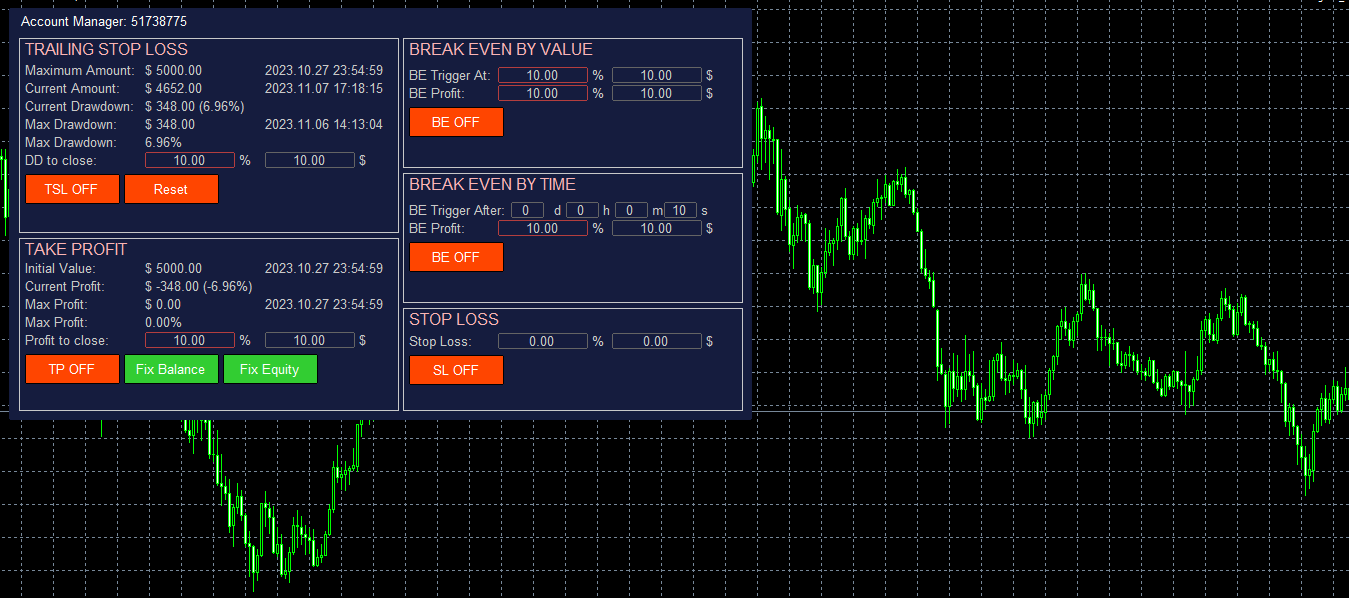
The account manager has a set of functions necessary for trading, which take into account the results of the entire account in total, and not for each individual open position:

  1. Trailing stop loss.
  2. Take profit.
  3. Break-even on the amount of profit.
  4. Breakeven by time.
  5. Stop Loss

Typically, each of these options can be applied to each individual trade. As a result, the total profit on the account may continue to increase, and individual positions will be closed. This does not allow you to get the maximum profit and closes positions that are temporarily in the red, but in the future could also bring profit. In addition, the standard Stop Loss, Take Profit and Break Even Point are set in points, and in this Account Manager they are set in the account currency (dollars) or as a percentage of the starting value, which is much more convenient and clearer.

By and large, this utility is necessary for everyone who uses any trading system on the Metatrader. It can be reset, for example, every month - at the beginning of the month, in order to set the desired limits for the trading account in terms of profit and loss. For example, set Trailing Stop Loss - 10%, Take Profit - 10%. Then, if a monthly profit of 10% is reached, the program will close all positions and this month you can no longer trade, fixing this profit. If the Trailing Stop Loss is triggered, then trading will also be stopped, with the preliminary closing of all open positions. In this case, even if the number of profitable and unprofitable months is the same, you will still remain in profit, since the loss received when the Trailing Stop Loss is triggered will always be no more than 10%, and the profit when Take Profit is triggered will always be at least 10 %.

This version of Account Manager only closes open positions, but I also have an another version of the program that uses the DLL, which also disables the Auto-Trade of the terminal, which allows you to use this Account Manager even when using automatic programs that manage the opening and closing of trades.

Account Manager is linked to the current trading account and saves all settings even when changing the Timeframe, rebooting the Terminal or turning off the computer. You can install only one Account Manager per trading account. If you place it on a VPS server, then the control over the trading account will be carried out around the clock. Account information is checked every second.

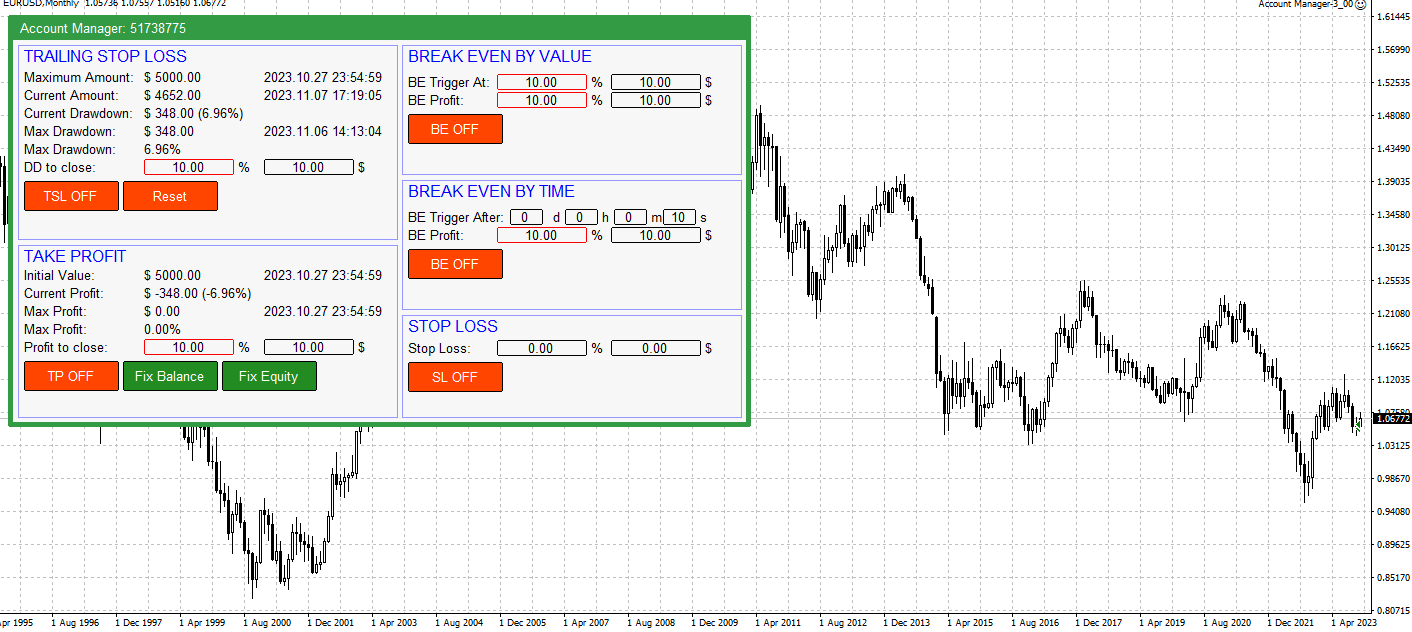
Trailing Stop Loss is set as a percentage or in the account currency (for example, in dollars). The Reset button resets the value of the maximum drawdown. In this section:

  • Maximum Amount - the maximum amount of funds on the account, fixed after pressing the Reset button and the time of getting this value. Used to calculate Trailing Stop Loss.
  • Current Amount - the current value of the funds on the account and the current time.
  • Current Drawdown - the current value of the drawdown on the account - in the account currency and as a percentage.
  • Max Drawdown - the maximum drawdown on the trading account that occurred after pressing the Reset button, in the account currency and as a percentage. And the time when this value was reached.
  • DD to close - drawdown value at which all positions are closed. It can be set both in percentage and in currency. Counted from Maximum Amount. The manager remembers in what units the value was set - percentage or currency. The selected option is highlighted with a frame.
  • TSL ON/OFF - switch on/ switch off closing by TSL
  • Reset - reset value of Maximum Amount to the current Equity

Take Profit is set as a percentage or in the account currency (for example, in dollars). Calculated from the Initial value. In this section:

  • Initial Value - the initial value from which the following are calculated: current profit, maximum profit, profit to close, Break Even values by amount and time.  And the time when this value was fixed.
  • Current Profit - current profit for the entire account.
  • Max Profit - maximum profit from the moment of setting the initializing value in the account currency and as a percentage. The time of reaching the maximum profit value.
  • Profit to close - profit value at which all open positions are closed. It can be set both in percentage and in currency. Calculated from Initial Value. The manager remembers in what units the value was set - percentage or currency. The selected option is highlighted with a frame.
  • TP ON/OFF - switch on/switch off closing by TP
  • Fix Balance - a button, when clicked, the Initial Value is set equal to the current Account Balance value.
  • Fix Equity - a button, when clicked, the Initial Value is set equal to the current account Equity value.

Break Even by Value is set as a percentage or in the account currency (for example, in dollars). Calculated from the Initial value. In this section:

  • BE Trigger At - profit value at which BE is activated. Calculated from the Initial Value of the Take Profit section. It can be set both in percentage and in currency. The manager remembers in what units the value was set - percentage or currency. The selected option is highlighted with a frame.
  • BE Profit - profit value to be received when BE is triggered. Calculated from the Initial Value of the Take Profit section. It can be set both in percentage and in currency. The manager remembers in what units the value was set - percentage or currency. The selected option is highlighted with a frame.
  • BE ON/OFF - BE by value on/off button.

Break Even by Time fixes the minimum value of profit that should be on the account after the specified value of days, hours, minutes, seconds will be passed. This means that after the specified time has passed since the activation of this option, all positions on the account will be closed if the profit is less than the specified value in the account currency or as a percentage. For example, if you set the timer for 1 hour, then in an hour the manager will control that the profit on the account does not fall below the BE Profit value. If the profit is less, then all positions will be closed.

  • BE Trigger After - after what time after the activation of the option, profit control on the account will be activated. Specified in days, hours, minutes and seconds.
  • BE Profit - profit that should be on the account after the expiration of the BE Trigger After time to save open positions. 
  • BE ON/OFF - BE by time on/off button.

Stop Loss closes opened trades when Stop Loss value is reached. Counting from the Initial Value

  • Stop Loss - value of total loss by the account, when SL will be triggered (dollars and percents)
  • SL ON/OFF - switch on/switch off the Stop Loss

Input Parameters:

  1. Panel's colors - There are two panel color schemes: Black on white and White on black.
  2. Scale (%) - Scale. Set to anything other than 100% if a scale other than 100% is selected in Windows - Display Options.

おすすめのプロダクト
A professional tool for real-time monitoring of the account status and the work of Expert Advisors. Information about the account status can be sent to Telegram chats automatically at a specified interval or upon request. From the screenshots of the open charts of the terminal, you receive upon request from your Telegram bot. Account information includes: 13:02 Trade monitoring by Telegram v.1.0 (headline) Account : 6802ххх RoboForex-Pro (account information) Profit start: 2661 USD (profit earne
This EA help trader to manage his pending orders, when you place many Pending Orders this utility monitor them and when of them get filed (executed) the EA cancel and delete all rest of pending orders, to avoid  opening of all of pending orders at the same time , and lose your risk management. this utility is very useful for trader when he /she is not available on the desk.
Pending Orders Grid Complete System opens any combination of Buy Stop, Sell Stop, Buy Limit and Sell Limit pending orders and closes all existing pending orders. You will be able to Drag-and-Drop the Script on the chart and it will pick up the start price for the first position in the grid from the "Drop" point. Usually it should be in the area of Support/Resistance lines. Input Parameters Before placing all pending orders, the input window is opened allowing you to modify all input parameters:
AKCAP Hotkey Tool
AK Capital Markets Limited
5 (3)
Special offer for the next 10 copies Are you tired of manually navigating through menus and inputting data every time you want to execute a trade or open an order on Meta Trader? Our hotkey tool is here to make your life easier and boost your trading efficiency. Our tool is natively coded for lightning-fast performance and comes loaded with all the features you could possibly want. From pending orders and OCO orders to trailing and multiple buckets, it has everything a scalper could need. And
RenkoChart EA
Paulo Henrique Da Silva
4.6 (5)
The RenkoChart tool presents an innovative and highly flexible approach to visualizing market data in MetaTrader 5. This expert creates a custom symbol with Renko bricks directly on the chart, displaying accurate prices at the respective opening date/time for each brick. This feature makes it possible to apply any indicator to the Renko chart. Furthermore, this tool also allows access to historical brick data through native methods in the MQL5 programming language, such as iOpen, iHigh, iLow and
FREE
The utility is designed to send signals from MT4 to Telegram. It has several unique features, allowing not only the sending of trade signals but also the following functionalities: Send messages directly from the terminal to Telegram Send emojis along with custom text Send text and images from Telegram All of these features enable users to manage a signal channel while focusing on trading and finding quality signals. Customizable Signal Messages You can fully customize the signal message: Specif
Tired of complex order placement and manual calculations? Trade Dashboard is your solution. With its user-friendly interface, placing orders becomes effortless, by a single click, you can open trades, set stop loss and take profit levels, manage trade lot size, and calculate risk to reward ratios, allowing you to only focus on your strategy. Say goodbye to manual calculations and streamline your trading experience with Trade Dashboard. Download  Demo Version  right now. You can find  Details of
MT5toTLGRM
Fernando Morales
4.2 (5)
Do not use Windows 7 with this EA MT5toTLGRM EA only sends text messages to a Telegram group or channel of your choice. The messages are customizable to show information about any trading activity in the account. Also it shows a daily PnL report. Several instances of this EA can be used simultaneously in the same MT5 terminal for sending messages to different Telegram group/channel but ensure that each one has a different number in [B13] setting. Following are the features of MT5toTLGRM EA send
FREE
A detailed description of the panel, along with access to a fully functional demo version (note: the demo does not allow opening positions), is available at http://mrtp.eu . MrRexo Trade Panel MrRexo Trade Panel is an Expert Advisor designed for manual trade management in MetaTrader 5. The panel provides tools for order execution, position control, and market structure visualization directly on the chart. It supports both hedging and netting account types. Main Functions 1. Position Sizing
A script for quick reversing positions and/or orders. If you need to reverse a position with the same volume, open an opposite position of a different volume or change the type of existing orders (for example, Buy Limit -> Sell Limit, Buy Stop -> Sell Limit, etc.) with the same or different take profit/stop loss, this script will make all the routine for you! Allow AutoTrading before running the script. Usage: Run the script on a chart. Input Parameters: Language of messages displayed (EN, RU, D
あなたの外国為替ポートフォリオを管理してください。あなたが立っている場所、何が働いているのか、そして何があなたに痛みを引き起こしているのかを即座に見てください! ここで利用可能なMT4バージョン:https:// www.mql5.com/en/market/product/58375 Trade Managerダッシュボードは、外国為替市場での現在の各ポジションが一目でわかるように設計されており、リスク管理と通貨へのエクスポージャーを理解しやすくします。 複数のポジションで徐々に市場に参入するトレーダー、またはそれらのトレーディンググリッドとバスケット戦略にとって、これは重要な情報です。ターミナル内の複数の位置を監視することは、管理が難しいことがよくあります。 不十分なリスクの活用と使用:報酬は、新しいトレーダーや一部の経験豊富なトレーダーが直面する主要な問題です。トレードマネージャーは、各通貨へのエクスポージャーを個別に示し、一度に両方向に取引しないようにします。 特徴: オープントレード-通貨ペアでソートされた現在のオープントレードをすべて表示します。ペアだけでなく、その
AUTO RISK MANAGER PRO:あなたのForex取引パートナー! AUTO RISK MANAGER PRO_MT4 — MT4バージョン デモ版 + 詳細な説明 感情のせいでお金を失うのはもうやめましょう! リスク管理はプロフェッショナルなアルゴリズムに任せる時です。 想像してみてください: 市場が急にあなたのポジションに逆行したその時、 あなたは寝ている、働いている、または家族と過ごしている——よくある話ですか? Auto Risk Manager Pro があれば——もう二度とそんなことはありません! メリット: 革命的なリスク管理アプローチ 24時間365日の自動資金保護 パソコンの前にいなくても自動で稼働 正確な利益目標設定——最適なタイミングで利益を確定 厳格な損失制限——重大な損失を防止 マルチカレンシー対応——どんな金融商品でも使用可能 チャートを閉じる機能(EAも同時にアンロード) コントロールパネル Control Panel Settings(パネル設定) PanelColor = clrDarkSlateGray — パネルの色 PanelX =
One Click Trader  is a tool designed for MetaTrader 4 platform, which enables you to take your trading to the next level. It enables you to open, manage and close your trades in simple an efficient way by just one click of your mouse button. "-"   ,  "+"  change OCT window size  Up arrow minimizes the OCT panel Down arrow maximizes the OCT panel Right arrow displays the next panel with additional features Left arrow hides the panel with additional features Red  SELL  button enables you to open s
TradingX Hotkeys
Johannes Stephanus Lombard
Inputs Available Lotsizes Partial Close % You can change lotsizes as you require On an open chart click once to select chart to be able to use hotkeys on specific chart. All Pairs can be used with this expert We created this expert to be able to still trade C300 with a 0.06 Lotsize If you enter a 0.6 lot and close 0.90% you can trade with 0.06 Lot Keys to be used: B -Buy S -Sell C -Close Profitable D -Breakeven (Note if stoploss is set it won't break even) P -Partial close X -Close all
Position Limit Monitor: Efficient Control of Your Trading Operations Have you ever worried about having too many open trades simultaneously? Would you like precise control over the maximum number of positions in your account? Position Limit Monitor is the solution you need. Main Features: • Real-time monitoring: Constantly supervises the number of open positions in your account. • Customizable limit: Easily set the maximum number of positions you want to keep open. • Automatic closure: When the
"Support or Resistance Alert Broken" is a simple and very intuitive tool that allows you to create or eliminate horizontal and trend supports and / or resistances with a simple click. When the support or resistance line is broken by the closing price at the end of the current candle, the "Support or Resistance Alert Broken" tool will send an alert with sound, as well as a notification to the MT4 or MT5 mobile application. This tool can send alerts from multiple pairs at the same time. Utility
All Pending Orders with StopLoss opens any combination of Buy Stop, Sell Stop, Buy Limit and Sell Limit pending orders and closes all existing pending orders. If boolSL = true then this Script will calculate one common StopLoss value as the StopLoss for a first/last orders and put this value in all pending orders. Input Parameters Before placing all pending orders, the input window is opened allowing you to modify all input parameters: DeleteAllPendings : if true , then all pending orders (for
GS trade report
Aleksander Gladkov
5 (1)
3 in 1 : Report + monitoring + sending messages (Telegram, ...) to optimize trading and use of advisors. Monitoring: Panel on the chart Sending messages to Telegram Sending messages to Email Sending Notifications Sending pop-up messages Sound notifications when the established Profit/Loss levels are exceeded Monitoring is activated by pressing the Start button. Profit for the period by currency pairs, hours and Magic number for the current account. Forms four tables: by symbols, by magic number
ストップロス(ピップ単位)と口座残高からのリスクのパーセンテージを考慮した取引ロットの自動計算。 Expert Advisorパネルは、左上のチャートにあります。アドバイザのパネルで、ピップ単位のストップロスのサイズとバランスからのリスクのパーセンテージを選択できます。保留中の注文の現在の価格からの偏差をピップで設定できます。赤い色は、ストップロスがトリガーされたときに失う可能性のある預金通貨の金額を示します。この金額には、手数料、スワップ、税金は含まれていません。    主要な外国為替通貨ペア、XAUUSD(ゴールド)、BTCUSD、ETHUSDには、このアドバイザーを使用することをお勧めします。他の機器については、計算の特殊性を考慮すると、エラーが発生する可能性があります。ほとんどの外国為替商品では、ドットの後に5桁のアカウントをお勧めします。       説明 -損失のリスク。預金通貨のリスク額は、アドバイザーの情報パネルに赤で表示されます。この値は、商品の証拠金がこのリスクに対して十分であり、SLフィールドでピップサイズを正しく指定している場合、未決済注文(または保留中
Operative Management Pro – Advanced Trading Utility Operative Management Pro is a smart visual tool for traders who want to analyze and simulate their trades before placing them on the market. This panel displays in real-time the most important parameters of the current symbol: Current price and minimum lot size Required margin Spread cost in USD and pips Take Profit and Stop Loss value in USD Automatic risk and reward calculation With just a click on the chart, you can simulate BUY or SELL t
show live chart spot All symbol binance If you want to get this product with a 99% discount, send a message to my Telegram admin and rent this product for 1 $ per month or 10 $ per year. Even if you do not like the way the chart is displayed, you can tell the admin in Telegram how to display it so that your own expert is ready. https://t.me/Bella_ciao1997 https://t.me/Binance_to_mql5
EW Close All – ワンクリックですべて終了。 EW Close All は軽量で多言語対応のEA(エキスパートアドバイザー)です。ボタンを1回クリックするだけで、すべてのオープン中のポジションを即座に決済し、すべての保留中注文をキャンセルできます。 すべての保有ポジションを決済   すべての保留注文を取消   どんな通貨ペア・時間足でも動作   多言語インターフェース対応   シンプル・高速・確実 素早い撤退、リスク管理、取引終了時のクリーンアップに最適。 完全にコントロールを維持 — EW Close All で数秒ですべてをクローズ! EW Close All – ワンクリックですべて終了。 EW Close All は軽量で多言語対応のEA(エキスパートアドバイザー)です。ボタンを1回クリックするだけで、すべてのオープン中のポジションを即座に決済し、すべての保留中注文をキャンセルできます。 すべての保有ポジションを決済   すべての保留注文を取消   どんな通貨ペア・時間足でも動作   多言語インターフェース対応  
FREE
Utility TimeLs Close Positions は、MetaTrader 5 においてポジションの管理と自動決済を行うためのツールです。 時間、シンボル、方向、マジックナンバー、コメントに基づいて、オープンポジションをいつどのように決済するかを柔軟に制御できます。 特定の曜日に取引を無効にできます すべてのポジションを決済する特定の時刻を設定できます シンボル、方向(買い/売り)、マジックナンバー、コメントでフィルタリングが可能です 「取引1」「取引2」「取引3」の最大3つの単発決済イベントを日付と時刻で設定できます 現在の設定と今後の決済イベントを表示する情報パネルをチャート上に表示するか選べます チャート上の文字サイズと色をカスタマイズできます
An algorithm that uses artificial intelligence (AI) to analyze the best entries in the market over the 24 hours generally works by following these steps: Real-Time Data Collection: The algorithm collects real-time information from various sources such as market prices, trading volumes, technical indicators, economic news, and fundamental analysis. Data Processing: It uses data processing techniques such as time series analysis, noise filtering, and extraction of relevant features that help pr
This Expert Advisor monitors all open positions across all symbols in MetaTrader 5. Whenever a Stop Loss (SL) or Take Profit (TP) is manually set or adjusted on any position, the EA automatically applies that value to all other open positions , regardless of symbol or order type (Buy/Sell). This ensures consistent and synchronized SL and TP levels across your account. Perfect for mobile trading via tablet or smartphone!
テイクプロフィット、ストップロス、トレーリングストップのレベルをブローカーに見えないようにします! 主なオプション:   ステルスモード バーチャルトレーリングストップ バーチャルテイクプロフィット バーチャルブレイクイーブン 仮想ストップロス 仮想注文の有効期間 警告:   エキスパートアドバイザーは、それ自体では注文を行いません。 自分で注文を開くか(エキスパートパネルを介して含む)、同じ通貨ペアの別のチャートでサードパーティのエキスパートを使用する必要があります。 エキスパートがこれらの注文を処理するには、エキスパート設定でマジックナンバー「-1」を指定してください。 テストにはビジュアルモードを使用してください!!! 作業アルゴリズム あなた(または別のエキスパートアドバイザー)が買い/売り注文を開くか、保留中の注文がトリガーされるか、チャートにすでに開いているポジション/注文がある場合、エキスパートはコントロールパネルをインストールしてv-StopLossの追跡を開始します。 v-BreakEven、v-TakeProfitパラメーター。 注意:     「-1」以外のマジ
Script for quick updates (synchronization) up-to-date data in the SQLite database. Saves open positions and orders, current quotes. Take advantage of SQLite's capabilities for intermediate data storage, analytics, and integrations of the MetaTrader platform. Keep all your data in one place. Use the saved data in SQL analytical queries, from Python and other languages, to build dashboards Parameters useDefaults true - use default parameters. Save data to the COMMON hierarchy, to the db/ram/{s
FREE
Pending Orders Grid Complete System   opens any combination of Buy Stop, Sell Stop, Buy Limit and Sell Limit pending orders and closes all existing pending orders. Only one time of the pending order at the same time!!! You will have a possibility to put a legitimate   Open Price   for the first position in the grid. Usually it should in the area of Support/Resistance lines. You just need to drop this script on the chart of a desired currency pair. Input Parameters Before placing all pending ord
T Manager, the ultimate trade management solution designed by traders for traders. If you are searching for a simple and efficient trade panel, trade manager, or trade assistant, you are at the right place.   The market contains a diverse number of those tools , but this one is designed by traders for traders . I designed this tool, and I am using it daily. Take my advice and stop buying tools blended with un-useful features that you will never use,   T Manager provides you with the essential y
Informer for VPS - report on the state of your account via e-mail. Useful for controlling your Expert Advisors that run on a VPS or a dedicated computer. Information about open positions and last deals for a day, week, month or year grouped by currency pairs.  Adjustable periodicity of reports and depth of deals included in the report. A possibility to add own comment to each report. You will receive reports on e-mail with specified periodicity: from 15 minutes to once a day. The reports are sen
このプロダクトを購入した人は以下も購入しています
TradePanel MT5
Alfiya Fazylova
4.86 (147)
Trade Panel は、多機能の取引アシスタントです。このアプリケーションには手動取引用の 50 を超える取引機能が含まれており、ほとんどの取引操作を自動化できます。 注意、アプリケーションはストラテジー テスターでは動作しません。購入する前に、デモアカウントでデモ版をテストできます。デモ版 ここ 。 完全な手順 こちら 。 取引。 ワンクリックで取引操作を実行できます: 自動リスク計算を使用して未決の注文とポジションをオープンします。 ワンクリックで複数の注文とポジションをオープンします。 注文グリッドを開きます。 未決の注文とポジションをグループごとにクローズします。 ポジション反転 (買いを閉じて売りを開く、または売りを閉じて買いを開く)。 ポジションをロックします(買いポジションと売りポジションの量を均等にする追加のポジションをオープンします)。 ワンクリックですべてのポジションを部分的にクローズします。 すべてのポジションのテイクプロフィットとストップロスを同じ価格レベルに設定します。 すべてのポジションのストップロスをポジションの損益分岐点レベルに設定します。 注文とポ
Ultimate Extractor - Professional Trading Analytics for MT5 Ultimate Extractor transforms your MetaTrader 5 trading history into actionable insights with comprehensive analytics, interactive charts, and real-time performance tracking. What It Does  Phase 1: Automatically analyzes your MT5 trading history across all Expert Advisors and generates detailed HTML reports with interactive visualizations. Tracks live performance metrics including open positions, floating P/L, and drawdown in real-time.
YuClusters
Yury Kulikov
4.93 (42)
Attention: You can view the program operation in the free version  YuClusters DEMO .  YuClusters is a professional market analysis system. The trader has unique opportunities to analyze the flow of orders, trade volumes, price movements using various charts, profiles, indicators, and graphical objects. YuClusters operates on data based on Time&Sales or ticks information, depending on what is available in the quotes of a financial instrument. YuClusters allows you to build graphs by combining da
Crypto Charting for MT5 – MetaTrader 5 向け暗号資産チャートツール 概要 Crypto Charting for MT5 は、WebSocket を介して暗号資産の OHLC チャートデータをリアルタイムで提供します。複数の取引所に対応し、MT5 上で履歴データの自動更新が可能です。 機能 WebSocket によるリアルタイムデータ 自動履歴データ更新 接続障害時のスケジュール更新 全ての MT5 時間足に対応 OHLCV データ構成 ストラテジーテスターに対応 自動再接続機能付き 対応取引所 Binance、Bybit、OKX、KuCoin、MEXC、Gate.io、Bitget、XT.com 補足情報 ティックデータおよび板情報には、別製品の Crypto Ticks をご覧ください。 注意事項 DLL を使用していません。VPS に適しています。 Strategy Tester では WebRequest 機能は動作しません。 デモをご希望の場合は、MQL5 のプライベートメッセージでご連絡ください。 Full Documentati
EASY Insight AIO – スマートで手間いらずな取引のオールインワンソリューション 概要 数秒で市場全体——FX、ゴールド、暗号資産、指数、さらには株式まで——を、手作業のチャート確認や複雑なセットアップ・インジケーター導入なしにスキャンできたらどうでしょうか? EASY Insight AIO はAIトレードのための究極のプラグ&プレイ型エクスポートツールです。市場全体のスナップショットを、クリーンなCSVファイルで一括出力。ChatGPT、Claude、Gemini、Perplexityなど、さまざまなAIプラットフォームで即座に解析できます。 ウィンドウの切り替えやグラフのごちゃごちゃしたオーバーレイはもう不要。自動エクスポートされる純粋で構造化されたインサイトだけで、無駄なチャート監視に悩まされず、スマートなデータ主導の判断に集中できます。 なぜEASY Insight AIOなのか? 本当のオールインワン • セットアップ不要、インジケーターのインストール不要、チャートへのオーバーレイ不要。インストールして起動し、エクスポートするだけです。 マルチアセット対
The product will copy all telegram signal to MT5 ( which you are member) , also it can work as remote copier.  Easy to set up, copy order instant, can work with almost signal formats, image signal,  s upport to translate other language to English Work with all type of channel or group, even channel have "Restrict Saving Content", work with  multi channel, multi MT5 Work as remote copier: with signal have ticket number, it will copy exactly via ticket number. Support to backtest signal. How to s
MetaTrader 5用Crypto Ticks – 暗号通貨のリアルタイムティックデータと板情報の統合 概要 Crypto Ticksは、主要な仮想通貨取引所からのリアルタイムティックデータとオーダーブック(板情報)をMetaTrader 5に直接ストリーミングします。スキャルピング、アルゴリズム戦略、ストラテジーテストを必要とするトレーダー向けに設計されています。 対応取引所 Binance:現物(アクティブなチャートに板情報)と先物(複数シンボル対応) KuCoin:現物と先物(チャート板サポート) Bybit:先物およびインバース先物 XT.com:現物と先物 主な機能 WebSocketによるリアルタイムティックデータ Binanceのデータストリーム対応:@trade, @ticker, @bookTicker, @aggTrade 取引所APIを使用したOHLCV履歴の完全更新 オーダーブックの可視化(最良の買値/売値と深さ) 自動再接続で安定性を確保 キャンドル精度向上のためのデータ置換 MT5再起動時に履歴を自動更新 ティックベースのデータを使ったStrategy
Strategy Builder offers an incredible amount of functionality. It combines a trade panel with configurable automation (covert indicators into an EA), real-time statistics (profit & draw down) plus automatic optimization of SL, TP/exit, trading hours, indicator inputs. Multiple indicators can be combined into an single alert/trade signal and can include custom indicators, even if just have ex4 file or purchased from Market. The system is easily configured via a CONFIG button and associated pop-u
Lazy Trader is your personal risk management assistant that independently finds the best market entries, manages positions, and helps you extract maximum profit from every trading idea! It monitors charts from M1 to W1 , finds optimal entry points based on your parameters, and manages trades without your involvement: - Got an idea on the daily chart? No need to wait for lower timeframes to form a signal — Lazy Trader will check everything and open all necessary positions while you live your lif
Remote Trade Copier is an advanced tool designed for efficiently copying trades between accounts in both local and remote modes. It allows for lightning-fast order replication from a master account to a slave account. In local mode, trades are copied instantly, while in remote mode, the copying process takes less than 1 second. MT4 Version (Only Local) MT5 Version (Only Local) MT4 Full Version (Local & Remote) Local mode refers to both MetaTrader platforms being installed on the same system,
This is exactly what the name says. Visual strategy builder . One of a kind. Turn your trading strategies and ideas into Expert Advisors without writing single line of code. Generate mql source code files with a few clicks and get your fully functional Expert Advisors, which are ready for live execution, strategy tester and cloud optimization. There are very few options for those who have no programming skills and can not create their trading solutions in the MQL language. Now, with Bots Builde
Custom Alerts AIO:マルチマーケット監視を一括で実現 — 設定不要ですぐに使えるインテリジェントツール 概要 Custom Alerts AIO は、追加のインジケーター設定が不要で、インストール後すぐに利用できる高機能マーケットスキャナーです。FX Power、FX Volume、FX Dynamic、FX Levels、IX Power を内部にすべて統合し、主要なすべての資産クラス(為替、金属、指数、暗号資産)を一括監視できます。MetaTrader の仕様により、株式は個別のシンボルとして追加可能ですが、一般的には利用頻度は低めです。 1. なぜ Custom Alerts AIO を選ぶべきか 追加ライセンス不要 • 必要なすべての Stein Investments インジケーターが内蔵されており、すぐに使用可能です。 • チャートに表示されるグラフィックは省略されており、アラート生成に特化した構成です。 市場を広範囲にカバー • 為替、金属、暗号資産、株価指数に対応(株式は手動追加可能)。 • シンボル名を入力する必要はなく、プロパティで資産クラス
Mentfx Mmanage mt5
Anton Jere Calmes
4.25 (8)
The added video will showcase all functionality, effectiveness, and uses of the trade manager. Drag and Drop Trade Manager. Draw your entry and have the tool calculate the rest. Advanced targeting and close portions of a trade directly available in tool (manage trades while you sleep). Market order or limit order on either side with factored spread. Just draw the entry, the tool does the rest. Hotkey setup to make it simple. Draw where you want to enter, and the stop loss, the tool calculates al
Timeless Charts is an advanced charting solution designed for professional traders seeking for custom charts / custom timeframes , including seconds charts / seconds timeframe, renko charts / renko bars, cluster charts / footprint charts and advanced tools present in most of the popular platforms. Unlike traditional offline charts or simplistic custom indicators, this solution constructs fully custom bars with true timestamp accuracy , down to miliseconds, allowing for a powerful and precise tr
HYT (Help Your Trading) は、主に次の 2 つのテクニックを使用して、損失ポジション を平均化 できるように設計されたツールです。 標準平均化。 トレンドの方向に沿ってポジションをオープンすることでヘッジします。 このツールを使用すると、買いと売りの両方において、異なる方向に開かれた複数のポジションを管理できます。 HYT は、次のポジションのサイズ、注文価格、平均化の方向、指定された利益確定レベルでのポジションのクローズを自動的に計算します。 また、希望する利益確定レベルと初期ロットを指定して、「購入」ボタンと「販売」ボタンを使用してポジションを開くオプションも提供します。 使用を開始する には、ツールをチャートにドラッグし、利益確定レベルを設定して、「平均化を開始」ボタンをクリックするだけです。 初期ポジションが大きすぎない ことを確認し、平均を下げるときにツールによってポジション サイズが拡大されるため、追加費用が発生することを覚悟してください。 HYTは 自動取引 も可能です。自動取引を有効にすると、ツールは指定されたパラメータに従ってポジションを開閉しま
あなたがメンバーである任意のチャネルから(プライベートおよび制限されたものを含む)シグナルを直接あなたのMT5にコピーします。  このツールは、トレードを管理し監視するために必要な多くの機能を提供しながら、ユーザーを考慮して設計されています。 この製品は使いやすく、視覚的に魅力的なグラフィカルインターフェースで提供されています。設定をカスタマイズして、数分で製品を使用を開始できます! ユーザーガイド + デモ  | MT4版 | Discord版 デモを試してみたい場合は、ユーザーガイドにアクセスしてください。 Telegram To MT5 受信機は、ストラテジーテスターで動作しません! Telegram To MT5の特徴 複数のチャネルから一度にシグナルをコピー プライベートおよび制限されたチャネルからシグナルをコピー BotトークンまたはChat IDは必要ありません   (必要に応じて使用することができます) リスク%または固定ロットを使用して取引 特定のシンボルを除外 すべてのシグナルをコピーするか、コピーするシグナルをカスタマイズするかを選択 すべてのシグナルを認
Riskless Pyramid Mt5
Snapdragon Systems Ltd
3.5 (2)
Introduction This powerful MT4 trade mangement EA offers a way potentially to aggressively multiply trade profits in a riskfree manner. Once a trade has been entered with a defined stoploss and take profit target then the EA will add three pyramid add-on trades in order to increase the overall level of profit. The user sets the total combined profit target to be gained if everything works out. This can be specified either as a multiple of the original trade profit or as a total dollar amount. Fo
Mt5 To InterativeBrokers Copier allows you to copy deals from MT5 account to Interactive Brokers. With this, you can run your EA strategy on a MT5 Demo/Real Account, then copy all the deals to Interactive Brokers account real time. Features: 1. Copy or Invert-Copy deals Realtime from MT5 to IB Account. 2. Synchronizing positions of both accounts periodicaly, in case any missing copying. 3. You can choose only Buy position or Sell position. Symbols Setup: General Format:  {MT Symbol} -> {IB S
Live Forex Signals サイト信号での取引用に設計されています   https://live-forex-signals.com/en と https://foresignal.com/en . Live Forex Signal for MetaTrader 4   https://www.mql5.com/en/market/product/81445 パラメータ サイトへのサブスクリプションを持っている場合は、ユーザー名とパスワードlive-forex-signals.com/foresignal.com サブスクリプションがない場合は、フィールドを空のままにします; オープンされているお得な情報へのコメント リスクリスクは、取引のための預金の割合として、リスク=0の場合、値ロットが使用されます 取引のためのロット固定ボリューム UseTakeProfitは、サイトから利益を取る使用します 当サイトからのご利用停止のご案内 F r e c h encysignalupdateinminute顧問のサイトへの訪問頻度を指定します MaximumSpreadForT
I present to your attention a powerful utility for predicting the future movement of an asset based on W.D. Ganna’s law of vibration. This utility analyzes the selected market model and provides codes for future possible market movement patterns. If you enter the selected code into the appropriate box, you will receive a forecast of the potential market movement. The utility has the ability to display several potential forecast models. The forecast is not yet tied to time and price and gives th
THIS EA IS A SEMI-AUTO EA, IT NEEDS USER INPUT. Manual & Test Version Please DON'T BUY this product before TESTING  and watching my video about it. The price of the ManHedger will increase to 250$ after 20 copies sold. Contact me for user support or bug reports or if you want the MT4 version! MT4 Version  I do not guarantee any profits or financial success using this EA. With this Expert Advisor, you can: Implement your own Zone Recovery strategy to capitalize on trending markets. Create Grid
DoIt Trade Coach AI (MT5/MT4) — AI Trade Validator for Manual Traders You are the trader. The AI is your second opinion. Intro price valid until 26.12.2025. After that, price updates to 197 USD. DoIt Trade Coach AI is a MetaTrader utility that helps you validate your trade ideas before you enter: you propose direction + Entry/SL/TP, the AI analyzes the setup, explains what’s strong/weak, suggests improvements, and lets you execute directly from the panel. This is NOT an automated trading EA.
This trade copy utility allows you to instantly and seamlessly replicate and synchronize unlimited orders from multiple master accounts to multiple slave accounts on your local machine. You can create custom channels (or portfolios) with advanced filtering capabilities to copy from multiple master accounts to multiple slave accounts. Moreover, you can tailor these channels with a range of lot sizing and trade condition options to ensure that copied trades outperform the original source. You can
The  Easy Strategy Builder (ESB)  is a " Do It Yourself " solution that allows you to create a wide range of the automated trading strategies without any line of codes. This is the world’s easiest method to automate your strategies that can be used in STP, ECN and FIFO brokers. No drag and drop is needed. Just by set conditions of your trading strategy and change settings on desired values and let it work in your account. ESB has hundreds of modules to define unlimited possibilities of strategi
The product will copy all  Discord  signal   to MT5   ( which you are member  ) , also it can work as remote copier.  Easy to set up. Work with almost signal formats, support to translate other language to English Work with multi channel, multi MT5. Work with Image signal. Copy order instant, auto detect symbol. Work as remote copier: with signal have ticket number, it will copy exactly via ticket number. How to setup and guide: Let read all details about setup and download Discord To MetaTrader
MT5 → Tradovate Bridge (Prop-Firm Ready) Mirror your MT5 trades into Tradovate in real time—perfect for running your favorite Expert Advisor (EA) on MT5 while executing on prop-firm compliant futures accounts (e.g., Apex, Topstep) that clear via Tradovate. Click here to read the Full Manual & Setup Guide Key Features Live Mirroring: Replicates MT5 market executions (open/close) to Tradovate as market orders in milliseconds. Smart Symbol Routing: Automatically maps your chart (e.g., US100, UST
Smart Position Sizer (MT5) Two clicks to map risk, auto-size, and execute with SL/TP prefilled—fast, visual, broker-aware. Built to work beautifully across Forex, Futures, Indices, Metals, and CFD symbols . Why traders love it (by market) Forex Spread-aware sizing (optional): include current spread in risk so your lot size targets net risk. Pip & 5-digit precision: correct pip math on majors/minors; handles mini/micro volume steps automatically. Side-price logic: uses bid/ask correctly for SL/T
This EA Utility allows you to manage (with advanced filtering) unlimited open orders (manual or EA) with 16 trailing stop methods: fixed, percent, ATR Exit, Chandelier Exit, Moving Average, Candle High Low Exit, Bollinger Bands, Parabolic, Envelope, Fractal, Ichimoku Kijun-Sen, Alligator, Exit After X Minutes or Bars, RSI and Stochastic. The trailing stop can be either real or virtual, and you can exit fully or with a partial close percent on touch or bar close.  Moreover, you can add (override
MT5用Binance取引ツール 1. 本製品には、Websocketからのライブチャート、ヒストリカルチャート、そしてMT5ターミナルの再起動時に自動更新される機能が搭載されています。これにより、手動操作なしでスムーズにBinance取引を行うことができます。 スポットと先物で取引、ライブチャート、ヒストリカルデータが利用可能です。 チャート機能: 1. Websocket (wss) 経由のライブOHLCチャート 2. APIからの履歴更新 3. MT5を開くたびにチャートの履歴を自動更新 4. M1からMN1まで、すべての時間枠に対応 5. 利用可能なデータ:始値、高値、安値、終値、実出来高、ティック出来高 6. ストラテジーテスターを使用して、暗号資産データでエキスパートアドバイザーのあらゆる戦略をバックテストできます。 チャートと履歴に関する手順: 1. MT5オプションにURLを追加します。 2. 任意のチャートでユーティリティを起動し、モードをLIVEに設定し、取引所(例:Binance Spot)を選択します。初回実行時のみ「シンボルの作成」を「有効」にして、
作者のその他のプロダクト
The Risk and Reward calculator is designed to place market and pending orders. You only need to set the risk size you are willing to risk in one trade and the Stop Loss level. The calculator will calculate the required lot size for this. And by setting the Risk Reward size, you can set the ratio of expected profit to risk in one position. For example, you are willing to risk one dollar in one trade and, if the market moves in your favor, you want to make a profit of 2 times more. Then you need
Simple Customizable Trade Panel — Fast and Easy One-Click Trading This lightweight and powerful panel is built for traders who value speed , simplicity , and full customization . With just one click, you can: Buy or Sell instantly Close all open positions Place pending orders with custom distance Delete all pending orders Adjustable parameters: • Lot size • Stop Loss (in points) • Take Profit (in points) • Distance to price for pending orders The panel is fully responsive and adaptab
The account manager has a set of functions necessary for trading, which take into account the results of the entire account in total, and not for each individual open position: Trailing stop loss. Take profit. Break-even on the amount of profit. Breakeven by time. Stop Loss Typically, each of these options can be applied to each individual trade. As a result, the total profit on the account may continue to increase, and individual positions will be closed. This does not allow you to get the maxi
Equity charts generator creates an offline chart that draws bars corresponding to the account Equity value. The TimeFrame of the Equity chart is the same as the TimeFrame of the chart where the indicator will be placed. Input Parameters: Offline Timeframe - You can select the timeframe in minutes of the generated chart. Use opened file for adding new bars (true/false) - If set to false, a new history file is always created and bars will start drawing from the moment the indicator is placed on t
MA and Momentum EA uses simple indicators for calculation - Moving Average and Momentum. Profit for 3 year is 757 869 %. There is no more than one trade open at a time. It is possible to enter on each buy / sell signal, closing the previous trade or wait for the open trade to be closed by SL, TP, TS or BE, so that later it will be possible to open the next trade. Input parameters: Entry Level (Points) - The level at which the buy and sell entry takes place. Magic Number - The unique number of t
The profitability of this EA from the beginning of 1999 to the present day is 25,000,000%. If $10,000 had been deposited into the account on 01/01/1999, by the end of 2006 the account would have had $2.8 billion. The parameters that were used are shown in the screenshot. EA uses 2 indicators, several types of SL, TP, TSL, and a grid. Parameters: Lot type - Type of lot calculation: Fixed, Relative - lots per balance of $1000. Lot Size (fixed or relative). Stop Loss, pips (0 - OFF) - Stop loss
The panel is designed to manage trading positions: to open new trades and close already opened ones. To open new trades, you can set the position LotSize, Stop Loss in points, risk in dollars or in percent, Take Profit in points or Profit in dollars, you can set the Profit/Risk parameter. It is possible to place a panel on the active chart to visually set the parameters of a new trade, select a market order or a pending one. If you fix the RR parameter, then when the Risk changes, the Profit wil
The panel was created to manage trading positions: to open new trades and close existing ones. To open new transactions, you can set the position volume, Stop Loss in points, risk in dollars or as a percentage, Take Profit in points or Profit in dollars, you can set the Profit/Risk parameter. It is possible to place a panel on the active chart to visually set the parameters of a new transaction, select a market order or a pending one. If you fix the RR parameter, then when Risk changes, Profit w
Simple Customizable Trade Panel — Fast and Easy One-Click Trading This lightweight and powerful panel is built for traders who value   speed ,   simplicity , and   full customization . With just one click, you can: Buy or Sell instantly Close all open positions Place pending orders with custom distance Delete all pending orders Adjustable parameters: • Lot size • Stop Loss (in points) • Take Profit (in points) • Distance to price for pending orders The panel is fully responsive and ad
Expert Advisor Description This scalper is based solely on price action logic — without using hedging, martingale, grids, or other high-risk methods. Trades are opened based on candle formations and key support/resistance levels. The EA has shown stable and profitable results during long-term backtesting from the year 2000 up to the present. Full backtest statistics are available in the attached report — including a Profit Factor of 2.70 , Recovery Factor of 16.20 , over 94% winning trades, and
CrownMaster Scalper is a powerful and fully automated trading robot designed for high-precision short-term trading using price action patterns and key price levels. It does not use Martingale, Grid, or Hedging — only clear, logic-based entries and exits. The EA was backtested on the Alpari broker from 2012 to 2025 using M5 timeframe with 98% modeling quality. For best results, your broker’s spread should be as low as possible . Key Features: No Martingale, Grid, or Hedging Works on any symbol an
フィルタ:
レビューなし
レビューに返信