Maria Royal
- Experts
-
Murodillo Eshkuvvatov
 Great time of day, all great traders!!
I am the Owner of PolyMaria, and I have experience in coding trading for 9 years, including 7 years as a full-time trader !!
Website: www.polymaria.net - Version: 1.6
- Updated: 7 November 2026
- Activations: 5
User guide (PDF): https://polymaria.net/manuals/maria-royal-user-guide.pdf
Maria Royal puts eight Maria products into one Expert Advisor. You attach one robot to a chart and choose the project you want on the panel: three trading robots, four trading helpers and one set of chart tools. Every project keeps its own magic number, its own saved settings and its own orders, and the order comment tells you which project opened a trade. Everything is controlled from one panel on the chart, and every rule the robot applies is visible on the panel or in the inputs.
THE EIGHT PROJECTS
- Antimartingale - BUY and SELL baskets with a copy side, equity target, loss eater and martin trailing.
- Breakout - a ladder of BUY STOP and SELL STOP orders around the price: live ladder, 5 lot zones, trailing stop, equity target.
- News - a BUY STOP + SELL STOP grid before economic news, by hand or automatic from the calendar, with OCO, spike guard and spread guard.
- Trade Manager - one-click trade desk: lot by risk, SL / TP in pips, money, % or ATR, breakeven, trailing, partial TP, daily guard.
- Copier - copies trades between MetaTrader terminals on the same computer (MASTER / SLAVE), lot modes, symbol mapping.
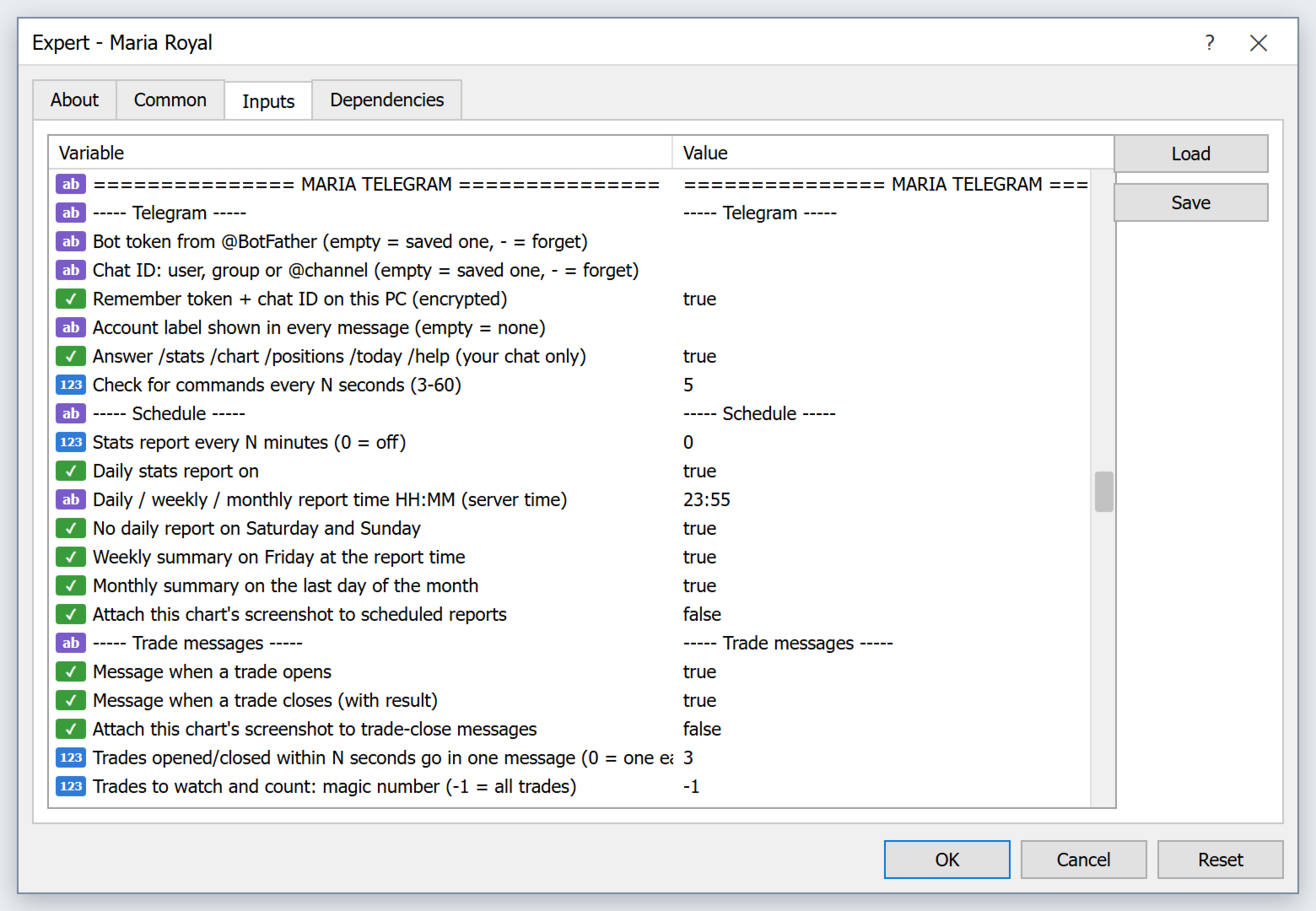
- Telegram - trade messages, daily / weekly / monthly reports, alerts and chart pictures to your Telegram.
- Maria AI - chat with an AI (Claude, OpenAI or DeepSeek) about the market, trade check, trade ideas and a trade coach.
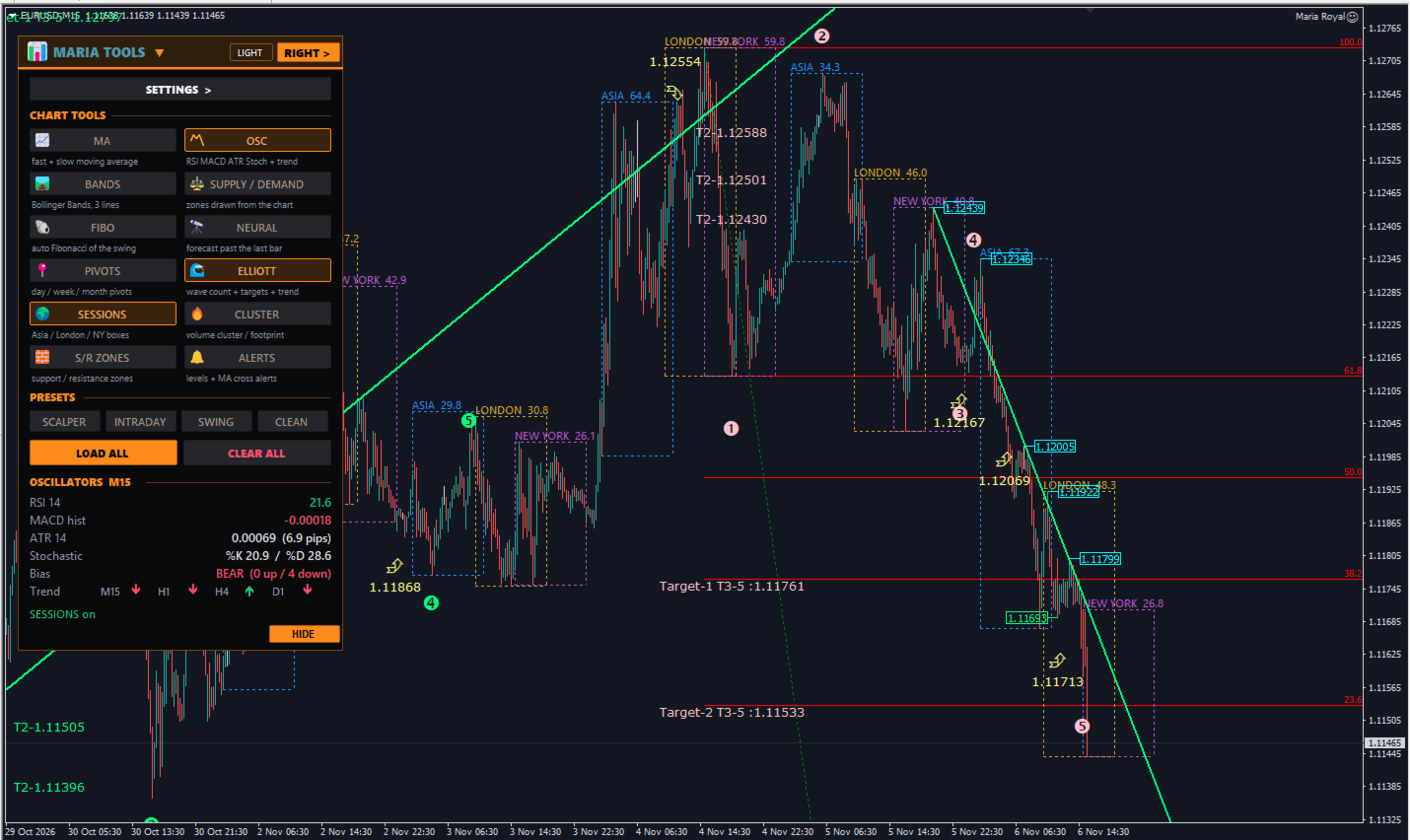
- Maria Tools - moving averages, Bollinger Bands, auto Fibonacci, pivots, sessions, S/R zones, oscillator block, supply / demand zones, neural forecast, Elliott waves and a cluster view.
ONE PANEL
- Click the project name in the panel header: the project list opens with every project, its number, magic number and state (on panel, running, finishing, on chart). The chosen project's panel takes the same place on the chart.
- The SETTINGS button is the first row of every panel. When you choose a project its SETTINGS panel opens once.
- RIGHT > / < LEFT moves the panel, HIDE folds it, LIGHT / DARK switches all panels and the chart colours (green / red candles on a dark or white background).
- When you attach the robot to a chart for the first time, the project list opens so you can choose where to go.
RUN RULE
- RUN: ONLY THE CHOSEN PROJECT (default): only the project on the panel opens new trades; the others only manage their open trades (exits, trailing, equity target) until they close.
- RUN: ALL PROJECTS TOGETHER: Antimartingale, Breakout and News also trade in the background, each with its own magic number.
- Maria Tools keeps its drawings on the chart while another project is on the panel.
COMMON SETTINGS
- Chart style, order lines, slippage, max spread, trading session, drawdown stop and referral are set once for every project. The SAFETY tabs of Antimartingale and Breakout show the same values: change them in one place and every project takes them.
INPUTS
- Every setting of every project is also on the Inputs tab (about 400 inputs in blocks: General, COMMON, then one block per project). This makes the Strategy Tester easy: choose the project with "Project that opens first".
- On a live chart the panel values are saved per symbol and magic base. When you change the inputs of one project, that project takes the new values; the others keep theirs.
HOW TO USE
- Attach Maria Royal to a chart (for the trading projects: XAUUSD) and allow live trading (AutoTrading on).
- Choose a project in the list; its SETTINGS panel opens.
- Open COMMON SETTINGS once (bottom of the project list) and check session, spread, slippage and the drawdown stop.
- Use the project as described in the user guide (START, PLACE, BUY, ...).
- Click the project name to switch. Keep RUN: ONLY THE CHOSEN PROJECT while you learn the robot.
INTERNET (WebRequest)
- News and Maria AI calendar: https://nfs.faireconomy.media
- Telegram (and Maria AI Telegram chat): https://api.telegram.org
- Maria AI: https://api.anthropic.com, https://api.openai.com, https://api.deepseek.com, https://news.google.com
- Antimartingale, Breakout, Trade Manager, Copier and Maria Tools work without the internet.
NOTES
- Magic numbers: Magic base 2610500 + 10 Antimartingale, +20 Breakout, +30 News, +40 Trade Manager, +50 Copier, +60 Telegram, +70 Maria AI. Use a different Magic base for a second Maria Royal on the same symbol.
- Antimartingale and Breakout add orders while the price moves. Test every project and every new setting on a demo account first and keep the limits (max orders, max lots, drawdown stop) inside what your account can carry.
- MetaTrader 4 cannot click panel buttons in the Strategy Tester. There the chosen project trades by itself with its inputs (Strategy Tester demo trades).
- Maria Copier needs the master and slave terminals on the same computer or VPS.
- The cluster view of Maria Tools is an estimate from tick volume, not real bid / ask volume.
- Trading involves risk. Use the robot with your own judgement and risk management.