Maria Telegram MT5

User guide (PDF): https://polymaria.net/manuals/maria-telegram-mt5-user-guide.pdf

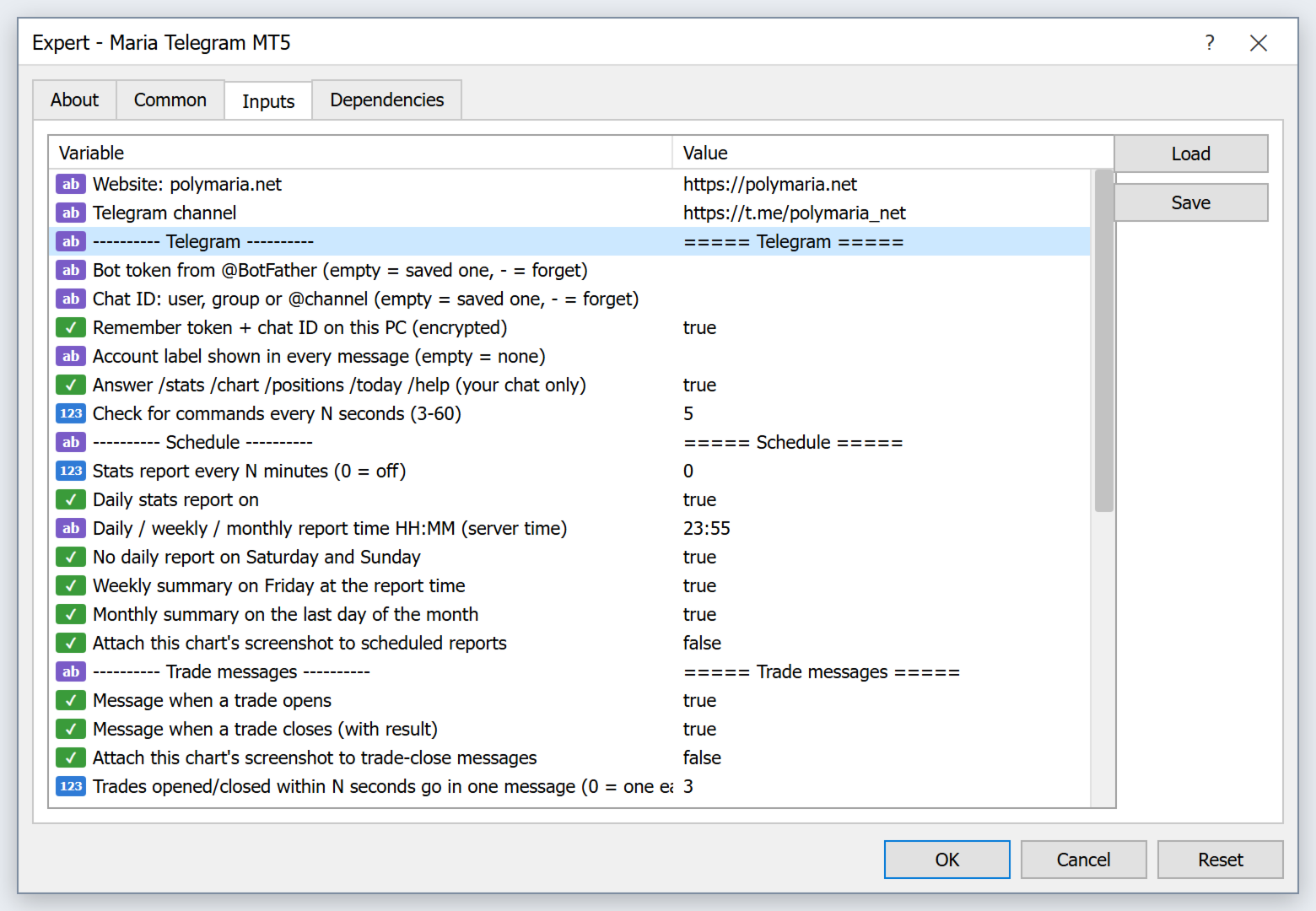
Maria Telegram keeps you informed about your MetaTrader 5 account on your phone. Attach it to any chart, enter your Telegram bot token and chat ID, and it sends clear reports, a card for every opened and closed trade, risk alerts and chart screenshots to your private chat, group or channel. It only reads the account: on a live chart it never opens, changes or closes trades.

REPORTS

  • Daily report at your time (broker server time), with an option to skip Saturday and Sunday.
  • Extra report every N minutes if you want it.
  • Weekly summary on Friday and monthly summary on the last day of the month: result, trades, wins and losses, win rate, profit factor, best and worst trade, average win and loss.
  • Every report shows balance, equity, margin level, floating P/L, drawdown (floating and maximum from the loaded history), closed P/L for today, this week and this month with trades and win rate, and your open positions.
  • Optional screenshot of the chart attached to scheduled reports.

TRADE CARDS

  • Trade opened: type, lots, symbol, price, SL and TP with distance in pips, and the money at risk with % of balance.
  • Trade closed: result, pips, duration, whether SL or TP was hit, and today's total.
  • Trades opened or closed within a few seconds (grids, baskets) are grouped into one message.
  • Optional chart screenshot after each close.
  • Magic number filter: watch all trades or only one EA.

ALERTS

  • Drawdown alert when the floating loss reaches your % of balance, and again at 2x and 3x that level.
  • Low margin alert when the margin level falls below your limit.
  • Alerts always ring, even in quiet hours.

TELEGRAM COMMANDS

  • /stats - full account report
  • /chart - screenshot of the chart the EA runs on
  • /positions - open trades
  • /today - today's closed trades
  • /help - list of commands

Only your own chat ID is answered. Give Maria Telegram its own bot, because two programs reading commands from the same bot take each other's messages.

PANEL ON THE CHART

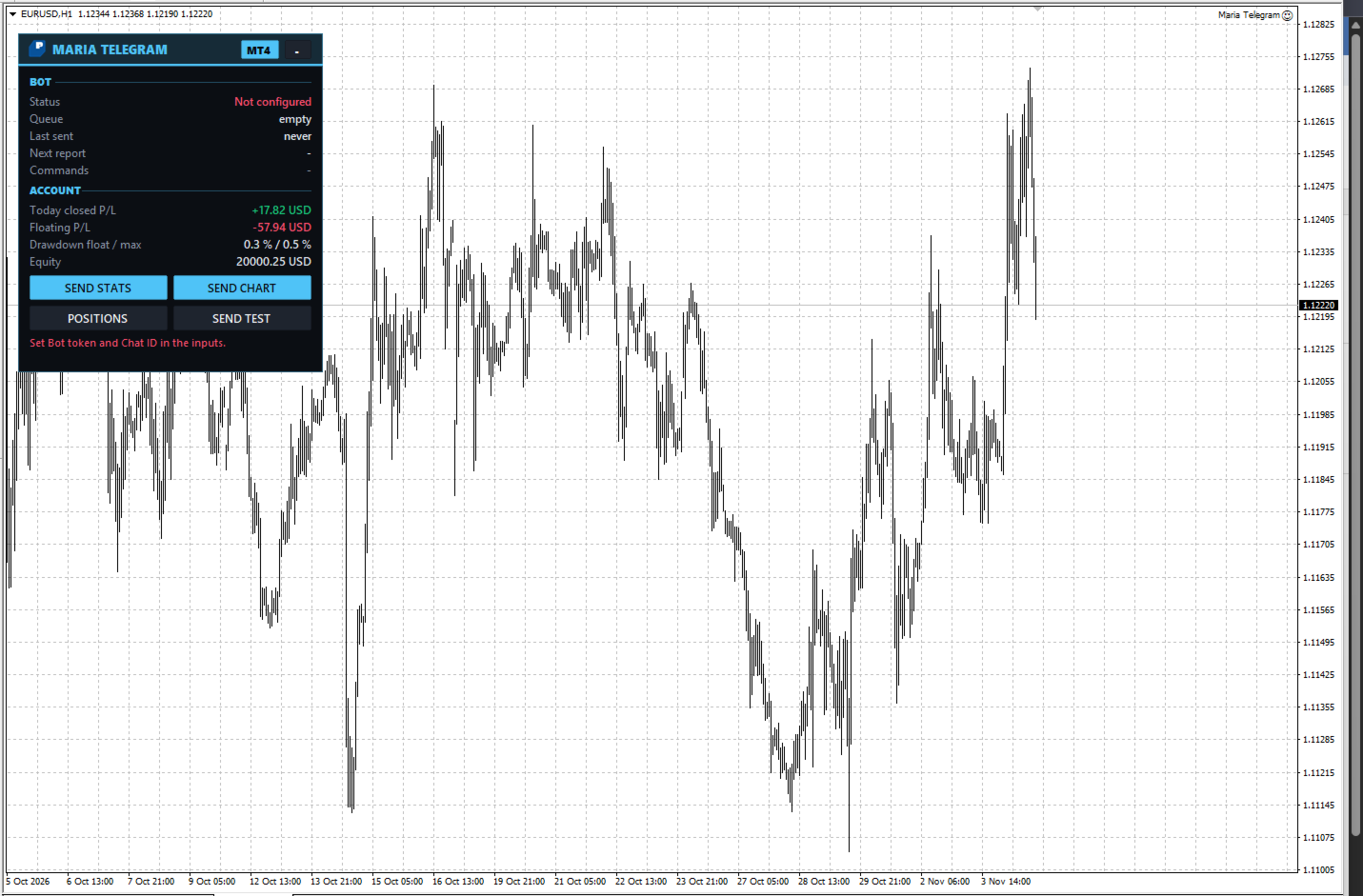
  • Status, send queue, last message, next report, commands state.
  • Today's closed P/L, floating P/L, drawdown and equity.
  • Buttons: SEND STATS, SEND CHART, POSITIONS, SEND TEST.

PRIVACY AND QUIET HOURS

  • Privacy mode for public channels: hides account number, name, broker, lots and money amounts and shows results in % instead.
  • Quiet hours: messages arrive silently at night (PC time).

RELIABLE SENDING

  • A send queue with retries that follows Telegram's speed limits.
  • Screenshots are uploaded only after the file is fully written.
  • A wrong token or chat ID pauses sending with a clear message on the panel instead of endless retries.
  • If the EA runs on several charts with the same account and chat, only one of them sends, so you never get double messages.
  • The bot token and chat ID are remembered encrypted on this PC: type them once.

SETUP (3 minutes)

  1. In Telegram, create a bot with @BotFather and copy its token.
  2. Find your chat ID: your numeric user ID for a private chat, a group ID (starts with -100) or a public channel name like @mychannel. For a group or channel, add the bot there (as an admin for channels).
  3. In MT5 open Tools > Options > Expert Advisors, tick "Allow WebRequest for listed URL" and add https://api.telegram.org
  4. Attach Maria Telegram to any chart, paste the bot token and chat ID in the inputs and press SEND TEST.

IMPORTANT

  • Maria Telegram does not trade on live or demo charts. It only reads account data and sends messages.
  • Statistics use the account history loaded in MT5. In the Account History tab choose "All History" for complete numbers.
  • MetaTrader 5 does not allow web requests in the Strategy Tester. In the tester the messages are written to the log instead of being sent, and small demo trades are placed only so the statistics can be checked.
  • Report times use broker server time, quiet hours use your PC time.

MAIN INPUTS

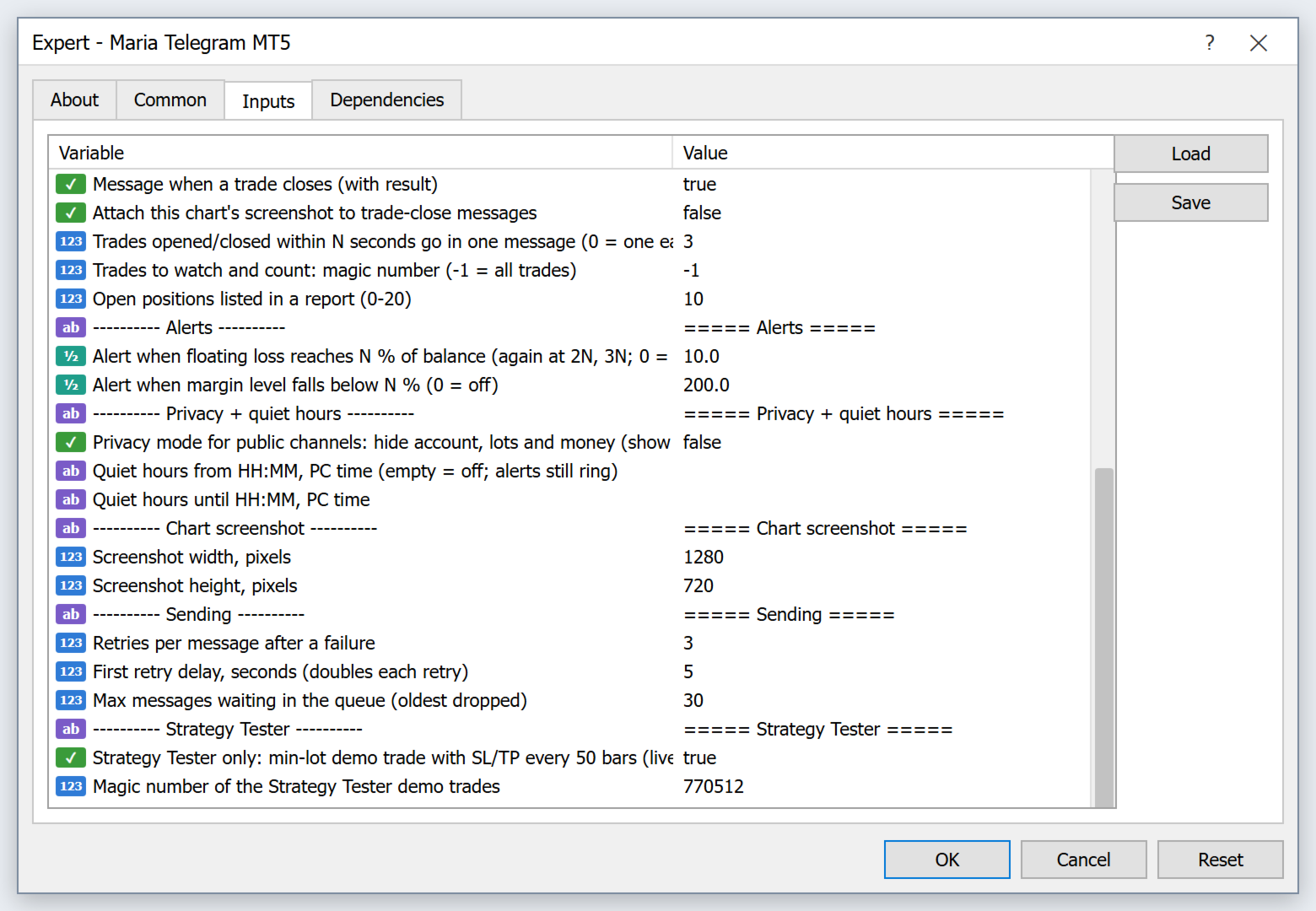
  • Bot token, chat ID, remember on this PC, account label
  • Telegram commands on / off, check interval
  • Report every N minutes, daily report on / time, skip weekends, weekly and monthly summary, chart with reports
  • Trade opened / closed messages, chart after close, group window in seconds, magic number filter, positions per report
  • Drawdown alert %, margin level alert %
  • Privacy mode, quiet hours from / to
  • Screenshot size, retries, queue size
Recommended products
[Getting Started] Smart SL Pro in 5 Steps No complicated setup. Follow these five steps and you are ready to trade. STEP 1 Attach the EA Drag the EA onto the chart of the symbol you trade, tick "Allow Algo Trading" and press OK. Make sure the "Algo Trading" button at the top of MT5 is on. STEP 2 Set your risk (the one setting you must choose) Click "SET" at the top, Entry tab, "Total risk". If you are new, start at 1% or less (how much of the account one stop may lose). The lot is calculated
Matrix Commander
Cyril Louis Marc Maillet
MATRIX COMMANDER All-in-One Tactical Trading Panel for MetaTrader 5 Command Your Trades. Stop Letting Them Run You. Most traders juggle between their chart, a lot-size calculator, and manual risk management, losing precious time on every single decision. Matrix Commander brings it all together in one control panel, right on your chart: One click to enter, one click to secure, o
AutoLevels
Maxim Kuznetsov
Automatic calculation and marking of resistance and price reversal levels. The script will perform statistical calculations and plot a regular grid on which the quote moves on the graph. These levels are very stable. Use them in trading planning and for placing pending orders. Just select a timeframe and AutoLevels will indicate the important places of the chart in the form of horizontal lines. Solid lines indicate more "dense" areas - areas of price reversal, where the quote happens more oft
IMPULSE  is a unique complex trading system , easy to use = launch and forget. The System is designed both for experienced traders (professional version) and new traders (settings already prepared by our team). The System is based on deversified desicion making approach based on market conditions which allows the algoruthm to pass hystory tests from 2013 with profound and stable results. IMPULSE is trading on breakthrough and rebound from support and resistance levels. This version was designe
Euro Pulse is a MetaTrader 5 Expert Advisor designed specifically for EURUSD trading. The system focuses on short holding periods, controlled exposure, and structured trade selection instead of aggressive recovery methods or high risk position scaling. Creator:  https://www.quant-atlas.com/ The Expert Advisor is built for traders who want a focused EURUSD robot with simple risk behavior, clear execution logic, and a clean trading profile. It does not use martingale, grid trading, averaging down,
Asian Session Gold XAU Breakout
Munther Akram Mohammad Saqr
Asian Session Gold XAU Breakout is a session-based breakout system for XAUUSD (Gold). It looks for one high-quality setup per day around the most active part of the gold market, always with a stop-loss and a predefined target. No grid, no martingale, no averaging, no hedging tricks. HOW IT WORKS Analyses the overnight price structure and defines the key levels of the day. Enters only when price breaks out with confirmation; maximum one trade per day. Every trade has a hard stop-loss and take-pro
Smart Start
Ruslan Papou
Only 1 copies left at a price of $99. Next price $199! actual .set files (click me) interactive panel manual (click me) Version for MT4:  Smart Start MT4  Smart Start  is a smart trading system, the indicators of which allow it to be used both for trading with small deposits (fast acceleration) and for conservative trading.  is a modernized trading indicator system that uses the MACD indicator to analyze the market. To analyze entry points,   smart start   takes into account the historical in
Grid Trading EA is a semi-automated one-click trading EA for both Normal Trading and Grid/Martingale Trading . Normal Trading Simply click Buy or Sell directly from the chart. The EA will automatically manage trades by: Setting Stop Loss and Take Profit Managing Trailing Stop Grid / Martingale Trading (For Hedging Account Type Only) When Grid Trading mode is enabled, the EA will automatically open additional grid orders at specified distances while increasing the lot size based on your settings.
Double or Nothing Daily Version MT5
Rui Fernando Pimentel De Oliveira
DOUBLEorNOTHING Daily is the version of the DOUBLEorNOTHING family designed to combine an aggressive Gold / XAUUSD trading strategy with a capital-management model focused on frequently protecting realized profits. The core idea behind the DOUBLEorNOTHING family is simple: recovery strategies may generate strong growth, but they can also experience significant drawdowns. For this reason, every version uses the same main trading concept while handling capital and profits differently. In Daily mod
Channel Rider
Dorival Cardozo
The Channels Robot for MetaTrader is an automated trading system based on time-defined price range analysis and channel breakout logic. The robot calculates the high and low of a user-defined time window, forming a price channel that represents the market’s consolidation range. Once the reference candle or session closes, upper and lower channel levels are projected at configurable distances. Trade entries are triggered when price breaks above or below these calculated channel boundaries, ensuri
FREE
Titan Backup
Elies Noah Siebenpfeiffer
Introducing Titan Backup : Are you ready to enhance your trading game with an automated system built for precision and flexibility? Meet Titan Backup , your expert trading assistant designed to capture high-profit breakouts by identifying accumulation zones . This powerful Expert Advisor (EA) excels in high-volatility markets such as the Nasdaq 100 and Crypto 10 , offering both hands-free automation and manual assistance to support your trading strategies. How Titan Backup Works: Titan Backup ru
Professional management and graphic tool
Mohsen Bin Abdul Rahman Bin Yahya Akrimi
Professional P/L Calculator & Risk-Reward Tool **The complete trading management solution combining two powerful tools in one!**   What You Get:   Advanced P/L Calculator - Real-time profit/loss tracking with percentage - Automatic break-even price calculation - Risk levels: -10%, -20% loss lines displayed on chart - Profit targets: +10%, +20% gain lines - Complete position breakdown (Buy/Sell lots, swap, net position) - Target price calculator - see P/L at any price level - Set SL/TP fo
Breakout scalp PRO
Cesar Napoleon Guio Martinez
Automated breakout scalper EA trading system with advanced execution filters and built-in risk management. Designed to operate during selected market conditions, combining session control, spread and slippage filtering, and dynamic trade management. Safety First Approach:  This EA does not use grid systems, martingale strategies or other high-risk unlimited recovery strategy. Every position is protected with predefined Stop Loss and Take Profit levels. The strategy is designed to maintain contro
Gold Crazy EA MT5
Nguyen Nghiem Duy
Gold Crazy EA   is an Expert Advisor designed specifically for trading Gold H1/ EU M15. It use some indicators to find the good Entry. And you can set SL or you can DCA if you want. It can be an Scalping or an Grid/ Martingale depend yours setting. This EA can Auto lot by Balance, set risk per trade. You also can set TP/ SL for earch trade or for basket of trade. - RSI_PERIOD - if = -1, then the default strategy works, if >0, then the RSI strategy works - MAX_ORDERS - to trade with only 1 order,
Description: EuroPulse MACD Hist Flow — EMA200 Trend Filter with MACD Histogram EA (Swap-Free) PRODUCT OVERVIEW EuroPulse MACD Hist Flow is a premium automated trading solution designed for MetaTrader 5, specialized for the EURUSD currency pair. The EA implements a robust trend-following strategy: • EMA200 as long-term trend filter • MACD Histogram for momentum confirmation • ATR-based stop loss and take profit • Daily loss protection • Swap-Free mode for Islamic accounts WHY EUR
Midas Touch from TradeMatic
Damian Lukasz Krazewski
Midas Touch -  everything it touches turns to gold, but only when the moment is right. Why most grid bots quietly kill your account? Most grid strategies share the same fatal flaw. They open position after position at fixed distances, all pointing the same way, no matter what the market is actually doing. The result is an account stacked with losing trades - and now price has to reverse dramatically , sometimes impossibly far, just for the bot to crawl back to break-even. One strong trend in th
Envelope monitoring for multi-EA accounts. Each magic number is watched against its own backtest; you get a traffic light on the chart and an alert only when a state changes. Includes the full free measurement layer. What it is You run several Expert Advisors on one account. This utility reads their closed history, groups it by magic number, and watches every system against its own backtest: a traffic light on the chart, and an alert only when a state actually changes. Underneath sits a full mea
Exclusive Imperium MT5 — Automated Trading System Exclusive Imperium MT5 is an Expert Advisor for MetaTrader 5, based on market analysis algorithms and risk management. The EA operates in a fully automated mode and requires minimal trader intervention. Attention! Contact me immediately after purchase to receive setup instructions! IMPORTANT: All examples, screenshots, and tests are provided for demonstration purposes only. If a certain currency pair shows good results with one broker, it does no
This EA performs with a Hedging strategy by which Buy and Sell signals are from the MACD indicator.... The lot sizes in the input are Custome for you to adjust as you pleased, so you are able to improve your hedging style. Inputs. Close Money-   this option is basically the take profit in ($), for example if you set the close money at $20 the   EA  will automatically close all trades when your overall profit is $20. Nearby Hedge Pips-   this basically determine the   distance of pips  between yo
This strategy is use differences between moving avarages and supported by the RSI. It can be used semi-automated trading systems, hedging, and the pair tradings. In pair tradings ı used this strategy  for a long time to looking for good long and short opportunities. Key Features: Smart Moving Average Spreads : Harness the dual strategy of EMA and SMA to adapt dynamically to market trends, ensuring timely and accurate trade entries. RSI-Based Momentum Analysis : Capitalize on RSI-driven signals
Crash300 Pro Trader is a fully automated Expert Advisor designed for trading Crash 300 index using a combination of trend detection, RSI filtering, and recovery-based trade management. Watch Video: 3 Years of Backtest The EA identifies market direction using Parabolic SAR on the Daily timeframe and executes trades only in the direction of the trend. To improve entry accuracy, it uses RSI filtering to avoid overbought and oversold false signals. A built-in recovery system is included to manage
Golden Rebound Super v2.0 Overview Golden Rebound Super is a fully automated Expert Advisor for MetaTrader 5, engineered specifically for GOLD (XAUUSD) on the M5 timeframe . It uses a proprietary four-layer trend confirmation system to identify high-probability entries — firing only when market structure, momentum, price action, and volatility filters all align simultaneously. No martingale. No grid. No dangerous money management. Every trade uses a fixed lot with a predefined Stop Loss and T
GOLD SCALPING MASTER V1.2 Advanced Mathematical Trading Engine for XAUUSD Introduction   GOLD SCALPING MASTER   is a sophisticated automated trading solution designed specifically for the Gold (XAUUSD) market. This EA is built on a proprietary   Mathematical Algorithm   that synchronizes trend-following filters with a dynamic recovery system. By replacing emotional trading with   algorithmic precision , it identifies high-probability entries and manages market volatility through a structured
DualFlex EA
Anold Stephen Minja
DualFlex EA is a versatile MetaTrader 5 Expert Advisor that lets you deploy either Buy/Sell Limit or Buy/Sell Stop pending orders—all with the same proven risk-management engine. Key Features Dual Order Modes : switch on-the-fly between Limit and Stop pending orders Symmetric Entries : places both Buy and Sell pending orders at your defined distance Advanced Risk Controls : dynamic lot sizing by % balance, free-margin and aggregate-volume caps Instrument Support : built-in filters for EURUSD &
Sniper Major
JETINVEST
5 (1)
The EA uses volatility, spread, frequency, and timing to decide when to trade. The EA uses the Limit Orders method to open Positions. In this case, the Slippage will at most be positive on executing the entries. Open trades are managed with a trailing take profit and a fixed stop loss. Most trades are closed within a short time. Main features Does not use martingale Does not use grid Optimized currency pairs: EURUSD | GBPUSD | USDJPY | USDCHF Timeframe: M5 Note: the EA trades only in a short wi
Smart Grid Navigator
Anastasia Danilova
Adaptive Grid Trading System Smart Grid Navigator is a professional trading expert advisor that uses a multi-level grid strategy with an intelligent entry filtering system. The program automatically manages positions based on technical indicator analysis and market conditions. The advisor comes with optimized settings and is ready to use immediately after installation. You can launch it on a chart and start testing. All parameters have safe default values and can be adapted to your trading style
ALPHATREND INSTITUTIONAL STRUCTURE MODE Descripción general: AlphaTrend es un Expert Advisor híbrido para MetaTrader 5 que combina análisis de estructura de mercado con indicadores de momentum. No es un sistema reactivo tradicional. Opera identificando primero la tendencia real mediante máximos y mínimos, luego espera un retroceso o pullback, y finalmente confirma la entrada con ADX y pendiente de media rápida. Esto permite entrar temprano en la dirección correcta, no perseguir el precio. Lógica
Only the first 5 copies will cost 50$ and then it will be converted to its original price.  Deposit 500$ Profit 2500$+ in 1 Month Gold Trading.   This robot works very well on gold. Gives good profit.  Key Features:  Very easy to use   Working symbols:  XAUUSD(GOLD) Working Timeframe: M1, M5, M30 All timeframe The minimum deposit $100, $500 Here you can adjust Lot Size, Auto lot, SL, TP, Trading Time, Profit pips, Percentage Equity, fixed ratio delta volume for lot size increasing with equity, 
Truerisk PRO
Muhammed Irshad P K
TrueRisk PRO — Risk-First Execution Terminal for MT5 Stop guessing your lot size. Start executing the exact risk you planned. TrueRisk PRO calculates your precise lot size in real-time — accounting for spread, commission, and slippage — so every trade risks exactly what you intended. Nothing more. The Problem It Solves Manual lot size calculation ignores spread, commission, and slippage. A 0.02 lot error costs scalpers $5–$20 per trade. Repeated across 100 trades, that's $500–$2000 in silent lo
Buyers of this product also purchase

Trade Assistant MT5
Evgeniy Kravchenko
4.43 (216)
It helps to calculate the risk per trade, the easy installation of a new order, order management with partial closing functions, trailing stop of 7 types and other useful functions. Additional materials and instructions Installation instructions - Application instructions Line function -   shows on the chart the Opening line, Stop Loss, Take Profit. With this function it is easy to set a new order and see its additional characteristics before opening.   Risk management  - The risk calculation
FarmedHedge Pair Trading Dashboard
Tanapisit Tepawarapruek
5 (7)
Farmed Hedge Yield Farming | All Markets (Manual - Hybrid - Semi/Automated EA) VERIFIED TRADING RESULTS - Farmed Hedge Yield Axi Copy:  https://www.mql5.com/en/signals/2356376 - Farmed Hedge Yield Exn Copy:   https://www.mql5.com/en/signals/2356404 - Farmed Hedge Yield V Copy:  https://www.mql5.com/en/signals/2357156 IMPORTANT NOTICE: FarmedHedge is a MANUAL-FOCUSED TRADING UTILITY ,not a fully automated EA. Results shown on this Signal include manual trades and overall strategic management.
Forex Trade Manager MT5
InvestSoft
4.98 (689)
Trade Manager MT5 is an advanced position size calculator and trade management tool for MetaTrader 5, designed to help traders plan trades faster, control risk more precisely, and manage open positions directly from the chart. It combines order placement, risk based lot calculation, Stop Loss and Take Profit management, Break Even, Trailing Stop, Partial Close, Equity Protection, and external trade management in one panel. Whether you trade forex, indices, metals, commodities, crypto, or future
Telegram to MT5 MultiChannel Copier
Sergio Marquez Uroz
4.68 (22)
Telegram to MT5 Multi-Channel Copier   automatically copies trading signals from your Telegram and Discord channels straight to MetaTrader 5. No bots, no browser extensions, no manual copying. A signal arrives in Telegram or Discord and the EA opens the trade in your terminal within seconds. And before you copy a channel, the built-in backtester shows you what that channel would have done in your account. The product has two components: a Windows application that listens to your Telegram channel
TradePanel MT5
Alfiya Fazylova
4.88 (172)
Trade Panel is a multi-functional trading assistant. The app contains over 50 trading functions for manual trading and allows you to automate most trading tasks. Application instructions: https://www.mql5.com/en/blogs/post/756482 Trial version of the application for a demo account: https://www.mql5.com/en/blogs/post/750865 How to install the application: https://www.mql5.com/en/blogs/post/756239 How to test the application in visual mode: https://www.mql5.com/en/blogs/post/770277 How to install
News Trade EA MT5
Konstantin Kulikov
4.55 (11)
Present to you the useful robot that I have been using for several years. It can be used in both semi-automatic mode and fully automatic mode. >>> Chat <<< The program contains flexible settings for trading on the news of the economic calendar. It cannot be checked in the strategy tester. Only real work. Download the latest archive of settings: https://www.mql5.com/en/blogs/post/747929 Signals monitoring: https://www.mql5.com/en/signals/author/test-standart When creating your own sets of setti
Copy Telegram signals with your own trading rules Telegram to MT5 Signal Trader automatically copies text-based trading signals from public and private Telegram channels and groups into MetaTrader 5. Manage multiple providers and MT5 accounts from one desktop app, with individual risk and trade settings for each provider . No Telegram bot or API setup needed for copying. Simply sign in with your own Telegram account by phone or QR code and select the channels or groups you have already joined. Y
================================================================================ POC BREAKOUT - V20.72. Full Professional Grade Toolkit ================================================================================ POC Breakout is a full MetaTrader 5 trading dashboard for discretionary traders who want breakout signals, Point of Control (POC) context, volume profiles, order flow, market structure, news, alerts, and advanced trade planning in one professional workspace. Attached directly to you
The product will copy all telegram signal to MT5 ( which you are member) , also it can work as remote copier.  Easy to set up, copy order instant, can work with almost signal formats, image signal,  s upport to translate other language to English Work with all type of channel or group, even channel have "Restrict Saving Content", work with  multi channel, multi MT5 Work as remote copier: with signal have ticket number, it will copy exactly via ticket number. Support to backtest signal. How to s
EA Overfitter
Stephen J Martret
5 (3)
That backtest looks great. But will it still be making money tomorrow, next week, next month? EA Overfitter re-runs your EA on 100 price histories it has never seen. One score tells you if the edge is real. A backtest tells you what an EA did on one price history — the one that happened to occur. What you cannot tell from it is how much of that result was the strategy and how much was the particular path. EA Overfitter answers that. It builds up to 100 synthetic price histories your EA has n
Power Candles Strategy Scanner - Self-Optimizing Multi-Symbol Setup Finder Self-optimizing settings work one chart at a time, and finding where they pay off right now means opening chart after chart. Power Candles Strategy Scanner runs the same self-optimizing engine as the Power Candles indicator on every symbol in your Market Watch, side by side. One panel ranks where it pays off: the winning strategy per symbol, its optimized Stop Loss and Take Profit. An alert fires the moment a fresh signal
Anchor Trade Manager
Kalinskie Gilliam
5 (8)
Your EAs cannot see each other, but Anchor can. Anchor gives you one place to coordinate your EAs, manage risk, and decide when trading is allowed. It works alongside the trading bots you already use without any changes to them. The Problem One EA opens a trade. Then another starts trading. The next thing you know, you wake up to multiple grids built across your account. Each EA may be doing exactly what it was designed to do, but together they can place far more risk on your account than you in
Welcome to Entry In The Zone with SMC Multi Timeframe  —  COMPLETE SMC ANALYSIS SYSTEM — ALL IN ONE INDICATOR  Entry In The Zone with SMC Multi Timeframe  An indicator designed for market analysis based on Smart Money Concepts (SMC), displaying Market Structure, Key Zones (Order Blocks, Supply & Demand Zones, and Fair Value Gaps), Liquidity, and real-time BUY / SELL signals. It supports both Single-Timeframe and Multi-Timeframe analysis, along with the Confluence at Zone feature, which helps you
VirtualTradePad PRO SE MT5 — professional trading control center for MetaTrader 5 VirtualTradePad PRO SE is a premium chart-based trading panel and trade-management workspace for MetaTrader 5 . It is designed for traders who want faster execution, clearer position control, structured trade management, visual level planning and a professional workflow directly from the chart. This is not only a BUY / SELL panel. PRO SE combines manual trading, pending orders, position management, partial exits, b
Trade Indicator Assistant   is a powerful MT5 utility designed to turn indicators into automated trading systems. Its main feature is the ability to automatically detect an indicator’s   BUY and SELL signal buffers , without requiring you to know the buffer numbers, search through indicator settings, or modify the indicator source code. Bonus Indicator:   After purchasing Trade Indicator Assistant, contact me to receive   Trade Signal Pro   completely free as a bonus indicator. [Download Demo V
EA Auditor
Stephen J Martret
5 (7)
EA Auditor is an independent analysis tool for traders evaluating Expert Advisors and trading signals on MetaTrader 5. It audits backtest reports, reviews posted developer signals, and cross-verifies the two against each other to help traders assess strategies before committing capital. The MQL5 market offers a wide range of Expert Advisors from many developers, with varying approaches, quality, and transparency. EA Auditor provides a consistent, data-driven framework for reviewing them, answer
Trade Manager DaneTrades
Levi Dane Benjamin
4.13 (31)
DaneTrades Trade Manager is a professional trade panel for MetaTrader 5, designed for fast, accurate execution with built‑in risk control. Place market or pending orders directly from the chart while the panel automatically calculates position size from your chosen risk, helping you stay consistent and avoid emotional decision‑making. The Trade Manager is built for manual traders who want structure: clear risk/reward planning, automation for repeatable management, and safeguards that help reduc
MT5 to Telegram Signal Provider turns your trading account into a signal provider. Every trade action, whether manual, by EA or from your phone, is instantly sent as a message to Telegram. You can fully customize the format or use a ready-made template for quick setup. [ Demo ] [ Manual ] [ MT4 Version ] [ Discord Version ]     New: [ Telegram To MT5 ] Setup A step by step user guide is available. Key Features Ability to customize order details sent to subscribers You can create a tiered subs
RETAILBERG FOOTPRINT CHART PRO — Order-Flow Workspace for MetaTrader 5 Version 7.00  |  Professional System  |  31 tools  |  One chart A full 150-page illustrated User Manual is included. Please read the full manual to understand this feature packed footprint chart elements and ui. https://www.mql5.com/en/blogs/post/777982 DEMO / STRATEGY TESTER — PLEASE READ FIRST
Trader Evolution
Siarhei Vashchylka
5 (7)
" Trader Evolution " - A utility designed for traders who use wave and technical analysis in their work. One tab of the utility is capable of money management and opening orders, and the other can help in making Elliott wave and technical analysis. Manual (Be sure to read before purchasing) | Version for MT4 Advantages 1. Trading in a few clicks. Immediate and pending orders are available in the panel 2. Money management. The program automatically selects the appropriate lot size 3. Simplifies
DrawDown Limiter
Haidar Lionel Haj Ali
5 (23)
DrawDown Limiter v5.0 — Advanced Account Protection Controller DrawDown Limiter v5.0 is a client-side account protection controller designed to supervise your trading account and automatically react when configured risk, profit, news, schedule, rollover, or position limits are reached. It can monitor manual trades, automated strategies, multiple Expert Advisors, pending orders and floating positions from one dedicated chart. It can protect the complete account or be configured to supervise a spe
On-Chart Trade Assistant & Risk Management Panel Ergotick Trade Manager gives you a complete set of trading tools directly on your MetaTrader 5 chart: a trade panel with lot size calculator, visual R:R tool, and daily loss limit protection; a separate statistics panel that tracks your performance and past trades; and an economic calendar you can toggle with one click. Built for scalpers, day traders, and prop firm traders. Ergotick Trade Manager is fast , light on resources , and stable , so it
Master Your Trading Discipline   Stop losing your hard-earned gains to overtrading and emotional decisions. The Discipline Tool is your ultimate trading assistant, ensuring strict risk management in real-time. Key Protection Features: Advanced Drawdown Defense : Automatically halts trading if your daily drawdown exceeds a preset threshold (percentage or dollar amount). Real-Time Equity Lock : Safeguard profits by referencing peak equity, ensuring drawdown stays within control. Hard Profit Target
Sentinel Master
Luca Barone
5 (1)
PROFESSIONAL MULTI-ACCOUNT TRADE COPYING FOR METATRADER 5 Sentinel Master is a trade-publishing Expert Advisor designed to work together with Sentinel Follower , providing a reliable and configurable solution for copying trades between MetaTrader 5 accounts. The system is designed for traders who manage multiple accounts and want to replicate their trading activity without manually opening and closing positions on every account. Sentinel Master continuously monitors the source account and publis
Dealer Panel
Mian Rameez Ali
Dealer's Panel No signal decides anything here — a hand does. One click, and the panel calculates what's underneath: lot size from risk, target from a 30-step balance ladder that remembers exactly how far an account has climbed. Toggle between market and pending without touching an input field. Set a stop, and the take-profit can write itself — a fixed share of the balance, translated into price with no arithmetic left for the trader to get wrong. One trade live at a time; it won't let a seco
Astro Trade MT5
Indra Maulana
5 (8)
25% discount on the release of the tool: only for the next 3 buyers Send a message to receive a demo version. AstroTrade Trading Assistant AstroTrade is a comprehensive multi-functional trading utility developed for the MetaTrader 5 platform. It integrates essential tools for trade execution, risk management, and technical monitoring into a single unified interface. The application is designed to assist traders in managing their daily operations through a visual and structured environment. Vi
My Chart Generator
Trade The Volume Waves Single Member P.C.
5 (1)
What if your chart adapted to the market instead of the clock?   THE PROBLEM IT SOLVES   Instead of trying to find the best indicator that fits your timeframe chart, build a chart and find the most appropriate indicator.   My Chart Generator is a MetaTrader 5 background service that builds  live, fully historical three types of custom charts :1. Range/Volume Balanced chart, 2.  Range/Volume Absorption chart and 3. Constant Volume chart from any symbol — Forex pairs, crypto, indices, commodities,
AlgoRadar
Stephen J Martret
5 (4)
AlgoRadar is an on-chart analytics dashboard for MT5 that aggregates Expert Advisor performance across multiple accounts, brokers, and platforms, including both MT4 and MT5 data, into a single live view on your MT5 chart. All analysis runs from the chart interface, with no external applications or manual report processing required. EA Analysis and Ranking For traders running multiple Expert Advisors, AlgoRadar provides a consolidated view of each EA's performance across accounts. Active EAs a
REVDEN AI Desk: Run Your Trading From One Conversation With Your Own AI, on REVDEN's Market Context Imagine running your trading from one conversation. REVDEN AI Desk brings it into MetaTrader 5: you ask your own AI how it reads the market, and it answers from REVDEN's full context on the symbols you trade, with their state, their risk picture and the releases ahead. Its proposals arrive with entry, stop, target and risk, and you approve the ones that fit. Your rules change the same way: write w
Sentinel Follower
Luca Barone
5 (1)
MULTI-ACCOUNT TRADE COPYING WITH ADVANCED RISK MANAGEMENT Sentinel Follower is an automated trade-copying Expert Advisor for MetaTrader 5, designed to receive and execute trading positions published by Sentinel Master . The system allows traders to replicate trading activity across multiple accounts while maintaining independent control over position sizing, risk exposure, basket management, and trade execution. Unlike traditional trade copiers, Sentinel Follower includes additional risk-managem
More from author
AbuTrader
Murodillo Eshkuvvatov
2025 year ending PROMO (valid till 01.01.2026year) Launch promo: Free get 70000 Files + 5000 video courses -> contact me after purchase Hello, I am   Murodillo Eshquvvatov , An EA (Expert Advisor) completely different from all other EAs on the market. You might like trading METALS or Index. But I like to move in most major active pair, flexibility for every broker I like PROFIT. Any currency pair that can provide good long-term profits is where I will focus. That's why this EA focuses on just
BitcoinRobot
Murodillo Eshkuvvatov
4.2 (5)
SET FILE Manual Guidebook  Why Bitcoin trading 1.   Elite Precision Precision – Redefining Trading Cutting-edge algorithms fine-tuned for pinpoint execution. Smart setups crafted to navigate risks and seize opportunities. 2. Adaptive Market Strategies with Real-Time Price Movement Markets shift—but Bitcoin Robot is built to adapt instantly: Trading in trending, volatile, or ranging conditions. Captures breakouts, reversals, and price surges before they happen. Dynamic strategy adjustments en
Maria AI
Murodillo Eshkuvvatov
User guide (PDF): https://polymaria.net/manuals/maria-ai-user-guide.pdf Maria AI puts an AI market analyst inside your MetaTrader 4 chart. Type a question in plain words, for example "what is happening on gold?" or "should I wait before buying EURUSD?", and the answer appears in the chat panel within seconds. The AI does not guess prices: it receives live data from your own broker (M15, H1, H4 and D1 trend, RSI, ATR, EMA 20/50/200, today's and yesterday's high and low, the last candles), fresh n
Maria Trade Manager
Murodillo Eshkuvvatov
User guide (PDF): https://polymaria.net/manuals/maria-trade-manager-user-guide.pdf Maria Trade Manager is a trade desk for manual traders, right on your MetaTrader 4 chart. Before you click BUY or SELL, the panel draws the trade plan on the chart: entry, stop loss and take profit zones with the money at risk, the reward and the risk:reward ratio. Drag a line to change the plan, then open the order with one click. After the trade is open the panel keeps protecting it with breakeven, trailing stop
Maria Copier
Murodillo Eshkuvvatov
User guide (PDF): https://polymaria.net/manuals/maria-copier-user-guide.pdf Maria Copier copies trades from one MetaTrader 4 account to other MetaTrader 4 accounts that run on the same computer or VPS. Attach it to one chart in the MASTER terminal and to one chart in every SLAVE terminal, use the same channel name, and the slaves follow the master within a fraction of a second. One EA does both jobs: you choose MASTER or SLAVE in the inputs. The master writes its open orders to a small file in t
Maria Telegram
Murodillo Eshkuvvatov
User guide (PDF): https://polymaria.net/manuals/maria-telegram-user-guide.pdf Maria Telegram keeps you informed about your MetaTrader 4 account on your phone. Attach it to any chart, enter your Telegram bot token and chat ID, and it sends clear reports, a card for every opened and closed trade, risk alerts and chart screenshots to your private chat, group or channel. It only reads the account: on a live chart it never opens, changes or closes trades. REPORTS Daily report at your time (broker ser
Maria News
Murodillo Eshkuvvatov
User guide (PDF): https://polymaria.net/manuals/maria-news-user-guide.pdf Maria News is a news straddle Expert Advisor for MetaTrader 4. Around a big release (NFP, CPI, FOMC and others) price often jumps hard in one direction, but nobody knows which one in advance. Maria News places buy stops above price and sell stops below price at the same distance, so whichever way the spike goes, one side is triggered. Every order has its own take profit and stop loss. Place the grid with one click, or let
Maria Indicators
Murodillo Eshkuvvatov
User guide (PDF): https://polymaria.net/manuals/maria-indicators-user-guide.pdf Maria Indicators replaces a crowded chart full of separate indicators with one small panel. Every tool is built in, so there is nothing else to install: switch a tool on or off with one click, or load a ready preset for your trading style. The panel remembers your choice for each chart, so everything comes back the same after a restart or a timeframe change. CHART TOOLS MA: fast and slow moving averages (periods, met
Maria Breakout
Murodillo Eshkuvvatov
User guide (PDF): https://polymaria.net/manuals/maria-breakout-user-guide.pdf Maria Breakout places a ladder of BUY STOP orders above the current price and SELL STOP orders below it. When the market breaks out, the stops on that side are filled one after another and ride the move. A trailing stop takes the profit of each trade, the live ladder keeps new stops in front of the price, the loss eater pays off losing trades from profit that is already closed, and the equity target closes the whole cy
Maria Royal
Murodillo Eshkuvvatov
User guide (PDF): https://polymaria.net/manuals/maria-royal-user-guide.pdf Maria Royal puts eight Maria products into one Expert Advisor. You attach one robot to a chart and choose the project you want on the panel: three trading robots, four trading helpers and one set of chart tools. Every project keeps its own magic number, its own saved settings and its own orders, and the order comment tells you which project opened a trade. Everything is controlled from one panel on the chart, and every ru
AbuTraderMT5
Murodillo Eshkuvvatov
2025 year ending PROMO (valid till 01.01.2026year) Launch promo: Free get 70000 Files + 5000 video courses -> contact me after purchase Hello, I am   Murodillo Eshquvvatov , An EA (Expert Advisor) completely different from all other EAs on the market. You might like trading METALS or Index. But I like to move in most major active pair, flexibility for every broker I like PROFIT. Any currency pair that can provide good long-term profits is where I will focus. That's why this EA focuses on jus
BitcoinRobotMT5
Murodillo Eshkuvvatov
Guidebook Why Bitcoin trading 1.   Elite Precision Precision – Redefining Trading Cutting-edge algorithms fine-tuned for pinpoint execution. Smart setups crafted to navigate risks and seize opportunities. 2. Adaptive Market Strategies with Real-Time Price Movement Markets shift—but Bitcoin Robot is built to adapt instantly: Trading in trending, volatile, or ranging conditions. Captures breakouts, reversals, and price surges before they happen. Dynamic strategy adjustments ensure continued p
Maria Breakout MT5
Murodillo Eshkuvvatov
User guide (PDF): https://polymaria.net/manuals/maria-breakout-mt5-user-guide.pdf Maria Breakout places a ladder of BUY STOP orders above the current price and SELL STOP orders below it. When the market breaks out, the stops on that side are filled one after another and ride the move. A trailing stop takes the profit of each trade, the live ladder keeps new stops in front of the price, the loss eater pays off losing trades from profit that is already closed, and the equity target closes the whol
Maria Trade Manager MT5
Murodillo Eshkuvvatov
User guide (PDF): https://polymaria.net/manuals/maria-trade-manager-mt5-user-guide.pdf Maria Trade Manager is a trade desk for manual traders, right on your MetaTrader 5 chart. Before you click BUY or SELL, the panel draws the trade plan on the chart: entry, stop loss and take profit zones with the money at risk, the reward and the risk:reward ratio. Drag a line to change the plan, then open the order with one click. After the trade is open the panel keeps protecting it with breakeven, trailing
Maria Copier MT5
Murodillo Eshkuvvatov
User guide (PDF): https://polymaria.net/manuals/maria-copier-mt5-user-guide.pdf Maria Copier copies trades from one MetaTrader 5 account to other MetaTrader 5 accounts that run on the same computer or VPS. Attach it to one chart in the MASTER terminal and to one chart in every SLAVE terminal, use the same channel name, and the slaves follow the master within a fraction of a second. One EA does both jobs: you choose MASTER or SLAVE in the inputs. The master writes its open orders to a small file
Maria Indicators MT5
Murodillo Eshkuvvatov
User guide (PDF): https://polymaria.net/manuals/maria-indicators-mt5-user-guide.pdf Maria Indicators replaces a crowded chart full of separate indicators with one small panel. Every tool is built in, so there is nothing else to install: switch a tool on or off with one click, or load a ready preset for your trading style. The panel remembers your choice for each chart, so everything comes back the same after a restart or a timeframe change. CHART TOOLS MA: fast and slow moving averages (periods,
Maria News MT5
Murodillo Eshkuvvatov
User guide (PDF): https://polymaria.net/manuals/maria-news-mt5-user-guide.pdf Maria News is a news straddle Expert Advisor for MetaTrader 5. Around a big release (NFP, CPI, FOMC and others) price often jumps hard in one direction, but nobody knows which one in advance. Maria News places buy stops above price and sell stops below price at the same distance, so whichever way the spike goes, one side is triggered. Every order has its own take profit and stop loss. Place the grid with one click, or
Maria AI MT5
Murodillo Eshkuvvatov
User guide (PDF): https://polymaria.net/manuals/maria-ai-mt5-user-guide.pdf Maria AI puts an AI market analyst inside your MetaTrader 5 chart. Type a question in plain words, for example "what is happening on gold?" or "should I wait before buying EURUSD?", and the answer appears in the chat panel within seconds. The AI does not guess prices: it receives live data from your own broker (M15, H1, H4 and D1 trend, RSI, ATR, EMA 20/50/200, today's and yesterday's high and low, the last candles), fre
Maria Royal MT5
Murodillo Eshkuvvatov
User guide (PDF): https://polymaria.net/manuals/maria-royal-mt5-user-guide.pdf Maria Royal puts eight Maria products into one Expert Advisor. You attach one robot to a chart and choose the project you want on the panel: three trading robots, four trading helpers and one set of chart tools. Every project keeps its own magic number, its own saved settings and its own orders, and the order comment tells you which project opened a trade. Everything is controlled from one panel on the chart, and ever
Filter:
No reviews
Reply to review