
Vexor MT5
- Utilities
-
Mehran Sepah Mansoor
 𝐓𝐫𝐚𝐝𝐢𝐧𝐠 𝐄𝐱𝐩𝐞𝐫𝐭𝐢𝐬𝐞
With 11 years immersed in the trading industry, I bring a wealth of knowledge and experience to the table.
𝐏𝐫𝐨𝐠𝐫𝐚𝐦𝐦𝐢𝐧𝐠 𝐏𝐫𝐨𝐰𝐞𝐬𝐬 - Version: 1.0
VEXOR - Advanced MT5 Trading Panel & Risk Management Tool
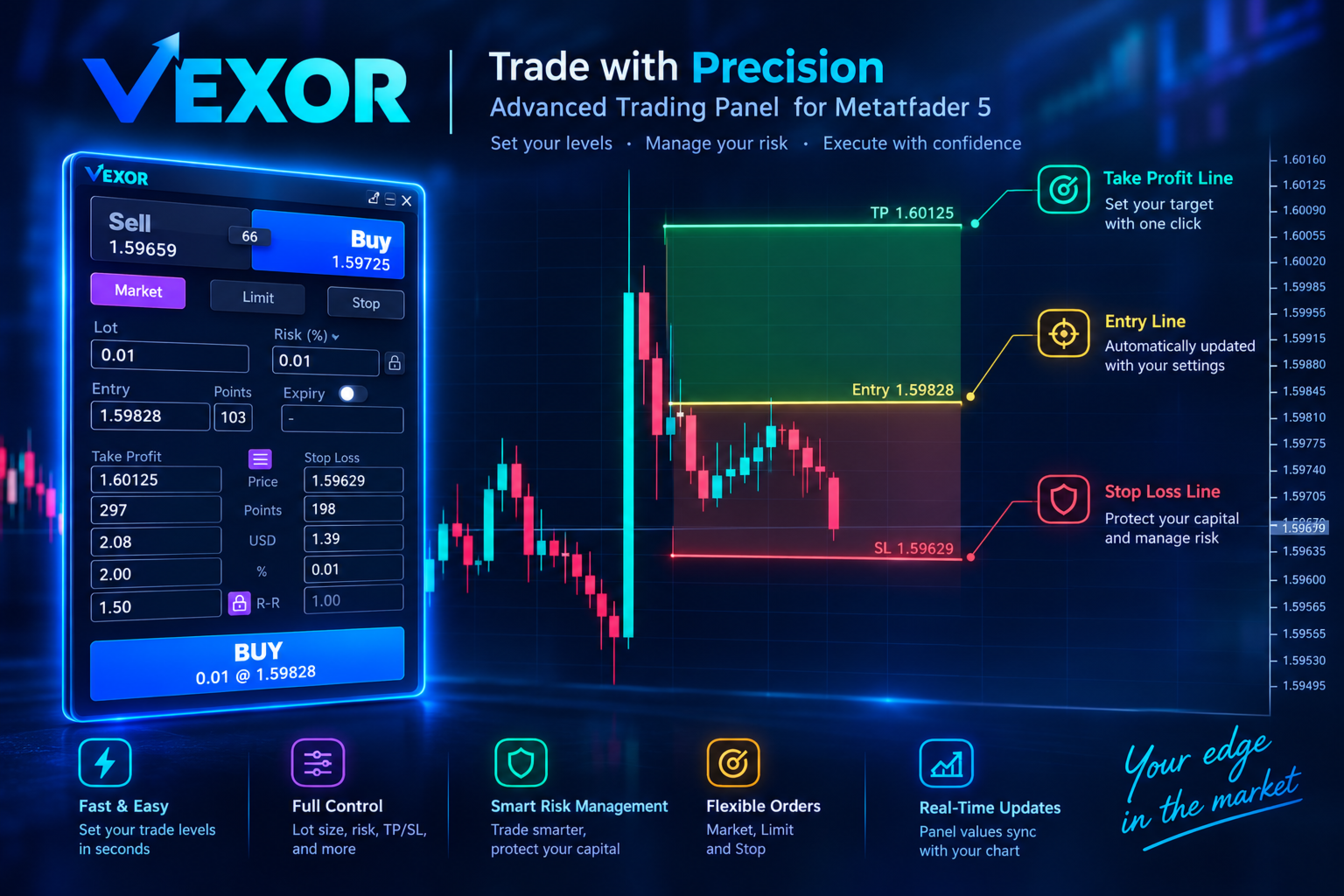
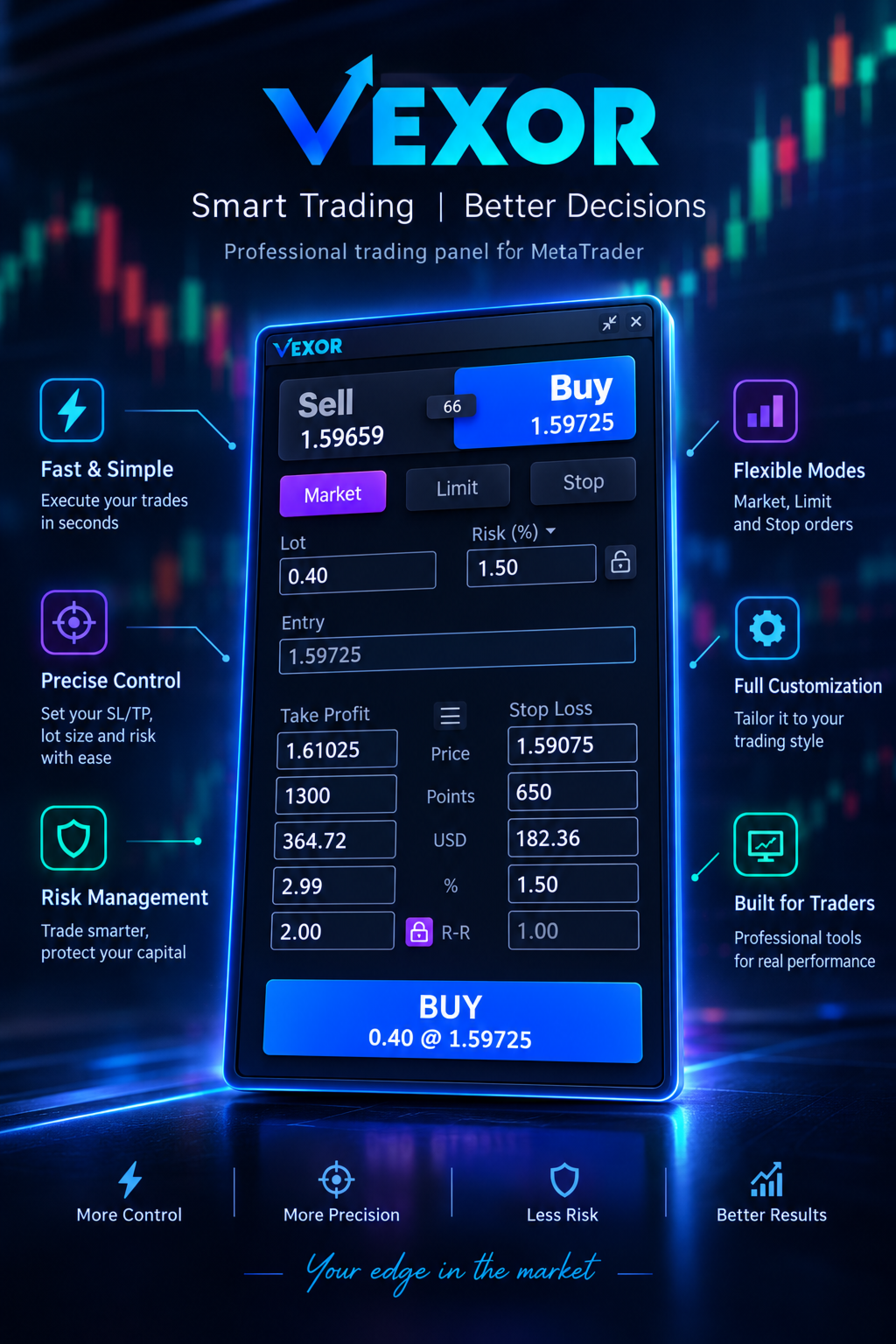
Take control of every trade with VEXOR, a modern trading panel for MetaTrader 5 (MT5) designed for traders who value precision, speed, and a better trading experience. Place market and pending orders, calculate position sizes, manage risk, and configure Stop Loss and Take Profit levels through an intuitive graphical interface.
Unlike conventional trading panels with rigid layouts and outdated interfaces, VEXOR combines a sleek dark design, interactive controls, real-time price information, dynamic risk calculations, and direct chart interaction in one streamlined workspace.
What Is VEXOR for MetaTrader 5?
VEXOR is an advanced MT5 trading panel designed to simplify manual trading and make order configuration more intuitive. Manage lot size, order types, risk settings, Entry, Stop Loss, and Take Profit directly from a single on-chart interface.
With interactive controls and visual order validation, VEXOR helps you prepare trades more efficiently while keeping essential trading information within easy reach.
Key Features of VEXOR MT5 Trading Panel
1. Modern Dark Interface
VEXOR features a carefully designed dark UI that offers a modern alternative to traditional MetaTrader trading panels.
- Modern dark-themed graphical interface.
- Interactive buttons with hover effects.
- Draggable panel positioning.
- Minimize functionality to free up chart space.
- Organized controls for orders, risk settings, and trade parameters.
2. Quick Buy and Sell Trading
Configure Buy and Sell orders directly from the panel. Dedicated blue and red controls make the trading direction easy to identify, while current Ask, Bid, and spread information remains visible.
- Dedicated Buy and Sell buttons.
- Current Ask and Bid prices.
- Live spread information based on incoming market quotes.
- Clear order summary before submission.
3. Market, Limit, and Stop Orders
Choose the order type that matches your trading strategy without switching between multiple windows.
- Market Orders: Prepare trades for execution at the available market price.
- Limit Orders: Configure pending orders at a specified entry price.
- Stop Orders: Configure pending orders at a specified trigger price.
The interface adapts to the selected order type. Entry-related settings, distance in points, and expiration options are displayed when relevant to pending orders, keeping the panel clean and easy to use.
4. Flexible Lot Size and Position Sizing
Set your trading volume directly through the lot size input, or use the available risk-based position sizing controls to align your trade volume with your planned risk and Stop Loss distance.
VEXOR connects position sizing with risk configuration to help you follow a more consistent trading process.
5. Risk Management in Percentage or Money
Define your intended trading risk using a percentage (%) or a monetary amount ($). Choose the risk measurement that fits your preferred money management strategy.
- Percentage-based risk settings.
- Fixed monetary risk settings.
- Dedicated risk input.
- Automatic lot size adjustment when the risk lock is enabled.
Dynamic Risk Lock: Enable the risk lock to maintain your selected risk target when adjusting the Stop Loss. VEXOR recalculates the lot size accordingly, subject to broker volume limits, instrument specifications, and calculation precision.
This feature is especially useful when you change Stop Loss levels but want to keep your planned risk consistent without manually recalculating the position size.
6. Interactive Entry, Stop Loss, and Take Profit Lines
Visualize and adjust important trade levels directly on the MetaTrader 5 chart. VEXOR lets you display Entry, Stop Loss, and Take Profit lines and use supported chart interactions to update the corresponding order parameters.
- Show or hide trade level lines.
- Adjust trade levels visually on the chart.
- Update corresponding order parameters through chart interaction.
- Review entry and exit levels in the context of price action.
Instead of relying only on numerical inputs, you can configure your trade setup visually and see how your planned entry, Stop Loss, and Take Profit relate to the current market price.
7. Multiple Stop Loss and Take Profit Calculation Modes
Configure Stop Loss and Take Profit using different measurement modes. Choose the representation that best matches your trading workflow and update the relevant values without manually converting every measurement.
- Price: Set a specific instrument price.
- Points: Configure the distance from the relevant entry price in points.
- Money: Work with a monetary profit or loss value.
- Percentage: Express the relevant value as a percentage.
- Risk-to-Reward Ratio (RR): Configure targets relative to planned risk.
Whether you plan trades around a fixed number of points, a monetary amount, a percentage, or a predefined risk-to-reward ratio, VEXOR brings these settings together in one interface.
8. Automatic Risk-to-Reward Lock
Maintain a consistent risk-to-reward ratio while adjusting your trade setup. When the RR lock is enabled, changing the Stop Loss can automatically update the Take Profit level to preserve the selected ratio.
For example, with a 1:2 risk-to-reward ratio, the planned Take Profit distance is twice the Stop Loss distance, subject to price precision and applicable trading constraints.
This feature helps traders follow predefined trade planning rules without repeatedly recalculating target levels.
9. Pending Order Settings
When configuring Limit or Stop orders, VEXOR displays the additional settings required for pending order preparation, including relevant entry parameters, distance in points, and expiration options.
The context-sensitive layout keeps unnecessary controls out of the way when they are not relevant to the selected order type.
10. Intelligent Order Validation
VEXOR evaluates relevant order parameters and provides visual feedback when the configuration is invalid. The main action button changes its state and can become disabled when supported validation conditions fail.
- Validation of relevant Stop Loss and Take Profit relationships.
- Checks against applicable broker stop-level restrictions.
- Visual feedback for invalid order configurations.
- Disabled or greyed-out action button when supported validation checks fail.
For example, an incorrectly positioned Stop Loss or a pending order price that violates the broker's minimum-distance requirements may prevent submission through the panel.
Actual order acceptance remains subject to broker rules, market conditions, available margin, execution settings, and server-side validation.
11. Clear Order Summary
The main action button displays a summary of the order being prepared, including the trading direction, lot size, and relevant price information where applicable.
This helps you review the intended order before submission instead of relying on a generic action label.
Why Choose VEXOR Over a Standard MT5 Trading Panel?
MetaTrader 5 provides powerful trading capabilities, but traders who frequently configure orders may benefit from a more streamlined interface. VEXOR brings order preparation, risk configuration, and chart interaction together in one modern trading panel.
- Modern UI: A dark interface with interactive hover effects.
- Flexible positioning: Drag or minimize the panel as needed.
- Multiple order types: Market, Limit, and Stop orders.
- Risk-based position sizing: Configure risk in percentage or money.
- Interactive chart controls: Adjust Entry, Stop Loss, and Take Profit levels visually.
- Multiple calculation modes: Price, points, money, percentage, and RR.
- Risk lock: Recalculate lot size when the Stop Loss changes.
- RR lock: Automatically adjust Take Profit when the Stop Loss changes.
- Order validation: Identify supported invalid configurations before submission.
VEXOR is designed to make essential trading controls easier to understand, faster to access, and more intuitive to use.
Who Is VEXOR Designed For?
VEXOR is designed for manual traders who use MetaTrader 5 and want greater control over their order preparation workflow.
- Day Traders: Keep essential order controls accessible while monitoring the chart.
- Scalpers: Review Bid, Ask, spread, and order parameters during fast-moving sessions.
- Price Action Traders: Configure Entry, Stop Loss, and Take Profit using chart interaction.
- Risk-Conscious Traders: Use percentage-based or monetary risk settings.
- Risk-to-Reward Traders: Maintain a selected RR relationship while adjusting trade levels.
- Discretionary Traders: Prepare market and pending orders from a single interface.
How to Use VEXOR in MetaTrader 5
- Install the VEXOR Expert Advisor according to the provided installation instructions.
- Open the chart of the instrument you want to trade and attach VEXOR.
- Select Market, Limit, or Stop order mode.
- Enter your lot size or configure the available risk-based position sizing settings.
- Choose percentage or monetary risk and enable the risk lock if required.
- Configure Entry, Stop Loss, and Take Profit using numerical inputs or supported chart lines.
- Set your preferred risk-to-reward ratio and enable the RR lock if required.
- Review the order summary and check that the configuration is valid.
- Submit the order using the main action button.
Always review the instrument, volume, entry price, Stop Loss, and Take Profit before submitting an order.
Frequently Asked Questions
Is VEXOR compatible with MetaTrader 5?
Yes. VEXOR is an Expert Advisor designed for the MetaTrader 5 trading platform. Check the product requirements before installation.
Is VEXOR an automated trading robot?
VEXOR is primarily a graphical trade execution and order configuration tool for manual traders. It helps you prepare and submit orders rather than generating trading signals or predicting market direction.
Does VEXOR support Buy and Sell orders?
Yes. VEXOR provides dedicated Buy and Sell controls for configuring trades in either direction.
Can I place pending orders with VEXOR?
Yes. VEXOR supports Market, Limit, and Stop order modes, allowing you to prepare market and supported pending orders.
Can VEXOR calculate lot size based on risk?
VEXOR provides percentage-based and monetary risk settings. When the risk lock is enabled, the lot size can be recalculated as the Stop Loss changes to help maintain the selected risk target.
Can I adjust Stop Loss and Take Profit directly on the chart?
Yes. VEXOR supports interactive Entry, Stop Loss, and Take Profit lines that let you configure supported trade levels visually as well as numerically.
What does the RR lock do?
The RR lock helps maintain your selected risk-to-reward ratio. When enabled, changing the Stop Loss can automatically adjust the Take Profit level relative to the planned risk.
Can VEXOR prevent invalid orders?
VEXOR provides validation feedback and can disable its main action button when supported validation conditions fail. However, broker-side rejection can still occur.
Does VEXOR guarantee profits?
No. VEXOR is a trade execution and risk configuration tool, not a profit guarantee. Trading involves substantial risk, and actual results depend on market conditions, execution, leverage, instrument specifications, and trading decisions.
Is VEXOR suitable for beginners?
Its graphical interface is designed to make order preparation more intuitive. However, users should understand order types, position sizing, Stop Loss, Take Profit, leverage, and trading risk before using it with a live account.
Risk Disclosure
VEXOR is a trading utility and does not provide investment advice, guarantee trading results, or eliminate market risk. Calculations depend on instrument specifications, broker settings, price precision, contract size, volume constraints, and execution conditions.
A configured risk amount is a planning target, not a guarantee of the final realized loss. Slippage, price gaps, commissions, swaps, liquidity conditions, and execution differences may cause actual results to differ from estimates. Pending orders may also be rejected or executed under different market conditions than expected.
Test VEXOR on a demo account before using it in live trading. Verify all order parameters, understand your broker's trading rules, and never risk money you cannot afford to lose.
Upgrade Your MT5 Trading Workflow with VEXOR
Experience a more intuitive way to configure orders, manage position sizing, and work with trade levels directly on your MetaTrader 5 chart. With a modern dark interface, flexible risk settings, interactive chart controls, and contextual order validation, VEXOR brings essential trading tools into one streamlined panel.
VEXOR - Trade. Control. Perform.
Download VEXOR and discover a more organized approach to manual trading on MetaTrader 5.

































































User didn't leave any comment to the rating