Copy Trader Pro FAST
- Utilities
- Version: 3.0
- Updated: 30 May 2026
- Activations: 20

Real-Time Trade Copier | MT4 ↔ MT5 Cross-Platform | Unlimited Trades | 20ms Latency
CopyTrader Pro FAST is a professional-grade trade copier Expert Advisor that copies trades between MetaTrader terminals in real time. Built on a high-speed file-based communication system, it delivers 20–200ms copy latency on the same machine — completely independent of tick frequency.
No VPS, no network configuration, no DLL files. Just attach to a chart, set Master or Slave mode, and start copying.
🚀 Key Features
- ✅ Unlimited trades & unlimited Slaves — 1 Master → as many Slaves as needed
- ✅ 20ms timer-based refresh — copies even when market is quiet, no tick dependency
- ✅ True cross-platform: MT5 → MT4, MT4 → MT5, MT4 → MT4, MT5 → MT5
- ✅ 3 lot calculation modes: Multiplier, Fixed Lot, Balance Ratio
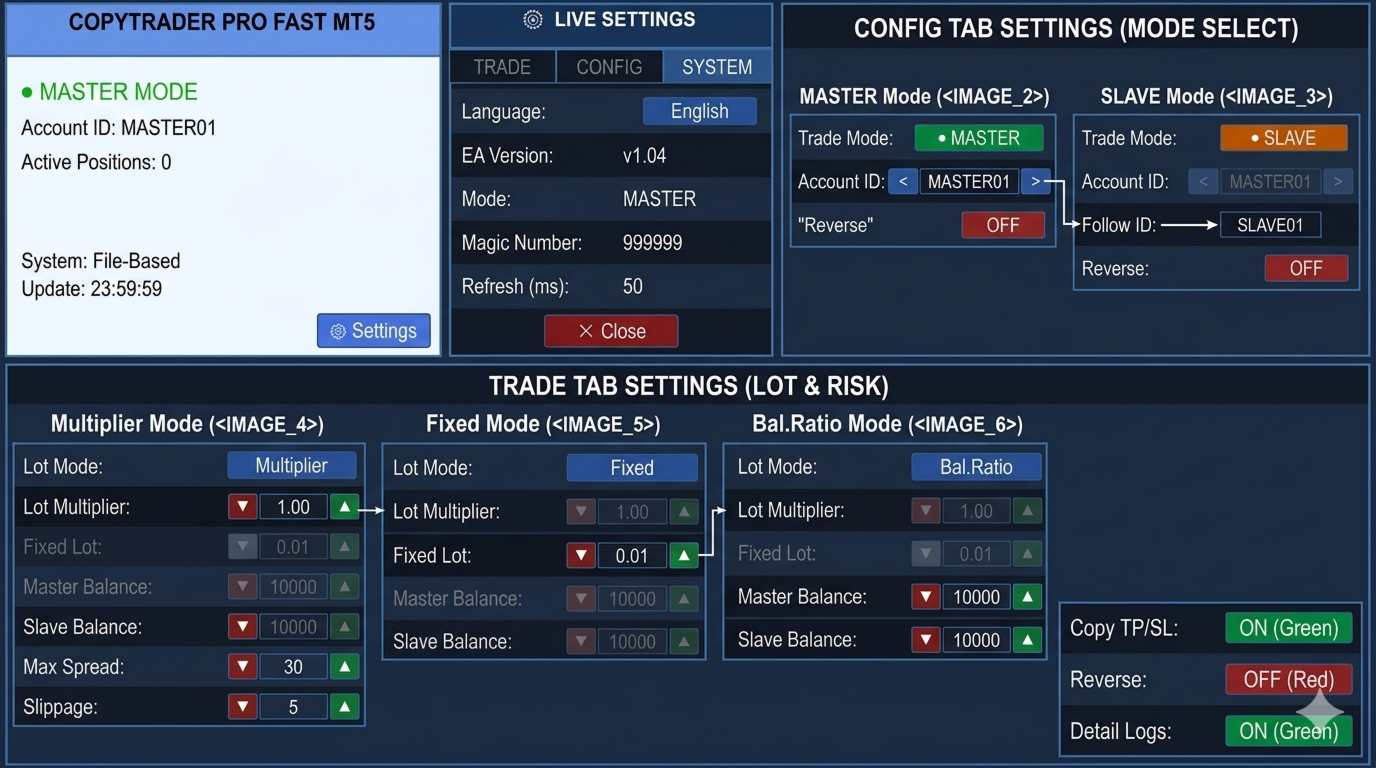
- ✅ Live on-chart settings panel — 3 tabs, change everything without restarting
- ✅ TP/SL copying with real-time modification tracking
- ✅ Reverse signal mode — hedge or mirror strategy
- ✅ MASTER01–10 / SLAVE01–10 preset ID system — instant configuration
- ✅ Magic number filter — copy only specific EA trades
- ✅ Symbol filter — copy only current chart's symbol
- ✅ Custom comment mode: Copy / Add custom text / Ticket ID only
- ✅ Spread filter — skip trade if spread is too high
- ✅ Orphan trade detection — closes Slave trades when Master closes
- ✅ Works with any broker — no account restrictions
⚙️ How It Works
The EA uses MetaTrader's built-in shared Common Files folder (%AppData%\MetaQuotes\Terminal\Common\Files), which is automatically accessible by all MT4 and MT5 terminals running under the same Windows user account.
- Master writes all open positions to a signal file every 20ms (only when positions change)
- Slave(s) read the file and open/close/modify trades to match the Master
- Typical latency: 20–200ms on the same machine
- No network required — runs fully offline
📊 Usage Scenarios
Scenario 1: Copy between two brokers on the same PC
| Terminal | Mode | Account ID | Follow ID |
|---|---|---|---|
| MT5 — Broker A | MASTER | MASTER01 | — |
| MT4 — Broker B | SLAVE | SLAVE01 | MASTER01 |
Scenario 2: One Master → Multiple Slaves
| Terminal | Mode | Account ID | Lot Mode |
|---|---|---|---|
| MT5 Main Account | MASTER | MASTER01 | — |
| MT4 Account #1 | SLAVE | SLAVE01 | Multiplier ×1.0 |
| MT4 Account #2 | SLAVE | SLAVE02 | Fixed 0.05 |
| MT5 Account #3 | SLAVE | SLAVE03 | Balance Ratio |
Scenario 3: Reverse Signal (Hedge)
Set Reverse = ON on the Slave to open opposite positions. Master BUY → Slave SELL. Useful for hedging or contra strategies.
📋 Input Parameters
| Parameter | Default | Description |
|---|---|---|
| TradeMode | MASTER | MASTER = publish signals, SLAVE = copy signals |
| AccountID | MASTER_01 | Unique identity for this terminal (MASTER01–10 or SLAVE01–10) |
| FollowMasterID | MASTER_01 | Master ID to follow (Slave mode only) |
| MasterMagicNumber | 0 | Filter by magic number (0 = copy all trades) |
| OnlyCurrentChart | false | Copy only trades on this chart's symbol |
| LotCalculationMode | Multiplier | Multiplier / Fixed / Balance Ratio |
| LotMultiplier | 1.0 | Applied to master lot size |
| FixedLot | 0.1 | Fixed lot for every copied trade |
| MasterBalance | 10000 | Master balance for Balance Ratio mode |
| SlaveBalance | 10000 | Slave balance for Balance Ratio mode |
| CopyTPSL | true | Copy and track TP/SL modifications |
| ReverseSignals | false | Reverse trade direction (BUY↔SELL) |
| SlippagePoints | 5 | Max allowed slippage in points |
| MaxSpreadPoints | 30 | Do not copy if spread exceeds this value |
| CommentMode | ID Only | Copy master comment / Add text / Ticket ID only |
| SlaveMagicNumber | 999999 | Magic number for all copied trades |
| SignalFolderName | CopyTrader_Signals | Shared folder name (must match on all terminals) |
| RefreshRateMs | 50 | Timer interval in ms (min 20) |
| DetailedLogs | true | Write detailed logs to Expert journal |
🖥️ Live Settings Panel
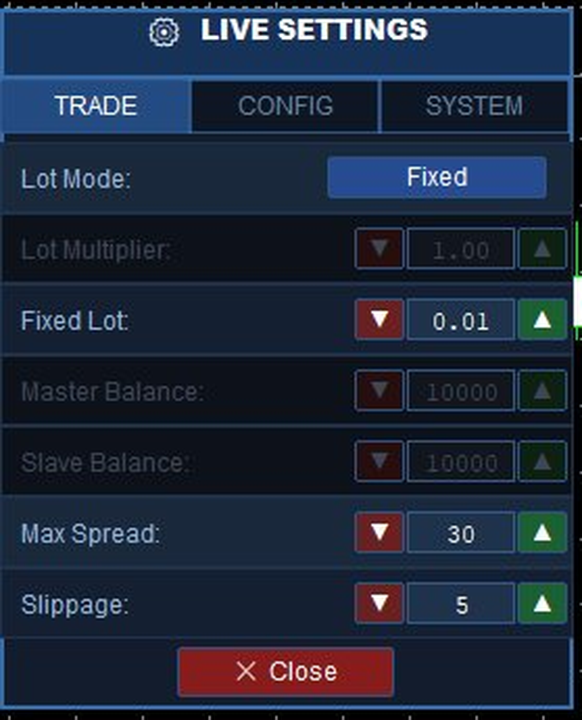
A full 3-tab settings panel is built into the chart. Click ⚙ Settings to open it — all changes apply instantly without restarting the EA.
TRADE Tab (Slave mode)
- Lot Mode selector: Multiplier / Fixed / Balance Ratio
- Numeric fields: Lot Multiplier, Fixed Lot, Master/Slave Balance, Max Spread, Slippage
- All fields locked in Master mode to prevent accidental changes
CONFIG Tab
- Trade Mode toggle: ● MASTER / ● SLAVE — switch without reattaching
- Account ID selector: MASTER01–MASTER10 (Master) or SLAVE01–SLAVE10 (Slave)
- Follow ID selector: MASTER01–MASTER10 (which Master to copy)
- Comment mode: Copy / Add custom text / ID Only
- Copy TP/SL, Reverse, Detail Logs toggles
SYSTEM Tab
- Language: English / Turkish
- EA version, current mode, magic number, refresh rate
🔌 Connection Status
| Indicator | Color | Meaning |
|---|---|---|
| ● CONNECTED | Green | Master signal file updated within last 30 seconds |
| ● NO CONNECTION | Red | Master file not found or outdated |
| ✓ SYNCED | Green | Master and Slave trade counts match |
| ↻ Synchronizing | White | Copy in progress |
| Waiting... | White | No open trades on Master |
🛠️ Installation
- After purchase, the EA appears in MetaTrader 4 → Navigator → Market (or Expert Advisors).
- Drag it onto any chart on each terminal (Master and Slave).
- Set Trade Mode (MASTER / SLAVE) and Account ID / Follow ID in the CONFIG tab.
- Enable AutoTrading and tick "Allow live trading" on the Slave terminal.
✅ Requirements
- MetaTrader 4 (any build)
- Master and Slave terminals on the same Windows user account
- AutoTrading button enabled on Slave terminal
- "Allow live trading" checked in EA properties on Slave terminal
❓ FAQ
Q: Does it work between different brokers?
A: Yes. Any broker, any account type — the shared file system handles communication.
Q: Does it work between MT4 and MT5?
A: Yes. The MT5 version (also available) is fully compatible with this MT4 version.
Q: What is the typical latency?
A: 20–200ms on the same machine. The 20ms millisecond timer runs independently of ticks — even during low-volatility periods.
Q: How many Slaves can I run?
A: Unlimited. Run SLAVE01 through SLAVE10 (or more) all following the same MASTER01.
Q: Can I copy from MT5 to MT4?
A: Yes. Attach the MT5 version as Master, attach the MT4 version as Slave on the same PC.
Q: Does it work on VPS?
A: It works on a VPS if Master and Slave terminals are on the same VPS instance (same Windows user). Cross-VPS copying is not supported — file sharing requires the same machine.
🔒 Try the FREE version first to test the connection and setup before purchasing the Full version.