Auto Break Even Utility MT5
- Utilities
-
AL MOOSAWI ABDULLAH JAFFER BAQER
 To trade successfully we need to go through the proven path that others had gone and reached!
Here are 17 quotes from such successful investors:
1- Limit your size in any position so that fear does not become the prevailing instinct guiding your judgment.
Joe Vidich - Version: 5.10
- Updated: 29 October 2026
- Activations: 5
KNOW THE EXACT PRICE WHERE YOUR TRADES STOP COSTING YOU MONEY, AND LOCK IT IN WITH ONE CLICK
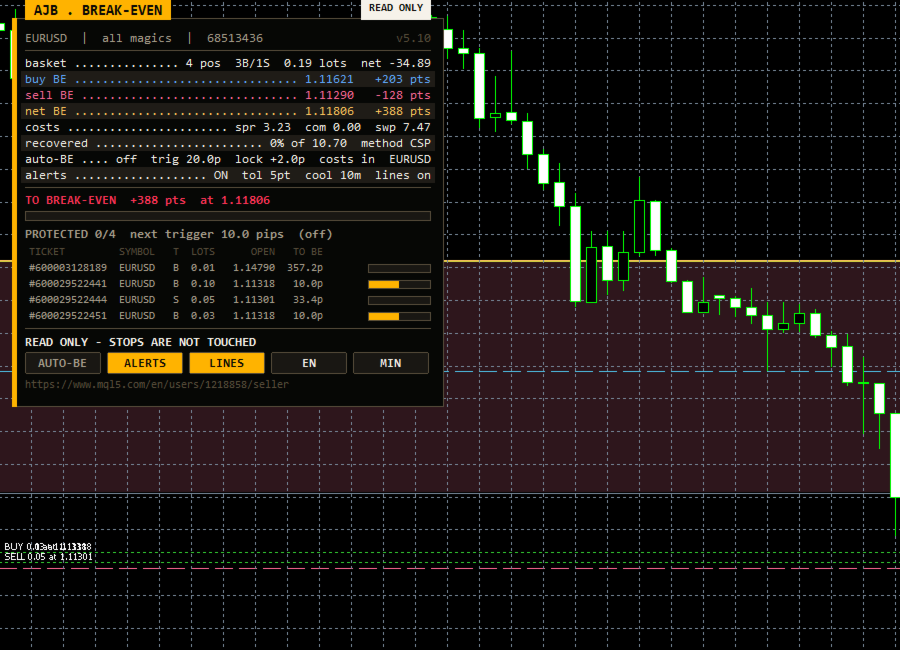
Auto Break Even Utility MT5 shows the real break-even price of your open positions: buy side, sell side and the net level of a hedged basket. Commission, swap and the spread you still have to pay are all included. A new optional stop mover can then put each position's stop loss at break-even once it has earned enough room.
Test it free first: load the free demo in the MetaTrader 5 Strategy Tester with visual mode on. Open a few trades by hand on the tester chart and watch the break-even lines, the distance row and the protection counter react on every tick. With the stop mover on, you will also see each stop jump to break-even the moment its trigger is reached.
- True buy, sell and net hedged break-even prices, with commission (both the entry and the coming exit), swap and closing spread.
- Distance to break-even in points, a cost recovery bar and a cost breakdown: spread, commission, swap.
- NEW: optional automatic break-even stop with trigger, lock, cost cover, symbol scope and magic filter.
- NEW: protection counter showing how many positions are already safe and how many pips the next one still needs.
- Chart lines for every break-even level and every entry, plus a shaded recovery zone. The right side of the chart stays clear.
- Break-even alerts by popup and push, with a tolerance and a cooldown.
START HERE
- Attach it to the chart of the symbol you trade. Any timeframe works.
- Read first: out of the box the stop mover is off. The utility only measures and draws, and your orders are never touched.
- Running an EA? Enter its magic number in InpMagicFilter so the numbers cover only that EA's trades.
- Want automatic protection? Allow algo trading in the terminal, then press AUTO-BE on the panel or set InpAutoBEStop to true. Choose a trigger that suits the symbol: about 15 to 25 pips on major pairs is a sensible first try.
- Check the panel: the PROTECTED row tells you at a glance how many positions are already at break-even.
WHY THE AVERAGE ENTRY IS NOT YOUR BREAK-EVEN
The terminal shows an entry price and a floating profit, but your true zero is somewhere else. Commission was charged when you opened and will be charged again when you close. Swap builds up every night. A buy closes at the bid and a sell closes at the ask, so the spread still has to be paid. Add several entries, partial closes and a hedge on top, and nobody can work the real number out in their head. This utility works it out every second and puts it on the chart as a clear line.
WHAT HAPPENS, STEP BY STEP
1. Counting. On every tick and on a timer, the utility collects the open positions on the chart symbol that pass your magic filter. For each one it reads the volume, the entry price, the swap and the commission from the deal history. Fees are included, and the exit leg that is still to come is estimated from the entry rate.
2. Pricing. Each side gets its own break-even, and it carries only its own swap and commission. A swap credit earned by your sells never moves the buy level. When you hold both sides with different volumes, the net level shows where the whole basket is flat. When the volumes are equal, the panel says LOCKED, because no price can change the result.
3. Measuring. The distance row shows how many points price is from the level that matters, in green when you are on the right side of it and red when you are not. The bar under it fills as the basket earns back its costs.
4. Protecting (optional). With the stop mover on, each position in scope is watched. When it has gained InpBETriggerPips, its stop loss is moved to the entry plus InpBELockPips and, if you choose, plus its own commission and swap. The take profit is kept. The move only happens when the broker's stop level and freeze level allow it. A stop that is already at break-even or better is never sent again, and a position whose change is refused waits InpBERetrySec seconds before the next try, so the journal does not fill with repeated requests. Every refusal is logged with the trade server's return code.
THE PANEL
The panel sits in the top-left corner on a dark card with a gold stripe, so the right side of the chart and the price scale stay free for your own analysis. A gold tab names the tool, and a pill shows READ ONLY, AUTO-BE or BLOCKED. Underneath, dotted rows list the basket (positions, buy and sell count, lots, net result), the buy, sell and net break-even with their distance in points, the cost breakdown, how much of the cost has been recovered, your stop-mover settings and your alert settings.
New in this version is the PROTECTED row: for example "PROTECTED 3/5 next trigger 4.2 pips". Below it, every position in scope is listed with ticket, symbol, side, lots, entry and how many pips it still needs, plus a small bar that fills as it gets closer and turns green once the stop is at break-even. Five buttons switch AUTO-BE, ALERTS, LINES, language and the compact view. You can drag the panel by its header. It measures its own text, fits smaller screens, and is not drawn during a non-visual backtest, so optimisation runs at full speed.
EVERY INPUT EXPLAINED
Break-even method
- InpIncludeCommission: count commission and deal fees, both the entry and the estimated exit (on).
- InpIncludeSwap: count accumulated swap (on).
- InpIncludeSpread: count the spread a closing trade must still pay (on).
- InpMagicFilter: only positions with this magic number; 0 means all positions, including manual trades.
- InpRefreshSec: timer interval in seconds; the utility also refreshes on every tick (1).
Panel
- InpLang: English, Arabic, or both, for the panel captions and the chart tags.
- InpCorner: the chart corner the panel is anchored to (top left).
- InpPanelX, InpPanelY: distance from that corner in pixels.
- InpAutoFit: shrink the font and table on small charts so the panel always fits (on).
- InpStartCompact: start in the compact view, which shows only the key rows (off).
Chart drawing
- InpDrawLines: draw the buy, sell and net break-even lines with their labels.
- InpDrawEntries: draw a dotted line at every entry price.
- InpDrawZone: shade the area between price and the break-even level.
- InpBuyColor, InpSellColor, InpNetColor: colours of the three levels.
- InpZoneLoss, InpZoneProfit: zone tint when you are below or above break-even.
Alerts
- InpAlertBE: alert when price reaches break-even (off; the ALERTS button switches it live).
- InpAlertPopup: show a terminal popup.
- InpAlertPush: send a push message to the MetaTrader app on your phone.
- InpAlertPoints: how close, in points, counts as "at break-even" (5).
- InpAlertCooldown: minimum minutes between two alerts (10).
Auto break-even stop (new)
- InpAutoBEStop: move stops to break-even automatically (off; the AUTO-BE button switches it live).
- InpBETriggerPips: profit in pips a position must reach before its stop is moved (20).
- InpBELockPips: pips locked beyond the entry, so a stopped-out trade still ends slightly positive (2).
- InpBEIncludeCosts: push the stop a little further so it also covers that position's commission and swap (on).
- InpBEThisSymbolOnly: manage only the chart's symbol (on), or every symbol on the account (off). The magic filter applies in both cases.
- InpBERetrySec: seconds to wait before retrying a position whose stop change was refused (15).
Journal
- InpLogLevel: errors only, errors and events, or verbose.
QUESTIONS TRADERS ASK
Will it change my trades if I just want the numbers? No. With InpAutoBEStop off and the AUTO-BE button not pressed, it never places, modifies or closes anything.
Does it work next to my grid or scalping EA? Yes. Set the EA's magic number and the stop mover will touch only that EA's positions. Remember that some EAs manage their own stops and may move them back.
Hedging and netting? Both are supported. On a netting account there is one position per symbol, so the buy or sell level is the whole story. No DLLs and no extra files.
HONEST EXPECTATIONS
A break-even stop limits the damage of a trade that turns around. It does not make a losing idea profitable. In fast markets and over weekend gaps, a stop can be filled at a worse price than the one set. A tight trigger can also close a trade that would have recovered later. Try your trigger and lock values in the Strategy Tester on your own broker's data before you use them live.
If Auto Break Even Utility MT5 earns a place on your charts, an honest review saying what helped and what you would like improved is very welcome. Real feedback from traders decides what goes into the next version.