Manual trade and group management

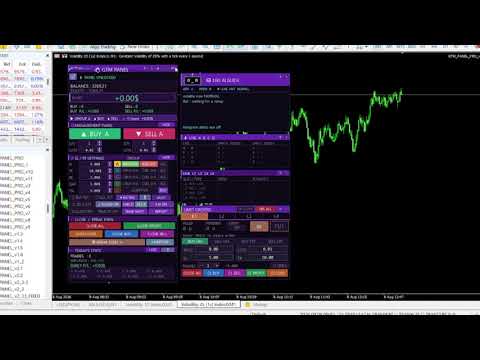
GTM PANEL PRO is a manual trade-management control panel for MetaTrader 5. It does not open trades on its own and it does not predict anything. It gives you a cockpit: you decide, and the panel executes, protects and reports — in one click instead of ten.

It was built for the trader who is already good at reading a chart but keeps losing money to the mechanics of trading: the stop that was never set, the basket that had to be closed one trade at a time, the pending order typed at the wrong price, the winner that came all the way back to entry because moving five stops by hand took too long.

🔧 TRY IT FIRST — the free demo runs in the Strategy Tester

MQL5 demos of an Expert Advisor cannot run on a live chart — that is a Market rule, not a limitation of this panel. To try the full panel for free:

1.  Press Download Demo, then open the Strategy Tester (Ctrl + R)
2.  Expert: GTM PANEL PRO  ·  any symbol  ·  M5  ·  pick a date range
3.  Tick “Visual mode” — without this the panel will not appear
4.  Press Start. The panel loads on the visual chart
5.  Unlock it with the password from the Inputs tab and trade the tester’s virtual account

Every button, every group, every limit slot and the AI guide all work there. Nothing is crippled in the demo.


⚡ Version 2.22 — rebuilt for speed

The most common complaint about trade panels in general is that they make the chart heavy: the box lags behind the pointer, the panel flickers, order buttons take seconds to answer. Version 2.22 is a targeted rewrite of exactly that:

▶ One position scan per repaint, not seventeen. With twenty trades open the old build made hundreds of position look-ups four times a second; it now makes one and shares it.
▶ Nothing is deleted and rebuilt any more. Pressing a button used to destroy every object on the panel and create it again — that was the flicker. Objects are now only moved and recoloured.
▶ Dragging is smooth. The move routine no longer walks every object on the chart on every mouse event, and repainting is capped at 60 frames a second.
▶ The chart tags only redraw when something actually moves — a trade opens or closes, or you scroll or zoom. Otherwise not a single object is touched.
▶ Telegram can no longer freeze the panel. Network calls are queued and never run while your hand is on a box or a line.
▶ Trailing stops respect the broker’s minimum distance, so a stop is never rejected silently, and the trail no longer sends an order request on every tick.


🧩 1. Trade in GROUPS, not in single tickets

This is the heart of the panel. Most terminals treat every trade as an orphan. GTM PANEL PRO gives you four completely independent groups — A, B, C and D — and each one owns everything:

🔢 its own magic number, so its trades are tagged from the second they open
📊 its own lot size and trade count, for the buy side and the sell side separately
🛡 its own stop loss, take profit, break-even trigger, break-even gap and trailing distance
📈 its own statistics — you can see which group is actually paying you
🎨 its own colour on the chart, so a glance tells you whose trades those are

Why this matters. You can run a scalp basket in group A, a swing position in group B and a hedge in group C on the same symbol, at the same time, with different stops and different risk — and never mix them up. Press CLOSE and only the group you are pointing at is touched. Nothing else on the account moves.

Every close and break-even button also obeys a per-group counter. Set it to 2 with three trades running and CLOSE takes two and leaves one to run. Scaling out stops being a manual chore.


🎯 2. The LIMIT DESK — four pending slots that behave like a plan

Pending orders are where patient traders make their money and where most panels stop caring. GTM PANEL PRO gives them a desk of their own: four slots, L1 to L4, each with its own order type, price, lot, stop, target, quantity and magic number.

✅ Any type per slot — BUY LIMIT, SELL LIMIT, BUY STOP, SELL STOP. Build a full break-out or reversion plan on one screen.
✖ Multiple orders per slot. Set the trade count to 3 and one press of PUT sends three orders at that price.
🔁 OCO — One Cancels Others. The moment any slot fills, every other pending order is cancelled automatically. Arm both sides of a range and let the market pick.
⏱ Auto expiry. A level that has not been touched in 1 minute, 30 minutes, an hour or a day deletes itself. No stale orders left behind.
🛡 SL and TP attached before the order is sent, so a fill is never naked.
🧹 Its own close row — close all, buys, sells, winners or losers of that slot alone, plus its own break even.
📊 Its own statistics, so you can see whether your pending-order plan is actually working.

Why this matters. A pending order placed badly is worse than no order at all. Here the price is checked before it goes out — point a BUY LIMIT above the market and the panel refuses to send it and says why, in plain English: “BUY LIMIT must sit BELOW price”. The broker’s own minimum stop distance is part of that check.


🖱 3. Set the stop and the target by DRAGGING them on the chart

Typing numbers into boxes is slow and it is where mistakes happen. In GTM PANEL PRO you put the trade where your eyes already are:

● Press on the price line and pull — the whole order travels with it: entry, stop, target and both shaded blocks move together.
● Pull the red line and only the stop moves. Pull the green line and only the target moves. Both are clamped to the broker’s minimum distance for you.
● While you drag, the PRICE, SL and TP boxes show the live number you are on — you are reading real values, not guessing.
● A shaded red block covers entry-to-stop and a shaded green block covers entry-to-target, so risk and reward are shapes you can see, not numbers you have to work out.
● If the slot already has a live pending order, moving a line re-places it at the new price immediately.

BUY TGT and SELL TGT. Two buttons on the panel switch on a preview for the group you have selected: the panel draws where the stop and the target of your next buy (or sell) would land, from the SL and TP you have typed in, with the same shaded blocks and a price chip on the scale reading SL A BUY and TP A BUY. Change a number on the panel and the preview moves with it. You set the risk before the trade exists, not after.


🛡 4. Protection that actually fires

⚖ Break even — one button moves the stop to entry on everything in scope, right now. Or set a trigger and let it fire by itself, with an optional gap past entry. Every break-even stop is clamped to the broker’s minimum distance, so it is never rejected without you noticing.
📉 Trailing stop — per group, with its own distance. Deliberately silent, because a beep on every step with a basket open is unbearable.
✂ Close winners only, or losers only — trim the bad half of a basket and let the good half run.
💲 $ or % risk — one button switches every stop, target, break-even and trailing value between dollars and percent, with a step multiplier so you can move in 0.01 or in 10.
🔒 Password lock — the panel opens read-only. Nothing fires until you unlock it.


🤖 5. A live guide that talks while you trade

A rolling advisor that reads your account and speaks only when there is something worth saying: a trade running without a stop loss, drawdown getting deep, margin level dropping, both sides open at once, lot size large for the balance, volatility changing gear, which group is carrying the day, a limit order about to fill — plus a rotating set of trading reminders.

Thirty-six separate things it knows how to warn you about, each with its own cooldown, so it never repeats itself and never chatters. Colour-coded: red act now, amber watch it, blue information, green good news. Lines are typed out one letter at a time, so the box reads like advice instead of a log.


📲 6. Telegram — alerts out, control in

This is the part most trade panels do not have at all. Traders normally buy a second product for it.


🔔 Every open, close, break-even, limit fill and risk warning pushed to your chat — and to a group or channel as well. Not raw text: the group, the side, the lot, the price, the result, that group’s running statistics and the account balance.
📸 A chart screenshot sent as a real photo, and a full written report of the whole account on demand.
🎮 Optional remote control. With REMOTE switched on you can send BUY, SELL and CLOSE from the chat. Commands are ignored entirely unless you switch it on, trading commands need a second separate permission in the inputs, and REMOTE never survives a restart on its own.
⚡ Alerts are queued and sent off the critical path, and never while you are holding a box or a line. A slow network cannot freeze the panel.


📊 7. Statistics that survive everything

Today and this month, rebuilt from your deal history every time the panel starts — a restart, a timeframe change or a terminal crash never loses a number. Trades closed, wins and losses, win rate with a meter, and realised plus floating P/L, per group and per limit slot. One button flips the whole block between today and this calendar month.

Results are filed by magic number the moment a deal closes, so a close never lands in the wrong column.


🖥 8. Built to live on your screen

🎨 Six full themes — NAVY, GOLD, EMERALD, PURPLE, CYBER, CLASSIC — plus a night mode, and three panel sizes.
🧲 Every outside box moves and folds independently. Park the AI guide, the group monitor, the live slot box and the limit desk anywhere you like, roll any of them up to its title bar, and the layout is remembered through restarts. Positions are kept inside the chart, so a box saved on a big monitor can never come back out of reach on a small one.
👁 Chart marks switch off one kind at a time when the chart gets busy.
🔗 Shares a chart with other EAs safely — every group and slot has its own magic number, and the panel touches nothing else.


⚠ What this product does NOT do

Please read this before buying. GTM PANEL PRO contains no automatic trading logic, no signals and no strategy. It will never open a trade you did not ask for. It is a control panel and a risk-management tool for a trader who makes their own decisions.

There are no performance claims on this page, because a management tool cannot make a losing strategy profitable. It can only stop good trades from being ruined by slow, manual execution.

It also does not calculate lot size from a risk percentage, it does not close part of a single position by volume, and it does not manage trades that were opened outside its own magic numbers.


🚀 Getting started in three steps

1.  Drag GTM PANEL PRO onto any chart. In the properties window tick Allow Algo Trading, open the Inputs tab, set your password and your lot defaults, then press OK.
2.  Unlock the panel with your password. Pick a group letter, switch the BUY and SELL sides on, set SL and TP.
3.  Trade. To change a setting later: Charts → Expert List → Properties, or just press F7.

📚 Full user guide — every button, every box and every number, one section at a time, with pictures:
GTM Panel Pro — a manual trade manager for MetaTrader 5


🖥 Requirements

MetaTrader 5, any broker, any symbol, any timeframe. Algo Trading enabled in the terminal.
For Telegram only: Tools → Options → Expert Advisors → tick Allow WebRequest and add https://api.telegram.org


⚙ INPUT PARAMETERS

Identity

InpMagicA / B / C / D Magic number for groups A, B, C and D. Each must be unique; the panel refuses to start if two clash.
InpPassword The password that unlocks the panel. Change it from the default.
InpSlippage Maximum slippage in points.

Panel

InpPanelX / InpPanelY Where the panel first appears on the chart.
InpThemeStart Starting theme: 0 NAVY, 1 GOLD, 2 EMERALD, 3 PURPLE, 4 CYBER, 5 CLASSIC.
InpUISize Starting panel size: 0 small, 1 medium, 2 large.
InpSideBoxStart Show the live group monitor at startup.
InpSoundStart Sound alerts on at startup.
InpAnimateStart Animated live border.

Group defaults — the same set for A, B, C and D

InpA_Lots Starting lot size for the group.
InpA_Qty How many trades one press opens.
InpA_SL Starting stop loss (0 = off).
InpA_TP Starting take profit (0 = off).
InpA_BE Profit needed before automatic break even fires (0 = off).
InpA_Gap How far past entry the break-even stop is placed.
InpA_TSL Trailing stop distance (0 = off).

Limit slots L1 – L4

InpMagicL Base magic number for the limit slots; L1 uses it, L2 +1, L3 +2, L4 +3.
InpL_Lots Starting lot size for the limit slots.
InpL_SL Starting stop loss for the limit slots.
InpL_TP Starting take profit for the limit slots.
InpL_Expiry Pending-order expiry in minutes (0 = never).
InpL_OCO One slot fills, the rest are cancelled.

Telegram

InpTgToken Bot token from @BotFather.
InpTgChatID Your chat id from @userinfobot.
InpTgGroupID Group or channel id (negative, starts -100). Leave blank to switch off.
InpTgAllowTrade Allow BUY / SELL / CLOSE commands from Telegram. Off by default.
InpTgPollSec How often incoming commands are checked, in seconds.
InpTgSinhala Bilingual replies.

Limits

InpMinLot / InpMaxLot Lot size floor and ceiling for the panel.
InpMinQty / InpMaxQty Trades-per-click floor and ceiling.


📜 Version history

2.22 Performance rebuild. One position scan per repaint instead of seventeen; the panel is no longer destroyed and recreated on every button press; dragging works from a cached object list and repaints at 60 fps; chart tags redraw only when the layout actually changes; Telegram can no longer block the interface; trailing stops and break even are clamped to the broker’s minimum distance; outside boxes can no longer be saved off-screen; the AI guide keeps working at the weekend.
2.21 Six themes, night mode, three sizes, the limit desk and the live AI guide.


💬 Support

Questions before you buy? Send a message and ask — I answer. If something in the panel does not behave the way this page describes, tell me and it gets fixed; that is what the version history above is.

⚠ Trading carries risk. This product is a manual execution and risk-management tool; it does not generate signals and it does not guarantee any result. Always test on a demo account first.

Contact: gayanindika.rox1992@gmail.com  ·  WhatsApp +94715260626
Recommended products
Grid Manager — Manual Multi-Basket Grid Assistant for MT5 Grid Manager is a hands-on control panel for building and managing grid "baskets" directly on your chart. You decide the direction and the moment; the tool opens the grid, manages every leg, and protects the position with money-based risk controls, on-chart breakeven/SL/TP lines, and one-click actions. It is an execution and management assistant — fast, visual, and fully under your control. What it is — and what it is not Grid Manager is
Auto Stop Loss MT5
Nabil Oukhouma
5 (1)
The "Set & Forget" Risk Manager for Multi-Asset Trading Never Leave a Trade Unprotected. Auto Stop Loss (MT5 Manager) is the ultimate background utility for traders who prioritize safety. Unlike standard panels, this tool works tirelessly behind the scenes to instantly secure every trade you place. Whether you open trades manually or via another EA, this manager ensures every position has a hard Stop Loss, Take Profit, and dynamic Trailing Stop attached immediately. The Game Changer:  Manage yo
Prop Calculator Assistant Stop blowing Prop Firm accounts due to bad math. Let the Assistant handle the risk. Prop Calculator Assistant   is the ultimate trade management panel designed specifically for traders attempting to pass funding challenges (FTMO, etc.) or managing funded capital. It replaces mental math and manual order dragging with a precision visual interface that keeps you strictly within your rules. This is   not   an auto-trading bot that guesses the market. It is a professional  
try the free limited version first: https://www.mql5.com/en/market/product/188573?source=Site +Profile+Seller Unlock the full power of MT5 with NGA Pro Next Gen Assistant Pro — the most advanced trading assistant designed to give you full control over your trades… even from your phone! . -Risk calculation, dollars stop loss based: by using NGA you can set the exact amount you willing to lose each time, without having to deal with manual pips calculation,     just   drag the visual Stop lo
Painel de Trading Pro
Dedial Pereira Da Silva
TradePanel Pro - Manual Trading Panel with Grid, Trailing, and Targets  "Complete manual trading panel for MT5: grid, trailing stop, smart breakeven, daily targets and risk management in one click." TradePanel Pro is a professional manual trading panel for MetaTrader 5, built for traders who want speed, organization and automatic position protection — without juggling multiple tools or complex setups. Everything you need lives in a single panel: one-click buy/sell, point-based stops and targe
Lot calculator tool MT5
Ernestas Kvedaras
3.67 (3)
More stable MetaTrader 4 version is available here:  Lot Calculator Tool . This tool helps you to automatically calculate and manage risk, conveniently place orders visually, schedule orders, trail stops, move them to break-even and more. Features Place market or pending orders using draggable lines Schedule orders Calculate and limit risk using various methods See current spread See time till next candle Set custom order comments Trail stops Move stops to break-even See order profit/loss in p
Hisoka Trade Panel — v6.91 Description: Hisoka Trade Panel is a comprehensive on-chart trade management Expert Advisor for MetaTrader 5. It places a draggable, collapsible panel directly on your chart and lets you manage open positions — break-even locks, trailing stops, partial closes, and SL/TP modification — with one click. All risk math is dollar-based, so the same "BE 5$" button locks $5 of profit consistently across XAUUSD, BTCUSD, EURUSD or any other instrument, regardless of contract siz
Telegram Messenger Signal
Rene Thristan Ferreira Da Silva
Monitor de Operações em Tempo Real + Integração com Telegram (MT5) Transforme sua conta MetaTrader 5 em um sistema automatizado de monitoramento e envio de operações diretamente para o Telegram. Este Expert Advisor NÃO abre operações. Ele funciona exclusivamente como um monitor inteligente, detectando automaticamente qualquer nova operação aberta na conta e enviando os dados em tempo real para um grupo ou canal no Telegram. ️ O QUE O SISTEMA FAZ • Detecta automaticamente qualquer operação ab
Atlas Trade Desk
Bernhard Wurzlbauer
Atlas Trade Desk MT5 Atlas Trade Desk MT5 is a visual trade panel, risk manager and lot calculator for manual MetaTrader 5 traders. Plan market and pending orders directly on the chart, calculate position size from your selected risk, adjust Entry, Stop Loss and Take Profit visually, and manage open positions from one clean dashboard. The tool is built for discretionary traders who want faster order preparation, clearer risk control and safer position management without switching between multipl
JMM Trade Panel MT5
Sarah Joyce Walker
JMM Trade Panel MT5 JMM Trade Panel MT5 is a practical chart- based trading utility for MetaTrader 5. Execute Buy and Sell orders directly from the chart, adjust the displayed lot size quickly, monitor basket performance, and manage trades using configurable Magic Number and symbol- management rules. Full   User   Manual: DOWNLOAD Key Features On- chart Buy, Sell, and Close All buttons. Close all trades managed by the EA with one click. Optional management of all open trades regardless of Magi
HedgeSafe Trade Assistant A risk-first manual trading panel for MetaTrader 5. HedgeSafe helps you prepare, validate and manage a trade directly on the chart before you press BUY or SELL. HedgeSafe is not a signal service, market predictor, AI bot or automatic strategy. It does not choose trade direction and does not promise profit. You remain in control of every trading decision. Main capabilities Lot calculation from a percentage of account balance or a fixed amount in account currency. Stop Lo
Background Image and Logo for MT5 chart
Gayan Indika Honnanthara Acharige
GTM PANEL PRO is a manual trade-management control panel for MetaTrader 5. It does not open trades on its own and it does not predict anything. It gives you a cockpit: you decide, and the panel executes, protects and reports — in one click instead of ten. It was built for the trader who is already good at reading a chart but keeps losing money to the mechanics of trading: the stop that was never set, the basket that had to be closed one trade at a time, the pending order typed at the wrong price
Protect your funded accounts and personal capital with military-grade precision. This utility continuously monitors your floating equity against your daily starting balance. The moment your custom drawdown threshold is breached, it instantly liquidates all open positions, deletes pending orders, and completely unloads from the chart. Stop revenge trading and never fail a prop firm evaluation due to a margin breach again.
FREE
The “Summary Risk Target” indicator is designed to show the total number of transactions made on a single pair. The transactions counted include active positions as well as pending orders . By setting a stop loss for each trade, this indicator displays the total potential risk (loss) that may be incurred. This helps traders easily understand their overall risk exposure without the need for manual calculations. Likewise, for take profit , if the TP level is defined—either in terms of pips or at a
FREE
Apex Zone Reversal
Joseph Muguai Nguru
Here is the revised product description for Apex Zone Reversal , updated to strictly comply with the MQL5 Market rules (specifically avoiding profit guarantees, superlative language, external links/Telegram group mentions, and improper text formatting). Apex Zone Reversal Product Overview Apex Zone Reversal is a technical analysis indicator developed for MetaTrader 5 (MT5). It is designed to assist traders in identifying market support, resistance, and reversal zones based on the ZORRO framewor
Trade Copilot - Semi-Automatic Risk Management Panel for Gold (XAUUSD) and any instrument Trade Copilot is a semi-automatic trading panel built for manual traders who want an EA's discipline without giving up control of their own entries. You decide the direction and the level - the panel handles risk sizing, stop-loss placement, take-profit management, and trade protection automatically. KEY FEATURES - Risk-based lot sizing - choose Risk %, Risk $, or Fixed Lot; the panel calculates positio
SwiftEdge Scalper Professional Tick Scalping EA with Full Manual Control Scalping demands split-second decisions, precise risk management, and seamless order execution. Managing breakeven calculations, trailing stops, and multiple positions while watching price action is overwhelming without the right tools. SwiftEdge Scalper is your professional trading assistant designed for active scalpers and day traders. Execute trades with one click or keyboard shortcut, while the EA handles breakeven, tra
Gold Trade Manager PRO MT5 is a manual trade management utility for MetaTrader 5. It is designed for traders who want to open, protect and manage positions directly from the chart without switching between multiple terminal windows. Current price: $59 - increases by $10 after every 20 purchases until reaching the final price of $119 . Next price: $69 . Complete Buyer Kit: 40 Professional Resources included at no additional cost. MT5 Presets, PDF Guides, Checklists, Mindmaps, Reference Cards, and
FlexTrade Panel Pro - The Ultimate Risk Management and Execution for MT5 Tired of calculating lots manually, missing the entry timing, or watching your risk management go down the drain on days of fury? FlexTrade Panel Pro is not just another order entry panel. It is a complete institutional command center designed for MetaTrader 5. Developed for traders who demand extreme agility, millimeter-precise risk calculations, and emotional control embedded right on the screen. The Innovative "Accor
Barak Mega EA
Jorge Jovanny Hernandez Maldonado
BARAK MEGA EA  is a fully automated trading Expert Advisor designed for traders who demand total control, strategic flexibility, and advanced risk management within a single system. This EA functions as a true strategy builder , allowing you to combine multiple technical indicators and custom rules to adapt to any market, asset, or timeframe. Unlike traditional robots with fixed logic, BARAK MEGA EA features a modular architecture where every component can be independently enabled, disabled, and
FREE
Recovery Manager Panel MT5 is a manual order management panel for traders who want to manage open positions directly from the chart in a clearer and more organized way. This tool is not a signal robot. It does not predict market direction, generate entry signals, or trade automatically based on market forecasts. Instead, it helps traders work with positions that are already open. You can calculate possible recovery lot sizes, view estimated target levels on the chart, and use available floating
SmartRAL
Jemy Yeferson Dimu Ludji
SmartRAL (Smart Risk Auto-Lot EA) SmartRAL: The Ultimate Risk & Lot Management Expert Advisor (EA) SmartRAL is an essential tool for traders who demand precise risk management and automated position sizing in MetaTrader 5. Stop guessing your lot size and let the algorithm handle the calculations. This EA allows you to trade with confidence by guaranteeing your risk exposure on every single trade, while offering absolute flexibility in setting your Stop Loss (SL). Key Features & Benefits Guarante
This is a multi-strategy Expert Advisor (EA) for MetaTrader 5 , integrating a visual control panel with buttons for manual trading, automatic position management based on ATR/Swing logic, session filtering by New York/London hours, and a daily profit/loss protection mechanism. Main Functional Blocks Mode Core logic Main filter Minimal EMA9/EMA21 crossover No additional filter BreakoutPullback Breakout of N-candle high/low or pullback to EMA20/50 SetupMode (Clean Breakout / Pullback) XAUSweepRete
SL AutoMover
Muhammad Fadhlan
DragSL Pro – The Ultimate Auto Stop Loss Management Tool! DragSL Pro is an innovative trading script designed to help traders manage their Stop Loss (SL) more easily and efficiently. With its automated features, you can adjust SL for all positions , including both open and pending orders , without the hassle of manual adjustments. Key Features: Drag & Adjust SL Easily – Move Stop Loss for all positions in one execution. Supports Open & Pending Orders – Works for both active trades and pendin
EasyTradePad for MT5
Sergey Batudayev
5 (5)
EasyTradePad – Trading Panel for MetaTrader 5 EasyTradePad is a tool for manual and semi-automated trading. The panel allows quick management of orders and positions, as well as risk management calculations in one click. [ DEMO and Instruction ] Panel Features: Open and close trades with predefined risk (% or deposit currency) Set SL and TP in points, percentages, or monetary values Calculate risk-to-reward ratio automatically Move stop loss to breakeven Partial position closing Trailing stop
The  DYJ MOBILE GAMING TRADING WINNER  can use your various terminals (MOBILE PHONE, WEB, TRADINGVIEW, MT5) for manual trading, and then automatically processed by EA. Mobile trading can use EA's various grid modes, scalp mode, hedging arbitrage mode and independent order mode to open positions manually, EA can automatically set stop loss for mobile opening. And use your mobile phone to open a grid, scalp, and hedge orders. EA can set up fully automatic trading, set up automatic and mobile phone
Prop Challenge Command Center is an account-control dashboard for monitoring prop-style daily and overall loss rules, target progress, minimum trading days, consistency, open risk and account state. Key functions: - Configurable rule profiles - Persisted daily and peak-equity baselines - Daily and overall drawdown monitoring - Profit-target and minimum-day progress - Consistency and exposure views - Warning ladder with guarded lock, reset and flatten controls - Event history for operational rev
It has never been so easy to manage the risk of your account until now, this tool will allow you to have full control of your capital and manage your entries in the synthetic index derivative markets, in an easy, practical and safe way. The available input and configuration parameters are as follows :  RISK MANAGEMENT 1. Value of your account: Here as its name says you will place the value corresponding to the size of your account, for example if your account is 150 dollars the corresponding val
GDS Renko Pip ST Chart - Pip-Based Renko Chart Indicator for MetaTrader 5 GDS Renko Pip ST Chart is a pip-based Renko chart indicator for MetaTrader 5. It helps traders build and study cleaner Renko price movement using a practical fixed pip or point-based brick structure. This tool is designed as a Renko chart foundation for manual analysis. It does not predict the market, does not generate buy or sell signals and does not decide whether a trade should be opened. Renko EDGE EA Golden Delta | A
Expert TP SL v04
Mikhail Ostashov
Expert TP SL v04 - Professional Trading Assistant with AI Motivation System Advanced manual trading tool with automatic risk management, overtrading protection, and intelligent psychological support for disciplined trading. PRODUCT OVERVIEW Expert TP SL v04 is a comprehensive trading assistant designed for manual traders who want to maintain emotional discipline while automating risk calculations. This isn't just another order placement tool - it's a complete trading psychology system that pr
Buyers of this product also purchase
Trade Assistant MT5
Evgeniy Kravchenko
4.43 (216)
It helps to calculate the risk per trade, the easy installation of a new order, order management with partial closing functions, trailing stop of 7 types and other useful functions. Additional materials and instructions Installation instructions - Application instructions - Trial version of the application for a demo account Line function -   shows on the chart the Opening line, Stop Loss, Take Profit. With this function it is easy to set a new order and see its additional characteristics bef
Forex Trade Manager MT5
InvestSoft
4.98 (685)
Trade Manager MT5 is an advanced position size calculator and trade management tool for MetaTrader 5, designed to help traders plan trades faster, control risk more precisely, and manage open positions directly from the chart. It combines order placement, risk based lot calculation, Stop Loss and Take Profit management, Break Even, Trailing Stop, Partial Close, Equity Protection, and external trade management in one panel. Whether you trade forex, indices, metals, commodities, crypto, or future
Telegram to MT5 MultiChannel Copier
Sergio Marquez Uroz
4.61 (18)
Telegram to MT5 Multi-Channel Copier   automatically copies trading signals from your Telegram channels straight to MetaTrader 5. No bots, no browser extensions, no manual copying. A signal arrives in Telegram and the EA opens the trade in your terminal within seconds. And before you copy a channel, the built-in backtester shows you what that channel would have done in your account. The product has two components: a Windows application that listens to your Telegram channels, and this Expert Advi
================================================================================ POC BREAKOUT - V20.72. Full Professional Grade Toolkit ================================================================================ POC Breakout is a full MetaTrader 5 trading dashboard for discretionary traders who want breakout signals, Point of Control (POC) context, volume profiles, order flow, market structure, news, alerts, and advanced trade planning in one professional workspace. Attached directly to you
TradePanel MT5
Alfiya Fazylova
4.88 (170)
Trade Panel is a multi-functional trading assistant. The app contains over 50 trading functions for manual trading and allows you to automate most trading tasks. Application instructions: https://www.mql5.com/en/blogs/post/756482 Trial version of the application for a demo account: https://www.mql5.com/en/blogs/post/750865 How to install the application: https://www.mql5.com/en/blogs/post/756239 How to test the application in visual mode: https://www.mql5.com/en/blogs/post/770277 How to install
Copy Telegram signals with your own trading rules Telegram to MT5 Signal Trader automatically copies text-based trading signals from public and private Telegram channels and groups into MetaTrader 5. Manage multiple providers and MT5 accounts from one desktop app, with individual risk and trade settings for each provider . No Telegram bot or API setup needed for copying. Simply sign in with your own Telegram account by phone or QR code and select the channels or groups you have already joined. Y
Power Candles Strategy Scanner - Self-Optimizing Multi-Symbol Setup Finder Self-optimizing settings work one chart at a time, and finding where they pay off right now means opening chart after chart. Power Candles Strategy Scanner runs the same self-optimizing engine as the Power Candles indicator on every symbol in your Market Watch, side by side. One panel ranks where it pays off: the winning strategy per symbol, its optimized Stop Loss and Take Profit. An alert fires the moment a fresh signal
FarmedHedge Pair Trading Dashboard
Tanapisit Tepawarapruek
5 (5)
Farmed Hedge Yield Farming | All Markets (Manual - Hybrid - Semi/Automated EA) VERIFIED TRADING RESULTS - Farmed Hedge Yield Axi Copy:  https://www.mql5.com/en/signals/2356376 - Farmed Hedge Yield Exn Copy:   https://www.mql5.com/en/signals/2356404 - Farmed Hedge Yield V Copy:  https://www.mql5.com/en/signals/2357156 IMPORTANT NOTICE: FarmedHedge is a MANUAL-FOCUSED TRADING UTILITY ,not a fully automated EA. Results shown on this Signal include manual trades and overall strategic management.
Exp COPYLOT CLIENT for MT5
Vladislav Andruschenko
3.97 (35)
Professional Trade Copier for MetaTrader 5 Fast, professional, and reliable trade copier for MetaTrader . COPYLOT allows you to copy Forex trades between MT4 and MT5 terminals with support for Hedge and Netting accounts. COPYLOT MT5 version supports: - MT5 Hedge to MT5 Hedge - MT5 Hedge to MT5 Netting - MT5 Netting to MT5 Hedge - MT5 Netting to MT5 Netting - MT4 to MT5 Hedge - MT4 to MT5 Netting MT4 version Full Description +DEMO +PDF How To Buy How To Install How to get Log Files H
Grid Manual MT5
Alfiya Fazylova
4.73 (22)
Grid Manual is a trading panel for working with grid strategies. The utility is universal, has flexible settings and an intuitive interface. It works with a grid of orders not only in the direction of averaging losses, but also in the direction of increasing profits. The trader does not need to create and maintain a grid of orders, the utility will do it. It is enough to open an order and the "Grid manual" will automatically create a grid of orders for it and will accompany it until the close. F
Footprint Chart Pro — Professional OrderFlow EA for MetaTrader 5 Version 6.34 | Professional tool for real traders | Institutional-Grade Visualization DEMO USERS - PLEASE SELECT EVERY TICK / REAL TICK WHEN TESTING AND YOU HAVE DOWNLOADED HISTORICAL DATA. IF YOU SEE A WAITING SCREEN AND IT IS NOT DOWNLOADING, IT MEANS YOU HAVE LOW HISTORICAL DATA. TRY 1 MIN AND 5 MIN FIRST ON 1 DAY DATA. ONE DAY DATA SHOULD BE THE NEWEST AND MOST CURRENT DATE. PLEASE WAIT UNTIL THE MARKET HAS ROLLED OVER PERIOD.
HINN MagicEntry Extra
ALGOFLOW OÜ
4.74 (19)
HINN MAGIC ENTRY – the ultimate tool for entry and position management! SIMPLE. FASTEST. INTUITIVE. MAX AUTOMATED. Place orders by selecting a level directly on the chart! full description   ::  demo-version  :: 60-sec-video-description Key features: - Market, limit, and pending orders - Automatic lot size calculation - Automatic spread and commission accounting - Unlimited partitial take-profits  - Breakeven and trailing stop-loss and take-profit  functions - Invalidation leves - Intuitive, a
Welcome to ENTRY IN THE ZONE AND SMC MULTI TIMEFRAME /  Official Website :   https://www.fableedge.net Entry In The Zone and SMC Multi Timeframe is a real-time market analysis tool based on Smart Money Concepts (SMC), designed to analyze market structure, price direction, and key trading zones. It supports both Single-Timeframe Analysis and Multi-Timeframe Analysis, providing a clearer view of the overall market structure across multiple timeframes, with real-time BUY / SELL signals that do not
Signal Trading View to MT5 Pro
Mirel Daniel Gheonu
4.5 (2)
Signal TradingView to MT5 Pro  Instant professional execution between TradingView and MetaTrader 5 Automate your trading strategy with the most robust communication bridge between TradingView alerts and real execution in MT5. Designed for traders who demand speed, flexibility, and impeccable risk management, this Expert Advisor transforms any alert message into a precise market or limit order.   Install and TEST the TRIAL version HERE STRENGTHS AND ADVANTAGES Universal Parsing Engine (Propriet
MT5 to Telegram Signal Provider turns your trading account into a signal provider. Every trade action, whether manual, by EA or from your phone, is instantly sent as a message to Telegram. You can fully customize the format or use a ready-made template for quick setup. [ Demo ] [ Manual ] [ MT4 Version ] [ Discord Version ]     New: [ Telegram To MT5 ] Setup A step by step user guide is available. Key Features Ability to customize order details sent to subscribers You can create a tiered subs
Premium Trade Manager - The Trade Panel With a Coach Built In Premium Trade Manager puts a trading coach inside your chart, with a full execution engine underneath it. Set the trade up the way you always do, then let Max, your AI trading coach, read that exact setup against your live account and give you a straight verdict before you commit: is the stop disciplined, is the risk sane, is a high-impact release minutes away, are you near a prop-firm limit. Below sits the engine that runs everything
Anchor Trade Manager
Kalinskie Gilliam
5 (9)
Your EAs cannot see each other, but Anchor can. Anchor gives you one place to coordinate your EAs, manage risk, and decide when trading is allowed. It works alongside the trading bots you already use without any changes to them. The Problem One EA opens a trade. Then another starts trading. The next thing you know, you wake up to multiple grids built across your account. Each EA may be doing exactly what it was designed to do, but together they can place far more risk on your account than you in
Trade Indicator Assistant   is a powerful MT5 utility designed to turn indicators into automated trading systems. Its main feature is the ability to automatically detect an indicator’s   BUY and SELL signal buffers , without requiring you to know the buffer numbers, search through indicator settings, or modify the indicator source code. Bonus Indicator:   After purchasing Trade Indicator Assistant, contact me to receive   Trade Signal Pro   completely free as a bonus indicator. [Download Demo V
Quant Panel
Kevin Craig E Gittins
QUANT PANEL Independent per-algo analytics, protected MT5 history and professional PDF reporting Quant Panel is built for traders who run several Expert Advisors or strategies on one MT5 account and need to know how each algo is actually performing. Instead of treating the terminal as one combined portfolio, Quant Panel groups closed positions by EA comment or magic number and calculates every strategy independently. It gives you one clear dashboard for comparing algos, finding weak systems and
YuClusters
Yury Kulikov
4.93 (43)
Attention: You can view the program operation in the free version  YuClusters DEMO .  YuClusters is a professional market analysis system. The trader has unique opportunities to analyze the flow of orders, trade volumes, price movements using various charts, profiles, indicators, and graphical objects. YuClusters operates on data based on Time&Sales or ticks information, depending on what is available in the quotes of a financial instrument. YuClusters allows you to build graphs by combining da
Trade Manager DaneTrades
Levi Dane Benjamin
4.23 (30)
DaneTrades Trade Manager is a professional trade panel for MetaTrader 5, designed for fast, accurate execution with built‑in risk control. Place market or pending orders directly from the chart while the panel automatically calculates position size from your chosen risk, helping you stay consistent and avoid emotional decision‑making. The Trade Manager is built for manual traders who want structure: clear risk/reward planning, automation for repeatable management, and safeguards that help reduc
DrawDown Limiter
Haidar Lionel Haj Ali
5 (23)
DrawDown Limiter v5.0 — Advanced Account Protection Controller DrawDown Limiter v5.0 is a client-side account protection controller designed to supervise your trading account and automatically react when configured risk, profit, news, schedule, rollover, or position limits are reached. It can monitor manual trades, automated strategies, multiple Expert Advisors, pending orders and floating positions from one dedicated chart. It can protect the complete account or be configured to supervise a spe
The News Filter MT5
Leolouiski Gan
4.78 (23)
This product filters   all expert advisors and manual charts   during news time.  It is able to remove any of your EA during news and automatically reattach them after news ends. This product also comes with a complete  order management system   that can handle your open positions and pending orders before the release of any news. Once you purchase   The News Filter , you will no longer need to rely on built-in news filters for future expert advisors, as this product can filter them all from her
VirtualTradePad One Click Trading Panel
Vladislav Andruschenko
4.59 (74)
Trading Panel for MetaTrader 5 — professional one-click trading from chart and keyboard A powerful trading panel for active manual trading, designed to open, manage, and close trades far faster and more efficiently than the standard MetaTrader interface. This panel is built for traders who want full control over positions, pending orders, profit management, and trading execution inside one professional workspace. This is not just another utility. It is a complete trading cockpit for MetaTrader
Smart Stop Scanner – Multi-Asset Stop-Loss Intelligence for Modern Traders Overview The Smart Stop Scanner brings professional stop-loss monitoring to every chart. It analyzes market structure, detects meaningful breakouts, and identifies the most relevant protective levels across Forex, Gold, Indices, Metals, Crypto, and more. All results appear inside one clean, DPI-aware dashboard designed for clarity, speed, and instant decision-making. This tool is part of the Stein Investments ecosystem
Trade Dashboard MT5
Fatemeh Ameri
4.94 (135)
Trade Dashboard simplifies how you open, manage, and control your trades, with built-in lot size calculation. It allows you to execute trades, manage risk, and control positions directly on the chart, with tools such as partial close, breakeven, and trailing stop. Designed to reduce manual work and help you stay focused on your trading decisions. A demo version is available for testing. Detailed explanations of features are provided within the MQL5 platform. Installation instructions are include
Binance Quotes Updater
Andrey Khatimlianskii
5 (1)
This service is designed to stream online cryptocurrency quotes   from the Binance exchange to your MetaTrader 5 terminal. You will find it perfectly suitable if you want to see the quotes of cryptocurrencies in real time — in the Market watch window and on the MetaTrader 5 charts. After running the service, you will have fully featured and automatically updated  cryptocurrency charts in your MetaTrader 5. You can apply templates, color schemes, technical indicators and any non-trading tools to
The Expert Advisor will help you forward all alert from  MetaTrader 5 to Telegram channel/ group.  All alert must save to folder <Data folder>MQL5\Files\Alerts\ , text file with format *.txt and screenshot with format *.gif or *.png. Parameters: - Telegram Bot Token: - create bot on Telegram and get token. - Telegram Chat ID:  - input your Telegram user ID,  group / channel ID - Forward Alert: - default true, to forward alert. - Send message as caption of Screenshot: - default false, set true t
Timeless Charts
Samuel Manoel De Souza
5 (8)
Timeless Charts is an all-in-one trading utility for professional traders. It combines custom chart types such as Seconds Charts and Renko with advanced order flow analysis using Footprints , Clusters , Volume Profiles , VWAP studies, and anchored analysis tools for deeper market insight. Trading and position management are handled directly from the chart through an integrated trade management panel , while Market Replay and Virtual Accounts provide environments for practicing trading skills and
News Filter EA
Rashed Samir
5 (2)
News Filter EA: Advanced Algo Trading Assistant News Filter EA is an advanced algo trading assistant designed to enhance your trading experience. By using the News Filter EA , you can integrate a Forex economic news filter into your existing expert advisor, even if you do not have access to its source code. In addition to the news filter, you can also specify trading days and hours for your expert. The News Filter EA also includes risk management  and equity protection features. MT4 Version Ma
More from author
Trading Journal and Analytics
Gayan Indika Honnanthara Acharige
GTM Journal turns the trade history already sitting in your terminal into a journal you will actually read. Every closed position is rebuilt from your deal history — entry, exit, the stop that was set when you opened it, where that stop finished, the best and worst price the trade ever saw — and laid out across ten pages inside one draggable panel. Nothing is typed in twice. Nothing leaves your computer. It does not trade. It opens no positions, modifies nothing and sends no orders. It reads you
Multiple Moving Average Signal Panel
Gayan Indika Honnanthara Acharige
Eight moving averages on one chart, a BUY or SELL arrow every time the two you nominate cross, and a control panel that changes all of it without opening the inputs dialog. Most moving-average tools give you two lines and a fixed rule. This one gives you eight lines, lets you decide which two make the signal, and lets you change your mind from the chart — period, method, colour, thickness, dash pattern, arrow shape, arrow size, and how long a cross has to hold before it counts. Everything is sav
FREE
Trade manager gtm
Gayan Indika Honnanthara Acharige
GTM Panel is a manual trade panel for MetaTrader 5. It does not generate signals and it does not open a single trade on its own. You decide what to trade and when — the panel places it, protects it, follows it, and closes it in one press instead of ten. It is built around one thing most panels treat as an afterthought: pending orders . Four independent limit slots sit beside the market scope, each with its own colour, its own price, its own lots, its own SL and TP, and its own line on the chart.
Background Image and Logo for MT5 chart
Gayan Indika Honnanthara Acharige
GTM PANEL PRO is a manual trade-management control panel for MetaTrader 5. It does not open trades on its own and it does not predict anything. It gives you a cockpit: you decide, and the panel executes, protects and reports — in one click instead of ten. It was built for the trader who is already good at reading a chart but keeps losing money to the mechanics of trading: the stop that was never set, the basket that had to be closed one trade at a time, the pending order typed at the wrong price
GTM Bot Maker No Code EA Builder
Gayan Indika Honnanthara Acharige
GTM Bot Maker builds an Expert Advisor from ready blocks, right on the chart. Choose an entry, switch on filters, set the exits and the risk, preview the result on past candles - then switch the EA on. No MQL5, no code editor, no compiling. Everything is changed live from the panel, by /commands, or by describing the idea to an AI with your own key.   HOW IT WORKS - THREE STEPS 1. Build - open BUILDER. Pick one of 4 entry types, switch on any of 15 filters (or
GTM EA Bot Studio Drag-and-drop Expert Advisor builder for MetaTrader 5 · v1.42 GTM EA Bot Studio is a robot builder that lives inside MetaTrader 5. You build your own Expert Advisor by dragging coloured blocks onto a workspace on the chart then test it on that chart and run it live. No code, no MetaEditor, no compiling. User guide: the full step-by-step guide (English and Sinhala PDF) is in my blog post: How it works - three steps Build. Drag a WHEN block (for example "WHEN a new candle opens"
Filter:
No reviews
Reply to review