

Building AI-Powered Trading Systems in MQL5 (Part 9): Creating an AI Signal Dispatcher
 6 016
6 016
 2
2

Introduction
Part 8 of this series added loading animations, response-time metrics, prompt regeneration, and response export to the trading assistant, leaving us with a polished chat interface. What it did not solve was the gap between a chat response and an actual trade — every signal still required a hand-written prompt, every AI answer came back as free-form prose that code could not reliably parse, and nothing ever appeared on the chart to show that a decision had been made.
That gap has three edges. A response like "the trend looks bullish" carries no structured data — it cannot be parsed, logged, or fed into an order function. Routing every analysis type through one chat box means a quick scalp request, a daily bias question, and a key-level scan all share the same unstructured channel with no way to send each one to the right data or prompt template. And even when a useful signal does come back, no arrow marks the entry bar, no line marks the level, and no label ties the decision to the current timeframe, so the trader carries the signal in their head rather than on the chart.
This article closes that gap for MetaQuotes Language 5 (MQL5) developers and algo traders. We build a complete flow from a button click through bar collection, a constrained prompt, a line-based KEY:VALUE response, a parser, and a unified order function all the way to labeled drawings anchored to the current chart. The result is a canvas-based dashboard, a seven-button dispatch console, a caret-aware prompt editor, a stable integer-driven dispatch table, and a line-oriented AI protocol that produces structured signals ready for execution and backtesting. We will cover the following topics:
- Designing a Dispatch-Driven Action System for AI Trading Signals
- Theme and Drawing Primitives
- Scaffolding the Program State and Lifecycle
- The Custom Prompt Editor
- Render Orchestration and the User Interface
- The AI Logic Layer — Prompts, Signals, and Trades
- Interaction and Action Dispatch
- Backtesting
- Conclusion
By the end, you will have an MQL5 program that exposes a seven-button signal console on the chart, generates structured trading signals through a constrained AI protocol, places market or pending orders depending on the action, and renders every signal as a labeled drawing anchored to the current chart timeframe — ready for backtesting and further customization.
Designing a Dispatch-Driven Action System for AI Trading Signals
A dispatch-driven action system is a way of organizing several distinct user-triggered operations behind a single routing layer. Each operation carries a stable integer identifier, a label, an icon, and a handler. A central dispatcher receives an identifier and calls the matching handler. Adding a new action means adding a row to a table and a case to a switch — not editing five separate files. This is the structural answer to the pain of free-form chat: instead of forcing every analysis through one box, each operation gets its own data preparation, prompt template, parsing logic, and chart drawing, while the user sees a uniform set of buttons.
The seven actions we expose cover a spectrum of analytical scope. Get Chart Data dumps recent bars and indicators for follow-up questions. Twin Bars checks the last two closed bars and emits a buy, sell, or none decision when they share direction. Quick Scalp scans the last ten bars for candlestick patterns. Daily Signal pulls today's closed hourly bars and assesses directional momentum. Trend Read analyzes the last thirty bars and returns trend direction with two anchor points for a trendline. Key Level scans the last fifty bars for one significant horizontal level and indicates whether to bounce-trade or break-trade it. Clear Drawings wipes every chart object the program drew. Each AI-driven action follows a line-based key-value output protocol — one fact per line, no JSON, no nested braces — paired with an explicit bar-direction preamble that defines bullish as close greater than open and orders bars from newest to oldest, so the AI never has to guess our conventions.
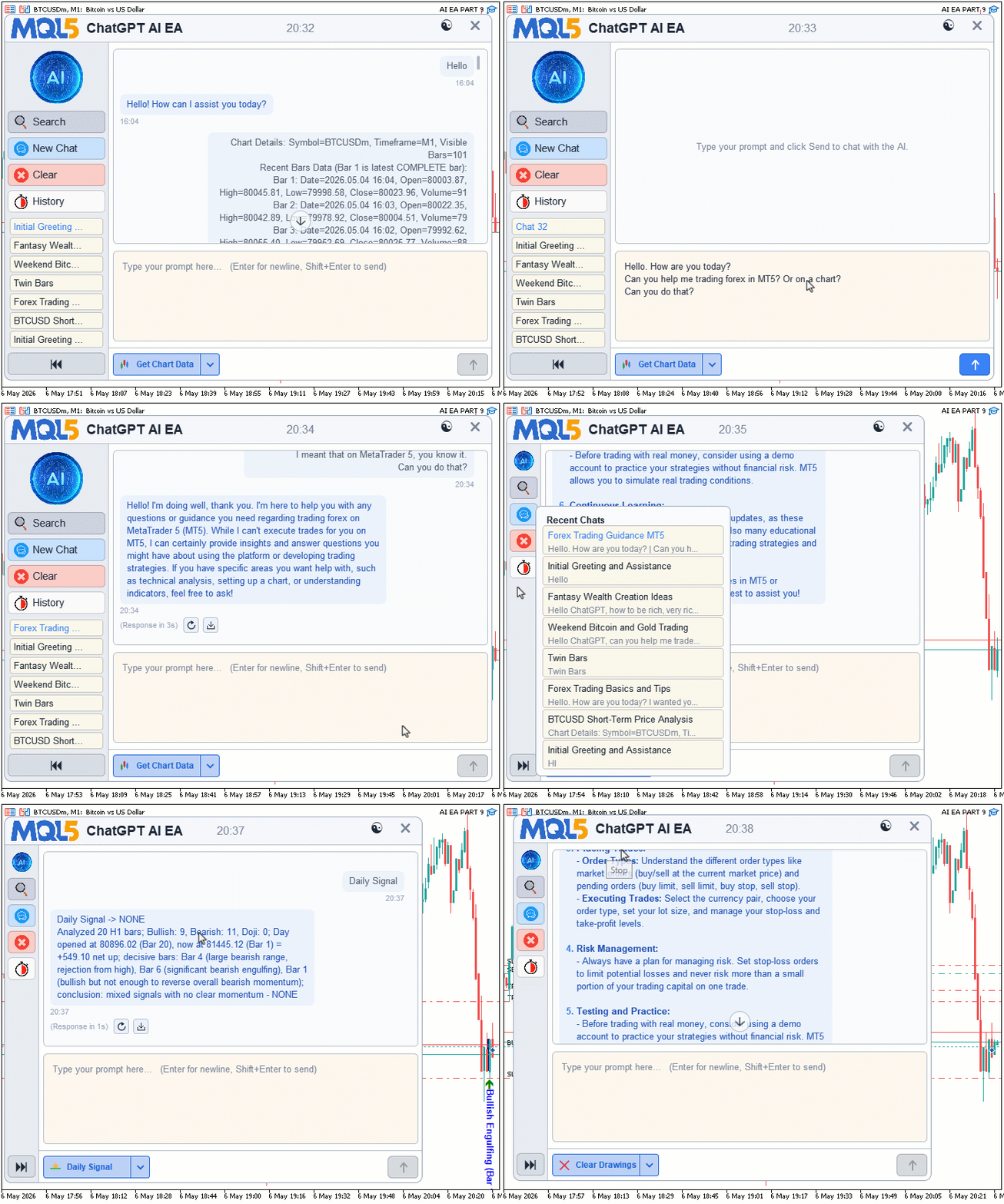
Trade execution maps cleanly onto the protocol. Twin Bars, Quick Scalp, and Daily Signal place market orders at the current price. Key Level places a pending order whose type is hardcoded from a two-by-two matrix: support and bounce takes a buy limit, support and break takes a sell stop, resistance and bounce takes a sell limit, resistance and break takes a buy stop. The AI picks the level type and bias; the dispatcher picks the order type. Stop and target distances use a buffer computed as a fraction of recent bar range, so the same code works on any symbol without per-instrument tuning. Here is an illustration of our objectives.
Theme and Drawing Primitives
Implementation in MQL5
We organize the program across nine source files included from the main entry point in a fixed order, and we give each file one focused responsibility. We will walk through them in include order so we build the program up the same way the compiler reads it: theme constants and drawing primitives first, then the global state and lifecycle scaffolding, then the custom prompt editor, then the render layer that composes the dashboard, then the AI logic that handles prompts and trades, and finally the interaction layer that wires user input into action dispatch. By the end of the walk, we will have every file accounted for and the program working end-to-end.
Theme and Drawing Primitives
We start with the foundation file that holds every color, font size, layout dimension, and glyph code we will reference across the program. We centralize these values so we can flip the entire dashboard between light and dark with one call, and so we can adjust a font or padding without hunting across the rest of the codebase.
Defining the Theme Constants and Palette
We declare the layout constants, font sizes, glyph codes, and color globals here, then expose the "Ai_ApplyTheme" function that fills the color globals with either the dark or light palette.
//+------------------------------------------------------------------+
//|                                              AI Canvas Theme.mqh |
//|                           Copyright 2026, Allan Munene Mutiiria. |
//|                                   https://t.me/Forex_Algo_Trader |
//+------------------------------------------------------------------+
#property copyright "Copyright 2026, Allan Munene Mutiiria."
#property link      "https://t.me/Forex_Algo_Trader"

//--- Include guard
#ifndef AI_CANVAS_THEME_MQH
#define AI_CANVAS_THEME_MQH

//+------------------------------------------------------------------+
//| Layout Dimensions                                                |
//+------------------------------------------------------------------+
#define AI_SIDEBAR_W_EXPANDED   150   // Expanded sidebar width
#define AI_SIDEBAR_W_COLLAPSED  50    // Collapsed sidebar width

//--- REST OF DIMENSIONS ARE AS BEFORE


//+------------------------------------------------------------------+
//| Apply theme palette - true for dark, false for light             |
//+------------------------------------------------------------------+
void Ai_ApplyTheme(bool dark)
  {
   //--- Store active theme flag
   g_ai_darkTheme = dark;

   //--- Dark theme palette
   if(dark)
     {
      //--- Panel and background colors
      g_ai_bg                  = C'22,26,36';
      g_ai_panelAlt            = C'28,33,46';
      g_ai_headerBg            = C'30,35,48';
      g_ai_sidebarBg           = C'24,29,40';
      g_ai_promptBg            = C'34,30,24';

      //--- Border colors lifted above panel for visibility
      g_ai_border              = C'95,105,125';
      g_ai_borderAccent        = C'130,140,160';

      //--- Text colors
      g_ai_titleText           = C'225,230,240';
      g_ai_subText             = C'140,150,170';
      g_ai_bodyText            = C'215,220,232';

      //--- Bubble colors
      g_ai_userBubbleText      = C'200,210,225';
      g_ai_aiBubbleText        = C'140,180,255';
      g_ai_userBubbleBg        = C'40,48,65';
      g_ai_aiBubbleBg          = C'35,55,90';
      g_ai_timestampText       = C'105,115,135';

      //--- SAME APPROACH TO THE REST OF MEMBERS
     }
  }

#endif // AI_CANVAS_THEME_MQH
We open the file with an include guard, "AI_CANVAS_THEME_MQH", so we process the header once even if multiple translation units pull it in. We then define the layout dimensions — sidebar widths in expanded and collapsed states, the main content area width, the header and footer heights, the chat display and prompt pane heights, generic padding and margin values, the standard button height, and a super-sampling factor we will use later in the drawing primitives. We use preprocessor defines so the values become compile-time constants with no runtime overhead.
We follow the same pattern for the font sizes, covering the title, body text, button labels, the snippet preview line in the chat history popup, the timestamp text under each bubble, the toolbar button labels, and headings. Below those, we map single characters from Webdings and Wingdings fonts to symbolic names through the glyph defines — for example, we set "AI_GLYPH_CLOSE" to "r" in Webdings, which renders as a close cross. We name glyphs by purpose rather than by raw character so the rest of our codebase stays readable.
We then declare the active theme flag, "g_ai_darkTheme", and start it as light. We declare every color the program needs as a global "color" variable, grouped into panels and backgrounds, borders, text colors, bubble colors for user and AI message backgrounds, accent colors, button background pairs for idle and hover states, close-button colors, chat history item colors, scrollbar colors, editor colors for caret and selection highlight, loading and response-time note colors, and the toast notification palette. We deliberately leave these globals uninitialized at declaration — we fill them in through "Ai_ApplyTheme".
We define "Ai_ApplyTheme" to take a single boolean argument: true for dark, false for light. We store the flag in "g_ai_darkTheme" and run one of two branches that assign the entire palette in a single pass. We use cool deep-blue panel backgrounds for the dark palette with lifted text colors for readability against them. We use near-white panels for the light palette with darker text and a warm beige tint on the prompt pane to set it apart from the chat area. The same approach applies to the rest of the colors. The next thing we will do is create another include file for the drawing primitives, which will serve as the foundation for the architecture.
Building the Drawing Primitives Foundation
We open the file with the canvas helpers we will lean on across the program — a fast canvas subclass, the primitives class declaration, and the dual-buffer text stamper. Most of the canvas plumbing here — direct pixel access, alpha compositing, supersampled rounded rectangles, scanline rasterization, and bicubic image scaling — we covered in detail in the MQL5 Tools series under the canvas topic, and the bicubic scaler in particular carries over from earlier articles in this series. We will skip those here and focus on what is new in this program.
//+------------------------------------------------------------------+
//|                                         AI Canvas Primitives.mqh |
//|                           Copyright 2026, Allan Munene Mutiiria. |
//|                                   https://t.me/Forex_Algo_Trader |
//+------------------------------------------------------------------+
#property copyright "Copyright 2026, Allan Munene Mutiiria."
#property link      "https://t.me/Forex_Algo_Trader"

//--- Include guard
#ifndef AI_CANVAS_PRIMITIVES_MQH
#define AI_CANVAS_PRIMITIVES_MQH

//--- Include required libraries
#include <Canvas/Canvas.mqh>
#include "AI Canvas Theme.mqh"

//+------------------------------------------------------------------+
//| Fast canvas subclass exposing direct pixel buffer access         |
//+------------------------------------------------------------------+
class CAiCanvasFast : public CCanvas
  {
public:
   //+---------------------------------------------------------------+
   //| Read pixel directly from buffer                               |
   //+---------------------------------------------------------------+
   uint GetPixelDirect(int x, int y) const
     {
      //--- Direct row-major buffer read
      return m_pixels[y * Width() + x];
     }

   //+---------------------------------------------------------------+
   //| Write pixel directly to buffer                                |
   //+---------------------------------------------------------------+
   void SetPixelDirect(int x, int y, uint v)
     {
      //--- Direct row-major buffer write
      m_pixels[y * Width() + x] = v;
     }

   //+---------------------------------------------------------------+
   //| Copy rectangular region from source canvas to this canvas     |
   //+---------------------------------------------------------------+
   void CopyRectFromCanvas(CCanvas &src, int l, int t, int r, int b)
     {
      //--- Get source and destination dimensions
      const int sw = src.Width();
      const int sh = src.Height();
      const int dw = Width();
      const int dh = Height();

      //--- Clamp rectangle bounds to both canvases
      const int cl = MathMax(0, l);
      const int ct = MathMax(0, t);
      const int cr = MathMin(MathMin(r, sw), dw);
      const int cb = MathMin(MathMin(b, sh), dh);

      //--- Copy row by row
      for(int yy = ct; yy < cb; yy++)
        {
         const int rowBase = yy * dw;
         for(int xx = cl; xx < cr; xx++)
            m_pixels[rowBase + xx] = src.PixelGet(xx, yy);
        }
     }

   //+---------------------------------------------------------------+
   //| Copy rectangular region from this canvas to destination       |
   //+---------------------------------------------------------------+
   void CopyRectToCanvas(CCanvas &dst, int l, int t, int r, int b)
     {
      //--- Get destination and source dimensions
      const int dwOther = dst.Width();
      const int dhOther = dst.Height();
      const int sw = Width();
      const int sh = Height();

      //--- Clamp rectangle bounds
      const int cl = MathMax(0, l);
      const int ct = MathMax(0, t);
      const int cr = MathMin(MathMin(r, sw), dwOther);
      const int cb = MathMin(MathMin(b, sh), dhOther);

      //--- Copy row by row
      for(int yy = ct; yy < cb; yy++)
        {
         const int rowBase = yy * sw;
         for(int xx = cl; xx < cr; xx++)
            dst.PixelSet(xx, yy, m_pixels[rowBase + xx]);
        }
     }

   //+---------------------------------------------------------------+
   //| Fill rectangle with solid color directly in buffer            |
   //+---------------------------------------------------------------+
   void FillRectFast(int l, int t, int r, int b, uint argb)
     {
      //--- Clamp rectangle to canvas bounds
      const int w = Width();
      const int h = Height();
      const int cl = MathMax(0, l);
      const int ct = MathMax(0, t);
      const int cr = MathMin(r, w);
      const int cb = MathMin(b, h);

      //--- Fill row by row
      for(int yy = ct; yy < cb; yy++)
        {
         const int rowBase = yy * w;
         for(int xx = cl; xx < cr; xx++)
            m_pixels[rowBase + xx] = argb;
        }
     }
  };

//+------------------------------------------------------------------+
//| Canvas drawing primitives helper class                           |
//+------------------------------------------------------------------+
class CAiCanvasPrimitives
  {
public:
   bool             m_hrFillReady;     // HR fill canvas init flag
   bool             m_hrBorderReady;   // HR border canvas init flag
   int              m_hrFillW;         // HR fill canvas width
   int              m_hrFillH;         // HR fill canvas height
   int              m_hrBorderW;       // HR border canvas width
   int              m_hrBorderH;       // HR border canvas height
   CAiCanvasFast    m_hrFill;          // Cached HR fill canvas
   CAiCanvasFast    m_hrBorder;        // Cached HR border canvas

                     CAiCanvasPrimitives();

   bool              EnsureHrFill(int needW, int needH);
   bool              EnsureHrBorder(int needW, int needH);

   void              BlendPixelSet(CCanvas &canvas, int x, int y, uint sourceARGB);
   void              DownsampleCanvas(CCanvas &dst, CCanvas &src, int factor);
   void              FillCornerQuadrantHR(CCanvas &canvas, int cx, int cy, int radius, uint argb, int signX, int signY);
   void              FillRoundRectHR(CCanvas &canvas, int x, int y, int w, int h, int radius, uint argb);
   void              FillSelectiveRoundRectHR(CCanvas &canvas, int x, int y, int w, int h, int radius, uint argb,
                                               bool rTL, bool rTR, bool rBL, bool rBR);
   void              FillTriangleHR(CCanvas &canvas, int x0, int y0, int x1, int y1, int x2, int y2, uint argb);
   void              FillQuadrilateralBorder(CCanvas &canvas, double &vx[], double &vy[], uint argb);
   void              DrawBorderEdge(CCanvas &canvas, double x0, double y0, double x1, double y1, int thickness, uint argb);
   bool              IsAngleBetween(double angle, double startAngle, double endAngle);
   void              DrawCornerArc(CCanvas &canvas, int cx, int cy, int radius, int thickness, uint argb, double startAngle, double endAngle);
   void              DrawSelectiveRoundRectBorderHR(CCanvas &canvas, int x, int y, int w, int h, int radius, uint argb, int thickness,
                                                    bool rTL, bool rTR, bool rBL, bool rBR);
   void              FillCircleAA(CCanvas &canvas, int cx, int cy, int radius, uint argb);
   void              DrawCircleBorderAA(CCanvas &canvas, int cx, int cy, int radius, int thickness, uint argb);
   void              DrawRoundRectBorderObStyle(CCanvas &canvas, int x, int y, int w, int h, int radius, uint argb,
                                                 bool drawTop, bool drawLeft, bool drawRight, bool drawBottom,
                                                 bool arcTL, bool arcTR, bool arcBL, bool arcBR);
   void              FillRoundRectSharp(CCanvas &target, int x, int y, int w, int h, int radius, uint argb, int factor = 4);
   void              DrawRoundRectBorderSharp(CCanvas &target, int x, int y, int w, int h, int radius, int thickness, uint argb, int factor = 4);
  };

//+------------------------------------------------------------------+
//| Stamp anti-aliased text on canvas using dual-buffer technique    |
//+------------------------------------------------------------------+
void AiStampTextAA(CCanvas &dst, int x, int y, const string txt,
                   const string fontName, int fontSize, color textColor)
  {
   //--- Bail on empty text
   if(StringLen(txt) == 0) return;

   //--- Set font and measure text
   TextSetFont(fontName, -(fontSize * 10));
   uint twU = 0, thU = 0;
   TextGetSize(txt, twU, thU);
   int tw = (int)twU, th = (int)thU;
   if(tw <= 0 || th <= 0) return;

   //--- Render text on black background buffer
   const uint textArgb = ColorToARGB(textColor, 255);
   uint bufB[]; ArrayResize(bufB, tw * th);
   ArrayFill(bufB, 0, tw * th, 0xFF000000);
   TextOut(txt, 0, 0, TA_LEFT | TA_TOP, bufB, tw, th,
           textArgb, COLOR_FORMAT_ARGB_NORMALIZE);

   //--- Render text on white background buffer
   uint bufW[]; ArrayResize(bufW, tw * th);
   ArrayFill(bufW, 0, tw * th, 0xFFFFFFFF);
   TextOut(txt, 0, 0, TA_LEFT | TA_TOP, bufW, tw, th,
           textArgb, COLOR_FORMAT_ARGB_NORMALIZE);

   //--- Cache canvas dimensions and source color components
   const int cW = dst.Width(), cH = dst.Height();
   const uchar srcR = (uchar)( textColor        & 0xFF);
   const uchar srcG = (uchar)((textColor >>  8) & 0xFF);
   const uchar srcB = (uchar)((textColor >> 16) & 0xFF);

   //--- Walk text pixels and derive coverage from buffer difference
   for(int py = 0; py < th; py++)
     {
      for(int px = 0; px < tw; px++)
        {
         //--- Compute alpha from black-vs-white pixel difference
         int i = py * tw + px;
         int dR = (int)((bufW[i] >> 16) & 0xFF) - (int)((bufB[i] >> 16) & 0xFF);
         int dG = (int)((bufW[i] >>  8) & 0xFF) - (int)((bufB[i] >>  8) & 0xFF);
         int dB = (int)( bufW[i]        & 0xFF) - (int)( bufB[i]        & 0xFF);
         int a  = 255 - (dR + dG + dB) / 3;
         if(a <= 0) continue;
         if(a > 255) a = 255;

         //--- Skip pixels outside canvas
         int dstX = x + px, dstY = y + py;
         if(dstX < 0 || dstX >= cW || dstY < 0 || dstY >= cH) continue;

         //--- Blend text pixel onto destination
         uint existing = dst.PixelGet(dstX, dstY);
         double sA = (double)a / 255.0;
         double dA = ((existing >> 24) & 0xFF) / 255.0;
         double oA = sA + dA * (1.0 - sA);
         if(oA <= 0.0) continue;
         double sRf = srcR / 255.0, sGf = srcG / 255.0, sBf = srcB / 255.0;
         double dRf = ((existing >> 16) & 0xFF) / 255.0;
         double dGf = ((existing >>  8) & 0xFF) / 255.0;
         double dBf = ( existing        & 0xFF) / 255.0;
         uint outPix = ((uint)(uchar)(oA * 255.0 + 0.5) << 24) |
                       ((uint)(uchar)((sRf*sA + dRf*dA*(1.0-sA)) / oA * 255.0 + 0.5) << 16) |
                       ((uint)(uchar)((sGf*sA + dGf*dA*(1.0-sA)) / oA * 255.0 + 0.5) <<  8) |
                        (uint)(uchar)((sBf*sA + dBf*dA*(1.0-sA)) / oA * 255.0 + 0.5);
         dst.PixelSet(dstX, dstY, outPix);
        }
     }
  }
We open with the include guard "AI_CANVAS_PRIMITIVES_MQH", then pull in the standard "Canvas/Canvas.mqh" header for the CCanvas base class and our own "AI Canvas Theme.mqh" so every primitive can reach the color globals when it needs them.
We declare "CAiCanvasFast" as a public subclass of "CCanvas". The reason is simple — the base class keeps "m_pixels" protected, and the inherited PixelSet and PixelGet calls go through a function call for every pixel. When we are blending tens of thousands of pixels per frame, that overhead adds up. By subclassing we expose "GetPixelDirect" and "SetPixelDirect" that index the buffer directly using the row-major formula "y * Width() + x", and we add "CopyRectFromCanvas", "CopyRectToCanvas", and "FillRectFast" for bulk operations that walk the buffer row by row with no per-pixel call overhead. Each of these clamps the rectangle to the canvas bounds first so we never read or write outside the buffer.
We then declare "CAiCanvasPrimitives" as the helper class that owns every drawing primitive in the file. Its members fall into two groups. The two "CAiCanvasFast" instances "m_hrFill" and "m_hrBorder" are off-screen working canvases the class uses for the supersample-then-downsample pattern — we render rounded rectangles at four times the target resolution into one of these, then box-average the result down to get sharp anti-aliased edges. The "m_hrFillReady", "m_hrFillW", "m_hrFillH" flags and the matching border trio let us grow these working canvases lazily through "EnsureHrFill" and "EnsureHrBorder" only when a request arrives that needs more space than we already have. The method declarations cover everything from "FillRoundRectHR" and "DrawSelectiveRoundRectBorderHR" through "FillTriangleHR" and "FillCircleAA" to the user-facing wrappers "FillRoundRectSharp" and "DrawRoundRectBorderSharp" — the full toolkit the renderer calls into.
We define "AiStampTextAA" as the function that paints anti-aliased text onto a canvas at any position. The challenge it solves is real — TextOut renders glyphs into a pixel buffer but does not return per-pixel alpha coverage, so naively stamping its output produces fully opaque text with jagged edges that ignores whatever was already on the canvas. We work around this with a dual-buffer trick. We allocate two pixel buffers, "bufB" and "bufW", of the measured text size, fill one with opaque black and the other with opaque white, and call "TextOut" on both with the same text and the same target color. Wherever a pixel is fully covered by the glyph, both buffers receive the source color, and the difference between them is zero.
Wherever a pixel is fully outside the glyph, the buffers keep their black and white backgrounds, and the difference is at its maximum. Anti-aliased edge pixels fall in between proportionally to coverage. We then walk the buffers, compute the per-channel difference, average the three channels, and invert it — the result is a clean alpha mask that we feed into a standard over-blend with the existing canvas pixel. The final loop body runs the same Porter-Duff "over" formula we use everywhere else, just with the derived alpha as the source coverage. The result is text that anti-aliases against any background color the chat bubble happens to be sitting on. The next thing we will work on is pixel-accurate text fitting, so we will use binary search. The last part used naive character-count truncation, and we want to overcome this.
Pixel-Accurate Text Fitting With Ellipsis
We define "Ai_FitTextToWidth" as the helper that truncates a string to fit a maximum pixel width and appends an ellipsis when truncation happens, replacing the naive character-count truncation we used in the previous article.
//+------------------------------------------------------------------+
//| Fit text to maximum pixel width with ellipsis                    |
//+------------------------------------------------------------------+
string Ai_FitTextToWidth(const string text, const string fontName, int fontSize, int maxWidthPx)
  {
   //--- Bail on empty input
   if(StringLen(text) == 0)  return "";
   if(maxWidthPx <= 0)       return "";

   //--- Fast path - full text fits
   const int fullW = AiTextWidth(text, fontName, fontSize);
   if(fullW <= maxWidthPx) return text;

   //--- Bail if even ellipsis doesn't fit
   const string ellipsis = "...";
   const int ellipsisW = AiTextWidth(ellipsis, fontName, fontSize);
   if(ellipsisW > maxWidthPx) return "";

   //--- Binary search longest prefix that fits with ellipsis appended
   const int n = StringLen(text);
   int lo = 0, hi = n;
   while(lo < hi)
     {
      const int mid = (lo + hi + 1) / 2;
      const string trial = StringSubstr(text, 0, mid) + ellipsis;
      if(AiTextWidth(trial, fontName, fontSize) <= maxWidthPx)
        {
         lo = mid;
        }
      else
        {
         hi = mid - 1;
        }
     }

   //--- Return ellipsis-only when nothing fits, else prefix + ellipsis
   if(lo <= 0) return ellipsis;
   return StringSubstr(text, 0, lo) + ellipsis;
  }
We open with two early bailouts — an empty input string returns an empty result, and a non-positive "maxWidthPx" argument returns the same. We then take the fast path. We measure the full string with "AiTextWidth" using the supplied "fontName" and "fontSize", and if it already fits within "maxWidthPx", we return it unchanged with no further work. The next guard handles the pathological case where the budget is so tight that even the three-character ellipsis itself does not fit — we return an empty string rather than emitting a partial ellipsis that would look broken.
We then binary-search the longest prefix that fits when the ellipsis is appended. The variables "lo" and "hi" bracket the candidate prefix length, starting at zero and the full string length respectively. On each iteration, we compute the midpoint, build a trial string StringSubstr(text, 0, mid) + "ellipsis", and measure its width. If the trial fits, "lo" advances to "mid" because we know that length works and we want to push for longer. If it does not, "hi" retreats to "mid - 1" because we know that length and everything beyond it overflows. The loop ends when the bracket collapses to a single value, which is the largest prefix length whose ellipsis form fits the budget. We close with one final check — when "lo" lands at zero, no character prefix fits, so we return the ellipsis alone; otherwise, we return the matching prefix concatenated with the ellipsis.
The reason we bother with binary search instead of stepping characters one at a time is that proportional fonts like Arial have wildly different glyph widths — a string of "i" characters and a string of "M" characters at the same length measure to very different pixel widths. Linear truncation by character count, which is what the previous article relied on, produces visibly inconsistent results — sometimes the truncated label has a wide gap to the right edge, sometimes it spills past it. Binary search converges in roughly the logarithm of the string length and respects the actual rendered geometry, so every truncated chat title, popup snippet, and button label in the program lands within one pixel of the budget regardless of which characters happen to appear. This is what gives us the following outcome.

With that done, we will move on to rendering custom semantic icons. The reason we chose this is that we can have full control of what we want to show, since using the Wingdings icons restricted us from accurately expressing what we want to show.
Custom Semantic Icons for the Action Toolbar
We define the icon toolkit and the thirteen custom-drawn glyphs that replace the Webdings and Wingdings characters used in the previous article. Each action button in the program now gets its own purpose-built icon, drawn pixel by pixel, with a color chosen to match what the button does.
//+------------------------------------------------------------------+
//| Draw small chevron arrow at center point                         |
//+------------------------------------------------------------------+
void AiDrawChevron(CCanvas &canvas, int cx, int cy, bool pointUp, uint argb)
  {
   //--- Draw two diagonal strokes converging up or down
   if(pointUp)
     {
      AiThickLineAA(canvas, cx - 4, cy + 2, cx,     cy - 2, 2, argb);
      AiThickLineAA(canvas, cx,     cy - 2, cx + 4, cy + 2, 2, argb);
     }
   else
     {
      AiThickLineAA(canvas, cx - 4, cy - 2, cx,     cy + 2, 2, argb);
      AiThickLineAA(canvas, cx,     cy + 2, cx + 4, cy - 2, 2, argb);
     }
  }

//+------------------------------------------------------------------+
//| Draw thin anti-aliased icon line using Wu algorithm              |
//+------------------------------------------------------------------+
void AiIconLine(CCanvas &canvas, double x0, double y0, double x1, double y1, uint argb)
  {
   //--- Determine steep or shallow slope
   double dxL = x1 - x0, dyL = y1 - y0;
   bool steep = MathAbs(dyL) > MathAbs(dxL);

   //--- Steep slope - iterate Y axis
   if(steep)
     {
      if(y0 > y1) { double t; t = x0; x0 = x1; x1 = t; t = y0; y0 = y1; y1 = t; }
      double grad = (y1 == y0) ? 0.0 : (x1 - x0) / (y1 - y0);
      int iy0 = (int)MathRound(y0), iy1 = (int)MathRound(y1);
      double xf = x0 + grad * (iy0 - y0);
      for(int iy = iy0; iy <= iy1; iy++)
        {
         int ix = (int)MathFloor(xf);
         double frac = xf - ix;
         AiIconAAPlot(canvas, ix,     iy, 1.0 - frac, argb);
         AiIconAAPlot(canvas, ix + 1, iy, frac,       argb);
         xf += grad;
        }
     }
   //--- Shallow slope - iterate X axis
   else
     {
      if(x0 > x1) { double t; t = x0; x0 = x1; x1 = t; t = y0; y0 = y1; y1 = t; }
      double grad = (x1 == x0) ? 0.0 : (y1 - y0) / (x1 - x0);
      int ix0 = (int)MathRound(x0), ix1 = (int)MathRound(x1);
      double yf = y0 + grad * (ix0 - x0);
      for(int ix = ix0; ix <= ix1; ix++)
        {
         int iy = (int)MathFloor(yf);
         double frac = yf - iy;
         AiIconAAPlot(canvas, ix, iy,     1.0 - frac, argb);
         AiIconAAPlot(canvas, ix, iy + 1, frac,       argb);
         yf += grad;
        }
     }
  }

//--- OTHER ICONS USE THE SAME APPROACH
Here, we open with three small helpers that the icon drawers lean on. "AiDrawChevron" strokes two diagonal lines that converge up or down for the small expand-collapse marker. "AiIconLine" then implements Xiaolin Wu's algorithm — we walk the major axis one integer step at a time and plot two pixels with weights "1.0 - frac" and "frac" so the line stays smooth at any angle.
The thirteen icon drawers all share the same skeleton — each takes a canvas, a corner position, a size, and a color, and builds its glyph from "AiThickLineAA", "AiIconLine", "AiBlendPixel", "AiStrokeArcAA", and "canvas.CircleWu". We give each icon a semantic color so the toolbar reads at a glance. Here is an example of what this will produce when wired.

With that done, the next thing we will do is work on the markdown inline parser so that the returned AI conversation can be rendered close to the expected visual format.
Inline Markdown Parser and Styled Run Stamping
We define the markdown subsystem that lets us render bold and italic styling inline in AI responses, replacing the plain-text output we produced in the previous article.
//+------------------------------------------------------------------+
//| Markdown Constants                                               |
//+------------------------------------------------------------------+
#define AI_MD_KIND_BODY     0   // Plain body line
#define AI_MD_KIND_H1       1   // Heading level 1 (sentinel \1)
#define AI_MD_KIND_H2       2   // Heading level 2 (sentinel \2)
#define AI_MD_KIND_H3       3   // Heading level 3 (sentinel \3)
#define AI_MD_KIND_NUMBERED 5   // Numbered list line

//+------------------------------------------------------------------+
//| Styled markdown run                                              |
//+------------------------------------------------------------------+
struct AiMdRun
  {
   string text;     // Run text content
   bool   bold;     // Bold style flag
   bool   italic;   // Italic style flag
  };

//+------------------------------------------------------------------+
//| Parse a single markdown line into styled runs                    |
//+------------------------------------------------------------------+
void AiMdParseInline(const string txt, AiMdRun &runs[])
  {
   //--- Reset output array and bail on empty input
   ArrayResize(runs, 0);
   const int len = StringLen(txt);
   if(len == 0) return;

   //--- Initialize parser state
   bool curBold = false, curItalic = false;
   string buf = "";

   //--- Define flush macro for emitting accumulated runs
   #define AI_MD_FLUSH() \
   { \
      if(StringLen(buf) > 0) { \
         const int sz = ArraySize(runs); \
         ArrayResize(runs, sz + 1); \
         runs[sz].text   = buf; \
         runs[sz].bold   = curBold; \
         runs[sz].italic = curItalic; \
         buf = ""; \
      } \
   }

   //--- Walk characters and toggle styles
   int i = 0;
   while(i < len)
     {
      const ushort ch = StringGetCharacter(txt, i);

      //--- Handle asterisk markers
      if(ch == '*')
        {
         //--- Triple asterisk toggles bold + italic
         if(i + 2 < len
            && StringGetCharacter(txt, i + 1) == '*'
            && StringGetCharacter(txt, i + 2) == '*')
           {
            AI_MD_FLUSH();
            curBold   = !curBold;
            curItalic = !curItalic;
            i += 3;
            continue;
           }

         //--- Double asterisk toggles bold
         if(i + 1 < len && StringGetCharacter(txt, i + 1) == '*')
           {
            AI_MD_FLUSH();
            curBold = !curBold;
            i += 2;
            continue;
           }

         //--- Single asterisk toggles italic
         AI_MD_FLUSH();
         curItalic = !curItalic;
         i++;
         continue;
        }

      //--- Append plain character
      buf += StringSubstr(txt, i, 1);
      i++;
     }

   //--- Flush trailing run
   AI_MD_FLUSH();
   #undef AI_MD_FLUSH
  }

//+------------------------------------------------------------------+
//| Compute markdown style state at end of line                      |
//+------------------------------------------------------------------+
void AiMdComputeEndState(const string txt, bool &openBold, bool &openItalic)
  {
   //--- Bail on empty input
   const int len = StringLen(txt);
   if(len == 0) return;

   //--- Walk characters mirroring AiMdParseInline transitions
   int i = 0;
   while(i < len)
     {
      const ushort ch = StringGetCharacter(txt, i);
      if(ch == '*')
        {
         //--- Triple asterisk toggles both
         if(i + 2 < len
            && StringGetCharacter(txt, i + 1) == '*'
            && StringGetCharacter(txt, i + 2) == '*')
           {
            openBold   = !openBold;
            openItalic = !openItalic;
            i += 3;
            continue;
           }
         //--- Double asterisk toggles bold
         if(i + 1 < len && StringGetCharacter(txt, i + 1) == '*')
           {
            openBold = !openBold;
            i += 2;
            continue;
           }
         //--- Single asterisk toggles italic
         openItalic = !openItalic;
         i++;
         continue;
        }
      i++;
     }
  }

//+------------------------------------------------------------------+
//| Build marker prefix needed to reopen styles on continuation line |
//+------------------------------------------------------------------+
string AiMdReopenMarkers(const bool openBold, const bool openItalic)
  {
   //--- Pick marker length based on combined open state
   if(openBold && openItalic) return "***";
   if(openBold)               return "**";
   if(openItalic)             return "*";
   return "";
  }

//+------------------------------------------------------------------+
//| Resolve font name for a markdown run's bold/italic combination   |
//+------------------------------------------------------------------+
string AiMdRunFont(const AiMdRun &r)
  {
   //--- Map style flags to Arial variant
   if(r.bold && r.italic) return "Arial Bold Italic";
   if(r.bold)             return "Arial Bold";
   if(r.italic)           return "Arial Italic";
   return "Arial";
  }

//+------------------------------------------------------------------+
//| Measure total pixel width of styled run sequence                 |
//+------------------------------------------------------------------+
int AiMdRunsWidth(const AiMdRun &runs[], int fontSize)
  {
   //--- Sum widths of each run with its font variant
   int total = 0;
   const int n = ArraySize(runs);
   for(int i = 0; i < n; i++)
     {
      total += AiTextWidth(runs[i].text, AiMdRunFont(runs[i]), fontSize);
     }
   return total;
  }

//+------------------------------------------------------------------+
//| Stamp styled run sequence side-by-side onto canvas               |
//+------------------------------------------------------------------+
void AiMdStampRuns(CCanvas &canvas, int x, int y,
                    const AiMdRun &runs[], int fontSize, color textCol)
  {
   //--- Walk runs and stamp each at advancing X position
   int curX = x;
   const int n = ArraySize(runs);
   for(int i = 0; i < n; i++)
     {
      if(StringLen(runs[i].text) == 0) continue;
      const string font = AiMdRunFont(runs[i]);
      AiStampTextAA(canvas, curX, y, runs[i].text, font, fontSize, textCol);
      curX += AiTextWidth(runs[i].text, font, fontSize);
     }
  }
We open with the line-kind constants "AI_MD_KIND_BODY", "AI_MD_KIND_H1" through "AI_MD_KIND_H3", and "AI_MD_KIND_NUMBERED" — the renderer uses these to tag each line of an AI response so it knows whether to draw it as body text, a heading at one of three levels, or a numbered list item. We then declare the "AiMdRun" struct as a single styled segment of text with "text", "bold", and "italic" fields. A line of markdown becomes an array of these runs after parsing.
We define "AiMdParseInline" as the parser that walks one line of text and emits the array of runs. We track "curBold" and "curItalic" as the active style flags and accumulate plain characters into "buf". The "AI_MD_FLUSH" macro emits the current buffer as a new run with whatever styles are active at that moment, then clears the buffer. When we hit an asterisk we check for the triple, double, and single forms in that order — "***" toggles both bold and italic, "**" toggles bold alone, and a lone "*" toggles italic. Each toggle flushes the accumulated buffer first so the styles change at the right boundary, then advances the cursor past the marker. Plain characters get appended to the buffer as-is, and we flush the trailing run after the loop ends.
We define "AiMdComputeEndState" as a lighter walk that returns only the final bold and italic state at the end of the line without producing any runs. The renderer uses this when a wrapped paragraph spans multiple visual lines — if a "**" opens halfway through line one and closes halfway through line two, we need line two to start in bold state. We define "AiMdReopenMarkers" to convert that combined open state back into the marker prefix we need to inject at the start of the continuation line so the parser picks up where it left off.
We define "AiMdRunFont" to resolve a run's style flags to one of the four Arial variants — plain, bold, italic, or bold-italic. "AiMdRunsWidth" sums the pixel widths of each run measured with its own font variant, which the wrap logic uses to decide where to break a styled line. "AiMdStampRuns" walks the run array left to right and calls "AiStampTextAA" for each non-empty run with the matching font, advancing "curX" by the run's own width so the runs sit flush against each other and form one visually continuous line of mixed-style text. These are the most impactful markups that we thought were standard; you can extend them to any other. This will give us an outcome as below.

With that done, we will now move on to working on the program state and lifecycle.
Scaffolding the Program State and Lifecycle
We move to the state and lifecycle layer that ties the canvas primitives to a working program. We hold the chat records, the active conversation, the popup visibility flags, and the dispatch tables in a single state header, then bring up the program through scrollbar math, a thin shell, and the main entry file.
Defining the Program State and Helper Functions
We declare every global the program reads or writes from a single header, including the new dispatch tables for the seven trading actions and the new toast notification state.
//+------------------------------------------------------------------+
//|                                              AI Canvas State.mqh |
//|                           Copyright 2026, Allan Munene Mutiiria. |
//|                                   https://t.me/Forex_Algo_Trader |
//+------------------------------------------------------------------+
#property copyright "Copyright 2026, Allan Munene Mutiiria."
#property link      "https://t.me/Forex_Algo_Trader"

//--- Include guard
#ifndef AI_CANVAS_STATE_MQH
#define AI_CANVAS_STATE_MQH

//--- Pull theme for AI_DASHBOARD_X_DEFAULT and AI_DASHBOARD_Y_DEFAULT
#include "AI Canvas Theme.mqh"

//+------------------------------------------------------------------+
//| Canvas Object Names                                              |
//+------------------------------------------------------------------+
#define AI_CANVAS_NAME_MAIN    "ChatGPT_AI_MainCanvas"     // Main dashboard canvas object
#define AI_CANVAS_NAME_PROMPT  "ChatGPT_AI_PromptCanvas"   // Prompt overlay canvas object

//+------------------------------------------------------------------+
//| Chat Record Structure                                            |
//+------------------------------------------------------------------+
struct Chat
  {
   int    id;        // Unique chat identifier
   string title;     // Chat display title
   string history;   // Full conversation transcript
  };

//+------------------------------------------------------------------+
//| Chat State                                                       |
//+------------------------------------------------------------------+
Chat   g_ai_chats[];                  // All loaded chats
int    g_ai_currentChatId = -1;       // Active chat id (-1 = new chat)
string g_ai_currentTitle  = "";       // Active chat title
string g_ai_conversationHistory = ""; // Active chat transcript
string g_ai_currentPrompt = "";       // Persisted prompt text

//+------------------------------------------------------------------+
//| UI Visibility Flags                                              |
//+------------------------------------------------------------------+
bool   g_ai_sidebarExpanded = true;   // Sidebar expanded state
bool   g_ai_dashboardVisible = true;  // Dashboard visible state

//+------------------------------------------------------------------+
//| Popup State Flags                                                |
//+------------------------------------------------------------------+
bool   g_ai_showSmallHistory = false;   // Small history popup visible
bool   g_ai_showBigHistory   = false;   // Big history popup visible
bool   g_ai_showSearch       = false;   // Search popup visible
bool   g_ai_justOpenedSmall  = false;   // Skip first-click close on small popup
bool   g_ai_justOpenedBig    = false;   // Skip first-click close on big popup
bool   g_ai_justOpenedSearch = false;   // Skip first-click close on search popup
string g_ai_searchQuery      = "";      // Current search query text

//+------------------------------------------------------------------+
//| Drag State                                                       |
//+------------------------------------------------------------------+
bool g_ai_dragging = false;       // Header drag in progress
int  g_ai_dragOffsetX = 0;        // Drag X offset from anchor
int  g_ai_dragOffsetY = 0;        // Drag Y offset from anchor

//+------------------------------------------------------------------+
//| Dashboard Position                                               |
//+------------------------------------------------------------------+
int  AI_DASHBOARD_X = AI_DASHBOARD_X_DEFAULT;   // Current dashboard X
int  AI_DASHBOARD_Y = AI_DASHBOARD_Y_DEFAULT;   // Current dashboard Y

//+------------------------------------------------------------------+
//| Footer Dropdown State                                            |
//+------------------------------------------------------------------+
bool   g_ai_showFooterDropdown = false;        // Dropdown popup visible
int    g_ai_footerDropdownSelectedIdx = 0;     // Selected action index

//+------------------------------------------------------------------+
//| Footer Action Dispatch Tables                                    |
//+------------------------------------------------------------------+
const int    AI_FOOTER_DD_COUNT       = 7;     // Number of dropdown actions
const string AI_FOOTER_DD_LABELS[]    = {
   "Get Chart Data",       // 0 - chart data dump
   "Twin Bars",            // 1 - twin-bars signal check
   "Quick Scalp",          // 2 - single-bar entry signal
   "Daily Signal",         // 3 - daily H1 bias signal
   "Trend Read",           // 4 - trendline anchors
   "Key Level",            // 5 - significant S/R level
   "Clear Drawings"        // 6 - wipe signal drawings
};
const int    AI_FOOTER_DD_ACTION_IDS[]= { 0, 1, 2, 3, 4, 5, 6 };   // Stable action IDs
const int    AI_FOOTER_DD_ICONS[]     = {
   0,  // chart icon
   1,  // twin bars icon
   2,  // lightning icon
   3,  // day icon
   4,  // trend icon
   5,  // level icon
   6   // close icon
};

//+------------------------------------------------------------------+
//| API Throttle Flag                                                |
//+------------------------------------------------------------------+
bool g_ai_signalRequestInFlight = false;   // Block parallel API calls

//+------------------------------------------------------------------+
//| Tick and Animation State                                         |
//+------------------------------------------------------------------+
datetime g_ai_lastBarTime = 0;     // Last seen bar time (for new-bar detection)
int      g_ai_spinnerCycle = 0;    // Loading spinner animation tick

//+------------------------------------------------------------------+
//| Toast Notification State                                         |
//+------------------------------------------------------------------+
string g_ai_toastText      = "";   // Active toast text (empty = no toast)
bool   g_ai_toastIsError   = false;// Pick error vs success color
ulong  g_ai_toastExpiryMs  = 0;    // Tick count when toast expires

//+------------------------------------------------------------------+
//| Pencil Hover Tracking                                            |
//+------------------------------------------------------------------+
bool   g_ai_overPencilIcon = false;   // Cursor over narrow pencil icon

//+------------------------------------------------------------------+
//| Send Button State Tracking                                       |
//+------------------------------------------------------------------+
bool   g_ai_lastRenderedSendDisabled = true;   // Disabled state at last footer render

//--- CHAT DECODE AND ENCODE LOGIC REMAINS

#endif // AI_CANVAS_STATE_MQH
We open with the include guard "AI_CANVAS_STATE_MQH" and pull in the theme header so the state file can reference "AI_DASHBOARD_X_DEFAULT" and "AI_DASHBOARD_Y_DEFAULT" for the initial dashboard position. We then declare the canvas object names, the "Chat" record struct with "id", "title", and "history", and the chat-state globals — the "g_ai_chats" array, "g_ai_currentChatId", "g_ai_currentTitle", "g_ai_conversationHistory", and "g_ai_currentPrompt". The sidebar and dashboard visibility flags and the small, big, and search popup visibility flags carry over from the previous article and play the same role they did there.
What is new in this header is the dispatch infrastructure. The "AI_FOOTER_DD_LABELS" array holds the seven action labels — Get Chart Data, Twin Bars, Quick Scalp, Daily Signal, Trend Read, Key Level, and Clear Drawings — in the order they appear in the dropdown. The matching "AI_FOOTER_DD_ACTION_IDS" array holds the stable integer IDs the dispatcher uses to route a click to the right handler, and "AI_FOOTER_DD_ICONS" maps each action to one of the icon drawers from the primitives file. "g_ai_footerDropdownSelectedIdx" remembers which action the user picked last so the button keeps its label between clicks, and "g_ai_signalRequestInFlight" blocks parallel API calls so a second click before the first response arrives is dropped silently rather than firing two requests.
We also add the toast notification trio — "g_ai_toastText", "g_ai_toastIsError", and "g_ai_toastExpiryMs" — that the renderer uses to draw the timed banner that appears after destructive actions like clearing a chat or deleting all history. The drag state, the spinner cycle counter, and the pencil hover flag round out the new globals.
The helper functions "AiEncodeID" and "AiDecodeID" carry over unchanged. The next thing we work on is the scrollbar logic, where we use a strip, changing from the full scrollbar from the naive primitives architecture that we had used in the previous part.
Scrollbar State and Drawing
We move scrollbar logic out of the renderer and into a small reusable module that holds a state struct, hit-test helpers, and a draw routine, replacing the four nearly identical scrollbar code paths from the previous article.
//+------------------------------------------------------------------+
//|                                          AI Canvas Scrollbar.mqh |
//|                           Copyright 2026, Allan Munene Mutiiria. |
//|                                   https://t.me/Forex_Algo_Trader |
//+------------------------------------------------------------------+
#property copyright "Copyright 2026, Allan Munene Mutiiria."
#property link      "https://t.me/Forex_Algo_Trader"

//--- Include guard
#ifndef AI_CANVAS_SCROLLBAR_MQH
#define AI_CANVAS_SCROLLBAR_MQH

//--- Include required modules
#include "AI Canvas Theme.mqh"
#include "AI Canvas Primitives.mqh"

//+------------------------------------------------------------------+
//| Scrollbar State Structure                                        |
//+------------------------------------------------------------------+
struct AiScrollState
  {
   int  trackL;          // Track left edge
   int  trackT;          // Track top edge
   int  trackR;          // Track right edge
   int  trackB;          // Track bottom edge
   int  scrollPx;        // Current scroll offset in pixels
   int  viewportH;       // Visible viewport height
   int  totalH;          // Total scrollable content height
   bool hoveredArea;     // Cursor is inside the scrollbar area
   bool hoveredThumb;    // Cursor is over the scrollbar thumb
   bool dragging;        // Thumb is being dragged
   bool hover;           // Generic hover flag
   int  dragOriginPx;    // Scroll position at drag start
   int  dragOriginY;     // Mouse Y at drag start
  };

//+------------------------------------------------------------------+
//| Reset scroll state to defaults                                   |
//+------------------------------------------------------------------+
void AiScrollInit(AiScrollState &s)
  {
   //--- Zero track and scroll metrics
   s.trackL = 0; s.trackT = 0; s.trackR = 0; s.trackB = 0;
   s.scrollPx = 0;
   s.viewportH = 0;
   s.totalH = 0;

   //--- Clear hover and drag flags
   s.hoveredArea = false;
   s.hoveredThumb = false;
   s.hover = false;
   s.dragging = false;
   s.dragOriginPx = 0;
   s.dragOriginY = 0;
  }

//+------------------------------------------------------------------+
//| Compute maximum allowed scroll offset                            |
//+------------------------------------------------------------------+
int AiScrollMax(const AiScrollState &s)
  {
   //--- Cap minimum at zero when content fits in viewport
   int m = s.totalH - s.viewportH;
   return (m < 0) ? 0 : m;
  }

//+------------------------------------------------------------------+
//| Test if scrollbar should be visible                              |
//+------------------------------------------------------------------+
bool AiScrollVisible(const AiScrollState &s)
  {
   //--- Only visible when content overflows viewport
   return AiScrollMax(s) > 0;
  }

//+------------------------------------------------------------------+
//| Clamp scroll offset within valid range                           |
//+------------------------------------------------------------------+
void AiScrollClamp(AiScrollState &s)
  {
   //--- Clamp scroll position between 0 and max
   int m = AiScrollMax(s);
   if(s.scrollPx < 0) s.scrollPx = 0;
   if(s.scrollPx > m) s.scrollPx = m;
  }

//--- SAME APPROACH TO THE REST OF THE SCROLLBAR

#endif // AI_CANVAS_SCROLLBAR_MQH
Here, we start with the "AiScrollState" struct that captures everything one scrollbar needs to know about itself — the four track edges "trackL" through "trackB", the current scroll offset "scrollPx", the viewport and total content heights, and the hover and drag flags. The previous article tracked these as separate global variables for each scrollable region, which meant duplicating the math four times for the chat display, the prompt pane, the big history popup, and the search popup. Here one struct instance per region carries the full state, and the helpers below operate on whichever struct gets passed in.
We define "AiScrollInit" to zero a struct to defaults at construction time. "AiScrollMax" returns the largest valid scroll offset, computed as "totalH - viewportH" and clamped to zero so a region whose content fits the viewport never reports negative scroll room. "AiScrollVisible" reduces visibility to a single test — the bar shows only when "AiScrollMax" is positive. "AiScrollClamp" keeps any externally written scroll position inside the valid range, which we call after wheel events and drag updates. We use the same approach in the rest of the scrollbar logic. The interact module wires real chart events into these four calls, and the renderer consumes the resulting state. Here is a visualization of what it looks like when wired.

Next, we upgrade the prompt editor to support standard editing features: mid-line edits, deletions, unlimited prompt length, and keyboard shortcuts. This removes the character-limit constraints of the previous editor. We did all of this in a unified file for ease of future advancements. The next section handles this in detail.
The Custom Prompt Editor
We move to the prompt editor that replaces the chart-object OBJ_EDIT field used in the previous article. The earlier program could only ever see prompt text after the user pressed Enter, because that is when MetaTrader emitted an end-edit event. The editor we build here owns its own buffer, draws its own caret, handles its own keystrokes, and renders directly onto the canvas — which means we can support multi-line prompts, mid-line editing, text selection, copy and paste, click-to-position, and live preview while the user types.
Declaring the Editor Class
We declare the "CAiEditor" class that holds every piece of state one prompt editor needs and exposes the methods the rest of the program calls into.
//+------------------------------------------------------------------+
//|                                             AI Canvas Editor.mqh |
//|                           Copyright 2026, Allan Munene Mutiiria. |
//|                                   https://t.me/Forex_Algo_Trader |
//+------------------------------------------------------------------+
#property copyright "Copyright 2026, Allan Munene Mutiiria."
#property link      "https://t.me/Forex_Algo_Trader"

//--- Include guard
#ifndef AI_CANVAS_EDITOR_MQH
#define AI_CANVAS_EDITOR_MQH

//--- Include required libraries
#include <Canvas/Canvas.mqh>
#include "AI Canvas Theme.mqh"
#include "AI Canvas Primitives.mqh"
#include "AI Canvas Scrollbar.mqh"

//+------------------------------------------------------------------+
//| Multi-line scrollable text editor with caret and selection       |
//+------------------------------------------------------------------+
class CAiEditor
  {
public:
   string         buffer;          // Full text content
   int            caret;           // Caret character position
   int            anchor;          // Selection anchor position (-1 = none)
   bool           focused;         // Focus state flag
   string         fontName;        // Font name for rendering
   int            fontSize;        // Font size in points
   int            padX;            // Horizontal padding
   int            padY;            // Vertical padding
   int            wrapWidth;       // Word-wrap width in pixels
   int            lineH;           // Line height in pixels
   AiScrollState  scroll;          // Vertical scroll state
   string         visLines[];      // Visual line strings (post-wrap)
   int            bufOffsets[];    // Buffer offsets per visual line
   bool           blinkOn;         // Caret blink toggle
   ulong          lastBlinkMs;     // Last blink toggle timestamp
   string         placeholder;     // Placeholder text when empty

   //--- Persistent off-screen canvas for clip and blend operations
   CAiCanvasFast  tmpCanvas;       // Reusable scratch canvas
   bool           tmpCanvasReady;  // Scratch canvas init flag
   int            tmpCanvasW;      // Scratch canvas width
   int            tmpCanvasH;      // Scratch canvas height
   string         tmpCanvasName;   // Unique scratch canvas object name

                     CAiEditor();
   void              Init(const string fnt, int fsz, int padInX, int padInY);
   void              SetWrapWidth(int wrapW);
   void              SetPlaceholder(const string s) { placeholder = s; }
   void              SetText(const string s);
   string            GetText() const { return buffer; }
   bool              IsEmpty() const { return StringLen(buffer) == 0; }
   void              Rebuild();
   bool              HasSelection();
   bool              GetSelectionRange(int &s, int &e);
   bool              DeleteSelection();
   void              ClearSelection() { anchor = -1; }
   void              SelectAll();
   void              InsertChar(const string ch);
   void              InsertNewline() { InsertChar("\n"); }
   void              Backspace();
   void              DeleteChar();
   void              MoveCaretLeft();
   void              MoveCaretRight();
   void              MoveCaretUp();
   void              MoveCaretDown();
   void              MoveCaretHome();
   void              MoveCaretEnd();
   void              ShiftExtendLeft();
   void              ShiftExtendRight();
   void              ShiftExtendUp();
   void              ShiftExtendDown();
   void              ShiftExtendHome();
   void              ShiftExtendEnd();
   void              SetCaretFromMouse(int localX, int localY);
   bool              HandleKeydown(int vk, bool shift, bool ctrl);
   void              UpdateBlink();
   void              EnsureCaretVisible();
   void              Render(CCanvas &canvas, int rectL, int rectT, int rectR, int rectB,
                            CAiCanvasPrimitives &prim);
private:
   void              FindLineCol(int caretPos, int &outLine, int &outCol);
   int               ColPxToCharIndex(const string line, int xPx);
   int               CharIndexToColPx(const string line, int charIdx);
  };
We start with the include guard "AI_CANVAS_EDITOR_MQH" and pull in the canvas header, the theme constants, the primitives helper, and the scrollbar module the editor uses for vertical scrolling when its content overflows.
We then declare the "CAiEditor" class with one focused responsibility — wrap a string buffer with everything a text input field needs. The "buffer" field holds the full text content, and "caret" is the character position where the next insert will land. "anchor" marks the other end of a selection, with the convention that "-1" means no selection is active. "focused" tracks whether keystrokes route to this editor or another one. The font fields and the padding pair fix the rendering geometry, and "wrapWidth" is the pixel budget the wrap pass measures against. "lineH" caches the line height so we do not remeasure on every render.
The "scroll" field is an "AiScrollState" instance that the editor uses for vertical scrolling when its content overflows the visible rect — same struct from the scrollbar module we just covered. The "visLines" array holds the wrapped visual lines after "Rebuild" runs, and "bufOffsets" stores the buffer offset where each visual line starts so we can map between caret positions in the buffer and rows-and-columns on screen. The "blinkOn" flag and "lastBlinkMs" timestamp drive the caret's blink animation, and "placeholder" holds the gray hint string we paint when the buffer is empty.
The four "tmpCanvas" fields cache a reusable off-screen canvas the editor uses for clipping and selection-highlight blending. We allocate it once on first render, grow it lazily when the editor's rect grows, and reuse it on every subsequent paint so we are not destroying and recreating a bitmap on every keystroke.
The method declarations split into roughly four groups. The lifecycle and content methods — "Init", "SetWrapWidth", "SetPlaceholder", "SetText", "GetText", "IsEmpty", and "Rebuild" — let the shell configure the editor and the renderer pull the current contents back out. The selection methods — "HasSelection", "GetSelectionRange", "DeleteSelection", "ClearSelection", and "SelectAll" — manage the highlighted range. The editing methods — "InsertChar", "InsertNewline", "Backspace", and "DeleteChar" — apply the kinds of mutations a key press produces. The caret-motion methods come in pairs — "MoveCaretLeft" through "MoveCaretEnd" collapse any selection and move the caret, while "ShiftExtendLeft" through "ShiftExtendEnd" extend the selection in the same direction.
"SetCaretFromMouse" takes a click coordinate in editor-local pixels and positions the caret at the closest character. "HandleKeydown" is the central dispatcher the interact module calls for every key event, taking the virtual key code and modifier flags and routing to the matching method. "UpdateBlink" toggles "blinkOn" on a timer, "EnsureCaretVisible" scrolls the viewport so the caret stays in view after motion, and "Render" paints the editor onto a target canvas inside the rect the caller specifies. The three private helpers — "FindLineCol", "ColPxToCharIndex", and "CharIndexToColPx" — convert between buffer positions, visual-line coordinates, and pixel positions, which is the math everything caret-related leans on. We will explain some of the class members; the rest follow the same logic.
Construction, Buffer Wrapping, and Selection-Aware Edits
We define the editor's constructor, content setters, the wrap pass that builds visual lines from the buffer, and the selection-aware insert and delete methods.
//+------------------------------------------------------------------+
//| Construct editor with default state                              |
//+------------------------------------------------------------------+
CAiEditor::CAiEditor()
  {
   //--- Initialize text and selection state
   buffer = "";
   caret = 0;
   anchor = -1;
   focused = false;

   //--- Initialize font and layout defaults
   fontName = "Arial";
   fontSize = AI_FONT_BODY;
   padX = 8;
   padY = 6;
   wrapWidth = 200;
   lineH = 16;

   //--- Initialize scroll, blink, and placeholder
   AiScrollInit(scroll);
   blinkOn = true;
   lastBlinkMs = 0;
   placeholder = "";

   //--- Initialize scratch canvas state
   tmpCanvasReady = false;
   tmpCanvasW = 0;
   tmpCanvasH = 0;

   //--- Generate unique scratch canvas name per instance
   static int s_editorInstanceCounter = 0;
   s_editorInstanceCounter++;
   tmpCanvasName = "AiEditorTmpPersistent_" + IntegerToString(s_editorInstanceCounter);
  }

//+------------------------------------------------------------------+
//| Initialize font and padding                                      |
//+------------------------------------------------------------------+
void CAiEditor::Init(const string fnt, int fsz, int padInX, int padInY)
  {
   //--- Apply font and padding settings
   fontName = fnt;
   fontSize = fsz;
   padX = padInX;
   padY = padInY;

   //--- Compute line height from font metrics
   lineH = AiTextHeight(fnt, fsz) + 2;
  }

//+------------------------------------------------------------------+
//| Set wrap width and rebuild visual lines                          |
//+------------------------------------------------------------------+
void CAiEditor::SetWrapWidth(int w)
  {
   //--- Bail if unchanged
   if(w == wrapWidth) return;
   wrapWidth = w;
   Rebuild();
  }

//+------------------------------------------------------------------+
//| Replace buffer content and reset caret                           |
//+------------------------------------------------------------------+
void CAiEditor::SetText(const string s)
  {
   //--- Replace buffer and reset selection
   buffer = s;
   caret = StringLen(buffer);
   anchor = -1;
   Rebuild();
  }

//+------------------------------------------------------------------+
//| Check if a non-empty selection exists                            |
//+------------------------------------------------------------------+
bool CAiEditor::HasSelection()
  {
   //--- No anchor or zero-width range means no selection
   if(anchor < 0) return false;
   if(anchor == caret) return false;
   return true;
  }

//+------------------------------------------------------------------+
//| Get normalized selection range start/end                         |
//+------------------------------------------------------------------+
bool CAiEditor::GetSelectionRange(int &s, int &e)
  {
   //--- Bail when no selection
   if(!HasSelection()) { s = e = 0; return false; }

   //--- Normalize ordering
   s = (anchor < caret) ? anchor : caret;
   e = (anchor > caret) ? anchor : caret;

   //--- Clamp to buffer bounds
   const int len = StringLen(buffer);
   if(s < 0) s = 0;
   if(e > len) e = len;
   if(s > e) s = e;
   return e > s;
  }

//+------------------------------------------------------------------+
//| Delete the current selection from buffer                         |
//+------------------------------------------------------------------+
bool CAiEditor::DeleteSelection()
  {
   //--- Bail if no selection
   int s, e;
   if(!GetSelectionRange(s, e)) return false;

   //--- Splice buffer around selection
   const int len = StringLen(buffer);
   const string before = (s > 0) ? StringSubstr(buffer, 0, s) : "";
   const string after  = (e < len) ? StringSubstr(buffer, e, len - e) : "";
   buffer = before + after;

   //--- Reset caret to splice point
   caret = s;
   anchor = -1;
   Rebuild();
   return true;
  }

//+------------------------------------------------------------------+
//| Select the entire buffer content                                 |
//+------------------------------------------------------------------+
void CAiEditor::SelectAll()
  {
   //--- Anchor to start, caret at end
   const int len = StringLen(buffer);
   if(len <= 0) { anchor = -1; caret = 0; return; }
   anchor = 0;
   caret = len;
  }

//+------------------------------------------------------------------+
//| Insert character/string at caret                                 |
//+------------------------------------------------------------------+
void CAiEditor::InsertChar(const string ch)
  {
   //--- Bail on empty input
   if(StringLen(ch) == 0) return;

   //--- Replace selection if present
   DeleteSelection();

   //--- Clamp caret to valid range
   int len = StringLen(buffer);
   if(caret < 0) caret = 0;
   if(caret > len) caret = len;

   //--- Splice in the new content
   string before = StringSubstr(buffer, 0, caret);
   string after  = StringSubstr(buffer, caret, len - caret);
   buffer = before + ch + after;
   caret += StringLen(ch);
   Rebuild();
   EnsureCaretVisible();
  }

//+------------------------------------------------------------------+
//| Delete character before caret                                    |
//+------------------------------------------------------------------+
void CAiEditor::Backspace()
  {
   //--- Delete selection first if present
   if(DeleteSelection()) { EnsureCaretVisible(); return; }
   if(caret <= 0) return;

   //--- Splice out character before caret
   int len = StringLen(buffer);
   string before = StringSubstr(buffer, 0, caret - 1);
   string after  = (caret < len) ? StringSubstr(buffer, caret, len - caret) : "";
   buffer = before + after;
   caret--;
   Rebuild();
   EnsureCaretVisible();
  }

//+------------------------------------------------------------------+
//| Delete character at caret                                        |
//+------------------------------------------------------------------+
void CAiEditor::DeleteChar()
  {
   //--- Delete selection first if present
   if(DeleteSelection()) { EnsureCaretVisible(); return; }
   int len = StringLen(buffer);
   if(caret >= len) return;

   //--- Splice out character at caret
   string before = StringSubstr(buffer, 0, caret);
   string after  = StringSubstr(buffer, caret + 1, len - caret - 1);
   buffer = before + after;
   Rebuild();
   EnsureCaretVisible();
  }
We define the constructor "CAiEditor::CAiEditor" to seed every field to safe defaults — an empty buffer, caret at zero, no selection anchor, unfocused, an Arial body font, eight-pixel horizontal padding and six-pixel vertical padding, a two-hundred-pixel wrap budget that the shell overrides at startup, and a sixteen-pixel default line height. The static instance counter at the bottom guarantees each editor allocated in the program receives a unique scratch canvas object name like "AiEditorTmpPersistent_1", which matters because two editors with the same canvas name would clobber each other's buffers.
"Init" applies a font and padding configuration and recomputes "lineH" from the actual font metrics returned by "AiTextHeight", adding two pixels of leading. "SetWrapWidth" updates the wrap budget and rebuilds the visual lines if the value actually changed. "SetText" replaces the buffer wholesale, parks the caret at the end, clears any selection, and rebuilds.
"HasSelection" returns true only when the anchor is set and differs from the caret, so a stale anchor sitting at the same position as the caret reads as no selection. "GetSelectionRange" normalizes the anchor and caret into ascending start and end values regardless of which way the user dragged, then clamps the result to buffer bounds. "DeleteSelection" splices the buffer around the selected range, parks the caret at the splice point, clears the anchor, and rebuilds. "SelectAll" anchors at zero and parks the caret at the end of the buffer.
"InsertChar" is the central insertion path. We delete any existing selection first so typing over a highlighted range replaces it, clamp the caret to valid bounds, splice the new content into the buffer at the caret, advance the caret by the inserted length, rebuild the visual lines, and call "EnsureCaretVisible" to scroll the viewport if the caret moved off-screen. "InsertNewline" is a one-line wrapper that delegates to "InsertChar" with a "\n" argument so the wrap pass treats it as a logical line break.
"Backspace" and "DeleteChar" follow the same selection-first pattern — if a selection exists, they delete it and stop; otherwise, they splice out the character before or at the caret, respectively. Both rebuild the visual lines and call "EnsureCaretVisible" afterward so the viewport tracks the caret on every edit. The other methods follow the same structure. Here is how we process keyboard inputs.
Translating Key Events Into Edits
We define "HandleKeydown" as the central dispatcher that converts a virtual key code and modifier flags into the right editor action, replacing the previous article's reliance on MetaTrader's built-in "OBJ_EDIT" keyboard handling.
//+------------------------------------------------------------------+
//| Process keyboard input event                                     |
//+------------------------------------------------------------------+
bool CAiEditor::HandleKeydown(int vk, bool shift, bool ctrl)
  {
   //--- Ignore when unfocused
   if(!focused) return false;

   //--- Ignore modifier-only keys
   if(vk == 16 || vk == 17 || vk == 18 || vk == 20 ||
      vk == 144 || vk == 145 || vk == 91 || vk == 92 || vk == 93) return false;

   //--- Handle shift-modified navigation (selection extension)
   if(shift)
     {
      if(vk == 37) { ShiftExtendLeft();  return true; }
      if(vk == 39) { ShiftExtendRight(); return true; }
      if(vk == 38) { ShiftExtendUp();    return true; }
      if(vk == 40) { ShiftExtendDown();  return true; }
      if(vk == 36) { ShiftExtendHome();  return true; }
      if(vk == 35) { ShiftExtendEnd();   return true; }
     }

   //--- Handle plain navigation keys
   if(vk == 37) { MoveCaretLeft();  return true; }
   if(vk == 39) { MoveCaretRight(); return true; }
   if(vk == 38) { MoveCaretUp();    return true; }
   if(vk == 40) { MoveCaretDown();  return true; }
   if(vk == 36) { MoveCaretHome();  return true; }
   if(vk == 35) { MoveCaretEnd();   return true; }

   //--- Handle editing keys
   if(vk == 8)  { Backspace();  return true; }
   if(vk == 46) { DeleteChar(); return true; }
   if(vk == 13 && shift) { InsertNewline(); return true; }

   //--- Filter to printable virtual keys
   bool isPrintableVk = (vk == 32) ||
                         (vk >= 48 && vk <= 57) ||
                         (vk >= 65 && vk <= 90) ||
                         (vk >= 96 && vk <= 111) ||
                         (vk >= 186 && vk <= 223);
   if(!isPrintableVk) return false;

   //--- Translate to character and insert
   short uch = TranslateKey(vk);
   if(uch <= 0) return false;
   ushort code = (ushort)uch;
   string ch = ShortToString(code);
   InsertChar(ch);
   return true;
  }
First, we bail immediately when the editor is not focused, so keystrokes meant for the search popup or elsewhere do not leak into this editor. We then ignore modifier-only key events — virtual codes for Shift, Control, Alt, Caps Lock, Num Lock, Scroll Lock, and the Windows keys — because those arrive as their own events when pressed and released, and we do not want them to insert phantom characters or trigger motion.
We then split navigation into two branches based on whether Shift is held. With Shift, the four arrow keys plus Home and End extend the selection in their respective directions through the "ShiftExtend" family of methods. Without Shift, the same six keys collapse any active selection and move the caret through the "MoveCaret" family. The virtual key codes here are the standard Windows codes — thirty-seven through forty for the four arrows, thirty-six for Home, and thirty-five for End — which is what the chart event delivers in the "lparam" of a key event.
The editing keys come next. Code eight is Backspace and code forty-six is Delete, both routing to their matching methods. Code thirteen is Enter, and we handle the Shift-Enter combination as a newline insert — the program reserves plain Enter for sending the prompt, so the user types Shift-Enter to add a line break inside a multi-line message. The interact module catches plain Enter at a higher level and routes it to the send action before it reaches this dispatcher. In case you are wondering where these character codes come from, they are defined in the ASCII character code table. Here is an example of backspace, code 8.

Finally, we filter the remaining virtual codes down to printable keys only. The five ranges we admit are space at thirty-two, the digit row from forty-eight to fifty-seven, the letter row from sixty-five to ninety, the numpad digits from ninety-six to one hundred and eleven, and the OEM punctuation block from one hundred and eighty-six to two hundred and twenty-three. Any other code falls through, and we return false so the chart event handler can route it elsewhere. For codes that survive the filter, we call TranslateKey — MetaTrader's built-in helper that consults the active keyboard layout and modifier state and returns the Unicode character the user actually typed — convert the resulting code to a string with ShortToString, and feed it to "InsertChar". The selection-replacement and viewport-tracking behavior we already covered in the insertion method takes care of the rest. With that done, we now handle the edit in one unified place rather than having two display areas. See the comparison sample below.

We will now handle the render logic that connects everything together for display, and that is handled in the next section.
Render Orchestration and the User Interface
We move to the render module that paints every pixel the user sees. The previous article rendered through chart objects, so each visual element was a separate OBJ_LABEL or OBJ_BUTTON and most layout work happened by repositioning those objects on a refresh. Here the entire dashboard is one canvas bitmap that we redraw from scratch on every state change, with a smaller prompt overlay canvas on top for the editor. We will not retread the per-element rendering — fills, borders, hover tints, image stamping, and label placement use the same patterns we already covered. We focus instead on the new pieces — the global state the renderer keeps, the toast notification, the chat-pane parsing cache and markdown preprocessing, and the split-action signal button with its dropdown.
Render Globals, Hover Codes, and the Toast Notification
We declare the canvas instances, off-screen scratch buffers, scroll states, image buffers, and hover code constants the rest of the render module reads, and define the toast notification helpers that show timed banners after destructive actions.
//+------------------------------------------------------------------+
//|                                             AI Canvas Render.mqh |
//|                           Copyright 2026, Allan Munene Mutiiria. |
//|                                   https://t.me/Forex_Algo_Trader |
//+------------------------------------------------------------------+
#property copyright "Copyright 2026, Allan Munene Mutiiria."
#property link      "https://t.me/Forex_Algo_Trader"

//--- Include guard
#ifndef AI_CANVAS_RENDER_MQH
#define AI_CANVAS_RENDER_MQH

//--- Include required modules
#include <Canvas/Canvas.mqh>
#include "AI Canvas Theme.mqh"
#include "AI Canvas State.mqh"
#include "AI Canvas Primitives.mqh"
#include "AI Canvas Scrollbar.mqh"
#include "AI Canvas Editor.mqh"

//+------------------------------------------------------------------+
//| Canvas Objects                                                   |
//+------------------------------------------------------------------+
CCanvas              g_ai_canvMain;            // Main dashboard canvas
CCanvas              g_ai_canvSmallPopup;      // Small history popup canvas
CCanvas              g_ai_canvBigPopup;        // Big popup canvas
CCanvas              g_ai_canvSearchPopup;     // Search popup canvas
CCanvas              g_ai_canvPrompt;          // Prompt-pane overlay canvas
bool                 g_ai_canvPromptExists = false;   // Prompt overlay init flag

//+------------------------------------------------------------------+
//| Persistent Off-screen Clip Buffers                               |
//+------------------------------------------------------------------+
CAiCanvasFast        g_ai_canvChatTmp;            // Chat-pane scratch canvas
bool                 g_ai_canvChatTmpReady = false;   // Chat scratch init flag
int                  g_ai_canvChatTmpW     = 0;       // Chat scratch width
int                  g_ai_canvChatTmpH     = 0;       // Chat scratch height

CAiCanvasFast        g_ai_canvSearchTmp;          // Search popup scratch canvas
bool                 g_ai_canvSearchTmpReady = false;   // Search scratch init flag
int                  g_ai_canvSearchTmpW     = 0;       // Search scratch width
int                  g_ai_canvSearchTmpH     = 0;       // Search scratch height

bool                 g_ai_canvMainExists       = false;   // Main canvas init flag
bool                 g_ai_canvSmallExists      = false;   // Small popup init flag
bool                 g_ai_canvBigExists        = false;   // Big popup init flag
bool                 g_ai_canvSearchExists     = false;   // Search popup init flag

//+------------------------------------------------------------------+
//| Drawing Primitives and Editor Instances                          |
//+------------------------------------------------------------------+
CAiCanvasPrimitives  g_ai_prim;          // Drawing primitives helper
CAiEditor            g_ai_editor;        // Main prompt editor
CAiEditor            g_ai_searchEditor;  // Search query editor

//+------------------------------------------------------------------+
//| Test if prompt editor is empty or whitespace-only                |
//+------------------------------------------------------------------+
bool Ai_PromptIsEmpty()
  {
   //--- Read editor text and check length
   const string txt = g_ai_editor.GetText();
   const int n = StringLen(txt);
   if(n == 0) return true;

   //--- Walk characters looking for non-whitespace
   for(int i = 0; i < n; i++)
     {
      const ushort c = StringGetCharacter(txt, i);
      if(c != ' ' && c != '\t' && c != '\n' && c != '\r') return false;
     }
   return true;
  }

//+------------------------------------------------------------------+
//| Scroll States                                                    |
//+------------------------------------------------------------------+
AiScrollState        g_ai_chatScroll;     // Chat pane scroll state
AiScrollState        g_ai_bigScroll;      // Big popup scroll state
AiScrollState        g_ai_searchScroll;   // Search popup scroll state

//+------------------------------------------------------------------+
//| Image Pixel Buffers                                              |
//+------------------------------------------------------------------+
uint   g_ai_pixHeader[];          // Header image pixels
uint   g_ai_pixSidebarBig[];      // Expanded sidebar logo
uint   g_ai_pixSidebarSmall[];    // Collapsed sidebar logo
uint   g_ai_pixNewChat[];         // New chat icon pixels
uint   g_ai_pixClear[];           // Clear icon pixels
uint   g_ai_pixHistory[];         // History icon pixels
uint   g_ai_pixSearch[];          // Search icon pixels
bool   g_ai_imagesLoaded = false; // Images loaded flag

//+------------------------------------------------------------------+
//| Hover Code Constants                                             |
//+------------------------------------------------------------------+
#define AI_HOV_NONE         0   // No hover
#define AI_HOV_CLOSE        1   // Close button
#define AI_HOV_TOGGLE       2   // Sidebar toggle
#define AI_HOV_NEW_CHAT     3   // New chat button
#define AI_HOV_CLEAR        4   // Clear chat button
#define AI_HOV_HISTORY      5   // History button
#define AI_HOV_SEARCH       6   // Search button
#define AI_HOV_CHART        7   // Chart action
#define AI_HOV_SIGNAL       8   // Signal action half
#define AI_HOV_SEND         9   // Send button
#define AI_HOV_REGEN       10   // Regenerate button
#define AI_HOV_EXPORT      11   // Export button
#define AI_HOV_BIG_CLOSE   12   // Big popup close
#define AI_HOV_SEARCH_CLOSE 13  // Search popup close
#define AI_HOV_SEE_MORE    14   // See more link
#define AI_HOV_THEME       15   // Theme toggle
#define AI_HOV_DRAG        16   // Header drag area
#define AI_HOV_FOOTER_DD   17   // Footer dropdown anchor
#define AI_HOV_SIGNAL_DD   18   // Signal chevron half
#define AI_HOV_SCROLL_FAB  19   // Scroll-to-bottom FAB
#define AI_HOV_SIDE_CHAT_BASE   100   // Sidebar chat row base
#define AI_HOV_SIDE_DEL_BASE    200   // Sidebar delete base
#define AI_HOV_SMALL_CHAT_BASE  300   // Small popup chat row base
#define AI_HOV_SMALL_DEL_BASE   400   // Small popup delete base
#define AI_HOV_BIG_CHAT_BASE    500   // Big popup chat row base
#define AI_HOV_BIG_DEL_BASE     600   // Big popup delete base
#define AI_HOV_SEARCH_CHAT_BASE 700   // Search popup chat row base
#define AI_HOV_SEARCH_DEL_BASE  800   // Search popup delete base
#define AI_HOV_FOOTER_DD_ITEM_BASE 900    // Footer dropdown item base
#define AI_HOV_USER_EDIT_BASE      1000   // User edit pencil base

//--- Width of chevron-half zone in split signal button
#define AI_SIGNAL_DD_ZONE_W 28

//+------------------------------------------------------------------+
//| Hover and Mouse Tracking                                         |
//+------------------------------------------------------------------+
int g_ai_hover = AI_HOV_NONE;   // Current hover code
int g_ai_mouseLx = -1;          // Last canvas-local mouse X
int g_ai_mouseLy = -1;          // Last canvas-local mouse Y

//+------------------------------------------------------------------+
//| Action Button Rectangles                                         |
//+------------------------------------------------------------------+
int g_ai_regenL = 0, g_ai_regenT = 0, g_ai_regenR = 0, g_ai_regenB = 0;       // Regenerate button rect
int g_ai_exportL = 0, g_ai_exportT = 0, g_ai_exportR = 0, g_ai_exportB = 0;   // Export button rect

//+------------------------------------------------------------------+
//| Scroll-to-bottom FAB Rectangle                                   |
//+------------------------------------------------------------------+
int  g_ai_scrollFabL = 0, g_ai_scrollFabT = 0, g_ai_scrollFabR = 0, g_ai_scrollFabB = 0;   // FAB rect
bool g_ai_scrollFabVisible = false;   // FAB visibility flag

//+------------------------------------------------------------------+
//| Per-User-Message Edit Pencil State                               |
//+------------------------------------------------------------------+
int    g_ai_userEditRectL[];    // Wide hover rect left bounds
int    g_ai_userEditRectT[];    // Wide hover rect top bounds
int    g_ai_userEditRectR[];    // Wide hover rect right bounds
int    g_ai_userEditRectB[];    // Wide hover rect bottom bounds
int    g_ai_userEditClickL[];   // Narrow click rect left bounds
int    g_ai_userEditClickT[];   // Narrow click rect top bounds
int    g_ai_userEditClickR[];   // Narrow click rect right bounds
int    g_ai_userEditClickB[];   // Narrow click rect bottom bounds
string g_ai_userEditPrompt[];   // Cached prompt text per pencil

bool g_ai_chatScrollPin = false;   // Chat scroll auto-pin to bottom flag

//+------------------------------------------------------------------+
//| Set toast notification text and start timer                      |
//+------------------------------------------------------------------+
void Ai_ShowToast(string text, bool isError)
  {
   //--- Store toast text and 5-second expiry
   g_ai_toastText     = text;
   g_ai_toastIsError  = isError;
   g_ai_toastExpiryMs = GetTickCount64() + 5000;
  }

//+------------------------------------------------------------------+
//| Render toast notification overlay                                |
//+------------------------------------------------------------------+
void Ai_RenderToast()
  {
   //--- Bail when no active toast
   if(StringLen(g_ai_toastText) == 0) return;
   const ulong now = GetTickCount64();
   if(now > g_ai_toastExpiryMs) return;

   //--- Setup padding and font
   const int padX = 16;
   const int padY = 8;
   const string toastFont = "Arial Bold";
   const int    toastSize = 10;

   //--- Measure text dimensions
   const int textW = AiTextWidth(g_ai_toastText, toastFont, toastSize);
   const int textH = AiTextHeight(toastFont, toastSize);

   //--- Setup progress bar geometry
   const int barH   = 2;
   const int barGap = 6;
   const int boxW   = textW + 2 * padX;
   const int boxH   = textH + barGap + barH + 2 * padY;

   //--- Center horizontally below header
   const int mainContentL = Ai_MainContentX();
   const int mainContentR = Ai_DashboardW();
   const int boxL = mainContentL + ((mainContentR - mainContentL) - boxW) / 2;
   const int boxT = AI_HEADER_H + 6;

   //--- Fill toast box
   g_ai_prim.FillRoundRectSharp(g_ai_canvMain, boxL, boxT, boxW, boxH, 8,
                                  ColorToARGB(g_ai_toastBg, 255));

   //--- Draw box border
   g_ai_prim.DrawRoundRectBorderSharp(g_ai_canvMain, boxL, boxT, boxW, boxH, 8, 1,
                                       ColorToARGB(g_ai_toastBorder, 255));

   //--- Stamp toast text with success/error color
   const color textCol = g_ai_toastIsError ? g_ai_toastError : g_ai_toastSuccess;
   AiStampTextAA(g_ai_canvMain, boxL + padX, boxT + padY,
                  g_ai_toastText, toastFont, toastSize, textCol);

   //--- Compute progress bar fill width from remaining lifetime
   const int   trackL = boxL + padX;
   const int   trackR = boxL + boxW - padX;
   const int   trackW = trackR - trackL;
   const int   trackY = boxT + padY + textH + barGap;
   const ulong totalLifeMs = 5000;
   const long  remaining   = (long)g_ai_toastExpiryMs - (long)now;
   double ratio = (double)remaining / (double)totalLifeMs;
   if(ratio < 0.0) ratio = 0.0;
   if(ratio > 1.0) ratio = 1.0;
   const int fillW = (int)(trackW * ratio);
   const int fillL = trackL + (trackW - fillW) / 2;

   //--- Draw track background
   g_ai_canvMain.FillRectangle(trackL, trackY, trackR - 1, trackY + barH - 1,
                                  ColorToARGB(g_ai_toastBorder, 255));

   //--- Draw shrinking fill segment
   if(fillW > 0)
     {
      g_ai_canvMain.FillRectangle(fillL, trackY, fillL + fillW - 1, trackY + barH - 1,
                                     ColorToARGB(textCol, 255));
     }
  }
We start by declaring the five "CCanvas" instances — the main dashboard "g_ai_canvMain", the prompt overlay "g_ai_canvPrompt", and three popup canvases the renderer can target when it needs separate surfaces. The "g_ai_canvChatTmp" and "g_ai_canvSearchTmp" are persistent off-screen "CAiCanvasFast" instances the renderer uses as scratch buffers for clip-and-blend operations. We allocate them once on first use, grow them lazily through the matching width and height fields, and reuse them on every render so we are not creating and destroying bitmaps every frame.
We declare singleton instances of the primitives helper and the two editors — one "g_ai_editor" for the prompt pane and a separate "g_ai_searchEditor" for the search popup's query field — and give the rest of the module a small "Ai_PromptIsEmpty" helper that returns true when the editor buffer holds nothing or only whitespace. The send button uses this flag to disable itself when there is no prompt to send. The three "AiScrollState" instances "g_ai_chatScroll", "g_ai_bigScroll", and "g_ai_searchScroll" carry the scroll position for the chat pane and the two scrollable popups.
The image pixel buffers "g_ai_pixHeader" through "g_ai_pixSearch" hold the scaled bitmap data for the logos and sidebar icons, loaded once from program resources by "Ai_LoadImages" and stamped onto the canvas wherever they appear. The hover code defines a map from every clickable element to a unique integer that the interact module writes to "g_ai_hover" and the renderer reads to pick the right tint. The base codes between one and nineteen cover singleton elements like the close button or the theme toggle, and the per-row bases starting at one hundred allocate ranges for chat list rows, popup list rows, dropdown items, and per-message edit pencils so the same hit-test framework handles every variable-length list in the program.
The action button rectangles "g_ai_regenL" through "g_ai_exportB" cache the regenerate and export icon positions after each render so the click handler can hit-test them without recomputing the layout. The scroll-to-bottom FAB rectangle group plus the "g_ai_scrollFabVisible" flag track the small floating action button that appears when the user is far from the bottom of a long chat. The eight per-user-edit-pencil arrays keep the wide hover rectangles, the narrow click rectangles, and the cached prompt text for each user message in the conversation, so clicking a pencil pulls the matching prompt into the editor for editing.
We then define "Ai_ShowToast" as the single entry point the rest of the program calls when it wants to flash a timed notification. It stores the text, the error-or-success flag, and an expiry timestamp five seconds in the future. The interact module calls this after destructive operations like deleting a chat, clearing the conversation, or wiping signal drawings off the chart, and the logic module calls it on API failures.
"Ai_RenderToast" paints the active toast onto the main canvas. We bail when no toast is set or when the expiry time has already passed, then measure the text and lay out a centered box below the header with padding around the text and a two-pixel progress bar at the bottom. We fill the box and border with theme colors, stamp the text in green for success or red for error, and draw the progress bar in two passes — a flat track in the border color spanning the full width, and a centered fill segment whose width shrinks proportionally as the remaining lifetime ticks down to zero. The shrink-from-center motion gives the user a visual countdown rather than a sudden disappearance, so they know how long they still have to read the message before it clears. This gives us the following outcome when wired.

With that done, the next thing we will wire is the search popup that we now advance with an off-screen clip canvas.
The Search Popup, Filter Cache, and Render Pipeline
We define "Ai_RenderPopup" as the unified renderer for both the search popup and the history popup, the popup state, and "Ai_GetPopupRect" and "Ai_FirstPromptSnippet" helpers it leans on, and the "Ai_RenderAll" orchestrator that paints the full dashboard in the right layered order.
//+------------------------------------------------------------------+
//| Search Box Rect State                                            |
//+------------------------------------------------------------------+
int g_ai_popupSearchL = 0, g_ai_popupSearchT = 0;   // Search box top-left
int g_ai_popupSearchR = 0, g_ai_popupSearchB = 0;   // Search box bottom-right

//+------------------------------------------------------------------+
//| Render search or history popup                                   |
//+------------------------------------------------------------------+
void Ai_RenderPopup(int anchorIdx)
  {
   //--- Get popup rect and store globally
   int pL, pT, pR, pB;
   Ai_GetPopupRect(anchorIdx, pL, pT, pR, pB);
   g_ai_popupL = pL; g_ai_popupT = pT;
   g_ai_popupR = pR; g_ai_popupB = pB;
   const int popupW = pR - pL;
   const int popupH = pB - pT;

   //--- Fill popup background (square for search, rounded for history)
   if(anchorIdx == 0)
     {
      g_ai_canvMain.FillRectangle(pL, pT, pR - 1, pB - 1,
                                    ColorToARGB(g_ai_panelAlt, 255));
     }
   else
     {
      g_ai_prim.FillRoundRectSharp(g_ai_canvMain, pL, pT, popupW, popupH, 8,
                                     ColorToARGB(g_ai_panelAlt, 255));
      g_ai_prim.DrawRoundRectBorderSharp(g_ai_canvMain, pL, pT, popupW, popupH, 8, 1,
                                          ColorToARGB(g_ai_borderAccent, 255));
     }

   //--- Stamp popup title
   const string title = (anchorIdx == 0) ? "Search Chats" : "Recent Chats";
   AiStampTextAA(g_ai_canvMain, pL + 16, pT + 12, title,
                  "Arial Bold", AI_FONT_LABEL, g_ai_titleText);

   //--- Compute layout heights
   const int rowH = 44;
   const int titleArea  = (anchorIdx == 0) ? 36 : 28;
   const int searchArea = (anchorIdx == 0) ? 38 : 0;

   //--- Render search input box for search popup
   if(anchorIdx == 0)
     {
      //--- Compute search box rect
      int siL = pL + 16;
      int siT = pT + titleArea;
      int siR = pR - 16;
      int siB = siT + searchArea - 6;
      g_ai_popupSearchL = siL; g_ai_popupSearchT = siT;
      g_ai_popupSearchR = siR; g_ai_popupSearchB = siB;

      //--- Fill search box and draw border
      g_ai_prim.FillRoundRectSharp(g_ai_canvMain, siL, siT, siR - siL, siB - siT, 4,
                                    ColorToARGB(g_ai_bg, 255));
      g_ai_prim.DrawRoundRectBorderSharp(g_ai_canvMain, siL, siT, siR - siL, siB - siT, 4, 1,
                                          ColorToARGB(g_ai_borderAccent, 255));

      //--- Vertically center the search editor
      const int boxH       = siB - siT;
      const int lineH      = AiTextHeightCached("Arial", AI_FONT_BODY) + 2;
      const int edL = siL + 8;
      const int edT = siT + (boxH - lineH) / 2 - g_ai_searchEditor.padY;
      const int edR = siR - 4;
      const int edB = edT + lineH + 2 * g_ai_searchEditor.padY;
      g_ai_searchEditor.Render(g_ai_canvMain, edL, edT, edR, edB, g_ai_prim);
     }
   else
     {
      //--- Reset search box rect when not search popup
      g_ai_popupSearchL = g_ai_popupSearchT = g_ai_popupSearchR = g_ai_popupSearchB = 0;
     }

   //--- Build filtered chat list
   int filteredIdx[];
   const int total = ArraySize(g_ai_chats);
   string queryLower = "";
   if(anchorIdx == 0 && StringLen(g_ai_searchQuery) > 0)
     {
      queryLower = g_ai_searchQuery;
      StringToLower(queryLower);
     }

   //--- Filter and lowercase cache (static across renders)
   #define AI_SEARCH_HISTORY_CAP 4096
   static string s_cacheLowerTitles[];
   static string s_cacheLowerHistories[];
   static int    s_cacheChatCount     = -1;
   static int    s_cacheTitleLenSum   = -1;
   static int    s_cacheHistoryLenSum = -1;
   static string s_cacheFilterQuery   = "\x01";
   static int    s_cacheFilterIdx[];

   //--- Compute current chats fingerprint
   int curTitleLenSum = 0;
   int curHistoryLenSum = 0;
   for(int fi = 0; fi < total; fi++)
     {
      curTitleLenSum   += StringLen(g_ai_chats[fi].title);
      const int hLen = StringLen(g_ai_chats[fi].history);
      curHistoryLenSum += (hLen < AI_SEARCH_HISTORY_CAP) ? hLen : AI_SEARCH_HISTORY_CAP;
     }
   const bool chatsCacheValid =
      (s_cacheChatCount     == total)
      && (s_cacheTitleLenSum   == curTitleLenSum)
      && (s_cacheHistoryLenSum == curHistoryLenSum);

   //--- Rebuild lowercase cache when chats change
   if(!chatsCacheValid)
     {
      ArrayResize(s_cacheLowerTitles,    total);
      ArrayResize(s_cacheLowerHistories, total);
      for(int li = 0; li < total; li++)
        {
         //--- Lowercase title
         string tL = g_ai_chats[li].title;     StringToLower(tL);

         //--- Lowercase capped history head
         string hRaw = g_ai_chats[li].history;
         if(StringLen(hRaw) > AI_SEARCH_HISTORY_CAP)
            hRaw = StringSubstr(hRaw, 0, AI_SEARCH_HISTORY_CAP);
         StringToLower(hRaw);

         //--- Store in cache
         s_cacheLowerTitles[li]    = tL;
         s_cacheLowerHistories[li] = hRaw;
        }
      s_cacheChatCount     = total;
      s_cacheTitleLenSum   = curTitleLenSum;
      s_cacheHistoryLenSum = curHistoryLenSum;

      //--- Invalidate filter cache too
      s_cacheFilterQuery = "\x01";
     }

   //--- Use filter cache when query and chats are unchanged
   if(anchorIdx == 0
      && chatsCacheValid
      && s_cacheFilterQuery == g_ai_searchQuery)
     {
      //--- Reuse cached filter result
      const int cn = ArraySize(s_cacheFilterIdx);
      ArrayResize(filteredIdx, cn);
      for(int ci = 0; ci < cn; ci++) filteredIdx[ci] = s_cacheFilterIdx[ci];
     }
   else
     {
      //--- Filter chats with title-first short-circuit
      for(int i = total - 1; i >= 0; i--)
        {
         if(StringLen(queryLower) > 0)
           {
            if(StringFind(s_cacheLowerTitles[i], queryLower) >= 0)
              {
               //--- Title hit - include without scanning history
              }
            else if(StringFind(s_cacheLowerHistories[i], queryLower) < 0)
              {
               continue;
              }
           }
         //--- Append index to filtered list
         int sz = ArraySize(filteredIdx);
         ArrayResize(filteredIdx, sz + 1);
         filteredIdx[sz] = i;
        }

      //--- Snapshot to filter cache
      if(anchorIdx == 0)
        {
         const int sn = ArraySize(filteredIdx);
         ArrayResize(s_cacheFilterIdx, sn);
         for(int si = 0; si < sn; si++) s_cacheFilterIdx[si] = filteredIdx[si];
         s_cacheFilterQuery = g_ai_searchQuery;
        }
     }

   //--- Compute row content area bounds
   const int rowsTop  = pT + titleArea + searchArea;
   const int rowsBot  = pB - 8;
   const int viewportH = MathMax(0, rowsBot - rowsTop);
   const int totalFiltered = ArraySize(filteredIdx);

   //--- Determine layout based on popup type
   bool useScrollbar = false;
   int  visStart = 0;
   int  visCount = 0;
   const int sbW = 4;

   //--- Search popup uses virtualized list with scrollbar
   if(anchorIdx == 0)
     {
      const int contentH = totalFiltered * rowH;
      g_ai_searchScroll.totalH    = contentH;
      g_ai_searchScroll.viewportH = viewportH;
      if(AiScrollVisible(g_ai_searchScroll)) useScrollbar = true;
      AiScrollClamp(g_ai_searchScroll);

      //--- Compute first partially visible row and count
      visStart = MathMax(0, g_ai_searchScroll.scrollPx / rowH);
      const int startScreenY = rowsTop + visStart * rowH - g_ai_searchScroll.scrollPx;
      const int yRoom        = rowsBot - startScreenY;
      visCount = MathMin(totalFiltered - visStart, (yRoom + rowH - 1) / rowH + 1);
      if(visCount < 0) visCount = 0;
      if(visStart + visCount > totalFiltered) visCount = totalFiltered - visStart;
     }
   else
     {
      //--- History popup caps at 8 rows
      visStart = 0;
      visCount = MathMin(totalFiltered, 8);
     }

   //--- Allocate row hit-test arrays
   ArrayResize(g_ai_popupRowL, visCount);
   ArrayResize(g_ai_popupRowT, visCount);
   ArrayResize(g_ai_popupRowR, visCount);
   ArrayResize(g_ai_popupRowB, visCount);
   ArrayResize(g_ai_popupRowChatIdx, visCount);

   //--- Prepare clip canvas for search popup virtualization
   const bool useClipCanvas = (anchorIdx == 0 && visCount > 0);
   if(useClipCanvas)
     {
      //--- Ensure search scratch canvas matches main size
      const int needW = g_ai_canvMain.Width();
      const int needH = g_ai_canvMain.Height();
      if(!g_ai_canvSearchTmpReady
         || g_ai_canvSearchTmpW < needW
         || g_ai_canvSearchTmpH < needH)
        {
         if(g_ai_canvSearchTmpReady) g_ai_canvSearchTmp.Destroy();
         const int newW = MathMax(needW, g_ai_canvSearchTmpW);
         const int newH = MathMax(needH, g_ai_canvSearchTmpH);
         if(g_ai_canvSearchTmp.CreateBitmap("AiSearchPopupTmpPersistent",
                                              0, 0, newW, newH,
                                              COLOR_FORMAT_ARGB_NORMALIZE))
           {
            g_ai_canvSearchTmpW = newW;
            g_ai_canvSearchTmpH = newH;
            g_ai_canvSearchTmpReady = true;
           }
        }
     }

   //--- Seed scratch canvas with main pixels for clip blending
   if(useClipCanvas && g_ai_canvSearchTmpReady)
     {
      g_ai_canvSearchTmp.CopyRectFromCanvas(g_ai_canvMain, pL, rowsTop, pR, rowsBot);
     }

   //--- Render each visible row
   for(int v = 0; v < visCount; v++)
     {
      //--- Get chat index for this row
      const int filterPos = visStart + v;
      const int chatIdx = filteredIdx[filterPos];

      //--- Compute row coords with scroll offset
      const int naturalY = rowsTop + filterPos * rowH;
      const int rT = naturalY - ((anchorIdx == 0) ? g_ai_searchScroll.scrollPx : 0);
      const int rB = rT + rowH - 2;
      const int rL = pL + 10;
      const int rR = pR - 10;

      //--- Clip hit rect to visible row band
      const int hitT = MathMax(rT, rowsTop);
      const int hitB = MathMin(rB, rowsBot);
      g_ai_popupRowL[v] = rL; g_ai_popupRowT[v] = hitT;
      g_ai_popupRowR[v] = rR; g_ai_popupRowB[v] = hitB;
      g_ai_popupRowChatIdx[v] = chatIdx;

      //--- Skip painting offscreen rows
      if(hitB <= hitT) continue;

      //--- Determine hover state and pick fill
      bool hov = (g_ai_popupHovRow == v);
      bool hovDel = (hov && g_ai_popupHovDel);
      color bg = hov ? g_ai_chatItemBgHover : g_ai_chatItemBg;

      //--- Render to clip canvas or main directly
      if(useClipCanvas && g_ai_canvSearchTmpReady)
        {
         //--- Fill row and draw border on scratch
         g_ai_prim.FillRoundRectSharp(g_ai_canvSearchTmp, rL, rT, rR - rL, rB - rT, 4,
                                       ColorToARGB(bg, 255));
         g_ai_prim.DrawRoundRectBorderSharp(g_ai_canvSearchTmp, rL, rT, rR - rL, rB - rT, 4, 1,
                                             ColorToARGB(AiBorderForBg(bg), 255));

         //--- Compute available width for text
         const int hpDeleteIconW = AiTextWidth(AI_GLYPH_DELETE, "Wingdings 2", 14);
         const int hpAvailW = (rR - rL) - 24 - hpDeleteIconW;

         //--- Stamp title on top line
         string titleText = Ai_FitTextToWidth(g_ai_chats[chatIdx].title,
                                                "Arial", AI_FONT_LABEL, hpAvailW);
         color titleCol = (g_ai_chats[chatIdx].id == g_ai_currentChatId)
                           ? g_ai_chatItemActiveText : g_ai_titleText;
         AiStampTextAA(g_ai_canvSearchTmp, rL + 8, rT + 6, titleText,
                        "Arial", AI_FONT_LABEL, titleCol);

         //--- Stamp snippet on bottom line
         string snippetRaw  = Ai_FirstPromptSnippet(g_ai_chats[chatIdx].history);
         string snippetText = Ai_FitTextToWidth(snippetRaw, "Arial", AI_FONT_SNIPPET, hpAvailW);
         const int snippetY = rT + 6 + AiTextHeightCached("Arial", AI_FONT_LABEL) + 4;
         AiStampTextAA(g_ai_canvSearchTmp, rL + 8, snippetY, snippetText,
                       "Arial", AI_FONT_SNIPPET, g_ai_subText);

         //--- Stamp delete glyph on hover
         if(hov)
           {
            color xCol = hovDel ? g_ai_chatItemDelHover : g_ai_subText;
            int xW = AiTextWidth(AI_GLYPH_DELETE, "Wingdings 2", 14);
            int xH = AiTextHeight("Wingdings 2", 14);
            AiStampTextAA(g_ai_canvSearchTmp, rR - 8 - xW, rT + ((rB - rT) - xH) / 2,
                           AI_GLYPH_DELETE, "Wingdings 2", 14, xCol);
           }
        }
      else
        {
         //--- Render directly to main canvas (history popup path)
         g_ai_prim.FillRoundRectSharp(g_ai_canvMain, rL, rT, rR - rL, rB - rT, 4,
                                       ColorToARGB(bg, 255));
         g_ai_prim.DrawRoundRectBorderSharp(g_ai_canvMain, rL, rT, rR - rL, rB - rT, 4, 1,
                                             ColorToARGB(AiBorderForBg(bg), 255));

         //--- Compute available width for text
         const int hp2DeleteIconW = AiTextWidth(AI_GLYPH_DELETE, "Wingdings 2", 14);
         const int hp2AvailW = (rR - rL) - 24 - hp2DeleteIconW;

         //--- Stamp title and snippet
         string titleText = Ai_FitTextToWidth(g_ai_chats[chatIdx].title,
                                                "Arial", AI_FONT_LABEL, hp2AvailW);
         color titleCol = (g_ai_chats[chatIdx].id == g_ai_currentChatId)
                           ? g_ai_chatItemActiveText : g_ai_titleText;
         AiStampTextAA(g_ai_canvMain, rL + 8, rT + 6, titleText,
                        "Arial", AI_FONT_LABEL, titleCol);
         string snippetRaw  = Ai_FirstPromptSnippet(g_ai_chats[chatIdx].history);
         string snippetText = Ai_FitTextToWidth(snippetRaw, "Arial", AI_FONT_SNIPPET, hp2AvailW);
         const int snippetY = rT + 6 + AiTextHeightCached("Arial", AI_FONT_LABEL) + 4;
         AiStampTextAA(g_ai_canvMain, rL + 8, snippetY, snippetText,
                       "Arial", AI_FONT_SNIPPET, g_ai_subText);

         //--- Stamp delete glyph on hover
         if(hov)
           {
            color xCol = hovDel ? g_ai_chatItemDelHover : g_ai_subText;
            int xW = AiTextWidth(AI_GLYPH_DELETE, "Wingdings 2", 14);
            int xH = AiTextHeight("Wingdings 2", 14);
            AiStampTextAA(g_ai_canvMain, rR - 8 - xW, rT + ((rB - rT) - xH) / 2,
                           AI_GLYPH_DELETE, "Wingdings 2", 14, xCol);
           }
        }
     }

   //--- Copy clipped rows back to main canvas
   if(useClipCanvas && g_ai_canvSearchTmpReady)
     {
      g_ai_canvSearchTmp.CopyRectToCanvas(g_ai_canvMain, pL, rowsTop, pR, rowsBot);
     }

   //--- Draw search popup scrollbar when needed
   if(anchorIdx == 0 && useScrollbar)
     {
      g_ai_searchScroll.trackL = pR - 7;
      g_ai_searchScroll.trackT = rowsTop;
      g_ai_searchScroll.trackR = g_ai_searchScroll.trackL + sbW;
      g_ai_searchScroll.trackB = rowsBot;
      AiScrollDraw(g_ai_canvMain, g_ai_searchScroll, g_ai_prim);
     }
  }
Here, we define "Ai_RenderPopup" to render both popups. When "anchorIdx" is zero, it renders the search popup with a query field at the top. Otherwise, it renders the history list anchored to the matching sidebar button. The popup body fills with "g_ai_panelAlt" and stamps a title, then for the search variant we lay out a search input box and call "g_ai_searchEditor.Render" to draw the editor inside it.
The filter and lowercase cache is the part worth attention. Lowercasing every chat title and history on every keystroke would be wasteful, so we keep a static fingerprint of the chats array — total count plus title and history length sums — and only rebuild the lowercase title and history arrays when that fingerprint changes. We also cap each cached lowercase history at four kilobytes since search hits in the first four kilobytes are enough for the surface-level matching the popup needs. The filter result itself caches against "g_ai_searchQuery", so successive renders with the same query reuse the previous match list. The matching loop runs title-first short-circuit — if the lowercase title contains the query, we include the chat without scanning the history at all, which makes title-keyword searches roughly free.
The search popup uses a virtualized list — we read "g_ai_searchScroll.scrollPx" to compute which row is the first partially visible one and how many rows fit before the bottom edge, then we render only that window. The history popup just caps at eight rows since it never scrolls. We render rows for the search popup into the persistent "g_ai_canvSearchTmp" scratch canvas first, then "CopyRectToCanvas" the clipped band back to the main canvas — this way rows that scroll past the popup's top or bottom edges get cleanly clipped without any pixels bleeding outside the popup bounds. The history popup renders directly onto the main canvas since it never overflows. Each row paints the title on top and the first prompt snippet on the second line, with a hover highlight and a delete glyph that only appears on hover.

With that done, we will move to orchestrating the AI logic as handled in the next section.
The AI Logic Layer — Prompts, Signals, and Trades
We move to the logic layer that turns a button click into a structured AI conversation, parses the result, places trades, and draws annotations on the chart. Most of the plumbing here — the chart-data dump, JSON escaping, history-to-messages conversion, the WebRequest path, AES-encrypted chat persistence, and the chat-record management — carries forward from the previous article. We focus on what is new in this program: the dispatch protocol, the trade-placement layer, the shared chat-and-chart helpers, and the seven signal actions that route through them.
The Dispatch Protocol — Bar Preamble, Bar Formatting, and Key-Value Parsing
We define the three helpers that form the program's communication protocol with the AI — a shared bar-definition preamble that every signal prompt opens with, a bar formatter that lays out OHLC data in descending time order, and a "Ai_ParseKVResponse" parser that pulls values out of line-based responses.
//+------------------------------------------------------------------+
//|                                                     AI Logic.mqh |
//|                           Copyright 2026, Allan Munene Mutiiria. |
//|                                   https://t.me/Forex_Algo_Trader |
//+------------------------------------------------------------------+
#property copyright "Copyright 2026, Allan Munene Mutiiria."
#property link      "https://t.me/Forex_Algo_Trader"

//--- Include guard
#ifndef AI_LOGIC_MQH
#define AI_LOGIC_MQH

//--- Include required libraries
#include <Trade/Trade.mqh>
#include "AI JSON FILE.mqh"
#include "AI Canvas State.mqh"
#include "AI Canvas Render.mqh"

//+------------------------------------------------------------------+
//| Forward Extern Declarations                                      |
//+------------------------------------------------------------------+
#ifndef AI_COMPILED_FROM_MAIN
extern string OpenAI_Model;             // OpenAI model identifier
extern string OpenAI_Endpoint;          // OpenAI API endpoint URL
extern int    MaxResponseLength;        // Maximum response token length
extern string LogFileName;              // Log file name
extern int    MaxChartBars;             // Maximum chart bars to send
extern bool   DeleteLogsOnChatDelete;   // Delete logs when chat is deleted
extern bool   AutoTrade;                // Enable auto-trade execution
extern double LotSize;                  // Trade lot size
extern string OpenAI_API_Key;           // OpenAI API key
#endif

//+------------------------------------------------------------------+
//| Build standard bar-definition preamble for AI prompts            |
//+------------------------------------------------------------------+
string Ai_BuildBarPreamble()
  {
   //--- Return shared bar rules text
   return
      "BAR DEFINITIONS (read carefully before analyzing):\n"
      "  - A bar is BULLISH if its close > open.\n"
      "  - A bar is BEARISH if its close < open.\n"
      "  - A bar is DOJI if close equals open.\n"
      "\n"
      "BAR ORDERING IN THE DATA BELOW (CRITICAL):\n"
      "  - Bars are listed in DESCENDING TIME ORDER.\n"
      "  - Bar 1 = MOST RECENT closed bar (highest timestamp, just finished).\n"
      "  - Bar 2 = the bar that closed BEFORE Bar 1.\n"
      "  - Bar 3 closed before Bar 2, and so on backwards in time.\n"
      "  - Bar 1 is the RIGHTMOST candle on the chart.\n"
      "  - The data block includes each bar's timestamp so you can verify ordering.\n"
      "  - DO NOT reverse this. Bar 1 is NEWEST, Bar N is OLDEST.\n"
      "\n";
  }

//+------------------------------------------------------------------+
//| Format N bars in descending time order for AI prompt             |
//+------------------------------------------------------------------+
string Ai_FormatBarsDesc(ENUM_TIMEFRAMES tf, int count)
  {
   //--- Pull rates and order newest first
   MqlRates r[];
   if(CopyRates(Symbol(), tf, 1, count, r) < count) return "";
   ArraySetAsSeries(r, true);

   //--- Build header
   string out = "BAR DATA (Bar 1 = newest, Bar " + IntegerToString(count) + " = oldest):\n";

   //--- Append each bar with direction tag
   for(int i = 0; i < count; i++)
     {
      string dir = (r[i].close > r[i].open) ? "BULLISH"
                  : (r[i].close < r[i].open) ? "BEARISH" : "DOJI";
      out += "Bar " + IntegerToString(i + 1)
           + " | Time=" + TimeToString(r[i].time, TIME_DATE | TIME_MINUTES)
           + " | O=" + DoubleToString(r[i].open,  _Digits)
           + " | H=" + DoubleToString(r[i].high,  _Digits)
           + " | L=" + DoubleToString(r[i].low,   _Digits)
           + " | C=" + DoubleToString(r[i].close, _Digits)
           + " | (this bar is " + dir + ")\n";
     }
   return out;
  }

//+------------------------------------------------------------------+
//| Parse KEY: VALUE line from AI response                           |
//+------------------------------------------------------------------+
string Ai_ParseKVResponse(string raw, string key)
  {
   //--- Split into lines and uppercase target key
   string lines[];
   int n = StringSplit(raw, '\n', lines);
   string keyUpper = key;
   StringToUpper(keyUpper);

   //--- Search for matching key
   for(int i = 0; i < n; i++)
     {
      string line = lines[i];
      StringTrimLeft(line);
      StringTrimRight(line);
      int colonPos = StringFind(line, ":");
      if(colonPos <= 0) continue;
      string lineKey = StringSubstr(line, 0, colonPos);
      StringTrimLeft(lineKey); StringTrimRight(lineKey);
      StringToUpper(lineKey);
      if(lineKey != keyUpper) continue;
      string val = StringSubstr(line, colonPos + 1);
      StringTrimLeft(val);
      StringTrimRight(val);
      return val;
     }
   return "";
  }
We define "Ai_BuildBarPreamble" to return the same fixed text block at the start of every signal prompt. The previous article let prompts make assumptions about bullish-versus-bearish definitions and bar ordering, and the AI sometimes reversed the order or treated a doji as bullish, which produced wrong signals. We close those gaps here by stating the rules explicitly — close greater than open is bullish, close less than open is bearish, equal is doji — and by warning twice that bar one is the most recent closed bar and bar N is the oldest, with the rightmost-on-chart anchor for visual confirmation. Every signal action concatenates this preamble before its action-specific rules, so the AI starts each conversation with the same shared vocabulary.
We define "Ai_FormatBarsDesc" to lay out the bar data block. We pull "count" bars starting from bar one of the requested timeframe with CopyRates, set the array as a series so index zero is the newest bar, and build a header line that names the range. For each bar, we emit one pipe-delimited row with the bar number, the timestamp, the four OHLC values rounded to the symbol's digits, and a parenthesized direction tag we computed in the same pass. The direction tag is redundant given the OHLC values, but having it inline reduces the chance the AI miscounts bullish-versus-bearish bars when summarizing — we are paying a few extra tokens to avoid a class of mistakes the previous article could not catch.
We define "Ai_ParseKVResponse" to extract a single value from a line-based response. The function splits the raw response on newlines, uppercases the requested key for case-insensitive matching, then walks each line looking for a colon, splits the line into key and value at that colon, trims whitespace from both sides, and returns the value when the keys match. The previous article asked the AI for a JSON object and parsed it through the program's JSON deserializer, which worked when the response was clean but failed on the slightest deviation — a missing comma, an extra prose line, a trailing period. Line-based key-value responses are forgiving in a way JSON cannot be: stray commentary above or below the keyed lines does not break parsing, and the AI tends to follow the format more reliably because each line has one job. Every signal action below calls this parser once per field it expects, so a single-line response with "SIGNAL: BUY" and "ENTRY: 1.10250" is enough to drive the rest of the action. That marks the dispatch protocol logic. The next thing we do is wire the interaction logic for the chart event responses.
Interaction and Action Dispatch
We move to the interaction module that takes mouse and keyboard events from MetaTrader and routes them. The previous article wired event handlers to chart-object names; we route by hover code instead — one integer per clickable element, dispatched in a single function. We focus on the keyboard override, the action dispatcher, the hit-test layering, and the fast-render path.
Keyboard Override and the Central Action Dispatcher
We define the keyboard-override pair that takes input away from chart shortcuts when an editor is focused, the dispatch table that maps the seven action IDs to the seven signal functions, and the central "Ai_HandleAction" router that fires the matching action for a given hover code.
//+------------------------------------------------------------------+
//|                                           AI Canvas Interact.mqh |
//|                           Copyright 2026, Allan Munene Mutiiria. |
//|                                   https://t.me/Forex_Algo_Trader |
//+------------------------------------------------------------------+
#property copyright "Copyright 2026, Allan Munene Mutiiria."
#property link      "https://t.me/Forex_Algo_Trader"

//--- Include guard
#ifndef AI_CANVAS_INTERACT_MQH
#define AI_CANVAS_INTERACT_MQH

//--- Include required modules
#include "AI Canvas State.mqh"
#include "AI Canvas Render.mqh"
#include "AI Canvas Editor.mqh"
#include "AI Logic.mqh"

//+------------------------------------------------------------------+
//| Global Variables                                                 |
//+------------------------------------------------------------------+
bool g_ai_chatScrollDragging   = false;   // Chat-pane scrollbar drag flag
bool g_ai_editorScrollDragging = false;   // Editor scrollbar drag flag
bool g_ai_searchScrollDragging = false;   // Search popup scrollbar drag flag

//--- Forward declarations
void Ai_HideDashboard();
void Ai_RecomputeLayout();

//+------------------------------------------------------------------+
//| Keyboard Override State                                          |
//+------------------------------------------------------------------+
bool g_ai_kbOverrideActive = false;   // Override active flag
bool g_ai_savedKbControl   = true;    // Saved keyboard control state
bool g_ai_savedQuickNav    = true;    // Saved quick navigation state

//+------------------------------------------------------------------+
//| Begin keyboard override to capture chart input                   |
//+------------------------------------------------------------------+
void Ai_BeginKeyboardOverride()
  {
   //--- Bail if already active
   if(g_ai_kbOverrideActive) return;

   //--- Save current chart settings
   g_ai_savedKbControl = (bool)ChartGetInteger(0, CHART_KEYBOARD_CONTROL);
   g_ai_savedQuickNav  = (bool)ChartGetInteger(0, CHART_QUICK_NAVIGATION);

   //--- Disable chart keyboard handling
   ChartSetInteger(0, CHART_KEYBOARD_CONTROL, false);
   ChartSetInteger(0, CHART_QUICK_NAVIGATION, false);
   g_ai_kbOverrideActive = true;
  }

//+------------------------------------------------------------------+
//| End keyboard override and restore chart input                    |
//+------------------------------------------------------------------+
void Ai_EndKeyboardOverride()
  {
   //--- Bail if not active
   if(!g_ai_kbOverrideActive) return;

   //--- Restore saved settings
   ChartSetInteger(0, CHART_KEYBOARD_CONTROL, g_ai_savedKbControl);
   ChartSetInteger(0, CHART_QUICK_NAVIGATION, g_ai_savedQuickNav);
   g_ai_kbOverrideActive = false;
  }

//+------------------------------------------------------------------+
//| Dispatch footer dropdown action by id                            |
//+------------------------------------------------------------------+
void Ai_DispatchFooterAction(int actionId)
  {
   //--- Route to handler based on action id
   switch(actionId)
     {
      case 0: AiGetAndAppendChartData(); break;   // Get Chart Data
      case 1: AiTwinBars();              break;   // Twin Bars
      case 2: AiGetTradeSignal(false);   break;   // Quick Scalp
      case 3: AiDailySignal();           break;   // Daily Signal
      case 4: AiTrendRead();             break;   // Trend Read
      case 5: AiKeyLevel();              break;   // Key Level
      case 6: AiClearSignalDrawings();   break;   // Clear Drawings
      default:
         //--- Unknown action - log and ignore
         Print("Ai_DispatchFooterAction: unknown actionId=", actionId);
         break;
     }
  }

//+------------------------------------------------------------------+
//| Handle action triggered by hover code                            |
//+------------------------------------------------------------------+
void Ai_HandleAction(int hov)
  {
   //--- Close dashboard
   if(hov == AI_HOV_CLOSE)            { Ai_HideDashboard();         return; }

   //--- Toggle theme
   if(hov == AI_HOV_THEME)
     {
      Ai_ApplyTheme(!g_ai_darkTheme);
      Ai_RenderAll(); ChartRedraw(); return;
     }

   //--- Toggle sidebar expansion
   if(hov == AI_HOV_TOGGLE)
     {
      g_ai_sidebarExpanded = !g_ai_sidebarExpanded;
      Ai_RecomputeLayout();
      Ai_RenderAll(); ChartRedraw(); return;
     }

   //--- Create new chat
   if(hov == AI_HOV_NEW_CHAT)
     {
      g_ai_showSearch = false; g_ai_showSmallHistory = false;
      AiCreateNewChat();          return;
     }

   //--- Clear current chat
   if(hov == AI_HOV_CLEAR)
     {
      //--- Skip if already empty
      if(StringLen(g_ai_conversationHistory) == 0
         && StringLen(g_ai_editor.GetText()) == 0)
        {
         Ai_RenderAll(); ChartRedraw(); return;
        }

      //--- Snapshot title for toast before clearing
      string titleSnap = g_ai_currentTitle;
      if(StringLen(titleSnap) > 30)
         titleSnap = StringSubstr(titleSnap, 0, 27) + "...";

      //--- Clear history and prompt
      g_ai_conversationHistory = "";
      g_ai_currentPrompt       = "";
      g_ai_editor.SetText("");

      //--- Persist and notify
      const bool savedOk = AiUpdateCurrentHistory();
      if(savedOk) Ai_ShowToast("Successfully cleared chat '" + titleSnap + "'", false);
      else        Ai_ShowToast("Failed to clear chat",                          true);
      Ai_RenderAll(); ChartRedraw(); return;
     }

   //--- Toggle history popup
   if(hov == AI_HOV_HISTORY)
     {
      g_ai_showSmallHistory = !g_ai_showSmallHistory;
      g_ai_showSearch = false;
      Ai_RenderAll(); ChartRedraw(); return;
     }

   //--- Toggle search popup
   if(hov == AI_HOV_SEARCH)
     {
      g_ai_showSearch = !g_ai_showSearch;
      g_ai_showSmallHistory = false;
      if(g_ai_showSearch)
        {
         //--- Focus search editor and reset state
         if(g_ai_editor.focused) g_ai_editor.focused = false;
         g_ai_searchEditor.focused = true;
         g_ai_searchEditor.SetText("");
         g_ai_searchQuery = "";
         g_ai_searchScroll.scrollPx = 0;
         Ai_BeginKeyboardOverride();
        }
      else
        {
         //--- Unfocus search editor and end override if no other focus
         g_ai_searchEditor.focused = false;
         if(!g_ai_editor.focused) Ai_EndKeyboardOverride();
        }
      Ai_RenderAll(); ChartRedraw(); return;
     }

   //--- Signal button action half - fire selected dropdown action
   if(hov == AI_HOV_SIGNAL)
     {
      g_ai_showFooterDropdown = false;
      g_ai_showSearch = false;
      g_ai_showSmallHistory = false;
      const int ddi = MathMax(0, MathMin(g_ai_footerDropdownSelectedIdx, AI_FOOTER_DD_COUNT - 1));
      Ai_DispatchFooterAction(AI_FOOTER_DD_ACTION_IDS[ddi]);
      Ai_RenderAll(); ChartRedraw(); return;
     }

   //--- Signal button chevron half - toggle dropdown
   if(hov == AI_HOV_SIGNAL_DD)
     {
      g_ai_showFooterDropdown = !g_ai_showFooterDropdown;
      g_ai_showSearch = false; g_ai_showSmallHistory = false;
      Ai_RenderAll(); ChartRedraw(); return;
     }

   //--- Footer dropdown item selection
   if(hov >= AI_HOV_FOOTER_DD_ITEM_BASE && hov < AI_HOV_FOOTER_DD_ITEM_BASE + 100)
     {
      int item = hov - AI_HOV_FOOTER_DD_ITEM_BASE;
      g_ai_footerDropdownSelectedIdx = item;
      g_ai_showFooterDropdown = false;
      if(item >= 0 && item < AI_FOOTER_DD_COUNT)
        {
         Ai_DispatchFooterAction(AI_FOOTER_DD_ACTION_IDS[item]);
        }
      Ai_RenderAll(); ChartRedraw(); return;
     }

   //--- Send button - submit prompt
   if(hov == AI_HOV_SEND)
     {
      //--- Suppress empty submissions
      if(Ai_PromptIsEmpty()) return;
      string txt = g_ai_editor.GetText();
      g_ai_editor.SetText("");
      g_ai_currentPrompt = "";
      AiSubmitMessage(txt);
      return;
     }

   //--- Regenerate button - resubmit last prompt
   if(hov == AI_HOV_REGEN)
     {
      //--- Capture last prompt then strip the turn pair and resubmit
      string lastPrompt = AiGetLastUserPrompt();
      if(StringLen(lastPrompt) > 0)
        {
         AiRemoveLastConversationTurn();
         AiSubmitMessage(lastPrompt);
        }
      return;
     }

   //--- Export button - write chat to file
   if(hov == AI_HOV_EXPORT)
     {
      string fname = "ChatGPT_Export_Chat" + IntegerToString(g_ai_currentChatId) + ".txt";
      int h = FileOpen(fname, FILE_WRITE | FILE_TXT | FILE_ANSI);
      if(h != INVALID_HANDLE)
        {
         FileWriteString(h, "Title: " + g_ai_currentTitle + "\r\n\r\n");
         FileWriteString(h, g_ai_conversationHistory);
         FileClose(h);
         Print("Exported chat to ", fname);
         Ai_ShowToast("Chat exported to " + fname, false);
        }
      else
        {
         const int err = GetLastError();
         Print("Export failed: ", err);
         Ai_ShowToast("Export failed (error " + IntegerToString(err) + ")", true);
        }
      Ai_RenderAll(); ChartRedraw();
      return;
     }

   //--- Scroll-to-bottom FAB - jump chat scroll to max
   if(hov == AI_HOV_SCROLL_FAB)
     {
      g_ai_chatScroll.scrollPx = AiScrollMax(g_ai_chatScroll);
      AiScrollClamp(g_ai_chatScroll);
      Ai_RenderAll(); ChartRedraw();
      return;
     }

   //--- User-message edit pencil - load prompt into editor
   if(hov >= AI_HOV_USER_EDIT_BASE
      && hov < AI_HOV_USER_EDIT_BASE + 100)
     {
      const int peIdx = hov - AI_HOV_USER_EDIT_BASE;
      if(peIdx >= 0 && peIdx < ArraySize(g_ai_userEditPrompt))
        {
         //--- Validate click landed in narrow pencil rect not just bubble
         const bool inClickRect =
            (peIdx < ArraySize(g_ai_userEditClickL))
            && (g_ai_mouseLx >= g_ai_userEditClickL[peIdx])
            && (g_ai_mouseLx <  g_ai_userEditClickR[peIdx])
            && (g_ai_mouseLy >= g_ai_userEditClickT[peIdx])
            && (g_ai_mouseLy <  g_ai_userEditClickB[peIdx]);
         if(!inClickRect) return;

         //--- Load prompt into editor
         const string prompt = g_ai_userEditPrompt[peIdx];
         g_ai_editor.SetText(prompt);

         //--- Focus editor and start keyboard override
         if(g_ai_searchEditor.focused) g_ai_searchEditor.focused = false;
         if(!g_ai_editor.focused)
           {
            g_ai_editor.focused = true;
            Ai_BeginKeyboardOverride();
           }

         //--- Sync currentPrompt for chat-store consistency
         g_ai_currentPrompt = prompt;
         Ai_RenderAll(); ChartRedraw();
        }
      return;
     }

   //--- Sidebar chat row click - switch active chat
   if(hov >= AI_HOV_SIDE_CHAT_BASE && hov < AI_HOV_SIDE_DEL_BASE)
     {
      int row = hov - AI_HOV_SIDE_CHAT_BASE;
      int total = ArraySize(g_ai_chats);
      int chatIdx = total - 1 - row;
      if(chatIdx >= 0 && chatIdx < total && g_ai_chats[chatIdx].id != g_ai_currentChatId)
        {
         AiUpdateCurrentHistory();
         g_ai_currentChatId       = g_ai_chats[chatIdx].id;
         g_ai_currentTitle        = g_ai_chats[chatIdx].title;
         g_ai_conversationHistory = g_ai_chats[chatIdx].history;
         Ai_RenderAll(); ChartRedraw();
        }
      return;
     }

   //--- Sidebar delete button - remove chat
   if(hov >= AI_HOV_SIDE_DEL_BASE && hov < AI_HOV_SIDE_DEL_BASE + 100)
     {
      int row = hov - AI_HOV_SIDE_DEL_BASE;
      int total = ArraySize(g_ai_chats);
      int chatIdx = total - 1 - row;
      if(chatIdx >= 0 && chatIdx < total)
        {
         //--- Snapshot title before delete for toast
         string titleSnap = g_ai_chats[chatIdx].title;
         if(StringLen(titleSnap) > 30)
            titleSnap = StringSubstr(titleSnap, 0, 27) + "...";
         const bool deletedOk = AiDeleteChat(g_ai_chats[chatIdx].id);

         //--- Notify user via toast
         if(deletedOk) Ai_ShowToast("Successfully deleted chat '" + titleSnap + "'", false);
         else          Ai_ShowToast("Failed to delete chat",       true);
         Ai_RenderAll(); ChartRedraw();
        }
      return;
     }

   //--- Popup chat row click - switch active chat
   if(hov >= AI_HOV_SMALL_CHAT_BASE && hov < AI_HOV_SMALL_DEL_BASE)
     {
      int row = hov - AI_HOV_SMALL_CHAT_BASE;
      if(row >= 0 && row < ArraySize(g_ai_popupRowChatIdx))
        {
         int chatIdx = g_ai_popupRowChatIdx[row];
         if(chatIdx >= 0 && chatIdx < ArraySize(g_ai_chats)
            && g_ai_chats[chatIdx].id != g_ai_currentChatId)
           {
            AiUpdateCurrentHistory();
            g_ai_currentChatId       = g_ai_chats[chatIdx].id;
            g_ai_currentTitle        = g_ai_chats[chatIdx].title;
            g_ai_conversationHistory = g_ai_chats[chatIdx].history;
           }
        }
      g_ai_showSearch = false;
      g_ai_showSmallHistory = false;
      Ai_RenderAll(); ChartRedraw();
      return;
     }

   //--- Popup delete button - remove chat from popup
   if(hov >= AI_HOV_SMALL_DEL_BASE && hov < AI_HOV_SMALL_DEL_BASE + 100)
     {
      int row = hov - AI_HOV_SMALL_DEL_BASE;
      if(row >= 0 && row < ArraySize(g_ai_popupRowChatIdx))
        {
         int chatIdx = g_ai_popupRowChatIdx[row];
         if(chatIdx >= 0 && chatIdx < ArraySize(g_ai_chats))
           {
            //--- Snapshot title before delete for toast
            string titleSnap = g_ai_chats[chatIdx].title;
            if(StringLen(titleSnap) > 30)
               titleSnap = StringSubstr(titleSnap, 0, 27) + "...";
            const bool deletedOk = AiDeleteChat(g_ai_chats[chatIdx].id);
            if(deletedOk) Ai_ShowToast("Successfully deleted chat '" + titleSnap + "'", false);
            else          Ai_ShowToast("Failed to delete chat",       true);
           }
        }
      Ai_RenderAll(); ChartRedraw();
      return;
     }
  }
We define "Ai_BeginKeyboardOverride" and "Ai_EndKeyboardOverride" to solve a problem the previous article did not have. With a chart object, the "OBJ_EDIT" field MetaTrader owned the focus and consumed keystrokes itself; we own the editor now, so the chart still tries to act on left arrows by scrolling and on letters by triggering one-key indicators in parallel with our typing. We save CHART_KEYBOARD_CONTROL and CHART_QUICK_NAVIGATION into the two saved-state flags on entry, disable them, and restore the saved values on exit. Both calls are idempotent so the editor blur logic does not have to track whether the override is on.
We define "Ai_DispatchFooterAction" as the dispatch table in code form. The seven action IDs declared in the state module map one-for-one to the seven signal functions — zero is the chart-data appender, one through five are the four signal actions and Quick Scalp, and six is the drawings-clearer. Every place that fires an action — the split signal button's action half, dropdown item clicks, future hotkeys — calls into this switch with the matching ID. Adding an eighth action is one new case here plus matching entries in the label and icon tables.
We define "Ai_HandleAction" as the central router that takes a hover code and fires the matching action, returning early after each match so the chain reads as independent handlers. The simple cases route directly — close hides the dashboard, theme flips the dark-mode flag, toggle flips the sidebar expansion, new chat calls into the logic module. Clear snapshots the title for the toast before wiping the conversation history and prompt buffer. The search toggle additionally focuses the search editor and starts the keyboard override; the history toggle just flips its visibility flag.
The split signal button's two halves route through the dispatch table. "AI_HOV_SIGNAL" reads the currently selected dropdown index and calls "Ai_DispatchFooterAction"; "AI_HOV_SIGNAL_DD" toggles the dropdown's visibility. The footer dropdown item range stores the new selection and dispatches in the same call, so picking an item both updates the action half's label and runs the action immediately.
The remaining branches handle the rest — send submits through "AiSubmitMessage", regenerate captures the last prompt, strips the last turn pair, and resubmits, export writes the chat to a text file with toast feedback, the scroll FAB jumps to the bottom of the chat, and the edit pencil validates the click landed inside the narrow pencil rect before loading the cached prompt into the editor. The four list-row ranges — sidebar chats, sidebar deletes, popup chats, popup deletes — each subtract their base hover code to get a row index and either switch the active chat or delete it. Every hover code the hit-test produces ends up handled in this one function, which is what makes the dispatch system extensible. To wire everything in the program, we create an EA file, include our files, and call the respective functions in the respective event handlers as below.
//+------------------------------------------------------------------+
//|                                         AI ChatGPT EA Part 9.mq5 |
//|                           Copyright 2026, Allan Munene Mutiiria. |
//|                                   https://t.me/Forex_Algo_Trader |
//+------------------------------------------------------------------+
#property copyright "Copyright 2026, Allan Munene Mutiiria."
#property link      "https://t.me/Forex_Algo_Trader"
#property version   "1.00"
#property strict
#property icon "1. Forex Algo-Trader.ico"

//--- Embed bitmap resources used by the AI chat shell interface
#resource "AI MQL5.bmp"
#resource "AI LOGO.bmp"
#resource "AI NEW CHAT.bmp"
#resource "AI CLEAR.bmp"
#resource "AI HISTORY.bmp"
#resource "AI SEARCH.bmp"

//+------------------------------------------------------------------+
//| Inputs                                                           |
//+------------------------------------------------------------------+
input group "=== OPENAI API SETTINGS ==="
input string OpenAI_Model    = "gpt-4o";                                     // OpenAI Model Name
input string OpenAI_Endpoint = "https://api.openai.com/v1/chat/completions"; // OpenAI API Endpoint URL
input int    MaxResponseLength = 3000;                                       // Max Response Length (Tokens)

input group "=== LOGGING SETTINGS ==="
input string LogFileName            = "ChatGPT_EA_Log.txt"; // Log File Name
input int    MaxChartBars           = 10;                   // Max Chart Bars To Send To AI
input bool   DeleteLogsOnChatDelete = true;                 // Clear Logs When Deleting Chats

input group "=== AUTO-TRADING SETTINGS ==="
input bool   AutoTrade        = true;  // Enable Auto-Trading On AI Signals
input double LotSize          = 0.01;  // Lot Size For Auto-Trades
input int    MagicNumber      = 12345; // Magic Number For Trades
input bool   EnableAutoSignal = false; // Enable Auto Signal Check On New Bar

//+------------------------------------------------------------------+
//| Global Variables                                                 |
//+------------------------------------------------------------------+
//--- Hold the OpenAI API key used for authenticating chat requests
string OpenAI_API_Key = "sk-proj-NLeLNsEMxmmGkkFT7o9eajnyjY_tXPR3x6Cjbiop6749wO4V6xibqMyhdt06AM1gOdftxeW3BlbkF8ZsPUxb3tlphFiDk97OxpPu5dD7pIs1l_azyyDV-RtNPcoOiJponKqhQNxCBQ1IO_xcA";

//+------------------------------------------------------------------+
//| Module Includes                                                  |
//+------------------------------------------------------------------+
//--- Define sentinel so headers skip their extern forward declarations
//--- This prevents type conflicts between input-vs-extern of the same names
//--- Standalone compilation of any .mqh leaves this undefined so externs emit
#define AI_COMPILED_FROM_MAIN

//--- Include theme constants and color definitions
#include "AI Canvas Theme.mqh"
//--- Include low-level canvas drawing primitives
#include "AI Canvas Primitives.mqh"
//--- Include JSON parsing and file utilities
#include "AI JSON FILE.mqh"
//--- Include shared canvas state structures and globals
#include "AI Canvas State.mqh"
//--- Include scrollbar component logic
#include "AI Canvas Scrollbar.mqh"
//--- Include text editor and caret handling
#include "AI Canvas Editor.mqh"
//--- Include rendering routines for the chat panel
#include "AI Canvas Render.mqh"
//--- Include trading and AI signal logic
#include "AI Logic.mqh"
//--- Include user interaction and input dispatch
#include "AI Canvas Interact.mqh"
//--- Include top-level shell lifecycle (init, deinit, tick, events)
#include "AI Canvas Shell.mqh"

//+------------------------------------------------------------------+
//| Expert initialization function                                   |
//+------------------------------------------------------------------+
int OnInit()
  {
//--- Delegate initialization to the shell module
   if(!Ai_Init())
      return INIT_FAILED;
//--- Start the millisecond timer for editor caret blink
   EventSetMillisecondTimer(500);
//--- Report successful initialization
   return INIT_SUCCEEDED;
  }

//+------------------------------------------------------------------+
//| Expert deinitialization function                                 |
//+------------------------------------------------------------------+
void OnDeinit(const int reason)
  {
//--- Stop the timer event
   EventKillTimer();
//--- Delegate cleanup to the shell module
   Ai_Deinit();
  }

//+------------------------------------------------------------------+
//| Expert tick function                                             |
//+------------------------------------------------------------------+
void OnTick()
  {
//--- Forward tick handling to the shell module
   Ai_OnTick();
  }

//+------------------------------------------------------------------+
//| ChartEvent function                                              |
//+------------------------------------------------------------------+
void OnChartEvent(const int id, const long &lparam, const double &dparam, const string &sparam)
  {
//--- Forward chart event to the shell module for dispatch
   Ai_OnChartEvent(id, lparam, dparam, sparam);
  }

//+------------------------------------------------------------------+
//| Timer function                                                   |
//+------------------------------------------------------------------+
void OnTimer()
  {
//--- Forward timer tick to the shell module
   Ai_OnTimer();
  }
//+------------------------------------------------------------------+
We start with the six #resource lines that embed the program's icon and the bitmaps for the header logo, sidebar logo, and the four sidebar action icons directly into the compiled program — same pattern as the previous article, but with the Twin Bars, Daily Signal, Trend Read, and Key Level icons drawn at runtime through the primitives module rather than loaded from disk, so we have fewer resource files to ship.
The "AI_COMPILED_FROM_MAIN" define before the includes is the sentinel each header checks to decide whether to emit extern forward declarations for the inputs. When the headers are compiled standalone for testing, the sentinel is undefined, and the externs are emitted; when included from this main file, the sentinel is defined, and the externs are skipped, so we do not get type conflicts between the input declarations here and the extern declarations there. The ten includes that follow pull in every module in dependency order — theme and primitives at the bottom, then JSON and state, then scrollbar and editor, then render, logic, interact, and shell at the top.
The five event handlers are one-line forwarders. OnInit calls "Ai_Init" and starts the five-hundred-millisecond timer that drives the caret blink and toast progress bar. OnDeinit kills the timer and calls "Ai_Deinit". OnTick forwards to "Ai_OnTick" for the new-bar auto-signal path. OnChartEvent forwards mouse and keyboard events to "Ai_OnChartEvent" in the interact module, and OnTimer forwards to "Ai_OnTimer" for the blink and toast updates. Keeping the entry file this thin means the user opens it, edits the inputs and the API key, and compiles — every other module stays untouched. What remains is testing the program, and that is handled in the next section.
Backtesting
We compiled the program and attached it to the chart. Below is the resulting visualization in a single Graphics Interchange Format (GIF) image.
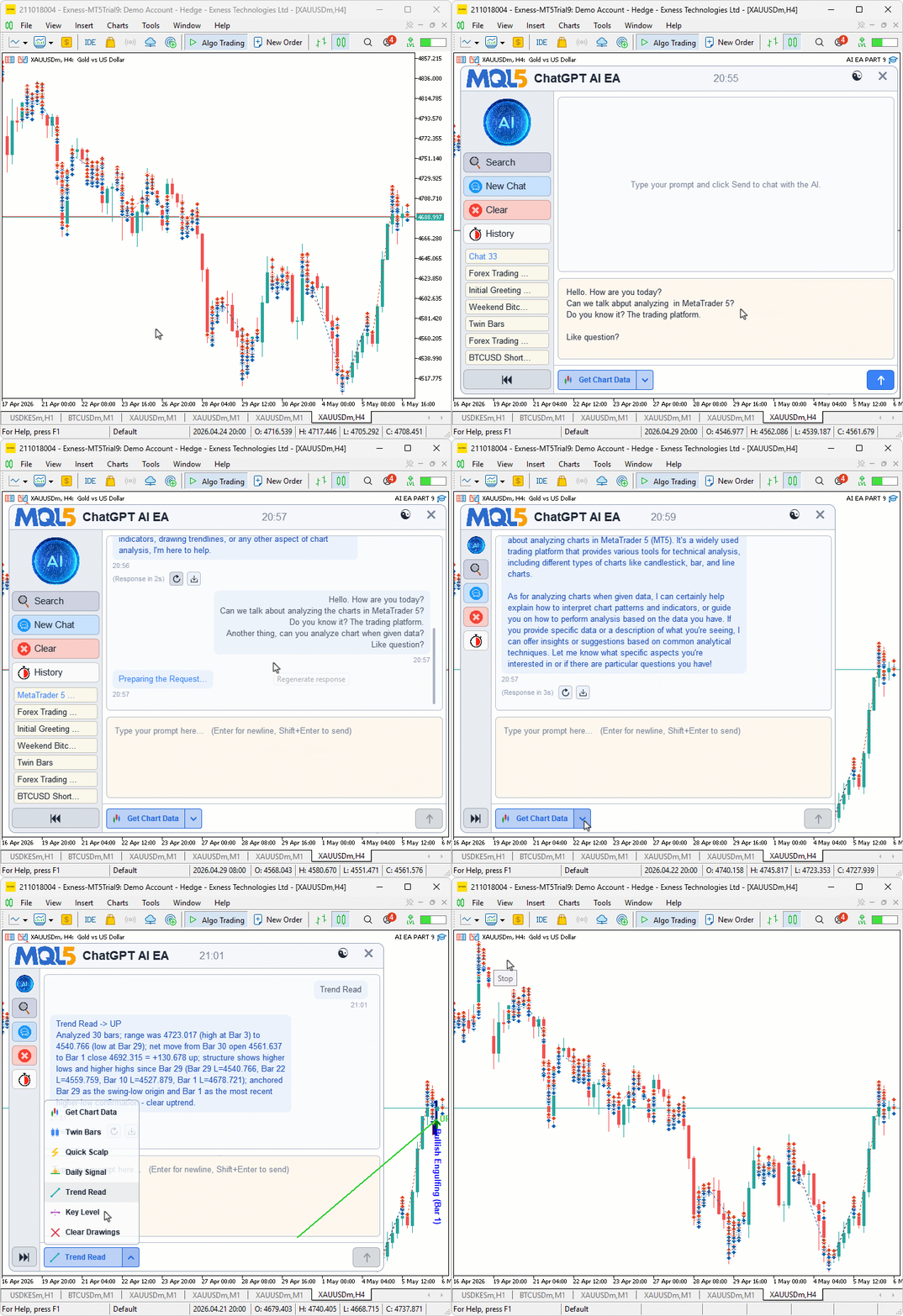
During testing, the split signal button dispatched the right action for every click; the seven signal actions produced structured chat turns with parsed results and trade-result lines; the auto-trade path placed market and pending orders matching each signal's direction; and the chart drawings appeared anchored to the correct bars with readable labels that the Clear Drawings action wiped in one pass.
Conclusion
We replaced the ad-hoc chat surface with a structured, dispatch-driven architecture that turns clicks into auditable trading artifacts. The program now routes seven distinct trading actions — Get Chart Data, Twin Bars, Quick Scalp, Daily Signal, Trend Read, Key Level, and Clear Drawings — through a single dispatcher keyed by stable integer IDs. It forces the AI into a constrained, line-based KEY:VALUE response format after a shared bar-definition preamble, making outputs reliably parseable even when the model adds commentary. A unified order-placement path chooses market or pending orders from an action-level matrix, validates broker stop levels, and scales SL/TP by recent bar volatility. Every signal is rendered as a labeled, bar-anchored chart drawing and can be cleared with a single command. Chat history and signal turns are persisted, making analysis and backtesting straightforward.
These outcomes are measurable: the project compiles, exercises each action via the dispatcher, places orders consistent with parsed signals, draws anchored annotations, and supports backtesting. Architecturally, adding an eighth action is minimal — register its label, icon, and action ID, then add one case to "AiDispatchFooterAction" — without reworking the UI or event wiring. The result is a reproducible, auditable AI-to-trade pipeline suitable for production experimentation and iterative extension. After reading this article, you will be able to:
- Design a dispatch-driven action system where stable integer IDs route through a central handler, making new actions a matter of registering one entry rather than wiring new event handlers
- Build line-based KEY:VALUE communication protocols with the AI that survive prose drift and partial responses where strict JSON parsing would fail
- Place both market and pending orders from a unified function with broker stops-level validation, volatility-scaled SL and TP buffers, and the four pending order types selected from a level-type and trade-bias matrix
Attachments
| S/N | Name | Type | Description |
|---|---|---|---|
| 1 | AI Canvas Theme.mqh | Include file | Defines the layout constants, font sizes, glyph codes, and the dark and light color palettes applied through a single theme switch |
| 2 | AI JSON FILE.mqh | Include file | Provides the JSON parser and serializer used by the encrypted chat persistence layer |
| 3 | AI Canvas Primitives.mqh | Include file | Provides the low-level drawing primitives — rounded rectangle fills and borders, anti-aliased text stamping, image scaling, custom semantic icons, and the inline markdown parser |
| 4 | AI Canvas State.mqh | Include file | Holds the program-wide state — the chats array, current chat tracking, dashboard position and visibility flags, and the dispatch tables that map the seven action IDs to their labels and icons |
| 5 | AI Canvas Scrollbar.mqh | Include file | Defines the scrollbar state struct and the helper functions that compute thumb geometry, handle drag and wheel input, and draw the track |
| 6 | AI Canvas Editor.mqh | Include file | Defines the multi-line text editor class with caret blinking, selection, word-wrap, click-to-position, and per-keystroke editing |
| 7 | AI Canvas Render.mqh | Include file | Renders the entire dashboard — header, sidebar, chat pane with markdown bubbles, prompt pane, footer, popups, and the toast notification |
| 8 | AI Logic.mqh | Include file | Implements the AI dispatch protocol, the seven signal actions, the unified order-placement function, the chat-turn injection helper, and the encrypted chat persistence |
| 9 | AI Canvas Interact.mqh | Include file | Routes mouse and keyboard events from MetaTrader to the right action through hover-code dispatching, the keyboard override pair, and the central action handler |
| 10 | AI Canvas Shell.mqh | Include file | Owns the program lifecycle — canvas creation and destruction, layout recomputation, the new-bar auto-signal tick path, and the show-and-hide pair |
| 11 | AI EA PART 9.mq5 | Expert Advisor | The main program entry point that embeds the bitmap resources, declares the user inputs, includes the ten module headers, and forwards each event to the matching shell function |
| 12 | AI EA BMP FILES.zip | Resource archive | Contains the bitmap files for the header logo, sidebar logo, and the four sidebar action icons that the program embeds at compile time |
The project is supported in Algo Forge: https://forge.mql5.io/29210372/Article-22495-Dispatch-Driven-AI-Trading-Signals
Warning: All rights to these materials are reserved by MetaQuotes Ltd. Copying or reprinting of these materials in whole or in part is prohibited.
This article was written by a user of the site and reflects their personal views. MetaQuotes Ltd is not responsible for the accuracy of the information presented, nor for any consequences resulting from the use of the solutions, strategies or recommendations described.



 MQL5 Wizard Techniques you should know (Part 89): Using Bitwise Vectorization with Perceptron Classifiers
 Beyond GARCH (Part I): Mandelbrot's MMAR versus Engle's GARCH
 Integrating MQL5 with Data Processing Packages (Part 9): Entropy-Based Adaptive Volatility
 Position Management: Safe Pyramiding with a Unified Stop in MQL5

- Free trading apps
- Over 8,000 signals for copying
- Economic news for exploring financial markets
You agree to website policy and terms of use