

MQL5 Trading Tools (Part 34): Replacing Native Chart Objects with an Interactive Canvas Drawing Layer
 1 756
1 756
 0
0

Introduction
In MetaQuotes Language 5 (MQL5), building a drawing system that behaves like a professional charting tool requires more than placing native chart objects on click. Native objects (trend lines, horizontal lines, rectangles) are rigid. After placement, programmatic interaction is limited: no pixel-precise hit-testing, no custom handle dragging, and no sub-pixel rendering control. This article is for MQL5 developers and algorithmic traders who want to build professional-grade interactive drawing tools directly on the chart canvas, with full control over rendering, selection, and object manipulation.
In Part 32 of the Tools Palette series, we built a working sidebar with flyout panels, scrolling, snapping, theme switching, a crosshair tool with a magnifier, and a drawing placement system that created native MetaTrader chart objects on click. What it could not do was let the user manipulate those objects after placement — no dragging, no handle manipulation, no rubber-band preview, and no way to delete a specific object. This article closes that gap entirely. We will cover the following topics:
- From Native Objects to a Canvas Drawing Architecture
- Building the Drawing Primitives and Line Tools
- Implementing the Drawing Engine and Object Management
- Hit Testing, Selection, and Object Interaction
- Visualization
- Conclusion
By the end of this article, we will have a drawing system in which every line, rectangle, and annotation lives on a dedicated canvas layer, responds to mouse interactions, and can be selected, reshaped, moved, and deleted with precision.
From Native Objects to a Canvas Drawing Architecture
In Part 32, every drawing tool created a native MetaTrader chart object the moment the user clicked the chart. A trend line became an OBJ_TREND, a horizontal line became an OBJ_HLINE, and a rectangle became an OBJ_RECTANGLE. MetaTrader managed their lifetime, their rendering, and their position entirely. That approach works for basic placement, but it hands control to the terminal — and the terminal gives very little back. You cannot query which object the mouse is over with pixel precision, you cannot intercept a drag on a specific handle, and you cannot render custom handle circles, dashed rubber-band previews, or floating info panels the way a professional drawing tool would.
In Part 34, we replace native objects with a full-chart bitmap canvas. It sits above the chart content and below the sidebar and flyout panels. Every line, rectangle, and annotation is stored in our own object structure array. When the chart redraws, we iterate over that array and paint each object pixel-by-pixel onto the canvas using our own rendering routines. Because we control rendering, we can perform pixel-precise hit-testing. That control enables interaction states such as selection, dragging, handle manipulation, rubber-band preview, and deletion.
The implementation follows three layers that build on each other. First, the rendering foundation — the primitive drawing functions and the per-tool line rendering library. Second, the object management layer — the struct that stores each drawing, the canvas lifecycle, and the redraw engine. Third, the interaction layer — the hit testing system and the pointer tool that turns a hit into a selection, a drag, or a deletion. Each layer depends on the one before it, and together they replace everything that native chart objects used to provide. In a nutshell, here is a visualization of our objective.

Building the Drawing Primitives and Line Tools
Setting Up the Primitives Foundation
The "ToolsPalette_Primitives.mqh" file serves as the base of the entire rendering stack. Every class in the system inherits from it, so anything defined here is available everywhere. We begin by including the MQL5 canvas library and defining the three input parameters and the "ThemeColorSet" structure that the UI depends on.
//+------------------------------------------------------------------+
//|                                      ToolsPalette_Primitives.mqh |
//|                            Copyright 2026, Allan Munene Mutiiria.|
//|                                    https://t.me/Forex_Algo_Trader|
//+------------------------------------------------------------------+
#ifndef TOOLS_PALETTE_PRIMITIVES_MQH
#define TOOLS_PALETTE_PRIMITIVES_MQH

#include <Canvas/Canvas.mqh>

//+------------------------------------------------------------------+
//| Inputs                                                           |
//+------------------------------------------------------------------+
input int    BorderWidth        = 1;    // Border Width (px)
input double BackgroundOpacity  = 0.92; // Background Opacity (0.0 - 1.0)
input bool   StartDark          = false; // Start In Dark Theme

//+------------------------------------------------------------------+
//| Theme color set structure                                        |
//+------------------------------------------------------------------+
struct ThemeColorSet
  {
   color sidebarBackground;         // Sidebar panel fill color
   color sidebarBorder;             // Sidebar outer border color
   color buttonHoverBackground;     // Button fill on hover
   color buttonActiveBackground;    // Button fill when active/pressed
   color buttonIconColor;           // Icon tint in normal state
   color buttonIconActiveColor;     // Icon tint when button is active
   color flyoutBackground;          // Flyout panel fill color
   color flyoutBorder;              // Flyout outer border color
   color flyoutItemHoverBackground; // Flyout row fill on hover
   color flyoutTextColor;           // Flyout item label text color
   color flyoutTextActiveColor;     // Flyout item label text when active
   color flyoutTitleColor;          // Flyout section title text color
   color gripDotsColor;             // Drag-grip dot fill color
   color closeButtonHoverColor;     // Close button tint on hover
   color themeButtonHoverColor;     // Theme-toggle button tint on hover
   color separatorColor;            // Divider line color
   color accentBarColor;            // Accent / highlight bar color
   color scrollArrowColor;          // Scroll arrow fill in normal state
   color scrollArrowHoverColor;     // Scroll arrow fill on hover
  };
The three inputs control the visual appearance of the entire palette — we set the border width to control the pixel thickness of all panel borders, the background opacity to control how much of the chart shows through the sidebar and flyout backgrounds, and the dark theme flag to determine which theme loads on initialization. The "ThemeColorSet" structure groups all nineteen color tokens that the light and dark themes assign differently. Rather than scattering individual color variables across multiple classes, we group them into one struct so a single "ApplyTheme" call can swap the entire palette at once. We carry this structure forward unchanged from the previous version into its own dedicated file. The next thing that we will do is define some helper functions to aid in canvas integration.
New Global Rendering Utilities
This version introduces a set of global free functions that sit outside any class and are available to every rendering routine in the system. We define these before the class hierarchy so that even the lowest-level primitive methods can call them. We start with the opacity conversion utility, the pixel blending function, the thick anti-aliased line renderer, and the line style pattern builder.
//+------------------------------------------------------------------+
//| Convert color + percentage opacity to ARGB uint                  |
//+------------------------------------------------------------------+
uint ColorWithPercentOpacity(color c, int pct)
  {
   //--- Clamp percentage to valid range
   if(pct < 0)   pct = 0;
   if(pct > 100) pct = 100;
   //--- Map percentage to 0-255 alpha byte
   const uchar alpha = (uchar)((255 * pct) / 100);
   //--- Return ARGB with computed alpha
   return ColorToARGB(c, alpha);
  }

//+------------------------------------------------------------------+
//| Alpha-composite a single pixel onto the canvas (source-over)     |
//+------------------------------------------------------------------+
void WidgetBlendPixel(CCanvas &canvas, int x, int y, uint srcArgb)
  {
   //--- Reject pixels outside canvas bounds
   if(x < 0 || y < 0 || x >= canvas.Width() || y >= canvas.Height()) return;
   //--- Extract source alpha
   const uchar sa = (uchar)((srcArgb >> 24) & 0xFF);
   //--- Skip fully transparent pixels
   if(sa == 0) return;
   //--- Write opaque pixels directly without blending overhead
   if(sa == 255) { canvas.PixelSet(x, y, srcArgb); return; }
   //--- Read destination pixel for compositing
   const uint dst = canvas.PixelGet(x, y);
   //--- Unpack destination alpha
   const uchar da = (uchar)((dst >> 24) & 0xFF);
   //--- Unpack source RGB channels
   const int sr = (int)((srcArgb >> 16) & 0xFF);
   const int sg = (int)((srcArgb >>  8) & 0xFF);
   const int sb = (int)( srcArgb        & 0xFF);
   //--- Unpack destination RGB channels
   const int dr = (int)((dst >> 16) & 0xFF);
   const int dg = (int)((dst >>  8) & 0xFF);
   const int db = (int)( dst        & 0xFF);
   //--- Compute output alpha via source-over formula
   const int oa = sa + (int)da * (255 - sa) / 255;
   //--- Discard pixel if resulting alpha is zero
   if(oa <= 0) { canvas.PixelSet(x, y, 0); return; }
   //--- Precompute (1 - srcAlpha) factor for destination contribution
   const int oneMinusSA = 255 - sa;
   //--- Blend each channel proportionally
   const int r = (sr * sa + dr * (int)da * oneMinusSA / 255) / oa;
   const int g = (sg * sa + dg * (int)da * oneMinusSA / 255) / oa;
   const int b = (sb * sa + db * (int)da * oneMinusSA / 255) / oa;
   //--- Pack blended channels back into ARGB and write
   const uint outArgb = ((uint)oa << 24) | ((uint)(uchar)r << 16)
                      | ((uint)(uchar)g <<  8) | (uint)(uchar)b;
   canvas.PixelSet(x, y, outArgb);
  }

//+------------------------------------------------------------------+
//| Draw an anti-aliased thick line between two points               |
//+------------------------------------------------------------------+
void WidgetThickLineAA(CCanvas &canvas,
                        int x0, int y0, int x1, int y1,
                        int thickness, uint argb)
  {
   //--- Clamp thickness to supported range
   if(thickness < 1) thickness = 1;
   if(thickness > 4) thickness = 4;

   if(y0 == y1)
     {
      //--- Compute horizontal span limits
      const int xL = MathMin(x0, x1);
      const int xR = MathMax(x0, x1);
      //--- Center the stroke vertically around y0
      const int yTop = y0 - thickness / 2;
      const int yBot = yTop + thickness - 1;
      //--- Fill every pixel in the aligned rectangle
      for(int yy = yTop; yy <= yBot; yy++)
         for(int xx = xL; xx <= xR; xx++)
            WidgetBlendPixel(canvas, xx, yy, argb);
      return;
     }
   if(x0 == x1)
     {
      //--- Compute vertical span limits
      const int yT = MathMin(y0, y1);
      const int yB = MathMax(y0, y1);
      //--- Center the stroke horizontally around x0
      const int xL = x0 - thickness / 2;
      const int xR = xL + thickness - 1;
      //--- Fill every pixel in the aligned rectangle
      for(int xx = xL; xx <= xR; xx++)
         for(int yy = yT; yy <= yB; yy++)
            WidgetBlendPixel(canvas, xx, yy, argb);
      return;
     }

   //--- General diagonal path — true AA via signed distance + subpixel coverage
   const double halfT = (double)thickness / 2.0;
   //--- Shift pixel centers to their geometric midpoints
   const double ax = (double)x0 + 0.5;
   const double ay = (double)y0 + 0.5;
   const double bx = (double)x1 + 0.5;
   const double by = (double)y1 + 0.5;
   //--- Compute segment direction vector
   const double dx = bx - ax;
   const double dy = by - ay;
   const double lenSq = dx * dx + dy * dy;
   //--- Skip degenerate zero-length segments
   if(lenSq < 1e-9) return;
   //--- Compute bounding box with padding for AA radius
   const double pad = halfT + 1.0;
   const int bbL = (int)MathFloor(MathMin(ax, bx) - pad);
   const int bbT = (int)MathFloor(MathMin(ay, by) - pad);
   const int bbR = (int)MathCeil (MathMax(ax, bx) + pad);
   const int bbB = (int)MathCeil (MathMax(ay, by) + pad);
   //--- Extract base alpha and RGB from input color
   const uchar bA  = (uchar)((argb >> 24) & 0xFF);
   const uint  rgb = argb & 0x00FFFFFF;
   //--- Set up 4x4 subpixel grid
   const int    sub   = 4;
   const double step  = 1.0 / sub;
   const int    subSq = sub * sub;

   //--- Iterate over every pixel in the bounding box
   for(int py = bbT; py <= bbB; py++)
     {
      for(int px = bbL; px <= bbR; px++)
        {
         //--- Project pixel center onto segment to find closest point
         const double pcx = (double)px + 0.5;
         const double pcy = (double)py + 0.5;
         double t = ((pcx - ax) * dx + (pcy - ay) * dy) / lenSq;
         //--- Clamp projection to segment endpoints
         if(t < 0.0) t = 0.0;
         if(t > 1.0) t = 1.0;
         const double projX = ax + t * dx;
         const double projY = ay + t * dy;
         //--- Compute perpendicular distance to segment
         const double pdx = pcx - projX;
         const double pdy = pcy - projY;
         const double centerDist = MathSqrt(pdx * pdx + pdy * pdy);
         //--- Skip pixels fully outside stroke radius + AA margin
         if(centerDist > halfT + 1.0) continue;
         //--- Write fully covered interior pixels immediately
         if(centerDist <= halfT - 1.0)
           {
            WidgetBlendPixel(canvas, px, py, argb);
            continue;
           }
         //--- Count subpixel samples inside the stroke for AA coverage
         int inside = 0;
         for(int sy = 0; sy < sub; sy++)
           {
            for(int sx = 0; sx < sub; sx++)
              {
               //--- Sample subpixel position
               const double sx_ = (double)px + (sx + 0.5) * step;
               const double sy_ = (double)py + (sy + 0.5) * step;
               //--- Project subpixel onto segment
               double st = ((sx_ - ax) * dx + (sy_ - ay) * dy) / lenSq;
               if(st < 0.0) st = 0.0;
               if(st > 1.0) st = 1.0;
               const double spx = ax + st * dx;
               const double spy = ay + st * dy;
               const double sdx = sx_ - spx;
               const double sdy = sy_ - spy;
               //--- Count subpixel if inside half-thickness radius
               if(sdx * sdx + sdy * sdy <= halfT * halfT) inside++;
              }
           }
         //--- Skip pixels with zero subpixel coverage
         if(inside == 0) continue;
         //--- Write pixel with alpha proportional to coverage fraction
         const uint covArgb = (((uint)(uchar)((int)bA * inside / subSq)) << 24) | rgb;
         WidgetBlendPixel(canvas, px, py, covArgb);
        }
     }
  }

//+------------------------------------------------------------------+
//| Build on/off pixel-length pattern for a given line style         |
//+------------------------------------------------------------------+
int BuildLineStylePattern(int lineStyle, int lineWidth, int &outPattern[])
  {
   //--- Clamp line width to valid range
   if(lineWidth < 1) lineWidth = 1;
   if(lineWidth > 4) lineWidth = 4;
   switch(lineStyle)
     {
      case 1: // Dashed style
         ArrayResize(outPattern, 2);
         outPattern[0] = 6; outPattern[1] = 4;
         return 2;
      case 2: // Dotted style — gap and dash scale with width
         ArrayResize(outPattern, 2);
         outPattern[0] = lineWidth * 2; outPattern[1] = lineWidth * 2;
         return 2;
      case 3: // Dash-dot style
         ArrayResize(outPattern, 4);
         outPattern[0] = 6; outPattern[1] = 3;
         outPattern[2] = lineWidth; outPattern[3] = 3;
         return 4;
      default: // Solid — caller skips dashed rendering entirely
         ArrayResize(outPattern, 0);
         return 0;
     }
  }
We define the "ColorWithPercentOpacity" function to convert a color and an integer opacity percentage into a packed ARGB value. We clamp the percentage between zero and one hundred, then map it to a 0–255 alpha byte and return the result using ColorToARGB. This gives every drawing routine a clean, readable way to express opacity. Instead of computing alpha bytes manually, we simply pass the color and a percentage. This will be very helpful when we design the settings window. Dragging will use this same approach—an early bonus.
Next, we define the "WidgetBlendPixel" function to alpha-composite a single source pixel onto the canvas using the Porter-Duff source-over formula. We first reject any pixel that falls outside the canvas bounds. For fully transparent source pixels, we skip the write entirely. For fully opaque pixels, we write directly with no blending overhead. For all intermediate alpha values, we read the destination pixel, unpack both source and destination channels, compute the output alpha, blend each channel proportionally, pack the result, and write it back. This function is the foundation of every anti-aliased draw call in the system.
With pixel blending in place, we define the "WidgetThickLineAA" function to draw an anti-aliased thick line between two points. For purely horizontal or vertical segments, we take a fast path — we simply fill a pixel-aligned rectangle centered on the line axis. For diagonal segments we compute the perpendicular signed distance from each pixel center to the segment, skip pixels that fall outside the stroke radius plus one pixel of anti-aliasing margin, write fully covered interior pixels directly, and for boundary pixels we run a 4×4 subpixel grid test, counting how many of the sixteen samples fall inside the stroke radius and writing the pixel with alpha proportional to that coverage fraction.
Finally, we define the "BuildLineStylePattern" function to produce on/off pixel-length arrays for dashed, dotted, and dash-dot line styles. We return a two-element array for dashed and dotted styles and a four-element array for dash-dot, with gap and dash lengths that scale naturally with the line width. For solid lines, we return an empty array so the caller skips the dashed rendering path entirely. The rest of the line and circle functions use the same approach. For circle drawing, we use the following approach.
Anti-Aliased Circle Primitives
Two new methods join the "CCanvasPrimitives" class in this version that did not exist in the previous one — a filled circle renderer and a circle border renderer. We add these because the drawing engine needs them for handle circles on selected objects and for the circle drawing tool.
//+------------------------------------------------------------------+
//| Fill a circle with anti-aliased edge                             |
//+------------------------------------------------------------------+
void CCanvasPrimitives::FillCircleAA(CCanvas &canvas, int cx, int cy, int radius, uint argb)
  {
   //--- Cache radius as float and extract base alpha and RGB
   double rd = (double)radius;
   uchar  bA = (uchar)((argb >> 24) & 0xFF);
   uint   rgb = argb & 0x00FFFFFF;
   //--- Set up 4x4 subpixel AA grid
   int sub = 4; double step = 1.0 / sub; int subSq = sub * sub;
   //--- Iterate over bounding box with one-pixel AA margin
   for(int dy = -radius - 1; dy <= radius + 1; dy++)
      for(int dx = -radius - 1; dx <= radius + 1; dx++)
        {
         //--- Compute radial distance from circle center
         double dist = MathSqrt((double)(dx * dx + dy * dy));
         //--- Skip pixels fully outside the circle
         if(dist > rd + 1.0) continue;
         //--- Write fully covered interior pixels directly
         if(dist <= rd - 1.0) { canvas.PixelSet(cx + dx, cy + dy, argb); continue; }
         //--- Count subpixel samples inside the circle radius
         int inside = 0;
         for(int sy = 0; sy < sub; sy++)
            for(int sx = 0; sx < sub; sx++)
              {
               //--- Compute subpixel offset from pixel corner
               double sdx = (double)dx - 0.5 + (sx + 0.5) * step;
               double sdy = (double)dy - 0.5 + (sy + 0.5) * step;
               if(sdx * sdx + sdy * sdy <= rd * rd) inside++;
              }
         //--- Skip pixels with zero subpixel coverage
         if(inside == 0) continue;
         //--- Blend AA boundary pixel with proportional alpha
         BlendPixelSet(canvas, cx + dx, cy + dy, (((uint)(uchar)((int)bA * inside / subSq)) << 24) | rgb);
        }
  }

//+------------------------------------------------------------------+
//| Draw a circle border with anti-aliasing                          |
//+------------------------------------------------------------------+
void CCanvasPrimitives::DrawCircleBorderAA(CCanvas &canvas, int cx, int cy, int radius, int thickness, uint argb)
  {
   //--- Delegate to DrawCornerArc using a full 360-degree sweep
   DrawCornerArc(canvas, cx, cy, radius, thickness, argb, 0.0, M_PI * 2.0);
  }
First, we define the "FillCircleAA" function to fill a circle with a clean anti-aliased edge. We cache the radius as a float and extract the base alpha and RGB components from the packed color. We then iterate over a bounding box that extends one pixel beyond the radius in every direction to capture the anti-aliasing margin. For each pixel, we compute its radial distance from the circle center using MathSqrt. Pixels whose distance exceeds the radius by more than one pixel are skipped entirely. Pixels whose distance is more than one pixel inside the radius are written directly without any blending overhead. For boundary pixels — those within one pixel of the edge — we run the same 4×4 subpixel grid we use for line anti-aliasing, counting how many of the sixteen samples fall inside the radius and blending the pixel with alpha proportional to that coverage fraction using the "BlendPixelSet" function.
Following that, we define the "DrawCircleBorderAA" function to draw an anti-aliased circle border of a given thickness. Rather than reimplementing the ring rasterization logic, we delegate entirely to the existing "DrawCornerArc" function, passing a full 360-degree sweep from zero to M_PI * 2.0. This gives us a consistent anti-aliased ring using the same arc renderer that draws the rounded corners of the sidebar and flyout panels, with no duplicated code. This helps us achieve the active objects' handles as shown below.

With that done, we will move to the tools file and cover per-tool canvas drawing routines. In the line tools class, we added several new member functions.
The Line Tools Class
With the primitives in place, we move to "ToolsPalette_Lines.mqh" — the file that owns every canvas-based line drawing and hit-testing routine in the system. We define the "CLineTools" class here, inheriting from "CCrosshairManager" to sit correctly in the inheritance chain.
//+------------------------------------------------------------------+
//|                                           ToolsPalette_Lines.mqh |
//|                           Copyright 2026, Allan Munene Mutiiria. |
//|                                   https://t.me/Forex_Algo_Trader |
//+------------------------------------------------------------------+
#ifndef TOOLS_PALETTE_LINES_MQH
#define TOOLS_PALETTE_LINES_MQH

//--- Include crosshair manager as the base class in the inheritance chain
#include "ToolsPalette_Crosshair.mqh"

//+------------------------------------------------------------------+
//| CLineTools — line tools library: draw and hit-test primitives    |
//+------------------------------------------------------------------+
class CLineTools : public CCrosshairManager
  {
protected:
   //--- Handle display state written by CDrawingEngine before each per-tool draw call
   int    m_currentObjIsActive; // Whether this object is selected or hovered (0 or 1)
   int    m_hideHandleIdx;      // Handle index to suppress during active drag (-1 = none)
   int    m_haloHandleIdx;      // Handle index to render with hover halo (-1 = none)

   //--- Last-drawn info panel bounding rect for HitTestInfoLinePanel (-1 = no panel drawn)
   int    m_lastInfoPanelX1; // Info panel left pixel
   int    m_lastInfoPanelY1; // Info panel top pixel
   int    m_lastInfoPanelX2; // Info panel right pixel
   int    m_lastInfoPanelY2; // Info panel bottom pixel

   //--- Generic handle and geometry helpers
   void   DrawHandleOnCanvas(CCanvas &canvas, int x, int y, bool selected,
                             color objColor, bool showHalo = false);
   void   ExtendLineToEdges(int canvasW, int canvasH, int x1, int y1, int x2, int y2,
                            int &ox1, int &oy1, int &ox2, int &oy2,
                            bool leftExtend, bool rightExtend);
   double PointToSegmentDistance(int mx, int my, int x1, int y1, int x2, int y2);

   //--- Per-line-tool canvas drawing routines (canvas-agnostic, pass target canvas explicitly)
   void   DrawTrendLineOn(CCanvas &canvas, int x1, int y1, int x2, int y2,
                          color objColor, bool selected, bool hovered,
                          int lineWidth = 2, int lineOpacity = 100, int lineStyle = 0);
   void   DrawHorizontalLineOn(CCanvas &canvas, int y,
                               color objColor, bool selected, bool hovered,
                               int lineWidth = 2, int lineOpacity = 100, int lineStyle = 0);
   void   DrawVerticalLineOn(CCanvas &canvas, int x,
                             color objColor, bool selected, bool hovered,
                             int lineWidth = 2, int lineOpacity = 100, int lineStyle = 0);
   void   DrawCrossLineOn(CCanvas &canvas, int cx, int cy,  // Full-canvas H + V intersecting at (cx, cy)
                          color objColor, bool selected, bool hovered,
                          int lineWidth = 2, int lineOpacity = 100, int lineStyle = 0);
   void   DrawRayLineOn(CCanvas &canvas, int x1, int y1, int x2, int y2,
                        color objColor, bool selected, bool hovered,
                        int lineWidth = 2, int lineOpacity = 100, int lineStyle = 0);
   void   DrawExtendedLineOn(CCanvas &canvas, int x1, int y1, int x2, int y2,
                             color objColor, bool selected, bool hovered,
                             int lineWidth = 2, int lineOpacity = 100, int lineStyle = 0);
   void   DrawInfoLineOn(CCanvas &canvas, int x1, int y1, int x2, int y2,
                         color objColor, datetime t1, datetime t2,
                         double p1, double p2,
                         bool selected, bool hovered, bool isDarkTheme,
                         int lineWidth = 2, int lineOpacity = 100, int lineStyle = 0);
   void   DrawTrendAngleOn(CCanvas &canvas, int x1, int y1, int x2, int y2,
                           color objColor, bool selected, bool hovered, bool isDarkTheme,
                           int lineWidth = 2, int lineOpacity = 100, int lineStyle = 0);

   //--- Per-line-tool hit-testing (explicit threshold for caller control)
   bool   HitTestTrendLine(int mx, int my, int x1, int y1, int x2, int y2, int threshold);
   bool   HitTestHorizontalLine(int mx, int my, int y, int threshold);
   bool   HitTestVerticalLine(int mx, int my, int x, int threshold);
   bool   HitTestInfoLinePanel(int mx, int my);

   //--- Canvas icon renderer for the tool palette buttons
   bool   DrawToolIconOnCanvas(CCanvas &canvas, int toolType, int cx, int cy,
                                int size, color iconColor);

   //--- Rectangle draw for this version (30% translucent fill, 2px border, 8 handles)
   void   DrawRectangleOn(CCanvas &canvas, int x1, int y1, int x2, int y2,
                          color objColor, bool selected, bool hovered,
                          int lineWidth = 2, int lineOpacity = 100,
                          int lineStyle = 0,
                          color fillColor = clrNONE, int fillOpacity = 30);
  };
We declare three handle display state members at the top of the class. The first tracks whether the current object being drawn is active. The second holds the index of the handle to suppress during a drag — when the user picks up a handle, we hide it so it appears lifted off the canvas. The third holds the index of the handle to render with a hover halo so the user gets clear visual feedback when the cursor approaches a draggable point. We also declare four integers that store the bounding rectangle of the last-drawn info line panel, which the hit testing system reads to determine whether a mouse click landed inside the floating stats box.
Following the state members, we declare the full set of protected methods. The geometry helpers cover handle rendering, line extension to canvas edges, and point-to-segment distance computation. The per-tool draw routines — "DrawTrendLineOn", "DrawHorizontalLineOn", "DrawVerticalLineOn", "DrawCrossLineOn", "DrawRayLineOn", "DrawExtendedLineOn", "DrawInfoLineOn", and "DrawTrendAngleOn" — each accept an explicit target canvas so they can draw onto any surface, not just the main drawing's canvas. All of them accept line width, opacity, and style parameters with sensible defaults so the engine can override them per object.
The hit-testing methods cover trend lines, horizontal lines, vertical lines, and the info line panel. We also declare "DrawToolIconOnCanvas" for rendering vector icons on the sidebar tiles, and "DrawRectangleOn" for the rectangle shape tool with its thirty-percent translucent fill, configurable border, and eight-handle selection state. Now, all tools have handles, so let's start with the handle drawing logic.
Rendering the Anchor Handles
Every drawn object that is selected or hovered shows circular handle markers at its anchor points. We define the "DrawHandleOnCanvas" function to render these handles with full anti-aliasing and an optional hover halo effect.
//+------------------------------------------------------------------+
//| Draw an anti-aliased circle handle at (x, y) with optional halo  |
//+------------------------------------------------------------------+
void CLineTools::DrawHandleOnCanvas(CCanvas &canvas, int x, int y, bool selected,
                                     color objColor, bool showHalo)
  {
   //--- All handles use the same dodger-blue border regardless of object color
   int    radius   = 7;
   int    borderPx = selected ? 2 : 1; // Thicker border when selected
   double outerR   = (double)radius;
   double innerR   = outerR - (double)borderPx;
   color  handleBorderColor = clrDodgerBlue;
   uint   fillARGB = ColorToARGB(clrWhite, 255);
   uint   bordARGB = ColorToARGB(handleBorderColor, 255);
   int    cW = canvas.Width(), cH = canvas.Height();
   //--- Supersample with a 4x4 grid per pixel for anti-aliased edges
   int    sub = 4; double step = 1.0 / sub; int subSq = sub * sub;

   //--- Pass 0: optional hover halo — semi-transparent filled disc at ~2x radius
   if(showHalo)
     {
      double haloR  = outerR * 2.0 - 2.0; // Slightly under 2x for subtlety
      uchar  haloR_ = (uchar)((handleBorderColor)       & 0xFF);
      uchar  haloG_ = (uchar)((handleBorderColor >> 8)  & 0xFF);
      uchar  haloB_ = (uchar)((handleBorderColor >> 16) & 0xFF);
      int    hRint  = (int)(haloR + 1);
      for(int dy = -hRint; dy <= hRint; dy++)
        {
         for(int dx = -hRint; dx <= hRint; dx++)
           {
            int px = x + dx, py = y + dy;
            //--- Skip pixels outside the canvas
            if(px < 0 || px >= cW || py < 0 || py >= cH) continue;
            //--- Count supersample points inside the halo disc
            int inHalo = 0;
            for(int sy = 0; sy < sub; sy++)
               for(int sx = 0; sx < sub; sx++)
                 {
                  double sdx = dx - 0.5 + (sx + 0.5) * step;
                  double sdy = dy - 0.5 + (sy + 0.5) * step;
                  if(sdx*sdx + sdy*sdy <= haloR*haloR) inHalo++;
                 }
            if(inHalo > 0)
              {
               //--- Scale alpha 70 by sub-pixel coverage fraction
               uint a = (uint)(70 * inHalo / subSq);
               if(a > 0)
                 {
                  uint haloPixel = (a << 24) | ((uint)haloR_ << 16) | ((uint)haloG_ << 8) | (uint)haloB_;
                  BlendPixelSet(canvas, px, py, haloPixel);
                 }
              }
           }
        }
     }

   //--- Pass 1: fill interior with white using sub-pixel coverage
   for(int dy = -(radius+1); dy <= radius+1; dy++)
      for(int dx = -(radius+1); dx <= radius+1; dx++)
        {
         int px = x + dx, py = y + dy;
         if(px < 0 || px >= cW || py < 0 || py >= cH) continue;
         //--- Count supersample points inside the inner fill disc
         int inFill = 0;
         for(int sy = 0; sy < sub; sy++)
            for(int sx = 0; sx < sub; sx++)
              {
               double sdx = dx - 0.5 + (sx + 0.5) * step;
               double sdy = dy - 0.5 + (sy + 0.5) * step;
               if(sdx*sdx + sdy*sdy <= innerR*innerR) inFill++;
              }
         if(inFill > 0)
            BlendPixelSet(canvas, px, py,
               (((uint)(uchar)(255 * inFill / subSq)) << 24) | (fillARGB & 0x00FFFFFF));
        }

   //--- Pass 2: border ring on top of fill using sub-pixel coverage
   for(int dy = -(radius+1); dy <= radius+1; dy++)
      for(int dx = -(radius+1); dx <= radius+1; dx++)
        {
         int px = x + dx, py = y + dy;
         if(px < 0 || px >= cW || py < 0 || py >= cH) continue;
         //--- Count supersample points in the ring between innerR and outerR
         int inBord = 0;
         for(int sy = 0; sy < sub; sy++)
            for(int sx = 0; sx < sub; sx++)
              {
               double sdx = dx - 0.5 + (sx + 0.5) * step;
               double sdy = dy - 0.5 + (sy + 0.5) * step;
               double sd  = sdx*sdx + sdy*sdy;
               if(sd > innerR*innerR && sd <= outerR*outerR) inBord++;
              }
         if(inBord > 0)
            BlendPixelSet(canvas, px, py,
               (((uint)(uchar)(255 * inBord / subSq)) << 24) | (bordARGB & 0x00FFFFFF));
        }
  }
We fix the handle radius at seven pixels and set the border thickness to two pixels when the object is selected, and one pixel otherwise, giving selected handles a visibly thicker ring. These values are arbitrary and can be adjusted to suit your visual preferences. We always use Dodger Blue as the border color regardless of the object's stroke color, so handles are immediately recognizable across all tool types. The interior fill is always white. We then run three rendering passes in sequence.
In the first pass, we draw the optional hover halo — a semi-transparent filled disc at roughly twice the handle radius. We iterate over the bounding box of the halo disc, run the 4×4 subpixel grid for each pixel, count how many samples fall inside the halo radius, and blend the pixel at a maximum alpha of seventy, scaled by the coverage fraction. This produces a soft glow around the handle that gives the user clear feedback when the cursor is near a draggable point without drawing a hard visible ring.
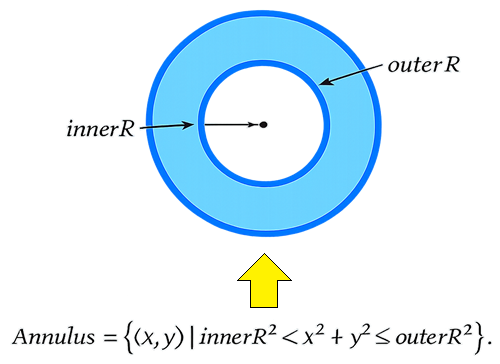
In the second pass, we fill the interior of the handle with white. We iterate over the bounding box of the inner radius, run the same subpixel grid, count samples inside the inner radius, and blend white pixels with alpha proportional to coverage. In the third pass, we draw the dodger-blue border ring on top of the white fill. We iterate over the same bounding box but count only samples that fall between the inner and outer radii — inside the ring annulus — and blend the border color with proportional alpha. Running the border pass after the fill pass ensures the ring sits cleanly on top of the white interior with no ordering artifacts. We used annulus-based logic to ensure everything sits perfectly. You could also use the associated approach math as below, but we chose simplicity.
Using the functions we have defined, we can now draw any tool. We will start with the trendline.
Drawing the Trend Line
With the handle renderer and stroke utilities in place, we now define the first per-tool draw routine. We define the "DrawTrendLineOn" function to render a trend line between two anchor points onto any target canvas.
//+------------------------------------------------------------------+
//| Draw a trend line between two anchor points                      |
//+------------------------------------------------------------------+
void CLineTools::DrawTrendLineOn(CCanvas &canvas, int x1, int y1, int x2, int y2,
                                  color objColor, bool selected, bool hovered,
                                  int lineWidth = 2, int lineOpacity = 100,
                                  int lineStyle = 0)
  {
   //--- Build ARGB stroke color from object color and opacity
   const uint argb = ColorWithPercentOpacity(objColor, lineOpacity);
   //--- Clamp line width and style to valid ranges
   if(lineWidth < 1) lineWidth = 1;
   if(lineWidth > 4) lineWidth = 4;
   if(lineStyle < 0) lineStyle = 0;
   if(lineStyle > 3) lineStyle = 3;
   //--- Draw solid or dashed stroke depending on line style
   if(lineStyle == 0)
     {
      DrawThickLine(canvas, x1, y1, x2, y2, lineWidth, argb);
     }
   else
     {
      int pat[];
      const int n = BuildLineStylePattern(lineStyle, lineWidth, pat);
      if(n > 0)
         WidgetDashedLineAA(canvas, x1, y1, x2, y2, lineWidth, argb, pat);
      else
         DrawThickLine(canvas, x1, y1, x2, y2, lineWidth, argb);
     }
   //--- Draw anchor handles when the object is selected or hovered
   if(selected || hovered)
     {
      if(m_hideHandleIdx != 0)
         DrawHandleOnCanvas(canvas, x1, y1, selected, objColor, m_haloHandleIdx == 0);
      if(m_hideHandleIdx != 1)
         DrawHandleOnCanvas(canvas, x2, y2, selected, objColor, m_haloHandleIdx == 1);
     }
  }
We first build the ARGB stroke color by passing the object color and opacity percentage through "ColorWithPercentOpacity". We then clamp the line width between one and four pixels and the style index between zero and three. For a solid style, we call "DrawThickLine" directly. For any other style, we call "BuildLineStylePattern" to produce the on/off pixel-length array, then pass it to "WidgetDashedLineAA" to walk the segment and paint only the on-segments. If the pattern builder returns an empty array for any reason, we fall back to the solid thick line.
After the stroke, we check whether the object is selected or hovered. If either is true, we draw the two anchor handles. Before drawing each handle, we check it against "m_hideHandleIdx" — if the index matches, we skip that handle entirely, which is how we make a handle appear lifted off the canvas during a drag. We also check "m_haloHandleIdx" and pass the result to "DrawHandleOnCanvas", so the handle under the cursor receives its hover halo. This same pattern — stroke first, then conditional handles with hide and halo checks — applies to every per-tool draw routine that follows. The same rendering approach applies to them. We will now move on to implementing the drawing engine and object management logic.
Implementing the Drawing Engine and Object Management
Reorganizing the Tool Registry
We move now to "ToolsPalette_Tools.mqh", which sits one level above the line tools in the inheritance chain and owns the tool registry, the category system, and the entire drawing engine. We begin with the enumerations and the "CToolRegistry" class declaration.
//+------------------------------------------------------------------+
//|                                           ToolsPalette_Tools.mqh |
//|                            Copyright 2026, Allan Munene Mutiiria.|
//|                                    https://t.me/Forex_Algo_Trader|
//+------------------------------------------------------------------+
#ifndef TOOLS_PALETTE_TOOLS_MQH
#define TOOLS_PALETTE_TOOLS_MQH

#include "ToolsPalette_Lines.mqh"

//+------------------------------------------------------------------+
//| Enumerations                                                     |
//+------------------------------------------------------------------+
enum TOOL_TYPE
  {
   TOOL_NONE = 0,             // No active tool
   TOOL_POINTER,              // Default pointer cursor
   TOOL_CROSSHAIR,            // Crosshair / measure cursor
   TOOL_TRENDLINE,            // Two-click trendline
   TOOL_HLINE,                // One-click horizontal line
   TOOL_VLINE,                // One-click vertical line
   TOOL_RAY,                  // Two-click ray
   TOOL_EXTENDED_LINE,        // Two-click extended (infinite) line
   TOOL_INFO_LINE,            // Two-click info line
   TOOL_TREND_ANGLE,          // Two-click angle line
   TOOL_CROSS_LINE,           // One-click cross line
   TOOL_PARALLEL_CHANNEL,     // Three-click parallel channel
   TOOL_REGRESSION_CHANNEL,   // Two-click regression channel
   TOOL_STDDEV_CHANNEL,       // Two-click standard deviation channel
   TOOL_PITCHFORK,            // Three-click pitchfork
   TOOL_SCHIFF_PITCHFORK,     // Three-click Schiff pitchfork
   TOOL_MOD_SCHIFF,           // Three-click modified Schiff pitchfork
   TOOL_GANN_LINE,            // Two-click Gann line
   TOOL_GANN_FAN,             // Two-click Gann fan
   TOOL_GANN_BOX,             // Two-click Gann box
   TOOL_FIBO_RETRACEMENT,     // Two-click Fibonacci retracement
   TOOL_FIBO_EXPANSION,       // Three-click Fibonacci expansion
   TOOL_FIBO_CHANNEL,         // Three-click Fibonacci channel
   TOOL_FIBO_TIMEZONES,       // Two-click Fibonacci time zones
   TOOL_FIBO_FAN,             // Two-click Fibonacci fan
   TOOL_FIBO_ARCS,            // Two-click Fibonacci arcs
   TOOL_RECTANGLE,            // Two-click rectangle
   TOOL_TRIANGLE,             // Three-click triangle
   TOOL_ELLIPSE,              // Three-click ellipse
   TOOL_TEXT,                 // One-click text annotation
   TOOL_ARROW_UP,             // One-click up arrow marker
   TOOL_ARROW_DOWN,           // One-click down arrow marker
   TOOL_THUMB_UP,             // One-click thumbs-up marker
   TOOL_THUMB_DOWN,           // One-click thumbs-down marker
   TOOL_PRICE_LABEL,          // One-click price label
   TOOL_STOP_SIGN,            // One-click stop sign marker
   TOOL_CHECK_MARK,           // One-click check mark marker
   TOOL_ROTATED_RECTANGLE,    // Three-click rotated rectangle (appended last — keeps other values stable)
   TOOL_PATH,                 // N-point polyline (appended last)
   TOOL_CIRCLE,               // Two-click circle — center + border point (appended last)
   TOOL_ARC,                  // Three-click arc — chord P1-P2 + bulge point P3 (appended last)
   TOOL_CURVE,                // Three-click quadratic Bézier curve, no fill (appended last)
   TOOL_ARROW,                // Two-click annotation arrow — line + filled triangle head (appended last)
   //--- Planned annotation tools — enum values reserved so category
   //--- registration shows all intended entries; each places a simple
   //--- single-click marker until full drawing logic is added.
   TOOL_ARROW_MARKER,         // Single-click arrow marker
   TOOL_NOTE,                 // Single-click note icon
   TOOL_PRICE_NOTE,           // Single-click price-line note
   TOOL_CALLOUT,              // Single-click callout marker
   TOOL_COMMENT               // Single-click comment marker
  };

enum ENUM_CATEGORY
  {
   CAT_NONE    = -1, // No category selected
   CAT_CURSORS =  0, // Cursor tools category
   CAT_LINES,        // Line tools category
   CAT_SHAPES,       // Shape tools category
   //--- Action categories: not real tool categories
   CAT_DELETE,       // Delete all drawings action (action category)
   CAT_COUNT         // Total number of registered categories
  };

//+------------------------------------------------------------------+
//| CLASS 4 — Tool registry and category definitions                 |
//+------------------------------------------------------------------+
class CToolRegistry : public CLineTools
  {
protected:
   CategoryDefinition m_categories[CAT_COUNT]; // All registered categories and their tool lists
   TOOL_TYPE m_lastUsedToolPerCategory[CAT_COUNT]; // Last selected tool per category

protected:
   //--- Populate all categories and their tool lists
   void          InitAllCategoriesAndTools();
   //--- Append a single tool entry to a category tool array
   void          AddTool(ToolDefinition &arr[], TOOL_TYPE type, string label, string font, uchar code, string tooltip);
   //--- Return the category that owns the given tool type
   ENUM_CATEGORY GetCategoryForActiveTool(TOOL_TYPE activeTool);
   //--- Return the number of chart clicks required to place the given tool
   int           GetRequiredClickCount(TOOL_TYPE toolType);
   //--- Return the display label string for the given tool type
   string        GetToolLabel(TOOL_TYPE toolType);
   //--- Initialize last-used slots to the first tool of each category
   void          InitLastUsedTools();
   //--- Record a tool selection so its category tile shows that tool's icon on next render
   void          RecordToolSelection(TOOL_TYPE toolType);
   //--- Resolve which tool the sidebar tile should display for the given category
   TOOL_TYPE     GetCategoryDisplayToolType(ENUM_CATEGORY cat);
   //--- Return true for action categories that invoke a one-shot action instead of activating a tool
   bool          IsActionCategory(ENUM_CATEGORY cat);
   //--- Render the canvas icon for an action category at (cx, cy) fitting inside a size × size box
   bool          DrawActionCategoryIconOnCanvas(CCanvas &canvas, ENUM_CATEGORY cat,
                                                int cx, int cy, int size,
                                                color iconColor);
  };
The "TOOL_TYPE" enumeration carries forward all the tool values from the previous version and adds several new ones. We append "TOOL_TREND_ANGLE" for the angle measurement line, "TOOL_CROSS_LINE" for the full-canvas intersecting crosshair, "TOOL_ROTATED_RECTANGLE" for a three-click rotated rectangle, "TOOL_PATH" for a variable-point polyline, "TOOL_CIRCLE" for a center-plus-border-point circle, "TOOL_ARC" for a three-click arc defined by a chord and a bulge point, "TOOL_CURVE" for a three-click quadratic Bezier curve, and "TOOL_ARROW" for a two-click annotation arrow. We also reserve values for planned annotation tools — "TOOL_NOTE", "TOOL_PRICE_NOTE", "TOOL_CALLOUT", and "TOOL_COMMENT" — so the category registration reflects all intended entries even before their full drawing logic is implemented. We append all new values at the end of the enumeration to keep the numeric values of all existing tools stable.
The "ENUM_CATEGORY" enumeration is significantly reduced from the previous version. We now register only three active tool categories — "CAT_CURSORS", "CAT_LINES", and "CAT_SHAPES" — and introduce one action category, "CAT_DELETE". Action categories are a new concept in this version: instead of opening a flyout of tools, clicking an action category tile triggers a one-shot operation directly. The "CAT_DELETE" category clears all drawn objects from the canvas in a single click.
In the "CToolRegistry" class, we add two members that did not exist in the previous version. The first is "m_lastUsedToolPerCategory", an array that tracks the last tool the user selected within each category, so the sidebar tile always shows the most recently used tool icon rather than a static category icon. The second is a set of new methods to support this: "RecordToolSelection" writes to the array when a tool is activated, "GetCategoryDisplayToolType" reads from it when the sidebar renders a tile, "InitLastUsedTools" seeds every slot with the first tool of its category on initialization, "IsActionCategory" returns true for "CAT_DELETE" and any future action categories, and "DrawActionCategoryIconOnCanvas" renders the custom canvas-drawn trash bin icon for the delete tile. Next, we move to the engine side, where we cover the objects' structure, the drawing canvas lifecycle, and per-tool style memory, most of which we just forward declare here for future reference.
The "DrawnObject" Structure and Drawing Engine Declaration
The heart of the object management system is the "DrawnObject" struct and the "CDrawingEngine" class that operates on it. We define both here as the foundation everything else builds on.
//+------------------------------------------------------------------+
//| DrawnObject — persistent drawing data structure                  |
//+------------------------------------------------------------------+
struct DrawnObject
  {
   TOOL_TYPE toolType;     // Type of drawing tool that created this object
   int       id;           // Unique integer identifier assigned at creation
   datetime  time1;        // Chart time of anchor point 1
   double    price1;       // Chart price of anchor point 1
   datetime  time2;        // Chart time of anchor point 2
   double    price2;       // Chart price of anchor point 2
   datetime  time3;        // Chart time of anchor point 3 (three-click tools)
   double    price3;       // Chart price of anchor point 3
   datetime  pathTimes[];  // Dynamic array of times for TOOL_PATH polyline
   double    pathPrices[]; // Dynamic array of prices for TOOL_PATH polyline
   color     objColor;     // Primary stroke color
   bool      selected;     // True when the object is currently selected
   bool      visible;      // True when the object should be rendered
   string    labelText;    // Annotation text content
   int       lineWidth;    // Stroke width in pixels
   int       lineStyle;    // Stroke style index (0 = solid)
   color     textColor;    // Color used for annotation text
   int       lineOpacity;  // Stroke opacity 0–100
   int       textOpacity;  // Text opacity 0–100
   int       fontSize;     // Font size in points for annotation text
   bool      bold;         // True if annotation text is bold
   int       vAlign;       // Vertical text alignment (0 = top, 1 = center, 2 = bottom)
   int       hAlign;       // Horizontal text alignment (0 = left, 1 = center, 2 = right)
   color     fillColor;    // Primary fill color
   int       fillOpacity;  // Primary fill opacity 0–100
   color     midColor;     // Midline color (channels)
   int       midOpacity;   // Midline opacity 0–100
   color     fillColor2;   // Secondary fill color (e.g. opposite zone of a channel)
   int       fillOpacity2; // Secondary fill opacity 0–100
   bool      midVisible;   // True if the midline is shown
   int       midWidth;     // Midline stroke width
   int       midStyle;     // Midline stroke style
   double    midOffset;    // Midline position as a ratio between the two bounds (0.0–1.0)
   bool      centerVisible;  // True if the center line is shown (regression / stddev channel)
   color     centerColor;    // Center line color
   int       centerOpacity;  // Center line opacity 0–100
   int       centerWidth;    // Center line stroke width
   int       centerStyle;    // Center line stroke style
   bool      upperBandVisible; // True if the upper sigma band is shown
   double    upperBandSigma;   // Upper band sigma multiplier
   bool      lowerBandVisible; // True if the lower sigma band is shown
   double    lowerBandSigma;   // Lower band sigma multiplier
   bool      pearsonVisible;   // True if the Pearson's R label is shown
   //--- Fibonacci retracement level arrays
   double    fiboLevelRatio[];   // Level ratios (e.g. 0.0, 0.236, 0.382 …)
   color     fiboLevelColor[];   // Per-level stroke color
   int       fiboLevelOpacity[]; // Per-level opacity 0–100
   int       fiboLevelWidth[];   // Per-level stroke width
   int       fiboLevelStyle[];   // Per-level stroke style
   bool      fiboLevelVisible[]; // Per-level visibility flag
   //--- Fibonacci expansion level arrays
   double    fibexLevelRatio[];
   color     fibexLevelColor[];
   int       fibexLevelOpacity[];
   int       fibexLevelWidth[];
   int       fibexLevelStyle[];
   bool      fibexLevelVisible[];
   //--- Fibonacci channel level arrays
   double    fibchLevelRatio[];
   color     fibchLevelColor[];
   int       fibchLevelOpacity[];
   int       fibchLevelWidth[];
   int       fibchLevelStyle[];
   bool      fibchLevelVisible[];
   //--- Fibonacci time zone level arrays (integer Fib sequence stored as double)
   double    fibtzLevelRatio[];
   color     fibtzLevelColor[];
   int       fibtzLevelOpacity[];
   int       fibtzLevelWidth[];
   int       fibtzLevelStyle[];
   bool      fibtzLevelVisible[];
   //--- Fibonacci fan level arrays
   double    fibfanLevelRatio[];
   color     fibfanLevelColor[];
   int       fibfanLevelOpacity[];
   int       fibfanLevelWidth[];
   int       fibfanLevelStyle[];
   bool      fibfanLevelVisible[];
   //--- Fibonacci arc level arrays
   double    fibarcLevelRatio[];
   color     fibarcLevelColor[];
   int       fibarcLevelOpacity[];
   int       fibarcLevelWidth[];
   int       fibarcLevelStyle[];
   bool      fibarcLevelVisible[];
   //--- Gann fan level arrays (9 canonical ratios)
   double    gannfanLevelRatio[];
   color     gannfanLevelColor[];
   int       gannfanLevelOpacity[];
   int       gannfanLevelWidth[];
   int       gannfanLevelStyle[];
   bool      gannfanLevelVisible[];
   //--- Gann box level arrays
   double    gannboxLevelRatio[];
   color     gannboxLevelColor[];
   int       gannboxLevelOpacity[];
   int       gannboxLevelWidth[];
   int       gannboxLevelStyle[];
   bool      gannboxLevelVisible[];
   //--- Pitchfork median line properties
   bool      medianVisible; // True if the median (handle) line is shown
   color     medianColor;   // Median line color
   int       medianWidth;   // Median line stroke width
   int       medianStyle;   // Median line stroke style
   //--- Pitchfork outer tine properties
   bool      outerVisible; // True if the outer tines are shown
   color     outerColor;   // Outer tine color
   int       outerWidth;   // Outer tine stroke width
   int       outerStyle;   // Outer tine stroke style
   //--- Pitchfork inner tine properties
   bool      innerVisible; // True if the inner tines are shown
   color     innerColor;   // Inner tine color
   int       innerWidth;   // Inner tine stroke width
   int       innerStyle;   // Inner tine stroke style
  };

//+------------------------------------------------------------------+
//| CLASS 5 — Drawing engine                                         |
//+------------------------------------------------------------------+
class CDrawingEngine : public CToolRegistry
  {
protected:
   DrawnObject m_drawnObjects[];         // Dynamic array of all placed drawing objects
   int         m_drawnObjectCount;       // Count of active entries in m_drawnObjects
   int         m_drawnObjectCounter;     // Monotonically increasing ID generator
   int         m_toolDrawingClickCount;  // Number of clicks collected for the current placement
   datetime    m_drawPoint1Time;         // Chart time of the first placement click
   datetime    m_drawPoint2Time;         // Chart time of the second placement click
   double      m_drawPoint1Price;        // Chart price of the first placement click
   double      m_drawPoint2Price;        // Chart price of the second placement click
   datetime    m_pathBuildTimes[];       // Accumulated point times for an in-progress TOOL_PATH
   double      m_pathBuildPrices[];      // Accumulated point prices for an in-progress TOOL_PATH
   ulong       m_pathLastClickMicros;    // Microsecond timestamp of the last PATH click (double-click detection)
   int         m_pathLastClickX;         // Screen X of the last PATH click
   int         m_pathLastClickY;         // Screen Y of the last PATH click
   int         m_hoveredObjectId;        // ID of the object under the mouse pointer (-1 = none)
   int         m_hoveredHandleIdx;       // Handle index under the mouse pointer (-1 = none)
   int         m_hoveredHandleHostId;    // ID of the object that owns the hovered handle
   int         m_selectedObjectId;       // ID of the currently selected object (-1 = none)
   int         m_draggedHandleIdx;       // Handle index being dragged (-1 = none)
   bool        m_isDraggingHandle;       // True while a handle drag is in progress
   int         m_hitThreshold;           // Pixel radius used for hit-testing
   bool        m_isDraggingObject;       // True while a whole-object drag is in progress
   int         m_dragLastMouseX;         // Last recorded mouse X during an object drag
   int         m_dragLastMouseY;         // Last recorded mouse Y during an object drag
   ulong       m_lastPointerClickMicros; // Timestamp of the last pointer click (double-click detection)
   int         m_lastPointerClickHitId;  // Object ID that was hit on the last pointer click
   bool        m_pendingTextEditArmed;   // True if a second click on the same text object will open edit mode
   int         m_pendingTextEditObjId;   // Object ID waiting for the second click to open edit mode
   int         m_pendingTextEditStartX;  // Mouse X when the pending text edit was armed
   int         m_pendingTextEditStartY;  // Mouse Y when the pending text edit was armed
   int         m_addTextPromptObjId;     // Object ID whose "add text" prompt is currently shown
   int         m_addTextPromptX1;        // Left edge of the add-text prompt hit rectangle
   int         m_addTextPromptY1;        // Top edge of the add-text prompt hit rectangle
   int         m_addTextPromptX2;        // Right edge of the add-text prompt hit rectangle
   int         m_addTextPromptY2;        // Bottom edge of the add-text prompt hit rectangle
   int         m_addTextPromptCornerX[]; // Corner X coordinates of the add-text prompt polygon
   int         m_addTextPromptCornerY[]; // Corner Y coordinates of the add-text prompt polygon
   bool        m_labelHitActive;         // True while a label hit rectangle is tracked
   int         m_labelHitObjIdForLast;   // Object ID associated with the most recent label hit rect
   int         m_labelHitObjIdForSelected; // Object ID whose label hit rect is displayed as selected
   int         m_labelHitX1;            // Left edge of the tracked label hit rectangle
   int         m_labelHitY1;            // Top edge of the tracked label hit rectangle
   int         m_labelHitX2;            // Right edge of the tracked label hit rectangle
   int         m_labelHitY2;            // Bottom edge of the tracked label hit rectangle
   int         m_labelHitCornerX[];     // Corner X coordinates of the label hit polygon
   int         m_labelHitCornerY[];     // Corner Y coordinates of the label hit polygon
   bool        m_isPreviewActive;       // True while a rubber-band preview is being rendered
   int         m_previewMouseX;         // Current mouse X for the preview rubber band
   int         m_previewMouseY;         // Current mouse Y for the preview rubber band
   TOOL_TYPE   m_previewToolType;       // Tool type being previewed
   bool        m_isEditingLabel;        // True while in-place text editing is active
   string      m_labelEditBuffer;       // Current contents of the label edit buffer
   int         m_labelCaretPos;         // Caret character position within the edit buffer
   int         m_labelSelectionAnchor;  // Anchor position for selection range
   bool        m_savedKeyboardControl;  // Saved CHART_KEYBOARD_CONTROL state before keyboard override
   bool        m_savedQuickNavigation;  // Saved CHART_QUICK_NAVIGATION state before keyboard override
   bool        m_keyboardOverrideActive; // True while keyboard events are captured by the label editor
   CCanvas     m_canvasDrawings;        // Full-chart canvas for drawing all objects
   string      m_nameDrawings;          // Object name of the drawings bitmap label
   CCanvas     m_canvasObjPriceLabel1;  // Price-axis label canvas for point 1
   CCanvas     m_canvasObjTimeLabel1;   // Time-axis label canvas for point 1
   CCanvas     m_canvasObjPriceLabel2;  // Price-axis label canvas for point 2
   CCanvas     m_canvasObjTimeLabel2;   // Time-axis label canvas for point 2
   CCanvas     m_canvasObjPriceLabel3;  // Price-axis label canvas for point 3
   CCanvas     m_canvasObjTimeLabel3;   // Time-axis label canvas for point 3
   string      m_nameObjPriceLabel1;    // Object name for price-axis label 1
   string      m_nameObjTimeLabel1;     // Object name for time-axis label 1
   string      m_nameObjPriceLabel2;    // Object name for price-axis label 2
   string      m_nameObjTimeLabel2;     // Object name for time-axis label 2
   string      m_nameObjPriceLabel3;    // Object name for price-axis label 3
   string      m_nameObjTimeLabel3;     // Object name for time-axis label 3
   bool        m_objLabelsVisible;      // True while at least one axis label is currently shown
   DrawnObject m_toolMemory[64];        // Per-tool-type style memory (indexed by TOOL_TYPE cast to int)
   bool        m_toolMemoryValid[64];   // True for each slot that has been written at least once

protected:
   //--- Create the full-chart drawings canvas
   bool         CreateDrawingsCanvas();
   //--- Destroy the drawings canvas and remove its chart object
   void         DestroyDrawingsCanvas();
   //--- Resize the drawings canvas to the current chart dimensions
   void         ResizeDrawingsCanvas();
   //--- Create all six axis-label canvases for point coordinates
   bool         CreateObjLabelCanvases();
   //--- Destroy all six axis-label canvases
   void         DestroyObjLabelCanvases();
   //--- Hide all axis labels without destroying their canvas objects
   void         HideObjLabels();
   //--- Update axis labels for the hovered or selected object
   void         UpdateObjLabels();
   //--- Redraw permanent price/time labels for all objects that use them
   void         RedrawPermanentAxisLabels();
   //--- Delete permanent axis labels associated with the given object ID
   void         DeletePermanentAxisLabelsFor(int objId);
   //--- Add a drawn object to the storage array and return its new ID
   int          AddDrawnObject(TOOL_TYPE toolType, datetime t1, double p1,
                               datetime t2, double p2, datetime t3, double p3, color objColor,
                               bool useMemory = true);
   //--- Remove the drawn object with the given ID from the storage array
   void         RemoveDrawnObject(int id);
   //--- Remove all drawn objects and clear the canvas
   void         ClearAllDrawnObjects();
   //--- Find and return the array index for the given object ID (-1 if not found)
   int          FindObjectIndexById(int id);
   //--- Reset all style properties of an object to tool-type defaults
   void         ApplyToolDefaults(int objId);
   //--- Snapshot the style properties of the given object into the per-tool memory slot
   void         CaptureToolMemory(int liveIdx);
   //--- Apply the stored per-tool memory style onto the newly created object at newIdx
   void         ApplyToolMemory(int newIdx);
   //--- Redraw every object onto the drawings canvas and flush it
   void         RedrawAllObjects();
   //--- Draw a rectangle object onto the canvas
   void         DrawRectangle(int x1, int y1, int x2, int y2, color objColor, bool selected, bool hovered);
   //--- Draw a dashed rubber-band preview line between two screen points
   void         DrawRubberBand(int x1, int y1, int x2, int y2, TOOL_TYPE toolType, color objColor);
   //--- Update the stored preview mouse position for the current rubber band
   void         UpdatePreviewMousePos(int mouseX, int mouseY);
   //--- Return the default stroke color for the given tool type
   color        GetToolDefaultColor(TOOL_TYPE toolType);
   //--- Return true if the mouse point hits the axis-aligned rectangle
   bool         HitTestRectangle(int mx, int my, int x1, int y1, int x2, int y2);
   //--- Return true if the mouse point hits the ellipse defined by center and radii
   bool         HitTestEllipse(int mx, int my, int cx, int cy, int rx, int ry);
   //--- Return the handle index under the mouse for the given object, or -1
   int          HitTestHandles(int mx, int my, int objIdx);
   //--- Return the ID of the topmost object hit by the mouse, or -1
   int          HitTestAllObjects(int mouseX, int mouseY);
   //--- Return true if the screen point lies inside the rotated rectangle defined by four corners
   bool         PointInRotatedRect(int px, int py, const int &cx[], const int &cy[]);
   //--- Dispatch a mouse click during an active drawing tool placement
   void         HandleDrawingClick(int mouseX, int mouseY, TOOL_TYPE &activeTool, string &instruction);
   //--- Place a single-click drawing object at the given chart coordinate
   void         PlaceSingleClickObject(datetime t, double p, int sub, TOOL_TYPE toolType);
   //--- Commit a two-click drawing using the two stored anchor points
   void         PlaceTwoClickObject(TOOL_TYPE toolType);
   //--- Commit an in-progress PATH polyline and activate TOOL_NONE
   void         CommitPath(TOOL_TYPE &activeTool, string &instruction);
   //--- Cancel an in-progress PATH polyline without creating an object
   void         CancelPath();
   //--- Commit a three-click drawing using the two stored anchors and the given third point
   void         PlaceThreeClickObject(datetime t3, double p3, TOOL_TYPE toolType);
   //--- Update hover state when the pointer tool is moved over the canvas
   void         HandlePointerMouseMove(int mouseX, int mouseY);
   //--- Handle a single left-click when the pointer tool is active
   void         HandlePointerClick(int mouseX, int mouseY);
   //--- Handle a double left-click when the pointer tool is active
   void         HandlePointerDoubleClick(int mouseX, int mouseY);
   //--- Apply incremental mouse-delta to the object or handle being dragged
   void         HandlePointerDragMove(int mouseX, int mouseY);
   //--- Finalize a drag operation and commit the new object position
   void         HandlePointerDragRelease();
   //--- Delete the currently selected object
   void         DeleteSelectedObject();
   //--- Begin label edit mode for the selected object (stub — implemented elsewhere)
   void         StartLabelEdit() {}
   //--- Capture keyboard events away from the chart (stub)
   void         BeginKeyboardOverride() {}
   //--- Release keyboard events back to the chart (stub)
   void         EndKeyboardOverride() {}
   //--- Append a character to the label edit buffer (stub)
   void         AppendLabelChar(string ch) {}
   //--- Remove the character before the caret in the edit buffer (stub)
   void         BackspaceLabelChar() {}
   //--- Commit the current label edit buffer to the object (stub)
   void         CommitLabel() {}
   //--- Discard the label edit buffer and restore the previous text (stub)
   void         CancelLabel() {}
   //--- Insert a character at the current caret position (stub)
   void         InsertCharAtCaret(string ch) {}
   //--- Insert a newline at the current caret position (stub)
   void         InsertNewlineAtCaret() {}
   //--- Delete the character before the caret (stub)
   void         BackspaceAtCaret() {}
   //--- Delete the character after the caret (stub)
   void         DeleteAtCaret() {}
   //--- Move the caret one character to the left (stub)
   void         MoveCaretLeft() {}
   //--- Move the caret one character to the right (stub)
   void         MoveCaretRight() {}
   //--- Move the caret one line up (stub)
   void         MoveCaretUp() {}
   //--- Move the caret one line down (stub)
   void         MoveCaretDown() {}
   //--- Move the caret to the start of the current line (stub)
   void         MoveCaretHome() {}
   //--- Move the caret to the end of the current line (stub)
   void         MoveCaretEnd() {}
   //--- Return true if a text selection range is active (stub)
   bool         HasLabelSelection() { return false; }
   //--- Return the start and end of the current selection range (stub)
   bool         GetLabelSelectionRange(int &outStart, int &outEnd) { outStart=0; outEnd=0; return false; }
   //--- Delete the selected text range from the edit buffer (stub)
   bool         DeleteLabelSelection() { return false; }
   //--- Select the entire label edit buffer content (stub)
   void         LabelSelectAll() {}
   //--- Clear the current text selection without moving the caret (stub)
   void         ClearLabelSelection() {}
   //--- Extend the selection one character to the left (stub)
   void         ShiftExtendCaretLeft() {}
   //--- Extend the selection one character to the right (stub)
   void         ShiftExtendCaretRight() {}
   //--- Extend the selection one line up (stub)
   void         ShiftExtendCaretUp() {}
   //--- Extend the selection one line down (stub)
   void         ShiftExtendCaretDown() {}
   //--- Extend the selection to the start of the current line (stub)
   void         ShiftExtendCaretHome() {}
   //--- Extend the selection to the end of the current line (stub)
   void         ShiftExtendCaretEnd() {}
   //--- Compute the current caret line and column for cursor rendering (stub)
   void         ComputeCaretLineColumn(int &outLine, int &outCol) { outLine=0; outCol=0; }
   //--- Split a multi-line text string into a line array (stub)
   void         SplitTextIntoLines(const string text, string &lines[]) { ArrayResize(lines,1); lines[0]=text; }
   //--- Convert a line/column pair to a flat buffer offset (stub)
   int          LineColumnToCaret(int line, int col) { return 0; }
   //--- Finalize any open label edit; remove empty text annotations
   bool         FinalizeOpenLabelEdit();
   //--- Cancel any in-progress multi-click placement and return true if a redraw is needed
   bool         CancelInProgressPlacement();
   //--- Deselect all objects and reset hover state; return true if a redraw is needed
   bool         DeselectAll();
   //--- Select the object with the given ID, deselecting any previous selection
   void         SelectObjectById(int objId);
   //--- Set the label caret position from a mouse click inside the host text box (stub)
   void         SetCaretFromMouseClick(int mx, int my,
                                        int hostPaddingX, int hostPaddingY,
                                        const string fontName, int fontPt,
                                        int wrapWidth = 0) {}
   //--- Retrieve the text layout parameters for the host object at objIdx (stub)
   bool         GetHostTextLayout(int objIdx,
                                   int &outPadX, int &outPadY,
                                   string &outFontName, int &outFontPt,
                                   int &outWrapWidth) { return false; }
   //--- Resolve the current visual layout of the label editor for caret rendering (stub)
   bool         ResolveCaretVisualLayout(string &outLines[],
                                          int &outBufOffsets[]) { return false; }
   //--- Draw an annotation label near the given object bounds (stub)
   void         DrawObjectLabel(int mx, int my, int x1, int y1, int x2, int y2,
                                const string labelText, bool selected, bool hovered, color objColor,
                                int anchorMode = 0, bool recordHitRect = false,
                                int wrapWidth = 0,
                                int hostClipL = -1, int hostClipT = -1,
                                int hostClipR = -1, int hostClipB = -1,
                                int shapeKind = 0,
                                double shapeRadiusA = 0.0,
                                double shapeRadiusB = 0.0,
                                int maxVisibleLines = 0,
                                int shapeCenterX = 0,
                                int shapeCenterY = 0,
                                int availableHeight = 0,
                                int textOpacity = 100,
                                int fontSize = 11,
                                bool bold = false,
                                int vAlign = 0,
                                int hAlign = 1) {}
   //--- Generate a unique chart object name for a new drawing
   string       MakeUniqueObjectName();
   //--- Property getter overloads — color, int, string, bool, double (stubs)
   bool         GetObjectProperty(int objId, string propId, color &outValue)   { outValue=clrWhite; return false; }
   bool         GetObjectProperty(int objId, string propId, int &outValue)     { outValue=0;        return false; }
   bool         GetObjectProperty(int objId, string propId, string &outValue)  { outValue="";       return false; }
   bool         GetObjectProperty(int objId, string propId, bool &outValue)    { outValue=false;    return false; }
   bool         GetObjectProperty(int objId, string propId, double &outValue)  { outValue=0.0;      return false; }
   //--- Property setter overloads — color, int, string, bool, double (stubs)
   bool         SetObjectProperty(int objId, string propId, color value, bool preview)   { return false; }
   bool         SetObjectProperty(int objId, string propId, int value, bool preview)     { return false; }
   bool         SetObjectProperty(int objId, string propId, string value, bool preview)  { return false; }
   bool         SetObjectProperty(int objId, string propId, bool value, bool preview)    { return false; }
   bool         SetObjectProperty(int objId, string propId, double value, bool preview)  { return false; }
   //--- Snapshot the current property state of an object for undo (stub)
   bool         SnapshotProperties(int objId)   { return false; }
   //--- Restore properties from the last snapshot (stub)
   bool         RestoreProperties()             { return false; }
   //--- Discard the current property snapshot (stub)
   void         DiscardSnapshot()               {}
   //--- Append a new Fibonacci level to the given object (stub)
   bool         AppendFibLevel(int objId)                { return false; }
   //--- Remove the Fibonacci level at levelIdx from the given object (stub)
   bool         RemoveFibLevel(int objId, int levelIdx)  { return false; }
   //--- Return the number of placement points for the given object (stub)
   int          GetObjectPointCount(int objId)           { return 0; }
   //--- Get the price of the given placement point index (stub)
   bool         GetObjectPointPrice(int objId, int pointIdx, double &outPrice)  { outPrice=0.0; return false; }
   //--- Get the time of the given placement point index (stub)
   bool         GetObjectPointTime(int objId, int pointIdx, datetime &outTime)  { outTime=0;    return false; }
   //--- Set the price of the given placement point index (stub)
   bool         SetObjectPointPrice(int objId, int pointIdx, double newPrice, bool preview) { return false; }
   //--- Set the time of the given placement point index (stub)
   bool         SetObjectPointTime(int objId, int pointIdx, datetime newTime, bool preview) { return false; }
   //--- Notify derived classes when the selected object changes (virtual no-op)
   virtual void OnSelectionChanged(int objId) { /* default no-op */ }
  };
We define the "DrawnObject" structure to hold every piece of data needed to render, hit-test, and interact with a single drawing. The first group of fields covers identity and position — the tool type, a unique integer identifier, and up to three time and price anchor points. For the path tool specifically, we include two dynamic arrays that accumulate as many vertices as the user places. The second group covers visual style — stroke color, width, opacity, and style index, plus fill color and opacity for shapes, text color and opacity for annotations, and font size, bold flag, and alignment for text tools. The third group covers advanced per-tool properties: midline visibility and style for channels, center line and sigma band settings for regression and standard deviation channels, and Pearson's R label visibility.
The final group holds eight sets of dynamic level arrays — one set each for Fibonacci retracement, expansion, channel, time zones, fan, and arcs, and one each for Gann fan and Gann box — each carrying ratio, color, opacity, width, style, and visibility per level. We also declare pitchfork-specific properties for the median line, outer tines, and inner tines separately. This struct is deliberately wide because every object carries the full set of possible properties regardless of tool type, which eliminates the need for type casting or union handling anywhere in the engine.
In the "CDrawingEngine" class declaration, we carry all the state needed to manage the full object lifecycle. We store the drawn objects in a dynamic array paired with a count and a monotonically increasing ID counter. For placement state, we store the click count, the two anchor times, and price values collected so far, and separate accumulator arrays for the path tool with a microsecond timestamp for double-click detection. For the interaction state, we store the hovered object ID, the hovered handle index and its host object ID, the selected object ID, the dragged handle index, and separate drag flags for handle drags and whole-object drags with the last recorded mouse position.
For the text editing state, we store a label edit buffer, caret position, selection anchor, and keyboard override flags. We declare the main drawings canvas and its object name, six axis label canvases with their object names for displaying anchor point coordinates on the price and time axes, and a sixty-four slot per-tool style memory array with a validity flag array so the engine can reapply the last used style of any tool type to the next object of that type.
The methods cover the full object lifecycle: creation, removal, clearing, lookup, defaults, and style memory. They also cover canvas lifecycle, axis labels, hit-testing, pointer interactions, previews, and placement dispatch. Label-editing methods are currently stubs and will be implemented later. On the sidebar side, we cover the category gaps, the group divider that we introduced above the delete category, and the sidebar icon pass logic that now uses custom icons. The most important thing is the new icon pass logic, which is as follows.
Dynamic Sidebar Icons and the Action Category
With the tool memory system in place, we now look at how "ToolsPalette_Sidebar.mqh" uses it to drive the sidebar tile icons. Two changes are relevant here — the icon rendering pass in "DrawSidebarIconLabels" and the active category resolution in "DrawSidebar".
//+------------------------------------------------------------------+
//|                                         ToolsPalette_Sidebar.mqh |
//|                            Copyright 2026, Allan Munene Mutiiria.|
//|                                    https://t.me/Forex_Algo_Trader|
//+------------------------------------------------------------------+
#ifndef TOOLS_PALETTE_SIDEBAR_MQH
#define TOOLS_PALETTE_SIDEBAR_MQH

//--- Pull in the full tool/engine stack via ToolsPalette_Tools.mqh
#include "ToolsPalette_Tools.mqh"

//--- EXAMPLE OF CANVAS TOOL ICON DRAWING LOGIC

//+------------------------------------------------------------------+
//| Render the full sidebar panel                                    |
//+------------------------------------------------------------------+
void CSidebarRenderer::DrawSidebar(TOOL_TYPE activeTool)
  {

   // EXISTING LOGIC

   //--- Determine the active category from the current tool selection
   ENUM_CATEGORY activeCat = GetCategoryForActiveTool(activeTool);


   // EXISTING LOGIC

  }


//+------------------------------------------------------------------+
//| Render category icons and sidebar control labels                 |
//+------------------------------------------------------------------+
void CSidebarRenderer::DrawSidebarIconLabels(TOOL_TYPE activeTool)
  {

      //--- EXISTING LOGIC

      if(IsActionCategory((ENUM_CATEGORY)c))
        {
         //--- Action categories use a red danger color to signal destructive intent
         color actionIconColor = (isActive || m_hoveredCategory == (ENUM_CATEGORY)c)
                                  ? C'255,80,80'  // brighter red on hover or active
                                  : C'220,53,69'; // standard danger red
         //--- Draw the custom action icon (e.g., trash bin for CAT_DELETE)
         drewCanvasIcon = DrawActionCategoryIconOnCanvas(tmpIcons,
                             (ENUM_CATEGORY)c, tileCx, tileCy,
                             FlyoutIconSize, actionIconColor);
        }
      else if(displayTool != TOOL_NONE)
        {
         //--- Draw the same custom canvas icon the flyout uses, at FlyoutIconSize,
         //--- centered within the larger tile for breathing room
         drewCanvasIcon = DrawToolIconOnCanvas(tmpIcons, (int)displayTool,
                             tileCx, tileCy, FlyoutIconSize, iconColor);
        }

      //--- EXISTING LOGIC
  }
In "DrawSidebar", we call "GetCategoryForActiveTool" to resolve which category owns the currently active tool. This is unchanged from previous version. What changes is what happens inside the icon rendering pass. For each visible category tile, we now call "GetCategoryDisplayToolType" to resolve the last-used tool for that category, then attempt to draw its vector icon via "DrawToolIconOnCanvas". If the canvas icon draw succeeds, we use it. If it returns false — meaning no custom icon exists for that tool type — we fall back to the static Wingdings glyph as before. This means every category tile now reflects actual user intent rather than a fixed symbol.
For action categories, the icon pass takes a different branch entirely. We call "IsActionCategory" to detect them, then call "DrawActionCategoryIconOnCanvas" instead of "DrawToolIconOnCanvas". We also apply a distinct color to action icons — a standard danger red at rest and a brighter red when the tile is hovered or active — to signal visually that clicking this tile performs a destructive operation rather than activating a drawing tool. For "CAT_DELETE", this renders the custom canvas-drawn trash bin icon we defined in "CToolRegistry". If the canvas draw fails for any reason, we fall back to the Wingdings glyph registered for that category. When we connect all these files, we get the following outcome.

We can see that we have the full set of rendered objects. The rest of the category objects will be included when we implement their full functionality. For now, we implement the interaction of these objects, which is handled in the next section, to achieve full interactivity, which will lay the foundation on which the rest of the tools will be used.
Hit Testing, Selection, and Object Interaction
The Hit Testing System
We move now to "ToolsPalette_Engine_Interact.mqh", which implements the full hit testing and pointer interaction system. We start with the two foundational hit testing primitives and the main dispatch loop that drives all object selection.
//+------------------------------------------------------------------+
//|                                 ToolsPalette_Engine_Interact.mqh |
//|                           Copyright 2026, Allan Munene Mutiiria. |
//|                                   https://t.me/Forex_Algo_Trader |
//+------------------------------------------------------------------+
#ifndef TOOLS_PALETTE_ENGINE_INTERACT_MQH
#define TOOLS_PALETTE_ENGINE_INTERACT_MQH

//--- Include CDrawingEngine class declaration; guard prevents double-inclusion via the main chain
#include "ToolsPalette_Tools.mqh"

//+------------------------------------------------------------------+
//| Test whether point (px, py) lies inside a convex rotated quad    |
//+------------------------------------------------------------------+
bool CDrawingEngine::PointInRotatedRect(int px, int py, const int &cx[], const int &cy[])
  {
   //--- Track whether any cross products are positive or negative
   bool anyPos = false, anyNeg = false;
   //--- Iterate over all 4 edges of the convex quad
   for(int i = 0; i < 4; i++)
     {
      //--- Wrap edge index to form a closed polygon
      int j = (i + 1) % 4;
      //--- Compute edge vector from corner i to corner j
      int ex = cx[j] - cx[i];
      int ey = cy[j] - cy[i];
      //--- Compute vector from corner i to the test point
      int fx = px - cx[i];
      int fy = py - cy[i];
      //--- Compute the 2D cross product z-component
      long crossZ = (long)ex * fy - (long)ey * fx;
      //--- Record the sign of this cross product
      if(crossZ > 0) anyPos = true;
      if(crossZ < 0) anyNeg = true;
      //--- Both signs found — point is outside the quad
      if(anyPos && anyNeg) return false;
     }
   //--- All cross products had the same sign — point is inside
   return true;
  }

//+------------------------------------------------------------------+
//| Hit test: rectangle body including interior fill                 |
//+------------------------------------------------------------------+
bool CDrawingEngine::HitTestRectangle(int mx, int my, int x1, int y1, int x2, int y2)
  {
   //--- Normalize corner coordinates so min/max are unambiguous
   int lx = MathMin(x1, x2), rx = MathMax(x1, x2);
   int ty = MathMin(y1, y2), by = MathMax(y1, y2);
   //--- Accept any click inside the interior or threshold border band (translucent fill makes all interior valid)
   return (mx >= lx - m_hitThreshold && mx <= rx + m_hitThreshold &&
           my >= ty - m_hitThreshold && my <= by + m_hitThreshold);
  }

//--- SAME LOGIC APPLIES TO ALL OTHER OBJECTS

//+------------------------------------------------------------------+
//| Main hit test loop — return object ID under cursor or -1         |
//+------------------------------------------------------------------+
int CDrawingEngine::HitTestAllObjects(int mouseX, int mouseY)
  {
   int n = ArraySize(m_drawnObjects);
   //--- Iterate in reverse draw order so the topmost rendered object wins
   for(int i = n - 1; i >= 0; i--)
     {
      //--- Skip invisible objects
      if(!m_drawnObjects[i].visible) continue;
      //--- Resolve all three anchor points to screen pixel coordinates
      int x1 = 0, y1 = 0, x2 = 0, y2 = 0, x3 = 0, y3 = 0;
      ChartTimePriceToXY(m_chartId, 0, m_drawnObjects[i].time1, m_drawnObjects[i].price1, x1, y1);
      if(m_drawnObjects[i].time2 != 0)
         ChartTimePriceToXY(m_chartId, 0, m_drawnObjects[i].time2, m_drawnObjects[i].price2, x2, y2);
      if(m_drawnObjects[i].time3 != 0)
         ChartTimePriceToXY(m_chartId, 0, m_drawnObjects[i].time3, m_drawnObjects[i].price3, x3, y3);
      //--- Dispatch to the appropriate hit test based on the tool type
      bool hit = false;
      switch(m_drawnObjects[i].toolType)
        {
         //--- Line-type tools: test cursor proximity to the line segment
         case TOOL_TRENDLINE:
         case TOOL_RAY:
         case TOOL_EXTENDED_LINE:
         case TOOL_TREND_ANGLE:
            hit = HitTestTrendLine(mouseX, mouseY, x1, y1, x2, y2, m_hitThreshold);
            break;
         case TOOL_INFO_LINE:
            //--- Info line: hit on the line body OR inside the floating info panel
            hit = HitTestTrendLine(mouseX, mouseY, x1, y1, x2, y2, m_hitThreshold) ||
                  HitTestInfoLinePanel(mouseX, mouseY);
            break;
         case TOOL_HLINE:
            hit = HitTestHorizontalLine(mouseX, mouseY, y1, m_hitThreshold);
            break;
         case TOOL_VLINE:
            hit = HitTestVerticalLine(mouseX, mouseY, x1, m_hitThreshold);
            break;
         case TOOL_CROSS_LINE:
            //--- Cross line is an H-line plus a V-line sharing a center
            hit = HitTestHorizontalLine(mouseX, mouseY, y1, m_hitThreshold) ||
                  HitTestVerticalLine(mouseX, mouseY, x1, m_hitThreshold);
            break;
         case TOOL_RECTANGLE:
            hit = HitTestRectangle(mouseX, mouseY, x1, y1, x2, y2);
            break;
         default: break;
        }
      //--- Return the first (topmost) matching object's ID
      if(hit) return m_drawnObjects[i].id;
     }
   return -1;
  }
We define the "PointInRotatedRect" function to test whether a screen point lies inside a convex quadrilateral defined by four corner coordinates. We iterate over all four edges of the quad in order, computing the 2D cross product of each edge vector against the vector from the edge start to the test point. If all four cross products have the same sign — all positive or all negative — the point is inside the convex shape. The moment we find both a positive and a negative cross product, we know the point is outside and return false immediately. We use this function to hit-test rotated text labels and prompt rectangles whose corners are not axis-aligned.
For the rectangle tool, we define "HitTestRectangle", which normalizes the two corner coordinates into a proper bounding box and then tests whether the mouse falls within that box expanded by the hit threshold on all sides. Because the rectangle renders with a thirty-percent translucent fill that covers its entire interior, any click inside the body is a valid hit — we do not need to test only the border edges. The same logic applies to all the other objects.
With the per-tool primitives in place, we define "HitTestAllObjects" as the main dispatch loop. We iterate the drawn objects array in reverse draw order so that the topmost rendered object always wins when objects overlap. For each visible object, we resolve all stored anchor points to screen pixel coordinates using ChartTimePriceToXY, then dispatch to the appropriate hit test based on the tool type. Trend lines, rays, extended lines, and angle lines all route to "HitTestTrendLine".
The info line routes to both "HitTestTrendLine" and "HitTestInfoLinePanel", so clicking the floating stats panel also selects the object. Horizontal lines route to "HitTestHorizontalLine", vertical lines to "HitTestVerticalLine", and cross lines to both, since the cross line is a horizontal and vertical line sharing one intersection. Rectangles route to "HitTestRectangle". The moment any test returns true, we return that object's ID immediately without testing further objects. If no object is hit, we return negative one. On the render side, we cover rendering all the objects, the axis labels for the vertical and horizontal lines, and rubber-band preview rendering.
The Render Engine and Permanent Axis Labels
We now cover "ToolsPalette_Engine_Render.mqh", which owns the full redraw cycle and the permanent axis label pills that appear on the price and time axes for horizontal, vertical, and cross lines.
//+------------------------------------------------------------------+
//|                                ToolsPalette_Engine_Render.mqh    |
//|                           Copyright 2026, Allan Munene Mutiiria. |
//|                                   https://t.me/Forex_Algo_Trader |
//+------------------------------------------------------------------+
#ifndef TOOLS_PALETTE_ENGINE_RENDER_MQH
#define TOOLS_PALETTE_ENGINE_RENDER_MQH

//--- Include CDrawingEngine class declaration; guard prevents double-inclusion via the main chain
#include "ToolsPalette_Tools.mqh"

//+------------------------------------------------------------------+
//| Render permanent axis label pills for every HLine, VLine, Cross  |
//+------------------------------------------------------------------+
void CDrawingEngine::RedrawPermanentAxisLabels()
  {
   //--- Read canvas dimensions and symbol digit count
   int cW     = m_canvasDrawings.Width();
   int cH     = m_canvasDrawings.Height();
   int digits = (int)SymbolInfoInteger(_Symbol, SYMBOL_DIGITS);
   //--- Iterate every stored drawn object looking for line-type tools
   int n = ArraySize(m_drawnObjects);
   for(int i = 0; i < n; i++)
     {
      //--- Skip hidden objects
      if(!m_drawnObjects[i].visible) continue;
      TOOL_TYPE tt = m_drawnObjects[i].toolType;
      //--- Only process HLine, VLine, and Cross Line objects
      if(tt != TOOL_HLINE && tt != TOOL_VLINE && tt != TOOL_CROSS_LINE) continue;
      //--- Cross Line renders two pills (price + time); all others render one
      int passCount = (tt == TOOL_CROSS_LINE) ? 2 : 1;
      for(int pass = 0; pass < passCount; pass++)
        {
         //--- Resolve effective tool type: Cross Line pass 0 = price pill, pass 1 = time pill
         TOOL_TYPE effTT = tt;
         if(tt == TOOL_CROSS_LINE) effTT = (pass == 0) ? TOOL_HLINE : TOOL_VLINE;
         //--- Build pill label text: price string for HLine, time string for VLine
         string labelText = (effTT == TOOL_HLINE)
            ? DoubleToString(m_drawnObjects[i].price1, digits)
            : TimeToString(m_drawnObjects[i].time1, TIME_DATE | TIME_MINUTES);
         //--- Skip if no label text was produced
         if(StringLen(labelText) == 0) continue;
         //--- Convert the anchor time/price to screen pixel coordinates
         int hx = 0, hy = 0;
         ChartTimePriceToXY(m_chartId, 0,
                             m_drawnObjects[i].time1,
                             m_drawnObjects[i].price1,
                             hx, hy);
         //--- Use the object's user-chosen color as the pill background
         color pillBgColor = m_drawnObjects[i].objColor;
         //--- Extract RGB components to compute luminance for contrast selection
         uchar lR = (uchar)((pillBgColor)       & 0xFF);
         uchar lG = (uchar)((pillBgColor >> 8)  & 0xFF);
         uchar lB = (uchar)((pillBgColor >> 16) & 0xFF);
         double luminance = 0.299 * lR + 0.587 * lG + 0.114 * lB;
         bool   bgIsDark  = (luminance < 128.0);
         //--- Pick white text on dark backgrounds, black on light backgrounds
         color  textColor    = bgIsDark ? clrWhite : clrBlack;
         uint   pillBgARGB   = ColorToARGB(pillBgColor, 255);
         uint   pillTextARGB = ColorToARGB(textColor,   255);
         //--- Measure the rendered text dimensions at 9 pt Arial
         TextSetFont("Arial", -(9 * 10));
         uint twU = 0, thU = 0;
         TextGetSize(labelText, twU, thU);
         int tw = (int)twU, th = (int)thU;
         //--- Compute pill dimensions with padding, enforcing a minimum size
         int padX = 4, padY = 2;
         int lw = tw + padX * 2;
         int lh = th + padY * 2;
         if(lw < 20) lw = 20;
         if(lh < 12) lh = 12;
         //--- Compute pill top-left canvas position based on line type
         int lx, ly;
         if(effTT == TOOL_HLINE)
           {
            //--- Pin to the right canvas edge, vertically centered on the line's Y
            lx = cW - lw;
            if(lx < 0) lx = 0;
            ly = hy - lh / 2;
            if(ly < 0) ly = 0;
            if(ly + lh > cH) ly = cH - lh;
           }
         else
           {
            //--- Pin to the bottom canvas edge, horizontally centered on the line's X
            lx = hx - lw / 2;
            if(lx < 0) lx = 0;
            if(lx + lw > cW) lx = cW - lw;
            ly = cH - lh;
            if(ly < 0) ly = 0;
           }
         //--- Render label text into an offscreen pixel buffer filled with the pill background
         uint buf[];
         ArrayResize(buf, lw * lh);
         ArrayFill(buf, 0, lw * lh, pillBgARGB);
         TextOut(labelText, padX, padY, TA_LEFT | TA_TOP, buf, lw, lh,
                 pillTextARGB, COLOR_FORMAT_ARGB_NORMALIZE);
         //--- Blit the offscreen buffer onto the drawings canvas at the computed position
         for(int py = 0; py < lh; py++)
           {
            int dy = ly + py;
            //--- Skip rows outside the canvas bounds
            if(dy < 0 || dy >= cH) continue;
            for(int px = 0; px < lw; px++)
              {
               int dx = lx + px;
               //--- Skip columns outside the canvas bounds
               if(dx < 0 || dx >= cW) continue;
               m_canvasDrawings.PixelSet(dx, dy, buf[py * lw + px]);
              }
           }
         //--- Draw a 1-px top and bottom border row on the pill for contrast
         for(int px = 0; px < lw; px++)
           {
            int dx = lx + px;
            if(dx < 0 || dx >= cW) continue;
            if(ly          >= 0 && ly          < cH) m_canvasDrawings.PixelSet(dx, ly,          pillTextARGB);
            if(ly + lh - 1 >= 0 && ly + lh - 1 < cH) m_canvasDrawings.PixelSet(dx, ly + lh - 1, pillTextARGB);
           }
         //--- Draw a 1-px left and right border column on the pill for contrast
         for(int py = 0; py < lh; py++)
           {
            int dy = ly + py;
            if(dy < 0 || dy >= cH) continue;
            if(lx          >= 0 && lx          < cW) m_canvasDrawings.PixelSet(lx,          dy, pillTextARGB);
            if(lx + lw - 1 >= 0 && lx + lw - 1 < cW) m_canvasDrawings.PixelSet(lx + lw - 1, dy, pillTextARGB);
           }
        }
     }
  }

//+------------------------------------------------------------------+
//| Delete permanent axis label bitmap for a specific object ID      |
//+------------------------------------------------------------------+
void CDrawingEngine::DeletePermanentAxisLabelsFor(int objId)
  {
   //--- Build the legacy per-object bitmap label name
   string lblName = StringFormat("tp_axislbl_%d", objId);
   //--- Delete the stale chart object if it still exists from a prior session
   if(ObjectFind(0, lblName) >= 0) ObjectDelete(0, lblName);
  }

//+------------------------------------------------------------------+
//| Redraw all stored drawn objects onto the drawings canvas         |
//+------------------------------------------------------------------+
void CDrawingEngine::RedrawAllObjects()
  {
   //--- Clear the entire drawings canvas to fully transparent
   m_canvasDrawings.Erase(0x00000000);
   //--- Reset per-frame prompt and label hit IDs before rendering
   m_addTextPromptObjId       = -1;
   m_labelHitObjIdForSelected = -1;
   //--- Iterate every stored drawn object and render it
   int n = ArraySize(m_drawnObjects);
   for(int i = 0; i < n; i++)
     {
      //--- Skip hidden objects
      if(!m_drawnObjects[i].visible) continue;
      //--- Read this object's stroke color and text color
      color col     = m_drawnObjects[i].objColor;
      color colText = m_drawnObjects[i].textColor;
      //--- Derive selection from the canonical engine ID rather than the per-object flag
      //--- to guarantee at most one selected object even if stale flags are present
      bool sel     = (m_drawnObjects[i].id == m_selectedObjectId);
      bool hovered = (m_drawnObjects[i].id == m_hoveredObjectId);
      //--- Resolve all three anchor points to screen pixel coordinates
      int x1 = 0, y1 = 0, x2 = 0, y2 = 0, x3 = 0, y3 = 0;
      ChartTimePriceToXY(m_chartId, 0, m_drawnObjects[i].time1, m_drawnObjects[i].price1, x1, y1);
      if(m_drawnObjects[i].time2 != 0)
         ChartTimePriceToXY(m_chartId, 0, m_drawnObjects[i].time2, m_drawnObjects[i].price2, x2, y2);
      if(m_drawnObjects[i].time3 != 0)
         ChartTimePriceToXY(m_chartId, 0, m_drawnObjects[i].time3, m_drawnObjects[i].price3, x3, y3);
      //--- Configure handle hide index: hide the dragged handle so it appears picked up
      bool isThisSelected   = (m_drawnObjects[i].id == m_selectedObjectId);
      m_hideHandleIdx = (isThisSelected && m_isDraggingHandle) ? m_draggedHandleIdx : -1;
      //--- Configure handle halo index: highlight the hovered handle except during drag
      bool isThisHandleHost = (m_drawnObjects[i].id == m_hoveredHandleHostId);
      m_haloHandleIdx = (isThisHandleHost && !m_isDraggingHandle && !m_isDraggingObject)
                        ? m_hoveredHandleIdx : -1;
      //--- Dispatch to the appropriate per-tool draw routine
      switch(m_drawnObjects[i].toolType)
        {
         case TOOL_TRENDLINE:
            DrawTrendLineOn(m_canvasDrawings, x1, y1, x2, y2, col, sel, hovered,
                            m_drawnObjects[i].lineWidth,
                            m_drawnObjects[i].lineOpacity,
                            m_drawnObjects[i].lineStyle);
            break;
         case TOOL_HLINE:
            DrawHorizontalLineOn(m_canvasDrawings, y1, col, sel, hovered,
                                 m_drawnObjects[i].lineWidth,
                                 m_drawnObjects[i].lineOpacity,
                                 m_drawnObjects[i].lineStyle);
            break;
         case TOOL_VLINE:
            DrawVerticalLineOn(m_canvasDrawings, x1, col, sel, hovered,
                               m_drawnObjects[i].lineWidth,
                               m_drawnObjects[i].lineOpacity,
                               m_drawnObjects[i].lineStyle);
            break;
         case TOOL_CROSS_LINE:
            DrawCrossLineOn(m_canvasDrawings, x1, y1, col, sel, hovered,
                            m_drawnObjects[i].lineWidth,
                            m_drawnObjects[i].lineOpacity,
                            m_drawnObjects[i].lineStyle);
            break;
         case TOOL_RAY:
            DrawRayLineOn(m_canvasDrawings, x1, y1, x2, y2, col, sel, hovered,
                          m_drawnObjects[i].lineWidth,
                          m_drawnObjects[i].lineOpacity,
                          m_drawnObjects[i].lineStyle);
            break;
         case TOOL_EXTENDED_LINE:
            DrawExtendedLineOn(m_canvasDrawings, x1, y1, x2, y2, col, sel, hovered,
                               m_drawnObjects[i].lineWidth,
                               m_drawnObjects[i].lineOpacity,
                               m_drawnObjects[i].lineStyle);
            break;
         case TOOL_INFO_LINE:
            DrawInfoLineOn(m_canvasDrawings, x1, y1, x2, y2, col,
                           m_drawnObjects[i].time1, m_drawnObjects[i].time2,
                           m_drawnObjects[i].price1, m_drawnObjects[i].price2,
                           sel, hovered, m_isDarkTheme,
                           m_drawnObjects[i].lineWidth,
                           m_drawnObjects[i].lineOpacity,
                           m_drawnObjects[i].lineStyle);
            break;
         case TOOL_TREND_ANGLE:
            DrawTrendAngleOn(m_canvasDrawings, x1, y1, x2, y2, col, sel, hovered,
                             m_isDarkTheme,
                             m_drawnObjects[i].lineWidth,
                             m_drawnObjects[i].lineOpacity,
                             m_drawnObjects[i].lineStyle);
            break;
         case TOOL_RECTANGLE:
            DrawRectangleOn(m_canvasDrawings, x1, y1, x2, y2, col, sel, hovered,
                            m_drawnObjects[i].lineWidth,
                            m_drawnObjects[i].lineOpacity,
                            m_drawnObjects[i].lineStyle,
                            m_drawnObjects[i].fillColor,
                            m_drawnObjects[i].fillOpacity);
            break;
         default: break;
        }
     }
   //--- Reset handle display state after loop to prevent leaking into preview renders
   m_hideHandleIdx = -1;
   m_haloHandleIdx = -1;
   //--- Draw rubber band preview if a two-click placement is in progress after the first click
   if(m_isPreviewActive && m_toolDrawingClickCount == 1)
     {
      //--- Resolve the first click anchor point to screen coordinates
      int px1 = 0, py1 = 0;
      ChartTimePriceToXY(m_chartId, 0, m_drawPoint1Time, m_drawPoint1Price, px1, py1);
      //--- Use the tool's default commit color for the preview stroke
      color previewColor = GetToolDefaultColor(m_previewToolType);
      if(m_previewToolType == TOOL_RECTANGLE)
        {
         //--- Rectangle preview: render the full committed look (fill + border + handles) as the user drags
         DrawRectangleOn(m_canvasDrawings, px1, py1,
                         m_previewMouseX, m_previewMouseY,
                         previewColor, false, true);
        }
      else
        {
         //--- All other tools: render a generic dashed rubber-band line from P1 to the cursor
         DrawRubberBand(px1, py1, m_previewMouseX, m_previewMouseY, m_previewToolType, previewColor);
        }
      //--- Read the current cursor time/price for potential axis label preview use
      double previewPrice; datetime previewTime; int sub;
      ChartXYToTimePrice(m_chartId, m_previewMouseX, m_previewMouseY, sub, previewTime, previewPrice);
     }
   //--- Render permanent axis pills for HLine/VLine directly onto the drawings canvas (no flicker)
   RedrawPermanentAxisLabels();
   //--- Flush the completed drawings canvas to screen
   m_canvasDrawings.Update();
   //--- Update the dedicated hover/select axis label canvases for trendlines and similar tools
   UpdateObjLabels();
  }

//+------------------------------------------------------------------+
//| Draw a rectangle between two diagonal corners                    |
//+------------------------------------------------------------------+
void CDrawingEngine::DrawRectangle(int x1, int y1, int x2, int y2, color objColor, bool selected, bool hovered)
  {
   //--- Delegate to CShapeTools::DrawRectangleOn for fill, border, and handle rendering
   DrawRectangleOn(m_canvasDrawings, x1, y1, x2, y2, objColor, selected, hovered);
  }

#endif // TOOLS_PALETTE_ENGINE_RENDER_MQH
//+------------------------------------------------------------------+
We define the "RedrawPermanentAxisLabels" function to render colored pill labels directly onto the drawing's canvas for every horizontal line, vertical line, and cross line in the object array. We iterate all stored objects and skip any that are hidden or not one of the three line types. For a cross line, we run two passes — the first renders the price pill on the right axis and the second renders the time pill on the bottom axis. For each pill, we build the label text using DoubleToString for price labels and TimeToString for time labels, then convert the anchor coordinate to screen pixels using ChartTimePriceToXY.
We use the object's own stroke color as the pill background and compute the text color automatically — we extract the red, green, and blue components and compute the luminance using the standard perceptual weighting formula. If the luminance falls below 128, we use white text; otherwise, black, so the label is always readable regardless of the object color. We render the label text into an offscreen pixel buffer filled with the pill background color using "TextOut", blit the buffer onto the drawing's canvas with bounds clamping, then draw a one-pixel border on all four sides using the text color for contrast. This gives us the following outcome for the vertical and horizontal lines.

Following that, we define "RedrawAllObjects" as the central render dispatch. We erase the entire drawing canvas to a fully transparent canvas at the start of every frame, reset the per-frame prompt and label hit IDs, then iterate all stored objects. For each visible object, we resolve the selection and hover state by comparing the object ID against the canonical engine IDs rather than the per-object flag — this guarantees at most one selected object even if stale flags are present.
We then configure the handle hide and halo indices on "m_hideHandleIdx" and "m_haloHandleIdx" before calling the per-tool draw routine, which reads these values during handle rendering. We dispatch each tool type to its dedicated draw function — "DrawTrendLineOn", "DrawHorizontalLineOn", "DrawVerticalLineOn", "DrawCrossLineOn", "DrawRayLineOn", "DrawExtendedLineOn", "DrawInfoLineOn", "DrawTrendAngleOn", and "DrawRectangleOn" — passing the stored style properties from the object struct directly. After the object loop, we reset both handle indices to negative one to prevent them from leaking into the rubber-band preview render that follows.
With all objects drawn, we check whether a preview is active and the click count is one, meaning the user has placed the first anchor of a multi-click tool and is dragging toward the second. For the rectangle tool, we render the full committed appearance as the preview so the user sees exactly what they will get. For all other tools, we call "DrawRubberBand" to paint a semi-transparent dashed line from the first anchor to the current cursor position. We then call "RedrawPermanentAxisLabels" to paint the axis pills on top of the object strokes, flush the canvas to screen with "Update", and finally call "UpdateObjLabels" to refresh the six axis label canvases for the selected or hovered object's anchor point coordinates. The rubber-band preview now looks like this:

Finally, we add a shell file that centralizes the previous shell logic. It cancels in-progress placements on tool switch, deselects tools on outside clicks, and handles the Delete category in the flyout click handler. Since we defined the respective methods in the tools file, we just need to call them here.
Tool Switching and Scroll Lock in the Shell
The final piece of the system lives in "ToolsPalette_Shell.mqh". We cover the two behaviors that changed most visibly from the previous version — how tool switching is handled and how chart scroll is managed across different tool modes.
//+------------------------------------------------------------------+
//|                                           ToolsPalette_Shell.mqh |
//|                            Copyright 2026, Allan Munene Mutiiria.|
//|                                    https://t.me/Forex_Algo_Trader|
//+------------------------------------------------------------------+
#ifndef TOOLS_PALETTE_SHELL_MQH
#define TOOLS_PALETTE_SHELL_MQH

#include "ToolsPalette_Sidebar.mqh"

//+------------------------------------------------------------------+
//| Toggle the given tool on or off                                  |
//+------------------------------------------------------------------+
void CToolsSidebar::ToggleTool(TOOL_TYPE toolType)
  {
   FinalizeOpenLabelEdit();
   DeselectAll();
   CancelInProgressPlacement();
   //--- Hide crosshair overlays left over from a previous crosshair session
   CleanupCrosshairOnToolSwitch();
   //--- Re-clicking the active tool or clicking Pointer toggles the tool off
   if(toolType == TOOL_POINTER || m_currentActiveTool == toolType)
     {
      m_currentActiveTool     = TOOL_NONE;
      m_toolDrawingClickCount = 0;
      m_currentInstruction    = "";
      //--- Restore scroll when no tool is active
      ChartSetInteger(0, CHART_MOUSE_SCROLL, true);
     }
   else
     {
      m_currentActiveTool     = toolType;
      m_toolDrawingClickCount = 0;
      //--- Record this tool as the last-used for its category so the tile shows its icon
      RecordToolSelection(toolType);
      if(toolType == TOOL_CROSSHAIR)
        {
         m_currentInstruction = "Move mouse for crosshair. Double-click to measure.";
         ShowAllCrosshairElements();
         //--- Crosshair manages its own scroll behavior
         ChartSetInteger(0, CHART_MOUSE_SCROLL, true);
        }
      else if(toolType == TOOL_POINTER || toolType == TOOL_NONE)
        {
         m_currentInstruction = "";
         //--- Pointer mode locks scroll to prevent chart panning during object interaction
         ChartSetInteger(0, CHART_MOUSE_SCROLL, false);
        }
      else
        {
         //--- Drawing tool — allow scroll between placement clicks
         m_currentInstruction = "Click on chart to place " + GetToolLabel(toolType) + ".";
         ChartSetInteger(0, CHART_MOUSE_SCROLL, true);
        }
     }
  }
Here, we redefine "ToggleTool" with a three-step cleanup sequence at the top that did not exist in the previous version. Before activating any new tool, we call "FinalizeOpenLabelEdit" to commit or discard any open text annotation edit, "DeselectAll" to clear the current selection and hover state, and "CancelInProgressPlacement" to discard any partial multi-click placement that was in progress. This guarantees the engine is always in a clean idle state when a new tool activates.
After the cleanup, we call "RecordToolSelection" to write the newly activated tool into the last-used slot for its category. This is the call that keeps the sidebar tile icons in sync — every tool activation updates the memory, and the next sidebar render picks up the change automatically. Re-clicking the active tool or clicking the pointer tool deactivates the current tool and restores chart scroll. Activating the crosshair tool shows all crosshair elements and allows chart scrolling so the user can pan while measuring.
Activating the pointer tool locks the chart scroll by setting CHART_MOUSE_SCROLL to false — this is the key behavioral change from the previous version. In pointer mode, the chart must not pan when the user clicks or drags, because those events are owned entirely by the object interaction system. Activating any drawing tool allows scrolling between placement clicks so the user can pan to a different area before placing the next anchor point. The final piece is the main advisor, which is as follows, to connect all the flows.
The Main Entry Point
With all the header files in place, we close the implementation with the main "Tools Palette Part 5.mq5" entry point file that wires everything together.
//+------------------------------------------------------------------+
//|                                         Tools Palette Part 5.mq5 |
//|                           Copyright 2026, Allan Munene Mutiiria. |
//|                                   https://t.me/Forex_Algo_Trader |
//+------------------------------------------------------------------+
#property copyright "Copyright 2026, Allan Munene Mutiiria."
#property link      "https://t.me/Forex_Algo_Trader"
#property version   "1.00"
#property strict
//--- Include the shell header that defines CToolsSidebar and all related logic
#include "ToolsPalette_Shell.mqh"

//+------------------------------------------------------------------+
//| Global Variables                                                 |
//+------------------------------------------------------------------+
CToolsSidebar g_sidebar; // Singleton sidebar instance managing the entire tools palette UI

//+------------------------------------------------------------------+
//| Expert initialization function                                   |
//+------------------------------------------------------------------+
int OnInit()
  {
//--- Attempt to initialize the sidebar on the current chart
   if(!g_sidebar.Init(ChartID()))
     {
      //--- Report initialization failure to the journal
      Print("ToolsPalette: Failed to initialize. Check journal for details.");
      //--- Abort EA load on failure
      return INIT_FAILED;
     }
//--- Force a chart redraw to render the sidebar immediately after init
   ChartRedraw();
//--- Signal successful initialization to the terminal
   return INIT_SUCCEEDED;
  }

//+------------------------------------------------------------------+
//| Expert deinitialization function                                 |
//+------------------------------------------------------------------+
void OnDeinit(const int reason)
  {
//--- Destroy all sidebar objects and free resources on removal
   g_sidebar.Destroy();
//--- Refresh the chart to clear any lingering sidebar visuals
   ChartRedraw();
  }

//+------------------------------------------------------------------+
//| Expert chart event function                                      |
//+------------------------------------------------------------------+
void OnChartEvent(const int id, const long &lparam, const double &dparam, const string &sparam)
  {
//--- Forward every chart event directly to the sidebar event dispatcher
   g_sidebar.OnEvent(id, lparam, dparam, sparam);
  }

//+------------------------------------------------------------------+
//| Expert timer function                                            |
//+------------------------------------------------------------------+
void OnTimer()
  {
//--- Drive the sidebar timer tick, which handles cursor blink during text label editing
   g_sidebar.OnTimer();
  }

//+------------------------------------------------------------------+
//| Expert tick function                                             |
//+------------------------------------------------------------------+
void OnTick()
  {
//--- No tick logic required; sidebar is event-driven only
  }
//+------------------------------------------------------------------+
We include "ToolsPalette_Shell.mqh" as the single include that pulls in the entire class hierarchy through the chain — shell to sidebar to drawing engine to tool registry to line tools to crosshair to primitives. We declare a single global "CToolsSidebar" instance named "g_sidebar" that manages the entire tools palette for the lifetime of the program.
In the OnInit event handler, we call "g_sidebar.Init" passing the current chart identifier. If initialization fails, we print a message to the journal and return "INIT_FAILED" to abort the load. On success, we call "ChartRedraw" to render the sidebar immediately and return INIT_SUCCEEDED. In the OnDeinit event handler, we call "g_sidebar.Destroy" to tear down all canvases and chart objects cleanly, followed by a final ChartRedraw to clear any lingering visuals from the chart.
The OnChartEvent event handler forwards every incoming event directly to "g_sidebar.OnEvent" without any filtering — the sidebar's internal routing handles all dispatch. The OnTick event handler is intentionally empty since the entire system is event-driven and requires no per-tick processing. The one addition versus the previous version is the OnTimer event handler, which calls "g_sidebar.OnTimer" to drive the cursor blink animation during in-place text label editing. When the user is typing a label, a periodic timer fires this handler, which triggers a "RedrawAllObjects" call to advance the blink state so the caret appears to pulse naturally. We will use this later in our implementation. That marks the end of our implementation. What remains is testing the system, and that is handled in the next section.
Visualization
We test the program on a live chart in MetaTrader 5. Below is the compiled result presented as a Graphics Interchange Format (GIF).
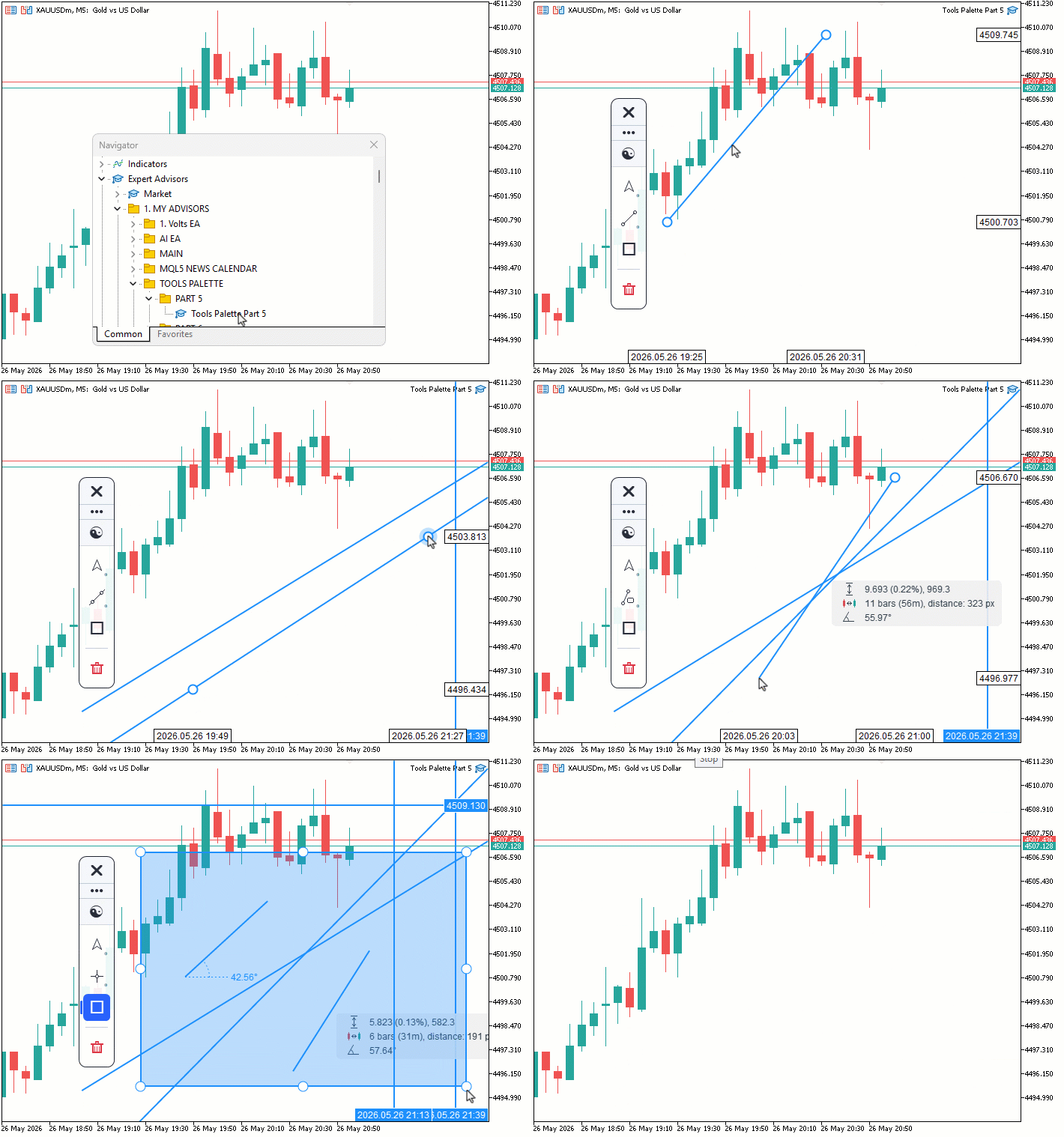
During testing, the sidebar tiles updated dynamically to reflect the last-used tool per category. Placed objects responded correctly to hover and selection, with handle circles appearing at anchor points. Dragging handles reshaped objects in real time, whole-object drags translated positions cleanly, and pressing Delete removed the selected object immediately. The rubber-band preview tracked the cursor accurately during multi-click placements, and pointer mode kept the chart scroll locked throughout all object interactions.
Conclusion
In conclusion, we have replaced the native MetaTrader chart object drawing system from the previous version with a fully canvas-based drawing engine that renders every tool pixel-by-pixel onto a dedicated full-chart bitmap layer. We implemented a persistent object storage system with per-tool style memory, a complete hit testing framework covering all registered tool types, and a pointer tool that supports object selection, whole-object dragging, individual handle manipulation, and deletion. We also reorganized the category system with a live delete action tile, introduced dynamic sidebar tile icons that reflect the last-used tool per category, and added permanent axis label pills for horizontal and vertical lines. After reading this article, you will be able to:
- Build a canvas-based drawing engine in MQL5 that stores, renders, and redraws objects persistently without relying on native chart objects
- Implement pixel-level hit testing for multiple tool types and use it to drive object selection, handle dragging, and whole-object translation on a dedicated canvas layer
- Add a last-used tool memory system to a sidebar so category tiles always reflect the most recently activated tool and activate it directly on click
In the next part of the series, we will extend the drawing engine with the full channel, Fibonacci, Gann, and pitchfork tool families — covering the parallel channel, regression channel, standard deviation channel, all three pitchfork variants, the six Fibonacci tools, and the complete Gann suite. Stay tuned.
Attachments
| S/N | Name | Type | Description |
|---|---|---|---|
| 1 | Tools Palette Part 5.mq5 | Expert Advisor | The main program entry point that includes the shell header, declares the global sidebar instance, and forwards initialization, deinitialization, chart events, timer ticks, and price ticks to the sidebar |
| 2 | ToolsPalette_Crosshair.mqh | Include file | Owns the crosshair and measure mode manager class, its canvas lifecycle, chart resize handler, and all crosshair rendering and event handling logic |
| 3 | ToolsPalette_Engine_Interact.mqh | Include file | Implements the hit testing system including the rotated rectangle point test, per-tool hit test methods, the main hit test dispatch loop, and the full pointer tool interaction handlers for mouse move, click, drag move, drag release, and object deletion |
| 4 | ToolsPalette_Engine_Render.mqh | Include file | Implements the full redraw cycle including per-object draw dispatch, handle hide and halo configuration, rubber-band preview rendering, permanent axis label pill rendering for horizontal and vertical lines, canvas flush, and axis label canvas updates |
| 5 | ToolsPalette_Lines.mqh | Include file | Defines the line tools class with all per-tool canvas draw routines for trend lines, horizontal lines, vertical lines, cross lines, ray lines, extended lines, info lines, angle lines, and rectangles, plus the anchor handle renderer, hit testing methods, and canvas-based tool icon drawing |
| 6 | ToolsPalette_Primitives.mqh | Include file | Defines the three input parameters, the theme color set structure, the global rendering free functions for opacity conversion, pixel blending, anti-aliased thick lines, and line style pattern building, and the canvas primitives class with anti-aliased filled and bordered circle methods |
| 7 | ToolsPalette_Shell.mqh | Include file | Owns the top-level event dispatcher class with the tool toggle cleanup sequence, scroll lock management for pointer and drawing modes, timer-driven cursor blink for label editing, and the action category flyout click handler |
| 8 | ToolsPalette_Sidebar.mqh | Include file | Owns the sidebar layout and rendering including the dynamic category tile icons using last-used tool memory, the action category branch with danger red coloring and trash bin icon, the group divider above the delete tile, and the flyout panel with all tool entries |
| 9 | ToolsPalette_Tools.mqh | Include file | Defines the full tool type and category enumerations, the tool registry class with category definitions and last-used tool memory, the drawn object struct with all style and level array fields, and the drawing engine class declaration with the full object lifecycle, canvas management, hit testing, pointer interaction, and label editing method set |
| 10 | Tools Palette Part 5.zip | Archive | A ready-to-extract archive containing all nine project files in a single folder. Unzip it into your MetaTrader 5 terminal data folder, and the folder is placed under MQL5/Experts/ with every file in its correct location, ready to compile. |
Warning: All rights to these materials are reserved by MetaQuotes Ltd. Copying or reprinting of these materials in whole or in part is prohibited.
This article was written by a user of the site and reflects their personal views. MetaQuotes Ltd is not responsible for the accuracy of the information presented, nor for any consequences resulting from the use of the solutions, strategies or recommendations described.

 Low-Frequency Quantitative Strategies in MetaTrader 5 (Part 3): A Regime-Adaptive Mean-Reversion Swing Trading System
 MetaTrader 5 Machine Learning Blueprint (Part 17): CPCV Backtesting — From Python Model to Tick-Level Evidence
 Market Simulation (Part 23): Getting Started with SQL (VI)
 Automating Classic Market Methods in MQL5 (Part 1): Wyckoff Accumulation and Distribution

- Free trading apps
- Over 8,000 signals for copying
- Economic news for exploring financial markets
You agree to website policy and terms of use