

MQL5 Trading Tools (Part 32): Crosshair, Magnifier, and Measure Mode
 3 697
3 697
 2
2

Introduction
Selecting a tool and placing it on the chart works. However, once the object is drawn, you are left staring at raw price action with no precise way to inspect what is underneath the cursor. There is no crosshair to track your exact position. You see no axis labels showing the price and time you are hovering. There is no magnified view to read congested candles without zooming the entire chart. There is also no quick way to measure the distance between two points in bars and pips. Without these navigation aids, the palette handles output well but provides no input-side analysis. This article is for MetaQuotes Language 5 (MQL5) developers building interactive sidebars and for algorithmic traders using such tools.
In our previous article (Part 31), we added full interactivity to the Tools Palette. We implemented flyout menus for tool selection and a chart event handler, routing all mouse and keyboard interactions. We also added a drawing engine supporting single-click, two-click, and three-click object placement. Panel dragging with edge snapping, bottom-edge resizing, scrollable lists, hover highlights, and live theme toggling were also included. In Part 32, we introduce a crosshair manager class. It adds eleven canvas layers for a reticle tick-mark overlay, full-width and full-height crosshair lines, and price and time axis labels. It also includes a circular magnifier lens that renders zoomed candle content and a double-click measure mode with anchor markers, a diagonal line, and floating bar and pip statistics. We will cover the following topics:
- What the Crosshair Reticle and Magnifier Lens Bring to the Chart
- Implementation in MQL5
- Backtesting
- Conclusion
By the end, you will have a crosshair system with reticle markers, axis labels, a zoomed magnifier lens, and a measure mode that gives you instant bar count and pip distance between any two chart points.
What the Crosshair Reticle and Magnifier Lens Bring to the Chart
The previous parts gave the sidebar the ability to select and place drawing tools, but once you move the cursor onto the chart, there is no visual feedback about where you are pointing. The default MetaTrader 5 crosshair exists, but it cannot be customized and does not offer magnification. We fill that gap here.
The crosshair system we added consists of several layered elements that work together. A reticle overlay draws tick-mark crosses offset from the cursor center, giving a precise aiming reference without cluttering the exact point you are targeting. Full-width horizontal and full-height vertical lines extend across the entire chart from the cursor position, and price and time axis labels snap to the right and bottom edges, showing the exact value under the cursor.
A circular magnifier lens follows the cursor and renders a zoomed view of the surrounding candles inside a bordered bubble, complete with wicks, bodies, bid and ask lines, and a price label, so you can read congested areas without changing the chart zoom level. Double-clicking locks a measure anchor at that point, after which a diagonal line connects the anchor to the moving cursor, while a floating label displays the bar count, pip distance, and raw price difference in real time.
On the chart, this means you can hover any area and immediately see the exact price and time, inspect tight candle clusters through the magnifier without losing your chart context, and double-click two points to get an instant distance measurement. When you hover over the sidebar or flyout, all crosshair elements hide automatically so they do not interfere with tool selection, and toggling the theme redraws every crosshair canvas in the new foreground color.
We will achieve this in four steps. First, we add eight input parameters for reticle, magnifier, and axis label customization. Second, we add a Bresenham line drawing method for the measure diagonal. Third, we add eleven new canvas layers managed by a dedicated crosshair manager class inserted between the sidebar renderer and the chart event handler. Finally, we update the event handler and top-level shell for crosshair mouse tracking, double-click detection, and theme-aware canvas refresh. Here is a visualization of what we will be achieving.

Implementation in MQL5
Adding Crosshair and Magnifier Input Parameters
These new inputs give the user full control over the crosshair reticle appearance, magnifier behavior, and axis label styling without modifying any code.
//+------------------------------------------------------------------+
//|                                         Tools Palette Part 4.mq5 |
//|                           Copyright 2026, Allan Munene Mutiiria. |
//|                                   https://t.me/Forex_Algo_Trader |
//+------------------------------------------------------------------+
#property copyright "Copyright 2026, Allan Munene Mutiiria."
#property link      "https://t.me/Forex_Algo_Trader"
#property version   "1.00"
#property strict

//---

input int    ReticleOffset     = 30;   // Crosshair Reticle Offset (px)
input int    ReticleTickLen    = 14;   // Crosshair Reticle Tick Length (px)
input int    ReticleThickness  = 2;    // Crosshair Reticle Tick Thickness (px)
input int    MagDiameter       = 180;  // Magnifier Diameter (px)
input double MagZoom           = 3.0;  // Magnifier Zoom Factor
input int    MagOffset         = 45;   // Magnifier Offset From Cursor (px)
input int    AxisLabelFontSize = 9;   // Axis Label Font Size (pt)
input string AxisLabelFont     = "Arial"; // Axis Label Font
We declare eight new input parameters alongside the existing sidebar inputs. The first three control the reticle tick-marks: the offset sets how far the ticks sit from the cursor center, the tick length defines their span, and the thickness sets their pixel width. The next three control the magnifier lens: the diameter sets the bubble size, the zoom factor determines how much the candle content is enlarged inside the lens, and the offset controls how far the magnifier floats from the cursor. The final two parameters set the font size and font name used for the price and time axis labels that appear at the chart edges when the crosshair is active. Next, we will add a new method to handle line drawing.
Adding Bresenham Line Drawing to the Canvas Primitives
The measure mode needs a diagonal line connecting the anchor point to the moving cursor, so we add a pixel-level line drawing method to the primitives class.
//+------------------------------------------------------------------+
//| CLASS 1 — Blend and draw low-level canvas primitives             |
//+------------------------------------------------------------------+
class CCanvasPrimitives
  {
protected:
   //--- EXISTING METHODS

   //--- Draw a line using Bresenham's algorithm with alpha blending
   void DrawBresenhamLine(CCanvas &canvas, int x0, int y0, int x1, int y1, uint argb);
  };

//+------------------------------------------------------------------+
//| Draw a line between two points using Bresenham's algorithm       |
//+------------------------------------------------------------------+
void CCanvasPrimitives::DrawBresenhamLine(CCanvas &canvas, int x0, int y0, int x1, int y1, uint argb)
  {
   //--- Compute absolute deltas and step directions
   int dx = MathAbs(x1 - x0), dy = MathAbs(y1 - y0);
   int sx = (x0 < x1) ? 1 : -1, sy = (y0 < y1) ? 1 : -1, err = dx - dy;
   int w = canvas.Width(), h = canvas.Height();
   //--- Iterate pixel by pixel until the endpoint is reached
   while (true)
     {
      //--- Blend the current pixel onto the canvas if within bounds
      if (x0 >= 0 && x0 < w && y0 >= 0 && y0 < h) BlendPixelSet(canvas, x0, y0, argb);
      //--- Stop when the endpoint is reached
      if (x0 == x1 && y0 == y1) break;
      int e2 = 2 * err;
      if (e2 > -dy) { err -= dy; x0 += sx; }
      if (e2 <  dx) { err += dx; y0 += sy; }
     }
  }
Here, we extend the "CCanvasPrimitives" class with the "DrawBresenhamLine" method, which implements Bresenham's line algorithm — a classic approach for drawing straight lines on pixel grids without gaps or floating-point overhead. The method computes the absolute deltas and step directions between the two endpoints, then iterates pixel by pixel using an integer error accumulator to decide whether to step horizontally, vertically, or both at each iteration. Each pixel along the path is blended onto the canvas using "BlendPixelSet" with bounds checking, and the loop terminates once the endpoint is reached. This method is used by the measure mode to draw the diagonal line from the locked anchor to the current cursor position on a full-screen canvas. The next thing we will do is expand the canvas layer with a crosshair and measure surfaces.
Expanding the Canvas Layer with Crosshair and Measure Surfaces
The canvas layer class grows from four canvases to fifteen, providing an independent drawing surface for every visual element in the crosshair and measure system.
//+------------------------------------------------------------------+
//| CLASS 4 — Create, destroy, and resize all canvas layers          |
//+------------------------------------------------------------------+
class CCanvasLayer : public CToolRegistry
  {
protected:
   int     m_supersampleFactor;         // Supersampling multiplier for high-res rendering
   long    m_chartId;                   // Chart identifier this layer belongs to

   CCanvas m_canvasSidebar;             // Final display-resolution sidebar canvas
   CCanvas m_canvasSidebarHighRes;      // High-resolution sidebar canvas for supersampling
   CCanvas m_canvasFlyout;              // Final display-resolution flyout canvas
   CCanvas m_canvasFlyoutHighRes;       // High-resolution flyout canvas for supersampling
   CCanvas m_canvasReticle;             // Crosshair reticle tick-mark canvas
   CCanvas m_canvasMagnifier;           // Circular magnifier lens canvas
   CCanvas m_canvasCrossVertical;       // Crosshair vertical line canvas (1 × chartH)
   CCanvas m_canvasCrossHorizontal;     // Crosshair horizontal line canvas (chartW × 1)
   CCanvas m_canvasCrossPriceLabel;     // Crosshair price axis label canvas
   CCanvas m_canvasCrossTimeLabel;      // Crosshair time axis label canvas
   CCanvas m_canvasMeasureVertical;     // Measure mode vertical anchor line canvas
   CCanvas m_canvasMeasureHorizontal;   // Measure mode horizontal anchor line canvas
   CCanvas m_canvasMeasurePriceLabel;   // Measure mode price axis label canvas
   CCanvas m_canvasMeasureTimeLabel;    // Measure mode time axis label canvas
   CCanvas m_canvasMeasureDiagonalLine; // Measure mode diagonal line canvas (chartW × chartH)

   string  m_nameSidebar;               // Object name of the sidebar bitmap label
   string  m_nameFlyout;                // Object name of the flyout bitmap label
   string  m_nameReticle;               // Object name of the reticle bitmap label
   string  m_nameMagnifier;             // Object name of the magnifier bitmap label
   string  m_nameCrossVertical;         // Object name of the crosshair vertical bitmap label
   string  m_nameCrossHorizontal;       // Object name of the crosshair horizontal bitmap label
   string  m_nameCrossPriceLabel;       // Object name of the crosshair price label bitmap
   string  m_nameCrossTimeLabel;        // Object name of the crosshair time label bitmap
   string  m_nameMeasureVertical;       // Object name of the measure vertical bitmap label
   string  m_nameMeasureHorizontal;     // Object name of the measure horizontal bitmap label
   string  m_nameMeasurePriceLabel;     // Object name of the measure price label bitmap
   string  m_nameMeasureTimeLabel;      // Object name of the measure time label bitmap
   string  m_nameMeasureDiagonalLine;   // Object name of the measure diagonal line bitmap

protected:
   //--- Create all canvas objects at the given sidebar dimensions
   bool CreateAllCanvases(int w, int h);
   //--- Destroy all canvas objects and remove chart objects
   void DestroyAllCanvases();
   //--- Resize both sidebar canvases to the given dimensions
   void ResizeSidebarCanvases(int w, int h);
   //--- Fill the crosshair vertical line canvas with the foreground colour
   void DrawCrossVerticalLinePixels(int chartH);
   //--- Fill the crosshair horizontal line canvas with the foreground colour
   void DrawCrossHorizontalLinePixels(int chartW);
   //--- Fill the measure vertical line canvas with the foreground colour at reduced opacity
   void DrawMeasureVerticalLinePixels(int chartH);
   //--- Fill the measure horizontal line canvas with the foreground colour at reduced opacity
   void DrawMeasureHorizontalLinePixels(int chartW);
  };

//+------------------------------------------------------------------+
//| Create all canvas objects at the given sidebar dimensions        |
//+------------------------------------------------------------------+
bool CCanvasLayer::CreateAllCanvases(int w, int h)
  {
   //--- Read current chart dimensions for full-width/height canvas sizing
   int chartW = (int)ChartGetInteger(0, CHART_WIDTH_IN_PIXELS);
   int chartH = (int)ChartGetInteger(0, CHART_HEIGHT_IN_PIXELS);
   //--- Create the display-resolution sidebar bitmap label canvas
   if (!m_canvasSidebar.CreateBitmapLabel(0, 0, m_nameSidebar, 0, 0, w, h, COLOR_FORMAT_ARGB_NORMALIZE))
     { Print("Failed to create sidebar canvas"); return false; }
   //--- Create the high-resolution sidebar canvas for supersampled drawing
   if (!m_canvasSidebarHighRes.Create("ToolsPalette_SidebarHR", w * m_supersampleFactor, h * m_supersampleFactor, COLOR_FORMAT_ARGB_NORMALIZE))
     { Print("Failed to create sidebar HR canvas"); return false; }
   //--- Create the display-resolution flyout bitmap label canvas
   if (!m_canvasFlyout.CreateBitmapLabel(0, 0, m_nameFlyout, 0, 0, 200, 200, COLOR_FORMAT_ARGB_NORMALIZE))
     { Print("Failed to create flyout canvas"); return false; }
   //--- Create the high-resolution flyout canvas for supersampled drawing
   if (!m_canvasFlyoutHighRes.Create("ToolsPalette_FlyoutHR", 200 * m_supersampleFactor, 200 * m_supersampleFactor, COLOR_FORMAT_ARGB_NORMALIZE))
     { Print("Failed to create flyout HR canvas"); return false; }
   //--- Create the reticle canvas sized to fit the tick-mark geometry
   int reticleSize = 2 * (ReticleOffset + ReticleTickLen / 2) + 6;
   if (!m_canvasReticle.CreateBitmapLabel(0, 0, m_nameReticle, 0, 0, reticleSize, reticleSize, COLOR_FORMAT_ARGB_NORMALIZE))
     { Print("Failed to create reticle canvas"); return false; }
   //--- Hide the reticle until the crosshair tool is active
   ObjectSetInteger(0, m_nameReticle, OBJPROP_TIMEFRAMES, OBJ_NO_PERIODS);
   ObjectSetInteger(0, m_nameReticle, OBJPROP_ZORDER, 90);
   //--- Create the magnifier lens canvas
   if (!m_canvasMagnifier.CreateBitmapLabel(0, 0, m_nameMagnifier, 0, 0, MagDiameter, MagDiameter, COLOR_FORMAT_ARGB_NORMALIZE))
     { Print("Failed to create magnifier canvas"); return false; }
   //--- Hide the magnifier until the crosshair tool is active
   ObjectSetInteger(0, m_nameMagnifier, OBJPROP_TIMEFRAMES, OBJ_NO_PERIODS);
   ObjectSetInteger(0, m_nameMagnifier, OBJPROP_ZORDER, 95);
   //--- Create the crosshair vertical line canvas (1 pixel wide, full chart height)
   if (!m_canvasCrossVertical.CreateBitmapLabel(0, 0, m_nameCrossVertical, 0, 0, 1, chartH, COLOR_FORMAT_ARGB_NORMALIZE))
     { Print("Failed to create cross vertical canvas"); return false; }
   ObjectSetInteger(0, m_nameCrossVertical, OBJPROP_TIMEFRAMES, OBJ_NO_PERIODS);
   ObjectSetInteger(0, m_nameCrossVertical, OBJPROP_ZORDER, 80);
   //--- Pre-fill the vertical line pixels with the chart foreground colour
   DrawCrossVerticalLinePixels(chartH);
   //--- Create the crosshair horizontal line canvas (full chart width, 1 pixel tall)
   if (!m_canvasCrossHorizontal.CreateBitmapLabel(0, 0, m_nameCrossHorizontal, 0, 0, chartW, 1, COLOR_FORMAT_ARGB_NORMALIZE))
     { Print("Failed to create cross horizontal canvas"); return false; }
   ObjectSetInteger(0, m_nameCrossHorizontal, OBJPROP_TIMEFRAMES, OBJ_NO_PERIODS);
   ObjectSetInteger(0, m_nameCrossHorizontal, OBJPROP_ZORDER, 80);
   //--- Pre-fill the horizontal line pixels with the chart foreground colour
   DrawCrossHorizontalLinePixels(chartW);
   //--- Create the crosshair price axis label canvas
   if (!m_canvasCrossPriceLabel.CreateBitmapLabel(0, 0, m_nameCrossPriceLabel, 0, 0, 80, 18, COLOR_FORMAT_ARGB_NORMALIZE))
     { Print("Failed to create cross price label canvas"); return false; }
   ObjectSetInteger(0, m_nameCrossPriceLabel, OBJPROP_TIMEFRAMES, OBJ_NO_PERIODS);
   ObjectSetInteger(0, m_nameCrossPriceLabel, OBJPROP_ZORDER, 85);
   //--- Create the crosshair time axis label canvas
   if (!m_canvasCrossTimeLabel.CreateBitmapLabel(0, 0, m_nameCrossTimeLabel, 0, 0, 140, 18, COLOR_FORMAT_ARGB_NORMALIZE))
     { Print("Failed to create cross time label canvas"); return false; }
   ObjectSetInteger(0, m_nameCrossTimeLabel, OBJPROP_TIMEFRAMES, OBJ_NO_PERIODS);
   ObjectSetInteger(0, m_nameCrossTimeLabel, OBJPROP_ZORDER, 85);
   //--- Create the measure mode vertical anchor line canvas
   if (!m_canvasMeasureVertical.CreateBitmapLabel(0, 0, m_nameMeasureVertical, 0, 0, 1, chartH, COLOR_FORMAT_ARGB_NORMALIZE))
     { Print("Failed to create measure vertical canvas"); return false; }
   ObjectSetInteger(0, m_nameMeasureVertical, OBJPROP_TIMEFRAMES, OBJ_NO_PERIODS);
   ObjectSetInteger(0, m_nameMeasureVertical, OBJPROP_ZORDER, 79);
   //--- Pre-fill the measure vertical pixels at reduced opacity
   DrawMeasureVerticalLinePixels(chartH);
   //--- Create the measure mode horizontal anchor line canvas
   if (!m_canvasMeasureHorizontal.CreateBitmapLabel(0, 0, m_nameMeasureHorizontal, 0, 0, chartW, 1, COLOR_FORMAT_ARGB_NORMALIZE))
     { Print("Failed to create measure horizontal canvas"); return false; }
   ObjectSetInteger(0, m_nameMeasureHorizontal, OBJPROP_TIMEFRAMES, OBJ_NO_PERIODS);
   ObjectSetInteger(0, m_nameMeasureHorizontal, OBJPROP_ZORDER, 79);
   //--- Pre-fill the measure horizontal pixels at reduced opacity
   DrawMeasureHorizontalLinePixels(chartW);
   //--- Create the measure mode price axis label canvas
   if (!m_canvasMeasurePriceLabel.CreateBitmapLabel(0, 0, m_nameMeasurePriceLabel, 0, 0, 80, 18, COLOR_FORMAT_ARGB_NORMALIZE))
     { Print("Failed to create measure price label canvas"); return false; }
   ObjectSetInteger(0, m_nameMeasurePriceLabel, OBJPROP_TIMEFRAMES, OBJ_NO_PERIODS);
   ObjectSetInteger(0, m_nameMeasurePriceLabel, OBJPROP_ZORDER, 84);
   //--- Create the measure mode time axis label canvas
   if (!m_canvasMeasureTimeLabel.CreateBitmapLabel(0, 0, m_nameMeasureTimeLabel, 0, 0, 140, 18, COLOR_FORMAT_ARGB_NORMALIZE))
     { Print("Failed to create measure time label canvas"); return false; }
   ObjectSetInteger(0, m_nameMeasureTimeLabel, OBJPROP_TIMEFRAMES, OBJ_NO_PERIODS);
   ObjectSetInteger(0, m_nameMeasureTimeLabel, OBJPROP_ZORDER, 84);
   //--- Create the measure mode diagonal line canvas (full chart size)
   if (!m_canvasMeasureDiagonalLine.CreateBitmapLabel(0, 0, m_nameMeasureDiagonalLine, 0, 0, chartW, chartH, COLOR_FORMAT_ARGB_NORMALIZE))
     { Print("Failed to create measure diagonal canvas"); return false; }
   ObjectSetInteger(0, m_nameMeasureDiagonalLine, OBJPROP_TIMEFRAMES, OBJ_NO_PERIODS);
   ObjectSetInteger(0, m_nameMeasureDiagonalLine, OBJPROP_ZORDER, 78);
   //--- Clear the diagonal canvas to fully transparent and flush
   m_canvasMeasureDiagonalLine.Erase(0x00000000);
   m_canvasMeasureDiagonalLine.Update();
   return true;
  }

//+------------------------------------------------------------------+
//| Destroy all canvas objects and remove chart objects              |
//+------------------------------------------------------------------+
void CCanvasLayer::DestroyAllCanvases()
  {
   //--- ALL canvas objects created with CreateBitmapLabel need explicit ObjectDelete
   //--- after Destroy() — without it they stay as ghost objects on the chart and
   //--- CreateBitmapLabel fails silently on the next Init() call (parameter change restart)
   m_canvasSidebar.Destroy();             ObjectDelete(0, m_nameSidebar);
   m_canvasSidebarHighRes.Destroy();
   m_canvasFlyout.Destroy();              ObjectDelete(0, m_nameFlyout);
   m_canvasFlyoutHighRes.Destroy();
   m_canvasReticle.Destroy();             ObjectDelete(0, m_nameReticle);
   m_canvasMagnifier.Destroy();           ObjectDelete(0, m_nameMagnifier);
   m_canvasCrossVertical.Destroy();       ObjectDelete(0, m_nameCrossVertical);
   m_canvasCrossHorizontal.Destroy();     ObjectDelete(0, m_nameCrossHorizontal);
   m_canvasCrossPriceLabel.Destroy();     ObjectDelete(0, m_nameCrossPriceLabel);
   m_canvasCrossTimeLabel.Destroy();      ObjectDelete(0, m_nameCrossTimeLabel);
   m_canvasMeasureVertical.Destroy();     ObjectDelete(0, m_nameMeasureVertical);
   m_canvasMeasureHorizontal.Destroy();   ObjectDelete(0, m_nameMeasureHorizontal);
   m_canvasMeasurePriceLabel.Destroy();   ObjectDelete(0, m_nameMeasurePriceLabel);
   m_canvasMeasureTimeLabel.Destroy();    ObjectDelete(0, m_nameMeasureTimeLabel);
   m_canvasMeasureDiagonalLine.Destroy(); ObjectDelete(0, m_nameMeasureDiagonalLine);
  }

//+------------------------------------------------------------------+
//| Fill the crosshair vertical line canvas with foreground colour   |
//+------------------------------------------------------------------+
void CCanvasLayer::DrawCrossVerticalLinePixels(int chartH)
  {
   //--- Clear the canvas to fully transparent
   m_canvasCrossVertical.Erase(0x00000000);
   //--- Pack the chart foreground colour at full opacity
   uint col = ColorToARGB((color)ChartGetInteger(0, CHART_COLOR_FOREGROUND), 255);
   //--- Set every pixel in the single-column canvas to the foreground colour
   for (int y = 0; y < chartH; y++) m_canvasCrossVertical.PixelSet(0, y, col);
   m_canvasCrossVertical.Update();
  }

//+------------------------------------------------------------------+
//| Fill the crosshair horizontal line canvas with foreground colour |
//+------------------------------------------------------------------+
void CCanvasLayer::DrawCrossHorizontalLinePixels(int chartW)
  {
   //--- Clear the canvas to fully transparent
   m_canvasCrossHorizontal.Erase(0x00000000);
   //--- Pack the chart foreground colour at full opacity
   uint col = ColorToARGB((color)ChartGetInteger(0, CHART_COLOR_FOREGROUND), 255);
   //--- Set every pixel in the single-row canvas to the foreground colour
   for (int x = 0; x < chartW; x++) m_canvasCrossHorizontal.PixelSet(x, 0, col);
   m_canvasCrossHorizontal.Update();
  }

//+------------------------------------------------------------------+
//| Fill measure vertical line canvas at reduced opacity             |
//+------------------------------------------------------------------+
void CCanvasLayer::DrawMeasureVerticalLinePixels(int chartH)
  {
   //--- Clear the canvas to fully transparent
   m_canvasMeasureVertical.Erase(0x00000000);
   //--- Pack the chart foreground colour at 200/255 opacity for visual distinction
   uint col = ColorToARGB((color)ChartGetInteger(0, CHART_COLOR_FOREGROUND), 200);
   //--- Set every pixel in the single-column canvas
   for (int y = 0; y < chartH; y++) m_canvasMeasureVertical.PixelSet(0, y, col);
   m_canvasMeasureVertical.Update();
  }

//+------------------------------------------------------------------+
//| Fill measure horizontal line canvas at reduced opacity           |
//+------------------------------------------------------------------+
void CCanvasLayer::DrawMeasureHorizontalLinePixels(int chartW)
  {
   //--- Clear the canvas to fully transparent
   m_canvasMeasureHorizontal.Erase(0x00000000);
   //--- Pack the chart foreground colour at 200/255 opacity for visual distinction
   uint col = ColorToARGB((color)ChartGetInteger(0, CHART_COLOR_FOREGROUND), 200);
   //--- Set every pixel in the single-row canvas
   for (int x = 0; x < chartW; x++) m_canvasMeasureHorizontal.PixelSet(x, 0, col);
   m_canvasMeasureHorizontal.Update();
  }
We expand the "CCanvasLayer" class with eleven new canvas members and their corresponding object name strings. These cover the reticle tick-mark canvas, the circular magnifier lens canvas, a one-pixel-wide vertical and one-pixel-tall horizontal crosshair line canvas spanning the full chart dimensions, price and time axis label canvases for the crosshair, matching vertical, horizontal, price label, and time label canvases for the measure mode anchor, and a full-screen diagonal line canvas for the measure connector. We also declare four new helper methods for pre-filling the crosshair and measure line canvases.
The "CreateAllCanvases" method now reads the chart dimensions with ChartGetInteger and creates all fifteen canvases in sequence. After the existing sidebar and flyout canvases, we create the reticle canvas sized to fit the tick-mark geometry from the input parameters, the magnifier canvas sized by the magnifier diameter input, and the crosshair vertical and horizontal canvases at one pixel by full chart height and full chart width by one pixel respectively. We pre-fill both crosshair line canvases with the chart foreground color immediately after creation. We then create the price and time axis label canvases, followed by the measure mode equivalents where the vertical and horizontal line canvases are pre-filled at reduced opacity for visual distinction from the live crosshair. Finally, we create the full-screen diagonal canvas and clear it to transparent. Each canvas receives a z-order setting to ensure correct layering and starts hidden with OBJ_NO_PERIODS until the crosshair tool is activated.
The "DestroyAllCanvases" method now destroys all fifteen canvases, calling ObjectDelete explicitly after each bitmap label destruction to prevent ghost objects from lingering on the chart and causing silent creation failures on the next initialization.
The four-line pixel helper methods follow the same pattern. "DrawCrossVerticalLinePixels" and "DrawCrossHorizontalLinePixels" clear their canvas, pack the chart foreground color at full opacity using ColorToARGB, and fill every pixel in the single-column or single-row canvas. "DrawMeasureVerticalLinePixels" and "DrawMeasureHorizontalLinePixels" do the same, but at an opacity of 200 out of 255, giving the measure anchor lines a slightly faded appearance that visually separates them from the moving crosshair lines. To manage the crosshair, we introduce a dedicated class that centralizes the logic for easier future changes. Since this is a new class, let us define the class and its members first.
Declaring the Crosshair Manager Class
This entirely new class sits between the sidebar renderer and the chart event handler, managing all crosshair, reticle, magnifier, and measure mode visual elements.
//+------------------------------------------------------------------+
//| CLASS 8 — Manage crosshair, reticle, magnifier, and measure mode |
//+------------------------------------------------------------------+
class CCrosshairManager : public CSidebarRenderer
  {
protected:
   int      m_reticleCanvasSize;            // Pixel size of the square reticle canvas
   bool     m_isReticleVisible;             // Flag indicating the reticle is currently shown
   bool     m_isMagnifierVisible;           // Flag indicating the magnifier lens is shown
   bool     m_isCrossVertVisible;           // Flag indicating the vertical crosshair line is shown
   bool     m_isCrossHorizVisible;          // Flag indicating the horizontal crosshair line is shown
   bool     m_isCrossPriceLabelVisible;     // Flag indicating the crosshair price label is shown
   bool     m_isCrossTimeLabelVisible;      // Flag indicating the crosshair time label is shown
   bool     m_isMeasureVertVisible;         // Flag indicating the measure vertical anchor line is shown
   bool     m_isMeasureHorizVisible;        // Flag indicating the measure horizontal anchor line is shown
   bool     m_isMeasurePriceLabelVisible;   // Flag indicating the measure price label is shown
   bool     m_isMeasureTimeLabelVisible;    // Flag indicating the measure time label is shown
   bool     m_isMeasureDiagonalVisible;     // Flag indicating the measure diagonal line is shown
   bool     m_isMeasuringActive;            // Flag indicating measure mode is locked to an anchor point
   datetime m_measureAnchorTime;            // Chart time of the measure mode anchor point
   double   m_measureAnchorPrice;           // Price level of the measure mode anchor point
   int      m_measureAnchorPixelX;          // Screen X of the measure mode anchor point
   int      m_measureAnchorPixelY;          // Screen Y of the measure mode anchor point
   ulong    m_lastClickTimeMicros;          // Microsecond timestamp of the last mouse click
   int      m_lastMagMouseX;                // Last mouse X used to draw the magnifier lens
   int      m_lastMagMouseY;                // Last mouse Y used to draw the magnifier lens

protected:
   //--- Draw the reticle tick-mark crosses onto the reticle canvas
   void DrawReticleTickMarks();
   //--- Make the reticle canvas visible on the chart
   void ShowReticle();
   //--- Hide the reticle canvas from the chart
   void HideReticle();
   //--- Move the reticle canvas to follow the mouse cursor
   void UpdateReticlePosition(int mouseX, int mouseY);
   //--- Make the crosshair vertical line canvas visible
   void ShowCrossVertical();
   //--- Hide the crosshair vertical line canvas
   void HideCrossVertical();
   //--- Move the crosshair vertical line to the given screen X
   void UpdateCrossVerticalPosition(int mouseX);
   //--- Make the crosshair horizontal line canvas visible
   void ShowCrossHorizontal();
   //--- Hide the crosshair horizontal line canvas
   void HideCrossHorizontal();
   //--- Move the crosshair horizontal line to the given screen Y
   void UpdateCrossHorizontalPosition(int mouseY);
   //--- Make the crosshair price axis label visible
   void ShowCrossPriceLabel();
   //--- Hide the crosshair price axis label
   void HideCrossPriceLabel();
   //--- Make the crosshair time axis label visible
   void ShowCrossTimeLabel();
   //--- Hide the crosshair time axis label
   void HideCrossTimeLabel();
   //--- Draw and position one axis label canvas next to the crosshair
   void DrawAndPositionAxisLabel(CCanvas &labelCanvas, string objectName, string labelText,
                                  bool isPriceAxis, int crosshairPixelPos, int chartWidth, int chartHeight);
   //--- Update both crosshair axis labels to reflect the current mouse position
   void UpdateCrosshairAxisLabels(int mouseX, int mouseY, datetime barTime, double barPrice);
   //--- Show all measure mode line and label canvases
   void ShowMeasureLines();
   //--- Hide all measure mode line and label canvases
   void HideMeasureLines();
   //--- Move the measure vertical anchor line to the given screen X
   void UpdateMeasureVerticalPosition(int pixelX);
   //--- Move the measure horizontal anchor line to the given screen Y
   void UpdateMeasureHorizontalPosition(int pixelY);
   //--- Update the measure anchor axis labels at the anchor chart coordinate
   void UpdateMeasureAnchorLabels();
   //--- Make the magnifier lens canvas visible
   void ShowMagnifier();
   //--- Hide the magnifier lens canvas
   void HideMagnifier();
   //--- Move the magnifier and redraw its lens content if the mouse has moved
   void UpdateMagnifierPosition(int mouseX, int mouseY, datetime barTime, double barPrice);
   //--- Render the zoomed candle chart content inside the circular magnifier lens
   void DrawMagnifierLensContent(int mouseX, int mouseY, datetime centerTime, double centerPrice);
   //--- Redraw the measure diagonal line from the anchor to the current mouse position
   void UpdateMeasureDiagonalLine(int currentMouseX, int currentMouseY);
   //--- Update the floating measure info label near the cursor with bar/pip statistics
   void UpdateMeasurementInfoLabel(int mouseX, int mouseY, datetime barTime, double barPrice);
   //--- Hide all crosshair element canvases in one call
   void HideAllCrosshairElements();
   //--- Show all crosshair element canvases in one call
   void ShowAllCrosshairElements();
   //--- Handle a potential double-click to toggle measure mode anchor
   void HandleCrosshairDoubleClick(int mouseX, int mouseY, datetime barTime, double barPrice);
   //--- Delete all measure mode chart objects and hide canvases
   void DeleteAllMeasureObjects();
  };
Here, we declare the "CCrosshairManager" class, which inherits from "CSidebarRenderer" and introduces twenty protected member variables. These include the reticle canvas size, visibility flags for each of the eleven crosshair and measure canvases, a flag tracking whether measure mode is actively locked to an anchor point, the anchor's chart time, price, and screen pixel coordinates, a microsecond timestamp for double-click detection, and cached magnifier mouse coordinates to avoid redundant lens redraws when the cursor has not moved.
The class declares thirty protected methods organized into four groups. The reticle group covers drawing tick marks, showing, hiding, and repositioning the reticle canvas. The crosshair line group handles showing, hiding, and positioning the vertical and horizontal lines, plus showing, hiding, drawing, and positioning the price and time axis labels through a shared "DrawAndPositionAxisLabel" method. The measure mode group manages showing and hiding all measure canvases, positioning the anchor lines, updating anchor labels, drawing the diagonal line, and updating the floating info label with bar count and pip statistics. The magnifier group handles showing, hiding, positioning, and rendering the zoomed candle content inside the circular lens. Finally, two convenience methods show or hide all crosshair elements in a single call, "HandleCrosshairDoubleClick" toggles the measure anchor on double-click, and "DeleteAllMeasureObjects" cleans up all measure mode resources. Let us now define all these methods.
//+------------------------------------------------------------------+
//| Draw the reticle tick-mark crosses onto the reticle canvas       |
//+------------------------------------------------------------------+
void CCrosshairManager::DrawReticleTickMarks()
  {
   //--- Clear the reticle canvas to fully transparent
   m_canvasReticle.Erase(0x00000000);
   //--- Compute the centre of the square reticle canvas
   int cx = m_reticleCanvasSize / 2, cy = m_reticleCanvasSize / 2;
   //--- Cache tick geometry from inputs
   int off = ReticleOffset, tl = ReticleTickLen / 2, th = ReticleThickness;
   //--- Pack the chart foreground colour at slightly reduced opacity
   uint col = ColorToARGB((color)ChartGetInteger(0, CHART_COLOR_FOREGROUND), 230);
   //--- Draw left tick marks above and below the horizontal axis
   m_canvasReticle.FillRectangle(cx - off - tl, cy - th - 1, cx - off + tl, cy - 2,      col);
   m_canvasReticle.FillRectangle(cx - off - tl, cy + 2,      cx - off + tl, cy + th + 1, col);
   //--- Draw right tick marks above and below the horizontal axis
   m_canvasReticle.FillRectangle(cx + off - tl, cy - th - 1, cx + off + tl, cy - 2,      col);
   m_canvasReticle.FillRectangle(cx + off - tl, cy + 2,      cx + off + tl, cy + th + 1, col);
   //--- Draw top tick marks left and right of the vertical axis
   m_canvasReticle.FillRectangle(cx - th - 1, cy - off - tl, cx - 2,      cy - off + tl, col);
   m_canvasReticle.FillRectangle(cx + 2,      cy - off - tl, cx + th + 1, cy - off + tl, col);
   //--- Draw bottom tick marks left and right of the vertical axis
   m_canvasReticle.FillRectangle(cx - th - 1, cy + off - tl, cx - 2,      cy + off + tl, col);
   m_canvasReticle.FillRectangle(cx + 2,      cy + off - tl, cx + th + 1, cy + off + tl, col);
   m_canvasReticle.Update();
  }

//+------------------------------------------------------------------+
//| Make the reticle canvas visible on the chart                     |
//+------------------------------------------------------------------+
void CCrosshairManager::ShowReticle()
  {
   //--- Skip if already visible
   if (m_isReticleVisible) return;
   //--- Draw fresh tick marks before making visible
   DrawReticleTickMarks();
   //--- Make the reticle chart object visible on all timeframes
   ObjectSetInteger(0, m_nameReticle, OBJPROP_TIMEFRAMES, OBJ_ALL_PERIODS);
   m_isReticleVisible = true;
  }

//+------------------------------------------------------------------+
//| Hide the reticle canvas from the chart                           |
//+------------------------------------------------------------------+
void CCrosshairManager::HideReticle()
  {
   //--- Skip if already hidden
   if (!m_isReticleVisible) return;
   ObjectSetInteger(0, m_nameReticle, OBJPROP_TIMEFRAMES, OBJ_NO_PERIODS);
   m_isReticleVisible = false;
  }

//+------------------------------------------------------------------+
//| Move the reticle canvas to follow the mouse cursor               |
//+------------------------------------------------------------------+
void CCrosshairManager::UpdateReticlePosition(int mouseX, int mouseY)
  {
   if (!m_isReticleVisible) return;
   //--- Centre the reticle canvas on the mouse cursor
   int half = m_reticleCanvasSize / 2;
   ObjectSetInteger(0, m_nameReticle, OBJPROP_XDISTANCE, mouseX - half);
   ObjectSetInteger(0, m_nameReticle, OBJPROP_YDISTANCE, mouseY - half);
  }

//+------------------------------------------------------------------+
//| Make the crosshair vertical line canvas visible                  |
//+------------------------------------------------------------------+
void CCrosshairManager::ShowCrossVertical()
  {
   if (m_isCrossVertVisible) return;
   ObjectSetInteger(0, m_nameCrossVertical, OBJPROP_TIMEFRAMES, OBJ_ALL_PERIODS);
   m_isCrossVertVisible = true;
  }

//+------------------------------------------------------------------+
//| Hide the crosshair vertical line canvas                          |
//+------------------------------------------------------------------+
void CCrosshairManager::HideCrossVertical()
  {
   if (!m_isCrossVertVisible) return;
   ObjectSetInteger(0, m_nameCrossVertical, OBJPROP_TIMEFRAMES, OBJ_NO_PERIODS);
   m_isCrossVertVisible = false;
  }

//+------------------------------------------------------------------+
//| Move the crosshair vertical line to the given screen X           |
//+------------------------------------------------------------------+
void CCrosshairManager::UpdateCrossVerticalPosition(int mouseX)
  {
   if (!m_isCrossVertVisible) return;
   //--- Position the 1-pixel-wide canvas at the cursor X
   ObjectSetInteger(0, m_nameCrossVertical, OBJPROP_XDISTANCE, mouseX);
   ObjectSetInteger(0, m_nameCrossVertical, OBJPROP_YDISTANCE, 0);
  }

//+------------------------------------------------------------------+
//| Make the crosshair horizontal line canvas visible                |
//+------------------------------------------------------------------+
void CCrosshairManager::ShowCrossHorizontal()
  {
   if (m_isCrossHorizVisible) return;
   ObjectSetInteger(0, m_nameCrossHorizontal, OBJPROP_TIMEFRAMES, OBJ_ALL_PERIODS);
   m_isCrossHorizVisible = true;
  }

//+------------------------------------------------------------------+
//| Hide the crosshair horizontal line canvas                        |
//+------------------------------------------------------------------+
void CCrosshairManager::HideCrossHorizontal()
  {
   if (!m_isCrossHorizVisible) return;
   ObjectSetInteger(0, m_nameCrossHorizontal, OBJPROP_TIMEFRAMES, OBJ_NO_PERIODS);
   m_isCrossHorizVisible = false;
  }

//+------------------------------------------------------------------+
//| Move the crosshair horizontal line to the given screen Y         |
//+------------------------------------------------------------------+
void CCrosshairManager::UpdateCrossHorizontalPosition(int mouseY)
  {
   if (!m_isCrossHorizVisible) return;
   //--- Position the 1-pixel-tall canvas at the cursor Y
   ObjectSetInteger(0, m_nameCrossHorizontal, OBJPROP_XDISTANCE, 0);
   ObjectSetInteger(0, m_nameCrossHorizontal, OBJPROP_YDISTANCE, mouseY);
  }

//+------------------------------------------------------------------+
//| Make the crosshair price axis label visible                      |
//+------------------------------------------------------------------+
void CCrosshairManager::ShowCrossPriceLabel()
  {
   if (m_isCrossPriceLabelVisible) return;
   ObjectSetInteger(0, m_nameCrossPriceLabel, OBJPROP_TIMEFRAMES, OBJ_ALL_PERIODS);
   m_isCrossPriceLabelVisible = true;
  }

//+------------------------------------------------------------------+
//| Hide the crosshair price axis label                              |
//+------------------------------------------------------------------+
void CCrosshairManager::HideCrossPriceLabel()
  {
   if (!m_isCrossPriceLabelVisible) return;
   ObjectSetInteger(0, m_nameCrossPriceLabel, OBJPROP_TIMEFRAMES, OBJ_NO_PERIODS);
   m_isCrossPriceLabelVisible = false;
  }

//+------------------------------------------------------------------+
//| Make the crosshair time axis label visible                       |
//+------------------------------------------------------------------+
void CCrosshairManager::ShowCrossTimeLabel()
  {
   if (m_isCrossTimeLabelVisible) return;
   ObjectSetInteger(0, m_nameCrossTimeLabel, OBJPROP_TIMEFRAMES, OBJ_ALL_PERIODS);
   m_isCrossTimeLabelVisible = true;
  }

//+------------------------------------------------------------------+
//| Hide the crosshair time axis label                               |
//+------------------------------------------------------------------+
void CCrosshairManager::HideCrossTimeLabel()
  {
   if (!m_isCrossTimeLabelVisible) return;
   ObjectSetInteger(0, m_nameCrossTimeLabel, OBJPROP_TIMEFRAMES, OBJ_NO_PERIODS);
   m_isCrossTimeLabelVisible = false;
  }

//+------------------------------------------------------------------+
//| Draw and position one axis label canvas next to the crosshair   |
//+------------------------------------------------------------------+
void CCrosshairManager::DrawAndPositionAxisLabel(CCanvas &labelCanvas, string objectName,
                                                  string labelText, bool isPriceAxis,
                                                  int crosshairPixelPos, int chartWidth, int chartHeight)
  {
   color fgColor = (color)ChartGetInteger(0, CHART_COLOR_FOREGROUND);
   color bgColor = (color)ChartGetInteger(0, CHART_COLOR_BACKGROUND);
   uint  fg = ColorToARGB(fgColor, 255), bg = ColorToARGB(bgColor, 255);
   //--- Measure text using standalone API
   TextSetFont(AxisLabelFont, -AxisLabelFontSize * 10);
   uint tw = 0, th = 0;
   TextGetSize(labelText, tw, th);
   int lw = (int)tw + 8, lh = (int)th + 4;
   if (labelCanvas.Width() != lw || labelCanvas.Height() != lh) labelCanvas.Resize(lw, lh);
   ObjectSetInteger(0, objectName, OBJPROP_XSIZE, lw);
   ObjectSetInteger(0, objectName, OBJPROP_YSIZE, lh);
   //--- Render text into raw buffer using XRGB — no alpha, pure colors
   uint textBuf[];
   int totalPx = lw * lh;
   ArrayResize(textBuf, totalPx);
   ArrayFill(textBuf, 0, totalPx, bg & 0x00FFFFFF);
   TextOut(labelText, 4, 2, TA_LEFT | TA_TOP, textBuf, lw, lh, fg & 0x00FFFFFF, COLOR_FORMAT_XRGB_NOALPHA);
   //--- Copy clean pixels onto canvas with full alpha
   for (int py = 0; py < lh; py++)
      for (int px = 0; px < lw; px++)
         labelCanvas.PixelSet(px, py, textBuf[py * lw + px] | 0xFF000000);
   //--- Draw border on top
   labelCanvas.Rectangle(0, 0, lw - 1, lh - 1, fg);
   labelCanvas.Update();
   //--- Position the label at the appropriate axis edge
   if (isPriceAxis)
     {
      ObjectSetInteger(0, objectName, OBJPROP_XDISTANCE, chartWidth - lw + 1);
      ObjectSetInteger(0, objectName, OBJPROP_YDISTANCE, crosshairPixelPos - lh / 2);
     }
   else
     {
      ObjectSetInteger(0, objectName, OBJPROP_XDISTANCE, crosshairPixelPos - lw / 2);
      ObjectSetInteger(0, objectName, OBJPROP_YDISTANCE, chartHeight - lh);
     }
  }
//+------------------------------------------------------------------+
//| Update both crosshair axis labels for the current mouse position |
//+------------------------------------------------------------------+
void CCrosshairManager::UpdateCrosshairAxisLabels(int mouseX, int mouseY, datetime barTime, double barPrice)
  {
   //--- Read chart dimensions and symbol digit count
   int chartW  = (int)ChartGetInteger(0, CHART_WIDTH_IN_PIXELS);
   int chartH  = (int)ChartGetInteger(0, CHART_HEIGHT_IN_PIXELS);
   int digits  = (int)SymbolInfoInteger(_Symbol, SYMBOL_DIGITS);
   //--- Draw and position the price label on the right axis at cursor Y
   DrawAndPositionAxisLabel(m_canvasCrossPriceLabel, m_nameCrossPriceLabel,
      DoubleToString(barPrice, digits), true, mouseY, chartW, chartH);
   //--- Draw and position the time label on the bottom axis at cursor X
   DrawAndPositionAxisLabel(m_canvasCrossTimeLabel, m_nameCrossTimeLabel,
      TimeToString(barTime, TIME_DATE | TIME_MINUTES), false, mouseX, chartW, chartH);
  }

//+------------------------------------------------------------------+
//| Show all measure mode line and label canvases                    |
//+------------------------------------------------------------------+
void CCrosshairManager::ShowMeasureLines()
  {
   //--- Show each measure canvas if not already visible
   if (!m_isMeasureVertVisible)
     { ObjectSetInteger(0, m_nameMeasureVertical,     OBJPROP_TIMEFRAMES, OBJ_ALL_PERIODS); m_isMeasureVertVisible     = true; }
   if (!m_isMeasureHorizVisible)
     { ObjectSetInteger(0, m_nameMeasureHorizontal,   OBJPROP_TIMEFRAMES, OBJ_ALL_PERIODS); m_isMeasureHorizVisible    = true; }
   if (!m_isMeasureDiagonalVisible)
     { ObjectSetInteger(0, m_nameMeasureDiagonalLine, OBJPROP_TIMEFRAMES, OBJ_ALL_PERIODS); m_isMeasureDiagonalVisible = true; }
   if (!m_isMeasurePriceLabelVisible)
     { ObjectSetInteger(0, m_nameMeasurePriceLabel,   OBJPROP_TIMEFRAMES, OBJ_ALL_PERIODS); m_isMeasurePriceLabelVisible = true; }
   if (!m_isMeasureTimeLabelVisible)
     { ObjectSetInteger(0, m_nameMeasureTimeLabel,    OBJPROP_TIMEFRAMES, OBJ_ALL_PERIODS); m_isMeasureTimeLabelVisible  = true; }
  }

//+------------------------------------------------------------------+
//| Hide all measure mode line and label canvases                    |
//+------------------------------------------------------------------+
void CCrosshairManager::HideMeasureLines()
  {
   //--- Hide each measure canvas if currently visible
   if (m_isMeasureVertVisible)
     { ObjectSetInteger(0, m_nameMeasureVertical,     OBJPROP_TIMEFRAMES, OBJ_NO_PERIODS); m_isMeasureVertVisible     = false; }
   if (m_isMeasureHorizVisible)
     { ObjectSetInteger(0, m_nameMeasureHorizontal,   OBJPROP_TIMEFRAMES, OBJ_NO_PERIODS); m_isMeasureHorizVisible    = false; }
   if (m_isMeasureDiagonalVisible)
     {
      //--- Clear the diagonal canvas before hiding to avoid stale pixels
      ObjectSetInteger(0, m_nameMeasureDiagonalLine, OBJPROP_TIMEFRAMES, OBJ_NO_PERIODS);
      m_canvasMeasureDiagonalLine.Erase(0x00000000);
      m_canvasMeasureDiagonalLine.Update();
      m_isMeasureDiagonalVisible = false;
     }
   if (m_isMeasurePriceLabelVisible)
     { ObjectSetInteger(0, m_nameMeasurePriceLabel,   OBJPROP_TIMEFRAMES, OBJ_NO_PERIODS); m_isMeasurePriceLabelVisible = false; }
   if (m_isMeasureTimeLabelVisible)
     { ObjectSetInteger(0, m_nameMeasureTimeLabel,    OBJPROP_TIMEFRAMES, OBJ_NO_PERIODS); m_isMeasureTimeLabelVisible  = false; }
  }

//+------------------------------------------------------------------+
//| Move the measure vertical anchor line to the given screen X      |
//+------------------------------------------------------------------+
void CCrosshairManager::UpdateMeasureVerticalPosition(int pixelX)
  {
   if (!m_isMeasureVertVisible) return;
   ObjectSetInteger(0, m_nameMeasureVertical, OBJPROP_XDISTANCE, pixelX);
   ObjectSetInteger(0, m_nameMeasureVertical, OBJPROP_YDISTANCE, 0);
  }

//+------------------------------------------------------------------+
//| Move the measure horizontal anchor line to the given screen Y    |
//+------------------------------------------------------------------+
void CCrosshairManager::UpdateMeasureHorizontalPosition(int pixelY)
  {
   if (!m_isMeasureHorizVisible) return;
   ObjectSetInteger(0, m_nameMeasureHorizontal, OBJPROP_XDISTANCE, 0);
   ObjectSetInteger(0, m_nameMeasureHorizontal, OBJPROP_YDISTANCE, pixelY);
  }

//+------------------------------------------------------------------+
//| Update the measure anchor axis labels at the anchor coordinate   |
//+------------------------------------------------------------------+
void CCrosshairManager::UpdateMeasureAnchorLabels()
  {
   //--- Read chart dimensions and symbol digit count
   int chartW = (int)ChartGetInteger(0, CHART_WIDTH_IN_PIXELS);
   int chartH = (int)ChartGetInteger(0, CHART_HEIGHT_IN_PIXELS);
   int digits = (int)SymbolInfoInteger(_Symbol, SYMBOL_DIGITS);
   //--- Convert the anchor chart coordinate to screen pixel position
   int fx = 0, fy = 0;
   if (!ChartTimePriceToXY(m_chartId, 0, m_measureAnchorTime, m_measureAnchorPrice, fx, fy)) return;
   //--- Draw and position the anchor price label on the right axis
   DrawAndPositionAxisLabel(m_canvasMeasurePriceLabel, m_nameMeasurePriceLabel,
      DoubleToString(m_measureAnchorPrice, digits), true, fy, chartW, chartH);
   //--- Draw and position the anchor time label on the bottom axis
   DrawAndPositionAxisLabel(m_canvasMeasureTimeLabel, m_nameMeasureTimeLabel,
      TimeToString(m_measureAnchorTime, TIME_DATE | TIME_MINUTES), false, fx, chartW, chartH);
  }

//+------------------------------------------------------------------+
//| Make the magnifier lens canvas visible                           |
//+------------------------------------------------------------------+
void CCrosshairManager::ShowMagnifier()
  {
   if (m_isMagnifierVisible) return;
   ObjectSetInteger(0, m_nameMagnifier, OBJPROP_TIMEFRAMES, OBJ_ALL_PERIODS);
   m_isMagnifierVisible = true;
  }

//+------------------------------------------------------------------+
//| Hide the magnifier lens canvas                                   |
//+------------------------------------------------------------------+
void CCrosshairManager::HideMagnifier()
  {
   if (!m_isMagnifierVisible) return;
   ObjectSetInteger(0, m_nameMagnifier, OBJPROP_TIMEFRAMES, OBJ_NO_PERIODS);
   m_isMagnifierVisible = false;
  }

//+------------------------------------------------------------------+
//| Move the magnifier and redraw lens content if cursor has moved   |
//+------------------------------------------------------------------+
void CCrosshairManager::UpdateMagnifierPosition(int mouseX, int mouseY, datetime barTime, double barPrice)
  {
   if (!m_isMagnifierVisible) return;
   int chartW = (int)ChartGetInteger(0, CHART_WIDTH_IN_PIXELS);
   int chartH = (int)ChartGetInteger(0, CHART_HEIGHT_IN_PIXELS);
   int diam   = MagDiameter;
   //--- Prefer placing the magnifier to the upper-right of the cursor
   int magX = (mouseX + MagOffset + diam < chartW) ? mouseX + MagOffset : mouseX - MagOffset - diam;
   int magY = (mouseY - MagOffset - diam > 0)      ? mouseY - MagOffset - diam : mouseY + MagOffset;
   //--- Clamp the magnifier position within chart bounds
   magX = MathMax(2, MathMin(chartW - diam - 2, magX));
   magY = MathMax(2, MathMin(chartH - diam - 2, magY));
   ObjectSetInteger(0, m_nameMagnifier, OBJPROP_XDISTANCE, magX);
   ObjectSetInteger(0, m_nameMagnifier, OBJPROP_YDISTANCE, magY);
   //--- Skip redrawing lens content if cursor has not moved
   if (mouseX == m_lastMagMouseX && mouseY == m_lastMagMouseY) return;
   m_lastMagMouseX = mouseX;
   m_lastMagMouseY = mouseY;
   //--- Redraw lens content for the new cursor position
   DrawMagnifierLensContent(mouseX, mouseY, barTime, barPrice);
  }

//+------------------------------------------------------------------+
//| Render zoomed candle chart content inside the magnifier lens     |
//+------------------------------------------------------------------+
void CCrosshairManager::DrawMagnifierLensContent(int mouseX, int mouseY, datetime centerTime, double centerPrice)
  {
   int    diam   = MagDiameter, radius = diam / 2;
   double zoom   = MagZoom;
   //--- Resize magnifier canvas if diameter has changed
   if (m_canvasMagnifier.Width() != diam || m_canvasMagnifier.Height() != diam)
      m_canvasMagnifier.Resize(diam, diam);
   m_canvasMagnifier.Erase(0x00000000);
   //--- Read chart colour settings for consistent lens rendering
   color bgColor  = (color)ChartGetInteger(0, CHART_COLOR_BACKGROUND);
   color fgColor  = (color)ChartGetInteger(0, CHART_COLOR_FOREGROUND);
   color bullBody = (color)ChartGetInteger(0, CHART_COLOR_CANDLE_BULL);
   color bearBody = (color)ChartGetInteger(0, CHART_COLOR_CANDLE_BEAR);
   color bullBord = (color)ChartGetInteger(0, CHART_COLOR_CHART_UP);
   color bearBord = (color)ChartGetInteger(0, CHART_COLOR_CHART_DOWN);
   color askColor = (color)ChartGetInteger(0, CHART_COLOR_ASK);
   color bidColor = (color)ChartGetInteger(0, CHART_COLOR_BID);
   bool  showAsk  = (ChartGetInteger(0, CHART_SHOW_ASK_LINE) != 0);
   bool  showBid  = (ChartGetInteger(0, CHART_SHOW_BID_LINE) != 0);
   //--- Read chart price range and bar width for coordinate mapping
   int    chartH      = (int)ChartGetInteger(0, CHART_HEIGHT_IN_PIXELS);
   double chartMax    = ChartGetDouble(0, CHART_PRICE_MAX, 0);
   double chartMin    = ChartGetDouble(0, CHART_PRICE_MIN, 0);
   double chartRange  = MathMax(chartMax - chartMin, _Point * 100);
   int    barWidth    = (int)MathPow(2.0, (int)ChartGetInteger(0, CHART_SCALE));
   double pricePerPixel = chartRange / chartH;
   double radiusSq    = (double)(radius - 3) * (radius - 3);
   //--- Fill the circular lens background
   uint   bgARGB  = ColorToARGB(bgColor, 255);
   double bgRSq   = (double)(radius - 2) * (radius - 2);
   for (int py = 0; py < diam; py++)
      for (int px = 0; px < diam; px++)
        {
         double ddx = px - radius, ddy = py - radius;
         if (ddx * ddx + ddy * ddy <= bgRSq) m_canvasMagnifier.PixelSet(px, py, bgARGB);
        }
   //--- Compute bar range to fetch based on zoom and visible bar width
   int chartVisibleBars = (int)ChartGetInteger(0, CHART_VISIBLE_BARS);
   int halfRange = MathMin((int)((radius * 2.0 / zoom) / MathMax(1, barWidth)) / 2 + 2, chartVisibleBars / 2 + 2);
   int cursorBar = iBarShift(_Symbol, _Period, centerTime, false);
   if (cursorBar < 0) cursorBar = 0;
   //--- Fetch OHLC rates for the visible bar range
   MqlRates rates[];
   ArraySetAsSeries(rates, false);
   int startBar = MathMax(0, cursorBar - halfRange);
   int copied   = CopyRates(_Symbol, _Period, startBar, cursorBar + halfRange + 1 - startBar, rates);
   //--- Compute zoomed wick and border thickness
   int wickThickness   = MathMax(1, (int)MathRound(zoom * 0.55));
   int borderThickness = MathMax(1, (int)MathRound(zoom * 0.45));
   //--- Draw each candle inside the lens clipped to the circle
   if (copied > 0)
     {
      for (int i = 0; i < copied; i++)
        {
         //--- Convert bar time/price to screen pixel position
         int barPxX = 0, barPxY = 0;
         if (!ChartTimePriceToXY(m_chartId, 0, rates[i].time, rates[i].close, barPxX, barPxY)) continue;
         //--- Map screen pixel to lens X using zoom factor
         int lensX = radius + (int)((barPxX - mouseX) * zoom);
         //--- Compute zoomed bar body width
         int zbw = MathMax(3, (int)(barWidth * zoom * 0.65)); if (zbw % 2 == 0) zbw++;
         int bh  = zbw / 2;
         if (lensX + bh < 0 || lensX - bh >= diam) continue;
         //--- Determine candle direction and pack colours
         bool isBull     = (rates[i].close >= rates[i].open);
         uint wickARGB   = ColorToARGB(isBull ? bullBord : bearBord, 255);
         uint bodyARGB   = ColorToARGB(isBull ? bullBody : bearBody, 255);
         uint borderARGB = ColorToARGB(isBull ? bullBord : bearBord, 255);
         //--- Convert high/low/open/close to lens Y coordinates
         int lensHi = radius - (int)((rates[i].high  - centerPrice) / pricePerPixel * zoom);
         int lensLo = radius - (int)((rates[i].low   - centerPrice) / pricePerPixel * zoom);
         double bTop = isBull ? rates[i].close : rates[i].open;
         double bBot = isBull ? rates[i].open  : rates[i].close;
         int lensBT  = radius - (int)((bTop - centerPrice) / pricePerPixel * zoom);
         int lensBB  = radius - (int)((bBot - centerPrice) / pricePerPixel * zoom);
         //--- Ensure minimum body height of 1 pixel
         if (lensBB - lensBT < 1) lensBB = lensBT + 1;
         //--- Draw the wick clipped to the lens circle
         int wickHalf = wickThickness / 2;
         for (int wy = MathMax(0, lensHi); wy <= MathMin(diam - 1, lensLo); wy++)
            for (int wx = lensX - wickHalf; wx <= lensX + wickHalf; wx++)
              {
               if (wx < 0 || wx >= diam) continue;
               double ddx = wx - radius, ddy = wy - radius;
               if (ddx * ddx + ddy * ddy < radiusSq) m_canvasMagnifier.PixelSet(wx, wy, wickARGB);
              }
         //--- Draw the candle body fill clipped to the lens circle
         for (int by = MathMax(0, lensBT); by <= MathMin(diam - 1, lensBB); by++)
            for (int bx = lensX - bh; bx <= lensX + bh; bx++)
              {
               if (bx < 0 || bx >= diam) continue;
               double ddx = bx - radius, ddy = by - radius;
               if (ddx * ddx + ddy * ddy < radiusSq) m_canvasMagnifier.PixelSet(bx, by, bodyARGB);
              }
         //--- Draw the candle body border clipped to the lens circle
         for (int bt = 0; bt < borderThickness; bt++)
           {
            int topRow = MathMax(0, lensBT + bt), botRow = MathMin(diam - 1, lensBB - bt);
            for (int bx = lensX - bh; bx <= lensX + bh; bx++)
              {
               if (bx < 0 || bx >= diam) continue;
               double ddx = bx - radius;
               double ddyT = topRow - radius, ddyB = botRow - radius;
               if (ddx * ddx + ddyT * ddyT < radiusSq) m_canvasMagnifier.PixelSet(bx, topRow, borderARGB);
               if (ddx * ddx + ddyB * ddyB < radiusSq) m_canvasMagnifier.PixelSet(bx, botRow, borderARGB);
              }
            int leftCol = lensX - bh + bt, rightCol = lensX + bh - bt;
            for (int by = MathMax(0, lensBT); by <= MathMin(diam - 1, lensBB); by++)
              {
               double ddy  = by - radius;
               double ddxL = leftCol  - radius, ddxR = rightCol - radius;
               if (leftCol  >= 0 && leftCol  < diam && ddxL * ddxL + ddy * ddy < radiusSq) m_canvasMagnifier.PixelSet(leftCol,  by, borderARGB);
               if (rightCol >= 0 && rightCol < diam && ddxR * ddxR + ddy * ddy < radiusSq) m_canvasMagnifier.PixelSet(rightCol, by, borderARGB);
              }
           }
        }
     }
   //--- Draw Bid line inside lens if enabled
   if (showBid)
     {
      double bidPrice = SymbolInfoDouble(_Symbol, SYMBOL_BID);
      int    bidY     = radius - (int)((bidPrice - centerPrice) / pricePerPixel * zoom);
      uint   bidARGB  = ColorToARGB(bidColor, 200);
      for (int gx = 0; gx < diam; gx++)
        {
         double ddx = gx - radius, ddy = bidY - radius;
         if (ddx * ddx + ddy * ddy < radiusSq) BlendPixelSet(m_canvasMagnifier, gx, bidY, bidARGB);
        }
     }
   //--- Draw Ask line inside lens if enabled
   if (showAsk)
     {
      double askPrice = SymbolInfoDouble(_Symbol, SYMBOL_ASK);
      int    askY     = radius - (int)((askPrice - centerPrice) / pricePerPixel * zoom);
      uint   askARGB  = ColorToARGB(askColor, 200);
      for (int gx = 0; gx < diam; gx++)
        {
         double ddx = gx - radius, ddy = askY - radius;
         if (ddx * ddx + ddy * ddy < radiusSq) BlendPixelSet(m_canvasMagnifier, gx, askY, askARGB);
        }
     }
   //--- Draw the anti-aliased circular lens ring border
   uint   ringARGB = ColorToARGB(m_isDarkTheme ? C'140,150,170' : C'80,90,110', 255);
   double outerR   = radius - 1.0, innerR = outerR - 2.5;
   for (int py = 0; py < diam; py++)
      for (int px = 0; px < diam; px++)
        {
         double ddx = px - radius + 0.5, ddy = py - radius + 0.5;
         double dist = MathSqrt(ddx * ddx + ddy * ddy);
         if (dist < innerR - 1.0 || dist > outerR + 1.0) continue;
         //--- Compute anti-aliased ring edge coverage
         double alpha = MathMin(MathMin(1.0, dist - (innerR - 1.0)), MathMin(1.0, outerR + 1.0 - dist));
         if (alpha <= 0.0) continue;
         BlendPixelSet(m_canvasMagnifier, px, py, ((uint)(uchar)(alpha * 255.0) << 24) | (ringARGB & 0x00FFFFFF));
        }
   //--- Draw a faint dashed crosshair at lens centre
   uint crossARGB = ColorToARGB(fgColor, 60);
   for (int px = 0; px < diam; px++)
     {
      if (px % 4 == 0) continue;
      double ddx = (double)(px - radius);
      if (ddx * ddx >= radiusSq) continue;
      BlendPixelSet(m_canvasMagnifier, px, radius, crossARGB);
     }
   for (int py = 0; py < diam; py++)
     {
      if (py % 4 == 0) continue;
      double ddy = (double)(py - radius);
      if (ddy * ddy >= radiusSq) continue;
      BlendPixelSet(m_canvasMagnifier, radius, py, crossARGB);
     }
   //--- Draw the current price label inside the lens near the bottom
   int digits = (int)SymbolInfoInteger(_Symbol, SYMBOL_DIGITS);
   m_canvasMagnifier.FontSet("Arial Bold", 11);
   string priceStr = DoubleToString(centerPrice, digits);
   int tw = m_canvasMagnifier.TextWidth(priceStr), th = m_canvasMagnifier.TextHeight(priceStr);
   int tx = radius - tw / 2, ty = diam - th - 16;
   double tdy = ty - radius;
   //--- Only draw the label if it fits within the lens circle
   if (tdy * tdy + 4 < radiusSq)
     {
      m_canvasMagnifier.FillRectangle(tx - 4, ty - 1, tx + tw + 4, ty + th + 1,
         (ringARGB & 0x00FFFFFF) | 0xFF000000);
      m_canvasMagnifier.TextOut(tx, ty, priceStr, ColorToARGB(clrWhite, 255));
     }
   m_canvasMagnifier.Update();
  }

//+------------------------------------------------------------------+
//| Redraw the measure diagonal line from anchor to current cursor   |
//+------------------------------------------------------------------+
void CCrosshairManager::UpdateMeasureDiagonalLine(int currentMouseX, int currentMouseY)
  {
   if (!m_isMeasureDiagonalVisible) return;
   //--- Clear the full-screen diagonal canvas before redrawing
   m_canvasMeasureDiagonalLine.Erase(0x00000000);
   //--- Draw an anti-aliased Bresenham line from anchor to current cursor
   DrawBresenhamLine(m_canvasMeasureDiagonalLine,
      m_measureAnchorPixelX, m_measureAnchorPixelY, currentMouseX, currentMouseY,
      ColorToARGB((color)ChartGetInteger(0, CHART_COLOR_FOREGROUND), 220));
   m_canvasMeasureDiagonalLine.Update();
  }

//+------------------------------------------------------------------+
//| Update the floating measure info label near the cursor           |
//+------------------------------------------------------------------+
void CCrosshairManager::UpdateMeasurementInfoLabel(int mouseX, int mouseY, datetime barTime, double barPrice)
  {
   string labelName = "ToolsPalette_MeasureInfoLabel";
   //--- Compute bar count between anchor and cursor using period seconds
   long   periodSec = PeriodSeconds(_Period);
   int    barCount  = (int)MathAbs(m_measureAnchorTime / periodSec - barTime / periodSec);
   //--- Compute pip distance using correct pip size for the symbol
   double pointSize = SymbolInfoDouble(_Symbol, SYMBOL_POINT);
   long   digits    = SymbolInfoInteger(_Symbol, SYMBOL_DIGITS);
   double pipSize   = (digits == 3 || digits == 5) ? pointSize * 10.0 : pointSize;
   double pips      = MathAbs(barPrice - m_measureAnchorPrice) / pipSize;
   //--- Build the label text string with bar count, pip distance, and raw price difference
   string labelText = StringFormat("%d bars, %.1f pips, Diff: %s",
      barCount, pips, DoubleToString(MathAbs(barPrice - m_measureAnchorPrice), (int)digits));
   //--- Create the OBJ_LABEL chart object if it does not yet exist
   if (ObjectFind(m_chartId, labelName) < 0)
     {
      ObjectCreate(m_chartId, labelName, OBJ_LABEL, 0, 0, 0);
      ObjectSetInteger(m_chartId, labelName, OBJPROP_CORNER,   CORNER_LEFT_UPPER);
      ObjectSetInteger(m_chartId, labelName, OBJPROP_FONTSIZE, 9);
      ObjectSetString(m_chartId,  labelName, OBJPROP_FONT,     "Arial");
      ObjectSetInteger(m_chartId, labelName, OBJPROP_COLOR,
         (color)ChartGetInteger(0, CHART_COLOR_FOREGROUND));
     }
   //--- Update the label position to follow the cursor with a small offset
   ObjectSetInteger(m_chartId, labelName, OBJPROP_XDISTANCE, mouseX + 20);
   ObjectSetInteger(m_chartId, labelName, OBJPROP_YDISTANCE, mouseY + 3);
   ObjectSetString(m_chartId,  labelName, OBJPROP_TEXT,      labelText);
  }

//+------------------------------------------------------------------+
//| Hide all crosshair element canvases in one call                  |
//+------------------------------------------------------------------+
void CCrosshairManager::HideAllCrosshairElements()
  {
   HideReticle();
   HideMagnifier();
   HideCrossVertical();
   HideCrossHorizontal();
   HideCrossPriceLabel();
   HideCrossTimeLabel();
  }

//+------------------------------------------------------------------+
//| Show all crosshair element canvases in one call                  |
//+------------------------------------------------------------------+
void CCrosshairManager::ShowAllCrosshairElements()
  {
   ShowReticle();
   ShowMagnifier();
   ShowCrossVertical();
   ShowCrossHorizontal();
   ShowCrossPriceLabel();
   ShowCrossTimeLabel();
  }

//+------------------------------------------------------------------+
//| Delete all measure mode chart objects and hide canvases          |
//+------------------------------------------------------------------+
void CCrosshairManager::DeleteAllMeasureObjects()
  {
   //--- Hide all measure canvases
   HideMeasureLines();
   //--- Remove the floating info label chart object
   ObjectDelete(m_chartId, "ToolsPalette_MeasureInfoLabel");
  }

//+------------------------------------------------------------------+
//| Handle a potential double-click to toggle measure mode anchor    |
//+------------------------------------------------------------------+
void CCrosshairManager::HandleCrosshairDoubleClick(int mouseX, int mouseY, datetime barTime, double barPrice)
  {
   ulong nowMicros = GetMicrosecondCount();
   //--- Detect double-click by checking time since last click
   if (nowMicros - m_lastClickTimeMicros < 500000)
     {
      if (!m_isMeasuringActive)
        {
         //--- Lock the measure anchor to the current chart coordinate
         m_measureAnchorTime   = barTime;
         m_measureAnchorPrice  = barPrice;
         m_measureAnchorPixelX = mouseX;
         m_measureAnchorPixelY = mouseY;
         m_isMeasuringActive   = true;
         //--- Disable chart scroll while measuring
         ChartSetInteger(0, CHART_MOUSE_SCROLL, false);
        }
      else
        {
         //--- Release the measure anchor and clean up all measure objects
         m_isMeasuringActive = false;
         DeleteAllMeasureObjects();
         ChartSetInteger(0, CHART_MOUSE_SCROLL, true);
        }
      //--- Reset click timer to prevent triple-click retriggering
      m_lastClickTimeMicros = 0;
     }
   else
     {
      //--- Record this click as the first of a potential double-click pair
      m_lastClickTimeMicros = nowMicros;
     }
  }
First, we implement the "DrawReticleTickMarks" method, which clears the reticle canvas and draws eight small rectangles arranged as tick-mark pairs at four compass positions offset from the canvas center. Each pair sits above and below or left and right of the axis, using the input parameters for offset distance, tick length, and thickness. The color is packed from the chart foreground at slightly reduced opacity. The "ShowReticle", "HideReticle", and "UpdateReticlePosition" methods control the reticle's visibility and positioning by toggling the timeframes property and centering the canvas on the mouse cursor.
Then, the crosshair line methods follow a consistent show, hide, and update pattern. "ShowCrossVertical" and "ShowCrossHorizontal" make their one-pixel canvases visible, while the update methods reposition them to the cursor's screen coordinates. The same pattern applies to the price and time axis labels.
The "DrawAndPositionAxisLabel" method is a shared utility for rendering both price and time labels. We read the chart foreground and background colors, measure the label text dimensions, resize the canvas to fit, render the text into a raw pixel buffer using TextOut with the COLOR_FORMAT_XRGB_NOALPHA format for clean rendering, copy those pixels onto the canvas with full alpha, draw a border rectangle on top, and position the label at the right axis edge for price or the bottom axis edge for time. The "UpdateCrosshairAxisLabels" method calls this for both labels using the current bar price and time formatted with the DoubleToString and TimeToString functions.
The measure mode methods manage the five anchor canvases. "ShowMeasureLines" and "HideMeasureLines" toggle visibility for the vertical, horizontal, diagonal, price label, and time label canvases, with the diagonal canvas being cleared before hiding to avoid stale pixels. The position update methods move the anchor lines to the stored screen coordinates, and "UpdateMeasureAnchorLabels" converts the anchor chart coordinate to screen position using ChartTimePriceToXY and calls the shared label drawing method for both axes.
The "UpdateMagnifierPosition" method places the magnifier to the upper-right of the cursor with fallback positioning when it would go off-screen, skipping the lens redraw if the cursor has not moved. The "DrawMagnifierLensContent" method is the most involved rendering operation. We clear the magnifier canvas, fill a circular background clipped to the lens radius, fetch OHLC rates around the cursor bar using CopyRates and iBarShift, then draw each candle inside the lens by converting bar coordinates to zoomed lens pixel positions. Wicks, body fills, and body borders are all drawn with circle clipping to stay within the lens boundary. We then draw bid and ask lines if enabled using SymbolInfoDouble, render an anti-aliased ring border with alpha coverage calculation, draw a faint dashed crosshair at the lens center, and finish with a price label near the bottom of the lens.
The "UpdateMeasureDiagonalLine" method clears the full-screen diagonal canvas and draws a line from the anchor to the current cursor using the "DrawBresenhamLine" method. The "UpdateMeasurementInfoLabel" method computes the bar count using period seconds, the pip distance using the correct pip size for the symbol's digit count, and formats a label string with StringFormat showing bars, pips, and raw price difference. It creates or updates an OBJ_LABEL chart object positioned near the cursor.
The "HideAllCrosshairElements" and "ShowAllCrosshairElements" convenience methods call all six individual show or hide methods in sequence. The "DeleteAllMeasureObjects" method hides the measure canvases and removes the floating info label. Finally, "HandleCrosshairDoubleClick" detects double-clicks using GetMicrosecondCount with a 500-millisecond threshold. On the first double-click, it locks the measure anchor coordinates and disables chart scrolling, and on the second, it releases the anchor, cleans up all measure objects, and restores scrolling. Finally, we integrate the crosshair into the top-level shell for real-time updates.
Integrating Crosshair Logic into the Top-Level Shell
These two methods in the top-level class coordinate crosshair cleanup during tool switches and drive all crosshair visual updates on every mouse move.
//+------------------------------------------------------------------+
//| Clean up crosshair and measure mode when switching tools         |
//+------------------------------------------------------------------+
void CToolsSidebar::CleanupCrosshairOnToolSwitch()
  {
   //--- Only clean up if the crosshair was the active tool or measure mode is locked
   if (m_currentActiveTool == TOOL_CROSSHAIR || m_isMeasuringActive)
     {
      HideAllCrosshairElements();
      if (m_isMeasuringActive)
        {
         //--- Release the measure anchor and restore chart scrolling
         m_isMeasuringActive = false;
         DeleteAllMeasureObjects();
         ChartSetInteger(0, CHART_MOUSE_SCROLL, true);
        }
     }
  }

//+------------------------------------------------------------------+
//| Update all crosshair and measure canvases for the cursor position|
//+------------------------------------------------------------------+
void CToolsSidebar::HandleCrosshairMouseMove(int mouseX, int mouseY, bool overSidebar, bool overFlyout)
  {
   //--- Skip if the crosshair tool is not active
   if (m_currentActiveTool != TOOL_CROSSHAIR) return;
   //--- Hide all crosshair elements when the cursor is over a panel
   if (overSidebar || overFlyout) { HideAllCrosshairElements(); return; }
   //--- Show all crosshair elements when the cursor is on the chart
   ShowAllCrosshairElements();
   datetime barTime; double barPrice; int subWindow;
   if (ChartXYToTimePrice(m_chartId, mouseX, mouseY, subWindow, barTime, barPrice))
     {
      //--- Update all crosshair line and label positions
      UpdateCrossVerticalPosition(mouseX);
      UpdateCrossHorizontalPosition(mouseY);
      UpdateCrosshairAxisLabels(mouseX, mouseY, barTime, barPrice);
      UpdateReticlePosition(mouseX, mouseY);
      UpdateMagnifierPosition(mouseX, mouseY, barTime, barPrice);
      //--- Update measure mode elements if measuring is active
      if (m_isMeasuringActive)
        {
         int fx = 0, fy = 0;
         if (ChartTimePriceToXY(m_chartId, 0, m_measureAnchorTime, m_measureAnchorPrice, fx, fy))
           {
            ShowMeasureLines();
            UpdateMeasureVerticalPosition(fx);
            UpdateMeasureHorizontalPosition(fy);
            UpdateMeasureAnchorLabels();
           }
         UpdateMeasureDiagonalLine(mouseX, mouseY);
         UpdateMeasurementInfoLabel(mouseX, mouseY, barTime, barPrice);
        }
      ChartRedraw();
     }
  }
Finally, we implement the "CleanupCrosshairOnToolSwitch" method, which is called whenever the user activates a different tool or deactivates the current one. It checks whether the crosshair was active or measure mode is locked, and if so, hides all crosshair elements. If measuring is active, it additionally releases the anchor, calls "DeleteAllMeasureObjects" to clean up all measure canvases and the floating info label, and restores chart scrolling. This ensures no crosshair visuals linger on the chart after switching to a drawing tool or the pointer.
The "HandleCrosshairMouseMove" method is the central coordinator called on every mouse move event. It exits early if the crosshair tool is not active. When the cursor hovers over the sidebar or flyout, it hides all crosshair elements so they do not interfere with panel interaction. When the cursor is on the chart, it shows all elements and converts the screen coordinates to chart time and price using the ChartXYToTimePrice function. From there, it updates the vertical and horizontal crosshair line positions, refreshes both axis labels, repositions the reticle, and updates the magnifier lens. If measure mode is active, it converts the anchor coordinates back to screen pixels with ChartTimePriceToXY, shows and repositions the measure anchor lines and labels, redraws the diagonal line, and updates the floating measurement info label. Finally, it forces a chart redraw to display all the changes. That marks the end of the updates we need to achieve our objectives. What remains is testing the program, and that is handled in the next section.
Backtesting
We compiled the program and attached it to the chart. Below is the resulting visualization in a single Graphics Interchange Format (GIF) image.
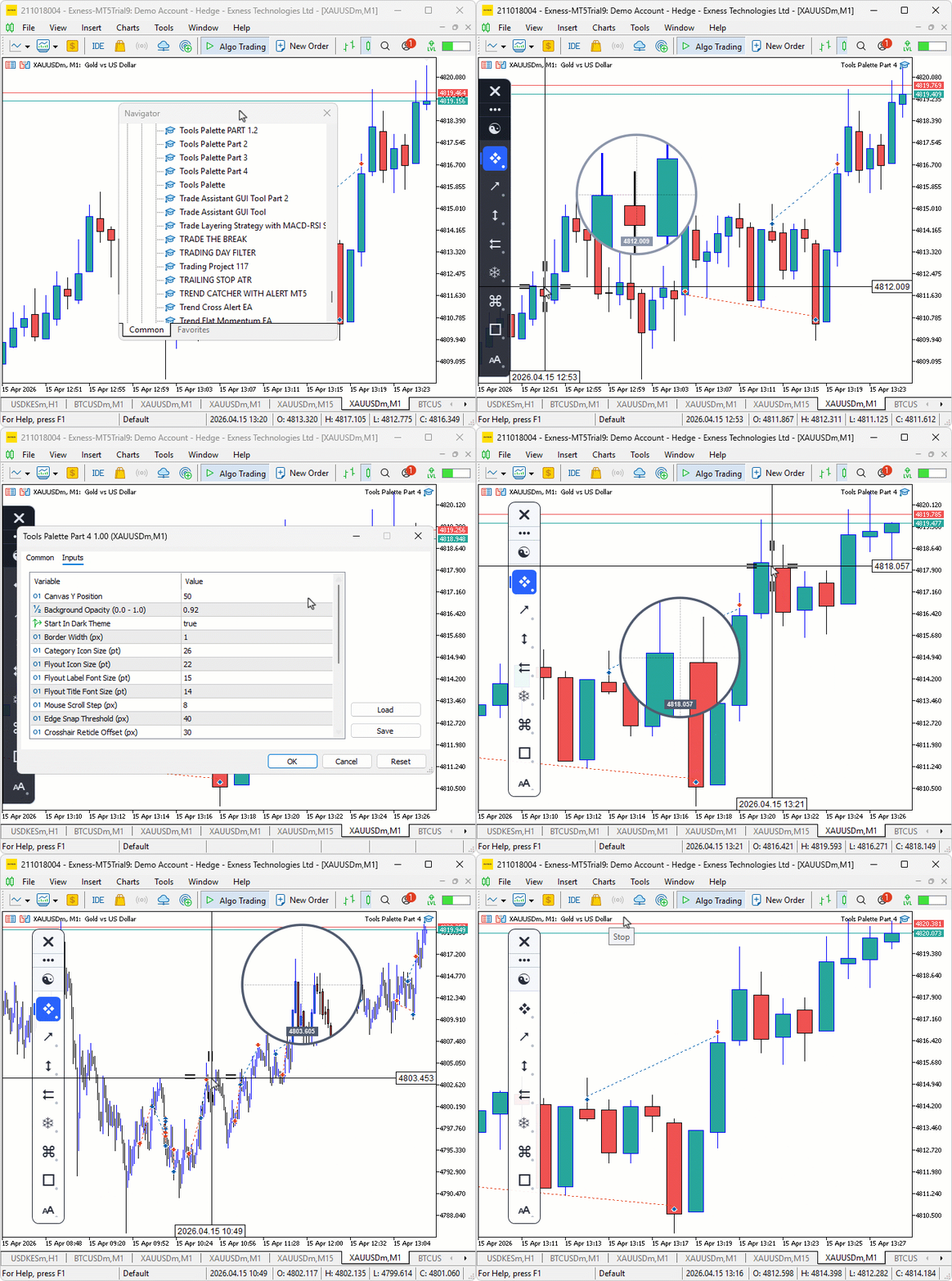
During testing, the crosshair and axis labels updated smoothly in real time. The magnifier rendered candles correctly with wicks, bodies, and bid/ask lines. The measurement mode locked and released cleanly on double-click, with the diagonal line, anchor markers, and floating bar and pip statistics tracking the cursor between locks.
Conclusion
In conclusion, we have enhanced the Tools Palette program with a complete crosshair reticle and magnifier system in MQL5. We introduced a new crosshair manager class with eleven additional canvas layers covering a reticle tick-mark overlay, full-screen crosshair lines, price and time axis labels, a circular magnifier lens rendering zoomed candle content with bid/ask lines and an anti-aliased border, and a double-click measure mode with anchor markers, a Bresenham diagonal line, and floating statistics showing bar count, pip distance, and price difference. All crosshair elements hide automatically when hovering the sidebar or flyout, and refresh their colors on the theme toggle. After reading this article, you will be able to:
- Inspect any chart area with precision using the crosshair reticle and axis labels
- Read congested candle clusters through the magnifier lens without zooming the entire chart
- Measure the distance between any two chart points instantly using the double-click anchor with bar count and pip statistics.
Warning: All rights to these materials are reserved by MetaQuotes Ltd. Copying or reprinting of these materials in whole or in part is prohibited.
This article was written by a user of the site and reflects their personal views. MetaQuotes Ltd is not responsible for the accuracy of the information presented, nor for any consequences resulting from the use of the solutions, strategies or recommendations described.

 MetaTrader 5: Build a Market to Suit Your Strategy — Renko/Range/Volume, Synthetics, and Stress Tests on Custom Symbols
 The MQL5 Standard Library Explorer (Part 12): Multi-Timeframe Composite-Score Dashboard
 From "Best Pass" to Robust Solutions: Exploring the Optimization Surface in MetaTrader 5
 Beyond GARCH (Part III): Building the MMAR and the Verdict

- Free trading apps
- Over 8,000 signals for copying
- Economic news for exploring financial markets
You agree to website policy and terms of use
The chart can not respond to drag event anymore.