

MQL5 Trading Tools (Part 31): Creating an Interactive Tools Palette in MQL5
 3 431
3 431
 4
4

Introduction
You already have a nicely rendered Tools Palette on the MT5 chart — clean layout, anti-aliased icons, and dual themes — but it is only a visual shell: clicks do nothing. The missing piece is the interaction layer that turns rendering into behavior: reliable hit-testing on bitmap labels, a chart event handler that listens to CHARTEVENT_* events, and a deterministic state machine that maps user input to tool selection, panel manipulation, and object placement.
This article is for MetaQuotes Language 5 (MQL5) developers and algorithmic traders who want a measurable, production-ready interaction layer on top of the UI. Our goal is concrete: implement a single "OnEvent"/"OnChartEvent" entry point and the supporting classes that enable these minimum user scenarios:
- Select a tool and place a chart object
- Scroll overflowing categories
- Drag the panel and snap it to edges
- Resize the panel from the bottom
- Switch theme live
To do that, we expand the architecture from Part 30 into ten cooperating classes: a tool registry, canvas layers (including flyout HR canvases), layout and hit-testing, flyout manager, renderer, event router, and a drawing engine that supports one-click, two-click, and three-click placements. Throughout, we treat the interaction contract (activeTool, clicksRequired, placement sequence) as the single source of truth, so behavior is testable and extensible. We will cover the following topics:
By the end, you will have a fully interactive MQL5 sidebar with flyout tool selection, scrollable lists, drag-and-snap positioning, and a multi-click drawing engine that places chart objects directly from the palette.
From Static Sidebar to Interactive Drawing System
In the previous part, we built a sidebar that renders category icons with anti-aliased corners and dual-theme support, but every button is inert. Clicking a category does nothing, the panel stays fixed in place, and there is no path from selecting a tool to actually drawing on the chart. The gap between a rendered interface and a usable one is the interaction layer, and that is what we bridge here.
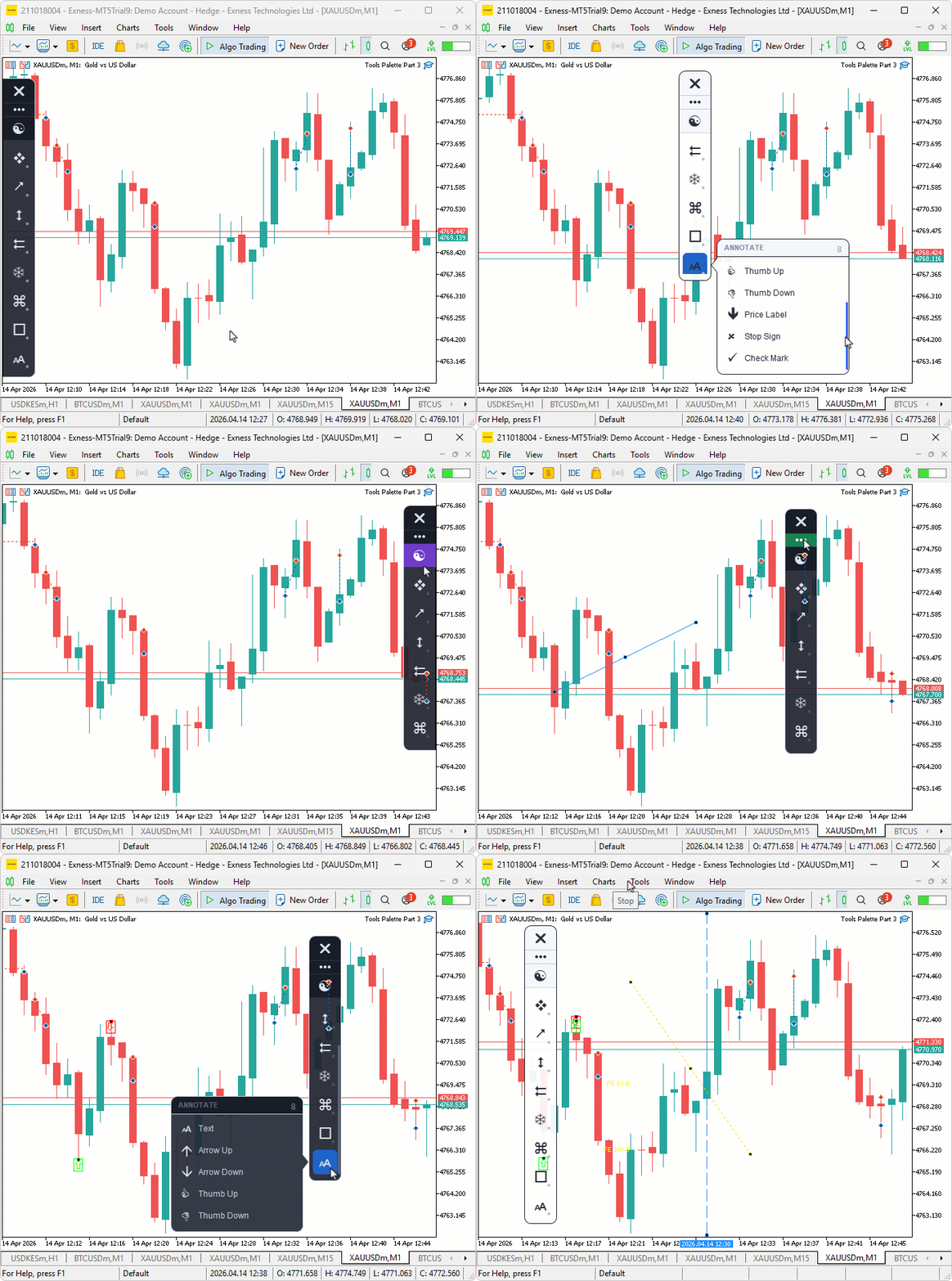
The upgrade introduces three major capabilities. First, flyout menus that appear when you hover a category button, showing the individual tools inside that group with icons, labels, hover highlights, and scroll support for longer lists. Second, a full mouse interaction system that lets you drag the panel by its grip area, resize it from the bottom edge, scroll overflowing categories with the mouse wheel or a thumb pill, toggle the theme on click, and close the panel. Third, a chart drawing engine that translates tool selection into actual chart objects, handling single-click placements like horizontal lines and arrows, two-click placements like trend lines and rectangles, and three-click placements like channels and pitchforks.
On the chart, this means you can hover the lines category, pick a trend line from the flyout, then click two points on the chart to place it. If the sidebar is blocking price action, grab the grip dots and drag it to the opposite edge where it snaps flush. When a category is active, its button shows a blue highlight with an accent bar so you always know which group your current tool belongs to. Resizing the panel from the bottom lets you show fewer categories on smaller screens without losing access to the rest through scrolling.
We will expand the icon definitions and enumerations to cover all thirty-five tools. We will introduce a tool definition structure and rebuild the registry to use dynamic tool arrays. We will also extend the theme color set, add a flyout panel class, build a chart event handler, and implement a multi-click drawing engine. In a nutshell, here is an illustration of what we will be achieving.
Implementation in MQL5
Expanding Icon Definitions, Enumerations, Inputs, and Structures
To support the full interactive drawing system, we first expand the foundational definitions with individual tool icons, a comprehensive tool type enumeration, new input parameters, and restructured data types.
//+------------------------------------------------------------------+
//|                                         Tools Palette Part 3.mq5 |
//|                           Copyright 2026, Allan Munene Mutiiria. |
//|                                   https://t.me/Forex_Algo_Trader |
//+------------------------------------------------------------------+
#property copyright "Copyright 2026, Allan Munene Mutiiria."
#property link      "https://t.me/Forex_Algo_Trader"
#property version   "1.00"
#property strict


//--- Define icon for each individual drawing tool using font/char pairs
SIconDefinition ICON_TOOL_POINTER         = { "Wingdings 3", (uchar)'-'  }; // Pointer tool icon
SIconDefinition ICON_TOOL_CROSSHAIR       = { "Wingdings",   (uchar)'W'  }; // Crosshair tool icon
SIconDefinition ICON_TOOL_TRENDLINE       = { "Wingdings 3", (uchar)'&'  }; // Trend line tool icon
SIconDefinition ICON_TOOL_HLINE           = { "Wingdings 3", (uchar)'"'  }; // Horizontal line tool icon
SIconDefinition ICON_TOOL_VLINE           = { "Wingdings 3", (uchar)'#'  }; // Vertical line tool icon
SIconDefinition ICON_TOOL_RAY             = { "Wingdings 3", (uchar)'&'  }; // Ray line tool icon
SIconDefinition ICON_TOOL_EXTENDED_LINE   = { "Wingdings 3", (uchar)'1'  }; // Extended line tool icon
SIconDefinition ICON_TOOL_INFO_LINE       = { "Wingdings 3", (uchar)'2'  }; // Info/measure line tool icon
SIconDefinition ICON_TOOL_PARALLEL_CH     = { "Wingdings 3", (uchar)'H'  }; // Parallel channel tool icon
SIconDefinition ICON_TOOL_REGRESSION_CH   = { "Wingdings 3", (uchar)'I'  }; // Regression channel tool icon
SIconDefinition ICON_TOOL_STDDEV_CH       = { "Wingdings 3", (uchar)'J'  }; // Standard deviation channel tool icon
SIconDefinition ICON_TOOL_PITCHFORK       = { "Wingdings 3", (uchar)'H'  }; // Andrew's pitchfork tool icon
SIconDefinition ICON_TOOL_SCHIFF          = { "Wingdings 3", (uchar)'I'  }; // Schiff pitchfork tool icon
SIconDefinition ICON_TOOL_MOD_SCHIFF      = { "Wingdings 3", (uchar)'K'  }; // Modified Schiff pitchfork tool icon
SIconDefinition ICON_TOOL_GANN_LINE       = { "Wingdings 3", (uchar)'&'  }; // Gann line tool icon
SIconDefinition ICON_TOOL_GANN_FAN        = { "Wingdings 3", (uchar)'0'  }; // Gann fan tool icon
SIconDefinition ICON_TOOL_GANN_GRID       = { "Wingdings",   (uchar)'i'  }; // Gann grid tool icon
SIconDefinition ICON_TOOL_FIBO_RET        = { "Wingdings",   (uchar)'['  }; // Fibonacci retracement tool icon
SIconDefinition ICON_TOOL_FIBO_EXP        = { "Wingdings 3", (uchar)'&'  }; // Fibonacci expansion tool icon
SIconDefinition ICON_TOOL_FIBO_CH         = { "Wingdings 3", (uchar)'H'  }; // Fibonacci channel tool icon
SIconDefinition ICON_TOOL_FIBO_TZ         = { "Wingdings 3", (uchar)'#'  }; // Fibonacci time zones tool icon
SIconDefinition ICON_TOOL_FIBO_FAN        = { "Wingdings 3", (uchar)'J'  }; // Fibonacci fan tool icon
SIconDefinition ICON_TOOL_FIBO_ARCS       = { "Wingdings",   (uchar)'l'  }; // Fibonacci arcs tool icon
SIconDefinition ICON_TOOL_RECTANGLE       = { "Wingdings",   (uchar)'o'  }; // Rectangle tool icon
SIconDefinition ICON_TOOL_TRIANGLE        = { "Wingdings 3", (uchar)'p'  }; // Triangle tool icon
SIconDefinition ICON_TOOL_ELLIPSE         = { "Wingdings",   (uchar)'l'  }; // Ellipse tool icon
SIconDefinition ICON_TOOL_TEXT            = { "Webdings",    (uchar)'>'  }; // Text label tool icon
SIconDefinition ICON_TOOL_ARROW_UP        = { "Wingdings",   (uchar)225  }; // Arrow up tool icon
SIconDefinition ICON_TOOL_ARROW_DOWN      = { "Wingdings",   (uchar)226  }; // Arrow down tool icon
SIconDefinition ICON_TOOL_THUMB_UP        = { "Wingdings",   (uchar)'C'  }; // Thumbs up tool icon
SIconDefinition ICON_TOOL_THUMB_DOWN      = { "Wingdings",   (uchar)'D'  }; // Thumbs down tool icon
SIconDefinition ICON_TOOL_PRICE_LABEL     = { "Wingdings",   (uchar)234  }; // Left price label tool icon
SIconDefinition ICON_TOOL_STOP_SIGN       = { "Wingdings",   (uchar)251  }; // Stop sign tool icon
SIconDefinition ICON_TOOL_CHECK_MARK      = { "Wingdings",   (uchar)252  }; // Check mark tool icon

enum TOOL_TYPE
  {
   TOOL_NONE = 0,          // No tool active
   TOOL_POINTER,           // Default pointer cursor
   TOOL_CROSSHAIR,         // Crosshair / measure cursor
   TOOL_TRENDLINE,         // Trend line drawing tool
   TOOL_HLINE,             // Horizontal line drawing tool
   TOOL_VLINE,             // Vertical line drawing tool
   TOOL_RAY,               // Ray line drawing tool
   TOOL_EXTENDED_LINE,     // Extended (infinite) line drawing tool
   TOOL_INFO_LINE,         // Info / measure line drawing tool
   TOOL_PARALLEL_CHANNEL,  // Parallel channel drawing tool
   TOOL_REGRESSION_CHANNEL,// Regression channel drawing tool
   TOOL_STDDEV_CHANNEL,    // Standard deviation channel drawing tool
   TOOL_PITCHFORK,         // Andrew's pitchfork drawing tool
   TOOL_SCHIFF_PITCHFORK,  // Schiff pitchfork drawing tool
   TOOL_MOD_SCHIFF,        // Modified Schiff pitchfork drawing tool
   TOOL_GANN_LINE,         // Gann line drawing tool
   TOOL_GANN_FAN,          // Gann fan drawing tool
   TOOL_GANN_GRID,         // Gann grid drawing tool
   TOOL_FIBO_RETRACEMENT,  // Fibonacci retracement drawing tool
   TOOL_FIBO_EXPANSION,    // Fibonacci expansion drawing tool
   TOOL_FIBO_CHANNEL,      // Fibonacci channel drawing tool
   TOOL_FIBO_TIMEZONES,    // Fibonacci time zones drawing tool
   TOOL_FIBO_FAN,          // Fibonacci fan drawing tool
   TOOL_FIBO_ARCS,         // Fibonacci arcs drawing tool
   TOOL_RECTANGLE,         // Rectangle shape drawing tool
   TOOL_TRIANGLE,          // Triangle shape drawing tool
   TOOL_ELLIPSE,           // Ellipse shape drawing tool
   TOOL_TEXT,              // Text label annotation tool
   TOOL_ARROW_UP,          // Arrow up annotation tool
   TOOL_ARROW_DOWN,        // Arrow down annotation tool
   TOOL_THUMB_UP,          // Thumbs up annotation tool
   TOOL_THUMB_DOWN,        // Thumbs down annotation tool
   TOOL_PRICE_LABEL,       // Left price label annotation tool
   TOOL_STOP_SIGN,         // Stop sign annotation tool
   TOOL_CHECK_MARK         // Check mark annotation tool
  };

input int    FlyoutIconSize    = 22;  // Flyout Icon Size (pt)
input int    FlyoutLabelSize   = 15;  // Flyout Label Font Size (pt)
input int    FlyoutTitleSize   = 14;  // Flyout Title Font Size (pt)
input int    MouseScrollSpeed  = 8;   // Mouse Scroll Step (px)

//+------------------------------------------------------------------+
//| Tool definition structure                                        |
//+------------------------------------------------------------------+
struct ToolDefinition
  {
   TOOL_TYPE toolType;    // Unique tool type identifier
   string    toolLabel;   // Display label shown in the flyout panel
   string    iconFontName;// Font name used to render the tool icon
   uchar     iconCharCode;// Character code of the tool icon glyph
   string    tooltipText; // Tooltip string shown on hover
  };

//+------------------------------------------------------------------+
//| Category definition structure                                    |
//+------------------------------------------------------------------+
struct CategoryDefinition
  {
   string         categoryLabel; // Display label for the category
   string         iconFontName;  // Font name used to render the category icon
   uchar          iconCharCode;  // Character code of the category icon glyph
   ToolDefinition tools[];       // Dynamic array of tools belonging to this category
  };

//+------------------------------------------------------------------+
//| Theme color set structure                                        |
//+------------------------------------------------------------------+
struct ThemeColorSet
  {
   color sidebarBackground;         // Background fill color of the sidebar panel
   color sidebarBorder;             // Outline border color of the sidebar panel
   color buttonHoverBackground;     // Background fill when a category button is hovered
   color buttonActiveBackground;    // Background fill when a category button is active
   color buttonIconColor;           // Default color used to render category icons
   color buttonIconActiveColor;     // Icon color when the button is in active state
   color flyoutBackground;          // Background fill color of the flyout panel
   color flyoutBorder;              // Outline border color of the flyout panel
   color flyoutItemHoverBackground; // Background fill of a hovered flyout item row
   color flyoutTextColor;           // Default text color of flyout item labels
   color flyoutTextActiveColor;     // Text color of the active flyout item label
   color flyoutTitleColor;          // Color of the flyout panel title text
   color gripDotsColor;             // Color of the drag-grip dot indicators
   color closeButtonHoverColor;     // Background fill of the close button on hover
   color themeButtonHoverColor;     // Background fill of the theme button on hover
   color separatorColor;            // Color of the horizontal separator lines
   color accentBarColor;            // Color of the active tool accent bar indicator
   color scrollArrowColor;          // Default color of the scroll thumb pill
   color scrollArrowHoverColor;     // Color of the scroll thumb pill on hover
  };
We begin by declaring thirty-five individual tool icon definitions using the same "SIconDefinition" structure from the previous part, each mapping a specific drawing tool to its font and character code. These cover cursors, lines, channels, pitchforks, Gann tools, Fibonacci tools, shapes, and annotations, and they will appear inside the flyout panel when a category is expanded.
Next, we introduce the "TOOL_TYPE" enumeration, which assigns a unique identifier to every drawing tool in the system. Starting with "TOOL_NONE" for no active tool and "TOOL_POINTER" for the default cursor, it lists all thirty-five tools through to "TOOL_CHECK_MARK". This enumeration is what the entire interaction and drawing pipeline uses to track which tool the user has selected.
We also added new input parameters. The flyout icon size, label font size, and title font size give the user control over the flyout panel's text appearance, while the mouse scroll speed controls how fast the sidebar and flyout lists scroll per wheel tick.
We then introduce the "ToolDefinition" structure, which packages a tool type, display label, icon font, character code, and tooltip into a single unit. This makes each tool a self-contained data entry. The "CategoryDefinition" structure is also restructured, replacing the previous boolean multi-tool flag with a dynamic array of "ToolDefinition" entries. Each category now directly carries its full list of tools, so checking whether a category has multiple tools is simply a matter of reading the array size.
Finally, we expand the "ThemeColorSet" structure from five fields to nineteen. The new fields cover button hover and active backgrounds, active icon colors, flyout background and border, flyout item hover and text colors, title color, close and theme button hover colors, accent bar color, and scroll thumb colors for both default and hovered states. This gives every interactive element in the sidebar and flyout full theme-aware visual feedback. Next, we will add a function to the primitives class to aid in drawing the flyout pointer.
Adding Triangle Rasterization to the Canvas Primitives
The flyout panel uses a pointer triangle to visually connect itself to the sidebar category that opened it, so we need a method to fill triangular shapes at high resolution.
//+------------------------------------------------------------------+
//| Fill a triangle using scanline rasterization at high resolution  |
//+------------------------------------------------------------------+
void CCanvasPrimitives::FillTriangleHR(CCanvas &canvas, int x0, int y0, int x1, int y1, int x2, int y2, uint argb)
  {
   //--- Store triangle vertices as floating-point arrays for scanline processing
   double vx[3] = { (double)x0, (double)x1, (double)x2 };
   double vy[3] = { (double)y0, (double)y1, (double)y2 };
   //--- Find vertical bounding extent of the triangle
   double minY = vy[0], maxY = vy[0];
   for (int i = 1; i < 3; i++) { if (vy[i] < minY) minY = vy[i]; if (vy[i] > maxY) maxY = vy[i]; }
   //--- Iterate over each horizontal scanline within the bounding box
   for (int scanY = (int)MathCeil(minY); scanY <= (int)MathFloor(maxY); scanY++)
     {
      //--- Compute scanline center Y and prepare intersection buffer
      double cy = (double)scanY + 0.5; double xi[6]; int nc = 0;
      //--- Compute X intersections with each edge of the triangle
      for (int i = 0; i < 3; i++)
        {
         int ni = (i + 1) % 3;
         //--- Determine edge vertical extents
         double eMin = (vy[i] < vy[ni]) ? vy[i] : vy[ni], eMax = (vy[i] > vy[ni]) ? vy[i] : vy[ni];
         //--- Skip edges that do not cross the current scanline
         if (cy < eMin || cy > eMax || MathAbs(vy[ni] - vy[i]) < 1e-12) continue;
         //--- Compute intersection parameter along the edge
         double t = (cy - vy[i]) / (vy[ni] - vy[i]);
         if (t < 0.0 || t > 1.0) continue;
         //--- Record intersection X coordinate
         xi[nc++] = vx[i] + t * (vx[ni] - vx[i]);
        }
      //--- Sort intersections left to right
      for (int a = 0; a < nc - 1; a++)
         for (int b = a + 1; b < nc; b++)
            if (xi[a] > xi[b]) { double tmp = xi[a]; xi[a] = xi[b]; xi[b] = tmp; }
      //--- Fill pixels between paired intersection spans
      for (int p = 0; p + 1 < nc; p += 2)
         for (int fx = (int)MathCeil(xi[p]); fx <= (int)MathFloor(xi[p + 1]); fx++)
            canvas.PixelSet(fx, scanY, argb);
     }
  }
We implement the "FillTriangleHR" method, which rasterizes a filled triangle using the same scanline approach we already use for quadrilaterals. We store the three vertices as floating-point arrays, find the vertical bounding extent, and then sweep horizontal scanlines through the triangle. For each scanline, we compute where it intersects the three edges, sort those intersections left to right, and fill the pixel spans between each pair. This produces a cleanly filled triangle at high resolution that, after downsampling, gives the flyout pointer a smooth, anti-aliased appearance on the chart. Next, we expand the theme methods, so we take care of the newly added elements.
Expanding Theme Colors and Adding Live Theme Toggling
With the sidebar now supporting hover states, active highlights, flyout panels, and scroll indicators, the theme system needs to cover all these interactive elements.
//+------------------------------------------------------------------+
//| Apply color values matching the current theme state              |
//+------------------------------------------------------------------+
void CThemeManager::ApplyTheme()
  {
   //--- Apply dark theme color assignments
   if (m_isDarkTheme)
     {
      m_themeColors.sidebarBackground         = C'30,34,45';     // Dark navy background
      m_themeColors.sidebarBorder             = C'200,210,225';  // Light blue-gray border
      m_themeColors.buttonHoverBackground     = C'30,100,200';   // Blue hover background
      m_themeColors.buttonActiveBackground    = C'41,98,255';    // Bright blue active background
      m_themeColors.buttonIconColor           = C'220,225,235';  // Near-white icon color
      m_themeColors.buttonIconActiveColor     = clrWhite;        // Pure white active icon
      m_themeColors.flyoutBackground          = C'36,41,54';     // Dark flyout background
      m_themeColors.flyoutBorder              = C'200,210,225';  // Light flyout border
      m_themeColors.flyoutItemHoverBackground = C'30,100,200';   // Blue flyout row hover
      m_themeColors.flyoutTextColor           = C'200,210,225';  // Light flyout text
      m_themeColors.flyoutTextActiveColor     = clrWhite;        // White active flyout text
      m_themeColors.flyoutTitleColor          = C'90,105,130';   // Muted blue-gray title
      m_themeColors.gripDotsColor             = C'90,100,120';   // Muted slate grip dots
      m_themeColors.closeButtonHoverColor     = C'235,55,55';    // Red close button hover
      m_themeColors.themeButtonHoverColor     = C'255,200,50';   // Yellow theme button hover
      m_themeColors.separatorColor            = C'44,50,64';     // Dark separator line
      m_themeColors.accentBarColor            = C'41,98,255';    // Bright blue accent bar
      m_themeColors.scrollArrowColor          = C'120,130,150';  // Muted scroll thumb
      m_themeColors.scrollArrowHoverColor     = clrWhite;        // White scroll thumb hover
     }
   else
     {
      //--- Apply light theme color assignments
      m_themeColors.sidebarBackground         = clrWhite;        // White background
      m_themeColors.sidebarBorder             = C'30,35,45';     // Dark border
      m_themeColors.buttonHoverBackground     = C'30,100,200';   // Blue hover background
      m_themeColors.buttonActiveBackground    = C'41,98,255';    // Bright blue active background
      m_themeColors.buttonIconColor           = C'40,45,58';     // Dark icon color
      m_themeColors.buttonIconActiveColor     = clrWhite;        // White active icon
      m_themeColors.flyoutBackground          = clrWhite;        // White flyout background
      m_themeColors.flyoutBorder              = C'30,35,45';     // Dark flyout border
      m_themeColors.flyoutItemHoverBackground = C'30,100,200';   // Blue flyout row hover
      m_themeColors.flyoutTextColor           = C'40,45,58';     // Dark flyout text
      m_themeColors.flyoutTextActiveColor     = clrWhite;        // White active flyout text
      m_themeColors.flyoutTitleColor          = C'130,140,160';  // Muted gray title
      m_themeColors.gripDotsColor             = C'160,170,185';  // Light gray grip dots
      m_themeColors.closeButtonHoverColor     = C'210,35,35';    // Red close button hover
      m_themeColors.themeButtonHoverColor     = C'150,100,0';    // Amber theme button hover
      m_themeColors.separatorColor            = C'210,215,225';  // Light separator line
      m_themeColors.accentBarColor            = C'41,98,255';    // Bright blue accent bar
      m_themeColors.scrollArrowColor          = C'120,130,145';  // Muted scroll thumb
      m_themeColors.scrollArrowHoverColor     = C'40,45,58';     // Dark scroll thumb hover
     }
  }

//+------------------------------------------------------------------+
//| Toggle between dark and light theme and reapply colors           |
//+------------------------------------------------------------------+
void CThemeManager::ToggleTheme()
  {
   //--- Flip the active theme flag and reapply color assignments
   m_isDarkTheme = !m_isDarkTheme;
   ApplyTheme();
  }
We expand the "ApplyTheme" method from the five color assignments it had in the previous part to nineteen. Beyond the original sidebar background, border, icon, grip dot, and separator colors, we now assign colors for button hover and active backgrounds, active icon state, flyout background and border, flyout item hover and text colors, flyout title color, close button hover in red, theme button hover in yellow for dark mode and amber for light mode, accent bar color for the active tool indicator, and scroll thumb colors for both default and hovered states. Both dark and light themes receive full coverage, so every interactive element responds visually regardless of which theme is active.
We also introduce the "ToggleTheme" method, which flips the dark theme flag and immediately calls "ApplyTheme" to refresh all color values. This enables live theme switching when the user clicks the theme button on the sidebar, rather than requiring a restart. With that done, the next thing we will do is rewrite the entire registry class so it handles the tools as well, which will come in handy in the future when we expand the tools palette to house more tools.
Rebuilding the Category Registry into a Full Tool Registry
The previous part's category registry only stored labels and icons per category. We now rebuild it as a complete tool registry that owns every tool definition and provides lookup methods for the interaction and drawing systems.
//+------------------------------------------------------------------+
//| CLASS 3 — Register all tool and category definitions             |
//+------------------------------------------------------------------+
class CToolRegistry : public CThemeManager
  {
protected:
   CategoryDefinition m_categories[CAT_COUNT]; // Array of all category definitions
protected:
   //--- Populate all categories and their associated tool lists
   void          InitAllCategoriesAndTools();
   //--- Append a single tool entry to the given category tool array
   void          AddTool(ToolDefinition &arr[], TOOL_TYPE type, string label, string font, uchar code, string tooltip);
   //--- Return the category that owns the given active tool type
   ENUM_CATEGORY GetCategoryForActiveTool(TOOL_TYPE activeTool);
   //--- Return the number of chart clicks required to place the given tool
   int           GetRequiredClickCount(TOOL_TYPE toolType);
   //--- Return the display label string for the given tool type
   string        GetToolLabel(TOOL_TYPE toolType);
  };

//+------------------------------------------------------------------+
//| Append a single tool entry to a category tool array             |
//+------------------------------------------------------------------+
void CToolRegistry::AddTool(ToolDefinition &arr[], TOOL_TYPE type, string label, string font, uchar code, string tooltip)
  {
   //--- Expand the array by one slot to accommodate the new tool
   int sz = ArraySize(arr);
   ArrayResize(arr, sz + 1);
   //--- Populate all fields of the new tool definition
   arr[sz].toolType     = type;
   arr[sz].toolLabel    = label;
   arr[sz].iconFontName = font;
   arr[sz].iconCharCode = code;
   arr[sz].tooltipText  = tooltip;
  }

//+------------------------------------------------------------------+
//| Populate all categories and their associated tool lists          |
//+------------------------------------------------------------------+
void CToolRegistry::InitAllCategoriesAndTools()
  {
   //--- Assign Cursors category definition and reset its tool array
   m_categories[CAT_CURSORS].categoryLabel = "Cursors";
   m_categories[CAT_CURSORS].iconFontName  = ICON_CATEGORY_CURSORS.fontName;
   m_categories[CAT_CURSORS].iconCharCode  = ICON_CATEGORY_CURSORS.charCode;
   ArrayResize(m_categories[CAT_CURSORS].tools, 0);
   //--- Add pointer and crosshair tools to Cursors
   AddTool(m_categories[CAT_CURSORS].tools, TOOL_POINTER,   "Pointer",   ICON_TOOL_POINTER.fontName,   ICON_TOOL_POINTER.charCode,   "Default Pointer");
   AddTool(m_categories[CAT_CURSORS].tools, TOOL_CROSSHAIR, "Crosshair", ICON_TOOL_CROSSHAIR.fontName, ICON_TOOL_CROSSHAIR.charCode, "Crosshair / Measure");

   //--- Assign Lines category definition and reset its tool array
   m_categories[CAT_LINES].categoryLabel = "Lines";
   m_categories[CAT_LINES].iconFontName  = ICON_CATEGORY_LINES.fontName;
   m_categories[CAT_LINES].iconCharCode  = ICON_CATEGORY_LINES.charCode;
   ArrayResize(m_categories[CAT_LINES].tools, 0);
   //--- Add all line drawing tools to Lines
   AddTool(m_categories[CAT_LINES].tools, TOOL_TRENDLINE,     "Trend Line", ICON_TOOL_TRENDLINE.fontName,     ICON_TOOL_TRENDLINE.charCode,     "Trend Line");
   AddTool(m_categories[CAT_LINES].tools, TOOL_HLINE,         "Horizontal", ICON_TOOL_HLINE.fontName,         ICON_TOOL_HLINE.charCode,         "Horizontal Line");
   AddTool(m_categories[CAT_LINES].tools, TOOL_VLINE,         "Vertical",   ICON_TOOL_VLINE.fontName,         ICON_TOOL_VLINE.charCode,         "Vertical Line");
   AddTool(m_categories[CAT_LINES].tools, TOOL_RAY,           "Ray",        ICON_TOOL_RAY.fontName,           ICON_TOOL_RAY.charCode,           "Ray Line");
   AddTool(m_categories[CAT_LINES].tools, TOOL_EXTENDED_LINE, "Extended",   ICON_TOOL_EXTENDED_LINE.fontName, ICON_TOOL_EXTENDED_LINE.charCode, "Extended Line");
   AddTool(m_categories[CAT_LINES].tools, TOOL_INFO_LINE,     "Info Line",  ICON_TOOL_INFO_LINE.fontName,     ICON_TOOL_INFO_LINE.charCode,     "Info / Measure Line");

   //--- Assign Channels category definition and reset its tool array
   m_categories[CAT_CHANNELS].categoryLabel = "Channels";
   m_categories[CAT_CHANNELS].iconFontName  = ICON_CATEGORY_CHANNELS.fontName;
   m_categories[CAT_CHANNELS].iconCharCode  = ICON_CATEGORY_CHANNELS.charCode;
   ArrayResize(m_categories[CAT_CHANNELS].tools, 0);
   //--- Add all channel drawing tools to Channels
   AddTool(m_categories[CAT_CHANNELS].tools, TOOL_PARALLEL_CHANNEL,   "Parallel Channel", ICON_TOOL_PARALLEL_CH.fontName,   ICON_TOOL_PARALLEL_CH.charCode,   "Parallel Channel");
   AddTool(m_categories[CAT_CHANNELS].tools, TOOL_REGRESSION_CHANNEL, "Regression",       ICON_TOOL_REGRESSION_CH.fontName, ICON_TOOL_REGRESSION_CH.charCode, "Regression Channel");
   AddTool(m_categories[CAT_CHANNELS].tools, TOOL_STDDEV_CHANNEL,     "Std Deviation",    ICON_TOOL_STDDEV_CH.fontName,     ICON_TOOL_STDDEV_CH.charCode,     "Standard Deviation Channel");

   //--- Assign Pitchfork category definition and reset its tool array
   m_categories[CAT_PITCHFORK].categoryLabel = "Pitchfork";
   m_categories[CAT_PITCHFORK].iconFontName  = ICON_CATEGORY_PITCHFORK.fontName;
   m_categories[CAT_PITCHFORK].iconCharCode  = ICON_CATEGORY_PITCHFORK.charCode;
   ArrayResize(m_categories[CAT_PITCHFORK].tools, 0);
   //--- Add all pitchfork drawing tools to Pitchfork
   AddTool(m_categories[CAT_PITCHFORK].tools, TOOL_PITCHFORK,        "Andrew's Fork", ICON_TOOL_PITCHFORK.fontName,  ICON_TOOL_PITCHFORK.charCode,  "Andrew's Pitchfork");
   AddTool(m_categories[CAT_PITCHFORK].tools, TOOL_SCHIFF_PITCHFORK, "Schiff Fork",   ICON_TOOL_SCHIFF.fontName,     ICON_TOOL_SCHIFF.charCode,     "Schiff Pitchfork");
   AddTool(m_categories[CAT_PITCHFORK].tools, TOOL_MOD_SCHIFF,       "Mod. Schiff",   ICON_TOOL_MOD_SCHIFF.fontName, ICON_TOOL_MOD_SCHIFF.charCode, "Modified Schiff Pitchfork");

   //--- Assign Gann category definition and reset its tool array
   m_categories[CAT_GANN].categoryLabel = "Gann";
   m_categories[CAT_GANN].iconFontName  = ICON_CATEGORY_GANN.fontName;
   m_categories[CAT_GANN].iconCharCode  = ICON_CATEGORY_GANN.charCode;
   ArrayResize(m_categories[CAT_GANN].tools, 0);
   //--- Add all Gann drawing tools to Gann
   AddTool(m_categories[CAT_GANN].tools, TOOL_GANN_LINE, "Gann Line", ICON_TOOL_GANN_LINE.fontName, ICON_TOOL_GANN_LINE.charCode, "Gann Line");
   AddTool(m_categories[CAT_GANN].tools, TOOL_GANN_FAN,  "Gann Fan",  ICON_TOOL_GANN_FAN.fontName,  ICON_TOOL_GANN_FAN.charCode,  "Gann Fan");
   AddTool(m_categories[CAT_GANN].tools, TOOL_GANN_GRID, "Gann Grid", ICON_TOOL_GANN_GRID.fontName, ICON_TOOL_GANN_GRID.charCode, "Gann Grid");

   //--- Assign Fibonacci category definition and reset its tool array
   m_categories[CAT_FIBONACCI].categoryLabel = "Fibonacci";
   m_categories[CAT_FIBONACCI].iconFontName  = ICON_CATEGORY_FIBONACCI.fontName;
   m_categories[CAT_FIBONACCI].iconCharCode  = ICON_CATEGORY_FIBONACCI.charCode;
   ArrayResize(m_categories[CAT_FIBONACCI].tools, 0);
   //--- Add all Fibonacci drawing tools to Fibonacci
   AddTool(m_categories[CAT_FIBONACCI].tools, TOOL_FIBO_RETRACEMENT, "Retracement", ICON_TOOL_FIBO_RET.fontName,  ICON_TOOL_FIBO_RET.charCode,  "Fibonacci Retracement");
   AddTool(m_categories[CAT_FIBONACCI].tools, TOOL_FIBO_EXPANSION,   "Expansion",   ICON_TOOL_FIBO_EXP.fontName,  ICON_TOOL_FIBO_EXP.charCode,  "Fibonacci Expansion");
   AddTool(m_categories[CAT_FIBONACCI].tools, TOOL_FIBO_CHANNEL,     "Fib Channel", ICON_TOOL_FIBO_CH.fontName,   ICON_TOOL_FIBO_CH.charCode,   "Fibonacci Channel");
   AddTool(m_categories[CAT_FIBONACCI].tools, TOOL_FIBO_TIMEZONES,   "Time Zones",  ICON_TOOL_FIBO_TZ.fontName,   ICON_TOOL_FIBO_TZ.charCode,   "Fibonacci Time Zones");
   AddTool(m_categories[CAT_FIBONACCI].tools, TOOL_FIBO_FAN,         "Fib Fan",     ICON_TOOL_FIBO_FAN.fontName,  ICON_TOOL_FIBO_FAN.charCode,  "Fibonacci Fan");
   AddTool(m_categories[CAT_FIBONACCI].tools, TOOL_FIBO_ARCS,        "Fib Arcs",    ICON_TOOL_FIBO_ARCS.fontName, ICON_TOOL_FIBO_ARCS.charCode, "Fibonacci Arcs");

   //--- Assign Shapes category definition and reset its tool array
   m_categories[CAT_SHAPES].categoryLabel = "Shapes";
   m_categories[CAT_SHAPES].iconFontName  = ICON_CATEGORY_SHAPES.fontName;
   m_categories[CAT_SHAPES].iconCharCode  = ICON_CATEGORY_SHAPES.charCode;
   ArrayResize(m_categories[CAT_SHAPES].tools, 0);
   //--- Add all shape drawing tools to Shapes
   AddTool(m_categories[CAT_SHAPES].tools, TOOL_RECTANGLE, "Rectangle", ICON_TOOL_RECTANGLE.fontName, ICON_TOOL_RECTANGLE.charCode, "Rectangle");
   AddTool(m_categories[CAT_SHAPES].tools, TOOL_TRIANGLE,  "Triangle",  ICON_TOOL_TRIANGLE.fontName,  ICON_TOOL_TRIANGLE.charCode,  "Triangle");
   AddTool(m_categories[CAT_SHAPES].tools, TOOL_ELLIPSE,   "Ellipse",   ICON_TOOL_ELLIPSE.fontName,   ICON_TOOL_ELLIPSE.charCode,   "Ellipse");

   //--- Assign Annotations category definition and reset its tool array
   m_categories[CAT_ANNOTATIONS].categoryLabel = "Annotate";
   m_categories[CAT_ANNOTATIONS].iconFontName  = ICON_CATEGORY_ANNOTATIONS.fontName;
   m_categories[CAT_ANNOTATIONS].iconCharCode  = ICON_CATEGORY_ANNOTATIONS.charCode;
   ArrayResize(m_categories[CAT_ANNOTATIONS].tools, 0);
   //--- Add all annotation tools to Annotations
   AddTool(m_categories[CAT_ANNOTATIONS].tools, TOOL_TEXT,        "Text",        ICON_TOOL_TEXT.fontName,        ICON_TOOL_TEXT.charCode,        "Text Label");
   AddTool(m_categories[CAT_ANNOTATIONS].tools, TOOL_ARROW_UP,    "Arrow Up",    ICON_TOOL_ARROW_UP.fontName,    ICON_TOOL_ARROW_UP.charCode,    "Arrow Up");
   AddTool(m_categories[CAT_ANNOTATIONS].tools, TOOL_ARROW_DOWN,  "Arrow Down",  ICON_TOOL_ARROW_DOWN.fontName,  ICON_TOOL_ARROW_DOWN.charCode,  "Arrow Down");
   AddTool(m_categories[CAT_ANNOTATIONS].tools, TOOL_THUMB_UP,    "Thumb Up",    ICON_TOOL_THUMB_UP.fontName,    ICON_TOOL_THUMB_UP.charCode,    "Thumbs Up");
   AddTool(m_categories[CAT_ANNOTATIONS].tools, TOOL_THUMB_DOWN,  "Thumb Down",  ICON_TOOL_THUMB_DOWN.fontName,  ICON_TOOL_THUMB_DOWN.charCode,  "Thumbs Down");
   AddTool(m_categories[CAT_ANNOTATIONS].tools, TOOL_PRICE_LABEL, "Price Label", ICON_TOOL_PRICE_LABEL.fontName, ICON_TOOL_PRICE_LABEL.charCode, "Left Price Label");
   AddTool(m_categories[CAT_ANNOTATIONS].tools, TOOL_STOP_SIGN,   "Stop Sign",   ICON_TOOL_STOP_SIGN.fontName,   ICON_TOOL_STOP_SIGN.charCode,   "Stop Sign");
   AddTool(m_categories[CAT_ANNOTATIONS].tools, TOOL_CHECK_MARK,  "Check Mark",  ICON_TOOL_CHECK_MARK.fontName,  ICON_TOOL_CHECK_MARK.charCode,  "Check Mark");
  }

//+------------------------------------------------------------------+
//| Return the category that owns the given active tool type         |
//+------------------------------------------------------------------+
ENUM_CATEGORY CToolRegistry::GetCategoryForActiveTool(TOOL_TYPE activeTool)
  {
   //--- Return no category for inactive or pointer tool states
   if (activeTool == TOOL_NONE || activeTool == TOOL_POINTER) return CAT_NONE;
   //--- Search all categories and their tool lists for a match
   for (int c = 0; c < CAT_COUNT; c++)
      for (int t = 0; t < ArraySize(m_categories[c].tools); t++)
         if (m_categories[c].tools[t].toolType == activeTool) return (ENUM_CATEGORY)c;
   return CAT_NONE;
  }

//+------------------------------------------------------------------+
//| Return click count required to place the given tool              |
//+------------------------------------------------------------------+
int CToolRegistry::GetRequiredClickCount(TOOL_TYPE toolType)
  {
   switch (toolType)
     {
      //--- Cursor tools require no chart clicks
      case TOOL_POINTER: case TOOL_CROSSHAIR:
         return 0;
      //--- Single-click tools are placed with one chart interaction
      case TOOL_HLINE: case TOOL_VLINE: case TOOL_TEXT: case TOOL_ARROW_UP: case TOOL_ARROW_DOWN:
      case TOOL_THUMB_UP: case TOOL_THUMB_DOWN: case TOOL_PRICE_LABEL: case TOOL_STOP_SIGN:
      case TOOL_CHECK_MARK: case TOOL_FIBO_TIMEZONES:
         return 1;
      //--- Two-click tools require a start and end point
      case TOOL_TRENDLINE: case TOOL_RAY: case TOOL_EXTENDED_LINE: case TOOL_INFO_LINE:
      case TOOL_RECTANGLE: case TOOL_TRIANGLE: case TOOL_ELLIPSE: case TOOL_FIBO_RETRACEMENT:
      case TOOL_FIBO_EXPANSION: case TOOL_FIBO_FAN: case TOOL_FIBO_ARCS: case TOOL_GANN_LINE:
      case TOOL_GANN_FAN: case TOOL_GANN_GRID: case TOOL_REGRESSION_CHANNEL: case TOOL_STDDEV_CHANNEL:
         return 2;
      //--- Three-click tools require three anchor points
      case TOOL_PARALLEL_CHANNEL: case TOOL_FIBO_CHANNEL: case TOOL_PITCHFORK:
      case TOOL_SCHIFF_PITCHFORK: case TOOL_MOD_SCHIFF:
         return 3;
      //--- Default to single click for unrecognized tool types
      default: return 1;
     }
  }

//+------------------------------------------------------------------+
//| Return the display label string for the given tool type          |
//+------------------------------------------------------------------+
string CToolRegistry::GetToolLabel(TOOL_TYPE toolType)
  {
   //--- Search all categories and tool lists for a label match
   for (int c = 0; c < CAT_COUNT; c++)
      for (int t = 0; t < ArraySize(m_categories[c].tools); t++)
         if (m_categories[c].tools[t].toolType == toolType) return m_categories[c].tools[t].toolLabel;
   return "None";
  }
Here, we declare the "CToolRegistry" class, which replaces the previous "CCategoryRegistry" and inherits from "CThemeManager". It holds the same categories array but now declares five protected methods: "InitAllCategoriesAndTools" for populating all categories and their tools, "AddTool" as a helper for appending tool entries, "GetCategoryForActiveTool" for reverse-looking up which category owns a given tool, "GetRequiredClickCount" for determining how many chart clicks a tool needs, and "GetToolLabel" for fetching a tool's display name.
The "AddTool" method expands the given tool array by one slot using ArrayResize and fills the new entry with the tool type, label, icon font, character code, and tooltip. This keeps the category population clean and consistent.
We implement "InitAllCategoriesAndTools" by assigning each category its label and icon from the global icon definitions, resetting its tool array to zero, then calling "AddTool" repeatedly to register every tool. Cursors receive the pointer and crosshair. Lines get six tools from the trend line through the info line. Channels, pitchfork, and Gann each receive three tools. Fibonacci gets the largest set with six tools covering retracement, expansion, channel, time zones, fan, and arcs. Shapes hold rectangles, triangles, and ellipses. Annotations carry eight tools from text labels to check marks.
The "GetCategoryForActiveTool" method returns which category owns a given active tool by searching all categories and their tool arrays, returning "CAT_NONE" for inactive or pointer states. The "GetRequiredClickCount" method uses a switch statement to classify every tool into zero clicks for cursors, one click for horizontal lines, vertical lines, annotations, and similar single-point tools, two clicks for trend lines, rectangles, Fibonacci retracements, and other two-anchor tools, and three clicks for parallel channels, Fibonacci channels, and pitchfork variants. The "GetToolLabel" method searches all categories for a matching tool type and returns its display label. Now, we will extend the canvases class to extend the layers with fly-out surfaces.
Extending the Canvas Layer with Flyout Surfaces
The flyout panel needs its own independent drawing surfaces, so we extend the canvas layer class to manage four canvases instead of the previous two.
//+------------------------------------------------------------------+
//| CLASS 4 — Create, destroy, and resize all canvas layers          |
//+------------------------------------------------------------------+
class CCanvasLayer : public CToolRegistry
  {
protected:
   int     m_supersampleFactor;       // Supersampling multiplier for high-res rendering
   long    m_chartId;                 // Chart identifier this layer belongs to
   CCanvas m_canvasSidebar;           // Final display-resolution sidebar canvas
   CCanvas m_canvasSidebarHighRes;    // High-resolution sidebar canvas for supersampling
   CCanvas m_canvasFlyout;            // Final display-resolution flyout canvas
   CCanvas m_canvasFlyoutHighRes;     // High-resolution flyout canvas for supersampling
   string  m_nameSidebar;             // Object name of the sidebar bitmap label
   string  m_nameFlyout;              // Object name of the flyout bitmap label

protected:
   //--- Create all canvas objects at the given dimensions
   bool CreateAllCanvases(int w, int h);
   //--- Destroy all canvas objects and remove chart objects
   void DestroyAllCanvases();
   //--- Resize both sidebar canvases to the given dimensions
   void ResizeSidebarCanvases(int w, int h);
  };

//+------------------------------------------------------------------+
//| Create all canvas objects at the given dimensions                |
//+------------------------------------------------------------------+
bool CCanvasLayer::CreateAllCanvases(int w, int h)
  {
   //--- Create the display-resolution sidebar bitmap label canvas
   if (!m_canvasSidebar.CreateBitmapLabel(0, 0, m_nameSidebar, 0, 0, w, h, COLOR_FORMAT_ARGB_NORMALIZE))
     { Print("Failed to create sidebar canvas"); return false; }
   //--- Create the high-resolution sidebar canvas for supersampled drawing
   if (!m_canvasSidebarHighRes.Create("ToolsPalette_SidebarHR", w * m_supersampleFactor, h * m_supersampleFactor, COLOR_FORMAT_ARGB_NORMALIZE))
     { Print("Failed to create sidebar HR canvas"); return false; }
   //--- Create the display-resolution flyout bitmap label canvas
   if (!m_canvasFlyout.CreateBitmapLabel(0, 0, m_nameFlyout, 0, 0, 200, 200, COLOR_FORMAT_ARGB_NORMALIZE))
     { Print("Failed to create flyout canvas"); return false; }
   //--- Create the high-resolution flyout canvas for supersampled drawing
   if (!m_canvasFlyoutHighRes.Create("ToolsPalette_FlyoutHR", 200 * m_supersampleFactor, 200 * m_supersampleFactor, COLOR_FORMAT_ARGB_NORMALIZE))
     { Print("Failed to create flyout HR canvas"); return false; }
   return true;
  }

//+------------------------------------------------------------------+
//| Destroy all canvas objects and remove chart objects              |
//+------------------------------------------------------------------+
void CCanvasLayer::DestroyAllCanvases()
  {
   //--- Destroy display canvas and remove its chart object
   m_canvasSidebar.Destroy();
   ObjectDelete(0, m_nameSidebar);
   //--- Destroy the high-resolution sidebar working canvas
   m_canvasSidebarHighRes.Destroy();
   //--- Destroy flyout canvas and remove its chart object
   m_canvasFlyout.Destroy();
   ObjectDelete(0, m_nameFlyout);
   //--- Destroy the high-resolution flyout working canvas
   m_canvasFlyoutHighRes.Destroy();
  }
We declare the "CCanvasLayer" class, which now inherits from "CToolRegistry" and adds two new canvas members alongside the existing sidebar pair: a display-resolution flyout canvas and its high-resolution counterpart for supersampled rendering, plus a string holding the flyout bitmap label object name.
The "CreateAllCanvases" method now creates four canvases in sequence. After building the sidebar display and high-resolution canvases as before, we create the flyout display canvas as a bitmap label using CreateBitmapLabel with an initial size of two hundred by two hundred pixels, followed by its high-resolution working canvas scaled by the supersample factor. If any of the four creations fail, we print an error and return false.
The "DestroyAllCanvases" method mirrors this by destroying the sidebar display canvas and removing its chart object with ObjectDelete, destroying the sidebar high-resolution canvas, then doing the same for both flyout canvases. The "ResizeSidebarCanvases" method remains unchanged from the previous part since flyout resizing is handled dynamically during rendering rather than through a dedicated resize call. Next, we will expand the sidebar layout for full interactivity; it needs to scroll, resize from the bottom edge, drag, and include a scroll thumb pill.
Expanding the Sidebar Layout with Scroll, Drag, Resize, and Hit-Testing
The sidebar layout class grows significantly to support all the interactive behaviors the panel now needs, from scrolling and dragging to resizing and precise mouse hit detection.
//+------------------------------------------------------------------+
//| CLASS 5 — Compute and maintain sidebar layout and geometry       |
//+------------------------------------------------------------------+
class CSidebarLayout : public CCanvasLayer
  {
protected:
   int             m_panelX;                    // Horizontal position of the sidebar panel
   int             m_panelY;                    // Vertical position of the sidebar panel
   int             m_sidebarWidth;              // Width of the sidebar panel in pixels
   int             m_sidebarHeight;             // Height of the sidebar panel in pixels
   int             m_categoryButtonSize;        // Size of each category button in pixels
   int             m_categoryButtonPadding;     // Vertical gap between category buttons
   int             m_panelCornerRadius;         // Corner rounding radius of the panel
   int             m_headerGripHeight;          // Height of the top header and grip area
   ENUM_SNAP_STATE m_snapState;                 // Current snap alignment state
   int             m_sidebarMaxVisibleCats;     // Maximum number of visible category buttons
   int             m_sidebarScrollPixels;       // Current vertical scroll offset in pixels
   int             m_sidebarScrollThumbHeight;  // Height of the sidebar scroll thumb pill
   int             m_sidebarScrollThinWidth;    // Width of the sidebar scroll thumb pill
   bool            m_isSidebarThumbDragging;    // Flag indicating scroll thumb drag in progress
   int             m_sidebarThumbDragStartY;    // Mouse Y when sidebar thumb drag started
   int             m_sidebarThumbDragStartPixels;// Scroll offset when sidebar thumb drag started
   bool            m_isHoveredSidebarScrollArea;// Flag indicating mouse is over sidebar scroll area
   bool            m_isHoveredSidebarThumb;     // Flag indicating mouse is over sidebar scroll thumb
   bool            m_isPanelDragging;           // Flag indicating panel drag in progress
   int             m_dragOffsetX;               // Mouse X offset from panel origin when drag started
   int             m_dragOffsetY;               // Mouse Y offset from panel origin when drag started
   bool            m_isResizingBottomEdge;      // Flag indicating bottom resize drag in progress
   int             m_bottomResizeDragStartY;    // Mouse Y when bottom resize drag started
   int             m_bottomResizeStartHeight;   // Panel height when bottom resize drag started
   int             m_snappedSidebarHeight;      // User-set height override while panel is snapped
   bool            m_isBottomResizeHovered;     // Flag indicating mouse is over the bottom resize grip

protected:
   //--- Compute and set the sidebar panel height based on available chart space
   void          CalcSidebarHeight();
   //--- Compute the Y pixel position of a category button by index
   int           CalcCategoryButtonY(int idx);
   //--- Compute the top clipping boundary for the category button area
   int           CalcClipTop();
   //--- Compute the bottom clipping boundary for the category button area
   int           CalcClipBottom();
   //--- Compute total pixel height of all category buttons stacked
   int           CalcSidebarTotalScrollPixels();
   //--- Compute the visible viewport pixel height for category buttons
   int           CalcSidebarViewportPixels();
   //--- Compute the maximum allowable scroll offset in pixels
   int           CalcSidebarMaxScrollPixels();
   //--- Check whether the category button at the given index is within the visible clip area
   bool          IsCategoryButtonVisible(int idx);
   //--- Attempt to snap the panel to a chart edge based on current position
   void          TrySnapToEdge();
   //--- Test whether the given screen coordinates hit the sidebar panel
   bool          HitTestOverSidebar(int mouseX, int mouseY, int &lx, int &ly);
   //--- Return the category under the given local coordinates, or CAT_NONE
   ENUM_CATEGORY HitTestCategoryButton(int lx, int ly);
   //--- Test whether the given local coordinates hit the grip drag area
   bool          HitTestOverGripArea(int lx, int ly);
   //--- Test whether the given local coordinates hit the close button area
   bool          HitTestOverCloseButton(int lx, int ly);
   //--- Test whether the given local coordinates hit the theme toggle button area
   bool          HitTestOverThemeButton(int lx, int ly);
   //--- Test whether the given local coordinates hit the bottom resize grip
   bool          HitTestOverBottomResizeGrip(int lx, int ly);
  };

//+------------------------------------------------------------------+
//| Compute and set sidebar height based on available chart space    |
//+------------------------------------------------------------------+
void CSidebarLayout::CalcSidebarHeight()
  {
   //--- Get current chart height in pixels
   int chartH = (int)ChartGetInteger(0, CHART_HEIGHT_IN_PIXELS);
   //--- Define vertical padding constants
   int topPad = 8, botPad = 10;
   //--- Set button gap spacing
   m_categoryButtonPadding = 6;
   //--- Handle snapped panel height computation
   if (m_snapState != SNAP_FLOAT)
     {
      //--- Pin panel to fixed Y offset below chart top
      m_panelY = 30;
      ObjectSetInteger(0, m_nameSidebar, OBJPROP_YDISTANCE, m_panelY);
      //--- Compute maximum available height below panel top offset
      int availH   = chartH - m_panelY - 8;
      //--- Compute ideal natural height to fit all category buttons
      int naturalH = m_headerGripHeight + topPad + CAT_COUNT * (m_categoryButtonSize + m_categoryButtonPadding) - m_categoryButtonPadding + botPad;
      //--- Compute minimum height to show at least three category buttons
      int minH     = m_headerGripHeight + topPad + 3 * (m_categoryButtonSize + m_categoryButtonPadding) - m_categoryButtonPadding + botPad;
      //--- Apply user-set snapped height override if present, otherwise use natural size
      if (m_snappedSidebarHeight > 0)
         m_sidebarHeight = MathMax(minH, MathMin(MathMin(naturalH, availH), m_snappedSidebarHeight));
      else
         m_sidebarHeight = MathMax(minH, MathMin(naturalH, availH));
     }
   else
     {
      //--- Compute natural and maximum height bounds for a floating panel
      int naturalH = m_headerGripHeight + topPad + CAT_COUNT * (m_categoryButtonSize + m_categoryButtonPadding) - m_categoryButtonPadding + botPad;
      int maxH     = chartH - m_panelY - 20;
      int minH     = m_headerGripHeight + topPad + 3 * (m_categoryButtonSize + m_categoryButtonPadding) - m_categoryButtonPadding + botPad;
      //--- Clamp the floating panel height within valid bounds
      if (m_sidebarHeight < minH || m_sidebarHeight > MathMin(naturalH, maxH))
         m_sidebarHeight = MathMin(naturalH, maxH);
     }
   //--- Compute usable height for the button area
   int btnAreaH = m_sidebarHeight - m_headerGripHeight - topPad - botPad;
   //--- Compute total height needed for all buttons at natural spacing
   int fullBtnH = CAT_COUNT * (m_categoryButtonSize + m_categoryButtonPadding) - m_categoryButtonPadding;
   //--- All buttons fit: show all and clear scroll offset
   if (fullBtnH <= btnAreaH)
     {
      m_sidebarMaxVisibleCats = CAT_COUNT;
      m_sidebarScrollPixels   = 0;
     }
   else
     {
      //--- Compute how many buttons fit and clamp scroll offset within valid range
      m_sidebarMaxVisibleCats = MathMax(3, MathMin(CAT_COUNT, btnAreaH / (m_categoryButtonSize + m_categoryButtonPadding)));
      m_sidebarScrollPixels   = MathMax(0, MathMin(m_sidebarScrollPixels, CalcSidebarMaxScrollPixels()));
     }
  }

//+------------------------------------------------------------------+
//| Compute Y pixel position of a category button by index           |
//+------------------------------------------------------------------+
int CSidebarLayout::CalcCategoryButtonY(int idx)
  {
   //--- Return scroll-adjusted Y offset below the header grip area
   return m_headerGripHeight + 8 + idx * (m_categoryButtonSize + m_categoryButtonPadding) - m_sidebarScrollPixels;
  }

//+------------------------------------------------------------------+
//| Compute top clip boundary for the category button area           |
//+------------------------------------------------------------------+
int CSidebarLayout::CalcClipTop()
  {
   //--- Return Y position just below the header grip bottom edge
   return m_headerGripHeight + 8;
  }

//+------------------------------------------------------------------+
//| Compute bottom clip boundary for the category button area        |
//+------------------------------------------------------------------+
int CSidebarLayout::CalcClipBottom()
  {
   //--- Return Y position leaving bottom padding inside the panel
   return m_sidebarHeight - 10;
  }

//+------------------------------------------------------------------+
//| Compute total pixel height of all category buttons stacked       |
//+------------------------------------------------------------------+
int CSidebarLayout::CalcSidebarTotalScrollPixels()
  {
   //--- Return the combined height of all buttons including inter-button gaps
   return CAT_COUNT * (m_categoryButtonSize + m_categoryButtonPadding) - m_categoryButtonPadding;
  }

//+------------------------------------------------------------------+
//| Compute the visible viewport pixel height for category buttons   |
//+------------------------------------------------------------------+
int CSidebarLayout::CalcSidebarViewportPixels()
  {
   //--- Return the pixel height of the visible button clip region
   return CalcClipBottom() - CalcClipTop();
  }

//+------------------------------------------------------------------+
//| Compute the maximum allowable scroll offset in pixels            |
//+------------------------------------------------------------------+
int CSidebarLayout::CalcSidebarMaxScrollPixels()
  {
   //--- Return zero if all buttons fit; otherwise return the overflow amount
   return MathMax(0, CalcSidebarTotalScrollPixels() - CalcSidebarViewportPixels());
  }

//+------------------------------------------------------------------+
//| Check whether a category button is within the visible clip area  |
//+------------------------------------------------------------------+
bool CSidebarLayout::IsCategoryButtonVisible(int idx)
  {
   //--- All buttons are visible when scroll is not needed
   if (m_sidebarMaxVisibleCats >= CAT_COUNT) return true;
   //--- Compute the button's scroll-adjusted Y position
   int y = CalcCategoryButtonY(idx);
   //--- Return true if the button overlaps the clip region
   return (y + m_categoryButtonSize > CalcClipTop() && y < CalcClipBottom());
  }

//+------------------------------------------------------------------+
//| Attempt to snap the panel to a chart edge based on position      |
//+------------------------------------------------------------------+
void CSidebarLayout::TrySnapToEdge()
  {
   //--- Get current chart width for right-edge detection
   int chartW = (int)ChartGetInteger(0, CHART_WIDTH_IN_PIXELS);
   ENUM_SNAP_STATE prev = m_snapState;
   //--- Snap to left edge if panel is within the snap threshold
   if (m_panelX <= SnapThreshold)
     {
      m_snapState = SNAP_LEFT;
      m_panelX    = 0;
      //--- Clear snapped height override when transitioning from float
      if (prev == SNAP_FLOAT) m_snappedSidebarHeight = 0;
     }
   //--- Snap to right edge if panel right boundary is within the snap threshold
   else if (m_panelX + m_sidebarWidth >= chartW - SnapThreshold)
     {
      m_snapState = SNAP_RIGHT;
      m_panelX    = chartW - m_sidebarWidth;
      if (prev == SNAP_FLOAT) m_snappedSidebarHeight = 0;
     }
   else
     {
      //--- Set floating state and clear snapped height when leaving a snapped edge
      m_snapState = SNAP_FLOAT;
      if (prev != SNAP_FLOAT) { m_snappedSidebarHeight = 0; m_categoryButtonPadding = 6; }
     }
   //--- Update the chart object X position to reflect the snapped or free position
   ObjectSetInteger(0, m_nameSidebar, OBJPROP_XDISTANCE, m_panelX);
  }

//+------------------------------------------------------------------+
//| Test whether screen coordinates hit the sidebar panel            |
//+------------------------------------------------------------------+
bool CSidebarLayout::HitTestOverSidebar(int mouseX, int mouseY, int &lx, int &ly)
  {
   //--- Compute local coordinates relative to the panel origin
   lx = mouseX - m_panelX;
   ly = mouseY - m_panelY;
   //--- Return true if local coordinates fall within the panel bounds
   return (lx >= 0 && lx < m_sidebarWidth && ly >= 0 && ly < m_sidebarHeight);
  }

//+------------------------------------------------------------------+
//| Return the category under local coordinates, or CAT_NONE         |
//+------------------------------------------------------------------+
ENUM_CATEGORY CSidebarLayout::HitTestCategoryButton(int lx, int ly)
  {
   //--- Reject coordinates outside the category button clip region
   if (ly < CalcClipTop() || ly >= CalcClipBottom()) return CAT_NONE;
   //--- Compute horizontal start of the centered button column
   int btnX = (m_sidebarWidth - m_categoryButtonSize) / 2;
   //--- Test each visible category button for a hit
   for (int c = 0; c < CAT_COUNT; c++)
     {
      if (!IsCategoryButtonVisible(c)) continue;
      int btnY = CalcCategoryButtonY(c);
      //--- Return category if local coordinates fall within the button bounds
      if (lx >= btnX && lx <= btnX + m_categoryButtonSize &&
          ly >= btnY && ly <= btnY + m_categoryButtonSize && ly < m_sidebarHeight - 8)
         return (ENUM_CATEGORY)c;
     }
   return CAT_NONE;
  }

//+------------------------------------------------------------------+
//| Test whether local coordinates hit the grip drag area            |
//+------------------------------------------------------------------+
bool CSidebarLayout::HitTestOverGripArea(int lx, int ly)
  {
   //--- Return true if coordinates fall within the horizontal grip strip
   return (lx >= 0 && lx < m_sidebarWidth && ly >= m_categoryButtonSize && ly < m_categoryButtonSize + 20);
  }

//+------------------------------------------------------------------+
//| Test whether local coordinates hit the close button area         |
//+------------------------------------------------------------------+
bool CSidebarLayout::HitTestOverCloseButton(int lx, int ly)
  {
   //--- Return true if coordinates fall within the top close button slot
   return (lx >= 0 && lx < m_sidebarWidth && ly >= 0 && ly < m_categoryButtonSize);
  }

//+------------------------------------------------------------------+
//| Test whether local coordinates hit the theme toggle button area  |
//+------------------------------------------------------------------+
bool CSidebarLayout::HitTestOverThemeButton(int lx, int ly)
  {
   //--- Return true if coordinates fall within the theme toggle row
   return (lx >= 0 && lx < m_sidebarWidth && ly >= m_categoryButtonSize + 20 && ly < m_headerGripHeight);
  }

//+------------------------------------------------------------------+
//| Test whether local coordinates hit the bottom resize grip        |
//+------------------------------------------------------------------+
bool CSidebarLayout::HitTestOverBottomResizeGrip(int lx, int ly)
  {
   //--- Return true if coordinates fall within the bottom resize handle strip
   return (lx >= 0 && lx < m_sidebarWidth && ly >= m_sidebarHeight - 8 && ly < m_sidebarHeight);
  }
Here, we expand the "CSidebarLayout" class with a substantial set of new protected members. Beyond the original position, dimension, button sizing, corner radius, header height, snap state, and visible category count from the previous part, we add scroll tracking variables including the current scroll offset in pixels, scroll thumb height and width, thumb drag state with start position and start offset, and hover flags for both the scroll area and the thumb itself. We also add panel drag state with mouse offset tracking, bottom-edge resize state with drag start position and original height, a snapped height override for user-resized docked panels, and a bottom resize hover flag.
The method list also expands. Alongside the existing height calculation, button positioning, and clip boundary methods, we add "CalcSidebarTotalScrollPixels," which returns the combined height of all category buttons stacked, "CalcSidebarViewportPixels," which returns the visible clip region height, "CalcSidebarMaxScrollPixels," which computes the maximum scroll offset, and "IsCategoryButtonVisible," which checks whether a button falls within the visible area after scrolling. We also add "TrySnapToEdge" for snapping the panel to chart edges after a drag, and six hit-test methods: "HitTestOverSidebar" for checking if the mouse is over the panel, "HitTestCategoryButton" for identifying which category button is under the cursor, and individual tests for the grip area, close button, theme button, and bottom resize grip.
The "CalcSidebarHeight" method now branches between snapped and floating states, applying a user-set height override when snapped and clamping floating panels within valid bounds. When all buttons fit, it clears the scroll offset. When they overflow, it computes how many fit and clamps the scroll within range. The "CalcCategoryButtonY" method now subtracts the scroll offset so buttons slide upward as the user scrolls. The "TrySnapToEdge" method checks whether the panel is within the snap threshold of either chart edge, pins it flush if so, and clears the snapped height override when transitioning from a floating state. The six hit-test methods each check whether local coordinates fall within their respective region of the sidebar, enabling the event handler to determine exactly what the user is interacting with. Next, we manage the flyout tool selection panel.
Introducing the Flyout Panel Class
This entirely new class manages the popup tool selection panel that appears when the user hovers a category button, handling its positioning, rendering, scrolling, and hit detection.
//+------------------------------------------------------------------+
//| CLASS 6 — Manage the flyout tool selection panel                 |
//+------------------------------------------------------------------+
class CFlyoutPanel : public CSidebarLayout
  {
protected:
   int           m_flyoutWidth;               // Width of the flyout body (excluding pointer triangle)
   int           m_flyoutItemHeight;          // Height of each tool item row in the flyout
   int           m_flyoutPadding;             // Horizontal and vertical padding inside the flyout
   int           m_flyoutPointerWidth;        // Half-height of the pointer triangle
   int           m_flyoutPointerHeight;       // Depth (horizontal extent) of the pointer triangle
   int           m_flyoutPointerLocalY;       // Local Y center of the pointer tip within the flyout
   bool          m_flyoutPointerOnLeft;       // Flag indicating the pointer faces left toward the sidebar
   bool          m_isFlyoutVisible;           // Flag indicating the flyout is currently visible
   ENUM_CATEGORY m_flyoutActiveCat;           // Category whose tools are currently shown in the flyout
   int           m_hoveredFlyoutItem;         // Index of the hovered flyout item row, or -1
   int           m_flyoutScrollPixels;        // Current vertical scroll offset of the flyout list
   int           m_flyoutMaxVisibleItems;     // Maximum number of visible tool rows in the flyout
   int           m_flyoutScrollThumbHeight;   // Height of the flyout scroll thumb pill
   bool          m_isFlyoutThumbDragging;     // Flag indicating flyout scroll thumb drag in progress
   int           m_flyoutThumbDragStartY;     // Mouse Y when flyout thumb drag started
   int           m_flyoutThumbDragStartPixels;// Scroll offset when flyout thumb drag started
   bool          m_isHoveredFlyoutScrollArea; // Flag indicating mouse is over the flyout scroll area
   bool          m_isHoveredFlyoutThumb;      // Flag indicating mouse is over the flyout scroll thumb

protected:
   //--- Show the flyout panel for the given category, highlighting the active tool
   void ShowFlyout(ENUM_CATEGORY cat, TOOL_TYPE activeTool);
   //--- Hide the flyout panel and reset its state
   void HideFlyout();
   //--- Draw and composite the full flyout panel for the given category
   void DrawFlyoutForCategory(ENUM_CATEGORY cat, TOOL_TYPE activeTool);
   //--- Draw the flyout scroll thumb pill overlay onto the display canvas
   void DrawFlyoutScrollPillOverlay(ENUM_CATEGORY cat);
   //--- Draw the flyout body border at high resolution
   void DrawFlyoutBodyBorderHR(int x, int y, int w, int h, int r, int thickness, uint borderColor);
   //--- Test whether screen coordinates hit the visible flyout panel
   bool HitTestOverFlyout(int mouseX, int mouseY, int &lx, int &ly);
   //--- Return the flyout item index under the given local coordinates, or -1
   int  HitTestFlyoutItem(int lx, int ly);
  };

//+------------------------------------------------------------------+
//| Hide the flyout panel and reset its state                        |
//+------------------------------------------------------------------+
void CFlyoutPanel::HideFlyout()
  {
   //--- Reset hover item and scroll offset
   m_hoveredFlyoutItem = -1;
   m_flyoutScrollPixels = 0;
   //--- Clear scroll hover flags
   m_isHoveredFlyoutScrollArea = false;
   m_isHoveredFlyoutThumb      = false;
   //--- Hide the flyout chart object from all timeframes
   ObjectSetInteger(0, m_nameFlyout, OBJPROP_TIMEFRAMES, OBJ_NO_PERIODS);
   //--- Mark the flyout as hidden and clear the active category
   m_isFlyoutVisible = false;
   m_flyoutActiveCat = CAT_NONE;
  }

//+------------------------------------------------------------------+
//| Test whether screen coordinates hit the visible flyout panel     |
//+------------------------------------------------------------------+
bool CFlyoutPanel::HitTestOverFlyout(int mouseX, int mouseY, int &lx, int &ly)
  {
   //--- Skip test if flyout is not visible
   if (!m_isFlyoutVisible) return false;
   //--- Read the flyout chart object position and size
   int fx = (int)ObjectGetInteger(0, m_nameFlyout, OBJPROP_XDISTANCE);
   int fy = (int)ObjectGetInteger(0, m_nameFlyout, OBJPROP_YDISTANCE);
   int fw = (int)ObjectGetInteger(0, m_nameFlyout, OBJPROP_XSIZE);
   int fh = (int)ObjectGetInteger(0, m_nameFlyout, OBJPROP_YSIZE);
   //--- Compute local coordinates relative to the flyout origin
   lx = mouseX - fx;
   ly = mouseY - fy;
   //--- Return true if the mouse is within the flyout bounds
   return (mouseX >= fx && mouseX < fx + fw && mouseY >= fy && mouseY < fy + fh);
  }

//+------------------------------------------------------------------+
//| Return flyout item index under local coordinates, or -1          |
//+------------------------------------------------------------------+
int CFlyoutPanel::HitTestFlyoutItem(int lx, int ly)
  {
   //--- Return no hit if no category is active
   if (m_flyoutActiveCat == CAT_NONE) return -1;
   int nTools = ArraySize(m_categories[(int)m_flyoutActiveCat].tools);
   //--- Compute title row height and body left offset for pointer direction
   int titleH = 26, dispBx = m_flyoutPointerOnLeft ? m_flyoutPointerHeight : 0;
   int visibleTools = MathMin(nTools, m_flyoutMaxVisibleItems);
   //--- Exclude clicks on the scroll thumb column when scrolling is active
   if (nTools > m_flyoutMaxVisibleItems)
     {
      int tw = m_sidebarScrollThinWidth;
      if (!m_flyoutPointerOnLeft) { if (lx <= dispBx + tw + 8) return -1; }
      else                        { if (lx >= dispBx + m_flyoutWidth - tw - 8) return -1; }
     }
   //--- Compute the vertical clip region for item rows
   int itemClipTop = titleH + m_flyoutPadding, itemClipBot = titleH + m_flyoutPadding + visibleTools * m_flyoutItemHeight;
   //--- Return no hit if Y is outside the item clip region
   if (ly < itemClipTop || ly >= itemClipBot) return -1;
   //--- Compute item index from Y position accounting for scroll offset
   int idx = (ly - itemClipTop + m_flyoutScrollPixels) / m_flyoutItemHeight;
   if (idx < 0 || idx >= nTools) return -1;
   return idx;
  }

//+------------------------------------------------------------------+
//| Show the flyout for the given category with active tool state    |
//+------------------------------------------------------------------+
void CFlyoutPanel::ShowFlyout(ENUM_CATEGORY cat, TOOL_TYPE activeTool)
  {
   //--- Hide flyout and exit if the category has no tools
   int nTools = ArraySize(m_categories[(int)cat].tools);
   if (nTools == 0) { HideFlyout(); return; }
   //--- Reset the flyout scroll offset on each new show
   m_flyoutScrollPixels = 0;
   //--- Compute flyout panel height based on visible tool count
   int titleH = 26, visibleTools = MathMin(nTools, m_flyoutMaxVisibleItems);
   int flyH   = titleH + m_flyoutPadding + visibleTools * m_flyoutItemHeight + m_flyoutPadding;
   int totalW = m_flyoutWidth + m_flyoutPointerHeight;
   //--- Read chart dimensions for bounds checking
   int chartW = (int)ChartGetInteger(0, CHART_WIDTH_IN_PIXELS), chartH = (int)ChartGetInteger(0, CHART_HEIGHT_IN_PIXELS);
   //--- Determine pointer direction and flyout X position based on snap state
   bool ptrLeft; int flyX;
   if (m_snapState == SNAP_LEFT)
     {
      ptrLeft = true;
      flyX    = m_panelX + m_sidebarWidth;
     }
   else if (m_snapState == SNAP_RIGHT)
     {
      ptrLeft = false;
      flyX    = m_panelX - totalW;
     }
   else
     {
      //--- For floating panels, prefer opening to the right with fallback to left
      int rightX = m_panelX + m_sidebarWidth;
      if (rightX + totalW <= chartW - 4)
        { ptrLeft = true; flyX = rightX; }
      else
        {
         ptrLeft = false; flyX = m_panelX - totalW;
         if (flyX < 0) { ptrLeft = true; flyX = rightX; }
        }
     }
   m_flyoutPointerOnLeft = ptrLeft;
   //--- Compute the flyout Y position aligned to the hovered category button center
   int btnCentreY = m_panelY + CalcCategoryButtonY((int)cat) + m_categoryButtonSize / 2;
   int flyY = btnCentreY - (titleH + m_flyoutPadding + 6);
   //--- Clamp flyout Y within chart bounds
   if (flyY + flyH > chartH - 8) flyY = chartH - flyH - 8;
   if (flyY < 4) flyY = 4;
   //--- Clamp the pointer local Y to stay within the flyout rounded corners
   m_flyoutPointerLocalY = MathMax(m_panelCornerRadius + m_flyoutPointerWidth + 2,
                           MathMin(flyH - m_panelCornerRadius - m_flyoutPointerWidth - 2, btnCentreY - flyY));
   //--- Position the flyout chart object and mark it visible
   ObjectSetInteger(0, m_nameFlyout, OBJPROP_XDISTANCE, flyX);
   ObjectSetInteger(0, m_nameFlyout, OBJPROP_YDISTANCE, flyY);
   m_isFlyoutVisible = true;
   m_flyoutActiveCat = cat;
   //--- Draw the flyout contents and make the object visible on all timeframes
   DrawFlyoutForCategory(cat, activeTool);
   ObjectSetInteger(0, m_nameFlyout, OBJPROP_TIMEFRAMES, OBJ_ALL_PERIODS);
  }

//+------------------------------------------------------------------+
//| Draw the flyout body border at high resolution                   |
//+------------------------------------------------------------------+
void CFlyoutPanel::DrawFlyoutBodyBorderHR(int x, int y, int w, int h, int r, int thickness, uint borderColor)
  {
   //--- Skip drawing when border width is disabled
   if (BorderWidth <= 0) return;
   //--- Clamp corner radius and compute half-thickness offset
   r = MathMin(r, MathMin(w / 2, h / 2)); int h2 = thickness / 2;
   //--- Draw all four border edges of the flyout body
   DrawBorderEdge(m_canvasFlyoutHighRes, x + r,      y + h2,     x + w - r,  y + h2,     thickness, borderColor);
   DrawBorderEdge(m_canvasFlyoutHighRes, x + w - h2, y + r,      x + w - h2, y + h - r,  thickness, borderColor);
   DrawBorderEdge(m_canvasFlyoutHighRes, x + w - r,  y + h - h2, x + r,      y + h - h2, thickness, borderColor);
   DrawBorderEdge(m_canvasFlyoutHighRes, x + h2,     y + h - r,  x + h2,     y + r,      thickness, borderColor);
   //--- Draw all four corner arcs of the flyout body
   DrawCornerArc(m_canvasFlyoutHighRes, x + r,     y + r,     r, thickness, borderColor, M_PI,       M_PI * 1.5);
   DrawCornerArc(m_canvasFlyoutHighRes, x + w - r, y + r,     r, thickness, borderColor, M_PI * 1.5, M_PI * 2.0);
   DrawCornerArc(m_canvasFlyoutHighRes, x + r,     y + h - r, r, thickness, borderColor, M_PI * 0.5, M_PI);
   DrawCornerArc(m_canvasFlyoutHighRes, x + w - r, y + h - r, r, thickness, borderColor, 0.0,        M_PI * 0.5);
  }

//+------------------------------------------------------------------+
//| Draw and composite the full flyout panel for the given category  |
//+------------------------------------------------------------------+
void CFlyoutPanel::DrawFlyoutForCategory(ENUM_CATEGORY cat, TOOL_TYPE activeTool)
  {
   //--- Exit early if the category has no tools
   int nTools = ArraySize(m_categories[(int)cat].tools);
   if (nTools == 0) return;
   //--- Compute layout dimensions
   int titleH = 26, visibleTools = MathMin(nTools, m_flyoutMaxVisibleItems);
   bool needsScroll = (nTools > m_flyoutMaxVisibleItems);
   int flyH   = titleH + m_flyoutPadding + visibleTools * m_flyoutItemHeight + m_flyoutPadding;
   int totalW = m_flyoutWidth + m_flyoutPointerHeight;
   //--- Compute high-res canvas dimensions
   int ws = totalW * m_supersampleFactor, hs = flyH * m_supersampleFactor;
   bool ptrLeft = m_flyoutPointerOnLeft;
   //--- Compute scroll thumb height if scrolling is needed
   if (needsScroll)
     {
      int trackH = visibleTools * m_flyoutItemHeight;
      m_flyoutScrollThumbHeight = MathMax(20, (int)(trackH * (double)m_flyoutMaxVisibleItems / nTools));
     }
   //--- Resize display and high-res canvases if flyout dimensions have changed
   if (m_canvasFlyout.Width() != totalW || m_canvasFlyout.Height() != flyH)
      m_canvasFlyout.Resize(totalW, flyH);
   if (m_canvasFlyoutHighRes.Width() != ws || m_canvasFlyoutHighRes.Height() != hs)
      m_canvasFlyoutHighRes.Resize(ws, hs);
   //--- Update the flyout chart object size to match
   ObjectSetInteger(0, m_nameFlyout, OBJPROP_XSIZE, totalW);
   ObjectSetInteger(0, m_nameFlyout, OBJPROP_YSIZE, flyH);
   //--- Clear the high-res canvas to fully transparent
   m_canvasFlyoutHighRes.Erase(0x00000000);
   //--- Compute horizontal body offset and width at high resolution
   int bx = ptrLeft ? m_flyoutPointerHeight * m_supersampleFactor : 0;
   int bw = m_flyoutWidth * m_supersampleFactor;
   int br = m_panelCornerRadius * m_supersampleFactor;
   //--- Compute pointer tip Y and half-height at high resolution
   int ptrCY  = MathMax(br + m_flyoutPointerWidth * m_supersampleFactor + m_supersampleFactor,
                MathMin(hs - br - m_flyoutPointerWidth * m_supersampleFactor - m_supersampleFactor,
                        m_flyoutPointerLocalY * m_supersampleFactor));
   int ptrHHS = m_flyoutPointerWidth * m_supersampleFactor;
   //--- Compute pointer tip and base X based on pointer direction
   int tipX   = ptrLeft ? 0 : ws - 1, baseX = ptrLeft ? bx : bx + bw - 1;
   //--- Pack background and border colors
   uchar flyBgA     = (uchar)(255 * BackgroundOpacity);
   uint  fillARGB   = ColorToARGB(m_themeColors.flyoutBackground, flyBgA);
   uint  borderARGB = ColorToARGB(m_themeColors.flyoutBorder, 255);
   int   brdT       = BorderWidth * m_supersampleFactor;
   //--- Fill flyout body background with rounded corners
   FillRoundRectHR(m_canvasFlyoutHighRes, bx, 0, bw, hs, br, fillARGB);
   //--- Fill the pointer triangle background
   FillTriangleHR(m_canvasFlyoutHighRes, tipX, ptrCY, baseX, ptrCY - ptrHHS, baseX, ptrCY + ptrHHS, fillARGB);
   //--- Draw flyout body border and pointer edges if border is enabled
   if (BorderWidth > 0)
     {
      if (ptrLeft)
        {
         //--- Draw body border on all four sides
         DrawFlyoutBodyBorderHR(bx, 0, bw, hs, br, brdT, borderARGB);
         //--- Erase the body-left gap where the pointer connects
         m_canvasFlyoutHighRes.FillRectangle(bx, ptrCY - ptrHHS, bx + brdT + m_supersampleFactor, ptrCY + ptrHHS, fillARGB);
         //--- Draw pointer triangle border edges
         DrawBorderEdge(m_canvasFlyoutHighRes, (double)bx,   (double)(ptrCY - ptrHHS), (double)tipX, (double)ptrCY,            brdT, borderARGB);
         DrawBorderEdge(m_canvasFlyoutHighRes, (double)tipX, (double)ptrCY,            (double)bx,   (double)(ptrCY + ptrHHS), brdT, borderARGB);
        }
      else
        {
         //--- Compute the body right boundary for the right-facing pointer
         int bodyRight = bx + bw;
         DrawFlyoutBodyBorderHR(bx, 0, bw, hs, br, brdT, borderARGB);
         //--- Erase the body-right gap where the pointer connects
         m_canvasFlyoutHighRes.FillRectangle(bodyRight - brdT - m_supersampleFactor, ptrCY - ptrHHS, bodyRight, ptrCY + ptrHHS, fillARGB);
         //--- Draw pointer triangle border edges for right-facing pointer
         DrawBorderEdge(m_canvasFlyoutHighRes, (double)bodyRight, (double)(ptrCY - ptrHHS), (double)tipX,      (double)ptrCY,            brdT, borderARGB);
         DrawBorderEdge(m_canvasFlyoutHighRes, (double)tipX,      (double)ptrCY,            (double)bodyRight, (double)(ptrCY + ptrHHS), brdT, borderARGB);
        }
     }
   //--- Fill the flyout title strip background with rounded top corners
   color titleFill = m_isDarkTheme ? C'25,29,40' : C'245,247,252';
   int   tbrd      = MathMax(brdT, m_supersampleFactor), innerTR = MathMax(0, br - tbrd);
   FillSelectiveRoundRectHR(m_canvasFlyoutHighRes, bx + tbrd, tbrd, bw - 2 * tbrd, titleH * m_supersampleFactor - tbrd, innerTR, ColorToARGB(titleFill, 255), true, true, false, false);
   //--- Square off the lower half of the title strip
   m_canvasFlyoutHighRes.FillRectangle(bx + tbrd, (titleH / 2) * m_supersampleFactor, bx + bw - tbrd - 1, titleH * m_supersampleFactor - 1, ColorToARGB(titleFill, 255));
   //--- Compute item clip boundaries
   int itemClipTop = titleH + m_flyoutPadding, itemClipBot = titleH + m_flyoutPadding + visibleTools * m_flyoutItemHeight;
   //--- Draw item highlight backgrounds — use tmpHighRes when scrolling so highlights
   //--- never bleed above itemClipTop into the title strip after DownsampleCanvas
   if (needsScroll)
     {
      //--- Draw all scrolled item backgrounds onto a temporary HR canvas
      CCanvas tmpHighRes;
      tmpHighRes.Create("FlyoutTmpHR", ws, hs, COLOR_FORMAT_ARGB_NORMALIZE);
      tmpHighRes.Erase(0x00000000);
      for (int t = 0; t < nTools; t++)
        {
         //--- Compute scroll-adjusted item Y at high resolution
         int itemY = (titleH + m_flyoutPadding + t * m_flyoutItemHeight - m_flyoutScrollPixels) * m_supersampleFactor;
         //--- Skip items fully above or below the clip region
         if (itemY + (m_flyoutItemHeight - 2) * m_supersampleFactor <= itemClipTop * m_supersampleFactor) continue;
         if (itemY >= itemClipBot * m_supersampleFactor) continue;
         bool isActive  = (activeTool == m_categories[(int)cat].tools[t].toolType);
         bool isHovered = (m_hoveredFlyoutItem == t && m_flyoutActiveCat == cat);
         int  itemH = (m_flyoutItemHeight - 2) * m_supersampleFactor, padS = m_flyoutPadding * m_supersampleFactor;
         //--- Fill active item row background onto temp canvas
         if (isActive)
            FillRoundRectHR(tmpHighRes, bx + padS, itemY, bw - 2 * padS, itemH, 5 * m_supersampleFactor, ColorToARGB(m_themeColors.buttonActiveBackground, 255));
         //--- Fill hovered item row background onto temp canvas
         else if (isHovered)
            FillRoundRectHR(tmpHighRes, bx + padS, itemY, bw - 2 * padS, itemH, 5 * m_supersampleFactor, ColorToARGB(m_themeColors.flyoutItemHoverBackground, 255));
         //--- Draw active indicator dot onto temp canvas
         if (isActive)
            tmpHighRes.FillCircle(bx + bw - m_flyoutPadding * m_supersampleFactor - 5 * m_supersampleFactor,
                                   itemY + itemH / 2, 3 * m_supersampleFactor, ColorToARGB(m_themeColors.flyoutTextActiveColor, 255));
        }
      //--- Blit only the clip region from temp onto the main HR canvas
      for (int y = itemClipTop * m_supersampleFactor; y < itemClipBot * m_supersampleFactor && y < hs; y++)
         for (int x = 0; x < ws; x++)
           {
            uint px = tmpHighRes.PixelGet(x, y);
            if (((px >> 24) & 0xFF) > 0) BlendPixelSet(m_canvasFlyoutHighRes, x, y, px);
           }
      tmpHighRes.Destroy();
     }
   else
     {
      //--- No scrolling — all items fit, draw directly onto the HR canvas
      for (int t = 0; t < visibleTools; t++)
        {
         bool isActive  = (activeTool == m_categories[(int)cat].tools[t].toolType);
         bool isHovered = (m_hoveredFlyoutItem == t && m_flyoutActiveCat == cat);
         //--- Compute item Y at high resolution (no scroll offset needed)
         int  itemY = (titleH + m_flyoutPadding + t * m_flyoutItemHeight) * m_supersampleFactor;
         int  itemH = (m_flyoutItemHeight - 2) * m_supersampleFactor;
         int  padS  = m_flyoutPadding * m_supersampleFactor;
         //--- Fill active item row background
         if (isActive)
            FillRoundRectHR(m_canvasFlyoutHighRes, bx + padS, itemY, bw - 2 * padS, itemH, 5 * m_supersampleFactor, ColorToARGB(m_themeColors.buttonActiveBackground, 255));
         //--- Fill hovered item row background
         else if (isHovered)
            FillRoundRectHR(m_canvasFlyoutHighRes, bx + padS, itemY, bw - 2 * padS, itemH, 5 * m_supersampleFactor, ColorToARGB(m_themeColors.flyoutItemHoverBackground, 255));
         //--- Draw active indicator dot
         if (isActive)
            m_canvasFlyoutHighRes.FillCircle(bx + bw - m_flyoutPadding * m_supersampleFactor - 5 * m_supersampleFactor,
                                              itemY + itemH / 2, 3 * m_supersampleFactor, ColorToARGB(m_themeColors.flyoutTextActiveColor, 255));
        }
     }
   //--- Downsample high-res canvas into the display-resolution flyout canvas
   DownsampleCanvas(m_canvasFlyout, m_canvasFlyoutHighRes, m_supersampleFactor);
   //--- Compute display-resolution body left offset
   int dispBx = ptrLeft ? m_flyoutPointerHeight : 0;
   //--- Draw horizontal separator below the title strip
   m_canvasFlyout.Line(dispBx + BorderWidth, titleH, dispBx + m_flyoutWidth - BorderWidth - 1, titleH, ColorToARGB(m_themeColors.flyoutBorder, 255));
   //--- Draw the uppercased category title text
   string titleStr = m_categories[(int)cat].categoryLabel;
   StringToUpper(titleStr);
   m_canvasFlyout.FontSet("Arial Bold", FlyoutTitleSize);
   m_canvasFlyout.TextOut(dispBx + m_flyoutPadding + 4, 6, titleStr, ColorToARGB(m_themeColors.flyoutTitleColor, 255));
   //--- Draw the tool count badge if the category has more than one tool
   if (nTools > 1)
     {
      string countStr = IntegerToString(nTools);
      m_canvasFlyout.FontSet("Arial", 15);
      int cw = m_canvasFlyout.TextWidth(countStr);
      //--- Right-align the count badge within the title strip
      m_canvasFlyout.TextOut(dispBx + m_flyoutWidth - m_flyoutPadding - cw - 4, 8, countStr, ColorToARGB(m_themeColors.flyoutTitleColor, 200));
     }
   //--- Create a temporary canvas for the icon and label text pass
   //--- Drawing directly onto m_canvasFlyout has no Y clipping; TextOut at scrolled
   //--- positions bleeds into the title strip. tmpText is seeded only for the clip
   //--- region and blitted back, so glyphs outside [itemClipTop, itemClipBot) are discarded
   CCanvas tmpText;
   tmpText.Create("FlyoutTmpText", m_canvasFlyout.Width(), m_canvasFlyout.Height(), COLOR_FORMAT_ARGB_NORMALIZE);
   tmpText.Erase(0x00000000);
   //--- Seed the clip region with existing flyout pixels as the drawing background
   for (int y = itemClipTop; y < itemClipBot && y < m_canvasFlyout.Height(); y++)
      for (int x = 0; x < m_canvasFlyout.Width(); x++)
         tmpText.PixelSet(x, y, m_canvasFlyout.PixelGet(x, y));
   //--- Draw icon glyphs and label text for each tool row onto the temp canvas
   for (int t = 0; t < nTools; t++)
     {
      //--- Compute scroll-adjusted display-resolution item Y
      int itemY = titleH + m_flyoutPadding + t * m_flyoutItemHeight - m_flyoutScrollPixels;
      int itemH = m_flyoutItemHeight - 2;
      //--- Skip rows fully outside the clip region
      if (itemY + itemH <= itemClipTop || itemY >= itemClipBot) continue;
      bool isActive  = (activeTool == m_categories[(int)cat].tools[t].toolType);
      bool isHovered = (m_hoveredFlyoutItem == t && m_flyoutActiveCat == cat);
      //--- Select icon and text colors based on state
      color iconColor = isActive ? m_themeColors.flyoutTextActiveColor : (isHovered ? clrWhite : m_themeColors.buttonIconColor);
      color textColor = isActive ? m_themeColors.flyoutTextActiveColor : (isHovered ? clrWhite : m_themeColors.flyoutTextColor);
      //--- Draw tool icon glyph onto the temp canvas
      tmpText.FontSet(m_categories[(int)cat].tools[t].iconFontName, FlyoutIconSize);
      string sym = CharToString(m_categories[(int)cat].tools[t].iconCharCode);
      int ih = tmpText.TextHeight(sym);
      tmpText.TextOut(dispBx + m_flyoutPadding + 8, itemY + (itemH - ih) / 2, sym, ColorToARGB(iconColor, 255));
      //--- Draw tool label text onto the temp canvas
      tmpText.FontSet("Arial", FlyoutLabelSize);
      int lh = tmpText.TextHeight(m_categories[(int)cat].tools[t].toolLabel);
      tmpText.TextOut(dispBx + m_flyoutPadding + 34, itemY + (itemH - lh) / 2,
                      m_categories[(int)cat].tools[t].toolLabel, ColorToARGB(textColor, 255));
     }
   //--- Blit only the clip region back onto the display canvas, discarding any out-of-bounds draws
   for (int y = itemClipTop; y < itemClipBot && y < m_canvasFlyout.Height(); y++)
      for (int x = 0; x < m_canvasFlyout.Width(); x++)
         m_canvasFlyout.PixelSet(x, y, tmpText.PixelGet(x, y));
   //--- Destroy the temporary canvas
   tmpText.Destroy();
   //--- Overlay the scroll thumb pill if hover or drag is active
   DrawFlyoutScrollPillOverlay(cat);
   //--- Flush the display canvas to the chart
   m_canvasFlyout.Update();
  }

//+------------------------------------------------------------------+
//| Draw the flyout scroll thumb pill overlay onto display canvas    |
//+------------------------------------------------------------------+
void CFlyoutPanel::DrawFlyoutScrollPillOverlay(ENUM_CATEGORY cat)
  {
   //--- Skip drawing if neither hovered nor dragging
   if (!m_isHoveredFlyoutScrollArea && !m_isFlyoutThumbDragging) return;
   if (cat == CAT_NONE) return;
   int nTools = ArraySize(m_categories[(int)cat].tools);
   //--- Skip if all items are visible and no scroll is needed
   if (nTools <= m_flyoutMaxVisibleItems) return;
   //--- Compute scroll track geometry
   int titleH = 26, itemsTop = titleH + m_flyoutPadding;
   int trackH = MathMin(nTools, m_flyoutMaxVisibleItems) * m_flyoutItemHeight;
   m_flyoutScrollThumbHeight = MathMax(20, (int)(trackH * (double)m_flyoutMaxVisibleItems / nTools));
   //--- Compute the thumb Y position from the current scroll fraction
   int    maxScrollPx = (nTools - m_flyoutMaxVisibleItems) * m_flyoutItemHeight;
   double scrollPos   = (maxScrollPx > 0) ? (double)m_flyoutScrollPixels / maxScrollPx : 0.0;
   int    thumbY      = itemsTop + (int)(scrollPos * (trackH - m_flyoutScrollThumbHeight));
   //--- Compute scroll pill X position based on pointer direction
   int tw    = m_sidebarScrollThinWidth, dispBx = m_flyoutPointerOnLeft ? m_flyoutPointerHeight : 0;
   int thinX = m_flyoutPointerOnLeft ? (dispBx + m_flyoutWidth - tw - 2) : (dispBx + 2);
   //--- Select pill color and opacity based on interaction state
   color pillColor; uchar pillAlpha;
   if (m_isFlyoutThumbDragging)     { pillColor = m_themeColors.accentBarColor;        pillAlpha = 255; }
   else if (m_isHoveredFlyoutThumb) { pillColor = m_themeColors.scrollArrowHoverColor; pillAlpha = 255; }
   else                              { pillColor = m_themeColors.scrollArrowColor;      pillAlpha = 180; }
   uint thumbARGB = ColorToARGB(pillColor, pillAlpha);
   //--- Create a temporary high-res canvas for the pill shape
   int    pws = tw * m_supersampleFactor, phs = m_flyoutScrollThumbHeight * m_supersampleFactor;
   CCanvas pillHR;
   pillHR.Create("FlyoutPillHR_tmp", pws, phs, COLOR_FORMAT_ARGB_NORMALIZE);
   pillHR.Erase(0x00000000);
   //--- Fill the pill with a fully rounded rect at high resolution
   FillRoundRectHR(pillHR, 0, 0, pws, phs, MathMax(1, pws / 2), thumbARGB);
   //--- Downsample the pill and blend it onto the flyout display canvas
   for (int py = 0; py < m_flyoutScrollThumbHeight; py++)
      for (int px = 0; px < tw; px++)
        {
         //--- Accumulate channel sums across the high-res sample block
         double sumA = 0, sumR = 0, sumG = 0, sumB = 0, wc = 0;
         for (int dy = 0; dy < m_supersampleFactor; dy++)
            for (int dx = 0; dx < m_supersampleFactor; dx++)
              {
               int sx = px * m_supersampleFactor + dx, sy = py * m_supersampleFactor + dy;
               if (sx >= pws || sy >= phs) continue;
               uint p = pillHR.PixelGet(sx, sy); uchar a = (uchar)((p >> 24) & 0xFF);
               sumA += a;
               if (a > 0) { sumR += (p >> 16) & 0xFF; sumG += (p >> 8) & 0xFF; sumB += p & 0xFF; wc += 1.0; }
              }
         //--- Compute averaged output alpha and blend onto the display canvas
         int ss2 = m_supersampleFactor * m_supersampleFactor; uchar fa = (uchar)(sumA / ss2);
         if (fa > 0 && wc > 0)
            BlendPixelSet(m_canvasFlyout, thinX + px, thumbY + py,
               ((uint)fa << 24) | ((uint)(uchar)(sumR / wc) << 16) | ((uint)(uchar)(sumG / wc) << 8) | (uint)(uchar)(sumB / wc));
        }
   //--- Destroy the temporary high-res pill canvas
   pillHR.Destroy();
  }
First, we declare the "CFlyoutPanel" class, which inherits from "CSidebarLayout" and introduces protected members covering the flyout body width, item row height, padding, pointer triangle dimensions and direction, visibility flag, active category, hovered item index, scroll offset, maximum visible items, scroll thumb height, thumb drag state, and scroll hover flags. We also declare seven protected methods for showing, hiding, drawing, scroll pill rendering, border drawing, and two hit-test functions.
Then, the "HideFlyout" method resets the hovered item and scroll offset, clears scroll hover flags, hides the flyout chart object by setting its timeframes to OBJ_NO_PERIODS, and marks the flyout as hidden. The "HitTestOverFlyout" method reads the flyout chart object position and size using ObjectGetInteger, computes local coordinates, and returns whether the mouse falls within its bounds. The "HitTestFlyoutItem" method computes which tool row the cursor is over by accounting for the title height, padding, scroll offset, and clip boundaries, while excluding clicks on the scroll thumb column.
The "ShowFlyout" method handles the full positioning logic. We compute the flyout height from the visible tool count, determine the pointer direction based on snap state with a right-side fallback for floating panels, align the flyout vertically to the hovered category button center, clamp it within chart bounds, position the pointer tip within the flyout's rounded corners, set the chart object position, and call the drawing method to render the contents.
The "DrawFlyoutBodyBorderHR" method draws the flyout border at high resolution using four edge segments and four corner arcs on the flyout's high-resolution canvas. The "DrawFlyoutForCategory" method is the main rendering pipeline. We compute layout dimensions, resize canvases if needed, clear the high-resolution canvas, fill the body background with rounded corners using "FillRoundRectHR", draw the pointer triangle with "FillTriangleHR", and render the border with a gap erased where the pointer connects. We fill the title strip with rounded top corners, then draw item row highlights for active and hovered states, using a temporary clipped canvas when scrolling to prevent highlights from bleeding into the title area. After downsampling, we draw the separator line, uppercased title text, tool count badge, and each tool's icon and label onto a temporary text canvas that is blitted back within the clip region to prevent text overflow. Finally, we overlay the scroll pill and flush the result.
The "DrawFlyoutScrollPillOverlay" method renders a thin, rounded pill on the flyout edge when the scroll area is hovered, or the thumb is being dragged. We compute the thumb position from the scroll fraction, create a temporary high-resolution canvas, fill it with a rounded rectangle, manually downsample it, and blend the result onto the flyout display canvas with color and opacity varying based on whether the thumb is idle, hovered, or actively dragged. Upon rendering, this will give us the following overlay.

With that done, we will now extend the sidebar with hover states and a scrollbar pill as well.
Expanding the Sidebar Renderer with Hover States and Scroll Pill
The renderer class now inherits from the flyout panel and gains hover tracking, active tool awareness, and a sidebar scroll thumb overlay.
//+------------------------------------------------------------------+
//| CLASS 7 — Draw and composite all sidebar visual elements         |
//+------------------------------------------------------------------+
class CSidebarRenderer : public CFlyoutPanel
  {
protected:
   ENUM_CATEGORY m_hoveredCategory;      // Currently hovered category button, or CAT_NONE
   bool          m_isCloseButtonHovered; // Flag indicating the close button is hovered
   bool          m_isThemeButtonHovered; // Flag indicating the theme toggle button is hovered
   bool          m_isGripAreaHovered;    // Flag indicating the drag-grip area is hovered

protected:
   //--- Draw and composite the full sidebar onto its canvas
   void DrawSidebar(TOOL_TYPE activeTool);
   //--- Draw the header grip strip at high resolution
   void DrawHeaderStripHR(int canvasW, int canvasH);
   //--- Draw a single category button with active, hover, and dot states at high resolution
   void DrawCategoryButtonHR(CCanvas &target, int xHR, int yHR, int sizeHR, bool isActive, bool isHovered, bool hasDot);
   //--- Draw icon glyphs and separator lines onto the display canvas
   void DrawSidebarIconLabels(TOOL_TYPE activeTool);
   //--- Draw the sidebar scroll thumb pill overlay onto the display canvas
   void DrawSidebarScrollPillOverlay();
  };

//+------------------------------------------------------------------+
//| Draw the sidebar scroll thumb pill overlay onto display canvas   |
//+------------------------------------------------------------------+
void CSidebarRenderer::DrawSidebarScrollPillOverlay()
  {
   //--- Skip drawing if scrolling is not needed or neither hovered nor dragging
   if (CalcSidebarMaxScrollPixels() <= 0 || (!m_isHoveredSidebarScrollArea && !m_isSidebarThumbDragging)) return;
   //--- Compute scroll track geometry
   int trackY = CalcClipTop(), trackH = CalcSidebarViewportPixels();
   m_sidebarScrollThumbHeight = MathMax(20, (int)(trackH * (double)trackH / CalcSidebarTotalScrollPixels()));
   int maxPx = CalcSidebarMaxScrollPixels();
   //--- Compute the thumb Y position from the current scroll fraction
   double pos    = (maxPx > 0) ? (double)m_sidebarScrollPixels / maxPx : 0.0;
   int    thumbY = trackY + (int)(pos * (trackH - m_sidebarScrollThumbHeight));
   //--- Compute scroll pill X position based on snap state
   int tw    = m_sidebarScrollThinWidth;
   int thinX = (m_snapState == SNAP_RIGHT) ? 2 : m_sidebarWidth - tw - 2;
   //--- Select pill color and opacity based on interaction state
   color pillColor; uchar pillAlpha;
   if (m_isSidebarThumbDragging)     { pillColor = m_themeColors.accentBarColor;        pillAlpha = 255; }
   else if (m_isHoveredSidebarThumb) { pillColor = m_themeColors.scrollArrowHoverColor; pillAlpha = 255; }
   else                               { pillColor = m_themeColors.scrollArrowColor;      pillAlpha = 180; }
   uint thumbARGB = ColorToARGB(pillColor, pillAlpha);
   //--- Create a temporary high-res canvas for the pill shape
   int    pws = tw * m_supersampleFactor, phs = m_sidebarScrollThumbHeight * m_supersampleFactor;
   CCanvas pillHR;
   pillHR.Create("SB_PillHR_tmp", pws, phs, COLOR_FORMAT_ARGB_NORMALIZE);
   pillHR.Erase(0x00000000);
   //--- Fill the pill with a fully rounded rect at high resolution
   FillRoundRectHR(pillHR, 0, 0, pws, phs, MathMax(1, pws / 2), thumbARGB);
   //--- Downsample the pill and blend it onto the sidebar display canvas
   for (int py = 0; py < m_sidebarScrollThumbHeight; py++)
      for (int px = 0; px < tw; px++)
        {
         //--- Accumulate channel sums across the high-res sample block
         double sumA = 0, sumR = 0, sumG = 0, sumB = 0, wc = 0;
         for (int dy = 0; dy < m_supersampleFactor; dy++)
            for (int dx = 0; dx < m_supersampleFactor; dx++)
              {
               int sx = px * m_supersampleFactor + dx, sy = py * m_supersampleFactor + dy;
               if (sx >= pws || sy >= phs) continue;
               uint p = pillHR.PixelGet(sx, sy); uchar a = (uchar)((p >> 24) & 0xFF);
               sumA += a;
               if (a > 0) { sumR += (p >> 16) & 0xFF; sumG += (p >> 8) & 0xFF; sumB += p & 0xFF; wc += 1.0; }
              }
         //--- Compute averaged output alpha and blend onto the display canvas
         int ss2 = m_supersampleFactor * m_supersampleFactor; uchar fa = (uchar)(sumA / ss2);
         if (fa > 0 && wc > 0)
            BlendPixelSet(m_canvasSidebar, thinX + px, thumbY + py,
               ((uint)fa << 24) | ((uint)(uchar)(sumR / wc) << 16) | ((uint)(uchar)(sumG / wc) << 8) | (uint)(uchar)(sumB / wc));
        }
   //--- Destroy the temporary high-res pill canvas
   pillHR.Destroy();
  }
Here, we declare the "CSidebarRenderer" class, which now inherits from "CFlyoutPanel" instead of "CSidebarLayout" as in the previous part, giving it access to the entire flyout system. We add four new protected members tracking which category button is hovered and whether the close button, theme button, or grip area is currently under the cursor. The "DrawSidebar" method now accepts the active tool type as a parameter so it can determine which category button to highlight. The "DrawCategoryButtonHR" method gains active and hovered boolean parameters alongside the existing dot flag, enabling it to render three visual states. We also add the "DrawSidebarScrollPillOverlay" method and retain the existing header strip and icon label drawing methods, both of which now accept the active tool for state-aware rendering.
The "DrawSidebarScrollPillOverlay" method renders a thin, rounded scroll indicator on the sidebar edge when the category list overflows and the user hovers or drags the scroll area. We compute the thumb position from the current scroll fraction relative to the track height, position it on the left or right edge based on snap state, and select the pill color based on whether the thumb is idle, hovered, or being dragged. We then create a temporary high-resolution canvas, fill it with a rounded rectangle, manually downsample it pixel by pixel, and blend the result onto the sidebar display canvas using "BlendPixelSet". This gives the scroll pill the same anti-aliased quality as the rest of the sidebar. With that done, we have all the needed elements. We will define a new class now to handle all the mouse and chart events. Let's first declare it.
Introducing the Chart Event Handler Class
This entirely new class serves as the central routing hub for all mouse, keyboard, and chart interaction events, translating user actions into sidebar, flyout, and drawing responses.
//+------------------------------------------------------------------+
//| CLASS 8 — Route and handle all chart interaction events          |
//+------------------------------------------------------------------+
class CChartEventHandler : public CSidebarRenderer
  {
protected:
   int m_previousMouseButtonState; // Mouse button state recorded on the previous move event

protected:
   //--- Dispatch an incoming chart event to the appropriate handler
   void RouteChartEvent(const int id, const long &lp, const double &dp, const string &sp, TOOL_TYPE &activeTool);
   //--- Handle CHARTEVENT_CHART_CHANGE to reflow layout on resize
   void OnChartChangeEvent(TOOL_TYPE activeTool);
   //--- Handle CHARTEVENT_MOUSE_WHEEL to scroll sidebar or flyout
   void OnMouseWheelEvent(int mouseX, int mouseY, int wheelDelta, TOOL_TYPE activeTool);
   //--- Handle CHARTEVENT_MOUSE_MOVE to process all mouse interactions
   void OnMouseMoveEvent(int mouseX, int mouseY, int mouseButtons, TOOL_TYPE &activeTool);
   //--- Move the panel to follow the mouse during a drag operation
   void HandlePanelDragMove(int mouseX, int mouseY, TOOL_TYPE activeTool);
   //--- Finalize a panel drag by snapping to the nearest edge
   void HandlePanelDragRelease(TOOL_TYPE activeTool);
   //--- Resize the panel bottom edge as the mouse moves
   void HandleBottomResizeDrag(int mouseX, int mouseY, TOOL_TYPE activeTool);
   //--- Scroll the sidebar by moving the scroll thumb
   void HandleSidebarThumbDrag(int mouseX, int mouseY, TOOL_TYPE activeTool);
   //--- Finalize a sidebar scroll thumb drag
   void HandleSidebarThumbRelease(TOOL_TYPE activeTool);
   //--- Scroll the flyout list by moving the flyout scroll thumb
   void HandleFlyoutThumbDrag(int mouseX, int mouseY);
   //--- Finalize a flyout scroll thumb drag
   void HandleFlyoutThumbRelease();
   //--- Recompute all hover state flags and trigger redraws as needed
   void UpdateAllHoverStates(int mouseX, int mouseY, bool overSidebar, bool overFlyout, int lx, int ly, int flx, int fly, TOOL_TYPE activeTool);
   //--- Handle a mouse button-down event within the sidebar or flyout
   void HandleMouseClickDown(int mouseX, int mouseY, bool overSidebar, bool overFlyout, int lx, int ly, int flx, int fly, TOOL_TYPE &activeTool);
  };
Here, we declare the "CChartEventHandler" class, which inherits from "CSidebarRenderer" and introduces a single state variable tracking the previous mouse button state for detecting fresh click transitions. The class declares fourteen protected methods that together handle every user interaction the sidebar supports.
The "RouteChartEvent" method will act as the top-level dispatcher, forwarding chart change events to "OnChartChangeEvent" for layout reflow on window resize, mouse wheel events to "OnMouseWheelEvent" for scrolling the sidebar or flyout, and mouse move events to "OnMouseMoveEvent" for the full interaction pipeline. The mouse move handler is the most complex, processing active drag and thumb operations first before falling through to hover state updates and fresh click detection.
For panel movement, "HandlePanelDragMove" will clamp the panel position within chart bounds and reposition the flyout to follow, while "HandlePanelDragRelease" will finalize the drag by calling the snap-to-edge logic and recompute the layout. The "HandleBottomResizeDrag" method will adjust the panel height as the mouse moves, clamping between minimum and natural bounds. For scroll interactions, "HandleSidebarThumbDrag" and "HandleFlyoutThumbDrag" will map mouse deltas to scroll offsets for their respective lists, with corresponding release methods that clear the drag state.
The "UpdateAllHoverStates" method snapshots and clears hover flags, then recomputes them from the current mouse position using hit tests. It shows or hides the flyout as needed and redraws only when state changes. The "HandleMouseClickDown" method will process fresh left-button presses, routing them to scroll thumb drags, track page-scrolls, grip area drag initiation, bottom resize initiation, or close button removal, depending on what the mouse is over. Let us now define all these methods in detail.
//+------------------------------------------------------------------+
//| Dispatch an incoming chart event to the appropriate handler      |
//+------------------------------------------------------------------+
void CChartEventHandler::RouteChartEvent(const int id, const long &lp, const double &dp, const string &sp, TOOL_TYPE &activeTool)
  {
   //--- Forward chart change events to the resize/reflow handler
   if (id == CHARTEVENT_CHART_CHANGE) { OnChartChangeEvent(activeTool); return; }
   //--- Forward mouse wheel events to the scroll handler
   if (id == CHARTEVENT_MOUSE_WHEEL)  { OnMouseWheelEvent((int)(short)lp, (int)(short)(lp >> 16), (int)dp, activeTool); return; }
   //--- Forward mouse move events to the full mouse interaction handler
   if (id == CHARTEVENT_MOUSE_MOVE)     OnMouseMoveEvent((int)lp, (int)dp, (int)sp, activeTool);
  }

//+------------------------------------------------------------------+
//| Handle chart change event to reflow layout on resize             |
//+------------------------------------------------------------------+
void CChartEventHandler::OnChartChangeEvent(TOOL_TYPE activeTool)
  {
   //--- Reset all drag and thumb states on chart geometry change
   m_previousMouseButtonState = 0;
   m_isPanelDragging          = false;
   m_isResizingBottomEdge     = false;
   m_isSidebarThumbDragging   = false;
   m_isFlyoutThumbDragging    = false;
   //--- Restore chart mouse scroll in case it was locked during a drag
   ChartSetInteger(0, CHART_MOUSE_SCROLL, true);
   //--- Reposition and reflow snapped panels only
   if (m_snapState != SNAP_FLOAT)
     {
      //--- Recalculate snapped panel X position from chart width
      int chartW = (int)ChartGetInteger(0, CHART_WIDTH_IN_PIXELS);
      m_panelX = (m_snapState == SNAP_RIGHT) ? chartW - m_sidebarWidth : 0;
      ObjectSetInteger(0, m_nameSidebar, OBJPROP_XDISTANCE, m_panelX);
      //--- Clamp snapped height override within the new chart height
      if (m_snappedSidebarHeight > 0)
         m_snappedSidebarHeight = MathMin(m_snappedSidebarHeight, (int)ChartGetInteger(0, CHART_HEIGHT_IN_PIXELS) - m_panelY - 8);
      //--- Recompute layout and resize canvases
      CalcSidebarHeight();
      ResizeSidebarCanvases(m_sidebarWidth, m_sidebarHeight);
      DrawSidebar(activeTool);
      //--- Reposition the flyout if it is currently visible
      if (m_isFlyoutVisible) ShowFlyout(m_flyoutActiveCat, activeTool);
     }
   ChartRedraw();
  }

//+------------------------------------------------------------------+
//| Handle mouse wheel event to scroll sidebar or flyout list        |
//+------------------------------------------------------------------+
void CChartEventHandler::OnMouseWheelEvent(int mouseX, int mouseY, int wheelDelta, TOOL_TYPE activeTool)
  {
   int lx, ly, flx, fly;
   bool overSidebar = HitTestOverSidebar(mouseX, mouseY, lx, ly);
   bool overFlyout  = HitTestOverFlyout(mouseX, mouseY, flx, fly);
   //--- Scroll the sidebar when the wheel is over the sidebar and it is scrollable
   if (overSidebar && m_sidebarMaxVisibleCats < CAT_COUNT)
     {
      //--- Lock chart scroll to prevent chart panning while scrolling the sidebar
      ChartSetInteger(0, CHART_MOUSE_SCROLL, false);
      int step = MathMax(1, MouseScrollSpeed);
      //--- Scroll down on negative delta, up on positive
      m_sidebarScrollPixels = MathMax(0, MathMin(m_sidebarScrollPixels + ((wheelDelta < 0) ? step : -step), CalcSidebarMaxScrollPixels()));
      HideFlyout();
      DrawSidebar(activeTool);
      ChartRedraw();
      return;
     }
   //--- Scroll the flyout list when the wheel is over the flyout and it is scrollable
   if (overFlyout && m_isFlyoutVisible && m_flyoutActiveCat != CAT_NONE)
     {
      int nTools = ArraySize(m_categories[(int)m_flyoutActiveCat].tools);
      if (nTools > m_flyoutMaxVisibleItems)
        {
         //--- Lock chart scroll to prevent chart panning while scrolling the flyout
         ChartSetInteger(0, CHART_MOUSE_SCROLL, false);
         int maxPx = (nTools - m_flyoutMaxVisibleItems) * m_flyoutItemHeight;
         //--- Scroll flyout list by the configured step amount
         m_flyoutScrollPixels = MathMax(0, MathMin(m_flyoutScrollPixels + ((wheelDelta < 0) ? MathMax(1, MouseScrollSpeed) : -MathMax(1, MouseScrollSpeed)), maxPx));
         DrawFlyoutForCategory(m_flyoutActiveCat, activeTool);
         ChartRedraw();
        }
      return;
     }
   //--- Restore chart scroll when the wheel is not over any panel
   ChartSetInteger(0, CHART_MOUSE_SCROLL, true);
  }

//+------------------------------------------------------------------+
//| Move the panel to follow the mouse during a drag operation       |
//+------------------------------------------------------------------+
void CChartEventHandler::HandlePanelDragMove(int mouseX, int mouseY, TOOL_TYPE activeTool)
  {
   //--- Clamp panel position within chart bounds
   int chartW = (int)ChartGetInteger(0, CHART_WIDTH_IN_PIXELS), chartH = (int)ChartGetInteger(0, CHART_HEIGHT_IN_PIXELS);
   m_panelX = MathMax(0, MathMin(chartW - m_sidebarWidth,  mouseX - m_dragOffsetX));
   m_panelY = MathMax(0, MathMin(chartH - m_sidebarHeight, mouseY - m_dragOffsetY));
   //--- Update the chart object position to follow the mouse
   ObjectSetInteger(0, m_nameSidebar, OBJPROP_XDISTANCE, m_panelX);
   ObjectSetInteger(0, m_nameSidebar, OBJPROP_YDISTANCE, m_panelY);
   //--- Reposition the flyout to follow the sidebar if visible
   if (m_isFlyoutVisible) ShowFlyout(m_flyoutActiveCat, activeTool);
   DrawSidebar(activeTool);
   ChartRedraw();
  }

//+------------------------------------------------------------------+
//| Finalize panel drag by snapping to the nearest edge              |
//+------------------------------------------------------------------+
void CChartEventHandler::HandlePanelDragRelease(TOOL_TYPE activeTool)
  {
   //--- Clear drag state flag
   m_isPanelDragging = false;
   //--- Attempt to snap the panel to a chart edge
   TrySnapToEdge();
   //--- Recompute layout after potential snap state change
   CalcSidebarHeight();
   ResizeSidebarCanvases(m_sidebarWidth, m_sidebarHeight);
   DrawSidebar(activeTool);
   ChartRedraw();
  }

//+------------------------------------------------------------------+
//| Resize the panel bottom edge as the mouse moves                  |
//+------------------------------------------------------------------+
void CChartEventHandler::HandleBottomResizeDrag(int mouseX, int mouseY, TOOL_TYPE activeTool)
  {
   //--- Compute vertical mouse delta from drag start
   int dy     = mouseY - m_bottomResizeDragStartY;
   int chartH = (int)ChartGetInteger(0, CHART_HEIGHT_IN_PIXELS);
   //--- Compute natural height for all buttons and height clamp limits
   int naturalH = m_headerGripHeight + 8 + CAT_COUNT * (m_categoryButtonSize + 6) - 6 + 10;
   int minH     = m_headerGripHeight + 8 + 10 + 3 * (m_categoryButtonSize + 6) - 6;
   int maxH     = (m_snapState != SNAP_FLOAT) ? MathMin(naturalH, chartH - m_panelY - 8) : chartH - m_panelY - 8;
   //--- Compute the new panel height clamped within valid bounds
   int newH = MathMax(minH, MathMin(maxH, m_bottomResizeStartHeight + dy));
   //--- Apply the new height if it has changed
   if (newH != m_sidebarHeight)
     {
      //--- Store as snapped height override for non-floating panels
      if (m_snapState != SNAP_FLOAT) m_snappedSidebarHeight = newH; else m_sidebarHeight = newH;
      CalcSidebarHeight();
      ResizeSidebarCanvases(m_sidebarWidth, m_sidebarHeight);
      DrawSidebar(activeTool);
      ChartRedraw();
     }
  }

//+------------------------------------------------------------------+
//| Scroll the sidebar by moving the scroll thumb                    |
//+------------------------------------------------------------------+
void CChartEventHandler::HandleSidebarThumbDrag(int mouseX, int mouseY, TOOL_TYPE activeTool)
  {
   //--- Compute the available travel distance for the thumb
   int trackH = CalcSidebarViewportPixels(), travel = trackH - m_sidebarScrollThumbHeight;
   if (travel > 0)
     {
      //--- Map mouse delta to scroll offset delta
      int dy    = mouseY - m_sidebarThumbDragStartY;
      int maxPx = CalcSidebarMaxScrollPixels();
      int newPx = MathMax(0, MathMin(maxPx, m_sidebarThumbDragStartPixels + (int)MathRound((double)dy / travel * maxPx)));
      //--- Apply the new scroll offset if it has changed
      if (newPx != m_sidebarScrollPixels)
        {
         m_sidebarScrollPixels = newPx;
         HideFlyout();
         DrawSidebar(activeTool);
         ChartRedraw();
        }
     }
  }

//+------------------------------------------------------------------+
//| Finalize a sidebar scroll thumb drag                             |
//+------------------------------------------------------------------+
void CChartEventHandler::HandleSidebarThumbRelease(TOOL_TYPE activeTool)
  {
   //--- Clear the sidebar thumb dragging flag and redraw
   m_isSidebarThumbDragging = false;
   DrawSidebar(activeTool);
   ChartRedraw();
  }

//+------------------------------------------------------------------+
//| Scroll the flyout list by moving the flyout scroll thumb         |
//+------------------------------------------------------------------+
void CChartEventHandler::HandleFlyoutThumbDrag(int mouseX, int mouseY)
  {
   //--- Exit if no flyout category is active
   if (m_flyoutActiveCat == CAT_NONE) return;
   int nTools = ArraySize(m_categories[(int)m_flyoutActiveCat].tools);
   if (nTools <= m_flyoutMaxVisibleItems) return;
   //--- Compute the available travel distance for the flyout thumb
   int trackH = MathMin(nTools, m_flyoutMaxVisibleItems) * m_flyoutItemHeight, travel = trackH - m_flyoutScrollThumbHeight;
   if (travel > 0)
     {
      //--- Map mouse delta to flyout scroll offset delta
      int dy    = mouseY - m_flyoutThumbDragStartY;
      int maxPx = (nTools - m_flyoutMaxVisibleItems) * m_flyoutItemHeight;
      int newPx = MathMax(0, MathMin(maxPx, m_flyoutThumbDragStartPixels + (int)MathRound((double)dy / travel * maxPx)));
      //--- Apply the new flyout scroll offset if it has changed
      if (newPx != m_flyoutScrollPixels)
        {
         m_flyoutScrollPixels = newPx;
         DrawFlyoutForCategory(m_flyoutActiveCat, TOOL_NONE);
         ChartRedraw();
        }
     }
  }

//+------------------------------------------------------------------+
//| Finalize a flyout scroll thumb drag                              |
//+------------------------------------------------------------------+
void CChartEventHandler::HandleFlyoutThumbRelease()
  {
   //--- Clear the flyout thumb dragging flag and redraw
   m_isFlyoutThumbDragging = false;
   DrawFlyoutForCategory(m_flyoutActiveCat, TOOL_NONE);
   ChartRedraw();
  }

//+------------------------------------------------------------------+
//| Recompute all hover states and trigger redraws as needed         |
//+------------------------------------------------------------------+
void CChartEventHandler::UpdateAllHoverStates(int mouseX, int mouseY, bool overSidebar, bool overFlyout,
                                               int lx, int ly, int flx, int fly, TOOL_TYPE activeTool)
  {
   //--- Snapshot all hover flags before updating for change detection
   ENUM_CATEGORY prevHovCat  = m_hoveredCategory;
   int           prevHovItem = m_hoveredFlyoutItem;
   bool prevClose   = m_isCloseButtonHovered,  prevTheme  = m_isThemeButtonHovered;
   bool prevGrip    = m_isGripAreaHovered,      prevSBA    = m_isHoveredSidebarScrollArea;
   bool prevFSA     = m_isHoveredFlyoutScrollArea, prevBR = m_isBottomResizeHovered;
   bool prevSbTh    = m_isHoveredSidebarThumb,  prevFlyTh = m_isHoveredFlyoutThumb;
   //--- Clear all hover flags before recomputing
   m_isCloseButtonHovered = m_isThemeButtonHovered = m_isGripAreaHovered = false;
   m_isBottomResizeHovered = m_isHoveredSidebarScrollArea = m_isHoveredSidebarThumb = false;
   m_isHoveredFlyoutScrollArea = m_isHoveredFlyoutThumb = false;
   //--- Recompute sidebar hover states when the mouse is over the sidebar
   if (overSidebar)
     {
      m_hoveredCategory       = HitTestCategoryButton(lx, ly);
      m_isCloseButtonHovered  = HitTestOverCloseButton(lx, ly);
      m_isThemeButtonHovered  = HitTestOverThemeButton(lx, ly);
      m_isGripAreaHovered     = HitTestOverGripArea(lx, ly);
      m_isBottomResizeHovered = HitTestOverBottomResizeGrip(lx, ly);
      //--- Recompute scroll thumb hover state if the sidebar is scrollable
      if (CalcSidebarMaxScrollPixels() > 0)
        {
         int trackY = CalcClipTop(), trackH = CalcSidebarViewportPixels();
         m_isHoveredSidebarScrollArea = (ly >= trackY && ly <= trackY + trackH);
         if (m_isHoveredSidebarScrollArea)
           {
            //--- Check if the mouse is over the narrow scroll pill column
            int tw = m_sidebarScrollThinWidth, thinX = (m_snapState == SNAP_RIGHT) ? 2 : m_sidebarWidth - tw - 2;
            if (lx >= thinX - 4 && lx <= thinX + tw + 4)
              {
               //--- Compute thumb Y position from scroll fraction and check hit
               int maxPx    = CalcSidebarMaxScrollPixels();
               int sliderY  = trackY + (int)((maxPx > 0 ? (double)m_sidebarScrollPixels / maxPx : 0.0) * (trackH - m_sidebarScrollThumbHeight));
               m_isHoveredSidebarThumb = (ly >= sliderY && ly <= sliderY + m_sidebarScrollThumbHeight);
              }
           }
        }
     }
   //--- Clear hovered category if not over the flyout either
   else if (!overFlyout) m_hoveredCategory = CAT_NONE;
   //--- Recompute flyout hover states when the mouse is over the flyout
   if (overFlyout)
     {
      m_hoveredFlyoutItem = HitTestFlyoutItem(flx, fly);
      if (m_hoveredFlyoutItem < 0) m_hoveredFlyoutItem = -1;
      //--- Mark flyout scroll area as hovered if it is scrollable
      m_isHoveredFlyoutScrollArea = m_isFlyoutVisible && m_flyoutActiveCat != CAT_NONE &&
                                    (ArraySize(m_categories[(int)m_flyoutActiveCat].tools) > m_flyoutMaxVisibleItems);
      if (m_isHoveredFlyoutScrollArea)
        {
         int nTools = ArraySize(m_categories[(int)m_flyoutActiveCat].tools);
         int titleH = 26, itemsTop = titleH + m_flyoutPadding;
         int trackH = MathMin(nTools, m_flyoutMaxVisibleItems) * m_flyoutItemHeight;
         int tw     = m_sidebarScrollThinWidth, dispBx = m_flyoutPointerOnLeft ? m_flyoutPointerHeight : 0;
         //--- Compute the scroll pill X column based on pointer direction
         int thinX  = m_flyoutPointerOnLeft ? (dispBx + m_flyoutWidth - tw - 2) : (dispBx + 2);
         if (flx >= thinX - 6 && flx <= thinX + tw + 6 && fly >= itemsTop && fly <= itemsTop + trackH)
           {
            //--- Compute flyout thumb Y position from scroll fraction and check hit
            int maxPx   = (nTools - m_flyoutMaxVisibleItems) * m_flyoutItemHeight;
            int sliderY = itemsTop + (int)((maxPx > 0 ? (double)m_flyoutScrollPixels / maxPx : 0.0) * (trackH - m_flyoutScrollThumbHeight));
            m_isHoveredFlyoutThumb = (fly >= sliderY && fly <= sliderY + m_flyoutScrollThumbHeight);
           }
        }
     }
   //--- Clear flyout item hover when not over either panel
   else if (!overSidebar) { m_hoveredFlyoutItem = -1; m_isHoveredFlyoutScrollArea = false; }
   //--- Show the flyout when hovering a new category button
   if (overSidebar && m_hoveredCategory != CAT_NONE &&
       !m_isCloseButtonHovered && !m_isThemeButtonHovered && !m_isGripAreaHovered)
     {
      if (m_hoveredCategory != m_flyoutActiveCat) ShowFlyout(m_hoveredCategory, activeTool);
     }
   //--- Hide the flyout when the mouse leaves both panels
   else if (!overFlyout && m_isFlyoutVisible)
     {
      //--- Allow brief transition across the gap between sidebar and flyout
      bool transitEdge = false;
      if (overSidebar)
        {
         int margin = m_sidebarWidth / 4;
         transitEdge = (m_snapState == SNAP_LEFT)  ? (lx >= m_sidebarWidth - margin) :
                       (m_snapState == SNAP_RIGHT) ? (lx <= margin) :
                       (m_flyoutPointerOnLeft ? (lx >= m_sidebarWidth - margin) : (lx <= margin));
        }
      if (!transitEdge) { HideFlyout(); ChartRedraw(); }
     }
   //--- Trigger a redraw only when any hover state has changed
   bool changed = (prevHovCat  != m_hoveredCategory  || prevHovItem != m_hoveredFlyoutItem ||
                   prevClose   != m_isCloseButtonHovered || prevTheme != m_isThemeButtonHovered ||
                   prevGrip    != m_isGripAreaHovered || prevSBA    != m_isHoveredSidebarScrollArea ||
                   prevFSA     != m_isHoveredFlyoutScrollArea || prevBR != m_isBottomResizeHovered ||
                   prevSbTh    != m_isHoveredSidebarThumb || prevFlyTh != m_isHoveredFlyoutThumb);
   if (changed)
     {
      DrawSidebar(activeTool);
      if (m_isFlyoutVisible) DrawFlyoutForCategory(m_flyoutActiveCat, activeTool);
      ChartRedraw();
     }
  }

//+------------------------------------------------------------------+
//| Handle a mouse button-down event within the sidebar or flyout    |
//+------------------------------------------------------------------+
void CChartEventHandler::HandleMouseClickDown(int mouseX, int mouseY, bool overSidebar, bool overFlyout,
                                               int lx, int ly, int flx, int fly, TOOL_TYPE &activeTool)
  {
   //--- Handle sidebar scroll thumb and track clicks
   if (overSidebar && CalcSidebarMaxScrollPixels() > 0)
     {
      int trackY = CalcClipTop(), trackH = CalcSidebarViewportPixels(), tw = m_sidebarScrollThinWidth;
      int thinX  = (m_snapState == SNAP_RIGHT) ? 2 : m_sidebarWidth - tw - 2;
      if (lx >= thinX - 4 && lx <= thinX + tw + 4 && ly >= trackY && ly <= trackY + trackH)
        {
         int maxPx   = CalcSidebarMaxScrollPixels();
         int sliderY = trackY + (int)((maxPx > 0 ? (double)m_sidebarScrollPixels / maxPx : 0.0) * (trackH - m_sidebarScrollThumbHeight));
         //--- Begin thumb drag if the click is on the thumb
         if (ly >= sliderY && ly <= sliderY + m_sidebarScrollThumbHeight)
           {
            m_isSidebarThumbDragging      = true;
            m_sidebarThumbDragStartY      = mouseY;
            m_sidebarThumbDragStartPixels = m_sidebarScrollPixels;
            ChartSetInteger(0, CHART_MOUSE_SCROLL, false);
            HideFlyout();
            DrawSidebar(activeTool);
            ChartRedraw();
           }
         else
           {
            //--- Page-scroll the sidebar by one button step when clicking the track
            int step = m_categoryButtonSize + m_categoryButtonPadding;
            m_sidebarScrollPixels = MathMax(0, MathMin(maxPx, m_sidebarScrollPixels + ((ly < sliderY) ? -step : step)));
            HideFlyout();
            DrawSidebar(activeTool);
            ChartRedraw();
           }
         return;
        }
     }
   //--- Handle flyout scroll thumb and track clicks
   if (overFlyout && m_flyoutActiveCat != CAT_NONE)
     {
      int nTools = ArraySize(m_categories[(int)m_flyoutActiveCat].tools);
      if (nTools > m_flyoutMaxVisibleItems)
        {
         int titleH = 26, itemsTop = titleH + m_flyoutPadding;
         int trackH = MathMin(nTools, m_flyoutMaxVisibleItems) * m_flyoutItemHeight;
         int tw     = m_sidebarScrollThinWidth, dispBx = m_flyoutPointerOnLeft ? m_flyoutPointerHeight : 0;
         int thinX  = m_flyoutPointerOnLeft ? (dispBx + m_flyoutWidth - tw - 2) : (dispBx + 2);
         if (flx >= thinX - 6 && flx <= thinX + tw + 6 && fly >= itemsTop && fly <= itemsTop + trackH)
           {
            int maxPx   = (nTools - m_flyoutMaxVisibleItems) * m_flyoutItemHeight;
            int sliderY = itemsTop + (int)((maxPx > 0 ? (double)m_flyoutScrollPixels / maxPx : 0.0) * (trackH - m_flyoutScrollThumbHeight));
            //--- Begin flyout thumb drag if the click is on the thumb
            if (fly >= sliderY && fly <= sliderY + m_flyoutScrollThumbHeight)
              {
               m_isFlyoutThumbDragging      = true;
               m_flyoutThumbDragStartY      = mouseY;
               m_flyoutThumbDragStartPixels = m_flyoutScrollPixels;
               ChartSetInteger(0, CHART_MOUSE_SCROLL, false);
               DrawFlyoutForCategory(m_flyoutActiveCat, activeTool);
               ChartRedraw();
              }
            else
              {
               //--- Page-scroll the flyout by one item height when clicking the track
               m_flyoutScrollPixels = MathMax(0, MathMin(maxPx, m_flyoutScrollPixels + ((fly < sliderY) ? -m_flyoutItemHeight : m_flyoutItemHeight)));
               DrawFlyoutForCategory(m_flyoutActiveCat, activeTool);
               ChartRedraw();
              }
            return;
           }
        }
     }
   //--- Begin panel drag when clicking the grip area
   if (overSidebar && HitTestOverGripArea(lx, ly) && !m_isCloseButtonHovered && !m_isThemeButtonHovered)
     {
      m_isPanelDragging = true;
      m_dragOffsetX     = lx;
      m_dragOffsetY     = ly;
      ChartSetInteger(0, CHART_MOUSE_SCROLL, false);
      HideFlyout();
      return;
     }
   //--- Begin bottom resize drag when clicking the resize grip
   if (overSidebar && HitTestOverBottomResizeGrip(lx, ly))
     {
      m_isResizingBottomEdge      = true;
      m_bottomResizeDragStartY    = mouseY;
      m_bottomResizeStartHeight   = m_sidebarHeight;
      ChartSetInteger(0, CHART_MOUSE_SCROLL, false);
      HideFlyout();
      return;
     }
   //--- Remove the indicator when the close button is clicked
   if (overSidebar && m_isCloseButtonHovered) { ExpertRemove(); return; }
  }

//+------------------------------------------------------------------+
//| Handle CHARTEVENT_MOUSE_MOVE to process all mouse interactions   |
//+------------------------------------------------------------------+
void CChartEventHandler::OnMouseMoveEvent(int mouseX, int mouseY, int mouseButtons, TOOL_TYPE &activeTool)
  {
   int lx, ly, flx, fly;
   bool overSidebar = HitTestOverSidebar(mouseX, mouseY, lx, ly);
   bool overFlyout  = !overSidebar && HitTestOverFlyout(mouseX, mouseY, flx, fly);
   //--- Handle active drag and thumb operations first, before hover or click logic
   if (m_isPanelDragging        && mouseButtons == 1) { HandlePanelDragMove(mouseX, mouseY, activeTool);    m_previousMouseButtonState = mouseButtons; return; }
   if (m_isPanelDragging        && mouseButtons == 0) { HandlePanelDragRelease(activeTool);                 m_previousMouseButtonState = mouseButtons; return; }
   if (m_isResizingBottomEdge   && mouseButtons == 1) { HandleBottomResizeDrag(mouseX, mouseY, activeTool); m_previousMouseButtonState = mouseButtons; return; }
   if (m_isResizingBottomEdge   && mouseButtons == 0) { m_isResizingBottomEdge = false;                     m_previousMouseButtonState = mouseButtons; return; }
   if (m_isSidebarThumbDragging && mouseButtons == 1) { HandleSidebarThumbDrag(mouseX, mouseY, activeTool); m_previousMouseButtonState = mouseButtons; return; }
   if (m_isSidebarThumbDragging && mouseButtons == 0) { HandleSidebarThumbRelease(activeTool);              m_previousMouseButtonState = mouseButtons; return; }
   if (m_isFlyoutThumbDragging  && mouseButtons == 1) { HandleFlyoutThumbDrag(mouseX, mouseY);              m_previousMouseButtonState = mouseButtons; return; }
   if (m_isFlyoutThumbDragging  && mouseButtons == 0) { HandleFlyoutThumbRelease();                         m_previousMouseButtonState = mouseButtons; return; }
   //--- Recompute all hover states for the current mouse position
   UpdateAllHoverStates(mouseX, mouseY, overSidebar, overFlyout, lx, ly, flx, fly, activeTool);
   //--- Manage chart scroll lock: lock when over any panel, unlock otherwise
   bool overAny = overSidebar || overFlyout;
   if (!m_isSidebarThumbDragging && !m_isPanelDragging && !m_isResizingBottomEdge && !m_isFlyoutThumbDragging)
      ChartSetInteger(0, CHART_MOUSE_SCROLL, !overAny);
   //--- Detect a fresh left-button press and route to the click-down handler
   if (mouseButtons == 1 && m_previousMouseButtonState == 0)
      HandleMouseClickDown(mouseX, mouseY, overSidebar, overFlyout, lx, ly, flx, fly, activeTool);
   //--- Record button state for next event comparison
   m_previousMouseButtonState = mouseButtons;
  }
First, we implement the "RouteChartEvent" method as the top-level dispatcher. It checks the event identifier and forwards chart change events to "OnChartChangeEvent", mouse wheel events to "OnMouseWheelEvent" with extracted coordinates and delta, and mouse move events to "OnMouseMoveEvent".
Then, the "OnChartChangeEvent" method resets all drag and thumb states, restores chart scrolling, then reflows the layout for snapped panels by recalculating the panel position from the chart width, clamping the snapped height override, recomputing the sidebar height, resizing canvases, redrawing, and repositioning the flyout if visible.
The "OnMouseWheelEvent" method hit-tests the mouse against the sidebar and flyout. When the wheel is over the sidebar and categories overflow, we lock chart scrolling and adjust the sidebar scroll offset by the configured step. When over a scrollable flyout, we adjust its scroll offset instead. If the cursor is over neither panel, we restore chart scrolling.
For panel movement, "HandlePanelDragMove" clamps the panel position within chart bounds using MathMax and MathMin, updates the chart object position, repositions the flyout if visible, and redraws. "HandlePanelDragRelease" clears the drag flag, calls "TrySnapToEdge", recomputes the layout, and resizes canvases. "HandleBottomResizeDrag" computes the delta from the drag start, clamps the new height between minimum and natural bounds, stores it as a snapped height override for docked panels, and reflows the layout.
The sidebar and flyout thumb drag methods map mouse deltas to scroll offset changes proportionally based on the available travel distance, hiding the flyout when the sidebar scrolls and redrawing after each update. Their corresponding release methods clear the drag flag and trigger a final redraw.
The "UpdateAllHoverStates" method snapshots all hover flags, clears them, recomputes each one from the current mouse position using the hit-test methods, checks whether the scroll thumb is under the cursor by computing its position from the scroll fraction, shows the flyout when a new category is hovered, hides it when the mouse leaves both panels with a transition edge allowance, and triggers redraws only when a state has changed.
The "HandleMouseClickDown" method processes fresh left-button presses by first checking the sidebar and flyout scroll columns for thumb drags or track page-scrolls, then initiating panel drag from the grip area, bottom resize from the resize grip, or calling ExpertRemove when the close button is clicked.
The "OnMouseMoveEvent" method ties it all together. It hit-tests both panels, handles active drag and thumb operations first with early returns, falls through to hover state updates, manages chart scroll locking when over any panel, detects fresh clicks, and records the button state for the next event. This gives us the interactivity we have been longing for. See this illustration sample below.

With that done, we can now engineer the actual drawing on the chart. We have selected and activated a tool, so what's next? We need to make sure we use the tool, which will complete our objectives. We will create a new class to handle that.
Introducing the Drawing Engine Class
This entirely new class translates tool selections into actual chart objects, managing anchor point collection across multiple clicks and dispatching to the correct object creation method.
//+------------------------------------------------------------------+
//| CLASS 9 — Place chart drawing objects from tool interactions     |
//+------------------------------------------------------------------+
class CDrawingEngine : public CChartEventHandler
  {
protected:
   int      m_drawnObjectCounter;   // Running counter used to generate unique object names
   int      m_toolDrawingClickCount;// Number of chart clicks recorded for the current tool placement
   datetime m_drawPoint1Time;       // Chart time of the first placement click
   datetime m_drawPoint2Time;       // Chart time of the second placement click
   double   m_drawPoint1Price;      // Chart price of the first placement click
   double   m_drawPoint2Price;      // Chart price of the second placement click

protected:
   //--- Generate a unique name for the next drawing object
   string MakeUniqueObjectName();
   //--- Process a chart click and dispatch to the appropriate object creator
   void   HandleDrawingClick(int mouseX, int mouseY, TOOL_TYPE &activeTool, string &instruction);
   //--- Create a chart object that requires a single placement click
   void   CreateSingleClickObject(int sub, datetime t, double p, TOOL_TYPE toolType);
   //--- Create a chart object that requires two placement clicks
   void   CreateTwoClickObject(int sub, TOOL_TYPE toolType);
   //--- Create a chart object that requires three placement clicks
   void   CreateThreeClickObject(int sub, datetime t3, double p3, TOOL_TYPE toolType);
  };

//+------------------------------------------------------------------+
//| Generate a unique name for the next drawing object               |
//+------------------------------------------------------------------+
string CDrawingEngine::MakeUniqueObjectName()
  {
   //--- Increment the counter and combine it with the current time for uniqueness
   m_drawnObjectCounter++;
   return "ToolsPalette_Drawing_" + IntegerToString(m_drawnObjectCounter) + "_" + IntegerToString((int)TimeCurrent());
  }

//+------------------------------------------------------------------+
//| Process a chart click and dispatch to the appropriate creator    |
//+------------------------------------------------------------------+
void CDrawingEngine::HandleDrawingClick(int mouseX, int mouseY, TOOL_TYPE &activeTool, string &instruction)
  {
   //--- Convert screen coordinates to chart time and price
   datetime barTime; double barPrice; int sub;
   if (!ChartXYToTimePrice(m_chartId, mouseX, mouseY, sub, barTime, barPrice)) return;
   //--- Exit if the active tool requires no clicks
   int clicksNeeded = GetRequiredClickCount(activeTool);
   if (clicksNeeded <= 0) return;
   //--- Increment the click count for the ongoing placement sequence
   m_toolDrawingClickCount++;
   if (m_toolDrawingClickCount == 1)
     {
      //--- Record the first anchor point
      m_drawPoint1Time  = barTime;
      m_drawPoint1Price = barPrice;
      //--- Create object immediately for single-click tools
      if (clicksNeeded == 1)
        {
         CreateSingleClickObject(sub, barTime, barPrice, activeTool);
         m_toolDrawingClickCount = 0;
         activeTool              = TOOL_NONE;
         instruction             = "";
        }
      else instruction = "Click second point for " + GetToolLabel(activeTool) + ".";
     }
   else if (m_toolDrawingClickCount == 2)
     {
      //--- Record the second anchor point
      m_drawPoint2Time  = barTime;
      m_drawPoint2Price = barPrice;
      //--- Create object immediately for two-click tools
      if (clicksNeeded == 2)
        {
         CreateTwoClickObject(sub, activeTool);
         m_toolDrawingClickCount = 0;
         activeTool              = TOOL_NONE;
         instruction             = "";
        }
      else instruction = "Click third point for " + GetToolLabel(activeTool) + ".";
     }
   else if (m_toolDrawingClickCount == 3)
     {
      //--- Create object for three-click tools using all three recorded anchor points
      CreateThreeClickObject(sub, barTime, barPrice, activeTool);
      m_toolDrawingClickCount = 0;
      activeTool              = TOOL_NONE;
      instruction             = "";
     }
  }

//+------------------------------------------------------------------+
//| Create a chart object that requires a single placement click     |
//+------------------------------------------------------------------+
void CDrawingEngine::CreateSingleClickObject(int sub, datetime t, double p, TOOL_TYPE toolType)
  {
   string name = MakeUniqueObjectName(); bool ok = false;
   switch (toolType)
     {
      //--- Create a horizontal line at the clicked price
      case TOOL_HLINE:
         ok = ObjectCreate(m_chartId, name, OBJ_HLINE, 0, 0, p);
         if (ok) { ObjectSetInteger(m_chartId, name, OBJPROP_COLOR, clrDodgerBlue); ObjectSetInteger(m_chartId, name, OBJPROP_STYLE, STYLE_DASH); }
         break;
      //--- Create a vertical line at the clicked time
      case TOOL_VLINE:
         ok = ObjectCreate(m_chartId, name, OBJ_VLINE, 0, t, 0);
         if (ok) { ObjectSetInteger(m_chartId, name, OBJPROP_COLOR, clrDodgerBlue); ObjectSetInteger(m_chartId, name, OBJPROP_STYLE, STYLE_DASH); }
         break;
      //--- Create a text label at the clicked position
      case TOOL_TEXT:
         ok = ObjectCreate(m_chartId, name, OBJ_TEXT, sub, t, p);
         if (ok) { ObjectSetString(m_chartId, name, OBJPROP_TEXT, "Text"); ObjectSetInteger(m_chartId, name, OBJPROP_COLOR, clrWhite); ObjectSetInteger(m_chartId, name, OBJPROP_FONTSIZE, 10); }
         break;
      //--- Create an arrow-up annotation at the clicked position
      case TOOL_ARROW_UP:
         ok = ObjectCreate(m_chartId, name, OBJ_ARROW_UP, sub, t, p);
         if (ok) ObjectSetInteger(m_chartId, name, OBJPROP_COLOR, clrLime);
         break;
      //--- Create an arrow-down annotation at the clicked position
      case TOOL_ARROW_DOWN:
         ok = ObjectCreate(m_chartId, name, OBJ_ARROW_DOWN, sub, t, p);
         if (ok) ObjectSetInteger(m_chartId, name, OBJPROP_COLOR, clrRed);
         break;
      //--- Create a thumbs-up annotation at the clicked position
      case TOOL_THUMB_UP:
         ok = ObjectCreate(m_chartId, name, OBJ_ARROW_THUMB_UP, sub, t, p);
         if (ok) ObjectSetInteger(m_chartId, name, OBJPROP_COLOR, clrLime);
         break;
      //--- Create a thumbs-down annotation at the clicked position
      case TOOL_THUMB_DOWN:
         ok = ObjectCreate(m_chartId, name, OBJ_ARROW_THUMB_DOWN, sub, t, p);
         if (ok) ObjectSetInteger(m_chartId, name, OBJPROP_COLOR, clrRed);
         break;
      //--- Create a left price label at the clicked position
      case TOOL_PRICE_LABEL:
         ok = ObjectCreate(m_chartId, name, OBJ_ARROW_LEFT_PRICE, sub, t, p);
         if (ok) ObjectSetInteger(m_chartId, name, OBJPROP_COLOR, clrDodgerBlue);
         break;
      //--- Create a stop sign annotation at the clicked position
      case TOOL_STOP_SIGN:
         ok = ObjectCreate(m_chartId, name, OBJ_ARROW_STOP, sub, t, p);
         if (ok) ObjectSetInteger(m_chartId, name, OBJPROP_COLOR, clrRed);
         break;
      //--- Create a check mark annotation at the clicked position
      case TOOL_CHECK_MARK:
         ok = ObjectCreate(m_chartId, name, OBJ_ARROW_CHECK, sub, t, p);
         if (ok) ObjectSetInteger(m_chartId, name, OBJPROP_COLOR, clrLime);
         break;
      //--- Create a Fibonacci time zones object at the clicked position
      case TOOL_FIBO_TIMEZONES:
         ok = ObjectCreate(m_chartId, name, OBJ_FIBOTIMES, sub, t, p, t, p);
         if (ok) ObjectSetInteger(m_chartId, name, OBJPROP_COLOR, clrGold);
         break;
      default: break;
     }
   //--- Mark created objects as selectable and trigger a chart redraw
   if (ok)
     {
      ObjectSetInteger(m_chartId, name, OBJPROP_SELECTABLE, true);
      ObjectSetInteger(m_chartId, name, OBJPROP_SELECTED, true);
      ChartRedraw(m_chartId);
     }
  }

//+------------------------------------------------------------------+
//| Create a chart object that requires two placement clicks         |
//+------------------------------------------------------------------+
void CDrawingEngine::CreateTwoClickObject(int sub, TOOL_TYPE toolType)
  {
   string name = MakeUniqueObjectName(); bool ok = false; color objColor = clrDodgerBlue;
   //--- Retrieve the two recorded anchor points
   datetime t1 = m_drawPoint1Time,  t2 = m_drawPoint2Time;
   double   p1 = m_drawPoint1Price, p2 = m_drawPoint2Price;
   switch (toolType)
     {
      //--- Create a standard trend line between the two anchor points
      case TOOL_TRENDLINE:
         ok = ObjectCreate(m_chartId, name, OBJ_TREND, sub, t1, p1, t2, p2);
         break;
      //--- Create a ray line starting at the first anchor and extending right
      case TOOL_RAY:
         ok = ObjectCreate(m_chartId, name, OBJ_TREND, sub, t1, p1, t2, p2);
         if (ok) ObjectSetInteger(m_chartId, name, OBJPROP_RAY_RIGHT, true);
         break;
      //--- Create an extended line running through both anchors in both directions
      case TOOL_EXTENDED_LINE:
         ok = ObjectCreate(m_chartId, name, OBJ_TREND, sub, t1, p1, t2, p2);
         if (ok) { ObjectSetInteger(m_chartId, name, OBJPROP_RAY_LEFT, true); ObjectSetInteger(m_chartId, name, OBJPROP_RAY_RIGHT, true); }
         break;
      //--- Create a measure/info line and annotate it with pip distance
      case TOOL_INFO_LINE:
         ok = ObjectCreate(m_chartId, name, OBJ_TREND, sub, t1, p1, t2, p2);
         if (ok) { ObjectSetString(m_chartId, name, OBJPROP_TEXT, StringFormat("%.0f pips", MathAbs(p2 - p1) / SymbolInfoDouble(_Symbol, SYMBOL_POINT) / 10.0)); objColor = clrMediumSlateBlue; }
         break;
      //--- Create a filled rectangle between the two anchor points
      case TOOL_RECTANGLE:
         ok = ObjectCreate(m_chartId, name, OBJ_RECTANGLE, sub, t1, p1, t2, p2);
         if (ok) ObjectSetInteger(m_chartId, name, OBJPROP_FILL, true);
         break;
      //--- Create a triangle with a computed third vertex
      case TOOL_TRIANGLE:
         ok = ObjectCreate(m_chartId, name, OBJ_TRIANGLE, sub, t1, p1, t2, p2, t1 + (t2 - t1) / 2, p1 - MathAbs(p2 - p1));
         if (ok) objColor = clrMediumSlateBlue;
         break;
      //--- Create an ellipse using anchor points and a mid-edge third point
      case TOOL_ELLIPSE:
         ok = ObjectCreate(m_chartId, name, OBJ_ELLIPSE, sub, t1, p1, t2, p2, t1, p1 + (p2 - p1) / 2);
         if (ok) objColor = clrMediumOrchid;
         break;
      //--- Create a Fibonacci retracement between the two anchor points
      case TOOL_FIBO_RETRACEMENT:
         ok = ObjectCreate(m_chartId, name, OBJ_FIBO, sub, t1, p1, t2, p2);
         if (ok) objColor = clrGold;
         break;
      //--- Create a Fibonacci expansion between the two anchor points
      case TOOL_FIBO_EXPANSION:
         ok = ObjectCreate(m_chartId, name, OBJ_EXPANSION, sub, t1, p1, t2, p2);
         if (ok) objColor = clrGold;
         break;
      //--- Create a Fibonacci fan between the two anchor points
      case TOOL_FIBO_FAN:
         ok = ObjectCreate(m_chartId, name, OBJ_FIBOFAN, sub, t1, p1, t2, p2);
         if (ok) objColor = clrGold;
         break;
      //--- Create Fibonacci arcs between the two anchor points
      case TOOL_FIBO_ARCS:
         ok = ObjectCreate(m_chartId, name, OBJ_FIBOARC, sub, t1, p1, t2, p2);
         if (ok) objColor = clrGold;
         break;
      //--- Create a Gann line between the two anchor points
      case TOOL_GANN_LINE:
         ok = ObjectCreate(m_chartId, name, OBJ_GANNLINE, sub, t1, p1, t2, p2);
         if (ok) objColor = clrOrangeRed;
         break;
      //--- Create a Gann fan from the first anchor point
      case TOOL_GANN_FAN:
         ok = ObjectCreate(m_chartId, name, OBJ_GANNFAN, sub, t1, p1, t2, p2);
         if (ok) objColor = clrOrangeRed;
         break;
      //--- Create a Gann grid between the two anchor points
      case TOOL_GANN_GRID:
         ok = ObjectCreate(m_chartId, name, OBJ_GANNGRID, sub, t1, p1, t2, p2);
         if (ok) objColor = clrOrangeRed;
         break;
      //--- Create a regression channel between the two anchor points
      case TOOL_REGRESSION_CHANNEL:
         ok = ObjectCreate(m_chartId, name, OBJ_REGRESSION, sub, t1, p1, t2, p2);
         if (ok) objColor = clrCornflowerBlue;
         break;
      //--- Create a standard deviation channel between the two anchor points
      case TOOL_STDDEV_CHANNEL:
         ok = ObjectCreate(m_chartId, name, OBJ_STDDEVCHANNEL, sub, t1, p1, t2, p2);
         if (ok) objColor = clrCornflowerBlue;
         break;
      default: break;
     }
   //--- Apply shared properties and trigger a chart redraw
   if (ok)
     {
      ObjectSetInteger(m_chartId, name, OBJPROP_COLOR,      objColor);
      ObjectSetInteger(m_chartId, name, OBJPROP_WIDTH,      1);
      ObjectSetInteger(m_chartId, name, OBJPROP_SELECTABLE, true);
      ObjectSetInteger(m_chartId, name, OBJPROP_SELECTED,   true);
      ChartRedraw(m_chartId);
     }
  }

//+------------------------------------------------------------------+
//| Create a chart object that requires three placement clicks       |
//+------------------------------------------------------------------+
void CDrawingEngine::CreateThreeClickObject(int sub, datetime t3, double p3, TOOL_TYPE toolType)
  {
   string name = MakeUniqueObjectName(); bool ok = false; color objColor = clrDodgerBlue;
   //--- Retrieve the first two recorded anchor points
   datetime t1 = m_drawPoint1Time,  t2 = m_drawPoint2Time;
   double   p1 = m_drawPoint1Price, p2 = m_drawPoint2Price;
   switch (toolType)
     {
      //--- Create a parallel channel using all three anchor points
      case TOOL_PARALLEL_CHANNEL:
         ok = ObjectCreate(m_chartId, name, OBJ_CHANNEL, sub, t1, p1, t2, p2, t3, p3);
         if (ok) objColor = clrCornflowerBlue;
         break;
      //--- Create a Fibonacci channel using all three anchor points
      case TOOL_FIBO_CHANNEL:
         ok = ObjectCreate(m_chartId, name, OBJ_FIBOCHANNEL, sub, t1, p1, t2, p2, t3, p3);
         if (ok) objColor = clrGold;
         break;
      //--- Create a pitchfork variant using all three anchor points
      case TOOL_PITCHFORK:
      case TOOL_SCHIFF_PITCHFORK:
      case TOOL_MOD_SCHIFF:
         ok = ObjectCreate(m_chartId, name, OBJ_PITCHFORK, sub, t1, p1, t2, p2, t3, p3);
         if (ok) objColor = clrMediumSeaGreen;
         break;
      default: break;
     }
   //--- Apply shared properties and trigger a chart redraw
   if (ok)
     {
      ObjectSetInteger(m_chartId, name, OBJPROP_COLOR,      objColor);
      ObjectSetInteger(m_chartId, name, OBJPROP_WIDTH,      1);
      ObjectSetInteger(m_chartId, name, OBJPROP_SELECTABLE, true);
      ObjectSetInteger(m_chartId, name, OBJPROP_SELECTED,   true);
      ChartRedraw(m_chartId);
     }
  }
We declare the "CDrawingEngine" class, which inherits from "CChartEventHandler" and introduces protected members for a running object name counter, the current click count in the placement sequence, and two pairs of time and price variables storing the first and second anchor points. We declare five protected methods: "MakeUniqueObjectName" for generating distinct object names, "HandleDrawingClick" for processing each chart click, and three creator methods for single-click, two-click, and three-click tools.
The "MakeUniqueObjectName" method increments the counter and combines it with the current time using IntegerToString to produce a unique string prefixed with the drawing identifier. The "HandleDrawingClick" method converts screen coordinates to chart time and price using ChartXYToTimePrice, queries the required click count for the active tool, then tracks the placement sequence. On the first click, it records the first anchor and either creates the object immediately for single-click tools or updates the instruction text prompting for the second point. The second click records the second anchor, and either creates the object for two-click tools or prompts for the third. The third click creates three-click objects using all recorded anchors. After each successful creation, the click counter and active tool are reset.
The "CreateSingleClickObject" method handles twelve tool types through a switch statement. Horizontal and vertical lines are created with ObjectCreate using OBJ_HLINE and OBJ_VLINE with dashed styling. Text labels, arrow annotations, thumbs up and down, price labels, stop signs, check marks, and Fibonacci time zones each create their corresponding MQL5 object type with appropriate colors. All created objects are marked as selectable and selected.
The "CreateTwoClickObject" method handles sixteen tool types using the two stored anchor points. Trend lines, rays, and extended lines all use OBJ_TREND with ray properties toggled accordingly. The info line adds a pip distance annotation. Rectangles are created with fill enabled, triangles compute a third vertex automatically, and ellipses use a mid-edge third point. Fibonacci retracements, expansions, fans, and arcs each use their dedicated object type in gold. Gann tools use orange-red, and channel types use cornflower blue. All objects receive shared color, width, selectable, and selected properties.
The "CreateThreeClickObject" method handles parallel channels, Fibonacci channels, and pitchfork variants using all three anchor points, creating the appropriate MQL5 object type and applying shared properties before redrawing the chart. Finally, we reconnect everything, so now the entire management is done from one central class.
Rebuilding the Top-Level Sidebar Shell
The top-level class grows from a minimal shell into the full command center of the program, managing the active tool lifecycle, event routing, and complete initialization of all ten classes in the hierarchy.
//+------------------------------------------------------------------+
//| CLASS 10 — Top-level sidebar shell exposing the public interface |
//+------------------------------------------------------------------+
class CToolsSidebar : public CDrawingEngine
  {
private:
   TOOL_TYPE m_currentActiveTool;   // Currently active drawing tool, or TOOL_NONE
   string    m_currentInstruction;  // Instruction text shown during multi-click tool placement

public:
   CToolsSidebar()  { InitDefaults(); } // Construct and apply default state
   ~CToolsSidebar() { Destroy(); }      // Destruct and clean up all resources

   //--- Initialize the sidebar and build all canvas objects
   bool Init(long chartId);
   //--- Destroy all canvas objects and release resources
   void Destroy();
   //--- Handle all incoming chart events for the sidebar
   void OnEvent(const int id, const long &lp, const double &dp, const string &sp);

private:
   //--- Set all member variables to their compile-time default values
   void InitDefaults();
   //--- Toggle the given tool on or off as the active drawing tool
   void ToggleTool(TOOL_TYPE toolType);
   //--- Deactivate the current tool and reset placement state
   void DeactivateCurrentTool();
   //--- Remove all drawing objects placed by this indicator instance
   void CleanupAllDrawnObjects();
  };

//+------------------------------------------------------------------+
//| Set all member variables to their compile-time default values    |
//+------------------------------------------------------------------+
void CToolsSidebar::InitDefaults()
  {
   //--- Reset chart reference to default
   m_chartId               = 0;
   //--- Set the sidebar bitmap label object name
   m_nameSidebar           = "ToolsPalette_Sidebar";
   //--- Set the flyout bitmap label object name
   m_nameFlyout            = "ToolsPalette_Flyout";
   //--- Set supersampling factor for high-res rendering
   m_supersampleFactor     = 4;
   //--- Set default button size and spacing
   m_categoryButtonSize    = 36;
   m_categoryButtonPadding = 6;
   //--- Set panel corner rounding radius
   m_panelCornerRadius     = 10;
   //--- Set header and grip strip height
   m_headerGripHeight      = 92;
   //--- Set sidebar panel width
   m_sidebarWidth          = 48;
   //--- Reset computed height and visible category count
   m_sidebarHeight         = 0;
   m_sidebarMaxVisibleCats = 0;
   //--- Reset scroll state
   m_sidebarScrollPixels         = 0;
   m_sidebarScrollThumbHeight    = 30;
   m_sidebarScrollThinWidth      = 3;
   m_isSidebarThumbDragging      = false;
   m_sidebarThumbDragStartY      = 0;
   m_sidebarThumbDragStartPixels = 0;
   m_isHoveredSidebarScrollArea  = false;
   m_isHoveredSidebarThumb       = false;
   //--- Reset panel position to origin
   m_panelX = 0;
   m_panelY = CanvasY;
   //--- Default snap state to left edge
   m_snapState       = SNAP_LEFT;
   //--- Reset panel drag state
   m_isPanelDragging = false;
   m_dragOffsetX     = 0;
   m_dragOffsetY     = 0;
   //--- Reset snapped height override and resize state
   m_snappedSidebarHeight      = 0;
   m_isResizingBottomEdge      = false;
   m_bottomResizeDragStartY    = 0;
   m_bottomResizeStartHeight   = 0;
   m_isBottomResizeHovered     = false;
   //--- Reset all header button hover flags
   m_hoveredCategory         = CAT_NONE;
   m_isCloseButtonHovered    = false;
   m_isThemeButtonHovered    = false;
   m_isGripAreaHovered       = false;
   //--- Set flyout layout defaults
   m_flyoutWidth             = 195;
   m_flyoutItemHeight        = 32;
   m_flyoutPadding           = 7;
   m_flyoutPointerWidth      = 10;
   m_flyoutPointerHeight     = 8;
   m_flyoutPointerLocalY     = 40;
   m_flyoutPointerOnLeft     = true;
   //--- Reset flyout visibility and category state
   m_isFlyoutVisible         = false;
   m_flyoutActiveCat         = CAT_NONE;
   m_hoveredFlyoutItem       = -1;
   //--- Reset flyout scroll state
   m_flyoutScrollPixels         = 0;
   m_flyoutMaxVisibleItems      = 5;
   m_flyoutScrollThumbHeight    = 30;
   m_isFlyoutThumbDragging      = false;
   m_flyoutThumbDragStartY      = 0;
   m_flyoutThumbDragStartPixels = 0;
   m_isHoveredFlyoutScrollArea  = false;
   m_isHoveredFlyoutThumb       = false;
   //--- Apply the starting theme from user input
   m_isDarkTheme              = StartDark;
   //--- Reset mouse button tracking
   m_previousMouseButtonState = 0;
   //--- Reset active tool and instruction text
   m_currentActiveTool   = TOOL_NONE;
   m_currentInstruction  = "";
   //--- Reset drawing object placement state
   m_drawnObjectCounter    = 0;
   m_toolDrawingClickCount = 0;
   m_drawPoint1Time        = 0;
   m_drawPoint2Time        = 0;
   m_drawPoint1Price       = 0.0;
   m_drawPoint2Price       = 0.0;
  }

//+------------------------------------------------------------------+
//| Initialize the sidebar and build all canvas objects              |
//+------------------------------------------------------------------+
bool CToolsSidebar::Init(long chartId)
  {
   //--- Reset all members to defaults before initializing
   InitDefaults();
   //--- Store the target chart identifier
   m_chartId = chartId;
   //--- Set initial panel X position based on default snap state
   m_panelX = (m_snapState == SNAP_RIGHT) ? (int)ChartGetInteger(0, CHART_WIDTH_IN_PIXELS) - m_sidebarWidth : 0;
   //--- Populate all category and tool definitions
   InitAllCategoriesAndTools();
   //--- Apply the active theme color set
   ApplyTheme();
   //--- Compute and set the sidebar panel height
   CalcSidebarHeight();
   //--- Create all canvas layers; abort on failure
   if (!CreateAllCanvases(m_sidebarWidth, m_sidebarHeight)) return false;
   //--- Position the sidebar chart object
   ObjectSetInteger(0, m_nameSidebar, OBJPROP_XDISTANCE, m_panelX);
   ObjectSetInteger(0, m_nameSidebar, OBJPROP_YDISTANCE, m_panelY);
   ObjectSetInteger(0, m_nameSidebar, OBJPROP_ZORDER, 100);
   //--- Set the flyout Z-order above the sidebar
   ObjectSetInteger(0, m_nameFlyout,  OBJPROP_ZORDER, 200);
   //--- Hide the flyout and draw the initial sidebar frame
   HideFlyout();
   DrawSidebar(m_currentActiveTool);
   //--- Reapply position in case the draw call shifted the object
   ObjectSetInteger(0, m_nameSidebar, OBJPROP_XDISTANCE, m_panelX);
   ObjectSetInteger(0, m_nameSidebar, OBJPROP_YDISTANCE, m_panelY);
   //--- Enable mouse move and wheel events
   ChartSetInteger(0, CHART_EVENT_MOUSE_MOVE,  true);
   ChartSetInteger(0, CHART_EVENT_MOUSE_WHEEL, true);
   ChartSetInteger(0, CHART_MOUSE_SCROLL,      true);
   return true;
  }

//+------------------------------------------------------------------+
//| Destroy all canvas objects and release resources                 |
//+------------------------------------------------------------------+
void CToolsSidebar::Destroy()
  {
   //--- Deactivate the active tool before destroying
   m_currentActiveTool = TOOL_NONE;
   //--- Delegate canvas cleanup to the layer base class
   DestroyAllCanvases();
   //--- Remove all chart drawing objects placed by this instance
   CleanupAllDrawnObjects();
   //--- Restore chart mouse scroll to the default state
   ChartSetInteger(0, CHART_MOUSE_SCROLL, true);
  }

//+------------------------------------------------------------------+
//| Toggle the given tool on or off as the active drawing tool       |
//+------------------------------------------------------------------+
void CToolsSidebar::ToggleTool(TOOL_TYPE toolType)
  {
   //--- Deactivate if the pointer tool is selected or the tool is already active
   if (toolType == TOOL_POINTER || m_currentActiveTool == toolType)
     {
      m_currentActiveTool     = TOOL_NONE;
      m_toolDrawingClickCount = 0;
      m_currentInstruction    = "";
     }
   else
     {
      //--- Activate the new tool and reset its click counter and instruction
      m_currentActiveTool     = toolType;
      m_toolDrawingClickCount = 0;
      m_currentInstruction    = "Click on chart to place " + GetToolLabel(toolType) + ".";
     }
  }

//+------------------------------------------------------------------+
//| Deactivate the current tool and reset placement state            |
//+------------------------------------------------------------------+
void CToolsSidebar::DeactivateCurrentTool()
  {
   //--- Clear tool state and instruction text
   m_currentActiveTool     = TOOL_NONE;
   m_toolDrawingClickCount = 0;
   m_currentInstruction    = "";
   //--- Redraw the sidebar to reflect the deactivated state
   DrawSidebar(m_currentActiveTool);
   ChartRedraw();
  }

//+------------------------------------------------------------------+
//| Remove all drawing objects placed by this indicator instance     |
//+------------------------------------------------------------------+
void CToolsSidebar::CleanupAllDrawnObjects()
  {
   //--- Iterate backwards through all chart objects to safely delete matches
   int total = ObjectsTotal(m_chartId);
   for (int i = total - 1; i >= 0; i--)
     {
      string n = ObjectName(m_chartId, i);
      //--- Delete objects whose names match the drawing prefix
      if (StringFind(n, "ToolsPalette_Drawing_") == 0) ObjectDelete(m_chartId, n);
     }
  }

//+------------------------------------------------------------------+
//| Handle all incoming chart events for the sidebar                 |
//+------------------------------------------------------------------+
void CToolsSidebar::OnEvent(const int id, const long &lp, const double &dp, const string &sp)
  {
   //--- Deactivate the active tool when Escape is pressed
   if (id == CHARTEVENT_KEYDOWN && lp == 27) { DeactivateCurrentTool(); return; }

   if (id == CHARTEVENT_MOUSE_MOVE)
     {
      int mouseX = (int)lp, mouseY = (int)dp, mouseButtons = (int)sp;
      int lx, ly, flx, fly;
      bool overSidebar = HitTestOverSidebar(mouseX, mouseY, lx, ly);
      bool overFlyout  = !overSidebar && HitTestOverFlyout(mouseX, mouseY, flx, fly);

      //--- Handle theme toggle on fresh left-click over the theme button
      if (mouseButtons == 1 && m_previousMouseButtonState == 0 && overSidebar && m_isThemeButtonHovered)
        {
         ToggleTheme();
         DrawSidebar(m_currentActiveTool);
         if (m_isFlyoutVisible) DrawFlyoutForCategory(m_flyoutActiveCat, m_currentActiveTool);
         ChartRedraw();
         m_previousMouseButtonState = mouseButtons;
         return;
        }

      //--- Handle tool selection from flyout on fresh left-click over a flyout item
      if (mouseButtons == 1 && m_previousMouseButtonState == 0 && overFlyout && m_hoveredFlyoutItem >= 0 && m_flyoutActiveCat != CAT_NONE)
        {
         int nT = ArraySize(m_categories[(int)m_flyoutActiveCat].tools);
         if (m_hoveredFlyoutItem < nT)
           {
            //--- Toggle the selected tool and redraw
            ToggleTool(m_categories[(int)m_flyoutActiveCat].tools[m_hoveredFlyoutItem].toolType);
            HideFlyout();
            DrawSidebar(m_currentActiveTool);
            ChartRedraw();
           }
         m_previousMouseButtonState = mouseButtons;
         return;
        }

      //--- Handle direct tool selection for single-tool categories on fresh left-click
      if (mouseButtons == 1 && m_previousMouseButtonState == 0 && overSidebar && m_hoveredCategory != CAT_NONE &&
          !m_isCloseButtonHovered && !m_isThemeButtonHovered && !m_isGripAreaHovered &&
          ArraySize(m_categories[(int)m_hoveredCategory].tools) == 1)
        {
         ToggleTool(m_categories[(int)m_hoveredCategory].tools[0].toolType);
         HideFlyout();
         DrawSidebar(m_currentActiveTool);
         ChartRedraw();
         m_previousMouseButtonState = mouseButtons;
         return;
        }

      //--- Handle chart placement clicks when a drawing tool is active
      if (mouseButtons == 1 && m_previousMouseButtonState == 0 &&
          m_currentActiveTool != TOOL_NONE && m_currentActiveTool != TOOL_POINTER &&
          !overSidebar && !overFlyout)
        {
         HandleDrawingClick(mouseX, mouseY, m_currentActiveTool, m_currentInstruction);
         DrawSidebar(m_currentActiveTool);
         m_previousMouseButtonState = mouseButtons;
         return;
        }

      //--- Forward remaining mouse move logic to the chart event handler
      RouteChartEvent(id, lp, dp, sp, m_currentActiveTool);

      //--- Update the sidebar tooltip based on current hover state
      string tip = "";
      if (overSidebar && m_hoveredCategory != CAT_NONE)
         tip = m_categories[(int)m_hoveredCategory].categoryLabel;
      if (overFlyout && m_hoveredFlyoutItem >= 0 && m_flyoutActiveCat != CAT_NONE)
        {
         int nT = ArraySize(m_categories[(int)m_flyoutActiveCat].tools);
         if (m_hoveredFlyoutItem < nT) tip = m_categories[(int)m_flyoutActiveCat].tools[m_hoveredFlyoutItem].tooltipText;
        }
      ObjectSetString(0, m_nameSidebar, OBJPROP_TOOLTIP, tip);
      return;
     }

   //--- Forward all other chart events to the routing handler
   RouteChartEvent(id, lp, dp, sp, m_currentActiveTool);
  }
First, we declare the "CToolsSidebar" class, which now inherits from "CDrawingEngine" instead of "CSidebarRenderer" as in the previous part, giving it access to the full ten-class hierarchy. We add two private members: the currently active tool type and an instruction string shown during multi-click placements. The public interface remains the same with "Init", "Destroy", and "OnEvent", while four private methods handle defaults, tool toggling, tool deactivation, and drawing object cleanup.
Then, the "InitDefaults" method resets every member variable across the entire hierarchy to safe defaults. Beyond the sidebar geometry, canvas names, and theme settings from the previous part, we now initialize the flyout bitmap label name, all scroll state variables for both sidebar and flyout, panel drag and bottom resize state, hover flags for all header buttons, flyout layout dimensions and pointer configuration, flyout visibility and scroll state, mouse button tracking, active tool and instruction text, and the drawing engine counter and anchor point storage.
The "Init" method orchestrates the full startup sequence. We call "InitDefaults", store the chart identifier, compute the initial panel position based on snap state, call "InitAllCategoriesAndTools" to populate the full tool registry, apply the theme, compute the sidebar height, create all four canvases, position both the sidebar and flyout chart objects with the flyout at a higher z-order, hide the flyout, draw the initial sidebar frame, and enable mouse move and wheel events using the ChartSetInteger function.
The Destroy method deactivates the current tool, delegates canvas cleanup to "DestroyAllCanvases", calls "CleanupAllDrawnObjects" to remove all placed chart objects by iterating backwards through ObjectsTotal and deleting names matching the drawing prefix with StringFind, and restores chart scrolling.
The "ToggleTool" method deactivates the tool if the pointer is selected or the same tool is clicked again, clearing the click counter and instruction. Otherwise, it activates the new tool, resets the counter, and sets the instruction text using "GetToolLabel". The "DeactivateCurrentTool" method clears the tool state, redraws the sidebar, and is called when the Escape key is pressed.
The "OnEvent" method is the main entry point for all chart events. It handles Escape key presses for tool deactivation, then processes mouse move events through a priority chain: theme toggle clicks call "ToggleTheme" and redraw both panels, flyout item clicks call "ToggleTool" with the selected tool and hide the flyout, single-tool category clicks activate the tool directly, and chart placement clicks when a drawing tool is active call "HandleDrawingClick". Any remaining mouse logic is forwarded to "RouteChartEvent". We also update the sidebar tooltip based on hover state using the ObjectSetString function. All other event types are forwarded directly to the routing handler. That now connects the entire management hierarchy, hence achieving our objective. Next, we test the program in the following section.
Backtesting
We compiled the program and attached it to the chart. Below is the resulting visualization in a single Graphics Interchange Format (GIF) image.
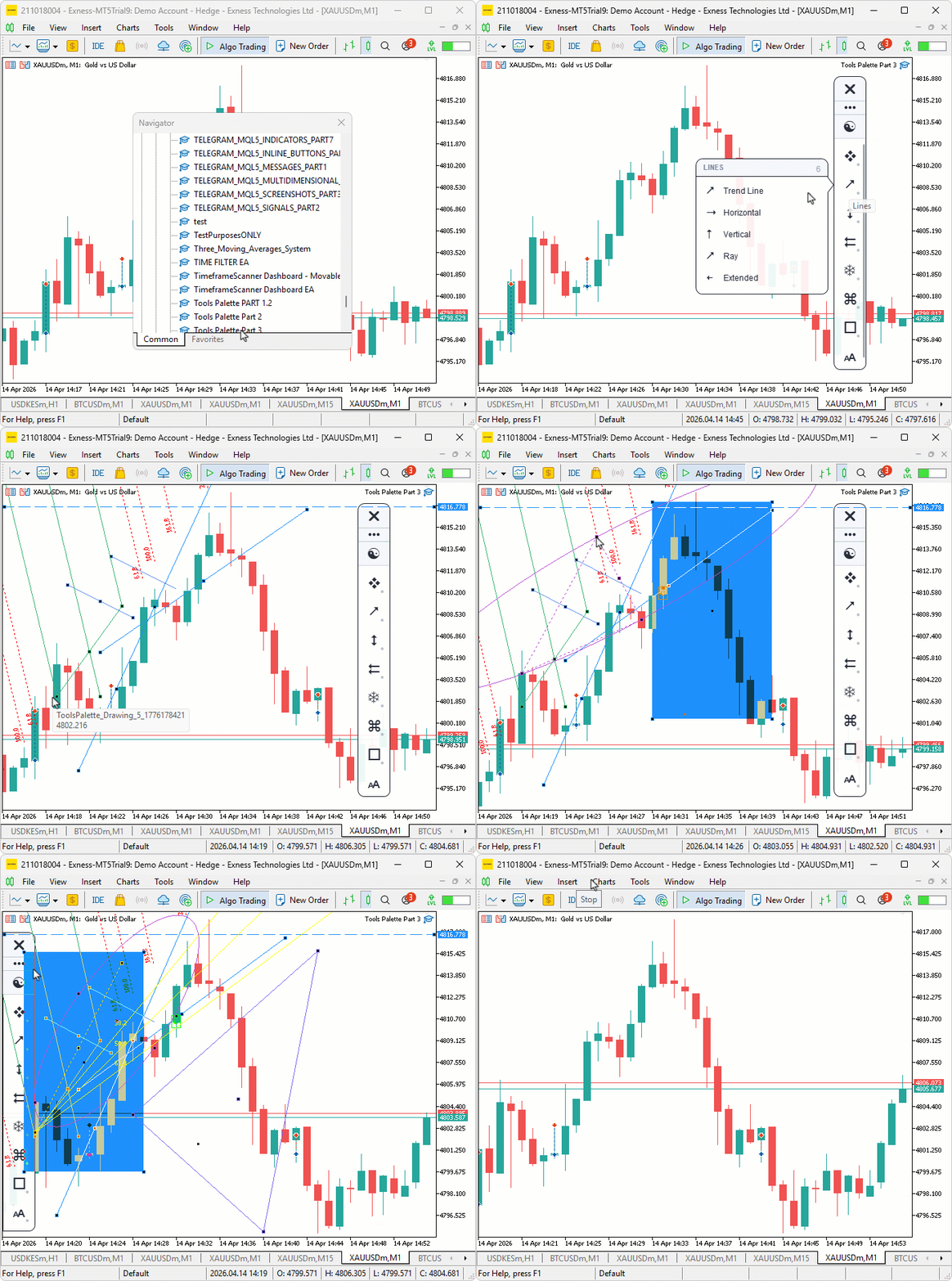
During testing, the flyout panels appeared correctly when hovering each category button with smooth pointer triangle alignment, tool selection from the flyout placed chart objects accurately across single-click, two-click, and three-click tools, and panel dragging snapped cleanly to both chart edges with the flyout repositioning to follow.
Conclusion
In conclusion, we have not just built a prettier sidebar but a working, testable interaction stack in MQL5. Concretely, the static palette was extended into a ten-class system that provides a data-driven tool registry covering thirty-five tools across eight categories, so new tools are added as data entries rather than ad hoc code changes. The flyout selection panel includes a pointer triangle, clipped scrolling, hover and highlight states, and a thin scroll thumb pill. The chart event handler routes mouse move, wheel, keyboard, and chart-resize events while performing precise hit-testing against the sidebar and flyout regions. Full panel interactivity covers grip dragging with edge snapping, bottom-edge resizing, scrollable category lists, and live theme toggling without restart. Finally, the drawing engine translates tool selection into chart objects with deterministic state reset after each completed placement.
The acceptance criteria demonstrated in testing are clear: selecting a tool from a flyout results in object placement on the chart; overflowing lists scroll with the wheel or thumb drag; the panel drags and snaps to chart edges; theme toggles apply immediately; and flyouts reposition correctly when the panel moves. The architecture exposes a clean interaction contract — active tool, clicks needed, and placement state — making behavior predictable and easy to extend. After reading this article, you will be able to:
- Select drawing tools from flyout menus and place trend lines, Fibonacci retracements, channels, pitchforks, and annotations directly from the sidebar
- Drag, resize, and snap the sidebar to chart edges during live sessions without obstructing price action
- Extend the tool registry by adding new tools as data entries without modifying rendering or interaction logic
In the next part, we will leverage this interaction layer to enhance the crosshair tool with a reticle tick-mark overlay, full-width and full-height crosshair lines with axis labels, a circular magnifier lens rendering zoomed candle content, and a double-click measure mode with diagonal line, anchor markers, and floating bar and pip statistics. Stay tuned.
Warning: All rights to these materials are reserved by MetaQuotes Ltd. Copying or reprinting of these materials in whole or in part is prohibited.
This article was written by a user of the site and reflects their personal views. MetaQuotes Ltd is not responsible for the accuracy of the information presented, nor for any consequences resulting from the use of the solutions, strategies or recommendations described.

 Downloading International Monetary Fund Data Using Python
 Adaptive Malaysian Engulfing Indicator (Part 2): Optimized Retest Bar Range
 Position Management: Safe Pyramiding with a Unified Stop in MQL5
 Building a Trade Analytics System (Part 3): Storing MetaTrader 5 Trades in SQLite

- Free trading apps
- Over 8,000 signals for copying
- Economic news for exploring financial markets
You agree to website policy and terms of use
Looks NICE; thx for sharing codes & ideas ; take care
That view is beautiful. Thanks.