

Trading with the MQL5 Economic Calendar (Part 12): SQLite Storage and Deduplication
 1 406
1 406
 2
2

Introduction
In algorithmic trading, the data feeding our automation must survive program restarts, terminal reboots, and the boundary between live charts and the strategy tester. In Part 11 of this series, we built a modular canvas-based news dashboard that loaded events either from an embedded Comma-Separated Values (CSV) resource in the strategy tester or from the live MetaQuotes Language 5 (MQL5) calendar API in live mode. That approach worked, but it left two problems unsolved. The CSV was a static snapshot frozen at compile time, so updating the test data meant recompiling the program. And the triggered trade list lived only in memory, so a restart erased every record of which news events had already fired trades, opening the door to duplicate orders. This article is for MetaQuotes Language 5 (MQL5) developers and algorithmic traders. It shows how to persist calendar and trade state across restarts, share one data store between live and tester modes, and download fresh history on demand without recompiling.
We replace the CSV resource with a SQLite layer. The database file lives in the common terminal folder, so live charts and strategy tester agents share it. Live mode continuously writes every loaded event to disk, while the strategy tester reads from that same store with no code changes between the two modes. We also persist triggered trade IDs and show download progress via a canvas progress bar, so the user has visible feedback while the database is being populated. The triggered trade list is restored from the last twenty-four hours on every program restart. We will cover the following topics:
By the end of this article, we will have a news dashboard that persists its data across restarts, downloads calendar history on demand with a visible progress bar, and shares one database between live operation and offline testing.
From CSV Resource to SQLite Database Layer
In the previous part, the strategy tester relied on a CSV file embedded into the program at compile time. The file was bundled as a resource string, parsed line by line on startup, and used to populate the in-memory event array. That worked for offline testing, but it meant the test data was permanently fixed to whatever was in the file at the moment of compilation. Updating to a fresh range of news events required regenerating the CSV, copying it into the resource folder, and recompiling. Live mode loaded directly from the MetaTrader 5 calendar API and never wrote anything to disk, so the two modes used completely different data sources with completely different lifecycles.
The new design replaces both halves of that split with a single SQLite database file living in the common terminal folder. SQLite is a self-contained database engine built into the MetaTrader 5 runtime through the Database API, which gives us familiar tools — create tables, prepare statements, bind parameters, run transactions, and query rows — all from inside MQL5. The common folder placement means the live chart agent and every strategy tester agent point at the same physical file. Whatever live mode learns about the calendar, the tester can read. Whatever the tester is given to chew on, the live chart sees it too. Two tables sit inside that file: one holds the events themselves with every field needed for unit-aware display and trade decisions, and the other holds the IDs of news events that have already fired trades so the deduplication set survives restarts.
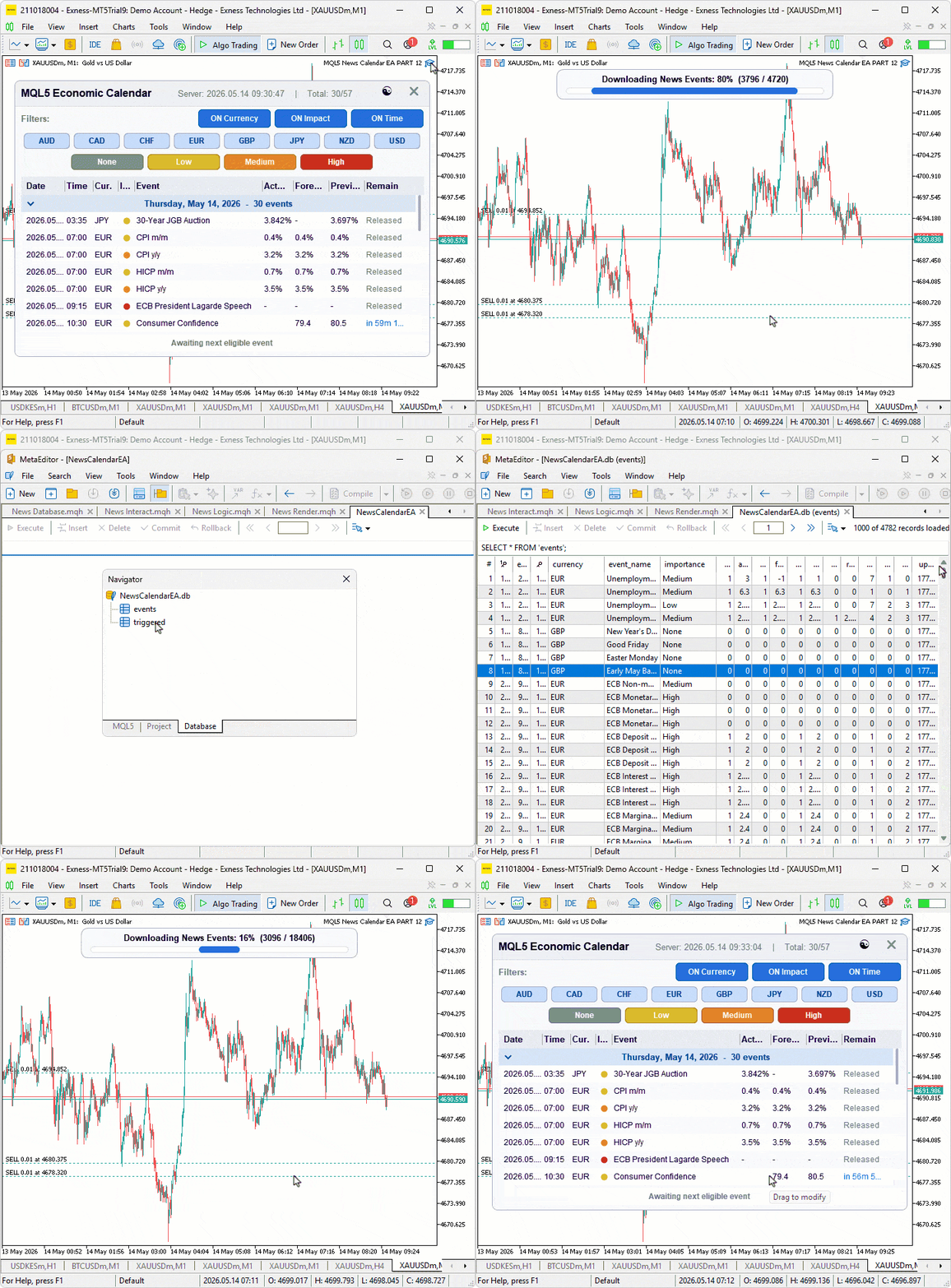
The data flow becomes asymmetric and clean. In live mode, every refresh of the calendar API now upserts each event into the database within a single transaction, so the disk picture stays in sync with what the program sees in memory. A new input lets the user request a one-time download of any historical date range to seed the database, with a progress bar overlay showing percentage and record counts as the rows accumulate. In tester mode, the program does no API calls at all — it queries the events table for the configured backtest window and feeds the result straight into the same filtering and rendering pipeline used by live mode. The triggered trade list is loaded once at startup from the last twenty-four hours of database history, restoring whatever deduplication context the previous session left behind. Below is a visualization of what we intend to achieve.
Implementation in MQL5
Opening the SQLite Database and Creating the Schema
The database layer starts with a single file shared between live and tester modes, plus two tables: one for events and one for triggered trade IDs. We use the SQLite engine built into MetaTrader 5, which exposes its API directly to MQL5.
//+------------------------------------------------------------------+
//|                                               News Database.mqh  |
//|                           Copyright 2026, Allan Munene Mutiiria. |
//|                                   https://t.me/Forex_Algo_Trader |
//+------------------------------------------------------------------+
#property copyright "Copyright 2026, Allan Munene Mutiiria."
#property link      "https://t.me/Forex_Algo_Trader"

//--- Include guard
#ifndef NEWS_DATABASE_MQH
#define NEWS_DATABASE_MQH

//--- Include core data definitions and state
#include "News Core.mqh"

//--- Declare debugLogging extern when not compiled from main (Logic.mqh uses same guard)
#ifndef NEWS_COMPILED_FROM_MAIN
extern bool debugLogging; // Print debug info to journal
#endif

//+------------------------------------------------------------------+
//| Database State                                                   |
//+------------------------------------------------------------------+
int g_news_db = INVALID_HANDLE; // SQLite database handle (-1 when not open)

//--- Database stored in the COMMON terminal folder so both live chart
//--- and strategy tester agents can access the same file
#define NEWS_DB_PATH "Database\\NewsCalendarEA.db" // Path relative to Common/Files/

//+------------------------------------------------------------------+
//| Open or create database and ensure required tables exist         |
//+------------------------------------------------------------------+
bool News_DbOpen()
  {
//--- Return early if database is already open
   if(g_news_db != INVALID_HANDLE) return true;
//--- Open from Common/Files/ folder for shared live and tester access
   g_news_db = DatabaseOpen(NEWS_DB_PATH,
                            DATABASE_OPEN_READWRITE |
                            DATABASE_OPEN_CREATE    |
                            DATABASE_OPEN_COMMON);
   if(g_news_db == INVALID_HANDLE)
     {
      Print("News_DbOpen: failed to open '", NEWS_DB_PATH, "' error=", GetLastError());
      return false;
     }
//--- Create events table with all calendar value columns
   if(!DatabaseExecute(g_news_db,
      "CREATE TABLE IF NOT EXISTS events ("
      "  value_id     INTEGER PRIMARY KEY,"
      "  event_id     INTEGER NOT NULL,"
      "  event_time   INTEGER NOT NULL,"
      "  currency     TEXT    NOT NULL,"
      "  event_name   TEXT    NOT NULL,"
      "  importance   TEXT    NOT NULL,"
      "  has_actual   INTEGER NOT NULL DEFAULT 0,"
      "  actual       REAL    NOT NULL DEFAULT 0,"
      "  has_forecast INTEGER NOT NULL DEFAULT 0,"
      "  forecast     REAL    NOT NULL DEFAULT 0,"
      "  has_previous INTEGER NOT NULL DEFAULT 0,"
      "  previous     REAL    NOT NULL DEFAULT 0,"
      "  has_revised  INTEGER NOT NULL DEFAULT 0,"
      "  revised_prev REAL    NOT NULL DEFAULT 0,"
      "  unit         INTEGER NOT NULL DEFAULT 0,"
      "  multiplier   INTEGER NOT NULL DEFAULT 0,"
      "  digits       INTEGER NOT NULL DEFAULT 0,"
      "  updated_at   INTEGER NOT NULL DEFAULT 0"
      ");"))
     {
      Print("News_DbOpen: create events table failed: ", GetLastError());
      DatabaseClose(g_news_db);
      g_news_db = INVALID_HANDLE;
      return false;
     }
//--- Create index on event_time for fast time-window queries
   DatabaseExecute(g_news_db,
      "CREATE INDEX IF NOT EXISTS idx_events_time ON events(event_time);");
//--- Create triggered table for trade deduplication across restarts
   if(!DatabaseExecute(g_news_db,
      "CREATE TABLE IF NOT EXISTS triggered ("
      "  event_id     INTEGER PRIMARY KEY,"
      "  triggered_at INTEGER NOT NULL"
      ");"))
     {
      Print("News_DbOpen: create triggered table failed: ", GetLastError());
      DatabaseClose(g_news_db);
      g_news_db = INVALID_HANDLE;
      return false;
     }
   if(debugLogging) Print("News_DbOpen: ready at '", NEWS_DB_PATH, "'");
   return true;
  }
We start the implementation by declaring the "g_news_db" global handle to track the open database connection across the entire program lifetime, seeded to INVALID_HANDLE so we can detect the not-open state. The "NEWS_DB_PATH" defines a path relative to the common files folder — the double backslash escapes a single backslash in the string literal, and the file sits inside a "Database" subfolder named "NewsCalendarEA.db".
We define the "News_DbOpen" function as the single entry point for setting up the database. The early-return guard prevents reopening an already-open handle, since calling open twice would leak the previous connection. We then call the DatabaseOpen function with three flags combined: read-write access, create-if-missing, and the common folder flag. That third flag is the crucial one for our split — without it, the database would live under the per-instance terminal data folder, where the live chart agent and each tester agent get isolated copies. The common folder is the single shared location every MetaTrader 5 instance on the machine can read and write, so a live-mode download populates the same file the tester opens.
When the open call fails, we print the last error code and return false so the caller knows initialization cannot proceed. On success, we move into schema creation. The events table is built with the DatabaseExecute function carrying a "CREATE TABLE IF NOT EXISTS" statement, which means a fresh program install creates the schema and a subsequent run reuses the existing one. The table's primary key is value_id, which is the unique MetaTrader 5 calendar value ID — this lets the same event get updated rather than duplicated when its actual or revised values get published after the initial load. The event_id column holds the parent event ID used for trade deduplication, event_time carries the Unix timestamp for time-window queries, and the rest of the columns mirror the "NewsEvent" struct fields, including the four has-value flags, the four value doubles, the unit/multiplier/digits formatting metadata, and an updated_at timestamp.
After the table creation, we run a second statement to create an index on the "event_time" column. SQLite would otherwise scan the entire table for every time-window query, but with this index in place, the engine can jump straight to the relevant range. This matters because the tester loads events by date range on every initialization, and the live mode prunes old events by timestamp on every startup.
The triggered table is created next with its own "CREATE TABLE IF NOT EXISTS" call. Its schema is intentionally minimal — just the event ID as the primary key and the timestamp when the trade fired. The primary key constraint gives us free deduplication: when the trade logic tries to mark the same event twice, the "INSERT OR IGNORE" we will see later just skips the duplicate without an error. On any creation failure, we close the handle and return false to keep the program from running with a half-initialized database. The final debug log confirms the database is ready at its expected path. After opening the database, we need to close it. We use the following approach.
Closing the Database Cleanly
The companion to opening the database is closing it cleanly when the program shuts down, so file locks are released and any pending writes are flushed.
//+------------------------------------------------------------------+
//| Close the database cleanly                                       |
//+------------------------------------------------------------------+
void News_DbClose()
  {
//--- Skip if database is not open
   if(g_news_db == INVALID_HANDLE) return;
   DatabaseClose(g_news_db);
   g_news_db = INVALID_HANDLE;
  }
We define the "News_DbClose" function as a small but important cleanup helper. The early return guards against calling close on a handle that was never opened or has already been closed, which would otherwise pass an invalid value into the runtime and trigger a journal error. When the handle is valid, we call the DatabaseClose function to release the connection, then reset the global handle back to the invalid sentinel, so any subsequent code that checks the open state sees the database as closed. This pair of operations runs from the program's deinit path, ensuring the SQLite engine flushes its write cache and releases the file lock before the terminal unloads the program. Next, we implement inserting a single row at a time.
Inserting or Replacing a Single Event Row
The events table is written one row at a time through a prepared statement that handles both fresh inserts and updates to existing rows in a single operation. This is what powers idempotent loads — running the same data through twice produces the same result as running it once.
//+------------------------------------------------------------------+
//| Upsert a single event row into the events table                  |
//+------------------------------------------------------------------+
bool News_DbUpsertEvent(long valueId, const NewsEvent &ev, datetime updatedAt)
  {
//--- Abort if database is not open
   if(g_news_db == INVALID_HANDLE) return false;
//--- Prepare INSERT OR REPLACE statement with all event columns
   int stmt = DatabasePrepare(g_news_db,
      "INSERT OR REPLACE INTO events ("
      "  value_id,event_id,event_time,currency,event_name,importance,"
      "  has_actual,actual,has_forecast,forecast,"
      "  has_previous,previous,has_revised,revised_prev,"
      "  unit,multiplier,digits,updated_at"
      ") VALUES (?,?,?,?,?,?,?,?,?,?,?,?,?,?,?,?,?,?);");
   if(stmt == INVALID_HANDLE) return false;
//--- Bind all parameter values to statement slots
   DatabaseBind(stmt,  0, valueId);
   DatabaseBind(stmt,  1, ev.eventId);
   DatabaseBind(stmt,  2, (long)ev.eventDateTime);
   DatabaseBind(stmt,  3, ev.currency);
   DatabaseBind(stmt,  4, ev.event);
   DatabaseBind(stmt,  5, ev.importance);
   DatabaseBind(stmt,  6, (int)ev.hasActual);
   DatabaseBind(stmt,  7, ev.actual);
   DatabaseBind(stmt,  8, (int)ev.hasForecast);
   DatabaseBind(stmt,  9, ev.forecast);
   DatabaseBind(stmt, 10, (int)ev.hasPrevious);
   DatabaseBind(stmt, 11, ev.previous);
   DatabaseBind(stmt, 12, (int)ev.hasRevised);
   DatabaseBind(stmt, 13, ev.revisedPrevious);
   DatabaseBind(stmt, 14, ev.unit);
   DatabaseBind(stmt, 15, ev.multiplier);
   DatabaseBind(stmt, 16, ev.digits);
   DatabaseBind(stmt, 17, (long)updatedAt);
//--- Execute and finalize the prepared statement
   const bool ok = DatabaseRead(stmt);
   DatabaseFinalize(stmt);
   return ok;
  }
Here, we define the "News_DbUpsertEvent" function to write one event row using the upsert pattern — short for "update or insert". The function takes the calendar value ID separately from the event struct because the value ID is the unique key per published value, while the event ID is the parent event identifier we use for trade deduplication. The third parameter is a single timestamp shared across all rows in one batch, useful for tagging when this version of the data was last touched.
The early-return guard prevents writes when the database is not open, returning false so the caller can decide whether to log the failure or carry on silently. We then call the DatabasePrepare function with the upsert statement. The INSERT OR REPLACE form is the SQLite shorthand for "if a row with this primary key already exists, delete it and insert the new one". Since the primary key is value_id, the same calendar value ID always overwrites itself, which means re-running the download for a date range or refreshing live mode never produces duplicate rows. Each column in the table gets one parameter placeholder — the eighteen question marks line up with the eighteen columns listed in the parentheses above them.
The parameter binding uses the DatabaseBind function to fill each placeholder slot by zero-based index. We feed in the value ID, the parent event ID, and the event timestamp cast to a long since SQLite stores datetimes as integer unix timestamps. The string fields — currency, event name, and importance label — bind directly. The four have-value flags are cast from bool to int since SQLite uses 0 and 1 for boolean storage. The four value doubles bind as floating-point. The three formatting metadata fields and the updated-at timestamp finish the bindings. Prepared statements with bound parameters are how we avoid building SQL through string concatenation, which would expose us to malformed input characters in event names.
We then call the DatabaseRead function to execute the prepared statement and capture its return value. For statements that do not return rows, such as inserts and updates, this call simply runs the statement and reports success or failure. We always pair the prepare with the DatabaseFinalize function in the same call to release the statement handle, regardless of whether execution succeeded — leaking statement handles would eventually exhaust the SQLite engine's resource pool. The function returns the execution result so the caller knows whether the row landed in the database. The next task is to read the events out of the table.
Reading Events Out of the Database for a Time Window
The complement to writing events is reading them back, which is what the strategy tester does on startup to populate the in-memory array from the database file.
//+------------------------------------------------------------------+
//| Load events for a time window from DB into g_news_allEvents[]    |
//+------------------------------------------------------------------+
int News_DbLoadEventsForWindow(datetime startDt, datetime endDt)
  {
//--- Abort if database is not open
   if(g_news_db == INVALID_HANDLE) return 0;
//--- Prepare time-window query ordered ascending by event time
   int stmt = DatabasePrepare(g_news_db,
      "SELECT event_id,event_time,currency,event_name,importance,"
      "       has_actual,actual,has_forecast,forecast,"
      "       has_previous,previous,has_revised,revised_prev,"
      "       unit,multiplier,digits"
      " FROM events"
      " WHERE event_time >= ? AND event_time <= ?"
      " ORDER BY event_time ASC;");
   if(stmt == INVALID_HANDLE) return 0;
//--- Bind time window bounds
   DatabaseBind(stmt, 0, (long)startDt);
   DatabaseBind(stmt, 1, (long)endDt);
//--- Reset event array and read each row into it
   ArrayResize(g_news_allEvents, 0);
   int idx = 0;
   while(DatabaseRead(stmt))
     {
      //--- Declare temporary locals; MQL5 forbids struct refs from arrays
      NewsEvent e;
      long   evId = 0, evTime = 0;
      int    hasA = 0, hasF = 0, hasP = 0, hasR = 0;
      int    unitV = 0, multV = 0, digV = 0;
      string cur = "", evName = "", imp = "";
      double act = 0, fcast = 0, prev = 0, revPrev = 0;
      //--- Read each column from the current row
      DatabaseColumnLong   (stmt,  0, evId);
      DatabaseColumnLong   (stmt,  1, evTime);
      DatabaseColumnText   (stmt,  2, cur);
      DatabaseColumnText   (stmt,  3, evName);
      DatabaseColumnText   (stmt,  4, imp);
      DatabaseColumnInteger(stmt,  5, hasA);
      DatabaseColumnDouble (stmt,  6, act);
      DatabaseColumnInteger(stmt,  7, hasF);
      DatabaseColumnDouble (stmt,  8, fcast);
      DatabaseColumnInteger(stmt,  9, hasP);
      DatabaseColumnDouble (stmt, 10, prev);
      DatabaseColumnInteger(stmt, 11, hasR);
      DatabaseColumnDouble (stmt, 12, revPrev);
      DatabaseColumnInteger(stmt, 13, unitV);
      DatabaseColumnInteger(stmt, 14, multV);
      DatabaseColumnInteger(stmt, 15, digV);
      //--- Populate event struct from column values
      e.eventId         = evId;
      e.eventDateTime   = (datetime)evTime;
      e.eventDate       = TimeToString((datetime)evTime, TIME_DATE);
      e.eventTime       = TimeToString((datetime)evTime, TIME_MINUTES);
      e.currency        = cur;
      e.event           = evName;
      e.importance      = imp;
      e.hasActual       = (hasA != 0);
      e.actual          = act;
      e.hasForecast     = (hasF != 0);
      e.forecast        = fcast;
      e.hasPrevious     = (hasP != 0);
      e.previous        = prev;
      e.hasRevised      = (hasR != 0);
      e.revisedPrevious = revPrev;
      e.unit            = unitV;
      e.multiplier      = multV;
      e.digits          = digV;
      //--- Append populated struct to the event array
      ArrayResize(g_news_allEvents, idx + 1);
      g_news_allEvents[idx] = e;
      idx++;
     }
   DatabaseFinalize(stmt);
   if(debugLogging) Print("News_DbLoadEventsForWindow: loaded ", idx, " events");
   return idx;
  }
We define the "News_DbLoadEventsForWindow" function to pull every event whose timestamp falls within the start and end bounds. Returning zero on a closed handle lets the caller fall back to live loading without a hard error. We then prepare a "SELECT" statement that picks sixteen columns out of the events table, filtered by the time-window predicate, and ordered ascending by event time. The ordering matters because the rest of the program expects events to come out oldest-first — without it, the row plan would build day separators in the wrong sequence.
The two time bounds bind into the placeholders as long integers, matching the way SQLite stored the timestamps when we wrote them. We then call the "ArrayResize" function to clear the global event array before reading, ensuring a fresh load does not append onto stale data from a previous tester run.
The read loop uses the DatabaseRead function in a while form — for "SELECT" statements, each call advances the cursor to the next row and returns true while rows remain. Inside the loop, we declare a temporary "NewsEvent" struct along with one local variable per column. We pull each value out with the column-specific accessors: the DatabaseColumnLong function for the two integer columns that need a 64-bit range, the DatabaseColumnText function for the three string columns, the "DatabaseColumnInteger" function for the seven integer-typed fields, including the four has-value flags, and the DatabaseColumnDouble function for the four floating-point value columns. The column index parameter on each call matches the position in the "SELECT" list, not the table schema.
Once every column is read, we populate the struct field by field. The event timestamp comes back as a long integer, which we cast to a datetime for storage and then format twice through the TimeToString function to fill the human-readable date and time string fields. The has-value flags get converted from their integer 0/1 storage back into the bool representation the rest of the program uses, and every other field copies directly. Finally, we grow the event array and append the struct to a new slot.
After the loop exits, the DatabaseFinalize function releases the statement handle, and the debug log reports how many rows were loaded. The return value carries the same count, so the caller can branch on it — in particular, the tester startup uses a zero return as the signal to print the "no data found, please download in live mode first" instructions to the user. The next thing we do is data cleaning up old event rows, recording, and querying the triggered trade set.
Pruning, Trade Deduplication, and Window Existence Checks
Five small helpers handle the housekeeping around the two tables — cleaning up old event rows, recording and querying the triggered trade set, and probing whether a window already has data.
//+------------------------------------------------------------------+
//| Prune events older than keepDays to prevent database bloat       |
//+------------------------------------------------------------------+
void News_DbPruneOldEvents(int keepDays = 7)
  {
//--- Abort if database is not open
   if(g_news_db == INVALID_HANDLE) return;
//--- Compute cutoff timestamp and delete rows older than it
   const long cutoff = (long)TimeCurrent() - (long)keepDays * 86400;
   int stmt = DatabasePrepare(g_news_db,
      "DELETE FROM events WHERE event_time < ?;");
   if(stmt == INVALID_HANDLE) return;
   DatabaseBind(stmt, 0, cutoff);
   DatabaseRead(stmt);
   DatabaseFinalize(stmt);
  }

//+------------------------------------------------------------------+
//| Persist a triggered event ID to DB for restart safety            |
//+------------------------------------------------------------------+
bool News_DbMarkTriggered(long evId)
  {
//--- Abort if database is not open
   if(g_news_db == INVALID_HANDLE) return false;
//--- Insert event ID with current timestamp; ignore duplicate
   int stmt = DatabasePrepare(g_news_db,
      "INSERT OR IGNORE INTO triggered (event_id,triggered_at) VALUES (?,?);");
   if(stmt == INVALID_HANDLE) return false;
   DatabaseBind(stmt, 0, evId);
   DatabaseBind(stmt, 1, (long)TimeCurrent());
   const bool ok = DatabaseRead(stmt);
   DatabaseFinalize(stmt);
   return ok;
  }

//+------------------------------------------------------------------+
//| Load triggered event IDs from last 24h into g_news_triggeredIds[]|
//+------------------------------------------------------------------+
void News_DbLoadTriggered()
  {
//--- Abort if database is not open
   if(g_news_db == INVALID_HANDLE) return;
//--- Query triggered IDs from the past 24 hours
   const long cutoff = (long)TimeCurrent() - 86400;
   int stmt = DatabasePrepare(g_news_db,
      "SELECT event_id FROM triggered WHERE triggered_at >= ?;");
   if(stmt == INVALID_HANDLE) return;
   DatabaseBind(stmt, 0, cutoff);
//--- Populate g_news_triggeredIds array from query results
   ArrayResize(g_news_triggeredIds, 0);
   int n = 0;
   while(DatabaseRead(stmt))
     {
      long id = 0;
      DatabaseColumnLong(stmt, 0, id);
      ArrayResize(g_news_triggeredIds, n + 1);
      g_news_triggeredIds[n++] = id;
     }
   DatabaseFinalize(stmt);
   if(n > 0 && debugLogging)
      Print("News_DbLoadTriggered: restored ", n, " triggered IDs");
  }

//+------------------------------------------------------------------+
//| Check if event ID was already triggered (memory array fast path) |
//+------------------------------------------------------------------+
bool News_DbAlreadyTriggered(long evId)
  {
//--- Linear scan of the in-memory triggered IDs array
   const int n = ArraySize(g_news_triggeredIds);
   for(int i = 0; i < n; i++)
      if(g_news_triggeredIds[i] == evId) return true;
   return false;
  }

//+------------------------------------------------------------------+
//| Check if database already has events for a given time window     |
//+------------------------------------------------------------------+
bool News_DbHasDataForWindow(datetime startDt, datetime endDt)
  {
//--- Abort if database is not open
   if(g_news_db == INVALID_HANDLE) return false;
//--- Count rows in the requested window
   int stmt = DatabasePrepare(g_news_db,
      "SELECT COUNT(*) FROM events WHERE event_time >= ? AND event_time <= ?;");
   if(stmt == INVALID_HANDLE) return false;
   DatabaseBind(stmt, 0, (long)startDt);
   DatabaseBind(stmt, 1, (long)endDt);
   int cnt = 0;
   if(DatabaseRead(stmt)) DatabaseColumnInteger(stmt, 0, cnt);
   DatabaseFinalize(stmt);
   return (cnt > 0);
  }
Here, we define the "News_DbPruneOldEvents" function to delete rows older than a configurable number of days. The default keeps a rolling seven-day window, balancing useful historical context against database bloat from months of accumulated data. The cutoff timestamp comes from subtracting the keep-days value times 86400 — the number of seconds in a day — from the current server time. We prepare a DELETE statement filtered by the event_time column, bind the cutoff as a long integer, run it through the DatabaseRead function, and finalize the handle. The live mode startup path calls this, so each fresh session begins with a tidy database.
The "News_DbMarkTriggered" function records that a specific event ID has fired a trade. We use the INSERT OR IGNORE form of SQLite's insert — if a row with the same primary key already exists, the statement silently does nothing instead of raising a constraint violation. Since the triggered table's primary key is the event ID itself, this gives us free deduplication at the database level. We bind the event ID and the current timestamp as the values, run the statement, finalize, and return the success flag.
We define the "News_DbLoadTriggered" function to restore the in-memory triggered set on startup. Reaching twenty-four hours back is enough to cover overnight and weekend gaps without dragging in stale entries from sessions long past. The function prepares a SELECT on the triggered table filtered by the cutoff, clears the global triggered IDs array, then walks each returned row with the "DatabaseRead" function and uses the DatabaseColumnLong function to read the event ID before appending it to the array. The debug log reports how many IDs were restored when at least one came back.
The "News_DbAlreadyTriggered" function is the hot-path check used during every trade candidate scan. Rather than hitting the database every time, it scans the in-memory array directly. The array is loaded once at startup by the previous function and appended to whenever a new trade fires, so it always reflects the current truth without a disk round-trip on each tick.
Finally, the "News_DbHasDataForWindow" function answers whether a given time window already has rows in the events table. It prepares a SELECT COUNT(*) query filtered by the time bounds, binds the start and end, and reads the single count value back with the DatabaseColumnInteger function. The return tests whether the count is positive. This is the kind of check that could short-circuit a download — if the requested range already exists, the caller could skip the API fetch entirely. The next thing we do is visualize the download progress.
Drawing One Frame of the Download Progress Bar
The download routine fetches potentially thousands of calendar records, and the user needs feedback that something is happening. We paint a single progress bar frame onto a dedicated canvas overlay, with a centered title carrying the live percent and counts, and a track that fills outward from the center.
//+------------------------------------------------------------------+
//| Draw one frame of the download progress bar onto canvas          |
//+------------------------------------------------------------------+
void News_DbDrawProgressBar(CCanvas &canv, int pbW, int pbH,
                             int pct, int saved, int total)
  {
//--- Clear canvas to transparent
   canv.Erase(0x00000000);
//--- Draw outer rounded pill background using theme colors
   News_FillRoundRect(canv, 0, 0, pbW, pbH, 10, ColorToARGB(g_news_bg, 255));
   News_DrawRoundRectBorder(canv, 0, 0, pbW, pbH, 10, 1,
                             ColorToARGB(g_news_borderAccent, 255));
//--- Stamp centered title text with current progress counts
   canv.FontSet("Arial Bold", -100);
   canv.TextOut(pbW / 2, 7,
      "Downloading News Events: " + IntegerToString(pct) +
      "%  (" + IntegerToString(saved) + " / " + IntegerToString(total) + ")",
      ColorToARGB(g_news_titleText, 255), TA_CENTER | TA_TOP);
//--- Draw the track capsule background below the title
   const int padX   = 14;
   const int trackL = padX;
   const int trackR = pbW - padX;
   const int trackW = trackR - trackL;
   const int trackY = pbH - 18;
   const int barH   = 10;
   News_FillRoundRect(canv, trackL, trackY, trackW, barH, barH / 2,
                      ColorToARGB(g_news_panelAlt, 255));
   News_DrawRoundRectBorder(canv, trackL, trackY, trackW, barH, barH / 2, 1,
                             ColorToARGB(g_news_border, 255));
//--- Fill the track from center outward proportional to percent complete
   const int fillW = (int)(trackW * pct / 100.0);
   const int fillL = trackL + (trackW - fillW) / 2;
   if(fillW > 0)
      News_FillRoundRect(canv, fillL, trackY, fillW, barH, barH / 2,
                         ColorToARGB(g_news_accent, 255));
//--- Push canvas frame to chart
   canv.Update();
   ChartRedraw(0);
  }
We define the "News_DbDrawProgressBar" function to render a complete progress bar frame from scratch on every call. The canvas reference comes in by parameter, so the same routine works on whatever canvas the caller chose to set up. We start by clearing the canvas to fully transparent with the Erase method, then paint the outer pill background using the "News_FillRoundRect" helper with a 10-pixel corner radius. The "News_DrawRoundRectBorder" helper draws a 1-pixel border on top, giving the pill a defined edge against the chart background.
Next, we stamp the centered title using the FontSet method to switch to bold Arial at 10 point, followed by the TextOut method with the "TA_CENTER | TA_TOP" alignment flag combination. The title string is built inline from the percent value and the saved-versus-total counts, formatted with the IntegerToString function so the user sees both the percentage and the raw record numbers — "45% (450 / 1000)" reads more clearly than either piece alone.
Following the title, we lay out the track capsule below it. The track sits with side padding on the left and right, leaves enough room above for the title, and runs eighteen pixels up from the bottom edge. We paint the track itself as a 10-pixel-tall, fully-rounded rectangle filled with the alternate panel color, then trace its border. Setting the corner radius to half the bar height gives the track a true pill shape regardless of its width.
We then compute the fill width as the track width scaled by the percent value, divided by 100. The interesting part is the fill positioning — rather than growing the bar from the left edge as most progress bars do, we center it within the track by offsetting the fill's left edge by half the unfilled remainder. As the percent rises from 0 to 100, the fill expands symmetrically outward from the center, eventually meeting both edges of the track. This is a small visual choice that gives the bar a satisfying "growing toward completion" feel rather than a one-directional sweep.
Finally, we push the rendered canvas to the chart with the Update method and call the ChartRedraw function to force the terminal to repaint immediately. Without that explicit redraw, the progress bar updates would queue up and only display at the chart's normal refresh cadence, which would make the percent counter look frozen during the download. Finally, we can wire all these functions to simulate the download.
Downloading Calendar Data and Saving It to the Database
This is the orchestrator that ties the calendar API, the progress bar canvas, and the upsert helper into a single download operation. It runs only in live mode, and only when the user has explicitly opted in.
//+------------------------------------------------------------------+
//| Download calendar data for date range and save to database       |
//+------------------------------------------------------------------+
void News_DbDownloadAndSave(datetime startDt, datetime endDt)
  {
//--- Abort if database is not open
   if(g_news_db == INVALID_HANDLE)
     {
      Print("News_DbDownloadAndSave: DB not open - aborting");
      return;
     }
   Print(">>> News DB: Fetching calendar events from ",
         TimeToString(startDt), " to ", TimeToString(endDt), " ...");
//--- Query all raw calendar values in the requested time window
   MqlCalendarValue values[];
   const int total = CalendarValueHistory(values, startDt, endDt, NULL, NULL);
   if(total <= 0)
     {
      Print(">>> News DB: No events found for specified range");
      return;
     }
   Print(">>> News DB: ", total, " raw calendar records found - saving to DB...");
//--- Create progress bar canvas centered at the top of the chart
   const int chartW  = (int)ChartGetInteger(0, CHART_WIDTH_IN_PIXELS);
   const int PB_W    = 420;
   const int PB_H    = 46;
   const int PB_X    = (chartW - PB_W) / 2;
   const int PB_Y    = 20;
   const string PB_NAME = "NewsDB_ProgressCanvas";
   CCanvas pbCanv;
   if(pbCanv.CreateBitmapLabel(PB_NAME, PB_X, PB_Y, PB_W, PB_H,
                                COLOR_FORMAT_ARGB_NORMALIZE))
     {
      //--- Configure progress bar canvas object properties
      ObjectSetInteger(0, PB_NAME, OBJPROP_SELECTABLE, false);
      ObjectSetInteger(0, PB_NAME, OBJPROP_HIDDEN,     true);
      ObjectSetInteger(0, PB_NAME, OBJPROP_ZORDER,     2000);
     }
//--- Draw initial 0% progress frame
   News_DbDrawProgressBar(pbCanv, PB_W, PB_H, 0, 0, total);
//--- Begin transaction, iterate all values, upsert each event record
   DatabaseTransactionBegin(g_news_db);
   const datetime updatedAt = TimeCurrent();
   int saved = 0;
   for(int i = 0; i < total; i++)
     {
      //--- Fetch associated event metadata and country info
      MqlCalendarEvent ev;
      if(!CalendarEventById(values[i].event_id, ev)) continue;
      MqlCalendarCountry ctry;
      CalendarCountryById(ev.country_id, ctry);
      MqlCalendarValue val;
      CalendarValueById(values[i].id, val);
      //--- Populate NewsEvent struct from calendar API data
      NewsEvent ne;
      ne.eventDate       = TimeToString(values[i].time, TIME_DATE);
      ne.eventTime       = TimeToString(values[i].time, TIME_MINUTES);
      ne.currency        = ctry.currency;
      ne.event           = ev.name;
      ne.importance      = News_GetImpactLabel(ev.importance);
      ne.hasActual       = val.HasActualValue();
      ne.hasForecast     = val.HasForecastValue();
      ne.hasPrevious     = val.HasPreviousValue();
      ne.hasRevised      = val.HasRevisedValue();
      ne.actual          = val.HasActualValue()   ? val.GetActualValue()   : 0.0;
      ne.forecast        = val.HasForecastValue() ? val.GetForecastValue() : 0.0;
      ne.previous        = val.HasPreviousValue() ? val.GetPreviousValue() : 0.0;
      ne.revisedPrevious = val.HasRevisedValue()  ? val.GetRevisedValue()  : 0.0;
      ne.unit            = (int)ev.unit;
      ne.multiplier      = (int)ev.multiplier;
      ne.digits          = (int)ev.digits;
      ne.eventDateTime   = values[i].time;
      ne.eventId         = (long)values[i].event_id;
      //--- Upsert the event into the database
      News_DbUpsertEvent((long)values[i].id, ne, updatedAt);
      saved++;
      //--- Refresh progress bar every 5 records to reduce redraw overhead
      if(i % 5 == 0 || i == total - 1)
        {
         const int pct = (int)((i + 1) * 100.0 / total);
         News_DbDrawProgressBar(pbCanv, PB_W, PB_H, pct, saved, total);
        }
     }
//--- Commit all upserts as a single transaction
   DatabaseTransactionCommit(g_news_db);
//--- Hold at 100% briefly so the user sees completion before canvas disappears
   News_DbDrawProgressBar(pbCanv, PB_W, PB_H, 100, saved, total);
   Sleep(800);
//--- Destroy progress bar canvas and clean up the chart object
   pbCanv.Destroy();
   ObjectDelete(0, PB_NAME);
   ChartRedraw(0);
   Print(">>> News DB: Download complete. ", saved, " events saved to ", NEWS_DB_PATH,
         " for range ", TimeToString(startDt), " to ", TimeToString(endDt),
         ". Use it for offline testing...");
//--- Open the DB file to log its current size on disk
   ResetLastError();
   int fh = FileOpen(NEWS_DB_PATH,
                     FILE_READ | FILE_BIN | FILE_COMMON | FILE_SHARE_READ | FILE_SHARE_WRITE);
   if(fh == INVALID_HANDLE)
     {
      Print(">>> News DB: Could not open DB file to read size (error ", GetLastError(), ")");
     }
   else
     {
      //--- Format byte count into KB or MB for readability
      const ulong dbBytes = FileSize(fh);
      FileClose(fh);
      string sizeStr;
      if(dbBytes >= 1048576)
         sizeStr = DoubleToString((double)dbBytes / 1048576.0, 2) + " MB";
      else if(dbBytes >= 1024)
         sizeStr = DoubleToString((double)dbBytes / 1024.0, 1) + " KB";
      else
         sizeStr = IntegerToString((long)dbBytes) + " bytes";
      Print(">>> News DB: Database file size: ", dbBytes, " bytes (", sizeStr, ")...");
     }
  }
Here, we define the "News_DbDownloadAndSave" function as the main download routine. After the open-handle guard and a journal log of the requested range, we call the CalendarValueHistory function to pull every calendar value record in the window. The early return on a zero-or-negative count handles the case where the requested range has no events at all — for example, a future date that has not been published yet, or a weekend window where no news fires.
Once we know there is data to save, we lay out the progress bar overlay. The canvas is 420 pixels wide and 46 tall, centered horizontally at the top of the chart by computing the offset from the chart width. We create the bitmap label with the "CreateBitmapLabel" method, then configure the chart object: not selectable, hidden from the object list, and z-ordered at 2000 to sit above the news dashboard's main canvas at 1000. The initial frame paints a zero-percent state, so the user sees the bar appear before any work starts.
The bulk of the function is the upsert loop, wrapped in a database transaction. We call the DatabaseTransactionBegin function before the loop and the DatabaseTransactionCommit function after it — without that, SQLite would auto-commit each insert as its own transaction, which forces a disk flush per record and slows the operation by roughly an order of magnitude. With the transaction wrapping every upsert, SQLite holds the writes in memory and flushes them all at commit time.
Inside the loop, we resolve each calendar value in three steps. First, we fetch the parent event metadata with the "CalendarEventById" function. Next, we fetch the country and currency information with the "CalendarCountryById" function. Finally, we fetch the value record itself with the "CalendarValueById" function. The three results map directly into a "NewsEvent" struct, with the "HasActualValue", "HasForecastValue", "HasPreviousValue", and "HasRevisedValue" methods producing the four boolean flags and their paired "GetActualValue", "GetForecastValue", "GetPreviousValue", and "GetRevisedValue" accessors providing the doubles. We then hand the struct off to the upsert helper.
The progress bar refreshes every five records and on the final iteration. Redrawing on every single record would flood the chart with paint events and slow the download visibly, but refreshing too rarely would leave the percent counter looking frozen. Five records strike a balance — the bar moves smoothly without stealing CPU from the actual save work. You can set any record step you want; this was just an arbitrary step we chose.
After the commit, we hold the bar at 100 percent for 800 milliseconds via the Sleep function so the user gets visual confirmation that the operation finished before the overlay disappears. The progress canvas is then destroyed with the Destroy method and removed from the chart through the ObjectDelete function, with a final redraw to clear it from the display. A completion log reports the saved count, the path, and the range.
The final block reads the database file size from disk for the journal. We open the file with shared-read flags through the FileOpen function so the operation works even while the database connection is still active, pull the byte count with the FileSize function, and immediately close the handle. The byte count is then formatted into a human-readable string — bytes for tiny files, kilobytes with one decimal for medium, megabytes with two decimals for large — so the user can see whether their download produced a manageable file or something approaching the multi-megabyte range. When downloaded, we see the following outcome.

With that done, we will now add some extra input variables to the main file to control the conditional download of the news events in live mode. We used the following logic to achieve that.
Wiring the Download Inputs and the Database Include Into the Main File
The main entry file gains a new input group for the download settings and a new include for the database module. These two small additions are what let the user trigger the download from the standard input panel and let every other module reach the database functions.
//--- Main file

//+------------------------------------------------------------------+
//| Inputs - Data Download Settings                                  |
//+------------------------------------------------------------------+
input group "=== DATA DOWNLOAD SETTINGS ==="
input bool     inp_DownloadDataInLive = false;         // Download NEWS data for offline testing?
input datetime inp_DownloadStartDate  = D'2026.01.01'; // Download range: START date
input datetime inp_DownloadEndDate    = D'2026.05.12'; // Download range: END date

//+------------------------------------------------------------------+
//| Module Includes                                                  |
//+------------------------------------------------------------------+

//--- We include the new database file

//--- Include SQLite database layer for persistent calendar storage
#include "News Database.mqh"
In the main file, we declare three new inputs under a "Data Download Settings" group. The boolean flag defaults to false, so the program never downloads automatically — the user must consciously opt in by flipping the toggle, which prevents accidental downloads every time the program reattaches to a chart. The two datetime inputs define the start and end of the range to fetch, with sensible defaults matching the backtest window inputs from the other group. Keeping these as separate inputs from the backtest range gives the user flexibility — they can download a broad historical sweep once and then test against narrower slices repeatedly without re-fetching.
The "News Database.mqh" includes sits between the core module and the logic module in the include order. That placement matters because the logic module references database functions during its tracing and refresh paths, so the database module must already be visible to the compiler by the time the logic header is processed. The other modules then pick up the database symbols transparently through the same include chain. In the logic module, we improve the restart safety by routing through the database module.
//--- In logic module

//--- Mark triggered logic now persists to DB

//+------------------------------------------------------------------+
//| Append event ID to triggered list and persist to database        |
//+------------------------------------------------------------------+
void News_MarkTriggered(long evId)
  {
//--- Add ID to the in-memory triggered array
   const int n = ArraySize(g_news_triggeredIds);
   ArrayResize(g_news_triggeredIds, n + 1);
   g_news_triggeredIds[n] = evId;
//--- Persist triggered ID to database for restart safety
   News_DbMarkTriggered(evId);
//--- Invalidate candidate cache so next FindCandidate recomputes
   g_news_cachedCandStamp = (datetime)-1;
  }

//--- Already triggered logic now delegates to DB module

//+------------------------------------------------------------------+
//| Test if an event ID is already in the triggered list             |
//+------------------------------------------------------------------+
bool News_AlreadyTriggered(long evId)
  {
//--- Delegate to database module's in-memory triggered list check
   return News_DbAlreadyTriggered(evId);
  }
The "News_MarkTriggered" function now does two things back-to-back. We grow the in-memory triggered IDs array and append the new ID at the end, keeping the hot-path deduplication check fast — every subsequent call to find a candidate event scans this array and skips IDs already present. Right after the in-memory append, we call the "News_DbMarkTriggered" function from the database module to persist the ID to the triggered table. That second call is what survives a restart. The candidate cache is then invalidated, so the next search rebuilds from the updated state rather than returning the stale candidate we just traded.
The "News_AlreadyTriggered" function becomes a thin delegate that calls the database module's "News_DbAlreadyTriggered" function. We keep this function in the logic module so other code can call it through the same name as before, but the actual implementation now lives in the database module. The check itself remains an in-memory scan — no disk hit per call — because the database module loaded the IDs into the same global array at startup. The split keeps the logic module's interface stable while moving the persistence concern into its own home. In the interaction module, we now rewrite the initialization and deinitialization functions to use the database path and close the database, respectively.
Wiring the Database Into the Init and Deinit Lifecycle
The program lifecycle now owns the database connection — opened once in init, closed once in deinit, with very different data loading strategies between tester and live modes sitting in between.
//+------------------------------------------------------------------+
//| Initialize program                                               |
//+------------------------------------------------------------------+
bool News_Init()
  {
//--- Apply default light theme
   News_ApplyTheme(false);
//--- Initialize currency/impact filters and scroll state
   News_InitDefaultFilters();
   News_ScrollInit(g_news_tableScroll);
//--- Set magic number on the trade helper object
   g_news_trade.SetExpertMagicNumber(20260507);
//--- Open the SQLite database; abort if it fails
   if(!News_DbOpen())
     {
      Print(">>> News DB: Failed to open database - cannot continue");
      return false;
     }
//--- Branch on tester vs live mode for data loading strategy
   if(MQLInfoInteger(MQL_TESTER))
     {
      //--- Load events from database for the configured backtest window
      Print(">>> News DB: Running in Strategy Tester, loading from: ", NEWS_DB_PATH, "...");
      const int loaded = News_DbLoadEventsForWindow(
                           (datetime)StartDate, (datetime)EndDate);
      if(loaded == 0)
        {
         //--- Instruct user to download data on a live chart first
         Print("================================================================");
         Print(">>> News DB: NO DATA FOUND FOR BACKTEST PERIOD");
         Print(">>> Go to a live chart and enable 'Download NEWS data for");
         Print(">>> offline testing?' with the same date range, then rerun.");
         Print("================================================================");
         return false;
        }
      //--- Log file size; use shared-read flags so file can be read while DB is open
      ResetLastError();
      int fh = FileOpen(NEWS_DB_PATH,
                        FILE_READ | FILE_BIN | FILE_COMMON | FILE_SHARE_READ | FILE_SHARE_WRITE);
      if(fh == INVALID_HANDLE)
        {
         Print(">>> News DB: Loaded ", loaded, " events from ", NEWS_DB_PATH,
               " (could not read file size, error ", GetLastError(), ")...");
        }
      else
        {
         //--- Format byte count into KB or MB for readability
         const ulong dbBytes = FileSize(fh);
         FileClose(fh);
         string sizeStr;
         if(dbBytes >= 1048576)
            sizeStr = DoubleToString((double)dbBytes / 1048576.0, 2) + " MB";
         else if(dbBytes >= 1024)
            sizeStr = DoubleToString((double)dbBytes / 1024.0, 1) + " KB";
         else
            sizeStr = IntegerToString((long)dbBytes) + " bytes";
         Print(">>> News DB: Loaded ", loaded, " events from ", NEWS_DB_PATH,
               " (size: ", dbBytes, " bytes / ", sizeStr, ")...");
        }
      News_ApplyFilters();
     }
   else
     {
      //--- Prune stale events and restore triggered IDs from database
      News_DbPruneOldEvents(7);
      News_DbLoadTriggered();
      //--- Download calendar data when user has enabled offline download
      if(inp_DownloadDataInLive)
        {
         Print(">>> News DB: inp_DownloadDataInLive=true - downloading ",
               TimeToString((datetime)inp_DownloadStartDate), " to ",
               TimeToString((datetime)inp_DownloadEndDate));
         News_DbDownloadAndSave((datetime)inp_DownloadStartDate,
                                 (datetime)inp_DownloadEndDate);
        }
      //--- Load current live window from MT5 calendar API
      const datetime now = TimeTradeServer();
      News_LoadEventsFromLive(now - PeriodSeconds(start_time),
                               now + PeriodSeconds(end_time));
      News_ApplyFilters();
     }
//--- Show dashboard after successful initialization
   News_ShowDashboard();
   return true;
  }

//+------------------------------------------------------------------+
//| Deinitialize program                                             |
//+------------------------------------------------------------------+
void News_Deinit()
  {
//--- Hide and destroy the dashboard canvas
   News_HideDashboard();
//--- Close the SQLite database before EA unloads
   News_DbClose();
//--- Destroy persistent table scratch canvas
   if(g_news_tableTmpReady)
     {
      g_news_tableTmp.Destroy();
      g_news_tableTmpReady = false;
     }
//--- Destroy primitives high-resolution fill canvas
   if(g_news_prim.m_hrFillReady)
     {
      g_news_prim.m_hrFill.Destroy();
      g_news_prim.m_hrFillReady = false;
     }
//--- Destroy primitives high-resolution border canvas
   if(g_news_prim.m_hrBorderReady)
     {
      g_news_prim.m_hrBorder.Destroy();
      g_news_prim.m_hrBorderReady = false;
     }
  }
We open the database in "News_Init" after initializing the theme, filters, scroll state, and trade helper magic number. The call goes through the "News_DbOpen" function from the database module. If it fails, initialization stops — without a working database, neither tester nor live mode has anywhere to read from or write to. We log a clear journal message and return false so the program's outer init handler can bail out with "INIT_FAILED".
Following the open, we branch on tester versus live mode through the MQLInfoInteger function with the MQL_TESTER flag. In tester mode, the database is our only source of truth, so we call the "News_DbLoadEventsForWindow" function with the backtest start and end dates. When zero events come back, we print a clearly framed instruction block telling the user to switch to a live chart, enable the download flag, and rerun — without this guidance, an empty backtest would silently produce no trades, and the user would have no idea why.
When events do come back, we report what was loaded. We open the database file through the FileOpen function with the shared-read flags — the database connection is still live, so we need to declare that we are reading concurrently. The file size comes from the FileSize function, and a small formatting block produces a human-readable string in bytes, kilobytes, or megabytes, depending on the magnitude. The journal line ties together the load count and the file size, giving the user a single line that confirms the database is the right size for the data it should contain. We then call the "News_ApplyFilters" function to build the displayable set from what was loaded.
In live mode, the flow is different. We start by calling the "News_DbPruneOldEvents" function with a seven-day retention window to clear out stale rows, then call the "News_DbLoadTriggered" function to restore the deduplication set from the last twenty-four hours of trade history. When the user has enabled the download flag, we call the "News_DbDownloadAndSave" function with the download range inputs, which fetches and persists historical data while showing the progress bar canvas to the user. Finally, regardless of whether a download ran, we pull the current live window via the "News_LoadEventsFromLive" function using the configured past and future time spans, then apply filters.
Then, we add the database close call to the "News_Deinit" event handler entry point right after the dashboard is hidden and before the offscreen canvas tear-downs. Calling the "News_DbClose" function here ensures SQLite flushes any pending writes and releases the file lock before the program unloads. The rest of the deinit sequence is unchanged — scratch canvas, fill canvas, and border canvas all get torn down in turn, so no memory or chart object leaks behind us. Finally, in the tick event handler, we simplify the logic to a single refresh path for both modes, as shown below.
Unified Tick Refresh for Both Modes
The tick handler in the previous part carried two separate refresh paths — one for live with a 30-second cadence and one for the tester with a 1-second cadence. The new database design makes that split unnecessary, so we collapse both into a single path.
//+------------------------------------------------------------------+
//| Expert tick function                                             |
//+------------------------------------------------------------------+
void News_OnTick()
  {
//--- Skip processing when dashboard is hidden
   if(!g_news_dashboardVisible) return;
//--- Refresh live events and DB every 30 seconds
   static datetime lastRefresh = 0;
   const datetime now = TimeCurrent();
   if(now - lastRefresh >= 30)
     {
      //--- Snapshot displayable state before refresh to detect changes
      const int      preCount = ArraySize(g_news_displayableEvents);
      const datetime preStamp = g_news_lastEventStamp;
      News_RefreshEvents();
      //--- Redraw only if event list actually changed
      const int      postCount = ArraySize(g_news_displayableEvents);
      const datetime postStamp = g_news_lastEventStamp;
      if(postCount != preCount || postStamp != preStamp)
        {
         News_RenderAll();
         ChartRedraw();
        }
      lastRefresh = now;
     }
//--- Check whether a news trade should be placed
   News_CheckForNewsTrade();
  }
Here, we rewrite the "News_OnTick" event handler entry point so both modes share one refresh cadence. After the visibility guard, a static last-refresh timestamp tracks when the next refresh is due. The 30-second interval works for live mode because the calendar API rarely changes within a single window, and it works for tester mode because the database is read once at startup, and the displayable set only changes when filters get toggled.
Inside the refresh block, we capture the current event count and the change-tracking signature before calling the "News_RefreshEvents" function. After the refresh runs, we compare the post-refresh count and signature against the snapshot. When either differs, we trigger a full canvas render via the "News_RenderAll" function and push the result to the chart with the ChartRedraw function. Skipping the render when nothing changed avoids the cost of repainting unchanged content thirty times an hour. The "News_CheckForNewsTrade" function then runs at the end of every tick, regardless of refresh — trade timing decisions need to fire on every tick, not on the slow refresh cadence. With that done, the database is fully incorporated. What remains is testing the program, and that is handled in the next section.
Visualization
We compile the program and attach it to a live chart with the download flag turned on and the range covering January through May. The progress bar canvas appears at the top of the chart, fills outward from the center as records are saved, holds at 100 percent briefly, and disappears.
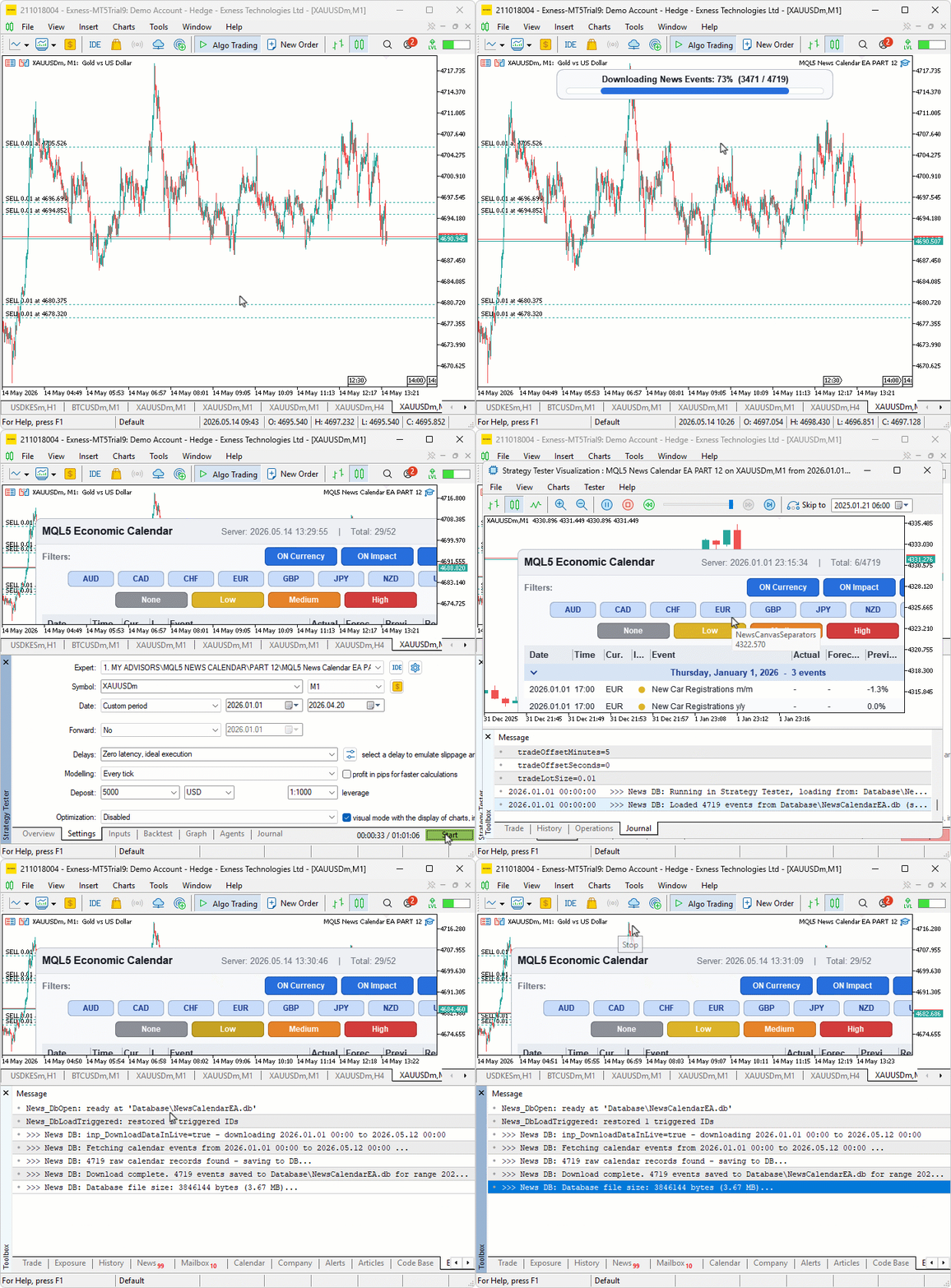
During testing, the live session populated the database file in the common folder while the dashboard continued to update normally. A subsequent strategy tester run on a fresh agent loaded events directly from the same file with no recompile, and the triggered trade IDs from the previous live session were restored at startup, so events that had already fired stayed deduplicated across the restart.
Conclusion
In conclusion, we replace the embedded CSV resource with a SQLite database. It persists calendar events and triggered trade IDs to a single file in the common terminal folder. The database is shared between live mode and the strategy tester through the common folder flag, so one download populates the same store both modes read from. Live mode upserts every event it fetches from the calendar API within a transaction, downloads historical ranges on demand when the user enables the input flag, and shows a progress bar canvas during the operation. Trade deduplication now survives program restarts because the triggered IDs are loaded from the past twenty-four hours of database history at startup. The tester reads its events from the database with a clear journal message guiding the user when no data exists for the requested window. After reading this article, you will be able to:
- Open a shared SQLite database from the common terminal folder, create indexed tables, and use the upsert pattern to keep one row per unique calendar value ID
- Download a historical calendar range into the database within a single transaction, with a canvas progress bar showing percent and record counts during the operation
- Persist triggered trade event IDs across program restarts so news events that already fired trades stay deduplicated through reboots and reattaches.
Attachments
| S/N | Name | Type | Description |
|---|---|---|---|
| 1 | MQL5 News Calendar EA PART 12.mq5 | Expert Advisor | The main program entry point that declares the user inputs and the data download settings group, includes the five module headers in dependency order, and forwards each event to the matching module function |
| 2 | News Core.mqh | Include file | Defines the layout constants, font sizes, glyph codes, the dual theme palette, the event and row plan structures, the scroll state structure, the primitives helper class, and the value and time formatting utilities |
| 3 | News Database.mqh | Include file | Owns the SQLite database lifecycle — opens the shared file with the common folder flag, creates the events and triggered tables, upserts event rows, loads events by time window, prunes stale rows, persists and restores triggered trade IDs, and downloads calendar history with a progress bar canvas |
| 4 | News Interact.mqh | Include file | Routes mouse, wheel, and chart events through coordinate conversion, pixel-level hit-testing, action dispatching, panel drag and edge-resize handling, and owns the program lifecycle including database open and close |
| 5 | News Logic.mqh | Include file | Loads events from the live calendar API and persists each one to the database within a transaction, applies the currency, impact, and time filters, builds the row plan with collapsible day groups, and runs the trade candidate search and order execution with database-backed deduplication |
| 6 | News Render.mqh | Include file | Renders the entire dashboard — header, filter toggles, currency and impact chips, table header with separator overlay, event rows with revised markers and Remain cells, scrollbar, countdown banner, and toast notification |
The project is supported in Algo Forge: https://forge.mql5.io/29210372/Article-22608-News-Calendar-SQLite-Persistence-Layer
Warning: All rights to these materials are reserved by MetaQuotes Ltd. Copying or reprinting of these materials in whole or in part is prohibited.
This article was written by a user of the site and reflects their personal views. MetaQuotes Ltd is not responsible for the accuracy of the information presented, nor for any consequences resulting from the use of the solutions, strategies or recommendations described.

 An Introduction to the Study of Fractal Market Structures Using Machine Learning
 Price Action Analysis Toolkit Development (Part 70): Turning Flag Pattern Signals into Automated Trade Execution
 Market Microstructure in MQL5 (Part 3): Estimating ARFIMA d with GPH
 Publish Your Article Code to MQL5 Algo Forge in 10 Minutes: A Step-by-Step Guide

- Free trading apps
- Over 8,000 signals for copying
- Economic news for exploring financial markets
You agree to website policy and terms of use
Wow, this is thorough. Nice work gee! 👍