

MQL5 Trading Tools (Part 33): Building a Rich Content Markup Documentation System for MQL5 Programs
 2 180
2 180
 0
0

Introduction
Imagine attaching your program to a chart and opening a clear, scrollable, tabbed document inside MetaTrader 5 (MetaTrader 5). It includes styled headings, colored text, embedded images, and interactive navigation. No external files or broken links. No guessing. That is exactly what we built in this article. In Part 9 of this series, we developed a setup wizard for Expert Advisors in MetaQuotes Language 5 (MQL5) that uses standard chart objects and a scrollable text guide. In Part 32, we enhanced the tools palette with a crosshair reticle and magnifier lens.
Part 33 builds directly on that. Here, we take the foundation much further by rebuilding the documentation concept from the ground up using the CCanvas class. This enables a fully canvas-rendered, rich-content document system. It supports tabs, inline markup styling, embedded images, themed palettes, supersampled anti-aliased rendering, and a scrollable body. These features allow MQL5 developers and algorithmic traders to deliver self-contained documentation directly inside their programs. We will cover the following topics:
- Rethinking In-Chart Documentation — Concept and Design
- Implementation in MQL5
- Backtesting
- Conclusion
By the end, you will have a reusable documentation engine ready to embed into any MQL5 program you build — let's get into it.
Rethinking In-Chart Documentation — Concept and Design
Documentation has always lived outside the tool. A separate PDF, an external link, a forum thread the user has to go and find, and more often than not, never does. The idea here is straightforward: bring the documentation inside the program itself, formatted and interactive, always available the moment the program is attached to a chart. Think of it as a user manual or a rich-content guide — the kind of formatted document you would expect to open in a PDF reader or a word processor, but living natively inside MetaTrader 5, attached to the very program it describes.
At its core, a rich content document system is built around a few key ideas. Content is organized into tabs, each covering a distinct topic, so the user can navigate freely without scrolling through everything at once. Within each tab, paragraphs carry meaning through formatting — headings stand out, warnings are visually distinct from tips, numbered lists guide step-by-step, and inline text can be bold, italic, underlined, colored, or highlighted. Images sit inline with the text, scaled to fit the panel. Everything scrolls smoothly within a defined body area, and the whole panel adapts to the chart size.
The rendering approach is what separates this from a plain chart object panel. Rather than placing individual label objects for every piece of text, everything is drawn pixel by pixel onto dedicated drawing surfaces. To achieve smooth, professional edges on rounded corners, buttons, and scrollbar pills, we use supersampling — rendering each element at four times the display resolution on an internal high-resolution surface, then downsampling it to the visible display. This eliminates the jagged edges that bitmap rendering typically produces at normal scale.
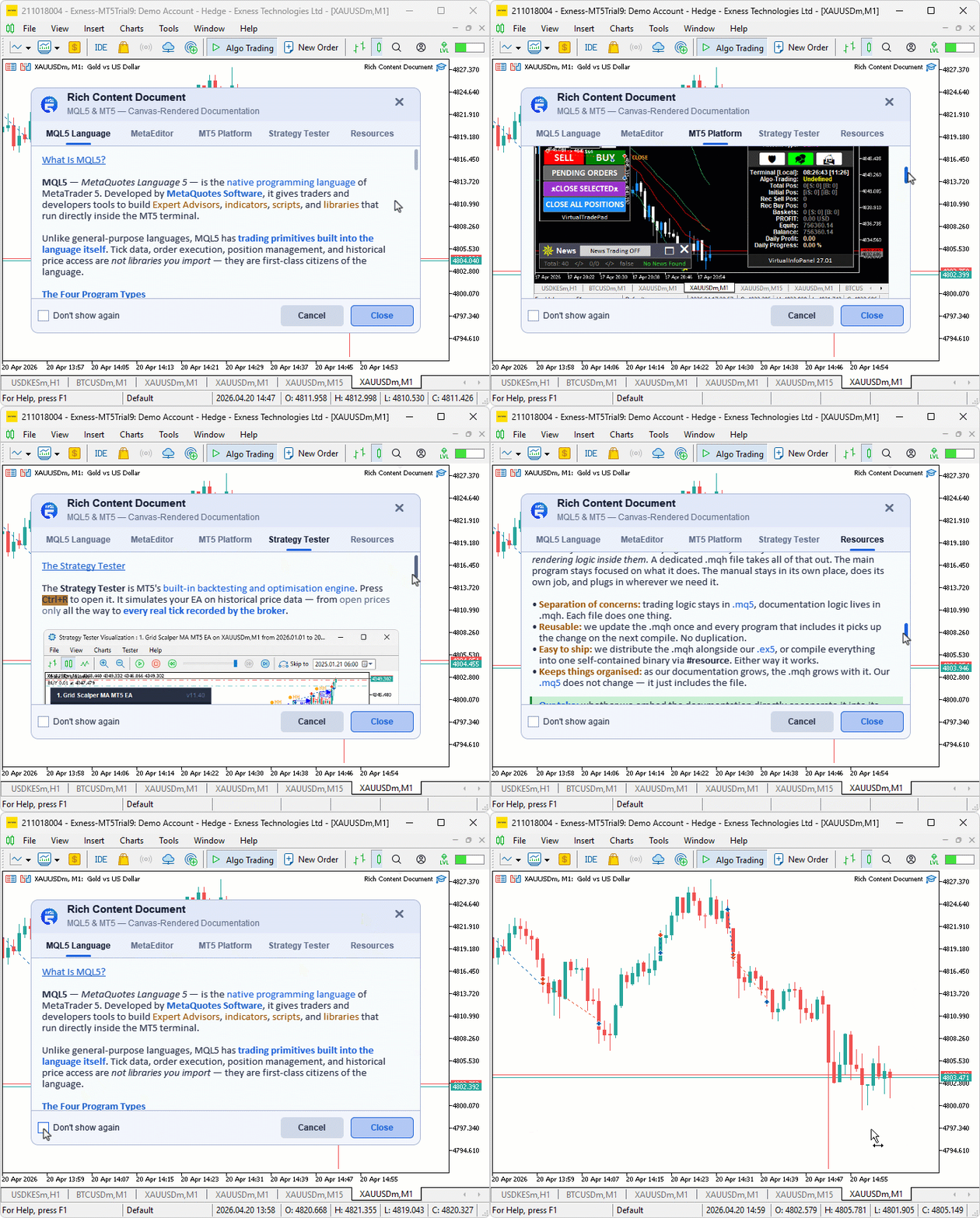
Think of this system like a well-written trading plan. It doesn't change how the tool works, but it improves how confidently and correctly the tool is used. A trader who understands what each input controls, what conditions the program is designed for, and what to expect from it is far less likely to misuse it. Embedded documentation is not decoration — it is risk management for the developer. We build this in steps. First, we define the layout and theme. Next, we implement supersampled rendering. Then we add paragraphs and inline markup, handle tabs and scrolling, embed images, and wire up interactions. Here is a visualization of our objectives.
Implementation in MQL5
Defining the Core Structures, Enumerations, and Forward Declarations
Before any rendering or interaction logic can take place, we lay out the entire architectural foundation of the rich content documentation system — the resources, configuration constants, data structures, state variables, and function signatures that everything else will build upon.
//+------------------------------------------------------------------+ //| Rich Content Document.mq5 | //| Copyright 2026, Allan Munene Mutiiria. | //| https://t.me/Forex_Algo_Trader | //+------------------------------------------------------------------+ #property copyright "Copyright 2026, Allan Munene Mutiiria." #property link "https://t.me/Forex_Algo_Trader" #property version "1.00" #property strict #property description "Rich Content Document. A canvas-rendered, PDF-like documentation" #property description "system demonstrating MQL5's full rich content capabilities." #property description "Scrollable. Formatted. Beautiful. Right inside your MT5 chart." #include <Canvas/Canvas.mqh> //+------------------------------------------------------------------+ //| Resources | //+------------------------------------------------------------------+ #resource "Rich Content Document - Logo.bmp" // Embedded logo bitmap #resource "Rich Content Document - MQL5 IDE.bmp" // MQL5 IDE screenshot #resource "Rich Content Document - MT5 Chart.bmp" // MT5 chart screenshot #resource "Rich Content Document - Strategy Tester.bmp"// Strategy Tester screenshot #resource "Rich Content Document - Market Watch.bmp" // Market Watch screenshot #resource "Rich Content Document - Navigator.bmp" // Navigator screenshot //+------------------------------------------------------------------+ //| Resource path macros | //+------------------------------------------------------------------+ #define RCD_LOGO_RESOURCE "::Rich Content Document - Logo.bmp" // Logo resource string #define RCD_IMG_MQL5_IDE "::Rich Content Document - MQL5 IDE.bmp" // MQL5 IDE resource string #define RCD_IMG_MT5_CHART "::Rich Content Document - MT5 Chart.bmp" // MT5 Chart resource string #define RCD_IMG_STRAT_TESTER "::Rich Content Document - Strategy Tester.bmp"// Strategy Tester resource string #define RCD_IMG_MARKET_WATCH "::Rich Content Document - Market Watch.bmp" // Market Watch resource string #define RCD_IMG_NAVIGATOR "::Rich Content Document - Navigator.bmp" // Navigator resource string //+------------------------------------------------------------------+ //| Inputs | //+------------------------------------------------------------------+ input group "RICH CONTENT DOCUMENT SETTINGS" input int rcdTheme = 1; // Theme: 0=Dark, 1=Light input bool rcdShowOnAttach = true; // Show document on attach //+------------------------------------------------------------------+ //| Constants | //+------------------------------------------------------------------+ #define RCD_SS 4 // Supersampling factor for AA rendering #define RCD_HEADER_H 48 // Header height in pixels #define RCD_TABS_H 36 // Tabs bar height in pixels #define RCD_FOOTER_H 50 // Footer height in pixels #define RCD_GAP 0 // Gap between sections #define RCD_PAD 16 // Body text padding #define RCD_LOGO_SIZE 32 // Logo display size in header #define RCD_MIN_WIDTH 520 // Minimum panel width #define RCD_MAX_WIDTH 720 // Maximum panel width #define RCD_MIN_BODY_H 160 // Minimum body height #define RCD_MAX_BODY_H 540 // Maximum body height #define RCD_TOP_MARGIN 40 // Distance from top of chart #define RCD_SIDE_MARGIN 40 // Distance from sides of chart #define RCD_BOTTOM_MARGIN 40 // Distance from bottom of chart #define RCD_SB_PILL_W 5 // Scrollbar pill width #define RCD_SB_MARGIN_R 4 // Scrollbar right margin #define RCD_CHECKBOX_SIZE 16 // Checkbox size in pixels #define RCD_BUTTON_W 90 // Footer button width #define RCD_BUTTON_H 30 // Footer button height #define RCD_FONT_TITLE 11 // Header title font size #define RCD_FONT_SUBTITLE 9 // Header subtitle font size #define RCD_FONT_TAB 9 // Tab label font size #define RCD_FONT_BODY 11 // Body text font size #define RCD_FONT_HEADING 11 // Section heading font size #define RCD_FONT_BUTTON 9 // Button label font size #define RCD_FONT_LABEL 9 // Checkbox label font size #define RCD_FONT_CLOSE 13 // Close button font size #define RCD_LINE_GAP 5 // Extra pixels between text lines #define RCD_TOP_PAD_BODY 10 // Top padding inside body area #define RCD_IMG_COUNT 5 // Total number of content images #define RCD_IMG_MQL5IDE_IDX 0 // Image index: MQL5 IDE #define RCD_IMG_MT5CHART_IDX 1 // Image index: MT5 Chart #define RCD_IMG_STTEST_IDX 2 // Image index: Strategy Tester #define RCD_IMG_MWATCH_IDX 3 // Image index: Market Watch #define RCD_IMG_NAV_IDX 4 // Image index: Navigator #define RCD_TAB_COUNT 5 // Total number of tabs #define RCD_TAB_LANGUAGE 0 // Tab index: MQL5 Language #define RCD_TAB_METAEDITOR 1 // Tab index: MetaEditor #define RCD_TAB_PLATFORM 2 // Tab index: MT5 Platform #define RCD_TAB_TESTER 3 // Tab index: Strategy Tester #define RCD_TAB_RESOURCES 4 // Tab index: Resources #define RCD_IMG_LINE_PREFIX "RCDIMG:" // Prefix for image placeholder lines #define RCD_LOGO_LINE_PREFIX "RCDLOGO:" // Prefix for logo placeholder lines //+------------------------------------------------------------------+ //| Paragraph type enum | //+------------------------------------------------------------------+ enum RcdParaType { RCD_PARA_EMPTY = 0, // Blank spacer line RCD_PARA_BODY = 1, // Plain body text RCD_PARA_HEADING = 2, // Section heading RCD_PARA_NUMBERED = 3, // Numbered list item RCD_PARA_WARN = 5, // Warning block (orange/red bar) RCD_PARA_INFO = 7, // Info block (blue bar) RCD_PARA_ANSWER = 9, // Answer/tip block (green bar) RCD_PARA_IMG = 11, // Image placeholder RCD_PARA_LOGO = 12, // Logo placeholder RCD_PARA_BULLET = 13 // Bullet list item }; //+------------------------------------------------------------------+ //| Inline run structure — styled text segment within a paragraph | //+------------------------------------------------------------------+ struct RcdRun { string text; // Actual text content color col; // Text color (0 = inherit paragraph default) color bgCol; // Background highlight color (0 = none) bool bold; // Bold style flag bool italic; // Italic style flag bool underline; // Underline style flag bool strikethrough; // Strikethrough style flag }; //+------------------------------------------------------------------+ //| Paragraph structure — single content unit | //+------------------------------------------------------------------+ struct RcdPara { RcdParaType type; // Paragraph type string text; // Paragraph text content int imgIdx; // Image index (only for RCD_PARA_IMG) }; //+------------------------------------------------------------------+ //| Canvas object name strings | //+------------------------------------------------------------------+ string rcdHeaderCanvasName = "RCD_Header"; // Header canvas object name string rcdTabsCanvasName = "RCD_Tabs"; // Tabs canvas object name string rcdBodyCanvasName = "RCD_Body"; // Body canvas object name string rcdBodyHRCanvasName = "RCD_Body_HR"; // Body high-res canvas name string rcdBlockCanvasName = "RCD_Block"; // Block overlay canvas name string rcdFooterCanvasName = "RCD_Footer"; // Footer canvas object name string rcdLogoScaledResName = "::RCD_Logo_Scaled"; // Scaled logo resource name //+------------------------------------------------------------------+ //| Canvas instances | //+------------------------------------------------------------------+ CCanvas rcdCanvHeader; // Header canvas CCanvas rcdCanvTabs; // Tabs canvas CCanvas rcdCanvBody; // Body canvas CCanvas rcdCanvBodyHR; // Body high-resolution supersampled canvas CCanvas rcdCanvBlock; // Block overlay canvas (text + images + scrollbar) CCanvas rcdCanvFooter; // Footer canvas //+------------------------------------------------------------------+ //| Per-tab paragraph arrays | //+------------------------------------------------------------------+ RcdPara rcdTabParasLanguage[]; // MQL5 Language tab paragraphs RcdPara rcdTabParasMetaEditor[]; // MetaEditor tab paragraphs RcdPara rcdTabParasPlatform[]; // MT5 Platform tab paragraphs RcdPara rcdTabParasTester[]; // Strategy Tester tab paragraphs RcdPara rcdTabParasResources[]; // Resources tab paragraphs //+------------------------------------------------------------------+ //| State variables | //+------------------------------------------------------------------+ bool rcdIsActive = false; // Document is currently displayed bool rcdContentBuilt = false; // Content arrays have been populated bool rcdLogoLoaded = false; // Header logo was successfully loaded //--- Layout geometry int rcdPanelX = 0; // Panel left edge X coordinate int rcdPanelY = 0; // Panel top edge Y coordinate int rcdPanelWidth = 0; // Panel total width int rcdBodyHeight = 0; // Body section height int rcdTotalHeight = 0; // Total panel height int rcdHeaderY = 0; // Header top Y coordinate int rcdTabsY = 0; // Tabs bar top Y coordinate int rcdBodyY = 0; // Body top Y coordinate int rcdFooterY = 0; // Footer top Y coordinate //--- Tab and content state int rcdActiveTab = RCD_TAB_LANGUAGE; // Currently selected tab index string rcdTabTitles[RCD_TAB_COUNT]; // Display names for each tab RcdPara rcdCurrentParas[]; // Working copy of active tab paragraphs string rcdWrappedLines[]; // Wrapped text lines for rendering int rcdLineHeight = 0; // Pixel height of one text line int rcdTotalContentHeight = 0; // Total pixel height of all lines //--- Scroll state int rcdScrollPos = 0; // Current scroll offset in pixels int rcdMaxScroll = 0; // Maximum allowed scroll position int rcdSliderHeight = 0; // Computed scrollbar pill height bool rcdScrollVisible = false; // Whether scrollbar is shown bool rcdIsDraggingSlider = false; // Slider drag in progress int rcdDragStartMouseY = 0; // Mouse Y when drag started int rcdDragStartScrollPos = 0; // Scroll position when drag started //--- Hover state flags bool rcdHoverClose = false; // Mouse over close button bool rcdHoverOK = false; // Mouse over OK button bool rcdHoverCancel = false; // Mouse over Cancel button bool rcdHoverCheckbox = false; // Mouse over checkbox bool rcdHoverSlider = false; // Mouse over scrollbar slider bool rcdHoverTabs[RCD_TAB_COUNT]; // Mouse over each tab bool rcdMouseInBody = false; // Mouse is inside body area bool rcdPrevMouseInBody = false; // Previous mouse-in-body state int rcdPrevMouseState = 0; // Previous mouse button state //--- Checkbox state bool rcdDontShowAgain = false; // User checked "don't show again" //--- Image cache arrays (5 images x flat pixel storage) int rcdImgOrigW[RCD_IMG_COUNT]; // Original image widths int rcdImgOrigH[RCD_IMG_COUNT]; // Original image heights int rcdImgScaledW[RCD_IMG_COUNT]; // Scaled image widths int rcdImgScaledH[RCD_IMG_COUNT]; // Scaled image heights bool rcdImgLoaded[RCD_IMG_COUNT]; // Image was loaded from resource bool rcdImgCacheValid[RCD_IMG_COUNT]; // Scaled cache is current int rcdImgCacheForWidth[RCD_IMG_COUNT]; // Panel width when cache was built uint rcdImgPixels0[]; // Pixel data for image 0 (MQL5 IDE) uint rcdImgPixels1[]; // Pixel data for image 1 (MT5 Chart) uint rcdImgPixels2[]; // Pixel data for image 2 (Strategy Tester) uint rcdImgPixels3[]; // Pixel data for image 3 (Market Watch) uint rcdImgPixels4[]; // Pixel data for image 4 (Navigator) //--- Logo display (large version used in Resources tab) uint rcdLogoDisplayPixels[]; // Scaled logo pixel data for body display int rcdLogoDisplayW = 0; // Logo display width int rcdLogoDisplayH = 0; // Logo display height bool rcdLogoDisplayReady = false; // Logo display data is ready //+------------------------------------------------------------------+ //| Theme color variables | //+------------------------------------------------------------------+ color rcdBg; // Main background color color rcdPanelAlt; // Alternate panel color (footer) color rcdHeaderBg; // Header background color color rcdTabsBg; // Tabs bar background color color rcdBorder; // Border color color rcdHeaderText; // Header title text color color rcdSubText; // Subtitle and secondary text color color rcdBodyText; // Body paragraph text color color rcdHeadingText; // Section heading text color color rcdAccentColor; // Primary accent color color rcdLinkColor; // Hyperlink text color color rcdHighlightColor; // Code highlight and gold text color color rcdTabInactive; // Inactive tab text color color rcdTabActive; // Active tab text color color rcdTabHover; // Hovered tab text color color rcdButtonBg; // Primary button background color color rcdButtonBgHover; // Primary button hover background color color rcdButtonText; // Button text color color rcdCancelBg; // Cancel button background color color rcdCancelBgHover; // Cancel button hover background color color rcdCheckboxBg; // Checkbox background color color rcdCheckboxBorder; // Checkbox border color color rcdCheckboxChecked; // Checkbox checked fill color color rcdCloseColor; // Close button icon color color rcdCloseHoverColor; // Close button hover icon color color rcdScrollSlider; // Scrollbar pill normal color color rcdScrollSliderHover;// Scrollbar pill hover color color rcdScrollSliderDrag; // Scrollbar pill drag color //+------------------------------------------------------------------+ //| Forward declarations | //+------------------------------------------------------------------+ void RcdApplyTheme(int theme); void RcdCalculateLayout(); bool RcdCreateCanvases(); void RcdDestroyCanvases(); bool RcdLoadLogo(); void RcdLoadLogoDisplay(); bool RcdLoadImage(int imgIndex); void RcdEnsureImageCache(int imgIndex); void RcdBuildContent(); void RcdRebuildWrappedLines(); void RcdRenderAll(); void RcdRenderHeader(); void RcdRenderTabs(); void RcdRenderBody(); void RcdRenderFooter(); void RcdUpdateHovers(int mouseX, int mouseY); void RcdAddPara(RcdPara ¶Array[], RcdParaType paraType, const string paraText = "", int imageIndex = -1); void RcdCopyParas(const RcdPara &sourceArray[], RcdPara &destArray[]); void RcdGetTabParas(int tabIndex, RcdPara &outputArray[]); void RcdWrapText(const RcdPara ¶Array[], int maxPixelWidth, string &outputLines[]); bool RcdHasMarkup(const string inputText); string RcdStripInlineTags(const string inputText); void RcdParseRuns(const string inputText, RcdRun &outputRuns[]); void RcdCopyRuns(const RcdRun &sourceRuns[], RcdRun &destRuns[]); color RcdResolveColorToken(const string colorToken); void RcdStampRuns(CCanvas &targetCanvas, int startX, int startY, int lineH, const RcdRun &runs[], color defaultColor, color stampBg, int fontSize); void RcdStampText(CCanvas &targetCanvas, int posX, int posY, const string displayText, const string fontName, int fontSize, color textColor, color bgColor, bool transparentBg); bool RcdPointInRect(int pointX, int pointY, int rectX, int rectY, int rectW, int rectH); int RcdCalcSliderHeight(int visibleH, int totalH, int trackH, int minH); void RcdArgbSplit(uint pixelValue, uchar &alphaOut, uchar &redOut, uchar &greenOut, uchar &blueOut); uint RcdBlendPixel(uint destPixel, uint srcPixel); void RcdScaleImage(uint &pixelArray[], int origW, int origH, int newW, int newH); uint RcdBicubicInterp(uint &pixelArray[], int imgW, int imgH, double sampleX, double sampleY); double RcdBicubicComponent(uchar &componentValues[], double fracX, double fracY); void RcdFillRoundRectHR(CCanvas &targetCanvas, int rectX, int rectY, int rectW, int rectH, int cornerRadius, uint fillArgb); void RcdFillCornerQuadrantHR(CCanvas &targetCanvas, int centerX, int centerY, int radius, uint fillArgb, int signX, int signY); void RcdDrawRoundRectBorderHR(CCanvas &targetCanvas, int rectX, int rectY, int rectW, int rectH, int cornerRadius, uint borderArgb, bool drawTop, bool drawLeft, bool drawRight, bool drawBottom, bool arcTL, bool arcTR, bool arcBL, bool arcBR); void RcdDownsampleCanvas(CCanvas &targetCanvas, CCanvas &sourceCanvas); void RcdImgGetPixels(int imgIndex, uint &outputPixels[]); void RcdImgSetPixels(int imgIndex, uint &inputPixels[]); string RcdImgResourcePath(int imgIndex); RcdParaType RcdLineType(const string wrappedLine); string RcdLineText(const string wrappedLine); int RcdLineIndent(const string wrappedLine); bool RcdIsImgLine(const string wrappedLine); int RcdImgLineIndex(const string wrappedLine); int RcdImgLineSlot(const string wrappedLine); bool RcdIsLogoLine(const string wrappedLine); int RcdLogoLineSlot(const string wrappedLine); void RcdShow(); void RcdHide(); void RcdHandleChartEvent(const int eventId, const long &lParam, const double &dParam, const string &sParam);
We start the implementation by including the canvas library and embedding six bitmap files directly into the compiled program using the #resource directive — a logo and five screenshots that will appear inline within the document body. Embedding them this way means they travel with the program file itself, requiring no external assets. We explained this in the initial version. Corresponding macro definitions are then declared to give each resource a clean, readable reference name used throughout the code.
The input parameters expose two user-facing settings: the color theme and whether the document should open automatically on attachment. A set of numeric constants then defines the panel geometry — header, tabs, footer heights, padding values, scrollbar dimensions, font sizes, body size limits, and margin distances — keeping all layout measurements in one place for easy adjustment.
Next, we define the "RcdParaType" enumeration to classify every paragraph the document can contain — blank spacers, plain body text, section headings, numbered items, bullet points, warning blocks, info blocks, answer blocks, image placeholders, and logo placeholders. This drives how each line is rendered visually. Alongside it, the "RcdRun" structure describes a single styled text segment within a paragraph, carrying the text itself plus flags for bold, italic, underline, strikethrough, a text color override, and a background highlight color. The "RcdPara" structure then represents a full paragraph, combining its type, text content, and an optional image index.
From there we declare the canvas object name strings, six canvas instances for the header, tabs, body, high-resolution body, block overlay, and footer, per-tab paragraph arrays for each of the five tabs, and a comprehensive set of state variables covering layout geometry, tab and content state, scroll position and slider dimensions, hover flags for every interactive element, checkbox state, and the image cache arrays for all five embedded images. Finally, all functions are forward-declared, so the compiler resolves references regardless of definition order. Next, we explain the key functions that bring this to life. We already covered similar canvas-based tools in previous parts of the series, and this idea is based on an existing part in the series. So the baseline is, you have interacted with most of the logic that makes this work. We will start with the logic to stamp text onto the canvas.
Two-Pass Alpha-Reconstructed Text Stamping
Standard text rendering onto a bitmap surface loses true per-pixel transparency information, producing ugly fringes when text is placed over any background other than the one it was rendered against. To solve this cleanly, we use a two-pass alpha reconstruction technique that recovers the true alpha of every glyph pixel before compositing it onto the canvas.
//+------------------------------------------------------------------+
//| Stamp text onto canvas using two-pass alpha reconstruction       |
//+------------------------------------------------------------------+
void RcdStampText(CCanvas &targetCanvas, int posX, int posY, const string displayText,
                  const string fontName, int fontSize, color textColor, color bgColor, bool transparentBg)
  {
   if(StringLen(displayText) == 0) return;
   //--- Set the font and measure the text extent
   TextSetFont(fontName, -(fontSize * 10));
   uint textW = 0, textH = 0;
   TextGetSize(displayText, textW, textH);
   if(textW == 0 || textH == 0) return;
   int lineW = (int)textW, lineH = (int)textH;
   //--- Render text onto a black background buffer
   uint bufBlack[];
   ArrayResize(bufBlack, lineW * lineH);
   ArrayFill(bufBlack, 0, lineW * lineH, 0xFF000000);
   TextOut(displayText, 0, 0, TA_LEFT | TA_TOP, bufBlack, lineW, lineH,
           ColorToARGB(textColor, 255), COLOR_FORMAT_ARGB_NORMALIZE);
   //--- Render same text onto a white background buffer
   uint bufWhite[];
   ArrayResize(bufWhite, lineW * lineH);
   ArrayFill(bufWhite, 0, lineW * lineH, 0xFFFFFFFF);
   TextOut(displayText, 0, 0, TA_LEFT | TA_TOP, bufWhite, lineW, lineH,
           ColorToARGB(textColor, 255), COLOR_FORMAT_ARGB_NORMALIZE);
   int canvasW = targetCanvas.Width(), canvasH = targetCanvas.Height();
   //--- Composite each pixel using the difference between buffers to recover true alpha
   for(int py = 0; py < lineH; py++)
     {
      int dstY = posY + py;
      if(dstY < 0 || dstY >= canvasH) continue;
      for(int px = 0; px < lineW; px++)
        {
         int dstX = posX + px;
         if(dstX < 0 || dstX >= canvasW) continue;
         uint pb = bufBlack[py * lineW + px];
         uint pw = bufWhite[py * lineW + px];
         //--- Recover alpha from the channel difference between renders
         int diffR = (int)((pw >> 16) & 0xFF) - (int)((pb >> 16) & 0xFF);
         int diffG = (int)((pw >>  8) & 0xFF) - (int)((pb >>  8) & 0xFF);
         int diffB = (int)( pw        & 0xFF) - (int)( pb        & 0xFF);
         int alpha = 255 - (diffR + diffG + diffB) / 3;
         if(alpha <= 0) continue;
         if(alpha > 255) alpha = 255;
         //--- Reconstruct true RGB from pre-multiplied black-background values
         uchar oR = (alpha > 0) ? (uchar)MathMin(255, (int)((pb >> 16) & 0xFF) * 255 / alpha) : (uchar)((textColor >> 16) & 0xFF);
         uchar oG = (alpha > 0) ? (uchar)MathMin(255, (int)((pb >>  8) & 0xFF) * 255 / alpha) : (uchar)((textColor >>  8) & 0xFF);
         uchar oB = (alpha > 0) ? (uchar)MathMin(255, (int)( pb        & 0xFF) * 255 / alpha) : (uchar)( textColor        & 0xFF);
         //--- Composite reconstructed pixel onto the canvas
         uint stampPixel    = ((uint)(uchar)alpha << 24) | ((uint)oR << 16) | ((uint)oG << 8) | (uint)oB;
         uint existingPixel = targetCanvas.PixelGet(dstX, dstY);
         targetCanvas.PixelSet(dstX, dstY, RcdBlendPixel(existingPixel, stampPixel));
        }
     }
  }
First, we define the "RcdStampText" function to handle all text rendering onto a canvas surface. After an early exit for empty strings, we set the font using TextSetFont and measure the text extent with TextGetSize to size two temporary pixel buffers. The first buffer is filled with pure black, and the second with pure white, then the same text is rendered onto both using TextOut at the same position and color.
The key insight is mathematical: where a glyph pixel is fully opaque, both buffers show the same color. Where it is semi-transparent — as happens on anti-aliased edges — the black buffer shows a darker result, and the white buffer shows a lighter one. The difference between the two reveals exactly how much the background bled through, which directly tells us the true alpha of that pixel. We compute this by averaging the channel differences across red, green, and blue, then subtracting from 255 to get the coverage value.
With the alpha recovered, we reconstruct the true RGB by reversing the pre-multiplication that the black background render introduced — dividing each channel by the alpha fraction and clamping to the valid range. The result is packed into a full ARGB pixel and composited onto the target canvas using "RcdBlendPixel", which applies the Porter-Duff over formula to blend it naturally against whatever is already drawn there. This gives us clean, background-independent text at any position on any surface. With that done, the next thing we will work on is defining the images that we will embed.
Image Scaling, Storage, and Cache Management
Every image embedded in the document needs to be loaded from its resource, scaled to fit the current panel width, and cached so it is not rescaled unnecessarily on every render pass. This group of functions handles that entire pipeline.
//+------------------------------------------------------------------+
//| Scale an image pixel array to new dimensions using bicubic AA    |
//+------------------------------------------------------------------+
void RcdScaleImage(uint &pixelArray[], int origW, int origH, int newW, int newH)
  {
   uint scaledPixels[];
   ArrayResize(scaledPixels, newW * newH);
   //--- Map each destination pixel back to fractional source coordinates
   for(int y = 0; y < newH; y++)
      for(int x = 0; x < newW; x++)
        {
         double ox = (double)x * origW / newW; // Fractional source X
         double oy = (double)y * origH / newH; // Fractional source Y
         scaledPixels[y*newW + x] = RcdBicubicInterp(pixelArray, origW, origH, ox, oy);
        }
   //--- Replace the original pixel array with the scaled result
   ArrayResize(pixelArray, newW * newH);
   ArrayCopy(pixelArray, scaledPixels);
  }

//+------------------------------------------------------------------+
//| Copy pixel data out of an image slot by index                    |
//+------------------------------------------------------------------+
void RcdImgGetPixels(int imgIndex, uint &outputPixels[])
  {
   //--- Copy from the matching flat pixel array based on slot index
   if(imgIndex==0)      ArrayCopy(outputPixels, rcdImgPixels0);
   else if(imgIndex==1) ArrayCopy(outputPixels, rcdImgPixels1);
   else if(imgIndex==2) ArrayCopy(outputPixels, rcdImgPixels2);
   else if(imgIndex==3) ArrayCopy(outputPixels, rcdImgPixels3);
   else if(imgIndex==4) ArrayCopy(outputPixels, rcdImgPixels4);
  }

//+------------------------------------------------------------------+
//| Store pixel data into an image slot by index                     |
//+------------------------------------------------------------------+
void RcdImgSetPixels(int imgIndex, uint &inputPixels[])
  {
   //--- Resize and copy into the matching flat pixel array for the given slot
   if(imgIndex==0)
     { ArrayResize(rcdImgPixels0, ArraySize(inputPixels)); ArrayCopy(rcdImgPixels0, inputPixels); }
   else if(imgIndex==1)
     { ArrayResize(rcdImgPixels1, ArraySize(inputPixels)); ArrayCopy(rcdImgPixels1, inputPixels); }
   else if(imgIndex==2)
     { ArrayResize(rcdImgPixels2, ArraySize(inputPixels)); ArrayCopy(rcdImgPixels2, inputPixels); }
   else if(imgIndex==3)
     { ArrayResize(rcdImgPixels3, ArraySize(inputPixels)); ArrayCopy(rcdImgPixels3, inputPixels); }
   else if(imgIndex==4)
     { ArrayResize(rcdImgPixels4, ArraySize(inputPixels)); ArrayCopy(rcdImgPixels4, inputPixels); }
  }

//+------------------------------------------------------------------+
//| Return the embedded resource path string for an image slot       |
//+------------------------------------------------------------------+
string RcdImgResourcePath(int imgIndex)
  {
   //--- Map slot index to its corresponding #resource path macro
   if(imgIndex==0) return RCD_IMG_MQL5_IDE;
   if(imgIndex==1) return RCD_IMG_MT5_CHART;
   if(imgIndex==2) return RCD_IMG_STRAT_TESTER;
   if(imgIndex==3) return RCD_IMG_MARKET_WATCH;
   if(imgIndex==4) return RCD_IMG_NAVIGATOR;
   return "";
  }

//+------------------------------------------------------------------+
//| Load raw image pixels from embedded resource into a slot         |
//+------------------------------------------------------------------+
bool RcdLoadImage(int imgIndex)
  {
   //--- Validate index bounds
   if(imgIndex < 0 || imgIndex >= RCD_IMG_COUNT) return false;
   uint px[];
   uint ow = 0, oh = 0;
   //--- Read pixels from the embedded resource
   if(!ResourceReadImage(RcdImgResourcePath(imgIndex), px, ow, oh)) return false;
   if(ow == 0 || oh == 0) return false;
   //--- Store original dimensions and pixel data
   rcdImgOrigW[imgIndex] = (int)ow;
   rcdImgOrigH[imgIndex] = (int)oh;
   RcdImgSetPixels(imgIndex, px);
   //--- Mark image as loaded and cache as invalid
   rcdImgLoaded[imgIndex]     = true;
   rcdImgCacheValid[imgIndex] = false;
   return true;
  }

//+------------------------------------------------------------------+
//| Rebuild scaled image cache if panel width has changed            |
//+------------------------------------------------------------------+
void RcdEnsureImageCache(int imgIndex)
  {
   //--- Skip if index invalid or image not yet loaded
   if(imgIndex < 0 || imgIndex >= RCD_IMG_COUNT) return;
   if(!rcdImgLoaded[imgIndex]) return;
   //--- Skip if cache is still valid for the current panel width
   if(rcdImgCacheValid[imgIndex] && rcdImgCacheForWidth[imgIndex] == rcdPanelWidth) return;
   //--- Compute display width fitting inside the text area
   int textAreaW = rcdPanelWidth - RCD_PAD * 2 - RCD_SB_PILL_W - RCD_SB_MARGIN_R * 2;
   int displayW  = textAreaW - 4;
   //--- Clamp display width between 10 and the original image width
   if(displayW > rcdImgOrigW[imgIndex]) displayW = rcdImgOrigW[imgIndex];
   if(displayW < 10) displayW = 10;
   //--- Maintain aspect ratio for display height
   double aspectRatio = (double)rcdImgOrigH[imgIndex] / (double)rcdImgOrigW[imgIndex];
   int displayH = (int)MathRound(displayW * aspectRatio);
   if(displayH < 1) displayH = 1;
   //--- Re-read original pixels from resource and scale them
   uint px[];
   uint ow = 0, oh = 0;
   if(!ResourceReadImage(RcdImgResourcePath(imgIndex), px, ow, oh)) return;
   RcdScaleImage(px, (int)ow, (int)oh, displayW, displayH);
   //--- Store scaled pixel data and update cache state
   RcdImgSetPixels(imgIndex, px);
   rcdImgScaledW[imgIndex]       = displayW;
   rcdImgScaledH[imgIndex]       = displayH;
   rcdImgCacheValid[imgIndex]    = true;
   rcdImgCacheForWidth[imgIndex] = rcdPanelWidth;
  }
The "RcdScaleImage" function resizes a flat pixel array to new dimensions using bicubic interpolation. For every pixel in the destination image, it maps back to fractional source coordinates by multiplying the destination position by the original-to-new dimension ratio, then calls "RcdBicubicInterp" to sample the source at that fractional position. The result fills a temporary scaled array, which is then copied back into the original using ArrayCopy, replacing it in place.
The "RcdImgGetPixels" and "RcdImgSetPixels" functions provide indexed access to the five flat pixel arrays declared globally for each image slot. Since MQL5 does not support arrays of arrays, each slot has its own dedicated array, and these two functions abstract that detail away with a simple slot index. "RcdImgResourcePath" completes the access layer by mapping a slot index back to its embedded resource path string.
Loading is handled by "RcdLoadImage", which validates the index, reads the raw pixels from the embedded resource using ResourceReadImage, stores the original dimensions and pixel data into the appropriate slot, and marks the cache as invalid so the next render pass knows a fresh scale is needed.
The most important function in this group is "RcdEnsureImageCache". It skips immediately if the image is not loaded or if the cache is already valid for the current panel width. Otherwise, it computes the display width by fitting the image inside the available text area, clamps it between a minimum of 10 pixels and the original image width, then derives the display height by maintaining the original aspect ratio. It re-reads the raw pixels fresh from the resource, scales them to the computed dimensions, stores the result, and records the panel width against which the cache was built — so the next call can determine in one comparison whether rescaling is needed again. The next thing is working on the paragraphs, and most importantly, the markup tags.
The Inline Markup System — Parsing, Resolving, and Rendering Styled Text
A plain text label cannot carry bold, italic, colored, or highlighted segments within the same line. To achieve that, we build a lightweight inline markup system that parses tagged strings into styled runs and renders each one independently onto the canvas.
//+------------------------------------------------------------------+ //| Append a paragraph entry to a paragraph array | //+------------------------------------------------------------------+ void RcdAddPara(RcdPara ¶Array[], RcdParaType paraType, const string paraText = "", int imageIndex = -1) { //--- Extend array by one and populate the new slot int currentSize = ArraySize(paraArray); ArrayResize(paraArray, currentSize + 1); paraArray[currentSize].type = paraType; paraArray[currentSize].text = paraText; paraArray[currentSize].imgIdx = imageIndex; } //+------------------------------------------------------------------+ //| Copy all paragraph entries from source to destination array | //+------------------------------------------------------------------+ void RcdCopyParas(const RcdPara &sourceArray[], RcdPara &destArray[]) { int n = ArraySize(sourceArray); ArrayResize(destArray, n); //--- Copy each field of every paragraph element individually for(int i = 0; i < n; i++) { destArray[i].type = sourceArray[i].type; destArray[i].text = sourceArray[i].text; destArray[i].imgIdx = sourceArray[i].imgIdx; } } //+------------------------------------------------------------------+ //| Load the active tab's paragraph array into the output buffer | //+------------------------------------------------------------------+ void RcdGetTabParas(int tabIndex, RcdPara &outputArray[]) { //--- Dispatch to the correct per-tab paragraph array switch(tabIndex) { case RCD_TAB_LANGUAGE: RcdCopyParas(rcdTabParasLanguage, outputArray); break; case RCD_TAB_METAEDITOR: RcdCopyParas(rcdTabParasMetaEditor, outputArray); break; case RCD_TAB_PLATFORM: RcdCopyParas(rcdTabParasPlatform, outputArray); break; case RCD_TAB_TESTER: RcdCopyParas(rcdTabParasTester, outputArray); break; case RCD_TAB_RESOURCES: RcdCopyParas(rcdTabParasResources, outputArray); break; default: ArrayResize(outputArray, 0); break; } } //+------------------------------------------------------------------+ //| Test whether a text string contains any inline markup tags | //+------------------------------------------------------------------+ bool RcdHasMarkup(const string inputText) { //--- Check for any known opening or closing inline tags return (StringFind(inputText, "[b]") >= 0 || StringFind(inputText, "[u]") >= 0 || StringFind(inputText, "[i]") >= 0 || StringFind(inputText, "[s]") >= 0 || StringFind(inputText, "[/b]") >= 0 || StringFind(inputText, "[/u]") >= 0 || StringFind(inputText, "[/i]") >= 0 || StringFind(inputText, "[/s]") >= 0 || StringFind(inputText, "[/c]") >= 0 || StringFind(inputText, "[/h]") >= 0 || StringFind(inputText, "[c=") >= 0 || StringFind(inputText, "[h=") >= 0); } //+------------------------------------------------------------------+ //| Strip all inline markup tags and return plain text | //+------------------------------------------------------------------+ string RcdStripInlineTags(const string inputText) { string result = ""; int len = StringLen(inputText); int i = 0; //--- Walk input character by character while(i < len) { if(StringGetCharacter(inputText, i) == '[') { //--- Find the closing bracket int closePos = StringFind(inputText, "]", i); //--- Treat unclosed bracket as literal text if(closePos < 0) { result += StringSubstr(inputText, i, 1); i++; continue; } string tagContent = StringSubstr(inputText, i+1, closePos-i-1); //--- Discard recognised markup tags if(tagContent == "b" || tagContent == "/b" || tagContent == "u" || tagContent == "/u" || tagContent == "i" || tagContent == "/i" || tagContent == "s" || tagContent == "/s" || tagContent == "/c" || tagContent == "/h" || StringSubstr(tagContent, 0, 2) == "c=" || StringSubstr(tagContent, 0, 2) == "h=") { i = closePos + 1; } else { //--- Preserve unrecognised bracket sequences as literal text result += "[" + tagContent + "]"; i = closePos + 1; } } else { //--- Append plain character directly result += StringSubstr(inputText, i, 1); i++; } } return result; } //+------------------------------------------------------------------+ //| Map a named color token string to its color value | //+------------------------------------------------------------------+ color RcdResolveColorToken(const string colorToken) { //--- Return the theme color matching the token name if(colorToken == "accent") return rcdAccentColor; if(colorToken == "heading") return rcdHeadingText; if(colorToken == "gold") return rcdHighlightColor; if(colorToken == "red") return C'220,80,80'; if(colorToken == "green") return rcdCheckboxChecked; if(colorToken == "dim") return rcdSubText; if(colorToken == "link") return rcdLinkColor; if(colorToken == "warn") return rcdHighlightColor; if(colorToken == "white") return clrWhite; if(colorToken == "black") return clrBlack; //--- Parse hex color literals prefixed with # if(StringSubstr(colorToken, 0, 1) == "#") return (color)StringToInteger(StringSubstr(colorToken, 1)); return 0; } //+------------------------------------------------------------------+ //| Copy all run entries from source to destination array | //+------------------------------------------------------------------+ void RcdCopyRuns(const RcdRun &sourceRuns[], RcdRun &destRuns[]) { int n = ArraySize(sourceRuns); ArrayResize(destRuns, n); //--- Copy each field of every run element individually for(int i = 0; i < n; i++) { destRuns[i].text = sourceRuns[i].text; destRuns[i].col = sourceRuns[i].col; destRuns[i].bgCol = sourceRuns[i].bgCol; destRuns[i].bold = sourceRuns[i].bold; destRuns[i].italic = sourceRuns[i].italic; destRuns[i].underline = sourceRuns[i].underline; destRuns[i].strikethrough = sourceRuns[i].strikethrough; } } //+------------------------------------------------------------------+ //| Parse inline markup string into a sequence of styled runs | //+------------------------------------------------------------------+ void RcdParseRuns(const string inputText, RcdRun &outputRuns[]) { ArrayResize(outputRuns, 0); int len = StringLen(inputText); if(len == 0) return; //--- Track current inline style state bool curBold = false, curItalic = false, curUnderline = false, curStrikethrough = false; color curColor = 0, curBgColor = 0; string currentSegment = ""; int i = 0; //--- Walk input and emit a run whenever style changes at a tag boundary while(i < len) { if(StringGetCharacter(inputText, i) == '[') { int closePos = StringFind(inputText, "]", i); //--- Treat unclosed bracket as literal character if(closePos < 0) { currentSegment += StringSubstr(inputText, i, 1); i++; continue; } string tagContent = StringSubstr(inputText, i+1, closePos-i-1); //--- Flush accumulated text as a run before applying the tag if(StringLen(currentSegment) > 0) { int sz = ArraySize(outputRuns); ArrayResize(outputRuns, sz+1); outputRuns[sz].text = currentSegment; outputRuns[sz].col = curColor; outputRuns[sz].bgCol = curBgColor; outputRuns[sz].bold = curBold; outputRuns[sz].italic = curItalic; outputRuns[sz].underline = curUnderline; outputRuns[sz].strikethrough = curStrikethrough; currentSegment = ""; } //--- Apply the recognised tag to the current style state if(tagContent == "b") curBold = true; else if(tagContent == "/b") curBold = false; else if(tagContent == "i") curItalic = true; else if(tagContent == "/i") curItalic = false; else if(tagContent == "u") curUnderline = true; else if(tagContent == "/u") curUnderline = false; else if(tagContent == "s") curStrikethrough = true; else if(tagContent == "/s") curStrikethrough = false; else if(tagContent == "/c") curColor = 0; else if(tagContent == "/h") curBgColor = 0; else if(StringSubstr(tagContent, 0, 2) == "c=") curColor = RcdResolveColorToken(StringSubstr(tagContent, 2)); else if(StringSubstr(tagContent, 0, 2) == "h=") curBgColor = RcdResolveColorToken(StringSubstr(tagContent, 2)); else { //--- Preserve unrecognised bracket sequences verbatim currentSegment += "[" + tagContent + "]"; i = closePos + 1; continue; } i = closePos + 1; } else { //--- Accumulate plain character into the current segment currentSegment += StringSubstr(inputText, i, 1); i++; } } //--- Flush any remaining text as a final run if(StringLen(currentSegment) > 0) { int sz = ArraySize(outputRuns); ArrayResize(outputRuns, sz+1); outputRuns[sz].text = currentSegment; outputRuns[sz].col = curColor; outputRuns[sz].bgCol = curBgColor; outputRuns[sz].bold = curBold; outputRuns[sz].italic = curItalic; outputRuns[sz].underline = curUnderline; outputRuns[sz].strikethrough = curStrikethrough; } } //+------------------------------------------------------------------+ //| Stamp a sequence of styled runs onto a canvas at a given Y | //+------------------------------------------------------------------+ void RcdStampRuns(CCanvas &targetCanvas, int startX, int startY, int lineH, const RcdRun &runs[], color defaultColor, color stampBg, int fontSize) { int currentX = startX; int numRuns = ArraySize(runs); //--- Process each run in sequence for(int r = 0; r < numRuns; r++) { if(StringLen(runs[r].text) == 0) continue; //--- Resolve effective text color, falling back to the paragraph default color textColor = (runs[r].col != 0) ? runs[r].col : defaultColor; //--- Select font variant based on bold/italic flags string fontName; if(runs[r].bold && runs[r].italic) fontName = "Calibri Bold Italic"; else if(runs[r].bold) fontName = "Calibri Bold"; else if(runs[r].italic) fontName = "Calibri Italic"; else fontName = "Calibri"; TextSetFont(fontName, -(fontSize * 10)); uint runW = 0, runH = 0; TextGetSize(runs[r].text, runW, runH); int runWidth = (int)runW; //--- Detect true glyph top and bottom via a reference render of "H" int glyphTop = (int)runH / 4, glyphBot = (int)runH * 3 / 4; { uint refBuf[]; int rw = MathMax((int)runW, 8), rh = (int)runH; ArrayResize(refBuf, rw * rh); ArrayFill(refBuf, 0, rw * rh, 0xFF000000); TextOut("H", 0, 0, TA_LEFT | TA_TOP, refBuf, rw, rh, 0xFFFFFFFF, COLOR_FORMAT_ARGB_NORMALIZE); //--- Scan downward to find the first row with glyph pixels for(int py = 0; py < rh; py++) { bool found = false; for(int px = 0; px < rw; px++) { if((uchar)((refBuf[py*rw+px] >> 16) & 0xFF) > 60) { glyphTop = py; found = true; break; } } if(found) break; } //--- Scan upward to find the last row with glyph pixels for(int py = rh-1; py >= 0; py--) { bool found = false; for(int px = 0; px < rw; px++) { if((uchar)((refBuf[py*rw+px] >> 16) & 0xFF) > 60) { glyphBot = py; found = true; break; } } if(found) break; } } //--- Draw background highlight rectangle behind the run if requested if(runs[r].bgCol != 0 && runWidth > 0) { int hlTop = startY + glyphTop - 2; int hlBot = startY + glyphBot + 4; if(hlTop < 0) hlTop = 0; if(hlBot >= targetCanvas.Height()) hlBot = targetCanvas.Height() - 1; targetCanvas.FillRectangle(currentX, hlTop, currentX + runWidth - 1, hlBot, ColorToARGB(runs[r].bgCol, 200)); } //--- Determine the background color to pass to the stamp function color effectiveBg = (runs[r].bgCol != 0) ? runs[r].bgCol : stampBg; //--- Stamp the run text onto the canvas RcdStampText(targetCanvas, currentX, startY, runs[r].text, fontName, fontSize, textColor, effectiveBg, true); //--- Draw underline decoration below the glyph baseline if(runs[r].underline && runWidth > 0) { int ulY = startY + glyphBot + 2; if(ulY < targetCanvas.Height()) targetCanvas.Line(currentX, ulY, currentX + runWidth - 1, ulY, ColorToARGB(textColor, 255)); } //--- Draw strikethrough decoration through the glyph midpoint if(runs[r].strikethrough && runWidth > 0) { int stY = startY + glyphTop + (glyphBot - glyphTop) * 45 / 100; if(stY < targetCanvas.Height()) targetCanvas.Line(currentX, stY, currentX + runWidth - 1, stY, ColorToARGB(textColor, 255)); } //--- Advance the X cursor by the rendered run width currentX += runWidth; } }
We start with the paragraph management layer. The "RcdAddPara" function appends a single paragraph entry to a given array by resizing it by one and populating the new slot with the type, text, and optional image index. "RcdCopyParas" performs a field-by-field deep copy of a paragraph array, and "RcdGetTabParas" dispatches by tab index to copy the correct per-tab array into a working output buffer.
Before any rendering, "RcdHasMarkup" scans a string for any known opening or closing tag patterns using StringFind, returning true if any are present. This acts as a fast gate — plain text lines skip the markup pipeline entirely. For lines that do contain markup, "RcdStripInlineTags" walks the string character by character, identifies and discards all recognised tag sequences, and returns clean plain text used for width measurement during line wrapping.
Color tokens within tags like "[c=accent]" or "[c=gold]" are resolved by "RcdResolveColorToken", which maps named tokens to their current theme color values and also handles raw hexadecimal color literals prefixed with a hash character.
The core of the markup system is "RcdParseRuns". It walks the input string, maintaining a live style state — bold, italic, underline, strikethrough, text color, and background color. Each time a tag boundary is encountered, the accumulated plain text segment is flushed into a new run entry carrying a snapshot of the current style state, and the tag is applied to update that state. Any unrecognised bracket sequences are preserved verbatim as literal text. Any remaining text after the final tag is flushed as a closing run.
Finally, "RcdStampRuns" iterates through the parsed run array and renders each segment in sequence. For each run, it resolves the effective text color, selects the appropriate font variant based on the bold and italic flags, and measures the run width. To position underline and strikethrough decorations accurately, it renders a reference glyph of the letter "H" onto a temporary buffer and scans it pixel by pixel to find the true top and bottom of the glyph — avoiding font metric inaccuracies. We chose that letter because it gives the true glyph; you can use any letter — it doesn't have to be 'H'. Then, background highlights are drawn as filled rectangles behind the glyph before the text is stamped using "RcdStampText". Underline and strikethrough lines are then drawn at the detected glyph baseline and midpoint, respectively, and the horizontal cursor advances by the rendered run width before moving to the next segment. Next, we will define the extraction helper functions that will help in the entire wrapping process.
Wrapped Line Decoding Utilities
Once paragraphs are wrapped into display lines, each line is stored as an encoded string carrying its type, indent, and content as a compact prefix sequence. These utility functions decode that encoding during rendering, so each line knows exactly how to present itself.
//+------------------------------------------------------------------+
//| Test whether a wrapped line is an image placeholder              |
//+------------------------------------------------------------------+
bool RcdIsImgLine(const string wrappedLine)
  {
   //--- Check for the image line prefix at the start of the string
   return StringSubstr(wrappedLine, 0, StringLen(RCD_IMG_LINE_PREFIX)) == RCD_IMG_LINE_PREFIX;
  }

//+------------------------------------------------------------------+
//| Extract the image index encoded in an image placeholder line     |
//+------------------------------------------------------------------+
int RcdImgLineIndex(const string wrappedLine)
  {
   //--- Strip the prefix then parse the integer before the colon separator
   string s = StringSubstr(wrappedLine, StringLen(RCD_IMG_LINE_PREFIX));
   int colon = StringFind(s, ":");
   return (colon > 0) ? (int)StringToInteger(StringSubstr(s, 0, colon)) : 0;
  }

//+------------------------------------------------------------------+
//| Extract the slot number encoded in an image placeholder line     |
//+------------------------------------------------------------------+
int RcdImgLineSlot(const string wrappedLine)
  {
   //--- Strip the prefix then parse the integer after the colon separator
   string s = StringSubstr(wrappedLine, StringLen(RCD_IMG_LINE_PREFIX));
   int colon = StringFind(s, ":");
   return (colon >= 0) ? (int)StringToInteger(StringSubstr(s, colon+1)) : 0;
  }

//+------------------------------------------------------------------+
//| Test whether a wrapped line is a logo placeholder                |
//+------------------------------------------------------------------+
bool RcdIsLogoLine(const string wrappedLine)
  {
   //--- Check for the logo line prefix at the start of the string
   return StringSubstr(wrappedLine, 0, StringLen(RCD_LOGO_LINE_PREFIX)) == RCD_LOGO_LINE_PREFIX;
  }

//+------------------------------------------------------------------+
//| Extract the slot number encoded in a logo placeholder line       |
//+------------------------------------------------------------------+
int RcdLogoLineSlot(const string wrappedLine)
  {
   //--- Parse integer immediately after the logo prefix
   return (int)StringToInteger(StringSubstr(wrappedLine, StringLen(RCD_LOGO_LINE_PREFIX)));
  }

//+------------------------------------------------------------------+
//| Extract the paragraph type encoded at the start of a line        |
//+------------------------------------------------------------------+
RcdParaType RcdLineType(const string wrappedLine)
  {
   //--- Return body type when the type prefix character 'T' is absent
   if(StringSubstr(wrappedLine, 0, 1) != "T") return RCD_PARA_BODY;
   int colon = StringFind(wrappedLine, ":");
   if(colon < 2) return RCD_PARA_BODY;
   //--- Parse the integer type code between 'T' and the first colon
   return (RcdParaType)(int)StringToInteger(StringSubstr(wrappedLine, 1, colon - 1));
  }

//+------------------------------------------------------------------+
//| Extract the display text payload from a wrapped line string     |
//+------------------------------------------------------------------+
string RcdLineText(const string wrappedLine)
  {
   string s = wrappedLine;
   //--- Strip leading type prefix "TN:" if present
   if(StringSubstr(s, 0, 1) == "T")
     {
      int c = StringFind(s, ":");
      if(c >= 1) s = StringSubstr(s, c+1);
     }
   //--- Strip leading indent prefix "INDENT:N:" if present
   if(StringSubstr(s, 0, 7) == "INDENT:")
     {
      int c = StringFind(s, ":", 7);
      if(c > 7) s = StringSubstr(s, c+1);
     }
   return s;
  }

//+------------------------------------------------------------------+
//| Extract the hanging indent pixel width from a wrapped line       |
//+------------------------------------------------------------------+
int RcdLineIndent(const string wrappedLine)
  {
   string s = wrappedLine;
   //--- Strip leading type prefix if present
   if(StringSubstr(s, 0, 1) == "T")
     {
      int c = StringFind(s, ":");
      if(c >= 1) s = StringSubstr(s, c+1);
     }
   //--- Return zero when no indent prefix is present
   if(StringSubstr(s, 0, 7) != "INDENT:") return 0;
   //--- Parse the pixel indent value between "INDENT:" and the following colon
   int c = StringFind(s, ":", 7);
   return (c > 7) ? (int)StringToInteger(StringSubstr(s, 7, c-7)) : 0;
  }
The "RcdIsImgLine" and "RcdIsLogoLine" functions each check whether a wrapped line string begins with its respective prefix constant, identifying it as an image or logo placeholder rather than a text line. For image placeholders, "RcdImgLineIndex" strips the prefix and parses the integer before the colon separator to recover the image slot index, while "RcdImgLineSlot" parses the integer after the colon to recover the vertical slot number — since a tall image occupies multiple line slots and only the first slot triggers the actual pixel blit. "RcdLogoLineSlot" does the same for logo placeholders.
For text lines, "RcdLineType" checks whether the string begins with the type prefix character "T" and parses the integer between it and the first colon to recover the paragraph type as an "RcdParaType" value, defaulting to body type when the prefix is absent. "RcdLineText" then strips both the type prefix and any following indent prefix to return the clean display text ready for rendering. Finally, "RcdLineIndent" reads the pixel value stored in the indent prefix — used to shift continuation lines of numbered and bullet paragraphs rightward so they align beneath the text rather than the marker, producing proper hanging indentation. The entire wrapping logic is now as follows.
Wrapping Paragraphs into Display Lines
Before any text can be rendered, every paragraph must be broken into lines that fit within the available panel width. The "RcdWrapText" function handles this for the entire active tab content in a single pass, producing the flat array of encoded line strings that the renderer consumes directly.
//+------------------------------------------------------------------+ //| Wrap paragraph array into display lines within pixel width | //+------------------------------------------------------------------+ void RcdWrapText(const RcdPara ¶Array[], int maxPixelWidth, string &outputLines[]) { ArrayResize(outputLines, 0); int numParas = ArraySize(paraArray); //--- Process each paragraph in order for(int p = 0; p < numParas; p++) { //--- Handle image placeholder paragraphs if(paraArray[p].type == RCD_PARA_IMG) { int idx = paraArray[p].imgIdx; if(idx >= 0 && idx < RCD_IMG_COUNT && rcdImgLoaded[idx] && rcdLineHeight > 0) { RcdEnsureImageCache(idx); //--- Compute how many line slots the image height occupies int totalPx = rcdImgScaledH[idx] + 8; int slots = (int)MathCeil((double)totalPx / rcdLineHeight); if(slots < 1) slots = 1; //--- Emit one placeholder line per slot for(int s = 0; s < slots; s++) { int sz = ArraySize(outputLines); ArrayResize(outputLines, sz+1); outputLines[sz] = RCD_IMG_LINE_PREFIX + IntegerToString(idx) + ":" + IntegerToString(s); } } else { //--- Emit empty line when image is unavailable int sz = ArraySize(outputLines); ArrayResize(outputLines, sz+1); outputLines[sz] = ""; } continue; } //--- Handle logo placeholder paragraphs if(paraArray[p].type == RCD_PARA_LOGO) { if(rcdLogoDisplayReady && rcdLineHeight > 0) { int totalPx = rcdLogoDisplayH + 8; int slots = (int)MathCeil((double)totalPx / rcdLineHeight); if(slots < 1) slots = 1; for(int s = 0; s < slots; s++) { int sz = ArraySize(outputLines); ArrayResize(outputLines, sz+1); outputLines[sz] = RCD_LOGO_LINE_PREFIX + IntegerToString(s); } } else { int sz = ArraySize(outputLines); ArrayResize(outputLines, sz+1); outputLines[sz] = ""; } continue; } //--- Emit a single blank line for empty paragraphs if(paraArray[p].type == RCD_PARA_EMPTY || StringLen(paraArray[p].text) == 0) { int sz = ArraySize(outputLines); ArrayResize(outputLines, sz+1); outputLines[sz] = ""; continue; } RcdParaType ptype = paraArray[p].type; string ptext = paraArray[p].text; bool isHeading = (ptype == RCD_PARA_HEADING); bool isBlock = (ptype == RCD_PARA_WARN || ptype == RCD_PARA_INFO || ptype == RCD_PARA_ANSWER); //--- Select font and size based on paragraph type string mFont = isHeading ? "Calibri Bold" : "Calibri"; int mSize = isHeading ? RCD_FONT_HEADING : RCD_FONT_BODY; TextSetFont(mFont, -(mSize * 10)); //--- Build the type prefix for stored line strings string marker = "T" + IntegerToString((int)ptype) + ":"; int blockPad = isBlock ? 10 : 0; //--- Compute hanging indent width for numbered/bullet items int hangW = 0; if(ptype == RCD_PARA_BULLET) { uint bW = 0, bH = 0; TextGetSize("• ", bW, bH); hangW = (int)bW; } else { string plainCheck = RcdStripInlineTags(ptext); if(StringLen(plainCheck) > 2) { ushort c0 = StringGetCharacter(plainCheck,0); ushort c1 = StringGetCharacter(plainCheck,1); ushort c2 = StringGetCharacter(plainCheck,2); //--- Detect "X. " numbered list prefix pattern if(((c0 >= '1' && c0 <= '9') || (c0 >= 'a' && c0 <= 'z') || (c0 >= 'A' && c0 <= 'Z')) && c1 == '.' && c2 == ' ') { uint pW = 0, pH = 0; TextGetSize(StringSubstr(plainCheck,0,3), pW, pH); hangW = (int)pW; } } } bool hasMarkup = RcdHasMarkup(ptext); if(hasMarkup) { //--- Markup-aware wrapping: measure plain text widths, preserve original markup in stored lines string plain = RcdStripInlineTags(ptext); string plainWords[]; int nw = StringSplit(plain, ' ', plainWords); //--- Build origCuts: byte position in ptext where each plain word starts int origCuts[]; ArrayResize(origCuts, nw + 1); int pi = 0, li = 0; for(int w = 0; w < nw; w++) { if(w > 0) { //--- Skip the inter-word space in the plain text if(li < StringLen(plain) && StringGetCharacter(plain, li) == ' ') li++; //--- Skip any tags and the space between words in the markup source bool skippedSpace = false; while(pi < StringLen(ptext)) { ushort ch = StringGetCharacter(ptext, pi); if(ch == '[') { int cl = StringFind(ptext, "]", pi); if(cl >= 0) { pi = cl+1; continue; } } if(ch == ' ' && !skippedSpace) { pi++; skippedSpace = true; continue; } break; } //--- Skip any tags that immediately precede this word while(pi < StringLen(ptext) && StringGetCharacter(ptext, pi) == '[') { int cl = StringFind(ptext, "]", pi); if(cl >= 0) pi = cl+1; else break; } origCuts[w] = pi; } else { origCuts[w] = 0; //--- Skip any leading tags before the first word while(pi < StringLen(ptext) && StringGetCharacter(ptext, pi) == '[') { int cl = StringFind(ptext, "]", pi); if(cl >= 0) pi = cl+1; else break; } } //--- Advance both cursors past the word characters int wlen = StringLen(plainWords[w]), matched = 0; while(pi < StringLen(ptext) && matched < wlen) { if(StringGetCharacter(ptext, pi) == '[') { int cl = StringFind(ptext,"]",pi); if(cl >= 0) { pi=cl+1; continue; } } pi++; li++; matched++; } } origCuts[nw] = StringLen(ptext); string stateAtWord[]; ArrayResize(stateAtWord, nw + 1); for(int w2 = 0; w2 <= nw; w2++) { //--- scanEnd: include all tags whose ] sits at or before this word's start int scanEnd = (w2 < nw) ? origCuts[w2] : StringLen(ptext); bool stBold=false, stItalic=false, stUnder=false, stStrike=false; color stCol=0, stBg=0; int spi = 0; while(spi < scanEnd) { if(StringGetCharacter(ptext,spi) == '[') { int cl = StringFind(ptext,"]",spi); //--- Include this tag only if its ] lands at or before scanEnd if(cl >= 0 && cl <= scanEnd) { string tag = StringSubstr(ptext,spi+1,cl-spi-1); if(tag=="b") stBold=true; else if(tag=="/b") stBold=false; else if(tag=="i") stItalic=true; else if(tag=="/i") stItalic=false; else if(tag=="u") stUnder=true; else if(tag=="/u") stUnder=false; else if(tag=="s") stStrike=true; else if(tag=="/s") stStrike=false; else if(tag=="/c") stCol=0; else if(StringSubstr(tag,0,2)=="c=") stCol=RcdResolveColorToken(StringSubstr(tag,2)); else if(tag=="/h") stBg=0; else if(StringSubstr(tag,0,2)=="h=") stBg=RcdResolveColorToken(StringSubstr(tag,2)); spi=cl+1; continue; } } spi++; } //--- Serialise active style state as a reopening tag sequence string st=""; if(stBold) st+="[b]"; if(stItalic) st+="[i]"; if(stUnder) st+="[u]"; if(stStrike) st+="[s]"; if(stCol!=0) st+="[c=#"+IntegerToString((int)stCol,6,'0')+"]"; if(stBg !=0) st+="[h=#"+IntegerToString((int)stBg, 6,'0')+"]"; stateAtWord[w2] = st; } //--- Greedy wrap loop: accumulate words into a line until width overflows string curPlain = ""; int lineStartW = 0; bool isFirstLine = true; for(int w = 0; w <= nw; w++) { bool flush = (w == nw); string testPlain = ""; if(!flush) testPlain = curPlain + (StringLen(curPlain) > 0 ? " " : "") + plainWords[w]; uint wW = 0, wH = 0; if(!flush) TextGetSize(testPlain, wW, wH); //--- Subtract block padding and hanging indent from available width int effMax = maxPixelWidth - blockPad - 8; if(!isFirstLine && hangW > 0) effMax -= hangW; //--- Add word to current line if it fits if(!flush && (int)wW <= effMax) { curPlain = testPlain; } else { //--- Flush accumulated line to output if(StringLen(curPlain) > 0) { int origStart = origCuts[lineStartW]; int origEnd = (w < nw) ? origCuts[w] : StringLen(ptext); //--- Extract the corresponding markup slice from the original text string origSlice = StringSubstr(ptext, origStart, origEnd - origStart); //--- Strip trailing whitespace from the slice while(StringLen(origSlice) > 0 && StringGetCharacter(origSlice, StringLen(origSlice)-1) == ' ') origSlice = StringSubstr(origSlice, 0, StringLen(origSlice)-1); //--- Strip trailing dangling open tags that have no text after them while(StringLen(origSlice) > 0 && StringGetCharacter(origSlice, StringLen(origSlice)-1) == ']') { int openPos = StringLen(origSlice) - 1; while(openPos > 0 && StringGetCharacter(origSlice, openPos) != '[') openPos--; if(openPos >= 0 && StringGetCharacter(origSlice, openPos) == '[') { string trailingTag = StringSubstr(origSlice, openPos+1, StringLen(origSlice)-openPos-2); //--- Remove only opening tags with no following text content bool isOpenTag = (StringLen(trailingTag) > 0 && StringGetCharacter(trailingTag, 0) != '/' && (StringSubstr(trailingTag,0,2)=="c=" || StringSubstr(trailingTag,0,2)=="h=" || trailingTag=="b" || trailingTag=="i" || trailingTag=="u" || trailingTag=="s")); if(isOpenTag) origSlice = StringSubstr(origSlice, 0, openPos); else break; } else break; } //--- Prepend the reopening state tags for continuation lines string prefix = (lineStartW > 0) ? stateAtWord[lineStartW] : ""; origSlice = prefix + origSlice; //--- Emit the wrapped line with type marker and optional indent int sz = ArraySize(outputLines); ArrayResize(outputLines, sz+1); if(!isFirstLine && hangW > 0) outputLines[sz] = marker + "INDENT:" + IntegerToString(hangW) + ":" + origSlice; else outputLines[sz] = marker + origSlice; isFirstLine = false; } //--- Begin the next line with the current word if(!flush) { curPlain = plainWords[w]; lineStartW = w; } } } } else { //--- Plain-text wrapping path: no markup to preserve string words[]; int nw = StringSplit(ptext, ' ', words); string cur = ""; bool isFirstLine = true; for(int w = 0; w < nw; w++) { //--- Build measurement string accounting for any existing indent prefix string measureStr; if(StringSubstr(cur,0,7)=="INDENT:") { int c2=StringFind(cur,":",7); string tp=(c2>7)?StringSubstr(cur,c2+1):""; measureStr=tp+(StringLen(tp)>0?" ":"")+words[w]; } else { measureStr=cur+(StringLen(cur)>0?" ":"")+words[w]; } uint wW=0,wH=0; TextGetSize(measureStr,wW,wH); int effMax=maxPixelWidth-blockPad-8; if(!isFirstLine&&hangW>0&&StringSubstr(cur,0,7)!="INDENT:") effMax-=hangW; //--- Add word to line if it fits within available width if((int)wW<=effMax) { if(StringSubstr(cur,0,7)=="INDENT:") { int c2=StringFind(cur,":",7); string pfx=(c2>7)?StringSubstr(cur,0,c2+1):cur+":"; string tp=(c2>7)?StringSubstr(cur,c2+1):""; cur=pfx+tp+(StringLen(tp)>0?" ":"")+words[w]; } else { cur=cur+(StringLen(cur)>0?" ":"")+words[w]; } } else { //--- Flush current line and begin a new one if(StringLen(cur)>0) { int sz=ArraySize(outputLines); ArrayResize(outputLines,sz+1); outputLines[sz]=marker+cur; isFirstLine=false; } //--- Apply hanging indent to continuation lines if(!isFirstLine&&hangW>0) cur="INDENT:"+IntegerToString(hangW)+":"+words[w]; else cur=words[w]; } } //--- Flush any remaining text as the final line of this paragraph if(StringLen(cur)>0) { int sz=ArraySize(outputLines); ArrayResize(outputLines,sz+1); outputLines[sz]=marker+cur; } } } }
The function iterates through every paragraph in order. Image and logo placeholders are handled first — their scaled pixel heights are divided by the line height using MathCeil to determine how many line slots they occupy, and one encoded placeholder string is emitted per slot. Empty paragraphs emit a single blank line. For all other paragraph types, the font is selected based on whether the paragraph is a heading or body text, and a type marker prefix is built to tag every output line with its paragraph type for the renderer to decode later.
Hanging indent width is computed next. For bullet paragraphs, the bullet character width is measured directly, and for other paragraphs, the plain text is checked for a numbered list prefix pattern — a single alphanumeric character followed by a period and a space — whose pixel width becomes the hang offset applied to all continuation lines.
The wrapping then splits into two paths based on whether the paragraph contains inline markup. For plain text, words are accumulated greedily using TextGetSize measurements until the line overflows, at which point the current line is flushed and a new one begins with a hanging indent prefix if applicable.
The markup-aware path is more involved. Since width measurement must use plain text while the stored lines must preserve the original markup, two parallel cursors track position simultaneously through both the stripped plain version and the original tagged string. For each word boundary, the byte offset into the original markup source is recorded in a cuts array. Additionally, for every word position, the active style state is serialised into a reopening tag sequence — so if a bold or colored span was open when a line break occurs, the continuation line reopens those tags automatically, ensuring styling carries correctly across wrapped lines. When a line is flushed, the corresponding markup slice is extracted from the original string, trailing whitespace and dangling open tags are stripped, the reopening prefix is prepended, and the encoded line is written to the output array with its type marker and optional indent prefix. We can now define the tab's content that we will be showing. This is critical since we need to be careful with the inline markup; it needs to be shown inline with the content. We added all so that it can serve as an example when you are doing real documentation. We used MetaTrader 5 and MQL5 content for this.
Building the Document Content
With the rendering and wrapping infrastructure in place, we now populate the actual documentation that the system will display — the five tab contents that form the body of the rich content document.
//+------------------------------------------------------------------+
//| Populate all per-tab paragraph arrays with documentation        |
//+------------------------------------------------------------------+
void RcdBuildContent()
  {
   //--- Assign display names to each tab slot
   rcdTabTitles[RCD_TAB_LANGUAGE]   = "MQL5 Language";
   rcdTabTitles[RCD_TAB_METAEDITOR] = "MetaEditor";
   rcdTabTitles[RCD_TAB_PLATFORM]   = "MT5 Platform";
   rcdTabTitles[RCD_TAB_TESTER]     = "Strategy Tester";
   rcdTabTitles[RCD_TAB_RESOURCES]  = "Resources";

   //--- Convenience macros to reduce repetition inside content blocks
   #define P(t,s)  RcdAddPara(arr,t,s)
   #define PE      RcdAddPara(arr,RCD_PARA_EMPTY)
   #define PI(n)   RcdAddPara(arr,RCD_PARA_IMG,"",n)
   #define PLOGO   RcdAddPara(arr,RCD_PARA_LOGO)
   #define PB(s)   RcdAddPara(arr,RCD_PARA_BULLET,s)

   //========== TAB 1: MQL5 LANGUAGE ==========
   {
      RcdPara arr[];
      P(RCD_PARA_HEADING, "[u]What Is MQL5?[/u]"); PE;
      P(RCD_PARA_BODY,    "[b]MQL5[/b] — [i]MetaQuotes Language 5[/i] — is the [c=accent]native programming language[/c] of MetaTrader 5. Developed by [b][c=heading]MetaQuotes Software[/c][/b], it gives traders and developers tools to build [c=gold]Expert Advisors[/c], [c=gold]indicators[/c], [c=gold]scripts[/c], and [c=gold]libraries[/c] that run directly inside the MT5 terminal."); PE;
      P(RCD_PARA_BODY,    "Unlike general-purpose languages, MQL5 has [b][c=accent]trading primitives built into the language itself[/c][/b]. Tick data, order execution, position management, and historical price access are [i]not libraries you import[/i] — they are first-class citizens of the language."); PE;

      P(RCD_PARA_HEADING, "The Four Program Types"); PE;
      P(RCD_PARA_NUMBERED,"[c=gold]1.[/c] [b]Expert Advisors[/b] — [c=accent]Fully automated trading robots.[/c] Attach to a chart and respond to [b]OnInit[/b], [b]OnTick[/b], [b]OnDeinit[/b], and [b]OnChartEvent[/b]. [i]This entire document — every pixel — is rendered by an EA.[/i]");
      P(RCD_PARA_NUMBERED,"[c=gold]2.[/c] [b]Indicators[/b] — Custom technical analysis drawn on the chart via [c=accent]indicator buffers[/c]. They respond to [b]OnCalculate[/b] and can be called from EAs using [c=link]iCustom()[/c].");
      P(RCD_PARA_NUMBERED,"[c=gold]3.[/c] [b]Scripts[/b] — [i]One-shot programs[/i] that run once and stop. No event loop. Ideal for batch operations and utility tasks.");
      P(RCD_PARA_NUMBERED,"[c=gold]4.[/c] [b][c=teal]Libraries[/c][/b] — Reusable compiled [c=accent].ex5[/c] modules imported via [b]#import[/b]. Cannot run standalone but expose functions to any other MQL5 program."); PE;

      P(RCD_PARA_HEADING, "Core Language Capabilities"); PE;
      PB("[b][c=accent]Object-Oriented:[/c][/b] Full class support — inheritance, polymorphism, encapsulation. The entire standard library is built on OOP.");
      PB("[b][c=gold]Strongly Typed:[/c][/b] Every variable has a declared type. [c=teal]int[/c], [c=teal]double[/c], [c=teal]string[/c], [c=teal]bool[/c], [c=teal]datetime[/c], [c=teal]color[/c], [c=teal]long[/c], [c=teal]ulong[/c], [c=teal]uchar[/c] — each serves a specific purpose.");
      PB("[b][c=purple]Canvas API:[/c][/b] The [c=accent]CCanvas[/c] class provides a pixel-level drawing surface. [i][u]Every heading, every color, every block in this document is CCanvas rendered.[/u][/i]");
      PB("[b][c=orange]Built-in Trading Functions:[/c][/b] [c=link]OrderSend()[/c], [c=link]PositionSelect()[/c], [c=link]HistoryDealSelect()[/c] — trading operations are native language functions."); PE;

      P(RCD_PARA_INFO, "[b]Did you know?[/b] MQL5 compiles to [b][c=green]native machine code[/c][/b] via its own compiler. The resulting [c=accent].ex5[/c] binary runs [b]significantly faster[/b] than interpreted languages — critical for high-frequency strategies processing thousands of ticks per second."); PE;

      P(RCD_PARA_HEADING, "The Event System"); PE;
      P(RCD_PARA_BODY,    "MQL5 programs are [b][i]event-driven[/i][/b]. Your code responds to events the platform fires — [s]not a continuous loop[/s]:"); PE;
      PB("[c=accent]OnInit()[/c] — Fires once on attach. Initialise handles, state, and UI here.");
      PB("[c=accent]OnTick()[/c] — Fires on every new price quote. The [b]heartbeat[/b] of any live EA.");
      PB("[c=accent]OnDeinit()[/c] — Fires on removal or terminal close. [u]Clean up objects and resources.[/u]");
      PB("[c=accent]OnChartEvent()[/c] — Fires on mouse moves, clicks, and keyboard input. [i]All tab switching and scrolling in this document live here.[/i]");
      PB("[c=accent]OnTimer()[/c] — Fires at intervals set by [c=link]EventSetTimer()[/c]. Used for animations and periodic checks.");
      PB("[c=accent]OnTradeTransaction()[/c] — Fires on broker-level trade events. [b][u]The most accurate way[/u][/b] to react to position opens and closes."); PE;

      P(RCD_PARA_HEADING, "Data Types in Depth"); PE;
      P(RCD_PARA_WARN, "[b][c=red]Precision Warning:[/c][/b] Always use [c=accent]double[/c] for prices and call [b]NormalizeDouble(price, _Digits)[/b] before passing values to order functions. [s]Integer arithmetic on prices[/s] causes silent rounding errors that corrupt SL and TP calculations."); PE;
      PB("[b][c=teal]int / long / ulong[/c][/b] — Integer types. [c=accent]ulong[/c] is required for ticket numbers because they can exceed the 32-bit int range on some brokers.");
      PB("[b][c=teal]double[/c][/b] — 64-bit floating point. Used for [i]all[/i] price, volume, and ratio calculations.");
      PB("[b][c=teal]string[/c][/b] — Unicode text. Reference-counted and memory-managed. [c=link]StringLen()[/c], [c=link]StringFind()[/c], [c=link]StringSubstr()[/c] are core tools.");
      PB("[b][c=teal]datetime[/c][/b] — Unix timestamp stored as [c=accent]long[/c] internally. [c=link]TimeCurrent()[/c] returns server time.");
      PB("[b][c=teal]color[/c][/b] — RGB stored as [c=accent]int[/c]. [c=link]ColorToARGB()[/c] adds an alpha channel for canvas rendering. Source format: [h=gold][c=black]C'R,G,B'[/c][/h]."); PE;

      P(RCD_PARA_HEADING, "Arrays and Series"); PE;
      P(RCD_PARA_BODY, "Arrays are declared as [c=accent]type name[][/c] and resized with [c=link]ArrayResize()[/c]. When you set [c=link]ArraySetAsSeries(arr, true)[/c], index [h=accent][c=white]0[/c][/h] is the [b]current bar[/b] and index [h=accent][c=white]1[/c][/h] is the [b]previous completed bar[/b]."); PE;
      P(RCD_PARA_ANSWER, "[b][c=green]Best Practice:[/c][/b] Always set [c=accent]ArraySetAsSeries(true)[/c] on any price buffer before reading it. [u]Without it, index 0 is the oldest bar[/u] — [b][i][c=red]silently inverting your signal logic.[/c][/i][/b]"); PE;

      P(RCD_PARA_HEADING, "Preprocessor Directives"); PE;
      PB("[b][c=gold]#property[/c][/b] — Sets file metadata: [c=accent]copyright[/c], [c=accent]version[/c], [c=accent]link[/c], [c=accent]description[/c].");
      PB("[b][c=gold]#define[/c][/b] — Compile-time text substitution for named constants that never change.");
      PB("[b][c=gold]#include[/c][/b] — Pastes another file at compile time. Enables modular code using [c=accent].mqh[/c] headers.");
      PB("[b][c=gold]#resource[/c][/b] — [i]Embeds a binary file directly into the compiled[/i] [c=accent].ex5[/c]. [b][u]This document embeds all images this way[/u][/b] — they travel with the file.");
      PB("[b][c=gold]sinput vs input[/c][/b] — [c=accent]sinput[/c] parameters [s]cannot be optimised[/s] in the Strategy Tester. Use it for magic numbers and visual settings."); PE;

      RcdCopyParas(arr, rcdTabParasLanguage);
     }

   //========== TAB 2: METAEDITOR ==========
   {
      RcdPara arr[];
      P(RCD_PARA_HEADING, "[u]MetaEditor — Your MQL5 IDE[/u]"); PE;
      P(RCD_PARA_BODY, "[b]MetaEditor[/b] is the [c=accent]integrated development environment[/c] that ships with every MetaTrader 5 installation. Press [h=gold][c=black]F4[/c][/h] inside MT5 to open it instantly, or navigate to [c=link]Tools → MetaQuotes Language Editor[/c]."); PE;
      PI(RCD_IMG_MQL5IDE_IDX);
      P(RCD_PARA_HEADING, "The Interface Layout"); PE;
      PB("[b][c=gold]Toolbox — Left Panel:[/c][/b] Three tabs — [c=accent]Navigator[/c] for file browsing, [c=accent]Symbols[/c] for instrument lookup, and [c=accent]Projects[/c] for solution management.");
      PB("[b][c=gold]Editor Area — Center:[/c][/b] The main code canvas. [i]Syntax highlighting, code folding, bracket matching, and multi-tab editing.[/i]");
      PB("[b][c=gold]Toolbox — Bottom Panel:[/c][/b] [c=accent]Errors[/c] shows compile errors with exact line numbers. [c=accent]Journal[/c] shows runtime output from [c=link]Print()[/c]."); PE;

      P(RCD_PARA_HEADING, "Writing Your First EA"); PE;
      P(RCD_PARA_NUMBERED,"[c=gold]1.[/c] Go to [c=accent]File → New[/c] or press [h=gold][c=black]Ctrl+N[/c][/h]. Select [b]Expert Advisor[/b] and click Next.");
      P(RCD_PARA_NUMBERED,"[c=gold]2.[/c] Enter a name. MetaEditor creates the file with [b]OnInit[/b], [b]OnDeinit[/b], and [b]OnTick[/b] pre-generated in [c=accent]MQL5/Experts/[/c].");
      P(RCD_PARA_NUMBERED,"[c=gold]3.[/c] Write your logic. Add [c=accent]input[/c] parameters at the top for user-configurable settings.");
      P(RCD_PARA_NUMBERED,"[c=gold]4.[/c] Press [h=gold][c=black]F7[/c][/h] to compile. [c=green]Warnings[/c] are yellow. [c=red]Errors[/c] are red. Both show exact line numbers.");
      P(RCD_PARA_NUMBERED,"[c=gold]5.[/c] Switch to MT5. Your [c=accent].ex5[/c] appears in the Navigator under Experts. [b][i]Drag it onto any chart to run it.[/i][/b]"); PE;

      P(RCD_PARA_HEADING, "Essential Keyboard Shortcuts"); PE;
      PB("[h=gold][c=black]F7[/c][/h] — Compile. [u]Always compile before testing.[/u]");
      PB("[h=gold][c=black]F5[/c][/h] — Start the debugger and attach to a running EA on a chart.");
      PB("[h=gold][c=black]Ctrl+F[/c][/h] — Find in current file. [c=accent]Ctrl+H[/c] to find and replace.");
      PB("[h=gold][c=black]Ctrl+Shift+F[/c][/h] — Find across [i]all files[/i] in the MQL5 directory.");
      PB("[h=gold][c=black]Ctrl+Space[/c][/h] — IntelliSense autocomplete. Shows function signatures and available methods.");
      PB("[h=gold][c=black]Alt+G[/c][/h] — Go to definition. Jump to where a function or variable is declared."); PE;

      P(RCD_PARA_HEADING, "The Debugger"); PE;
      P(RCD_PARA_BODY, "MetaEditor includes a [b][c=accent]source-level debugger[/c][/b]. Set breakpoints by clicking the line number gutter, press [h=gold][c=black]F5[/c][/h] to attach. Execution pauses — [i]every variable is inspectable live.[/i]"); PE;
      PB("[h=gold][c=black]F10[/c][/h] — Step over. Execute current line and move to next.");
      PB("[h=gold][c=black]F11[/c][/h] — Step into. Enter the body of a function call.");
      PB("[h=gold][c=black]Shift+F11[/c][/h] — Step out. Return from current function to its caller.");
      PB("[c=accent]Locals panel[/c] — See the [b]live value[/b] of every local variable in scope."); PE;

      P(RCD_PARA_INFO, "[b]Performance Matters:[/b] The MetaEditor [c=accent]Profiler[/c] shows [b][u]exactly which functions consume the most CPU[/u][/b] — broken down to individual lines. Use it before any live release to eliminate bottlenecks."); PE;

      P(RCD_PARA_HEADING, "File and Folder Structure"); PE;
      PB("[c=accent]MQL5/Experts/[/c] — All Expert Advisors. Subfolders appear as groups in MT5 Navigator.");
      PB("[c=accent]MQL5/Indicators/[/c] — Custom indicators.");
      PB("[c=accent]MQL5/Scripts/[/c] — One-shot scripts.");
      PB("[c=accent]MQL5/Include/[/c] — Header files [c=teal](.mqh)[/c]. Standard library lives in [c=gold]Include/Trade/[/c] and [c=gold]Include/Canvas/[/c].");
      PB("[c=accent]MQL5/Files/[/c] — Sandbox for file I/O. [c=link]FileOpen()[/c] and [c=link]FileWrite()[/c] are restricted here by default."); PE;

      P(RCD_PARA_WARN, "[b][c=red]Important:[/c][/b] [s]Never edit the .ex5 compiled file directly.[/s] Always edit the [c=accent].mq5[/c] source. The compiled binary is regenerated on every [h=gold][c=black]F7[/c][/h] press. Distributing only the [c=accent].ex5[/c] [b][i]protects your source from copying.[/i][/b]"); PE;

      RcdCopyParas(arr, rcdTabParasMetaEditor);
     }

   //========== TAB 3: MT5 PLATFORM ==========
   {
      RcdPara arr[];
      P(RCD_PARA_HEADING, "[u]MetaTrader 5 — The Platform[/u]"); PE;
      P(RCD_PARA_BODY, "[b]MetaTrader 5[/b] is a [c=accent]multi-asset trading platform[/c] supporting [c=gold]Forex[/c], [c=gold]stocks[/c], [c=gold]futures[/c], [c=gold]options[/c], and [c=gold]CFDs[/c]. It connects to brokers via an encrypted protocol, executes orders, streams live prices, and [b][i]runs your MQL5 programs simultaneously.[/i][/b]"); PE;
      PI(RCD_IMG_MT5CHART_IDX);
      P(RCD_PARA_HEADING, "The Main Interface"); PE;
      PB("[b][c=gold]Menu Bar:[/c][/b] File, View, Insert, Charts, Tools, Window. [c=accent]Tools → Options[/c] configures the platform globally — chart defaults, notifications, server settings.");
      PB("[b][c=red]Algo Trading Button:[/c][/b] The [h=warn][b]smiley face[/b][/h] in the toolbar enables or disables [u]all EA execution globally[/u]. If it is off, [b][c=red]no EA can trade[/c][/b] regardless of its internal settings.");
      PB("[b][c=gold]Market Watch:[/c][/b] The live price feed. [c=accent]Ctrl+M[/c] toggles it. Right-click to add or remove symbols. [i]Drag a symbol onto a chart to switch it instantly.[/i]"); PE;

      P(RCD_PARA_HEADING, "21 Timeframes Available"); PE;
      PB("[c=teal]M1, M2, M3, M4, M5[/c] — Minute timeframes for scalping strategies.");
      PB("[c=teal]M6, M10, M12, M15, M20, M30[/c] — Sub-hourly timeframes.");
      PB("[c=teal]H1, H2, H3, H4, H6, H8, H12[/c] — Hourly timeframes for intraday strategies.");
      PB("[c=teal]D1, W1, MN1[/c] — Daily, weekly, and monthly for [b][i]position and macro trading.[/i][/b]"); PE;

      P(RCD_PARA_HEADING, "Market Watch"); PE;
      PI(RCD_IMG_MWATCH_IDX);
      P(RCD_PARA_BODY, "The [b]Market Watch[/b] window shows live [c=green]Bid[/c] and [c=red]Ask[/c] prices for every symbol. Right-click any row to open a chart, place an order, or view contract specifications."); PE;
      P(RCD_PARA_ANSWER, "[b][c=green]Tip:[/c][/b] Right-click the [c=accent]column header[/c] to add [b]High[/b], [b]Low[/b], [b][u]Spread[/u][/b], and [b]Volume[/b] columns. The [h=accent][c=white]spread column[/c][/h] is especially useful — it shows live spread in points and reveals [i]true execution costs[/i] before any trade."); PE;

      P(RCD_PARA_HEADING, "The Navigator"); PE;
      PI(RCD_IMG_NAV_IDX);
      P(RCD_PARA_BODY, "Press [h=gold][c=black]Ctrl+N[/c][/h] to open the [b]Navigator[/b]. It shows all MQL5 programs organised by type: [c=gold]Expert Advisors[/c], [c=gold]Indicators[/c], [c=gold]Scripts[/c], and [c=gold]Libraries[/c]."); PE;
      PB("To attach an EA: [c=accent]double-click[/c] it or [b]drag it onto any chart[/b]. The inputs dialog opens automatically.");
      PB("To run a script: drag to chart. [i]Scripts execute immediately[/i] — they cannot be reconfigured after attachment."); PE;

      P(RCD_PARA_HEADING, "Order Types in MT5"); PE;
      PB("[b][c=green]Market Order:[/c][/b] Execute immediately at current price using [c=link]OrderSend()[/c].");
      PB("[b][c=gold]Limit Order:[/c][/b] Execute only at specified price or better.");
      PB("[b][c=orange]Stop Order:[/c][/b] Becomes a market order when price reaches the trigger level.");
      PB("[b][c=purple]Stop-Limit Order:[/c][/b] Becomes a limit order when stop price is hit. [i]Most precise entry control available.[/i]"); PE;

      P(RCD_PARA_WARN, "[b][c=red]Critical — Netting vs Hedging:[/c][/b] Netting accounts allow [u]only one position per symbol[/u]. A second trade in the same direction [s]increases the existing position[/s] instead of opening a new one. [b]Always confirm your account mode[/b] before writing grid or multi-position EAs."); PE;

      RcdCopyParas(arr, rcdTabParasPlatform);
     }

   //========== TAB 4: STRATEGY TESTER ==========
   {
      RcdPara arr[];
      P(RCD_PARA_HEADING, "[u]The Strategy Tester[/u]"); PE;
      P(RCD_PARA_BODY, "The [b]Strategy Tester[/b] is MT5's [c=accent]built-in backtesting and optimisation engine[/c]. Press [h=gold][c=black]Ctrl+R[/c][/h] to open it. It simulates your EA on historical price data — from [c=dim]open prices only[/c] all the way to [b][c=green]every real tick recorded by the broker[/c][/b]."); PE;
      PI(RCD_IMG_STTEST_IDX);
      P(RCD_PARA_HEADING, "Testing Modes — Fastest to Most Accurate"); PE;
      PB("[b][c=dim]Open Prices Only:[/c][/b] [i]Fastest mode.[/i] Calls [c=accent]OnTick()[/c] only at bar open. [s]Do not use for intrabar strategies.[/s]");
      PB("[b][c=orange]1 Minute OHLC:[/c][/b] Uses M1 bar OHLC to simulate intrabar price movement. Good for most strategies.");
      PB("[b][c=gold]Every Tick (Simulated):[/c][/b] Generates synthetic ticks within each bar using OHLC. Solid accuracy.");
      PB("[b][c=green]Every Tick (Real Ticks):[/c][/b] [b][u]Most accurate.[/u][/b] Uses actual tick data from the broker. [i]Slowest to run — worth it for final validation.[/i]"); PE;

      P(RCD_PARA_HEADING, "Reading the Report"); PE;
      PB("[b][c=gold]Profit Factor[/c][/b] — Gross profit divided by gross loss. Values above [h=accent][c=white]1.5[/c][/h] suggest a robust strategy.");
      PB("[b][c=gold]Max Drawdown[/c][/b] — [b][u]The single most important risk metric.[/u][/b] A strategy with [h=warn][c=black]80% return but 60% drawdown[/c][/h] is [c=red]unusable[/c] for most traders.");
      PB("[b][c=gold]Sharpe Ratio[/c][/b] — Return per unit of risk. Values above [h=accent][c=white]1.0[/c][/h] are acceptable. Above [h=green][c=white]2.0[/c][/h] is excellent.");
      PB("[b][c=gold]Recovery Factor[/c][/b] — Net profit divided by max drawdown. A value of [h=accent][c=white]3.0[/c][/h] or above suggests reliable recovery."); PE;

      P(RCD_PARA_HEADING, "Optimisation"); PE;
      P(RCD_PARA_NUMBERED,"[c=gold]1.[/c] Check the [c=accent]optimise checkbox[/c] next to each parameter you want to sweep. Set range and step.");
      P(RCD_PARA_NUMBERED,"[c=gold]2.[/c] Choose your [c=accent]optimisation criterion[/c] — Profit Factor, Expected Payoff, Drawdown, or Sharpe Ratio.");
      P(RCD_PARA_NUMBERED,"[c=gold]3.[/c] Use [c=accent]Genetic Algorithm[/c] for large parameter spaces — finds near-optimal results [b]without testing every combination[/b].");
      P(RCD_PARA_NUMBERED,"[c=gold]4.[/c] [b][u]Do not simply pick the highest-profit result.[/u][/b] Check robustness across a range of nearby parameter values."); PE;

      P(RCD_PARA_WARN, "[b][c=red]Overfitting Warning:[/c][/b] A strategy optimised to perfection on historical data [s]often fails on live data[/s]. This is [c=accent]curve fitting[/c]. [b]Always validate[/b] on [h=warn][c=black]out-of-sample data[/c][/h] — a period the optimiser never saw."); PE;

      P(RCD_PARA_HEADING, "Forward Testing and Visual Mode"); PE;
      P(RCD_PARA_INFO, "[b]Forward testing[/b] optimises on the [c=accent]in-sample[/c] portion then tests the best result on the [c=accent]out-of-sample[/c] forward period — [b][i]in the same run[/i][/b]. A strategy that performs well on both is a [c=green]strong candidate[/c] for live deployment."); PE;
      P(RCD_PARA_BODY, "Enable [b]Visual Mode[/b] to watch your EA trade bar by bar on an [c=accent]animated chart[/c]. Use it to verify signal logic and drawdown behaviour before running a full statistical backtest."); PE;
      P(RCD_PARA_ANSWER, "[b][c=green]Rule:[/c][/b] [u]Never go live without a completed backtest.[/u] And [b][c=accent]never go live after just one backtest[/c][/b] — validate across multiple time periods. [i]The market has seen conditions your backtest data has not.[/i]"); PE;

      RcdCopyParas(arr, rcdTabParasTester);
     }

   //========== TAB 5: RESOURCES ==========
   {
      RcdPara arr[];
      P(RCD_PARA_HEADING, "[u]MQL5 Resources and Community[/u]"); PE;
      P(RCD_PARA_BODY, "The [b][c=accent]MQL5 ecosystem[/c][/b] is one of the largest and most active algorithmic trading communities in the world. Whether you are writing your [i]first indicator[/i] or engineering a [b][c=purple]production-grade multi-basket EA[/c][/b], these resources give you everything you need."); PE;
      PLOGO;
      P(RCD_PARA_HEADING, "Official Documentation"); PE;
      PB("[b][c=gold]MQL5 Reference:[/c][/b] [c=link]https://www.mql5.com/en/docs[/c] — The [u]complete language reference[/u]. Every built-in function, enum, and constant documented with examples. [b][i]Bookmark it. You will use it daily.[/i][/b]");
      PB("[b][c=gold]MQL5 Articles:[/c][/b] [c=link]https://www.mql5.com/en/articles[/c] — Thousands of in-depth tutorials covering [c=accent]basic EA structure[/c] to [c=purple]neural networks[/c], [c=teal]genetic algorithms[/c], and [c=orange]market microstructure[/c].");
      PB("[b][c=gold]MT5 Help:[/c][/b] Press [h=gold][c=black]F1[/c][/h] inside MetaTrader 5 or MetaEditor on any function name to jump [b]directly to its documentation page[/b]."); PE;

      P(RCD_PARA_HEADING, "MQL5.community — The Central Hub"); PE;
      PB("[b][c=gold]Market:[/c][/b] Buy and sell EAs, indicators, and scripts. [i]The largest MT4/MT5 product marketplace worldwide.[/i]");
      PB("[b][c=gold]Freelance:[/c][/b] Post a job to hire a developer, or offer your own services. [c=green]Escrow-protected payments.[/c]");
      PB("[b][c=gold]Forum:[/c][/b] Ask questions, share code, report bugs. [c=accent]The MQL5 development team actively participates.[/c]");
      PB("[b][c=gold]Signals:[/c][/b] Subscribe to copy trades from professional providers [b][u]directly into your MT5 account[/u][/b].");
      PB("[b][c=gold]VPS:[/c][/b] Rent a MetaQuotes virtual private server to run your EA [c=green]24/7[/c] [s]without keeping your PC on[/s]."); PE;

      P(RCD_PARA_HEADING, "Standard Library — Your Head Start"); PE;
      P(RCD_PARA_INFO, "[b]Never reinvent the wheel.[/b] The [c=accent]MQL5 Standard Library[/c] ships with every MetaEditor installation as [b][i]pre-built, tested classes[/i][/b]:"); PE;
      PB("[b][c=teal]CTrade[/c][/b] ([c=gold]Trade/Trade.mqh[/c]) — Execute market orders, modifications, and closures. Handles slippage, deviation, and magic numbers cleanly.");
      PB("[b][c=teal]CPositionInfo[/c][/b] ([c=gold]Trade/PositionInfo.mqh[/c]) — Query open position properties [u]without manual PositionSelect() calls[/u].");
      PB("[b][c=teal]CCanvas[/c][/b] ([c=gold]Canvas/Canvas.mqh[/c]) — [b][i]Pixel-level bitmap drawing.[/i][/b] [h=accent][c=white]Everything rendered in this document uses CCanvas.[/c][/h] Text, shapes, images — all pixel-perfect.");
      PB("[b][c=teal]CChartObject[/c][/b] ([c=gold]ChartObjects/*.mqh[/c]) — Object-oriented wrappers for chart lines, arrows, labels, and rectangles."); PE;

      P(RCD_PARA_HEADING, "Your Learning Path"); PE;
      P(RCD_PARA_NUMBERED,"[c=gold]1.[/c] [b]Read the language reference[/b] at [c=link]https://www.mql5.com/en/docs/basis[/c]. [u]Before writing any EA.[/u]");
      P(RCD_PARA_NUMBERED,"[c=gold]2.[/c] [b]Build a simple indicator.[/c] Understanding [c=accent]OnCalculate()[/c] and indicator buffers is the foundation.");
      P(RCD_PARA_NUMBERED,"[c=gold]3.[/c] [b]Write a simple EA.[/c] Start with a [i]Moving Average crossover[/i]. Hard-code first. Then refactor into [c=accent]input[/c] parameters.");
      P(RCD_PARA_NUMBERED,"[c=gold]4.[/c] [b]Add proper trade management.[/c] Implement [c=accent]CTrade[/c], add SL/TP validation, handle spread and stop-level checks.");
      P(RCD_PARA_NUMBERED,"[c=gold]5.[/c] [b][u]Backtest and optimise.[/u][/b] Run on [c=green]real ticks[/c]. Validate out-of-sample. [b][c=red]Never go live without this step.[/c][/b]");
      P(RCD_PARA_NUMBERED,"[c=gold]6.[/c] [b]Demo first — always.[/c] Minimum [h=warn][c=black]30 days on demo[/c][/h]. [i]Market conditions change. Your backtest cannot capture everything.[/i]"); PE;

      P(RCD_PARA_HEADING, "Tip — It Does Not Have to Live Inside Your Main File"); PE;
      P(RCD_PARA_INFO, "[b]Something we recommend:[/b] we do not have to put the entire rich content system inside our main [c=accent].mq5[/c] file. MQL5's [b][c=gold]#include[/c][/b] directive means we can move all of it — the canvas variables, rendering functions, paragraph arrays, and documentation content — into a dedicated [c=teal].mqh[/c] header file. Then our main EA simply has one line at the top: [b][c=accent]#include \"Rich Content Manual.mqh\"[/c][/b]. Everything compiles in. The program works exactly the same. Our main file stays clean."); PE;
      P(RCD_PARA_BODY, "We think of it this way — our EA is built to trade. Our indicator is built to analyse. [i]Neither of them should be carrying hundreds of lines of documentation rendering logic inside them.[/i] A dedicated [c=teal].mqh[/c] file takes all of that out. The main program stays focused on what it does. The manual stays in its own place, does its own job, and plugs in wherever we need it."); PE;
      PB("[b][c=gold]Separation of concerns:[/c][/b] trading logic stays in [c=accent].mq5[/c], documentation logic lives in [c=teal].mqh[/c]. Each file does one thing.");
      PB("[b][c=gold]Reusable:[/c][/b] we update the [c=teal].mqh[/c] once and every program that includes it picks up the change on the next compile. No duplication.");
      PB("[b][c=gold]Easy to ship:[/c][/b] we distribute the [c=teal].mqh[/c] alongside our [c=accent].ex5[/c], or compile everything into one self-contained binary via [b]#resource[/b]. Either way it works.");
      PB("[b][c=gold]Keeps things organised:[/c][/b] as our documentation grows, the [c=teal].mqh[/c] grows with it. Our [c=accent].mq5[/c] does not change — it just includes the file."); PE;
      P(RCD_PARA_ANSWER, "[b][c=green]Our take:[/c][/b] whether we embed the documentation directly or separate it into its own include file, [u]what the reader experiences is identical[/u] — a rich, scrollable, formatted manual inside MetaTrader 5. [b][i]The architecture is a choice we make as developers. The result speaks for itself.[/i][/b]"); PE;
      P(RCD_PARA_HEADING, "[u]A Word From Us[/u]"); PE;
      P(RCD_PARA_ANSWER, "[b][c=green]\"[/c][/b] [b]We were inspired by a recurring gap[/b] — one we kept seeing between [u]what a program does[/u] and [u]what its user actually understands about it[/u]. Documentation tends to live outside the tool. A separate file. An external link. Something the user has to go and find. [i]We wanted to change that.[/i] We wanted the knowledge to live exactly where the program lives — inside MetaTrader 5, always available, never separated from the tool it describes. [b][c=green]\"[/c][/b]"); PE;
      P(RCD_PARA_INFO, "[b][c=accent]\"[/c][/b] [b]The idea was straightforward:[/b] everything you can do in a [c=accent]PDF[/c] or a [c=accent]Word document[/c] — [b]bold headings[/b], [i]italic emphasis[/i], [u]underlined terms[/u], [c=gold]colored text[/c], [h=warn][c=black]highlighted warnings[/c][/h], numbered lists, bullet points, embedded images, and clearly separated sections — we wanted all of that to be possible inside an MQL5 program, rendered directly on the chart. No external file. No separate reader. [c=teal]The same reading experience a user gets opening a polished document[/c], delivered natively through [b]CCanvas[/b] — scrollable, tabbed, and always attached to the program it describes. [i]Not as an afterthought. As a feature.[/i] [b][c=accent]\"[/c][/b]"); PE;
      P(RCD_PARA_INFO, "[b][c=accent]\"[/c][/b] [b]For the content itself, we deliberately chose [c=teal]MQL5 and MT5[/c] as the subject matter[/b] — the language, the platform, the IDE, the Strategy Tester. Not because it is the only content this system can hold, but because it [i]serves as a fitting description of the very environment this runs in[/i]. If you are building an [b]Expert Advisor[/b], the content becomes your strategy logic, your input explanations, your risk controls. If you are building an [b]indicator[/b], it becomes your signal documentation. A [b]script[/b] — your usage instructions. [u]We focused on the backbone[/u]. The structure, the rendering engine, the markup system, the scroll and tab behavior — [c=accent]all of it is ready to be adapted[/c]. Swap the content, keep the framework, and you have a professional inbuilt manual for any MQL5 program you deliver. [b][c=accent]\"[/c][/b]"); PE;
      P(RCD_PARA_HEADING, "What We Set Out to Enable"); PE;
      P(RCD_PARA_NUMBERED, "[c=gold]a.[/c] [b][c=accent]Self-served documentation.[/c][/b] Users get the full picture the moment they attach a program — no external PDF, no video, no forum thread. Everything they need is already there, inside the chart.");
      P(RCD_PARA_NUMBERED, "[c=gold]b.[/c] [b][c=teal]Documentation that ships with the program.[/c][/b] Compiled directly into the [c=accent].ex5[/c] binary via [b]#resource[/b], it cannot be lost, separated, or left behind. The manual and the tool are always together.");
      P(RCD_PARA_NUMBERED, "[c=gold]c.[/c] [b][c=purple]Formatting that carries meaning.[/c][/b] A [h=warn][c=black]warning[/c][/h] looks different from a [h=accent][c=white]tip[/c][/h]. [c=red]Critical notes[/c] are visually distinct from [c=green]best practices[/c]. [u]The formatting itself communicates[/u] — not just the words.");
      P(RCD_PARA_NUMBERED, "[c=gold]d.[/c] [b][c=orange]A consistent standard for any program type.[/c][/b] Whether it is an [b]Expert Advisor[/b], an [b]indicator[/b], a [b]script[/b], or a [b]library[/b] — the same rich content system works for all of them. [i]Every MQL5 program can now explain itself.[/i]"); PE;
      P(RCD_PARA_WARN, "[b][c=red]\"[/c][/b] [b]We believe developers deserve better tools for explaining their work[/b] — and users deserve better access to that explanation. This document is our contribution toward that. It is open, it is native to MQL5, and [u]anyone can build on it[/u]. Take the approach, adapt it, and make your own programs more transparent to the people who use them. [b][c=red]\"[/c][/b]"); PE;
      P(RCD_PARA_HEADING, "About This Document"); PE;
      P(RCD_PARA_BODY, "This [b][c=accent]Rich Content Document[/c][/b] is itself a [b][i]demonstration[/i][/b] of MQL5's rendering capabilities — [u]scrollable, tabbed, formatted documentation[/u] inside your MT5 chart. Every [h=gold][c=black]highlight[/c][/h], every [c=red]colored word[/c], every [s]strikethrough[/s], every [u]underline[/u], every [b][i][c=purple]bold italic colored combination[/c][/i][/b] you see here is drawn [c=accent]pixel by pixel[/c] using [b]CCanvas[/b], [b]TextOut()[/b], and [b]ResourceCreate()[/b]."); PE;
      P(RCD_PARA_ANSWER, "[b][c=green]Our closing thought:[/c][/b] we built this because we believe [b][c=accent]MQL5 is capable of far more than trading logic[/c][/b]. What you are reading right now is rendered entirely in native MQL5. No external libraries. No outside tools. Just [b]CCanvas[/b], [b]TextOut()[/b], and [b]ResourceCreate()[/b] — and the result is a fully formatted, scrollable document living inside your chart. [i]We hope it changes how you think about what your programs can deliver to the people who use them.[/i] [u]Take it. Adapt it. Make it yours.[/u]"); PE;

      RcdCopyParas(arr, rcdTabParasResources);
     }

   //--- Clean up convenience macros
   #undef P
   #undef PE
   #undef PI
   #undef PLOGO
   #undef PB

   //--- Mark content as built so it is not rebuilt on subsequent shows
   rcdContentBuilt = true;
  }
The "RcdBuildContent" function assigns display names to each of the five tab slots, then builds each tab's paragraph array in its own scoped block. To keep the content authoring clean and readable, five convenience macros are defined locally — "P" for adding a typed paragraph, "PE" for an empty spacer, "PI" for an image placeholder, "PLOGO" for the logo placeholder, and "PB" for bullet items — all wrapping calls to "RcdAddPara". Once each tab block finishes building its local array, it is copied into the corresponding global per-tab array using "RcdCopyParas", and the macros are undefined at the end to avoid polluting the global scope.
The first tab covers the MetaQuotes Language 5 (MQL5) language itself — what it is, its four program types, core capabilities, the event system, data types, arrays, and preprocessor directives. The second covers MetaEditor, including the interface layout, writing and compiling a first program, keyboard shortcuts, the debugger, and the file structure. The third walks through the MetaTrader 5 (MetaTrader 5) platform — the main interface, available timeframes, the Market Watch window, the Navigator, and order types. The fourth covers the Strategy Tester, explaining testing modes from fastest to most accurate, how to read the report metrics, optimisation workflow, overfitting risks, and forward testing. The fifth and final tab is a resources and community guide covering official documentation links, the MQL5 community hub, the standard library, a recommended learning path, and a closing section on separating documentation into a dedicated header file for cleaner program architecture.
Throughout all five tabs, the inline markup system is used extensively. Bold, italic, underlined, colored, and highlighted text segments are embedded directly in the paragraph strings using the bracket tag syntax. This gives the finished document the visual richness of a formatted PDF or word-processed document while being authored entirely as plain tagged strings. We use this approach because it matches how markup works. You can define different tags if you prefer. That being said, our content rendering logic is now done. We will define the logic to create the holder where it is rendered and the images embedded in the content. We start with the logo.
Logo Loading and Scaling
The logo appears in two places — as a small icon in the header bar and as a larger display image in the Resources tab body. Each version is handled by its own dedicated function.
//+------------------------------------------------------------------+
//| Load and scale the header logo from the embedded resource        |
//+------------------------------------------------------------------+
bool RcdLoadLogo()
  {
   uint px[];
   uint ow = 0, oh = 0;
   //--- Read raw pixels from the embedded logo resource
   if(!ResourceReadImage(RCD_LOGO_RESOURCE, px, ow, oh)) return false;
   if(ow == 0 || oh == 0) return false;
   //--- Scale to the fixed header logo size
   RcdScaleImage(px, (int)ow, (int)oh, RCD_LOGO_SIZE, RCD_LOGO_SIZE);
   //--- Store as a named in-memory resource for fast header rendering
   return ResourceCreate(rcdLogoScaledResName, px, RCD_LOGO_SIZE, RCD_LOGO_SIZE, 0, 0, RCD_LOGO_SIZE, COLOR_FORMAT_ARGB_NORMALIZE);
  }

//+------------------------------------------------------------------+
//| Load and scale the large body-display logo for Resources tab     |
//+------------------------------------------------------------------+
void RcdLoadLogoDisplay()
  {
   uint px[];
   uint ow = 0, oh = 0;
   //--- Read raw pixels from the embedded logo resource
   if(!ResourceReadImage(RCD_LOGO_RESOURCE, px, ow, oh)) return;
   if(ow == 0 || oh == 0) return;
   int displaySize = 96;
   int dispW, dispH;
   //--- Maintain aspect ratio when scaling to display size
   if((int)ow >= (int)oh)
     {
      dispW = displaySize;
      dispH = (int)MathRound((double)oh / ow * displaySize);
     }
   else
     {
      dispH = displaySize;
      dispW = (int)MathRound((double)ow / oh * displaySize);
     }
   if(dispW < 1) dispW = 1;
   if(dispH < 1) dispH = 1;
   //--- Scale logo pixels to the computed display dimensions
   RcdScaleImage(px, (int)ow, (int)oh, dispW, dispH);
   //--- Store scaled pixel data and mark as ready
   ArrayResize(rcdLogoDisplayPixels, dispW * dispH);
   ArrayCopy(rcdLogoDisplayPixels, px);
   rcdLogoDisplayW     = dispW;
   rcdLogoDisplayH     = dispH;
   rcdLogoDisplayReady = true;
  }
Here, the "RcdLoadLogo" function handles the header version. It reads the raw pixels from the embedded logo resource using ResourceReadImage, then scales them to the fixed header size using "RcdScaleImage". Rather than blitting the pixels directly during every header render, the scaled result is stored as a named in-memory resource using ResourceCreate, which allows the header renderer to read it back quickly without rescaling on each frame. The function returns true or false depending on whether the resource was created successfully.
"RcdLoadLogoDisplay" handles the larger body version shown in the Resources tab. It reads the same embedded logo but scales it to a 96-pixel display size while preserving the original aspect ratio — if the image is wider than it is tall, the width is set to 96, and the height is derived proportionally, and vice versa, with both dimensions clamped to a minimum of 1 pixel to avoid zero-size errors. The scaled pixels are copied into the global display pixel array, and the display dimensions and a ready flag are stored so the body renderer knows the logo is available and exactly how much space it occupies in the line layout. Next, we create the layout.
Panel Layout, Canvas Creation, and Destruction
Before anything can be rendered, the panel geometry must be calculated from the current chart dimensions and the drawing surfaces must be created at the correct positions and sizes.
//+------------------------------------------------------------------+
//| Compute and cache panel geometry from current chart dimensions   |
//+------------------------------------------------------------------+
void RcdCalculateLayout()
  {
   //--- Read chart pixel dimensions with safe fallbacks
   long chartW = ChartGetInteger(0, CHART_WIDTH_IN_PIXELS);
   long chartH = ChartGetInteger(0, CHART_HEIGHT_IN_PIXELS);
   if(chartW < 200) chartW = 800;
   if(chartH < 200) chartH = 600;
   //--- Compute panel width clamped between min and max values
   int targetW = (int)(chartW - RCD_SIDE_MARGIN * 2);
   rcdPanelWidth = MathMin(RCD_MAX_WIDTH, MathMax(RCD_MIN_WIDTH, targetW));
   if(rcdPanelWidth > (int)chartW - 20)
      rcdPanelWidth = MathMax(RCD_MIN_WIDTH, (int)chartW - 20);
   //--- Compute body height from available vertical space minus chrome
   int chromeH    = RCD_HEADER_H + RCD_GAP + RCD_TABS_H + RCD_GAP + RCD_GAP + RCD_FOOTER_H;
   int availBodyH = (int)(chartH - RCD_TOP_MARGIN - RCD_BOTTOM_MARGIN - chromeH);
   rcdBodyHeight  = MathMin(RCD_MAX_BODY_H, MathMax(RCD_MIN_BODY_H, availBodyH));
   //--- Compute total panel height as the sum of all sections
   rcdTotalHeight = RCD_HEADER_H + RCD_GAP + RCD_TABS_H + RCD_GAP + rcdBodyHeight + RCD_GAP + RCD_FOOTER_H;
   //--- Centre panel horizontally within the chart
   rcdPanelX = MathMax(RCD_SIDE_MARGIN, (int)((chartW - rcdPanelWidth) / 2));
   rcdPanelY = RCD_TOP_MARGIN;
   //--- Clamp panel Y so it does not overflow the bottom margin
   if(rcdPanelY + rcdTotalHeight > (int)chartH - RCD_BOTTOM_MARGIN)
      rcdPanelY = MathMax(RCD_TOP_MARGIN, (int)chartH - rcdTotalHeight - RCD_BOTTOM_MARGIN);
   //--- Compute absolute Y coordinates for each panel section
   rcdHeaderY = rcdPanelY;
   rcdTabsY   = rcdHeaderY + RCD_HEADER_H + RCD_GAP;
   rcdBodyY   = rcdTabsY   + RCD_TABS_H   + RCD_GAP;
   rcdFooterY = rcdBodyY   + rcdBodyHeight + RCD_GAP;
   //--- Invalidate image caches when the panel width has changed
   for(int ii = 0; ii < RCD_IMG_COUNT; ii++)
      if(rcdImgCacheForWidth[ii] != rcdPanelWidth)
         rcdImgCacheValid[ii] = false;
  }

//+------------------------------------------------------------------+
//| Create all six canvas bitmap label objects                       |
//+------------------------------------------------------------------+
bool RcdCreateCanvases()
  {
   //--- Create header canvas at the computed position and size
   if(!rcdCanvHeader.CreateBitmapLabel(0, 0, rcdHeaderCanvasName,  rcdPanelX, rcdHeaderY, rcdPanelWidth, RCD_HEADER_H,  COLOR_FORMAT_ARGB_NORMALIZE)) return false;
   //--- Create tabs canvas directly below the header
   if(!rcdCanvTabs.CreateBitmapLabel(0, 0, rcdTabsCanvasName,      rcdPanelX, rcdTabsY,   rcdPanelWidth, RCD_TABS_H,    COLOR_FORMAT_ARGB_NORMALIZE)) return false;
   //--- Create body canvas for background fill
   if(!rcdCanvBody.CreateBitmapLabel(0, 0, rcdBodyCanvasName,      rcdPanelX, rcdBodyY,   rcdPanelWidth, rcdBodyHeight, COLOR_FORMAT_ARGB_NORMALIZE)) return false;
   //--- Create internal high-resolution body canvas for supersampling
   if(!rcdCanvBodyHR.Create(rcdBodyHRCanvasName, rcdPanelWidth * RCD_SS, rcdBodyHeight * RCD_SS, COLOR_FORMAT_ARGB_NORMALIZE)) return false;
   //--- Create block overlay canvas for text, images, and scrollbar
   if(!rcdCanvBlock.CreateBitmapLabel(0, 0, rcdBlockCanvasName,    rcdPanelX, rcdBodyY,   rcdPanelWidth, rcdBodyHeight, COLOR_FORMAT_ARGB_NORMALIZE)) return false;
   //--- Create footer canvas at the bottom of the panel
   if(!rcdCanvFooter.CreateBitmapLabel(0, 0, rcdFooterCanvasName,  rcdPanelX, rcdFooterY, rcdPanelWidth, RCD_FOOTER_H,  COLOR_FORMAT_ARGB_NORMALIZE)) return false;
   return true;
  }

//+------------------------------------------------------------------+
//| Destroy all canvases and remove their chart objects              |
//+------------------------------------------------------------------+
void RcdDestroyCanvases()
  {
   //--- Destroy each canvas and delete its associated chart object
   rcdCanvHeader.Destroy(); ObjectDelete(0, rcdHeaderCanvasName);
   rcdCanvTabs.Destroy();   ObjectDelete(0, rcdTabsCanvasName);
   rcdCanvBody.Destroy();   ObjectDelete(0, rcdBodyCanvasName);
   rcdCanvBodyHR.Destroy();
   rcdCanvBlock.Destroy();  ObjectDelete(0, rcdBlockCanvasName);
   rcdCanvFooter.Destroy(); ObjectDelete(0, rcdFooterCanvasName);
  }
The "RcdCalculateLayout" function reads the current chart width and height using ChartGetInteger, applying safe fallback values for unusually small charts. The panel width is computed by subtracting the side margins from the chart width, then clamped between the defined minimum and maximum width constants, with an additional check ensuring it never exceeds the chart width minus a small safety margin. The body height is derived from the remaining vertical space after subtracting the top and bottom margins plus the combined heights of the header, tabs bar, and footer — again clamped between its minimum and maximum bounds. The total panel height is then the sum of all sections. The panel is centered horizontally, placed at the top margin vertically, and its bottom position is checked to ensure it does not overflow the bottom margin. From the final panel position, the absolute vertical coordinates for the header, tabs, body, and footer are computed in sequence. Finally, all image caches are invalidated if the panel width has changed since they were last built, triggering a rescale on the next render pass.
"RcdCreateCanvases" creates all six drawing surfaces at the positions computed by the layout function. The header, tabs, body background, block overlay, and footer canvases are each created as bitmap label chart objects using CreateBitmapLabel, which makes them visible on the chart at their specified coordinates. The internal high-resolution body canvas is created differently — using Create without a chart object — since it exists purely as an offscreen supersampling buffer that is never displayed directly. If any canvas creation fails, the function returns false immediately.
"RcdDestroyCanvases" mirrors this by calling Destroy on each canvas instance and deleting its associated chart object with ObjectDelete, cleanly removing all visual elements and freeing the underlying pixel memory. Now, when the active tab changes, we need to recompute the content display for changes to take effect per the current layout.
Rebuilding the Wrapped Line Array
Whenever the active tab changes, the panel resizes, or the document is first shown, the entire wrapped line array must be recomputed to match the current layout dimensions and content.
//+------------------------------------------------------------------+
//| Recompute wrapped line array for the active tab content          |
//+------------------------------------------------------------------+
void RcdRebuildWrappedLines()
  {
   //--- Compute available text width excluding scrollbar and padding
   int textAreaW = rcdPanelWidth - RCD_PAD * 2 - RCD_SB_PILL_W - RCD_SB_MARGIN_R * 2;
   //--- Measure line height from a single reference character
   TextSetFont("Calibri", -(RCD_FONT_BODY * 10));
   uint tw = 0, th = 0;
   TextGetSize("x", tw, th);
   rcdLineHeight = (int)(th * 0.65) + RCD_LINE_GAP;
   //--- Ensure all loaded image caches are current for this panel width
   for(int ii = 0; ii < RCD_IMG_COUNT; ii++)
      if(rcdImgLoaded[ii]) RcdEnsureImageCache(ii);
   //--- Load the active tab's paragraph array and wrap it into display lines
   RcdGetTabParas(rcdActiveTab, rcdCurrentParas);
   RcdWrapText(rcdCurrentParas, textAreaW, rcdWrappedLines);
   //--- Compute total content height and scroll bounds
   int numLines          = ArraySize(rcdWrappedLines);
   rcdTotalContentHeight = numLines * rcdLineHeight + RCD_TOP_PAD_BODY * 2;
   rcdScrollVisible      = rcdTotalContentHeight > rcdBodyHeight;
   rcdMaxScroll          = MathMax(0, rcdTotalContentHeight - rcdBodyHeight);
   rcdScrollPos          = MathMax(0, MathMin(rcdScrollPos, rcdMaxScroll));
   //--- Compute scrollbar pill height when scroll is visible
   if(rcdScrollVisible)
     {
      int pillMargin  = 4;
      int trackH      = rcdBodyHeight - pillMargin * 2;
      rcdSliderHeight = RcdCalcSliderHeight(rcdBodyHeight, rcdTotalContentHeight, trackH, 24);
     }
  }
The "RcdRebuildWrappedLines" function begins by computing the available text width — subtracting the left and right padding plus the scrollbar pill width and its margins from the total panel width. The line height is then measured by rendering a reference character using TextGetSize at the body font size, scaling the result to 65% to strip excess internal font leading, and adding the defined line gap constant. This produces a tighter, more visually consistent line spacing than the raw font metrics would give.
Before wrapping, all loaded image caches are verified and refreshed where needed. The active tab's paragraph array is then loaded into the working buffer and passed to "RcdWrapText" along with the computed text width, producing the flat encoded line array that the renderer will consume.
With the wrapped lines available, the total content height is calculated by multiplying the line count by the line height and adding top padding on both ends. This is compared against the visible body height to determine whether the scrollbar needs to be shown and to compute the maximum scroll position. The current scroll offset is clamped to the new maximum to prevent it from sitting beyond the content after a tab switch or resize. Finally, if scrolling is needed, the scrollbar pill height is computed using "RcdCalcSliderHeight", which scales the pill proportionally to the ratio of visible to total content height while enforcing a minimum pill size of 24 pixels for comfortable interaction. Now we can build the layout. We will show how to render the body since the same logic is used for the other parts like the header, tabs, and footer.
//+------------------------------------------------------------------+
//| Render body background, block highlights, text, and scrollbar    |
//+------------------------------------------------------------------+
void RcdRenderBody()
  {
   //--- Fill the HR canvas with the background color
   rcdCanvBodyHR.Erase(0);
   uint bgArgb = ColorToARGB(rcdBg, 255);
   rcdCanvBodyHR.FillRectangle(0, 0, rcdPanelWidth*RCD_SS-1, rcdBodyHeight*RCD_SS-1, bgArgb);
   //--- Downsample to the display body canvas and add border lines
   RcdDownsampleCanvas(rcdCanvBody, rcdCanvBodyHR);
   uint borderArgb = ColorToARGB(rcdBorder, 255);
   rcdCanvBody.Line(0, 0, 0, rcdBodyHeight-1, borderArgb);
   rcdCanvBody.Line(rcdPanelWidth-1, 0, rcdPanelWidth-1, rcdBodyHeight-1, borderArgb);
   rcdCanvBody.Update();
   //--- Clear the block overlay canvas
   rcdCanvBlock.Erase(0x00000000);
   //--- Detect dark theme for block color selection
   bool isDark = (rcdBg == C'20,24,34');

   //--- Draw colored background panels behind WARN / INFO / ANSWER blocks
   {
      int numLines = ArraySize(rcdWrappedLines);
      int topPad   = RCD_TOP_PAD_BODY;
      int blockX   = RCD_PAD - 3;
      int blockW   = rcdPanelWidth - blockX - RCD_SB_PILL_W - RCD_SB_MARGIN_R - 2;
      for(int i = 0; i < numLines; )
        {
         string ln = rcdWrappedLines[i];
         if(RcdIsImgLine(ln) || RcdIsLogoLine(ln)) { i++; continue; }
         if(StringLen(ln) == 0) { i++; continue; }
         RcdParaType lineType = RcdLineType(ln);
         bool isWarn   = (lineType == RCD_PARA_WARN);
         bool isInfo   = (lineType == RCD_PARA_INFO);
         bool isAnswer = (lineType == RCD_PARA_ANSWER);
         if(!isWarn && !isInfo && !isAnswer) { i++; continue; }
         //--- Find the last line that belongs to this block run
         int blockStart = i, blockEnd = i;
         for(int j = i+1; j < numLines; j++)
           {
            if(RcdIsImgLine(rcdWrappedLines[j]) || RcdIsLogoLine(rcdWrappedLines[j])) break;
            if(StringLen(rcdWrappedLines[j]) == 0)
              {
               //--- Look ahead to see if the block continues after a blank line
               bool cont = false;
               for(int k = j+1; k < numLines && k <= j+2; k++)
                 {
                  if(RcdIsImgLine(rcdWrappedLines[k]) || RcdIsLogoLine(rcdWrappedLines[k])) break;
                  RcdParaType tk = RcdLineType(rcdWrappedLines[k]);
                  if((isWarn&&tk==RCD_PARA_WARN)||(isInfo&&tk==RCD_PARA_INFO)||(isAnswer&&tk==RCD_PARA_ANSWER)) { cont=true; break; }
                  if(StringLen(rcdWrappedLines[k]) > 0) break;
                 }
               if(cont) blockEnd = j; else break;
              }
            else
              {
               RcdParaType tj = RcdLineType(rcdWrappedLines[j]);
               if((isWarn&&tj==RCD_PARA_WARN)||(isInfo&&tj==RCD_PARA_INFO)||(isAnswer&&tj==RCD_PARA_ANSWER))
                  blockEnd = j;
               else break;
              }
           }
         //--- Compute visible top/bottom pixel coordinates for this block
         int dtop = MathMax(0, topPad + blockStart * rcdLineHeight - rcdScrollPos - 3);
         int dbot = MathMin(rcdBodyHeight-1, topPad + (blockEnd+1) * rcdLineHeight - rcdScrollPos + 3);
         if(dbot > dtop)
           {
            //--- Choose fill and accent bar colors by block type and theme
            color bgC  = isWarn   ? (isDark ? C'75,18,18'  : C'255,210,210') :
                         isAnswer ? (isDark ? C'14,52,18'  : C'200,240,210') :
                                    (isDark ? C'16,33,68'  : C'210,225,250');
            color barC = isWarn   ? (isDark ? C'195,45,45' : C'175,28,28')   :
                         isAnswer ? (isDark ? C'48,172,75' : C'28,136,58')   :
                                    (isDark ? C'52,120,240': C'28,88,200');
            //--- Fill block background and the left-side accent bar
            rcdCanvBlock.FillRectangle(blockX, dtop, blockX+blockW-1, dbot, ColorToARGB(bgC, 255));
            rcdCanvBlock.FillRectangle(blockX, dtop, blockX+2,        dbot, ColorToARGB(barC, 255));
           }
         i = blockEnd + 1;
        }
     }

   //--- Draw all text lines and inline images onto the block canvas
   int textX    = RCD_PAD;
   int numLines = ArraySize(rcdWrappedLines);
   int topPad   = RCD_TOP_PAD_BODY;
   //--- Track which images have already been drawn this pass
   bool imgDrawnFlags[RCD_IMG_COUNT];
   for(int ii = 0; ii < RCD_IMG_COUNT; ii++) imgDrawnFlags[ii] = false;
   for(int i = 0; i < numLines; i++)
     {
      string ln    = rcdWrappedLines[i];
      int    lineY = topPad + i * rcdLineHeight - rcdScrollPos;
      //--- Handle image placeholder lines
      if(RcdIsImgLine(ln))
        {
         int imgIdx = RcdImgLineIndex(ln);
         int slot   = RcdImgLineSlot(ln);
         //--- Draw image only once, on slot 0, when cache is valid
         if(slot == 0 && imgIdx >= 0 && imgIdx < RCD_IMG_COUNT &&
            rcdImgLoaded[imgIdx] && rcdImgCacheValid[imgIdx] && !imgDrawnFlags[imgIdx])
           {
            imgDrawnFlags[imgIdx] = true;
            int imgY  = lineY + 4;
            int textW = rcdPanelWidth - RCD_PAD * 2 - RCD_SB_PILL_W - RCD_SB_MARGIN_R * 2;
            //--- Centre image horizontally within the text area
            int imgX  = RCD_PAD + (textW - rcdImgScaledW[imgIdx]) / 2;
            if(imgX < 0) imgX = 0;
            uint px[];
            RcdImgGetPixels(imgIdx, px);
            //--- Blit each pixel of the scaled image onto the block canvas
            for(int py = 0; py < rcdImgScaledH[imgIdx]; py++)
              {
               int dstY = imgY + py;
               if(dstY < 0) continue;
               if(dstY >= rcdBodyHeight) break;
               for(int px2 = 0; px2 < rcdImgScaledW[imgIdx]; px2++)
                 {
                  int dstX = imgX + px2;
                  if(dstX < 0 || dstX >= rcdPanelWidth) continue;
                  uint srcPx = px[py * rcdImgScaledW[imgIdx] + px2];
                  uchar sa, sr, sg, sb;
                  RcdArgbSplit(srcPx, sa, sr, sg, sb);
                  if(sa == 0) continue;
                  uint ex = rcdCanvBlock.PixelGet(dstX, dstY);
                  rcdCanvBlock.PixelSet(dstX, dstY, RcdBlendPixel(ex, srcPx));
                 }
              }
           }
         continue;
        }
      //--- Handle logo placeholder lines
      if(RcdIsLogoLine(ln))
        {
         int slot = RcdLogoLineSlot(ln);
         //--- Draw logo only once, on slot 0, when display data is ready
         if(slot == 0 && rcdLogoDisplayReady)
           {
            int imgY  = lineY + 4;
            int textW = rcdPanelWidth - RCD_PAD * 2 - RCD_SB_PILL_W - RCD_SB_MARGIN_R * 2;
            int imgX  = RCD_PAD + (textW - rcdLogoDisplayW) / 2;
            if(imgX < 0) imgX = 0;
            for(int py = 0; py < rcdLogoDisplayH; py++)
              {
               int dstY = imgY + py;
               if(dstY < 0) continue;
               if(dstY >= rcdBodyHeight) break;
               for(int px2 = 0; px2 < rcdLogoDisplayW; px2++)
                 {
                  int dstX = imgX + px2;
                  if(dstX < 0 || dstX >= rcdPanelWidth) continue;
                  uint srcPx = rcdLogoDisplayPixels[py * rcdLogoDisplayW + px2];
                  uchar sa, sr, sg, sb;
                  RcdArgbSplit(srcPx, sa, sr, sg, sb);
                  if(sa == 0) continue;
                  uint ex = rcdCanvBlock.PixelGet(dstX, dstY);
                  rcdCanvBlock.PixelSet(dstX, dstY, RcdBlendPixel(ex, srcPx));
                 }
              }
           }
         continue;
        }
      //--- Skip lines scrolled above or below the visible area
      if(lineY + rcdLineHeight < 0) continue;
      if(lineY >= rcdBodyHeight) break;
      if(StringLen(ln) == 0) continue;
      //--- Compute horizontal text position including hanging indent
      int lineTextX = textX;
      int indentPx  = RcdLineIndent(ln);
      if(indentPx > 0) lineTextX = textX + indentPx;
      //--- Decode paragraph type and display text from wrapped line
      RcdParaType ptype   = RcdLineType(ln);
      string renderText   = RcdLineText(ln);
      bool isBlock        = (ptype == RCD_PARA_WARN || ptype == RCD_PARA_INFO || ptype == RCD_PARA_ANSWER);
      //--- Add extra indent inside block paragraphs for the accent bar
      if(isBlock) lineTextX = textX + 10 + indentPx;
      //--- Measure bullet prefix width and shift text right for first line
      if(ptype == RCD_PARA_BULLET && indentPx == 0)
        {
         TextSetFont("Calibri", -(RCD_FONT_BODY * 10));
         uint bW = 0, bH = 0;
         TextGetSize("• ", bW, bH);
         lineTextX = textX + (int)bW;
        }
      //--- Select the default text color for this paragraph type
      color defaultTextColor;
      switch(ptype)
        {
         case RCD_PARA_HEADING:  defaultTextColor = rcdHeadingText;    break;
         case RCD_PARA_NUMBERED: defaultTextColor = rcdHighlightColor; break;
         default:                defaultTextColor = rcdBodyText;       break;
        }
      //--- Select font face and size based on paragraph type
      string fontName = (ptype == RCD_PARA_HEADING) ? "Calibri Bold" : "Calibri";
      int    fontSize = (ptype == RCD_PARA_HEADING) ? RCD_FONT_HEADING : RCD_FONT_BODY;
      //--- Determine the effective background color for text stamping
      color stampBg;
      if(isBlock)
         stampBg = (ptype == RCD_PARA_WARN)   ? (isDark ? C'75,18,18'  : C'255,210,210') :
                   (ptype == RCD_PARA_ANSWER)  ? (isDark ? C'14,52,18'  : C'200,240,210') :
                                                 (isDark ? C'16,33,68'  : C'210,225,250');
      else
         stampBg = rcdBg;
      //--- Stamp line content using markup-aware or plain path
      if(RcdHasMarkup(renderText))
        {
         RcdRun runs[];
         RcdParseRuns(renderText, runs);
         //--- Stamp the bullet character separately before the run text
         if(ptype == RCD_PARA_BULLET && indentPx == 0)
            RcdStampText(rcdCanvBlock, textX, lineY, "•", "Calibri", fontSize, defaultTextColor, stampBg, true);
         RcdStampRuns(rcdCanvBlock, lineTextX, lineY, rcdLineHeight, runs, defaultTextColor, stampBg, fontSize);
        }
      else
        {
         //--- Stamp bullet character then plain text
         if(ptype == RCD_PARA_BULLET && indentPx == 0)
            RcdStampText(rcdCanvBlock, textX, lineY, "•", "Calibri", fontSize, defaultTextColor, stampBg, true);
         RcdStampText(rcdCanvBlock, lineTextX, lineY, renderText, fontName, fontSize, defaultTextColor, stampBg, true);
        }
     }

   //--- Draw the scrollbar pill when scroll is visible and mouse is nearby
   if(rcdScrollVisible && (rcdMouseInBody || rcdIsDraggingSlider))
     {
      int pillMargin = 4;
      int trackH     = rcdBodyHeight - pillMargin * 2;
      int thumbY     = pillMargin;
      //--- Compute the pill's vertical position proportional to scroll offset
      if(rcdMaxScroll > 0)
         thumbY = pillMargin + (int)(((double)rcdScrollPos / rcdMaxScroll) * (trackH - rcdSliderHeight));
      thumbY = MathMax(pillMargin, MathMin(rcdBodyHeight - rcdSliderHeight - pillMargin, thumbY));
      int pillX = rcdPanelWidth - RCD_SB_MARGIN_R - RCD_SB_PILL_W;
      //--- Choose pill color based on drag/hover state
      color pillColor;
      uchar pillAlpha;
      if(rcdIsDraggingSlider)  { pillColor = rcdScrollSliderDrag;  pillAlpha = 255; }
      else if(rcdHoverSlider)  { pillColor = rcdScrollSliderHover; pillAlpha = 255; }
      else                     { pillColor = rcdScrollSlider;       pillAlpha = 180; }
      uint thumbArgb = ColorToARGB(pillColor, pillAlpha);
      //--- Build and downsample an HR pill onto the block canvas
      int pWS = RCD_SB_PILL_W * RCD_SS, pHS = rcdSliderHeight * RCD_SS;
      CCanvas pillHR;
      pillHR.Create("RCD_PillHR_scroll_tmp", pWS, pHS, COLOR_FORMAT_ARGB_NORMALIZE);
      pillHR.Erase(0x00000000);
      RcdFillRoundRectHR(pillHR, 0, 0, pWS, pHS, MathMax(1, pWS/2), thumbArgb);
      int ss2 = RCD_SS * RCD_SS;
      for(int py = 0; py < rcdSliderHeight; py++)
         for(int px2 = 0; px2 < RCD_SB_PILL_W; px2++)
           {
            double sumA=0,sumR=0,sumG=0,sumB=0,wc=0;
            for(int dy=0;dy<RCD_SS;dy++)
               for(int dx=0;dx<RCD_SS;dx++)
                 {
                  int sx=px2*RCD_SS+dx, sy=py*RCD_SS+dy;
                  if(sx>=pWS||sy>=pHS) continue;
                  uint p=pillHR.PixelGet(sx,sy);
                  uchar pa,pr,pg,pb;
                  RcdArgbSplit(p,pa,pr,pg,pb);
                  sumA+=pa;
                  if(pa>0){sumR+=pr; sumG+=pg; sumB+=pb; wc+=1.0;}
                 }
            uchar fa=(uchar)(sumA/ss2);
            if(fa>0&&wc>0)
              {
               uint blended=((uint)fa<<24)|((uint)(uchar)(sumR/wc)<<16)|((uint)(uchar)(sumG/wc)<<8)|(uint)(uchar)(sumB/wc);
               int dstX=pillX+px2, dstY=thumbY+py;
               if(dstX>=0&&dstX<rcdPanelWidth&&dstY>=0&&dstY<rcdBodyHeight)
                 {
                  uint ex=rcdCanvBlock.PixelGet(dstX,dstY);
                  rcdCanvBlock.PixelSet(dstX,dstY,RcdBlendPixel(ex,blended));
                 }
              }
           }
      pillHR.Destroy();
     }

   rcdCanvBlock.Update();
  }
The function opens by filling the high-resolution body canvas with the background color, downsampling it to the display canvas using "RcdDownsampleCanvas", drawing the left and right border lines, then clearing the block overlay canvas to fully transparent — ready to receive all the content drawn on top.
The first content pass draws the colored background panels behind warning, info, and answer block paragraphs. The function walks the wrapped line array looking for block-typed lines, then scans forward to find where each contiguous block run ends — accounting for blank lines that may sit between wrapped lines of the same block. Once the full vertical extent of a block is known, its pixel top and bottom are computed relative to the current scroll position and clamped to the visible area. The fill color and left-side accent bar color are then chosen based on the block type and whether the dark or light theme is active, and both are drawn as filled rectangles onto the block canvas.
The second pass iterates every wrapped line and renders its content. Image placeholder lines are handled by blitting the cached scaled pixel data centered horizontally within the text area, compositing each pixel using "RcdBlendPixel" and skipping fully transparent ones, with a drawn flag per image slot preventing the same image from being blitted more than once per pass. Logo placeholders follow the same approach using the body display pixel array. Text lines that fall entirely outside the visible scroll window are skipped, and each visible line has its horizontal position resolved from its hanging indent value and paragraph type — block paragraphs receive additional left offset to clear the accent bar, and bullet lines have the bullet character stamped separately at the base text position before the main text is shifted right by the bullet width. The default text color and font are selected by paragraph type, the matching block background color is determined for correct alpha reconstruction, and the line is stamped either through the markup-aware run path or the plain text path, depending on whether markup tags are present.
Finally, the scrollbar pill is drawn when the scroll is active, and the mouse is inside the body, or a drag is in progress. Its vertical position is computed proportionally from the current scroll offset within the available track height. A temporary high-resolution canvas is created, filled with a fully rounded rectangle using "RcdFillRoundRectHR", then manually downsampled and composited pixel by pixel onto the block canvas, giving the pill smooth, anti-aliased, rounded ends. The pill color shifts between its normal, hover, and drag states based on interaction flags, and the temporary canvas is destroyed before the block canvas is flushed to the screen with the Update method. The same logic is used for the other layout parts. We will now wire all the parts for the initial run.
Showing the Document and Initializing the Program
With all the rendering, wrapping, and content systems in place, the final step is wiring everything together into the show sequence and the program entry point.
//+------------------------------------------------------------------+
//| Show document — initialise state, canvases, and render           |
//+------------------------------------------------------------------+
void RcdShow()
  {
   //--- Prevent double-initialisation
   if(rcdIsActive) return;
   //--- Apply theme colors and compute layout geometry
   RcdApplyTheme(rcdTheme);
   RcdCalculateLayout();
   //--- Reset all interaction and display state
   rcdActiveTab        = RCD_TAB_LANGUAGE;
   rcdScrollPos        = 0;
   rcdDontShowAgain    = false;
   rcdIsDraggingSlider = false;
   rcdHoverClose       = false;
   rcdHoverOK          = false;
   rcdHoverCancel      = false;
   rcdHoverCheckbox    = false;
   rcdHoverSlider      = false;
   rcdMouseInBody      = false;
   rcdPrevMouseInBody  = false;
   rcdPrevMouseState   = 0;
   for(int i = 0; i < RCD_TAB_COUNT; i++) rcdHoverTabs[i] = false;
   //--- Create canvases; abort and clean up on failure
   if(!RcdCreateCanvases()) { RcdDestroyCanvases(); return; }
   //--- Load header logo and the large body-display logo
   rcdLogoLoaded = RcdLoadLogo();
   RcdLoadLogoDisplay();
   //--- Load all content images from embedded resources
   for(int ii = 0; ii < RCD_IMG_COUNT; ii++)
     {
      rcdImgLoaded[ii]     = false;
      rcdImgCacheValid[ii] = false;
      RcdLoadImage(ii);
     }
   //--- Build documentation content on first show
   if(!rcdContentBuilt) RcdBuildContent();
   //--- Enable mouse move and wheel chart events
   ChartSetInteger(0, CHART_EVENT_MOUSE_MOVE,  true);
   ChartSetInteger(0, CHART_EVENT_MOUSE_WHEEL, true);
   //--- Mark document active then render all sections
   rcdIsActive = true;
   RcdRebuildWrappedLines();
   RcdRenderAll();
   ChartRedraw();
  }

//+------------------------------------------------------------------+
//| Expert initialization function                                   |
//+------------------------------------------------------------------+
int OnInit()
  {
   //--- Enable mouse move and wheel events on the chart
   ChartSetInteger(0, CHART_EVENT_MOUSE_MOVE,  true);
   ChartSetInteger(0, CHART_EVENT_MOUSE_WHEEL, true);
   //--- Show document on attach if requested by the input parameter
   if(rcdShowOnAttach)
     {
      RcdShow();
      Print("Rich Content Document: Displaying canvas-rendered documentation. Theme=",
            (rcdTheme == 0 ? "Dark" : "Light"));
     }
   else
     {
      Print("Rich Content Document: Attached. Set rcdShowOnAttach=true to display, or call RcdShow() manually.");
     }
   return(INIT_SUCCEEDED);
  }
The "RcdShow" function is the single entry point that brings the entire document to life. It opens with a guard check to prevent double initialization if called while the document is already visible. The theme colors are then applied, and the panel geometry computed. Every interaction and display state variable is reset to its default — the active tab is set to the first tab, the scroll position cleared, the checkbox unchecked, and all hover and drag flags set to false — ensuring the document always opens in a clean, consistent state regardless of any prior interaction. Canvas creation is attempted next, and if any canvas fails to initialize, the entire set is destroyed, and the function exits cleanly.
With the canvases ready, both logo variants are loaded, and all five content images are loaded from their embedded resources with their cache flags cleared. The documentation content is built on the very first show call only, since the "rcdContentBuilt" flag prevents it from being rebuilt on subsequent opens. Mouse move and wheel chart events are enabled, the document is marked active, the wrapped lines are built for the initial tab, all four panel sections are rendered, and the chart is redrawn to make everything visible.
In the OnInit event handler, mouse move and wheel events are enabled on the chart, and the "rcdShowOnAttach" input is checked. If true, "RcdShow" is called immediately, and a confirmation message is printed to the journal, noting the active theme. If false, a message is printed instead informing the user how to display the document manually. The event handler concludes by returning INIT_SUCCEEDED to confirm the program initialized correctly. Upon compilation, we get the following outcome.

Now that we have rendered the document panel, we need to hide it when not needed. Here is the logic we used to achieve that.
//+------------------------------------------------------------------+
//| Hide document — destroy canvases and free all resources          |
//+------------------------------------------------------------------+
void RcdHide()
  {
   if(!rcdIsActive) return;
   //--- Destroy all canvas objects and their chart labels
   RcdDestroyCanvases();
   //--- Free the scaled logo resource if it was created
   if(rcdLogoLoaded)
     {
      ResourceFree(rcdLogoScaledResName);
      rcdLogoLoaded = false;
     }
   //--- Reset image slot state and release pixel data arrays
   for(int ii = 0; ii < RCD_IMG_COUNT; ii++)
     {
      rcdImgLoaded[ii]     = false;
      rcdImgCacheValid[ii] = false;
     }
   ArrayResize(rcdImgPixels0, 0);
   ArrayResize(rcdImgPixels1, 0);
   ArrayResize(rcdImgPixels2, 0);
   ArrayResize(rcdImgPixels3, 0);
   ArrayResize(rcdImgPixels4, 0);
   //--- Release logo display pixel data
   rcdLogoDisplayReady = false;
   ArrayResize(rcdLogoDisplayPixels, 0);
   rcdIsActive = false;
   ChartRedraw();
  }

//+------------------------------------------------------------------+
//| Expert deinitialization function                                 |
//+------------------------------------------------------------------+
void OnDeinit(const int reason)
  {
   //--- Destroy all canvases and release all resources cleanly
   RcdHide();
   Print("Rich Content Document: Deinitialized cleanly.");
  }
The "RcdHide" function opens with a guard check mirroring the one in "RcdShow", returning immediately if the document is not currently active. It then destroys all canvas objects and removes their chart labels. If the scaled header logo resource was successfully created during the show sequence, it is freed using ResourceFree, and the loaded flag is reset. All five image slot flags are cleared, and their flat pixel arrays are resized to zero, releasing the memory that was holding the scaled image data. The logo display pixel array is similarly released, and its ready flag is reset. With all resources freed, the active flag is set to false, and the chart is redrawn to clear the panel from the screen.
The OnDeinit event handler keeps things simple — it calls "RcdHide" to handle the full teardown sequence and prints a confirmation message to the journal. This ensures that whether the document is closed by the user clicking a button or by the program being removed from the chart, all allocated memory and chart objects are cleaned up correctly without leaving orphaned resources behind. Finally, we need to handle mouse movement and clicks on the chart.
Event Handling — Interaction, Resize, and Scroll
All user interaction with the document flows through a single central event handler, keeping the OnChartEvent event handler itself completely clean and delegating everything to one dedicated function.
//+------------------------------------------------------------------+
//| Route and process all chart events for the document UI           |
//+------------------------------------------------------------------+
void RcdHandleChartEvent(const int eventId, const long &lParam, const double &dParam, const string &sParam)
  {
   if(!rcdIsActive) return;

   //--- Handle chart resize or reflow events
   if(eventId == CHARTEVENT_CHART_CHANGE)
     {
      //--- Recompute geometry and move all canvas objects to new positions
      RcdCalculateLayout();
      ObjectSetInteger(0, rcdHeaderCanvasName, OBJPROP_XDISTANCE, rcdPanelX);
      ObjectSetInteger(0, rcdHeaderCanvasName, OBJPROP_YDISTANCE, rcdHeaderY);
      ObjectSetInteger(0, rcdTabsCanvasName,   OBJPROP_XDISTANCE, rcdPanelX);
      ObjectSetInteger(0, rcdTabsCanvasName,   OBJPROP_YDISTANCE, rcdTabsY);
      ObjectSetInteger(0, rcdBodyCanvasName,   OBJPROP_XDISTANCE, rcdPanelX);
      ObjectSetInteger(0, rcdBodyCanvasName,   OBJPROP_YDISTANCE, rcdBodyY);
      ObjectSetInteger(0, rcdBlockCanvasName,  OBJPROP_XDISTANCE, rcdPanelX);
      ObjectSetInteger(0, rcdBlockCanvasName,  OBJPROP_YDISTANCE, rcdBodyY);
      ObjectSetInteger(0, rcdFooterCanvasName, OBJPROP_XDISTANCE, rcdPanelX);
      ObjectSetInteger(0, rcdFooterCanvasName, OBJPROP_YDISTANCE, rcdFooterY);
      //--- Resize canvases when the panel width has changed
      if(rcdCanvHeader.Width() != rcdPanelWidth)
        {
         rcdCanvHeader.Resize(rcdPanelWidth, RCD_HEADER_H);
         rcdCanvTabs.Resize(rcdPanelWidth, RCD_TABS_H);
         rcdCanvBody.Resize(rcdPanelWidth, rcdBodyHeight);
         rcdCanvBodyHR.Resize(rcdPanelWidth * RCD_SS, rcdBodyHeight * RCD_SS);
         rcdCanvBlock.Resize(rcdPanelWidth, rcdBodyHeight);
         rcdCanvFooter.Resize(rcdPanelWidth, RCD_FOOTER_H);
         ObjectSetInteger(0, rcdHeaderCanvasName, OBJPROP_XSIZE, rcdPanelWidth);
         ObjectSetInteger(0, rcdTabsCanvasName,   OBJPROP_XSIZE, rcdPanelWidth);
         ObjectSetInteger(0, rcdBodyCanvasName,   OBJPROP_XSIZE, rcdPanelWidth);
         ObjectSetInteger(0, rcdBodyCanvasName,   OBJPROP_YSIZE, rcdBodyHeight);
         ObjectSetInteger(0, rcdBlockCanvasName,  OBJPROP_XSIZE, rcdPanelWidth);
         ObjectSetInteger(0, rcdBlockCanvasName,  OBJPROP_YSIZE, rcdBodyHeight);
         ObjectSetInteger(0, rcdFooterCanvasName, OBJPROP_XSIZE, rcdPanelWidth);
        }
      else if(rcdCanvBody.Height() != rcdBodyHeight)
        {
         //--- Resize only the body canvases when height alone has changed
         rcdCanvBody.Resize(rcdPanelWidth, rcdBodyHeight);
         rcdCanvBodyHR.Resize(rcdPanelWidth * RCD_SS, rcdBodyHeight * RCD_SS);
         rcdCanvBlock.Resize(rcdPanelWidth, rcdBodyHeight);
         ObjectSetInteger(0, rcdBodyCanvasName,  OBJPROP_YSIZE, rcdBodyHeight);
         ObjectSetInteger(0, rcdBlockCanvasName, OBJPROP_YSIZE, rcdBodyHeight);
        }
      //--- Rewrap content and re-render everything after resize
      RcdRebuildWrappedLines();
      RcdRenderAll();
      ChartRedraw();
      return;
     }

   //--- Handle mouse move and click events
   if(eventId == CHARTEVENT_MOUSE_MOVE)
     {
      int mx     = (int)lParam;
      int my     = (int)dParam;
      int mstate = (int)sParam;
      //--- Snapshot previous hover state for dirty-region detection
      bool pClose = rcdHoverClose, pOK = rcdHoverOK, pCancel = rcdHoverCancel;
      bool pChk = rcdHoverCheckbox, pSL = rcdHoverSlider;
      bool pInBody = rcdMouseInBody;
      bool pTabs[RCD_TAB_COUNT];
      for(int i = 0; i < RCD_TAB_COUNT; i++) pTabs[i] = rcdHoverTabs[i];
      //--- Recompute all hover flags for the new mouse position
      RcdUpdateHovers(mx, my);
      //--- Toggle chart scroll lock when the mouse enters or leaves the body
      if(rcdMouseInBody != rcdPrevMouseInBody)
        {
         ChartSetInteger(0, CHART_MOUSE_SCROLL, !rcdMouseInBody);
         rcdPrevMouseInBody = rcdMouseInBody;
        }
      //--- Compute which regions need to be redrawn
      bool hdrChanged    = (pClose != rcdHoverClose);
      bool tabsChanged   = false;
      bool footerChanged = (pOK != rcdHoverOK) || (pCancel != rcdHoverCancel) || (pChk != rcdHoverCheckbox);
      bool bodyChanged   = (pSL != rcdHoverSlider) || (pInBody != rcdMouseInBody);
      for(int i = 0; i < RCD_TAB_COUNT; i++)
         if(pTabs[i] != rcdHoverTabs[i]) tabsChanged = true;
      //--- Process mouse-down (button pressed) actions
      if(mstate == 1 && rcdPrevMouseState == 0)
        {
         //--- Close on click of close button or OK button
         if(rcdHoverClose || rcdHoverOK) { RcdHide(); rcdPrevMouseState = mstate; return; }
         //--- Close on click of Cancel button
         if(rcdHoverCancel)              { RcdHide(); rcdPrevMouseState = mstate; return; }
         //--- Toggle "don't show again" checkbox state
         if(rcdHoverCheckbox)
           {
            rcdDontShowAgain = !rcdDontShowAgain;
            footerChanged = true;
           }
         //--- Switch active tab on tab click
         for(int i = 0; i < RCD_TAB_COUNT; i++)
           {
            if(rcdHoverTabs[i] && i != rcdActiveTab)
              {
               rcdActiveTab = i;
               rcdScrollPos = 0;
               RcdRebuildWrappedLines();
               tabsChanged = true;
               bodyChanged = true;
               break;
              }
           }
         //--- Handle scrollbar track and pill interactions
         if(rcdScrollVisible && rcdMouseInBody)
           {
            int pillMargin = 4;
            int bLx = mx - rcdPanelX;
            int bLy = my - rcdBodyY;
            int pillX  = rcdPanelWidth - RCD_SB_MARGIN_R - RCD_SB_PILL_W;
            int trackH = rcdBodyHeight - pillMargin * 2;
            int thumbY = pillMargin;
            if(rcdMaxScroll > 0)
               thumbY = pillMargin + (int)(((double)rcdScrollPos / rcdMaxScroll) * (trackH - rcdSliderHeight));
            thumbY = MathMax(pillMargin, MathMin(rcdBodyHeight - rcdSliderHeight - pillMargin, thumbY));
            if(rcdHoverSlider)
              {
               //--- Begin dragging the scrollbar pill
               rcdIsDraggingSlider   = true;
               rcdDragStartMouseY    = bLy;
               rcdDragStartScrollPos = rcdScrollPos;
               ChartSetInteger(0, CHART_MOUSE_SCROLL, false);
              }
            else if(RcdPointInRect(bLx, bLy, pillX-4, pillMargin, RCD_SB_PILL_W+8, trackH))
              {
               //--- Jump scroll to the clicked track position
               int newTop = bLy - pillMargin - rcdSliderHeight / 2;
               double ratio = (trackH - rcdSliderHeight > 0)
                  ? MathMax(0.0, MathMin(1.0, (double)newTop / (trackH - rcdSliderHeight))) : 0.0;
               rcdScrollPos = MathMax(0, MathMin(rcdMaxScroll, (int)MathRound(ratio * rcdMaxScroll)));
               bodyChanged = true;
              }
           }
        }
      else if(mstate == 1 && rcdPrevMouseState == 1 && rcdIsDraggingSlider)
        {
         //--- Update scroll position while dragging the pill
         int pillMargin = 4;
         int bLy  = my - rcdBodyY;
         int dy   = bLy - rcdDragStartMouseY;
         int travel = (rcdBodyHeight - pillMargin*2) - rcdSliderHeight;
         if(travel > 0)
           {
            int np = rcdDragStartScrollPos + (int)MathRound((double)dy / travel * rcdMaxScroll);
            np = MathMax(0, MathMin(rcdMaxScroll, np));
            if(np != rcdScrollPos) { rcdScrollPos = np; bodyChanged = true; }
           }
        }
      else if(mstate == 0 && rcdPrevMouseState == 1 && rcdIsDraggingSlider)
        {
         //--- Release scrollbar pill and restore chart scroll
         rcdIsDraggingSlider = false;
         ChartSetInteger(0, CHART_MOUSE_SCROLL, !rcdMouseInBody);
         bodyChanged = true;
        }
      //--- Re-render only the dirty regions
      if(hdrChanged)    RcdRenderHeader();
      if(tabsChanged)   RcdRenderTabs();
      if(bodyChanged)   RcdRenderBody();
      if(footerChanged) RcdRenderFooter();
      if(hdrChanged || tabsChanged || bodyChanged || footerChanged) ChartRedraw();
      rcdPrevMouseState = mstate;
      return;
     }

   //--- Handle mouse wheel scroll events
   if(eventId == CHARTEVENT_MOUSE_WHEEL)
     {
      if(!rcdScrollVisible) return;
      int delta = (int)dParam;
      int mx    = (int)(short)lParam;
      int my    = (int)(short)(lParam >> 16);
      int bLx   = mx - rcdPanelX;
      int bLy   = my - rcdBodyY;
      //--- Only scroll when the wheel event originates inside the body area
      if(RcdPointInRect(bLx, bLy, 0, 0, rcdPanelWidth, rcdBodyHeight))
        {
         int step = 3 * rcdLineHeight;
         //--- Scroll up on positive delta, down on negative
         rcdScrollPos += (delta > 0 ? -step : step);
         rcdScrollPos = MathMax(0, MathMin(rcdMaxScroll, rcdScrollPos));
         RcdRenderBody();
         ChartRedraw();
        }
     }
  }

//+------------------------------------------------------------------+
//| Chart event function                                             |
//+------------------------------------------------------------------+
void OnChartEvent(const int id, const long &lparam, const double &dparam, const string &sparam)
  {
   //--- Route all chart events to the document's central event handler
   RcdHandleChartEvent(id, lparam, dparam, sparam);
  }
The "RcdHandleChartEvent" function opens with a guard that ignores all events when the document is not active. It then branches into three event paths. When a chart resize event arrives, the layout is recomputed, and all canvas chart objects are repositioned using ObjectSetInteger to their new coordinates. If the panel width has changed, all six canvases are resized and their chart object size properties updated accordingly. If only the height has changed, only the body and block canvases are resized — avoiding unnecessary work on the header, tabs, and footer, which are unaffected by vertical resizes. The wrapped lines are then rebuilt, and everything is re-rendered.
Mouse move events carry the current coordinates and button state. On each event, a snapshot of the previous hover flags is taken, all hover regions are recomputed by calling "RcdUpdateHovers", and when the mouse crosses the body boundary, the chart's native scroll is toggled off to prevent the chart from scrolling underneath the document while the user interacts with it. Rather than re-rendering the entire panel on every mouse move, only the regions whose hover state actually changed are redrawn — the header if the close button hover changed, the tabs bar if any tab hover changed, the footer if any button or checkbox hover changed, and the body if the scrollbar slider hover or the mouse-in-body state changed. This dirty-region approach keeps the rendering efficient.
On a mouse press, the close button in the header and the OK and Cancel buttons in the footer all call "RcdHide" to dismiss the document. A tab click switches the active tab, resets the scroll position, and rebuilds the wrapped lines. A click on the scrollbar pill begins a drag by recording the starting mouse position and scroll offset, and a click on the scrollbar track outside the pill jumps the scroll position proportionally to the click location. While a drag is in progress, the displacement from the drag start is mapped proportionally across the available track travel to compute the new scroll position. On mouse release, the drag state is cleared, and the chart scroll is restored.
Mouse wheel events are only processed when the wheel originates inside the body area, scrolling by three line heights per notch in the direction of the delta, clamping to the valid scroll range, and re-rendering the body. The OnChartEvent event handler itself contains a single line — forwarding all events directly to "RcdHandleChartEvent". That completes our objectives. Next, we backtest the program.
Backtesting
We attached the program to a chart inside MetaTrader 5 to verify that the document renders correctly and that all interactive elements behave as expected. Below is a single Graphics Interchange Format (GIF) image showing the result.
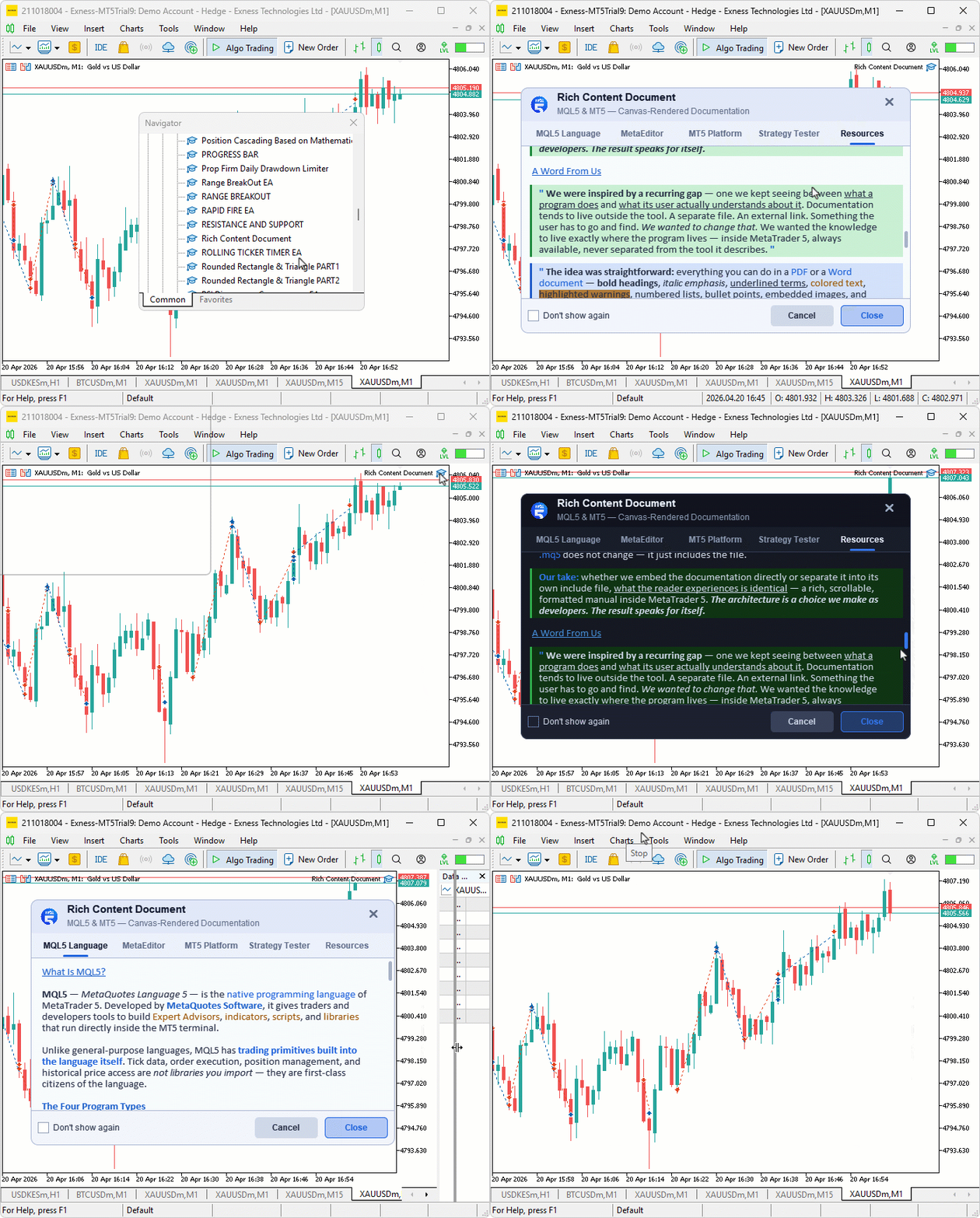
During testing, the document opened automatically on attachment with the light theme active, tab switching loaded each content section correctly with the scroll position resetting on every switch, and the scrollbar pill tracked mouse drag interactions accurately across the full content height.
Conclusion
In conclusion, we have built a fully canvas-rendered, rich content documentation system for MQL5 programs — a scrollable, tabbed, formatted in-chart manual that any program can adopt to deliver professional, self-contained documentation directly inside MetaTrader 5. Starting from the simple setup wizard we built in Part 9, we have come a long way — replacing plain chart object labels with a pixel-level rendering pipeline, a lightweight inline markup system, supersampled anti-aliased shapes, bicubic-interpolated image scaling, and a fully interactive event-driven interface. The result is a documentation experience that feels like opening a PDF or a Word document, but lives natively inside the chart, compiled directly into the program file it describes. After reading this article, you will be able to:
- Embed a fully formatted, scrollable, tabbed documentation panel into any MQL5 program you build, replacing plain text guides with a rich content experience
- Author document content using the inline markup system to produce bold, italic, colored, highlighted, and structured paragraphs that render with the visual quality of a word-processed document
- Separate the documentation engine into a dedicated header file using the #include directive, keeping your main program file focused on its core logic while the manual plugs in cleanly at compile time
Attachments
| S/N | Name | Type | Description |
|---|---|---|---|
| 1 | Rich Content Document.mq5 | Main Expert Advisor file | Main file for handling documentation logic |
| 2 | Rich Content Document BMP files.zip | ZIP file | Contains referenced BMP image files |
The project is supported in Algo Forge: https://forge.mql5.io/29210372/Article-22303-Rich-Content-Document-MQL5-Canvas
Warning: All rights to these materials are reserved by MetaQuotes Ltd. Copying or reprinting of these materials in whole or in part is prohibited.
This article was written by a user of the site and reflects their personal views. MetaQuotes Ltd is not responsible for the accuracy of the information presented, nor for any consequences resulting from the use of the solutions, strategies or recommendations described.

 Building Volatility Models in MQL5 (Part III): Implementing the SLSQP Algorithm for Model Estimation
 Beyond the Clock (Part 2): Building Runs Bars in MQL5
 Beyond GARCH (Part IV): Partition Analysis in MQL5
 Application of the Grey Model in Technical Analysis of Financial Time Series

- Free trading apps
- Over 8,000 signals for copying
- Economic news for exploring financial markets
You agree to website policy and terms of use