

Low-Frequency Quantitative Strategies in MetaTrader 5 (Part 3): A Regime-Adaptive Mean-Reversion Swing Trading System
 3 473
3 473
 1
1

Introduction
In 2002, Mark Helweg and David Stendhal published a small book that had a significant impact on the trading publishing market, Dynamic Trading Indicators: Winning with Value Charts and Price Action Profile (John Wiley & Sons, Inc., 2002). These two concepts, introduced in the book, Value Charts© and the Price Action Profile©, were a novelty at the time, if not for other reasons, for the wealth of information that the implementation of these concepts can bring to traditional charts, both for discretionary and algorithmic trading systems.
Almost a decade later, quantitative systems designer David Abrams and portfolio manager Scott Walker used the Value Charts and Price Action Profile methods to build a sophisticated mean-reversion swing trading system. They published it in 2010 and reported impressive equity-market results. They named the system MR Swing.
MRSwing was included 'as a 20% component in a diversified portfolio of low-correlation ETFs based on the Ivy Portfolio, modeled after university endowments. MR Swing increased the combined portfolio CAGR by a factor of 1.5 while reducing the max drawdown to only 4%.'
Beyond the good stats in the equity market, the MR Swing system presents at least two characteristics that deserve our attention, irrespective of the market:
- non-symmetrical trading algorithms for different market regimes
- volatility adaptive metrics
In the first part of this series about low-frequency quantitative strategies, we described the simplest setup for a local, lightweight OLAP-friendly datastore. Next, we discussed the first strategy, a lead-lag analysis over high-liquidity stocks from the semiconductor industry. Now, we’ll go beyond the data analysis and follow a complete quantitative strategy implementation in MQL5. In this article, we describe the MQL5 implementation of the MR Swing system along with its backtests in high-liquidity Nasdaq stocks for the last five years, showing that the system is still relevant in the current days.
We will start with a brief description of what Value Charts and Price Action Profile are, along with an overview of how they are used in the MR Swing system.
Next, we will dissect the indicators and trading logic that compose the system and their MQL5 implementation.
Finally, we comment on two backtests. First, we run an optimization on 'All Market Watch symbols' to select the best-performing symbol among six high-liquidity Nasdaq stocks. Second, we run a single test on the selected symbol.
What is a Value Chart
A Value Chart is a volatility-adaptive indicator based on the calculation of relative prices. Visually, it is very similar to a traditional oscillator plot, like the RSI, for example.
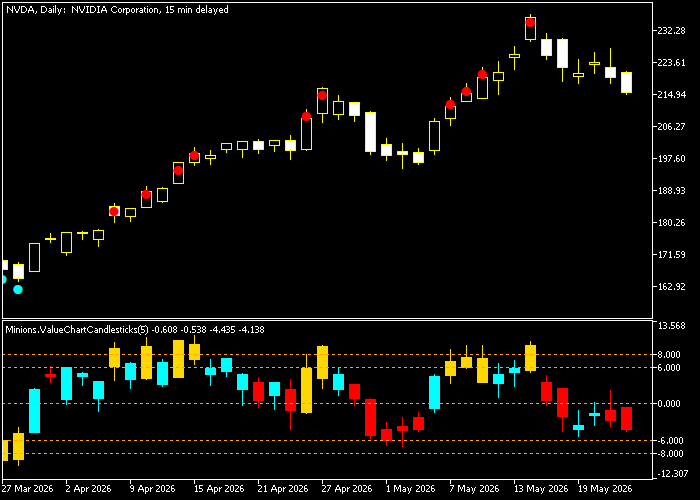
Fig. 1 - Nvidia Corp. daily chart with Value Chart indicator (free indicator by Flavio Javier Jarabeck)
In the plot above, the candles with lows below -6.0 are considered oversold, and those with highs above 6.0 are taken as overbought. As mentioned, its interpretation is very similar to oscillators like the RSI, and its lookback period and overbought/oversold levels are configurable parameters as well.
The main idea behind the Value Chart is a distinction between price and value; therefore, Value Charts are used instead of price charts.
“The valuation of a market is a function of both price and time. If a free market traded at the same price forever, one would logically assume that the buyers and sellers agreed that the price is not overbought or oversold, but representative of fair value. The markets that we participate in are rarely trading at the exact same price over time, but instead are constantly overshooting fair value, both to the upside and the downside, across every time frame. Because we live in an ever-changing world, fair value is constantly being redefined as time goes on. Actively traded markets are always oscillating around fair value.” [HELWEG and STENDHAL, 2002]
The calculation of Value Chart prices can be better understood by breaking it into four steps. At the end, we’ll have volatility-adjusted, relative market prices, so we can identify overbought and oversold levels that remain consistent even as market volatility shifts over time.
We first calculate the Floating Axis. The Floating Axis represents the 'fair value' of the market. It is the baseline for the chart. It is nothing more than a moving average of the median price over a specific smoothing period. The default is 5 bars.
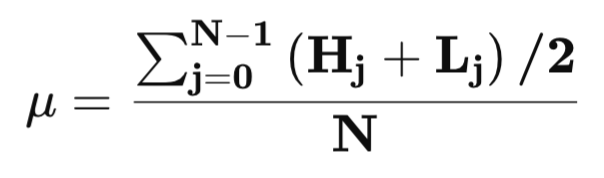
Fig. 2 - The Floating Axis formula
“(...) instead of plotting price with respect to zero, it is necessary to plot price (open, high, low, and close) with respect to a moving (floating) axis, which is designed to represent fair value. Because fair value represents the price level where the majority of the buyers and sellers transact business, a carefully selected moving average of price activity should be representative of fair value in any market. This moving average is referred to as the floating axis.” [HELWEG and STENDHAL, 2002]
Then we calculate the Dynamic Volatility Unit that adjusts the relative price for the always-changing volatility. It takes the daily trading range average over the same smoothing period and multiplies it by a constant.
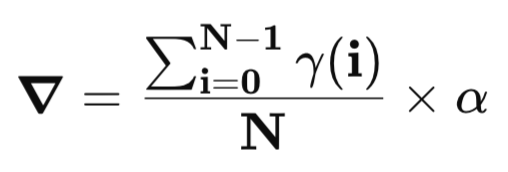
Fig. 3 - The Dynamic Volatility Unit formula
The alpha constant value suggested by the book authors is 0.20, while the authors of MR Swing use 0.16.
Now, we need the Relative Price. It is simply the difference between the actual price and the floating axis. Thus, the relative high would be (high - floating axis), the relative low would be (low - floating axis), and so on.
Finally, we can calculate the Value Chart Price by dividing the relative prices by the Dynamic Volatility Unit.
Value Chart High = (High - floating axis) / Dyn Vol Unity
Value Chart Low = (Low - floating axis) / Dyn Vol Unity
On the indicator plot, a value of zero represents a fair value. Standard thresholds used to identify overbought/oversold levels are 4 and 8. These values typically represent one and two standard deviations (Std Dev) from the fair value.
Value Charts in MR Swing
In the MR Swing, Value Charts are used to signal potential pullback entry points in bull markets, with a 5-bar smoothing period and a Dynamic Volatility Unit constant of 0.16. The system monitors the Value Chart of the bar lows rather than the closing or median prices. A potential entry occurs only when the Value Chart of the lows reaches a specific oversold level of -7.5. This level remains statistically relevant in high or low-volatility markets, where static overbought/oversold levels could become inaccurate.
MR Swing treats bull and bear markets as asymmetric. The authors observe that bull markets tend to have quick, sharp pullbacks that are usually followed by slow moves higher. Since Value Charts can identify when a price move has diverged significantly from its short-term floating axis, they help signal these quick pullbacks.
What is a Price Action Profile?
The Price Action Profile is a market analysis tool that 'plots and describes the historical distribution and frequency of Value Chart price activity'. We can think of it as a statistical complement to Value Charts. It allows us to identify the specific frequency with which a market trades within defined relative price intervals.
Below you can see a typical visualization of a Price Action Profile. The figure is from the original book.
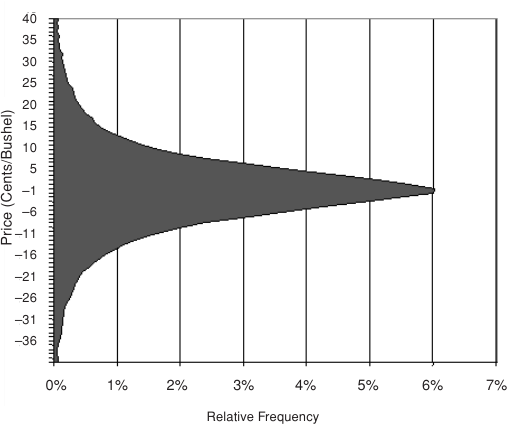
Fig. 4 - A typical Price Action Profile visualization
A Price Action Profile organizes price data into a frequency histogram that resembles a typical bell curve of a normal distribution. By analyzing this distribution, we can define specific Value Chart ranges for fair value and for overbought/oversold price levels. Because Value Chart–based profiles are relatively consistent across markets and volatility regimes, we can estimate the future distribution of price data from the historical sample. It is reasonable to assume that future price behavior will look like the historical distribution. It is objective, quantifiable information that can be interpreted only one way, helping to eliminate emotional biases. To help in understanding the formation of the histogram, the authors included in their book the four-step sequence you can see below.
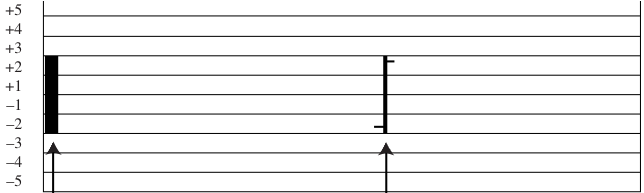
Fig. 5 - Price Action Profile constructed from one Value Chart price bar
In Figure 5, the filled bar (left) represents a Price Action Profile constructed from one Value Chart price bar (right) reflecting one trading day. In Figures 6, 7, and 8 below, we see the progressive construction of the same Price Action Profile from two, three, and four Value Chart price bars successively.
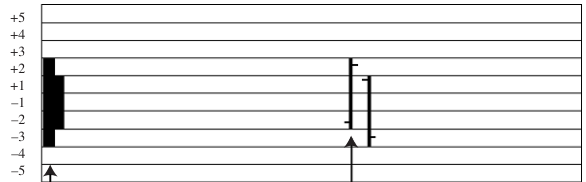
Fig. 6 - Price Action Profile constructed from two Value Chart price bars
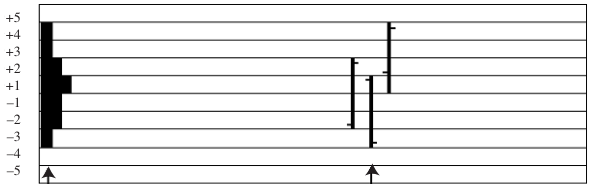
Fig. 7 - Price Action Profile constructed from three Value Chart price bars
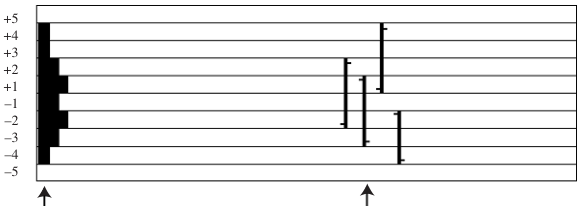
Fig. 8 - Price Action Profile constructed from four Value Chart price bars
If we imagine four hundred, or four thousand Value Chart price bars accumulating on the histogram, we can devise its final form depicted in Figure 4.
Price Action Profile in the MR Swing System
On the bear-regime side of the MR Swing system, the Percent-Rank function used by the David Varadi Oscillator (DVO) to normalize data is the mathematical implementation of a Price Action Profile. This function takes the current price ratios and ranks them against a lookback period to determine their relative frequency. This ensures that overbought/oversold signals are based on historical probability rather than static price levels. Besides that, the Percent-Rank function also ensures that a signal generated in a low-volatility environment has the same statistical significance as one in a high-volatility environment. The Price Action Profile gives confidence that the entry points are low-risk. It indicates that price activity at the -7.5 level is statistically rare and that a reversal is historically probable. This statistical confidence is essential for the system’s high-probability limit order entries.
The MR Swing trading system
The Hysteresis Channel
The market is in a continuous state of change. This is the main premise behind the MR Swing system. Trying to anticipate the next change is pointless. To make effective trading decisions in a continuously changing environment is the trader’s challenge. To address this challenge, the MR Swing system checks the current market regime at every tick and uses different trading algorithms for the bull and the bear market regimes.
The tool used to quantify the current market regime has a sophisticated concept behind it, hysteresis, a concept borrowed from physics.
“Hysteresis is a natural phenomenon that appears in magnetism, elasticity, cell mitosis, and control theory (e.g., thermostats). These systems exhibit path dependence in which the current state depends on the path taken to achieve it. The system has memory, and the effects of the current input are only felt after a delay or range threshold is exceeded. We believe that markets also need time to respond to new information and that response does take into consideration recent market history. Our market regime filter requires the price to close below the low of the channel before switching into a bear regime. [ABRAMS and WALKER, 2010, p.8].”
The idea behind this Hysteresis Channel, or Trend Channel, is to create a buffer between regime changes to reduce false change signals, also called 'whipsaws'. The practical implementation of the system is made of a 200-day Simple Moving Average Trend Channel.
You will find its implementation in the MRSwing.mqh header file.
class CMRSwing
{
private:
   //--- Persistent state
   int      m_regime;      // 1: Bull, -1: Bear
   double   m_rho;
The Hysteresis Channel value is stored in the variable m_rho. While the usual 200-day SMA is calculated from one of the OHLC prices, frequently the close price, the Hysteresis Channel simultaneously takes the highs and the lows. This high/low buffer creates a threshold that moves only in the direction of the current regime (up in bull regimes and down in bear regimes). In other words, it is an increment-only model that ignores minor retracements, which provides a kind of memory and helps by reducing the whipsaws resulting from market regime changes, those annoying false positives we are so used to receiving in traditional moving average systems.
      //--- 1. Hysteresis Channel
      for(int i = start; i < rates_total; i++)
        {
         if(i < 200)
            continue;
         double mu_l = SMA(low, 200, i);
         double mu_h = SMA(high, 200, i);
         if(i == 200)
           {
            m_rho = mu_l;
            m_regime = 1;
           }
         if(m_regime == 1)
            m_rho = MathMax(mu_l, m_rho);
         else
            m_rho = MathMin(mu_h, m_rho);
         if(close[i] > m_rho)
            m_regime = 1;
         else
            if(close[i] < m_rho)
               m_regime = -1;
        }
First, we get the simple moving averages for both the bar highs (mu_h) and the bar lows (mu_l) over a period of 200 days. The channel value only moves in the direction of the established trend. It depends on the current regime. In a bull market, it is the maximum of the current or the previous bar. This restriction means that in an uptrend, the channel can only increase or stay flat. It never moves down during retracements. In a bear market, it is the minimum of the current or the previous bar. This means that in a downtrend, the channel can only decrease or stay flat. The market switch is only allowed when the price closes above or below the current channel value.
By requiring the price to close completely outside the high/low channel before recognizing a trend change, the effect of new price data is only felt once a specific range threshold is exceeded. This captures major trends more reliably than a traditional single moving average.
David Varadi Oscillator (DVO)
The David Varadi Oscillator (DVO) used in the bear market regime is a simple and powerful detrended price oscillator. The Percent-Rank function used by DVO to normalize data is the mathematical implementation of a Price Action Profile, as it quantifies the frequency and distribution of price activity. This function ranks the current price ratios against a lookback period to determine their relative frequency, so overbought and oversold signals are based on historical probability rather than static price levels. The default lookback period in this implementation is 252 days.
This is the DVO generalized formula presented by the MR Swing authors.
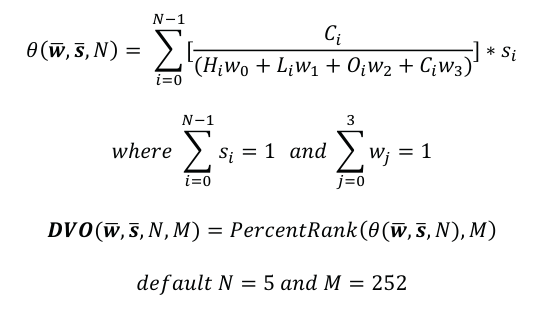
Fig. 9 - DVO formula as presented by ABRAMS and WALKER, 2010
The w coefficients are weights applied to the OHLC prices. Note that we can use any combination of OHLC weights. There is plenty of room for optimization here. In this implementation, we are using the DV2 variant (see below) that applies weights only to the high and the low.
s - is also a weight, but applied across days/time. The authors call it a 'density'. It defines how much weight is given to each of the N previous bars.
N - is the smoothing period that defaults to 5 trading days.
M - is the lookback period. It defaults to 252, or one year of trading days.
Note that to calculate the DVO via Percent-Rank, first we need Theta.
  double GetDVO(const double &close[], const double &high[], const double &low[], int index)
   {
      return DVO(close, high, low, 5, 252, index, m_theta_buffer);
   }
Theta is the weighted summation of the ratio between the closing price and a combination of its OHLC prices. The authors use a DVO variation (DV2).
“The DV2 is one specific setting originally designed for the SPY (the weighting period was 50/50 over the last two days).”
The DV2 uses the weight vector w = [0.5, 0.5, 0, 0]. This means:
High (w0): Weighted at 0.5
Low (w1): Weighted at 0.5
Open (w2): Weighted at 0
Close (w3): Weighted at 0

Fig. 10 - The DV2 formula with weight vectors
      //--- 2. DVO Pre-calc (Theta buffer)
      for(int i = start; i < rates_total; i++)
        {
         double mid = (high[i] + low[i]) * 0.5;
         double ratio = (mid != 0) ? close[i] / mid : 1.0;
         m_dv2_temp[i] = (i > 0) ? ratio * 0.5 + ((close[i - 1] / ((high[i - 1] + low[i - 1]) * 0.5))) * 0.5 : ratio;
         m_theta_buffer[i] = SMA(m_dv2_temp, 5, i);
        }
So, this DV2 configuration, designed for the S&P 500 ETF, tracks the ratio between the closing price and the current day's trading range.
Finally, Theta (the raw value) is normalized using the Percent-Rank function over the lookback period. Statisticians call this a nonparametric technique, meaning 'it does not assume prices follow a normal Gaussian distribution'.
//+------------------------------------------------------------------+
//| David Varadi Oscillator (DVO)                                    |
//+------------------------------------------------------------------+
double DVO(const double &close[],
           const double &high[],
           const double &low[],
           int smooth_period,
           int rank_period,
           int index,
           const double &theta_buffer[])
  {
   if(index < rank_period + smooth_period)
      return(EMPTY_VALUE);
   double last_theta = theta_buffer[index];
   int count = 0;
   for(int i = 0; i < rank_period; i++)
     {
      if(theta_buffer[index - i] < last_theta)
         count++;
     }
   return((double)count / (rank_period - 1));
  }
The DVO generates mean-reversion signals in the bear regime. Less than 0.40 is a buy signal; above 0.70 is a sell signal.
Short-Term Volume and Price Oscillator (SVAPO)
The Short-Term Volume and Price Oscillator (SVAPO), developed by Sylvain Vervoort, is used to identify market exhaustion points in a bull regime by combining short-term price trends with the slope of volume over time.
SVAPO is calculated through smoothing and volume-weighting steps.
First, we smooth the price trend. It uses a smoothed Heikin-Ashi closing price, which is further processed using a Triple Exponential Moving Average (TEMA) over a period defined as 0.625 * Period.
      //--- 3. SVAPO Implementation
      for(int i = start; i < rates_total; i++)
        {
         double ap = (open_p[i] + high[i] + low[i] + close[i]) / 4.0;
         m_ha_open[i] = (i > 0) ? 0.5 * (ap + m_ha_open[i - 1]) : ap;
         m_ha_cl[i] = 0.25 * (ap + m_ha_open[i] +
                              MathMax(ap, MathMax(high[i], m_ha_open[i])) +
                              MathMin(ap, MathMin(low[i], m_ha_open[i])));
        }
      CalculateTEMABuffer(m_ha_cl, m_ema1_hac, m_ema2_hac, m_ema3_hac, m_hac, (int)(0.625 * 8), rates_total, prev_calculated);
Then, we smooth the volume trend. A TEMA is applied to the linear regression slope of the volume over the specified period (default N=8).
      double vol_slope[];
      ArrayResize(vol_slope, rates_total);
      for(int i = start; i < rates_total; i++)
         vol_slope[i] = LinearRegressionSlope(volume, 8, i);
      CalculateTEMABuffer(vol_slope, m_ema1_vt, m_ema2_vt, m_ema3_vt, m_v_trend, 8, rates_total, prev_calculated);
We determine the trend using the smoothed Heikin-Ashi. If its price and volume trend are both higher than the previous bar, a day is considered 'Up'; else, if both the price and volume trend are lower than the previous bar, a day is considered 'Down'.
      double delta_temp[];
      ArrayResize(delta_temp, rates_total);
      for(int i = start; i < rates_total; i++)
        {
         if(i < 40)
            continue;
         double v_avg = SMA(volume, 40, i - 1);
         double vc = (volume[i] < 2.0 * v_avg) ? volume[i] : 2.0 * v_avg;
         bool up = (m_hac[i] > m_hac[i - 1] * (1.001)) && (m_v_trend[i] >= m_v_trend[i - 1]) && (m_v_trend[i - 1] >= m_v_trend[i - 2]);
         bool dn = (m_hac[i] < m_hac[i - 1] * (0.999)) && (m_v_trend[i] <= m_v_trend[i - 1]) && (m_v_trend[i - 1] <= m_v_trend[i - 2]);
         delta_temp[i] = up ? vc : (dn ? -vc : 0);
         double sum_delta = 0;
         for(int k = 0; k < 8; k++)
            sum_delta += delta_temp[i - k];
         m_delta_sum[i] = sum_delta / (v_avg + 1.0);
        }
The system sums the volume for 'Up' days and subtracts it for 'Down' days over the period, then normalizes this by the average volume. The SVAPO value is the TEMA of this volume delta summation.
CalculateTEMABuffer(m_delta_sum, m_ema1_sv, m_ema2_sv, m_ema3_sv, m_svapo, 8, rates_total, prev_calculated);
SVAPO is used to identify exhaustion in bull markets. So, dynamic bands are generated around the oscillator based on the standard deviation of the SVAPO value over a 100-bar period. The upper band is defined as 1.5 × StdDev(SVAPO,100). Exhaustion is signaled when the SVAPO closes above the upper band.
SVAPO is called from the main MRSwingEA.mq5 file.
   double svapo_val = ExtStrategy.GetSVAPO(last_bar);
//--- SVAPO Upper Band
//--- We need a buffer of SVAPO to calculate StdDev
   double svapo_hist[];
   ArrayResize(svapo_hist, rates_total);
   for(int i = 0; i < rates_total; i++)
      svapo_hist[i] = ExtStrategy.GetSVAPO(i);
   double upper_band = 1.5 * StdDev(svapo_hist, 100, last_bar);
The GetSVAPO function is declared in the strategy header.
double GetSVAPO(int index) { return (index >= 0 && index < ArraySize(m_svapo)) ? m_svapo[index] : EMPTY_VALUE; }
The exhaustion signal does not trigger an immediate market exit. Instead, once the SVAPO crosses above the top band, the system opens a limit order, searching for a fill at the highest high of the last two bars to maximize the exit price during the peak.
Entries
Once the current market regime is defined by the Hysteresis Channel, the system uses different trading strategies for bull or bear regimes.
Bull Regime
For bull regimes, according to the authors, the MR Swing system got inspiration from the well-known Elder’s Triple Screen swing trading setup. First, the dominant trend is identified in the large timeframe/screen, which here was done by the Hysteresis Channel above. Then, a smaller timeframe/screen is used to get the entry signal, a pullback entry given by the Value Charts oversold threshold. Finally, a yet smaller timeframe/screen is used to get the optimum entry point, in this case implemented as limit orders set at the lowest low of the last two bars.
You will find this logic in the main MRSwingEA.mq5.
//--- 3. Bull Regime (Swing)
   else
      if(regime == 1)
        {
         if(v_low < -7.5)
           {
            double limit_price = MathMin(rates[last_bar].low, rates[last_bar - 1].low);
            //--- Buy Limit pending order
            ExtTrade.BuyLimit(InpLotSize, limit_price, _Symbol);
           }
         if(is_long && svapo_val > upper_band)
           {
            double limit_exit = MathMax(rates[last_bar].high, rates[last_bar - 1].high);
            ExtTrade.SellLimit(InpLotSize, limit_exit, _Symbol);
           }
         if(is_short)
            ExtTrade.PositionClose(_Symbol);
        }
Bear Regime
For bear regimes, the MR Swing system uses a short-term mean-reversion setup with the David Varadi Oscillator (DVO). The MR Swing System authors say that, although the two-period Relative Strength Index, RSI(2), would work fine for daily mean reversion, the Percent-Rank function used by DVO to normalize the daily data is crucial to adapt to market volatility changes. The Percent-Rank function ensures that the oversold or overbought signals are relative to the current volatility rather than the absolute price levels.
//--- 2. Bear Regime (Mean Reversion)
   if(regime == -1)
     {
      if(dvo_val < 0.40 && InpMode != MODE_CONSERVATIVE)
        {
         if(!is_long)
            ExtTrade.Buy(InpLotSize, _Symbol);
        }
      else
         if(dvo_val > 0.70)
           {
            if(!is_short)
               ExtTrade.Sell(InpLotSize, _Symbol);
           }
      //--- Exit Bear
      if(is_long && dvo_val > 0.50)
         ExtTrade.PositionClose(_Symbol);
      if(is_short && dvo_val < 0.50)
         ExtTrade.PositionClose(_Symbol);
     }
Exits
As it happens with entries, the logic for closing positions also depends on the market regime. When swing trading in the bull market, the system checks for market exhaustion with Vervoort’s Short-Term Volume and Price Oscillator (SVAPO). The exit signal is triggered when the SVAPO goes through its upper band, but the exit is not at the current market price. Instead, a limit order is placed at the highest high of the last two bars. Optionally, to protect profits, it can use a trailing stop set at the simple moving average of the lows of the last two bars.
When trading the mean reversion in the bear market, the exit depends on the system configuration mode.
MR Swing Configuration
The MR Swing system defines three configuration modes. They are based on whether the system is allowed to take counter-trend trades or must only trade in the direction of the dominant market regime.
- Aggressive
- Intermediate
- Conservative
In the aggressive mode, the system is always in the market, long or short. In this mode, it takes all counter-trend trades irrespective of the regime. An exit from a long position occurs when a short signal is triggered (DVO > 70%), and an exit from a short position occurs when a buy signal is triggered (DVO < 40%).
- Bear Regime: Performs both long and short trades using mean-reversion rules.
- Bull Regime: Performs both long and short trades using swing trading rules.
When running in the intermediate mode, the system allows counter-trend trades only during the heightened volatility of a bear market. It doesn’t short a bull market.
- Bear Regime: Goes both long and short using mean-reversion rules.
- Bull Regime: Performs long-only swing trades; it never shorts a bull market.
Conservative mode only trades in the direction of the dominant market regime and never takes counter-trend trades.
- Bear Regime: Only sells short using mean-reversion rules; it never goes long.
- Bull Regime: Only goes long using swing trade rules; it never shorts.
If the market regime shifts while there are open positions, they are not closed immediately. Instead, the exit rules change according to the new market regime. For example, suppose we are long in a bear market, thus trading mean-reversion. If the price closes above the Hysteresis Channel, according to the system rules, we are now in a bull market. The system will stop looking for a DVO-based exit for our long position. It will wait for an SVAPO exhaustion signal and fill a limit order at the highest high of the last two bars.
Backtest
We did an optimized backtest on NVDA, AAPL, MSFT, GOOG, AMZN, and META for the last five years, looking for the best Sharpe ratio. We used the MR Swing aggressive mode in the backtests.
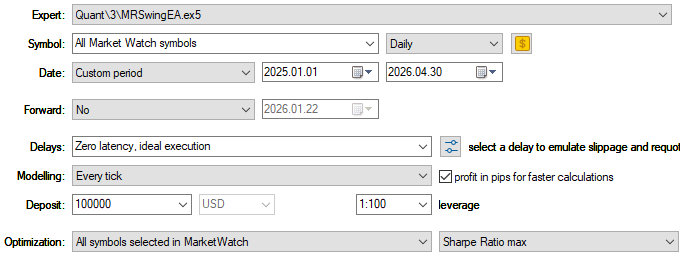
Fig. 11 - Backtest settings for best Sharpe ratio symbol selection
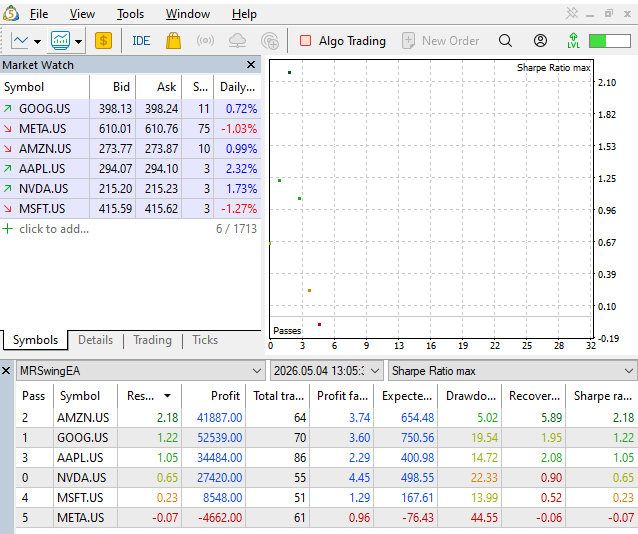
Fig. 12 - backtest results for the six major tech companies from Nasdaq ordered by max Sharpe ratio
Then we ran a backtest for the AMZN.US symbol, which returned the best Sharpe ratio.
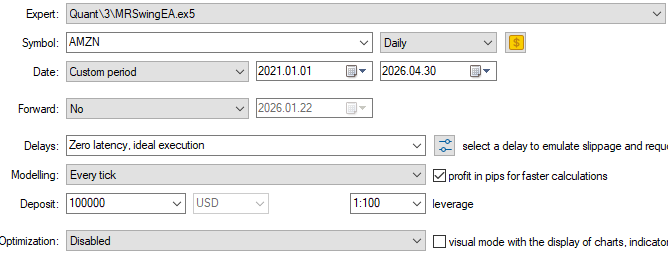
Fig. 13 - backtest settings for a single test run on AMZN for the last five years
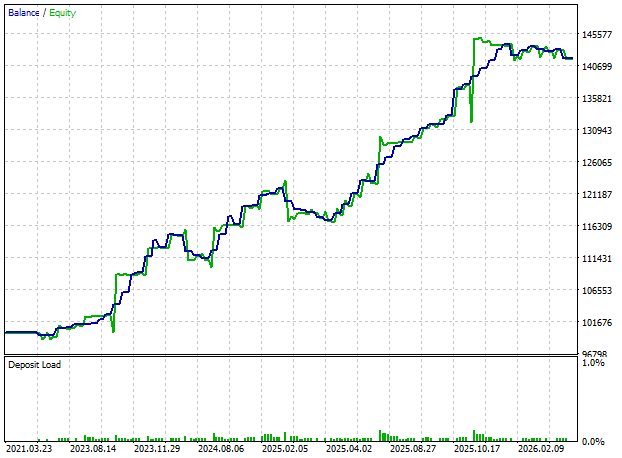
Fig. 14 - Balance/equity evolution of a single test run on AMZN for the last five years
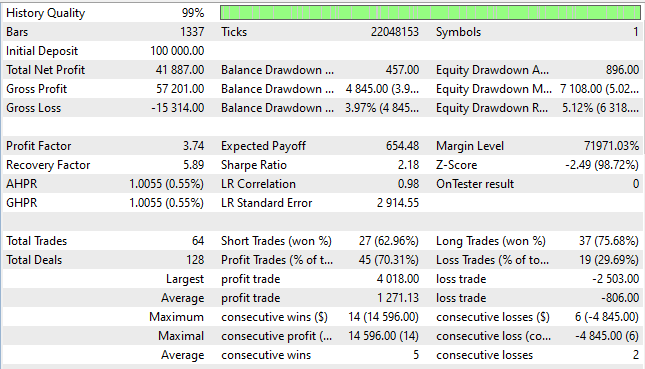
Fig. 15 - Backtests statistics of a single test run on AMZN for the last five years
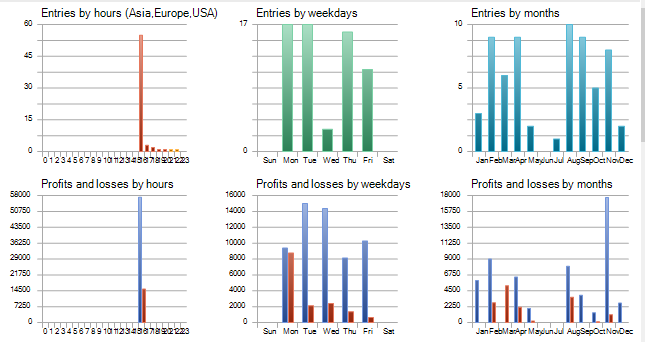
Fig. 16 - Backtests entry times of a single test run on AMZN for the last five years
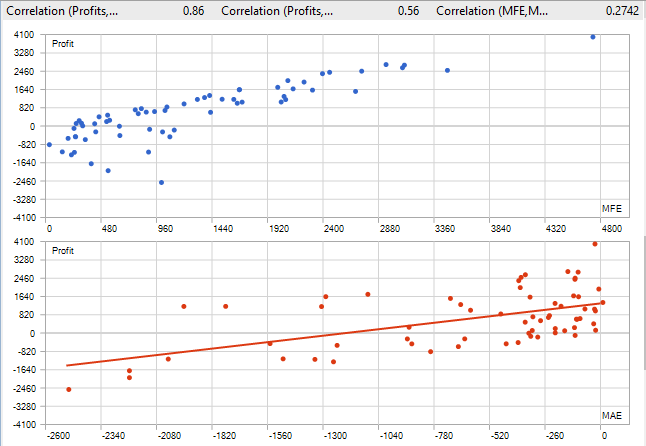
Fig. 17 - Backtests correlation MFE/MAE of a single test run on AMZN for the last five years
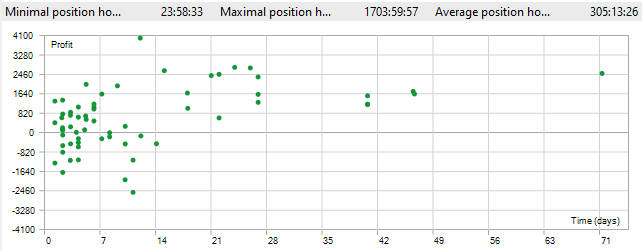
Fig. 18 - Backtests position holding times of a single test run on AMZN for the last five years
This is the Expert Advisor code, MRSwingEA.mq5. Please check the strategy header and the indicators files in the attachments section in this article’s footer.
//+------------------------------------------------------------------+
//|                                                   MRSwingEA.mq5  |
//|                                  Copyright 2025, MetaQuotes Ltd. |
//|                                             https://www.mql5.com |
//+------------------------------------------------------------------+
#property copyright "Copyright 2025, MetaQuotes Ltd."
#property link      "https://www.mql5.com"
#property version   "1.00"
#property strict

#include <Trade\Trade.mqh>
#include "MRSwing.mqh"
enum ENUM_MR_SWING_MODE
  {
   MODE_AGGRESSIVE,
   MODE_INTERMEDIATE,
   MODE_CONSERVATIVE
  };
//--- Input parameters
input ENUM_MR_SWING_MODE  InpMode = MODE_AGGRESSIVE;

input double InpLotSize = 1.0;
input int    InpMagic   = 123456;

//--- Global variables
CMRSwing  *ExtStrategy;
CTrade    ExtTrade;
int       ExtLastBarTime;

//+------------------------------------------------------------------+
//| Expert initialization function                                   |
//+------------------------------------------------------------------+
int OnInit()
  {
   ExtStrategy = new CMRSwing();
   ExtTrade.SetExpertMagicNumber(InpMagic);
   ExtLastBarTime = 0;
   return(INIT_SUCCEEDED);
  }

//+------------------------------------------------------------------+
//| Expert deinitialization function                                 |
//+------------------------------------------------------------------+
void OnDeinit(const int reason)
  {
   delete ExtStrategy;
  }

//+------------------------------------------------------------------+
//| Expert tick function                                             |
//+------------------------------------------------------------------+
void OnTick()
  {
   MqlRates rates[];
   ArraySetAsSeries(rates, false);
   int copied = CopyRates(_Symbol, _Period, 0, 1000, rates);
   if(copied < 252)
      return;
   int rates_total = copied;
   int last_bar = rates_total - 1;
   if(rates[last_bar].time <= ExtLastBarTime)
      return; // Only run on new bar
   ExtLastBarTime = (int)rates[last_bar].time;
   ExtStrategy.Calculate(rates, rates_total, 0);
   int regime = ExtStrategy.GetRegime();
   double close[], high[], low[];
   ArrayResize(close, rates_total);
   ArrayResize(high, rates_total);
   ArrayResize(low, rates_total);
   for(int i = 0; i < rates_total; i++)
     {
      close[i] = rates[i].close;
      high[i] = rates[i].high;
      low[i] = rates[i].low;
     }
   double dvo_val = ExtStrategy.GetDVO(close, high, low, last_bar);
   double v_low, v_high;
   ValueCharts(high, low, close, 5, last_bar, v_low, v_high);
   double svapo_val = ExtStrategy.GetSVAPO(last_bar);
//--- SVAPO Upper Band
//--- We need a buffer of SVAPO to calculate StdDev
   double svapo_hist[];
   ArrayResize(svapo_hist, rates_total);
   for(int i = 0; i < rates_total; i++)
      svapo_hist[i] = ExtStrategy.GetSVAPO(i);
   double upper_band = 1.5 * StdDev(svapo_hist, 100, last_bar);
//--- Strategy Logic ---
//--- 1. Position Info
   bool is_long = PositionSelectByMagic(_Symbol, InpMagic) && PositionGetInteger(POSITION_TYPE) == POSITION_TYPE_BUY;
   bool is_short = PositionSelectByMagic(_Symbol, InpMagic) && PositionGetInteger(POSITION_TYPE) == POSITION_TYPE_SELL;
//--- 2. Bear Regime (Mean Reversion)
   if(regime == -1)
     {
      if(dvo_val < 0.40 && InpMode != MODE_CONSERVATIVE)
        {
         if(!is_long)
            ExtTrade.Buy(InpLotSize, _Symbol);
        }
      else
         if(dvo_val > 0.70)
           {
            if(!is_short)
               ExtTrade.Sell(InpLotSize, _Symbol);
           }
      //--- Exit Bear
      if(is_long && dvo_val > 0.50)
         ExtTrade.PositionClose(_Symbol);
      if(is_short && dvo_val < 0.50)
         ExtTrade.PositionClose(_Symbol);
     }
//--- 3. Bull Regime (Swing)
   else
      if(regime == 1)
        {
         if(v_low < -7.5)
           {
            double limit_price = MathMin(rates[last_bar].low, rates[last_bar - 1].low);
            //--- Buy Limit pending order
            ExtTrade.BuyLimit(InpLotSize, limit_price, _Symbol);
           }
         if(is_long && svapo_val > upper_band)
           {
            double limit_exit = MathMax(rates[last_bar].high, rates[last_bar - 1].high);
            ExtTrade.SellLimit(InpLotSize, limit_exit, _Symbol);
           }
         if(is_short)
            ExtTrade.PositionClose(_Symbol);
        }
//--- Variations
   if(InpMode == MODE_INTERMEDIATE)
     {
      if(regime == -1 && (is_long || is_short))
         ExtTrade.PositionClose(_Symbol);
     }
   if(InpMode == MODE_CONSERVATIVE)
     {
      if(regime == 1 && is_short)
         ExtTrade.PositionClose(_Symbol);
      if(regime == -1 && is_long)
         ExtTrade.PositionClose(_Symbol);
     }
  }

//+------------------------------------------------------------------+
//| PositionSelectByMagic helper                                     |
//+------------------------------------------------------------------+
bool PositionSelectByMagic(string symbol, int magic)
  {
   for(int i = PositionsTotal() - 1; i >= 0; i--)
     {
      ulong ticket = PositionGetTicket(i);
      if(PositionSelectByTicket(ticket))
        {
         if(PositionGetString(POSITION_SYMBOL) == symbol && PositionGetInteger(POSITION_MAGIC) == magic)
            return(true);
        }
     }
   return(false);
  }
Conclusion
In this article, we presented the MR Swing trading system, a quantitative mean-reversion swing trading system supported by Value Charts and Price Action Profile. We described its port to MQL5 with a backtest for the last five years over the AMZN stock. The backtest results show that despite more than fifteen years having passed since its publication by the original authors, its principles remain valid.
It is worth noting that the backtests were run with their default parameters and without any optimization, except for the symbol choice among the most liquid tech stocks from Nasdaq. Thus, there is plenty of room for experimentation with similar symbols, different markets, other asset classes, along with a combination of EA and indicator parameters.
References
Helweg, Mark W., and David C. Stendahl. Dynamic Trading Indicators: Winning with Value Charts and Price Action Profile. John Wiley & Sons, Inc., 2002
Abrams, David, and Scott Walker. MR Swing: A Quantitative System for Mean-Reversion and Swing Trading in Market Regimes. Mar. 2010
| Filename | Description |
|---|---|
| Experts/MRSwing/MRSwingEA.mq5 | The MR Swing Expert Advisor file |
| Include/MRSwing/MRSwing.mqh | The strategy header file |
| Include/MRSwing/Indicators.mqh | The indicators header file |
| MRSwingEA.Daily.20210101_20260430.030.ini | Backtest settings for 'All Market Watch symbols' optimization |
| MRSwingEA.AMZN.US.Daily.20210101_20260430.030.ini | Backtest settings for AMZN.US |
Warning: All rights to these materials are reserved by MetaQuotes Ltd. Copying or reprinting of these materials in whole or in part is prohibited.
This article was written by a user of the site and reflects their personal views. MetaQuotes Ltd is not responsible for the accuracy of the information presented, nor for any consequences resulting from the use of the solutions, strategies or recommendations described.


 Market Simulation (Part 23): Getting Started with SQL (VI)
 MQL5 Trading Tools (Part 34): Replacing Native Chart Objects with an Interactive Canvas Drawing Layer
 From Basic to Intermediate: Function Pointers
 MetaTrader 5 Machine Learning Blueprint (Part 17): CPCV Backtesting — From Python Model to Tick-Level Evidence

- Free trading apps
- Over 8,000 signals for copying
- Economic news for exploring financial markets
You agree to website policy and terms of use