

MQL5取引ツール(第2回):インタラクティブな取引アシスタントの強化:動的視覚フィードバックの導入
 272
272
 2
2

はじめに
前回の第1回では、MetaTrader 5用の取引アシスタントツール(Trade Assistant Tool)をMetaQuotes Language 5 (MQL5)で構築し、ペンディングオーダーの発注を簡素化しました。今回はさらに一歩進め、動的な視覚フィードバックによるインタラクティブ性を強化します。ドラッグ可能なコントロールパネル、直感的なナビゲーションのためのホバー効果、リアルタイムの注文検証などの機能を導入し、取引設定が正確で市場に適したものになるようにします。これらの進化は以下のサブトピックで解説します。
これらのセクションを通じて、より応答性が高く直感的でユーザーフレンドリーなトレーディングツールの構築を目指します。
概念的改善によるインタラクティブ性の向上
私たちは、取引アシスタントツールをより直感的で柔軟なものにすることを目指します。まず、チャート上で自由に配置可能なドラッグ可能なコントロールパネルを導入します。この柔軟性により、複数のチャートを管理する場合でも、単一のトレード設定に集中する場合でも、自分のワークフローに合わせてインターフェースをカスタマイズできます。さらに、ホバー効果を統合し、カーソルがボタンやチャート要素上を移動するとそれらがハイライトされ、即時の視覚的フィードバックが得られるようにします。これにより、操作がスムーズになり、ミスを最小限に抑えられます。
リアルタイムの注文検証も重要な改善点です。エントリー、ストップロス、テイクプロフィットの各レベルが実行前に現在の市場価格と論理的に整合していることを確認します。この機能により、無効な取引設定を防ぎ、操作をシンプルに保ちながら取引の精度を高められます。これらの改善により、応答性が高くユーザー中心のツールが構築され、取引判断をサポートするとともに、将来的なリスク管理機能などの拡張への基盤も整います。要するに、下に示すのは私たちが目指す可視化のイメージです。
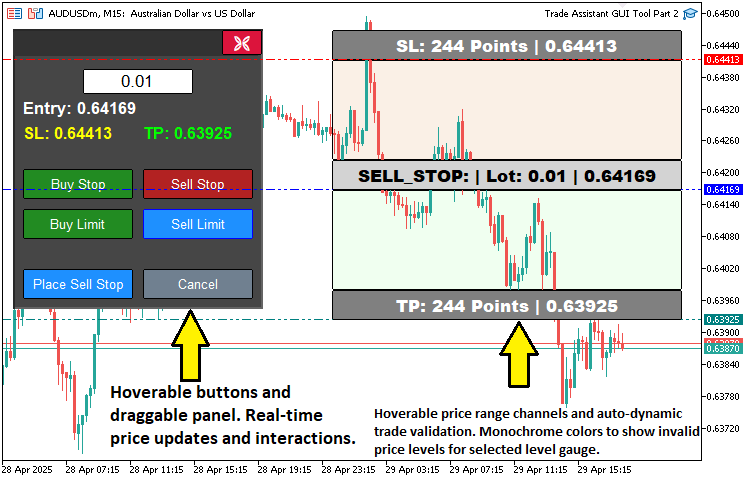
MQL5での実装
MQL5で目的を達成するために、まず追加のパネルオブジェクトやドラッグ、ホバー確認用の変数を定義する必要があります。これらの変数は、パネルや価格ツールに対するユーザーの操作を追跡するために使用されます。
// Control panel object names
#define PANEL_BG        "PANEL_BG"        //--- Define constant for panel background object name
#define PANEL_HEADER    "PANEL_HEADER"    //--- Define constant for panel header object name
#define LOT_EDIT        "LOT_EDIT"        //--- Define constant for lot size edit field object name
#define PRICE_LABEL     "PRICE_LABEL"     //--- Define constant for price label object name
#define SL_LABEL        "SL_LABEL"        //--- Define constant for stop-loss label object name
#define TP_LABEL        "TP_LABEL"        //--- Define constant for take-profit label object name
#define BUY_STOP_BTN    "BUY_STOP_BTN"    //--- Define constant for buy stop button object name
#define SELL_STOP_BTN   "SELL_STOP_BTN"   //--- Define constant for sell stop button object name
#define BUY_LIMIT_BTN   "BUY_LIMIT_BTN"   //--- Define constant for buy limit button object name
#define SELL_LIMIT_BTN  "SELL_LIMIT_BTN"  //--- Define constant for sell limit button object name
#define PLACE_ORDER_BTN "PLACE_ORDER_BTN" //--- Define constant for place order button object name
#define CANCEL_BTN      "CANCEL_BTN"      //--- Define constant for cancel button object name
#define CLOSE_BTN       "CLOSE_BTN"       //--- Define constant for close button object name

// Variables for dragging panel
bool panel_dragging   = false;            //--- Flag to track if panel is being dragged
int  panel_drag_x     = 0,
     panel_drag_y     = 0;                //--- Mouse coordinates when drag starts
int  panel_start_x    = 0,
     panel_start_y    = 0;                //--- Panel coordinates when drag starts

// Button and rectangle hover states
bool buy_stop_hovered    = false;         //--- Buy Stop button hover state
bool sell_stop_hovered   = false;         //--- Sell Stop button hover state
bool buy_limit_hovered   = false;         //--- Buy Limit button hover state
bool sell_limit_hovered  = false;         //--- Sell Limit button hover state
bool place_order_hovered = false;         //--- Place Order button hover state
bool cancel_hovered      = false;         //--- Cancel button hover state
bool close_hovered       = false;         //--- Close button hover state
bool header_hovered      = false;         //--- Header hover state
bool rec1_hovered        = false;         //--- REC1 (TP) hover state
bool rec3_hovered        = false;         //--- REC3 (Entry) hover state
bool rec5_hovered        = false;         //--- REC5 (SL) hover state
MetaTrader 5インターフェースでパネルのドラッグやホバー効果を可能にする主要変数を定義することで、ツールのインタラクティブ機能の実装を開始します。#defineディレクティブを使用して、コントロールパネルのドラッグ可能領域となるパネルヘッダーオブジェクト用に定数PANEL_HEADERを作成します。ドラッグをサポートするために、パネルが移動中であるかを追跡するブール型フラグpanel_draggingを宣言し、ドラッグ開始時のマウス座標を格納する整数型変数panel_drag_x、panel_drag_y、パネルの初期位置を記録するpanel_start_x、panel_start_yを宣言して、移動中の新しい位置を計算できるようにします。
さらに、ボタンやチャート矩形のホバー状態を管理するブール型変数も導入します。対応するボタンとパネルヘッダー用にbuy_stop_hovered、sell_stop_hovered、buy_limit_hovered、sell_limit_hovered、place_order_hovered、cancel_hovered、close_hovered、header_hoveredを、テイクプロフィット、エントリー、ストップロス矩形用にrec1_hovered、rec3_hovered、rec5_hoveredを定義します。これらの変数により、カーソルがこれらの要素上にあるかを検出し、色の変更などの視覚的フィードバックをトリガーして、ツールインターフェース内でのナビゲーションと操作性を向上させることができます。次に、価格ツールの値を取得し、取引用に検証する必要があります。
//+------------------------------------------------------------------+
//| Check if order setup is valid                                    |
//+------------------------------------------------------------------+
bool isOrderValid() {
   if(!tool_visible) return true;                                     //--- No validation needed if tool is not visible
   double current_price = SymbolInfoDouble(Symbol(), SYMBOL_BID);     //--- Get current bid price
   double entry_price   = Get_Price_d(PR_HL);                         //--- Get entry price
   double sl_price      = Get_Price_d(SL_HL);                         //--- Get stop-loss price
   double tp_price      = Get_Price_d(TP_HL);                         //--- Get take-profit price

   if(selected_order_type == "BUY_STOP") {
      //--- Buy Stop: Entry must be above current price, TP above entry, SL below entry
      if(entry_price <= current_price || tp_price <= entry_price || sl_price >= entry_price) {
         return false;
      }
   }
   else if(selected_order_type == "SELL_STOP") {
      //--- Sell Stop: Entry must be below current price, TP below entry, SL above entry
      if(entry_price >= current_price || tp_price >= entry_price || sl_price <= entry_price) {
         return false;
      }
   }
   else if(selected_order_type == "BUY_LIMIT") {
      //--- Buy Limit: Entry must be below current price, TP above entry, SL below entry
      if(entry_price >= current_price || tp_price <= entry_price || sl_price >= entry_price) {
         return false;
      }
   }
   else if(selected_order_type == "SELL_LIMIT") {
      //--- Sell Limit: Entry must be above current price, TP below entry, SL above entry
      if(entry_price <= current_price || tp_price >= entry_price || sl_price <= entry_price) {
         return false;
      }
   }
   return true;                                                       //--- Order setup is valid
}
ここでは、ツールの強化としてリアルタイムで注文設定を検証するisOrderValid関数を実装します。これにより、取引が市場状況に沿ったものになることを保証します。まず、tool_visibleがfalseの場合はツールがアクティブでないため、検証をスキップしてtrueを返します。次に、SymbolInfoDouble関数で現在の市場価格(SYMBOL_BID)を取得し、Get_Price_d関数を使ってエントリー(entry_price)、ストップロス(sl_price)、テイクプロフィット(tp_price)の価格をそれぞれPR_HL、SL_HL、TP_HLから取得します。
注文タイプごとの検証は次の通りです。BUY_STOPではentry_priceがcurrent_priceより上、tp_priceがentry_priceより上、sl_priceがentry_priceより下であることを確認します。SELL_STOPではentry_priceがcurrent_priceより下、tp_priceがentry_priceより下、sl_priceがentry_priceより上であることを確認します。BUY_LIMITではentry_priceがcurrent_priceより下、tp_priceがentry_priceより上、sl_priceがentry_priceより下であることを確認します。SELL_LIMITではentry_priceがcurrent_priceより上、tp_priceがentry_priceより下、sl_priceがentry_priceより上であることを確認します。条件に1つでも違反すればfalseを返し、すべて満たされていればtrueを返します。この検証結果に応じて、矩形の色を更新して注文の有効性を視覚的に反映させることができます。
//+------------------------------------------------------------------+
//| Update rectangle colors based on order validity and hover        |
//+------------------------------------------------------------------+
void updateRectangleColors() {
   if(!tool_visible) return;                                                             //--- Skip if tool is not visible
   bool is_valid = isOrderValid();                                                       //--- Check order validity

   if(!is_valid) {
      //--- Gray out REC1 and REC5 if order is invalid, with hover effect
      ObjectSetInteger(0, REC1, OBJPROP_BGCOLOR, rec1_hovered ? C'100,100,100' : clrGray);
      ObjectSetInteger(0, REC5, OBJPROP_BGCOLOR, rec5_hovered ? C'100,100,100' : clrGray);
   }
   else {
      //--- Restore original colors based on order type and hover state
      if(selected_order_type == "BUY_STOP" || selected_order_type == "BUY_LIMIT") {
         ObjectSetInteger(0, REC1, OBJPROP_BGCOLOR, rec1_hovered ? C'0,100,0'   : clrGreen); //--- TP rectangle (dark green on hover)
         ObjectSetInteger(0, REC5, OBJPROP_BGCOLOR, rec5_hovered ? C'139,0,0'   : clrRed);   //--- SL rectangle (dark red on hover)
      }
      else {
         ObjectSetInteger(0, REC1, OBJPROP_BGCOLOR, rec1_hovered ? C'0,100,0'   : clrGreen); //--- TP rectangle (dark green on hover)
         ObjectSetInteger(0, REC5, OBJPROP_BGCOLOR, rec5_hovered ? C'139,0,0'   : clrRed);   //--- SL rectangle (dark red on hover)
      }
   }

   ObjectSetInteger(0, REC3, OBJPROP_BGCOLOR, rec3_hovered ? C'105,105,105' : clrLightGray); //--- Entry rectangle (darker gray on hover)
   ChartRedraw(0);                                                                          //--- Redraw chart
}
ツールの視覚的フィードバックを強化するために、注文の有効性やホバー状態に応じてチャート矩形の色を更新するupdateRectangleColors関数を実装します。tool_visibleがfalseの場合は処理をスキップし、isOrderValid関数で注文の有効性を確認します。ObjectSetInteger関数を使い、REC1(TP)とREC5(SL)を無効な場合は灰(clrGrayまたはホバー時はC'100,100,100')に、BUY_STOP/BUY_LIMITや売り注文の場合は有効なら緑/赤(clrGreen/clrRedまたはホバー時C'0,100,0'/C'139,0,0')に設定します。REC3(entry)は薄い灰色(clrLightGrayまたはホバー時C'105,105,105')に設定し、ChartRedrawを呼び出してチャートを更新します。
この処理の後、ボタンのホバー状態を取得する必要があります。
//+------------------------------------------------------------------+
//| Update button and header hover state                             |
//+------------------------------------------------------------------+
void updateButtonHoverState(int mouse_x, int mouse_y) {
   // Define button names and their properties
   string buttons[] = {BUY_STOP_BTN, SELL_STOP_BTN, BUY_LIMIT_BTN, SELL_LIMIT_BTN, PLACE_ORDER_BTN, CANCEL_BTN, CLOSE_BTN};
   bool hover_states[] = {buy_stop_hovered, sell_stop_hovered, buy_limit_hovered, sell_limit_hovered, place_order_hovered, cancel_hovered, close_hovered};
   color normal_colors[] = {clrForestGreen, clrFireBrick, clrForestGreen, clrFireBrick, clrDodgerBlue, clrSlateGray, clrCrimson};
   color hover_color = clrDodgerBlue;                      //--- Bluish color for hover
   color hover_border = clrBlue;                           //--- Bluish border for hover

   for(int i = 0; i < ArraySize(buttons); i++) {
      int x = (int)ObjectGetInteger(0, buttons[i], OBJPROP_XDISTANCE);
      int y = (int)ObjectGetInteger(0, buttons[i], OBJPROP_YDISTANCE);
      int width = (int)ObjectGetInteger(0, buttons[i], OBJPROP_XSIZE);
      int height = (int)ObjectGetInteger(0, buttons[i], OBJPROP_YSIZE);

      bool is_hovered = (mouse_x >= x && mouse_x <= x + width && mouse_y >= y && mouse_y <= y + height);

      if(is_hovered && !hover_states[i]) {
         // Mouse entered button
         ObjectSetInteger(0, buttons[i], OBJPROP_BGCOLOR, hover_color);
         ObjectSetInteger(0, buttons[i], OBJPROP_BORDER_COLOR, hover_border);
         hover_states[i] = true;
      }
      else if(!is_hovered && hover_states[i]) {
         // Mouse left button
         ObjectSetInteger(0, buttons[i], OBJPROP_BGCOLOR, normal_colors[i]);
         ObjectSetInteger(0, buttons[i], OBJPROP_BORDER_COLOR, clrBlack);
         hover_states[i] = false;
      }
   }

   // Update header hover state
   int header_x = (int)ObjectGetInteger(0, PANEL_HEADER, OBJPROP_XDISTANCE);
   int header_y = (int)ObjectGetInteger(0, PANEL_HEADER, OBJPROP_YDISTANCE);
   int header_width = (int)ObjectGetInteger(0, PANEL_HEADER, OBJPROP_XSIZE);
   int header_height = (int)ObjectGetInteger(0, PANEL_HEADER, OBJPROP_YSIZE);

   bool is_header_hovered = (mouse_x >= header_x && mouse_x <= header_x + header_width && mouse_y >= header_y && mouse_y <= header_y + header_height);

   if(is_header_hovered && !header_hovered) {
      ObjectSetInteger(0, PANEL_HEADER, OBJPROP_BGCOLOR, C'030,030,030'); //--- Darken header
      header_hovered = true;
   }
   else if(!is_header_hovered && header_hovered) {
      ObjectSetInteger(0, PANEL_HEADER, OBJPROP_BGCOLOR, C'050,050,050'); //--- Restore header color
      header_hovered = false;
   }

   // Update tool rectangle hover states
   if(tool_visible) {
      int x1 = (int)ObjectGetInteger(0, REC1, OBJPROP_XDISTANCE);
      int y1 = (int)ObjectGetInteger(0, REC1, OBJPROP_YDISTANCE);
      int width1 = (int)ObjectGetInteger(0, REC1, OBJPROP_XSIZE);
      int height1 = (int)ObjectGetInteger(0, REC1, OBJPROP_YSIZE);

      int x3 = (int)ObjectGetInteger(0, REC3, OBJPROP_XDISTANCE);
      int y3 = (int)ObjectGetInteger(0, REC3, OBJPROP_YDISTANCE);
      int width3 = (int)ObjectGetInteger(0, REC3, OBJPROP_XSIZE);
      int height3 = (int)ObjectGetInteger(0, REC3, OBJPROP_YSIZE);

      int x5 = (int)ObjectGetInteger(0, REC5, OBJPROP_XDISTANCE);
      int y5 = (int)ObjectGetInteger(0, REC5, OBJPROP_YDISTANCE);
      int width5 = (int)ObjectGetInteger(0, REC5, OBJPROP_XSIZE);
      int height5 = (int)ObjectGetInteger(0, REC5, OBJPROP_YSIZE);

      bool is_rec1_hovered = (mouse_x >= x1 && mouse_x <= x1 + width1 && mouse_y >= y1 && mouse_y <= y1 + height1);
      bool is_rec3_hovered = (mouse_x >= x3 && mouse_x <= x3 + width3 && mouse_y >= y3 && mouse_y <= y3 + height3);
      bool is_rec5_hovered = (mouse_x >= x5 && mouse_x <= x5 + width5 && mouse_y >= y5 && mouse_y <= y5 + height5);

      if(is_rec1_hovered != rec1_hovered || is_rec3_hovered != rec3_hovered || is_rec5_hovered != rec5_hovered) {
         rec1_hovered = is_rec1_hovered;
         rec3_hovered = is_rec3_hovered;
         rec5_hovered = is_rec5_hovered;
         updateRectangleColors();                            //--- Update colors based on hover state
      }
   }

   // Update hover state variables
   buy_stop_hovered = hover_states[0];
   sell_stop_hovered = hover_states[1];
   buy_limit_hovered = hover_states[2];
   sell_limit_hovered = hover_states[3];
   place_order_hovered = hover_states[4];
   cancel_hovered = hover_states[5];
   close_hovered = hover_states[6];

   ChartRedraw(0);                                           //--- Redraw chart
}
ボタンやチャート要素のホバー効果を管理してツールのインタラクティブ性を高めるために、updateButtonHoverState関数を実装します。ボタン名(BUY_STOP_BTNからCLOSE_BTN)を格納する配列buttons、対応するホバーフラグ(buy_stop_hoveredからclose_hovered)を格納するhover_states、デフォルト色を格納するnormal_colorsを定義し、ホバー時の色をhover_color(clrDodgerBlue)、ボーダーをhover_border(clrBlue)に設定します。
各ボタンについて、ObjectGetIntegerで位置とサイズを取得し、マウス座標(mouse_x、mouse_y)が範囲内かを確認します。条件に応じて、ObjectSetIntegerでOBJPROP_BGCOLORとOBJPROP_BORDER_COLORをhover_colorまたはnormal_colorsに設定し、hover_statesを更新します。
PANEL_HEADERについても同様にホバー状態を確認し、暗めの色(C'030,030,030')に変更するか元の色(C'050,050,050')に戻します。tool_visibleがtrueの場合は、REC1、REC3、REC5の範囲を確認し、rec1_hovered、rec3_hovered、rec5_hoveredを更新し、変化があればupdateRectangleColorsを呼び出します。hover_statesをbuy_stop_hoveredからclose_hoveredまで同期させ、ChartRedrawでチャートを更新します。これらの関数はOnChartEventイベントハンドラ内で呼び出すことで、リアルタイムの更新を取得できるようになります。
//+------------------------------------------------------------------+ //| Expert onchart event function | //+------------------------------------------------------------------+ void OnChartEvent( const int id, //--- Event ID const long& lparam, //--- Long parameter (e.g., x-coordinate for mouse) const double& dparam, //--- Double parameter (e.g., y-coordinate for mouse) const string& sparam //--- String parameter (e.g., object name) ) { if(id == CHARTEVENT_OBJECT_CLICK) { //--- Handle object click events // Handle order type buttons if(sparam == BUY_STOP_BTN) { //--- Check if Buy Stop button clicked selected_order_type = "BUY_STOP"; //--- Set order type to Buy Stop showTool(); //--- Show trading tool update_Text(PLACE_ORDER_BTN, "Place Buy Stop"); //--- Update place order button text updateRectangleColors(); //--- Update rectangle colors } else if(sparam == SELL_STOP_BTN) { //--- Check if Sell Stop button clicked selected_order_type = "SELL_STOP"; //--- Set order type to Sell Stop showTool(); //--- Show trading tool update_Text(PLACE_ORDER_BTN, "Place Sell Stop"); //--- Update place order button text updateRectangleColors(); //--- Update rectangle colors } else if(sparam == BUY_LIMIT_BTN) { //--- Check if Buy Limit button clicked selected_order_type = "BUY_LIMIT"; //--- Set order type to Buy Limit showTool(); //--- Show trading tool update_Text(PLACE_ORDER_BTN, "Place Buy Limit"); //--- Update place order button text updateRectangleColors(); //--- Update rectangle colors } else if(sparam == SELL_LIMIT_BTN) { //--- Check if Sell Limit button clicked selected_order_type = "SELL_LIMIT"; //--- Set order type to Sell Limit showTool(); //--- Show trading tool update_Text(PLACE_ORDER_BTN, "Place Sell Limit"); //--- Update place order button text updateRectangleColors(); //--- Update rectangle colors } else if(sparam == PLACE_ORDER_BTN) { //--- Check if Place Order button clicked if(isOrderValid()) { placeOrder(); //--- Execute order placement deleteObjects(); //--- Delete tool objects showPanel(); //--- Show control panel } else { Print("Cannot place order: Invalid price setup for ", selected_order_type); } } else if(sparam == CANCEL_BTN) { //--- Check if Cancel button clicked deleteObjects(); //--- Delete tool objects showPanel(); //--- Show control panel } else if(sparam == CLOSE_BTN) { //--- Check if Close button clicked deleteObjects(); //--- Delete tool objects deletePanel(); //--- Delete control panel ChartSetInteger(0, CHART_EVENT_MOUSE_MOVE, false); //--- Disable mouse move events } ObjectSetInteger(0, sparam, OBJPROP_STATE, false); //--- Reset button state click ChartRedraw(0); //--- Redraw chart } if(id == CHARTEVENT_MOUSE_MOVE) { //--- Handle mouse move events int MouseD_X = (int)lparam; //--- Get mouse x-coordinate int MouseD_Y = (int)dparam; //--- Get mouse y-coordinate int MouseState = (int)sparam; //--- Get mouse state // Update button and rectangle hover states updateButtonHoverState(MouseD_X, MouseD_Y); // Handle panel dragging int header_xd = (int)ObjectGetInteger(0, PANEL_HEADER, OBJPROP_XDISTANCE); int header_yd = (int)ObjectGetInteger(0, PANEL_HEADER, OBJPROP_YDISTANCE); int header_xs = (int)ObjectGetInteger(0, PANEL_HEADER, OBJPROP_XSIZE); int header_ys = (int)ObjectGetInteger(0, PANEL_HEADER, OBJPROP_YSIZE); if(prevMouseState == 0 && MouseState == 1) { //--- Mouse button down if(MouseD_X >= header_xd && MouseD_X <= header_xd + header_xs && MouseD_Y >= header_yd && MouseD_Y <= header_yd + header_ys) { panel_dragging = true; //--- Start dragging panel_drag_x = MouseD_X; //--- Store mouse x-coordinate panel_drag_y = MouseD_Y; //--- Store mouse y-coordinate panel_start_x = header_xd; //--- Store panel x-coordinate panel_start_y = header_yd; //--- Store panel y-coordinate ChartSetInteger(0, CHART_MOUSE_SCROLL, false); //--- Disable chart scrolling } } if(panel_dragging && MouseState == 1) { //--- Dragging panel int dx = MouseD_X - panel_drag_x; //--- Calculate x displacement int dy = MouseD_Y - panel_drag_y; //--- Calculate y displacement panel_x = panel_start_x + dx; //--- Update panel x-position panel_y = panel_start_y + dy; //--- Update panel y-position // Update all panel objects' positions ObjectSetInteger(0, PANEL_BG, OBJPROP_XDISTANCE, panel_x); ObjectSetInteger(0, PANEL_BG, OBJPROP_YDISTANCE, panel_y); ObjectSetInteger(0, PANEL_HEADER, OBJPROP_XDISTANCE, panel_x); ObjectSetInteger(0, PANEL_HEADER, OBJPROP_YDISTANCE, panel_y+2); ObjectSetInteger(0, CLOSE_BTN, OBJPROP_XDISTANCE, panel_x + 209); ObjectSetInteger(0, CLOSE_BTN, OBJPROP_YDISTANCE, panel_y + 1); ObjectSetInteger(0, LOT_EDIT, OBJPROP_XDISTANCE, panel_x + 70); ObjectSetInteger(0, LOT_EDIT, OBJPROP_YDISTANCE, panel_y + 40); ObjectSetInteger(0, PRICE_LABEL, OBJPROP_XDISTANCE, panel_x + 10); ObjectSetInteger(0, PRICE_LABEL, OBJPROP_YDISTANCE, panel_y + 70); ObjectSetInteger(0, SL_LABEL, OBJPROP_XDISTANCE, panel_x + 10); ObjectSetInteger(0, SL_LABEL, OBJPROP_YDISTANCE, panel_y + 95); ObjectSetInteger(0, TP_LABEL, OBJPROP_XDISTANCE, panel_x + 130); ObjectSetInteger(0, TP_LABEL, OBJPROP_YDISTANCE, panel_y + 95); ObjectSetInteger(0, BUY_STOP_BTN, OBJPROP_XDISTANCE, panel_x + 10); ObjectSetInteger(0, BUY_STOP_BTN, OBJPROP_YDISTANCE, panel_y + 140); ObjectSetInteger(0, SELL_STOP_BTN, OBJPROP_XDISTANCE, panel_x + 130); ObjectSetInteger(0, SELL_STOP_BTN, OBJPROP_YDISTANCE, panel_y + 140); ObjectSetInteger(0, BUY_LIMIT_BTN, OBJPROP_XDISTANCE, panel_x + 10); ObjectSetInteger(0, BUY_LIMIT_BTN, OBJPROP_YDISTANCE, panel_y + 180); ObjectSetInteger(0, SELL_LIMIT_BTN, OBJPROP_XDISTANCE, panel_x + 130); ObjectSetInteger(0, SELL_LIMIT_BTN, OBJPROP_YDISTANCE, panel_y + 180); ObjectSetInteger(0, PLACE_ORDER_BTN, OBJPROP_XDISTANCE, panel_x + 10); ObjectSetInteger(0, PLACE_ORDER_BTN, OBJPROP_YDISTANCE, panel_y + 240); ObjectSetInteger(0, CANCEL_BTN, OBJPROP_XDISTANCE, panel_x + 130); ObjectSetInteger(0, CANCEL_BTN, OBJPROP_YDISTANCE, panel_y + 240); ChartRedraw(0); //--- Redraw chart } if(MouseState == 0) { //--- Mouse button released if(panel_dragging) { panel_dragging = false; //--- Stop dragging ChartSetInteger(0, CHART_MOUSE_SCROLL, true); //--- Re-enable chart scrolling } } if(tool_visible) { //--- Handle tool movement int XD_R1 = (int)ObjectGetInteger(0, REC1, OBJPROP_XDISTANCE); //--- Get REC1 x-distance int YD_R1 = (int)ObjectGetInteger(0, REC1, OBJPROP_YDISTANCE); //--- Get REC1 y-distance int XS_R1 = (int)ObjectGetInteger(0, REC1, OBJPROP_XSIZE); //--- Get REC1 x-size int YS_R1 = (int)ObjectGetInteger(0, REC1, OBJPROP_YSIZE); //--- Get REC1 y-size int XD_R2 = (int)ObjectGetInteger(0, REC2, OBJPROP_XDISTANCE); //--- Get REC2 x-distance int YD_R2 = (int)ObjectGetInteger(0, REC2, OBJPROP_YDISTANCE); //--- Get REC2 y-distance int XS_R2 = (int)ObjectGetInteger(0, REC2, OBJPROP_XSIZE); //--- Get REC2 x-size int YS_R2 = (int)ObjectGetInteger(0, REC2, OBJPROP_YSIZE); //--- Get REC2 y-size int XD_R3 = (int)ObjectGetInteger(0, REC3, OBJPROP_XDISTANCE); //--- Get REC3 x-distance int YD_R3 = (int)ObjectGetInteger(0, REC3, OBJPROP_YDISTANCE); //--- Get REC3 y-distance int XS_R3 = (int)ObjectGetInteger(0, REC3, OBJPROP_XSIZE); //--- Get REC3 x-size int YS_R3 = (int)ObjectGetInteger(0, REC3, OBJPROP_YSIZE); //--- Get REC3 y-size int XD_R4 = (int)ObjectGetInteger(0, REC4, OBJPROP_XDISTANCE); //--- Get REC4 x-distance int YD_R4 = (int)ObjectGetInteger(0, REC4, OBJPROP_YDISTANCE); //--- Get REC4 y-distance int XS_R4 = (int)ObjectGetInteger(0, REC4, OBJPROP_XSIZE); //--- Get REC4 x-size int YS_R4 = (int)ObjectGetInteger(0, REC4, OBJPROP_YSIZE); //--- Get REC4 y-size int XD_R5 = (int)ObjectGetInteger(0, REC5, OBJPROP_XDISTANCE); //--- Get REC5 x-distance int YD_R5 = (int)ObjectGetInteger(0, REC5, OBJPROP_YDISTANCE); //--- Get REC5 y-distance int XS_R5 = (int)ObjectGetInteger(0, REC5, OBJPROP_XSIZE); //--- Get REC5 x-size int YS_R5 = (int)ObjectGetInteger(0, REC5, OBJPROP_YSIZE); //--- Get REC5 y-size if(prevMouseState == 0 && MouseState == 1 && !panel_dragging) { //--- Check for mouse button down, avoid dragging conflict mlbDownX1 = MouseD_X; //--- Store mouse x-coordinate for REC1 mlbDownY1 = MouseD_Y; //--- Store mouse y-coordinate for REC1 mlbDownXD_R1 = XD_R1; //--- Store REC1 x-distance mlbDownYD_R1 = YD_R1; //--- Store REC1 y-distance mlbDownX2 = MouseD_X; //--- Store mouse x-coordinate for REC2 mlbDownY2 = MouseD_Y; //--- Store mouse y-coordinate for REC2 mlbDownXD_R2 = XD_R2; //--- Store REC2 x-distance mlbDownYD_R2 = YD_R2; //--- Store REC2 y-distance mlbDownX3 = MouseD_X; //--- Store mouse x-coordinate for REC3 mlbDownY3 = MouseD_Y; //--- Store mouse y-coordinate for REC3 mlbDownXD_R3 = XD_R3; //--- Store REC3 x-distance mlbDownYD_R3 = YD_R3; //--- Store REC3 y-distance mlbDownX4 = MouseD_X; //--- Store mouse x-coordinate for REC4 mlbDownY4 = MouseD_Y; //--- Store mouse y-coordinate for REC4 mlbDownXD_R4 = XD_R4; //--- Store REC4 x-distance mlbDownYD_R4 = YD_R4; //--- Store REC4 y-distance mlbDownX5 = MouseD_X; //--- Store mouse x-coordinate for REC5 mlbDownY5 = MouseD_Y; //--- Store mouse y-coordinate for REC5 mlbDownXD_R5 = XD_R5; //--- Store REC5 x-distance mlbDownYD_R5 = YD_R5; //--- Store REC5 y-distance if(MouseD_X >= XD_R1 && MouseD_X <= XD_R1 + XS_R1 && //--- Check if mouse is within REC1 bounds MouseD_Y >= YD_R1 && MouseD_Y <= YD_R1 + YS_R1) { movingState_R1 = true; //--- Enable REC1 movement ChartSetInteger(0, CHART_MOUSE_SCROLL, false); //--- Disable chart scrolling } if(MouseD_X >= XD_R3 && MouseD_X <= XD_R3 + XS_R3 && //--- Check if mouse is within REC3 bounds MouseD_Y >= YD_R3 && MouseD_Y <= YD_R3 + YS_R3) { movingState_R3 = true; //--- Enable REC3 movement ChartSetInteger(0, CHART_MOUSE_SCROLL, false); //--- Disable chart scrolling } if(MouseD_X >= XD_R5 && MouseD_X <= XD_R5 + XS_R5 && //--- Check if mouse is within REC5 bounds MouseD_Y >= YD_R5 && MouseD_Y <= YD_R5 + YS_R5) { movingState_R5 = true; //--- Enable REC5 movement ChartSetInteger(0, CHART_MOUSE_SCROLL, false); //--- Disable chart scrolling } } if(movingState_R1) { //--- Handle REC1 (TP) movement bool canMove = false; //--- Flag to check if movement is valid if(selected_order_type == "BUY_STOP" || selected_order_type == "BUY_LIMIT") { //--- Check for buy orders if(YD_R1 + YS_R1 < YD_R3) { //--- Ensure TP is above entry for buy orders canMove = true; //--- Allow movement ObjectSetInteger(0, REC1, OBJPROP_YDISTANCE, mlbDownYD_R1 + MouseD_Y - mlbDownY1); //--- Update REC1 y-position ObjectSetInteger(0, REC2, OBJPROP_YDISTANCE, YD_R1 + YS_R1); //--- Update REC2 y-position ObjectSetInteger(0, REC2, OBJPROP_YSIZE, YD_R3 - (YD_R1 + YS_R1)); //--- Update REC2 y-size } } else { //--- Handle sell orders if(YD_R1 > YD_R3 + YS_R3) { //--- Ensure TP is below entry for sell orders canMove = true; //--- Allow movement ObjectSetInteger(0, REC1, OBJPROP_YDISTANCE, mlbDownYD_R1 + MouseD_Y - mlbDownY1); //--- Update REC1 y-position ObjectSetInteger(0, REC4, OBJPROP_YDISTANCE, YD_R3 + YS_R3); //--- Update REC4 y-position ObjectSetInteger(0, REC4, OBJPROP_YSIZE, YD_R1 - (YD_R3 + YS_R3)); //--- Update REC4 y-size } } if(canMove) { //--- If movement is valid datetime dt_TP = 0; //--- Variable for TP time double price_TP = 0; //--- Variable for TP price int window = 0; //--- Chart window ChartXYToTimePrice(0, XD_R1, YD_R1 + YS_R1, window, dt_TP, price_TP); //--- Convert chart coordinates to time and price ObjectSetInteger(0, TP_HL, OBJPROP_TIME, dt_TP); //--- Update TP horizontal line time ObjectSetDouble(0, TP_HL, OBJPROP_PRICE, price_TP); //--- Update TP horizontal line price update_Text(REC1, "TP: " + DoubleToString(MathAbs((Get_Price_d(TP_HL) - Get_Price_d(PR_HL)) / _Point), 0) + " Points | " + Get_Price_s(TP_HL)); //--- Update REC1 text update_Text(TP_LABEL, "TP: " + Get_Price_s(TP_HL)); //--- Update TP label text } updateRectangleColors(); //--- Update rectangle colors ChartRedraw(0); //--- Redraw chart } if(movingState_R5) { //--- Handle REC5 (SL) movement bool canMove = false; //--- Flag to check if movement is valid if(selected_order_type == "BUY_STOP" || selected_order_type == "BUY_LIMIT") { //--- Check for buy orders if(YD_R5 > YD_R4) { //--- Ensure SL is below entry for buy orders canMove = true; //--- Allow movement ObjectSetInteger(0, REC5, OBJPROP_YDISTANCE, mlbDownYD_R5 + MouseD_Y - mlbDownY5); //--- Update REC5 y-position ObjectSetInteger(0, REC4, OBJPROP_YDISTANCE, YD_R3 + YS_R3); //--- Update REC4 y-position ObjectSetInteger(0, REC4, OBJPROP_YSIZE, YD_R5 - (YD_R3 + YS_R3)); //--- Update REC4 y-size } } else { //--- Handle sell orders if(YD_R5 + YS_R5 < YD_R3) { //--- Ensure SL is above entry for sell orders canMove = true; //--- Allow movement ObjectSetInteger(0, REC5, OBJPROP_YDISTANCE, mlbDownYD_R5 + MouseD_Y - mlbDownY5); //--- Update REC5 y-position ObjectSetInteger(0, REC2, OBJPROP_YDISTANCE, YD_R5 + YS_R5); //--- Update REC2 y-position ObjectSetInteger(0, REC2, OBJPROP_YSIZE, YD_R3 - (YD_R5 + YS_R5)); //--- Update REC2 y-size } } if(canMove) { //--- If movement is valid datetime dt_SL = 0; //--- Variable for SL time double price_SL = 0; //--- Variable for SL price int window = 0; //--- Chart window ChartXYToTimePrice(0, XD_R5, YD_R5 + YS_R5, window, dt_SL, price_SL); //--- Convert chart coordinates to time and price ObjectSetInteger(0, SL_HL, OBJPROP_TIME, dt_SL); //--- Update SL horizontal line time ObjectSetDouble(0, SL_HL, OBJPROP_PRICE, price_SL); //--- Update SL horizontal line price update_Text(REC5, "SL: " + DoubleToString(MathAbs((Get_Price_d(PR_HL) - Get_Price_d(SL_HL)) / _Point), 0) + " Points | " + Get_Price_s(SL_HL)); //--- Update REC5 text update_Text(SL_LABEL, "SL: " + Get_Price_s(SL_HL)); //--- Update SL label text } updateRectangleColors(); //--- Update rectangle colors ChartRedraw(0); //--- Redraw chart } if(movingState_R3) { //--- Handle REC3 (Entry) movement ObjectSetInteger(0, REC3, OBJPROP_XDISTANCE, mlbDownXD_R3 + MouseD_X - mlbDownX3); //--- Update REC3 x-position ObjectSetInteger(0, REC3, OBJPROP_YDISTANCE, mlbDownYD_R3 + MouseD_Y - mlbDownY3); //--- Update REC3 y-position ObjectSetInteger(0, REC1, OBJPROP_XDISTANCE, mlbDownXD_R1 + MouseD_X - mlbDownX1); //--- Update REC1 x-position ObjectSetInteger(0, REC1, OBJPROP_YDISTANCE, mlbDownYD_R1 + MouseD_Y - mlbDownY1); //--- Update REC1 y-position ObjectSetInteger(0, REC2, OBJPROP_XDISTANCE, mlbDownXD_R2 + MouseD_X - mlbDownX2); //--- Update REC2 x-position ObjectSetInteger(0, REC2, OBJPROP_YDISTANCE, mlbDownYD_R2 + MouseD_Y - mlbDownY2); //--- Update REC2 y-position ObjectSetInteger(0, REC4, OBJPROP_XDISTANCE, mlbDownXD_R4 + MouseD_X - mlbDownX4); //--- Update REC4 x-position ObjectSetInteger(0, REC4, OBJPROP_YDISTANCE, mlbDownYD_R4 + MouseD_Y - mlbDownY4); //--- Update REC4 y-position ObjectSetInteger(0, REC5, OBJPROP_XDISTANCE, mlbDownXD_R5 + MouseD_X - mlbDownX5); //--- Update REC5 x-position ObjectSetInteger(0, REC5, OBJPROP_YDISTANCE, mlbDownYD_R5 + MouseD_Y - mlbDownY5); //--- Update REC5 y-position datetime dt_PRC = 0, dt_SL1 = 0, dt_TP1 = 0; //--- Variables for time double price_PRC = 0, price_SL1 = 0, price_TP1 = 0; //--- Variables for price int window = 0; //--- Chart window ChartXYToTimePrice(0, XD_R3, YD_R3 + YS_R3, window, dt_PRC, price_PRC); //--- Convert REC3 coordinates to time and price ChartXYToTimePrice(0, XD_R5, YD_R5 + YS_R5, window, dt_SL1, price_SL1); //--- Convert REC5 coordinates to time and price ChartXYToTimePrice(0, XD_R1, YD_R1 + YS_R1, window, dt_TP1, price_TP1); //--- Convert REC1 coordinates to time and price ObjectSetInteger(0, PR_HL, OBJPROP_TIME, dt_PRC); //--- Update entry horizontal line time ObjectSetDouble(0, PR_HL, OBJPROP_PRICE, price_PRC); //--- Update entry horizontal line price ObjectSetInteger(0, TP_HL, OBJPROP_TIME, dt_TP1); //--- Update TP horizontal line time ObjectSetDouble(0, TP_HL, OBJPROP_PRICE, price_TP1); //--- Update TP horizontal line price ObjectSetInteger(0, SL_HL, OBJPROP_TIME, dt_SL1); //--- Update SL horizontal line time ObjectSetDouble(0, SL_HL, OBJPROP_PRICE, price_SL1); //--- Update SL horizontal line price update_Text(REC1, "TP: " + DoubleToString(MathAbs((Get_Price_d(TP_HL) - Get_Price_d(PR_HL)) / _Point), 0) + " Points | " + Get_Price_s(TP_HL)); //--- Update REC1 text update_Text(REC3, selected_order_type + ": | Lot: " + DoubleToString(lot_size, 2) + " | " + Get_Price_s(PR_HL)); //--- Update REC3 text update_Text(REC5, "SL: " + DoubleToString(MathAbs((Get_Price_d(PR_HL) - Get_Price_d(SL_HL)) / _Point), 0) + " Points | " + Get_Price_s(SL_HL)); //--- Update REC5 text update_Text(PRICE_LABEL, "Entry: " + Get_Price_s(PR_HL)); //--- Update entry label text update_Text(SL_LABEL, "SL: " + Get_Price_s(SL_HL)); //--- Update SL label text update_Text(TP_LABEL, "TP: " + Get_Price_s(TP_HL)); //--- Update TP label text updateRectangleColors(); //--- Update rectangle colors ChartRedraw(0); //--- Redraw chart } if(MouseState == 0) { //--- Check if mouse button is released movingState_R1 = false; //--- Disable REC1 movement movingState_R3 = false; //--- Disable REC3 movement movingState_R5 = false; //--- Disable REC5 movement ChartSetInteger(0, CHART_MOUSE_SCROLL, true); //--- Enable chart scrolling } } prevMouseState = MouseState; //--- Update previous mouse state } }
既にOnChartEvent関数を定義しているため、ここでは新たに追加したインタラクティブ機能のロジックに注目します。これにはパネルのドラッグ、ホバー状態の更新、注文検証が含まれます。CHARTEVENT_OBJECT_CLICKの場合、BUY_STOP_BTN、SELL_STOP_BTN、BUY_LIMIT_BTN、SELL_LIMIT_BTNのボタンクリック処理を拡張し、updateRectangleColors関数を呼び出して注文の有効性を視覚的に反映させます。PLACE_ORDER_BTNについては、isOrderValid関数で注文の有効性をチェックし、無効な場合はPrint関数でエラーをログに記録して誤ったトレードを防ぎます。この動作は下に示す可視化で確認できます。
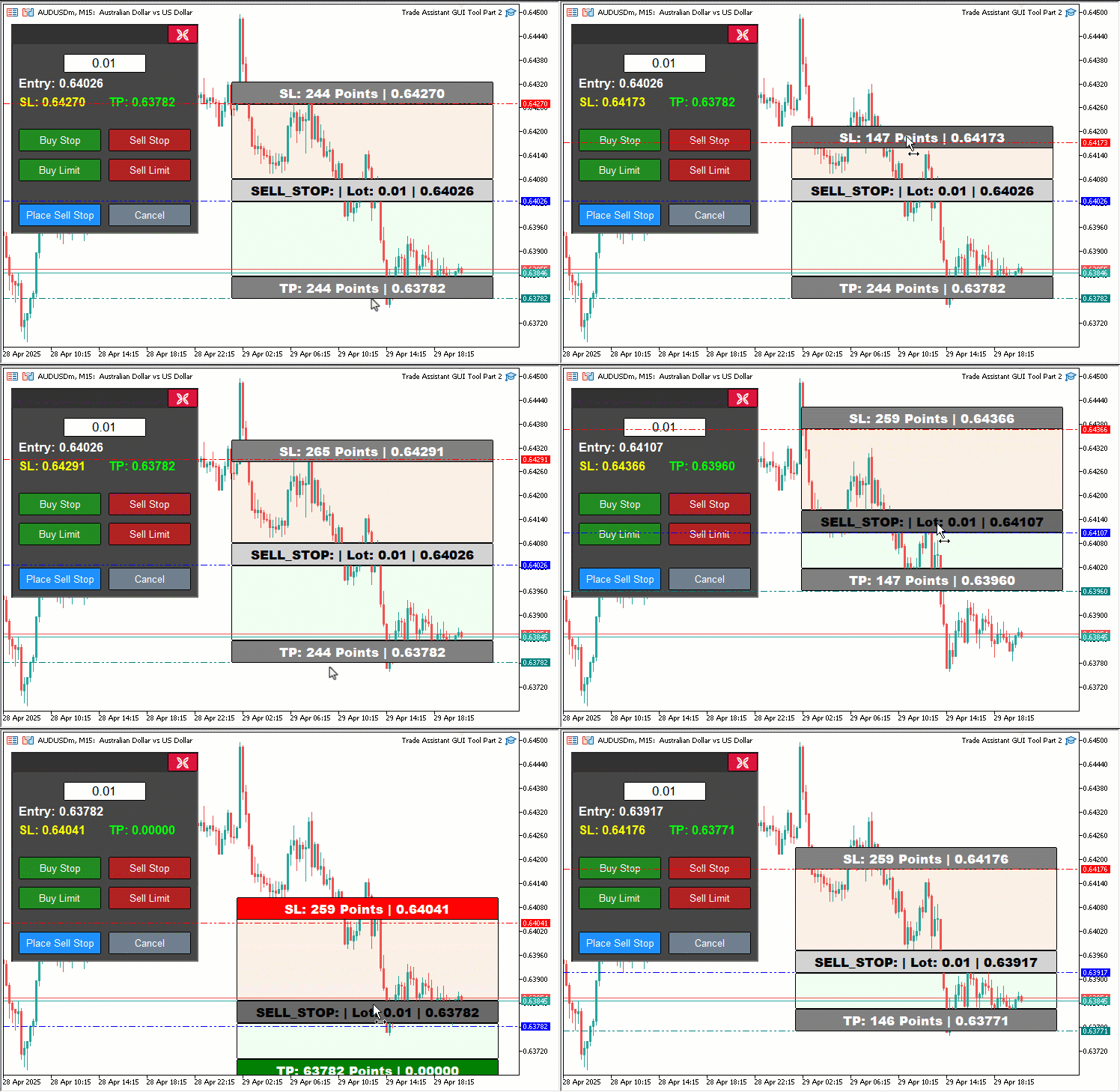
クリック後のホバー効果を更新するために、updateButtonHoverState関数も導入します。この際、マウス座標はlparamとdparamを使用します。CHARTEVENT_MOUSE_MOVEの場合は、パネルのドラッグ機能を追加し、マウスクリックがPANEL_HEADERの範囲内にあるか(ObjectGetIntegerで取得)を確認します。条件を満たせば、panel_draggingをtrueに設定し、座標をpanel_drag_x、panel_drag_y、panel_start_x、panel_start_yに保存し、ChartSetIntegerでスクロールを無効化します。
ドラッグ中(panel_draggingかつMouseStateが1)には、変位(dx、dy)を計算し、panel_x、panel_yを更新、ObjectSetIntegerですべてのパネルオブジェクト(PANEL_BG、PANEL_HEADER、CLOSE_BTN、LOT_EDITなど)の位置を再設定し、ChartRedrawでチャートを更新します。マウスリリース時にはpanel_draggingをリセットし、スクロールを再有効化します。矩形のドラッグ(REC1、REC3、REC5)はパネルドラッグと衝突しないよう「!panel_dragging」を確認して処理し、movingState_R1、movingState_R5、movingState_R3の間にupdateRectangleColorsを呼び出して、ホバーや有効性の状態を反映させます。
重要なコードスニペットをハイライトしており、下に可視化で示します。
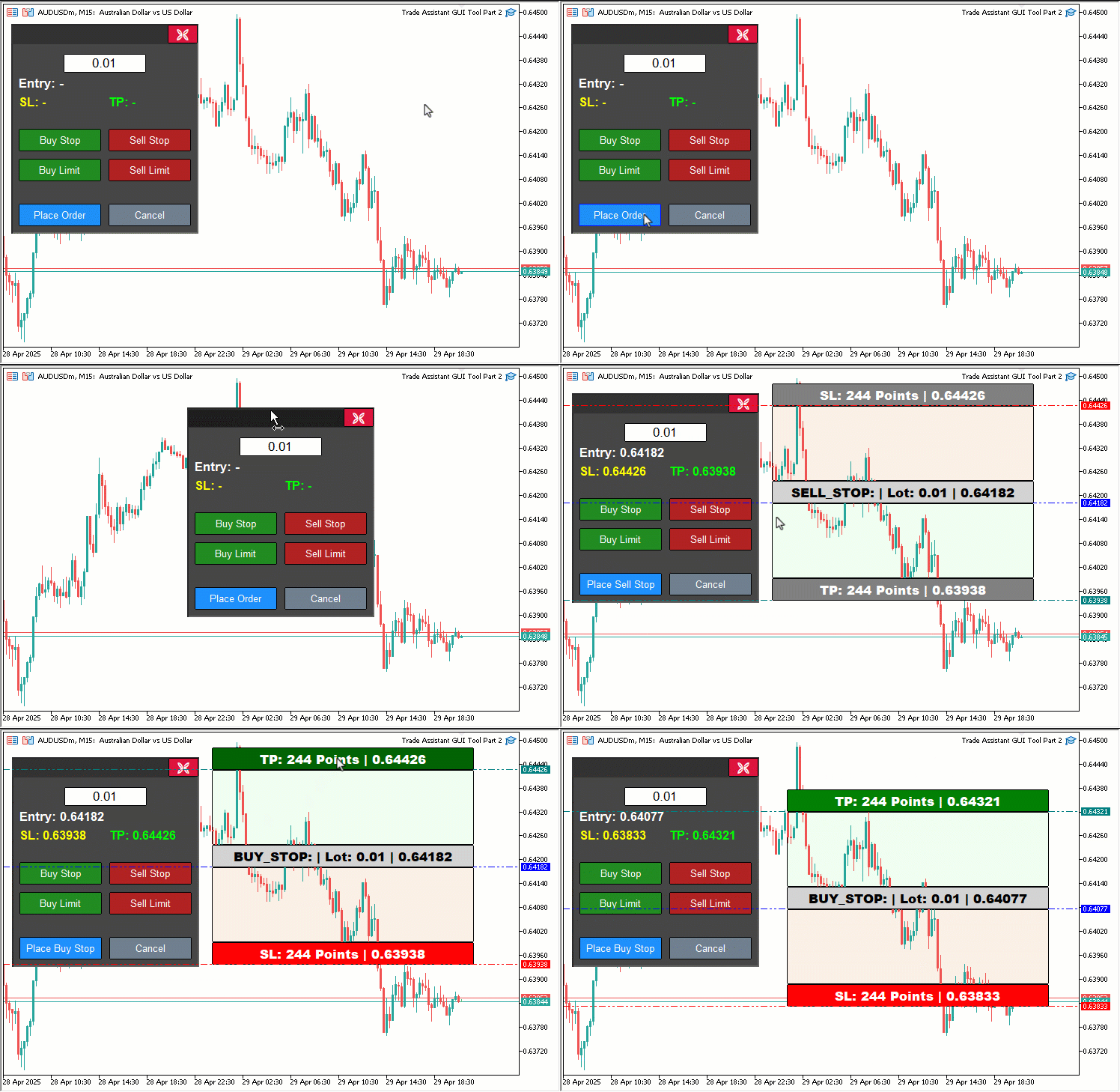
また、パネルヘッダオブジェクトを使用しているため、その作成方法は以下の通りです。
//+------------------------------------------------------------------+
//| Create control panel                                             |
//+------------------------------------------------------------------+
void createControlPanel() {
   // Background rectangle
   ObjectCreate(0, PANEL_BG, OBJ_RECTANGLE_LABEL, 0, 0, 0);                   //--- Create panel background rectangle
   ObjectSetInteger(0, PANEL_BG, OBJPROP_XDISTANCE, panel_x);                 //--- Set background x-position
   ObjectSetInteger(0, PANEL_BG, OBJPROP_YDISTANCE, panel_y);                 //--- Set background y-position
   ObjectSetInteger(0, PANEL_BG, OBJPROP_XSIZE, 250);                         //--- Set background width
   ObjectSetInteger(0, PANEL_BG, OBJPROP_YSIZE, 280);                         //--- Set background height
   ObjectSetInteger(0, PANEL_BG, OBJPROP_BGCOLOR, C'070,070,070');            //--- Set background color
   ObjectSetInteger(0, PANEL_BG, OBJPROP_BORDER_COLOR, clrWhite);             //--- Set border color
   ObjectSetInteger(0, PANEL_BG, OBJPROP_BACK, false);                        //--- Set background to foreground

   // Header rectangle (inside panel)

   createButton(PANEL_HEADER,"",panel_x+2,panel_y+2,250-4,28-3,clrBlue,C'050,050,050',12,C'050,050,050',false);

   createButton(CLOSE_BTN, CharToString(203), panel_x + 209, panel_y + 1, 40, 25, clrWhite, clrCrimson, 12, clrBlack, false, "Wingdings"); //--- Create close button

//---

}
createControlPanel関数内で、ツールのコントロールパネルにPANEL_HEADERボタンを追加します。createButton関数を使用し、位置は(panel_x+2、panel_y+2)、サイズは246x25、青色文字(clrBlue)、ダークグレーの背景とボーダー(C'050,050,050')、ラベルなしでスタイル設定します。これにより、OnChartEventでパネルをドラッグ可能にします。次におこなうべきことは、パネルを削除する処理です。
//+------------------------------------------------------------------+
//| Delete control panel objects                                     |
//+------------------------------------------------------------------+
void deletePanel() {
   ObjectDelete(0, PANEL_BG);        //--- Delete panel background
   ObjectDelete(0, PANEL_HEADER);    //--- Delete panel header
   ObjectDelete(0, LOT_EDIT);        //--- Delete lot edit field
   ObjectDelete(0, PRICE_LABEL);     //--- Delete price label
   ObjectDelete(0, SL_LABEL);        //--- Delete SL label
   ObjectDelete(0, TP_LABEL);        //--- Delete TP label
   ObjectDelete(0, BUY_STOP_BTN);    //--- Delete Buy Stop button
   ObjectDelete(0, SELL_STOP_BTN);   //--- Delete Sell Stop button
   ObjectDelete(0, BUY_LIMIT_BTN);   //--- Delete Buy Limit button
   ObjectDelete(0, SELL_LIMIT_BTN);  //--- Delete Sell Limit button
   ObjectDelete(0, PLACE_ORDER_BTN); //--- Delete Place Order button
   ObjectDelete(0, CANCEL_BTN);      //--- Delete Cancel button
   ObjectDelete(0, CLOSE_BTN);       //--- Delete Close button
   ChartRedraw(0);                   //--- Redraw chart
}
ここでは、deletePanel関数を更新し、ツールのコントロールパネルが適切に削除されるようにします。新たに追加したヘッダも含め、すべての関連オブジェクトを削除します。ObjectDelete関数を使用して、パネル背景(PANEL_BG)、新規追加ヘッダ(PANEL_HEADER)、ロットサイズ入力欄(LOT_EDIT)、ラベル(PRICE_LABEL、SL_LABEL、TP_LABEL)、ボタン(BUY_STOP_BTN、SELL_STOP_BTN、BUY_LIMIT_BTN、SELL_LIMIT_BTN、PLACE_ORDER_BTN、CANCEL_BTN、CLOSE_BTN)をMetaTrader 5チャートから削除します。
最後に、ChartRedraw関数を呼び出してチャートを更新し、削除後もクリーンなインターフェースを維持します。また、ツール表示時にはホバー効果が視覚的にわかりやすいように考慮する必要があります。
//+------------------------------------------------------------------+
//| Show control panel                                               |
//+------------------------------------------------------------------+
void showPanel() {
   // Ensure panel is in foreground
   ObjectSetInteger(0, PANEL_BG,        OBJPROP_BACK, false); //--- Show panel background
   ObjectSetInteger(0, PANEL_HEADER,    OBJPROP_BACK, false); //--- Show panel header
   ObjectSetInteger(0, LOT_EDIT,        OBJPROP_BACK, false); //--- Show lot edit field
   ObjectSetInteger(0, PRICE_LABEL,     OBJPROP_BACK, false); //--- Show price label
   ObjectSetInteger(0, SL_LABEL,        OBJPROP_BACK, false); //--- Show SL label
   ObjectSetInteger(0, TP_LABEL,        OBJPROP_BACK, false); //--- Show TP label
   ObjectSetInteger(0, BUY_STOP_BTN,    OBJPROP_BACK, false); //--- Show Buy Stop button
   ObjectSetInteger(0, SELL_STOP_BTN,   OBJPROP_BACK, false); //--- Show Sell Stop button
   ObjectSetInteger(0, BUY_LIMIT_BTN,   OBJPROP_BACK, false); //--- Show Buy Limit button
   ObjectSetInteger(0, SELL_LIMIT_BTN,  OBJPROP_BACK, false); //--- Show Sell Limit button
   ObjectSetInteger(0, PLACE_ORDER_BTN, OBJPROP_BACK, false); //--- Show Place Order button
   ObjectSetInteger(0, CANCEL_BTN,      OBJPROP_BACK, false); //--- Show Cancel button
   ObjectSetInteger(0, CLOSE_BTN,       OBJPROP_BACK, false); //--- Show Close button

   // Reset button hover states
   buy_stop_hovered     = false;
   sell_stop_hovered    = false;
   buy_limit_hovered    = false;
   sell_limit_hovered   = false;
   place_order_hovered  = false;
   cancel_hovered       = false;
   close_hovered        = false;
   header_hovered       = false;

   // Reset button colors
   ObjectSetInteger(0, BUY_STOP_BTN,    OBJPROP_BGCOLOR,       clrForestGreen);
   ObjectSetInteger(0, BUY_STOP_BTN,    OBJPROP_BORDER_COLOR,  clrBlack);
   ObjectSetInteger(0, SELL_STOP_BTN,   OBJPROP_BGCOLOR,       clrFireBrick);
   ObjectSetInteger(0, SELL_STOP_BTN,   OBJPROP_BORDER_COLOR,  clrBlack);
   ObjectSetInteger(0, BUY_LIMIT_BTN,   OBJPROP_BGCOLOR,       clrForestGreen);
   ObjectSetInteger(0, BUY_LIMIT_BTN,   OBJPROP_BORDER_COLOR,  clrBlack);
   ObjectSetInteger(0, SELL_LIMIT_BTN,  OBJPROP_BGCOLOR,       clrFireBrick);
   ObjectSetInteger(0, SELL_LIMIT_BTN,  OBJPROP_BORDER_COLOR,  clrBlack);
   ObjectSetInteger(0, PLACE_ORDER_BTN, OBJPROP_BGCOLOR,       clrDodgerBlue);
   ObjectSetInteger(0, PLACE_ORDER_BTN, OBJPROP_BORDER_COLOR,  clrBlack);
   ObjectSetInteger(0, CANCEL_BTN,      OBJPROP_BGCOLOR,       clrSlateGray);
   ObjectSetInteger(0, CANCEL_BTN,      OBJPROP_BORDER_COLOR,  clrBlack);
   ObjectSetInteger(0, CLOSE_BTN,       OBJPROP_BGCOLOR,       clrCrimson);
   ObjectSetInteger(0, CLOSE_BTN,       OBJPROP_BORDER_COLOR,  clrBlack);
   ObjectSetInteger(0, PANEL_HEADER,    OBJPROP_BGCOLOR,       C'050,050,050');

   // Reset panel state
   update_Text(PRICE_LABEL,     "Entry: -");        //--- Reset entry label text
   update_Text(SL_LABEL,        "SL: -");           //--- Reset SL label text
   update_Text(TP_LABEL,        "TP: -");           //--- Reset TP label text
   update_Text(PLACE_ORDER_BTN, "Place Order");     //--- Reset Place Order button text
   selected_order_type = "";                        //--- Clear selected order type
   tool_visible        = false;                     //--- Hide tool
   ChartSetInteger(0, CHART_EVENT_MOUSE_MOVE, true); //--- Ensure mouse move events are enabled
   ChartRedraw(0);                                   //--- Redraw chart
}
showPanel関数を拡張し、ツールのコントロールパネルの表示と状態リセットを管理します。新たに追加したPANEL_HEADERと、ツールのインタラクティブ性向上に伴うホバー状態管理も組み込みます。まず、ObjectSetInteger関数を使用して、パネル背景(PANEL_BG)、新規追加ヘッダー(PANEL_HEADER)、ロットサイズ入力欄(LOT_EDIT)、価格関連ラベル(PRICE_LABEL、SL_LABEL、TP_LABEL)、およびすべてのボタン(BUY_STOP_BTN、SELL_STOP_BTN、BUY_LIMIT_BTN、SELL_LIMIT_BTN、PLACE_ORDER_BTN、CANCEL_BTN、CLOSE_BTN)のOBJPROP_BACKをfalseに設定し、チャートの最前面に表示されるようにします。
クリーンで予測可能なインターフェースを維持するため、ホバー状態をリセットします。ブール型変数buy_stop_hovered、sell_stop_hovered、buy_limit_hovered、sell_limit_hovered、place_order_hovered、cancel_hovered、close_hovered、header_hoveredをfalseに設定し、パネル表示時にホバー効果が残らないようにします。
次に、ボタンとヘッダのデフォルトの視覚的外観を復元します。ObjectSetInteger関数でOBJPROP_BGCOLORを設定し、BUY_STOP_BTNとBUY_LIMIT_BTNはclrForestGreen、SELL_STOP_BTNとSELL_LIMIT_BTNはclrFireBrick、PLACE_ORDER_BTNはclrDodgerBlue、CANCEL_BTNはclrSlateGray、CLOSE_BTNはclrCrimson、PANEL_HEADERはダークグレー(C'050,050,050')に設定します。
すべてのボタンのOBJPROP_BORDER_COLORをclrBlackに設定し、非ホバー状態で統一感を持たせます。
パネルの機能状態をリセットするために、update_Text関数を呼び出し、PRICE_LABELを「Entry: -」、SL_LABELを「SL: -」、TP_LABELを「TP: -」、PLACE_ORDER_BTNを「Place Order」に設定して、以前の取引設定情報をクリアします。selected_order_type変数をクリアし、チャートツールを非表示にするためにtool_visibleをfalseに設定し、ChartSetInteger関数でCHART_EVENT_MOUSE_MOVEイベントを有効化して、ホバーやドラッグ操作に対応できる状態にします。
最後に、ChartRedraw関数を呼び出してチャートを更新し、パネルをデフォルト状態でレンダリングします。これにより、次の操作に向けて完全に準備された状態になります。コンパイルすると、結果は次のようになります。
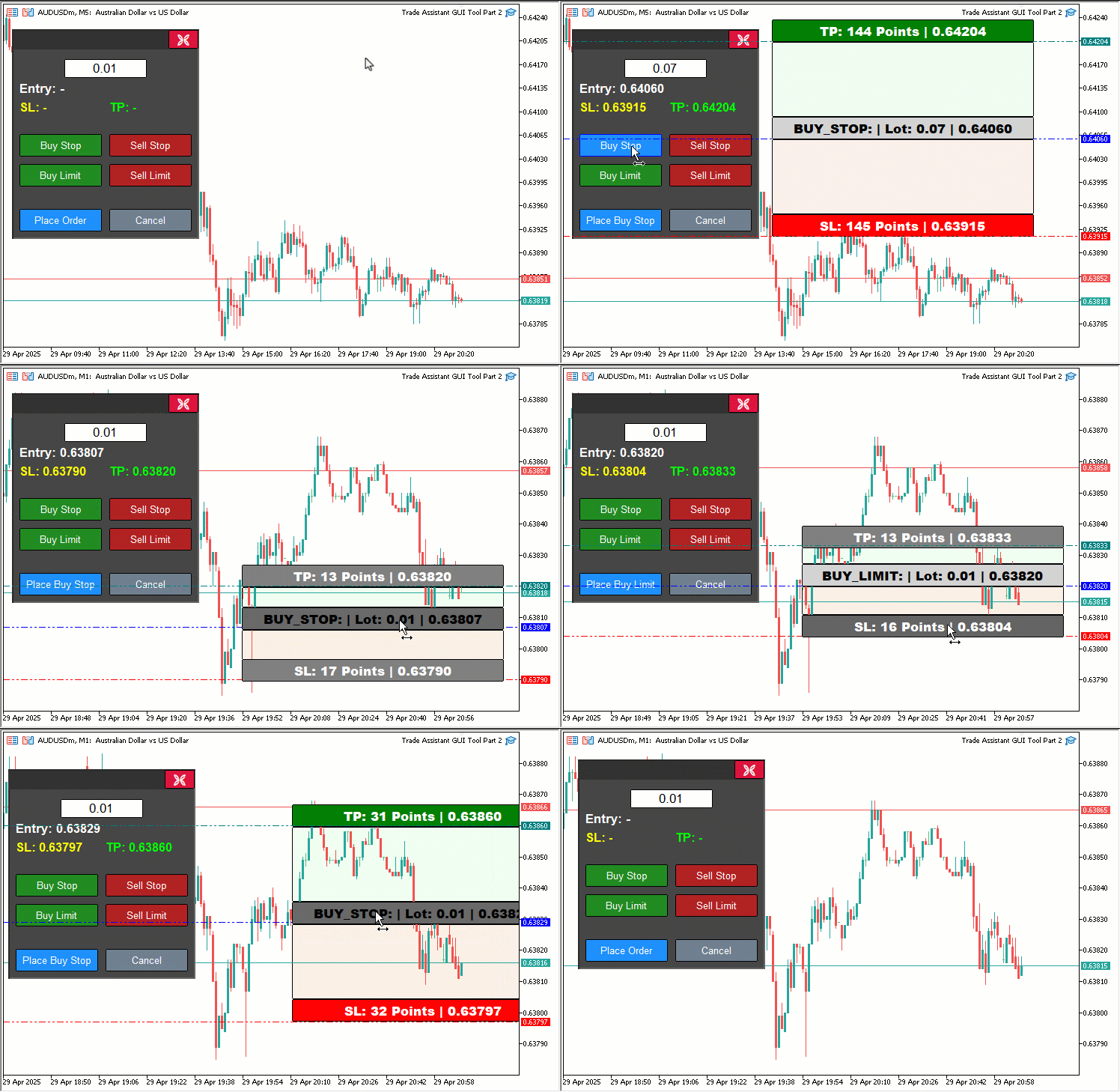
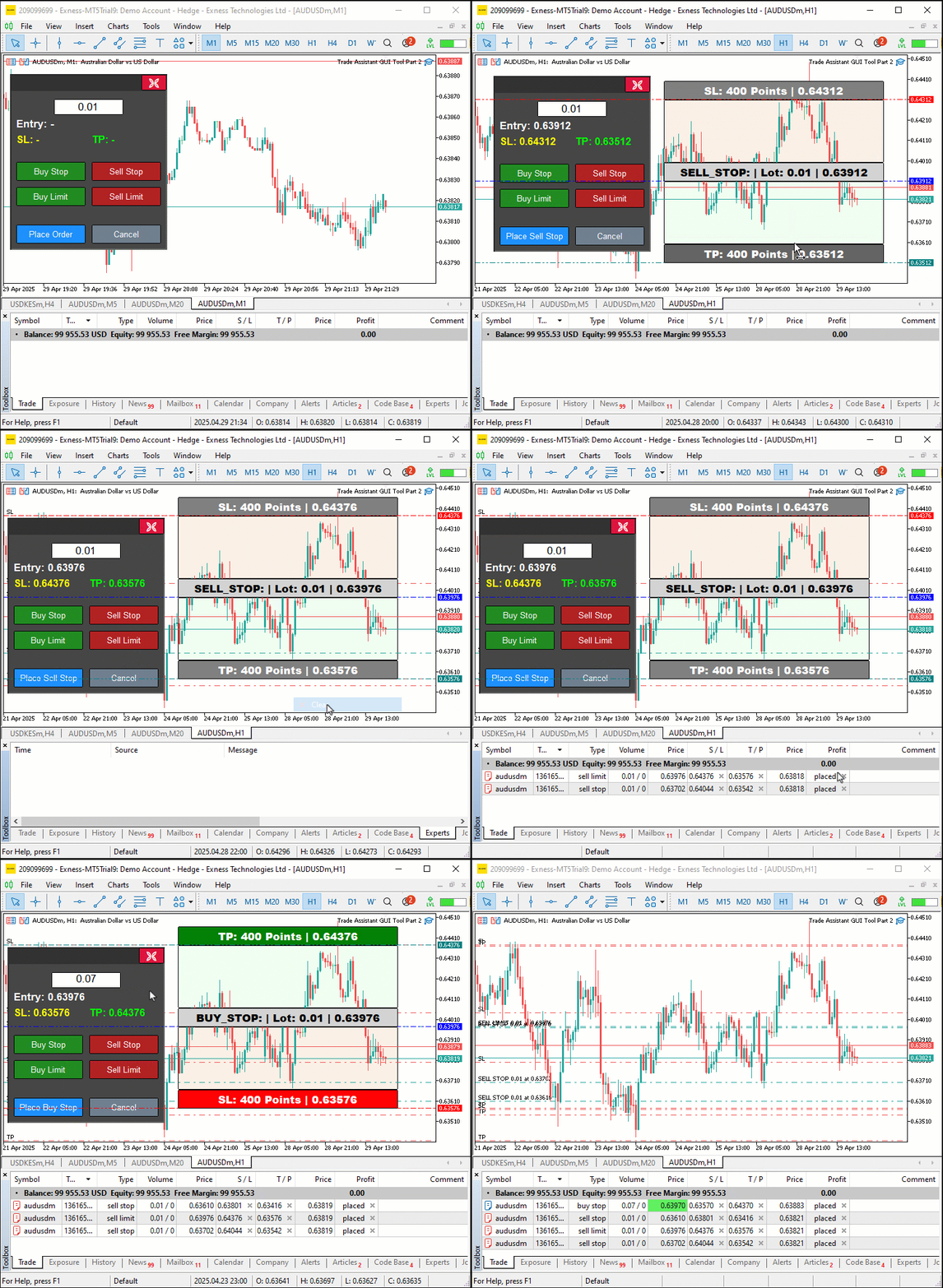
可視化から、価格ツールを通じて注文を動的に検証でき、価格が範囲外の場合に色を変えてユーザーに警告できることが確認できます。また、パネルや価格ツールを動的にドラッグでき、ボタンにホバーすると範囲が取得され、ボタンの範囲に応じて色を動的に変更できることも確認でき、目的を達成しています。残る作業はプロジェクトのインタラクティブ性のテストであり、それは前のセクションで扱われています。
バックテスト
テストを実施しました。以下はコンパイル後の可視化を単一のGraphics Interchange Format (GIF)ビットマップ画像形式で示したものです。
結論
まとめると、MQL5で作成した取引アシスタントツールを強化し、動的な視覚フィードバック、ドラッグ可能なパネル、ホバー効果、リアルタイムの注文検証を組み込むことで、ペンディングオーダーの発注をより直感的かつ正確に行えるようになりました。これらの改善の設計と実装を示し、取引ニーズに合わせた十分なバックテストで信頼性を確認しました。このツールは取引スタイルに合わせてカスタマイズでき、チャート上での注文発注効率を大幅に向上させることができます。
MetaQuotes Ltdにより英語から翻訳されました。
元の記事: https://www.mql5.com/en/articles/17972
警告: これらの資料についてのすべての権利はMetaQuotes Ltd.が保有しています。これらの資料の全部または一部の複製や再プリントは禁じられています。
この記事はサイトのユーザーによって執筆されたものであり、著者の個人的な見解を反映しています。MetaQuotes Ltdは、提示された情報の正確性や、記載されているソリューション、戦略、または推奨事項の使用によって生じたいかなる結果についても責任を負いません。

 知っておくべきMQL5ウィザードのテクニック(第65回):FrAMAとForce Indexのパターンを活用する
 MQL5取引ツール(第1回):インタラクティブで視覚的なペンディングオーダー取引アシスタントツールの構築
 MQL5で取引管理者パネルを作成する(第11回):最新機能通信インターフェース(I)
 MQL5 Algo Forgeのご紹介

- 無料取引アプリ
- 8千を超えるシグナルをコピー
- 金融ニュースで金融マーケットを探索
バグを見つけた。tpやslがエントリーの端に近づくと、それ以上動けなくなる。

バグを見つけた。tpやslが入力の端に近づくと、それ以上動けなくなるのだ。