Pulsar Terminal MT5

5

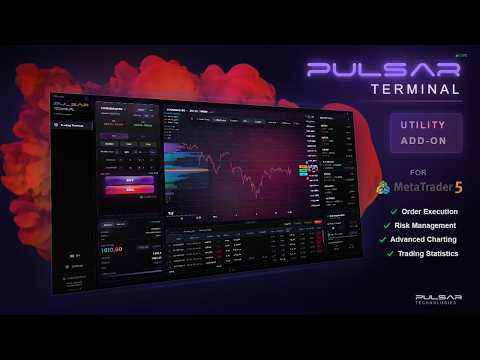
Pulsar Terminal is a full trade manager for MetaTrader 5: risk-based position sizing, one-click execution, multi-level take profit, automatic trailing stop and prop firm protection, in a dedicated visual interface connected to your MT5 account.

Important - Running Conditions

1) MetaTrader 5 must be open on the same PC as the companion app (localhost-only connection via the EA) for actions to be executed.
2) After closing Pulsar Terminal, your SL/TP will only remain managed if MT5 + the EA are running on a VPS.

It runs as a companion application next to your MetaTrader 5 terminal, connected through an Expert Advisor. This is what gives it a full-screen interface, real-time charts and a trading workflow that a standard in-chart panel cannot draw. It requires MetaTrader 5 to run, all communication stays on your computer (localhost only), and buyers receive the installer through the Installation Guide (MQL5 Blog post).

The interface allows you to execute orders, manage risk, view trading statistics, and analyze charts using advanced charting tools directly from the companion app connected to MetaTrader 5.

Pulsar Terminal© is a product of Pulsar Technologies™, a trademark of Astralys LLC.

Note:
The Expert Advisor does not work in the Strategy Tester.
Support is provided via MQL5 comments and MQL5 private messages only.

The Challenge

Do you spend more time calculating lot sizes, adjusting Stop Losses and managing Take Profits than analysing the market? Pulsar Terminal enhances your MetaTrader 5 with a real-time interface designed to speed up every step of your execution. Pulsar is an Expert Advisor that connects MT5 to a visual trading interface. Place orders in one click, manage up to 5 Take Profit and 5 Stop Loss levels, enable trailing stop, automatic breakeven or grid trading, all from a beautifully designed, clear and responsive interface.


WHY PULSAR?

Most traders waste precious time on repetitive tasks: calculating position size, placing Stop Losses manually, managing partial Take Profits that MT5 does not support natively. Pulsar automates these steps so you can focus on what matters: your analysis and trading decisions.

Pulsar Terminal
Lot calculated automatically based on your risk
Up to 5 Take Profit and Stop Loss levels with automatic partial closures
Drag and Drop SL/TP levels directly on the chart
Prop Firm protection with automatic closure and trading lock
Modern interface with 7 visual themes and 11 languages


MAIN FEATURES

Order Execution

  • Market, Limit and Stop orders in one click
  • Auto-Execution Mode: Instant execution without confirmation
  • Drag-Trader: place orders by dragging directly in the chart
  • Full keyboard shortcuts
  • Visual confirmation before execution (can be disabled)

Multi-level Take Profit & Stop Loss

  • Spread your targets and risk across up to 5 price levels for TP and 5 levels for SL
  • Drag TP/SL levels directly on the chart
  • Three calculation modes: Pips, Price, Currency (USD/EUR/etc.)
  • Partial closures managed automatically by the EA for all 5 levels
  • Configurable percentage per level (e.g. TP1 = 50%, TP2 = 30%, TP3 = 20%)

Automatic Trailing Stop

  • Stop Loss follows price automatically in your favour
  • Real-time tracking with automatic updates
  • Configurable distance
  • Modes: Pips, Price, Currency

Automatic Breakeven

  • Moves Stop Loss to entry price when profit threshold is reached
  • Protects winning positions from reversal
  • Three trigger modes: Pips, Price, Currency
  • One-time automatic activation

Grid Trading

  • Price-based grids: immediate placement at regular intervals
  • Configurable spacing (pips or percentage)
  • 2 to 20 orders per grid
  • Order types: Limit, Stop or Mixed
  • Time-based grids: progressive placement over a period

Account/Prop Firm Protection

  • Real-time max daily loss monitoring
  • Visual indicators: orange when approaching, red when exceeded
  • Automatic reset at midnight (broker time)
  • Automatic trading lock for the rest of the day
  • Automatic closure of all positions when buffer is reached
  • Safety buffer system (configurable, 4% default)

Risk management

  • Automatic position sizing calculation
  • Account statistics: balance, equity, margin, free margin
  • Max spread protection: blocks orders if spread exceeds threshold
  • Current drawdown calculated from equity peak
  • Real-time daily P/L tracking


CHARTS & ANALYSIS

Real-time charts

  • Powered by Lightweight Charts V5
  • Candlestick, line, area
  • 16 timeframes including scalping timeframes:
    - Standard: M1, M5, M15, M30, H1, H4, D1
    - Seconds: 1s, 5s, 10s, 30s (for fast scalping)
    - Tick charts: 1T, 2T, 10T, 50T, 100T (tick-based candles)
  • Zoom, pan, adjustable price scale
  • Real-time sync with MT5

20+ drawing tools

  • Trend lines, horizontal, vertical
  • Parallel channels, rectangles, ellipses, triangles
  • Fibonacci Retracement, Extension, Fan, Circle
  • Gann Fan and Gann Box
  • Elliott Wave
  • Text annotations and callouts
  • Full customisation: colour, thickness, opacity, style

20 chart patterns

  • 8 bullish: Flag, Pennant, Cup and Handle, Ascending Triangle, etc.
  • 8 bearish: Flag, Pennant, Inverted Cup, Descending Triangle, etc.
  • 4 reversal: Double Bottom, Diamond, Rectangle Top, Head and Shoulders
  • Interactive placement, resizing, adjustable opacity
  • Visual comparison with the chart

Volume/Market Profile

  • Volume Profile: volume distribution by price level
  • POC (Point of Control), VAH/VAL (Value Area), HVN/LVN (Volume Nodes)
  • Market Profile (TPO): time-based distribution
  • Tools not natively available on MetaTrader 5

20+ technical indicators

  • Trend: Moving Averages (SMA/EMA), Ichimoku, Bollinger Bands, Parabolic SAR, ADX
  • Momentum: RSI, MACD, Stochastic, CCI, Williams %R
  • Volume: OBV, VWAP, Volume Profile
  • Volatility: ATR, Keltner Channels
  • Others: Pivot Points (Daily, Weekly, Monthly)


CUSTOMISATION & ACCESSIBILITY

Voice announcements

  • Voice announcements for order execution, position closure, risk alerts, errors
  • Male or female voice
  • Adjustable volume, activatable/deactivatable categories
  • Compatible with all 11 interface languages

11 languages supported

  • English, French, Spanish, German, Italian, Portuguese
  • Russian, Turkish, Japanese, Korean, Chinese

40+ keyboard shortcuts

  • Trading: Alt+B (Buy), Alt+S (Sell), Alt+C (Close), Alt+Q (Cancel All), +/- (Lot)
  • Order types: Alt+M (Market), Alt+L (Limit), Alt+T (Stop)
  • Risk: Alt+1 (Add SL), Alt+2 (Add TP), Alt+R (Trailing), Alt+E (Breakeven)
  • Execute: Alt+Enter (Execute Order)
  • Fully customizable shortcut mappings

Interface customisation

  • 7 predefined themes: Dark Pro, White Pro, Deep Blue, Arctic, Astral, Fruity, Nebula
  • Full colour customisation (candles, buttons, backgrounds)
  • Up to 5 saved custom themes
  • Repositionable and resizable panels


TECHNICAL DETAILS

Companion Application

To provide a modern interface and extended workflow features, Pulsar Terminal uses a companion desktop application for the trading interface. The installer is provided to buyers via the Installation Guide (MQL5 Blog post). The companion app runs entirely on your machine (localhost only). No data is sent externally.

System Requirements

  • Windows 10/11 PC
  • MetaTrader 5 terminal
  • MT5 trading account (demo or live)
  • Optional: Windows VPS (recommended for 24/5 SL/TP management)

MQL5 Market Compliance

  • Compiled .EX5 Expert Advisor, no DLL imports
  • All communication between EA and interface stays local (localhost)
  • No license server, no external network requests, no data collection
  • Standard MQL5 license and support

#Tags: trade manager mt5, trading panel, trade assistant, position size calculator, risk management, trailing stop, breakeven, partial close, prop firm protection, order management
Reviews 8
Alexandre Troin
23
Alexandre Troin 2026.05.05 18:02 
 

The platform is ideal if you trade with a prop firm. I can do my analysis on the chart and execute directly from the same platform. I highly recommend it. There are also ICT indicators and other custom indicators included. The overall user experience is incredible. It is very smooth and pleasant, with a refreshing design. I can say PULSAR is REVOLUTIONARY!

Hector Pacheco
44446
Hector Pacheco 2026.03.23 18:43 
 

Excellent tool, just what every trader needs. I love the Grid Recovery feature; will you be implementing Profit mode?

ayoubpog
19
ayoubpog 2026.03.03 08:21 
 

Very interesting concept. The companion app makes MT5 feel more like a complete trading terminal and significantly improves workflow compared to the default interface. The UI is clean and the feature set is ambitious.

Recommended products
TradePilotmt5
Hossein Khalil Alishir
TradePilot Expert Advisor (EA) for MetaTrader 5 TradePilot is a professional and user-friendly Expert Advisor (EA) for MetaTrader 5 (MT5) . It simplifies automated trading , risk management , and trade execution with a smart trading panel . Perfect for beginners and experienced traders looking for a reliable trade manager EA with automated lot size calculation and smart position management. Key Advantages User-Friendly Trading Panel: Customizable panel with buttons and hotkeys for fast ex
CosmiCLab SMC FIBO CosmiCLab SMC FIBO is a professional trading indicator designed for traders who use Smart Money Concepts (SMC), market structure analysis and Fibonacci retracement levels. The indicator automatically detects market swings and builds Fibonacci levels based on the latest impulse movement. It also identifies market structure changes such as BOS (Break of Structure) and CHOCH (Change of Character), helping traders understand the current market direction. CosmiCLab SMC FIBO also pr
Pro Gold System Indicator
PEDRO JOAQUIM GONCALVES GOMES
ADVANCED FUNCTIONALITIES: Trend Score (0-100) with visual bar Intelligent signals with adjustable strength (1-10) Risk management with automatic TP/SL Audible and visual alerts Price zones with smooth filling Multi-indicator analysis (RSI, ATR, BB, EMAs) DESIGN FEATURES Modern Visual: Smooth and well-spaced lines (EMA with 2-3px width) Vibrant and professional colors (Sky Blue, Orange, Gold) Modern arrows (code 233/234) for buy/sell signals Configurable dark/light theme Adjustable transparency f
PropWin EA
Nasimul Haque Choudhury
PropWin EA is an advanced automated trading system designed specifically for prop firm traders. It employs a sophisticated hedging strategy that protects your investment by trading simultaneously on your funded prop account AND your personal live account. The result? Even if you don't pass the challenge, your live account profits offset the challenge fee—ensuring you never truly lose money on the attempt. Key Features Automatic Trade Hedging Lightning-fast 100ms scan interval for near-instant
Master Edition
Peter Ofunda Fischer
Harvester Pro Universal Master The Ultimate Volatility Breakout & Trend-Following Solution for XAUUSD and Major Pairs. Harvester Pro Universal Master is a professional-grade Expert Advisor (EA) engineered for high-performance trading on the MetaTrader 5 (MT5) platform. Optimized specifically for XAUUSD (Gold) and major currency pairs like EURUSD , this EA combines a sophisticated Volatility Breakout engine with a robust EMA/TEMA Trend-Following filter to capture explosive market moves with surg
Noize Absorption Index - is the manual trading system that measures the difference of pressure between bears forces and bulls forces. Green line - is a noize free index that showing curent situation. Zero value of index shows totally choppy/flat market.Values above zero level shows how powerfull bullish wave is and values below zero measures bearish forces.Up arrow appears on bearish market when it's ready to reverse, dn arrow appears on weak bullish market, as a result of reverse expectation.
Overview Harmonic Patterns MT5 is a technical analysis indicator designed for the MetaTrader 5 platform. It identifies and displays harmonic price patterns, such as Butterfly, Cypher, Crab, Bat, Shark, and Gartley, in both bullish and bearish directions. The indicator calculates key price levels, including entry, stop loss, and three take-profit levels, to assist traders in analyzing market movements. Visual elements and customizable alerts enhance usability on the chart. Features Detects six ha
Supply and Demand indicator powered by advanced multi-timeframe fractal algorithms, Zone Merging technology, and full EA readiness. -  Finding the exact areas where institutional buying and selling occur is the key to successful trading. Advanced Supply & Demand Zones Simple  takes the guesswork out of chart analysis. By utilizing a dual-layered fractal calculation (Fast and Slow points) combined with dynamic ATR scaling, this indicator pinpoints high-probability reversal and continuation zones
FREE
ProTrade EA
Jim Ariel Camarce Ignao
Key Features   Automated Candle Pattern Recognition 10 Professional Patterns : Detects Bullish/Bearish Engulfing, Hammer/Shooting Star, Morning/Evening Star, Piercing/Dark Cloud, and 6 additional professional candlestick patterns Smart Filtering : Combine multiple patterns with configurable confirmation logic Volume Confirmation : Optional volume filter to validate pattern strength Multi-Timeframe Analysis : Separate execution and bias timeframes for better timing   Trading Dashboard Int
POC Delta Order Blocks is a rule-based order block and volume-delta indicator designed to help traders clearly understand where real trading activity happened and how price reacts around those zones . Instead of drawing generic candle-based blocks, this indicator uses a Point of Control (POC) approach to identify the most actively traded price level between a swing high/low and a confirmed Break of Structure (BOS). The order block is then anchored to the earliest valid candle that interacted wit
Net Z
Sugianto
5 (1)
NET Z uses a very well-known trend reversal technique to determine position entry with slight modifications by using virtual trade techniques and virtual pending orders so that position entry is not too early or too late. Why NETZ? NET Z does not require complicated settings and is easy to use because user only need to upload a set file that is already available. Currently there are set files for 20 fx pairs. The best GRID EA with the ability to control risks. I will share my personal daily rou
CornGrid
Mohamad Akram Bin Mohd Jamil
CornGrid EA MT5 – Advanced Algorithmic Trading System Official Website:   https://corngrid.com Platform: MetaTrader 5 (MT5) | Version:  2.10 Executive Overview CornGrid EA is a sophisticated, fully automated Expert Advisor engineered for MetaTrader 5. Built upon a high-probability Reverse-Candle Entry Algorithm combined with a Dynamic Smart Grid Recovery Model , CornGrid EA is designed to capitalize on short-term market mean-reversion and structural price retracements. Unlike traditional mome
Cosmic Nebula Oscillator
Pieter Gerhardus Van Zyl
Cosmic Nebula Oscillator is a momentum and trend-strength oscillator designed to visualize market pressure using color-coded histogram states. It transforms directional energy into four intuitive cosmic phases plotted around the zero line (event horizon), making it easy to read both direction and quality of momentum at a glance. The indicator classifies market conditions into: Neutron Star (bright blue): strong bullish momentum with expanding energy. Nebula Glow (purple): bullish bias, but momen
Polaris Nova
Alessandro Sciacco
Polaris Nova is a single-model machine-learning EA built specifically for XAUUSD. It runs one ONNX classifier that scores entry timing, combined with a multi-timeframe RSI direction filter. It manages one basket at a time on gold — a single directional exposure that can, optionally, add further same-direction legs on adverse price movement to average into a position, rather than running multiple uncorrelated parallel slots. The point of a single-basket design is control: at any moment you can se
MACD Sniper Pro
Noppawat Tumjai
MACD Sniper Pro is an advanced automated trading system designed for traders seeking high-precision entries and robust risk management. By combining the classic momentum of MACD Crossover with a strict ADX Volatility Filter and Dynamic ATR Management , this EA completely eliminates emotional trading and filters out dangerous flat/sideways markets. Unlike standard MACD indicators that suffer during consolidation, MACD Sniper Pro verifies trend strength before entering and protects your capital us
Passband Filter Pro Passband Filter Pro is a trend and cycle oscillator for MetaTrader 5. It is built on the Ehlers Super Passband Filter, a band pass filter that removes long term trend drift and short term noise so that only the dominant market cycle remains. The result is a clean oscillator with a color cloud that shows overbought and oversold conditions, cycle turns, and momentum on forex, gold, indices, stocks and crypto. Most traders enter too early or too late. Simple moving averages la
G Labs Trade Manager Mt5
Garry James Goodchild
5 (1)
G-Labs Trade Manager by G-Labs — on-chart trade panel for MetaTrader 5. Risk-based lot sizing, visual entry stop and take profit lines, position management, news filter, currency strength, statistics, and OCO breakout tools. One panel for planning, executing, and managing manual trades. Set risk before you click buy or sell, drag stop loss and take profit on the chart, manage open positions and pending orders, and track performance — you stay in control of every decision. Trading utility, not a
Your Trend Friend
Luigi Nunes Labigalini
5 (1)
The trend is your friend! Look at the color of the indicator and trade on that direction. It does not  repaint. After each candle is closed, that's the color of the trend. You can focus on shorter faster trends or major trends, just test what's most suitable for the symbol and timeframe you trade. Simply change the "Length" parameter and the indicator will automatically adapt. You can also change the color, thickness and style of the lines. Download and give it a try! There are big movements w
Forex Daily Scalping EA is a professional scalping advisor for daily work on the FOREX currency market. In trading, along with experience, traders usually come to understand that the levels of accumulation of stop orders, price and time play a significant role in the market. - Recommend ECN broker with LOW SPREAD: IC Market , Exness, NordFX , FXPRIMUS , Alpari , FXTM PARAMETERS: PRICE - the price distance to be covered in the allotted time period; TIME - time allotted in seconds; HL_PERIOD - n
SolarTrade Suite Financial Robot: LaunchPad Market Expert - designed to open trades! This is a trading robot that uses special innovative and advanced algorithms to calculate its values, Your Assistant in the World of Financial Markets. Use our set of indicators from the SolarTrade Suite series to better choose the moment to launch this robot. Check out our other products from the SolarTrade Suite series at the bottom of the description. Do you want to confidently navigate the world of inves
Visual CrossPulse Dynamics Indicator
AL MOOSAWI ABDULLAH JAFFER BAQER
Visual CrossPulse Dynamics: Trade with the Market's True Rhythm Unlock a new level of market insight with Visual CrossPulse Dynamics, a sophisticated trading indicator designed to adapt to ever-changing volatility and reveal the true direction of the trend. Are you tired of indicators that lag in fast-moving markets or give false signals during consolidation? The Visual CrossPulse Dynamics indicator solves this problem by using an advanced, adaptive algorithm that intelligently adjusts to the m
Grid people ea mt5
Ranaweera Wanasinghe Herath Bandara
GRID PEOPLE — Built for Consistency, Tuned for AUDCAD and AUDNZD (M5) (Live signal is only using AUDCAD) If you're here, you already know the appeal of grid trading: smooth equity curves, frequent wins, and a system that works   with   the market's natural ranging behavior instead of fighting it. GRID PEOPLE is crafted for traders who want that consistency — without flying blind. This EA is engineered around disciplined money management and built-in protection, not just raw grid logic: What's un
"Impulses and Corrections 5" is created to help traders navigate the market situation. The indicator shows multi-time frame upward and downward "Impulses" of price movements. These impulses are the basis for determining the "Base" , which is composed of zones of corrections of price movements, as well as "Potential" zones for possible scenarios of price movement. Up and down impulses are determined based on a modified formula of Bill Williams' "Fractals" indicator. The last impulse is always "U
| Fully-automated Smart Money Concept (ICT) inspired trading solution with multi-strategy capabilities | Built by a grid trader >> for grid traders.  This is MT5 version, click  here  for  Blue CARA MT4  (settings and logics are same in both versions)     Real monitoring signal  -->  Cara Gold Intro Blue CARA EA   ('CARA') - short for  C omprehensive  A lgorithmic   R esponsive   A dvisor is a next-gen  multi-currency    multi-timeframe  EA base on the widely known (and perhaps the most popul
PROMO: ONLY 10 LEFT AT $90! Next price:        $199 Price will be kept high to limit number of users for this strategy. This EA starts trading at the open of   London (UK) Session . It is based on analysis of advanced statistical distributions combined with short to medium term reversal patterns which have mean-reversion attributes. The EA includes several smart features and allows you to trade with a fixed or automatic lot size. The EA is not sensitive to spreads but can be backtested on both
Let us introduce the Heikin Ashi RSI Oscillator! This indicator combines the concepts of Heikin Ashi candles with the RSI (Relative Strength Index) to produce an oscillator-like format that can be used to filter out some of the noise associated with standard RSI readings. This provides traders with a smoother representation of market conditions. Here are some articles to read more about the RSI and Heikin Ashi candles: https://www.investopedia.com/terms/r/rsi.asp https://www.investopedia.com/ter
GoldPro Max
Taher Ahmed Mohamed Taha Elshafei
GOLDPRO MAX Advanced Multi-Timeframe and Smart Money Market Analysis for MetaTrader 5 GoldPro Max is a professional market analysis indicator for MetaTrader 5 designed to help traders study market direction, price structure, liquidity, market imbalance and potential trading areas from multiple perspectives. The indicator combines Multi-Timeframe Analysis, Smart Money Concepts, Market Structure, Liquidity Analysis, Order Blocks, Fair Value Gaps, Premium and Discount analysis, Smart Analytical Eng
MultiTimeframe Support and Resistance Zones
Mohamed Gamal Abdelnasser Yous Hashesh
A powerful indicator that highlights key market zones and helps traders identify potential opportunities across multiple timeframes. Designed for clarity and efficiency, it provides real-time alerts to keep you informed of important price levels. Key Features: Works on multiple timeframes: M1, M5, M15, M30, H1, H4, D1, W1, MN1. Customizable zone colors for each timeframe. Real-time alerts and notifications when price reaches significant zones. Automatically manages chart objects to keep your wor
Overview Mirror Signals Service EA (Text only)   is a powerful monitoring Expert Advisor that automatically sends   real-time Telegram notifications   for all important trade events on your MetaTrader 5 account. It is engineered specifically for   signal providers ,   trade-copier operators ,   auditors ,   educators , and   professional trading services   that require immediate, detailed, and reliable reporting. Everything from   entries, exits, SL/TP changes, comment changes, trailing sto
DAILY OH/OL SDEV QUANT MODEL - STATISTICAL TRADING WITH PRECISION RISK MANAGEMENT TRADE WITH MATHEMATICAL CERTAINTY - KNOW YOUR EXACT STOP-LOSS AND TAKE-PROFIT BEFORE YOU ENTER This indicator analyzes 5,000+ days of price history to give you: Exact entry levels (sigma bands locked at daily open) Exact stop-loss distance (from M
Buyers of this product also purchase
Trade Assistant MT5
Evgeniy Kravchenko
4.41 (216)
It helps to calculate the risk per trade, the easy installation of a new order, order management with partial closing functions, trailing stop of 7 types and other useful functions. Additional materials and instructions Installation instructions - Application instructions - Trial version of the application for a demo account Line function -   shows on the chart the Opening line, Stop Loss, Take Profit. With this function it is easy to set a new order and see its additional characteristics bef
================================================================================ POC BREAKOUT - V20.72. Full Professional Grade Toolkit ================================================================================ POC Breakout is a full MetaTrader 5 trading dashboard for discretionary traders who want breakout signals, Point of Control (POC) context, volume profiles, order flow, market structure, news, alerts, and advanced trade planning in one professional workspace. Attached directly to you
TradePanel MT5
Alfiya Fazylova
4.88 (167)
Trade Panel is a multi-functional trading assistant. The app contains over 50 trading functions for manual trading and allows you to automate most trading tasks. Application instructions + video instructions: https://www.mql5.com/en/blogs/post/756482 Trial version of the application for a demo account: https://www.mql5.com/en/blogs/post/750865 How to install the application: https://www.mql5.com/en/blogs/post/756239 How to test the application in visual mode: https://www.mql5.com/en/blogs/post/7
The product will copy all telegram signal to MT5 ( which you are member) , also it can work as remote copier.  Easy to set up, copy order instant, can work with almost signal formats, image signal,  s upport to translate other language to English Work with all type of channel or group, even channel have "Restrict Saving Content", work with  multi channel, multi MT5 Work as remote copier: with signal have ticket number, it will copy exactly via ticket number. Support to backtest signal. How to s
Power Candles Strategy Scanner - Self-Optimizing Multi-Symbol Setup Finder Power Candles Strategy Scanner runs the same self-optimizing engine that powers the Power Candles indicator - on every symbol in your Market Watch, side by side. One panel tells you which symbols are statistically tradable right now, which strategy wins on each, the optimal Stop Loss / Take Profit pair, and pings you the moment a fresh signal fires. This tool is part of the Stein Investments ecosystem - 18+ tools plus Max
FarmedHedge Pair Trading Dashboard
Tanapisit Tepawarapruek
5 (3)
Farmed Hedge Yield Farming | All Markets (Manual - Hybrid - Semi/Automated EA) VERIFIED TRADING RESULTS - Farmed Hedge Yield Axi Copy:  https://www.mql5.com/en/signals/2356376 - Farmed Hedge Yield Exn Copy:   https://www.mql5.com/en/signals/2356404 - Farmed Hedge Yield V Copy:  https://www.mql5.com/en/signals/2357156 * Before purchasing, please feel free to send me a message if you have any questions about the product or setup. ** After purchase,  Contact me via private message to receive t
Premium Trade Manager - The Trade Panel With a Coach Built In Premium Trade Manager puts a trading coach inside your chart, with a full execution engine underneath it. Set the trade up the way you always do, then let Max, your AI trading coach, read that exact setup against your live account and give you a straight verdict before you commit: is the stop disciplined, is the risk sane, is a high-impact release minutes away, are you near a prop-firm limit. Below sits the engine that runs everything
Quant AI Agents
Ho Tuan Thang
5 (1)
Quant AI Agents are independent trading Expert Advisors. Instead of trading using a fixed strategy like other conventional EAs, Quant AI Agents   is a   multi-agent AI trading framework   that turns natural-language strategy prompts into live.  WANT THE SAME RESULTS AS MY LIVE SIGNAL?   Use the exact same brokers I do:   IC MARKETS , IC TRADING   .  Unlike the centralized stock market, Forex has no single, unified price feed.  Every broker sources liquidity from different providers, creating un
Footprint Chart Pro — Professional OrderFlow EA for MetaTrader 5 Version 6.34 | Professional tool for real traders | Institutional-Grade Visualization DEMO USERS - PLEASE SELECT EVERY TICK / REAL TICK WHEN TESTING AND YOU HAVE DOWNLOADED HISTORICAL DATA. IF YOU SEE A WAITING SCREEN AND IT IS NOT DOWNLOADING, IT MEANS YOU HAVE LOW HISTORICAL DATA. TRY 1 MIN AND 5 MIN FIRST ON 1 DAY DATA. ONE DAY DATA SHOULD BE THE NEWEST AND MOST CURRENT DATE. PLEASE WAIT UNTIL THE MARKET HAS ROLLED OVER PERIOD.
YuClusters
Yury Kulikov
4.93 (43)
Attention: You can view the program operation in the free version  YuClusters DEMO .  YuClusters is a professional market analysis system. The trader has unique opportunities to analyze the flow of orders, trade volumes, price movements using various charts, profiles, indicators, and graphical objects. YuClusters operates on data based on Time&Sales or ticks information, depending on what is available in the quotes of a financial instrument. YuClusters allows you to build graphs by combining da
Ultimate Extractor
Clifton Creath
5 (8)
Ultimate Extractor - Professional Trading Analytics for MT5 *****this is the local HTML version of Ultimate Extractor. !!!!!it is not compatible with Cloud!!!! For the online version please reach out to me directly****** Ultimate EA manager also now available when you use cloud pro and above for free!! Ultimate Extractor transforms your MetaTrader 5 trading history into actionable insights with comprehensive analytics, interactive charts, and real-time performance tracking. What It Does Automa
VirtualTradePad PRO SE MT5 — professional trading control center for MetaTrader 5 VirtualTradePad PRO SE is a premium chart-based trading panel and trade-management workspace for MetaTrader 5 . It is designed for traders who want faster execution, clearer position control, structured trade management, visual level planning and a professional workflow directly from the chart. This is not only a BUY / SELL panel. PRO SE combines manual trading, pending orders, position management, partial exits, b
AI Agents Supervisor
Ho Tuan Thang
5 (1)
AI Agent Supervisor is NOT an Expert Advisor. AI Agent Supervisor   is a   multi-agent AI risk & portfolio supervisor   that watches every EA on your account and intervenes in real time.  WANT AN AI PORTFOLIO MANAGER WATCHING YOUR FLEET 24/7?   Run your fleet on the same brokers I do:   IC MARKETS , IC TRADING   .  Unlike the centralized stock market, Forex has no single, unified price feed.  Every broker sources liquidity from different providers, creating unique data streams. The Supervisor r
Welcome to ENTRY IN THE ZONE WITH SMC MULTI TIMEFRAME Entry In The Zone and SMC Multi Timeframe is a real-time market analysis tool based on Smart Money Concepts (SMC), designed to analyze market structure, price direction, and key trading zones. It supports both Single-Timeframe Analysis and Multi-Timeframe Analysis, providing a clearer view of the overall market structure across multiple timeframes, with real-time BUY / SELL signals that do not repaint. It is designed to help filter trading op
Check EA performance  https://www.mql5.com/en/signals/2376164?source=Site +Profile+Seller Spot vs Future Arbitrage EA for MT5 Spot vs Future Arbitrage EA is an automated Expert Advisor designed for MetaTrader 5 that operates using price differences between Gold spot and Gold futures instruments. The strategy opens positions on both instruments simultaneously to take advantage of temporary differences between spot and futures prices. Requirements The trading account must provide both Gold spot
Custom Alerts AIO: All-in-One Market Scanner – No Setup Required Overview Custom Alerts AIO is the fastest and easiest way to monitor multiple markets for real-time trading signals—without any setup or extra licenses. It comes with all required Stein Investments indicators already embedded, making it the perfect plug-and-play solution for traders who value simplicity and performance. Just load it to any chart and start receiving alerts across Forex, Metals, Crypto, and Indices. Shares can be a
Custom Timeframe Manager Pro: Unlimited Timeframes in MetaTrader 5 Standard terminal settings often hide important price movement details. By limiting analysis to classic periods only, a trader risks missing trend inception points and true volatility levels. Custom Timeframe Manager Pro is a professional utility that expands the boundaries of MetaTrader 5. Create any custom periods, including fractional and exotic ones, and work with them exactly like standard terminal charts. Available period
Global Investing FX Terminal
Santiago Nicolas Pla Casuriaga
The Global Investing FX Terminal is an all-in-one FX dashboard for MetaTrader 5 — CB policy rates, CFTC COT positioning, carry rankings, economic surprises, options skew, retail sentiment, and correlations, thirteen panels in total — rendered on a single zero-flicker canvas overlay and refreshing every 10 seconds from one attached EA. No external software required. Professional FX analysis requires simultaneous access to data that normally lives in separate platforms: rate derivatives, governmen
Adam FTMO MT5
Vyacheslav Izvarin
5 (2)
ADAM EA Special Version for FTMO Please use ShowInfo= false for backtesting ! Our 1st EA created using ChatGPT technology Trade only GOOD and checked PROP FIRMS  Default parameters for Challenge $100,000 Tested on EURUSD and GBPUSD only  Use 15MIN Time Frame Close all deals and Auto-trading  before Weekend at 12:00 GMT+3  Friday For Prop Firms MUST use special Protector  https://www.mql5.com/en/market/product/94362 --------------------------------------------------------------------------------
Trading Chaos Expert
Gennadiy Stanilevych
5 (11)
This software has no equals in the world and represents a universal trade "console" covering trading signals, automated market entry, setting of Stop Loss and Take Profit, as well as Trailing Profit for multiple trades at the same time in a single open window. Intuitive control of the Expert Advisor in "three clicks" ensures a comprehensive use of all its functions on different computers, including tablets PCs. Interacting with additional signal indicators that mark the chart to give a real mark
The product will copy all  Discord  signal   to MT5   ( which you are member  ) , also it can work as remote copier.  Easy to set up. Work with almost signal formats, support to translate other language to English Work with multi channel, multi MT5. Work with Image signal. Copy order instant, auto detect symbol. Work as remote copier: with signal have ticket number, it will copy exactly via ticket number. How to setup and guide: Let read all details about setup and download Discord To MetaTrader
EasyInsight AIO MT5
Alain Verleyen
4.92 (12)
EASY Insight AIO – All-In-One Power for AI-Driven Trading Want to skip the setup and start scanning the entire market – Forex, Gold, Crypto, Indices, and even Stocks – in seconds? EASY Insight AIO is the complete plug-and-play solution for AI-powered trade analysis. It includes all core Stein Investments indicators built-in and automatically exports clean, structured CSV files – perfect for backtesting, AI prompts, and live market decision-making. No need to install or configure indicators manu
FUTURES ORDERFLOW FOOTPRINT CHART Professional OrderFlow EA for MetaTrader 5 Version 1.01| Professional tool for real traders | Institutional-Grade Visualization STRATEGY TESTER USERS - PLEASE SELECT EVERY REAL TICK WHEN TESTING AND YOU HAVE DOWNLOADED HISTORICAL DATA. IF YOU SEE A WAITING SCREEN AND IT IS NOT DOWNLOADING, IT MEANS YOU HAVE LOW HISTORICAL DATA. TRY 1 MIN AND 5 MIN FIRST ON 1 DAY DATA. ONE DAY DATA SHOULD BE THE NEWEST AND MOST CURRENT DATE. PLEASE WAIT UNTIL THE MARKET HAS ROL
Features   With MT5 to Interactive Brokers(IB) Trader, you can: 1. Load chart data from IB to MT5, and Analyze with all standard or customer Indicators. 2. Place Orders to IB Account Directly in MT5. 3. Make your Own EAs upon IB Securities by only making minus changes of the trading function. Usage 1) Installation Copy the "Mt5ToIBTraderEn.ex4" and sample files to [MT5 Data Folder]->MQL5->Experts.  2)  MT5 Settings Add the IP Address to the MT5 Allowed URLs in 'Tools->Options->Expert Adviso
Indicator Automation XT - Elite Universal Signal Engine Transform any indicator into a high-performance automated trading system instantly. Stop chasing signals and start executing with precision. Indicator Automation XT is the ultimate evolution of signal-to-trade technology for MetaTrader 5. Designed for traders who demand speed, reliability, and institutional-grade risk management, the XT version bridges the gap between your favorite technical indicators and the live market. Whether it is a
Active Lines
Yury Kulikov
5 (2)
Attention: Demo version for review and testing can be downloaded here . It does not allow trading and can only be run on one chart. Active Lines - a powerful professional tool for operations with lines on charts. Active Lines provides a wide range of actions for events when the price crosses lines. For example: notify, open/modify/close a position, place/remove pending orders. With Active Lines you can assign several tasks to one line, for each of which you can set individual trigger conditions
HINN Lazy Trader
ALGOFLOW OÜ
5 (1)
The core idea: using the user interface, you configure the parameters the chart must meet before entering a position (or positions), choose which entry models to use, and set the rules for when trading and planning should end. Lazy Trader  handles the rest: it  takes over all the routine chart watching and execution! full description  :: 3 key videos [1] ->  [2]   ->  [3] What can it do? - Understands Larry Williams market structure - Understands swing market structure by Michael Huddleston
The Expert Advisor will help you forward all alert from  MetaTrader 5 to Telegram channel/ group.  All alert must save to folder <Data folder>MQL5\Files\Alerts\ , text file with format *.txt and screenshot with format *.gif or *.png. Parameters: - Telegram Bot Token: - create bot on Telegram and get token. - Telegram Chat ID:  - input your Telegram user ID,  group / channel ID - Forward Alert: - default true, to forward alert. - Send message as caption of Screenshot: - default false, set true t
Mt5 To InterativeBrokers Copier allows you to copy deals from MT5 account to Interactive Brokers. With this, you can run your EA strategy on a MT5 Demo/Real Account, then copy all the deals to Interactive Brokers account real time. Features: 1. Copy or Invert-Copy deals Realtime from MT5 to IB Account. 2. Synchronizing positions of both accounts periodicaly, in case any missing copying. 3. You can choose only Buy position or Sell position. Symbols Setup: General Format:  {MT Symbol} -> {IB S
Telegram To MT5 Receiver
Levi Dane Benjamin
4.53 (15)
Copy trade signals from Telegram channels you already belong to (including private and restricted channels) directly into MetaTrader 5. Set your risk rules once, monitor execution, and manage positions with built-in protections designed to reduce mistakes and overtrading. Fast setup : configure your channels, select what to copy, and start within minutes using a clean on-chart interface. User Guide + Demo | MT4 Version Who this is for Traders who follow one or more signal providers and want cons
Filter:
Alexandre Troin
23
Alexandre Troin 2026.05.05 18:02 
 

The platform is ideal if you trade with a prop firm. I can do my analysis on the chart and execute directly from the same platform. I highly recommend it. There are also ICT indicators and other custom indicators included. The overall user experience is incredible. It is very smooth and pleasant, with a refreshing design. I can say PULSAR is REVOLUTIONARY!

Hector Pacheco
44446
Hector Pacheco 2026.03.23 18:43 
 

Excellent tool, just what every trader needs. I love the Grid Recovery feature; will you be implementing Profit mode?

Tanapon Sanguanrat
552
Tanapon Sanguanrat 2026.03.17 15:19 
 

User didn't leave any comment to the rating

ayoubpog
19
ayoubpog 2026.03.03 08:21 
 

Very interesting concept. The companion app makes MT5 feel more like a complete trading terminal and significantly improves workflow compared to the default interface. The UI is clean and the feature set is ambitious.

chen guang
125
chen guang 2026.03.02 17:21 
 

User didn't leave any comment to the rating

Yassine Sellami
125
Yassine Sellami 2026.03.02 12:04 
 

Orders execute quickly and smoothly, which is very useful in fast markets. Tools like trailing stop, automatic break-even, and easy stop/limit management make trading much easier and more precise. The Prop Firm feature makes this utility very professional , I recommend it

Astralys LLC
570
Reply from developer John Bergerat 2026.03.02 12:08
Thanks for your feedback Yassine 👍
Bunmi Joel Omoboye
126
Bunmi Joel Omoboye 2026.02.28 02:09 
 

Whole experience with Pulsar is fantastic. Perfect & Amazing solution

Are new indicators will be released in the future ?

Astralys LLC
570
Reply from developer John Bergerat 2026.02.28 02:16
Thanks Jhollie 👍
Diksapu L
33
Diksapu L 2026.02.27 18:23 
 

User didn't leave any comment to the rating

Astralys LLC
570
Reply from developer John Bergerat 2026.02.27 18:29

Thanks a lot Diksapu!
Reply to review




















