Save Template

A very fast way to save your chart template.


Set the keyboard shortcut to further speed up the operation.


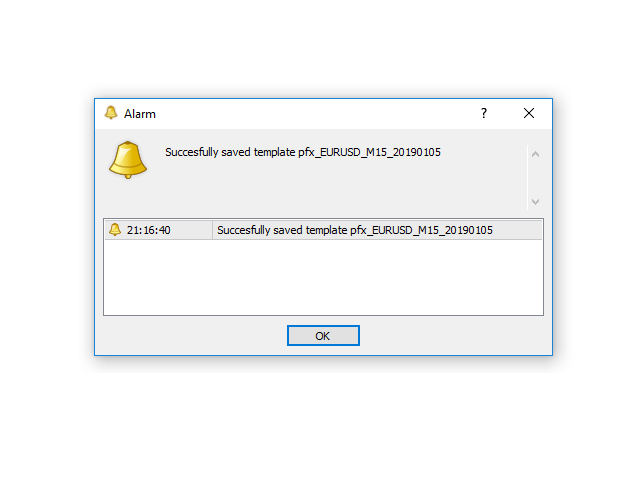
The script allows you to save a template with a specific prefix, with the current date or with the chart timeframe. The symbol is saved automatically.

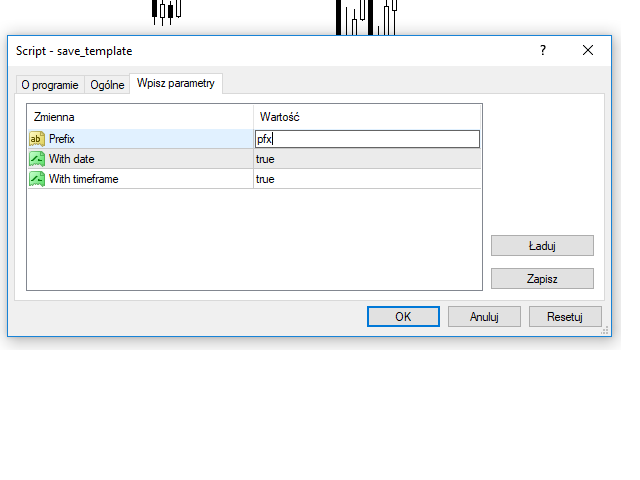
Script parameters:

  • Prefix - prefix for the template name. Can be empty.
  • With date - true = template name will containt current date
  • With timeframe - true = template name will containt timeframe of the current chart

Recommended products
You can check out comment #1 how does it work This is a very useful tool, enter the currency charts you need to open, use the symbol "/" to distinguish them, and select the periodicity /TF of the chart, press the button and they will open the charts for you in batches without you having to manually open them each! Because some EA use multiple currency pairs strategy, but do not support one chart to support all currency pairs, so I developed this tool, hope you like it, if you are satisfied with
FREE
NEW :    integration with Ofir Signals to send personalized alerts Ofir Notify is a tool which send alerts on trades to Telegram Alert on any event concerning a position : Opening, Closing, modification (SL, TP) Send alerts to Chats, Groups and Channel Alert on Equity change Display Risk, Reward and progress of profit/lost for each position Customization of alerts Sending charts screenshots with alerts Send signals from your indicators or experts Multi-lingual NEW  : version 2 brings integratio
FREE
Swap Detector
Dustin Ricardo Pierenz
The Swap Detector is an essential MQL4 utility that displays the swap costs of any instrument when applied to a chart. It helps traders make informed decisions by visually indicating the swap value in customizable colors— green for positive (good) and red for negative (bad) by default. This tool ensures transparency in overnight holding costs, enabling better trade planning and risk management
FREE
UniTerminal MT4 – Semi-Manual Trading Panel UniTerminal  is a compact semi-manual trading terminal designed for fast, precise order execution directly from the chart. Key features: One-click   Market BUY / SELL   with adjustable lot size Pending order wizard : select order type, then click   Entry → Stop Loss → Take Profit   on the chart Risk-based lot calculation   for pending orders (percentage of balance or equity) Supported pending orders: Buy Stop, Sell Stop, Buy Limit, Sell Limit Trade man

FREE
Using hotkeys, you can create graphic objects of different drawing styles and different colors on the active chart. You can change the formatting styles for graphics. You can choose default drawing styles, or set them in the advisor properties selection window. Going to the graph, when creating graphic objects, the color, line type and line thickness are selected automatically. Drawing styles for graphical objects will depend on the current timeframe where drawing will be performed. Please watch
FREE
Designed to revolutionize trading efficiency, this app enables traders to seamlessly cycle through Market Watch symbols using intuitive keyboard arrow keys or dynamically positioned on-chart buttons, minimizing navigation time and enhancing focus on market analysis. Potential : This lightweight MetaTrader 4 tool unlocks rapid symbol switching for comparative analysis across assets, supports wrap-around navigation for uninterrupted workflows, and adapts button placement to stay within chart

FREE
Telegram Alerts
Gad Benisty
4.74 (19)
This application is now replaced by Ofir Notify Light Edition (Free) or Ofir Notify (paid). Thank all for your positive feedbacks. Ofir Notify is a tool which send alerts on trades to Telegram Alert on any event concerning a position : Opening, Closing, modification (SL, TP) Send alerts to Chats, Groups and Channel Alert on Equity change Display Risk, Reward and progress of profit/lost for each position Customization of alerts ( only in full edition ) Sending charts screenshots with alerts   

FREE
BrokerInfo
Nikolaos Pantzos
5 (2)
'BrokerInfo' is an indicator to show some information of account on the chart. You can to see on chart information about: GMT time. Broker time. Maximum simultaneously open orders. Leverage. Maximum lot size. Minimum lot size. Lot step. Stop level in pips. Symbol spread in pips. You can to get source code from here . Parameters SizeBackground – background size. PositionUpDn – position to show info on the chart.
FREE
Spread Total
Sergei Lopukhov
Informing the user about the size of the current spread. A simple and convenient informant. You can place it anywhere on the chart (configurable in the input parameters). Input parameters: - text color - text size - text style - binding to the corner of the graph - horizontal offset from the anchor point - vertical offset from the anchor point - enabling (disabling) the "Show as background" function Have a good trade to everyone!
FREE
Draw and Sync Objects MT4
Nguyen Thanh Sang
4.67 (6)
Draw and Sync Objects Multiple Charts 1. Draw objects by key press. ( You must: 1.  Press Function key =>   2.   Click where you want to draw =>   3.   Draw it =>   4.   Press ESC to complete). (If you don't want to draw after pressing function key, you must press ESC to cancel). 2.   Developing  : Sync selected objects to multiple charts by button. 3. Developing: Hide objects that do not belong to the current symbol (Objects drawn with this indicator will belong to the symbol they are plotted
FREE
【MT4 Edition】One-Click Theme Changer: Instantly Switch Up Your Chart's Look! "If only changing chart colors wasn't such a hassle..." Sound familiar? We heard you! Introducing the "Theme Changer" for MT4 – a handy indicator that lets you instantly switch your chart's color scheme with a single click! If you need the MT5 version, please click the link below: MT5 Theme Changer No more fiddling with complicated settings windows. With just one button on your chart, you can transform its appearance i
FREE
This indicator help to mark the high and low of the session Asian,London,Newyork , with custom hour setting This indicator is set to count from minute candle so it will move with the current market and stop at the designated hour and create a accurate line for the day. below is the customization that you can adjust : Input Descriptions EnableAsian Enables or disables the display of Asian session high and low levels. EnableLondon Enables or disables the display of London session high and
FREE
MASi Three Screens
Aleksey Terentev
5 (2)
MASi Three Screens is based on the trading strategy by Dr. Alexander Elder. This indicator is a collection of algorithms. Algorithms are based on the analysis of charts of several timeframes. You can apply any of the provided algorithms. List of versions of algorithms:     ThreeScreens v1.0 - A simple implementation, with analysis of the MACD line;     ThreeScreens v1.1 - A simple implementation, with analysis of the MACD histogram;     ThreeScreens v1.2 - Combines the first two algorithms in
FREE
Adapting to the volatility, potential  Risk to Reward trading positions are shown based on Average True Range. Risk-Reward-Boxes are shown when the 'Buy or Sell' Button is clicked! A utility of the ATR calculation,  rejoice with a matter that isn’t part of a hard decision for when to close a trade. This matter would assist your risk management decision.     Specifications:  The Average True Range is a commonly used indicator that measures a symbol’s market volume, noting changes over a given
FREE
Deal multiplier Mt4
Mikhail Mitin
4.46 (13)
The utility opens copies of open trades. It is very convenient if you use the Signals service and want to increase the volume of transactions. Settings: Symbols: all symbols only current symbol Orders: Buy Sell Magic Any Magic Input Magic Lot size Original - lot size from original order; Fix Lot - fix lot size (input); Lot X Mult - lot size X koef; Stop Loss From sender - Stop Loss from original; Without - without Stop Loss; Plus Fix - Stop Loss from original order + fix points; Fix Point - fix
FREE
Daily Trading Dashboard – MT4 Indicator A compact and efficient tool that displays your daily trading statistics directly on the chart. Designed for traders who need a clear overview of their performance without switching screens. Key Features Real-time calculation of today’s profit/loss (with green/red color coding) Display of trade count and total trading volume Lightweight 280×160 px panel with clean blue design Automatic updates every few seconds Optional filtering by Magic Number or Comment
FREE
Telecontrol MT4
MIKHAIL VINOGRADOV
Telecontrol MT4 is a solution for integrating the MetaTrader 4 terminal with a Telegram channel. The server-based operation simplifies the creation of tokens and identifiers, consolidates data from multiple terminals, and generates valuable information in Telegram. The functionality includes: notifications about trades, orders, and balance changes; monitoring of drawdowns and lot limit exceedances; trade reports and expert advisor analysis; notifications about significant events with color highl
FREE
Swift Symbol Switch
Luke Anthony Caras
Add a clean, on-chart button panel that lets you instantly switch between any forex pair, crypto, or commodity with a single click—no typing, no symbol search, and no menu digging required. This EA works seamlessly with any MT4 broker and on any timeframe, making it ideal for scalpers, swing traders, and long-term analysts alike. It automatically detects broker-specific symbol suffixes, highlights the currently active pair for easy tracking, and includes both light and dark mode themes to match
FREE
Filled Area Chart
Evgeniy Scherbina
The utility Filled Area Chart adds to the standard set of price presentations. It is a brand new, nice price chart. You will certainly like it if you want to feel yourself a trader born under the Bloomber lucky star. The Properties allow to set the colors and other things: Color preset - choose a preset or set to "Custom" and set your own colors using the properties below. Custom area color - color of the area below the price line. Works only with Color preset = Custom. Custom chart color - col
FREE
Regua MT4
Edgar Lima Uggioni
Convenient tool for measuring the number of points between the prices directly on the chart. Displays in the measurement between points in percentage, points (financial) and time (bars ). Compatible with all graphical timeframes. When fixed on the chart is displayed in all timeframes. Press Ctrl, click the first point, move the mouse and will now display the measurement. Click again and fix. Very fast tool that does not occupy much space. Input Parameters Line Color Line Style Text Color Text S
FREE
Wicks Trade Panel
Lee Teik Hong
4 (1)
Wicks Trade Panel  It's a Trade Panel include Order Management & Risk Management for serious trader. Especially for those traders who pay attention to important events like the CPI, NFP, and ADP. A one-of-a-kind faster technique to fix the Entry Price by simply pointing the mouse pointer at it. This is what I enjoy about it. Automatically closing 50% order size lots when setting TRUE on Breakeven Status. It's especially useful when trading on significant economic events like the CPI, NFP, and A
FREE
Practice Simulator Sync
Sajiro Yoshizaki
4.5 (2)
This module synchronizes with the Practice Simulator to display chart time and position information, not only for the same currency pair, but also display synchronized charts for various timeframes and different currency pairs. Note: This module does not work by itself. "Practice Simulator" is required. Practice Simulator https://www.mql5.com/en/market/product/98348 Two synchronisation modes are available. Simple synchronisation mode: You can easily create a synchronised chart by opening t
FREE
The SyncAllCharts indicator streamlines trading by automatically aligning all open MetaTrader 4 charts to the symbol of the chart where it’s applied, saving traders time and effort when analyzing a single asset across multiple timeframes or setups. With a customizable "Main Sync" label to identify the lead chart, it ensures a clear, clutter-free workspace, enhancing workflow efficiency and consistency for traders monitoring one currency pair or symbol.
FREE
Script to calculate equity and balance at a specific date and time.  This script makes up for a lack of MetaTrader account history, that does not show how the balance and equity changes in time. Balance calculation includes closed orders only. Equity calculation includes orders closed before and orders that are still open at the specified time. Example: date and time set to 2020/07/06 00:00. If I had a Buy 1 lot EURUSD position opened at price 1.12470 on the 2020/07/02, the program would ca
FREE
This is a demo version of CyberTrader Assistant tool. In demo version you cannot change lots value (it is set to the minimal value for the given symbol) and price rounding function for pending orders is unavailable This tool simplifies routine trading tasks (like opening market orders, setting up pending orders, closing of all orders and orders by parameter), helps to control losses by use of break even stop and trailing stop, and adds a little bit of cyber punk edge to your trading Control Ele
FREE
Trade simplifier is a trade panel that simplifies trade opening. It is simple and easy to understand, with key features to ease trading. Features include: Order type selection Fixed lot entry from the chart user interface Easy Take profit entry field on the chart user interface Visual take profit selection and adjustment via the line that appears when you click the Take Profit button Easy Stop loss entry field in points on the chart user interface  Visual Stop Loss selection and adjustment  via
FREE
SG InfoBox
Hleb Smoliar
The "InfoBox" utility is designed to display the presence of open orders, the number of lots, current profit and much more in one window. The version for the MT5 platform   is here . You've probably encountered a situation where you have an advisor that works on a currency pair, but information about its operation: - orders and their number, the size of the spread for the instrument, the volume of lots on the market, drawdown and much more - are scattered in different places of the terminal and
FREE
Ultimate Dashboard Demo
Siwakon Poonsawat
4.33 (3)
Tools designed for multi-currency trading. You can customize which currency you want to trade, analyze up to 10 currencies by yourself. Note: This is demo version that you can test for free (Maximum Lot Size = 0.01) Full version can be found here:  https://www.mql5.com/en/market/product/17793 Analysis method. (Refer to screenshot 1) Ultimate dashboard analyzes trend strength from six major time frames: M5, M15, M30, H1, H4, D1 Show the result in graphic format. You can identify which currencies
FREE
This is a MetaTrader 4 script. It helps to summarize all trades into every symbol. Input Select Period: This is 7-option input. It includes Last Month, This Month, Last Week, This Week, Today, All History, and Date Specified. Specify Starting Date: Enter a date if you selected Date Specified in "Select Period" input. Specify Ending Date: Enter a date if you selected Date Specified in "Select Period" input. The summary is saved into a file in MQL4\Files folder. Also, there is pop-up window for a
FREE
Hogvid Chart Scale
David Richard Hinze
Do you want tidy and attractive charts? Let Hogvid Chart Scale help you! Chart Scale automatically scales the height of the chart to a configurable percentage of the total window height. This creates space at the top and bottom of the window for additional visual elements and increases clarity without having to manually adjust the vertical scaling which can be annoying, especially if you change the chart symbol frequently. The function can be activated and deactivated at any time with a simple
FREE
Buyers of this product also purchase
Local Trade Copier EA MT4
Juvenille Emperor Limited
4.96 (109)
Experience exceptionally  fast trade copying with the Local Trade Copier EA MT4 . With its easy 1-minute setup, this trade copier allows you to copy trades between multiple MetaTrader terminals on the same Windows computer or Windows VPS with lightning-fast copying speeds of under 0.5 seconds. Whether you're a beginner or a professional trader, the Local Trade Copier EA MT4 offers a wide range of options to customize it to your specific needs. It's the ultimate solution for anyone looking to inc
Forex Trade Manager MT4
InvestSoft
4.98 (435)
Welcome to Trade Manager MT4 - the ultimate   risk management tool   designed to make trading more intuitive, precise, and efficient. This is not just an order placement tool; it's a comprehensive solution for seamless trade planning, position management, and enhanced control over risk. Whether you're a beginner taking your first steps, an advanced trader, or a scalper needing rapid executions, Trade Manager MT4 adapts to your needs, offering flexibility across all markets, from forex and indice
Trade Assistant MT4
Evgeniy Kravchenko
4.43 (195)
It helps to calculate the risk per trade, the easy installation of a new order, order management with partial closing functions, trailing stop of 7 types and other useful functions. Additional materials and instructions Installation instructions   -   Application instructions   -   Trial version of the application for a demo account Line function -   shows on the chart the Opening line, Stop Loss, Take Profit. With this function it is easy to set a new order and see its additional characteris
Copy Cat More Trade Copier MT4 is not just a simple local trade copier; it is a complete risk management and execution framework designed for today’s trading challenges. From prop firm challenges to personal portfolio management, it adapts to every situation with its blend of robust execution, capital protection, flexible configuration, and advanced trade handling. The copier works in both   Master (sender) and Slave (receiver)   modes, with real-time synchronization of market and pending orders
Exp COPYLOT CLIENT for MT4
Vladislav Andruschenko
4.65 (66)
Professional Trade Copier for MetaTrader 4 Fast, professional, and reliable trade copier for MetaTrader 4 . COPYLOT helps you copy Forex trades between MetaTrader 4 and MetaTrader 5 terminals with flexible synchronization for different account setups. COPYLOT MT4 version supports: MetaTrader 4 to MetaTrader 4 MetaTrader 5 Hedge to MetaTrader 4 MetaTrader 5 Netting to MetaTrader 4   MT5 version Full Description + DEMO + PDF How To Buy How To Install How to get Log Files How To Test and Optimize A
TradePanel MT4
Alfiya Fazylova
4.84 (94)
Trade Panel is a multi-functional trading assistant. The app contains over 50 trading functions for manual trading and allows you to automate most trading tasks. Attention! Discounts are limited in time, every Tuesday the price will increase by $5 (up to $90). Before making a purchase, you can test the demo version on a demo account. Download the trial version of the application for a demonstration account: https://www.mql5.com/en/blogs/post/750865 . Full instructions here . Trade. Allows you to
Trade copier MT4
Alfiya Fazylova
4.58 (33)
Trade Copier is a professional utility designed to copy and synchronize trades between trading accounts. Copying occurs from the account / terminal of the supplier to the account / terminal of the recipient, which are installed on the same computer or VPS . PROMOTION - If you have already purchased the "Trade Copier MT5," you can receive the "Trade Copier MT4" for free (for copying MT4 > MT5 and MT4 < MT5). For more detailed information about the conditions, please contact us via private message
Trading History MT4
Siarhei Vashchylka
5 (9)
Trading History - A program for trading and money management on the history of quotes in stratagy tester. It can work with pending and immediate orders, and is equipped with trailing stop, breakeven and take profit functions. Very good for training and testing different strategies. Manual (Be sure to read before purchasing) Advantages 1. Allows you to test any trading strategy in the shortest possible time 2. An excellent simulator for trading training. You can gain months of trading experience
Telegram to MT4 Coppy
Sergey Batudayev
3.89 (9)
Telegram to MT4: The Ultimate Signal Copying Solution Streamline your trading with Telegram to MT4 , the cutting-edge utility designed to copy trading signals directly from Telegram channels and chats to your MetaTrader 4 platform—without the need for DLLs. This robust solution ensures seamless execution of signals with unparalleled precision and customization options, saving you time and boosting your efficiency. [ Instructions and DEMO ] [ FAQ ] [ How atach logs properly ] [Settings descrition
The product will copy all telegram signal to MT4   ( which you are member  ) , also it can work as remote copier.  Easy to set up, copy order instant, can work with almost signal formats, image signal, s upport to translate other language to English Work with all type of channel or group, even channel have "Restrict Saving Content", work with  multi channel, multi MT5 Work as remote copier: with signal have ticket number, it will copy exactly via ticket number. Support to backtest signal. How to
Grid Manual MT4
Alfiya Fazylova
4.71 (17)
Grid Manual is a trading panel for working with grid strategies. The utility is universal, has flexible settings and an intuitive interface. It works with a grid of orders not only in the direction of averaging losses, but also in the direction of increasing profits. The trader does not need to create and maintain a grid of orders, the utility will do it. It is enough to open an order and the Grid manual will automatically create a grid of orders for it and will accompany it until the close. Ful
News Filter EA MT4
Rashed Samir
5 (9)
News Filter EA: Advanced Algo Trading Assistant News Filter EA is an advanced algo trading assistant designed to enhance your trading experience. By using the   News Filter EA , you can integrate a Forex economic news filter into your existing expert advisor, even if you do not have access to its source code. In addition to the news filter, you can also specify   trading days   and   hours   for your expert. The News Filter EA also includes   risk management   and   equity protection   features
Copy Master mt4
Evgenii Aksenov
5 (5)
This utility will allow you to copy any trades from one terminal with the Master setting to other terminals with the Slave setting At the same time, you can choose which pairs to copy, set the size of the copied order by several parameters. Set the limit losses by DrawDown or copy only profitable trades You can copy deals from MT4/MT5 to MT4/MT5 other brokers Now it will not be difficult to copy the signals of any Expert Advisor working in MT4 to the MT5 terminal or back Use Copy Master to copy
Exp4 Duplicator
Vladislav Andruschenko
4.5 (22)
Duplicator for MetaTrader 4 — professional trade and order duplicator inside one terminal A powerful Expert Advisor for traders who want to automatically duplicate existing trades, scale volume, apply their own lot settings, and manage duplicate positions with precise logic. This is a practical working tool for manual trading, algorithmic systems, and flexible management of positions that already exist in the terminal. Duplicator does not open trades by its own trading strategy. Its role is to
The News Filter
Leolouiski Gan
5 (25)
This product filters all expert advisors and manual charts during news time. It is able to remove any of your EA during news and automatically reattach them after news ends. This product also comes with a complete  order management system that can handle your open positions and pending orders before the release of any news. Once you purchase The News Filter , you will no longer need to rely on built-in news filters for future expert advisors, as this product can filter them all from here onwards
Auto Trade Copier
Vu Trung Kien
4.76 (85)
Auto Trade Copier is designed to copy trades to multiple MT4, MT5 and cTrader accounts/terminals with 100% accuracy. The provider and receiver accounts must be on the same PC/VPS. With this tool, you can copy trades to receiver accounts on the same PC/VPS. All trading actions will be copied from provider to receiver perfectly. This version can be used on MT4 accounts only. For MT5 accounts, you must use Auto Trade Copier for MT5 . Reference: - For MT4 receiver, please download Trade Receiver Fre
Equity Protect Pro: Your Comprehensive Account Protection Expert for Worry-Free Trading If you're looking for features like account protection, equity protection, portfolio protection, multi-strategy protection, profit protection, profit harvesting, trading security, risk control programs, automatic risk control, automatic liquidation, conditional liquidation, scheduled liquidation, dynamic liquidation, trailing stop loss, one-click close, one-click liquidation, and one-click restore, Equity P
Trade Reverse Copie4
Chukwuemeka Kingsley Anyanwu
Feel free to contact me for any extra features :) [SEE MT5 VERSION  https://www.mql5.com/en/market/product/128846 The Local Reverse Copier is an Expert Advisor designed to synchronize positions between a Master account and a Slave account with a twist: it reverses the trades. When a buy position is opened on the Master account, the EA opens a sell position on the Slave account, and vice versa. This allows for a unique form of trade copying where positions are mirrored in opposite directions bet
VirtualTradePad mt4 Extra
Vladislav Andruschenko
4.85 (61)
Trading Panel for trading in 1 click.  Working with positions and orders!  Trading from the chart or the keyboard. Using our trading panel, you can trade in one click from the chart and perform trading operations 30 times faster than the standard MetaTrader control. Automatic calculations of parameters and functions that make life easier for a trader and help a trader conduct their trading activities much faster and more conveniently. Graphic tips and full information on trade deals on the chart
Exit Manager
Victor Christiaanse
5 (2)
Enhance Your Trading with the Exit Manager Elevate your trading strategy with the Exit Manager, designed to ensure optimal closure of your trades at precisely the right moments. Once you've placed an order, our Exit Manager steps in and starts monitoring the order based on YOUR predetermined conditions, and can even trail your stop loss to mitigate risk. Key Features: Set & Forget Functionality With the Exit Manager, simply place your trade and let the tool do the rest. It continuously monitor
Drawdown Manager MT4 is an essential utility for traders using MetaTrader 4, designed to protect your trading equity by actively managing drawdowns and safeguarding your investments. Ideal for both individual traders and proprietary trading firms, this tool provides a robust solution for maintaining your trading strategy's integrity and capital security. With advanced features like real-time alerts and customizable risk parameters, Drawdown Manager MT4 ensures that you can effectively monitor an
Telegram to MT4 Multi-Channel Copier   automatically copies trading signals from your Telegram channels directly into MetaTrader 4. No bots, no browser extensions, no manual copying. You receive a signal on Telegram and the EA opens the trade on your terminal in seconds. The product includes two components: a Windows application that listens to your Telegram channels, and this Expert Advisor that executes the signals on your MT4 terminal. Check the guide to download the application:   https://ww
Custom Alerts AIO: All-in-One Market Scanner – No Setup Required Overview Custom Alerts AIO is the fastest and easiest way to monitor multiple markets for real-time trading signals—without any setup or extra licenses. It comes with all required Stein Investments indicators already embedded, making it the perfect plug-and-play solution for traders who value simplicity and performance. Just load it to any chart and start receiving alerts across Forex, Metals, Crypto, and Indices. Shares can be a
Currency Strength Trade Panel EA MT4
Juvenille Emperor Limited
5 (1)
Currency Strength Trade Panel EA MT4  takes the currency strength concept to a whole new level, since it combines it with price action and can be applied on any symbol/pair, apart from the usual 28 combinations of the 8 major currencies. That means that you can trade the strength or weakness of any pair, including all currencies, commodities and cryptos (not indexes). It is a real breakthrough product that gives you a clear insight of 16/32 symbols with one glimpse, by using colored bars that in
The professional indicator of Trading Sessions is now available in MetaTrader4. Also the professional   BROWSER of the NEWS  and Trading Sessions is now available in MetaTrader5. One dial shows the time of the 18 largest stock exchanges in the world. This makes it possible to trace the characteristic movement of the market at the appropriate time of day. Thanks to sound and Push notifications, you will never miss the start of trading on the next exchange! The operating time of each exchange
MT4 to Telegram Signal Provider   turns your trading account into a signal provider. Every trade action, whether manual, by EA or from your phone, is instantly sent as a message to Telegram. You can fully customize the format or use a ready-made template for quick setup. [ Demo ] [ Manual ] [ MT5 Version ] [ Discord Version ]  New: [ Telegram To MT5 ] Setup A step by step user guide is available. Key Features Ability to customize order details sent to subscribers You can create a tiered subs
Riskless Pyramid
Snapdragon Systems Ltd
5 (1)
Introduction This powerful MT4 trade mangement EA offers a way potentially to aggressively multiply trade profits in a riskfree manner. Once a trade has been entered with a defined stoploss and take profit target then the EA will add three pyramid add-on trades in order to increase the overall level of profit. The user sets the total combined profit target to be gained if everything works out. This can be specified either as a multiple of the original trade profit or as a total dollar amount. Fo
ManHedger MT4
Peter Mueller
5 (2)
THIS EA IS A SEMI-AUTO EA, IT NEEDS USER INPUT. Manual & Test Version Please TEST this product before   BUYING  and watch my video about it. Contact me for user support or bug reports, or if you want the MT5 version! MT5 Version I do not guarantee any profits or financial success using this EA. With this Expert Advisor, you can: Implement your own   Zone Recovery   strategy to capitalize on trending markets. Create   Grid   trading strategies, to profit from ranging markets. Place orders easil
Trade Manager MT4 DaneTrades
Levi Dane Benjamin
4.09 (11)
DaneTrades Trade Manager is a professional trade panel for MetaTrader 4, designed for fast, accurate execution with built‑in risk control. Place market or pending orders directly from the chart while the panel automatically calculates position size from your chosen risk, helping you stay consistent and avoid emotional decision‑making. The Trade Manager is built for manual traders who want structure: clear risk/reward planning, automation for repeatable management, and safeguards that help reduc
A script to open and Close  charts of  multiple pairs instantly with custom template $30 for the next 25 downloaders, next price: $45 Features: Chart Opener : Open chart(s) of multiple pairs simultaneously Template Opener : Load any User specified template (.tpl) to the opened chart(s) Chart Closer : Close chart(s) of multiple pairs simultaneously Disclaimer: Any loss involving this trading tool is the sole responsibility of the User, and not the responsibility of the Creator of this trading
More from author
Unselect all
Dominik Kaczorowski
5 (2)
A script that allows you to deselect all selected items on the current chart. Very simple, but at the same time can be a very useful script, especially when a keyboard shortcut is assigned to it. MT4 has the same functionality under the right mouse button, but using the keyboard shortcut running this script is much faster and more convenient. The script does not have any input parameters. Have fun using this free tool.
FREE
Select All
Dominik Kaczorowski
A script that allows you to select all items on the current chart. Very simple, but at the same time can be a very useful script, especially when a keyboard shortcut is assigned to it. You no longer need to manually select all objects on the chart. This is the opposite script to my "Unselect All" script. The script does not have any input parameters. Have fun using this free tool. Please let me know what do you think about it.
FREE
Elliott Wave Marker
Dominik Kaczorowski
1 (1)
Important notice! This indicator does not automatically select waves. This is your job. Features: calculate risk calculate position size mark Elliott waves mark Fibonacci levels change object parameters Input parameters: Keyboard shortcuts - enable/disable keyboard shortcuts External capital - fill in if you do not keep all your capital in broker account. The risk will be calculated from the sum of the broker account and external capital. Select object after create - if true, then every create
Date Time Indicator
Dominik Kaczorowski
A simple but very useful indicator that allows you to display the current date and time on the chart. Especially useful when you save your analysis or trades. Features: show local date and time show server date and time show remaining time to end the current timeframe interval customizable display parameters - show/hide date or time set display position set display size set display color works on every timeframe
Save screen
Dominik Kaczorowski
A script that allows you to quickly save the image of the current chart. Accelerate the use of the script by assigning a keyboard shortcut to it. The image is saved in the location of your MT4 platform: /MQL4/Files/{current_date}. The script does not contain any parameters. The name of the chart being saved is determined automatically and consists of a symbol, the current date and the timeframe. Attention! Files with the same names are overwritten!
Filter:
No reviews
Reply to review