My Chart Control

Important:

Do not download or install My Chart Control unless you already own My Chart Generator service. My Chart Control is not a standalone chart generator. It is designed to work together with the custom charts produced by My Chart Generator.

Your Range/Volume chart, optimized for your indicator — automatically.


My Chart Control is the on-chart dashboard and intelligence interface for My Chart Generator. Attach it to your My Chart custom symbol chart and it gives you complete control over bar construction, automatic R/V calibration, indicator profile scoring, market regime detection, and consolidation zone analysis — all from a single, clean panel without touching any input dialog.


THE PROBLEM IT SOLVES

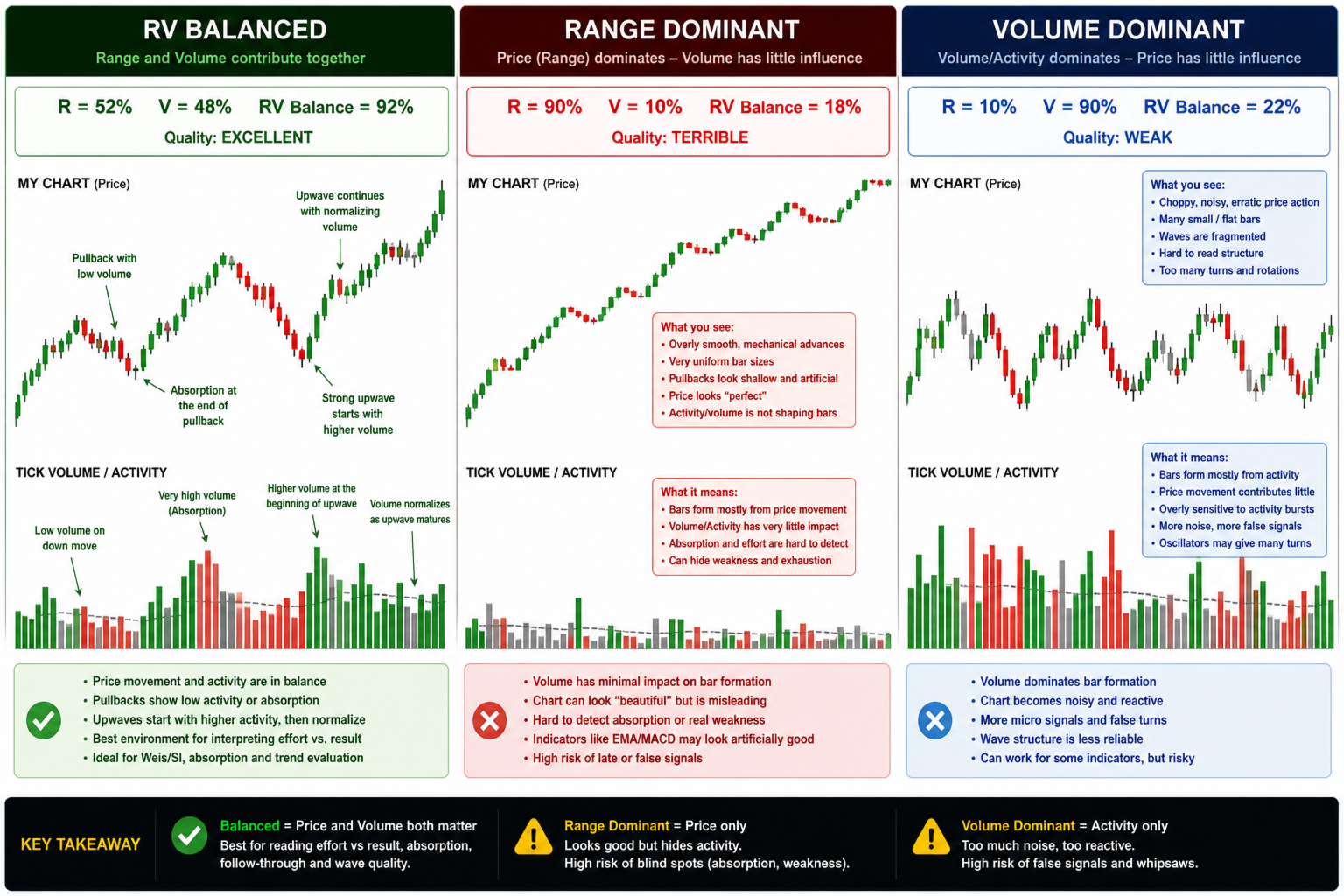
Instead of trying to find the best indicator that fits your timeframe chart, build a chart and find the most appropriate indicator. Range/Volume charting is powerful, but choosing the right Range and Volume thresholds has always been guesswork. Too tight and every tick closes a bar. Too wide and you miss intraday structure. And even when you find a balanced chart, there is no guarantee it is optimised for the specific indicator you trade. My Chart Control eliminates that guesswork entirely. It pRovides three diffeent types of charts: RVH BALANCED CHART, RVH BALANCED CHART, CONSTANT VOLUME CHART.

 IMPORTANT NOTE: HISTORY OF AVAILABLE TICK DATA DEPENDS ON YOUR BROKER


RVH BALANCE CHART — ONE CLICK R/V CALIBRATION

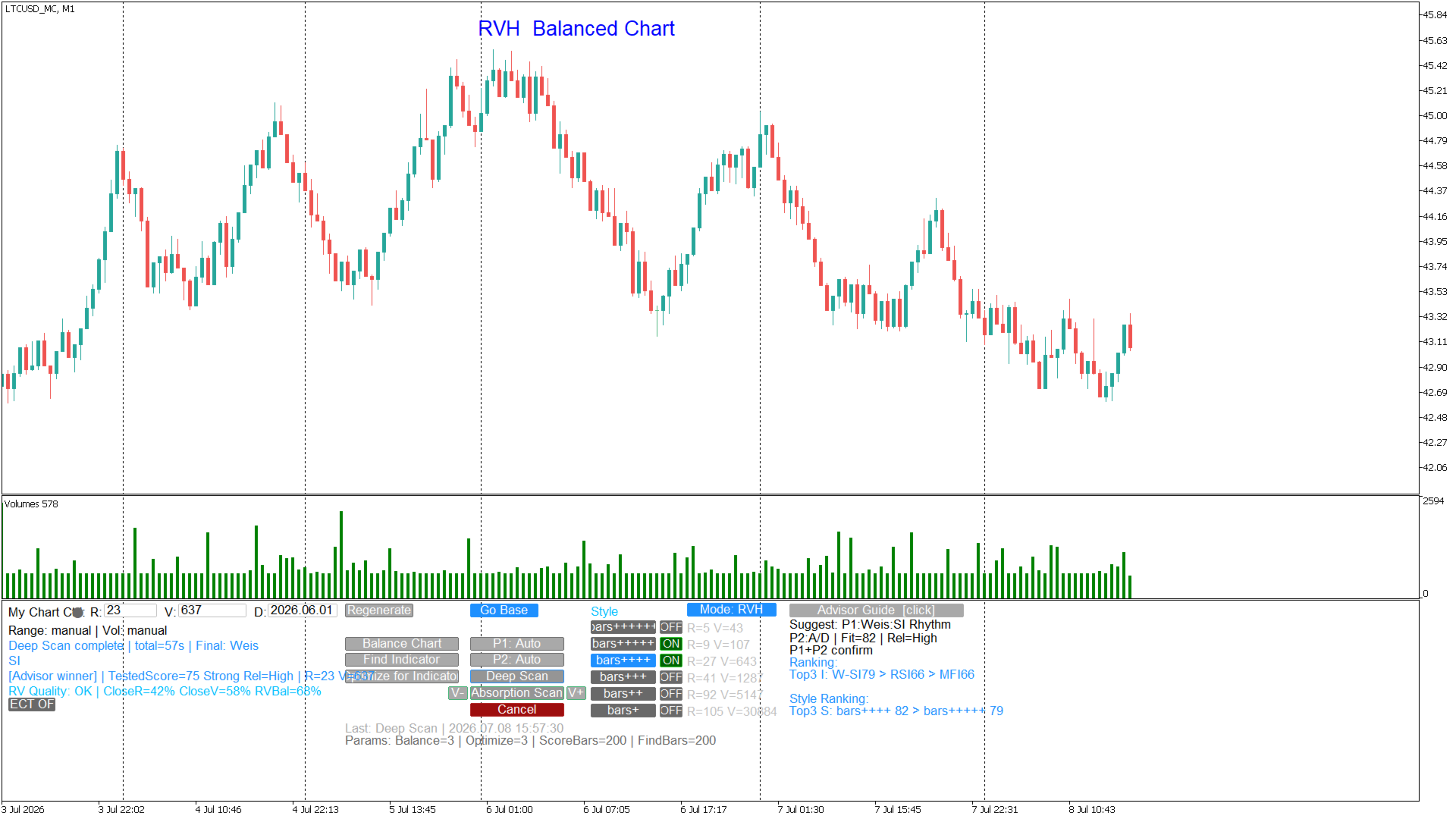
The Balance Chart function analyses the bottleneck split of the current custom chart: what percentage of bars closed because the Range threshold was satisfied first (R%), the Volume threshold first (V%), or both simultaneously (S%). It then automatically adjusts Range and Volume across multiple passes until both dimensions contribute roughly equally — producing a chart where price movement and volume carry balanced weight in every bar. A balanced chart has a cleaner, more consistent rhythm and responds more reliably to indicator signals.


RVH ABSORPTION CHART — ONE CLICK R/V ABSORPTION  CALIBRATION

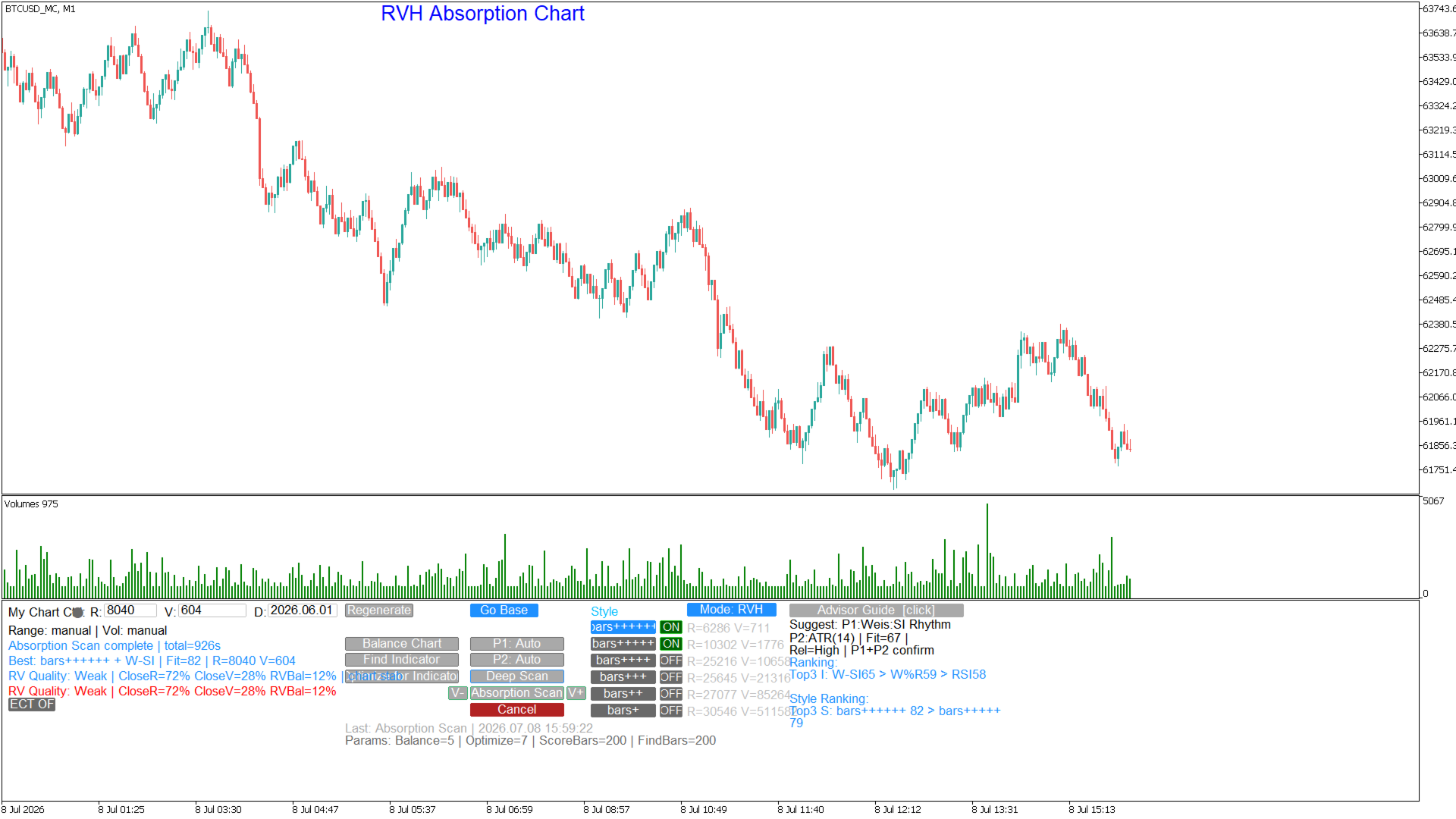
The Absorption Chart function creates a chart that focuses on areas that volume absorption occurs. 


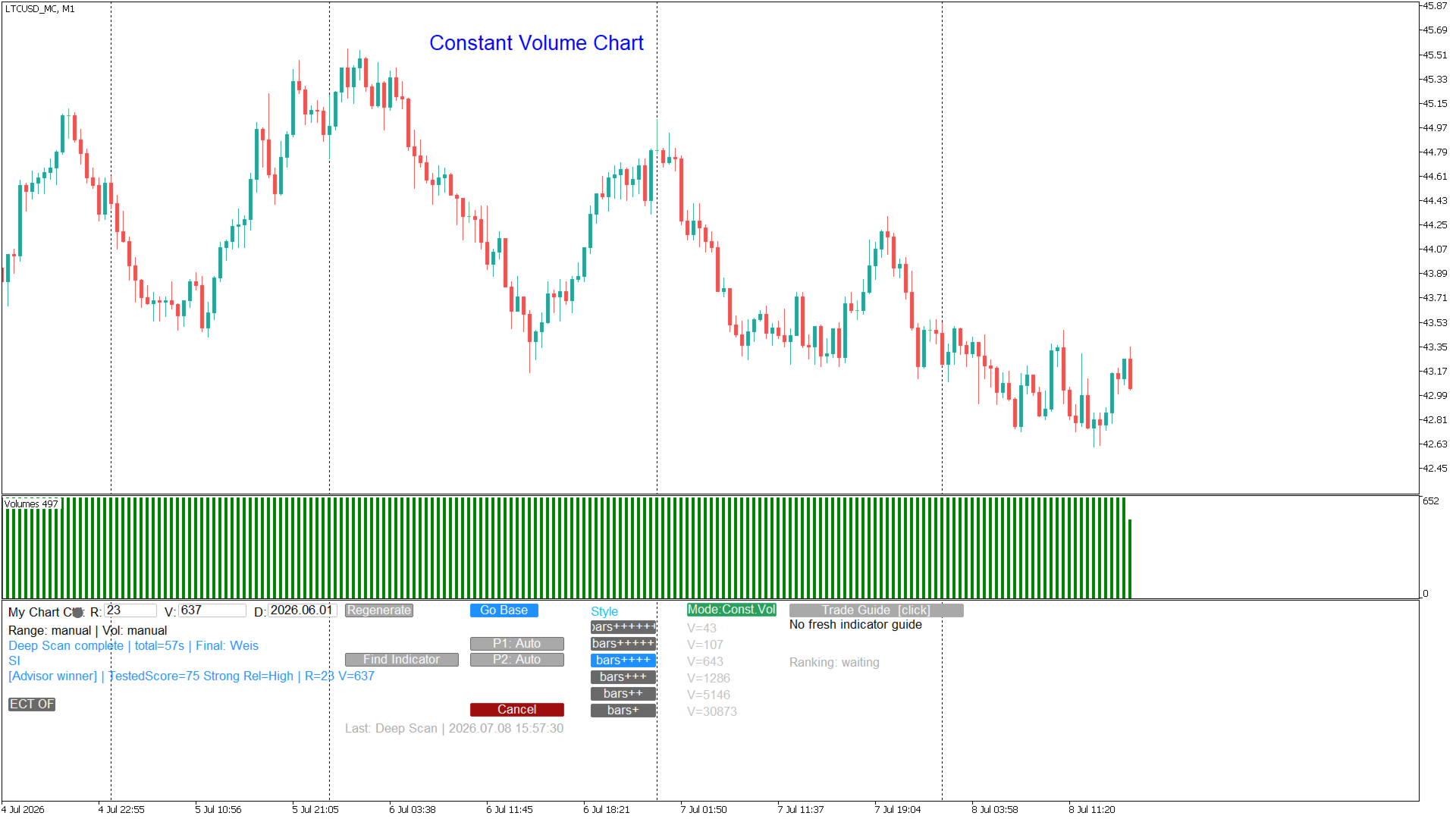
CONSTANT VOLUME CHART — ONE CLICK CREATION

The Constant Volume Chart function creates a chart to equal volume per bar that can be adjusted according to your preference. 


FIND INDICATOR — MARKET REGIME DETECTION

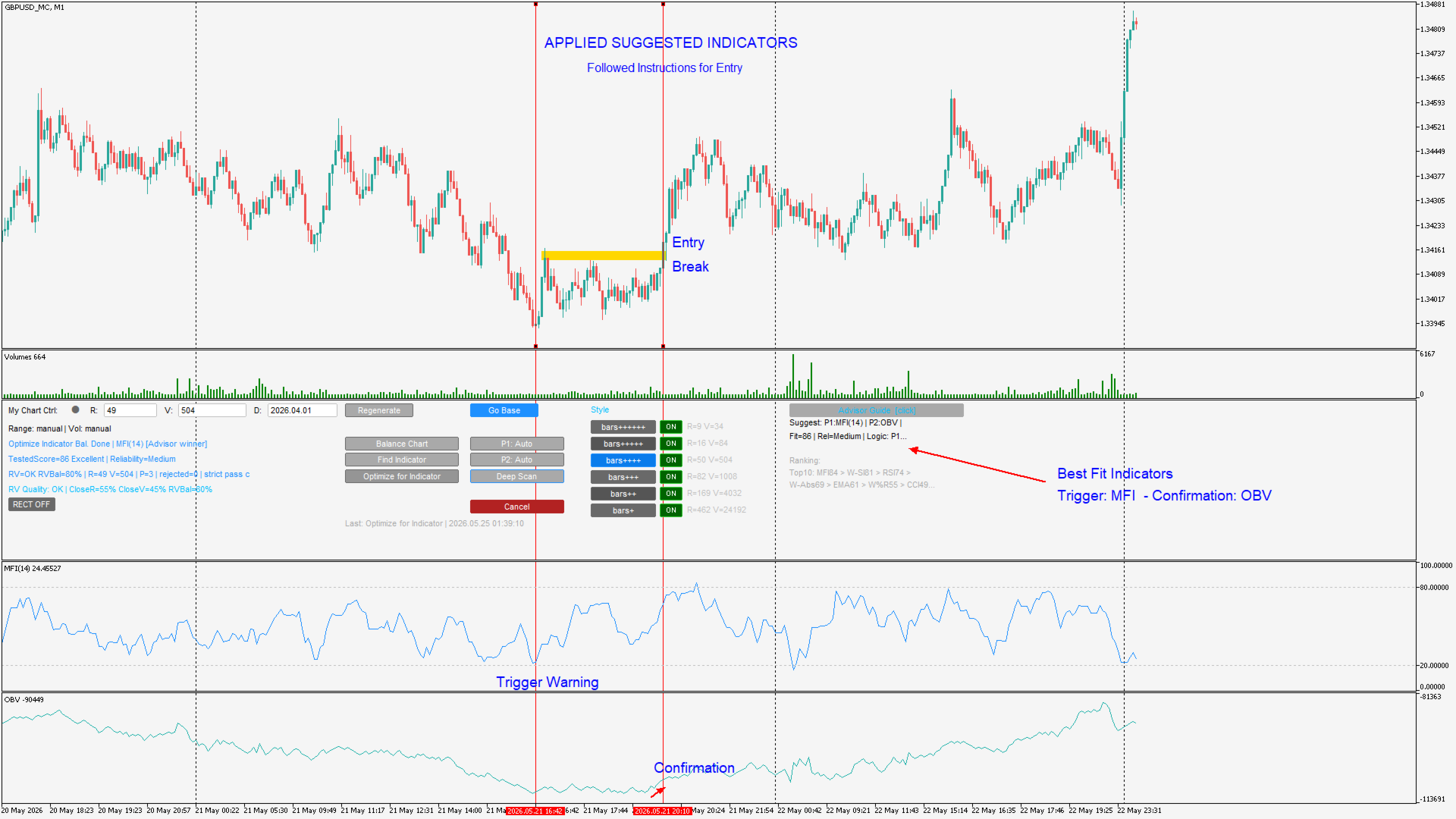
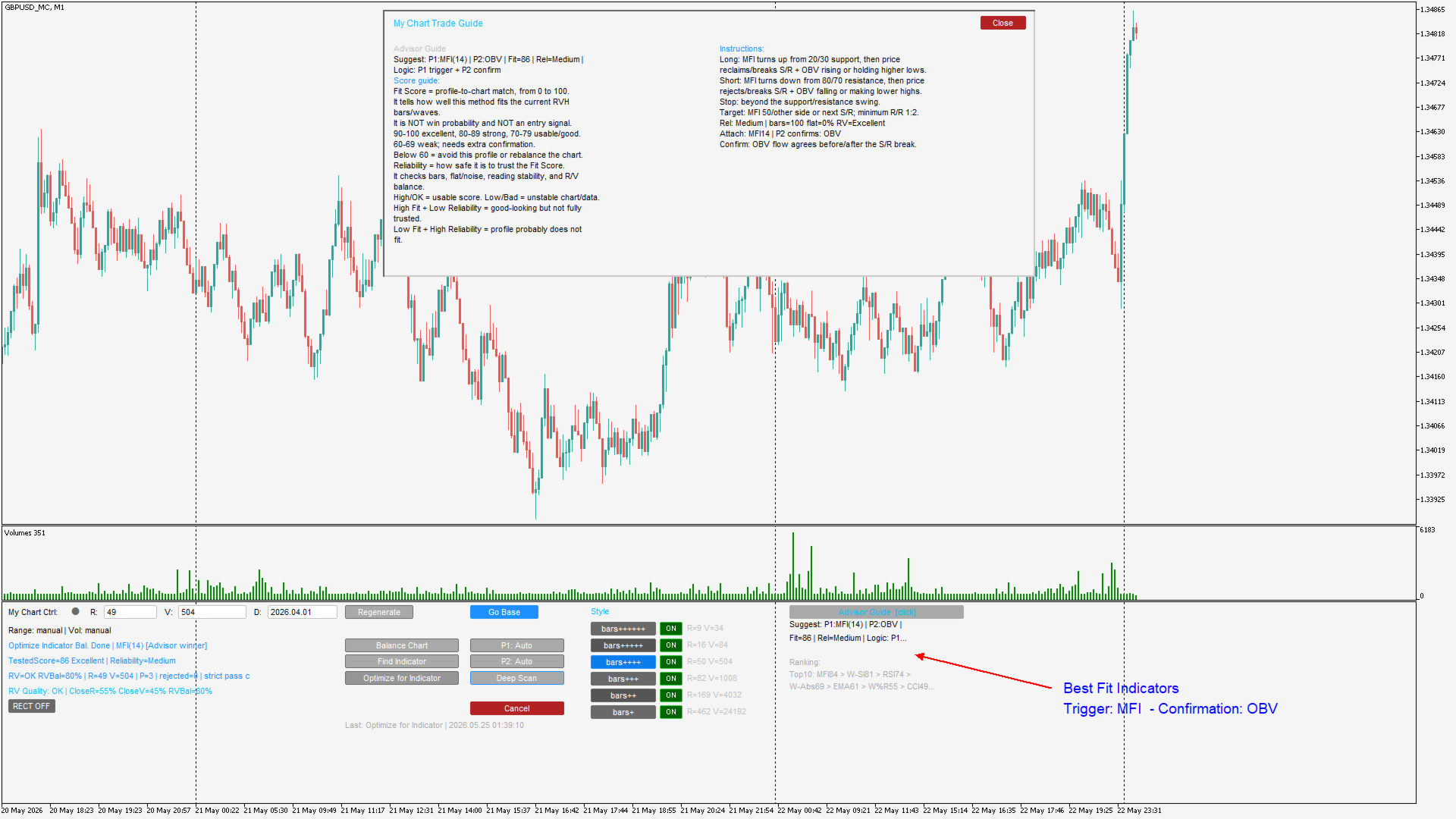
  The Find Indicator button triggers the Generator's built-in Advisor, which analyses the most recent bars of your custom chart and detects the dominant market behaviour pattern: trend impulse, trend pullback, range rotation, breakout expansion, compression, absorption, or chop. Based on the detected regime it recommends the primary indicator profile and optional confirmation filter best suited to current conditions, along with a full trading guide covering entry logic, stop placement, and target approach. The result is displayed in the Trade Guide panel on the right side of the screen.


OPTIMIZE FOR INDICATOR — AUTOMATED MULTI-PASS R/V SEARCH

This is the core function that makes My Chart Control unique. When you click Optimize for Indicator, the system runs a configurable number of passes — each one testing a different R/V combination, sending it to the Generator, waiting for the chart to rebuild, scoring the selected indicator profile's signal quality, and comparing the result against all previous candidates. When all passes complete the best-scoring R/V combination with a good balance grade is applied automatically. No manual testing, no spreadsheet of results to compare — the system finds the optimal settings for your indicator on your symbol.


If Profile 1 is set to Auto, Optimize for Indicator runs Find Indicator automatically before the first pass and uses the Advisor's winner as the scoring profile. The entire workflow — regime detection, indicator recommendation, and multi-pass R/V optimisation — executes in a single click.


DEEP SCAN — FULL AUTOMATIC STYLE SEARCH

  Deep Scan is the most comprehensive calibration tool in the system. With one click it cycles through all six style presets (bars+ through bars++++++), runs Balance Chart and Find Indicator for each style, scores the best indicator profile at each rhythm, and at the end applies the style, R/V, and profile combination that produced the highest overall score. Use it when you are starting fresh on a new symbol or after a significant market regime change to find the optimal starting configuration from scratch.


SUPPORTED INDICATOR PROFILES

  My Chart Control supports 15 built-in indicator profiles plus External Indicator for any custom MQL5 indicator:

Primary profiles (P1): Auto, RSI, MACD, Stochastic, MFI, Williams %R, CCI, EMA/MA, EMA Cross, Bollinger Bands, Weis/Speed Index, Weis Follow, Wave Absorption, Flat Absorption, External Indicator.

Confirmation filters (P2): Auto, None, ADX, MFI, OBV, ATR, Accumulation/Distribution.


CONSOLIDATION ZONES AND BREAKOUT ALERTS

  My Chart Control automatically detects consolidation zones — areas where price has closed inside a reference bar's range for a configurable number of consecutive bars — and draws them as rectangles directly on the custom chart. When price breaks out of a confirmed consolidation zone an alert fires via MT5 pop-up, email, or mobile push notification. The RECT button toggles rectangle visibility without losing the detection state.


STYLE BUTTONS WITH LIVE R/V PREVIEW

  Six style preset buttons (bars+ through bars++++++) let you switch bar rhythm in one click. Beside each button the panel displays the Generator's recommended R/V for that style based on the symbol's recent tick activity, so you can compare all six options before committing.


REQUIREMENTS

— MetaTrader 5 terminal, build 3000 or later.

My Chart Generator service (sold separately ). https://www.mql5.com/en/market/product/178752

— Both components must use the same Output Suffix setting.

To download the manual sign up for free on my site: www.tradethevolumewaves.com and download it from your profile menu under files

Recommended products
How it works –   Base-departure detection — algorithmically finds consolidation bases (overlapping range with compressed volatility) followed by displacement departures. Patterns: Drop-Base-Rally, Rally-Base-Drop, Rally-Base-Rally, Drop-Base-Drop — detected structurally, not by candle names. –   Strength score (0–100) — from departure velocity, time-at-base, freshness (each revisit decays the score), higher-timeframe confluence and origin volume. –   Lifecycle — Fresh, Tested (decaying), Broken
FREE
Trade AST Pro
Pablo Luis Prieto Navarro
Boost Your Trading with the Trade AST PRO Imagine having a   personal trading assistant   that transforms how you trade. With our EA, success is just one click away:   Drag & Drop Smart Setup Place entry, SL and TP by simply dragging lines on the chart Automatic real-time risk and volume calculations Instant adaptation to every market move   Lightning-Fast Execution Direct BUY/SELL buttons on the chart MARKET mode for instant entry PENDING mode for planned trades   Auto Mobile Mirror Co
FREE
On the standard MT5 platform, only minute-based timeframes are available, and ultra-short charts such as 1-second or 5-second bars are not provided. The tool Seconds Chart Generator SimpleVer is a utility EA designed to generate real-time second-based charts from tick data, allowing traders to observe ultra-short-term price movements with precision. You can use it simply by attaching it to a regular chart. The generated second-based charts are automatically created as custom symbols, so you can
FREE
Institutional Momentum Stochastic Index
Agustinus Biotamalo Lumbantoruan
4 (1)
The Stochastic Momentum Index (SMI), developed by William Blau and featured in the January 1993 edition of Technical Analysis of Stocks & Commodities magazine, introduces a unique perspective to trading analysis. Distinguished from the conventional Stochastic Oscillator, which evaluates the current close in relation to the recent x-period high/low range, the SMI assesses the close's position relative to the midpoint of this range. This innovation yields an oscillator with a range of +/- 100, re
FREE
Custom Candle – Multi-Timeframe Visualization Analyzing multiple timeframes is essential for accurate trading decisions, but switching between charts can be inconvenient and inefficient. The Custom Candle indicator solves this problem by overlaying higher-timeframe (HTF) candles directly onto your lower-timeframe (LTF) chart. This allows you to see the bigger picture at a glance, align with the higher trend, and improve trade accuracy—without leaving your current chart. Key Features Multi-Timefr
FREE
Gold Emperor AI
Abdulrahman Saad
Gold Emperor is a fully automated Expert Advisor (EA) designed exclusively for trading the gold pair (XAUUSD) on the MetaTrader 5 platform. Technical Specifications of Gold Emperor: Strategy Type: Relies on artificial intelligence (AI) algorithms to identify entry and exit points based on market structure and momentum. It does not use risky Martingale or Grid strategies. Timeframe: Works optimally on H1 Risk Management: Every trade is protected by automatic Stop Loss and Take Profit orders. It
FREE
What is SMC Market Structure Pro? SMC Market Structure Pro is an automated trading Expert Advisor for MetaTrader 5 , developed based on Smart Money Concept (SMC) and market structure analysis . The EA is designed to help traders follow the natural flow of the market , focusing on price structure instead of indicators or lagging signals. How Does the EA Work? The EA analyzes market structure changes using pure price action: Detects higher highs & higher lows for bullish structure Detects l
FREE
Binance Futures Risk Calculator Binance Futures Risk Calculator is a free utility for calculating position size and trade risk for Binance USD-M Futures. The calculator helps you estimate the key parameters of a futures trade before opening a position manually. Binance Futures Risk Calculator — Setup and Usage Guide Main Features Long and Short trade calculation Position size calculation Risk calculation in USDT or percentage Entry, Stop Loss and Take Profit planning Risk/Reward calculation Adj
FREE
Indicator Description Range Filter Pro is a sophisticated trading tool for XAUUSD (Gold) that combines adaptive price filtering with volume analysis and real-time market monitoring. Designed for both novice and professional traders, this indicator helps identify trend direction, potential reversals, and significant market movements through its multi-layered approach. Key Components 1.Dynamic Range Filter 2.Volatility-Adjusted Bands 3.Volume-Enhanced Candles 4.Professional Trading Dashboard 5.M
FREE
QuantumAlert RSI Navigator is a free indicator available for MT4/MT5 platforms, its work is to provide "alerts" when the market is inside "overbought and oversold" regions in the form of "buy or sell" signals. This indicator comes with many customization options mentioned in the parameter section below, user can customise these parameters as needful. Join our MQL5 group , where we share important news and updates. You are also welcome to join our private channel as well, contact me for the priva
FREE
Pullback EA xau
Katja Nordhausen
EA description (short, clear, market-ready) EA_XAU_Fibo_M15_FINAL_TTP_MODERN_v2_00 is a rule-based XAUUSD (gold) pullback EA for the M15 chart that specifically targets pullbacks to a defined Fibonacci zone (0.500–0.667, optionally close to 0.618) – but only if the parent trend filter on H1 confirms a clear direction. The EA combines structure (swing range + Fib retracement) with trend bias (EMA20/50, RSI and optional MACD) and uses modern, broker-safe execution and risk management: stop/freez
FREE
Gold Polaris AI
Shota Watanabe
5 (2)
Gold Polaris AI Non-Martingale / Non-Grid Design AI Trading System for Gold (XAUUSD H1) Overview Gold Polaris AI is an AI-based trading system specifically designed for XAUUSD (Gold) on the H1 timeframe. The model was trained using multiple ATR-based volatility features, allowing it to adapt to expanding and contracting volatility structures. The AI evaluates market conditions dynamically and automatically switches between trend-following and counter-trend logic. When the system detects trend
FREE
Osiris Royal Arises
Victor Chege Macharia
Osiris Royal Arises is an integration of the Python programming language, deep learning machine and mql5 code to be able to predict USDCAD,USDCHF and EURUSD price movements so as to produce the most profitable entries and exits with minimal average risk per order. Why  Osiris Royal Arises ? +   Osiris Royal Arises has been through the research and development stage for almost 1 year, and has passed the testing phase. +   Osiris Royal Arises uses martingale only when it is deemed to be an ideal
FREE
SMC Structure Markup
Seyed Mohammad Hosseini Hejazi
4.67 (15)
Overview The Smart Money Structure Markup Indicator for MetaTrader 5 is a powerful tool designed to help traders identify key market structures based on popular Smart Money Concepts (SMC) strategies. This indicator detects micro-market structures, providing insights into price movements and potential trend changes. It highlights important elements such as valid Break of Structure (BOS), Change of Character (CHoCH), and Inducement (IDM), helping traders to make informed decisions. Key Features Ma
FREE
LT Mini Charts
Thiago Duarte
4.88 (8)
This is a utility indicator that creates mini charts on left side of the chart you are looking at. It is very useful to watch many timeframes simultaneously, without having to change between multiple charts. Its configuration is very simple. You can have up to 4 mini charts opened. They automatically load the template of the "parent" chart. If you have any doubt please contact me. Enjoy! This is a free indicator, but it took hours to develop. If you want to pay me a coffee, I appreciate a lot  
FREE
QuantumAlert Stoch Navigator is a free indicator available for MT4/MT5 platforms, its work is to provide "alerts" when the market is inside "overbought and oversold" regions in the form of "buy or sell" signals. This indicator comes with many customization options mentioned in the parameter section below, user can customise these parameters as needful. Join our   MQL5 group , where we share important news and updates. You are also welcome to join our private channel as well, contact me for the p
FREE
Yugen Donchian Trend
Yogeswaran Suppiah
FOR XAUUSD (GOLD) ON H4. This EA was developed and tested on gold only. It will run on any symbol you attach it to, but everything below was measured on XAUUSD H4 and nothing outside that is supported by testing. It warns you in the Experts log if you attach it elsewhere. A Donchian channel breakout with an EMA trend filter. No grid, no martingale, no averaging, no recovery. One position at a time, a stop loss on every trade from the moment it opens. HOW IT TRADES The EA enters when price closes
FREE
Newsium
Kaan Caliskan
5 (1)
Newsium EA Newsium EA is a real-time Economic Calendar Analysis Engine for MetaTrader 5. It reads the MT5 built-in economic calendar, analyzes event outcomes, calculates currency impact scores, and shares the data with other Expert Advisors via Global Variables. It runs entirely in pure MQL5 with no DLL dependencies. Newsium EA does not place any trades. It is a data engine that provides economic intelligence to other EAs or can be used standalone as a visual economic calendar dashboard on the c
FREE
MinDeposit MT5
Aleksej Poljakov
3 (1)
The script analyzes the history of quotes and gives recommendations on the minimum deposit. The calculations take into account the variability of prices and the standard deviation. Margin requirements for the instrument are also taken into account. The result of the script is the minimum recommended deposit for trading the given currency pair.
FREE
Volatility Doctor
Gamuchirai Zororo Ndawana
4.5 (2)
Volatility Doctor - Your Expert Advisor for Mastering Market Rhythms! Are you ready to unlock the power of precision trading? Meet the Volatility Doctor, your trusted companion in the dynamic world of forex markets. This multi-currency expert advisor is not just a trading tool; it's a symphony conductor, guiding your investments with unparalleled precision. Discover the Key Features: 1. Trend-Seeking Expertise: The Volatility Doctor employs tried-and-true methods to spot robust market trends
FREE
AZ session scalper
Yurii Shvechikov
5 (1)
AZ session scalper A small but useful session indicator, designed primarily for scalping. Enable the session you plan to trade, watch the reaction of the M5/M15 candlesticks to the level of the previous trading session, and enter. We always look at the reaction of the current session to the previous one. For example, if you trade the Americas, enable the European session, and watch how one session takes away liquidity from another. Important: adjust the time to your broker's time zone in the i
FREE
Nikkei225 Gap ContinuationEA
Francesc Jordi Mallol Nolden
Nikkei 225 Gap Continuation EA Automated opening-gap continuation strategy for the Nikkei 225 Nikkei 225 Gap Continuation EA is an automated trading system for MetaTrader 5 designed specifically for the Japanese stock index. It searches for significant opening gaps and enters only when price action confirms a possible continuation in the same direction. The strategy combines the opening gap, a configurable opening range and session VWAP confirmation. It also includes risk-based position sizing,
FREE
Free automatic Fibonacci is an indicator that automatically plots a Fibonacci retracement based on the number of bars you select on the BarsToScan setting in the indicator. The Fibonacci is automatically updated in real time as new highest and lowest values appears amongst the selected bars. You can select which level values to be displayed in the indicator settings. You can also select the color of the levels thus enabling the trader to be able to attach the indicator several times with differe
FREE
Climax Hunter
Van Cuong Nguyen
Climax Hunter Inspired by volume climax theory and liquidity behavior, Climax Hunter highlights potential turning points where the market is likely to begin price manipulation as well as the potential to reverse or pause manipulation.  Key Features  Helps identify manipulation zones of institutions and sharks  Filters out false breakout signals and stop-hunt trades  Detects Buying Climax (Market Top)  Detects Selling Climax (Market Bottom)  Works on all timeframes  Operates on Forex, Gold, Indi
FREE
This indicator like small script only attach on any chart. It will export All symbol name and property to CSV file. Location at MQL5/File/Data/ Format CSV Pattern like ["Symbol","Category","Sector","Industry","Description"] Example : "USDX","","Indexes","Undefined"","US Dollar Index" "Coffee","","Commodities","Commodities - Agricultural"","Coffee Cash Contract" "Airbnb_Inc_(ABNB.O)","","Communication Services","Internet Content & Information"","Airbnb Inc" "Akamai_Technologies_(AKAM.O)","","Tech
FREE
INTRODUCING MML Data Bridge The demand for bridging external data and machine learning with trading platforms is higher than ever. MetaTrader 5 is a powerful environment for trading and back testing, but without a data bridge, MT5 is largely isolated from using any external data. MML Bridge is a developer tool that allows users to bridge external data into MT5 for back testing, live trading, and optimization. It's built for ease of use, providing users with a simple function API that drip-feeds
FREE
Эксперт  MACD_LevelTrader MT5   создан для торговле валютной пары XAUUSD. Данная версия это наработки того, что можно извлечь  из  индикатора MACD и Moving Average.  Важно   перед тестированием изменить настройку с 1000 на 5000                       Offset in points UP from SMA200 for sell              5000                       Offset in points DOWN from SMA200 for buy        5000   Тайм фрейм  М5. Два варианта логики, П араметр  true=вход по уровню  MACD +   SMA200, false=вход по MACD  Тестиру
FREE
Pivot Points Indicator – a fast, reliable, and fully customizable pivot detection for MetaTrader 5. This indicator uses MetaTrader’s native iHighest and iLowest functions to identify pivot highs and lows by scanning for the highest and lowest prices within a user-defined window of bars. A pivot is confirmed only when the current bar is the absolute maximum or minimum within the selected range, ensuring accurate and timely signals based on robust built-in logic. Key Features No Repainting : Onc
FREE
Gold Adaptive EA MT5 is an automated Expert Advisor for MetaTrader 5 designed for trading Gold (XAUUSD). The EA uses several internal trading models and market filters to adapt to different phases of Gold price movement. Instead of relying on one fixed entry pattern, Gold Adaptive EA MT5 analyzes market behavior and selects suitable logic for trend continuation, impulse moves, pullbacks and selected recovery conditions. The main goal of the Expert Advisor is to provide a structured Gold tradi
FREE
Nexa Gold Relative is a professional Gold trading indicator designed for XAUUSD traders who prefer cleaner and more selective trade signals. The indicator combines a Gold-focused price calculation engine with RSI confirmation, ATR-based trade zones, candle confirmation, session filtering, signal cooldown, and mobile alerts. Nexa Gold Relative is built to help traders identify structured BUY and SELL setups directly on the chart, with clear Entry, Stop Loss, and Take Profit areas. Main Featur
FREE
Buyers of this product also purchase
Trade Assistant MT5
Evgeniy Kravchenko
4.41 (216)
It helps to calculate the risk per trade, the easy installation of a new order, order management with partial closing functions, trailing stop of 7 types and other useful functions. Additional materials and instructions Installation instructions - Application instructions - Trial version of the application for a demo account Line function -   shows on the chart the Opening line, Stop Loss, Take Profit. With this function it is easy to set a new order and see its additional characteristics bef
Forex Trade Manager MT5
InvestSoft
4.98 (675)
Trade Manager MT5 is an advanced position size calculator and trade management tool for MetaTrader 5, designed to help traders plan trades faster, control risk more precisely, and manage open positions directly from the chart. It combines order placement, risk based lot calculation, Stop Loss and Take Profit management, Break Even, Trailing Stop, Partial Close, Equity Protection, and external trade management in one panel. Whether you trade forex, indices, metals, commodities, crypto, or future
TradePanel MT5
Alfiya Fazylova
4.88 (167)
Trade Panel is a multi-functional trading assistant. The app contains over 50 trading functions for manual trading and allows you to automate most trading tasks. Application instructions + video instructions: https://www.mql5.com/en/blogs/post/756482 Trial version of the application for a demo account: https://www.mql5.com/en/blogs/post/750865 How to install the application: https://www.mql5.com/en/blogs/post/756239 How to test the application in visual mode: https://www.mql5.com/en/blogs/post/7
================================================================================ POC BREAKOUT - V20.72. Full Professional Grade Toolkit ================================================================================ POC Breakout is a full MetaTrader 5 trading dashboard for discretionary traders who want breakout signals, Point of Control (POC) context, volume profiles, order flow, market structure, news, alerts, and advanced trade planning in one professional workspace. Attached directly to you
Beta Release The Telegram to MT5 Signal Trader is nearly at the official alpha release. Some features are still under development and you may encounter minor bugs. If you experience issues, please report them, your feedback helps improve the software for everyone. Telegram to MT5 Signal Trader is a powerful tool that automatically copies trading signals from Telegram channels or groups directly to your MetaTrader 5 account. It supports both public and private Telegram channels, and you can conn
Local Trade Copier EA MT5
Juvenille Emperor Limited
4.94 (148)
Experience exceptionally fast trade copying with the   Local Trade Copier EA MT5 . With its easy 1-minute setup, this trade copier allows you to copy trades between multiple MetaTrader terminals on the same Windows computer or Windows VPS with lightning-fast copying speeds of under 0.5 seconds. Whether you're a beginner or a professional trader, the   Local Trade Copier EA MT5   offers a wide range of options to customize it to your specific needs. It's the ultimate solution for anyone looking t
FarmedHedge Pair Trading Dashboard
Tanapisit Tepawarapruek
5 (4)
Farmed Hedge Yield Farming | All Markets (Manual - Hybrid - Semi/Automated EA) VERIFIED TRADING RESULTS - Farmed Hedge Yield Axi Copy:  https://www.mql5.com/en/signals/2356376 - Farmed Hedge Yield Exn Copy:   https://www.mql5.com/en/signals/2356404 - Farmed Hedge Yield V Copy:  https://www.mql5.com/en/signals/2357156 * Before purchasing, please feel free to send me a message if you have any questions about the product or setup. - You can test the system using Strategy Tester: Visual Mode , a
EA Overfitter
Stephen J Martret
That backtest looks great. But will it still be making money tomorrow, next week, next month? EA Overfitter re-runs your EA on 100 price histories it has never seen. One score tells you if the edge is real. A backtest tells you what an EA did on one price history — the one that happened to occur. What you cannot tell from it is how much of that result was the strategy and how much was the particular path. EA Overfitter answers that. It builds up to 100 synthetic price histories your EA has n
Telegram to MT5 MultiChannel Copier
Sergio Marquez Uroz
4.46 (13)
Telegram to MT5 Multi-Channel Copier   automatically copies trading signals from your Telegram channels straight to MetaTrader 5. No bots, no browser extensions, no manual copying. A signal arrives in Telegram and the EA opens the trade in your terminal within seconds. The product has two components: a Windows application that listens to your Telegram channels, and this Expert Advisor that executes the signals in your MT5 terminal. An MT4 version is also available   here . Setup guide and appli
Astro Trade MT5
Indra Maulana
5 (5)
25% discount on the release of the tool: only for the next 3 buyers Send a message to receive a demo version. AstroTrade Trading Assistant AstroTrade is a comprehensive multi-functional trading utility developed for the MetaTrader 5 platform. It integrates essential tools for trade execution, risk management, and technical monitoring into a single unified interface. The application is designed to assist traders in managing their daily operations through a visual and structured environment. Vi
Exp COPYLOT CLIENT for MT5
Vladislav Andruschenko
3.97 (35)
Professional Trade Copier for MetaTrader 5 Fast, professional, and reliable trade copier for MetaTrader . COPYLOT allows you to copy Forex trades between MT4 and MT5 terminals with support for Hedge and Netting accounts. COPYLOT MT5 version supports: - MT5 Hedge to MT5 Hedge - MT5 Hedge to MT5 Netting - MT5 Netting to MT5 Hedge - MT5 Netting to MT5 Netting - MT4 to MT5 Hedge - MT4 to MT5 Netting MT4 version Full Description +DEMO +PDF How To Buy How To Install How to get Log Files H
HINN MagicEntry Extra
ALGOFLOW OÜ
4.74 (19)
HINN MAGIC ENTRY – the ultimate tool for entry and position management! SIMPLE. FASTEST. INTUITIVE. MAX AUTOMATED. Place orders by selecting a level directly on the chart! full description   ::  demo-version  :: 60-sec-video-description Key features: - Market, limit, and pending orders - Automatic lot size calculation - Automatic spread and commission accounting - Unlimited partitial take-profits  - Breakeven and trailing stop-loss and take-profit  functions - Invalidation leves - Intuitive, a
Telegram To MT5 Ultra
Mirel Daniel Gheonu
5 (5)
Telegram To MT5 — Signal Copier Turn the trading calls from your Telegram channels into real MT5 orders — automatically, on as many accounts as you like, with risk and rules fully under your control. Telegram To MT5 connects the VIP / signal channels you already follow on Telegram to your MetaTrader 5 terminal. A free companion desktop app reads the messages (even from channels that block bots), and this Expert Advisor executes them on your account — applying your own risk settings, symbol mappi
Premium Trade Manager - The Trade Panel With a Coach Built In Premium Trade Manager puts a trading coach inside your chart, with a full execution engine underneath it. Set the trade up the way you always do, then let Max, your AI trading coach, read that exact setup against your live account and give you a straight verdict before you commit: is the stop disciplined, is the risk sane, is a high-impact release minutes away, are you near a prop-firm limit. Below sits the engine that runs everything
Anchor Trade Manager
Kalinskie Gilliam
5 (8)
Anchor: The EA Manager Your EAs cannot see each other, but Anchor can. Anchor gives you one place to coordinate your EAs, manage risk, and decide when trading is allowed. It works alongside the trading bots you already use without any changes to them. The Problem One EA opens a trade. Then another starts trading. The next thing you know, you wake up to multiple grids built across your account. Each EA may be doing exactly what it was designed to do, but together they can place far more risk on y
Power Candles Strategy Scanner - Self-Optimizing Multi-Symbol Setup Finder Power Candles Strategy Scanner runs the same self-optimizing engine that powers the Power Candles indicator - on every symbol in your Market Watch, side by side. One panel tells you which symbols are statistically tradable right now, which strategy wins on each, the optimal Stop Loss / Take Profit pair, and pings you the moment a fresh signal fires. This tool is part of the Stein Investments ecosystem - 18+ tools plus Max
Trade Dashboard MT5
Fatemeh Ameri
4.95 (132)
Trade Dashboard simplifies how you open, manage, and control your trades, with built-in lot size calculation. It allows you to execute trades, manage risk, and control positions directly on the chart, with tools such as partial close, breakeven, and trailing stop. Designed to reduce manual work and help you stay focused on your trading decisions. A demo version is available for testing. Detailed explanations of features are provided within the MQL5 platform. Installation instructions are include
Ultimate Extractor
Clifton Creath
5 (8)
Ultimate Extractor - Professional Trading Analytics for MT5 *****this is the local HTML version of Ultimate Extractor. !!!!!it is not compatible with Cloud!!!! For the online version please reach out to me directly****** Ultimate EA manager also now available when you use cloud pro and above for free!! Ultimate Extractor transforms your MetaTrader 5 trading history into actionable insights with comprehensive analytics, interactive charts, and real-time performance tracking. What It Does Automa
Grid Manual MT5
Alfiya Fazylova
4.73 (22)
Grid Manual is a trading panel for working with grid strategies. The utility is universal, has flexible settings and an intuitive interface. It works with a grid of orders not only in the direction of averaging losses, but also in the direction of increasing profits. The trader does not need to create and maintain a grid of orders, the utility will do it. It is enough to open an order and the "Grid manual" will automatically create a grid of orders for it and will accompany it until the close. F
Signal Trading View to MT5 Pro
Mirel Daniel Gheonu
4.5 (2)
Signal TradingView to MT5 Pro  Instant professional execution between TradingView and MetaTrader 5 Automate your trading strategy with the most robust communication bridge between TradingView alerts and real execution in MT5. Designed for traders who demand speed, flexibility, and impeccable risk management, this Expert Advisor transforms any alert message into a precise market or limit order.   Install and TEST the TRIAL version HERE STRENGTHS AND ADVANTAGES Universal Parsing Engine (Propriet
The News Filter MT5
Leolouiski Gan
4.78 (23)
This product filters   all expert advisors and manual charts   during news time.  It is able to remove any of your EA during news and automatically reattach them after news ends. This product also comes with a complete  order management system   that can handle your open positions and pending orders before the release of any news. Once you purchase   The News Filter , you will no longer need to rely on built-in news filters for future expert advisors, as this product can filter them all from her
Trade copier MT5
Alfiya Fazylova
4.59 (54)
Trade Copier is a professional utility designed to copy and synchronize trades between trading accounts. Copying occurs from the account / terminal of the supplier to the account / terminal of the recipient, which are installed on the same computer or VPS . PROMOTION - If you have already purchased the "Trade Copier MT5," you can receive the "Trade Copier MT4" for free (for copying MT4 > MT5 and MT4 < MT5). For more detailed information about the conditions, please contact us via private message
FUTURES ORDERFLOW FOOTPRINT CHART Professional OrderFlow EA for MetaTrader 5 Version 1.01| Professional tool for real traders | Institutional-Grade Visualization STRATEGY TESTER USERS - PLEASE SELECT EVERY REAL TICK WHEN TESTING AND YOU HAVE DOWNLOADED HISTORICAL DATA. IF YOU SEE A WAITING SCREEN AND IT IS NOT DOWNLOADING, IT MEANS YOU HAVE LOW HISTORICAL DATA. TRY 1 MIN AND 5 MIN FIRST ON 1 DAY DATA. ONE DAY DATA SHOULD BE THE NEWEST AND MOST CURRENT DATE. PLEASE WAIT UNTIL THE MARKET HAS ROL
The product will copy all telegram signal to MT5 ( which you are member) , also it can work as remote copier.  Easy to set up, copy order instant, can work with almost signal formats, image signal,  s upport to translate other language to English Work with all type of channel or group, even channel have "Restrict Saving Content", work with  multi channel, multi MT5 Work as remote copier: with signal have ticket number, it will copy exactly via ticket number. Support to backtest signal. How to s
Telegram To MT5 Receiver
Levi Dane Benjamin
4.53 (15)
Copy trade signals from Telegram channels you already belong to (including private and restricted channels) directly into MetaTrader 5. Set your risk rules once, monitor execution, and manage positions with built-in protections designed to reduce mistakes and overtrading. Fast setup : configure your channels, select what to copy, and start within minutes using a clean on-chart interface. User Guide + Demo | MT4 Version Who this is for Traders who follow one or more signal providers and want cons
MT5 to Telegram Signal Provider turns your trading account into a signal provider. Every trade action, whether manual, by EA or from your phone, is instantly sent as a message to Telegram. You can fully customize the format or use a ready-made template for quick setup. [ Demo ] [ Manual ] [ MT4 Version ] [ Discord Version ]     New: [ Telegram To MT5 ] Setup A step by step user guide is available. Key Features Ability to customize order details sent to subscribers You can create a tiered subs
Prop Firm Os
Gayathiri Gopalakrishnan
5 (1)
PROP FIRM OS Structured Trading Assistant for MetaTrader 5 PROP FIRM OS is a structured trading assistant designed for MetaTrader 5 users who prefer rule-based market analysis and organized trading workflows. The Expert Advisor combines market analysis tools, scanner functions, dashboard monitoring, alerts, risk-control settings, and trade management features inside one system. PROP FIRM OS is designed to help traders follow selected rules, filters, and monitoring conditions during trading activ
News Filter EA
Rashed Samir
5 (2)
News Filter EA: Advanced Algo Trading Assistant News Filter EA is an advanced algo trading assistant designed to enhance your trading experience. By using the News Filter EA , you can integrate a Forex economic news filter into your existing expert advisor, even if you do not have access to its source code. In addition to the news filter, you can also specify trading days and hours for your expert. The News Filter EA also includes risk management  and equity protection features. MT4 Version Ma
EA Auditor
Stephen J Martret
5 (5)
EA Auditor is an independent analysis tool for traders evaluating Expert Advisors and trading signals on MetaTrader 5. It audits backtest reports, reviews posted developer signals, and cross-verifies the two against each other to help traders assess strategies before committing capital. The MQL5 market offers a wide range of Expert Advisors from many developers, with varying approaches, quality, and transparency. EA Auditor provides a consistent, data-driven framework for reviewing them, answer
Message me after purchase to receive the complete manual kit + 3-day OpenAI API trial to test the AI features + Another bonus gift The current price is a limited discount for August Relaunch Update — secure your edition now before price go up. Next Price: $340 This is completely different from any trading panel you’ve tried or seen on the market. It’s one of the most innovative AI-powered trading panels available in the retail market right now. Imagine connecting   AI directly to your chart   —
More from author
My Chart Generator
Trade The Volume Waves Single Member P.C.
What if your chart adapted to the market instead of the clock?   THE PROBLEM IT SOLVES   Instead of trying to find the best indicator that fits your timeframe chart, build a chart and find the most appropriate indicator.   My Chart Generator is a MetaTrader 5 background service that builds  live, fully historical three types of custom charts :1. Range/Volume Balanced chart, 2.  Range/Volume Absorption chart and 3. Constant Volume chart from any symbol — Forex pairs, crypto, indices, commodities,
Trend Lines MT5 with Alert
Trade The Volume Waves Single Member P.C.
Trend Lines Cross  This indicator will alert you on any cross of a Trendline. You can draw up to two trend lines and form a channel, a pennant , a triangle or a simple trend and when the price crosses either trend line the indicator  will provide you with alerts that you define plus an up or down arrow when the cross happened. How to:   Draw the 1st trendline and name it tl1.  Draw the 2nd trendline and name it tl2. Select which type of alerts you would like in the indicator properties and you a
FREE
TrendLines Cross with Alert
Trade The Volume Waves Single Member P.C.
4 (4)
Trend Lines Cross  This indicator will alert you on any cross of a Trendline. You can draw up to two trend lines and form a channel, a pennant , a triangle or a simple trend and when the price crosses either trend line the indicator  will provide you with alerts that you define plus an up or down arrow when the cross happened. How to:   Draw the 1st trendline and name it tl1.  Draw the 2nd trendline and name it tl2. Select which type of alerts you would like in the indicator properties and you a
FREE
Constant Volume Calculator MT4
Trade The Volume Waves Single Member P.C.
This is a free helper indicator for MT4 that will help traders setup their constant volume charts depending on their trading style. It will calculate the number of ticks that your constant volume chart should have depending on the following trading styles: Scalper Active Day trader Day trader Swing trader Position trader   Instruction video attached. Enjoy!
FREE
Constant Volume Calculator MT5
Trade The Volume Waves Single Member P.C.
This is a free helper indicator for MT5 that will help traders setup their constant volume charts depending on their trading style. It will calculate the number of ticks that your constant volume chart should have depending on the following trading styles: Scalper Active Day trader Day trader Swing trader Position trader   Instruction video attached. Enjoy!
FREE
Tick Chart Monitor
Trade The Volume Waves Single Member P.C.
DO NOT DOWNLOAD  UNLESS YOU OWN "Tick Chart - Constant Volume Generator EA" - This indicator acts as remote control of the specifc EA. The link for "Tick Chart - Constant Volume Generator EA" : https://www.mql5.com/en/market/product/171018 1. Tick Chart Monitor   1.1 What It Does The Monitor is an indicator that runs directly on the generated tick chart. It provides a graphical control panel that lets you change the EA’s style, volume, start date, or trigger a full rebuild — without touching the
FREE
RVH Monitor MT5
Trade The Volume Waves Single Member P.C.
This is an indicator to control the Parameters of Range Volume Hybrid Generator expert advisor -It does not work as stand alone, it works as a remote control of Range Volume Hybrid Generator and must be applied on the custom chart generated by the EA. To get Range Volume Hybrid Generator expert advisor:  https://www.mql5.com/en/market/product/165557 Parameters that can be adjusted: Trading Style as well as manual setting of Range, Volume and start Date of data collection. What's the video for 
FREE
Weis Wave with Alert
Trade The Volume Waves Single Member P.C.
4.82 (22)
Rental/Lifetime Package Options and Privileges' Rent Monthly Six Months   Yearly/Lifetime Weis Wave with Speed with Alert+Speed Index x x x Manual  x x x Quick Set up Video x x x Blog x x x Lifetime Updates x x x Setup and Training Material x x Rectangle Break Alert Tool      x Discord Access Channel "The SI traders" x   How to trade info visit:    http://www.tradethevolumewaves.com   ** If you purchase please contact me to setup your  : training Room and  complete manual access.  This is
No Demand No Supply
Trade The Volume Waves Single Member P.C.
4.5 (4)
This indicator identifies No Demand –No Supply candles  to your chart and plots volume bars colored according to the signal. It can be applied to all timeframes or to a specific one only. It can also be used as regular volume indicator but with exceptional future of WEIGHTED VOLUME. Furthermore is has an alert notification, sound and email when a signals occurs. The indicator does not repaint but the alert will come on two candles back due to the definition of No Demand No Supply. The VSA (Volum
Anchored VWAP with Alert
Trade The Volume Waves Single Member P.C.
5 (4)
What is the Volume Weighted Average Price (VWAP)? The volume weighted average price (VWAP) is a trading benchmark used by traders that gives the average price an instrument has traded at throughout the day, based on both volume and price.  It is important because it provides traders with insight into both the trend and value of the instrument. What is the Difference between VWAP and AVWAP? While VWAP is having as starting point the beggining of the day,week,month etc. in the AVWAP you can plac
Wave Anatomy
Trade The Volume Waves Single Member P.C.
5 (1)
Wave Anatomy Visit:   http://www.tradethevolumewaves.com   for more information Construct your own 5 Waves and analyze the price movements stages: Easy Movement Hard time to move Fast move This indicator is based on Wyckoff’s, David’s Weis and my Speed Index Theory. This indicator will you help analyze what is happening in 5 Price Waves that you can construct yourself. This tool is designed for scalpers and swing traders and will help them to analyze any wave on any timeframe at the same time.
Weis Wave with Alert MT5
Trade The Volume Waves Single Member P.C.
4.94 (17)
Rental/Lifetime Package Options and Privileges  Rent Monthly Six Months   Yearly/Lifetime Weis Wave with Speed with Alert+Speed Index x x x Manual  x x x Quick Set up Video x x x Blog x x x Lifetime Updates x x x Setup and Training Material x x Discord Access Channel "The SI traders"          x Rectangle Break Alert Tool      x How to trade with it:    http://www.tradethevolumewaves.com   ** If you purchase please contact me to setup your  : Training Room and  complete manual access.  Wei
No Demand No Supply MT5
Trade The Volume Waves Single Member P.C.
No Demand No Supply   This indicator identifies   No Demand –No Supply candles to your chart and plots volume bars colored according to the signal. It can be applied to all timeframes or to a specific one only. It can also be used as regular volume indicator  with exceptional future of WEIGHTED VOLUME. Furthermore is has an alert notification, sound and email when a signals occurs. The indicator does not repaint but the alert will come on two candles back due to the definition of No Demand No Su
Anchored VWAP with Alert MT5
Trade The Volume Waves Single Member P.C.
5 (1)
What is the Volume Weighted Average Price (VWAP)? The volume weighted average price (VWAP) is a trading benchmark used by traders that gives the average price an instrument has traded at throughout the day, based on both volume and price.  It is important because it provides traders with insight into both the trend and value of the instrument. What is the Difference between VWAP and AVWAP? While VWAP is having as starting point the beggining of the day,week,month etc. in the AVWAP you can pla
Wave Anatomy MT5
Trade The Volume Waves Single Member P.C.
Wave Anatomy Visit:  http://www.trafethevolumewaves.com  for more information Construct your own 5 Waves and analyze the price movements stages: Easy Movement Hard time to move Fast move This indicator is based on Wyckoff’s, David’s Weis and my Speed Index Theory. This indicator will you help analyze what is happening in 5 Price Waves that you can construct yourself. This tool is designed for scalpers and swing traders and will help them to analyze any wave on any timeframe at the same time. Fur
Range Volume Hybrid Generator
Trade The Volume Waves Single Member P.C.
1. Introduction Range Volume Hybrid (RVH) is a MetaTrader 5 Expert Advisor that creates custom chart symbols using a unique dual-condition bar formation method. Unlike traditional charts where bars close based on a single criterion (time, range, or volume), RVH bars close only when BOTH a minimum price range AND a minimum volume threshold are met simultaneously.  Download also and install RVH Monito r Indicator - to control the EA from the custom charts (it's Free)  https://www.mql5.com/en/marke
Tick Chart Constant Volume Generator
Trade The Volume Waves Single Member P.C.
1. Overview   The Tick Chart Toolset is a pair of tightly coupled MQL5 files that generate and control professional Constant Volume charts inside MetaTrader 5 as custom symbols. Unlike time-based charts, each bar closes only when a target volume threshold is reached, giving you a noise-filtered, activity-proportional view of the market. Free "Tick Chart Monitor Indicator" to control the generator EA:  https://www.mql5.com/en/market/product/17104   Component Type Role Tick_Chart_Generator_AI_MT5

Filter:
No reviews
Reply to review