Volume Imbalance MT5
- Indicators
-
Agus Santoso
 DISCLAIMER ON : The author of EA will not be held responsible for your losses or problems of any kind if the EA is directly or indirectly responsible for any losses.
Our software is provided “as is”, without any warranty or condition of any kind, express, implied or statutory. - Version: 1.0
- Activations: 5
MT4 Version : https://www.mql5.com/en/market/product/157433
MT5 Version : https://www.mql5.com/en/market/product/167286
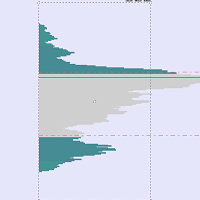
Volume Imbalance is a lightweight Volume Profile + Delta Imbalance visualization tool designed to help you spot high-activity price zones, directional pressure, and “empty” price areas inside a configurable lookback range.
Unlike classic volume profile that only shows total volume, this indicator splits each price level into:
Bull Volume (Buy Pressure) – estimated from bullish candles (Close > Open)
Bear Volume (Sell Pressure) – estimated from bearish candles (Close ≤ Open)
The result is a clean, TradingView-inspired profile drawn to the right side of the chart, plus a Delta Summary Panel that displays the percentage imbalance (Δ%) across price segments, making it easy to identify where buyers or sellers dominated.
It also highlights Zero-Volume Zones (price bins with no volume inside the selected lookback), which can act as low-liquidity gaps where price may move quickly.
Note: On Forex/CFD symbols, the indicator uses tick volume (broker-provided). Delta is an estimation based on candle direction (not true bid/ask footprint delta).
Key Features
Volume Profile by Price Levels
Builds a histogram across Rows price bins within the selected lookback range.
Bull vs Bear Volume Split
Each level is divided into two parts:
Bull (blue) = bullish candle volume
Bear (orange) = bearish candle volume
Zero-Volume Zone Detection & Merge
Automatically detects continuous “no-volume” bins and merges them into clean blocks.
Delta Summary Panel (Δ%)
A compact right-side panel showing imbalance strength by vertical segments:
Green = buyer dominance
Red = seller dominance
Fully Customizable
Lookback, rows, width, source price, delta segments, colors, minimum delta bar size, and more.
Inputs Explained (Simple)
Profile Settings
Lookback (Bars): how many candles are analyzed.
Rows: number of price bins (higher = more detailed).
Price Source: which candle price is used to assign volume to a bin (Close/Open/Typical/etc).
Profile Styling
Profile Width (Bars): profile “length” drawn to the right of the chart.
Bull/Bear/Zone Colors: customize the visual theme.
Delta Summary
Summary Sections: number of vertical slices for Δ% calculation.
Summary Width: width of delta panel drawn to the right.
Gap From Profile: spacing between profile and delta panel.
Show Delta Text: display “Δ xx.x%” label on each segment.
Delta Styling
Positive / Negative Colors
Neutral Background (optional)
Min Size Fraction: keeps delta bars visible even with low imbalance.
How It Works (Concept)
The indicator scans the last Lookback candles and finds the highest high and lowest low.
It splits this range into Rows equal price bins.
For each candle, it assigns tick volume into the correct bin based on your Price Source.
Volume is split into:
Bull Volume (Close > Open)
Bear Volume (Close ≤ Open)
It normalizes the histogram width using the highest volume bin.
It draws:
Volume profile bars (bull + bear)
Zero-volume zones
Delta summary panel (Δ%)
How to Use (Step-by-Step)
1) Attach to a Chart
Open any symbol and timeframe.
Drag Volume Imbalance onto the chart.
Recommended timeframes: M5–H1 for intraday / scalping, H4–D1 for swing.
2) Set Your Lookback & Rows
Suggested starting points:
Scalping (M5–M15): Lookback 150–300, Rows 40–70
Intraday (M15–H1): Lookback 200–500, Rows 50–100
Swing (H4–D1): Lookback 300–800, Rows 60–120
3) Read the Profile
Thicker levels = more activity / more acceptance.
Thin levels = low activity / fast transitions.
4) Read Delta (D%)
Positive D% (green) = buyers dominated that zone.
Negative D% (red) = sellers dominated that zone.
Strong imbalance zones often become key areas for retests or breakouts.
5) Use Zero-Volume Zones
These zones represent low-liquidity / no-activity regions inside your lookback.
Price may travel faster through them (gap-like behavior), especially after breakout.
Practical Trading Ideas (Non-Financial Advice)
Support/Resistance Confirmation:
High-volume bins frequently align with strong S/R.
Breakout Acceleration:
Breakouts into low-volume / zero-volume zones can move quickly.
Bias Filter:
Use Delta Summary to confirm directional pressure before entries.
Notes & Limitations
Delta is estimated (candle direction proxy), not true order-flow delta.
Tick volume depends on broker feed quality.
Extremely large Lookback + Rows may increase object drawing load on old PCs.
Recommended Defaults (Good Starting Template)
Lookback: 200
Rows: 50
Profile Width: 50
Summary Sections: 20
Summary Width: 20
Min Delta Fraction: 0.2